
Quantiva
- Experts
- Version: 1.130
- Activations: 5

Quantiva is an automated trading Expert Advisor developed for MetaTrader 5, combining adaptive market entry, progressive position management, dynamic grid spacing, and a state-based recovery engine.
Unlike a simple fixed-distance grid system, Quantiva manages positions according to the current basket structure and market conditions. Its recovery logic is designed to actively manage accumulated positions instead of relying solely on a single basket break-even level.
The objective is to create a structured and automated approach to position management while keeping the system simple for the user.
Key Features
Adaptive Entry Engine
Quantiva evaluates multiple market conditions before initiating a new trading cycle. It does not continuously open positions without an entry filter.
Dynamic Position Structure
Additional positions are managed using progressively adjusted price distances rather than a simple fixed-step structure.
State-Based Recovery Engine
The recovery process adapts to the current position depth and basket state. Different recovery behavior can be applied as the position structure develops.
Position Recycling
When predefined recovery conditions are reached, Quantiva can selectively manage existing positions to reduce exposure and reorganize the remaining basket.
Automatic Lot Management
Quantiva includes an automatic lot-sizing system based on account balance.
Default Auto Lot setting:
0.01 lot per 1,000 account balance
Auto Lot can be disabled at any time, allowing the trader to use a fixed initial lot instead.
Built-in Risk Protection
Users can define maximum floating drawdown limits by either account currency or percentage.
Trading can also be stopped automatically after the configured protection level is triggered.
Recommended Setup
Primary Symbol: AUDCAD
Timeframe: M5
Auto Lot: Enabled
Default Auto Lot: 0.01 lot per 1,000 balance
Trading conditions vary between brokers. Spread, commission, swap, leverage, execution speed and price feed differences may affect trading results.
Before using Quantiva on a live account, testing the EA in the MetaTrader 5 Strategy Tester and on a demo account is strongly recommended.
Input Parameters
Magic Number — Unique identifier used by Quantiva to manage its own trades.
Maximum Spread Points — Maximum allowed spread for new trading operations.
Enable Auto Lot — Enables or disables automatic lot calculation.
Fixed Initial Lot — Initial trading volume when Auto Lot is disabled.
Auto Lot Per 1000 — Initial lot size calculated for every 1,000 units of account balance. Default: 0.01.
Maximum Single Lot — Maximum allowed volume for an individual position.
Maximum Drawdown Money — Maximum permitted floating drawdown expressed in account currency. Set to 0 to disable.
Maximum Drawdown Percent — Maximum permitted floating drawdown expressed as a percentage. Set to 0 to disable.
Stop Trading After Stop Loss — Determines whether Quantiva stops opening new trades after the configured drawdown protection is triggered.
Trade Monday – Friday — Enables or disables trading on individual weekdays.
Avoid NFP — Controls trading during the NFP filter period.
Important Risk Information
Quantiva uses a multi-position recovery structure. During prolonged directional markets, abnormal volatility, gaps, or extreme market conditions, the EA may hold multiple positions simultaneously and floating drawdown and margin requirements may increase significantly.
No trading system can guarantee profits or eliminate risk.
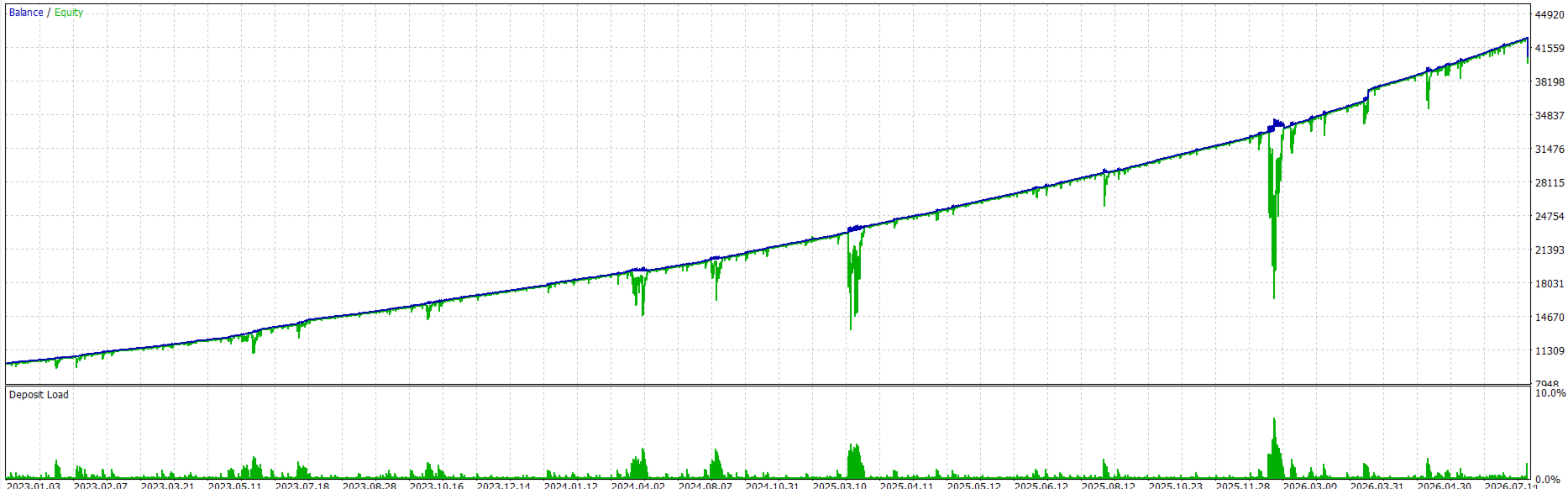
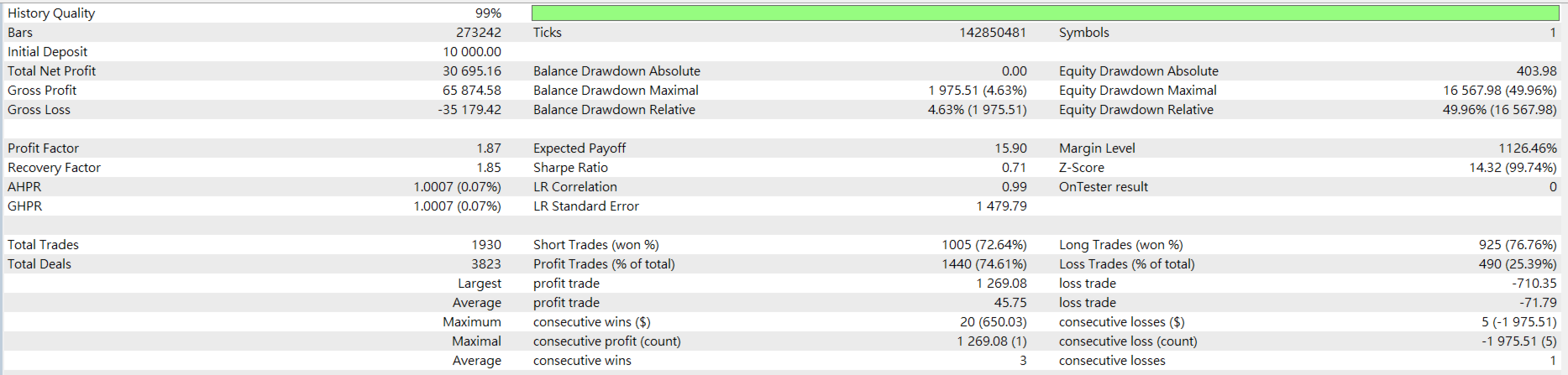
Backtesting results represent historical simulations and do not guarantee future performance. Live trading results may differ because of spread, commission, swap, slippage, execution, liquidity, leverage and broker-specific trading conditions.
Please select lot size and risk settings according to your account size and individual risk tolerance.
Always test Quantiva thoroughly before using it with real funds.



































User didn't leave any comment to the rating