
Pacific Edge EA
- Experts
- Version: 1.22
- Updated: 20 August 2026
- Activations: 5

Pacific Edge EA
Pacific Edge EA is a MetaTrader 5 Expert Advisor designed for automated multi-currency trading.
Preset Files and Backtest Reports: All Pacific Edge EA preset (.set) files and corresponding backtest reports are available in our dedicated MQL5 blog. The blog contains the configurations for AUDCAD, AUDNZD, NZDCAD and the combined portfolio, together with their corresponding performance reports.
Pacific Edge EA Backtests and Preset Files
The current configuration supports:
- AUDCAD
- AUDNZD
- NZDCAD
The EA can monitor multiple configured symbols from a single chart and manage positions independently for each symbol.
The product includes configurable position sizing, grid management, take-profit and stop-loss controls, spread protection, trading-hour filters, drawdown protection, margin protection and execution settings.
The default configuration supplied with the product is based on the tested configuration.
Supported Symbols
Default symbols:
- AUDNZD
- AUDCAD
- NZDCAD
Symbols are entered as a comma-separated list.
Maximum Symbols defines how many symbols can have active grids simultaneously.
Default: 3
If your broker uses symbol suffixes or prefixes, enter the exact symbol names used by your broker.
General Settings
Main Timeframe
Defines the main timeframe used by the EA.
Default: M15
Allow To Buy/Sell
Available options:
- Buy and Sell
- Buy only
- Sell only
- Default: Buy and Sell
Allow Hedging
Allows buy and sell positions to be managed independently on the same symbol.
Default: Enabled
Availability of opposing positions also depends on the account type and broker.
Trade Comment
Defines the comment attached to EA trades.
UID
Provides an identifier used by the EA's internal magic-number system.
Values from 0 to 9 can be used.
Different UID values can be useful when running multiple configurations on the same account.
Lot Sizing
Pacific Edge EA provides several position-sizing methods:
- Low Risk Preset
- Medium Risk Preset
- High Risk Preset
- Very High Risk Preset
- Dynamic Lot Based on Equity
- Dynamic Lot Based on Balance
- Deposit Load
- Fixed Lots
Low Risk Preset
Uses a predefined 0.25% margin-load configuration.
Medium Risk Preset
Uses a predefined 0.50% margin-load configuration.
High Risk Preset
Uses a predefined 1.00% margin-load configuration.
Very High Risk Preset
Uses a predefined 1.50% margin-load configuration.
These presets are sizing configurations and do not represent guaranteed annual returns.
Fixed Lots
Defines the initial fixed lot size.
Default: 0.01
Dynamic Lot
Defines the value used by the selected dynamic position-sizing method.
Deposit Load
Defines the percentage used by the deposit-load sizing method.
Maximum Lot
Sets the maximum lot size allowed by the EA.
The EA also respects the broker's volume restrictions.
Auto Split
Allows larger calculated volumes to be divided into multiple orders when required by broker volume limits.
Grid Settings
Trade Distance
Defines the base distance between grid levels.
Default: 35 pips
Smart Distance
Enables adaptive grid-distance calculation.
Default: Enabled
Smart Distance Multiplier
Controls the multiplier applied to the adaptive distance calculation.
Maximum Trades
Defines the maximum number of grid positions.
Default: 9
Grid Level To Start
Defines the level at which grid management begins.
Default: 1
Second Trade Multiplier
Defines the lot multiplier for the second grid level.
Default: 1.0
Third Trade Multiplier
Defines the multiplier applied to the applicable third through fifth grid levels.
Default: 2.0
Sixth Trade Multiplier
Defines the multiplier applied from the sixth grid level onward.
Default: 1.5
Maximum Grid Lot Multiplier
Limits the maximum grid lot relative to the initial position.
Default: 20
Changes to grid parameters can materially change exposure, margin requirements and drawdown.
Take Profit
Initial TP
Initial take-profit distance.
Default: 10 pips
Weighted TP
Enables weighted take-profit management.
Default: Enabled
Grid TP
Defines the applicable grid take-profit distance.
Default: 0
Break Even After This Level
Controls break-even behavior after the selected grid level.
Default: Disabled
Hide TP
Allows TP management to be handled internally by the EA.
Default: Disabled
Smart TP
Enables the additional smart take-profit function.
Default: Disabled
OPO Settings
Use OPO Method
Enables the optional OPO take-profit method.
Default: Disabled
OPO Timeframe
Defines the timeframe used by the OPO method.
Default: M15
Stop Loss
Grid SL
Defines the configured stop-loss distance for grid positions.
Default: 0
Hide SL
Allows stop-loss management to be handled internally by the EA.
Spread Protection
Enable Spread Filter
Enables spread protection.
Default: Enabled
Maximum Spread
Defines the maximum permitted spread for applicable entries.
Default: 10 points
When the spread exceeds the configured limit, new entries can be prevented.
Slippage
Maximum Slippage
Defines the maximum permitted execution deviation.
Default: 10 pips
Actual execution depends on broker conditions and market liquidity.
Trading Hours
Hour To Start Trading
Defines the beginning of the trading period.
Default: 00:00
Hour To Stop Trading
Defines the end of the trading period.
Default: 23:59
Trading hours use broker server time.
Holiday Filter
Allow Trading On Holidays
Controls whether new trading activity is allowed during the EA's holiday restriction.
Default: Disabled
Drawdown Protection
Maximum Drawdown
Defines the maximum floating drawdown percentage when percentage protection is enabled.
Maximum Drawdown Money
Defines the maximum floating drawdown in account currency.
Drawdown Calculation
Allows drawdown to be calculated for the EA strategy or the complete account.
Maximum Drawdown Action
Available actions include:
- Close trades and stop for 24 hours
- Close trades and stop until restart
- Stop opening new grids
- Stop opening new grids until restart
Maximum Drawdown Cooldown Hours
Defines the cooldown period when a temporary drawdown action is selected.
Margin Protection
Minimum Free Margin
Defines the minimum margin-level protection threshold.
When the configured condition is not satisfied, new trading activity can be prevented.
Tester Settings
Test All Currencies
Provides a Strategy Tester option for testing the configured currency portfolio.
Fixed Initial Deposit
Provides a Strategy Tester option for maintaining the initial deposit as the reference for applicable lot-sizing calculations.
Information Panel
Show Panel
Controls the EA information panel.
Default: Enabled
Default Configuration
- Symbols: AUDNZD, AUDCAD, NZDCAD
- Timeframe: M15
- Maximum Symbols: 3
- Trading Direction: Buy and Sell
- Hedging: Enabled
- Trade Distance: 35 pips
- Smart Distance: Enabled
- Maximum Trades: 9
- Second Trade Multiplier: 1.0
- Third Trade Multiplier: 2.0
- Sixth Trade Multiplier: 1.5
- Maximum Grid Lot Multiplier: 20
- Initial TP: 10 pips
- Weighted TP: Enabled
- OPO Method: Disabled
- Spread Filter: Enabled
- Maximum Spread: 10 points
- Maximum Slippage: 10 pips
- Holiday Trading: Disabled
- Show Panel: Enabled
The supplied default configuration is the reference configuration for the historical results below.
Changing parameters can produce substantially different results.
Historical Performance
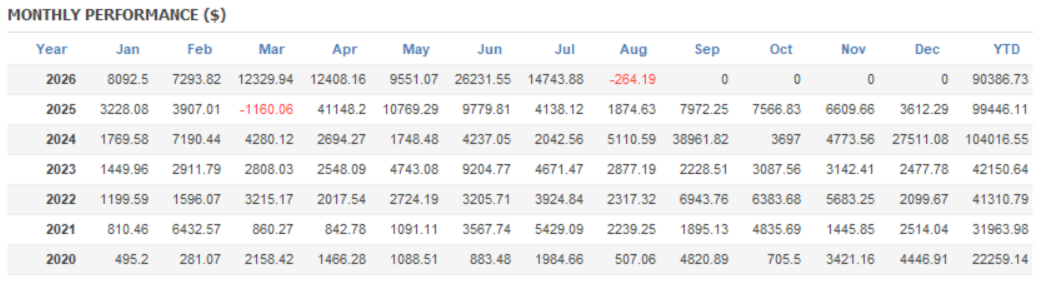
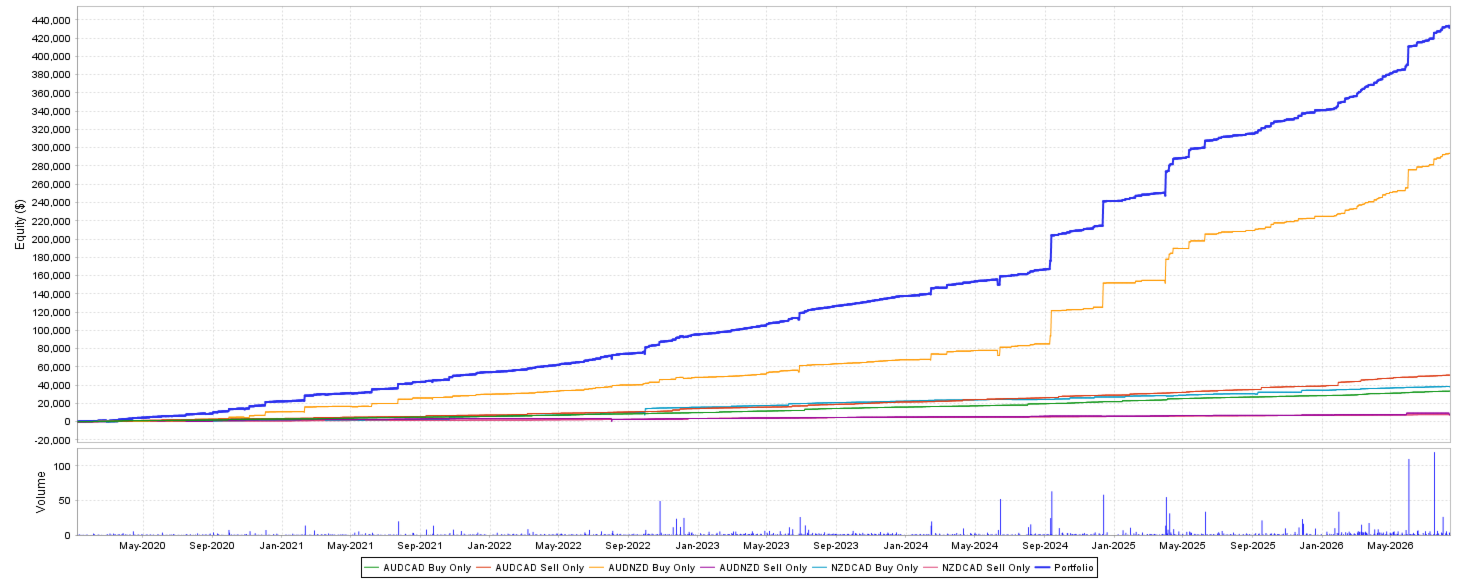
The following results are historical Strategy Tester results and are not live trading results.
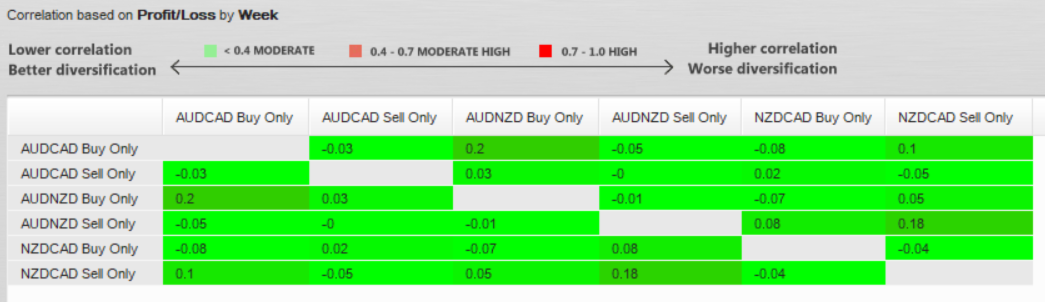
The tested portfolio contains:
- AUDCAD Buy
- AUDCAD Sell
- AUDNZD Buy
- AUDNZD Sell
- NZDCAD Buy
- NZDCAD Sell
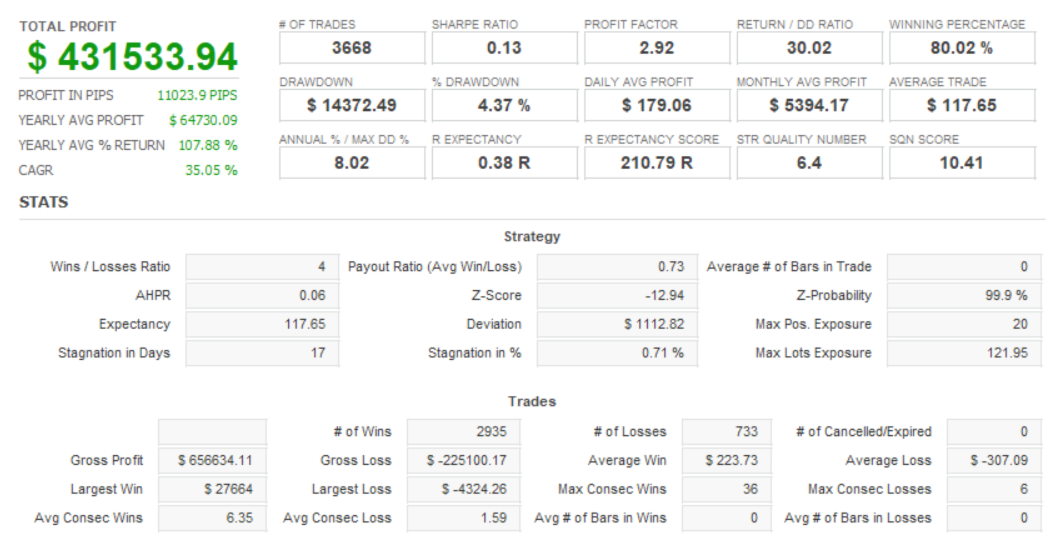
Portfolio Results
- Total Net Profit: $309,233
- Total Trades: 3,741
- Profit Factor: 2.72
- Winning Trades: 81.15%
- Maximum Balance Drawdown: $12,956.49
- Maximum Balance Drawdown: 4.98%
- Average Yearly Profit: $46,382.47
- Average Monthly Profit: $3,865.41
- CAGR: 29.64%
- Return / Drawdown: 23.87
- SQN: 4.68
- R Expectancy: 0.32 R
Individual Results
AUDCAD Buy
- Net Profit: $29,374.41
- Trades: 966
- Profit Factor: 2.94
- Win Rate: 81.78%
- Drawdown: 2.55%
AUDCAD Sell
- Net Profit: $36,245.37
- Trades: 965
- Profit Factor: 2.35
- Win Rate: 81.76%
- Drawdown: 6.15%
AUDNZD Buy
- Net Profit: $197,838.77
- Trades: 692
- Profit Factor: 3.06
- Win Rate: 71.68%
- Drawdown: 9.24%
AUDNZD Sell
- Net Profit: $10,275.02
- Trades: 257
- Profit Factor: 1.63
- Win Rate: 80.54%
- Drawdown: 24.60%
NZDCAD Buy
- Net Profit: $29,228.88
- Trades: 404
- Profit Factor: 2.39
- Win Rate: 80.69%
- Drawdown: 17.77%
NZDCAD Sell
- Net Profit: $6,270.55
- Trades: 457
- Profit Factor: 2.23
- Win Rate: 93.65%
- Drawdown: 11.91%
Risk Disclosure
Pacific Edge EA uses grid-based position management. Multiple positions can be opened during adverse price movements, which can increase floating losses, margin requirements and market exposure.
Historical drawdown is not a guaranteed maximum future drawdown.
Actual results can differ from Strategy Tester results because of spread, commission, swap, slippage, liquidity, execution, leverage, broker conditions, account type and market conditions.
Changing the EA parameters can materially change its risk and performance.
The EA does not guarantee profits, returns or a specific drawdown level.
Users should test the EA with their own broker conditions before using it on a live account.
Recommended Testing
Before live use:
- Start with the supplied default settings.
- Verify AUDCAD, AUDNZD and NZDCAD are available.
- Run Strategy Tester tests using appropriate historical data.
- Check spread, commission and swap conditions.
- Evaluate balance and equity drawdown.
- Check maximum grid exposure and required margin.
- Run a forward test on a demo account.
- Only consider live deployment after completing independent testing.
Broker Compatibility
Results can vary between brokers because of differences in spread, commission, swap, contract specifications, execution, leverage, volume limits and server time.
If your broker uses symbol suffixes or prefixes, modify the Symbols input to match the exact broker symbol names.
Version
Pacific Edge EA v1.0
Supported portfolio:
- AUDCAD
- AUDNZD
- NZDCAD
Future versions may include bug fixes, improvements, additional configurations or additional supported instruments.
Past Strategy Tester results are not a guarantee of future performance.
Support
Product support is provided through the MQL5 Market product comments and MQL5 messaging system.
When requesting support, provide the EA version, broker, account type, symbol configuration, input settings and a description of the issue.
































User didn't leave any comment to the rating