ZyloFx Timed Exit Pro
- Experts
-
Rosa Lina Martinez Jimenez
 🤖 5 years of Forex programming experience + AI solutions + dedicated support = The Best Forex Tools for Traders
========================================================================================================================= - Version: 1.0
- Activations: 20
| IMPORTANT: After purchasing this product, please send me a private message to receive the installation guide, setup instructions, and direct product support. |
ZyloFx Timed Exit Pro is a MetaTrader 5 Expert Advisor designed to manage scheduled trade exits. It can close open market positions and delete pending orders at a specific time selected by the user.
The EA is not an entry strategy and does not provide trading signals during normal live use. Its purpose is to help users manage open exposure at a defined time and keep their trading routine more organized.
Main Function
The user selects a daily exit time in the EA inputs. When that time is reached, the EA checks the account according to the selected filters and performs the enabled actions.
The EA can close open positions, delete pending orders, or do both, depending on the user settings.
Main Features
- Scheduled daily exit for MetaTrader 5.
- Close open market positions at a selected time.
- Delete pending orders at a selected time.
- Option to manage only the current chart symbol.
- Option to manage matching trades from all symbols.
- Magic Number filter.
- Broker server time or local computer time mode.
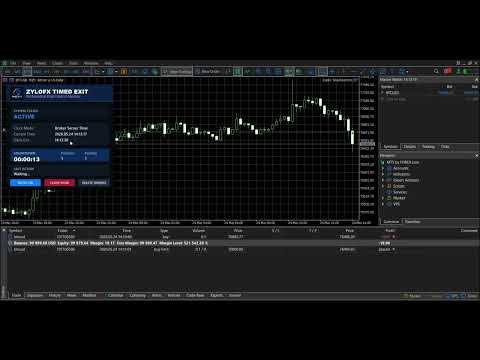
- Chart panel with status, countdown, positions, pending orders, and last action.
- Manual buttons for direct control from the chart.
Panel Buttons
The chart panel includes three buttons:
- AUTO: ON / OFF enables or disables the automatic scheduled exit.
- CLOSE NOW closes only open market positions that match the selected filters.
- DELETE ORDERS deletes only pending orders that match the selected filters.
Timed Exit Logic
When the selected time is reached, the EA checks the positions and pending orders that match the current settings. If closing positions is enabled, matching open positions are closed. If deleting pending orders is enabled, matching pending orders are removed.
If continuous closing mode is disabled, the EA performs the scheduled exit once per day. New trades opened after the completed scheduled exit are not affected by the same daily exit event.
Inputs
InpEAName
Sets the internal display name of the Expert Advisor.
InpEnableTimedExit
Enables or disables the scheduled exit when the EA starts.
InpExitTime
Sets the daily exit time. Format: HH:MM:SS. Example: 15:29:30.
InpTimeMode
Selects Broker Server Time or Computer Local Time.
InpCloseMarketPositions
If enabled, the EA closes matching open market positions at the selected time.
InpDeletePendingOrders
If enabled, the EA deletes matching pending orders at the selected time.
InpManageCurrentSymbolOnly
If enabled, the EA manages only the symbol of the chart where it is attached. If disabled, it can manage matching trades from all symbols.
InpMagicFilter
Filters trades by Magic Number. Use -1 to manage all Magic Numbers.
InpKeepClosingAfterTime
If false, the scheduled exit is performed once per day. If true, the EA continues checking and closing matching trades after the selected time until midnight.
InpDeviationPoints
Sets the allowed deviation in points when closing market positions.
InpTimerSeconds
Sets how often the EA updates the panel and checks the scheduled exit logic.
InpShowPanel
Shows or hides the chart panel.
Recommended Basic Setup
- InpEnableTimedExit: true
- InpExitTime: 15:29:30
- InpTimeMode: Broker Server Time
- InpCloseMarketPositions: true
- InpDeletePendingOrders: true
- InpManageCurrentSymbolOnly: true
- InpMagicFilter: -1
- InpKeepClosingAfterTime: false
Important Notes
- The EA must remain attached to a chart in order to work.
- MetaTrader 5 must remain open and connected to the broker.
- Algo Trading must be enabled.
- The EA manages only trades that match the selected symbol and Magic Number filters.
- The EA does not provide entry signals.
Risk Notice
Trading financial instruments involves risk. This tool is designed for scheduled trade management, but it does not guarantee profits, prevent losses, or replace proper risk management.
Users should test the EA on a demo account before using it on a live account.
Product Information
Product Name: ZyloFx Timed Exit Pro
Version: 1.00
Platform: MetaTrader 5
Author: Rosa Lina Martinez Jimenez
Brand: ZyloFx
Year: 2026