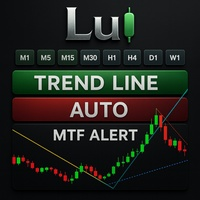
Lui Trendline Auto MTF Alert
- Indicators
- Version: 5.12
- Activations: 5

================================================================================
LUI AUTO TRENDLINE MTF ALERT - UPDATED DESCRIPTION (v5.11)
================================================================================
================================================================================
SHORT DESCRIPTION
================================================================================
Automatic Multi-Timeframe TrendLine with Smart Alerts. 9 Timeframes (M1-MN1), 3 Detection Modes (L/S/T), 5 Alert Channels (Popup/Push/Email/Telegram/Sound), Adjustable Sensitivity, Movable UI Buttons.
================================================================================
FULL DESCRIPTION (HTML FORMAT - Copy ไปวางได้เลย)
================================================================================
<!-- START ENGLISH -->
<b>Lui Auto TrendLine MTF Alert</b> automatically draws precise trendlines across 9 timeframes on a single chart. Stop switching between timeframes - see the complete market structure instantly.
<b>═══ KEY FEATURES ═══</b>
<b>Multi-Timeframe Display</b>
• 9 Timeframes: M1, M5, M15, M30, H1, H4, D1, W1, MN1
• View all timeframe trendlines simultaneously
• Toggle each timeframe ON/OFF with one click
• Color-coded lines for instant identification
<b>3 Detection Modes (L / S / T Button)</b>
• <b>L (Long-term):</b> Stable trends with wider lookback. Best for swing trading and position trading. Less signals, higher accuracy.
• <b>S (Short-term):</b> Quick trends with tighter parameters. Best for scalping and day trading. More signals, faster response.
• <b>T (Triangle):</b> Automatic triangle pattern detection. Identifies converging support/resistance for breakout trading.
<b>═══ SMART ALERT SYSTEM ═══</b>
<b>5 Alert Channels</b>
• Popup window (on-screen notification)
• Sound alert (customizable .wav file)
• Mobile Push notification (MT5 app)
• Email notification (SMTP setup required)
• Telegram bot message (Bot Token + Chat ID)
<b>Adjustable Alert Sensitivity</b>
• 0% = Instant alert (any touch)
• 70% = Pre-breakout alert (recommended, fewer false signals)
• 100% = Full breakout confirmation
• Customize threshold from 0-100% in settings
<b>Smart Protection</b>
• Cooldown timer prevents alert spam (adjustable 0-999 seconds)
• Per-timeframe alert toggle (enable only H1/H4 for quality signals)
• No duplicate alerts across chart changes
<b>═══ USER INTERFACE ═══</b>
<b>Interactive Control Panel</b>
• Master toggle for all timeframes
• Individual timeframe buttons (M1-MN1)
• One-click mode switching (L/S/T)
• Movable button position (X/Y coordinates in settings)
<b>Full Customization</b>
• Individual colors for each timeframe
• Line width (1-5) per timeframe
• Line style (solid, dash, dot) per timeframe
• Show/hide timeframe labels on lines
<b>═══ QUICK START GUIDE ═══</b>
1. Add indicator to your chart
2. Click L/S/T button to select detection mode
3. Click timeframe buttons (M1-MN1) to show/hide lines
4. Enable alerts: Input → ALERT TIMEFRAMES → set H1/H4 to true
5. Adjust sensitivity: Input → Alert Sensitivity % (default 70%)
6. Move buttons: Input → UI CONTROLS POSITION → set X/Y pixels
<b>═══ RECOMMENDED SETTINGS ═══</b>
<b>Swing Trading</b>
Mode: L (Long-term)
Timeframes: H1, H4, D1
Alert Sensitivity: 70%
Best for: Catching major trend reversals
<b>Day Trading</b>
Mode: S (Short-term)
Timeframes: M15, M30, H1
Alert Sensitivity: 50-70%
Best for: Intraday breakouts
<b>Scalping</b>
Mode: S (Short-term)
Timeframes: M1, M5, M15
Alert Sensitivity: 30-50%
Best for: Quick entries on small moves
<b>Breakout Trading</b>
Mode: T (Triangle)
Timeframes: M30, H1, H4
Alert Sensitivity: 80-100%
Best for: Pattern breakout confirmation
<b>═══ ALERT SETUP GUIDE ═══</b>
<b>Mobile Push Notifications</b>
1. Install MetaTrader 5 app on your phone
2. Go to Settings → Messages → MetaQuotes ID
3. Copy the ID to MT5 Desktop: Tools → Options → Notifications
4. Enable "Push notification" in indicator settings
<b>Email Notifications</b>
1. Go to Tools → Options → Email
2. Configure SMTP server (Gmail, Outlook, etc.)
3. Enable "Email" in indicator settings
4. Set your email subject line
<b>Telegram Notifications</b>
1. Create a bot via @BotFather on Telegram
2. Copy the Bot Token to indicator settings
3. Get your Chat ID from @userinfobot
4. Enable "Telegram" in indicator settings
5. Allow WebRequest: Tools → Options → Expert Advisors → Allow https://api.telegram.org
<b>═══ PERFORMANCE ═══</b>
• Optimized calculations (under 50ms per update)
• No lag on chart zoom or scroll
• Rate limiting prevents CPU overload
• Smart bar detection skips unnecessary recalculations
• Works seamlessly with other indicators
<b>═══ INPUTS REFERENCE ═══</b>
<b>Quick Setup</b>
• Detection method: High/Low (accurate) or Close (smooth)
• Show TF labels: Display timeframe names on lines
• Master Alert Switch: Enable/disable all alerts
• Alert Sensitivity %: 0=instant, 70=confirmed, 100=full breakout
• Alert Cooldown: Seconds between alerts (prevents spam)
<b>Alert Channels</b>
• Popup, Sound, Push, Email, Telegram
• Custom sound file selection
• Custom email subject line
• Telegram Bot Token and Chat ID
<b>Visual Settings</b>
• Per-timeframe colors, width, and line style
• Button X/Y position (movable UI)
• Chart top margin for other indicators
<!-- END ENGLISH -->
================================================================================
WHAT'S NEW (Version History)
================================================================================
<b>Version 5.11</b>
• NEW: 5 Alert channels (Popup, Sound, Push, Email, Telegram)
• NEW: Adjustable alert sensitivity (0-100% threshold)
• NEW: Movable UI buttons (customizable X/Y position)
• NEW: Per-timeframe alert cooldown with GlobalVariable persistence
• NEW: Telegram bot integration with WebRequest
• IMPROVED: Alert spam protection across chart changes
• IMPROVED: Quick Start Guide in code comments
• IMPROVED: Organized input parameters with emoji icons
<b>Version 5.10</b>
• Initial release
• 9 timeframe support (M1 to MN1)
• 3 detection modes (Long-term, Short-term, Triangle)
• Pre-breakout alert system
• Interactive on-chart control panel
• Performance optimized for real-time trading
================================================================================
TAGS
================================================================================
trend, trendline, multi-timeframe, MTF, support, resistance, alert, breakout, triangle, channel, telegram, push notification, email alert
================================================================================
CATEGORY
================================================================================
Indicators > Trend
================================================================================
END OF FILE
================================================================================