 MetaTrader 5
 Experts
 Indicators
 Libraries
 Utilities
 Widgets
 Rules
Watch the Market tutorial videos on YouTube
How to buy а trading robot or an indicator
Run your EA on
virtual hosting
virtual hosting
Test аn indicator/trading robot before buying
Want to earn in the Market?
How to present a product for a sell-through
Free trading utilities for MetaTrader 4 - 18
 Below are trading programs simplifying Forex trading in MetaTrader 4. Hover over a utility in the list below to read its description and purpose.

You can check out comment #1 how does it work This is a very useful tool, enter the currency charts you need to open, use the symbol "/" to distinguish them, and select the periodicity /TF of the chart, press the button and they will open the charts for you in batches without you having to manually open them each! Because some EA use multiple currency pairs strategy, but do not support one chart to support all currency pairs, so I developed this tool, hope you like it, if you are satisfied with
FREE
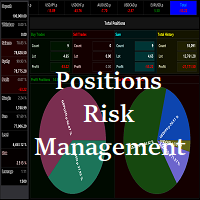
Waddah Attar Easy Positions Risk Management
This EA gives you a full ability to close one position or close all positions . Close buy or sell trades in any position . Close profit or loss position . by clicking on a command button on the chart with confirmation message . Show you a full information about your positions like : count - lots - average price - points - profit - profit % - used margin for this position and the risk percent . and also the scrolled table of trades that position has
FREE
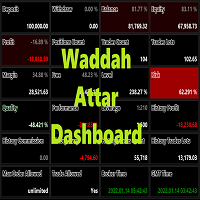
Waddah Attar Dashboard
Simple App show you the most important information about your account , trades and history . Risk , Quality and Performance are the most important numbers you must watch them carefully . also the important thing you must do is Focus on the RED Color on the board . you can control the font name , font size , width , height and padding properties . the information is auto arranged on the chart . don't worry about it .
Thanks .
recommended product for position risk manage
FREE
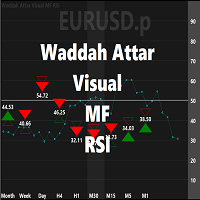
Waddah Attar Visual MF RSI
this App show you RSI values and status for all frames in one chart .
Filled Triangle means current RSI Value . Framed Triangle means previous RSI Value . Up Arrow and Green Color means the direction of RSI is up . Down Arrow and Red Color means the direction of RSI is down .
when you move mouse cursor on frame column .. the full RSI chart will drawn .
you can change RSI Period in the app properties .. the default is 14 .
thanks and good luck .
FREE

Tetris remains one of the most fun and addictive pieces of software to ever grace the computing scene. That's right, everything that everyone loves about Tetris can now be experienced on MT4 platform. Its beautiful simplicity and surprisingly fast-paced gameplay make it an exceptionally easy thing to just pick up and play on short notice. This version comes with everything everyone loves about Tetris. It has all six of the classic tetrimino shapes, the steadily growing level of challenge tha
FREE

Currency Pair Information
Useful indicator to have the following information on the chart: 1. Asset Name 2. Current Spread 3. Current ATR of the actual time frame 4. Time to close of the candle
It is located at the top right of the chart. If you request it, I can add the parameterization of the location of the information.
Other tools:
AMS Forex System
hockfx Price Alert Pro
hockfx
FREE

The Week7D indicator helps traders identify the day of the week on a price chart. It simply marks each period or each candle as the day of the week at the start of a new trading day. This allows traders to watch how prices move on any given day.
The Week7D indicator has several customization options that traders can use to change the visual representation of the indicator.
The variable "BarCount" changes the number of days during which the indicator will indicate the day of the week in each d
FREE

This is an expert advisor that works more like an indicator.
Its functions are the following: - Print the balance and equity in Arial font size 40 (cannot be changed) - Change chart background and candle colors depending on the close of the previous candle and the current price level.
Now... what is this for or what can I use it for? Good. Personally I use it to put it as the main chart while in other charts I leave other expert advisors working, what I care to see is the balance and equity..
FREE

This is an entertainment game developed on MT4, and this program is provided for free. how the game is played Use the game handle to control the direction of the snake up and down, left and right, and look for something to eat. You can get a certain amount of points for each bite, and the snake's body will grow longer and longer, and the longer the body is, the more difficult it is to play. Snake's only goal is to grow into the longest snake! Slide the joystick to control the snake's position, e
FREE
Update:ver1.53 (2023/08/16) ・概要と必要環境 手動発注もしくは他ツール等からの発注に対し、指値発注予約の複製を生成します。こちらは「発注操作の簡易化」に特化したものになります。発注判断となる分析は、資料を漁る、経験則を導く、他の分析ツールやEAを併用する等、利用者ご自身で頑張ってください。なお、ver1.28より、「決済後、自動で再発注する」機能が実装されました。(有償版でのみ有効化できます)
・導入と導入後の操作 導入そのものは簡単です。「自動売買可能なEA」として、適当なチャートにて動作させるだけです。(チャートの対象相場は問いません。このEAは、チャートを見ていません)。あとは、「このEAでのローカルコピー以外の発注」があれば、それに応じて「損失が出た場合に備えての追加取引の予約」という形で、指値発注が自動生成されます。 導入操作上の注意として、「本EAを、複数のチャートで動作」はできません。EAがチャート自体を見ておらず、注文状況だけを見ているため、複数のチャートで動かす意味もありません。また、ターミナルとEAの設定として「自動売買」を許可しない
FREE

#property copyright "小天" #property link " https://www.mql5.com " #property version "2.01" #property strict #property description "test"
input int hlength=85; input int vlength=25; input int DX=-340; input int DY=-80; input string InpDirectoryName="Data"; // directory name
input double lots_default=1; input int pc_times_default=2; input double deposit_minimal=1; input double floating_loss_percent=0.1; input double margin_occupied=0.2; input int tradingnumber=1;//控制买卖交易数量
input
FREE
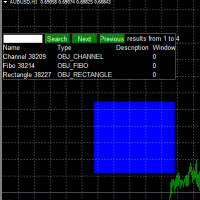
Use this software to browse through all objects within the chart and look at them comfortably. Also, you can look at the list of global variables and search and delete them . The same you can do with charts and indicators. You can search in objects names and object descriptions to find the object you are interested in. This is definitely an improvement to what is available in Mt4. You type what you are interested in , then press Search button. You can move to next and previous search results. No
FREE
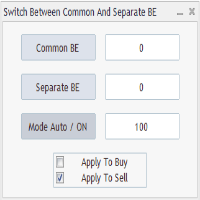
Advanced Auto BE. Program for switching between common and separate breakeven stop loss. Levels can be modified with user-defined point values The program also offers auto mode, where common/separate BE levels are switching depending on whether all positions are profitable. Calculation includes open prices . It can be used for BUY/SELL positions separately or together. HOWEVER I HAVE NEVER TESTED SITUATION, WHERE I HAD BOTH SELL AND BUY POSITIONS PROFITABLE ( I Mean AUTOMODE pyramyds) . Rememb
FREE

Strategy creation : Create lines of stop loss, entry and take profit. Live parameters such as lot size, gap in pip from SL to TP, Risk/Reward ratio are update whenever lines of SL and Entry move. This function allows traders to clarify their strategy before making any orders. Risk management - The risk calculation function calculates the volume for a new order taking into account the set risk and the distance from the Stoptloss to Entry Line. In addition, maximum risk (%), RR value are
FREE
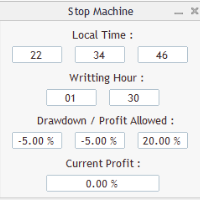
Close all orders immediately: if account balance is less/greater than allowed. PROGRAM USES ACCOUNT BALANCE, NOT EQUITY. Initial balance is calculated once a day if writting hour/minute comes ( local time is using ). It is also reset each restart program ( program does not read account balance from the past! ) Program is developed for VPS running purposes, to prevent from attempts of trading after daily DD limit is reached. I made decision to share this for free. It is not developed for commerci
FREE

The utility provides data on balance, equity and profit/loss on a trading account from the start of a trading day at a specified time.
You no longer need to constantly check your VPS or computer.
The utility features email and push notifications to the mobile platform version on your smartphone.
Set the EA on any H1 chart.
Configure parameters of your MetaTrader 4 for sending messages before usage.
Parameters Send test notification - true/false - send a text message when launching on a ch
FREE

Broker Desynchronization script MT4 is a script in the form of an EA. It will check the desynchronization of a BROKER's server compared to your time at your PC.
Usually BROKER sets time forward to have some space to execute trades.
If you wish to check how big the difference is, please load the EA to any chart.
After loading, it will wait for the first tick to check the desynchronization.
Information will be available for 10 seconds.
NOTE!
If market is closed, you get information to try again la
FREE

On the other hand, we denounce with righteous indignation and dislike men who are so beguiled and demoralized by the charms of pleasure of the moment, so blinded by desire, that they cannot foresee the pain and trouble that are bound to ensue; and equal blame belongs to those who fail in their duty through weakness of will, which is the same as saying through shrinking from toil and pain. These cases are perfectly simple and easy to distinguish. In a free hour, when our power of choice is untram
FREE

Left4Trade MT4 Script
A script allows displaying the closure of a trade on the current chart. It helps to see where the trade was opened and closed and how it affects the overall trading result.
When using this script, arrows indicating the opening and closing of trades are displayed on the chart. They can be configured with different colors according to your preferences.
One of the main advantages of using this script is the ability to quickly analyze trading operations, which allows you to
FREE
Avoid SWAP fees EA MT4 This version only supports orders with a single order transaction count of=0.01. If the single order transaction count is=0.01, please subscribe to a higher version This EA is not actively profitable, but only uses trading time to increase trading frequency and achieve the goal of saving swap fees. Working principle: This EA will generate MQL4 Experts Orderhis before the trading deadline of the day_ The today.csv file is used to record the information that has been
FREE
The Change Chart Timeframe EA is a powerful tool that provides users with the ability to effortlessly modify and customize chart timeframes according to their trading strategies and personal preferences. You can select individual charts to modify or apply changes to all charts simultaneously, saving valuable time and effort. This EA is just a tool to help with your auto trading. It doesn't open any trades, so nothing happens if you backtest it. Any setting marked with "(pro)" will use its
FREE

If you run an EA on a VPS, it is necessary to quickly notice if the server loses the connection to the broker.
The ServerGuard24 EA checks the connection to the broker once a minute and sends the result to our monitoring server. There we notify you by e-mail, SMS, push and much more.
The setup is super easy:
1. register at www.serverguard24.de
2. create a "Cron" check
3. copy the URL that is shown to you during the "Cron" check into the properties of the EA.
And you can be sure that your Met
FREE
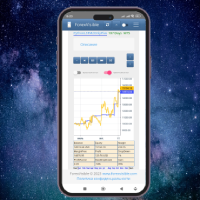
This client utility is intended for sharing and copying signals, as well as for monitoring your Expert Advisor on the site https://forexvisible.com . The Android version of the site can be downloaded here The version for the MT4 terminal can be downloaded here https://www.mql5.com/en/market/product/106509 There are many reasons to use this application in your trading, and these are: 1. If you have many trading advisors and many accounts, it is very difficult to track them and monitor everyt
FREE

This simple EA closes old losing trades at the expense of a portion of your profits. This helps to slowly work away drawdown and accelerate the closure of martingale grids
*** New Features *** Added - Option to close oldest or furthest from current price trades Added - Calculation of profits that will be sacrificed.
Anyone who has traded with martingale knows that you can get trapped in grids and be hoping for a quicker recovery. This led me to create this EA with the goal of helping to r
FREE

Script to configure "TweetHelper for MT4" environment settings for "Twitter API v2 OAuth 2.0 with PKCE".
Client ID : ${CLIENT_ID} Auth Basic base64 : β string(Base64) Response Code : auth_code to be obtained in step 2 of "Connection Procedure Using OAuth2.0" Callback URI : the value set in User authentication settings "Callback URI / Redirect URL"
TweetHelper trial for MT4 https://www.mql5.com/ja/market/product/54507
TweetHelper for MT4
https://www.mql5.com/ja/market/product/54
FREE
This indicator is to be used in bot connectors for automation of Pct Multi indicator entries.
How to use: Configure the bot connector with the following information: Indicator name: pctmultibot Call buffer: 0 Put buffer: 1
Do not add this indicator to the chart, just configure it in the bot connector!
Pct Multi indicator:
https://www.mql5.com/en/market/product/73054
FREE

Delving deep into the sphere of finance and trading strategies, I decided to conduct a series of experiments, exploring approaches based on reinforcement learning as well as those operating without it. Applying these methods, I managed to formulate a nuanced conclusion, pivotal for understanding the significance of unique strategies in contemporary trading.
FREE

General Description Advanced Statements is an innovative script for MetaTrader 4, designed to significantly enhance your portfolio analysis. This tool allows you to examine the complete MT4 history, generating detailed reports HTML for each MagicNumber. Through in-depth analysis, it identifies the best strategies to optimize your trading.
Main Features Complete Statement Analysis Allows you to examine the entire statement generated by MetaTrader 4, providing a comprehensive view of portfolio pe
FREE

This free tool is more reliable and user friendly to use Please give five star if you feel the tool is helpful Lot size positioning is the important risk management rule The larger the lot, the more risk you're exposed to. Smaller lot sizes are often favored by traders who want to manage risk more conservatively.
A general rule of thumb is to risk no more than 1-2% of their account on each trade. Traders need to determine their risk tolerance for each trade. This will help them decide how muc
FREE

Демо-версия утилиты ExactVol.exe Утилита ExactVol . ex 4 помогает трейдеру точно рассчитать размер лота и автоматически установить торговый ордер, исходя из входных значений и параметров ордера-указателя. Это необходимо для эффективного риск-менеджмента, когда нужно установить процент прибыли и процент риска на сделку в определенном соотношении, например 4:1. Предназначена для торговых стратегий, где используются уровни и линии поддержки/сопротивления. Ордер-указатель – ордер с минимальным о
FREE

Overview Custom Logic for Trading Mini is the free version of Custom Logic for Trading that designed to execute trades based on custom indicator signals, with robust position management features with break-even settings. This script allows traders to implement their strategies with high precision and flexibility, enhancing their trading efficiency and profitability. Input Parameters Indicator Settings indicator_name : Name of the custom indicator to be used for generating signals. buy_signal :
FREE
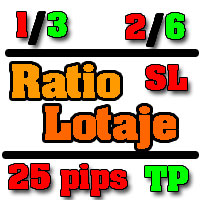
Asesor experto desarrollado para MT4 con el objetivo de ingresar ratios de utilidad y % de riesgo, adicional los Pips de SL para el cálculo del lotaje para dicho riesgo. Estos se calculan sobre el balance actual. El usuario tomaría como dato ingresar el lotaje que se calculó y arrastrar el SL manualmente a la cantidad de Pips que ingreso (15,20,25 Pips) el cual daría como perdida en $ el % de riesgo ingresado y arrastar el TP a la cantidad de pips indicado como TP. A la vez que se va inc
FREE

The DrawStopLevel script is designed for the MetaTrader 4 (MT4) trading platform. This script allows traders to quickly and easily draw a stop-loss horizontal line on their trading chart. This script is used in conjunction with the Trade Entry Journal Utility ( https://www.mql5.com/en/market/product/ . This script can also be easily integrated into any MT4 trading strategy, allowing for quick visual representation of stop-loss levels.
FREE

This script is designed to automatically set Stop-Loss (SL) and Take-Profit (TP) levels for all open trades based on customizable criteria. Unlike traditional scripts that run once and then exit, this script continuously monitors your trades and applies SL and TP to any new orders that meet the specified conditions. It is ideal for traders who want to ensure that their risk management strategy is consistently applied across all trades. Key features include continuous monitoring, customizable SL
FREE

This MQL4 script is designed for automated trading management with enhanced control over position handling and execution timing. The script allows users to automatically modify open trades by adjusting Stop-Loss and Take-Profit levels according to predefined settings. It provides several features to customize trade management:
1. **Stop-Loss and Take-Profit Modification**: The script can automatically adjust Stop-Loss and Take-Profit levels based on either the trade's open price or the current
FREE

### Program Overview
**RemoteBatchClose EA** is an automated closing tool designed for forex traders, aimed at assisting users in managing open positions when they are away from their computers. By automatically monitoring specified pending order prices and currency pairs, this program can execute closing operations when conditions are met, thereby reducing the user's operational burden and ensuring effective implementation of trading strategies. Its primary purpose is to address the inconveni
FREE

This Program will not execute any trades!
Works on any chart and any time frame!
This is the MT4 version.
MT5 version: https://www.mql5.com/en/market/product/125600?source=Site+Market+My+Products+Page
This Program will produce a comment box at the top left of the chart and show you your equity % difference throughout the day. Updating constantly in real time.
The daily resets back to zero on open of a new market open day. Using new current equity at start of day as reference for future calc
FREE

Telecontrol MT4 is a solution for integrating the MetaTrader 4 terminal with a Telegram channel. The server-based operation simplifies the creation of tokens and identifiers, consolidates data from multiple terminals, and generates valuable information in Telegram. The functionality includes: notifications about trades, orders, and balance changes; monitoring of drawdowns and lot limit exceedances; trade reports and expert advisor analysis; notifications about significant events with color highl
FREE

This Expert Advisor captures and sends information about all open positions to a REST API server in real-time using HTTP POST requests. It is ideal for building synchronization tools, external monitoring systems, or custom trade copier solutions. What does this EA do? Iterates through all active orders in the account. Compares current positions with the previously sent ones. If any change is detected (SL, TP, price, symbol, volume, type, etc.), it sends updated information to the defined endpoi
FREE

it is hard to do full margin strategy in MT4, because you cannot close all orders easily. Unlock the power of full margin trading with confidence using FullMargin RiskGuard , a cutting-edge Expert Advisor (EA) designed specifically for beginner traders on the MetaTrader 5 platform. Inspired by the renowned trading style of Papip Celebes, this EA empowers users to execute full trade strategies while safeguarding their capital with advanced risk management features. Key Features: MaxFloatingLos
FREE
The Order Info Box utility is designed to conveniently control the orders placed. If there are orders, the utility builds graphical informers for each order, indicating
- the order type (position direction);
- the order volume;
- the profit (if the order is in the market);
- optionally the order magic;
- optionally the order comment.
In addition, the utility builds informers for TakeProfits and StopLosses of orders, indicating the profit or loss that will occur when this TakeProfit or StopLoss i
FREE

OvertradeShield – Utility EA to Prevent Overtrading in Discretionary Trading Have you ever regretted making “just one more” trade in discretionary trading? OvertradeShield is a utility-type EA that automatically limits and alerts entries based on realized profit and loss, supporting your trading rules and mental discipline. It is ideal for traders who want to keep daily profits and losses in mind, prevent overtrading, and enforce profit and loss rules systematically. Since entries are discretion
FREE

Bank Your Profits & Secure Your Trade in One Click The Ultimate "Scale Out" Tool for Professional Traders. Close Partial (MT4 Utility) is designed for traders who want to lock in profits without killing the trend. With a single click, you can bank a percentage of your profit instantly. New Feature (Auto-Secure): Stop wasting time dragging your Stop Loss after taking profit. This manager can now automatically move your Stop Loss to Break-Even the moment you click the "Close Partial" butt
FREE

Bollinger Bands TP Guardian This utility Expert Advisor use Bollinger Bands to modify Take Profit (TP) level of open orders, improve your trade management & hands free after manual trade executed. Key Features Automatic TP Adjustment : The EA automatically adjusts the TP of open orders. Bollinger Bands Integration : TP levels are set using the Upper, Middle, or Lower Bollinger Band. Customizable Settings : Users can specify Bollinger Bands parameters and the frequency of TP modifications. Eff
FREE

Activation initiates the sequence from the initial symbol in the Market Watch roster, forming a perpetual loop that continues until deactivation. The system employs global terminal variables to sustain operational continuity amid symbol-induced reinitializations, thereby ensuring uninterrupted performance. This EA should not be checked off as 'Allowed live Trading' and is functional with that checkmark box, when uploading the EA. Principal advantages encompass augmented productivity in overseein
FREE

Prints ALL current chart's symbol and timeframe as customizable labels, ensuring precise anchoring and automatic repositioning during window resizes, timeframe switches, or other chart events. It supports layered display options (background, forefront, or combined color modes) for enhanced visibility without obstructing price data. The accompanying script facilitates global application by attaching or updating the indicator across all open charts in a single execution, promoting efficiency in m
FREE

The power to close every open chart window at once — no matter the symbol, timeframe, number of indicators, Expert Advisors, or objects on them. When you attach it, a confirmation dialog appears. Only after you explicitly grant permission does the script shut down all charts, leaving you on the clean gray screen with Market Watch still fully available. From there you can rebuild your layout from scratch exactly the way you want it. Ideal for: Quickly clearing a cluttered multi-chart workspace
FREE

Have you ever been swayed by immediate market movements when a trend has been continuing for a long time?
Contrarian trading based on the feeling that "it's about to reverse." Premature profit-taking due to the anxiety of "not wanting to lose gains." All of these are regrets that could have been avoided if you had just waited for the candle to close.
This tool was created to eliminate the stress of staring at the monitor and to support disciplined trading.
This tool is a simple monitoring EA
FREE

Equity Watch Pro shows your MetaTrader 4 and MetaTrader 5 accounts in an Android app: equity, open profit and loss, today's result, floating drawdown, and whether each terminal is still sending data. You can check accounts that run on a VPS without opening a remote desktop session. This Expert Advisor runs on one chart in each terminal and sends the account figures to the app. It does not trade. It only sends data, never receives instructions, and has no access to your trading password. What the
FREE

This Premium Copy Trade EA was originally a paid tool, but I have decided to release it to the community completely for free. If you find this tool valuable and it improves your trading experience, please consider making a small donation. A tip of $1, $5, $10, or any amount you are comfortable with is deeply appreciated and helps me continue developing free tools. Donations can be sent via Crypto to the wallet address below. Thank you for your kindness and support! Support / Tip (Crypto): USDT
FREE

Description Ultra Panel MT4 is a MetaTrader 4 Utility designed for traders who want fast manual trade execution with built-in automated trade management. It combines the speed of one-click manual entries with useful automation features such as basket profit closing. This makes it ideal for scalping, intraday trading, and active trade management directly from the chart. The panel appears on the chart and allows you to place trades instantly, adjust lot size, stop loss, and take profit, and close
FREE

This script is created for you if you : • You trade on several instruments or timeframes at the same time and want all charts to look the same . • You can set up each chart manually , change the settings of trading strategies • You teach trading and want to quickly bring all student terminals to a single view • Just appreciate the order and professional look of your workspace ________________________________________ What will it improve in your trading Time saving — setting up 10-20 charts tak
FREE

Never worry about leaving trades open overnight or over the weekend again. AutoClose Time Manager is a lightweight, highly reliable trade management utility designed to automatically close open positions and delete pending orders at a specified server time. Whether you are an intraday trader looking to flatten your account before the daily rollover, or a prop-firm trader strictly avoiding overnight or weekend holding penalties, this tool ensures your account is clean exactly when yo
FREE

The Margin Stress Index (MSI) was created to represent the current load on a trading account as accurately as possible.
A value of 100% indicates an account with no margin usage, and the value decreases proportionally as margin is utilized.
A value of 0% corresponds to a trading account under maximum margin stress.
In addition, the Expert Advisor stores the highest and lowest values for margin, free margin, margin level, MSI, and equity.
FREE

Zirk Trading Management Zirk Trading Management is a powerful trade management utility for MetaTrader that helps traders execute trades with consistent risk management. It is designed to simplify position sizing by automatically calculating the correct lot size based on your chosen risk percentage and stop-loss distance. Instead of manually calculating lot sizes, simply set your desired account risk (e.g., 1%), place your stop loss, and the utility instantly determines the appropriate trade vol
FREE

All In One Trade Management Panel is an on-chart trade management panel for MetaTrader 4. Plan trades with a drag-and-drop position tool, let the panel calculate the lot size from your risk, and manage pending, open and closed trades from one place. The panel also shows the market context many traders use: trend, key levels, market structure, economic news and currency strength. Planning a trade: Click New Long or New Short and place the entry on the chart. Drag the entry, stop loss and take-pro
FREE

Order Guard — MT4 Gold Order Assistant In trading, the hardest battle is often not against the market, but against yourself.
You plan everything clearly before entering a trade, but once the position is open, human weaknesses take over: reluctance to set a stop loss, holding onto losing trades, and after a loss, getting emotional and wanting to go all-in to win it back... I, too, blew several accounts because of this. After learning the hard way, I developed this self-discipline auxiliary tool
FREE

MNFM Equity Protection MT4 monitors account equity relative to cumulative deposits. Choose activation and liquidation thresholds on the dashboard. Default: activate after +30% growth and request liquidation at 0%. Immediate activation and negative thresholds are available.
Upon triggering, it closes other charts in this terminal to stop attached Expert Advisors, removes pending orders and requests closure of all account positions across all symbols and magic numbers. Other terminals, devices an
FREE

MNFM Performance Monitor MT4
A read-only dashboard for comparing trading results by order magic number and symbol. It does not open, modify or close orders, and does not provide trading signals.
Features - Closed-ticket net profit after commission and swap. - Current floating profit including recorded commission and swap. - Views by magic number, symbol and open market-order exposure. - Rolling 7-day and 30-day periods, or all loaded history. - Closed-ticket win rate, profit factor and longest
FREE

MNFM Manual Entry MT4 is a compact manual trading utility for MetaTrader 4. Set the lot size in the dashboard and click BUY or SELL to send one market order on the current chart symbol. Each order is opened with Magic Number 0 and the comment “MNFM Manual Entry”. The dashboard displays open buy and sell net results and counts positions with Magic Number 0.
This utility does not open trades automatically. It does not place pending orders, read news, or manage stop loss, take profit, trailing sto
FREE

Monitoraggio completo dei drawdown storici - Expert Advisor per MetaTrader 4 Descrizione del prodotto (descrizione del mercato): Smetti di fare supposizioni sulla tua reale esposizione al rischio. Scopri immediatamente il tuo peggior calo storico. Il Full History Drawdown Monitor è un'utility professionale essenziale per la gestione del rischio, sviluppata per MetaTrader 4 (MT4). A differenza dei report o dei monitor standard del terminale, che calcolano il drawdown solo dal momento in cui veng
FREE

AurumEdge Risk Guard MT4 is a free position-size calculator that sits on your chart.
HOW IT WORKS Two dashed lines appear on the chart: a red stop-loss line and a green take-profit line. Drag the red line to where you would place your stop. The panel instantly shows: - the lot size for your chosen risk (type the risk % directly into the panel) - the money at risk, and the actual % after rounding to your broker's lot step - BUY or SELL, worked out from the side of price your stop is on - reward:
FREE

MNFM Closure lets you review and close existing positions or cancel pending orders from one chart panel. It executes only after you confirm a preview.
Getting started 1. Attach the utility to a chart. Enable automated trading and allow trading for this utility if you want it to execute confirmed closures. 2. Choose a closure action. Review the tickets, direction, lots and estimated net. Use Include to adjust the selection where available. 3. Confirm the displayed plan or cancel. After execution
FREE

Get your DuoFX indicator alerts on Telegram and Discord, with a chart screenshot, without staring at the terminal. Free, for DuoFX products only This relay forwards alerts from DuoFX indicators and tools that have the "Send to DuoFX Alert Relay" option. It does not forward alerts from other indicators or Expert Advisors. Supported today: DuoFX Divergence Scanner (version 1.3 and later and DuoFX Currency Strength Meter 1.1 and later). More DuoFX tools get the option in their next updates; the cur
FREE

MNFM Trade Splitter MT4 is an order management utility for placing three pending orders from one plan. The orders share one entry price and one stop loss, with a separate take profit for each order.
Choose Buy or Sell and select a Stop or Limit entry. Enter the total lot size, entry price, shared stop loss distance, and three take profit distances. All distances are in points. Review the lot size and price of each order, then select Execute Trade Plan and confirm the submission.
The utility ch
FREE

Free MT4 trade panel and trade manager: lot size from your stop-loss risk, drag entry, stop loss and take profit lines on the chart, one-click break-even with commission and swap included, and an in-chart order and analytics pane. Nothing is sent until you press the order button. Works on Windows and Mac / Wine MetaTrader 4.
Pick a side and the entry, take profit and stop loss appear as draft lines; adjust them there, check size and risk, then send. The order pane below the chart keeps the reco
FREE

Algorex Candle Timer shows the information you look at before every entry in one compact panel on your chart. Countdown to the close of the current candle in gold, turning red shortly before the close (M1: last 10 s, M5: last 30 s, M15 and above: last minute) Countdown label next to the live candle Spread in points and pips Today's range and how much of the average daily range (ADR) is already used ATR of the chart timeframe New York, local and server time, with daylight saving handled automatic
FREE

Algorex Theme Switcher puts six carefully balanced colour themes and six slots for your own themes on a compact panel in the corner of your chart. One click recolours this chart or all open charts at once. Unlike loading a template, the switcher only changes colours: Expert Advisors, indicators and drawings stay exactly where they are. Built-in themes Zurich Snow: clean light theme with slate candles Amber Terminal: black screen with amber candles Midnight: deep navy with blue candles Forest: da
FREE

I built Algorex Trade Pilot for myself. Spontaneous trades and revenge trading have burned me many times: a quick entry without a plan, a loss, then the next trade only to win it back, bigger and worse than the first. Trade Pilot puts a short, honest check between the impulse and the click, and it takes the order buttons away from me when I am in no state to trade. It never opens a trade by itself: every order needs your click. Risk, size and lines Enter your risk per trade in percent of the bal
FREE

SnapDraw — every MT4 drawing tool in a panel under your chart
Drawing in MetaTrader means hunting through menus and toolbars, and changing the colour of every line by hand. SnapDraw puts the tools you use in a slim panel docked under the chart: drag one onto the chart, or click it and draw, and it lands in your colour, snapped to the candle.
What it includes
• Every object in the MT4 Insert menu: lines, channels, Gann, Fibonacci, shapes, arrows and text, plus graphical objects such as event,
FREE
The MetaTrader Market is a unique store of trading robots and technical indicators.
Read the MQL5.community User Memo to learn more about the unique services that we offer to traders: copying trading signals, custom applications developed by freelancers, automatic payments via the Payment System and the MQL5 Cloud Network.

You are missing trading opportunities:
- Free trading apps
- Over 8,000 signals for copying
- Economic news for exploring financial markets
Registration
Log in
You agree to website policy and terms of use
If you do not have an account, please register