
You are missing trading opportunities:
- Free trading apps
- Over 8,000 signals for copying
- Economic news for exploring financial markets
Registration
Log in
You agree to website policy and terms of use
If you do not have an account, please register
Trading Signals:
Forum on trading, automated trading systems and testing trading strategies
How to Start with Metatrader 5
Sergey Golubev, 2013.01.23 07:34
Concerning signals ... I see some members asked about how to unsubscribe from the signals. I subscribed to some free signal 3 days ago (with no problem so far). Just some information/topics about the signals which I collected about signals:
Forum on trading, automated trading systems and testing trading strategies
How to Start with Metatrader 5
Sergey Golubev, 2016.02.17 09:08
Tips for Selecting a Trading Signal to Subscribe. Step-By-Step Guide
"Trading on financial markets is a pretty large sphere which involves a lot of people and a lot of valuable assets. Successful trading in your preferred market sector requires its deep analysis, further development of your own trading system and, of course, acquisition of steel hard discipline and composure. Some people do not have time for this, but they have an aspiration to make their financial means work and provide a benefit. The Signals service of the MQL5.com site helps to solve this problem. This article is dedicated to the system approach to the search of a required signal which would satisfy criteria of profitability, risk, trading ambitions, working on various types of accounts and financial instruments."
Forum on trading, automated trading systems and testing trading strategies
how to create a signal for free in a real account
Aleksey Pak, 2016.02.19 14:04
Signal based on the real account available only for paid subscription. Demo signals always free.Forum on trading, automated trading systems and testing trading strategies
How to Start with Metatrader 5
Sergey Golubev, 2016.02.19 16:25
Frequently Asked Questions about the Signals service
Questions
What the Signals service is needed for?
Who can create a trading Signal at MQL5.com? Should I pay for this?
When a free Signal will become available for subscription?
How to create a free signal?
How to subscribe to a Signal?
I created a signal, but it is not available for subscription on the website. Why?
How to subscribe to a signal from the MetaTrader 4 (MetaTrader 5) client terminal?
Can I copy trades from MetaTrader 4 to MetaTrader 5 or vice versa?
How paid subscriptions are charged? What will happen if a free subscription becomes paid?
Can I cancel a paid subscription?
I want to copy trades with fixed volume of 1.0 lots. Is it possible?
On Provider's account all trades are performed with volume of 0.1 lots. I want to copy these trades with larger volume, for example 0.3 lots. Can I raise the volume somehow?
The Provider has trading symbol called GOLD, and my broker has the same instrument, but it is called XAUUSD. Are trades on GOLD copied to XAUUSD in that case?
Can I set my own rules of copying trades from a Provider's symbol to a Subscriber's one?
What rounding scheme is used for Provider's and Subscriber's percentage ratio of deals volume?
Why there should be no open positions and pending orders on my account in order to subscribe to a signal?
Why manual trading leads to problems with copying of signals (accounts out of sync)? Why I cannot simultaneously subscribe to a signal and trade on one account?
How to disable your own Signal? I do not want to broadcast it anymore.
Does the MetaTrader 4/5 terminal has to be running at Subscriber's end for trades to be copied?
Can I unsubscribe from the Signal in the same way I subscribed to it?
How can I find out what Signal I am subscribed to in the terminal and how can I cancel the subscription?
How are transactions copied if the Provider has 4-digit quotes for a Symbol and the Subscriber has 5-digit quotes for the same Symbol or vice verse?
How is the Growth in Signals Calculated?
Forum on trading, automated trading systems and testing trading strategies
signal subscription disabled, enable realtime subscription in 'Signals' settings
Jose Francisco Casado Fernandez, 2016.09.23 07:00
You have to login with your mql5 user first (Tools\Options\Community):
And then, you have to enable signal subscription (Tools\Options\Signals):
Regards.
Forum on trading, automated trading systems and testing trading strategies
Synchronize doesn't do it's job.
Marco vd Heijden, 2016.11.03 09:12
your system that copies the signal should be running at all times.
if you close and reopen it, it will synchronize new positions.
Форум по трейдингу, автоматическим торговым системам и тестированию торговых стратегий
Frequently Asked Questions about the Signals service
Rashid Umarov, 2018.02.15 14:05
Signals based on cent accounts can not have a paid subscription
Very useful article
Data Structure in MetaTrader 4 Build 600 and Higher
MetaTarder 4 build 600 features the new structure and location of the client terminal files. Now, MQL4 applications are placed in separate directories according to the program type (Expert Advisors, indicators or scripts). In most cases, the terminal data is now stored in a special data folder separated from the terminal installation location. In this article, we will describe in details how data is transferred, as well as the reasons for introducing the new storage system.
Quick Evaluation of a Signal: Trading Activity, Drawdown/Load and MFE/MAE Distribution Charts
Subscribers often search for an appropriate signal by analyzing the total growth on the signal provider's account, which is not a bad idea. However, it is also important to analyze potential risks of a particular trading strategy. In this article we will show a simple and efficient way to evaluate a Trading Signal based on its performance values:
Forum on trading, automated trading systems and testing trading strategies
MetaTrader 5 web platform is now faster and more convenient
MetaQuotes Software Corp., 2016.09.29 10:59
We continue to improve the MetaTrader 5 multi-asset web platform and expand its features. The latest update allows you to trade in your favorite browser with even more comfort. Launch the web terminal and try the latest innovations:
Despite all the changes, the main thing remains intact — MetaTrader 5 Web is still the most versatile and convenient web platform.
Launch the application and try it right now!
Forum on trading, automated trading systems and testing trading strategies
How to Start with Metatrader 5
Sergey Golubev, 2016.05.08 20:17
Welcome,
- Usually people who can't code don't receive free help on this forum, though it could happen if you are lucky, be patient.
- If you show your attempts and describe well your problem, you will most probably receive an answer from the community.
- If you don't want to learn to code, nothing bad, you can either look at the Codebase if something free already exists, or in the Market for paid products (sometimes free also).
- Finally, you also have the option to hire a programmer in the Freelance section.
Good luck.Forum on trading, automated trading systems and testing trading strategies
How to Start with Metatrader 5
Sergey Golubev, 2014.05.07 18:18
Just a reminderThere is good article concerning to fundamental trading (for creation of the EAs related to News Trading) :
============
Building an Automatic News Trader
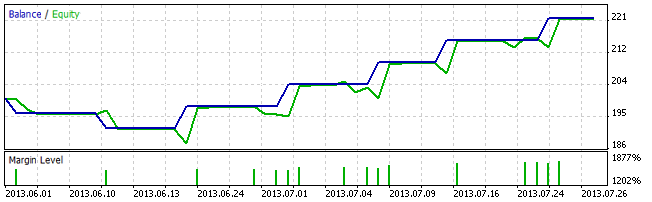
As Investopedia states, a news trader is "a trader or investor who makes trading or investing decisions based on news announcements". Indeed, economic reports such as a country's GDP, consumer confidence indexes and employment data of countries, amongst others, often produce significant movements in the currency markets. Have you ever attended a U.S. Non-Farm Payrolls release? If so, you already know that these reports may determine currencies' recent future and act as catalysts for trends reversals.
Forum on trading, automated trading systems and testing trading strategies
MAMM plugin for MetaTrader 5 now available for asset management in financial markets for brokers and professional traders
MetaQuotes Software Corp., 2016.10.13 09:49
Following the growth in MetaTrader 5 popularity, brokers are now interested in extra solutions extending its capabilities. In response to this demand, Plugit Apps Business Solution provider has released an asset management automation service integrated with the popular platform.
MetaTrader 5 PLG Multi-Asset Management Module (MAMM) is a special server-side plugin with a web interface designed for brokers and professional asset managers. The application simplifies and optimizes the interaction between a money manager (Master) and an investor trading in the MetaTrader 5 multi-asset platform. The following types of asset management are supported: Equity Lot Ratio (MAM), Equity Cash Ratio (PAMM) and Equal Volume.
PLG MAMM allows money managers trading on MetaTrader 5 platform to place a large block trades from a Master Account across an unlimited number of investor accounts using a variety of strategies and different allocations types. The PLG MAMM application is also equipped with a powerful reporting tool allowing managers to manage their client list in addition to evaluating their performance through advanced statistical reports and charts.
"Driven by the increased adoption of MetaTrader 5 among leading brokers, Plugit realized that time had come to invest heavily on MetaTrader 5 solutions to meet the surging demand for such products" — says Jalal Faour, CEO of Plugit Apps. "Today, we pride ourselves to be amongst the first to have successfully launched a wide array of reliable MetaTrader 5 products, notably our turnkey solution, PLG MAMM. Our MAMM solution allows MetaTrader 5 brokers to leverage their platform and serve Money Managers in addition to retail clients. We are very delighted to have worked closely with MetaQuotes prior to deploying this innovative solution".
Jalal Faour, Plugit Apps
Send an email to sales@plugitapps.com or call +357 25 025026 to find out more about the MetaTrader 5 PLG MAMM plugin and test the free trial version.
Forum on trading, automated trading systems and testing trading strategies
List of changes in MetaTrader 5 Client Terminal builds
MetaQuotes Software Corp., 2016.10.13 17:14
New MetaTrader 5 Platform Build 1455: Libraries of mathematical functions in MQL5
MetaTrader 5 platform update is to be released on Friday, October 14, 2016. The new version features the following changes:
Terminal: Added tooltips for the Buy, Sell and Close buttons in trade dialogs. The tooltips contain information about the security to be bought or sold during the operation, to help beginners understand the trading process.
MQL5: An MQL5 version of the ALGLIB numerical analysis library has been included into the Standard Library.
Library Features
How to Use
ALGLIB files are located in \MQL5\Include\Math\Alglib. To use the functions, add the main library file into your program:
MQL5: Mathematical statistics functions have been included into the Standard Library. MQL5 now provides the functionality of the R language, which is one of the best tools for statistical data processing and analysis.
Library Features
The statistical library contains functions for calculating the statistical characteristics of data, as well as functions for operations with statistical distributions:
How to Use
The statistical library files are located in \MQL5\Include\Math\Stat. To use the library, add the file with required functions into your program, for example:
The detailed description of the library functions is available in the article Statistical Distributions in MQL5 - Taking the Best of R.
MQL5: The MQL5 version of the Fuzzy library has been included into the Standard Library. The Fuzzy library implements Mamdani and Sugeno fuzzy inference systems.
Library Features
How to Use
Fuzzy Library files are located in \MQL5\Include\Math\Fuzzy. To use the library, add the file with required functions into your program, for example:
A detailed description of the library is available in the Code Base: Fuzzy - library for developing fuzzy models
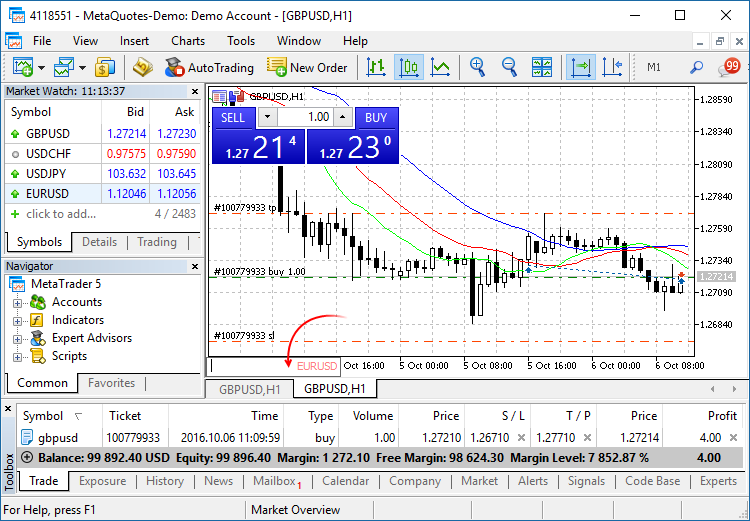
The navigation bar is opened by pressing Enter or Space. It allows you to quickly move to the specified date on the chart, as well as to switch symbols and timeframes. If your MQL5 program processes Enter or Space key pressing, disable the CHART_QUICK_NAVIGATION property, in order to avoid interception of these events by the terminal. The quick navigation bar can still be opened by a double click.An example of how to write ticks to a file and then read them:
If one color is specified, all candlesticks on the chart will be fully painted in this color.
If two colors are specified, one color is used for candlestick edges, the other one is used for the body.
If three colors are specified, one color is used for candlestick edges, two other colors are used for the bodies of bullish and bearish candlesticks.
The DRAW_CANDLES style allows setting custom colors of candlesticks. All colors can also be changed dynamically while the indicator is running, using the function PlotIndexSetInteger(drawing_index_DRAW_CANDLES, PLOT_LINE_COLOR, modifier_number, color) where modifier_number can have the following values:
The update will be available through the LiveUpdate system.
Securing MQL5 code: Password Protection, Key Generators, Time-limits, Remote Licenses and Advanced EA License Key Encryption Techniques
"Most developers need to have their code secured. This article will present a few different ways to protect MQL5 software. All examples in the article will refer to Expert Advisors but the same rules can be applied to Scripts and Indicators. The article starts with simple password protection and follows with key generators, licensing a given brokers account and time-limit protection. Then it introduces a remote license server concept. My last article on MQL5-RPC framework described Remote Procedure Calls from MetaTrader 5 to any XML-RPC server."
"I will make use of this solution to provide an example of a remote license. I will also describe how to enhance this solution with base64 encoding and provide advice for PGP support to make ultra-secure protection for MQL5 Expert Advisors and Indicators. I am aware that MetaQuotes Software Corp. is providing some options for licensing the code directly from the MQL5.com Market section. This is really good for all developers and will not invalidate ideas presented in this article. Both solutions used together can only make the protection stronger and more secure against software theft."
Forum on trading, automated trading systems and testing trading strategies
How to Start with Metatrader 5
Simon Gniadkowski, 2013.07.24 10:18
How to post code on this forum . . .