SQUID GRID AI is a sophisticated grid-based system capitalizing on mean reversion opportunities across 6 uncorrelated assets, optimizing portfolio weight to maximize profits while managing risk with AI-driven market monitoring.
[ Live Signal ] - [ Dedicated group | Version MT5 - MT4 ]
📌 The concept
📌 Why choose this EA?
Multi-asset diversification
- Trades 6 uncorrelated instruments: XAUUSD, EURUSD, EURJPY, GBPNZD, AUDCAD, USDCAD
- Optimized weight allocation to maximize profitability
- Advanced structural risk-management at core
Sophisticated grid strategy
- Capitalizes on mean reversion opportunities
- Identifies overbought and oversold conditions for optimal entry
- Adds positions during price retracements to enhance profitability
- Important: No martingale strategy employed
AI empowered Risk and Money Management for Grids
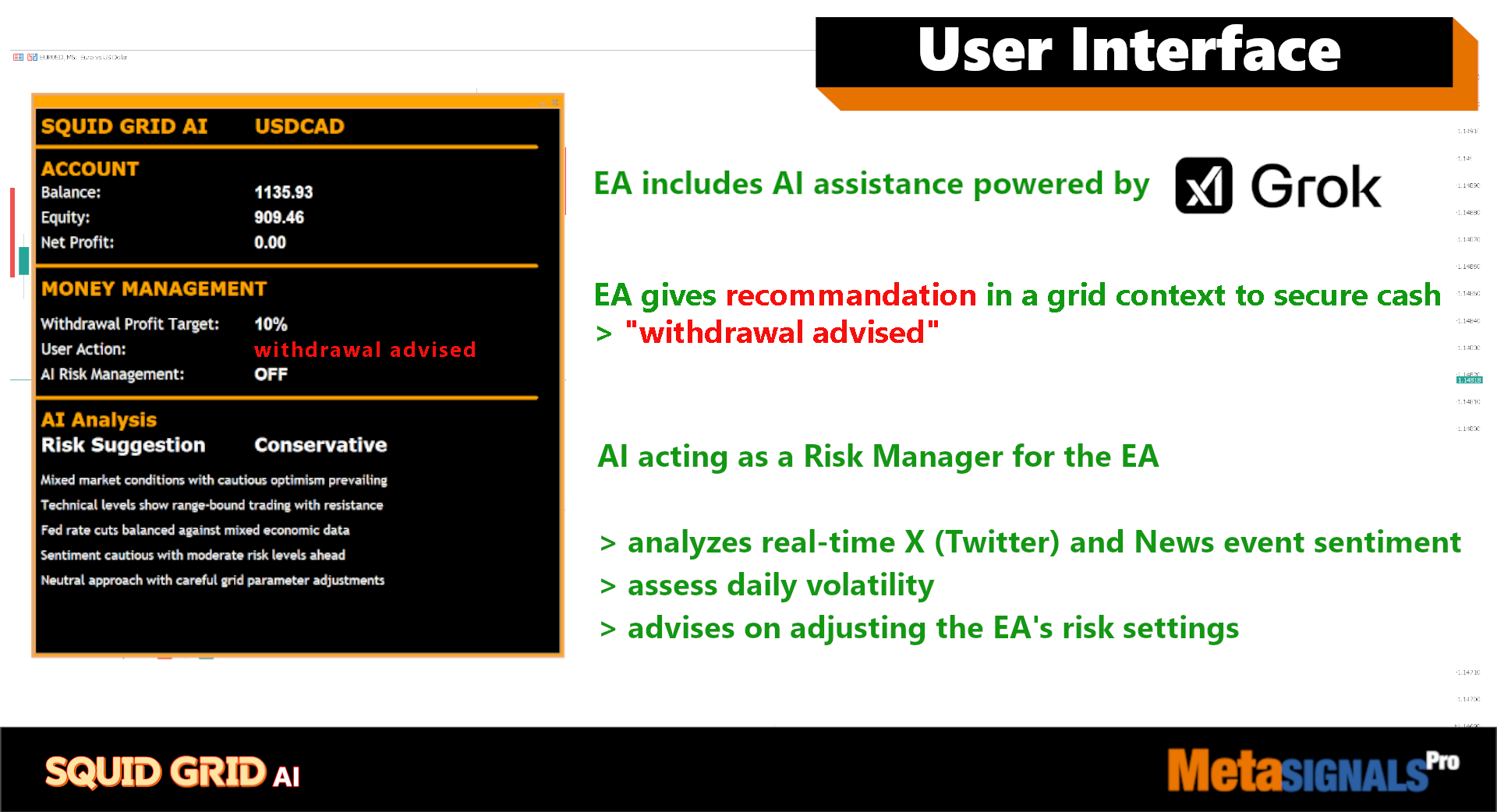
- Integrated with Grok4 AI for real-time market monitoring
- Analyzes daily macroeconomic conditions and market volatility
- Automatically closes positions or blocks trades during abnormal market events
- Customizable profit withdrawal thresholds based on risk tolerance
- Configurable Max Tolerable Drawdown and lot size settings
- Regular profit withdrawal recommendations (after 10-30% returns)
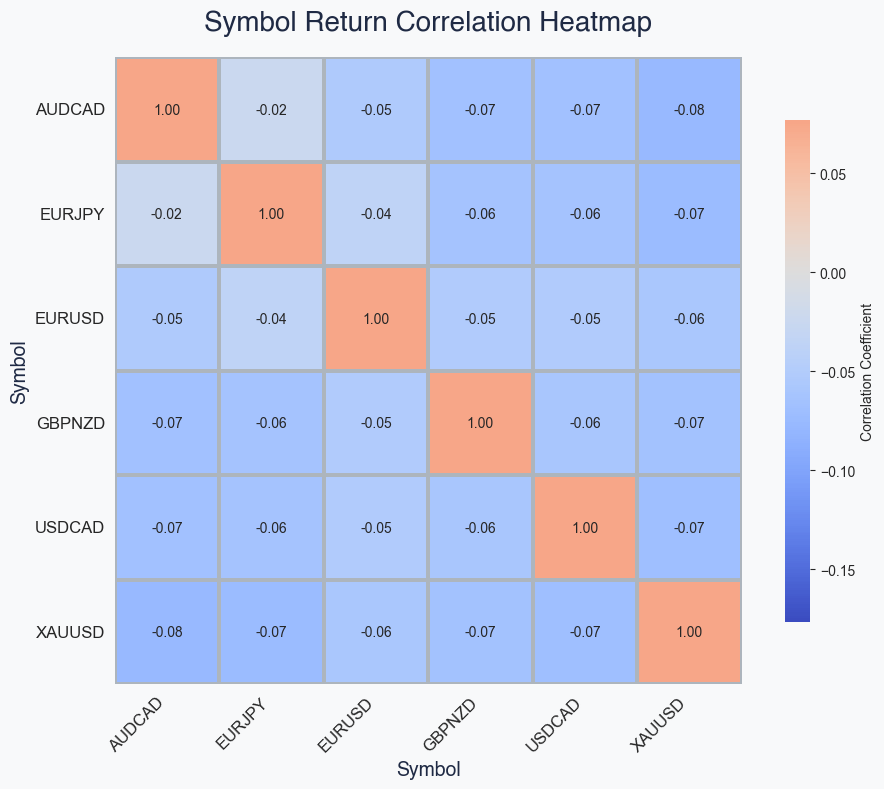
📌 Uncorrelated pairs and asset
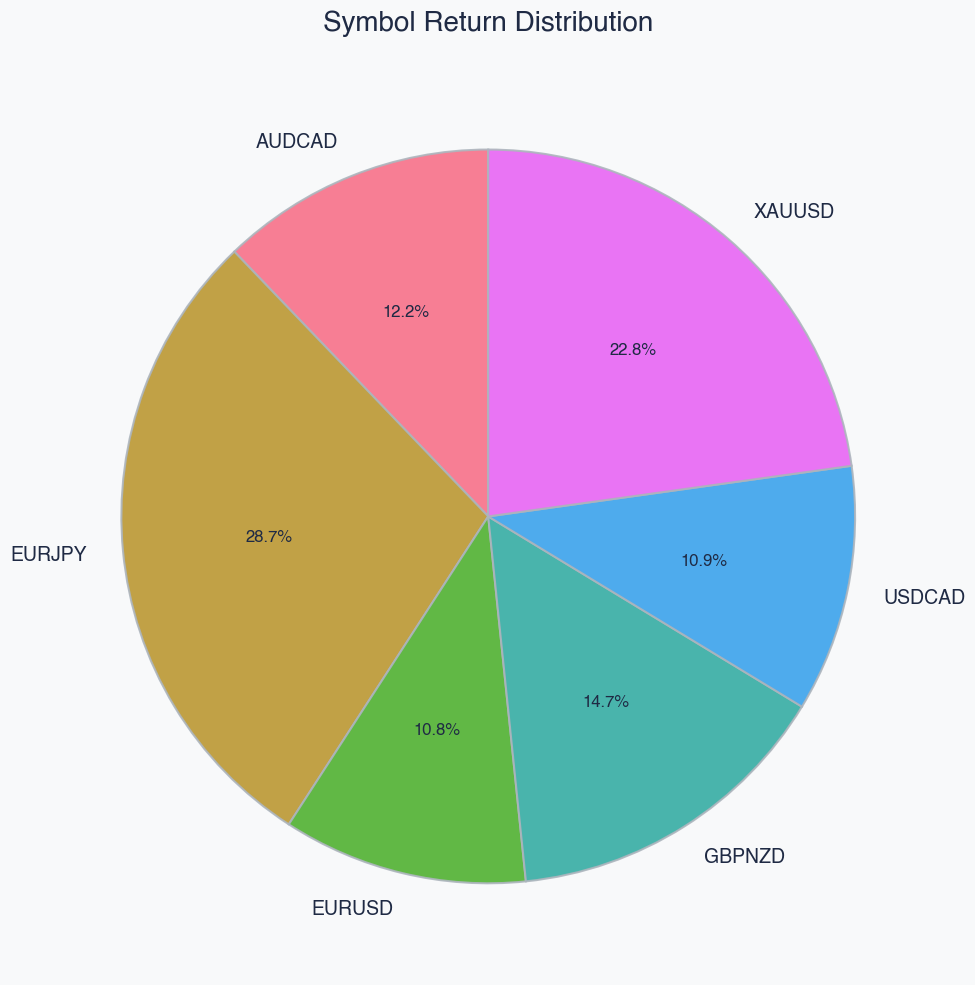
📌 Optimised weight of the uncorrelated assets
📌 Specs and Signals
- EA launching asset and Time frame: EURUSD | M5
- Traded assets: XAUUSD, EURUSD, EURJPY, GBPNZD, AUDCAD, USDCAD
- Timeframes: M5-H1 depending on asset volatility characteristics
- Backtest History: ICMarkets has limited CAD pairs history until 2025 so the backtests have been made on EasyForex
- Tested period: 2020 – 2025, OHLC
- Minimum / Recommended deposit: $500 / $2000
📌 Parameters
-
Level of risk
- Use these different lot sizes depending on the level of risk you desire.
| Low | Medium | High | |||||||
| EURJPY AUDCAD GBPNZD USDCAD EURUSD XAUUSD | 0,1 0,1 0,1 0,4 0,4 0,2 | 0,2 0,2 0,2 0,8 0,8 0,2 | 0,4 0,4 0,4 0,16 0,16 0,4 |
-
Max Tolerable Drawdown: Defines the maximum allowable floating drawdown as a percentage of the account balance (default: 0.5). If the floating loss for a symbol exceeds this threshold, all positions for that symbol will be closed to limit further losses.
-
Magic Number: A unique identifier for the EA's trades (default: 01234). This distinguishes the EA's positions from manual trades or those from other EAs, ensuring proper management and filtering.
-
Trade EURJPY: Enables or disables trading on the EURJPY pair (default: true). Set to false to exclude this symbol from trading.
-
Trade AUDCAD: Enables or disables trading on the AUDCAD pair (default: true). Set to false to exclude this symbol.
-
Trade GBPNZD: Enables or disables trading on the GBPNZD pair (default: true). Set to false to exclude this symbol.
-
Trade USDCAD: Enables or disables trading on the USDCAD pair (default: true). Set to false to exclude this symbol.
-
Trade EURUSD: Enables or disables trading on the EURUSD pair (default: true). Set to false to exclude this symbol.
-
Trade XAUUSD: Enables or disables trading on the XAUUSD (Gold) asset (default: true). Set to false to exclude this symbol.
-
Broker Ticker for EURJPY: Specifies the exact Broker Ticker for EURJPY as recognized by your broker (default: "EURJPY"). Adjust if your broker uses a different suffix or naming convention (e.g., "EURJPY.pro").
-
Broker Ticker for AUDCAD: Specifies the exact Broker Ticker for AUDCAD (default: "AUDCAD"). Customize for broker-specific variations.
-
Broker Ticker for GBPNZD: Specifies the exact Broker Ticker for GBPNZD (default: "GBPNZD"). Customize as needed.
-
Broker Ticker for USDCAD: Specifies the exact Broker Ticker for USDCAD (default: "USDCAD"). Customize as needed.
-
Broker Ticker for EURUSD: Specifies the exact Broker Ticker for EURUSD (default: "EURUSD"). Customize as needed.
-
Broker Ticker for XAUUSD: Specifies the exact Broker Ticker for XAUUSD (default: "XAUUSD"). Customize as needed.
-
EURJPY Lot Size: Sets the lot size for trades on EURJPY (default: 0.02). This determines the position volume; higher values increase risk and potential reward.
-
AUDCAD Lot Size: Sets the lot size for trades on AUDCAD (default: 0.02).
-
GBPNZD Lot Size: Sets the lot size for trades on GBPNZD (default: 0.02).
-
USDCAD Lot Size: Sets the lot size for trades on USDCAD (default: 0.08).
-
EURUSD Lot Size: Sets the lot size for trades on EURUSD (default: 0.08).
-
XAUUSD Lot Size: Sets the lot size for trades on XAUUSD (default: 0.02).
-
Withdrawal Profit Target Alert (%): defines the threshold of profit percentage of the Balance that triggers an alert for Cash withdrawal. Modulate depending on the risk you choose.
-
High risk: 30% of profit recommended to withdraw 30% of cash
-
Medium risk: 20% of profit recommended to withdraw 20% of cash
Important:
-
ensure that the trading asset symbols are added/shown in the Market Watch window of your MetaTrader terminal
-
this will enable your Expert Advisor (EA) to run on all chosen symbols simultaneously.
📌Our Commitments and backtest specs
Our system adheres to strict backtesting protocols with
🔹 100% qualitative data with no omissions
🔹 zero deletion or manipulation of historical stop losses or take profits.
🔹 zero overfitting
🔹 validated Walk Forward simulation
🔹 validated Monte Carlo simulation
🔹 continuous monitoring of the Live metrics with the backtest metrics