Quantum Trend Scanner
Multi-Currency · Multi-Timeframe · AI Trend Dashboard for MetaTrader 5
Version: 1.0 | Platform: MetaTrader 5 | Category: Trend Indicators
Overview
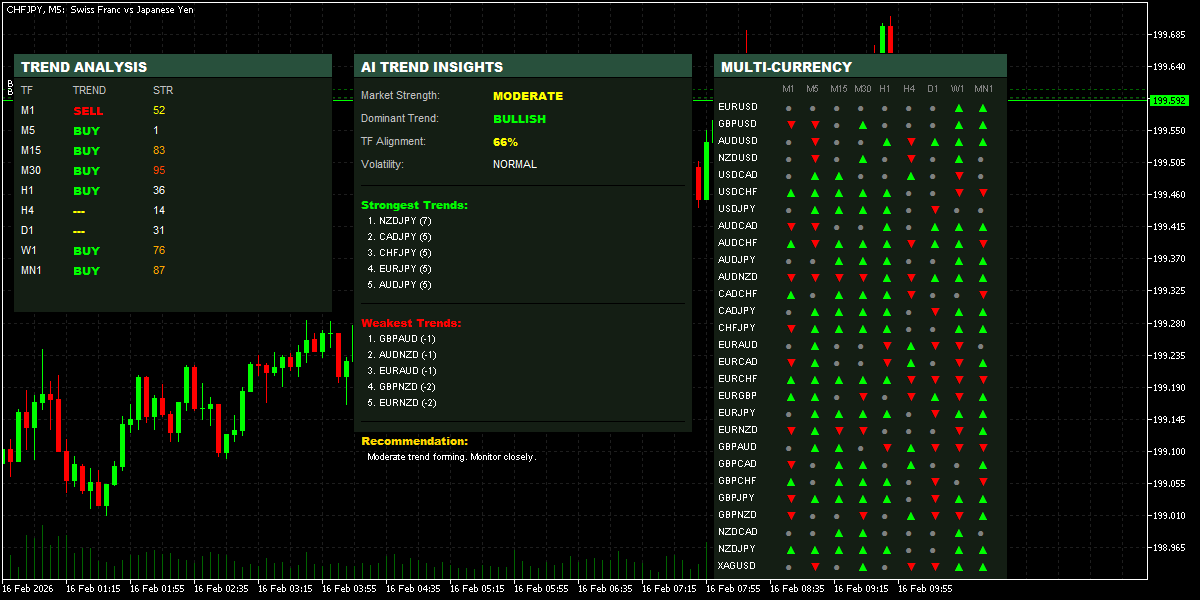
The Quantum Trend Scanner is a professional-grade multi-currency, multi-timeframe trend dashboard indicator built for MetaTrader 5. It consolidates the trend state of 30 major, minor, and precious metal pairs across 9 timeframes into three interactive on-chart panels — giving you an instant, 360-degree view of the entire forex market without switching charts.
Unlike simple moving average crossovers, this indicator uses a three-factor confluence engine: EMA alignment, price momentum, and market structure (higher highs / lower lows) — ensuring only high-probability trend signals are displayed. An AI Insights panel then synthesises all data into actionable recommendations.
💡 Perfect for traders who need to quickly identify the strongest trending pairs and timeframes before placing trades — eliminating hours of manual chart analysis.
Get this Indicator here https://www.mql5.com/en/market/product/165656
What's Inside — Three Powerful Panels
1. Trend Analysis Panel (Left)
Attached to the current chart symbol, this panel shows trend direction and signal strength across all 9 standard timeframes from M1 through MN1.
• Direction labels: BUY (lime green), SELL (red), or --- (neutral/ranging)
• Strength score from 0–100 directional intensity calculation
• Color-coded strength: orange-red (≥90), orange (≥70), yellow (≥50)
• Updates on every new bar and every 30-second timer tick
2. Multi-Currency Matrix Panel (Right)
A compact dot matrix showing trend bias for 30 pairs across all 9 timeframes — giving you 270 trend data points in a single glance.
• 30 pairs: all major/minor FX pairs plus XAGUSD, XAUEUR, and XAUUSD
• ▲ green arrow = bullish trend | ▼ red arrow = bearish | ● grey dot = neutral
• Smart caching: only recalculates when a new bar opens on that timeframe — very low CPU load
3. AI Trend Insights Panel (Centre)
The intelligence layer. This panel aggregates all trend data and presents distilled insights for the current chart symbol.
• Market Strength: Very Weak → Moderate → Strong → Very Strong classification
• Dominant Trend: BULLISH / BEARISH / RANGING with confidence alignment percentage
• Timeframe Alignment %: shows how aligned all 9 timeframes are in the same direction
• Volatility State: LOW / NORMAL / HIGH based on intensity averages
• Top 5 Strongest pairs — sorted by cross-timeframe trend score
• Top 5 Weakest pairs — ideal candidates for counter-trend or avoidance
• Contextual Recommendation: plain-English trade bias suggestion
Feature Summary
| Panel | Feature | Description |
| Left Panel | Trend Direction | BUY / SELL / Neutral for 9 timeframes (M1 to MN1) |
| Left Panel | Signal Strength | 0–100 intensity score based on ADX-style calculation |
| Right Panel | 30 Currency Pairs | All major, minor, and XAU pairs covered |
| Right Panel | 9 Timeframes | ▲ Bullish / ▼ Bearish / ● Neutral dot matrix view |
| AI Insights | Market Strength | Very Weak → Very Strong classification |
| AI Insights | Dominant Trend | Bullish / Bearish / Ranging with % alignment |
| AI Insights | Strongest Pairs | Top 5 trending pairs ranked in real time |
| AI Insights | Weakest Pairs | Bottom 5 counter-trend pairs identified |
| AI Insights | Recommendation | Context-aware trading suggestion |
How the Trend Engine Works
Most trend indicators rely on a single condition. Quantum Trend Scanner uses a three-factor confluence model — all factors are independently scored and then combined:
Factor 1 — EMA Alignment
Factor 2 — Price Momentum
Factor 3 — Market Structure
This three-factor approach means the indicator is significantly more resistant to false signals during ranging or low-volatility markets compared to simple MA crossover indicators.
Input Parameters
All panels, colors, and positions are fully customisable:
| Parameter | Default | Description |
| TrendPeriod | 14 | Lookback period for structure analysis |
| IntensityPeriod | 20 | Period for ADX-based strength calculation |
| ShowLeftPanel | true | Toggle the single-symbol trend analysis panel |
| ShowRightPanel | true | Toggle the multi-currency matrix panel |
| ShowAIPanel | true | Toggle the AI insights and recommendations panel |
| UpColor | Lime | Color for bullish trend signals |
| DownColor | Red | Color for bearish trend signals |
| NeutralColor | Yellow | Color for neutral / no trend signals |
| BaseFontSize | 8 | Base font size for all panel text |
| LeftPanelX/Y | 10 / 50 | Pixel position of the trend analysis panel |
| RightPanelX/Y | 710 / 50 | Pixel position of the multi-currency panel |
| AIPanelX/Y | 350 / 50 | Pixel position of the AI insights panel |
Automatic Chart Theme
When the indicator is loaded, it automatically applies a clean dark trading theme to the host chart:
• Black background, dark gray grid — easy on the eyes during long sessions
• Lime green bullish candles, red bearish candles — instant visual clarity
• Green bid line, orange ask line, yellow last price
• Tick volume bars displayed by default
You can override these colors via the standard MetaTrader chart settings at any time.
Performance & CPU Optimisation
Running 30 pairs × 9 timeframes in real time on a single indicator could be very resource-intensive. The Quantum Trend Scanner uses several techniques to keep CPU usage minimal:
• Bar-level caching — trend data for each pair/timeframe combination is only recalculated when a new bar opens on that timeframe
• Last bar timestamp tracking — the cache index tracks whether the bar has changed before triggering a new calculation
• 30-second timer — panel updates are batched via EventSetTimer(30) rather than on every tick
• Update-on-change logic — OnCalculate() only triggers a full refresh when the current bar has actually changed
How to Use — Trading Workflow
1. Start with the Multi-Currency Matrix. Scan the right panel for pairs showing strong ▲ or ▼ alignment across multiple timeframes — these are your best trend candidates.
2. Check the AI Insights Panel. Look for TF Alignment ≥ 75% and Market Strength of STRONG or VERY STRONG. This confirms institutional-level conviction in the move.
3. Navigate to the selected pair. The Left Panel will update automatically, showing detailed trend and strength data for that symbol across all timeframes.
4. Confirm your entry timeframe. Ensure your chosen trading timeframe shows BUY/SELL with a strength score ≥ 50 before entering. Higher scores = cleaner trends.
5. Avoid pairs showing the Ranging label. The AI panel flags when the market is in a mixed-signal state — an ideal time to step aside or reduce position size.
Instruments Covered
The right panel monitors the following 30 instruments out of the box:
EURUSD, GBPUSD, AUDUSD, NZDUSD, USDCAD, USDCHF, USDJPY, AUDCAD, AUDCHF, AUDJPY, AUDNZD, CADCHF, CADJPY, CHFJPY, EURAUD, EURCAD, EURCHF, EURGBP, EURJPY, EURNZD, GBPAUD, GBPCAD, GBPCHF, GBPJPY, GBPNZD, NZDCAD, NZDJPY, XAGUSD, XAUEUR, XAUUSD
Recommended Use Cases
• Swing traders seeking high-alignment, multi-timeframe confirmed trends
• Day traders scanning for the strongest intraday momentum pairs each session
• Position traders confirming that D1 and W1 structure supports their bias
• Gold and silver traders using XAUUSD and XAGUSD trend context
• Prop firm traders who need to trade only the cleanest, highest-probability setups
About VolatilityPlus Trading
VolatilityPlus Trading specialises in developing professional algorithmic trading tools for MetaTrader 5. Our indicators and Expert Advisors are built from real trading experience — not just theoretical models. We trade what we build.
For trading signals, updates, and community discussion, follow our Telegram channel: Volatility Plus.
| ⚠️ Risk Disclaimer: Trading foreign exchange and CFDs involves significant risk. Past performance of any indicator is not indicative of future results. Always use proper risk management when trading with real capital. |