

Database Is Easy (Part 1): A Lightweight ORM Framework for MQL5 Using SQLite
 2 078
2 078
 0
0

Table of contents:
- Introduction: Simplifying working with database
- Step-by-Step Construction of an ORM Framework in MQL5
- Practical Implementation
- Complete Samples
- Conclusion
Introduction: Simplifying working with database
In the world of algorithmic trading, robust data management is crucial. MQL5 provides a low-level database API for SQLite, which is powerful but requires manual SQL handling. Unlike modern languages such as C# that offer ORM solutions like ADO.NET or Entity Framework, MQL5 currently lacks a reusable and production-ready ORM framework. This article introduces a comprehensive, lightweight, portable, and professional ORM framework SQLite ORM(Object-Relational Mapping) system for MQL5 that brings SQL query capabilities to MetaTrader 5, designed specifically for SQLite.
Unlike traditional SQL approaches, this system provides a fluent interface that makes database operations intuitive and maintainable. At first it may seem tedious or difficult, but by developing a database management system, it makes the work easier, and we get rid of the long and tedious commands.
Well, in this regard, we will go step by step to implement this database management system in the style of ORM (Object Relational Mapping), which makes it easy for us to work with the database. In theory, no need to copy and paste every time the basic MQL5 SQL functions such as DatabaseOpen/DatabaseClose/DatabasePrepare/DatabaseFinalize/... everywhere in the code. Thus, in this case we need a framework that collects all useful methods to do the work in a plain way to delegate the data between database and our desired variables smoothly. Then in practical section, we implement our own model that reflects the data delegation between our desired variables and database file via ORM class object. At last we are testing the implemented classes in every section to check the results we expect from the framework. At the end of the article, there are the framework module and testing files to integrate it to any project that developer needs. At the time of writing, no similar ORM framework exists in the MQL5 Articles section. Is the first of its kind for MQL5. To implement this framework, we will start step by step.
Why ORM in MQL5?
Typical database code in MQL5:
- Is SQL-heavy
- Has weak error handling
- Is not reusable
- Does not scale for large EAs
The goal of this framework:
- Eliminates SQL from business logic
- Provides strong typing
- Enables Code-First development
- Improves safety and maintainability
Architecture Overview:
BaseModel → ORMField → DatabaseORM → SQLite API
  ↑ MacroModel
Key components:
- ORMField: Column metadata and binding
- BaseModel: Entity base class
- DatabaseORM: SQL generation and execution (ADO.NET-style interface)
- MacroModel: Code-First syntax
Step-by-Step Construction of an ORM Framework in MQL5
1. Dictionary class type: Key Map Reflection
In the first step, we need a class that stores objects as a dictionary type, which we can access whenever we need that object by the name of the variable we give to the object. To implement this class, we need to inherit from the built-in MQL5 CArrayObj class, and implement the simple dictionary structure.
template<typename T>
class CDictObj : public CArrayObj
  {

public :
                     CDictObj(void) {};
                    ~CDictObj(void) {Clear();};
   T*                operator[](const int index) const { return(At(index)); }
   T*                operator[](const string param) const
     {
      for(int index=0; index<Total(); index++)
        {
         T* obj = At(index);
         if(obj.Name() == param)
            return obj;
        }

      return NULL;
     }

  };
It must be implemented as generic so that we can bind any class to it , so that we can receive it from the method of that class.
2. Storing the field properties: Defining a class to store field information for each column
We need an another class that stores the fields we want to add to the database table as Column Mapping, i.e., it stores the information of that field for us in terms of the input information of the SQL field format, which includes : Name / Type(is Text | Integer | Real) / Is Primary Key / Is Auto Increment / Is Not Null /Default value. The important feature of each field of the column is stored in this class. These fields are stored in the Dictionary class that we recently implemented, with their field names, so that they can be used to transfer data from these fields to the database.
// Field Definition
//+------------------------------------------------------------------+
class CORMField : public CObject
  {
   ...
   ...
   ...

   string            Name()    const { return m_name; }
   ENUM_FIELD_TYPE   FieldType() const { return m_fieldType; }
   uint              Flags()   const { return m_flags; }

   // -------- Attributes --------
   void              PrimaryKey(bool v=true)    { m_isPrimaryKey=v; }
   void              AutoIncrement(bool v=true) { m_isAutoIncrement=v; }
   void              Nullable(bool v=true)      { m_isNullable=v; }


   template<typename T>
   void              SetValue(T v)
     {
      if(m_value!=string(v))
         m_value=string(v);
     }

   string            GetValue() const
     {
      return m_value;
     }

   bool              IsPrimaryKey()    const { return m_isPrimaryKey; }
   bool              IsAutoIncrement() const { return m_isAutoIncrement; }
   bool              IsNullable()      const { return m_isNullable; }

   ...
   ...
   ...

  };
//+------------------------------------------------------------------+
This class provides two important methods for getting/setting the value of the desired field. It is used to get or set or update the value of that desired field.
3. Creating a base model class to communicate between fields and database: controls data and SQL models
The CBaseModel provides the foundation for all database entities with automatic field management. It's a Strong typing, Automatic mapping, Reusable logic for the child inherited class.
The CBaseModel class stores the structure of a table with the fields of each column , and manages the raw data with the SQL statement. In fact, there is a relationship between the database and the user data that works with the SQL statement structure, so there is no need to copy the SQL statement every time we need it. This model executes the SQL statement for us and provides us with the requested tasks.
// Base Model Class
class CBaseModel : public CObject
  {
   ...
   ...
   ...

   virtual void      DefineFields();
   void              AddField();
   string            GetCreateTableQuery();
   virtual string    GetInsertQuery();
   virtual string    GetUpdateQuery();
   virtual void      LoadFromStatement();
   string            GetTableName();
   int               GetTableCount();
   string            GetPrimaryKeyName();

      // --- Reflection-like API ---
   string            Get(string field);
   void              Set(string field,string value);
   // --------- Binding Interface (IMPORTANT) ---------
   virtual string    OnGet(string field) { return ""; };
   virtual void      OnSet(string field,string value) {};
   void              PullFromModel();
   void              PushToModel();

   ...
   ...
   ...
};
Here are some of the important methods it provides:
| Methods | Description |
|---|---|
| DefineFields | In the child class, we can use this method to automatically add multiple fields in this method, so that there is no need to add the field elsewhere in the code. |
| AddField | Add a column field to the table. |
| GetCreateTableQuery | The table creation method is created here. |
| GetInsertQuery | The command to insert a row into the database is a virtual method, and can be overridden in the child class. |
| GetUpdateQuery | The command to update a row into the database is a virtual method, and can be overridden in the child class. |
| LoadFromStatement | The binding statement from the database to the variable we want is done in this section. It is virtual, and can be overridden in the child class. |
| GetTableName | Returns the table name. |
| GetTableCount | Returns the number of fields that have been selected. |
| GetPrimaryKeyName | Returns the name of the field that is selected as the primary key. |
| OnGet | Getting value from binding interface to the variable, it's abstract that should be inherited in child class. |
| OnSet | Setting value to binding interface to the variable, it's abstract that should be inherited in child class. |
| PullFromModel | Gets the value from the variable automatic way. |
| PushToModel | Sets the value from the variable automatic way. |
This class reflects the work of transferring data to the database, we just need to add the desired fields, to transfer those fields with their values to the database, without any additional instructions, but if we want to inherit from this class, there are several key methods that we implement by implementing our desired model. By using inheritance from this model class, we can define our own getter/setter model. By overriding 3 important methods, we provide our own variable connection with the database. In the examples section, you will see how we establish the connection between our variable and the database by inheriting from this model class easily.
4. SQLite API: a class connects directly to SQLite functions
There is an another module that directly works with the SQLite functions to reflect the SQL prompts to the database after connecting to. CDatabase class is a simple module that encapsulates SQLite functions and does simply some useful commands we need such as Open | Close | Read | Delete functions.
// Database sqlite API
class CDatabase
  {
    ...
    ...
    ...

   // ---------- Open / Close ----------
   bool              Open(string file, uint flags);
   void              Close();
   bool              IsOpen();
   int               Prepare(string sql);
   void              Finalize(int stmt);
   bool              Execute(string sql);
   bool              TransactionBegin();
   bool              TransactionCommit();
   bool              TransactionRollback(string sql);
   bool              Read(int stmt);

    ...
    ...
    ...
  };
This class object contains several most useful functions to connect directly to SQLite database without duplicating the basic MQL5 database functions elsewhere in the code. then we just initialize an object of this class, then will connect to our database file directly by this object anytime.
5. Core Architecture: Database ORM Foundation(Creating an ORM class model)
The CDatabaseORM class serves as the foundation, providing connection management, transaction handling, and core CRUD(Create/Read/Update/Delete) operations. This class provides the most basic and at the same time core database architecture, that is, it takes an object from the database model that stores the fields of the database as input, and based on the correct SQL query it provides, it performs the requested tasks. In fact, this class performs database-related tasks, including CREATE/INSERT/UPDATE/DELETE:
// ORM core model
class CDatabaseORM
{
    ...
    ...
    ...

    bool Connect();
    void Disconnect();
    bool CreateTable();
    bool Insert();
    bool Update();
    bool Delete();
    bool Select();
    bool SelectAll();

    ...
    ...
    ...
};
| Methods | Description |
|---|---|
| Connect | Starts connecting to the database. |
| Disconnect | Disconnects from the database. |
| CreateTable | Creating a table as demand. |
| Insert | Inserts data into a table. |
| Update | Updates data into a table. |
| Delete | Deletes data from a table. |
| Select | Searches the first item we'd like to be found by the WHERE condition. |
| SelectAll | Searches all items we'd like to be found by the WHERE condition. |
Key Features:
- Automatic Connection Management: Handles database connections seamlessly.
- Transaction Support: Full compliance with connecting/disconnecting.
- Applying SQL Prompts: Full support of Create/Insert/Update/Delete/Select.
- Connection Pooling: Efficient resource management.
- Error Handling: Comprehensive error reporting and recovery.
This class does the work of connecting to the database for us, here we need something that does the work of transferring data for us, that is, connecting to the CDatabaseORM class from the object that has collected data in itself to update or insert data into the database. That object receives data from the CBaseModel class (or a model that is inherited from this CBaseModel class) as input and we transfer our desired command with this object, and CDatabaseORM executes those commands.
Now let's move on to practical examples for each part of the class we have implemented so far.
Practical Implementation
1. Defining a custom Trade Report Model
Let's create a comprehensive model for storing backtest results:
class CTradeReportModel : public CBaseModel
  {
private:
   long             m_id;
   string           m_strategy_name;
   datetime         m_report_date;
   double           m_total_net_profit;
   double           m_profit_factor;
   double           m_max_drawdown_relative;
   int              m_total_trades;
   string           m_parameters;

public:
                     CTradeReportModel(string table_name="trade_report") : CBaseModel(table_name)
     {
      m_id = 0;
      m_total_net_profit = 0;
      m_profit_factor = 0;
      m_max_drawdown_relative = 0;
      m_total_trades = 0;
     }

                     CTradeReportModel(const CTradeReportModel& model) : CBaseModel(model)
     {
     }


   void              DefineFields() override
     {
      AddField("id", FIELD_TYPE_INT, true, true, true);
      AddField("strategy_name", FIELD_TYPE_STRING, false, false, true);
      AddField("report_date", FIELD_TYPE_DATETIME, false, false, true);
      AddField("total_net_profit", FIELD_TYPE_DOUBLE);
      AddField("profit_factor", FIELD_TYPE_DOUBLE);
      AddField("max_drawdown_relative", FIELD_TYPE_DOUBLE);
      AddField("total_trades", FIELD_TYPE_INT);
      AddField("parameters", FIELD_TYPE_STRING);
     }

   string            GetInsertQuery() override
     {
      string query = StringFormat("INSERT INTO %s (strategy_name, report_date, total_net_profit, profit_factor, " +
                                  "max_drawdown_relative, total_trades, parameters) " +
                                  "VALUES ('%s','%s', %d, %.2f, %.2f, %d, '%s')",
                                  GetTableName(),
                                  m_strategy_name, TimeToString(m_report_date), m_total_trades, m_profit_factor, m_max_drawdown_relative,
                                  m_total_trades, m_parameters);

      return query;
     }

   void              LoadFromStatement(int statement) override
     {
      m_id = DatabaseColumnInt(statement, 0);
      m_strategy_name = DatabaseColumnText(statement, 1);
      m_report_date = (datetime)DatabaseColumnInt(statement, 2);
      m_total_net_profit = DatabaseColumnDouble(statement, 3);
      m_profit_factor = DatabaseColumnDouble(statement, 4);
      m_max_drawdown_relative = DatabaseColumnDouble(statement, 5);
      m_total_trades = DatabaseColumnInt(statement, 6);
      m_parameters = DatabaseColumnText(statement, 7);
     }

   // Setters
   void              SetStrategyName(string name) { m_strategy_name = name; m_fields["strategy_name"].SetValue(name); }
   void              SetTotalNetProfit(double profit) { m_total_net_profit = profit; m_fields["total_net_profit"].SetValue(profit);}
   void              SetProfitFactor(double factor) { m_profit_factor = factor; m_fields["profit_factor"].SetValue(factor);}
   void              SetMaxDrawdown(double max_dd) { m_max_drawdown_relative = max_dd; m_fields["max_drawdown_relative"].SetValue(max_dd);}
   void              SetReportDate(datetime date) { m_report_date = date; m_fields["report_date"].SetValue(date);}
   void              SetTotalTrades(int total) { m_total_trades = total; m_fields["total_trades"].SetValue(total);}
   void              SetParameters(string param) { m_parameters = param; m_fields["parameters"].SetValue(param);}

   // Getters
   long            GetId() const { return m_id; }
   string          GetStrategyName() const { return m_strategy_name; }
   double          GetTotalNetProfit() const { return m_total_net_profit; }
   double          GetProfitFactor() const { return m_profit_factor; }
   double          GetMaxDrawdown() const { return m_max_drawdown_relative; }
   datetime        GetReportDate() const { return m_report_date; }
   int             GetTotalTrades() const { return m_total_trades; }
   string          GetParameters() const { return m_parameters; }

  };
This is a custom child class that inherits from the CBaseModel, and we provide our own getter/setter methods. In the " LoadFromStatement " method, we actually bind our variables to the database within this method. When we want to load values from the database, it is bound by this method, and we call the getter to get the value from that desired variable.
2. Using the reflection binding interface
In an another example, we can bind our variables to get/set the values from/to database using reflection interface by overriding the main methods of them as OnGet/OnSet like below:
//  binding model
class TradeReportModel : public CBaseModel
  {
public:
   int               Id;
   string            Symbol;
   double            Lots;
   datetime          OpenTime;

                     TradeReportModel()
     {
      Table("TradeReport");

      AddField(new CORMField("Id",FIELD_TYPE_INT,PRIMARY_KEY|AUTO_INCREMENT));
      AddField(new CORMField("Symbol",FIELD_TYPE_STRING,REQUIRED));
      AddField(new CORMField("Lots",FIELD_TYPE_DOUBLE));
      AddField(new CORMField("OpenTime",FIELD_TYPE_DATETIME));
     }

   // ---------- Binding ----------
   string            OnGet(string field) override
     {
      if(field=="Id")
         return (string)Id;
      if(field=="Symbol")
         return Symbol;
      if(field=="Lots")
         return DoubleToString(Lots);
      if(field=="OpenTime")
         return (string)OpenTime;
      return "";
     }

   void              OnSet(string field,string value) override
     {
      if(field=="Id")
         Id=(int)value;
      if(field=="Symbol")
         Symbol=value;
      if(field=="Lots")
         Lots=StringToDouble(value);
      if(field=="OpenTime")
         OpenTime=(datetime)value;
     }
  };
In this type of binding, we used the overridden functions that reflects the bound variables to delegate between our data and fields.
3. Using the power of macro: Code-First Macro Models
There is an another way to implement our own custom class in the shortest time possible, by using the power of macros. Well, a custom class with several variables and corresponding getter/setter methods, as well as binding our variable to the database:
//--------DB class start
//-- class start
DB_CLASS_BEGIN(CMyDBClassModel)

    //-- defining the getter/setter members
    DB_DEFINE_FIELD_INT(id)
    DB_DEFINE_FIELD_STRING(strategy_name)
    DB_DEFINE_FIELD_DATETIME(report_date)
    DB_DEFINE_FIELD_DOUBLE(total_net_profit)
    DB_DEFINE_FIELD_DOUBLE(profit_factor)
    DB_DEFINE_FIELD_DOUBLE(max_drawdown_relative)
    DB_DEFINE_FIELD_INT(total_trades)
    DB_DEFINE_FIELD_STRING(parameters)


    //-- adding the members
    DB_ADD_BEGIN

        DB_ADD_FIELD_INT(id,PRIMARY_KEY | AUTO_INCREMENT | REQUIRED)
        DB_ADD_FIELD_STRING(strategy_name,REQUIRED)
        DB_ADD_FIELD_DATETIME(report_date,REQUIRED)
        DB_ADD_FIELD_DOUBLE(total_net_profit,FIELD_NONE)
        DB_ADD_FIELD_DOUBLE(profit_factor,FIELD_NONE)
        DB_ADD_FIELD_DOUBLE(max_drawdown_relative,FIELD_NONE)
        DB_ADD_FIELD_INT(total_trades,FIELD_NONE)
        DB_ADD_FIELD_STRING(parameters,FIELD_NONE)

    DB_ADD_END


    //-- binding the members
    DB_BIND_BEGIN

        DB_BIND_FIELD_INT(id,0)
        DB_BIND_FIELD_STRING(strategy_name,1)
        DB_BIND_FIELD_DATETIME(report_date,2)
        DB_BIND_FIELD_DOUBLE(total_net_profit,3)
        DB_BIND_FIELD_DOUBLE(profit_factor,4)
        DB_BIND_FIELD_DOUBLE(max_drawdown_relative,5)
        DB_BIND_FIELD_INT(total_trades,6)
        DB_BIND_FIELD_STRING(parameters,7)

    DB_BIND_END

//-- class end
DB_CLASS_END
Here, the Integer/Double/String/Datetime/Boolean fields are defined and bound, and the custom class " CMyDBClassModel " is created. By defining an object of this class, we have our own custom model that is inherited from CBaseModel, so that we can transfer the structure of the fields of a table to our CDatabaseORM database object, so that the command we want can be applied to this object. In the next section, we will go to the test example and use these classes that we implemented, to see how easy it is to work with the database.
Complete Samples
Example usage of the classes in easy way and then spending and calling the model to ORM object class by Populating Database with Backtest Results,Here's a comprehensive example that creates a database and populates it with sample backtesting data. (TestDatabase.mq5 file):
1. By using the CBaseModel object:
bool              InitializeDatabase1()
     {
      Print("=== Backtest Data Generator by Native Base ===");

      Print("Initializing database...");

      if(!m_database.Connect())
        {
         Print("Failed to connect to database");
         return false;
        }

      // Create tables
      report_model.AddField("id", FIELD_TYPE_INT, true, true, true);
      report_model.AddField("strategy_name", FIELD_TYPE_STRING, false, false, true);
      report_model.AddField("report_date", FIELD_TYPE_DATETIME, false, false, true);
      report_model.AddField("total_net_profit", FIELD_TYPE_DOUBLE);
      report_model.AddField("profit_factor", FIELD_TYPE_DOUBLE);
      report_model.AddField("max_drawdown_relative", FIELD_TYPE_DOUBLE);
      report_model.AddField("total_trades", FIELD_TYPE_INT);
      report_model.AddField("parameters", FIELD_TYPE_STRING);

      if(!m_database.CreateTable(report_model))
        {
         Print("Failed to create table");
         return false;
        }

      Print("Database initialized successfully");
      return true;
     }
Here, after connecting to the database, we initialize our desired model using the CBaseModel class's object, by the AddField method. And then we create a table by presenting the same model object to the database. And then we set the sample values to transfer to the database:
// Sample strategy configurations
      string strategies[] =
        {
         "MA_Crossover_10_20", "RSI_Strategy_14_30_70",
         "Bollinger_Bands_20_2", "MACD_Strategy_12_26_9",
         "Stochastic_14_3_3", "Parabolic_SAR_002_02",
         "Ichimoku_Cloud", "ADX_Strategy_14",
         "Price_Action_Breakout", "Volume_Weighted_MA"
        };

      string symbols[] = {"EURUSD", "GBPUSD", "USDJPY", "AUDUSD", "XAUUSD"};
      string timeframes[] = {"H1", "H4", "D1", "W1"};

      int totalRecords = 0;

      for(int i = 0; i < ArraySize(strategies); i++)
        {
         for(int j = 0; j < ArraySize(symbols); j++)
           {
            for(int k = 0; k < ArraySize(timeframes); k++)
              {
               // Generate realistic backtest results
               report_model["strategy_name"].SetValue(strategies[i] + "_" + symbols[j] + "_" + timeframes[k]);
               report_model["report_date"].SetValue(TimeCurrent() - (MathRand() % 2592000)); // Random date in last month
               report_model["total_net_profit"].SetValue(GenerateRealisticProfit());
               report_model["profit_factor"].SetValue(1.0 + (MathRand() % 200) / 100.0); // 1.0 to 3.0
               report_model["max_drawdown_relative"].SetValue(5.0 + (MathRand() % 250) / 10.0); // 5% to 30%
               report_model["total_trades"].SetValue(50 + (MathRand() % 450)); // 50 to 500 trades

               string parameters = StringFormat("Symbol=%s, Timeframe=%s, Strategy=%s",
                                                symbols[j], timeframes[k], strategies[i]);
               report_model["parameters"].SetValue(parameters);

               if(m_database.Insert(report_model))
                 {
                  totalRecords++;
                 }

               // Add some variation
               Sleep(10);
              }
           }
        }
Here, we created sample values and passed the values to the model using the dictionary mode, and then passed the values to the database using the same model to execute the INSERT statement in the database by Insert method of database model object. In the image below, you can see these data stored in the database respectively when we open the database file by MetaEditor.
Output:
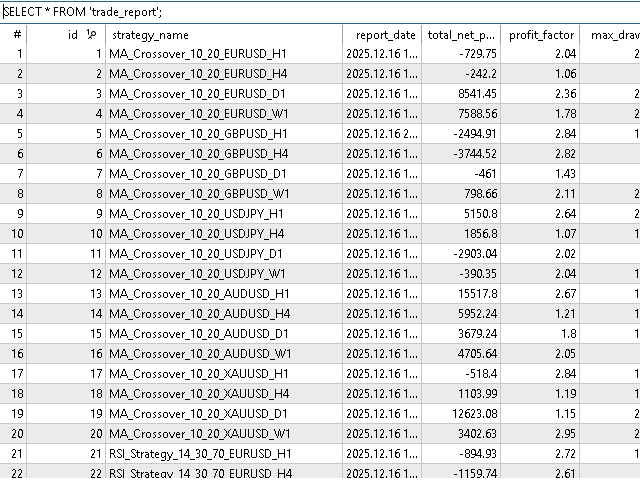
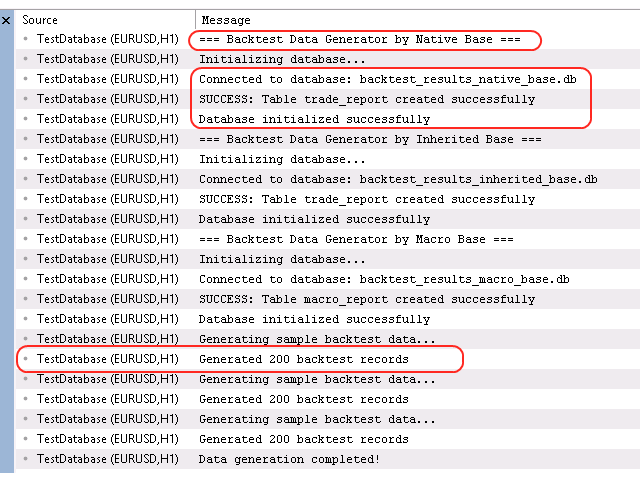
This is the report message of the initializing the database by using the sample code. There are three sample code for creating database by each model that are printed respectively in the below report messages.
Output:
Next, we can easily access by this code to select one of the rows we need:
...
...
...
// Select example
   if(db.Select(report_model))
     {
      PrintFormat("Found record : %s", report_model["strategy_name"].GetValue());
     }

// SelectAll example
   CArrayObj found_array;

   int items = db.SelectAll(found_array,report_model,"profit_factor > 1.0");
   Print("items : ", items);
   if(items>0)
     {
      for(int i=0; i<found_array.Total(); i++)
        {
         CBaseModel* _temp = found_array.At(i);
         if(_temp!=NULL)
            PrintFormat("Found record : %s", _temp["strategy_name"].GetValue());
        }

     }
...
...
...
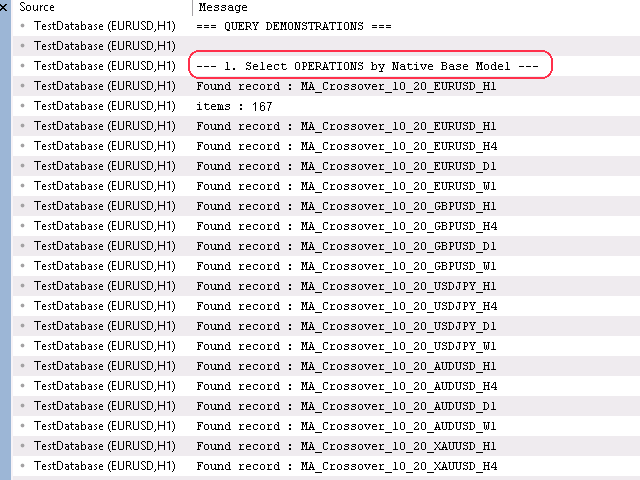
As you can see, to get the first value from the database, we called the Select method that provides the SELECT from SQL command from CDataBaseORM object without the WHERE condition, and in the next part, we wanted it to find and return multiple values for us, so we called the SelectAll method with the WHERE condition " profit_factor > 1.0 " , and as you can see, this command was executed correctly and transferred the values we wanted.
Output:
2. By using the custom CTradeReportModel object
Here, we are dealing with using the custom CTradeReportModel class that we implemented:
...
...
...
bool              InitializeDatabase2()
     {

      Print("=== Backtest Data Generator by Inherited Base ===");

      Print("Initializing database...");

      if(!m_database.Connect())
        {
         Print("Failed to connect to database");
         return false;
        }

      // Create tables
      trade_model.DefineFields();
      if(!m_database.CreateTable(trade_model))
        {
         Print("Failed to create table");
         return false;
        }

      Print("Database initialized successfully");
      return true;
     }
...
...
...
Here, after connecting to our desired database, we call the DefineFields method, which, as in the previous example, will automatically call the AddFields we put in this method. And then we create the table using the database ORM object and an object of the custom model.
...
...
...
               // Generate realistic backtest results
               trade_model.SetStrategyName(strategies[i] + "_" + symbols[j] + "_" + timeframes[k]);
               trade_model.SetReportDate(TimeCurrent() - (MathRand() % 2592000)); // Random date in last month
               trade_model.SetTotalNetProfit(GenerateRealisticProfit());
               trade_model.SetProfitFactor(1.0 + (MathRand() % 200) / 100.0); // 1.0 to 3.0
               trade_model.SetMaxDrawdown(5.0 + (MathRand() % 250) / 10.0); // 5% to 30%
               trade_model.SetTotalTrades(50 + (MathRand() % 450)); // 50 to 500 trades

               string parameters = StringFormat("Symbol=%s, Timeframe=%s, Strategy=%s",
                                                symbols[j], timeframes[k], strategies[i]);
               trade_model.SetParameters(parameters);

               if(m_database.Insert(trade_model))
...
...
...
Here we act like the previous example, but with a small difference, in addition to being able to use the dictionary state of our model, we can also use the getter/setter states of the custom methods that we implemented. Next, like in the previous example, we can get the values we want from the database with the WHERE command, as follows:
...
...
...
// Select example
   CTradeReportModel found_by_select;
   if(db.Select(found_by_select))
     {
      PrintFormat("Found record : %s", found_by_select.GetStrategyName());
     }

// SelectAll example
   CTradeReportModel found_by_selectAll;
   CArrayObj found_array;
   if(db.SelectAll(found_array,found_by_selectAll,"profit_factor > 1.0")>0)
     {
      for(int i=0; i<found_array.Total(); i++)
        {
         CTradeReportModel* _temp = found_array.At(i);
         PrintFormat("Found record : %s", _temp.GetStrategyName());
        }

     }
 ...
 ...
 ...
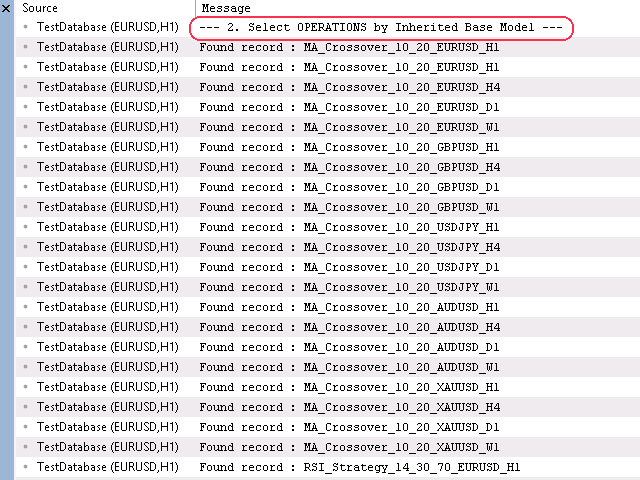
Here, the CArrayObj class returns an object of our custom model class, which is the CTradeReportModel class, and we call the getter method we defined to get the values. As you can see, this correctly returns the values too by printing the objects returned by SelectAll method.
Output:
3. By using the power of macro object
In this part, we can easily do the same things as in the example we just provided, except that we use the custom class we created with the macro:
...
...
...
bool              InitializeDatabase3()
     {

      Print("=== Backtest Data Generator by Macro Base ===");

      Print("Initializing database...");

      if(!m_database.Connect())
        {
         Print("Failed to connect to database");
         return false;
        }

      // Create tables
      macro_model.DefineFields();
      if(!m_database.CreateTable(macro_model))
        {
         Print("Failed to create table");
         return false;
        }

      Print("Database initialized successfully");
      return true;
     }
...
...
...
Here we do the same thing we did recently, with the custom macro class, and transfer the sample values to the database:
...
...
...
             // Generate realistic backtest results
               macro_model.Set_strategy_name(strategies[i] + "_" + symbols[j] + "_" + timeframes[k]);
               macro_model.Set_report_date(TimeCurrent() - (MathRand() % 2592000)); // Random date in last month
               macro_model.Set_total_net_profit(GenerateRealisticProfit());
               macro_model.Set_profit_factor(1.0 + (MathRand() % 200) / 100.0); // 1.0 to 3.0
               macro_model.Set_max_drawdown_relative(5.0 + (MathRand() % 250) / 10.0); // 5% to 30%
               macro_model.Set_total_trades(50 + (MathRand() % 450)); // 50 to 500 trades

               string parameters = StringFormat("Symbol=%s, Timeframe=%s, Strategy=%s",
                                                symbols[j], timeframes[k], strategies[i]);
               macro_model.Set_parameters(parameters);

               if(m_database.Insert(macro_model))
...
...
...
As you can see, the automatic getter/setter methods are implemented by the macro definition. And then, as in the previous example, to get the desired values by the WHERE condition, we call the SelectAll method from the database:
...
...
...
// Select example
   CMyDBClassModel found_by_select;
   if(db.Select(found_by_select))
     {
      PrintFormat("Found record : %s", found_by_select.Get_strategy_name());
     }

// SelectAll example
   CMyDBClassModel found_by_selectAll;
   CArrayObj found_array;
   if(db.SelectAll(found_array,found_by_selectAll,"profit_factor > 1.0")>0)
     {
      for(int i=0; i<found_array.Total(); i++)
        {
         CMyDBClassModel* _temp = found_array.At(i);
         PrintFormat("Found record : %s", _temp.Get_strategy_name());
        }

     }
...
...
...
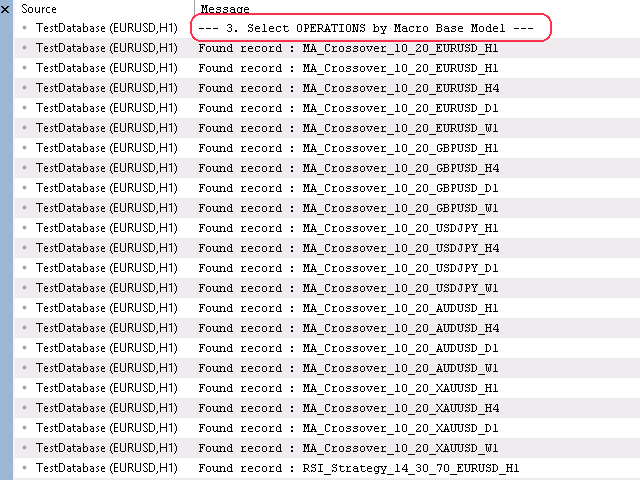
Here, an object from the CMyDBClassModel class is returned in the model class, and we print the value using the getter method that found by SelectAll method.
Output:
4. Reflection binding interface
In an another example to bind our variables by reflection that we implemented as overridden OnGet/OnSet methods recently, we do like as below:
...
...
...

   // creating fields
   CORMField *id=new CORMField("id",FIELD_TYPE_INT);
   id.PrimaryKey(true);
   id.AutoIncrement(true);

   CORMField *name=new CORMField("name",FIELD_TYPE_STRING);
   name.SetValue("Alice");

   // adding fields to model
   model.AddField(id);
   model.AddField(name);

   // spending the model fields to ORM database
   orm.CreateTable(model);
   orm.Insert(model);

...
...
...
First we created the column fields then adding them to the model created from CBaseModel class, then will be spent to ORM database to be filled into the desired database. In an another way, we used the model inherited from our CBaseModel entity, that performs the reflection API too:
...
...
...

   // creating ORM DB
   CDatabaseORM db;
   db.Connect("trade.db", db_flags);

   // definging the inherited model
   TradeReportModel report;
   report.Symbol   = "EURUSD";
   report.Lots     = 0.10;
   report.OpenTime = TimeCurrent();

   // spending the custom model to ORM DB
   db.CreateTable(report);
   db.Insert(report);

   // Retrieving data from DB by custom model
   TradeReportModel loaded;
   if(db.Select(loaded,"Symbol='EURUSD'"))
     {
      Print("Loaded: ",loaded.Symbol," ",loaded.Lots);
     }

   // Updating data
   loaded.Lots = 0.20;
   db.Update(loaded);

   // Soft delete
   db.Delete(loaded);

...
...
...
By these 4 easy ways, we can easily connect to the database, without the long and tedious SQL commands.
Benefits and Use Cases and Key Advantages:
- Type Safety: Compile-time checking of field names and types
- Performance: Efficient SQL generation and execution
- Flexibility: Support for complex queries, transactions
Conclusion
This powerful ORM framework system simplifies database development and brings modern C# ORM concept database management capabilities to MQL5, providing a robust foundation for storing and analyzing trading strategy data. Whether you're building a comprehensive backtesting system, tracking live trading performance, or conducting strategy research, this ORM provides the tools you need for effective data management in MetaTrader 5, and we learned how to connect, send and retrieve data from the database easily. The complete source code is available in the accompanying header files, Is suitable for professional and large-scale projects, ready to be integrated into your MQL5 projects. The following table describes all the source code files that accompany the article.
| File Name | Description |
|---|---|
| BaseModel v1.0.mqh BaseModel v2.0.mqh | File containing the base class models for communicating between data and database |
| DatabaseORM v1.0.mqh DatabaseORM v2.0.mqh | File containing the ORM framework that gets the base model object to execute SQL query commands |
| Database.mqh | File containing the encapsulated MQL5 SQL base functions |
| MacroModel.mqh | File containing the macro definitions to create custom base class immediately |
| MyDBClassModel v1.0.mqh | File containing the sample code of custom base class created by macro definition |
| TradeReportModel v1.0.mqh TradeReportModel v2.0.mqh | File containing the sample code of inherited class from CBaseModel |
| ORMError.mqh | File containing the database/SQL error definitions |
| ORMField.mqh | File containing the database column field collection |
| TestDatabase.mq5 TestDatabase v2.mq5 | File containing the sample usage of each models such as CBase Model | Inherited Model | Macro Model | Reflection Binding Model |
Warning: All rights to these materials are reserved by MetaQuotes Ltd. Copying or reprinting of these materials in whole or in part is prohibited.
This article was written by a user of the site and reflects their personal views. MetaQuotes Ltd is not responsible for the accuracy of the information presented, nor for any consequences resulting from the use of the solutions, strategies or recommendations described.

 Visualizing Strategies in MQL5: Laying Out Optimization Results Across Criterion Charts
 From Novice to Expert: Statistical Validation of Supply and Demand Zones
 Larry Williams Market Secrets (Part 9): Patterns to Profit
 Market Simulation (Part 10): Sockets (IV)

- Free trading apps
- Over 8,000 signals for copying
- Economic news for exploring financial markets
You agree to website policy and terms of use