
Tracking Account Dynamics: Balance, Equity, and Floating P/L Visualization in MQL5
 3 579
3 579
 3
3

Introduction
Most traders focus heavily on their chart analysis, indicators, and trading strategies, but surprisingly few pay close attention to how their actual account behaves over time. MetaTrader 5 provides you with access to your current balance and equity figures, but it doesn't provide a historical view of how these numbers have moved together or apart since you started trading. You can see where you are now, but not the path you took to get there.
This becomes a problem when you want to analyze your trading performance beyond simple win rates and profit totals. Understanding the relationship between your balance, equity, and floating profit or loss over time reveals patterns about your risk management, position-holding behavior, and overall account health. Without this visual context, you're essentially trading blind to your account's statistical story.
The usual workaround is exporting data to spreadsheets or using third party analytics platforms. These solutions work, but they pull you away from your trading terminal and often require manual updates. What if you could see all of this directly in MetaTrader 5, plotted as clean curves in a sub-window, updating automatically as you trade?
This article walks you through building a custom indicator that does exactly that. It reconstructs your complete trading history and plots four key curves: your starting balance as a reference line, your balance progression, your equity movement, and your floating profit or loss. Everything runs inside MetaTrader 5 with no external dependencies. The indicator samples data once per bar to keep performance smooth while tracking positions across all symbols you trade. By the end, you'll have a working analytical tool that reveals how your account actually behaves under real trading conditions.
The Visualization Approach
Standard MetaTrader 5 account monitoring shows only isolated snapshots, making it hard to understand how results were actually achieved. By treating balance, equity, and floating P/L as continuous time series, these metrics become visual narratives that reveal holding behavior, drawdowns, and recovery dynamics.Per-bar sampling provides the right balance between accuracy and performance, aligning account curves with price charts while remaining efficient over long histories. Multi-symbol tracking is made practical through price caching, avoiding severe performance issues.
Accurate reconstruction requires processing the full deal history in chronological order, starting from the initial deposit and maintaining position state over time. Done correctly, this produces four curves that fully describe the account’s historical behavior.
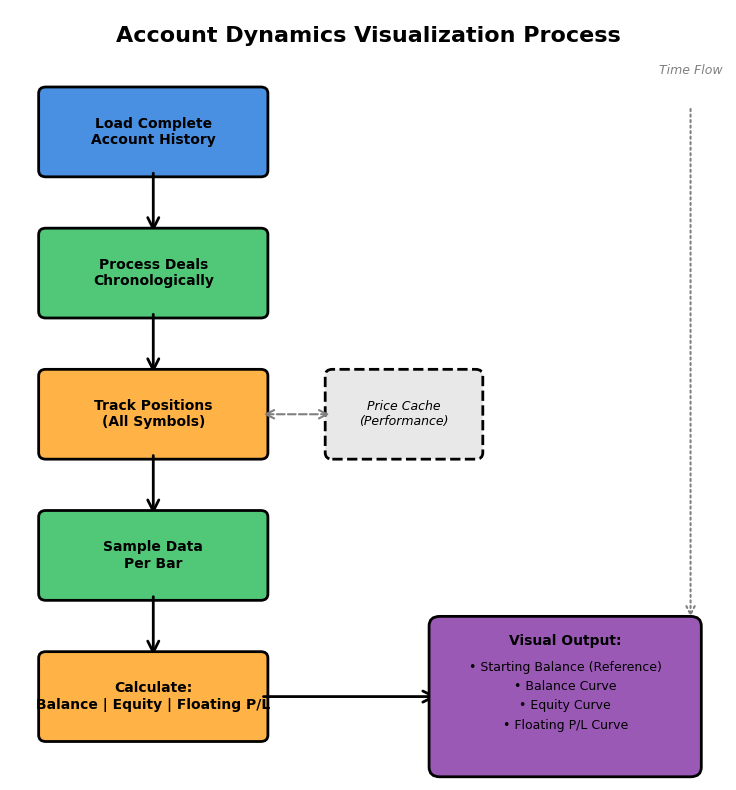
Figure 1: Account dynamics visualization workflow showing the process from historical data loading to final curve output
Implementation in MQL5
Indicator Properties and Buffer Setup
The indicator runs in a separate sub-window and plots four distinct curves. Here's the complete property and buffer declaration section from the indicator:
//+------------------------------------------------------------------+
//|                                   AccountDynamicsIndicator.mq5   |
//|                                  Copyright 2025, Persist FX      |
//|                                     Educational Analysis Tool    |
//+------------------------------------------------------------------+
#property copyright "Copyright 2025, Persist FX"
#property link      "https://www.mql5.com"
#property version   "2.0"
#property description "Visual analysis of account balance, equity, and floating P/L dynamics."
#property description "Displays historical account statistics for analytical purposes."
#property indicator_separate_window
#property indicator_buffers 4
#property indicator_plots   4

//--- plot Starting Balance (Reference Line)
#property indicator_label1  "Starting Balance"
#property indicator_type1   DRAW_LINE
#property indicator_color1  clrGray
#property indicator_style1  STYLE_DASH
#property indicator_width1  1

//--- plot Balance
#property indicator_label2  "Balance"
#property indicator_type2   DRAW_LINE
#property indicator_color2  clrOrange
#property indicator_style2  STYLE_SOLID
#property indicator_width2  2

//--- plot Equity
#property indicator_label3  "Equity"
#property indicator_type3   DRAW_LINE
#property indicator_color3  clrDodgerBlue
#property indicator_style3  STYLE_SOLID
#property indicator_width3  2

//--- plot Floating P/L
#property indicator_label4  "Floating P/L"
#property indicator_type4   DRAW_LINE
#property indicator_color4  clrLime
#property indicator_style4  STYLE_SOLID
#property indicator_width4  1

//--- input parameters
input int InpHistoryBars = 0;           // Number of bars to display (0 = all available)
input int InpUpdatePeriod = 300;        // History update period in seconds (default 5 min)

//--- indicator buffers
double StartingBalanceBuffer[];
double BalanceBuffer[];
double EquityBuffer[];
double FloatingBuffer[];
The starting balance uses a dashed gray line to distinguish it as a reference point rather than dynamic data. Balance and equity get thicker solid lines since they're the primary metrics traders focus on. The InpUpdatePeriod defaults to 300 seconds (5 minutes), balancing responsiveness against computational overhead when checking for new closed trades.
Data Structures for Historical Tracking
The indicator needs to maintain historical state across multiple calculation cycles. We use three custom structures to organize this data efficiently.
//--- structure to store balance changes over time
struct BalancePoint
{
   datetime time;
   double balance;
};

//--- structure for position tracking
struct PositionInfo
{
   ulong ticket;
   string symbol;
   datetime openTime;
   datetime closeTime;
   double openPrice;
   double volume;
   ENUM_POSITION_TYPE type;
   double tickSize;
   double tickValue;
};

//--- price cache for multi-symbol efficiency
struct PriceCache
{
   string symbol;
   datetime time;
   double price;
};
The BalancePoint structure tracks when your balance changed and what the new value was. Each closed trade creates a new balance point. The PositionInfo structure stores everything needed to calculate historical floating profit and loss for a position. Notice we cache tickSize and tickValue here rather than fetching them repeatedly during calculations. This is a critical performance optimization when dealing with multiple symbols.
The PriceCache structure solves a major performance bottleneck. Without caching, we'd call CopyRates() for the same symbol and time repeatedly as we process historical bars. By storing retrieved prices, we transform an O(n²) operation into something closer to O(n).
BalancePoint balanceHistory[];
PositionInfo positionCache[];
datetime lastHistoryUpdate = 0;
datetime earliestDealTime = 0;
double initialDeposit = 0;
int totalDealsProcessed = 0;

//--- price cache for multi-symbol efficiency
PriceCache priceCache[];
These global arrays persist between OnCalculate() calls, maintaining state across the indicator's lifetime. The totalDealsProcessed variable lets us detect when new trades have closed without rebuilding history unnecessarily. The earliestDealTime determines where our curves should start on the chart, preventing us from attempting calculations before any trading activity existed.
Initialization Process (OnInit)
The OnInit() function executes once when the indicator loads. This is where we connect our buffer arrays to the indicator system and build the complete account history.
int OnInit()
{
   //--- indicator buffers mapping
   SetIndexBuffer(0, StartingBalanceBuffer, INDICATOR_DATA);
   SetIndexBuffer(1, BalanceBuffer, INDICATOR_DATA);
   SetIndexBuffer(2, EquityBuffer, INDICATOR_DATA);
   SetIndexBuffer(3, FloatingBuffer, INDICATOR_DATA);

   //--- set arrays as series
   ArraySetAsSeries(StartingBalanceBuffer, true);
   ArraySetAsSeries(BalanceBuffer, true);
   ArraySetAsSeries(EquityBuffer, true);
   ArraySetAsSeries(FloatingBuffer, true);

   //--- set precision
   IndicatorSetInteger(INDICATOR_DIGITS, 2);

   //--- set indicator short name
   IndicatorSetString(INDICATOR_SHORTNAME, "Account Dynamics");

   //--- initialize buffers
   ArrayInitialize(StartingBalanceBuffer, EMPTY_VALUE);
   ArrayInitialize(BalanceBuffer, EMPTY_VALUE);
   ArrayInitialize(EquityBuffer, EMPTY_VALUE);
   ArrayInitialize(FloatingBuffer, EMPTY_VALUE);

   //--- build complete account history
   if(!BuildAccountHistory())
   {
      Print("Warning: Could not build complete account history");
   }

   lastHistoryUpdate = TimeCurrent();

   return(INIT_SUCCEEDED);
}
The SetIndexBuffer() function binds our arrays to the indicator's plotting system. The second parameter, INDICATOR_DATA tells MQL5 these buffers contain values to be plotted, as opposed to INDICATOR_CALCULATIONS which would hold intermediate values not meant for display. Buffer indices must match the order we declared in the property section.
The ArraySetAsSeries() calls are essential. By default, MQL5 arrays index from oldest to newest, but chart data naturally flows from newest to oldest. Setting arrays as series reverses the indexing so that index 0 always represents the most recent bar, matching how the time series arrays work in OnCalculate(). Without this, our data would plot backwards.
We initialize all buffers with EMPTY_VALUE, which tells the terminal not to draw anything at those points. This prevents spurious lines from appearing in areas where we have no data. The BuildAccountHistory() function does the heavy lifting of reconstructing your trading history, which we'll examine next.
Historical Data Reconstruction (BuildAccountHistory)
This function reconstructs your complete trading history by processing every deal your account has executed. It's the most complex part of the indicator but also the most critical for accurate visualization.
bool BuildAccountHistory()
{
   datetime toDate = TimeCurrent();
   datetime fromDate = 0; // From account inception

   if(!HistorySelect(fromDate, toDate))
   {
      Print("Error: Failed to load history - ", GetLastError());
      return false;
   }

   //--- clear previous data
   ArrayResize(balanceHistory, 0);
   ArrayResize(positionCache, 0);
   ArrayResize(priceCache, 0);

   int totalDeals = HistoryDealsTotal();
   totalDealsProcessed = totalDeals;

   if(totalDeals == 0)
   {
      Print("No trading history found");
      initialDeposit = AccountInfoDouble(ACCOUNT_BALANCE);
      AddBalancePoint(TimeCurrent(), initialDeposit);
      earliestDealTime = TimeCurrent();
      return true;
   }

   Print("Processing ", totalDeals, " deals from account history...");
The HistorySelect() function loads deal history into memory. By passing fromDate = 0, we request everything from the account's first transaction. This is not the same as trade history. Deals include deposits, withdrawals, balance operations, and both entry and exit trades. The function returns false if the history server is unavailable or if there's a connection issue.
After loading, HistoryDealsTotal() tells us how many deal records exist. If this is zero, we're likely on a fresh account with no trading activity. In that case, we create a single balance point at the current balance and return. For accounts with activity, we need to identify the initial deposit and earliest trading timestamp.
//--- find earliest deal and initial deposit
   earliestDealTime = TimeCurrent();
   double runningBalance = 0;
   bool foundInitialDeposit = false;

   for(int i = 0; i < totalDeals; i++)
   {
      ulong dealTicket = HistoryDealGetTicket(i);
      if(dealTicket == 0) continue;

      datetime dealTime = (datetime)HistoryDealGetInteger(dealTicket, DEAL_TIME);
      ENUM_DEAL_TYPE dealType = (ENUM_DEAL_TYPE)HistoryDealGetInteger(dealTicket, DEAL_TYPE);

      //--- find first balance operation (deposit/credit)
      if(!foundInitialDeposit && (dealType == DEAL_TYPE_BALANCE || dealType == DEAL_TYPE_CREDIT))
      {
         initialDeposit = HistoryDealGetDouble(dealTicket, DEAL_PROFIT);
         runningBalance = initialDeposit;
         earliestDealTime = dealTime;
         foundInitialDeposit = true;
         AddBalancePoint(dealTime, runningBalance);
      }

      if(dealTime < earliestDealTime)
         earliestDealTime = dealTime;
   }

   //--- if no initial deposit found, use first deal as reference
   if(!foundInitialDeposit)
   {
      initialDeposit = AccountInfoDouble(ACCOUNT_BALANCE);
      runningBalance = initialDeposit;
      AddBalancePoint(earliestDealTime, initialDeposit);
   }
The HistoryDealGetTicket() function retrieves each deal's unique identifier sequentially. We then use HistoryDealGetInteger() and HistoryDealGetDouble() to extract specific deal properties. The DEAL_TYPE_BALANCE represents deposits or withdrawals, while DEAL_TYPE_CREDIT represents bonus credits. The first occurrence of either becomes our initial deposit, establishing the starting point for all subsequent calculations.
Some accounts might not have explicit deposit deals if they were created with starting capital. In that case, we fall back to using the current balance as the reference point. This isn't perfect but provides a reasonable approximation for the visualization.
//--- process all trading deals chronologically
   for(int i = 0; i < totalDeals; i++)
   {
      ulong dealTicket = HistoryDealGetTicket(i);
      if(dealTicket == 0) continue;

      datetime dealTime = (datetime)HistoryDealGetInteger(dealTicket, DEAL_TIME);
      ENUM_DEAL_ENTRY dealEntry = (ENUM_DEAL_ENTRY)HistoryDealGetInteger(dealTicket, DEAL_ENTRY);
      ENUM_DEAL_TYPE dealType = (ENUM_DEAL_TYPE)HistoryDealGetInteger(dealTicket, DEAL_TYPE);

      //--- skip non-trading deals in this loop
      if(dealType == DEAL_TYPE_BALANCE || dealType == DEAL_TYPE_CREDIT)
         continue;

      double dealProfit = HistoryDealGetDouble(dealTicket, DEAL_PROFIT);
      double dealSwap = HistoryDealGetDouble(dealTicket, DEAL_SWAP);
      double dealCommission = HistoryDealGetDouble(dealTicket, DEAL_COMMISSION);
      ulong positionId = HistoryDealGetInteger(dealTicket, DEAL_POSITION_ID);
      string symbol = HistoryDealGetString(dealTicket, DEAL_SYMBOL);
Now we iterate through all deals again, this time focusing on trading activity. The DEAL_ENTRY property tells us whether a deal opened a position (DEAL_ENTRY_IN), closed it (DEAL_ENTRY_OUT), or reversed it (DEAL_ENTRY_INOUT). This distinction is crucial because only closing deals affects balance, but we need to track opening deals to calculate historical floating profit and loss.
//--- handle position entry
      if(dealEntry == DEAL_ENTRY_IN)
      {
         int size = ArraySize(positionCache);
         ArrayResize(positionCache, size + 1);

         positionCache[size].ticket = positionId;
         positionCache[size].symbol = symbol;
         positionCache[size].openTime = dealTime;
         positionCache[size].closeTime = 0;
         positionCache[size].openPrice = HistoryDealGetDouble(dealTicket, DEAL_PRICE);
         positionCache[size].volume = HistoryDealGetDouble(dealTicket, DEAL_VOLUME);
         positionCache[size].type = (dealType == DEAL_TYPE_BUY) ? POSITION_TYPE_BUY : POSITION_TYPE_SELL;

         //--- cache symbol specifications
         positionCache[size].tickSize = SymbolInfoDouble(symbol, SYMBOL_TRADE_TICK_SIZE);
         positionCache[size].tickValue = SymbolInfoDouble(symbol, SYMBOL_TRADE_TICK_VALUE);

         if(positionCache[size].tickSize == 0)
            positionCache[size].tickSize = SymbolInfoDouble(symbol, SYMBOL_POINT);
      }
When a position opens, we store all its details in the positionCache array. The closeTime is set to zero, indicating the position is still conceptually open in this historical reconstruction. We immediately fetch and cache the symbol's tick specifications using SymbolInfoDouble(). These values determine how price movements translate to profit and loss. Caching them here means we never have to fetch them again during floating P/L calculations, saving thousands of redundant lookups.
//--- handle position exit (balance change)
      else if(dealEntry == DEAL_ENTRY_OUT || dealEntry == DEAL_ENTRY_INOUT)
      {
         //--- mark position as closed
         for(int j = 0; j < ArraySize(positionCache); j++)
         {
            if(positionCache[j].ticket == positionId && positionCache[j].closeTime == 0)
            {
               positionCache[j].closeTime = dealTime;
               break;
            }
         }

         //--- update balance
         double balanceChange = dealProfit + dealSwap + dealCommission;
         if(balanceChange != 0)
         {
            runningBalance += balanceChange;
            AddBalancePoint(dealTime, runningBalance);
         }
      }
   }

   Print("History built: ", ArraySize(balanceHistory), " balance points, ",
         ArraySize(positionCache), " positions tracked, Initial deposit: ", initialDeposit);

   return true;
}
When a position closes, we find its entry in the cache and mark it closed by setting the closeTime. This is important because our floating P/L calculator needs to know whether a position was open at any given historical moment. The balance only changes when trades close, so we calculate the net effect of profit, swap, and commission, then add a new balance point to our history. The AddBalancePoint() helper function simply appends this data to the balanceHistory array.
Main Calculation Loop (OnCalculate)
The OnCalculate() function executes every time new price data arrives or when the user scrolls the chart. This is where we populate the indicator buffers with calculated values for each visible bar.
int OnCalculate(const int rates_total,
                const int prev_calculated,
                const datetime &time[],
                const double &open[],
                const double &high[],
                const double &low[],
                const double &close[],
                const long &tick_volume[],
                const long &volume[],
                const int &spread[])
{
   if(rates_total < 1)
      return 0;

   ArraySetAsSeries(time, true);

   //--- check if we need to update history
   datetime currentTime = TimeCurrent();
   if(currentTime - lastHistoryUpdate > InpUpdatePeriod)
   {
      //--- only rebuild if new deals appeared
      HistorySelect(0, currentTime);
      int currentDeals = HistoryDealsTotal();

      if(currentDeals != totalDealsProcessed)
      {
         Print("New deals detected, rebuilding history...");
         BuildAccountHistory();
      }

      lastHistoryUpdate = currentTime;
   }
The rates_total parameter tells us how many bars exist on the chart, while prev_calculated indicates how many we've already processed. On the first call, prev_calculated is zero, meaning we need to calculate everything. On subsequent calls, we typically only need to update the most recent bar. The time series arrays passed as parameters are not automatically series indexed, so we call ArraySetAsSeries(time, true) to align them with our buffer indexing.
The periodic history check is a smart optimization. Instead of rebuilding on every tick, we check at configurable intervals whether new deals have appeared. By comparing HistoryDealsTotal() with our stored totalDealsProcessed, we know instantly if anything changed. Only then do we incur the cost of rebuilding the complete history.
//--- calculate bars to process
   int limit = rates_total - prev_calculated;
   if(prev_calculated == 0)
      limit = rates_total;

   if(InpHistoryBars > 0 && limit > InpHistoryBars)
      limit = InpHistoryBars;

   //--- get current account values
   double currentBalance = AccountInfoDouble(ACCOUNT_BALANCE);
   double currentEquity = AccountInfoDouble(ACCOUNT_EQUITY);
The limit variable determines how many bars we need to process. When prev_calculated is zero, we process all bars. Otherwise, we only process new bars that have appeared since the last call. If the user specified a maximum history length via InpHistoryBars, we respect that limit. The AccountInfoDouble() function retrieves live account values using predefined constants ACCOUNT_BALANCE and ACCOUNT_EQUITY.
//--- process each bar
   for(int i = 0; i < limit; i++)
   {
      datetime barTime = time[i];

      //--- before earliest deal, no data available
      if(barTime < earliestDealTime)
      {
         StartingBalanceBuffer[i] = EMPTY_VALUE;
         BalanceBuffer[i] = EMPTY_VALUE;
         EquityBuffer[i] = EMPTY_VALUE;
         FloatingBuffer[i] = EMPTY_VALUE;
         continue;
      }

      //--- starting balance is constant horizontal line
      StartingBalanceBuffer[i] = initialDeposit;

      //--- for the most recent bar, use live account data
      if(i == 0)
      {
         BalanceBuffer[i] = currentBalance;
         FloatingBuffer[i] = currentEquity - currentBalance;
         EquityBuffer[i] = currentEquity;
      }
      else
      {
         //--- get historical balance at this bar
         double balanceAtTime = GetBalanceAtTime(barTime, currentBalance);

         //--- calculate historical floating P/L
         double floatingPL = CalculateFloatingPLAtTime(barTime);

         BalanceBuffer[i] = balanceAtTime;
         FloatingBuffer[i] = floatingPL;
         EquityBuffer[i] = balanceAtTime + floatingPL;
      }
   }

   return rates_total;
}
For bars before your first trade, we set all buffers to EMPTY_VALUE so nothing plots. The starting balance line gets the constant initialDeposit value at every bar, creating the horizontal reference line. Index 0 always represents the current bar, where we use live account data directly. For historical bars, we call helper functions to retrieve the balance at that specific time and calculate what the floating profit or loss was. Equity is simply balance plus floating P/L at any given moment.
Returning rates_total tells the terminal we successfully processed all available bars. This value becomes prev_calculated on the next call, allowing incremental updates.
Floating P/L Calculation
The floating profit and loss calculation is where multi-symbol complexity lives. We need helper functions to retrieve historical balance, calculate position valuations, and cache prices efficiently.
double GetBalanceAtTime(datetime targetTime, double currentBalance)
{
   int historySize = ArraySize(balanceHistory);

   if(historySize == 0)
      return currentBalance;

   //--- if before first balance point, return initial deposit
   if(targetTime < balanceHistory[0].time)
      return initialDeposit;

   //--- find the most recent balance point before target time
   double balance = initialDeposit;

   for(int i = 0; i < historySize; i++)
   {
      if(balanceHistory[i].time <= targetTime)
         balance = balanceHistory[i].balance;
      else
         break;
   }

   return balance;
}
This function walks through our balanceHistory array to find what the balance was at any given time. Balance only changes when trades close, so we're looking for the most recent balance point that occurred before or at the target time. If the target time is before our first recorded balance change, we return the initial deposit. This creates the stepped appearance of the balance curve, where it stays flat between closed trades.
double CalculateFloatingPLAtTime(datetime barTime)
{
   double totalPL = 0;
   int positionsProcessed = 0;

   //--- iterate through all cached positions
   for(int i = 0; i < ArraySize(positionCache); i++)
   {
      //--- skip if position not yet opened at bar time
      if(positionCache[i].openTime > barTime)
         continue;

      //--- skip if position already closed at bar time
      if(positionCache[i].closeTime != 0 && positionCache[i].closeTime <= barTime)
         continue;

      //--- position was open at this bar time, calculate its P/L
      double priceAtTime = GetCachedPrice(positionCache[i].symbol, barTime);

      if(priceAtTime <= 0)
         continue;

      //--- calculate P/L using cached tick size and value
      if(positionCache[i].tickSize <= 0 || positionCache[i].tickValue <= 0)
         continue;

      double priceDiff = (positionCache[i].type == POSITION_TYPE_BUY) ?
                         priceAtTime - positionCache[i].openPrice :
                         positionCache[i].openPrice - priceAtTime;

      double positionPL = (priceDiff / positionCache[i].tickSize) *
                          positionCache[i].tickValue *
                          positionCache[i].volume;

      totalPL += positionPL;
      positionsProcessed++;
   }

   return totalPL;
}
This is the computational core of the indicator. For each historical bar, we iterate through every position we've tracked and determine if it was open at that moment. A position is considered open if its openTime is before or at the bar time and either it never closed or its closeTime is after the bar time. For each open position, we fetch the price at that bar and calculate profit or loss.
The profit calculation uses the standard formula: price difference divided by tick size gives us the number of ticks moved, multiplied by tick value gives us profit per lot, and multiplied by volume gives total position P/L. For buy positions, profit is current price minus open price. For sells, it's inverted. We accumulate all open positions to get total floating P/L at that moment.
double GetCachedPrice(string symbol, datetime barTime)
{
   //--- check cache first
   for(int i = 0; i < ArraySize(priceCache); i++)
   {
      if(priceCache[i].symbol == symbol && priceCache[i].time == barTime)
         return priceCache[i].price;
   }

   //--- not in cache, fetch price
   double price = 0;

   if(symbol == _Symbol)
   {
      //--- current chart symbol (fastest)
      int shift = iBarShift(_Symbol, Period(), barTime, true);
      if(shift >= 0)
         price = iClose(_Symbol, Period(), shift);
   }
   else
   {
      //--- other symbol, use CopyRates
      MqlRates rates[];
      ArraySetAsSeries(rates, true);
      int copied = CopyRates(symbol, Period(), barTime, 1, rates);

      if(copied > 0)
         price = rates[0].close;
   }

   //--- add to cache
   if(price > 0)
   {
      int cacheSize = ArraySize(priceCache);

      //--- limit cache size to prevent memory issues
      if(cacheSize >= 1000)
      {
         //--- clear oldest 500 entries
         ArrayRemove(priceCache, 0, 500);
         cacheSize = ArraySize(priceCache);
      }

      ArrayResize(priceCache, cacheSize + 1);
      priceCache[cacheSize].symbol = symbol;
      priceCache[cacheSize].time = barTime;
      priceCache[cacheSize].price = price;
   }

   return price;
}
This is the performance optimization that makes multi-symbol tracking feasible. Before fetching any price, we check if we already retrieved it. If found in cache, we return it immediately. If not, we fetch it using either iBarShift() and iClose() for the current chart symbol or CopyRates() for other symbols. The iBarShift() function finds which bar index corresponds to a given time, while CopyRates() pulls historical bar data for any symbol.
After fetching, we add the price to our cache. The cache has a size limit of 1000 entries. When exceeded, we remove the oldest 500 using ArrayRemove(). This prevents memory growth while maintaining enough cache depth to cover typical calculation needs. Without this caching, the indicator would make thousands of redundant CopyRates() calls, causing severe lag.
void OnDeinit(const int reason)
{
   Comment("");
   ArrayFree(balanceHistory);
   ArrayFree(positionCache);
   ArrayFree(priceCache);
}
The deinitialization function cleans up when the indicator is removed or recompiled. We clear the comment area and free all dynamic arrays. While MQL5 handles memory automatically, explicitly freeing large arrays is good practice, especially for indicators that might be reloaded frequently during development.
Live Examples
Loading and Initial Display
When you attach the indicator to any chart, it immediately begins reconstructing your account history and plotting the four curves in a separate subwindow. The process is automatic and requires no additional configuration beyond the optional input parameters. The indicator displays your complete trading journey from the first deposit onwards, regardless of which symbol or timeframe you're viewing.
The visual hierarchy uses color coding to distinguish each metric. The gray dashed line represents your starting balance and remains constant across all bars, serving as the baseline reference. Orange tracks your realized balance, stepping up or down only when trades close. Blue shows equity, which combines balance with unrealized profits or losses from open positions. Green plots the floating profit and loss component separately, making it easy to see how much of your equity is at risk in open trades versus safely locked in as balance.

Figure 2. The indicator runs in a separate sub-window displaying starting balance (gray dashed), balance (orange), equity (blue), and floating P/L (green) curves simultaneously
The sub-window scales automatically to fit all curves, though during periods of significant drawdown or aggressive position sizing, the floating profit and loss fluctuations can dominate the visual space. Traders can adjust the sub-window height by dragging its border if they need more vertical resolution to distinguish between closely spaced curves.
Historical Verification and Pattern Analysis
The indicator's accuracy can be verified by cross-referencing with MetaTrader's account history tab. By identifying the timestamp of your first deposit in the history and scrolling the chart back to that exact date, you should see the starting balance line intersect with both the balance and equity curves at that point. This convergence confirms the indicator correctly identified your account's inception and began tracking from the proper baseline.

Figure 3. Scrolling back to the initial deposit date shows perfect correlation between the indicator's starting balance line and the actual account history, confirming accurate historical reconstruction
As you scroll forward through your trading history, patterns emerge that reveal behavioral characteristics. Extended periods where balance and equity move together indicate either no open positions or positions that are breaking even. When equity diverges significantly above balance, you're holding profitable open positions. Divergence below balance means open losses. The magnitude of this separation relative to your balance tells you how much risk is currently deployed.
Sharp vertical movements in the balance curve mark closed trades. If equity was above balance and then balance jumps up to meet it, you locked in profit. If equity was below and balance drops down, you realized a loss. The floating profit and loss curve explicitly quantifies this unrealized component, oscillating around zero when you have no positions and swinging positive or negative as open trades move in or out of profit. Watching how long floating profit persists before you close positions can reveal whether you tend to take profits quickly or let winners run.
The relationship between these curves also exposes risk management habits. If floating losses regularly approach or exceed your starting balance, you're operating with dangerous leverage. If equity never strays far from balance, you either close positions quickly or use tight stop losses. Traders who average down into losing positions will see equity drift progressively further below balance across multiple entries, then snap back sharply when they finally exit. Each account tells a different story through these statistical signatures.
Conclusion
The indicator turns MetaTrader 5 into a full account analysis tool without external services. It reconstructs the entire trading history and displays balance, equity, and floating P/L as continuous curves, revealing patterns not visible in standard reports. Efficient caching ensures stable performance even with long, multi-symbol histories.The four-curve visualization quickly shows risk profile and trading behavior: drawdown depth, profit-taking speed, and equity growth consistency. This enables decisions based on actual trading behavior rather than assumptions.
The indicator requires no setup, automatically processes all deals, and remains accurate across symbols. The curves update as you trade, building a clear statistical record. It helps detect changes in account dynamics and distinguish strategy improvement from favorable market conditions.
Warning: All rights to these materials are reserved by MetaQuotes Ltd. Copying or reprinting of these materials in whole or in part is prohibited.
This article was written by a user of the site and reflects their personal views. MetaQuotes Ltd is not responsible for the accuracy of the information presented, nor for any consequences resulting from the use of the solutions, strategies or recommendations described.

 Formulating Dynamic Multi-Pair EA (Part 6): Adaptive Spread Sensitivity for High-Frequency Symbol Switching
 Neural Networks in Trading: Hybrid Graph Sequence Models (Final Part)
 Neuroboids Optimization Algorithm 2 (NOA2)
 Triangular and Sawtooth Waves: Analytical Tools for Traders

- Free trading apps
- Over 8,000 signals for copying
- Economic news for exploring financial markets
You agree to website policy and terms of use
Check out the new article: Tracking Account Dynamics: Balance, Equity, and Floating P/L Visualization in MQL5.
Author: Nervada Emeule Adams
great article and indicator. It is very near to a balance+equity tracking indicator. There are a few serioius issues tho, so it is not quite correct. see image.
The red verticle line is when i attached the indicator. The lines are 3k or more above where they should be. ie see the lines of the open candle is correct on the right. The purple line was correct until i changed the indicator settings.
The purple lines are what i added with snipping tool. the light blue line was correct until I changed setting on the indicator, the chart refreshed with the image below. the lines were made incorrect.