

Package-based approach with KnitPkg for MQL5 development
 3 222
3 222
 2
2

Introduction
A trader‑developer often needs to maintain several MQL5 projects (EAs, indicators, utilities) that share the same math and utility code. Today, this reuse is usually done the old way: copying folders between projects and manually editing #include statements. With every update, version drift appears—somewhere there is a new fix, somewhere an old file—and a “pure MetaTrader” build depends on what has already been manually patched in that terminal. What is really needed is a way to implement a component once in Git, version it with SemVer, and include it in different projects so that installation and builds are repeatable on any machine: dependencies are fixed, artifacts are generated automatically (include tree or flat header), and moving code between projects no longer requires editing paths or copy‑pasting files.
This article presents such a workflow for MQL4/MQL5 based on KnitPkg packages: each piece of functionality is defined as a reusable, versioned component and then consumed across projects through a manifest rather than via copy‑paste. Throughout the article, we will see how this approach makes assembly, reuse between EAs/indicators, and publication more robust by turning scattered snippets into structured, dependency‑managed building blocks.
What KnitPkg is
KnitPkg is a Git‑first package and project manager for MQL4/MQL5. It solves the chronic “copy‑paste, manual include, version drift” problem that plagues MetaTrader development by:
- Storing only metadata in a central registry while the source lives in ordinary Git repositories.
- Providing semantic‑versioned dependencies (^, ~, *, etc.) so you can declare exactly which package version you need.
- Generating a lockfilefor reproducible builds.
- Offering two installation modes – include mode(a classic include tree) and flat mode (a single generated header, useful to distribute code in the MQL5 market).
In short, KnitPkg lets you focus on writing clean, testable, Git‑versioned MQL code, while it handles dependency resolution, installation, and compilation.
In this section we provide a brief overview of the main core ideas behind KnitPkg. For a more complete explanation, visit KnitPkg Documentation and KnitPkg Home Page.
1. Manifest. The manifest is the “brain” of a KnitPkg project repository: it tells KnitPkg what this repository is, how to build it, and which dependencies it needs. The manifest is stored in YAML format, in a file named knitpkg.yaml or knitpkg.yml. JSON format is also supported; in that case the file name is knitpkg.json.
2. Projects and Packges. A project is the standard “container”: it can be an indicator, expert, script, library, service, or even a test repository. In KnitPkg projects, your source code typically lives in src/, and KnitPkg automatically generates dependency artifacts (include tree or flat files) under knitpkg/.
A package is a project whose main purpose is to be imported by other projects via dependencies. That means it must organize its code in a predictable way so other people (or your other projects) can #include its headers. Not every project is a package, but every package is a project.
Single and Composite Packages. In KnitPkg, packages come in two flavors:
- Single package: self‑contained, declares no dependencies.
- Composite package: a package that depends on one or more other packages (directly or indirectly).
Composite packages must solve a specific problem. During development, the author wants IntelliSense and unit tests to compile smoothly, but the package depends on code that lives outside the repository. Further, when the package is installed as a dependency by others, the consumer project must receive the real #include directives that point at the installed dependency headers. KnitPkg solves this by combining:
- a development helper include (autocomplete.mqh), and
- installation‑time directives @knitpkg:includethat KnitPkg converts into real #include lines during kp installcommand.
KnitPkg provides specific commands to generate the autocomplete.mqh include and to verify that the directives are correct so the install process will work effectively when the package is consumed by other projects.
Using packages. The implementation style of a package can be structured or object‑oriented, as supported by MQL4 and MQL5. This article does not discuss implementation style, because it depends on the problem addressed by the component, performance constraints, developer preferences, etc.
Regardless of implementation style, thanks to KnitPkg a well‑designed package can be used in several ways:
- Direct code call via KnitPkg dependencies declared in the manifest.
- Through an MQL library: a library encapsulates and exposes the functionality of a package. The library is also created as a KnitPkg project.
- Through an MQL indicator: an indicator can use a package for calculations and then expose the results through its buffers. The indicator plots the data on the chart (acting as a “view” for the package) and also provides information (the calculation) that other EAs can consume. In this way, any EA can obtain the calculation performed by the component via the indicator, just as it would with a native function.
In summary, the advantages of implementing packages with KnitPkg are:
- Each functionality is implemented once in a Git repository, with SemVer versioning.
- The package can be reused in any project, as many times as needed, without duplicated code.
- The package can be reused in the most convenient form for the use case (direct code call, indicator, or library).
3. Unit Tests. KnitPkg encourages the use of unit tests to validate packages. Unit tests are small, repeatable checks that verify specific behaviors of your package code. They help you catch regressions early and—when well‑named—act as executable documentation for how your public API is supposed to behave.
This is especially valuable for packages because packages are meant to be reused as dependencies: when you publish a new package version, you want confidence that core behaviors still work as expected.
Unit tests are declared in the manifest under the compile entry so they are automatically compiled for prompt execution.
4. Registry. KnitPkg is split into two parts:- The CLI: the tool you run locally and interact with directly (example: kp install).
- The registry: a web service that stores metadata extracted from project manifests and serves that metadata to the CLI.
The registry exists so the CLI can reliably discover projects and resolve dependencies, while source code continues to live in Git repositories. It stores manifest metadata for KnitPkg‑managed projects and is used by the CLI to search and query public projects, resolve dependency version ranges into a concrete version, and locate the exact source revision (commit) corresponding to that resolved version. These Git repositories can be hosted on MQL5Forge, GitHub, GitLab, or Bitbucket.
All registered projects can also be browsed through the Registry web interface, which is designed to make it easy for developers and traders to discover the packages, EAs, and indicators they need.
Case study – building reusable packages with KnitPkg
In this case study, the main goal is to assemble and reuse a single calculation (an SMA) across three different artifacts: a package, an indicator, and an EA. The trading rules are intentionally simple; the focus is on how the same component is declared, versioned, installed, and reused without copy‑paste.- The final executable artifact is an EA that opens a long position based on two moving averages, when the short‑term SMA (sma1) crosses up the long‑term SMA (sma2). As a filter, a third SMA (sma3) must satisfy Close > sma1 > sma2 > sma3 before entry is allowed. The position should be closed when sma1 crosses down sma2. The EA must use as little CPU as possible.
- To support the EA, we will create an indicator called KnitPkgSMA, which calculates the simple moving average for the current chart. The SMA should be (re)calculated only on a new bar, not on every tick.
- The SMA calculation code should be hosted in a package so it can be reused.
- The SMA package must accept a generic interface that represents a TimeSeries, where index 0 always represents the most recent price (the index works like “shift”).
- The package that contains the SMA implementation (and future indicators) should be reusable both by the KnitPkgSMA indicator and by any other package or project.
- To allow efficient reuse of the SMA in an EA, a standardized way to check on each tick whether a new bar has formed must be provided.
- If an EA needs to access OHLCV data, it should also do so through a standard time‑series interface (index 0 for the most recent values).
Target package artifacts. In order to accomplish requirements, the following packages were created:
- @douglasrechia/bar– contains the interfaces for TimeSeries and OHLCV bars, as well as functionality to detect the creation of a new bar on each tick. See the Git repository for the package bar.
- @douglasrechia/calc – built on top of the bar package, calc contains the SMA implementation and other future indicators. See the Git repository for the package calc.
Note 1: In KnitPkg, a project is qualified as @<organization>/<repository_name>, where organizationand repository_nameare extracted from the last two elements of the Git URL, both in lowercase.
Note 2: To keep this article consistent even if the repositories evolve over time (new commits), the links point to the commit that represents the latest version of the packages at the time of writing.
1. Exploring the bar package. Following the KnitPkg convention, the headers of the bar package are located in the directory knitpkg/include/<organization>/<project_name>, in this case: knitpkg/include/douglasrechia/bar/Only projects of type package may add code under knitpkg/include/; for all other project types the knitpkg/ directory must not be edited manually.
The headers in knitpkg/include/douglasrechia/bar/ contain the classes and interfaces for TimeSeries, Bar (a time‑series‑style accessor for OHLCV data), and BarWatcher (to detect a new bar on each tick). Readers are encouraged to browse the repository and explore the code.
In the bar repository, the manifest knitpkg.yaml is as below:
target: mql5
type: package
organization: douglasrechia
name: bar
version: 1.1.0
version_description: New constructor for TimeSeriesArray

# Search fields
description: Simple, fast and reliable bar access with time series and new bar detection.
keywords: [ "bar", "array", "timeseries", "demo", "showcase" ]
author: Douglas Rechia
license: MIT

compile:
  - tests/UnitTestsBarArray.mq5
  - tests/UnitTestsBarMqlRates.mq5
  - tests/UnitTestsTimeSeries.mq5
Physically, a package is created in MetaTrader as a Script project. The unit‑test scripts, when compiled, indicate whether the output matches expectations. Let’s now download this package and run its unit tests.
2. Downloading and running the unit tests of the bar package. We assume you’ve already followed the KnitPkg installation instructions and have a fresh MetaTrader installation at `C:\Program Files\MetaTrader 5`.
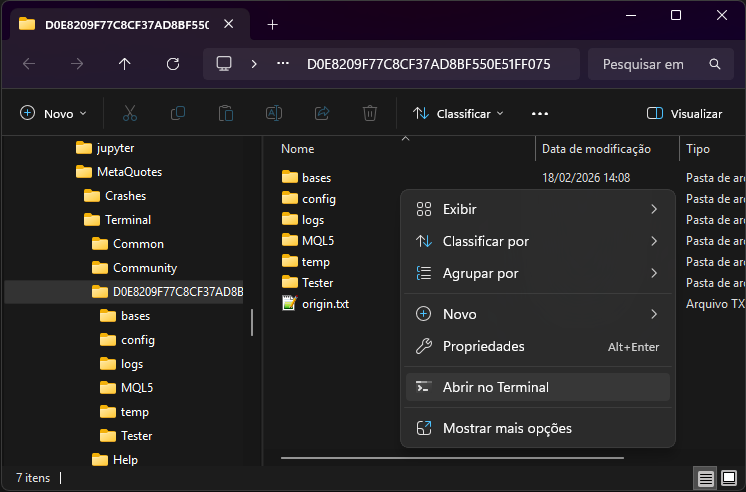
Open MetaTrader and go to File > Open Data Folder. Then right‑click inside the folder and select Open in Terminal:
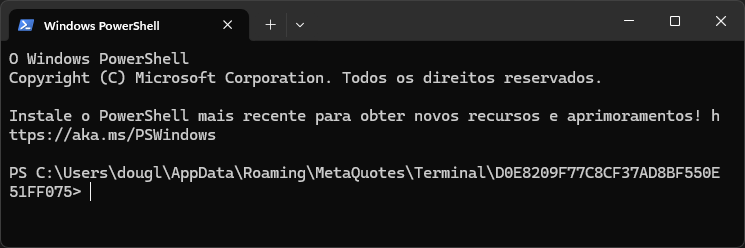
You should now see the terminal opened in the MetaTrader Data folder:
To download and compile the source code of the bar package directly into your MetaTrader environment, run:
kp get mql5 @douglasrechia/bar -v 1.1.0
Note: -v is optional for kp get; here version 1.1.0 is enforced to keep this article consistent with the package code version. If -v is not used, kp get resolves to the latest stable version.
See below how Terminal looks like after kp get:
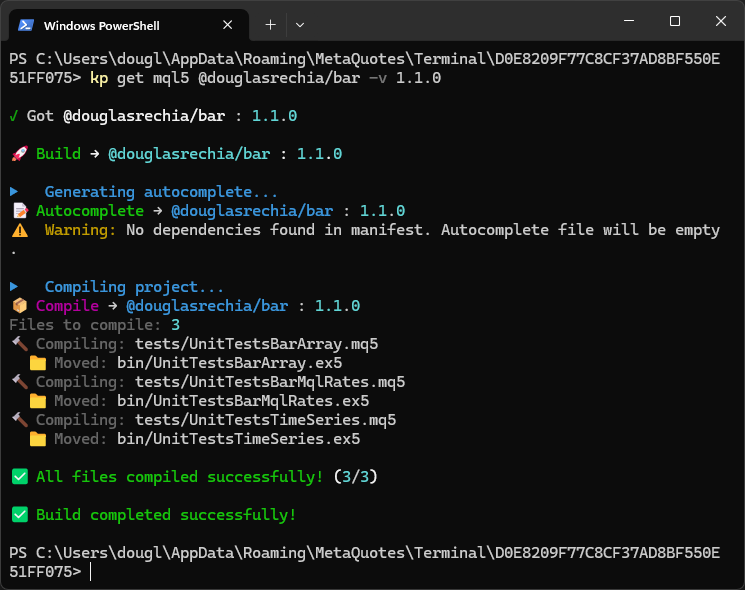
By this way we have not only a local copy of bar source code version 1.1.0, but also the Unit tests binares compiled from the source. Go back to MetaTrader and refresh the Scripts section in the Navigator. You’ll see the test scripts under Scripts/bar/bin/. Run the scripts UnitTestsBarArray, UnitTestsBarMqlRates, and UnitTestsTimeSeries (just double‑click each one). Check the Experts tab in the Toolbox for the test results:

You can open and explore the bar project that was downloaded under Scripts/bar. Notice that this is a Git‑versioned repository.
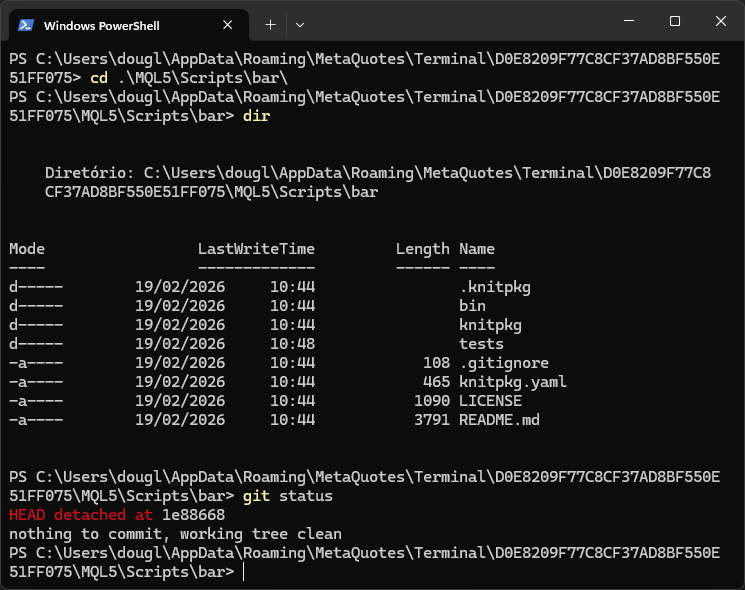
Also notice that the manifest file knitpkg.yamlis present, as well as the headers in knitpkg/include/douglasrechia/bar/, which will be exported to any projects that consume this package.
Note: Use Windows Explorer and your preferred editor to view YAML files and other non‑MQL source files; VS Code is recommended. For editing MQL code, MetaEditor is recommended.
Command get: what happens “under the hood”. When you run kp get (and some other commands do something similar), the KnitPkg CLI contacts the registry to obtain the latest stable version of the requested package. The registry returns the Git repository URL and the commit hash for that version. Then the kp get command clones that repository at the specific hash. This explains why the git status above shows that the repository is in HEAD detached state. For more details, see kp get reference.
The bar package is a Single package, with no dependencies. Let’s now move on to the calc package, where things get more interesting.
Milestone 1 - package installed without copy-paste. At this point, version 1.1.0 of the @douglasrechia/bar package is available in your MetaTrader 5 environment, and the unit tests confirm that it is working as expected. This is also the environment where the package is actively developed: creating development branches, fixing bugs, implementing new features, committing changes, and eventually generating a new package revision — all without touching any project that depends on bar.
3. Package calc: example of a Composite package. As we already know, the calc package is responsible for implementing the SMA calculation. But calc will use @douglasrechia/bar as a dependency: the TimeSeries interface is used as the argument to the moving average calculation function. The advantage is that the SMA function abstracts away the implementation of TimeSeries. It doesn’t matter whether TimeSeries is implemented with a simple array or any other data structure. SMA just needs to perform the calculation assuming that the most recent element is at position 0 of the time series, the previous one at position 1, and so on.
Now let’s repeat the process. Run the following command to get calc version 1.0.1:
kp get mql5 @douglasrechia/calc -v 1.0.1
As an exercise, go back to MetaTrader and refresh the Scripts section in the Navigator. You’ll see the test scripts under Scripts/calc/bin/. Run the tests and check the Experts tab in the Toolbox.
Now let’s explore the calc project and some particular aspects of its code. First, we will look at the calc manifest knitpkg.yaml. Here we have something new: the dependencies entry declares that calc depends on @douglasrechia/bar:
target: mql5
type: package

organization: douglasrechia
name: calc
version: 1.0.1
version_description: 'ATR fix'

description: Common indicators built on @douglasrechia/bar (SMA, ATR, etc)
keywords: [ "indicator", "sma", "atr", "showcase" ]
author: Douglas Rechia
license: MIT

dependencies:
  '@douglasrechia/bar': ^1.0.0

compile:
  - tests/UnitTestSMA.mq5
  - tests/UnitTestATR.mq5
Let’s look at the source code of the SMA function in knitpkg/include/douglasrechia/calc/Calc.mqh. Below we highlight some important points about this header and the specific aspects that are inherent to Composite packages.
The #include to autocomplete.mqh. In Calc.mqh the #include for autocomplete.mqh is what makes it possible to write a composite package “without pain”.
//...............

//------------------------------------------------------------------
// Development autocomplete — resolves dependencies and enables
// MetaEditor IntelliSense; automatically neutralized by KnitPkg
// installer.
// Run `kp autocomplete` to regenerate.
//------------------------------------------------------------------
#include "../../../autocomplete/autocomplete.mqh"


//------------------------------------------------------------------
// KnitPkg include directives — used by KnitPkg installer at the time
// this package is installed as a dependency into another KnitPkg
// project.
//------------------------------------------------------------------
/* @knitpkg:include "douglasrechia/bar/TimeSeries.mqh" */
/* @knitpkg:include "douglasrechia/bar/Bar.mqh" */

namespace douglasrechia
{
//...............
Interestingly, autocomplete.mqh is not in the Git repository. The kp autocomplete command generates that header at knitpkg/autocomplete/autocomplete.mqh. The kp get command (which we used above) automatically invokes kp autocomplete as part of its execution cycle, which is why get was able to compile the package and its unit tests automatically.
How autocomplete works. Check, in your local calc installation, the contents of autocomplete.mqh (you won’t find this header in the repository; it doesn’t exist there):
//+------------------------------------------------------------------+
//| autocomplete.mqh                                                 |
//| Generated by `kp autocomplete` — DO NOT EDIT                     |
//+------------------------------------------------------------------+
#include "knitpkg/include/douglasrechia/bar/Bar.mqh"
#include "knitpkg/include/douglasrechia/bar/BarArray.mqh"
#include "knitpkg/include/douglasrechia/bar/BarMqlRates.mqh"
#include "knitpkg/include/douglasrechia/bar/BarTimeSeries.mqh"
#include "knitpkg/include/douglasrechia/bar/BarWatcher.mqh"
#include "knitpkg/include/douglasrechia/bar/TimeSeries.mqh"
#include "knitpkg/include/douglasrechia/bar/TimeSeriesArray.mqh"
Notice that the barheaders are now under knitpkg/autocomplete/knitpkg/include/douglasrechia/bar (locally only), and that’s why autocomplete.mqh enables MetaEditor IntelliSense to work in Calc.mqh, and also makes it possible to compile the unit tests. These headers are created/resolved when you run kp autocomplete, which performs a git clone (or fetch) in .knitpkg/cache/ for the dependencies declared in the manifest. This way, you can comfortably develop packages that depend on other packages.
In a composite package, this automatically generated autocomplete.mqh file is not just a convenience feature; it is the standard way to make MetaEditor compilation and IntelliSense work while the real dependencies are still resolved and installed by KnitPkg. Without this step, package authors would inevitably fall back to manual #include management, re‑introducing exactly the drift and copy‑paste problems that KnitPkg is designed to eliminate.
Note: the contents of knitpkg/autocomplete/ are generated automatically and must not be edited.
Namespace (MQL5 only). For MQL5 it is recommended that the code of a package be contained in a namespace with the same name as the organization (namespaces are not available in MQL4). This avoids symbol conflicts when using packages from different organizations. Using namespaces together with the header location convention knitpkg/include/<organization>/<project name> guarantees the absence of conflicts and ensures that no header is overwritten when building the include tree.
The SMA function. SMA is a function that receives a TimeSeries (the ITimeSeries interface) as an argument and returns the average given the period (number of elements in the average) and the shift (the position where the average is calculated relative to the TimeSeries, using 0 for the most recent value, 1 for the previous one, etc.).
double SMA(douglasrechia::ITimeSeries<double> &series, int period, int shift = 0)
{
   if(series.Size() < (period + shift))
      return 0.0;

   double sum = 0.0;
   for(int i = shift; i < shift + period; i++)
      sum += series.ValueAtShift(i);

   return sum / period;
}
As already mentioned, the advantage of having SMA implemented here in the package, and not in the indicator code, is the ability to use this code in any other project.
Preparing a composite package to be installed: @knitpkg:include. Note the following directives in Calc.mqh:
/* @knitpkg:include "douglasrechia/bar/TimeSeries.mqh" */
/* @knitpkg:include "douglasrechia/bar/Bar.mqh" */
At first glance this looks like commented‑out code that the compiler will ignore. But for KnitPkg these directives, delimited by the /* and */ comment markers, have a special meaning: they refer to the headers that are external to calc and on which Calc.mqh depends. In fact, both headers are included in autocomplete.mqh, and that is why MetaEditor can compile Calc.mqh normally at development time, as well as the Scripts for unit tests.
When calc is used as a dependency in other projects, Calc.mqh is transformed so that the #include for autocomplete.mqh is disabled, and the @knitpkg:include directives are resolved into the real external headers. It is the package author’s responsibility to keep the @knitpkg:include directives up to date so that they point only to the headers that define the symbols required by that header.
To help developers keep these directives correct, KnitPkg provides the kp checkinstall command. This command resolves the current package being developed under knitpkg/autocomplete/include/, in this case knitpkg/autocomplete/knitpkg/include/douglasrechia/calc (yes, the path is a bit repetitive), and locally you can see what Calc.mqh will look like when it is installed as a dependency (you won’t find this in the repository; it will not be there):
//------------------------------------------------------------------
// Development autocomplete — resolves dependencies and enables
// MetaEditor IntelliSense; automatically neutralized by KnitPkg
// installer.
// Run `kp autocomplete` to regenerate.
//------------------------------------------------------------------
// #include "../../../autocomplete/autocomplete.mqh" /*** ← disabled by KnitPkg install (dev helper) ***/

//------------------------------------------------------------------
// KnitPkg include directives — used by KnitPkg installer at the time
// this package is installed as a dependency into another KnitPkg
// project.
//------------------------------------------------------------------
#include "../bar/TimeSeries.mqh" /*** ← dependency added by KnitPkg ***/
#include "../bar/Bar.mqh"       /*** ← dependency added by KnitPkg ***/
The kp checkinstall command is part of the kp get cycle, so you already have this file generated if you downloaded the project with kp get. In practice, the package author can run kp checkinstall whenever the @knitpkg:include directives are changed or whenever they want to make sure that the package will be installed correctly by other projects.
Together, the @knitpkg:include directives and the kp checkinstall command form the verification stage of the workflow. During development, they allow you to work comfortably with autocomplete.mqh and MetaEditor IntelliSense; at installation time, KnitPkg rewrites those directives into real #include statements that point to the correct dependency headers. This closes the loop between local development and reliable installation into other projects, ensuring that no manual edits to #include paths are needed and no headers are silently missed.
Milestone 2 – Shared behavior validated and composite package ready for reuse. With the calc package installed and its unit tests compiled and passing, the SMA logic is now implemented once in a tested component on top of @douglasrechia/bar. As a composite package, calc also had its @knitpkg:include directives verified via kp checkinstall, which confirms that its headers will be correctly rewritten and wired to the installed bar headers when used as a dependency. As a result, @douglasrechia/calc is now ready to be consumed by other projects (indicators, EAs, libraries) simply by declaring it in their knitpkg.yaml manifests, without any manual #include path adjustments or code duplication.
4. The sma indicator. Now that we already have the pieces, let's put them together to see how the indicator is assembled. Let's start by getting @douglasrechia/sma version 1.0.1:
kp get mql5 @douglasrechia/sma -v 1.0.1
Note: In the previous sections we ran kp get for the bar and calc projects separately, so you could inspect them in isolation. This is not required in order to use the SMA indicator. Running 'kp get mql5 @douglasrechia/sma' is enough: KnitPkg will automatically resolve and download all required dependencies (including bar and calc) without any prior steps.
Below we see how the terminal looks like after the kp get command:
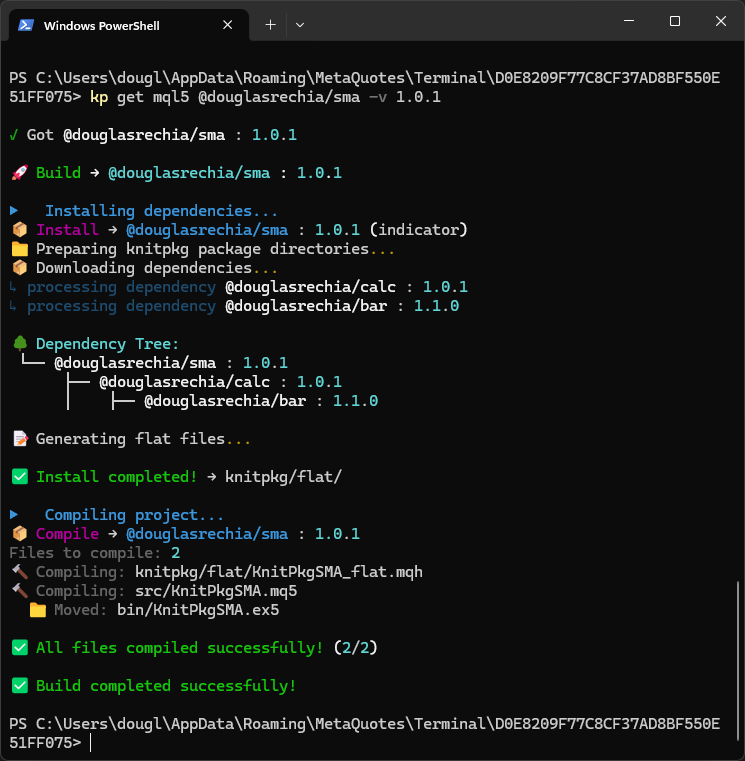
In the image above we can see that both bar and calc are downloaded/resolved in the dependency‑resolution tree with their respective versions. Let’s look at the manifest of sma:
target: mql5
type: indicator

organization: douglasrechia
name: sma
version: 1.0.1
version_description: Dependencies updated

# Registry search fields
description: KnitPkg for Metatrader - SMA Indicator Demo
keywords: [ "indicator", "sma", "showcase" ]
author: Douglas Rechia
license: MIT

# Include mode resolution
include_mode: flat

# File to be flattened with all the dependencies for this project
entrypoints:
  - src/KnitPkgSMA.mqh

compile:
  - src/KnitPkgSMA.mq5

# Dependencies of the project
dependencies:
  '@douglasrechia/calc': ^1.0.0
Note the most important parts of the manifest highlighted above; we will comment on them.
- dependencies – sma depends on @douglasrechia/calc. Even though only calc is declared as a direct dependency, bar is also resolved and downloaded as an indirect dependency of sma, because calc depends on bar.
- include_mode: flat – sma uses Flat mode, with src/KnitPkgSMA.mqh declared as an entrypoint. This means that all the dependencies required by the SMA indicator will be packaged into a single flattened file, knitpkg/flat/KnitPkgSMA_flat.mqh. Below is a fragment of src/KnitPkgSMA.mqh:
/* @knitpkg:include "douglasrechia/calc/Calc.mqh" */
/* @knitpkg:include "douglasrechia/bar/TimeSeriesArray.mqh" */
A header declared as an entrypoint (src/KnitPkgSMA.mqh in this case) is used only with Flat mode and must always contain @knitpkg:include directives that reference the external headers required by the project.
We can now explore the main source file of the indicator: src/KnitPkgSMA.mq5. Below is a fragment of this file:
// .....................
#include "../knitpkg/flat/KnitPkgSMA_flat.mqh"
// .....................
//+------------------------------------------------------------------+
//| Custom indicator iteration function                              |
//+------------------------------------------------------------------+
int OnCalculate(const int32_t rates_total,
                const int32_t prev_calculated,
                const int32_t begin,
                const double &price[])
  {
//---
   if (rates_total < InpSMAPeriod)
      return(0);
   if (prev_calculated >= rates_total)
      return rates_total;

   douglasrechia::TimeSeriesArray<double> priceArray(price, prev_calculated - InpSMAPeriod - 1, rates_total-1, false);

   // The following loop recalculates the SMA for the most recent bars.
   // This is necessary because the current bar's data can change with each tick
   // until its formation is complete. The `shiftStart` variable determines
   // the initial index for recalculation, ensuring that the SMA is accurately
   // updated for the latest bar and any preceding bars affected by recent data changes.
   int shiftStart = rates_total-prev_calculated;
   if (shiftStart >= rates_total)
      shiftStart--;
   for (int shift=shiftStart; shift >= 0 && !IsStopped(); shift--)
   {
      SMABuffer[shift] = douglasrechia::SMA(priceArray, InpSMAPeriod, shift);
   }
   return(rates_total);
  }
Note that we use a standard MQL #include that points to the flattened file ../knitpkg/flat/KnitPkgSMA_flat.mqh. The flattened file is generated automatically by KnitPkg based on the entrypoint and the resolved dependencies during the kp install step, so this file is not present in the repository (the kp install command is also part of the kp get workflow).
At this point it should be clear to the reader what the advantage of using packages is: the concrete implementation of the SMA calculation is not embedded in the indicator. As a result, the indicator code becomes much simpler, because it only calls the function implemented in calc, passing a TimeSeries built from the price array supplied to OnCalculate().
If you ran kp get above to download sma, go back to MetaTrader, refresh the Indicators list in the Navigator window, and add to the current chart the indicator that appears under Indicators/sma/bin/KnitPkgSMA:
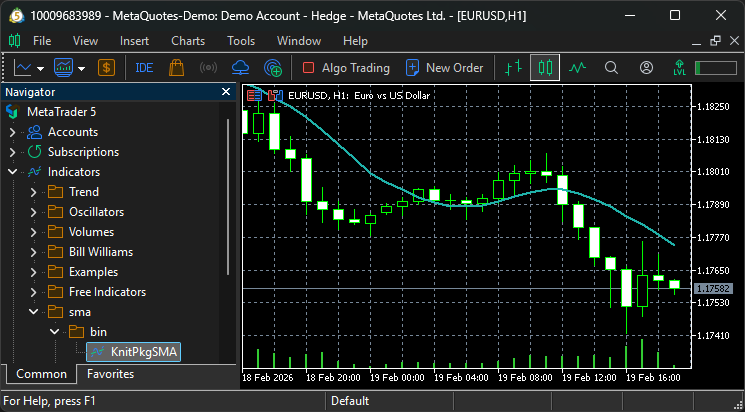
Milestone 3 – Reusable flat artifact generated and indicator compiled. After running kp get, KnitPkg generates the flattened header knitpkg/flat/KnitPkgSMA_flat.mqh from the entrypoint and its resolved dependencies, and then compiles the indicator successfully. This confirms that the @douglasrechia/calc package was correctly consumed to provide the SMA calculation. Just as it was used here by the indicator, the same calc package is available to be reused by any other project — EAs, other indicators, or libraries — without copying a single source file.
5. The expertdemo Expert Advisor. Now we move to the final piece of the puzzle: the demonstration Expert Advisor that implements a moving‑average‑crossover system. Get the expertdemo EA version 2.0.1:
kp get mql5 @douglasrechia/expertdemo -v 2.0.1
Let’s start by commenting on the most important parts of its manifest. expertdemo depends on @douglasrechia/bar (which you already know) and @douglasrechia/barhelper. To keep this article concise we will not go into the details of barhelper. It is enough for the reader to know that barhelper provides a function called NewTimeSeriesFromIndicator. This function returns a concrete implementation of ITimeSeries containing values calculated by any indicator in its output buffer (it may be the entire buffer or just a subset, depending on what is needed).
This is necessary because expertdemo uses the KnitPkgSMA indicator, not the SMA function in the calc package. An attentive reader will notice that the expertdemo manifest does not list the calc package. This illustrates the different ways in which a package’s functionality can be consumed: since KnitPkgSMA was built on top ofcalc, expertdemo does not depend directly on calc, but on an indicator that was built with it. Interesting, right?
The expertdemo EA also uses Flat mode, so the external headers required by the project must be declared in the entrypoint src/KnitPkgExpertDemo.mqh.
We finally arrive at the main source file src/KnitPkgExpertDemo.mq5. Below is a fragment of it:
//................................

//+------------------------------------------------------------------+
//| Expert initialization function                                   |
//+------------------------------------------------------------------+
int OnInit()
  {
//---
   barWatcher = new douglasrechia::BarWatcher();
   myBar = new douglasrechia::BarMqlRates();
//--- Validate that sma1.period < sma2.period < sma3.period
   if(!(sma1period < sma2period && sma2period < sma3period))
     {
      Print("Invalid moving average periods");
      return(INIT_FAILED);
     }
//--- Handlers for SMA indicators calculated at three different periods
   sma1handle = iCustom(_Symbol, _Period, "sma/bin/KnitPkgSMA", sma1period);
   sma2handle = iCustom(_Symbol, _Period, "sma/bin/KnitPkgSMA", sma2period);
   sma3handle = iCustom(_Symbol, _Period, "sma/bin/KnitPkgSMA", sma3period);
   if(sma1handle == INVALID_HANDLE || sma2handle == INVALID_HANDLE || sma3handle == INVALID_HANDLE)
     {
      Print("Could not initialize KnitPkgSMA indicator");
      return(INIT_FAILED);
     }
//---
   return(INIT_SUCCEEDED);
  }

//...............................

//+------------------------------------------------------------------+
//| Expert tick function                                             |
//+------------------------------------------------------------------+
void OnTick()
  {
//---
   barWatcher.Update();
   if(barWatcher.IsFirstTick())
     {
      Print("Hello world! This is KnitPkg's debut EA. I'm mostly here for show, but hey, looking good is half the battle! ;-)");
     }
   else
      if(barWatcher.IsNewBar())
        {
         OnNewBar();
        }
  }

//+------------------------------------------------------------------+
//| OnNewBar — called when a new bar is formed                       |
//+------------------------------------------------------------------+
void OnNewBar()
  {
//--- Get latest 5 bars data
   myBar.Refresh(5);

//--- Get the 5 most recent values of SMA into the TimeSeries.
//--- Do it for the three SMAs.
   douglasrechia::TimeSeriesArray<double>* sma1 =
      douglasrechia::NewTimeSeriesFromIndicator(sma1handle, 0, 0, 5);

   douglasrechia::TimeSeriesArray<double>* sma2 =
      douglasrechia::NewTimeSeriesFromIndicator(sma2handle, 0, 0, 5);

   douglasrechia::TimeSeriesArray<double>* sma3 =
      douglasrechia::NewTimeSeriesFromIndicator(sma3handle, 0, 0, 5);

   if(sma1 != NULL && sma2 != NULL && sma3 != NULL)
     {
      if(!positionInfo.Select(_Symbol))
        {
         //--- No position. Check filter conditions.
         if(!filterEnabled || (myBar.Close(1) > sma1.ValueAtShift(1) &&
                               sma1.ValueAtShift(1) > sma2.ValueAtShift(1) &&
                               sma2.ValueAtShift(1) > sma3.ValueAtShift(1)))
           {
            //--- Open position if Short term sma1 crosses up Mid term sma2
            if(douglasrechia::CrossUp(sma1, sma2, 1))
              {
               Print(StringFormat("[%s] Let's do it", TimeToString(myBar.Time(0))));
               trade.Buy(1);
              }
           }
        }
      else
        {
         //--- Position is found. Close it if Short term sma1 crosses down Mid term sma2.
         if(douglasrechia::CrossUp(sma2, sma1, 1))
           {
            Print(StringFormat("[%s] Time to go", TimeToString(myBar.Time(0))));
            trade.PositionClose(_Symbol);
           }
        }
     }
   else
     {
      Print("ERROR: could not get TimeSeries from indicators buffers.");
     }

   if(sma1 != NULL)
      delete sma1;
   if(sma2 != NULL)
      delete sma2;
   if(sma3 != NULL)
      delete sma3;
  }
The EA has clean, easy‑to‑understand code built with high‑level abstraction functions. In OnInit() the global objects barWatcher and myBar are instantiated. The handlers for the three SMAs are initialized using the exact paths prepared by the kp get command for the KnitPkgSMA indicator.
Note: As expertdemo depends on the binary KnitPkgSMA.ex5 to be at the location pointed by iCustom function as declared in OnInit(), the user of expertdemo is required to execute 'kp get mql5 @douglasrechia/sma' just once before running expertdemo.
In OnTick() the BarWatcher object from @douglasrechia/bar is used to detect a new bar; when a new bar appears, OnNewBar() is called.
The core of the Expert Advisor resides in OnNewBar(). Using the NewTimeSeriesFromIndicator function from @douglasrechia/barhelper, it easily obtains the latest five elements of each SMA indicator (in practice three would be enough). Then, via the CrossUp function (also implemented in barhelper), the EA opens or closes a position depending on whether the short‑term SMA crosses the mid‑term SMA.
Position checks and trade execution use the CTrade and CPositionInfo classes from the MQL Standard Library. It is important to note that KnitPkg is fully compatible with the MQL Standard Library and imposes no restrictions on its use (on the contrary, the Standard Library is a mature, high‑quality library that we encourage you to use).
Milestone 4 – “Package → indicator → EA” stack running without copy‑paste. The expertdemo EA now consumes the SMA logic through the KnitPkgSMA indicator, which in turn is built on top of the bar and calc packages. No source files were copied between projects, and no #include paths were edited manually: all wiring is expressed in knitpkg.yaml manifests and resolved by KnitPkg into a reproducible installation.
Conclusion
KnitPkg changes the way MQL4/MQL5 code is reused: instead of copying folders between terminals, renaming paths, and manually fixing #include directives, each piece of logic is implemented once as a versioned package and then consumed declaratively through a manifest. In practice, this turns a fragile, manual workflow into a repeatable build pipeline where dependencies are explicit, versions are controlled, and updates stop being “surgical operations” across multiple projects.
After reading this article, you have seen how to structure MQL development as a set of reusable components—packages, indicators, libraries, and EAs—assembled in a predictable way. More specifically, you gain:
- A clear mental model of KnitPkg: the registry stores metadata, Git repositories remain the source of truth, and semantic versioning (^ , ~ , *) enables controlled upgrades.
- The role of the manifest (knitpkg.yaml): a single place where project identity, build targets, and dependencies are declared, making builds reproducible.
- A practical installation workflow: understanding the difference between include mode (classic include tree) and flat mode (single generated header, useful for MQL5 Market distribution).
- How composite packages work: using autocomplete.mqh for development and @knitpkg:include directives that KnitPkg converts into real includes during installation.
- Why unit tests matter in MQL: tests are compiled with the project, helping ensure new package versions do not break dependent EAs or indicators.
The case study connects these ideas: one SMA implementation is packaged, reused by an indicator, and then consumed by an EA while using new-bar detection for efficiency. This provides a practical blueprint for building reusable package → indicator/library → EA stacks and reducing copy-paste in MQL development.
Attachments
The source code for all projects shown in this article is available in the Git repositories linked throughout the text. The attachments below correspond to files generated automatically by KnitPkg as a result of running kp get, which implicitly invokes the processes behind kp autocomplete, kp checkinstall and kp install. These files are not stored in Git, but readers can reproduce them locally by executing the same kp get commands described in the article.
| File Name | Description |
|---|---|
| autocomplete.mqh | Autocomplete helper generated for the calc package as part of kp get (knitpkg/autocomplete/autocomplete.mqh). |
| Calc.mqh | Resolved include header for the calc package, generated and verified during kp get / kp checkinstall (knitpkg/autocomplete/knitpkg/include/douglasrechia/calc/Calc.mqh). |
| KnitPkgSMA_flat.mqh | Flattened SMA indicator header generated in the sma project when running kp get / kp install (knitpkg/flat/KnitPkgSMA_flat.mqh). |
Warning: All rights to these materials are reserved by MetaQuotes Ltd. Copying or reprinting of these materials in whole or in part is prohibited.
This article was written by a user of the site and reflects their personal views. MetaQuotes Ltd is not responsible for the accuracy of the information presented, nor for any consequences resulting from the use of the solutions, strategies or recommendations described.

 Mastering PD Arrays: Optimizing Trading from Imbalances in PD Arrays
 MQL5 Trading Tools (Part 22): Graphing the Histogram and Probability Mass Function (PMF) of the Binomial Distribution
 Implementing the Truncated Newton Conjugate-Gradient Algorithm in MQL5
 Engineering Trading Discipline into Code (Part 2): Building a Daily Trade Limit Enforcer for All Trades in MQL5

- Free trading apps
- Over 8,000 signals for copying
- Economic news for exploring financial markets
You agree to website policy and terms of use
Looks interesting, but I have some doubts.
If someone clone a git repository with an MQL5 project/program/package supposed to be managed by KnitPkg, he/she will most likely get noncompilable sources because autogenerated files (such as _flat) are missing in the repository. Wouldn't it be feasible to commit all necessary autogenerated source to git to get the release compilable no matter how it's obtained?
I'm not sure how convenient will it be to make some changes in dependencies, since we actually compile and debug autogenerated code, and can't easily "jump" to corresponding origin - am I missing something? For example, you need to change the bar package while working on the indicator (if not the expert adviser). How would you do it?
At last, I'm suspicious about some things in implementation of examples (probably, because they are just examples), such as new/delete on every tick/bar. Also, for example, you do:
What's the purpose to pass the price array into priceArray constructor (where a copy of the part of the array is created), and then pass priceArray into SMA - why not pass the original price array by reference into SMA without copying?
Looks interesting, but I have some doubts.
If someone clone a git repository with an MQL5 project/program/package supposed to be managed by KnitPkg, he/she will most likely get noncompilable sources because autogenerated files (such as _flat) are missing in the repository. Wouldn't it be feasible to commit all necessary autogenerated source to git to get the release compilable no matter how it's obtained?
I'm not sure how convenient will it be to make some changes in dependencies, since we actually compile and debug autogenerated code, and can't easily "jump" to corresponding origin - am I missing something? For example, you need to change the bar package while working on the indicator (if not the expert adviser). How would you do it?
At last, I'm suspicious about some things in implementation of examples (probably, because they are just examples), such as new/delete on every tick/bar. Also, for example, you do:
What's the purpose to pass the price array into priceArray constructor (where a copy of the part of the array is created), and then pass priceArray into SMA - why not pass the original price array by reference into SMA without copying?
Hi Stanislav,
Thanks for taking the time to read the article and for raising these points.
On committing generated code: the idea with KnitPkg is that autogenerated artifacts (flat headers, resolved includes, etc.) should not live in the Git repository, because then you effectively duplicate code across repos and risk it going out of sync. If some functionality is implemented in a package/repository, that is the single source of truth; consumers declare a dependency (using SemVer ranges) and let kp install / kp autocomplete regenerate the derived files locally. This way, when a dependency is updated within the allowed SemVer range, your project can pick up the new version cleanly, instead of being “stuck” with stale generated code committed into its own repo. There is a concrete example of updating dependency versions in the documentation here.
On your concern about “how convenient it will be to make some changes in dependencies”: this was something I thought about while designing the tool. KnitPkg supports using local dependencies, so you can point a project directly to a package living in a local directory, modify that package, and test changes in a real consumer project during development. The workflow is described in more detail in the “Local Dependencies” section of the KnitPkg documentation: https://docs.knitpkg.dev/user-guide/local-dependencies/
Regarding price -> TimeSeriesArray -> SMA: the intention there is not to show the most efficient micro‑optimization, but to show a standardized interface. SMA receives an ITimeSeries (not TimeSeriesArray directly), and it only cares that “most recent is at index 0, next at 1, etc.”. TimeSeriesArray is just one implementation used in the example, which happens to copy a slice of price. Someone else could implement a different ITimeSeries that uses a more cache‑friendly structure. The point is to decouple the calculation from the concrete storage layout; how smart or efficient the ITimeSeries implementation is becomes a matter of design and creativity.
I’m always happy to discuss these design choices, and feedback on KnitPkg—whether on the workflow or the example code—is very welcome, so feel free to challenge or extend any of these ideas.