

Formulating Dynamic Multi-Pair EA (Part 6): Adaptive Spread Sensitivity for High-Frequency Symbol Switching
 3 632
3 632
 0
0

Introduction
Part 5 of our Dynamic Multi-Pair EA series explored the challenge of choosing the right trading style for different market conditions, specifically building a system that can switch between scalping and swing trading modes. We detailed how scalping focuses on capturing small price movements within tight timeframes, while swing trading targets larger directional moves over longer periods, and showed how an EA could dynamically adapt its logic, stop levels, and time horizons based on market context.
In contrast, Part 6 shifts the focus away from specific trading entry and exit styles and instead zeroes in on the execution environment itself—especially the cost of trading as expressed through spreads. In Part 6, we now introduce a module that continuously monitors and adapts to real-time spread conditions across all symbols, using dynamic sensitivity thresholds to determine which symbols are currently optimal to trade. This high-frequency symbol switching based on adaptive spread evaluation complements the broader multi-pair architecture by prioritizing execution quality and cost efficiency over pure strategy mechanics.
System Overview and Strategic Approach
The Adaptive Spread Sensitivity EA is a sophisticated multi-symbol trading system designed to optimize trade execution dynamically across multiple financial instruments. At its core, the system continuously monitors real-time spreads for all configured symbols, ranking them based on cost-efficiency metrics to prioritize trading on instruments with the most favorable execution conditions.
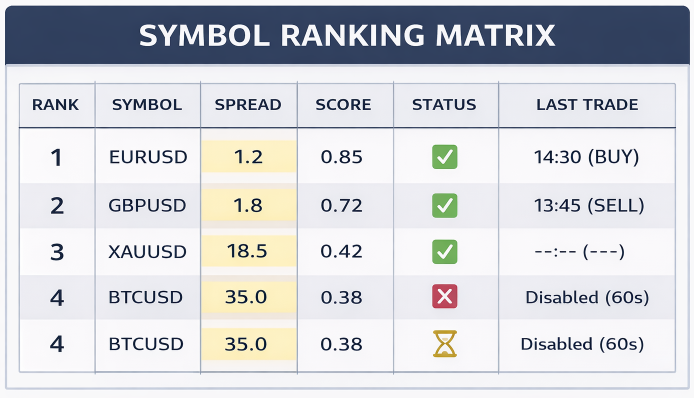
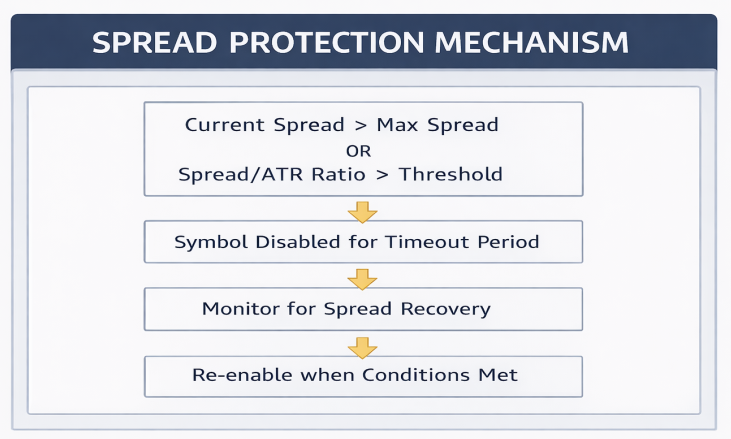
Unlike traditional single-symbol EAs, this system implements intelligent spread filtering that temporarily disables symbols experiencing abnormally high spreads, preventing costly entries during poor liquidity conditions while automatically re-enabling them when spreads normalize. The adaptive architecture allows the EA to function as a "smart router" that dynamically switches between available symbols based on changing market microstructure, ensuring trades are always executed on the most economically efficient instrument at any given moment.
The trading strategy employs a straightforward yet effective technical analysis approach using dual moving average crossovers combined with RSI momentum confirmation. When spread conditions are favorable, the system generates buy signals when the fast EMA crosses above the slow EMA while RSI indicates oversold conditions, and sell signals when the fast EMA crosses below the slow EMA with RSI in overbought territory. This combination provides balanced entry timing—using moving averages for trend direction and RSI for entry precision.
Getting Started
//+------------------------------------------------------------------+
//|                                           Spread Sensitivity.mq5 |
//|                        GIT under Copyright 2025, MetaQuotes Ltd. |
//|                     https://www.mql5.com/en/users/johnhlomohang/ |
//+------------------------------------------------------------------+
#property copyright "GIT under Copyright 2025, MetaQuotes Ltd."
#property link      "https://www.mql5.com/en/users/johnhlomohang/"
#property version   "1.00"
#property description "Multi-Symbol EA with Adaptive Spread Sensitivity"
#property description "Dynamically switches between symbols based on spread efficiency"

#include <Trade/Trade.mqh>
#include <Trade/PositionInfo.mqh>

//+------------------------------------------------------------------+
//| Input Parameters                                                 |
//+------------------------------------------------------------------+
input string   TradePairs = "EURUSD,GBPUSD,XAUUSD,US100,BTCUSD"; // Trading Pairs (comma separated)
input double   RiskPerTrade = 0.01;          // Risk % per trade
input int      MagicNumber = 98765;          // Magic Number

// Spread Sensitivity Settings
input group    "=== Spread Filter Settings ==="
input double   MaxAbsoluteSpread = 10.0;     // Max absolute spread (pips)
input double   MaxSpreadATRRatio = 0.25;     // Max spread/ATR ratio
input bool     UseAdaptiveFilter = true;     // Enable adaptive filtering
input int      DisableTimeoutSec = 60;       // Disable symbol timeout (seconds)
input bool     EnableSpreadRanking = true;   // Enable symbol ranking by spread
input int      MaxActiveSymbols = 3;         // Maximum active symbols at once

// Trading Strategy Settings
input group    "=== Trading Strategy Settings ==="
input ENUM_TIMEFRAMES TradingTimeframe = PERIOD_M5;  // Trading timeframe
input int      EMA_Fast_Period = 9;          // Fast EMA period
input int      EMA_Slow_Period = 21;         // Slow EMA period
input int      RSI_Period = 14;              // RSI period
input double   RSI_Overbought = 70;          // RSI overbought level
input double   RSI_Oversold = 30;            // RSI oversold level
input int      StopLoss_Pips = 30;           // Stop Loss in pips
input int      TakeProfit_Pips = 60;         // Take Profit in pips
input int      MaxOpenPositions = 1;         // Max positions per symbol
input int      TradeCooldownSeconds = 300;   // Cooldown between trades (seconds)

// ATR Settings for adaptive SL/TP
input group    "=== ATR Settings (Optional) ==="
input bool     UseATR_SL_TP = false;         // Use ATR for dynamic SL/TP
input double   ATR_SL_Multiplier = 1.5;      // ATR multiplier for SL
input double   ATR_TP_Multiplier = 2.0;      // ATR multiplier for TP

// Dashboard Settings
input group    "=== Dashboard Settings ==="
input bool     ShowDashboard = true;         // Show dashboard on chart
input color    DashboardBGColor = clrBlack;  // Dashboard background color
input color    DashboardTextColor = clrWhite;// Dashboard text color
input int      DashboardX = 20;              // Dashboard X position
input int      DashboardY = 20;              // Dashboard Y position
input int      FontSize = 8;                 // Dashboard font size

//+------------------------------------------------------------------+
//| Global Variables                                                 |
//+------------------------------------------------------------------+
string   SymbolList[];
int      TotalPairs;
CTrade   Trade;
CPositionInfo PositionInfo;
datetime LastDashboardUpdate = 0;

// Spread monitoring structure
struct SpreadData
{
   string      symbol;
   double      spreadInPips;
   double      atrValue;
   double      spreadATRRatio;
   double      spreadScore;
   datetime    disabledUntil;
   bool        isTradeable;
   bool        isActive;
   datetime    lastTradeTime;
   int         tradeAttempts;
   int         successfulTrades;
   color       statusColor;
};

SpreadData spreadData[];

// Dashboard messages
string DashboardMessages[10];
Getting started, we establish a flexible configuration layer for our dynamic multi-pair Expert Advisor by grouping all user-defined inputs in a clean and modular way. We begin with the general trade control, such as the list of symbols to monitor, risk per trade, and a magic number for position tracking. From there, we introduce a dedicated Spread Sensitivity section, which is the core of the EA’s execution logic. These inputs define absolute and adaptive spread limits, ATR-normalized spread thresholds, temporary symbol disabling, and symbol ranking constraints, allowing the EA to intelligently decide which markets are cost-efficient enough to trade at any given moment. Importantly, this layer does not dictate how trades are entered, but rather whether a symbol is eligible to participate, ensuring execution quality across multiple instruments.
Moving further, the code defines strategy-level inputs and supporting infrastructure that operate only after a symbol has passed the spread filter. The trading settings configure indicator parameters (EMA, RSI), risk boundaries (SL/TP, cooldowns, maximum positions), and optional ATR-based dynamic exits, enabling controlled and consistent trade execution. Below the inputs, global variables and the SpreadData structure form the EA’s internal state engine, tracking real-time spread metrics, symbol status, activity flags, trade statistics, and dashboard visuals. This structure allows the EA to rank symbols, disable and re-enable them dynamically, and present a live dashboard view of system behavior, making the EA both adaptive in logic and transparent in operation.
//+------------------------------------------------------------------+
//| Expert initialization function                                   |
//+------------------------------------------------------------------+
int OnInit()
{
   // Split trading pairs
   SplitString(TradePairs, ",", SymbolList);
   TotalPairs = ArraySize(SymbolList);

   if(TotalPairs == 0)
   {
      Print("Error: No symbols specified");
      return INIT_FAILED;
   }

   // Initialize spread data array
   ArrayResize(spreadData, TotalPairs);

   // Initialize dashboard messages
   for(int i = 0; i < 10; i++) DashboardMessages[i] = "";

   // Initialize each symbol
   for(int i = 0; i < TotalPairs; i++)
   {
      string symbol = SymbolList[i];

      // Validate symbol
      if(!SymbolInfoInteger(symbol, SYMBOL_TRADE_MODE))
      {
         Print("Warning: Symbol ", symbol, " is not available for trading");
         continue;
      }

      // Initialize spread data
      spreadData[i].symbol = symbol;
      spreadData[i].spreadInPips = 0;
      spreadData[i].atrValue = 0;
      spreadData[i].spreadATRRatio = 0;
      spreadData[i].spreadScore = 0;
      spreadData[i].disabledUntil = 0;
      spreadData[i].isTradeable = true;
      spreadData[i].isActive = true;
      spreadData[i].lastTradeTime = 0;
      spreadData[i].tradeAttempts = 0;
      spreadData[i].successfulTrades = 0;
      spreadData[i].statusColor = clrGreen;

      // Subscribe to symbol
      SymbolSelect(symbol, true);
   }

   // Set trade parameters
   Trade.SetExpertMagicNumber(MagicNumber);
   Trade.SetDeviationInPoints(10);

   // Initialize dashboard
   if(ShowDashboard) CreateDashboard();

   AddDashboardMessage("EA Initialized with " + IntegerToString(TotalPairs) + " symbols");
   Print("EA Initialized. Total pairs: ", TotalPairs);

   return INIT_SUCCEEDED;
}
The OnInit() function handles the full startup preparation of the Expert Advisor by configuring symbols, internal data structures, and execution settings before trading begins. It starts by parsing the user-defined symbol list and validating that at least one tradable symbol is available, safely terminating initialization if none are found. The function then allocates and initializes the spreadData structure for each symbol, setting default values for spread metrics, trade state, statistics, and visual status indicators while also subscribing each symbol for real-time data updates. Finally, it configures trade execution parameters such as the magic number and slippage tolerance, initializes the on-chart dashboard if enabled, logs a startup message, and confirms successful initialization—ensuring the EA is fully synchronized, monitored, and ready for adaptive multi-symbol operation.
//+------------------------------------------------------------------+
//| Expert deinitialization function                                 |
//+------------------------------------------------------------------+
void OnDeinit(const int reason)
{
   // Remove dashboard objects
   if(ShowDashboard) RemoveDashboard();

   // Print statistics
   Print("=== Trading Statistics ===");
   for(int i = 0; i < TotalPairs; i++)
   {
      Print(spreadData[i].symbol, ": ",
            spreadData[i].tradeAttempts, " attempts, ",
            spreadData[i].successfulTrades, " successful trades");
   }

   Print("EA Deinitialized");
}

//+------------------------------------------------------------------+
//| Expert tick function                                             |
//+------------------------------------------------------------------+
void OnTick()
{
   static int tickCounter = 0;
   tickCounter++;

   // Process one symbol per tick (prevents overloading)
   int symbolIndex = tickCounter % TotalPairs;
   string symbol = spreadData[symbolIndex].symbol;

   // Update spread data
   UpdateSpreadData(symbolIndex);

   // Check if symbol is tradeable
   if(!spreadData[symbolIndex].isTradeable || !spreadData[symbolIndex].isActive)
      return;

   // Check cooldown period
   if(TimeCurrent() - spreadData[symbolIndex].lastTradeTime < TradeCooldownSeconds)
      return;

   // Execute trading logic
   ExecuteTradingLogic(symbolIndex);

   // Update dashboard every 10 ticks
   if(ShowDashboard && (tickCounter % 10 == 0) && (TimeCurrent() - LastDashboardUpdate >= 1))
   {
      UpdateDashboard();
      LastDashboardUpdate = TimeCurrent();
   }
}
The OnDeinit() function ensures a clean and informative shutdown of the Expert Advisor. When the EA is removed or the terminal is closed, it first clears all dashboard objects from the chart to prevent leftover visuals. It then prints a concise summary of trading performance for each symbol, reporting the number of trade attempts and successful executions recorded during runtime. This final logging step provides transparency and post-run diagnostics, making it easier to evaluate symbol-level behavior and system effectiveness before the EA fully deinitializes.
The OnTick() function, on the other hand, defines the EA’s real-time operational flow and is designed for efficiency in a multi-symbol environment. Instead of processing all symbols on every tick, it cycles through one symbol per tick using a modulo counter, reducing CPU load and avoiding execution bottlenecks. For each selected symbol, the EA updates spread data, verifies trade eligibility, enforces cooldown constraints, and then executes the trading logic if all conditions are met. Dashboard updates are throttled to occur periodically rather than on every tick, ensuring the interface remains responsive while maintaining performance stability in high-frequency symbol monitoring scenarios.
//+------------------------------------------------------------------+
//| Timer function for spread updates                                |
//+------------------------------------------------------------------+
void OnTimer()
{
   // Update all spread data and rank symbols
   UpdateAllSpreadData();
   if(EnableSpreadRanking) RankSymbolsBySpread();
}

//+------------------------------------------------------------------+
//| Update spread data for all symbols                               |
//+------------------------------------------------------------------+
void UpdateAllSpreadData()
{
   for(int i = 0; i < TotalPairs; i++)
   {
      UpdateSpreadData(i);
   }
}

//+------------------------------------------------------------------+
//| Update spread data for specific symbol                           |
//+------------------------------------------------------------------+
void UpdateSpreadData(int index)
{
   string symbol = spreadData[index].symbol;

   // Get current bid and ask
   double bid = SymbolInfoDouble(symbol, SYMBOL_BID);
   double ask = SymbolInfoDouble(symbol, SYMBOL_ASK);

   if(bid == 0 || ask == 0) return;

   // Calculate spread in pips
   double point = SymbolInfoDouble(symbol, SYMBOL_POINT);
   double spreadPoints = (ask - bid) / point;
   spreadData[index].spreadInPips = NormalizeDouble(spreadPoints / 10, 1);

   // Calculate ATR for spread ratio
   spreadData[index].atrValue = CalculateATR(symbol, PERIOD_H1, 14);

   // Calculate spread/ATR ratio
   if(spreadData[index].atrValue > 0)
   {
      spreadData[index].spreadATRRatio = NormalizeDouble(spreadData[index].spreadInPips / spreadData[index].atrValue, 3);
   }

   // Evaluate tradeability
   EvaluateTradeability(index);
}

//+------------------------------------------------------------------+
//| Evaluate if symbol is tradeable based on spread                  |
//+------------------------------------------------------------------+
void EvaluateTradeability(int index)
{
   // Check if symbol is in timeout
   if(TimeCurrent() < spreadData[index].disabledUntil)
   {
      spreadData[index].isTradeable = false;
      spreadData[index].statusColor = clrOrange;
      return;
   }

   // Check absolute spread limit
   if(spreadData[index].spreadInPips > MaxAbsoluteSpread)
   {
      spreadData[index].isTradeable = false;
      spreadData[index].disabledUntil = TimeCurrent() + DisableTimeoutSec;
      AddDashboardMessage(spreadData[index].symbol + " disabled: High spread " +
                          DoubleToString(spreadData[index].spreadInPips, 1));
      spreadData[index].statusColor = clrRed;
      return;
   }

   // Check ATR ratio if adaptive filtering is enabled
   if(UseAdaptiveFilter && spreadData[index].spreadATRRatio > MaxSpreadATRRatio)
   {
      spreadData[index].isTradeable = false;
      spreadData[index].statusColor = clrRed;
      return;
   }

   // All checks passed
   spreadData[index].isTradeable = true;
   spreadData[index].statusColor = clrGreen;
}
This block introduces a timer-driven spread monitoring system that operates independently of tick frequency, ensuring consistent and timely evaluation of all symbols. The OnTimer() function acts as the scheduler, periodically refreshing spread data across every configured symbol and optionally ranking them by spread efficiency when enabled. This design decouples spread analysis from price ticks, allowing the EA to remain responsive even during low-liquidity periods. The update flow cascades through UpdateAllSpreadData() and into UpdateSpreadData(), where real-time bid/ask prices are collected, spreads are calculated in pips, and volatility context is added by computing ATR values, forming the basis for adaptive spread evaluation.
The EvaluateTradeability() function then applies a layered decision process to determine whether each symbol is eligible for trading. It first enforces cooldown timeouts for previously disabled symbols, preventing rapid re-entry during unstable conditions. Next, it checks absolute spread limits and adaptive ATR-normalized thresholds, automatically disabling symbols that become too costly to trade and logging these events to the dashboard for transparency. When all spread conditions are satisfied, the symbol is marked tradeable and visually flagged as healthy, completing a robust protection mechanism that dynamically filters symbols based on real-time execution quality rather than static rules.
//+------------------------------------------------------------------+
//| Rank symbols by spread efficiency                                |
//+------------------------------------------------------------------+
void RankSymbolsBySpread()
{
   // Calculate spread score for each symbol
   for(int i = 0; i < TotalPairs; i++)
   {
      // Lower spread = better score
      double spreadComponent = 1.0 / (1.0 + spreadData[i].spreadInPips);

      // Lower ATR ratio = better score
      double atrComponent = 1.0 / (1.0 + spreadData[i].spreadATRRatio);

      // Combine components with weights
      spreadData[i].spreadScore = (0.6 * spreadComponent) + (0.4 * atrComponent);
   }

   // Simple bubble sort by score
   for(int i = 0; i < TotalPairs - 1; i++)
   {
      for(int j = i + 1; j < TotalPairs; j++)
      {
         if(spreadData[j].spreadScore > spreadData[i].spreadScore)
         {
            SpreadData temp = spreadData[i];
            spreadData[i] = spreadData[j];
            spreadData[j] = temp;
         }
      }
   }

   // Activate top N symbols
   for(int i = 0; i < TotalPairs; i++)
   {
      spreadData[i].isActive = (i < MaxActiveSymbols);
   }
}

//+------------------------------------------------------------------+
//| Execute trading logic for symbol                                 |
//+------------------------------------------------------------------+
void ExecuteTradingLogic(int index)
{
   string symbol = spreadData[index].symbol;

   // Check if symbol already has max positions
   if(CountOpenPositions(symbol) >= MaxOpenPositions) return;

   // Get indicator handles
   int handleEmaFast = iMA(symbol, TradingTimeframe, EMA_Fast_Period, 0, MODE_EMA, PRICE_CLOSE);
   int handleEmaSlow = iMA(symbol, TradingTimeframe, EMA_Slow_Period, 0, MODE_EMA, PRICE_CLOSE);
   int handleRSI = iRSI(symbol, TradingTimeframe, RSI_Period, PRICE_CLOSE);

   if(handleEmaFast == INVALID_HANDLE || handleEmaSlow == INVALID_HANDLE || handleRSI == INVALID_HANDLE)
   {
      Print("Error: Failed to create indicator handles for ", symbol);
      return;
   }

   // Get indicator values
   double emaFast[1], emaSlow[1], rsi[1];

   if(CopyBuffer(handleEmaFast, 0, 0, 1, emaFast) < 1)
   {
      IndicatorRelease(handleEmaFast);
      IndicatorRelease(handleEmaSlow);
      IndicatorRelease(handleRSI);
      return;
   }

   if(CopyBuffer(handleEmaSlow, 0, 0, 1, emaSlow) < 1)
   {
      IndicatorRelease(handleEmaFast);
      IndicatorRelease(handleEmaSlow);
      IndicatorRelease(handleRSI);
      return;
   }

   if(CopyBuffer(handleRSI, 0, 0, 1, rsi) < 1)
   {
      IndicatorRelease(handleEmaFast);
      IndicatorRelease(handleEmaSlow);
      IndicatorRelease(handleRSI);
      return;
   }

   // Release indicator handles
   IndicatorRelease(handleEmaFast);
   IndicatorRelease(handleEmaSlow);
   IndicatorRelease(handleRSI);

   double emaF = emaFast[0];
   double emaS = emaSlow[0];
   double rsiV = rsi[0];

   // Generate trading signals
   if(emaF > emaS && rsiV < RSI_Oversold) // Buy signal: Fast EMA above Slow EMA and RSI oversold
   {
      spreadData[index].tradeAttempts++;
      double lotSize = CalculateLotSize(symbol);
      if(lotSize > 0)
      {
         if(ExecuteTrade(ORDER_TYPE_BUY, symbol, lotSize, StopLoss_Pips, TakeProfit_Pips))
         {
            spreadData[index].lastTradeTime = TimeCurrent();
            spreadData[index].successfulTrades++;
            AddDashboardMessage("BUY " + symbol + " | Spread: " + DoubleToString(spreadData[index].spreadInPips, 1));
         }
      }
   }
   else if(emaF < emaS && rsiV > RSI_Overbought) // Sell signal: Fast EMA below Slow EMA and RSI overbought
   {
      spreadData[index].tradeAttempts++;
      double lotSize = CalculateLotSize(symbol);
      if(lotSize > 0)
      {
         if(ExecuteTrade(ORDER_TYPE_SELL, symbol, lotSize, StopLoss_Pips, TakeProfit_Pips))
         {
            spreadData[index].lastTradeTime = TimeCurrent();
            spreadData[index].successfulTrades++;
            AddDashboardMessage("SELL " + symbol + " | Spread: " + DoubleToString(spreadData[index].spreadInPips, 1));
         }
      }
   }
}
Here we introduce a spread-efficiency ranking engine that determines which symbols are allowed to participate in trading at any given time. In RankSymbolsBySpread(), each symbol is assigned a composite spread score based on two execution-quality factors: the absolute spread and the spread-to-ATR ratio. Both components are inverted so that lower costs produce higher scores, then combined using weighted importance to emphasize raw spread while still accounting for volatility context. Once scores are calculated, the symbols are sorted in descending order, ensuring that the most cost-efficient instruments naturally rise to the top of the priority list.
After ranking, the EA applies a dynamic activation filter by enabling only the top MaxActiveSymbols and marking the rest as inactive. This mechanism ensures that the EA does not waste resources or capital on symbols with inferior execution conditions, even if they are otherwise valid. Rather than permanently excluding symbols, this system continuously re-evaluates and reshuffles them as spreads evolve, allowing previously inactive symbols to re-enter rotation when their execution quality improves. This creates a self-balancing, adaptive symbol universe driven entirely by real-time cost efficiency.
The second part, ExecuteTradingLogic(), is executed only for symbols that have passed all spread and activation filters, cleanly separating execution quality from strategy logic. It retrieves the necessary EMA and RSI indicators, validates data availability, and then generates trade signals based on trend alignment and momentum exhaustion. When a signal is confirmed, the EA records trade attempts, calculates position size, executes the trade, and updates symbol-level performance metrics and dashboard messages. This structure ensures that trading decisions are applied only to the best-ranked symbols, reinforcing the core philosophy of adaptive, execution-aware multi-pair trading.
//+------------------------------------------------------------------+
//| Execute trade with CTrade                                        |
//+------------------------------------------------------------------+
bool ExecuteTrade(ENUM_ORDER_TYPE tradeType, string symbol, double lotSize, int stopLossPips, int takeProfitPips)
{
   // Get symbol info
   double point = SymbolInfoDouble(symbol, SYMBOL_POINT);
   int digits = (int)SymbolInfoInteger(symbol, SYMBOL_DIGITS);

   // Get current price
   double ask = SymbolInfoDouble(symbol, SYMBOL_ASK);
   double bid = SymbolInfoDouble(symbol, SYMBOL_BID);
   double price = (tradeType == ORDER_TYPE_BUY) ? ask : bid;

   // Calculate pip size for different instruments
   double pipSize = CalculatePipSize(symbol, digits, point);

   // Use ATR for dynamic SL/TP if enabled
   double slDistance = 0, tpDistance = 0;

   if(UseATR_SL_TP)
   {
      double atr = iATR(symbol, TradingTimeframe, 14);
      if(atr > 0)
      {
         slDistance = atr * ATR_SL_Multiplier;
         tpDistance = atr * ATR_TP_Multiplier;
      }
   }

   // Fallback to fixed pips if ATR not used or failed
   if(slDistance == 0) slDistance = stopLossPips * pipSize;
   if(tpDistance == 0) tpDistance = takeProfitPips * pipSize;

   // Calculate SL and TP prices
   double sl = 0, tp = 0;

   if(slDistance > 0)
   {
      sl = (tradeType == ORDER_TYPE_BUY) ? price - slDistance : price + slDistance;
      sl = NormalizeDouble(sl, digits);
   }

   if(tpDistance > 0)
   {
      tp = (tradeType == ORDER_TYPE_BUY) ? price + tpDistance : price - tpDistance;
      tp = NormalizeDouble(tp, digits);
   }

   // Execute trade with CTrade
   bool success = false;

   if(tradeType == ORDER_TYPE_BUY)
   {
      success = Trade.Buy(lotSize, symbol, price, sl, tp, "Adaptive Spread EA");
   }
   else if(tradeType == ORDER_TYPE_SELL)
   {
      success = Trade.Sell(lotSize, symbol, price, sl, tp, "Adaptive Spread EA");
   }

   if(success)
   {
      PrintFormat("%s %s | Lot: %.2f | Price: %.5f | SL: %.5f | TP: %.5f | Spread: %.1f",
                  EnumToString(tradeType), symbol, lotSize, price, sl, tp,
                  SymbolInfoDouble(symbol, SYMBOL_ASK) - SymbolInfoDouble(symbol, SYMBOL_BID));
      return true;
   }
   else
   {
      PrintFormat("Failed to open %s on %s | Error: %d",
                  EnumToString(tradeType), symbol, GetLastError());
      return false;
   }
}

//+------------------------------------------------------------------+
//| Calculate pip size for different instruments                     |
//+------------------------------------------------------------------+
double CalculatePipSize(string symbol, int digits, double point)
{
   // Detect pip size automatically
   if(StringFind(symbol, "JPY") != -1)              // JPY pairs
      return (digits == 3) ? point * 10 : point;
   else if(StringFind(symbol, "XAU") != -1 || StringFind(symbol, "GOLD") != -1)   // Metals
      return 0.10;
   else if(StringFind(symbol, "BTC") != -1 || StringFind(symbol, "ETH") != -1)    // Cryptos
      return point * 100.0;
   else if(StringFind(symbol, "US") != -1 && digits <= 2)                         // Indices
      return point;
   else
      return (digits == 3 || digits == 5) ? point * 10 : point;                   // Default Forex
}

//+------------------------------------------------------------------+
//| Calculate position size based on risk                            |
//+------------------------------------------------------------------+
double CalculateLotSize(string symbol)
{
   double accountBalance = AccountInfoDouble(ACCOUNT_BALANCE);
   double minLot = SymbolInfoDouble(symbol, SYMBOL_VOLUME_MIN);
   double maxLot = SymbolInfoDouble(symbol, SYMBOL_VOLUME_MAX);
   double lotStep = SymbolInfoDouble(symbol, SYMBOL_VOLUME_STEP);

   if(accountBalance <= 0) return minLot;

   // Simple lot calculation based on risk percentage
   double riskAmount = accountBalance * (RiskPerTrade / 100.0);
   double tickValue = SymbolInfoDouble(symbol, SYMBOL_TRADE_TICK_VALUE);

   if(tickValue <= 0)
   {
      // Fallback calculation
      double contractSize = SymbolInfoDouble(symbol, SYMBOL_TRADE_CONTRACT_SIZE);
      tickValue = (SymbolInfoDouble(symbol, SYMBOL_TRADE_TICK_SIZE) * contractSize) / SymbolInfoDouble(symbol, SYMBOL_POINT);
   }

   double pipSize = CalculatePipSize(symbol, (int)SymbolInfoInteger(symbol, SYMBOL_DIGITS),
                                    SymbolInfoDouble(symbol, SYMBOL_POINT));
   double stopLossPoints = StopLoss_Pips * 10; // Convert pips to points

   if(stopLossPoints > 0 && tickValue > 0)
   {
      double lotSize = riskAmount / (stopLossPoints * tickValue);
      lotSize = NormalizeDouble(lotSize, 2);

      // Apply lot size limits
      lotSize = MathMax(lotSize, minLot);
      lotSize = MathMin(lotSize, maxLot);
      lotSize = MathRound(lotSize / lotStep) * lotStep;

      return lotSize;
   }

   return minLot;
}
In this section, we define the trade execution and risk control layer of the EA, starting with ExecuteTrade(), which standardizes how orders are opened regardless of symbol type. The function first retrieves symbol-specific pricing details and determines the correct execution price based on trade direction. It then calculates pip size dynamically to support forex pairs, metals, indices, and cryptocurrencies without hardcoded assumptions. Stop-loss and take-profit distances are derived either from ATR-based volatility measurements or fixed pip values as a fallback, ensuring robustness across varying market conditions. Once price levels are normalized to symbol precision, trades are executed using the CTrade class, with detailed logging provided for both successful and failed executions to maintain transparency and debuggability.
The supporting functions, CalculatePipSize() and CalculateLotSize(), ensure consistent position sizing and risk management across heterogeneous instruments. CalculatePipSize() automatically adapts pip definitions based on symbol characteristics, allowing the EA to trade mixed asset classes accurately. CalculateLotSize() then computes position size from account balance and risk percentage, translating monetary risk into volume while respecting broker constraints such as minimum, maximum, and step sizes. Together, these functions ensure that every trade is executed with controlled risk, instrument-aware precision, and consistent behavior—reinforcing the EA’s adaptive, multi-symbol execution framework.
void UpdateDashboard()
{
   if(!ShowDashboard) return;

   // Update ranking
   for(int i = 0; i < MathMin(MaxActiveSymbols + 2, TotalPairs); i++)
   {
      string objName = "Dashboard_Rank_" + IntegerToString(i);
      string status = spreadData[i].isActive ? "Yes" : "No";

      string text = IntegerToString(i+1) + ". " + spreadData[i].symbol +
                    " | Spread: " + DoubleToString(spreadData[i].spreadInPips, 1) +
                    " | Score: " + DoubleToString(spreadData[i].spreadScore, 3) +
                    " | Active: " + status;

      ObjectSetString(0, objName, OBJPROP_TEXT, text);
      ObjectSetInteger(0, objName, OBJPROP_COLOR, spreadData[i].statusColor);
   }

   // Update messages
   for(int i = 0; i < 10; i++)
   {
      string objName = "Dashboard_Msg_" + IntegerToString(i);
      ObjectSetString(0, objName, OBJPROP_TEXT, DashboardMessages[i]);
   }
}

void AddDashboardMessage(string message)
{
   // Shift messages up
   for(int i = 9; i > 0; i--)
   {
      DashboardMessages[i] = DashboardMessages[i-1];
   }

   // Add new message at the beginning
   DashboardMessages[0] = TimeToString(TimeCurrent(), TIME_SECONDS) + ": " + message;
}

//+------------------------------------------------------------------+
//| Chart Event Handler                                              |
//+------------------------------------------------------------------+
void OnChartEvent(const int id, const long& lparam, const double& dparam, const string& sparam)
{
   if(ShowDashboard && (id == CHARTEVENT_CHART_CHANGE || id == CHARTEVENT_CLICK))
   {
      UpdateDashboard();
   }
}

//+------------------------------------------------------------------+
//| Dashboard Functions                                              |
//+------------------------------------------------------------------+
void CreateDashboard()
{
   // Create main dashboard background
   ObjectCreate(0, "Dashboard_BG", OBJ_RECTANGLE_LABEL, 0, 0, 0);
   ObjectSetInteger(0, "Dashboard_BG", OBJPROP_XDISTANCE, DashboardX);
   ObjectSetInteger(0, "Dashboard_BG", OBJPROP_YDISTANCE, DashboardY);
   ObjectSetInteger(0, "Dashboard_BG", OBJPROP_XSIZE, 400);
   ObjectSetInteger(0, "Dashboard_BG", OBJPROP_YSIZE, 350);
   ObjectSetInteger(0, "Dashboard_BG", OBJPROP_BGCOLOR, DashboardBGColor);
   ObjectSetInteger(0, "Dashboard_BG", OBJPROP_BORDER_TYPE, BORDER_FLAT);
   ObjectSetInteger(0, "Dashboard_BG", OBJPROP_BORDER_COLOR, clrGray);
   ObjectSetInteger(0, "Dashboard_BG", OBJPROP_CORNER, CORNER_LEFT_UPPER);
   ObjectSetInteger(0, "Dashboard_BG", OBJPROP_HIDDEN, true);

   // Create title
   ObjectCreate(0, "Dashboard_Title", OBJ_LABEL, 0, 0, 0);
   ObjectSetString(0, "Dashboard_Title", OBJPROP_TEXT, "=== Adaptive Spread EA ===");
   ObjectSetInteger(0, "Dashboard_Title", OBJPROP_XDISTANCE, DashboardX + 10);
   ObjectSetInteger(0, "Dashboard_Title", OBJPROP_YDISTANCE, DashboardY + 10);
   ObjectSetInteger(0, "Dashboard_Title", OBJPROP_COLOR, clrYellow);
   ObjectSetInteger(0, "Dashboard_Title", OBJPROP_FONTSIZE, FontSize + 2);
   ObjectSetString(0, "Dashboard_Title", OBJPROP_FONT, "Consolas");
   ObjectSetInteger(0, "Dashboard_Title", OBJPROP_CORNER, CORNER_LEFT_UPPER);

   // Create ranking header
   ObjectCreate(0, "Dashboard_RankHeader", OBJ_LABEL, 0, 0, 0);
   ObjectSetString(0, "Dashboard_RankHeader", OBJPROP_TEXT, "=== Symbol Ranking ===");
   ObjectSetInteger(0, "Dashboard_RankHeader", OBJPROP_XDISTANCE, DashboardX + 10);
   ObjectSetInteger(0, "Dashboard_RankHeader", OBJPROP_YDISTANCE, DashboardY + 35);
   ObjectSetInteger(0, "Dashboard_RankHeader", OBJPROP_COLOR, clrYellow);
   ObjectSetInteger(0, "Dashboard_RankHeader", OBJPROP_FONTSIZE, FontSize);
   ObjectSetString(0, "Dashboard_RankHeader", OBJPROP_FONT, "Consolas");
   ObjectSetInteger(0, "Dashboard_RankHeader", OBJPROP_CORNER, CORNER_LEFT_UPPER);

   // Create symbol ranking labels
   for(int i = 0; i < MaxActiveSymbols + 2; i++)
   {
      string objName = "Dashboard_Rank_" + IntegerToString(i);
      ObjectCreate(0, objName, OBJ_LABEL, 0, 0, 0);
      ObjectSetInteger(0, objName, OBJPROP_XDISTANCE, DashboardX + 10);
      ObjectSetInteger(0, objName, OBJPROP_YDISTANCE, DashboardY + 55 + (i * 20));
      ObjectSetInteger(0, objName, OBJPROP_COLOR, DashboardTextColor);
      ObjectSetInteger(0, objName, OBJPROP_FONTSIZE, FontSize);
      ObjectSetString(0, objName, OBJPROP_FONT, "Consolas");
      ObjectSetInteger(0, objName, OBJPROP_CORNER, CORNER_LEFT_UPPER);
   }

   // Create messages header
   ObjectCreate(0, "Dashboard_MsgHeader", OBJ_LABEL, 0, 0, 0);
   ObjectSetString(0, "Dashboard_MsgHeader", OBJPROP_TEXT, "=== Messages ===");
   ObjectSetInteger(0, "Dashboard_MsgHeader", OBJPROP_XDISTANCE, DashboardX + 10);
   ObjectSetInteger(0, "Dashboard_MsgHeader", OBJPROP_YDISTANCE, DashboardY + 180);
   ObjectSetInteger(0, "Dashboard_MsgHeader", OBJPROP_COLOR, clrYellow);
   ObjectSetInteger(0, "Dashboard_MsgHeader", OBJPROP_FONTSIZE, FontSize);
   ObjectSetString(0, "Dashboard_MsgHeader", OBJPROP_FONT, "Consolas");
   ObjectSetInteger(0, "Dashboard_MsgHeader", OBJPROP_CORNER, CORNER_LEFT_UPPER);

   // Create message labels
   for(int i = 0; i < 10; i++)
   {
      string objName = "Dashboard_Msg_" + IntegerToString(i);
      ObjectCreate(0, objName, OBJ_LABEL, 0, 0, 0);
      ObjectSetInteger(0, objName, OBJPROP_XDISTANCE, DashboardX + 10);
      ObjectSetInteger(0, objName, OBJPROP_YDISTANCE, DashboardY + 200 + (i * 15));
      ObjectSetInteger(0, objName, OBJPROP_COLOR, DashboardTextColor);
      ObjectSetInteger(0, objName, OBJPROP_FONTSIZE, FontSize);
      ObjectSetString(0, objName, OBJPROP_FONT, "Consolas");
      ObjectSetInteger(0, objName, OBJPROP_CORNER, CORNER_LEFT_UPPER);
   }
}

void RemoveDashboard()
{
   ObjectsDeleteAll(0, "Dashboard_");
}
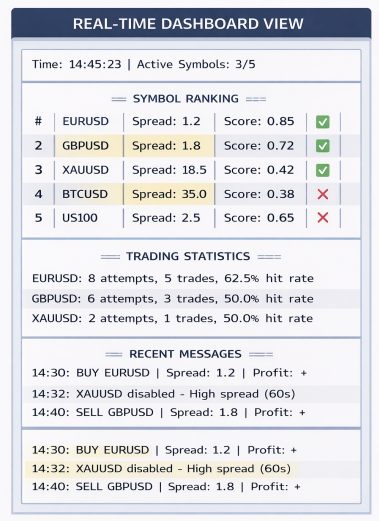
This code implements a real-time visual dashboard layer that exposes the EA’s internal decision-making directly on the chart. The UpdateDashboard() function refreshes symbol rankings by displaying spread values, spread-efficiency scores, and active status for the top-ranked symbols, using color cues to reflect each symbol’s current tradeability state. Alongside ranking data, the dashboard also displays a rolling message log that captures key system events such as symbol disabling or trade execution. The AddDashboardMessage() helper function maintains this log by shifting older messages downward and timestamping new entries, ensuring the most recent and relevant information is always visible at a glance.
The remaining functions handle dashboard lifecycle and interactivity. OnChartEvent() ensures the dashboard stays synchronized with chart updates and user interactions by forcing a refresh when the chart changes or is clicked. CreateDashboard() builds the full interface from scratch, including the background panel, section headers, symbol ranking labels, and message rows, all positioned and styled for clarity and minimal chart intrusion. Finally, RemoveDashboard() provides a clean teardown mechanism by deleting all dashboard-related objects when the EA is removed, ensuring no visual artifacts are left behind and keeping the chart environment tidy and professional.
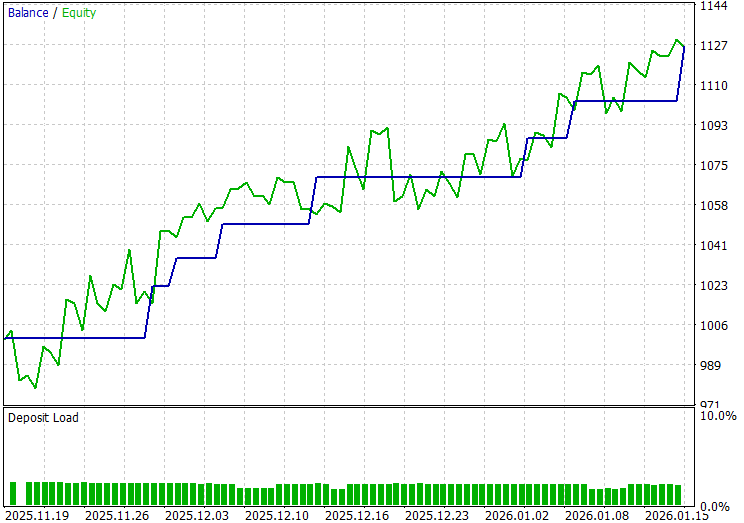
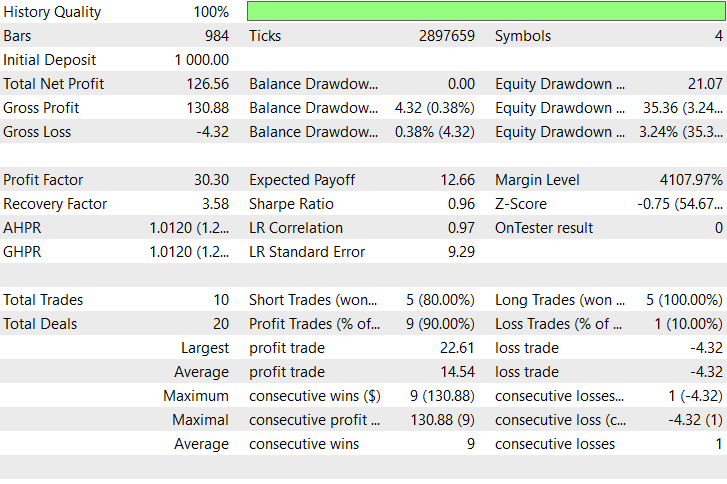
Back Test Results
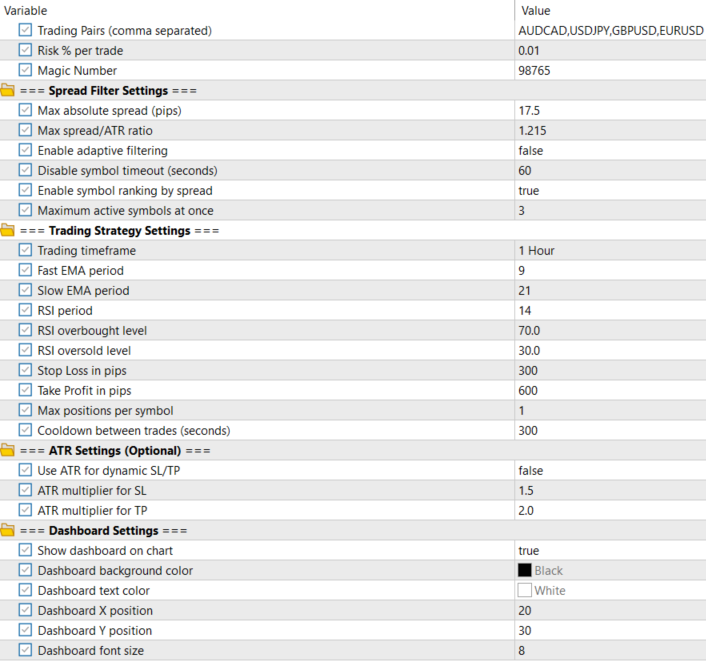
The testing was conducted across roughly a 2-month testing window from 19 November 2025 to 17 January 2026, with the following settings:
Now the equity curve and the backtest results:
Conclusion
In summary, we designed and implemented an Adaptive Spread Sensitivity framework that operates as an execution-intelligence layer within a dynamic multi-pair EA. The system continuously monitors real-time spreads, normalizes them using volatility context, ranks symbols by cost efficiency, and dynamically activates or deactivates instruments based on current execution quality. By separating spread evaluation from trading logic, we ensured that symbol selection, prioritization, and protection mechanisms remain adaptive, lightweight, and scalable—allowing the EA to switch focus across symbols at high frequency without altering the underlying strategy rules.
In conclusion, this approach equips traders with a powerful tool to control trading costs and execution risk in fast-moving, multi-symbol environments. Instead of trading all pairs blindly, the EA intelligently concentrates activity on the most efficient markets at any given moment, reducing slippage, avoiding unfavorable spread conditions, and improving overall trade quality. For traders, this translates into cleaner execution, better capital efficiency, and a more resilient automated system that adapts to changing market microstructure rather than being constrained by static assumptions.
Warning: All rights to these materials are reserved by MetaQuotes Ltd. Copying or reprinting of these materials in whole or in part is prohibited.
This article was written by a user of the site and reflects their personal views. MetaQuotes Ltd is not responsible for the accuracy of the information presented, nor for any consequences resulting from the use of the solutions, strategies or recommendations described.

 Neuroboids Optimization Algorithm 2 (NOA2)
 Tracking Account Dynamics: Balance, Equity, and Floating P/L Visualization in MQL5
 Graph Theory: Traversal Breadth-First Search (BFS) Applied in Trading
 Neural Networks in Trading: Hybrid Graph Sequence Models (Final Part)

- Free trading apps
- Over 8,000 signals for copying
- Economic news for exploring financial markets
You agree to website policy and terms of use