

Price Action Analysis Toolkit Development (Part 39): Automating BOS and ChoCH Detection in MQL5
 9 908
9 908
 4
4

Introduction
Welcome to Part 39 of the Price Action Analysis Toolkit Development series. In this installment, we build a practical MQL5 system that helps price-action traders read the chart with clarity instead of staring at candles and missing structure shifts. The goal is simple: turn fractal pivots and structure rules into reliable, non-repainting signals you can trust in both live trading and historical testing.
We use fractal pivots as reliable local anchors and detect two complementary signals: ChoCH (Change of Character), which flags when the market is losing its prior bias—for example when an uptrend fails to make a higher high or a downtrend fails to make a lower low—and BOS (Break of Structure), which confirms that the bias has shifted when price decisively closes beyond a prior swing high or low. Think of ChoCH as an early warning and BOS as the confirmation.
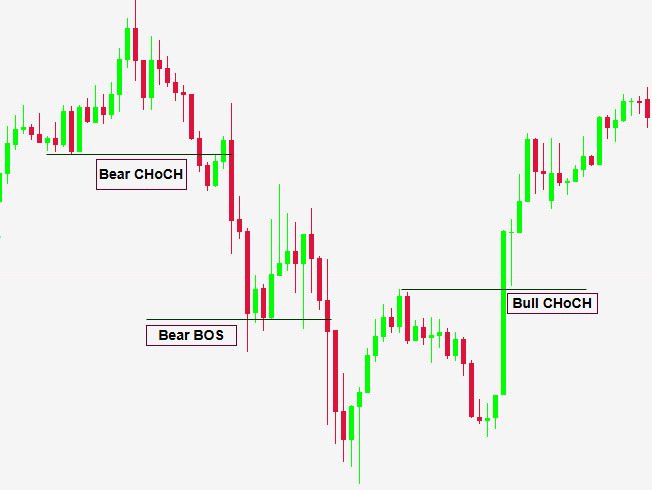
Combining fractals with ChoCH/BOS gives cleaner, non-repainting anchors for analysis, earlier warning of potential reversals, and multi-timeframe clarity that helps filter noise on lower charts. Those same rules are straightforward to automate, log and backtest—which makes them ideal for an EA.
This article walks through the algorithm design and the full MQL5 implementation: closed-bar fractal scanning, memory-safe fractal storage, safe drawing of persistent objects, and event handling that logs and alerts every confirmed BOS/ChoCH (desktop, mobile, and sound). By the end you’ll have a production-ready detector you can compile, test, and deploy.
We'll begin with the strategy logic, then move on to the MQL5 implementation, alerts, logging & notification options, testing and outcomes, and finally conclude. See the table of contents below.
- Introduction
- Strategy Logic
- MQL5 Implementation
- Alerts, Logging & Notification options
- Testing and Outcomes
- Conclusion
Strategy Logic
In this section we’ll walk through the core strategy logic behind the system we are building. The technique centers on the fractal indicator and the structure signals we derive from it. If you missed it, we covered a fractal-breakout trend strategy in an earlier article—fractals are versatile: beyond breakouts, they provide reliable anchor points that assist many kinds of price-action analysis. Here we use them to detect Change of Character (ChoCH) and Break of Structure (BOS).
A fractal pivot is a local turning point formed when a center bar’s high (or low) is higher (or lower) than a symmetric number of neighboring bars. Practically, with a window length defined as g_length = 2*p + 1, the central bar is a high fractal if its high is greater than or equal to every high in the window and a low fractal when its low is less than or equal to every low in the window. Fractals produce consistent, non-repainting anchors because detection requires the full window of confirming bars.
A Break of Structure (BOS) is a decisive violation of the recent market structure: price closes beyond a prior swing high (a bullish BOS) or below a prior swing low (a bearish BOS). A BOS signals that momentum and the short-to-medium term market bias have shifted in the direction of the break—it is the confirmation traders typically use to commit to the new direction.
A Change of Character (ChoCH) is an earlier, softer signal that the market’s bias is changing. Typical examples include a failure to make a higher high during an uptrend, or a failure to make a lower low during a downtrend. ChoCH should be treated as a warning: it often precedes a BOS if the subsequent price action gains conviction, and it lets you prepare (tighten stops, reduce exposure, or look for reversal entries).
Critically, to avoid repainting, all signals must be evaluated using closed bars only. In practice that means we compare completed bar closes (for example, prevClose vs curClose) to stored fractal levels; we never declare a BOS or ChoCH on an unconfirmed, still-forming bar. Using closed-bar logic ensures the events are reproducible and backtestable.
The algorithm is intentionally simple and deterministic: detect reliable fractal anchors on closed bars, watch for closed-bar crosses of those anchors, mark and draw each break only once, and emit a single log/alert per confirmed event. This closed-bar approach avoids repainting and produces reproducible, backtestable signals.
- High-level flow
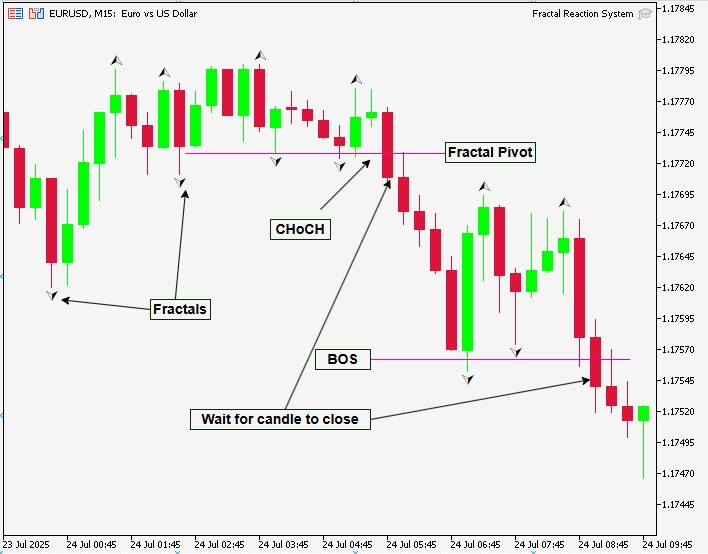
- Wait for a new closed bar (use the closed-bar timestamp as the trigger).
- Detect a fractal at the center of a symmetric window of length g_length = 2*p + 1.
- If found, store the fractal (time, price) and set marked = false.
- On each new closed bar, compare prevClose and curClose to each stored fractal price to detect crosses.
- When a cross occurs (closed-bar break), mark that fractal, draw a horizontal/trend line and an anchored label, and emit one log/alert.
- Periodically prune old fractals so the arrays remain bounded.
Core pseudocode (concise):
if new_closed_bar():
  ScanForFractals()            // detect & append new fractal anchors
  PruneFractals(maxKeepBars)   // remove very old anchors
  for each fractal in stored_fractals:
    if not fractal.marked and crossed(prevClose, curClose, fractal.price):
      DrawBreak(fractal)
      LabelAndLog(fractal)
      fractal.marked = true
MQL5 Implementation
Header and metadata
At the top of the file, concise comments provide essential metadata such as the filename, author, copyright, and reference links. These details are valuable for versioning and for future reference when sharing or revisiting the file. The #property directives determine compilation behavior; notably, #property strict enforces stricter type and API checks, which helps catch subtle errors early in development. The #include <stdlib.mqh> directive imports a standard helper library that simplifies common programming tasks and keeps the main codebase cleaner and more maintainable. If readers do not have this library available, they should either supply it or remove the include to avoid compilation errors.
//+------------------------------------------------------------------+
//|                                       Fractal Reaction System.mq5|
//|                               Copyright 2025, Christian Benjamin.|
//|                           https://www.mql5.com/en/users/lynnchris|
//+------------------------------------------------------------------+
#property copyright "Copyright 2025, Christian Benjamin."
#property link      "https://www.mql5.com/en/users/lynnchris"
#property version   "1.0"
#property strict

#include <stdlib.mqh>
User inputs
The input block exposes configuration parameters that control the EA’s behavior without requiring recompilation. AutoDetectLength permits automatic selection of an appropriate fractal length according to the chart timeframe, while LengthInput allows manual specification. Note that fractal detection requires an odd window size (for example, 3, 5, or 7) to ensure a single center bar with symmetric neighbors. Display options such as ShowBull and ShowBear and color settings (BullColor, BearColor) improve visual clarity and speed up interpretation across multiple charts.
The parameters HorizontalRightBars and HorizontalLeftExtend determine how trend lines are extended visually to the right or left, aiding interpretation of level relevance. DebugMode enables diagnostic logging for development and testing, and MaxFractalHistoryBars bounds how many historical fractals are retained, preventing unbounded memory growth during prolonged operation.
// User-configurable inputs
input bool   AutoDetectLength = false;
input int    LengthInput      = 5;
input bool   ShowBull         = true;
input color  BullColor        = clrLime;
input bool   ShowBear         = true;
input color  BearColor        = clrRed;
input int    HorizontalRightBars = 0;
input int    HorizontalLeftExtend = 3;
input bool   DebugMode        = false;
input int    MaxFractalHistoryBars = 2000;
Global variables and data structures
The global variables manage runtime state and persistent storage. g_chart_id stores the chart identifier so that all graphical objects are explicitly associated with the correct chart. g_length and p_half represent the fractal window length and its half-size, respectively; these values are computed once at initialization and reused. ea_digits, ea_point, and ea_point_pips normalize price precision across different brokers and symbols, ensuring consistent offsets and label placement. The system stores bullish and bearish fractals in parallel arrays (*_time[], *_price[], *_marked[]), where timestamps and prices identify each fractal and the marked flag prevents duplicate processing. Finally, os_state encapsulates the system’s market bias: 0 for neutral, 1 for bullish, and -1 for bearish.
// Internal globals
long   g_chart_id;
int    g_length;
int    p_half;
int    ea_digits;
double ea_point, ea_point_pips;

datetime bull_time[];
double bull_price[];
bool   bull_marked[];

datetime bear_time[];
double bear_price[];
bool   bear_marked[];

int    os_state = 0; // 0: none, 1: bullish, -1: bearish
Initialization (OnInit)
OnInit() performs initialization and input sanitization. The routine obtains the chart ID, determines the fractal length (either auto-detected or provided by the user), enforces a minimum value, and ensures the length is odd. It computes p_half and reads symbol precision to calculate point and pip sizes for accurate plotting. The fractal arrays are reset to an empty state. When DebugMode is enabled, the function outputs an initialization message containing key values, which helps confirm correct configuration before execution proceeds.
int OnInit()
{
    g_chart_id = ChartID();

    // Determine fractal length
    if(AutoDetectLength)
    {
        if(_Period <= PERIOD_H1)
            g_length = 5;
        else if(_Period <= PERIOD_H4)
            g_length = 7;
        else if(_Period <= PERIOD_D1)
            g_length = 9;
        else
            g_length = 11;
    }
    else
    {
        g_length = LengthInput;
    }

    // Ensure odd length >=3
    if(g_length < 3)
        g_length = 5;
    if((g_length % 2) == 0)
        g_length++;

    p_half = g_length / 2;

    // Get symbol info
    ea_digits = (int)SymbolInfoInteger(_Symbol, SYMBOL_DIGITS);
    ea_point = Point();
    ea_point_pips = ea_point;
    if(ea_digits == 3 || ea_digits == 5)
        ea_point_pips = Point() * 10.0;

    // Clear fractal arrays
    ArrayResize(bull_time,0);
    ArrayResize(bull_price,0);
    ArrayResize(bull_marked,0);
    ArrayResize(bear_time,0);
    ArrayResize(bear_price,0);
    ArrayResize(bear_marked,0);

    if(DebugMode)
        PrintFormat("EA INIT: AutoDetect=%s LengthInput=%d g_length=%d p_half=%d chart=%d",
                    AutoDetectLength ? "true" : "false", LengthInput, g_length, p_half, g_chart_id);
    return(INIT_SUCCEEDED);
}
Cleanup (OnDeinit)
OnDeinit() handles cleanup when the EA is removed from the chart. It invokes CleanupObjectsByPrefix() using a consistent prefix to remove all graphical objects created by the EA (such as trend lines and labels). This practice prevents orphaned objects from cluttering the chart and interfering with subsequent analysis or tools—an important consideration for professional deployments and demonstrations.
void OnDeinit(const int reason)
{
    CleanupObjectsByPrefix("CHB_");
}
Main loop (OnTick)
OnTick() implements a “run once per closed bar” model for deterministic behavior. The function checks the timestamp of the most recent closed bar and performs no further work if the bar has not changed since the last invocation. When a new closed bar is detected, OnTick() triggers three primary functions: ScanForFractals() to detect newly validated fractals, PruneFractals() to remove entries older than the configured history limit, and ProcessFractalCrosses() to evaluate whether price has crossed any stored fractal levels. This sequencing preserves efficiency and ensures that all detection and processing occur on completed bars, which is important for reproducible backtests and reliable live behavior.
void OnTick()
{
    static datetime last_checked = 0;
    datetime t = iTime(_Symbol, _Period, 1);
    if(t == last_checked)
        return;
    last_checked = t;

    ScanForFractals();
    PruneFractals(MaxFractalHistoryBars);
    ProcessFractalCrosses();
}
Fractal detection (ScanForFractals)
ScanForFractals() validates whether enough historical data exists and then inspects the center bar at shift p_half, which represents the middle of the fractal window. It invokes IsFractalHighAtShift() and IsFractalLowAtShift() to determine whether the center bar qualifies as a high or low fractal. These helpers perform strict comparisons between the center bar and its neighbors. When a valid fractal is identified and is not already recorded (duplicate prevention by timestamp), the routine appends its timestamp and price to the appropriate arrays and marks it as unprocessed so it can later participate in crossover detection.
void ScanForFractals()
{
    int bars = iBars(_Symbol, _Period);
    if(bars <= g_length)
        return;

    int centerShift = p_half;
    if(centerShift >= bars)
        return;

    // High fractal detection
    if(IsFractalHighAtShift(centerShift))
    {
        datetime t_fr = (datetime)iTime(_Symbol, _Period, centerShift);
        double p_fr = iHigh(_Symbol, _Period, centerShift);
        // Store if new
        bool exists = false;
        for(int i=0;i<ArraySize(bull_time);i++)
            if(bull_time[i]==t_fr)
                exists = true;
        if(!exists)
        {
            int n = ArraySize(bull_time);
            ArrayResize(bull_time, n+1);
            ArrayResize(bull_price, n+1);
            ArrayResize(bull_marked, n+1);
            bull_time[n] = t_fr;
            bull_price[n] = p_fr;
            bull_marked[n] = false;
            if(DebugMode)
                PrintFormat("FRAC_BULL DETECTED: t=%s price=%G", TimeToString(t_fr, TIME_DATE|TIME_SECONDS), p_fr);
        }
    }

    // Low fractal detection
    if(IsFractalLowAtShift(centerShift))
    {
        datetime t_fr = (datetime)iTime(_Symbol, _Period, centerShift);
        double p_fr = iLow(_Symbol, _Period, centerShift);
        // Store if new
        bool exists = false;
        for(int i=0;i<ArraySize(bear_time);i++)
            if(bear_time[i]==t_fr)
                exists = true;
        if(!exists)
        {
            int n = ArraySize(bear_time);
            ArrayResize(bear_time, n+1);
            ArrayResize(bear_price, n+1);
            ArrayResize(bear_marked, n+1);
            bear_time[n] = t_fr;
            bear_price[n] = p_fr;
            bear_marked[n] = false;
            if(DebugMode)
                PrintFormat("FRAC_BEAR DETECTED: t=%s price=%G", TimeToString(t_fr, TIME_DATE|TIME_SECONDS), p_fr);
        }
    }
}
Fractal validation helpers
IsFractalHighAtShift() and IsFractalLowAtShift() enforce the fractal definition by iterating through the symmetric window around the center bar. They return false if any neighbor invalidates the center’s dominance or if the full window is not available. These strict checks prevent premature or spurious fractal claims and protect against index errors at the start of historical data or after timeframe changes. For larger datasets, consider bulk-copying historical series with CopyHigh/CopyLow to reduce repeated per-bar API calls and improve performance.
bool IsFractalHighAtShift(int shift)
{
    int bars = iBars(_Symbol,_Period);
    int p = p_half;
    if(shift < 0 || shift >= bars)
        return false;

    double center = iHigh(_Symbol,_Period,shift);
    for(int k=-p; k<=p; k++)
    {
        if(k == 0)
            continue;
        int s = shift + k;
        if(s < 0 || s >= bars)
            return false; // incomplete window
        if(iHigh(_Symbol,_Period,s) > center)
            return false;
    }
    return true;
}
Helper: Check for Low Fractal
bool IsFractalLowAtShift(int shift)
{
    int bars = iBars(_Symbol,_Period);
    int p = p_half;
    if(shift < 0 || shift >= bars)
        return false;

    double center = iLow(_Symbol,_Period,shift);
    for(int k=-p; k<=p; k++)
    {
        if(k == 0)
            continue;
        int s = shift + k;
        if(s < 0 || s >= bars)
            return false;
        if(iLow(_Symbol,_Period,s) < center)
            return false;
    }
    return true;
}
Processing crosses (ProcessFractalCrosses)
ProcessFractalCrosses() converts stored fractal levels into actionable signals by checking whether the most recent confirmed close has crossed any fractal price. The function uses a conservative, closed-bar approach: it compares prevClose (the previous completed bar) and curClose (the most recent completed bar) and applies CrossedOver() or CrossedUnder() to determine crossings. When a crossing is detected for an unprocessed fractal, the EA assigns a unique object tag, classifies the event as a Break of Structure (BOS) or Change of Character (ChoCH) based on os_state, optionally draws a break line and label, updates os_state, marks the fractal as processed, and emits alerts. This one-time processing per fractal makes behavior deterministic and well-suited for backtesting.
void ProcessFractalCrosses()
{
    double prevClose = iClose(_Symbol, _Period, 2);
    double curClose  = iClose(_Symbol, _Period, 1);
    datetime curTime = (datetime)iTime(_Symbol, _Period, 1);

    // Process bullish fractals
    for(int i=0; i<ArraySize(bull_time); i++)
    {
        if(bull_marked[i])
            continue;
        double level = bull_price[i];

        if(CrossedOver(prevClose, curClose, level))
        {
            datetime fr_time = bull_time[i];
            string tag = "CHB_BULL_" + IntegerToString((int)fr_time);
            bool isChoCH = (os_state == -1);
            string niceName = isChoCH ? "Bull ChoCH" : "Bull BOS";

            if(ShowBull)
            {
                DrawBreak(tag, fr_time, level, curTime, true);
                CreateAnchoredLabel(tag + "_lbl", niceName, fr_time, level + 3*ea_point, BullColor);
            }

            os_state = 1;
            bull_marked[i] = true;
            string msg = StringFormat("%s detected: %s %s at %s price=%s",
                niceName, _Symbol, TimeframeToString(_Period), TimeToString(curTime, TIME_DATE|TIME_MINUTES), DoubleToString(level, ea_digits));
            EmitLogAlert(msg);
        }
    }

    // Process bearish fractals
    for(int i=0; i<ArraySize(bear_time); i++)
    {
        if(bear_marked[i])
            continue;
        double level = bear_price[i];

        if(CrossedUnder(prevClose, curClose, level))
        {
            datetime fr_time = bear_time[i];
            string tag = "CHB_BEAR_" + IntegerToString((int)fr_time);
            bool isChoCH = (os_state == 1);
            string niceName = isChoCH ? "Bear ChoCH" : "Bear BOS";

            if(ShowBear)
            {
                DrawBreak(tag, fr_time, level, curTime, false);
                CreateAnchoredLabel(tag + "_lbl", niceName, fr_time, level - 3*ea_point, BearColor);
            }

            os_state = -1;
            bear_marked[i] = true;
            string msg = StringFormat("%s detected: %s %s at %s price=%s",
                niceName, _Symbol, TimeframeToString(_Period), TimeToString(curTime, TIME_DATE|TIME_MINUTES), DoubleToString(level, ea_digits));
            EmitLogAlert(msg);
        }
    }
}
Alerting (EmitLogAlert)
EmitLogAlert() centralizes notification logic. It always prints the message to the Experts log for audit and review. Optionally, it produces a popup alert, sends a push notification to a configured MetaTrader mobile client, and plays a sound file. This multi-channel alerting ensures that traders receive timely notifications regardless of their current context. If push notifications are required, ensure the MetaQuotes ID is configured in the terminal.
void EmitLogAlert(const string msg)
{
    Print(msg);

    if(EnableAlerts)
        Alert(msg);

    if(EnableNotifications)
        SendNotification(msg);

    if(EnableSound && StringLen(AlertSoundFile) > 0)
        PlaySound(AlertSoundFile);
}
Visualization functions
DrawBreak(), CreateTrendLine(), and CreateAnchoredLabel() manage chart graphics. DrawBreak() computes bar indices for the fractal and break times using iBarShift(), extends the older side by HorizontalLeftExtend, and optionally shifts the newer edge toward the present according to HorizontalRightBars. CreateTrendLine() creates an anchored trend object between two times and applies visual styling. CreateAnchoredLabel() places descriptive text at a timestamp and price, offset by some points for readability. Each creation routine uses SafeDelete() to remove conflicting objects with the same name before creating new ones; this ensures the chart remains uncluttered and consistent.
void DrawBreak(const string tag, datetime fract_time, double fract_price, datetime break_time, bool bullish)
{
    int barFr = iBarShift(_Symbol, _Period, fract_time, false);
    int barBreak = iBarShift(_Symbol, _Period, break_time, false);
    int bars = iBars(_Symbol, _Period);
    if(barFr == -1 || barBreak == -1)
        return;

    int older_shift = MathMax(barFr, barBreak);
    int newer_shift = MathMin(barFr, barBreak);

    // Extend left
    older_shift = MathMin(older_shift + HorizontalLeftExtend, bars - 1);

    // Extend right towards current bar
    if(HorizontalRightBars > 0)
        newer_shift = MathMax(newer_shift - HorizontalRightBars, 0);

    // Swap if necessary
    if(older_shift < newer_shift)
    {
        int tmp = older_shift;
        older_shift = newer_shift;
        newer_shift = tmp;
    }

    datetime tLeft = (datetime)iTime(_Symbol, _Period, older_shift);
    datetime tRight = (datetime)iTime(_Symbol, _Period, newer_shift);

    string lineName = tag + "_line";
    CreateTrendLine(lineName, tLeft, fract_price, tRight, (bullish ? BullColor : BearColor), false);
}

void CreateAnchoredLabel(const string name, const string txt, datetime when, double price, color col)
{
    SafeDelete(name);
    if(ObjectCreate(g_chart_id, name, OBJ_TEXT, 0, when, price))
    {
        ObjectSetString(g_chart_id, name, OBJPROP_TEXT, txt);
        ObjectSetInteger(g_chart_id, name, OBJPROP_COLOR, (int)col);
        ObjectSetInteger(g_chart_id, name, OBJPROP_FONTSIZE, 10);
        ObjectSetInteger(g_chart_id, name, OBJPROP_BACK, false);
        ObjectMove(g_chart_id, name, 0, when, price);
    }
}

void CreateTrendLine(const string name, datetime tLeft, double price, datetime tRight, color col, bool dashed=false)
{
    SafeDelete(name);
    if(ObjectCreate(g_chart_id, name, OBJ_TREND, 0, tLeft, price, tRight, price))
    {
        ObjectSetInteger(g_chart_id, name, OBJPROP_COLOR, (int)col);
        ObjectSetInteger(g_chart_id, name, OBJPROP_WIDTH, 2);
        ObjectSetInteger(g_chart_id, name, OBJPROP_STYLE, dashed ? STYLE_DASH : STYLE_SOLID);
        ObjectSetInteger(g_chart_id, name, OBJPROP_BACK, false);
        ObjectSetInteger(g_chart_id, name, OBJPROP_SELECTABLE, false);
    }
}

void SafeDelete(const string name)
{
    if(ObjectFind(g_chart_id, name) >= 0)
        ObjectDelete(g_chart_id, name);
}
Utility helpers
CrossedOver() and CrossedUnder() encapsulate the closed-bar crossing conditions (prevClose <= level && curClose > level, and the inverse).
bool CrossedOver(double prevClose, double curClose, double level)
{
    return (prevClose <= level && curClose > level);
}

bool CrossedUnder(double prevClose, double curClose, double level)
{
    return (prevClose >= level && curClose < level);
}
TimeframeToString() converts timeframe constants to human-readable strings for clearer log output.
string TimeframeToString(int period)
{
    switch(period)
    {
        case PERIOD_M1: return "M1";
        case PERIOD_M5: return "M5";
        case PERIOD_M15: return "M15";
        case PERIOD_M30: return "M30";
        case PERIOD_H1: return "H1";
        case PERIOD_H4: return "H4";
        case PERIOD_D1: return "D1";
        case PERIOD_W1: return "W1";
        case PERIOD_MN1: return "MN1";
        default: return IntegerToString(period);
    }
}
CleanupObjectsByPrefix() removes all objects sharing a prefix; it iterates backward through the object list to avoid index-shift errors while deleting.
void CleanupObjectsByPrefix(const string prefix)
{
    long total = ObjectsTotal(g_chart_id);
    for(int i=total-1; i>=0; i--)
    {
        string name = ObjectName(g_chart_id, i);
        if(StringLen(name) >= StringLen(prefix) && StringSubstr(name, 0, StringLen(prefix)) == prefix)
            ObjectDelete(g_chart_id, name);
    }
}
Pruning (PruneFractals)
PruneFractals() maintains performance and memory stability by removing stored fractals older than the MaxFractalHistoryBars threshold. The routine compacts arrays in-place using a write pointer and then resizes them, avoiding unnecessary allocations. Bear in mind that iBarShift() is invoked per stored fractal during pruning, so massive storage caps may increase processing time. Selecting a reasonable default (such as 2000 bars) balances historical coverage and runtime efficiency.
void PruneFractals(int keepBars)
{
    if(keepBars <=0) return;

    // Prune bullish fractals
    int nB = ArraySize(bull_time);
    if(nB > 0)
    {
        int write = 0;
        for(int i=0; i<nB; i++)
        {
            int sh = iBarShift(_Symbol, _Period, bull_time[i], false);
            if(sh != -1 && sh <= keepBars)
            {
                bull_time[write] = bull_time[i];
                bull_price[write] = bull_price[i];
                bull_marked[write] = bull_marked[i];
                write++;
            }
        }
        if(write != nB)
        {
            ArrayResize(bull_time, write);
            ArrayResize(bull_price, write);
            ArrayResize(bull_marked, write);
        }
    }

    // Prune bearish fractals
    int nS = ArraySize(bear_time);
    if(nS > 0)
    {
        int write = 0;
        for(int i=0; i<nS; i++)
        {
            int sh = iBarShift(_Symbol, _Period, bear_time[i], false);
            if(sh != -1 && sh <= keepBars)
            {
                bear_time[write] = bear_time[i];
                bear_price[write] = bear_price[i];
                bear_marked[write] = bear_marked[i];
                write++;
            }
        }
        if(write != nS)
        {
            ArrayResize(bear_time, write);
            ArrayResize(bear_price, write);
            ArrayResize(bear_marked, write);
        }
    }
}
This EA is a modular and professional-grade system that identifies validated fractals on closed bars, stores them efficiently, detects confirmed crosses to generate BOS/ChoCH signals, renders clear chart annotations, and issues multi-channel alerts. Each module is designed for clarity, reproducibility, and maintainability. For a production or instructional setting, encourage readers to test in a demo environment, enable DebugMode during validation steps.
Alerts, Logging & Notification Options
The EA provides three configurable output channels so you won’t miss an event: desktop popups, mobile push, and sound. Use them together for maximum coverage or individually when you want quieter operation.
Settings:
- EnableAlerts — desktop popups via Alert() (immediate, visible while terminal is running). Useful for active monitoring.
- EnableNotifications — mobile push via SendNotification() (requires entering your MetaQuotes ID in Tools - Options - Notifications and enabling notifications in the MetaTrader mobile app).
- EnableSound — play a local terminal sound via PlaySound(filename); the file must be present in the terminal’s Sounds folder and the terminal sound volume unmuted.
Recommended alert message format (clear, parseable):
Bull BOS detected: EURUSD H1 at 2025.08.01 14:00 price=1.12345 fr_time=2025.08.01 12:00
Include symbol, timeframe, event type, confirmation time, price, and optional fractal timestamp to aid reconciliation.
To enable notifications, set your MetaQuotes ID in the terminal options and ensure notifications are activated on your mobile device.
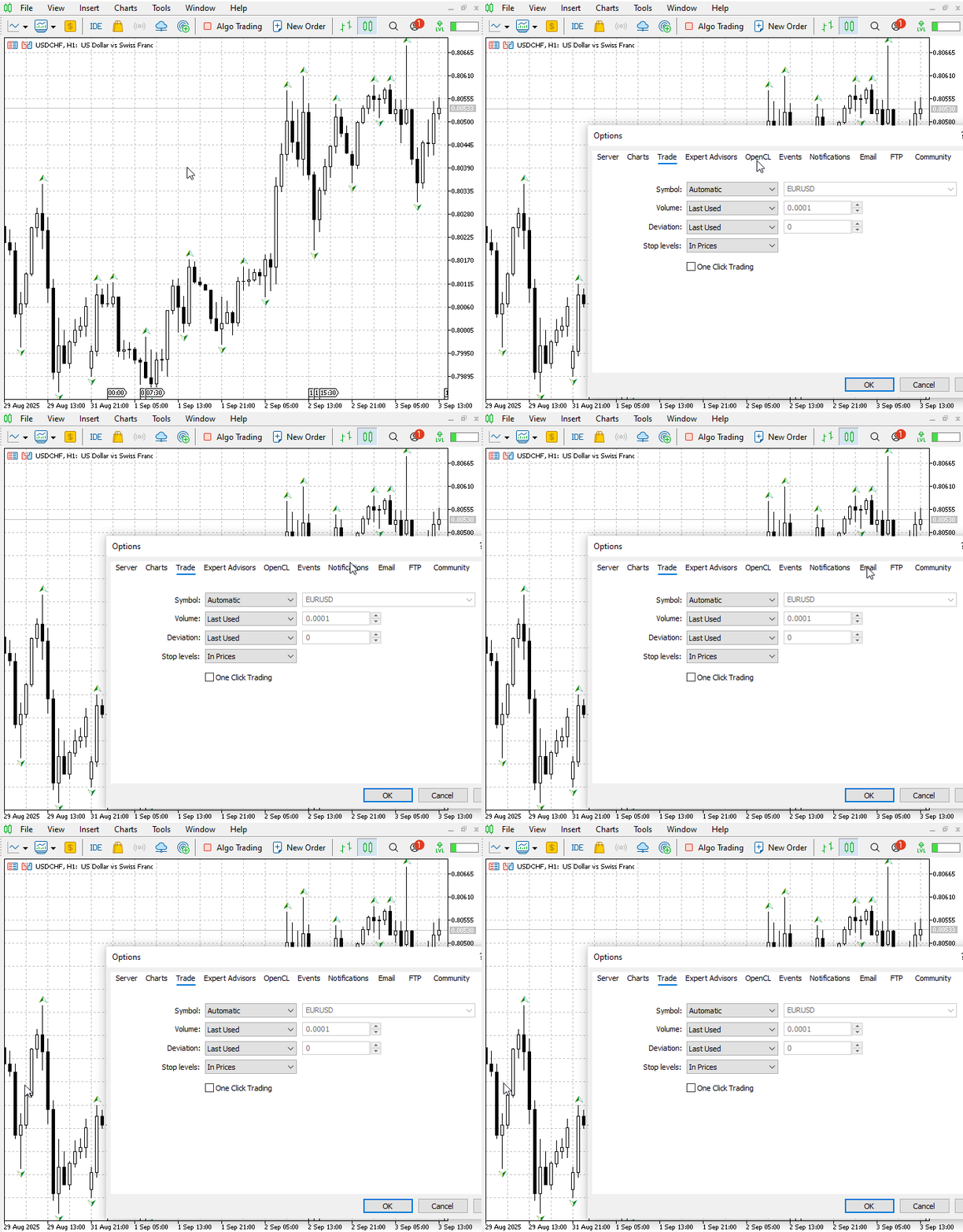
For sound alerts, copy your WAV or MP3 files into the terminal's Sounds folder and verify that the PlaySound function works correctly through Options - Events. To prevent spamming, utilize the *_marked[] arrays to avoid duplicate alerts for the same fractal and consider implementing a short cooldown period (e.g., 30–120 seconds) per symbol during volatile market conditions. Additionally, for audit and troubleshooting purposes, you can log events by appending them to a CSV file—using FILE_COMMON or placing the file in the terminal’s MQL5/Files directory—during testing, and be sure to close the file promptly after writing to avoid file locks.
Testing and Outcomes
In this section I present the system’s performance—both historical backtests and live results—which, on my side, match the design goals and behave as expected. I’ll show backtest configuration and metrics, the equity curve and sample trades that illustrate how the detector behaves in practice, and a short review of live performance with real-time screenshots and reconciliation against the backtest. Finally, I’ll summarize limitations and suggested next steps for further validation.
I ran backtests on EURUSD and Step Index, both on the H1 timeframe, and below I illustrate the outcomes. The animated GIF that follows clearly labels and visualizes the ChoCH and BOS events—the annotations are precise and make the sequence of warning - confirmation easy to follow.
- Step Index H1: annotated fractal pivot (anchor), ChoCH (failed HH) and Bull BOS (confirmed on close).
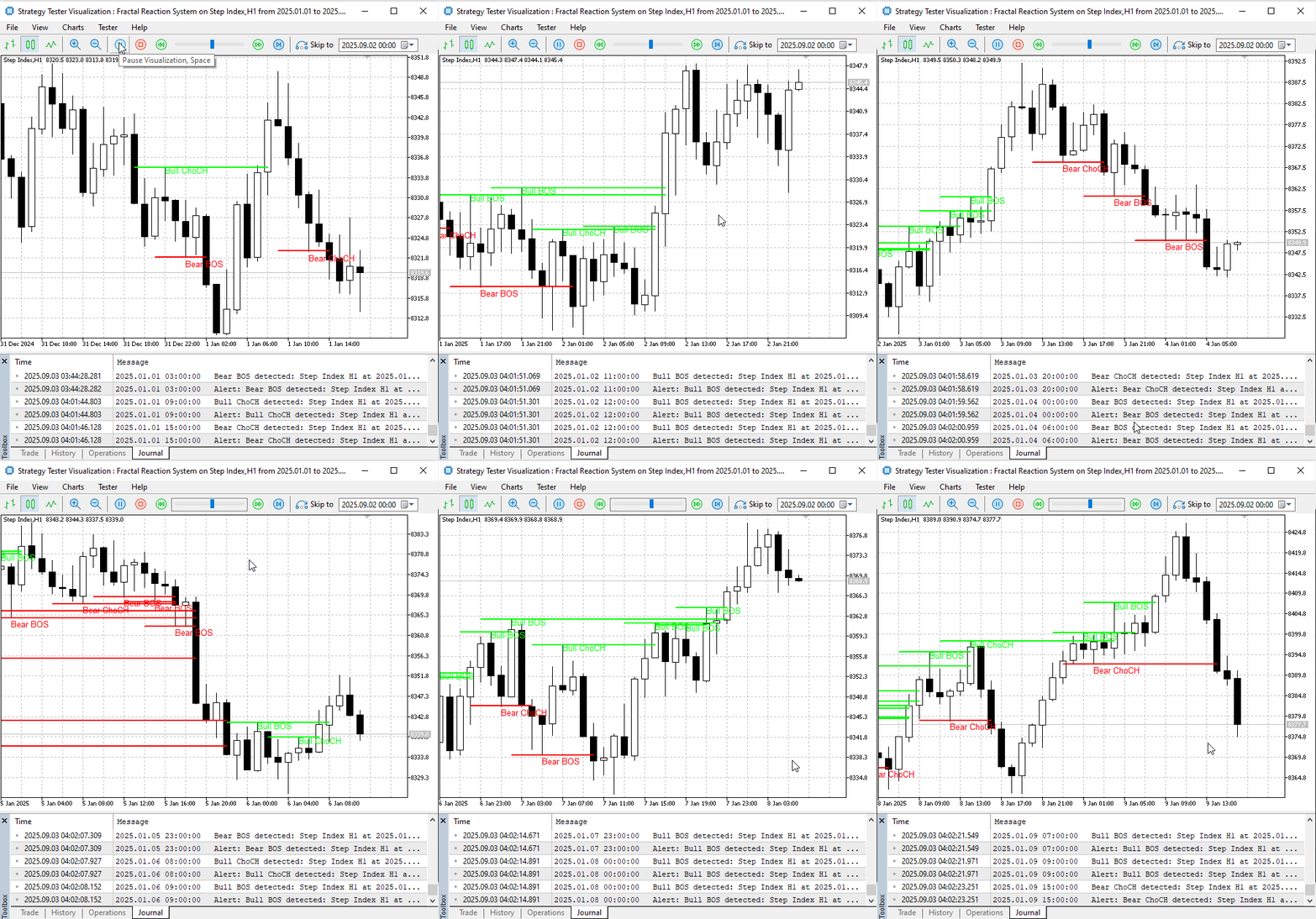
- EURUSD H1: annotated fractal pivot (anchor), ChoCH (failed HH) and Bull BOS (confirmed on close).
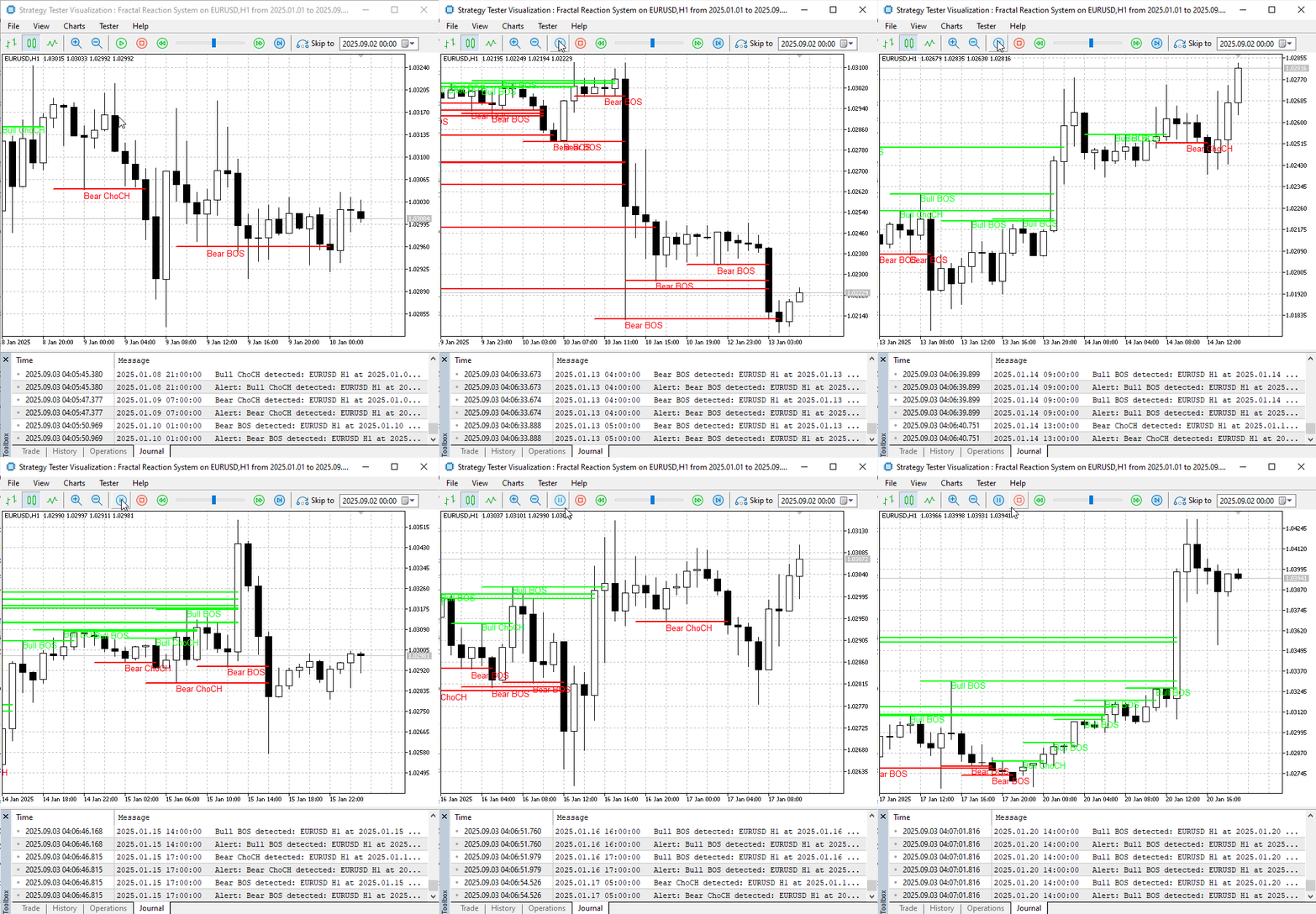
I also ran live testing to confirm real-time performance, and the tool behaved exactly as expected. The screenshots below show the EA detecting, labeling and logging ChoCH and BOS events in real time, with desktop alerts and chart objects appearing immediately on the confirmed closed bar. Live behavior matched the backtest signals directionally, with only the usual live-market effects (spread and slippage) visible in the execution logs.
Live demo—Volatility 75 (1s) Index M1: real-time ChoCH warnings and Bull BOS confirmations.
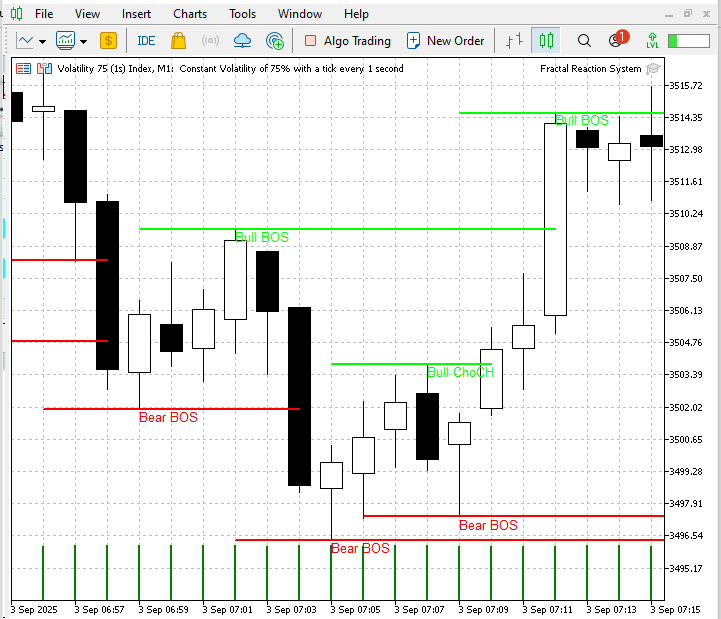
This live screenshot demonstrates how the system uses fractal pivots to flag early ChoCH warnings and then confirm structure shifts with non-repainting BOS markers—visually validating the detector’s real-time behavior.
Live demo—Step Index M1: real-time ChoCH warnings and Bull BOS confirmations
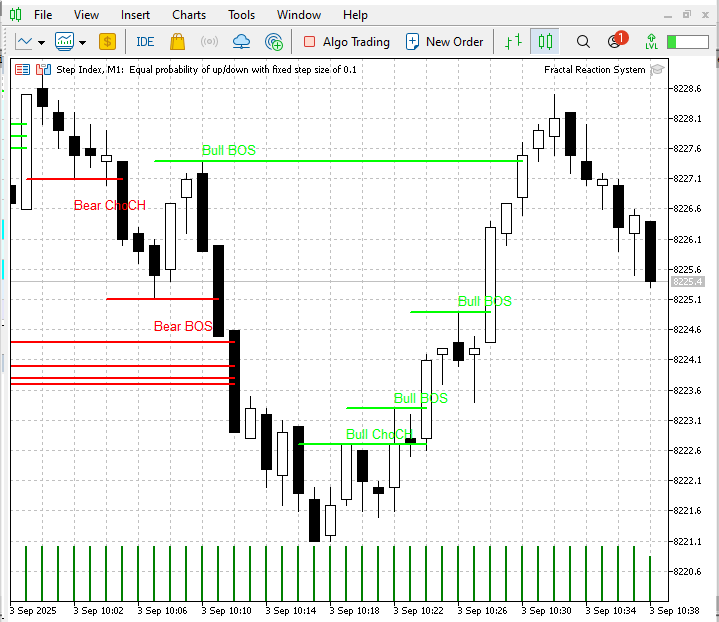
The EA first marks a bearish phase with a Bear ChoCH and successive Bear BOS levels, then flags a Bull ChoCH as the downmove fails and confirms a bullish reversal with multiple Bull BOS signals—demonstrating the system’s early-warning (ChoCH) and non-repainting confirmation (BOS) behavior in real time.
Below are the logs on the MetaTrader 5 experts tab.
2025.09.03
10 :
20 :58.856 Fractal Reaction System (Volatility 75 (1s) Index,M1)   Alert: Bear BOS detected: Volatility 75 (1s) Index M1 at 2025.09.03 13:44 price=3446.40
2025.09.03
10 :
20 :58.856 Fractal Reaction System (Volatility 75 (1s) Index,M1)   Bear BOS detected: Volatility 75 (1s) Index M1 at 2025.09.03 13:44 price=3446.73
2025.09.03
10 :
20 :58.856 Fractal Reaction System (Volatility 75 (1s) Index,M1)   Alert: Bear BOS detected: Volatility 75 (1s) Index M1 at 2025.09.03 13:44 price=3446.73
2025.09.03
10 :
20 :58.894 Fractal Reaction System (Step Index,M1) Bear BOS detected: Step Index M1 at 2025.09.03 13:44 price=8233.6
2025.09.03
10 :
20 :58.894 Fractal Reaction System (Step Index,M1) Alert: Bear BOS detected: Step Index M1 at 2025.09.03 13:44 price=8233.6
2025.09.03
10 :
20 :58.896 Fractal Reaction System (Volatility 75 (1s) Index,M1)   Alert: Bear BOS detected: Volatility 75 (1s) Index M1 at 2025.09.03 13:44 price=3447.86
Across both historical backtests (EURUSD and Step Index, H1) and live testing, the fractal-based detector behaved exactly as designed: fractal pivots provided stable, non-repainting anchors, ChoCH warnings flagged loss of bias early, and BOS confirmations reliably signalled the structural shifts. Backtests produced consistent trading events that match the annotated GIFs (warning - confirmation sequences), and live screenshots show the same pattern emerging in real time with only the expected live-market effects (spread and slippage).
Conclusion
The Fractal Reaction System converts simple fractal pivots into reliable, non-repainting market-structure signals: ChoCH (Change of Character) as an early warning and BOS (Break of Structure) as the confirmation. The EA presented here is memory-safe, evaluates only closed bars for reproducibility, draws persistent structure objects on the chart, and logs and alerts every confirmed event—behavior that is consistent across both historical backtests and live testing. Its primary strengths are transparency (auditable events), reproducibility (closed-bar logic), and practicality (desktop, mobile and sound notifications, plus easy reconciliation via logs).
This tool is a signal detector, not a complete trade manager: live execution factors such as spread, slippage and fills will affect realized performance, and ChoCH warnings are designed to be informative rather than prescriptive. Before deploying capital, validate the EA on your own instruments and broker settings, review the included backtest .set and event logs, and consider adding position-sizing rules, higher-timeframe filters, or a cooldown mechanism to suit your risk profile.
Warning: All rights to these materials are reserved by MetaQuotes Ltd. Copying or reprinting of these materials in whole or in part is prohibited.
This article was written by a user of the site and reflects their personal views. MetaQuotes Ltd is not responsible for the accuracy of the information presented, nor for any consequences resulting from the use of the solutions, strategies or recommendations described.

 From Novice to Expert: Animated News Headline Using MQL5 (X)—Multiple Symbol Chart View for News Trading
 Polynomial models in trading
 Automating Trading Strategies in MQL5 (Part 30): Creating a Price Action AB-CD Harmonic Pattern with Visual Feedback
 Market Simulation (Part 01): Cross Orders (I)

- Free trading apps
- Over 8,000 signals for copying
- Economic news for exploring financial markets
You agree to website policy and terms of use
Hello,
file 'C:\Users\Administrator\AppData\Roaming\MetaQuotes\Terminal\24F345EB9F291441AFE537834F9D8A19\MQL5\Include\stdlib_mq5.mqh' not found Fractal_Reaction_System.mq5
Where can I get the file?
Chris
Hello,
file 'C:\Users\Administrator\AppData\Roaming\MetaQuotes\Terminal\24F345EB9F291441AFE537834F9D8A19\MQL5\Include\stdlib_mq5.mqh' not found Fractal_Reaction_System.mq5
Where can I get the file?
Chris
Looks like an AI pattern. Maybe used to clean up code. AI agents sometimes impose incompatible C/C++ syntax here. Code compiles if you delete the line.
To be clear, the actual include directive in the code is:
#include <stdlib.mqh>Note that there is no underline spacer.