

Implementing Practical Modules from Other Languages in MQL5 (Part 04): time, date, and datetime modules from Python
 2 579
2 579
 0
0

Contents
- Introduction
- The time class
- The Time zone information class
- Time delta class
- The date class object
- The datetime module
- Conclusion
Introduction
Time is a foundational unit in our lives; everything that exists in this universe is measured in time. In our daily life, we measure our goals and the time taken to achieve them, and we even set tight schedules to measure (monitor) tasks with time tracking devices such as smartphones and watches.
When it comes to algorithmic and trading in general, time is still a crucial unit. We often make time-based trading decisions, and usually assess our achievements on a daily, monthly, and weekly basis.
The MQL5 programming language has plenty of built-in functions for managing and evaluating the time, ensuring our algorithmic trading systems are aware and in touch with the time in the real world. However, our favorable programming language offers a very basic (simple) and sometimes not human-friendly way of working with time, dates, etc., compared to other languages such as Python which offers rich modules for the task such as datetime, calendar, time, zoneinfo, etc.

In this article, we are going to implement similar modules to those offered in Python for time handling in the MQL5 programming language.
The Time class (Module)
Starting with the class named time, which has the foundational functions (methods) for working with time in the Python programming language.
According to a Python documentation:
A time object represents a (local) time of day, independent of any particular day, and subject to adjustment via a tzinfo object.
class datetime.time(hour=0, minute=0, second=0, microsecond=0, tzinfo=None, *, fold=0)
All arguments are optional. tzinfo may be None, or an instance of a tzinfo subclass. The remaining arguments must be integers in the following ranges:
- 0 <= hour < 24,
- 0 <= minute < 60,
- 0 <= second < 60,
- 0 <= microsecond < 1000000
If an argument outside those ranges is given, ValueError is raised. All default to 0 except tzinfo, which defaults to None.
Python offers classes such as datetime and date with similar methods for working with time. However, the class named time from a module named time is responsible for working with time only (without being aware of the date). Just like the way you'd like to know a specific time of a day.
Within a class named CTime, we have to handle the checking of the values to ensure the user has given appropriate values to create a time object in the class constructor, similarly to how Python does it.
class CTime
  {
protected:

   uint              m_hour;
   uint              m_minute;
   uint              m_second;
   uint              m_millisecond;
   CTZInfo           *m_tzinfo;

public:
   //--- constructors
                     CTime(void);
                     CTime(const int hour, const int minute, const int second, CTZInfo *tzinfo=NULL, const int milliseconds=0);
                    ~CTime(void); //--- A destructor
CTime::CTime(const int hour, const int minute, const int second, CTZInfo *tzinfo=NULL, const int milliseconds=0)
  {
// --- Validate hour ---
   if(hour < MINHOUR || hour > MAXHOUR)
     {
      printf("CTime Error: hour (%d) out of range [%d..%d]. Defaulting to 0.", hour, MINHOUR, MAXHOUR);
      m_hour = 0;
     }
   else
      m_hour = hour;

// --- Validate minute ---
   if(minute < MINMINUTES || minute > MAXMINUTES)
     {
      printf("CTime Error: minute (%d) out of range [%d..%d]. Defaulting to 0.", minute, MINMINUTES, MAXMINUTES);
      m_minute = 0;
     }
   else
      m_minute = minute;

// --- Validate second ---
   if(second < MINSECOND || second > MAXSECOND)
     {
      printf("CTime Error: second (%d) out of range [%d..%d]. Defaulting to 0.", second, MINSECOND, MAXSECOND);
      m_second = 0;
     }
   else
      m_second = second;

// --- Validate millisecond ---
   if(milliseconds < MINMILLISECOND || milliseconds > MAXMILLISECOND)
     {
      printf("CTime Error: millisecond (%d) out of range [%d..%d]. Defaulting to 0.", milliseconds, MINMILLISECOND, MAXMILLISECOND);
      m_millisecond = 0;
     }
   else
      m_millisecond = milliseconds;

// --- Timezone info pointer ---

   m_tzinfo = tzinfo;
  }
When a class constructor is called with optional parameters, it populates the variables within the class, effectively creating a CTime object.
An optional variable named tzinfo stores the information about a particular time zone a time object belongs to.
Below are several methods present in the class CTime.
(a): fromisoformat
This function returns a CTime object corresponding to a time_string variable in any valid ISO 8601 format, with the following exceptions:
- Time zone offsets may have fractional seconds.
- The leading T, normally required in cases where there may be ambiguity between a date and a time, is not required.
- Fractional seconds may have any number of digits (anything beyond 6 will be truncated).
- Fractional hours and minutes are not supported.
CTime CTime::fromisoformat(string time_string) Example usage.
void OnStart()
  {
//---
   CTime time;

   Print("Time: ",time.fromisoformat("04:23:01").__str__());
   Print("Time: ",time.fromisoformat("T04:23:01").__str__());
   Print("Time: ",time.fromisoformat("T042301").__str__());
   Print("Time: ",time.fromisoformat("04:23:01.000384").__str__());
   Print("Time: ",time.fromisoformat("04:23:01,000384").__str__());
   Print("Time: ",time.fromisoformat("04:23:01+04:00").__str__());
   Print("Time: ",time.fromisoformat("04:23:01Z").__str__());
   Print("Time: ",time.fromisoformat("04:23:01+00:00").__datetime__());
 }
Outputs.
OL      0       20:44:38.611    Time testing (XAUUSD,H1)        Time: 04:23:01
IG      0       20:44:38.611    Time testing (XAUUSD,H1)        Time: 04:23:01
KO      0       20:44:38.611    Time testing (XAUUSD,H1)        Time: 04:23:01
EF      0       20:44:38.611    Time testing (XAUUSD,H1)        Time: 04:23:01
GQ      0       20:44:38.611    Time testing (XAUUSD,H1)        Time: 04:23:01
QI      0       20:44:38.611    Time testing (XAUUSD,H1)        Time: 04:23:01
CP      0       20:44:38.611    Time testing (XAUUSD,H1)        Time: 04:23:01
HJ      0       20:44:38.611    Time testing (XAUUSD,H1)        Time: 1970.01.01 04:23:01
The methods __str__() and __datetime__() convert the time stored in the CTime object into a string and datetime formats (variables), respectively.
(b): strptime
This function converts a given time in a string format into an appropriate datetime variable.
datetime CTime::strptime(string timestr, string format)
Example usage.
void OnStart()
  {
//---

   Print("Time: ", CTime::strptime("00:00:01", "%H:%M:%S"));
   Print("Time: ", CTime::strptime("00,00,01", "%H,%M,%S"));
   Print("Time: ", CTime::strptime("00-00-01", "%H-%M-%S"));
 }
Outputs.
MD      0       20:37:49.509    Time testing (XAUUSD,H1)        Time: 1970.01.01 00:00:01
IL      0       20:37:49.509    Time testing (XAUUSD,H1)        Time: 1970.01.01 00:00:01
EE      0       20:37:49.509    Time testing (XAUUSD,H1)        Time: 1970.01.01 00:00:01
(c): replace
This function returns a new CTime object with the same values but with specified parameters updated. Note that, tzinfo=NULL can be specified to create a naive time from an aware time, without conversion of the time data.
CTime CTime::replace(const int hour, const int minute=-1, const int second=-1, CTZInfo *tzinfo=NULL, const int millisecond=0)
  {
//--- Modify only specified values

   int n_hour = int(hour<=-1?this.m_hour:hour);
   int n_minute = int(minute<=-1?this.m_minute:minute);
   int n_second = int(second<=-1?this.m_second:second);
   int n_millisecond = int(millisecond<=-1?this.m_millisecond:millisecond);

//---

   m_tzinfo = tzinfo;

   return CTime(n_hour, n_minute, n_second, m_tzinfo, n_millisecond);
  }
Example usage.
void OnStart()
  {
   CTime time(9, 48, 10, &tzinfo);
   Print(time.__str__());

   time = time.replace(22); //replace the hour and assign the new CTime object to the old one
   Print(time.__str__());
 }
Outputs.
FR      0       11:05:16.339    Time testing (XAUUSD,H1)        09:48:10
IN      0       11:05:16.339    Time testing (XAUUSD,H1)        22:48:10
(c): isoformat
This function returns a string representing the time in ISO 8601 format, one of:
- HH:MM:SS.ffffff, if microsecond is not 0
- HH:MM:SS, if microsecond is 0
- HH:MM:SS.ffffff+HH:MM[:SS[.ffffff]], if utcoffset() does not return None
- HH:MM:SS+HH:MM[:SS[.ffffff]], if microsecond is 0 and utcoffset() does not return None
string CTime::isoformat(string timespec = "auto")
  {
   string hh = StringFormat("%02d", m_hour);
   string mm = StringFormat("%02d", m_minute);
   string ss = StringFormat("%02d", m_second);
   string ms = StringFormat("%03d", m_millisecond);

// ----- Timespec switch -----
   if(timespec == "hours")
      return hh;

   if(timespec == "minutes")
      return hh + ":" + mm;

   if(timespec == "seconds")
      return hh + ":" + mm + ":" + ss;

   if(timespec == "milliseconds")
      return hh + ":" + mm + ":" + ss + "." + ms;

// ----- AUTO -----
// Python rule: include .mmm only if non-zero
   if(timespec == "auto")
     {
      if(m_millisecond > 0)
         return hh + ":" + mm + ":" + ss + "." + ms;
      else
         return hh + ":" + mm + ":" + ss;
     }

// Invalid timespec -> fallback to full precision
   return hh + ":" + mm + ":" + ss + "." + ms;
  }
The optional argument timespec specifies the number of additional components of the time to include (the default is 'auto'). It can be one of the following:
- 'auto': Same as 'seconds' if microseconds is 0, same as 'microseconds' otherwise.
- 'hours': Include the hour in the two-digit HH format.
- 'minutes': Include hour and minute in HH:MM format.
- 'seconds': Include hour, minute, and second in HH:MM:SS format.
- 'milliseconds': Include full time, but truncate the fractional second part to milliseconds. HH:MM:SS.sss format.
- 'microseconds': Include full time in HH:MM:SS.ffffff format.
Example usage.
void OnStart()
  {
//---

   CTime t(14, 30, 55, &tzinfo, 120);   // 14:30:55.120

   Print(t.isoformat());                       // AUTO -> "14:30:55.120"
   Print(t.isoformat("hours"));                // "14"
   Print(t.isoformat("minutes"));              // "14:30"
   Print(t.isoformat("seconds"));              // "14:30:55"
   Print(t.isoformat("milliseconds"));         // "14:30:55.120"
 }
(d): strftime
Returns a string representing the time, controlled by an explicit format string.
string CTime::strftime(string format)
  {
   string result = "";
   for(int i = 0; i < StringLen(format); i++)
     {
      if(StringGetCharacter(format, i) == '%' && i + 1 < StringLen(format)) //Start obtaining the values after a % sign
        {
         i++;
         uchar spec = (uchar)StringGetCharacter(format, i);

         switch(spec)
           {
            case 'H': //Find the H for hour
               result += StringFormat("%02d", m_hour);
               break;
            case 'M': //Put minutes in a place of M
               result += StringFormat("%02d", m_minute);
               break;
            case 'S': //put seconds in a place of S
               result += StringFormat("%02d", m_second);
               break;
            default:
               result += "%";
               result += CharToString(spec);
               break;
           }
        }
      else
         result += CharToString((char)StringGetCharacter(format, i));
     }

   return result;
  }
(e): utcoffset
If tzinfo is set to NULL (by default), this function returns INT_MAX; otherwise, it returns the offset in seconds of a given time zone from UTC/GMT-time.
int  CTime::tzoffset()
  {
   if(m_tzinfo == NULL)
      return INT_MAX;

   return m_tzinfo.utcoffset();
  }
Example.
void OnStart()
  {
//---

   CTZInfo tzinfo("America/New_York");

   CTime time(10, 22, 0, &tzinfo);
   printf("Tzoffset: %d hours",time.tzoffset()/3600); //we divide by 3600 to get the number of hours
 }
The class CTZInfo is discussed in the next section.
Outputs.
KK 0 12:39:37.184 Time testing (XAUUSD,H1) Tzoffset: -5 hours
That is factual, the United States' time (New York) is GMT-5 (5 hours behind UTC).
(f): dst
Returns INT_MAX if tzinfo is set to NULL (default value); otherwise, it returns Daylight Savings Time.
int CTime::dst(void)
 {
   if(m_tzinfo == NULL)
      return INT_MAX;

   return m_tzinfo.dst();
 }
Time zone Information Class (tzinfo)
In MQL5, we don't have a built-in way of accessing information from different time zones. This makes it challenging for our programs to stay aware and relevant to different times in the world.
Python offers a built-in class named tzinfo that provides access to time from all regions over the world.
According the documentation in Python.
class datetime.tzinfo
This is an abstract base class, meaning that this class should not be instantiated directly. Define a subclass of tzinfo to capture information about a particular time zone.
An instance of (a concrete subclass of) tzinfo can be passed to the constructors for datetime and time objects. The latter objects view their attributes as being in local time, and the tzinfo object supports methods revealing the offset of local time from UTC, the name of the time zone, and DST offset, all relative to a date or time object passed to them.
You need to derive a concrete subclass, and (at least) supply implementations of the standard tzinfo methods needed by the datetime methods you use. The datetime module provides time zone, a simple concrete subclass of tzinfo which can represent time zones with fixed offset from UTC such as UTC itself or North American EST and EDT.
A concrete subclass of tzinfo may need to implement the following methods. Exactly which methods are needed depends on the uses made of aware datetime objects. If in doubt, simply implement all of them.
Similarly to the class in Python programming language, the implemented class named CTZInfo in MQL5 is meant to work harmoniously with CDatetime and CTime classes, aiding these two classes in obtaining information about time zones.
Despite that you might be able to call the class outside other time-based classes, you shouldn't use it for accessing its values, such as current time, etc.
For this class (module) to work, we need to have a unified database with all time zone information. I had to extract all the information from https://www.iana.org/time-zones and store them in a sqlite database named timezonedb.sqlite (attached at the end of this post).
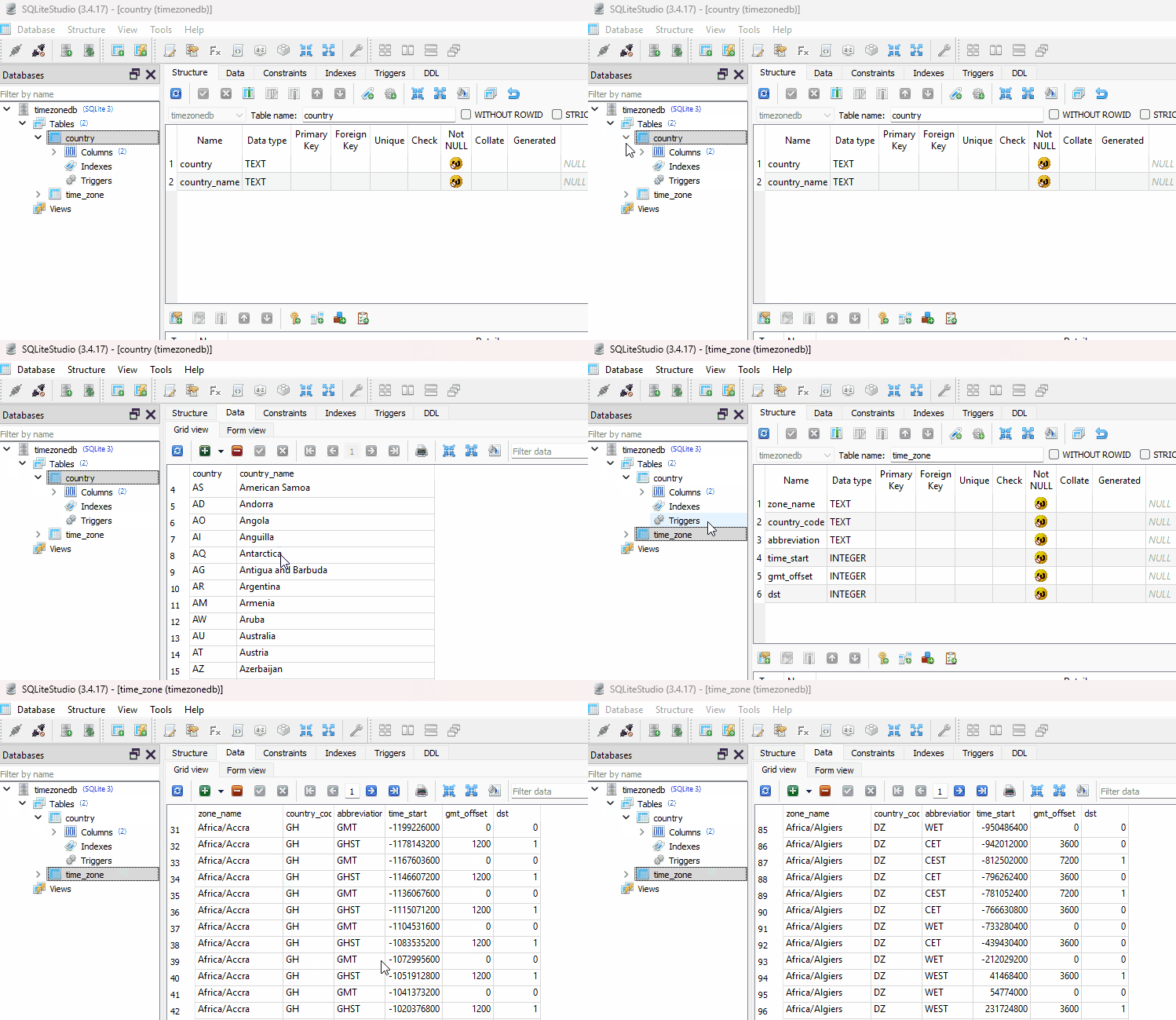
Inside the class constructor, the above database is read, and a connection is kept open in a variable for later usage within the class.
#include "sqlite3.mqh"
//+------------------------------------------------------------------+
//|                                                                  |
//+------------------------------------------------------------------+
class CTZInfo
  {
private:
   CSqlite3          sqlite;
   string            m_zone_name;
   int               utcoffset(datetime utc_time);

public:

                     CTZInfo(const string zone_name);
                    ~CTZInfo(void);
  };
//+------------------------------------------------------------------+
//|      Constructor - open timezone database                        |
//+------------------------------------------------------------------+
CTZInfo::CTZInfo(const string zone_name):
 m_zone_name(zone_name)
  {
   string db_name = "timezonedb.sqlite";

   if(!sqlite.connect(db_name, true))
     {
      Print("Failed to open timezone DB");
      return;
     }
  }
Below are some of the methods provided in the class implemented in MQL5 as in Python, with slight changes.
(a): utcoffset
Return offset of local time from UTC in seconds. If local time is west of UTC, the returned value should be negative; otherwise, it will be positive.
int CTZInfo::utcoffset()
  {
   string query =
      "SELECT gmt_offset FROM time_zone "
      "WHERE zone_name='" + m_zone_name + "' AND time_start <= " + (string)(int)TimeGMT() + " "
      "ORDER BY time_start DESC LIMIT 1;";

   vector row = sqlite.execute(query).fetchone();

   if(row.Size() == 0)
      return 0;

   return (int)row[0]; // seconds offset
  }
Example.
void OnStart()
  {
//---

   CTZInfo tzinfo("America/New_York");
   printf("Utc offset: %d hours",tzinfo.utcoffset()/3600);
 }
Output.
2025.11.19 17:32:08.699 Time testing (XAUUSD,H1) Utc offset: -5 hours
(b): dst
Return the daylight saving time (DST) adjustment, as a timedelta object or None if DST information isn't found.
int CTZInfo::dst()
  {
   string query =
      "SELECT dst FROM time_zone\n"
      "WHERE zone_name = '" + m_zone_name + "' "
      "AND time_start <= " + (string)(int)TimeGMT() + " "
      "ORDER BY time_start DESC\n"
      "LIMIT 1;";
//---

   vector row = sqlite.execute(query).fetchone();

   if(row.Size() == 0)    // no result
      return 0;

   return (int)row[0];
  }
(c): fromutc
It takes a UTC datetime and returns the localized datetime (UTC shifted by the time zone offset for that moment).
datetime CTZInfo::fromutc(datetime utc_time)
  {
   int offset = utcoffset(utc_time);
   return (datetime)((int)utc_time + offset);
  }
Example.
void OnStart()
  {
//---

   CTZInfo tzinfo("America/New_York");
   Print("From utc: ",tzinfo.fromutc(TimeGMT())); //converts utc time into New york's local time
 }
Outputs.
2025.11.19 17:26:24.400 Time testing (XAUUSD,H1) From utc: 2025.11.19 09:26:24
The Time delta Class
In Python, A timedelta object represents a duration, the difference or sum between two datetime or date instances.
class datetime.timedelta(days=0, seconds=0, microseconds=0, milliseconds=0, minutes=0, hours=0, weeks=0)
All arguments are optional and default to 0. Arguments may be integers or floats, and may be positive or negative.
Only days, seconds, and microseconds are stored internally. Arguments are converted to those units:
- A millisecond is converted to 1000 microseconds.
- A minute is converted to 60 seconds.
- An hour is converted to 3600 seconds.
- A week is converted to 7 days.
and days, seconds, and microseconds are then normalized so that the representation is unique, with
- 0 <= microseconds < 1000000
- 0 <= seconds < 3600*24 (the number of seconds in one day)
- -999999999 <= days <= 999999999
Below is the MQL5 equivalent of the timedelta module from Python, with slight changes.
No milliseconds and microseconds in the function arguments, this is because these two can't be stored (traced) within the datetime variable.
class CTimedelta
  {
public:
                     CTimedelta(void) {};
                    ~CTimedelta(void) {};

   //+------------------------------------------------------------------+
   //|                                                                  |
   //|   For crafting the desired time given the number of days, hours  |
   //|   minutes, seconds, and weeks                                    |
   //|                                                                  |
   //+------------------------------------------------------------------+

   template <typename T>
   static T          timedelta(uint days = 0, uint hours = 0, uint minutes = 0, uint seconds = 0, uint weeks = 0)
     {
      uint delta_seconds = ((days+(weeks*7)) * 86400) + (hours * 3600) + (minutes * 60) + seconds;
      return delta_seconds;
     }

   template <typename T>
   static T          days(uint days_)
     {
      return timedelta<T>(days_);
     }

   template <typename T>
   static T          hours(uint hours_)
     {
      return timedelta<T>(0, hours_);
     }

   template <typename T>
   static T          minutes(uint minutes_)
     {
      return timedelta<T>(0, 0, minutes_);
     }

   template <typename T>
   static T          seconds(uint seconds_)
     {
      return timedelta<T>(0, 0, 0, seconds_);
     }

   template <typename T>
   static T          weeks(uint weeks_)
     {
      return timedelta<T>(0, 0, 0, 0, weeks_);
     }
  };
To make this class flexible, like in Python, we use the typename(s) to ensure we have the option to return the time created in seconds using variables like (long, int, ulong, double, etc) and datetime.
Example usage:
#include <PyMQL5\datetime.mqh>
//+------------------------------------------------------------------+
//| Script program start function                                    |
//+------------------------------------------------------------------+
void OnStart()
  {
//---

   Print("10 minutes datetime: ",CTimedelta::minutes<datetime>(10));
   Print("10 minutes seconds: ",CTimedelta::minutes<int>(10));

   datetime now = TimeLocal();
   printf("Current time: %s 10 minutes ahead: %s",(string)now, string(now + CTimedelta::minutes<datetime>(10)));
   printf("Current time: %s 1 week, 2 days, 10 hours, and 5 minutes ahead: %s",string(now), string(now + CTimedelta::timedelta<datetime>(2,10,5,0,1)));
 }
Outputs.
CI      0       17:39:37.748    Time testing (XAUUSD,H1)        10 minutes datetime: 1970.01.01 00:10:00
CL      0       17:39:37.748    Time testing (XAUUSD,H1)        10 minutes seconds: 600
HL      0       17:39:37.748    Time testing (XAUUSD,H1)        Current time: 2025.11.20 17:39:37 10 minutes ahead: 2025.11.20 17:49:37
HI      0       17:39:37.748    Time testing (XAUUSD,H1)        Current time: 2025.11.20 17:39:37 1 week, 2 days, 10 hours, and 5 minutes ahead: 2025.11.30 03:44:37
This simple class is important for time addition and subtraction operations, which can be a little bit challenging in native MQL5.
The Date Class Object
A date object represents a date (year, month, and day) in an idealized calendar, the current Gregorian calendar indefinitely extended in both directions. Think of this class as a custom "date" variable (object).
From datetime in Python, the function named "date" returns an object containing all necessary information concerning the date of a given time.
Starting with a way to return today's date.
CDate CDate::today() { m_datetime = TimeLocal(); return CDate(); }
Example.
#include <PyMQL5\datetime.mqh>

void OnStart()
  {
//---
   CDate date;

   Print("Today's date: ",date.today().__str__());
  }
Outputs.
2025.11.20 18:14:46.217 Time testing (XAUUSD,H1) Today's date: 2025-11-20
Below is a table containing all necessary functions within the class named CDate.
| Function | Description |
|---|---|
CDate::CDate(uint year, uint month, uint day) { if(year < MINYEAR || year > MAXYEAR) Print("ValueError: year out of range"); if(month < 1 || month > 12) Print("ValueError: month out of range"); if(day < 1 || (int)day > DaysInMonth(year, month)) Print("ValueError: day out of range"); m_year = year; m_month = month; m_day = day; } | A constructor that receives a year, month, and day to create a custom date. |
CDate(void); | Default class constructor that sets today's date to the class when called. |
CDate::CDate(const datetime time) { MqlDateTime t; TimeToStruct(time, t); m_year = t.year; m_month = t.mon; m_day = t.day; } | A custom constructor that extracts the date from a datetime variable, e.g., 18.10.2025 00:00 |
CDate fromtimestamp(datetime ts); | Converts UNIX timestamp into a corresponding local date. |
CDate CDate::fromisoformat(string s) | Return a date corresponding to a date_string given in any valid ISO 8601 format. Unlike the function present in Python datetime module(s) our MQL5 function currently supports only two iso formats, using these formulas.
|
CDate fromordinal(int ordinal); | Converts ordinal date into a CDate object. |
const int weekday(); | Return the day of the week as an integer, where Monday is 0 and Sunday is 6, similarly to MqlDateTime.day. |
const int isoweekday(); | Return the day of the week as an integer, where Monday is 1 and Sunday is 7. |
static int DaysInMonth(int year, int month); | Return the number of days in a given month. |
static bool IsLeapYear(int year); | It returns true when a given year is a leap otherwise, it returns false. |
CDate replace(int year=-1, int month=-1, int day=-1) const | It replaces a value(s) of a given date object with new value(s). |
Example usage:
void OnStart()
  {
//---

   CDate date = py_datetime.date(D'29.02.2024');

   Print("date: ", date.isoformat());
   Print("Weekday: ", date.weekday());
   Print("ISO Weekday: ", date.isoweekday());
   Print("Ordinal: ", date.toordinal());
   Print("Leap year 2024? ", date.IsLeapYear(2024));
   Print("__str__: ",date.__str__());

   CDate d2 = py_datetime.date().today();
   Print("Today: ", d2.isoformat());
   Print("From ISO: ", d2.isoformat());

   d2 = d2.replace(-1, -1, 30);
   Print("Replaced: ", d2.isoformat());

//--- from timestamps

   CDate date3 = date.fromtimestamp(1672531199);
   Print("Date From timestamps: ",date3.isoformat());

   datetime time = py_datetime.fromtimestamp(1672531199);
   Print("time timestamps: ",time);

//---

   Print(date_m.fromisoformat("2019-12-04").__str__());
   Print(date_m.fromisoformat("20191204").__str__());

//---

   CDate today = date.today();
   Print(today.ctime());
  }
Outputs.
OR      0       19:10:29.522    Time testing (XAUUSD,H1)        date: 2024-02-29
CD      0       19:10:29.522    Time testing (XAUUSD,H1)        Weekday: 3
OQ      0       19:10:29.522    Time testing (XAUUSD,H1)        ISO Weekday: 4
CD      0       19:10:29.522    Time testing (XAUUSD,H1)        Ordinal: 738945
RD      0       19:10:29.522    Time testing (XAUUSD,H1)        Leap year 2024? true
HQ      0       19:10:29.522    Time testing (XAUUSD,H1)        __str__: 2024-02-29
LJ      0       19:10:29.522    Time testing (XAUUSD,H1)        Today: 2025-11-17
LR      0       19:10:29.522    Time testing (XAUUSD,H1)        From ISO: 2025-11-17
DD      0       19:10:29.522    Time testing (XAUUSD,H1)        Replaced: 2025-11-30
DO      0       19:10:29.522    Time testing (XAUUSD,H1)        Date From timestamps: 2023-01-01
EP      0       19:10:29.522    Time testing (XAUUSD,H1)        time timestamps: 2023.01.01 02:59:59
QK      0       19:10:29.522    Time testing (XAUUSD,H1)        2019-12-04
OR      0       19:10:29.522    Time testing (XAUUSD,H1)        2019-12-04
CH      0       19:10:29.523    Time testing (XAUUSD,H1)        Sun Nov 17 19:10:29 2025
The datetime Module
The datetime module supplies classes for manipulating dates and times. This class (module) combines the prior two (date and time) modules with several new methods introduced.
Starting with class constructors. Some take the datetime variable, and others take variables for creating the date and a specific time of that date.
class CDatetime
  {
protected:

   CTZInfo           *m_tzinfo;
   MqlDateTime       m_datetime_struct;
   int               weekday(const datetime time);

public:
                     CDatetime();
                     CDatetime(const datetime dt, CTZInfo *tzinfo=NULL);
                     CDatetime(uint year, uint month, uint day, uint hour, uint minutes, uint seconds, CTZInfo *tzinfo=NULL);

                    ~CDatetime(void);

   //--- custom constructor

   CDatetime         datetime_(uint year, uint month, uint day, uint hour, uint minutes, uint seconds, CTZInfo *tzinfo=NULL);
   CDatetime         combine(CDate &date, CTime &time, CTZInfo *tzinfo=NULL)
The method named combine combines both date and time objects to create a datetime object.
(a): The now function
This function returns the current CDatetime object depending on a specified time zone.
CDatetime CDatetime::now(CTZInfo *tzinfo)
  {
   return CDatetime(tzinfo.now(), tzinfo);
  }
Example.
#include <PyMQL5\datetime.mqh>
CDatetime py_datetime;
//+------------------------------------------------------------------+
//| Script program start function                                    |
//+------------------------------------------------------------------+
void OnStart()
  {
//--- Datetime module testing

   CTZInfo tzinfo("Africa/Nairobi");

   CDatetime now = py_datetime.now(&tzinfo);
   Print("ctime: ", now.ctime());
  }
Output.
2025.11.21 20:10:03.116 Time testing (XAUUSD,H1) ctime: Fri Nov 21 20:10:03 2025
(b): fromisoformat
Return a datetime corresponding to a date_string in any valid ISO 8601 format, with the following exceptions.
- Time zone offsets may have fractional seconds.
- The T separator may be replaced by any single Unicode character.
- Fractional hours and minutes are not supported.
- Reduced precision dates are not currently supported (YYYY-MM, YYYY).
- Extended date representations are not currently supported (±YYYYYY-MM-DD).
- Ordinal dates are not currently supported (YYYY-OOO).
CDatetime CDatetime::fromisoformat(string iso)
  {
   string orig = iso;

//--- Split date & time
   int sep = StringFind(iso, "T");
   if(sep == -1)
      sep = StringFind(iso, " ");

   if(sep == -1)
     {
      Print("Invalid ISO datetime: ", orig);
      return CDatetime();
     }

   string date_part = StringSubstr(iso, 0, sep);
   string time_part = StringSubstr(iso, sep + 1);

//--- Parse date YYYY-MM-DD

   string dparts[];
   if(StringSplit(date_part, '-', dparts) != 3)
     {
      Print("Invalid ISO date: ", orig);
      return CDatetime();
     }

   int year = (int)StringToInteger(dparts[0]);
   int mon  = (int)StringToInteger(dparts[1]);
   int day  = (int)StringToInteger(dparts[2]);

//--- Extract timezone part

   string tz = "";
   int tz_pos = StringFind(time_part, "+");
   if(tz_pos == -1)
      tz_pos = StringFind(time_part, "-");
   if(tz_pos == -1)
      tz_pos = StringFind(time_part, "Z");

   if(tz_pos != -1)
     {
      tz = StringSubstr(time_part, tz_pos);
      time_part = StringSubstr(time_part, 0, tz_pos);
     }

//--- Parse time HH:MM:SS(.fff)

   int hour=0, minute=0, second=0, millisecond=0;

   string tparts[];
   int n = StringSplit(time_part, ':', tparts);

   if(n < 2)
     {
      Print("Invalid ISO time: ", orig);
      return CDatetime();
     }

   hour   = (int)StringToInteger(tparts[0]);
   minute = (int)StringToInteger(tparts[1]);

   if(n >= 3)
     {
      int dot = StringFind(tparts[2], ".");
      if(dot != -1)
        {
         second = (int)StringToInteger(StringSubstr(tparts[2], 0, dot));
         string frac = StringSubstr(tparts[2], dot + 1);
         millisecond = (int)(StringToInteger(frac) / MathPow(10, StringLen(frac) - 3));
        }
      else
        {
         second = (int)StringToInteger(tparts[2]);
        }
     }

//--- Timezone if provided

   CTZInfo *tzinfo = NULL;
   if(tz == "Z")
      tzinfo = new CTZInfo("UTC");
   else
      if(StringLen(tz) > 0)
        {
         string id = "UTC" + tz;   // Example: "UTC+03:00"
         tzinfo = new CTZInfo(id);
        }

   return CDatetime(year, mon, day, hour, minute, second, tzinfo);
  }
There is a function with a similar name in CDate and CTime, but this one takes it further as it considers both date and time in a single formatted string.
Example.
   CDatetime time = py_datetime.fromisoformat("2011-11-04T00:05:23Z");

   Print("datetime: ",time.__str__());
Outputs.
2025.11.22 12:47:18.047 Time testing (XAUUSD,H1) datetime: 2011.11.04 00:05:23
(c): isoformat
Converts the "datetime" information stored within the CDatetime object into a string-formatted time in ISO 8601 format.
string CDatetime::isoformat(string sep="T", string timespec="auto")
  {
   datetime dt = this.__datetime__();
   MqlDateTime s;
   TimeToStruct(dt, s);

   string hh = StringFormat("%02d", s.hour);
   string mm = StringFormat("%02d", s.min);
   string ss = StringFormat("%02d", s.sec);

   string time_str;

   if(timespec == "hours")
      time_str = hh;
   else
      if(timespec == "minutes")
         time_str = hh + ":" + mm;
      else
         if(timespec == "seconds")
            time_str = hh + ":" + mm + ":" + ss;
         else
            if(timespec == "milliseconds")
               time_str = hh + ":" + mm + ":" + ss;
            else
               if(timespec == "auto")
                  time_str = hh + ":" + mm + ":" + ss;
               else
                  time_str = hh + ":" + mm + ":" + ss;

   string tz = _tz_offset_str();

   return StringFormat("%04d-%02d-%02d", s.year, s.mon, s.day) + sep + time_str + tz;
  }
Example usage.
   CDatetime time = py_datetime.fromisoformat("2011-11-04T00:05:23Z");

   Print("Iso format: ", time.isoformat());
Outputs.
2025.11.22 12:47:18.047 Time testing (XAUUSD,H1) Iso format: 2011-11-04T00:05:23
(d): strftime
Formats a stored datetime in the class to a desired string format, usually for demonstration purposes.
Example.
   CDatetime now = py_datetime.now(&tzinfo);
   string formatted_time = now.strftime("%Y/%M/%d %H:%M:%S");

   Print("formatted time: ", formatted_time);
Outputs.
2025.11.22 19:55:55.680 Time testing (XAUUSD,H1) formatted time: 2025/55/22 19:55:55
(e): strptime
This does the opposite of the method strftime, it reverses the formatted time from an ISO 8601 string-format into a datetime object stored inside the CDatetime class.
Example.
   CDatetime now = py_datetime.now(&tzinfo);
   string format = "%Y/%M/%d %H:%M:%S";

   string formatted_time = now.strftime(format);

   Print("formatted time: ", formatted_time);
   Print("Original time: ", now.strptime(formatted_time, format).__datetime__());
Outputs.
OL      0       20:00:47.220    Time testing (XAUUSD,H1)        formatted time: 2025/00/22 20:00:47
FF      0       20:00:47.220    Time testing (XAUUSD,H1)        Original time: 2025.11.22 20:00:47
Final Thoughts
Re-creating Python’s modules date, time, and calendar utilities in MQL5 is more than an exercise in rewriting code; it bridges a real gap in the MQL5 ecosystem. By implementing classes such as CTimedelta, CTime, and CDatetime, we gain access to expressive, high-level time manipulation tools that do not exist natively in MetaTrader 5.
These additions make it possible to perform reliable timestamp conversions, handle time zones correctly, and build more sophisticated backtesting or time-driven systems.
The repository containing all the code discussed in this article series can be found here: https://github.com/MegaJoctan/PyMQL5 for contributions and bug fixes.
Best regards.
Attachments Table
| Filename | Description & Usage |
|---|---|
| Include\errordescription.mqh | Contains functions for converting error codes produced by MetaTrader 5 and MQL5 into human-readable format. |
| Include\PyMQL5\datetime.mqh | Contains both the CDate and CDateTime classes for handling dates and time. |
| Include\PyMQL5\SQLite3.mqh | A similar module to sqlite3 in Python that has functions for reading SQLITE databases in MetaTrader 5. |
| Include\time.mqh | Contains the CTime class for working with time. |
| Include\TZInfo.mqh | It has the CTZInfo class for reading the time zone information from a universal time database. |
| Common\Files\timezonedb.sqlite | A SQLite3 database that contains information from all time zones, including utcoffset, time zone names, etc. |
| Scripts\Time testing.mq5 | A playground for testing all methods and functions discussed in this article. |
Warning: All rights to these materials are reserved by MetaQuotes Ltd. Copying or reprinting of these materials in whole or in part is prohibited.
This article was written by a user of the site and reflects their personal views. MetaQuotes Ltd is not responsible for the accuracy of the information presented, nor for any consequences resulting from the use of the solutions, strategies or recommendations described.

 Price Action Analysis Toolkit Development (Part 52): Master Market Structure with Multi-Timeframe Visual Analysis
 Mastering Kagi Charts in MQL5 (Part I): Creating the Indicator
 Neural Networks in Trading: Hierarchical Dual-Tower Transformer (Final Part)
 Overcoming The Limitation of Machine Learning (Part 8): Nonparametric Strategy Selection

- Free trading apps
- Over 8,000 signals for copying
- Economic news for exploring financial markets
You agree to website policy and terms of use