

Python-MetaTrader 5 Strategy Tester (Part 04): Tester 101
 4 614
4 614
 4
4

Contents
- Introduction
- From Simulator to Tester
- Tester configuration and initialization
- Strategy testing based on REAL TICKS
- Strategy testing tased on SIMULATED TICKS
- Strategy testing based on NEW BAR
- Strategy Testing On 1-Minute OHLC
- Putting it all together inside the OnTick function
- Finally, some trading actions in the strategy tester
- Generating Strategy Tester Reports
- Conclusion
Introduction
In previous articles of this series, we laid the groundwork for building a MetaTrader 5–like strategy tester from scratch. With the core structure in place, several critical components are still missing in our project.
To this stage, we are yet to process ticks and bars sequentially, we lack mechanisms for monitoring open orders and the simulated trading account, and we do not have performance metrics such as profit and loss, drawdown, win rate, risk–reward ratios, and detailed trade statistics in the simulator.

This article aims to address these gaps and further improve our project.
From Simulator to Tester
If you paid attention to the class we were working on in the previous posts, we called it Simulator, the name was aimed to provide all users with a simple noun everybody can understand. The MetaTrader 5's strategy tester program is indeed a simulator so, so this time we change our class name to Tester.
class Tester:
    def __init__(self, simulator_name: str, mt5_instance: mt5, deposit: float, leverage: str="1:100"):
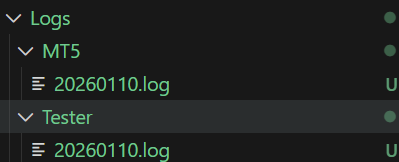
This change is accompanied by a change in folders structure for logs.
class Tester:
    def __init__(self, simulator_name: str, mt5_instance: mt5, deposit: float, leverage: str="1:100"):
        """MetaTrader 5-Like Strategy tester for the MetaTrader5-Python module.

        Args:
            simulator_name (str): A Bot or Simulator's name
            mt5_instance (mt5): An instance of the Initialized MetaTrader 5 module
            deposit (float): The initial account balance for the Tester
            leverage (_type_, optional): A leverage of the simulated account. Defaults to "1:100".

        Raises:
            RuntimeError: When one of the operation fails
        """

        self.mt5_instance = mt5_instance
        self.simulator_name = simulator_name

        config.mt5_logger = config.get_logger(self.simulator_name+".mt5",
                                                 logfile=os.path.join(config.MT5_LOGS_DIR, f"{config.LOG_DATE}.log"), level=config.logging_level)

        config.tester_logger = config.get_logger(self.simulator_name+".tester",
                                                    logfile=os.path.join(config.TESTER_LOGS_DIR, f"{config.LOG_DATE}.log"), level=config.logging_level)
Outputs.
Tester Configuration and Initialization
To understand what's needed right off the bat, for our customized strategy tester, we have to look at the MetaTrader 5's strategy tester configurations.

| Entry | Description & Usage |
|---|---|
| Expert | The name of an Expert Advisor (EA) (trading robot) you want to test. |
| symbol | This is the chart symbol the EA is attached to. Even if your EA trades multiple symbols, this symbol is still required as the “host” chart. |
| Timeframe — the field right after symbol | The chart timeframe used by the EA. Timeframe determines how OnTick(), OnTimer(), and bar events behave. |
| Date (starting date) — first field | The first historical date used in the test. |
| Date (end date) — second field | The last historical date used in the test. |
| Forward | Forward testing period, after the testing or optimization period. |
| Delays | Execution delay simulation. It has two options:
|
| Modelling | Dictates how ticks are generated during the test. Supported modellings include:
|
| Deposit | Starting account balance. |
| leverage | Account leverage to be used in a test. |
| optimization | Parameter optimization mode. When disabled, a single test is run; when enabled, the tester runs an EA several times with different parameter combinations. |
| visual mode... | Displays chart animation during testing. |
We need to pass similar configurations to our Tester class, a JSON file is handy for our console-based Python project.
configs/tester.json
{
    "tester": {
        "bot_name": "MY EA",
        "symbols": ["EURUSD", "USDCAD", "USDJPY"],
        "timeframe": "H1",
        "start_date": "01.01.2025 00:00",
        "end_date": "31.12.2025 00:00",
        "modelling" : "real_ticks",
        "deposit": 1000,
        "leverage": "1:100"
    }
}
We need a few parameters for now. There is still room for improvement as we dive deeper into the project.
The introduction of a JSON file for configurations makes some of the arguments we had in the previous version of this class obsolete. Below is a new class constructor.
class Tester:
    def __init__(self, tester_config: dict, mt5_instance: mt5):
        """MetaTrader 5-Like Strategy tester for the MetaTrader5-Python module.

        Args:
            configs_json (dict): a dictonary containing tester configurations
        Raises:
            RuntimeError: When one of the operation fails
        """
In MetaTrader 5, we only have to specify the host symbol; the platform itself handles imports and handles ticks across all instruments deployed in the program automatically.
It's unclear how the terminal can do so, but MQL5 is a compilation-based language, unlike Python; we might have a tough time mimicking this. For now, a user has to specify all instruments that will be used during the program runtime.
"symbols": ["EURUSD", "USDCAD", "USDJPY"],
However, relying on a JSON file for parameters comes with a vivid room for errors; even a small typo is sufficient to break the program.
That being said, we need functions for validating information received from such an object.
I: Ensuring We have Valid JSON Keys
The below function raises runtime errors when there is either a missing or unknown (additional) parameter in a dictionary.
Inside validators.py
class TesterConfigValidators:
    """
    Responsible for validating and normalizing strategy tester configurations.
    """

    def __init__(self):
        pass

    @staticmethod
    def _validate_keys(raw_config: Dict) -> None:
        required_keys = {
            "bot_name",
            "symbols",
            "timeframe",
            "start_date",
            "end_date",
            "modelling",
            "deposit",
            "leverage",
        }

        provided_keys = set(raw_config.keys())

        missing = required_keys - provided_keys
        if missing:
            raise RuntimeError(f"Missing tester config keys: {missing}")

        extra = provided_keys - required_keys
        if extra:
            raise RuntimeError(f"Unknown tester config keys: {extra}")
Every time we make changes by introducing a new parameter to our JSON file under the parent key "tester", we also have to update a dictionary named required_keys.
II: Checking if All Keys have Correct Accompanied Values
We have to ensure that, for each entry, a correct datatype is given.
validators.py
    @staticmethod
    def parse_tester_configs(raw_config: Dict) -> Dict:
        TesterConfigValidators._validate_keys(raw_config)

        cfg: Dict = {}

        # --- BOT NAME ---
        cfg["bot_name"] = str(raw_config["bot_name"])

        # --- SYMBOLS ---
        symbols = raw_config["symbols"]
        if not isinstance(symbols, list) or not symbols:
            raise RuntimeError("symbols must be a non-empty list")
        cfg["symbols"] = symbols

        # --- TIMEFRAME ---
        timeframe = raw_config["timeframe"].upper()
        if timeframe not in utils.TIMEFRAMES:
            raise RuntimeError(f"Invalid timeframe: {timeframe}")
        cfg["timeframe"] = timeframe

        # --- MODELLING ---
        modelling = raw_config["modelling"].lower()
        VALID_MODELLING = {"real_ticks", "new_bar"}
        if modelling not in VALID_MODELLING:
            raise RuntimeError(f"Invalid modelling mode: {modelling}")
        cfg["modelling"] = modelling

        # --- DATE PARSING ---
        try:
            start_date = datetime.strptime(
                raw_config["start_date"], "%d.%m.%Y %H:%M"
            )
            end_date = datetime.strptime(
                raw_config["end_date"], "%d.%m.%Y %H:%M"
            )
        except ValueError:
            raise RuntimeError("Date format must be: DD.MM.YYYY HH:MM")

        if start_date >= end_date:
            raise RuntimeError("start_date must be earlier than end_date")

        cfg["start_date"] = start_date
        cfg["end_date"] = end_date

        # --- DEPOSIT ---
        deposit = float(raw_config["deposit"])
        if deposit <= 0:
            raise RuntimeError("deposit must be > 0")
        cfg["deposit"] = deposit

        # --- LEVERAGE ---
        cfg["leverage"] = TesterConfigValidators._parse_leverage(raw_config["leverage"])

        return cfg
Inside a class constructor, is where we validate a dictionary received from a JSON file before assigning the resulting dictionary to a variable for the whole class to access.
self.tester_config = TesterConfigValidators.parse_tester_configs(tester_config)
Now that we can get information from the JSON file, let's see how we can handle different modelling when testing our trading robots.
Strategy Testing Based on REAL TICKS
Out of all price modellings available in the MetaTrader 5 strategy tester, this is the most accurate. It involves testing a program (indicator or an expert advisor) on ticks obtained directly from a broker.
This is very straightforward to implement, considering we already introduced functions for obtaining ticks and bars from a specified period in history.
tester.py
from src import ticks
class Tester:
    def __init__(self, tester_config: dict, mt5_instance: mt5):

        # ...

        self.__GetLogger().info("Tester Initializing")
        self.__GetLogger().info(f"Tester configs: {self.tester_config}")

        self.TESTER_ALL_TICKS_INFO = [] # for storing all ticks to be used during the test
        self.TESTER_ALL_BARS_INFO = [] # for storing all bars to be used during the test

        start_dt = self.tester_config["start_date"]
        end_dt = self.tester_config["end_date"]

        modelling = self.tester_config["modelling"]

        for symbol in self.tester_config["symbols"]:

            if modelling == "real_ticks":

                ticks_obtained = ticks.fetch_historical_ticks(start_datetime=start_dt, end_datetime=end_dt, symbol=symbol)

                ticks_info = {
                    "symbol": symbol,
                    "ticks": ticks_obtained,
                    "size": ticks_obtained.height,
                    "counter": 0
                }

                self.TESTER_ALL_TICKS_INFO.append(ticks_info)
After obtaining ticks from all given instruments, we append the result in an array called TESTER_ALL_TICKS_INFO. This is the one we will loop later in the main simulation loop.
Inside the function called OnTick in this class, we glue everything together.
    def OnTick(self, ontick_func):
        """Calls the assigned function upon the receival of new tick(s)

        Args:
            ontick_func (_type_): A function to be called on every tick
        """

        if not self.IS_TESTER:
            return

        modelling = self.tester_config["modelling"]
        if modelling == "real_ticks":

            self.__GetLogger().debug(f"total number of ticks: {total_ticks}")

                while True:

                    any_tick_processed = False

                    for ticks_info in self.TESTER_ALL_TICKS_INFO:

                        symbol = ticks_info["symbol"]
                        size = ticks_info["size"]
                        counter = ticks_info["counter"]

                        if counter >= size:
                            continue

                        current_tick = ticks_info["ticks"].row(counter)

                        self.TickUpdate(symbol=symbol, tick=current_tick)
                        ontick_func()

                        ticks_info["counter"] = counter + 1
                        any_tick_processed = True

                    if not any_tick_processed:
                        break
A progress bar is handy for situations like this:
    def OnTick(self, ontick_func):
        """Calls the assigned function upon the receival of new tick(s)

        Args:
            ontick_func (_type_): A function to be called on every tick
        """

        if not self.IS_TESTER:
            return

        modelling = self.tester_config["modelling"]
        if modelling == "real_ticks" or modelling == "every_tick":

            total_ticks = sum(ticks_info["size"] for ticks_info in self.TESTER_ALL_TICKS_INFO)

            self.__GetLogger().debug(f"total number of ticks: {total_ticks}")

            with tqdm(total=total_ticks, desc="Tester Progress", unit="tick") as pbar:
                while True:

                    any_tick_processed = False

                    for ticks_info in self.TESTER_ALL_TICKS_INFO:

                        symbol = ticks_info["symbol"]
                        size = ticks_info["size"]
                        counter = ticks_info["counter"]

                        if counter >= size:
                            continue

                        current_tick = ticks_info["ticks"].row(counter)

                        self.TickUpdate(symbol=symbol, tick=current_tick)
                        ontick_func()

                        ticks_info["counter"] = counter + 1
                        any_tick_processed = True

                        pbar.update(1)

                    if not any_tick_processed:
                        break
The above method called OnTick, takes a given function, supposedly a main function for trading, just like the OnTick function in MQL5.
A received function from the argument ontick_func will be called within the OnTick method on every tick iteration in the main simulation loop.
Example usage.
tester.py
if __name__ == "__main__":

    mt5.initialize()

    try:
        with open(os.path.join('configs/tester.json'), 'r', encoding='utf-8') as file: # reading a JSON file
            # Deserialize the file data into a Python object
            data = json.load(file)
    except Exception as e:
        raise RuntimeError(e)

    sim = Tester(tester_config=data["tester"], mt5_instance=mt5)

    def ontick_function():
        pass
        # print("some trading actions")

    sim.OnTick(ontick_function)
Outputs.
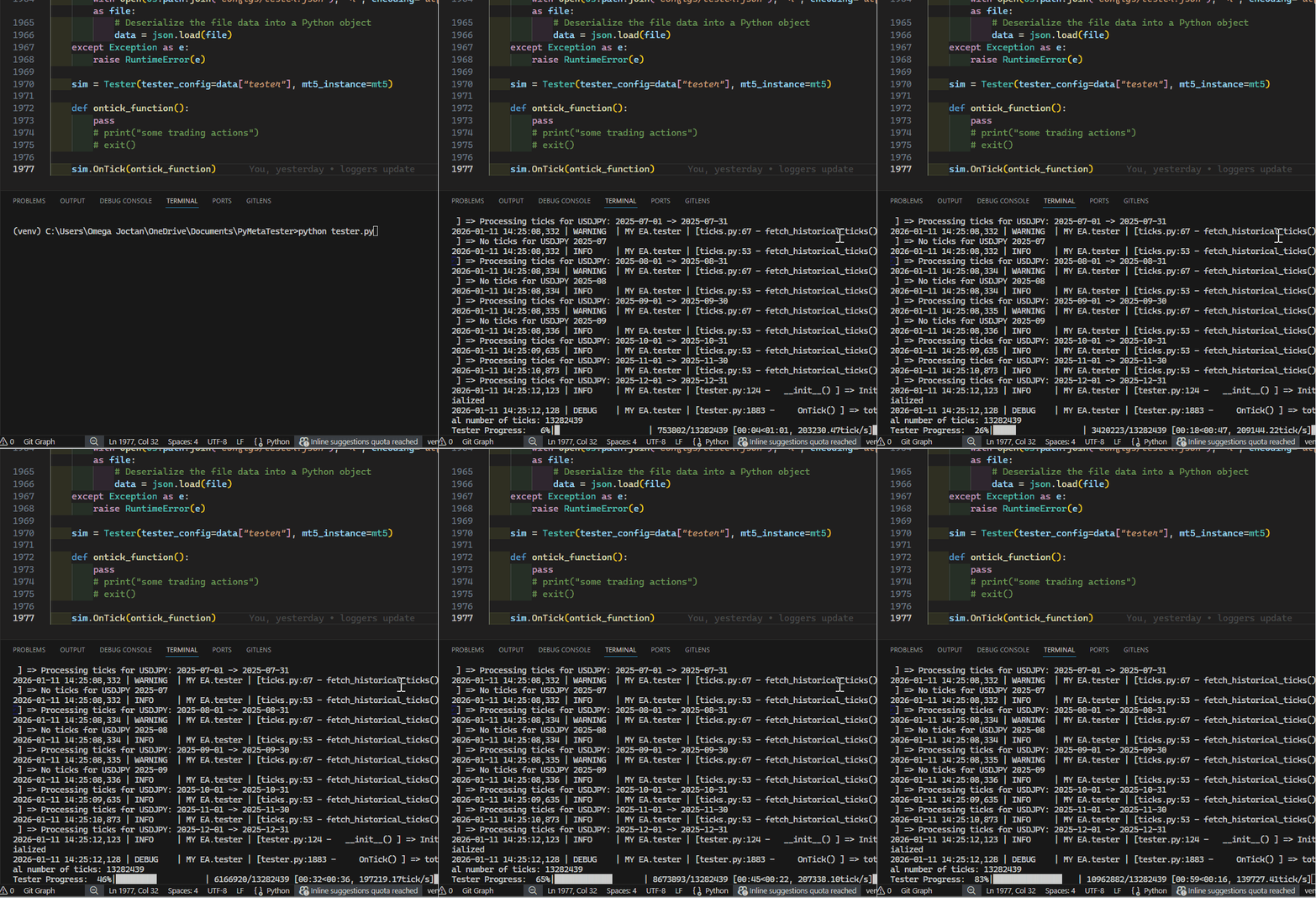
Strategy Testing Based on SIMULATED TICKS
When modelling is set to Every tick in MetaTrader 5's strategy tester, the terminal uses synthetic ticks. Generated by some sort of algorithm discussed in this article.
An attempt to mimic this algorithm can be found in a class located inside src/ticks_gen.py.
This time, instead of reading ticks from a Polars Dataframe, we generate the ticks according to one-minute bars.
Inside tester.py
from src.ticks_gen import TicksGen
elif modelling == "every_tick":

    bars_df = bars.fetch_historical_bars(symbol=symbol,
                                        timeframe=utils.TIMEFRAMES["M1"],
                                        start_datetime=start_dt, end_datetime=end_dt)

    ticks_obtained = TicksGen.generate_ticks_from_bars(bars=bars_df, symbol=symbol,
                                                    symbol_point=self.symbol_info(symbol).point,
                                                    out_dir=f"{config.SIMULATED_TICKS_DIR}/{symbol}",
                                                    return_df=True)

    ticks_info = {
        "symbol": symbol,
        "ticks": ticks_obtained,
        "size": ticks_obtained.height,
        "counter": 0
    }

    self.TESTER_ALL_TICKS_INFO.append(ticks_info)
The only difference between real and generated ticks is that one is generated while the other is extracted from a database; everything else is the same, so we treat them similarly inside the OnTick method.
    def OnTick(self, ontick_func):
        """Calls the assigned function upon the receival of new tick(s)

        Args:
            ontick_func (_type_): A function to be called on every tick
        """

        if not self.IS_TESTER:
            return

        modelling = self.tester_config["modelling"]
        if modelling == "real_ticks" or modelling == "every_tick":

            total_ticks = sum(ticks_info["size"] for ticks_info in self.TESTER_ALL_TICKS_INFO)

            self.__GetLogger().debug(f"total number of ticks: {total_ticks}")

            with tqdm(total=total_ticks, desc="Tester Progress", unit="tick") as pbar:
                while True:

                    any_tick_processed = False

                    for ticks_info in self.TESTER_ALL_TICKS_INFO:

                        symbol = ticks_info["symbol"]
                        size = ticks_info["size"]
                        counter = ticks_info["counter"]

                        if counter >= size:
                            continue

                        current_tick = ticks_info["ticks"].row(counter)

                        self.TickUpdate(symbol=symbol, tick=current_tick)
                        ontick_func()

                        ticks_info["counter"] = counter + 1
                        any_tick_processed = True

                        pbar.update(1)

                    if not any_tick_processed:
                        break
Below was the outcome when a class Tester was run with modelling set to every_tick inside a configuration JSON file.
Tester Progress: 100%|███████████████████████████████████████████████████████████████████████████████████████████████████| 20613922/20613922 [01:31<00:00, 224889.74tick/s]
Not bad, it took a minute and a half to simulate for the entire year on 3 instruments.
Strategy Testing Based on NEW BAR
This is the fastest and the least accurate modelling mode in the MetaTrader 5 Strategy tester. It involves testing the program on the opening of a new bar only. It skips all ticks between the opening and closing of a bar.
Inside the class constructor, we follow the same principles we did when preparing real ticks for simulation.
This time we store bars collected from every instrument inside an array named TESTER_ALL_BARS_INFO.
tester.py
        self.TESTER_ALL_BARS_INFO = [] # for storing all bars to be used during the test

        for symbol in self.tester_config["symbols"]:

            if modelling == "real_ticks":

                # ....

            elif modelling == "new_bar":

                bars_obtained = bars.fetch_historical_bars(symbol=symbol,
                                                        timeframe=utils.TIMEFRAMES[self.tester_config["timeframe"]],
                                                        start_datetime=start_dt,
                                                        end_datetime=end_dt)

                bars_info = {
                    "symbol": symbol,
                    "bars": bars_obtained,
                    "size": bars_obtained.height,
                    "counter": 0
                }

                self.TESTER_ALL_BARS_INFO.append(bars_info)
Inside the OnTick function, we loop through all collected bars.
    def OnTick(self, ontick_func):

        #....

        elif modelling == "new_bar":

            bars_ = [bars_info["size"] for bars_info in self.TESTER_ALL_BARS_INFO]
            total_bars = sum(bars_)

            self.__GetLogger().debug(f"total number of bars: {total_bars}")

            with tqdm(total=total_bars, desc="Tester Progress", unit="bar") as pbar:
                while True:

                    self.__account_monitoring()
                    self.__positions_monitoring()
                    self.__pending_orders_monitoring()

                    any_bar_processed = False

                    for bars_info in self.TESTER_ALL_BARS_INFO:

                        symbol = bars_info["symbol"]
                        size = bars_info["size"]
                        counter = bars_info["counter"]

                        if counter >= size:
                            continue

                        current_tick = self._bar_to_tick(symbol=symbol, bar=bars_info["bars"].row(counter))

                        self.TickUpdate(symbol=symbol, tick=current_tick)
                        ontick_func()

                        bars_info["counter"] = counter + 1
                        any_bar_processed = True

                        pbar.update(1)

                    if not any_bar_processed:
                        break
However, our Tester class relies heavily on ticks; since a bar is different from a tick, we generate ticks at the opening of a bar using a function below:
    def _bar_to_tick(self, symbol, bar):
        """
            Creates a synthetic tick from a bar (MT5-style).
            Uses OPEN price.
        """

        price = bar["open"] if isinstance(bar, dict) else bar[1]
        time = bar["time"] if isinstance(bar, dict) else bar[0]
        spread = bar["spread"] if isinstance(bar, dict) else bar[6]
        tv = bar["tick_volume"] if isinstance(bar, dict) else bar[5]

        return {
            "time": time,
            "bid": price,
            "ask": price + spread * self.symbol_info(symbol).point,
            "last": price,
            "volume": tv,
            "time_msc": time.timestamp(),
            "flags": 0,
            "volume_real": 0,
        }
We treat the current opening price as a bid price.
We assume the ask price to be the sum of the current opening price and the spread at a particular bar in points.
Below is the outcome when a class is run with modelling set to new_bar.
Tester Progress: 100%|██████████████████████████████████████████████████████████████████████████████████████████████████████████| 18579/18579 [00:00<00:00, 158324.66bar/s]
The test was instantaneous, something we expect when the new_bar modelling is applied.
Strategy Testing On 1-Minute OHLC
This modelling type is aimed at giving the right balance between the strategy tester's accuracy and speed when testing programs in MetaTrader 5.
When set to this mode, the terminal uses bars from the 1-minute chart to generate ticks at the opening of a bar, similarly to how we generated ticks for the new bar mode.
We fetch bars the same way as the prior modelling method; the only difference is a timeframe argument.
elif modelling == "1-minute-ohlc":

    bars_obtained = bars.fetch_historical_bars(symbol=symbol,
                                            timeframe=utils.TIMEFRAMES["M1"],
                                            start_datetime=start_dt,
                                            end_datetime=end_dt)

    bars_info = {
        "symbol": symbol,
        "bars": bars_obtained,
        "size": bars_obtained.height,
        "counter": 0
    }

    self.TESTER_ALL_BARS_INFO.append(bars_info)
Again, these two modelling modes are similar, so we use the same loop used for the new_bar modelling method.
        elif modelling == "new_bar" or modelling == "1-minute-ohlc":

            bars_ = [bars_info["size"] for bars_info in self.TESTER_ALL_BARS_INFO]
            total_bars = sum(bars_)

            self.__GetLogger().debug(f"total number of bars: {total_bars}")

            with tqdm(total=total_bars, desc="Tester Progress", unit="bar") as pbar:
                while True:

                    any_bar_processed = False

                    for bars_info in self.TESTER_ALL_BARS_INFO:

                        symbol = bars_info["symbol"]
                        size = bars_info["size"]
                        counter = bars_info["counter"]

                        if counter >= size:
                            continue

                        current_tick = self._bar_to_tick(symbol=symbol, bar=bars_info["bars"].row(counter))

                        # Getting ticks at the current bar

                        self.TickUpdate(symbol=symbol, tick=current_tick)
                        ontick_func()

                        bars_info["counter"] = counter + 1
                        any_bar_processed = True

                        pbar.update(1)

                    if not any_bar_processed:
                        break
configs/tester.json:
{
    "tester": {
        "bot_name": "MY EA",
        "symbols": ["EURUSD", "USDCAD", "USDJPY"],
        "timeframe": "H1",
        "start_date": "01.01.2025 00:00",
        "end_date": "31.12.2025 00:00",
        "modelling" : "1-minute-ohlc",
        "deposit": 1000,
        "leverage": "1:100"
    }
}
Below was the outcome when the class was run:
2026-01-11 17:59:45,462 | DEBUG    | MY EA.tester | [tester.py:1940 -     OnTick() ] => total number of bars: 1113189
Tester Progress: 100%|██████████████████████████████████████████████████████████████████████████████████████████████████████| 1113189/1113189 [00:07<00:00, 143610.20bar/s]
It became the second fastest after the new_bar modelling method.
Putting it All Together Inside the OnTick Function
In prior articles of this series, we implemented various functions for monitoring the account, pending orders, and positions. We had no way of testing them, this time we'll call them into action inside the OnTick method in our class.
    def OnTick(self, ontick_func):
        """Calls the assigned function upon the receival of new tick(s)

        Args:
            ontick_func (_type_): A function to be called on every tick
        """

        if not self.IS_TESTER:
            return

        modelling = self.tester_config["modelling"]
        if modelling == "real_ticks" or modelling == "every_tick":

            total_ticks = sum(ticks_info["size"] for ticks_info in self.TESTER_ALL_TICKS_INFO)

            self.__GetLogger().debug(f"total number of ticks: {total_ticks}")

            with tqdm(total=total_ticks, desc="Tester Progress", unit="tick") as pbar:
                while True:

                    self.__account_monitoring()
                    self.__positions_monitoring()
                    self.__pending_orders_monitoring()

                    any_tick_processed = False

                    for ticks_info in self.TESTER_ALL_TICKS_INFO:

                        symbol = ticks_info["symbol"]
                        size = ticks_info["size"]
                        counter = ticks_info["counter"]

                        if counter >= size:
                            continue

                        current_tick = ticks_info["ticks"].row(counter)

                        self.TickUpdate(symbol=symbol, tick=current_tick)
                        ontick_func()

                        ticks_info["counter"] = counter + 1
                        any_tick_processed = True

                        pbar.update(1)

                    if not any_tick_processed:
                        break

        elif modelling == "new_bar" or modelling == "1-minute-ohlc":

            bars_ = [bars_info["size"] for bars_info in self.TESTER_ALL_BARS_INFO]
            total_bars = sum(bars_)

            self.__GetLogger().debug(f"total number of bars: {total_bars}")

            with tqdm(total=total_bars, desc="Tester Progress", unit="bar") as pbar:
                while True:

                    self.__account_monitoring()
                    self.__positions_monitoring()
                    self.__pending_orders_monitoring()

                    any_bar_processed = False

                    for bars_info in self.TESTER_ALL_BARS_INFO:

                        symbol = bars_info["symbol"]
                        size = bars_info["size"]
                        counter = bars_info["counter"]

                        if counter >= size:
                            continue

                        current_tick = self._bar_to_tick(symbol=symbol, bar=bars_info["bars"].row(counter))

                        # Getting ticks at the current bar

                        self.TickUpdate(symbol=symbol, tick=current_tick)
                        ontick_func()

                        bars_info["counter"] = counter + 1
                        any_bar_processed = True

                        pbar.update(1)

                    if not any_bar_processed:
                        break
For new bar modes (1-minute-ohlc and new bar), we call these functions at the opening of every bar, whilst we call them on every tick for tick-based modes.
Finally, Some Trading Actions in the Strategy Tester
Now, let us make our very first trading robot using this simulator and observe how it operates.
First things first, we initialize the desired MetaTrader 5 terminal right after importing its module, alongside other useful Python modules for this project.
example_bot.py
import MetaTrader5 as mt5
from tester import Tester
from Trade.Trade import CTrade
import json
import os
import config

if not mt5.initialize(): # Initialize MetaTrader5 instance
    print(f"Failed to Initialize MetaTrader5. Error = {mt5.last_error()}")
    mt5.shutdown()
    quit()
We then load tester configurations from a configs/tester.json file.
try:
    with open(os.path.join(config.CONFIGS_DIR,'tester.json'), 'r', encoding='utf-8') as file: # reading a JSON file
        # Deserialize the file data into a Python object
        tester_configs = json.load(file)
except Exception as e:
    raise RuntimeError(e)
We initialize the Tester class, giving it configurations and an initialized MetaTrader 5 instance.
tester = Tester(tester_config=tester_configs["tester"], mt5_instance=mt5) # very important
We need some global variables that act as inputs we often see in MetaTrader 5 programs.
symbol = "EURUSD"
timeframe = "PERIOD_H1"
magic_number = 10012026
slippage = 100
sl = 500
tp = 700
Optionally, we instantiate the CTrade class to make our life much easier.
m_trade = CTrade(simulator=tester, magic_number=magic_number, filling_type_symbol=symbol, deviation_points=slippage)
We also need information about a particular symbol at our disposal.
symbol_info = tester.symbol_info(symbol=symbol)
Every trading robot needs a strategy, let's write one:
Whenever there are no open positions of such kind, we open one and hold it until it gets closed by either a stop loss or take profit hit, and the process repeats.
That being said, we need a function for checking whether a position of some attributes (type and magic number) exists.
def pos_exists(magic: int, type: int) -> bool:

    for position in tester.positions_get():
        if position.type == type and position.magic == magic:
            return True

    return False
We create a main function for executing our beautiful strategy.
def on_tick():

    tick_info = tester.symbol_info_tick(symbol=symbol)

    ask = tick_info.ask
    bid = tick_info.bid

    pts = symbol_info.point

    if not pos_exists(magic=magic_number, type=mt5.POSITION_TYPE_BUY): # If a position of such kind doesn't exist
        m_trade.buy(volume=0.1, symbol=symbol, price=ask, sl=ask-sl*pts, tp=ask+tp*pts, comment="Tester buy") # we open a buy position

    if not pos_exists(magic=magic_number, type=mt5.POSITION_TYPE_SELL): # If a position of such kind doesn't exist
        m_trade.sell(volume=0.1, symbol=symbol, price=bid, sl=bid+sl*pts, tp=bid-tp*pts, comment="Tester sell") # we open a sell position
At the end of our program, we pass this function to the method called OnTick from the Tester class.
tester.OnTick(ontick_func=on_tick) # very important! Finally, we run a strategy tester action.
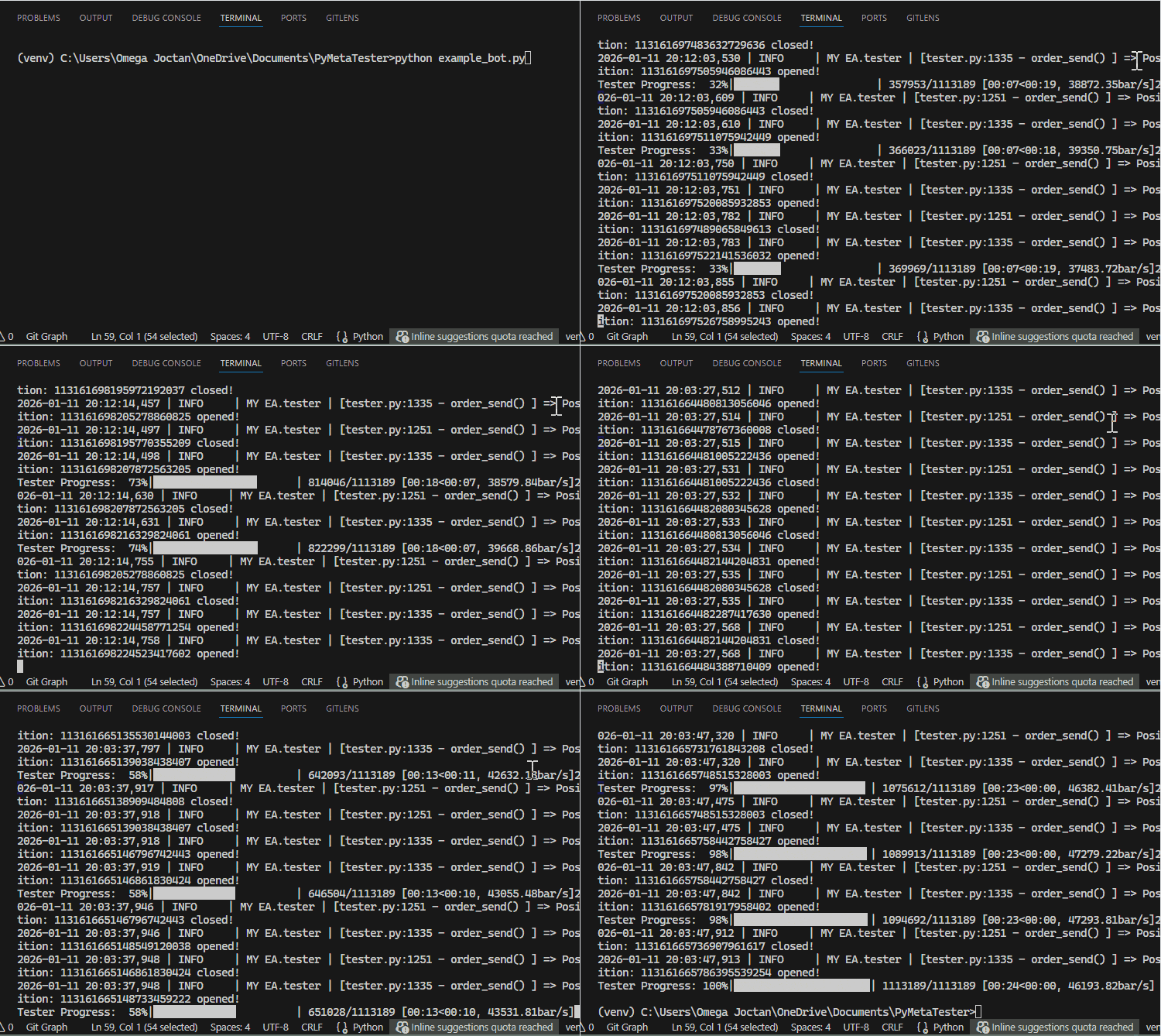
Upon a careful inspection, I was able to spot some trading operations (opening and closing of positions).
2026-01-11 20:03:42,943 | INFO     | MY EA.tester | [tester.py:1335 - order_send() ] => Position: 113161665468402118449 opened!
Tester Progress:  79%|██████████████████▏    | 882118/1113189 [00:19<00:05, 46032.14bar/s]2026-01-11 20:03:43,349 | INFO     | MY EA.tester | [tester.py:1251 - order_send() ] => Position: 113161665468402118449 closed!
2026-01-11 20:03:43,351 | INFO     | MY EA.tester | [tester.py:1335 - order_send() ] => Position: 113161665494484307258 opened!
2026-01-11 20:03:43,353 | INFO     | MY EA.tester | [tester.py:1251 - order_send() ] => Position: 113161665462461689618 closed!
2026-01-11 20:03:43,353 | INFO     | MY EA.tester | [tester.py:1335 - order_send() ] => Position: 113161665494609542402 opened!
Tester Progress:  80%|██████████████████▎    | 886723/1113189 [00:19<00:04, 45496.53bar/s]2026-01-11 20:03:43,452 | INFO     | MY EA.tester | [tester.py:1251 - order_send() ] => Position: 113161665494609542402 closed!
2026-01-11 20:03:43,453 | INFO     | MY EA.tester | [tester.py:1335 - order_send() ] => Position: 113161665501001632037 opened!
2026-01-11 20:03:43,473 | INFO     | MY EA.tester | [tester.py:1251 - order_send() ] => Position: 113161665494484307258 closed!
2026-01-11 20:03:43,474 | INFO     | MY EA.tester | [tester.py:1335 - order_send() ] => Position: 113161665502337760048 opened!
Tester Progress:  80%|██████████████████▍    | 891275/1113189 [00:19<00:04, 45088.52bar/s]2026-01-11 20:03:43,501 | INFO     | MY EA.tester | [tester.py:1251 - order_send() ] => Position: 113161665502337760048 closed!
Great, everything seems to be working at a glance. Let's analyze this further.
Generating Strategy Tester Reports
After a successful strategy tester run, the MetaTrader 5 terminal generates a so-called strategy tester report. This is a report that consists of statistical metrics for all operations triggered during a strategy testing action.
Such metrics include total net profit, gross profit/loss, winning rate of the program in both short and long trades, etc.
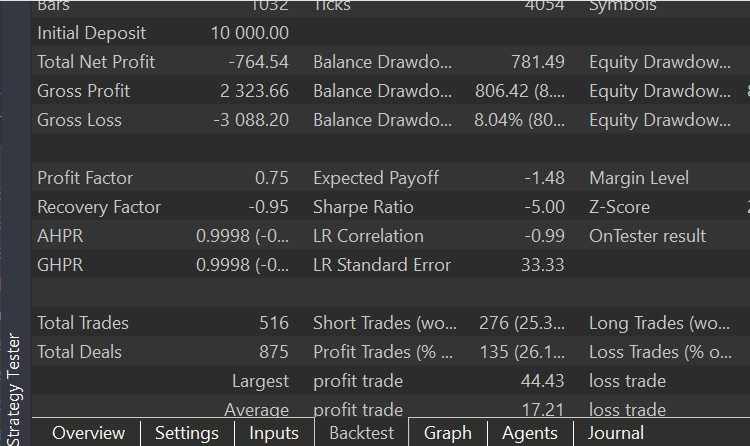
Apart from a backtest report found in the MetaTrader 5 terminal, we are interested in an HTML report that can be extracted from this report.
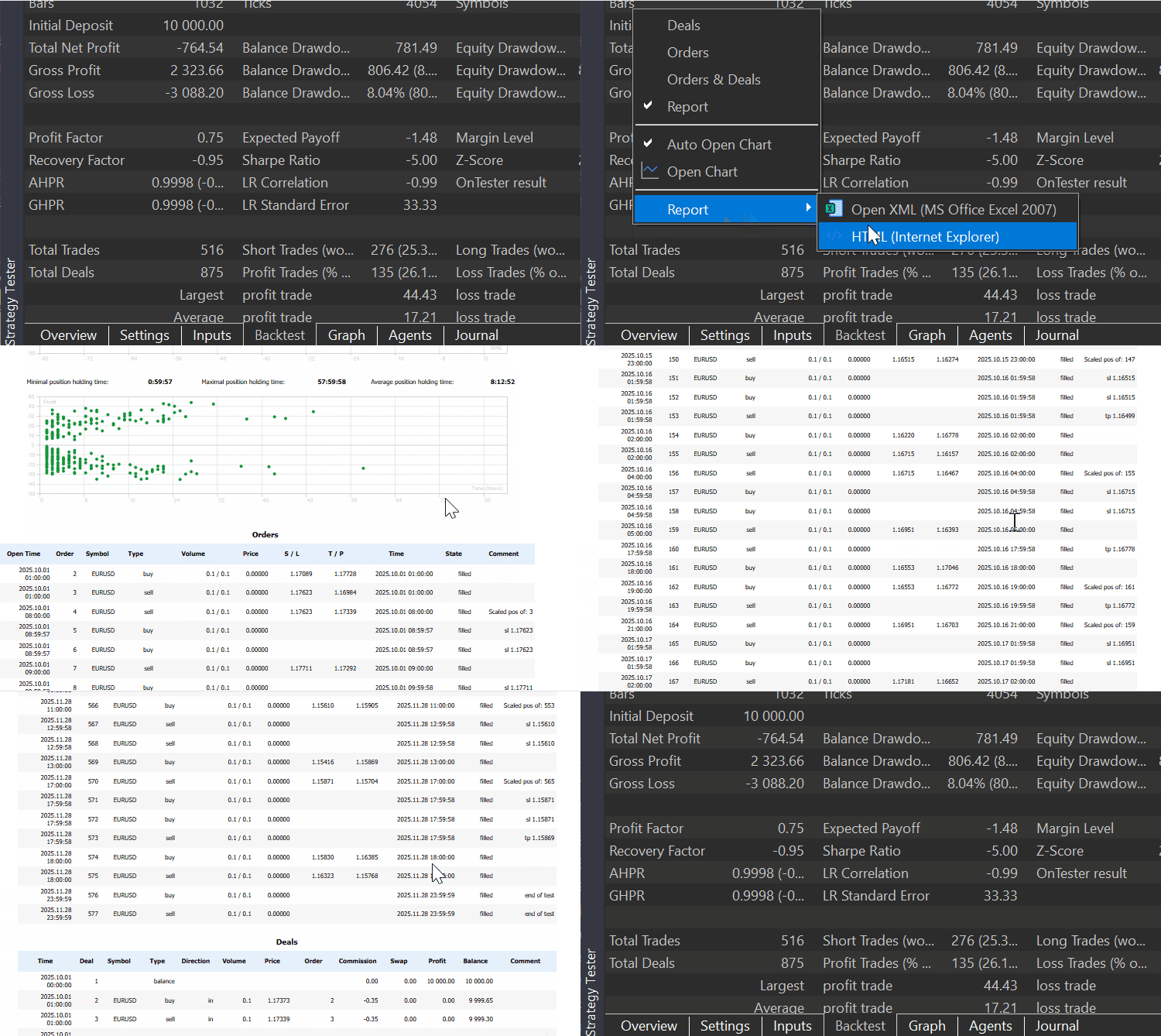
Let's generate such a report in our custom strategy tester, too, starting with a basic reports template.
Reports/template.html
<!DOCTYPE html>
<html lang="en">
<head>
    <meta charset="UTF-8">
    <title>Strategy Tester</title>

    <!-- Bootstrap 5 -->
    <link
        href="https://cdn.jsdelivr.net/npm/bootstrap@5.3.2/dist/css/bootstrap.min.css"
        rel="stylesheet"
    >

    <style>
        body {
            background: #f8f9fa;
        }

        h4 {
            font-size: 14px;
            text-align: center;
            margin: 16px 0 10px;
            font-weight: 600;
        }

        .tester-container {
            max-width: 1200px;
            margin: auto;
        }

        .table-wrapper {
            margin: 0 10%; /* 10% space left and right */
        }

        .table {
            font-size: 10px;
            width: 100%; /* fill the wrapper */
            background: white;
        }

        .table th {
            white-space: nowrap;
            text-align: center;
            font-size: 10px;
        }

        .table td {
            white-space: nowrap;
            font-size: 10px;
        }
    </style>

</head>
<body>

<h4 class="mt-4 text-center">Orders</h4>
<div class="table-wrapper">
    <div class="table-responsive">
        <table class="table table-sm table-striped table-bordered align-middle">
            <thead class="table-light text-center">
                <tr>
                    <th>Open Time</th>
                    <th>Order</th>
                    <th>Symbol</th>
                    <th>Type</th>
                    <th class="text-end">Volume</th>
                    <th class="text-end">Price</th>
                    <th class="text-end">S / L</th>
                    <th class="text-end">T / P</th>
                    <th>Time</th>
                    <th>State</th>
                    <th>Comment</th>
                </tr>
            </thead>
            <tbody>
                {{ORDER_ROWS}}
            </tbody>
        </table>
    </div>
</div>

<h4 class="mb-3 text-center">Deals</h4>
<div class="table-wrapper">
    <div class="table-responsive">
        <table class="table table-sm table-striped table-bordered align-middle">
            <thead class="table-light text-center">
                <tr>
                    <th>Time</th>
                    <th>Deal</th>
                    <th>Symbol</th>
                    <th>Type</th>
                    <th>Entry</th>
                    <th>Volume</th>
                    <th>Price</th>
                    <th>Commission</th>
                    <th>Swap</th>
                    <th>Profit</th>
                    <th>Comment</th>
                    <th>Balance</th>
                </tr>
            </thead>
            <tbody>
                {{DEAL_ROWS}}
            </tbody>
        </table>
    </div>
</div>

</body>
</html>
I: Writing Orders History in the Report
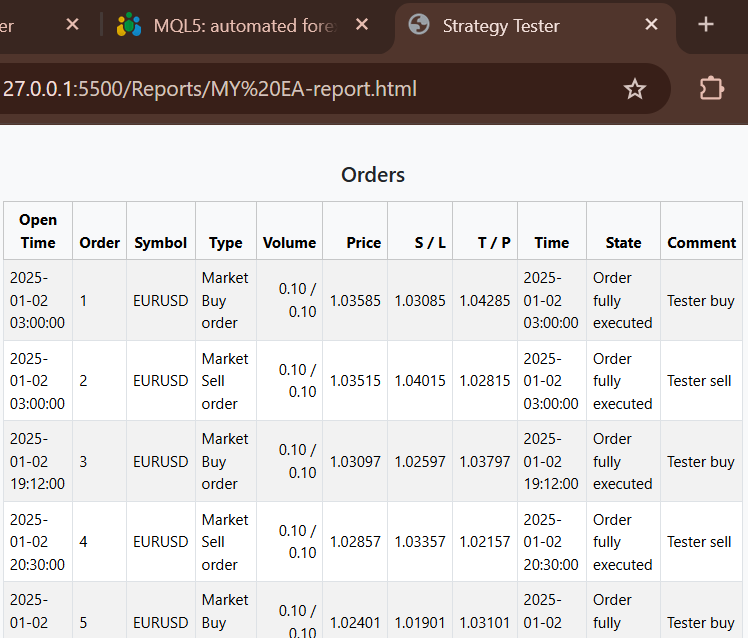
We start with the simplest part of this report — displaying all orders placed or triggered in a simulation.
To display these orders iteratively, we look at an array within the class called __orders_history_container__.
This array is populated every time an order is placed or a position is opened/closed inside the method order_send.
tester.py
    def __GenerateTesterReport(self, output_file="Tester report.html"):

        def render_order_rows(orders):
            rows = []

            for o in orders:
                rows.append(f"""
                <tr>
                    <td>{datetime.fromtimestamp(o.time_setup)}</td>
                    <td>{o.ticket}</td>
                    <td>{o.symbol}</td>
                    <td>{utils.ORDER_TYPE_MAP.get(o.type, o.type)}</td>
                    <td class="text-end">{o.volume_initial:.2f} / {o.volume_current:.2f}</td>
                    <td class="text-end">{o.price_open:.5f}</td>
                    <td class="text-end">{"" if o.sl == 0 else f"{o.sl:.5f}"}</td>
                    <td class="text-end">{"" if o.tp == 0 else f"{o.tp:.5f}"}</td>
                    <td>{datetime.fromtimestamp(o.time_done) if o.time_done else ""}</td>
                    <td>{utils.ORDER_STATE_MAP.get(o.state, o.state)}</td>
                    <td>{o.comment}</td>
                </tr>
                """)

            return "\n".join(rows)


        with open("Reports/template.html", "r", encoding="utf-8") as f:
            template = f.read()

        order_rows_html = render_order_rows(self.__orders_history_container__)

        # we populate table's body

        html = (
            template
            .replace("{{ORDER_ROWS}}", order_rows_html)
        )

        with open(output_file, "w", encoding="utf-8") as f:
            f.write(html)

        print(f"Deals report saved to: {output_file}")
Output.
II: Writing Deals in the Report
Since we have an array in our class called __deals_history_container__ that stores all deals opened during the simulation, we extract some information from it similarly to how we did for orders and populate them to a template for the report.
tester.py
    def __GenerateTesterReport(self, output_file="Tester report.html"):

        def render_order_rows(orders):
            rows = []

            for o in orders:
                rows.append(f"""
                <tr>
                    <td>{datetime.fromtimestamp(o.time_setup)}</td>
                    <td>{o.ticket}</td>
                    <td>{o.symbol}</td>
                    <td>{utils.ORDER_TYPE_MAP.get(o.type, o.type)}</td>
                    <td class="text-end">{o.volume_initial:.2f} / {o.volume_current:.2f}</td>
                    <td class="text-end">{o.price_open:.5f}</td>
                    <td class="text-end">{"" if o.sl == 0 else f"{o.sl:.5f}"}</td>
                    <td class="text-end">{"" if o.tp == 0 else f"{o.tp:.5f}"}</td>
                    <td>{datetime.fromtimestamp(o.time_done) if o.time_done else ""}</td>
                    <td>{utils.ORDER_STATE_MAP.get(o.state, o.state)}</td>
                    <td>{o.comment}</td>
                </tr>
                """)

            return "\n".join(rows)

        def render_deal_rows(deals):
            rows = []

            for d in deals:

                rows.append(f"""
                <tr>
                    <td>{datetime.fromtimestamp(d.time)}</td>
                    <td>{d.ticket}</td>
                    <td>{d.symbol}</td>
                    <td>{utils.DEAL_TYPE_MAP[d.type]}</td>
                    <td>{utils.DEAL_ENTRY_MAP[d.entry]}</td>
                    <td class="text-end">{d.volume:.2f}</td>
                    <td class="text-end">{d.price:.5f}</td>
                    <td class="text-end">{d.commission:.2f}</td>
                    <td class="text-end">{d.swap:.2f}</td>
                    <td class="text-end">{d.profit:.2f}</td>
                    <td>{d.comment}</td>
                    <td>{round(d.balance, 2)}</td>
                </tr>
                """)

            return "\n".join(rows)


        with open("Reports/template.html", "r", encoding="utf-8") as f:
            template = f.read()

        order_rows_html = render_order_rows(self.__orders_history_container__)
        deal_rows_html = render_deal_rows(self.__deals_history_container__)

        # we populate table's body

        html = (
            template
            .replace("{{ORDER_ROWS}}", order_rows_html)
            .replace("{{DEAL_ROWS}}", deal_rows_html)
        )

        with open(output_file, "w", encoding="utf-8") as f:
            f.write(html)

        print(f"Deals report saved to: {output_file}")
Now, if you pay attention to how deals are written from a MetaTrader 5 report, you'll notice that the first deal is of balance type (displaying the initial deposit). Below is how we can achieve the same outcome.
    def __make_balance_deal(self, time: datetime) -> namedtuple:

        time_sec = int(time.timestamp())
        time_msc = int(time.timestamp() * 1000)

        return self.TradeDeal(
            ticket=self.__generate_deal_ticket(),
            order=0,
            time=time_sec,
            time_msc=time_msc,
            type=self.mt5_instance.DEAL_TYPE_BALANCE,
            entry=self.mt5_instance.DEAL_ENTRY_IN,
            magic=0,
            position_id=0,
            reason=np.nan,
            volume=np.nan,
            price=np.nan,
            commission=0.0,
            swap=0.0,
            profit=0.0,
            fee=0.0,
            symbol="",
            balance=self.AccountInfo.balance,
            comment="",
            external_id=""
        )
We craft a deal with a balance type and append it to the deals history container array at the beginning of a simulation. making it the first deal in history.
    def __TesterInit(self):

        self.__deals_history_container__.append(
            self.__make_balance_deal(time=self.tester_config["start_date"])
        )

    def __TesterDeinit(self):

        # generate a report at the end
        self.__GenerateTesterReport(output_file=f"Reports/{self.tester_config['bot_name']}-report.html")
Notice that, call the function for generating a tester report inside the function called __TesterDeinit. This function is intended to be called at the end of our tester simulation; all mathematical calculations, analysis, generation, and saving of a report are performed within this method.
Outputs.

III: Writing Tester Statistics
To mimic the same metrics the MetaTrader 5 terminal offers, we have to understand what each metric represents and then derive them manually for our report.
| Metric | Description | Calculation (MT5) |
|---|---|---|
| History Quality | Quality of historical data used | (Modeled ticks ÷ required ticks) × 100% |
| Bars | Number of bars processed | Total bars in test period |
| Ticks | Number of price ticks used | Total tick events processed |
| Symbols | Symbols involved in test | Count of traded symbols |
| Total Net Profit | Final trading result | Gross Profit + Gross Loss |
| Gross Profit | Total profit from winning trades | Σ (profit > 0) |
| Gross Loss | Total loss from losing trades | Σ (loss < 0) |
| Profit Factor | Profitability ratio | Gross Profit ÷ |Gross Loss| |
| Expected Payoff | Average profit per trade | Net Profit ÷ Total Trades |
| Recovery Factor | Ability to recover from drawdown | Net Profit ÷ Maximal Drawdown |
| Sharpe Ratio | Risk-adjusted return | Mean(Returns) ÷ Std(Returns) |
| Z-Score | Trade sequence randomness | Statistical Z-test on win/loss runs |
| AHPR | Arithmetic holding period return |  |
| GHPR | Geometric holding period return | GHPR=(BalanceClose/BalanceOpen)^(1/N) |
| LR Correlation | Equity trend strength | Correlation(trade index, equity) |
| LR Standard Error | Deviation from equity trend | Std. error of regression residuals |
| Margin Level | Account safety level | (Equity ÷ Margin) × 100% |
| Total Trades | Closed positions count | Number of closed positions |
| Total Deals | All deal records | Includes partial closes |
| Short Trades (won %) | Sell trade win rate | Winning shorts ÷ total shorts × 100 |
| Long Trades (won %) | Buy trade win rate | Winning longs ÷ total longs × 100 |
| Profit Trades (%) | Winning trade ratio | Winning trades ÷ total trades × 100 |
| Loss Trades (%) | Losing trade ratio | Losing trades ÷ total trades × 100 |
| Largest Profit Trade | Best single trade | max(trade profit) |
| Largest Loss Trade | Worst single trade | min(trade profit) |
| Average Profit Trade | Mean profit of winners | Σ profits ÷ number of winning trades |
| Average Loss Trade | Mean loss of losers | Σ losses ÷ number of losing trades |
| Maximum Consecutive Wins | Longest win streak | max(count of consecutive wins) |
| Maximum Consecutive Losses | Longest loss streak | max(count of consecutive losses) |
| Maximal Consecutive Profit | Largest win streak value | max(Σ profit in win streak) |
| Maximal Consecutive Loss | Largest loss streak value | min(Σ loss in loss streak) |
| Average Consecutive Wins | Average win streak length | mean(win streak lengths) |
| Average Consecutive Losses | Average loss streak length | mean(loss streak lengths) |
| Balance Drawdown Absolute | Balance drop from start | Initial balance − minimum balance |
| Equity Drawdown Absolute | Equity drop from start | Initial equity − minimum equity |
| Balance Drawdown Maximal | Max peak-to-trough balance drop | max(balance peak − trough) |
| Equity Drawdown Maximal | Max peak-to-trough equity drop | max(equity peak − trough) |
| Balance Drawdown Relative | Max balance drawdown % | (Max DD ÷ peak balance) × 100 |
| Equity Drawdown Relative | Max equity drawdown % | (Max DD ÷ peak equity) × 100 |
For now, we implement some of the most used metrics in our report.
tester.py
    def __TesterDeinit(self):

        profits = []
        losses = []
        total_trades = 0

        max_consec_win_count = 0
        max_consec_win_money = 0.0

        max_consec_loss_count = 0
        max_consec_loss_money = 0.0

        max_profit_streak_money = 0.0
        max_profit_streak_count = 0

        max_loss_streak_money = 0.0
        max_loss_streak_count = 0

        cur_win_count = 0
        cur_win_money = 0.0

        cur_loss_count = 0
        cur_loss_money = 0.0

        win_streaks = []
        loss_streaks = []

        short_trades_won = 0
        long_trades_won = 0

        for deal in self.__deals_history_container__:
            if deal.entry == self.mt5_instance.DEAL_ENTRY_OUT: # a closed position

                total_trades +=1

                profit = deal.profit

                if profit > 0: # A win

                    profits.append(profit)

                    # reset loss streak
                    if cur_loss_count > 0:
                        loss_streaks.append(cur_loss_count)
                        cur_loss_count = 0
                        cur_loss_money = 0.0

                    cur_win_count += 1
                    cur_win_money += profit

                    # longest win streak
                    if cur_win_count > max_consec_win_count:
                        max_consec_win_count = cur_win_count
                        max_consec_win_money = cur_win_money

                    # most profitable win streak
                    if cur_win_money > max_profit_streak_money:
                        max_profit_streak_money = cur_win_money
                        max_profit_streak_count = cur_win_count

                    if deal.type == self.mt5_instance.DEAL_TYPE_BUY:
                        long_trades_won += 1

                    if deal.type == self.mt5_instance.DEAL_TYPE_SELL:
                        short_trades_won += 1

                else: # A loss

                    losses.append(profit)

                    # reset win streak
                    if cur_win_count > 0:
                        win_streaks.append(cur_win_count)
                        cur_win_count = 0
                        cur_win_money = 0.0

                    cur_loss_count += 1
                    cur_loss_money += profit

                    # longest loss streak
                    if cur_loss_count > max_consec_loss_count:
                        max_consec_loss_count = cur_loss_count
                        max_consec_loss_money = cur_loss_money

                    # largest losing streak
                    if cur_loss_money < max_loss_streak_money:
                        max_loss_streak_money = cur_loss_money
                        max_loss_streak_count = cur_loss_count


        self.tester_stats["Gross Profit"] = np.sum(profits) if profits else 0
        self.tester_stats["Gross Loss"] = np.sum(losses) if losses else 0
        self.tester_stats["Net Profit"] = self.tester_stats["Gross Profit"] + self.tester_stats["Gross Loss"]

        self.tester_stats["Profit Factor"] = self.tester_stats["Gross Profit"] / self.tester_stats["Gross Loss"]

        self.tester_stats["Expected Payoff"] = (
            self.tester_stats["Net Profit"] / total_trades
            if total_trades > 0 else 0
        )

        def max_drawdown(curve):
            peak = curve[0]
            max_dd = 0.0

            for value in curve:
                peak = max(peak, value)
                dd = peak - value
                max_dd = max(max_dd, dd)

            return max_dd

        returns = np.diff(self.tester_curves["equity"])

        sharpe = (
            np.mean(returns) / np.std(returns)
            if len(returns) > 1 and np.std(returns) > 0 else 0.0
        )

        self.tester_stats["Sharpe Ratio"] = sharpe

        self.tester_stats["Equity Drawdown Absolute"] = max_drawdown(self.tester_curves["equity"])
        self.tester_stats["Balance Drawdown Absolute"] = max_drawdown(self.tester_curves["balance"])

        self.tester_stats["Recovery Factor"] = (
            self.tester_stats["Net Profit"] / max(self.tester_stats["Balance Drawdown Absolute"], 1)
        )

        self.tester_stats["Equity Drawdown Relative"] = (
            self.tester_stats["Equity Drawdown Absolute"] / max(self.tester_curves["equity"]) * 100
            if self.tester_curves["equity"] else 0.0
        )

        self.tester_stats["Balance Drawdown Relative"] = (
            self.tester_stats["Balance Drawdown Absolute"] / max(self.tester_curves["balance"]) * 100
            if self.tester_curves["balance"] else 0.0
        )

        self.tester_stats["Balance Drawdown Maximal"] = max_drawdown(self.tester_curves["balance"])
        self.tester_stats["Equity Drawdown Maximal"] = max_drawdown(self.tester_curves["equity"])

        self.tester_stats["Total Trades"] = total_trades
        self.tester_stats["Total Deals"] = len(self.__deals_history_container__)

        self.tester_stats["Short Trades Won"] = short_trades_won
        self.tester_stats["Long Trades Won"] = long_trades_won

        self.tester_stats["Profit Trades"] = len(profits) if profits else 0
        self.tester_stats["Loss Trades"] = len(losses) if losses else 0

        self.tester_stats["Largest Profit Trade"] = np.max(profits) if profits else 0
        self.tester_stats["Largest Loss Trade"] = np.min(losses) if losses else 0

        self.tester_stats["Average Profit Trade"] = np.mean(profits) if profits else 0
        self.tester_stats["Average Loss Trade"] = np.mean(losses) if losses else 0

        self.tester_stats["Maximum Consecutive Wins"] = max_profit_streak_count
        self.tester_stats["Maximum Consecutive Losses"] = max_loss_streak_count

        self.tester_stats["Maximum Consecutive Wins Money"] = max_profit_streak_money
        self.tester_stats["Maximum Consecutive Losses Money"] = max_loss_streak_money

        self.tester_stats["Average Consecutive Wins"] = np.mean(win_streaks)
        self.tester_stats["Average Consecutive Losses"] = np.mean(loss_streaks)

        # AHPR / GHPR

        self.tester_stats["AHPR"] = np.prod(1 + returns) ** (1/len(returns)) if len(returns) else 0
        self.tester_stats["GHPR"] = np.prod(1 + returns) if len(returns) else 0
Inside the function __GenerateTesterReport, we render these metrics to our HTML template, similarly to how we rendered orders and deals.
        stats_table = f"""
            <table class="report-table table-sm table-striped">
                <tbody>
                    <tr>
                        <th>Initial Deposit</th><td class="number">{self.tester_config.get('deposit', 0)}</td>
                        <th>Ticks</th><td class="number">{self.tester_stats.get('Ticks', 0)}</td>
                        <th>Symbols</th><td class="number">{self.tester_stats.get('Symbols', 0)}</td>
                    </tr>
                    <tr>
                        <th>Total Net Profit</th><td class="number">{self.tester_stats.get('Net Profit', 0):.2f}</td>
                        <th>Balance Drawdown Absolute</th><td class="number">{self.tester_stats.get('Balance Drawdown Absolute', 0):.2f}</td>
                        <th>Equity Drawdown Absolute</th><td class="number">{self.tester_stats.get('Equity Drawdown Absolute', 0):.2f}</td>
                    </tr>
                    <tr>
                        <th>Gross Profit</th><td class="number">{self.tester_stats.get('Gross Profit', 0):.2f}</td>
                        <th>Balance Drawdown Maximal</th><td class="number">{self.tester_stats.get('Balance Drawdown Maximal', 0):.2f}</td>
                        <th>Equity Drawdown Maximal</th><td class="number">{self.tester_stats.get('Equity Drawdown Maximal', 0):.2f}</td>
                    </tr>
                    <tr>
                        <th>Gross Loss</th><td class="number">{self.tester_stats.get('Gross Loss', 0):.2f}</td>
                        <th>Balance Drawdown Relative</th><td class="number">{self.tester_stats.get('Balance Drawdown Relative', 0):.2f}%</td>
                        <th>Equity Drawdown Relative</th><td class="number">{self.tester_stats.get('Equity Drawdown Relative', 0):.2f}%</td>
                    </tr>
                    <tr>
                        <th>Profit Factor</th><td class="number">{self.tester_stats.get('Profit Factor', 0):.2f}</td>
                        <th>Expected Payoff</th><td class="number">{self.tester_stats.get('Expected Payoff', 0):.2f}</td>
                        <th>Margin Level</th><td class="number">{self.tester_stats.get('Margin Level', 0):.2f}%</td>
                    </tr>
                    <tr>
                        <th>Recovery Factor</th><td class="number">{self.tester_stats.get('Recovery Factor', 0):.2f}</td>
                        <th>Sharpe Ratio</th><td class="number">{self.tester_stats.get('Sharpe Ratio', 0):.2f}</td>
                        <th>Z-Score</th><td class="number">{self.tester_stats.get('Z-Score', 0):.2f}</td>
                    </tr>
                    <tr>
                        <th>AHPR</th><td class="number">{self.tester_stats.get('AHPR', 0):.4f}</td>
                        <th>LR Correlation</th><td class="number">{self.tester_stats.get('LR Correlation', 0):.2f}</td>
                        <th>OnTester result</th><td class="number">{self.tester_stats.get('OnTester result', 0)}</td>
                    </tr>
                    <tr>
                        <th>GHPR</th><td class="number">{self.tester_stats.get('GHPR', 0):.4f}</td>
                        <th>LR Standard Error</th><td class="number">{self.tester_stats.get('LR Standard Error', 0):.2f}</td>
                        <td></td><td></td>
                    </tr>
                    <tr>
                        <th>Total Trades</th><td class="number">{self.tester_stats.get('Total Trades', 0)}</td>
                        <th>Short Trades (won %)</th><td class="number">{short_trades_won} ({100*short_trades_won/self.tester_stats.get('Total Trades',1):.2f}%)</td>
                        <th>Long Trades (won %)</th><td class="number">{long_trades_won} ({100*long_trades_won/self.tester_stats.get('Total Trades',1):.2f}%)</td>
                    </tr>
                    <tr>
                        <th>Total Deals</th><td class="number">{self.tester_stats.get('Total Deals', 0)}</td>
                        <th>Profit Trades (% of total)</th><td class="number">{self.tester_stats.get('Profit Trades', 0)} ({100*self.tester_stats.get('Profit Trades',0)/max(self.tester_stats.get('Total Trades',1),1):.2f}%)</td>
                        <th>Loss Trades (% of total)</th><td class="number">{self.tester_stats.get('Loss Trades', 0)} ({100*self.tester_stats.get('Loss Trades',0)/max(self.tester_stats.get('Total Trades',1),1):.2f}%)</td>
                    </tr>
                    <tr>
                        <th>Largest Profit Trade</th><td class="number">{self.tester_stats.get('Largest Profit Trade', 0):.2f}</td>
                        <th>Largest Loss Trade</th><td class="number">{self.tester_stats.get('Largest Loss Trade', 0):.2f}</td>
                        <td></td><td></td>
                    </tr>
                    <tr>
                        <th>Average Profit Trade</th><td class="number">{self.tester_stats.get('Average Profit Trade', 0):.2f}</td>
                        <th>Average Loss Trade</th><td class="number">{self.tester_stats.get('Average Loss Trade', 0):.2f}</td>
                        <td></td><td></td>
                    </tr>
                    <tr>
                        <th>Max Consecutive Wins ($)</th><td class="number">{max_profit_streak_count} ({max_profit_streak_money:.2f})</td>
                        <th>Max Consecutive Losses ($)</th><td class="number">{max_loss_streak_count} ({max_loss_streak_money:.2f})</td>
                        <td></td><td></td>
                    </tr>
                    <tr>
                        <th>Max Consecutive Profit (count)</th><td class="number">{max_profit_streak_count} ({max_profit_streak_money:.2f})</td>
                        <th>Max Consecutive Loss (count)</th><td class="number">{max_loss_streak_count} ({max_loss_streak_money:.2f})</td>
                        <td></td><td></td>
                    </tr>
                    <tr>
                        <th>Average Consecutive Wins</th><td class="number">{self.tester_stats.get('Average Consecutive Wins', 0):.2f}</td>
                        <th>Average Consecutive Losses</th><td class="number">{self.tester_stats.get('Average Consecutive Losses', 0):.2f}</td>
                        <td></td><td></td>
                    </tr>
                </tbody>
            </table>
            """

        # ....

        # we populate table's body

        html = (
            template
            .replace("{{STATS_TABLE}}", stats_table)
            .replace("{{ORDER_ROWS}}", order_rows_html)
            .replace("{{DEAL_ROWS}}", deal_rows_html)
            .replace(
            "{{CURVE_IMAGE}}",
            f'<img src="{curve_img}" class="img-fluid curve-img">' if curve_img else ""
            )
        )
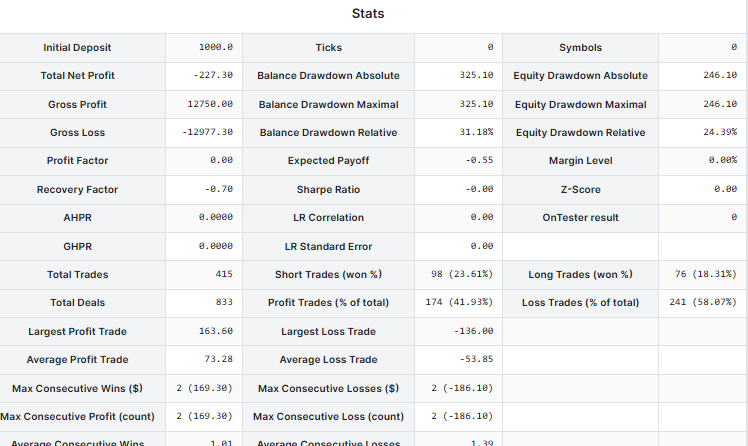
Notice that we rendered the metrics to a table, unlike the non-tabled report that the MetaTrader 5 strategy tester generates. A table makes it easy and convenient to read a produced report.
Our stats table in the report looks like this:
After this, we need to plot a balance curve in a report.
Using matplotlib.
    def _plot_tester_curves(self, output_path: str) -> str:

        curves = self.tester_curves

        if not curves["time"]:
            return None

        # Convert timestamps → datetime
        times = [
            datetime.fromtimestamp(t) if isinstance(t, (int, float)) else t
            for t in curves["time"]
        ]

        plt.figure(figsize=(10, 4))

        plt.plot(times, curves["balance"], label="Balance", linewidth=2)
        plt.plot(times, curves["equity"], label="Equity", linewidth=2)
        plt.grid(visible=True, which="minor")
        # plt.plot(times, curves["margin"], label="Margin", linewidth=1, alpha=0.6)

        plt.legend(loc="upper right")
        plt.tight_layout()

        plt.savefig(output_path, dpi=150, transparent=True)
        plt.close()

        return output_path
To get data for our plot (curves), we have to store the Tester's account state on every tick or a few iterations. We have to be careful on this part as it can be performance draining if not done correctly.
    def __curves_update(self, time):

        if isinstance(time, datetime):
            time = time.timestamp()

        minute = int(time) // (config.CURVES_PLOT_INTERVAL_MINS*60)

        if minute == self.last_curve_minute:
            return

        self.last_curve_minute = minute

        self.tester_curves["time"].append(time)
        self.tester_curves["balance"].append(self.AccountInfo.balance)
        self.tester_curves["equity"].append(self.AccountInfo.equity)
        self.tester_curves["margin"].append(self.AccountInfo.margin)
The above method appends a current time, balance, equity, and margin to their respective arrays for plotting purposes later on.
    def OnTick(self, ontick_func):
        """Calls the assigned function upon the receival of new tick(s)

        Args:
            ontick_func (_type_): A function to be called on every tick
        """

        if not self.IS_TESTER:
            return

        self.__TesterInit()

        modelling = self.tester_config["modelling"]
        if modelling == "real_ticks" or modelling == "every_tick":

            total_ticks = sum(ticks_info["size"] for ticks_info in self.TESTER_ALL_TICKS_INFO)

            self.__GetLogger().debug(f"total number of ticks: {total_ticks}")

            with tqdm(total=total_ticks, desc="Tester Progress", unit="tick") as pbar:
                while True:

                        # ...

                        current_tick = utils.make_tick_from_tuple(current_tick)
                        self.TickUpdate(symbol=symbol, tick=current_tick)

                        self.__curves_update(current_tick.time)
                        ontick_func()

                        ticks_info["counter"] = counter + 1
                        any_tick_processed = True

                        pbar.update(1)

                    if not any_tick_processed:
                        break

        elif modelling == "new_bar" or modelling == "1-minute-ohlc":

            bars_ = [bars_info["size"] for bars_info in self.TESTER_ALL_BARS_INFO]
            total_bars = sum(bars_)

            self.__GetLogger().debug(f"total number of bars: {total_bars}")

            with tqdm(total=total_bars, desc="Tester Progress", unit="bar") as pbar:
                while True:

                    any_bar_processed = False

                    for bars_info in self.TESTER_ALL_BARS_INFO:

                        # ...

                        current_tick = self._bar_to_tick(symbol=symbol, bar=bars_info["bars"].row(counter))

                        self.__curves_update(current_tick["time"])

                        # Getting ticks at the current bar

                        self.TickUpdate(symbol=symbol, tick=current_tick)
                        ontick_func()

                        bars_info["counter"] = counter + 1
                        any_bar_processed = True

                        pbar.update(1)

                    if not any_bar_processed:
                        break

        self.__TesterDeinit()
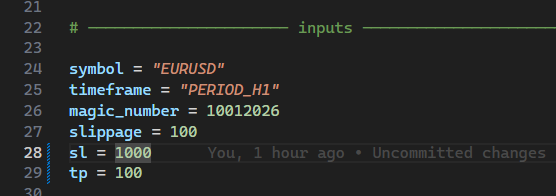
Finally, I set the stop loss to be 10 times larger than a take profit so that we know what to expect from a tester outcome — a higher accuracy in all trades. This is a good measure of how close and effective our project is.
Outputs.
I created a similar trading robot in MQL5:
#include <Trade\Trade.mqh>
#include <Trade\SymbolInfo.mqh>
#include <Trade\PositionInfo.mqh>

CTrade m_trade;
CSymbolInfo m_symbol;
CPositionInfo m_position;

input int magic_number = 10012026;
input int stoploss = 1000;
input int takeprofit = 100;
input int slippage = 100;
//+------------------------------------------------------------------+
//| Expert initialization function                                   |
//+------------------------------------------------------------------+
int OnInit()
  {
//---

   m_symbol.Name(Symbol());
   m_trade.SetExpertMagicNumber(magic_number);
   m_trade.SetDeviationInPoints(slippage);
   m_trade.SetTypeFillingBySymbol(Symbol());

//---
   return(INIT_SUCCEEDED);
  }
//+------------------------------------------------------------------+
//| Expert deinitialization function                                 |
//+------------------------------------------------------------------+
void OnDeinit(const int reason)
  {
//---

  }
//+------------------------------------------------------------------+
//| Expert tick function                                             |
//+------------------------------------------------------------------+
void OnTick()
  {
//---

    if (!m_symbol.RefreshRates())
      return;

    double ask = m_symbol.Ask(),
           bid = m_symbol.Bid(),
           pts = m_symbol.Point();

    double volume = 0.01;

    if (!PosExists(magic_number, POSITION_TYPE_BUY))
      m_trade.Buy(volume, Symbol(), ask, ask-stoploss*pts, ask+takeprofit*pts);

    if (!PosExists(magic_number, POSITION_TYPE_SELL))
      m_trade.Sell(volume, Symbol(), bid, bid+stoploss*pts, bid-takeprofit*pts);
  }
//+------------------------------------------------------------------+
//|                                                                  |
//+------------------------------------------------------------------+
bool PosExists(int magic, ENUM_POSITION_TYPE type)
 {
   for (int i=PositionsTotal()-1; i>=0; i--)
     if (m_position.SelectByIndex(i))
        if (m_position.Magic() == magic && m_position.PositionType() == type)
           return true;

   return false;
 }
After running a test in a similar environment to a custom tester, the following was the outcome.
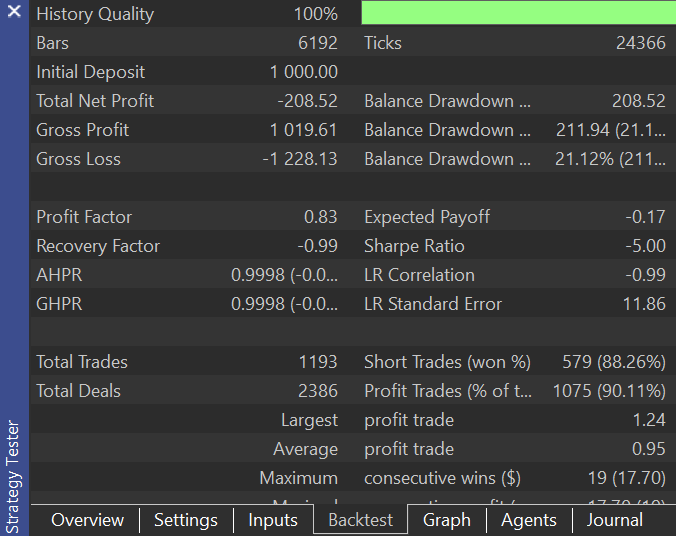
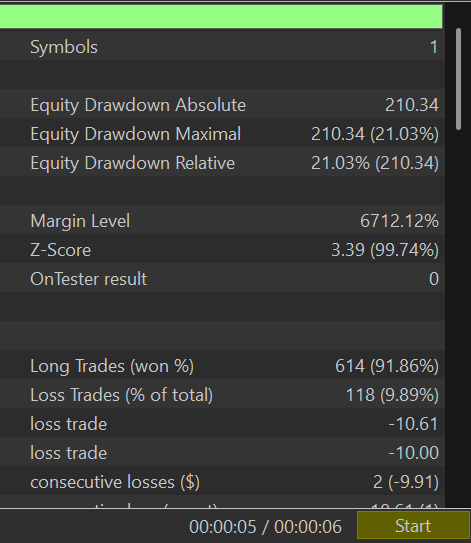
The results were close in terms of accuracy, but our simulator ended up opening fewer trades than the MetaTrader 5 strategy tester; the discrepancy was expected, as there is still a huge room for improvement in our project.
Share your thoughts and help to improve this project on GitHub: https://github.com/MegaJoctan/PyMetaTester
The Bottom Line
As we managed to introduce a familiar method of handling ticks and bars and loop through the history whilst calling the main function of a trading strategy, our project now becomes reliable.
A MetaTrader 5-like tester report is handy for testing new features and debugging our custom simulator. Despite being buggy and missing some metrics, it is still better than nothing as we keep perfecting our Python strategy tester.
There is more to come; stay tuned!
Attachments Table
| Filename | Description & Usage |
|---|---|
| requirements.txt | A text file with information about all Python dependencies and their versions, used in this project. |
| configs\tester.json | A configuration JSON file that contains adjustable parameters to be used for the tester. |
| Reports\template.html | An HTML template for a tester report produced by the Tester class. |
| src\bars.py | Contains functions that collect bars from the MetaTrader 5 terminal for simulation purposes. |
| src\ticks.py | Contains functions that collect ticks from the MetaTrader 5 terminal for simulation purposes. |
| src\ticks_gen.py | This script has a class with methods to help in generating ticks that resemble real ones offered by the MetaTrader 5 terminal. |
| Trade\Trade.py | Contains the CTrade class, a class that makes it easier to execute trades using MetaTrader 5-Python. |
| config.py | A Python configuration file. It is where useful variables throughout the project are stored for reference. |
| example_bot.py | Think of this file as an Expert Advisor made using a simulator overloaded with MetaTrader 5-Python functions. |
| tester.py | It contains the class Tester. This is the core/engine of this project. |
| validators.py | It has methods to help us validate user inputs and much more. |
| utils.py | A utility Python file that holdshold reusable methods throughout the project. |
| Example EA.mq5 | An MQL5-based trading robot (EA) with a similar strategy to the one inside example_bot.py. It is useful for making comparisons of outcomes produced in the MetaTrader 5 strategy tester and our custom tester. |
Warning: All rights to these materials are reserved by MetaQuotes Ltd. Copying or reprinting of these materials in whole or in part is prohibited.
This article was written by a user of the site and reflects their personal views. MetaQuotes Ltd is not responsible for the accuracy of the information presented, nor for any consequences resulting from the use of the solutions, strategies or recommendations described.

 Developing Market Memory Zones Indicator: Where Price Is Likely To Return
 Forex Arbitrage Trading: Relationship Assessment Panel
 Statistical Arbitrage Through Cointegrated Stocks (Part 10): Detecting Structural Breaks
 Central Force Optimization (CFO) algorithm

- Free trading apps
- Over 8,000 signals for copying
- Economic news for exploring financial markets
You agree to website policy and terms of use
For a researcher, the performance of a Tester is a crucial indicator. It would be good to provide the memory consumption of your tester.
0.2 million ticks/second is, unfortunately, a strong limitation. Perhaps Numba will help improve your performance.
Please add sections (for different numbers of trading symbols):
Thanks for the article!
For a researcher, the performance of a Tester is a crucial indicator. It would be good to provide the memory consumption of your tester.
0.2 million ticks/second is, unfortunately, a strong limitation. Perhaps Numba will help improve your performance.
Please add sections (for different numbers of trading symbols):
Thanks for the article!
Thanks for the suggestions, I will in the next few articles.
The goal was to implement first then improve later, a long way still to go😊
This is just the tool I've been looking for! Thanks Much. Any plans to implement an parameter optimizer in the future?