

Mastering Kagi Charts in MQL5 (Part I): Creating the Indicator
 4 383
4 383
 1
1

Introduction
Kagi charts are a special type of price chart that focuses on real market movement. They were first created in Japan many years ago. Unlike normal candlestick charts that update at every fixed time interval, a Kagi chart only changes direction when the price moves by a specific amount. This makes Kagi charts very clean and excellent at removing unnecessary noise.
Because a Kagi chart does not depend on time, it gives the trader a clear picture of the trend. When the price rises, the line grows upward. When the price falls, the line moves downward. The chart also changes its style when demand turns into supply. This simple structure helps traders see trend strength without distraction.
In a normal candlestick chart, the market prints a new bar at fixed time intervals. A Kagi chart behaves differently. It extends upward only when the price rises, and it turns downward only when the price falls by a specified reversal amount. When the balance of power changes from supply to demand, the Kagi line changes its thickness or color. This clear behavior is what makes Kagi Charts so powerful for trend analysis.
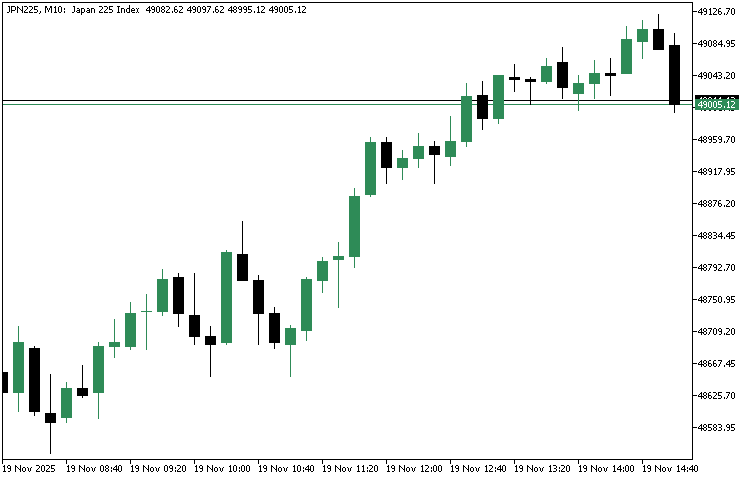
Before we begin building our own Kagi system, it helps to visualize how a Kagi chart looks when compared to a standard candlestick chart. The example below provides a simple conceptual comparison:
Traditional Candlestick Chart
Kagi Chart
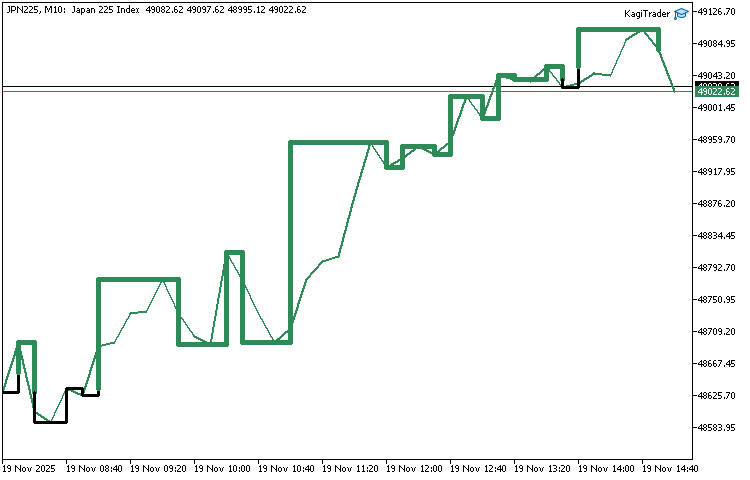
In this two-part series, we will build a complete Kagi-based trading system in MQL5. In Part One, we will create a live, fully functional, non-repainting Kagi Chart that draws directly on the main chart window using MQL5 graphical objects such as OBJ_TREND. This will give us a clean and accurate Kagi visualization that reacts instantly to market movements.
In Part Two, we will extend this work by detecting Kagi signals and using them to open trades automatically. By the end of the series, you will understand exactly how Kagi Charts are constructed, and you will have your own Kagi-powered trading engine running inside MQL5.
Kagi Chart Construction Basics
Before we begin coding, we need a simple understanding of how a Kagi chart is built. There are many detailed explanations available online, including the well-known description on Wikipedia, so we will not repeat the full theory here. Instead, we will focus on the essential elements needed to implement the chart correctly in MQL5. These concepts will guide how we calculate direction, detect reversals, and draw the Kagi lines on our chart.
Price Swings and Direction Changes
A Kagi chart moves only when price moves enough to form a meaningful swing. We track two things:
- Upward movement.
- Downward movement.
When price continues in the same direction, the Kagi line simply extends. A new direction begins only when price moves against the existing trend by more than the chosen reversal amount.
Shoulders (Local Maximums)
A shoulder, also known as a local maximum, appears when price reaches a new high and then turns down. That high becomes the shoulder level. Later, if price rises above that shoulder, it confirms bullish strength and can trigger a thickness change from thin to thick.
Waists (Local Minimums)
A waist is a local minimum. It happens when price makes a new low and then turns up. That low becomes the waist level. Later, if price falls below that waist, it confirms bearish strength and can trigger a thickness change from thick to thin.
The Reversal Amount
The reversal amount determines when the Kagi line changes direction. We will allow the trader to choose between:
- A fixed amount.
- A percentage of price.
The core idea is simple: If price moves against the current direction by more than this amount, the Kagi line draws a horizontal segment and then begins a new vertical segment in the opposite direction.
Yin and Yang Lines
Kagi Charts use two line styles to show shifts in supply and demand:
- Yin Line (thin line): Shows weakening demand or dominance of sellers.
- Yang Line (thick line): Shows strengthening demand or dominance of buyers.
The switch from Yin to Yang happens when the Kagi line breaks above a previous shoulder. Similarly, a switch from Yang to Yin happens when the Kagi line breaks below a previous waist.
These style changes form the classic Kagi trading signals:
- Thin => Thick = Buy signal.
- Thick => Thin = Sell signal.
Project Structure and Inputs
In this section, we will prepare the foundation for our Kagi Chart project. This program will be built as an Expert Advisor. It is important to state this clearly because MQL5 offers several program types. These include scripts, indicators, Expert Advisors and services. Each of them serves a different purpose. For this project, the Expert Advisor form is the best option because it allows us to work with graphical objects on the main chart window with full control. We will use the trend line graphical object called OBJ_TREND to draw the Kagi segments directly on the price chart. This creates a clean and interactive display without relying on custom indicator buffers. It also keeps the entire project contained in one file.
At this point, we can begin writing code. Open MetaEditor 5 and create a new Expert Advisor file. Call it KagiTrader.mq5. The file will contain the usual event handlers that every EA depends on. These include initialization, deinitialization, the tick handler and the trade transaction handler. They provide the structure that our Kagi Chart logic will run on. Below is the minimal skeleton that we will build on.
//+------------------------------------------------------------------+
//|                                                   KagiTrader.mq5 |
//|          Copyright 2025, MetaQuotes Ltd. Developer is Chacha Ian |
//|                          https://www.mql5.com/en/users/chachaian |
//+------------------------------------------------------------------+

#property copyright "Copyright 2025, MetaQuotes Ltd. Developer is Chacha Ian"
#property link      "https://www.mql5.com/en/users/chachaian"
#property version   "1.00"

//+------------------------------------------------------------------+
//| Expert initialization function                                   |
//+------------------------------------------------------------------+
int OnInit(){

   return INIT_SUCCEEDED;
}

//+------------------------------------------------------------------+
//| Expert deinitialization function                                 |
//+------------------------------------------------------------------+
void OnDeinit(const int reason){

}

//+------------------------------------------------------------------+
//| Expert tick function                                             |
//+------------------------------------------------------------------+
void OnTick(){

}

//+------------------------------------------------------------------+
//| TradeTransaction function                                        |
//+------------------------------------------------------------------+
void OnTradeTransaction(const MqlTradeTransaction& trans,
                        const MqlTradeRequest& request,
                        const MqlTradeResult& result)
{

}

//+------------------------------------------------------------------+
The initialization function is used when the EA starts. We will place our setup logic here. The deinitialization function is called when the EA is removed. It will later help us clear graphical objects from the chart. The tick handler will update the Kagi Chart as market prices change. The trade transaction function is not required for Part One, but it remains in the structure for completeness because Part Two will use it when we add automated trading.
Now that the project structure is in place, we can define the input parameters. These settings allow the reader to control how the Kagi Chart behaves. They also make it easy to adjust the chart without editing code.
Before we proceed to define the input parameters for our Kagi indicator, we first need to establish a custom enumeration that will guide how reversal conditions are interpreted. Kagi charts change direction only when price reverses by a significant amount, and traders may prefer different methods of defining what qualifies as “significant.”
To provide that flexibility, we introduce the following enumeration:
//+------------------------------------------------------------------+
//| Custom Enumerations                                              |
//+------------------------------------------------------------------+
enum ENUM_KAGI_REVERSAL_TYPE
{
   REVERSAL_BY_PERCENTAGE,
   REVERSAL_BY_PRICE_STEP
};
This enumeration gives our indicator two modes of determining reversals:
- REVERSAL_BY_PERCENTAGE
The Kagi line will reverse when price moves against the current direction by a specified percentage of the current price. This option adapts to market volatility because the reversal threshold automatically scales with price.
- REVERSAL_BY_PRICE_STEP
Here, a reversal happens when price moves by a fixed reversal amount. This makes the behavior more uniform and predictable, regardless of current price levels.
Below is the inputs parameter section followed by clear explanations.
//+------------------------------------------------------------------+
//| User input variables                                             |
//+------------------------------------------------------------------+
input group "Information"
input ENUM_TIMEFRAMES         kagiTimeframe = PERIOD_M10;
input ENUM_KAGI_REVERSAL_TYPE reversalType  = REVERSAL_BY_PERCENTAGE;
input double                  reversalValue = 4.0;
input color                   yangLineColor = C'38,166,154';
input color                   yinLineColor  = C'239,83,80';
input bool                    overlayKagi   = true;
Below is an explanation of each input parameter:
- kagiTimeframe
Defines the timeframe used to calculate the Kagi Chart. The EA reads price data from this timeframe regardless of the chart the user opens.
- reversalType
Controls how the reversal amount is interpreted. The trader can choose a fixed value or a percentage based value. This allows flexibility in different market conditions.
- reversalValue
Provides the reversal amount. It can be a static number or a percentage depending on the selected reversal type.
- yangLineColor
Defines the color used for the upward or bullish Kagi segments. These segments represent Yang lines.
- yinLineColor
Defines the color used for the downward or bearish Kagi segments. These segments represent Yin lines.
- overlayKagi
Enables the reader to decide if the Kagi Chart should be displayed. Turning this setting off will stop the EA from drawing the Kagi segments. This is useful when comparing chart behavior or when testing performance.
We may later introduce more inputs as the project grows. These may include line thickness, drawing offsets or options that control the cleaning of objects. For now, the above parameters are enough to start building the first working version of our Kagi Chart.
Kagi Chart State Variables and Internal Data Structure
Before we begin implementing the Kagi construction logic, we need a reliable way to store and update the internal state of our chart. A Kagi chart is dynamic by nature—it constantly reacts to price changes, reversals, trend transitions, and shifts between Yin and Yang lines. To manage all these moving pieces, we will define a custom structure that will hold every important variable we need during calculation and drawing.
Right after our input parameters, we introduce the following structure:
//+------------------------------------------------------------------+
//| Global Variables                                                 |
//+------------------------------------------------------------------+
struct MqlKagiData{

   double closePrice[];
   datetime openTime[];
   double referencePrice;
   datetime referenceTime;
   double localMaximum;
   double localMinimum;
   bool isUptrend;
   bool isDowntrend;
   bool isYang;
   bool isYin;
   int lookBackBars;
   datetime lastBarOpenTime;

};

//--- Initialize the state container
MqlKagiData kagiData;
This structure will act as an internal "memory" of our Kagi indicator. Below is an explanation of each field and why it is essential:
- closePrice[]
A Kagi chart is built from closing prices, so this dynamic array will store the historical close prices extracted from the chart. These values will form the basis of every Kagi segment.
- openTime[]
To draw lines on the chart using objects such as OBJ_TREND, we need both price and time coordinates. This array stores the corresponding open times for all historical bars so that each Kagi segment can be anchored correctly on the chart.
- referencePrice
The variable holds the last significant price used to build the current Kagi line. New checks are performed only at each bar close, and those close prices determine whether the line continues or a reversal occurs.
- referenceTime
Similar to referencePrice, this variable stores the timestamp associated with the last update in the Kagi structure. It helps us position Kagi line changes at the correct moment on the chart.
- localMaximum
- localMinimum
This stores the most recent waist—the latest local low reached before price reverses upward. It is essential for detecting transitions back to Yin lines when the price falls below previous lows.
- isUptrend
A simple boolean flag that tells us whether the current Kagi line is moving upward. This will help us decide whether incoming prices extend the current line or trigger a reversal.
- isDowntrend
Similar to isUptrend, this flag confirms whether the latest Kagi segment is moving downward. Keeping both flags allows the logic to remain very clear and explicit during updates.
- isYang
Yang lines represent strength or demand. This flag becomes true when price pushes above the latest shoulder. It helps us determine when to draw thick lines on the chart.
- isYin
- lookBackBars
- lastBarOpenTime
This variable stores the open time of the most recent bar processed. It will later help us detect when a new bar forms so that the indicator updates only when necessary.
With this structure defined and our kagiData instance initialized, we now have a well-organized container for all internal state management. This allows the rest of our implementation to read, update, and draw Kagi segments in a clean and consistent way.
Initializing the Kagi State and Loading Historical Data for Kagi Processing
When the Expert Advisor starts, we must prepare its internal state and load the historical data that will form the base of the Kagi Chart. This initialization runs once and sets everything the EA needs before it begins drawing on the chart.
First we set simple boolean flags and basic parameters.
//+------------------------------------------------------------------+
//| Expert initialization function                                   |
//+------------------------------------------------------------------+
int OnInit(){

   //--- Initialize global variables
   kagiData.isUptrend       = false;
   kagiData.isDowntrend     = false;
   kagiData.isYang          = false;
   kagiData.isYin           = false;
   kagiData.lookBackBars    = 100;
   kagiData.lastBarOpenTime = 0;

   return INIT_SUCCEEDED;
}
We mark the chart as not trending up or down yet. We also set both Yin and Yang flags to false because no shoulder or waist has been confirmed. The lookBackBars value limits how many recent bars we keep visible for drawing. Finally we set lastBarOpenTime to zeroso that the first processed bar is always detected as new.
Next we prepare the arrays that will hold close prices and open times.
//+------------------------------------------------------------------+
//| Expert initialization function                                   |
//+------------------------------------------------------------------+
int OnInit(){

   ...

   //--- Array Set As Series
   ArraySetAsSeries(kagiData.closePrice, true);
   ArraySetAsSeries(kagiData.openTime,   true);

   return INIT_SUCCEEDED;
}
Calling ArraySetAsSeries function with true makes the arrays ordered with the newest element at index zero. This ordering matches the way MetaTrader 5 returns copied history and simplifies indexing during updates. Using series arrays also speeds up copying and access when we process the most recent bars.
Before copying data we check that there is a reasonable amount of history available.
//+------------------------------------------------------------------+
//| Expert initialization function                                   |
//+------------------------------------------------------------------+
int OnInit(){

   ...

   //--- Get the total number of historical bars on both the lower and the higher timeframes
   int totalNumberOfHistoricalBarsOnKagiTimeframe  = Bars(_Symbol, kagiTimeframe);

   if(totalNumberOfHistoricalBarsOnKagiTimeframe  < 10){
      return INIT_FAILED;
   }

   return INIT_SUCCEEDED;
}
The Bars function returns how many candles are loaded for the chosen timeframe and symbol. If there are too few bars we stop initialization and return a failure status. This prevents later errors and avoids running the EA with insufficient data.
If history is sufficient we copy close prices next.
//+------------------------------------------------------------------+
//| Expert initialization function                                   |
//+------------------------------------------------------------------+
int OnInit(){

   ...

   //--- Get the actual close and opening times
   int closePricesCount = CopyClose(_Symbol, kagiTimeframe,  0, totalNumberOfHistoricalBarsOnKagiTimeframe,  kagiData.closePrice);
   if(closePricesCount  == -1){
      Print("Error while copying historical close prices ", GetLastError());
      return INIT_FAILED;
   }

   return INIT_SUCCEEDED;
}
CopyClose fills the closePrice array with bar closes from the selected timeframe. We check the returned count. If the function fails, we print the error and abort. This defensive step ensures the EA does not proceed with incomplete or missing price data.
We then copy open times in the same way.
//+------------------------------------------------------------------+
//| Expert initialization function                                   |
//+------------------------------------------------------------------+
int OnInit(){

   ...

   //--- Get the actual close and opening times

   ...

   int openTimesCount = CopyTime(_Symbol, kagiTimeframe,  0, totalNumberOfHistoricalBarsOnKagiTimeframe,  kagiData.openTime);
   if(openTimesCount  == -1){
      Print("Error while copying historical open times ", GetLastError());
      return INIT_FAILED;
   }

   return INIT_SUCCEEDED;
}
These timestamps are required because graphical objects such as OBJ_TREND need both price and time coordinates. Again we check the return value and abort if copying fails.
At this point we have two aligned series arrays. Each element at index zero is the most recent bar. The referencePrice and referenceTime can now be initialized from these arrays if needed. We will use these values to build the initial Kagi segments from history up to the most recent completed bar.
Configuring the Chart Appearance
Before we begin constructing the Kagi Chart, we need to prepare the chart so that our Kagi lines can be seen clearly. The default appearance of a MetaTrader 5 chart is not ideal for drawing custom graphical objects. It often has a colored background, a visible grid, and candlesticks that can hide or distort our custom Kagi line. For this reason, we create a separate function that adjusts the chart to a clean and simple layout.
//+------------------------------------------------------------------+
//| This function configures the chart's appearance.                 |
//+------------------------------------------------------------------+
bool ConfigureChartAppearance()
{
   if(!ChartSetInteger(0, CHART_COLOR_BACKGROUND, clrWhite)){
      Print("Error while setting chart background, ", GetLastError());
      return false;
   }

   if(!ChartSetInteger(0, CHART_SHOW_GRID, false)){
      Print("Error while setting chart grid, ", GetLastError());
      return false;
   }

   if(!ChartSetInteger(0, CHART_MODE, CHART_LINE)){
      Print("Error while setting chart mode, ", GetLastError());
      return false;
   }

   if(!ChartSetInteger(0, CHART_COLOR_FOREGROUND, clrBlack)){
      Print("Error while setting chart foreground, ", GetLastError());
      return false;
   }

   return true;
}
The ConfigureChartAppearance function sets these visual properties. First, it changes the background color of the chart to white. This gives a clean base that makes colored Kagi lines much easier to read. If this action fails the function prints an error message and returns false.
Next, it disables the chart grid. The grid lines can interfere with the clarity of the Kagi structure so removing them helps maintain a smooth appearance. Again, if the platform cannot apply this setting the function stops and returns false.
The function then sets the chart mode to line mode. Since we are going to draw our Kagi Chart using OBJ_TREND objects, a line chart provides a clearer background compared to candlesticks or bars. Only our own objects will stand out. If the chart mode cannot be applied, the function returns false.
Finally, the function sets the foreground color to black. The foreground color controls the axis labels and basic chart elements. A black foreground on a white background maintains good readability without affecting the visibility of Kagi lines. If this action fails, the function stops and reports the error.
If all settings succeed the function returns true. This tells the EA that the chart is now ready for drawing. We must call this function before we perform any Kagi construction. The best place to do this is at the very beginning of the OnInit function. The call looks like this:
//+------------------------------------------------------------------+
//| Expert initialization function                                   |
//+------------------------------------------------------------------+
int OnInit(){

   //--- To configure the chart's appearance
   if(!ConfigureChartAppearance()){
      Print("Error while configuring chart appearance", GetLastError());
      return INIT_FAILED;
   }

   ...

   return INIT_SUCCEEDED;
}
By doing this, the chart is properly prepared each time the EA is attached. This ensures that the Kagi Chart will display correctly right from the start and prevents issues where the drawing objects become difficult to see.
Constructing the Historical Kagi Chart
Before we begin building the historical Kagi Chart, we need a set of helper functions that can draw line segments on the chart. A Kagi Chart changes shape many times as price moves. It bends at turning points and thickens during bullish periods. For this reason, we draw each segment using a separate OBJ_TREND object.
The following functions handle all the drawing work for us. They keep the code clean and easy to follow. All four functions create a line on the chart using the supplied time and price coordinates. Each function also sets the color and width of the line and ensures that the object cannot be selected or moved by mistake. They all return true when the line is drawn successfully and false when an error occurs.
//+------------------------------------------------------------------+
//| This function is used to draw a new  yang line                   |
//+------------------------------------------------------------------+
bool DrawYangLine(string line_name, datetime time1, double price1, datetime time2, double price2, color line_color = clrGreen, int line_width=5)
{
   ResetLastError();

   //--- Create a Yang Line
   if(!ObjectCreate(0, line_name, OBJ_TREND, 0, time1, price1, time2, price2)){
      Print("Error while creating a Yin line: ", GetLastError());
      return false;
   }

   //--- Set some vital object properties
   ObjectSetInteger(0, line_name, OBJPROP_COLOR, line_color);
   ObjectSetInteger(0, line_name, OBJPROP_WIDTH, line_width);
   ObjectSetInteger(0, line_name, OBJPROP_SELECTED, false);
   ObjectSetInteger(0, line_name, OBJPROP_SELECTABLE, false);

   ChartRedraw     (0);
   return true;
}

//+------------------------------------------------------------------+
//| This function is used to draw a new yin line                     |
//+------------------------------------------------------------------+
bool DrawYinLine(string line_name, datetime time1, double price1, datetime time2, double price2, color line_color = clrRed  , int line_width=3)
{
   ResetLastError();

   //--- Create a Yin Line
   if(!ObjectCreate(0, line_name, OBJ_TREND, 0, time1, price1, time2, price2)){
      Print("Error while creating a Yin line: ", GetLastError());
      return false;
   }

   //--- Set some vital object properties
   ObjectSetInteger(0, line_name, OBJPROP_COLOR, line_color);
   ObjectSetInteger(0, line_name, OBJPROP_WIDTH, line_width);
   ObjectSetInteger(0, line_name, OBJPROP_SELECTED, false);
   ObjectSetInteger(0, line_name, OBJPROP_SELECTABLE, false);

   ChartRedraw     (0);
   return true;
}

//+------------------------------------------------------------------+
//| This function is used to draw a bend top line                    |
//+------------------------------------------------------------------+
bool DrawBendTop(string line_name, datetime time1, double price1, datetime time2, double price2, color line_color = clrGreen, int line_width=5)
{
   ResetLastError();

   //--- Create a Bend Top Line
   if(!ObjectCreate(0, line_name, OBJ_TREND, 0, time1, price1, time2, price2)){
      Print("Error while creating a Bend Top line: ", GetLastError());
      return false;
   }

   //--- Set some vital object properties
   ObjectSetInteger(0, line_name, OBJPROP_COLOR, line_color);
   ObjectSetInteger(0, line_name, OBJPROP_WIDTH, line_width);
   ObjectSetInteger(0, line_name, OBJPROP_SELECTED, false);
   ObjectSetInteger(0, line_name, OBJPROP_SELECTABLE, false);

   ChartRedraw     (0);
   return true;
}

//+------------------------------------------------------------------+
//| This function is used to draw a bend bottom line                 |
//+------------------------------------------------------------------+
bool DrawBendBottom(string line_name, datetime time1, double price1, datetime time2, double price2, color line_color = clrRed  , int line_width=3)
{
   ResetLastError();

   //--- Create a Bend Bottom Line
   if(!ObjectCreate(0, line_name, OBJ_TREND, 0, time1, price1, time2, price2)){
      Print("Error while creating a Bend Bottom line: ", GetLastError());
      return false;
   }

   //-- Set some vital object properties
   ObjectSetInteger(0, line_name, OBJPROP_COLOR, line_color);
   ObjectSetInteger(0, line_name, OBJPROP_WIDTH, line_width);
   ObjectSetInteger(0, line_name, OBJPROP_SELECTED, false);
   ObjectSetInteger(0, line_name, OBJPROP_SELECTABLE, false);

   ChartRedraw     (0);
   return true;
}
- DrawYangLine
This function draws a Yang line. A Yang line represents strength. It is used during upward movement. The function creates a trend line that is thicker and is usually colored in the Yang color selected by the user. It takes the name of the line, two time points, two price points, and optional color and width settings. When the line is created the chart is redrawn so that the update appears immediately.
- DrawYinLine
This function draws a Yin line. A Yin line represents weakness. It is used during downward movement. It operates in the same way as the DrawYangLine function. The main difference is the default color and line width. Yin lines are usually thinner. This keeps the visual style of a traditional Kagi Chart.
- DrawBendTop
This function draws a bend at the top of a Kagi structure. A bend occurs when price reaches a new high and reverses downward. The bend top line forms the upper part of this turning point. The function creates a trend line using the supplied coordinates and applies the correct style for the bend. The parameters and internal logic are the same as in the previous functions.
- DrawBendBottom
This function draws a bend at the bottom of a Kagi structure. A bend bottom appears when price reaches a new low and reverses upward. The function behaves like the others and creates a clean line segment that marks this turning point.
Since all four functions follow the same pattern, using them in the construction logic keeps the code simple and consistent. Each segment of the Kagi Chart will be drawn using the most appropriate function depending on trend direction and turning point type.
Every chart object in MQL5 must have its own unique name. No two objects can share the same name. A Kagi Chart contains many small line segments. As the chart grows, the number of segments can become very large. It is not practical to store all object names in an array and check them manually. To solve this problem, we use a helper function that creates a new unique name each time we need to draw a fresh segment.
The GenerateUniqueName function builds a name using a prefix and a random number. It increases the chance that each name will be different from all previous ones. The function loops until it produces a name that does not already exist on the chart.
//+------------------------------------------------------------------+
//| Function to generate a unique object name with a given prefix    |
//+------------------------------------------------------------------+
string GenerateUniqueName(string prefix)
{
   int attempt = 0;
   string uniqueName;
   while(true)
   {
      uniqueName = prefix + IntegerToString(MathRand() + attempt);
      if(ObjectFind(0, uniqueName) < 0)
         break;
      attempt++;
   }
   return uniqueName;
}
The function works as follows:
- It starts with an empty counter set to zero.
- Inside the loop it creates a candidate name. The name consists of the prefix plus a random number plus the attempt counter.
- It then checks whether an object with that name already exists on the chart.
- If the name is free, the loop stops and the function returns the new name.
- If the name is taken, the attempt counter increases and the loop continues until a free name is found.
This simple approach guarantees that every new Kagi segment we create will have a unique identifier. It also keeps the drawing logic clean because we no longer need to track object names manually.
Since our GenerateUniqueName function requires a string prefix, we need a fixed and reliable value that we can use every time we create a new Kagi segment. To achieve this, we define the following macro just below the properties directives:
//+------------------------------------------------------------------+
//| Macros                                                           |
//+------------------------------------------------------------------+
#define TRENDLINE "standardKagi"
The TRENDLINE macro defines a fixed prefix that we use when generating names for new Kagi segments. This gives us a consistent starting point for all object names and prevents mistakes that can come from typing the same string repeatedly. By using a single prefix throughout the code, we make our naming system cleaner and more reliable, and it works smoothly with the GenerateUniqueName function which builds the final unique name based on this prefix.
With our foundational components now in place, we can proceed to build the first rendering function—the one responsible for constructing the entire Kagi chart during initialization. This function processes all historical bars, applies our Kagi logic step-by-step, and draws the initial set of lines on the chart. By completing this stage, we establish a fully formed Kagi structure that serves as the baseline before real-time updates begin. We will name our function, ConstructKagiOnInitialization.
//+------------------------------------------------------------------+
//| This function is used to construct Kagi on Initialization        |
//+------------------------------------------------------------------+
void ConstructKagiOnInitialization()
{

}
We begin by setting the initial reference price and time from the oldest available bar.
//+------------------------------------------------------------------+
//| This function is used to construct Kagi on Initialization        |
//+------------------------------------------------------------------+
void ConstructKagiOnInitialization()
{
   //--- The very first historical bar serves as the initial reference point
   kagiData.referencePrice = kagiData.closePrice[ArraySize(kagiData.closePrice) - 1];
   kagiData.referenceTime  = kagiData.openTime  [ArraySize(kagiData.openTime)   - 1];
}
This makes the far left bar the starting anchor for all future comparisons. From this reference the function will walk forward through history building the Kagi structure.
The main work happens inside a loop that iterates from older bars toward the most recent completed bar.
//+------------------------------------------------------------------+
//| This function is used to construct Kagi on Initialization        |
//+------------------------------------------------------------------+
void ConstructKagiOnInitialization()
{
   ...

   for(int i = ArraySize(kagiData.closePrice) - 2; i > 0; i--){
   }
}
The loop skips the very latest bar at index zero because we only build history up to the last closed bar. Each pass processes one bar close and its open time and treats that close as the candidate price for continuation or reversal.
//+------------------------------------------------------------------+
//| This function is used to construct Kagi on Initialization        |
//+------------------------------------------------------------------+
void ConstructKagiOnInitialization()
{
   ...

   for(int i = ArraySize(kagiData.closePrice) - 2; i > 0; i--){

      //--- During every iteration, we record the current bar’s close price and open time.
      double currentClosePrice = kagiData.closePrice[i];
      datetime currentOpenTime = kagiData.openTime[i];

   }
}
For each bar we compute the reversal amount.
//+------------------------------------------------------------------+
//| This function is used to construct Kagi on Initialization        |
//+------------------------------------------------------------------+
void ConstructKagiOnInitialization()
{
   ...

   for(int i = ArraySize(kagiData.closePrice) - 2; i > 0; i--){

      ...

      double reversalAmount    = 0.0;

      if(reversalType == 0){
         reversalAmount = NormalizeDouble((reversalValue / 100.0) * kagiData.referencePrice, Digits());
      }

      if(reversalType == 1){
         reversalAmount = NormalizeDouble(reversalValue, Digits());
      }
   }
}
If the user chose percentage mode the reversal is the given percent of the current reference price. If the user chose price step mode the reversal amount is the fixed value supplied. Both values are normalized to symbol precision.
The first major decision tests for an initial trend start when the Kagi state is still neutral.
//+------------------------------------------------------------------+
//| This function is used to construct Kagi on Initialization        |
//+------------------------------------------------------------------+
void ConstructKagiOnInitialization()
{
   ...

   for(int i = ArraySize(kagiData.closePrice) - 2; i > 0; i--){

      ...

      //--- Handle the initial execution when the EA is first attached to the chart.
      if(!kagiData.isUptrend && !kagiData.isDowntrend && !kagiData.isYang && !kagiData.isYin && currentClosePrice >= (kagiData.referencePrice + reversalAmount)){
         kagiData.isUptrend = true;
         kagiData.isYang    = true;
         if(overlayKagi && i < kagiData.lookBackBars){
            DrawYangLine(GenerateUniqueName(TRENDLINE), kagiData.referenceTime, kagiData.referencePrice, kagiData.referenceTime, currentClosePrice, yangLineColor);
         }
         kagiData.localMinimum   = kagiData.referencePrice;
         kagiData.localMaximum   = currentClosePrice;
         kagiData.referencePrice = currentClosePrice;
      }

      if(!kagiData.isUptrend && !kagiData.isDowntrend && !kagiData.isYang && !kagiData.isYin && currentClosePrice <= (kagiData.referencePrice - reversalAmount)){
         kagiData.isDowntrend = true;
         kagiData.isYin       = true;
         if(overlayKagi && i < kagiData.lookBackBars){
            DrawYinLine(GenerateUniqueName(TRENDLINE), kagiData.referenceTime, kagiData.referencePrice, kagiData.referenceTime, currentClosePrice, yinLineColor);
         }
         kagiData.localMinimum   = currentClosePrice;
         kagiData.localMaximum   = kagiData.referencePrice;
         kagiData.referencePrice = currentClosePrice;
      }
   }
}
If no direction or style flags are set and the close moves beyond the reference by the reversal amount upward, the function starts an uptrend and marks the line as Yang. If the close moves below the reference by the reversal amount downward, the function starts a downtrend and marks the line as Yin.
Next come the straightforward continuation checks.
//+------------------------------------------------------------------+
//| This function is used to construct Kagi on Initialization        |
//+------------------------------------------------------------------+
void ConstructKagiOnInitialization()
{
   ...

   for(int i = ArraySize(kagiData.closePrice) - 2; i > 0; i--){

      ...

      //--- Handle a normal continuation
      if(kagiData.isUptrend && kagiData.isYang && currentClosePrice  >= (kagiData.referencePrice + reversalAmount) && currentClosePrice > kagiData.localMaximum){
         if(overlayKagi && i < kagiData.lookBackBars){
            DrawYangLine(GenerateUniqueName(TRENDLINE), kagiData.referenceTime, kagiData.referencePrice, kagiData.referenceTime, currentClosePrice, yangLineColor);
         }
         kagiData.localMaximum   = currentClosePrice;
         kagiData.referencePrice = currentClosePrice;
      }

      if(kagiData.isDowntrend && kagiData.isYin && currentClosePrice <= (kagiData.referencePrice - reversalAmount) && currentClosePrice < kagiData.localMinimum){
         if(overlayKagi && i < kagiData.lookBackBars){
            DrawYinLine(GenerateUniqueName(TRENDLINE), kagiData.referenceTime, kagiData.referencePrice, kagiData.referenceTime, currentClosePrice, yinLineColor);
         }
         kagiData.localMinimum   = currentClosePrice;
         kagiData.referencePrice = currentClosePrice;
      }
   }
}
When the current Kagi state is upward Yang the function extends the Yang line only if the close exceeds the reference plus reversal and also beats the last recorded local maximum. For a downward Yin state the function extends the Yin line only if the close falls below the reference minus reversal and also undercuts the last recorded local minimum.
The function then handles normal reversals that remain inside prior extremes.
//+------------------------------------------------------------------+
//| This function is used to construct Kagi on Initialization        |
//+------------------------------------------------------------------+
void ConstructKagiOnInitialization()
{
   ...

   for(int i = ArraySize(kagiData.closePrice) - 2; i > 0; i--){

      ...

      //--- Handle a normal reversal
      if(kagiData.isUptrend && kagiData.isYang && currentClosePrice <= (kagiData.referencePrice - reversalAmount) && (currentClosePrice >= kagiData.localMinimum)){
         if(overlayKagi && i < kagiData.lookBackBars){
            DrawBendTop(GenerateUniqueName(TRENDLINE), kagiData.referenceTime, kagiData.referencePrice, currentOpenTime, kagiData.referencePrice, yangLineColor);
            DrawYangLine(GenerateUniqueName(TRENDLINE), currentOpenTime, kagiData.referencePrice, currentOpenTime, currentClosePrice, yangLineColor);
         }
         kagiData.localMaximum   = kagiData.referencePrice;
         kagiData.referencePrice = currentClosePrice;
         kagiData.referenceTime  = currentOpenTime;
         kagiData.isDowntrend    = true;
         kagiData.isUptrend      = false;
      }

      if(kagiData.isDowntrend && kagiData.isYin && currentClosePrice >= (kagiData.referencePrice + reversalAmount) && (currentClosePrice <= kagiData.localMaximum)){
         if(overlayKagi && i < kagiData.lookBackBars){
            DrawBendBottom(GenerateUniqueName(TRENDLINE), kagiData.referenceTime, kagiData.referencePrice, currentOpenTime, kagiData.referencePrice, yinLineColor);
            DrawYinLine(GenerateUniqueName(TRENDLINE), currentOpenTime, kagiData.referencePrice, currentOpenTime, currentClosePrice, yinLineColor);
         }
         kagiData.localMinimum   = kagiData.referencePrice;
         kagiData.referencePrice = currentClosePrice;
         kagiData.referenceTime  = currentOpenTime;
         kagiData.isDowntrend    = false;
         kagiData.isUptrend      = true;
      }
   }
}
If an uptrend meets the reversal condition but stays above or equal to the local minimum, a bend top is drawn and a new vertical segment begins downward. A symmetric block handles the opposite case where a downtrend reverses upward but stays below or equal to the local maximum.
Complex reversals occur when the reversal moves beyond the prior local extreme.
//+------------------------------------------------------------------+
//| This function is used to construct Kagi on Initialization        |
//+------------------------------------------------------------------+
void ConstructKagiOnInitialization()
{
   ...

   for(int i = ArraySize(kagiData.closePrice) - 2; i > 0; i--){

      ...

      //--- Handle a complex reversal
      if(kagiData.isUptrend && kagiData.isYang && currentClosePrice <= (kagiData.referencePrice - reversalAmount) && (currentClosePrice < kagiData.localMinimum)){
         if(overlayKagi && i < kagiData.lookBackBars){
            DrawBendTop (GenerateUniqueName(TRENDLINE), kagiData.referenceTime, kagiData.referencePrice, currentOpenTime, kagiData.referencePrice, yangLineColor);
            DrawYangLine(GenerateUniqueName(TRENDLINE), currentOpenTime, kagiData.referencePrice, currentOpenTime, kagiData.localMinimum, yangLineColor);
            DrawYinLine (GenerateUniqueName(TRENDLINE), currentOpenTime, kagiData.localMinimum, currentOpenTime, currentClosePrice, yinLineColor);
         }
         kagiData.localMaximum   = kagiData.referencePrice;
         kagiData.referencePrice = currentClosePrice;
         kagiData.referenceTime  = currentOpenTime;
         kagiData.localMinimum   = currentClosePrice;
         kagiData.isDowntrend    = true;
         kagiData.isUptrend      = false;
         kagiData.isYang         = false;
         kagiData.isYin          = true;
      }

      if(kagiData.isDowntrend && kagiData.isYin && currentClosePrice >= (kagiData.referencePrice + reversalAmount) && (currentClosePrice > kagiData.localMaximum)){
         if(overlayKagi && i < kagiData.lookBackBars){
            DrawBendBottom(GenerateUniqueName(TRENDLINE), kagiData.referenceTime, kagiData.referencePrice, currentOpenTime, kagiData.referencePrice, yinLineColor);
            DrawYinLine   (GenerateUniqueName(TRENDLINE), currentOpenTime, kagiData.referencePrice, currentOpenTime, kagiData.localMaximum, yinLineColor);
            DrawYangLine  (GenerateUniqueName(TRENDLINE), currentOpenTime, kagiData.localMaximum, currentOpenTime, currentClosePrice, yangLineColor);
         }
         kagiData.localMinimum   = kagiData.referencePrice;
         kagiData.referencePrice = currentClosePrice;
         kagiData.referenceTime  = currentOpenTime;
         kagiData.localMaximum   = currentClosePrice;
         kagiData.isDowntrend    = false;
         kagiData.isUptrend      = true;
         kagiData.isYang         = true;
         kagiData.isYin          = false;
      }
   }
}
In that event the function draws a bend, then draws a short segment to the prior extreme, and finally draws the new segment that continues beyond the extreme. This creates the two segment change that visually represents a reversal which breaks the previous shoulder or waist.
After reversals the code contains many nuanced branches for continuations and counter reversals.
//+------------------------------------------------------------------+
//| This function is used to construct Kagi on Initialization        |
//+------------------------------------------------------------------+
void ConstructKagiOnInitialization()
{
   ...

   for(int i = ArraySize(kagiData.closePrice) - 2; i > 0; i--){

      ...

      //--- Handle a normal continuation after reversal
      if(kagiData.isDowntrend && kagiData.isYang && (currentClosePrice <= (kagiData.referencePrice - reversalAmount) && (currentClosePrice >= kagiData.localMinimum))){
         if(overlayKagi && i < kagiData.lookBackBars){
            DrawYangLine(GenerateUniqueName(TRENDLINE), kagiData.referenceTime, kagiData.referencePrice, kagiData.referenceTime, currentClosePrice, yangLineColor);
         }
         kagiData.referencePrice = currentClosePrice;
      }

      if(kagiData.isUptrend && kagiData.isYin && (currentClosePrice >= (kagiData.referencePrice + reversalAmount) && (currentClosePrice <= kagiData.localMaximum))){
         if(overlayKagi && i < kagiData.lookBackBars){
            DrawYinLine(GenerateUniqueName(TRENDLINE), kagiData.referenceTime, kagiData.referencePrice, kagiData.referenceTime, currentClosePrice, yinLineColor);
         }
         kagiData.referencePrice = currentClosePrice;
      }

      //--- Handle a complex continuation after reversal
      if(kagiData.isDowntrend && kagiData.isYang && (currentClosePrice <= (kagiData.referencePrice - reversalAmount) && (currentClosePrice < kagiData.localMinimum))){
         if(overlayKagi && i < kagiData.lookBackBars){
            DrawYangLine(GenerateUniqueName(TRENDLINE), kagiData.referenceTime, kagiData.referencePrice, kagiData.referenceTime, kagiData.localMinimum, yangLineColor);
            DrawYinLine (GenerateUniqueName(TRENDLINE), kagiData.referenceTime, kagiData.localMinimum, kagiData.referenceTime, currentClosePrice, yinLineColor);
         }
         kagiData.localMinimum   = currentClosePrice;
         kagiData.referencePrice = currentClosePrice;
         kagiData.isYang         = false;
         kagiData.isYin          = true;
      }

      if(kagiData.isUptrend && kagiData.isYin && (currentClosePrice >= (kagiData.referencePrice + reversalAmount) && (currentClosePrice > kagiData.localMaximum))){
         if(overlayKagi && i < kagiData.lookBackBars){
            DrawYinLine  (GenerateUniqueName(TRENDLINE), kagiData.referenceTime, kagiData.referencePrice, kagiData.referenceTime, kagiData.localMaximum, yinLineColor);
            DrawYangLine (GenerateUniqueName(TRENDLINE), kagiData.referenceTime, kagiData.localMaximum, kagiData.referenceTime, currentClosePrice, yangLineColor);
         }
         kagiData.localMaximum   = currentClosePrice;
         kagiData.referencePrice = currentClosePrice;
         kagiData.isYang         = true;
         kagiData.isYin          = false;
      }

      //--- Handle a normal counter-reversal
      if(kagiData.isDowntrend && kagiData.isYang && currentClosePrice >= (kagiData.referencePrice + reversalAmount) && currentClosePrice <= kagiData.localMaximum){
         if(overlayKagi && i < kagiData.lookBackBars ){
            DrawBendTop(GenerateUniqueName(TRENDLINE), kagiData.referenceTime, kagiData.referencePrice, currentOpenTime, kagiData.referencePrice, yangLineColor);
            DrawYangLine(GenerateUniqueName(TRENDLINE), currentOpenTime, kagiData.referencePrice, currentOpenTime, currentClosePrice, yangLineColor);
         }
         kagiData.localMinimum   = kagiData.referencePrice;
         kagiData.referencePrice = currentClosePrice;
         kagiData.referenceTime  = currentOpenTime;
         kagiData.isUptrend   = true;
         kagiData.isDowntrend = false;
      }

      if(kagiData.isUptrend && kagiData.isYin && currentClosePrice <= (kagiData.referencePrice - reversalAmount) && currentClosePrice >= kagiData.localMinimum){
         if(overlayKagi && i < kagiData.lookBackBars){
            DrawBendBottom(GenerateUniqueName(TRENDLINE), kagiData.referenceTime, kagiData.referencePrice, currentOpenTime, kagiData.referencePrice, yinLineColor);
            DrawYinLine(GenerateUniqueName(TRENDLINE), currentOpenTime, kagiData.referencePrice, currentOpenTime, currentClosePrice, yinLineColor);
         }
         kagiData.localMaximum   = kagiData.referencePrice;
         kagiData.referencePrice = currentClosePrice;
         kagiData.referenceTime  = currentOpenTime;
         kagiData.isUptrend   = false;
         kagiData.isDowntrend = true;
      }

      //--- Handle a complex counter-reversal
      if(kagiData.isDowntrend && kagiData.isYang && currentClosePrice >= (kagiData.referencePrice + reversalAmount) && currentClosePrice > kagiData.localMaximum){
         if(overlayKagi && i < kagiData.lookBackBars){
            DrawBendTop(GenerateUniqueName(TRENDLINE), kagiData.referenceTime, kagiData.referencePrice, currentOpenTime, kagiData.referencePrice, yangLineColor);
            DrawYangLine(GenerateUniqueName(TRENDLINE), currentOpenTime, kagiData.referencePrice, currentOpenTime, currentClosePrice, yangLineColor);
         }
         kagiData.localMinimum   = kagiData.referencePrice;
         kagiData.referencePrice = currentClosePrice;
         kagiData.referenceTime  = currentOpenTime;
         kagiData.localMaximum   = currentClosePrice;
         kagiData.isUptrend   = true;
         kagiData.isDowntrend = false;
      }

      if(kagiData.isUptrend && kagiData.isYin && currentClosePrice <= (kagiData.referencePrice - reversalAmount) && currentClosePrice < kagiData.localMinimum){
         if(overlayKagi && i < kagiData.lookBackBars){
            DrawBendBottom(GenerateUniqueName(TRENDLINE), kagiData.referenceTime, kagiData.referencePrice, currentOpenTime, kagiData.referencePrice, yinLineColor);
            DrawYinLine(GenerateUniqueName(TRENDLINE), currentOpenTime, kagiData.referencePrice, currentOpenTime, currentClosePrice, yinLineColor);
         }
         kagiData.localMaximum   = kagiData.referencePrice;
         kagiData.referencePrice = currentClosePrice;
         kagiData.referenceTime  = currentOpenTime;
         kagiData.localMinimum   = currentClosePrice;
         kagiData.isDowntrend = true;
         kagiData.isUptrend   = false;
      }

      //--- Handle a normal continuation after counter-reversal
      if(kagiData.isUptrend && kagiData.isYang && currentClosePrice >= (kagiData.referencePrice + reversalAmount) && currentClosePrice <= kagiData.localMaximum){
         if(overlayKagi && i < kagiData.lookBackBars){
            DrawYangLine(GenerateUniqueName(TRENDLINE), kagiData.referenceTime, kagiData.referencePrice, kagiData.referenceTime, currentClosePrice, yangLineColor);
         }
         kagiData.referencePrice = currentClosePrice;
      }

      if(kagiData.isDowntrend && kagiData.isYin && currentClosePrice <= (kagiData.referencePrice - reversalAmount) && currentClosePrice >= kagiData.localMinimum){
         if(overlayKagi && i < kagiData.lookBackBars){
            DrawYinLine(GenerateUniqueName(TRENDLINE), kagiData.referenceTime, kagiData.referencePrice, kagiData.referenceTime, currentClosePrice, yinLineColor);
         }
         kagiData.referencePrice = currentClosePrice;
      }

      //--- Handle a complex continuation after counter-reversal
      if(kagiData.isUptrend && kagiData.isYang && currentClosePrice >= (kagiData.referencePrice + reversalAmount) && currentClosePrice > kagiData.localMaximum){
         if(overlayKagi && i < kagiData.lookBackBars){
            DrawYangLine(GenerateUniqueName(TRENDLINE), kagiData.referenceTime, kagiData.referencePrice, kagiData.referenceTime, currentClosePrice, yangLineColor);
         }
         kagiData.referencePrice = currentClosePrice;
         kagiData.localMaximum   = currentClosePrice;
      }

      if(kagiData.isDowntrend && kagiData.isYin && currentClosePrice <= (kagiData.referencePrice - reversalAmount) && currentClosePrice < kagiData.localMinimum){
         if(overlayKagi && i < kagiData.lookBackBars){
            DrawYinLine(GenerateUniqueName(TRENDLINE), kagiData.referenceTime, kagiData.referencePrice, kagiData.referenceTime, currentClosePrice, yinLineColor);
         }
         kagiData.referencePrice = currentClosePrice;
         kagiData.localMinimum   = currentClosePrice;
      }

      //--- Handle a weird scenario
      if(kagiData.isUptrend && kagiData.isYin && currentClosePrice >= (kagiData.referencePrice + reversalAmount) && currentClosePrice > kagiData.localMaximum){
         if(overlayKagi && i < kagiData.lookBackBars){
            DrawYinLine(GenerateUniqueName(TRENDLINE), kagiData.referenceTime, kagiData.referencePrice, kagiData.referenceTime, kagiData.localMaximum, yinLineColor);
            DrawYangLine(GenerateUniqueName(TRENDLINE), kagiData.referenceTime, kagiData.localMaximum, kagiData.referenceTime, currentClosePrice, yangLineColor);
         }
         kagiData.isYin  = false;
         kagiData.isYang = true;
         kagiData.localMaximum   = currentClosePrice;
         kagiData.referencePrice = currentClosePrice;
      }

      if(kagiData.isDowntrend && kagiData.isYang && currentClosePrice <= (kagiData.referencePrice - reversalAmount) && currentClosePrice < kagiData.localMinimum){
         if(overlayKagi && i < kagiData.lookBackBars){
            DrawYangLine(GenerateUniqueName(TRENDLINE), kagiData.referenceTime, kagiData.referencePrice, kagiData.referenceTime, kagiData.localMinimum, yangLineColor);
            DrawYinLine(GenerateUniqueName(TRENDLINE), kagiData.referenceTime, kagiData.localMinimum, kagiData.referenceTime, currentClosePrice, yinLineColor);
         }
         kagiData.isYang = false;
         kagiData.isYin  = true;
         kagiData.localMinimum   = currentClosePrice;
         kagiData.referencePrice = currentClosePrice;
      }
   }
}
These blocks cover cases such as continuation inside prior extremes, continuation that extends beyond an extreme, counter reversals that flip direction again, and complex counter reversals that also set new local extremes.
Each branch updates the same core state variables to keep the internal memory consistent. All drawing calls are guarded by the overlayKagi flag and by the lookBackBars limit. This means the function computes the full Kagi history for correctness but only renders the most recent segments needed for display. Object names come from the unique name generator and each drawn segment uses the appropriate helper function for Yang, Yin, bend top or bend bottom.
Throughout the loop the function updates these key fields as conditions are met. referencePrice moves to the most recent price that defines the last segment, referenceTime records the time of a reversal when it occurs, localMaximum and localMinimum record the latest shoulder and waist, and the boolean flags reflect current direction and style.
These updates ensure the runtime updater can continue from an accurate state. At the end of the loop the internal kagiData holds a complete Kagi state that represents all processed history up to the last closed bar. The chart shows the last lookBackBars worth of graphical objects when overlay is enabled.
From this prepared state the real time update function can pick up and process each new closed bar with the correct context.
//+------------------------------------------------------------------+
//| This function is used to construct Kagi in real time             |
//+------------------------------------------------------------------+
void ConstructKagiInRealTime(double bidPr, double askPr){
   if(IsNewBar(_Symbol, kagiTimeframe, kagiData.lastBarOpenTime)){

      double   currentClosePrice = iClose(_Symbol, kagiTimeframe, 1);
      datetime currentOpenTime   = iTime( _Symbol, kagiTimeframe, 1);

      double reversalAmount    = 0.0;

      if(reversalType == 0){
         reversalAmount = NormalizeDouble((reversalValue / 100.0) * kagiData.referencePrice, Digits());
      }

      if(reversalType == 1){
         reversalAmount = NormalizeDouble(reversalValue, Digits());
      }

      //--- Handle a normal continuation
      if(kagiData.isUptrend && kagiData.isYang && currentClosePrice  >= (kagiData.referencePrice + reversalAmount) && currentClosePrice > kagiData.localMaximum){
         if(overlayKagi){
            DrawYangLine(GenerateUniqueName(TRENDLINE), kagiData.referenceTime, kagiData.referencePrice, kagiData.referenceTime, currentClosePrice, yangLineColor);
         }
         kagiData.localMaximum   = currentClosePrice;
         kagiData.referencePrice = currentClosePrice;
      }

      if(kagiData.isDowntrend && kagiData.isYin && currentClosePrice <= (kagiData.referencePrice - reversalAmount) && currentClosePrice < kagiData.localMinimum){
         if(overlayKagi){
            DrawYinLine(GenerateUniqueName(TRENDLINE), kagiData.referenceTime, kagiData.referencePrice, kagiData.referenceTime, currentClosePrice, yinLineColor);
         }
         kagiData.localMinimum   = currentClosePrice;
         kagiData.referencePrice = currentClosePrice;
      }

      //--- Handle a normal reversal
      if(kagiData.isUptrend && kagiData.isYang && currentClosePrice <= (kagiData.referencePrice - reversalAmount) && (currentClosePrice >= kagiData.localMinimum)){
         if(overlayKagi){
            DrawBendTop(GenerateUniqueName(TRENDLINE), kagiData.referenceTime, kagiData.referencePrice, currentOpenTime, kagiData.referencePrice, yangLineColor);
            DrawYangLine(GenerateUniqueName(TRENDLINE), currentOpenTime, kagiData.referencePrice, currentOpenTime, currentClosePrice, yangLineColor);
         }
         kagiData.localMaximum   = kagiData.referencePrice;
         kagiData.referencePrice = currentClosePrice;
         kagiData.referenceTime  = currentOpenTime;
         kagiData.isDowntrend    = true;
         kagiData.isUptrend      = false;
      }

      if(kagiData.isDowntrend && kagiData.isYin && currentClosePrice >= (kagiData.referencePrice + reversalAmount) && (currentClosePrice <= kagiData.localMaximum)){
         if(overlayKagi){
            DrawBendBottom(GenerateUniqueName(TRENDLINE), kagiData.referenceTime, kagiData.referencePrice, currentOpenTime, kagiData.referencePrice, yinLineColor);
            DrawYinLine(GenerateUniqueName(TRENDLINE), currentOpenTime, kagiData.referencePrice, currentOpenTime, currentClosePrice, yinLineColor);
         }
         kagiData.localMinimum   = kagiData.referencePrice;
         kagiData.referencePrice = currentClosePrice;
         kagiData.referenceTime  = currentOpenTime;
         kagiData.isDowntrend    = false;
         kagiData.isUptrend      = true;
      }

      //--- Handle a complex reversal
      if(kagiData.isUptrend && kagiData.isYang && currentClosePrice <= (kagiData.referencePrice - reversalAmount) && (currentClosePrice < kagiData.localMinimum)){
         if(overlayKagi){
            DrawBendTop (GenerateUniqueName(TRENDLINE), kagiData.referenceTime, kagiData.referencePrice, currentOpenTime, kagiData.referencePrice, yangLineColor);
            DrawYangLine(GenerateUniqueName(TRENDLINE), currentOpenTime, kagiData.referencePrice, currentOpenTime, kagiData.localMinimum, yangLineColor);
            DrawYinLine (GenerateUniqueName(TRENDLINE), currentOpenTime, kagiData.localMinimum, currentOpenTime, currentClosePrice, yinLineColor);
         }
         kagiData.localMaximum   = kagiData.referencePrice;
         kagiData.referencePrice = currentClosePrice;
         kagiData.referenceTime  = currentOpenTime;
         kagiData.localMinimum   = currentClosePrice;
         kagiData.isDowntrend    = true;
         kagiData.isUptrend      = false;
         kagiData.isYang         = false;
         kagiData.isYin          = true;
      }

      if(kagiData.isDowntrend && kagiData.isYin && currentClosePrice >= (kagiData.referencePrice + reversalAmount) && (currentClosePrice > kagiData.localMaximum)){
         if(overlayKagi){
            DrawBendBottom(GenerateUniqueName(TRENDLINE), kagiData.referenceTime, kagiData.referencePrice, currentOpenTime, kagiData.referencePrice, yinLineColor);
            DrawYinLine   (GenerateUniqueName(TRENDLINE), currentOpenTime, kagiData.referencePrice, currentOpenTime, kagiData.localMaximum, yinLineColor);
            DrawYangLine  (GenerateUniqueName(TRENDLINE), currentOpenTime, kagiData.localMaximum, currentOpenTime, currentClosePrice, yangLineColor);
         }
         kagiData.localMinimum   = kagiData.referencePrice;
         kagiData.referencePrice = currentClosePrice;
         kagiData.referenceTime  = currentOpenTime;
         kagiData.localMaximum   = currentClosePrice;
         kagiData.isDowntrend    = false;
         kagiData.isUptrend      = true;
         kagiData.isYang         = true;
         kagiData.isYin          = false;
      }

      //--- Handle a normal continuation after reversal
      if(kagiData.isDowntrend && kagiData.isYang && (currentClosePrice <= (kagiData.referencePrice - reversalAmount) && (currentClosePrice >= kagiData.localMinimum))){
         if(overlayKagi){
            DrawYangLine(GenerateUniqueName(TRENDLINE), kagiData.referenceTime, kagiData.referencePrice, kagiData.referenceTime, currentClosePrice, yangLineColor);
         }
         kagiData.referencePrice = currentClosePrice;
      }

      if(kagiData.isUptrend && kagiData.isYin && (currentClosePrice >= (kagiData.referencePrice + reversalAmount) && (currentClosePrice <= kagiData.localMaximum))){
         if(overlayKagi){
            DrawYinLine(GenerateUniqueName(TRENDLINE), kagiData.referenceTime, kagiData.referencePrice, kagiData.referenceTime, currentClosePrice, yinLineColor);
         }
         kagiData.referencePrice = currentClosePrice;
      }

      //--- Handle a complex continuation after reversal
      if(kagiData.isDowntrend && kagiData.isYang && (currentClosePrice <= (kagiData.referencePrice - reversalAmount) && (currentClosePrice < kagiData.localMinimum))){
         if(overlayKagi){
            DrawYangLine(GenerateUniqueName(TRENDLINE), kagiData.referenceTime, kagiData.referencePrice, kagiData.referenceTime, kagiData.localMinimum, yangLineColor);
            DrawYinLine (GenerateUniqueName(TRENDLINE), kagiData.referenceTime, kagiData.localMinimum, kagiData.referenceTime, currentClosePrice, yinLineColor);
         }
         kagiData.localMinimum   = currentClosePrice;
         kagiData.referencePrice = currentClosePrice;
         kagiData.isYang         = false;
         kagiData.isYin          = true;
      }

      if(kagiData.isUptrend && kagiData.isYin && (currentClosePrice >= (kagiData.referencePrice + reversalAmount) && (currentClosePrice > kagiData.localMaximum))){
         if(overlayKagi){
            DrawYinLine  (GenerateUniqueName(TRENDLINE), kagiData.referenceTime, kagiData.referencePrice, kagiData.referenceTime, kagiData.localMaximum, yinLineColor);
            DrawYangLine (GenerateUniqueName(TRENDLINE), kagiData.referenceTime, kagiData.localMaximum, kagiData.referenceTime, currentClosePrice, yangLineColor);
         }
         kagiData.localMaximum   = currentClosePrice;
         kagiData.referencePrice = currentClosePrice;
         kagiData.isYang         = true;
         kagiData.isYin          = false;
      }

      //--- Handle a normal counter-reversal
      if(kagiData.isDowntrend && kagiData.isYang && currentClosePrice >= (kagiData.referencePrice + reversalAmount) && currentClosePrice <= kagiData.localMaximum){
         if(overlayKagi){
            DrawBendTop(GenerateUniqueName(TRENDLINE), kagiData.referenceTime, kagiData.referencePrice, currentOpenTime, kagiData.referencePrice, yangLineColor);
            DrawYangLine(GenerateUniqueName(TRENDLINE), currentOpenTime, kagiData.referencePrice, currentOpenTime, currentClosePrice, yangLineColor);
         }
         kagiData.localMinimum   = kagiData.referencePrice;
         kagiData.referencePrice = currentClosePrice;
         kagiData.referenceTime  = currentOpenTime;
         kagiData.isUptrend   = true;
         kagiData.isDowntrend = false;
      }

      if(kagiData.isUptrend && kagiData.isYin && currentClosePrice <= (kagiData.referencePrice - reversalAmount) && currentClosePrice >= kagiData.localMinimum){
         if(overlayKagi){
            DrawBendBottom(GenerateUniqueName(TRENDLINE), kagiData.referenceTime, kagiData.referencePrice, currentOpenTime, kagiData.referencePrice, yinLineColor);
            DrawYinLine(GenerateUniqueName(TRENDLINE), currentOpenTime, kagiData.referencePrice, currentOpenTime, currentClosePrice, yinLineColor);
         }
         kagiData.localMaximum   = kagiData.referencePrice;
         kagiData.referencePrice = currentClosePrice;
         kagiData.referenceTime  = currentOpenTime;
         kagiData.isUptrend   = false;
         kagiData.isDowntrend = true;
      }

      //--- Handle a complex counter-reversal
      if(kagiData.isDowntrend && kagiData.isYang && currentClosePrice >= (kagiData.referencePrice + reversalAmount) && currentClosePrice > kagiData.localMaximum){
         if(overlayKagi){
            DrawBendTop(GenerateUniqueName(TRENDLINE), kagiData.referenceTime, kagiData.referencePrice, currentOpenTime, kagiData.referencePrice, yangLineColor);
            DrawYangLine(GenerateUniqueName(TRENDLINE), currentOpenTime, kagiData.referencePrice, currentOpenTime, currentClosePrice, yangLineColor);
         }
         kagiData.localMinimum   = kagiData.referencePrice;
         kagiData.referencePrice = currentClosePrice;
         kagiData.referenceTime  = currentOpenTime;
         kagiData.localMaximum   = currentClosePrice;
         kagiData.isUptrend   = true;
         kagiData.isDowntrend = false;
      }

      if(kagiData.isUptrend && kagiData.isYin && currentClosePrice <= (kagiData.referencePrice - reversalAmount) && currentClosePrice < kagiData.localMinimum){
         if(overlayKagi){
            DrawBendBottom(GenerateUniqueName(TRENDLINE), kagiData.referenceTime, kagiData.referencePrice, currentOpenTime, kagiData.referencePrice, yinLineColor);
            DrawYinLine(GenerateUniqueName(TRENDLINE), currentOpenTime, kagiData.referencePrice, currentOpenTime, currentClosePrice, yinLineColor);
         }
         kagiData.localMaximum   = kagiData.referencePrice;
         kagiData.referencePrice = currentClosePrice;
         kagiData.referenceTime  = currentOpenTime;
         kagiData.localMinimum   = currentClosePrice;
         kagiData.isDowntrend = true;
         kagiData.isUptrend   = false;
      }

      //Handle a normal continuation after counter-reversal
      if(kagiData.isUptrend && kagiData.isYang && currentClosePrice >= (kagiData.referencePrice + reversalAmount) && currentClosePrice <= kagiData.localMaximum){
         if(overlayKagi){
            DrawYangLine(GenerateUniqueName(TRENDLINE), kagiData.referenceTime, kagiData.referencePrice, kagiData.referenceTime, currentClosePrice, yangLineColor);
         }
         kagiData.referencePrice = currentClosePrice;
      }

      if(kagiData.isDowntrend && kagiData.isYin && currentClosePrice <= (kagiData.referencePrice - reversalAmount) && currentClosePrice >= kagiData.localMinimum){
         if(overlayKagi){
            DrawYinLine(GenerateUniqueName(TRENDLINE), kagiData.referenceTime, kagiData.referencePrice, kagiData.referenceTime, currentClosePrice, yinLineColor);
         }
         kagiData.referencePrice = currentClosePrice;
      }

      //--- Handle a complex continuation after counter-reversal
      if(kagiData.isUptrend && kagiData.isYang && currentClosePrice >= (kagiData.referencePrice + reversalAmount) && currentClosePrice > kagiData.localMaximum){
         if(overlayKagi){
            DrawYangLine(GenerateUniqueName(TRENDLINE), kagiData.referenceTime, kagiData.referencePrice, kagiData.referenceTime, currentClosePrice, yangLineColor);
         }
         kagiData.referencePrice = currentClosePrice;
         kagiData.localMaximum   = currentClosePrice;
      }

      if(kagiData.isDowntrend && kagiData.isYin && currentClosePrice <= (kagiData.referencePrice - reversalAmount) && currentClosePrice < kagiData.localMinimum){
         if(overlayKagi){
            DrawYinLine(GenerateUniqueName(TRENDLINE), kagiData.referenceTime, kagiData.referencePrice, kagiData.referenceTime, currentClosePrice, yinLineColor);
         }
         kagiData.referencePrice = currentClosePrice;
         kagiData.localMinimum   = currentClosePrice;
      }

      //--- Handle a weird scenario
      if(kagiData.isUptrend && kagiData.isYin && currentClosePrice >= (kagiData.referencePrice + reversalAmount) && currentClosePrice > kagiData.localMaximum){
         if(overlayKagi){
            DrawYinLine(GenerateUniqueName(TRENDLINE), kagiData.referenceTime, kagiData.referencePrice, kagiData.referenceTime, kagiData.localMaximum, yinLineColor);
            DrawYangLine(GenerateUniqueName(TRENDLINE), kagiData.referenceTime, kagiData.localMaximum, kagiData.referenceTime, currentClosePrice, yangLineColor);
         }
         kagiData.isYin  = false;
         kagiData.isYang = true;
         kagiData.localMaximum   = currentClosePrice;
         kagiData.referencePrice = currentClosePrice;
      }

      if(kagiData.isDowntrend && kagiData.isYang && currentClosePrice <= (kagiData.referencePrice - reversalAmount) && currentClosePrice < kagiData.localMinimum){
         if(overlayKagi){
            DrawYangLine(GenerateUniqueName(TRENDLINE), kagiData.referenceTime, kagiData.referencePrice, kagiData.referenceTime, kagiData.localMinimum, yangLineColor);
            DrawYinLine(GenerateUniqueName(TRENDLINE), kagiData.referenceTime, kagiData.localMinimum, kagiData.referenceTime, currentClosePrice, yinLineColor);
         }
         kagiData.isYang = false;
         kagiData.isYin  = true;
         kagiData.localMinimum   = currentClosePrice;
         kagiData.referencePrice = currentClosePrice;
      }
   }
}
This function updates the Kagi structure when a new bar closes. It runs only after detecting a new closed bar using the IsNewBar function and the stored lastBarOpenTime. The function reads the just closed bar close and open time from the chosen Kagi timeframe using iClose and iTime.
Next it computes the reversal amount in the same way as the initialization routine. If the reversal mode is percentage it calculates the percent of the current referencePrice. If the mode is price step it uses the fixed value. The value is normalized to the instrument precision.
The core logic mirrors the historical constructor but for a single new bar. It checks for continuation, normal reversal, complex reversal, counter reversal and related continuation cases. Each matching condition may draw one or more objects using the helper draw functions and GenerateUniqueName for object names. Drawing is performed only if the overlayKagiinput parameter is true.
After any drawing the function updates the internal Kagi state. It sets referencePrice and referenceTime when a new segment or reversal is established. It adjusts localMaximum and localMinimum to record shoulders and waists. It toggles the directional and style flags isUptrend, isDowntrend, isYang and isYin as needed.
The function accepts the current bid and ask as parameters but uses only the closed bar price for Kagi decisions. At the end of execution the internal state is ready for the next new bar, and the chart reflects the latest Kagi changes when overlay is enabled.
Wiring the functions into EA events
Now that both constructors are ready, we must call them from the proper EA event handlers. Call the historical constructor once during initialization. This builds the full Kagi state from history and draws the initial segments.
//+------------------------------------------------------------------+
//| Expert initialization function                                   |
//+------------------------------------------------------------------+
int OnInit(){

   ...

   //--- Construct Kagi On Initialization
   ConstructKagiOnInitialization();

   return INIT_SUCCEEDED;
}
On every tick we read the current market prices and then call the real time constructor. We pass the current bid and ask because the real time routine accepts them as parameters. The Kagi logic itself uses the last closed bar close for decisions.
//+------------------------------------------------------------------+
//| Expert tick function                                             |
//+------------------------------------------------------------------+
void OnTick(){

   //--- Scope variables
   double   askPrice      = SymbolInfoDouble (_Symbol, SYMBOL_ASK);
   double   bidPrice      = SymbolInfoDouble (_Symbol, SYMBOL_BID);

   //--- Construct Kagi In Real Time
   ConstructKagiInRealTime(bidPrice, askPrice);
}
With these calls in place the EA will build the Kagi from history once and then keep it updated as new bars close.
The full source code for this EA is attached at the end of the article. If you missed any piece while following the walkthrough, open the full file and inspect the sections in order. The full file contains the property block, enumerations, inputs, struct, initializers, drawing helpers, unique name generator, both constructors, and the event wiring we just described.
Evaluating the EA: Does the Kagi Logic Hold Up?
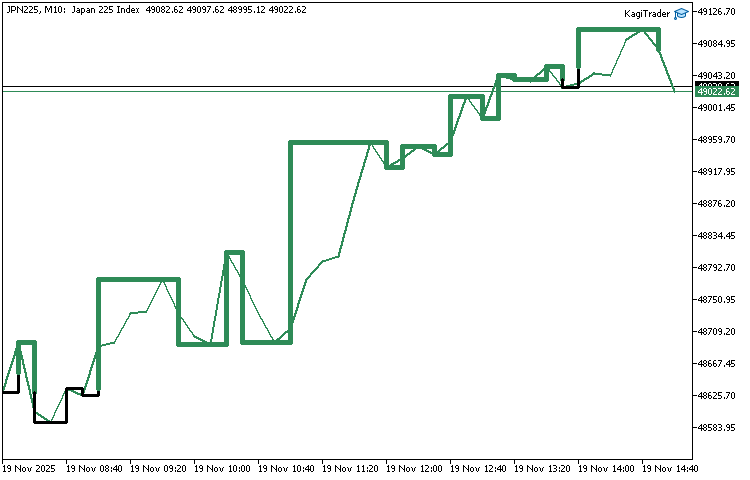
With our Kagi Chart EA now fully assembled, the next step is to put it on a live chart and confirm that everything behaves as expected. For this demonstration, we attached the EA to the Nikkei Index (JPN225) and loaded the configuration file named kagitrader.set, which is provided alongside the project. Once the settings were applied, we launched the EA on the chart — and the results were immediately visible. The Kagi structure began forming exactly as designed, updating smoothly as new bars came in. Below is a screenshot of the EA running in real time, showing the Kagi lines drawn correctly on top of price action.
Conclusion
In this part of the project, we successfully built the full foundation of a functional Kagi Chart Expert Advisor. You learned how to prepare the chart environment, generate unique object names, manage internal Kagi state, and construct the chart both on historical data and in real time. With these components working together, you now have a complete Kagi visualization tool that accurately tracks trend swings, reversals, and line thickness transitions. This gives you a charting framework you can rely on for interpreting market structure and making informed trading decisions.
By attaching the EA to a live symbol and testing it with the provided kagitrader.set file, you also verified that the Kagi logic works correctly in practice. The EA draws clean segments, updates on every new bar, and reacts to price movements exactly as the rules define. At this point, you have a fully operational Kagi chart engine running directly inside MetaTrader 5.
In Part 2, we will take this foundation further. We will extend the system with trading logic, add configuration controls, and integrate decision-making features that transform this charting EA into a true trading tool. The goal of the next stage is to bring the Kagi chart to life—using its behavior to generate signals, guide entries and exits, and support automated strategy development.
Warning: All rights to these materials are reserved by MetaQuotes Ltd. Copying or reprinting of these materials in whole or in part is prohibited.
This article was written by a user of the site and reflects their personal views. MetaQuotes Ltd is not responsible for the accuracy of the information presented, nor for any consequences resulting from the use of the solutions, strategies or recommendations described.


 Implementing Practical Modules from Other Languages in MQL5 (Part 04): time, date, and datetime modules from Python
 Overcoming The Limitation of Machine Learning (Part 8): Nonparametric Strategy Selection
 Price Action Analysis Toolkit Development (Part 52): Master Market Structure with Multi-Timeframe Visual Analysis
 Table and Header Classes based on a table model in MQL5: Applying the MVC concept

- Free trading apps
- Over 8,000 signals for copying
- Economic news for exploring financial markets
You agree to website policy and terms of use