

From Basic to Intermediate: Objects (II)
 1 965
1 965
 0
0

Introduction
In the previous article From Basic to Intermediate: Objects (I) we were introduced for the first time to the graphical objects available in MQL5, and we also demonstrated how these objects can be placed on a chart and manipulated in a relatively simple, although generally not very efficient, way. This is because we are not interested in building applications yet; our goal is to keep the code as simple and easy to follow as possible.
I must admit that the previous article was quite interesting. However, it is nowhere near as complex as what we are going to do today. The point is that once we start manipulating and controlling objects through code, things that used to seem impossible become increasingly common.
But since we are still at the beginning of the journey, there are a few points we need to deal with before we can unleash our imagination and turn MetaTrader 5 into something truly interesting from a programmer's point of view. From a user's point of view, what we are going to do may seem pointless. So, as usual, let us start a new topic.
Initial Manipulations
What we described in the previous article should not necessarily be regarded as the first actual manipulation of objects yet. That is simply because we placed them on the chart, and that was all. To perform any other action, we would have to open a dialog box, where we could access and manage some object properties. However, when we are programming, we can go much further, and in theory there is no limit to what we can do except our imagination. Since MQL5 was designed to create applications for use in MetaTrader 5, and the MetaTrader 5 platform is intended to display price charts, the scope of MQL5’s direct use is indeed limited.
But believe me, dear readers, this limit is actually far beyond what most people imagine. And once that limit is reached, we can use the C and C++ programming languages to extend it. But that is already another level, which will not be covered in this series of articles, because we will only reach the boundary that, in my opinion, separates the intermediate level from the advanced one. This advanced level begins to appear when we need to use languages such as C and C++ to expand the capabilities of MQL5.
Returning to our main point, in order to manipulate objects we need to use input and user-interaction mechanisms. These mechanisms rely on the keyboard and/or mouse, allowing user input to be handled in a simple way. However, as you may already have guessed, using such mechanisms means intercepting events, since the operating system itself, whether Windows, Linux or any other, essentially uses events to communicate between the user and any application. This was already shown in the article From Basic to Intermediate: Events (I) . But there we discussed such points only superficially. Here we will go a little deeper into this topic.
To begin, let us create a small code example that everyone can understand even without a detailed explanation. The first code fragment is shown below.
01. //+------------------------------------------------------------------+
02. #property copyright "Daniel Jose"
03. //+------------------------------------------------------------------+
04. #define def_NameObj "Demo"
05. //+------------------------------------------------------------------+
06. int OnInit()
07. {
08.     ObjectCreate(0, def_NameObj, OBJ_HLINE, 0, 0, 0);
09.     ObjectSetInteger(0, def_NameObj, OBJPROP_COLOR, clrPurple);
10.
11.     return INIT_SUCCEEDED;
12. };
13. //+------------------------------------------------------------------+
14. int OnCalculate(const int rates_total, const int prev_calculated, const int begin, const double &price[])
15. {
16.     static double p = 0;
17.
18.     ObjectMove(0, def_NameObj, 0, 0, p);
19.
20.     if (prev_calculated > 0)
21.         p = price[prev_calculated - 1];
22.
23.     return rates_total;
24. };
25. //+------------------------------------------------------------------+
26. void OnDeinit(const int reason)
27. {
28.     ObjectDelete(0, def_NameObj);
29.     ChartRedraw();
30. };
31. //+------------------------------------------------------------------+
Code 01
So, if you have studied what we have shown in these articles, you will understand this code perfectly, because it is actually quite interesting and very simple. It is interesting because of what it manages to achieve. Perhaps you are looking at it and thinking: "Well, I do not understand why you consider this code interesting. Worse still, I do not understand why you do such things in the OnCalculate function shown on line 14. Could you explain what is going on here?" Well, dear readers, if you have doubts about how this code works, it is because you have not put into practice what was shown in these articles.
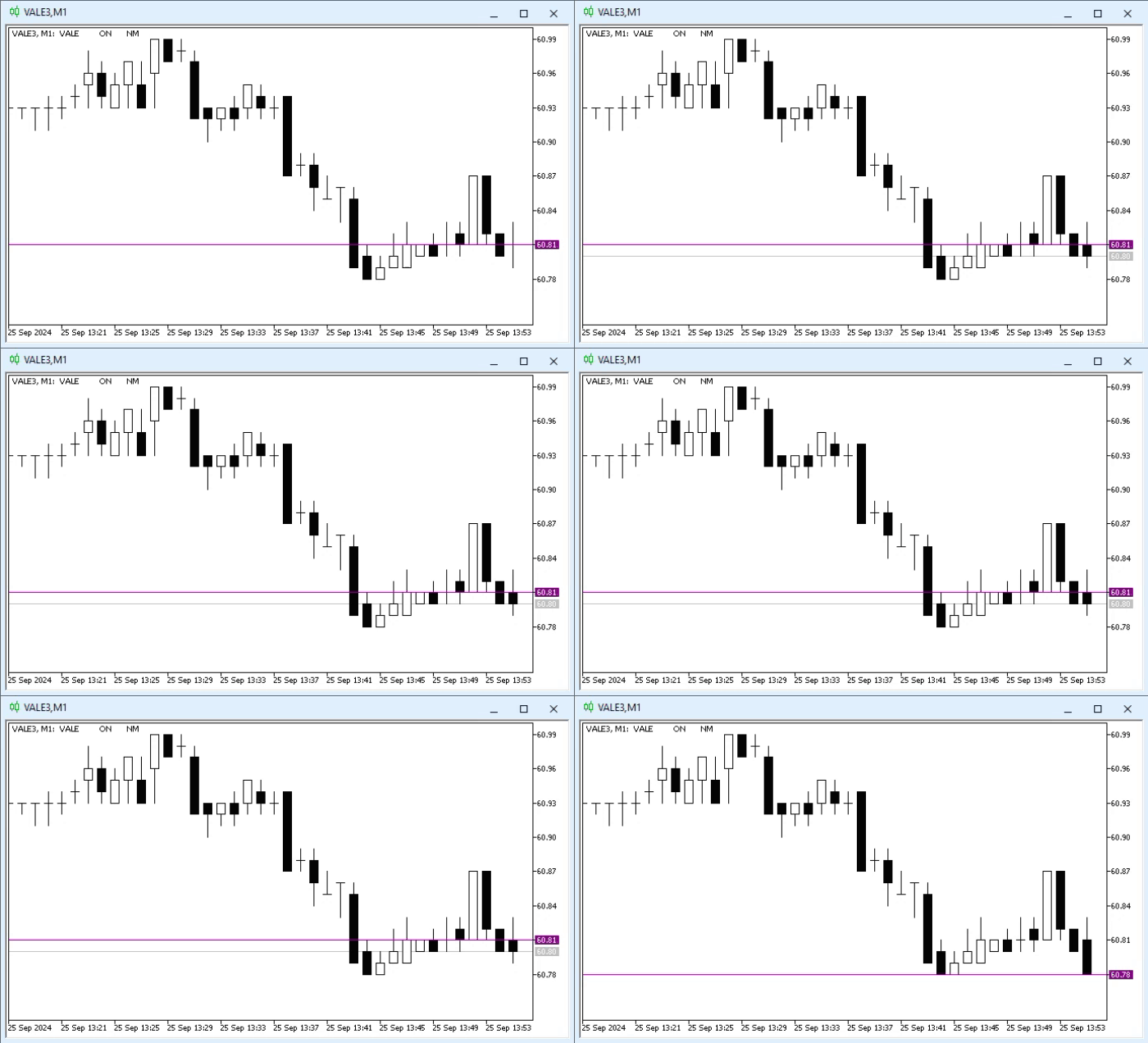
When this code is executed, the result will be similar to what is shown in the animation below.
Animation 01
In this case, using a single image would not be enough, because when watching the animation you can see that the purple line is always one step behind the price line. Sometimes this purple line touches the current price line. But the most interesting question is: why does this happen? Because in most cases the purple line will always point to the previous quote's price. However, sometimes that price matches the current price. It looks as if we have a problem with the indicator shown in Code 01.
Well, dear reader, there is nothing wrong with the code, and there is nothing wrong with the platform either. In fact, the purple line performs exactly the function for which it was intended: it indicates where the last quote was. However, if, after receiving a new quote, MetaTrader triggers a new Calculate event without changing the new quote's price, the purple line will coincide with the latest price line. This is exactly what we see in Animation 01. The reason lies on line 18. So, if we take the last price and the new quote's price, there may be a difference between these values. In this case, the purple line will always lag behind the price line. However, if the price matches the previous one, the purple line will coincide with the latest price line.
Quite useful, isn't it? Many traders and programmers do not share the idea you have just learned, and they believe that whenever a Calculate event is triggered, it is because the price has changed. However, you have just seen that this is not always the case. Therefore, it is very important to understand code optimization well so as not to cause a significant drop in the performance of the MetaTrader 5 application.
So, after working with something simple and seemingly trivial, let us experiment with an event. In this case we will start with the simplest one: keyboard event handling. I say that keyboard events are simpler because we do not need to enable or disable them. Each time a key is pressed, MetaTrader 5 automatically triggers an event. If any of our applications on the chart has a ChartEvent event handler, we will be able to handle the key press accordingly and react to it. To demonstrate this first system, we will create new code that responds to keyboard events; it is easy to understand and has a rather interesting purpose for beginners. This code is shown below.
01. //+------------------------------------------------------------------+
02. #property copyright "Daniel Jose"
03. //+------------------------------------------------------------------+
04. int OnInit()
05. {
06.    return INIT_SUCCEEDED;
07. };
08. //+------------------------------------------------------------------+
09. int OnCalculate(const int rates_total, const int prev_calculated, const int begin, const double &price[])
10. {
11.    return rates_total;
12. };
13. //+------------------------------------------------------------------+
14. void OnChartEvent(const int id, const long &lparam, const double &dparam, const string &sparam)
15. {
16.    switch(id)
17.    {
18.       case CHARTEVENT_KEYDOWN:
19.          Print(lparam);
20.          break;
21.    }
22. };
23. //+------------------------------------------------------------------+
Code 02
Have you ever wondered how a programmer determines which key was pressed? How does the programmer know whether an arrow key or a key such as Home or End was pressed? It may look like magic when you think about alphanumeric keys. But what about the other keys? Well, in fact, the programmer does not know this directly — but knows exactly how to find out. Code similar to the one above is used for this. By running this code, you can find out which numeric code is generated when a particular key is pressed.
In reality, when a key is pressed, the actual key code generated is different from the value shown here. However, since the operating system, so to speak, "translates" the value of the pressed key, when we run an application like the one shown in Code 02, MetaTrader 5 will tell us which value should be used. The animation below shows the result.

Animation 02
Please note that this is intuitive. When a key is pressed, the value is displayed in the terminal. Thus, this value can be used to check which key was pressed. Remember that the MQL5 standard library has a function that lets you check whether certain special keys have been pressed. But that function creates an abstraction over what you have just learned. Quite useful, isn't it?
All right, but how can we use this? It may seem somewhat pointless to deal with it. So let us see how we can use the information obtained with Code 02. To do this, we will modify Code 01 so that it now does something different. This change can be seen below.
01. //+------------------------------------------------------------------+
02. #property copyright "Daniel Jose"
03. //+------------------------------------------------------------------+
04. #define def_NameObj     "Demo"
05. #define def_KEY_UP      38
06. #define def_KEY_DOWN    40
07. //+------------------------------------------------------------------+
08. int OnInit()
09. {
10.    ObjectCreate(0, def_NameObj, OBJ_HLINE, 0, 0, 0);
11.    ObjectSetInteger(0, def_NameObj, OBJPROP_COLOR, clrPurple);
12.
13.    return INIT_SUCCEEDED;
14. };
15. //+------------------------------------------------------------------+
16. int OnCalculate(const int rates_total, const int prev_calculated, const int begin, const double &price[])
17. {
18.    return rates_total;
19. };
20. //+------------------------------------------------------------------+
21. void OnChartEvent(const int id, const long &lparam, const double &dparam, const string &sparam)
22. {
23.    static int p = 0;
24.    MqlRates rate[1];
25.
26.    switch(id)
27.    {
28.       case CHARTEVENT_KEYDOWN:
29.          switch ((int)lparam)
30.          {
31.             case def_KEY_DOWN:
32.                p = (p < Bars(_Symbol, _Period) ? p + 1 : p);
33.                break;
34.             case def_KEY_UP:
35.                p = (p > 0 ? p - 1 : p);
36.                break;
37.             default:
38.                return;
39.          }
40.          Comment(StringFormat("Current bar analyzed: %d", p));
41.          CopyRates(_Symbol, _Period, p, rate.Size(), rate);
42.          ObjectMove(0, def_NameObj, 0, rate[0].time, rate[0].close);
43.          break;
44.    }
45.    ChartRedraw();
46. };
47. //+------------------------------------------------------------------+
48. void OnDeinit(const int reason)
49. {
50.    Comment("");
51.    ObjectDelete(0, def_NameObj);
52.    ChartRedraw();
53. };
54. //+------------------------------------------------------------------+
Code 03
Code 03 is a little more complex than the others discussed in today's article. Even so, there is very little that is new here. Therefore, we will focus only on the new points and leave the rest aside, since the remaining parts will be easier to understand.
So, on line 23 we start a local counter. This will show us how many bars we are shifted relative to the latest bar on the chart. To make this clear, we used line 40 to display certain information directly on the chart. The code between lines 29 and 39 is already used to ensure that only the previously defined keys are captured and processed. On line 41, price data will now be retrieved for the bar currently indicated by counter p. Please note that we are retrieving only one bar. Line 42 then moves the object on the chart. Thus, when this code is executed, we get what is shown in the animation below.
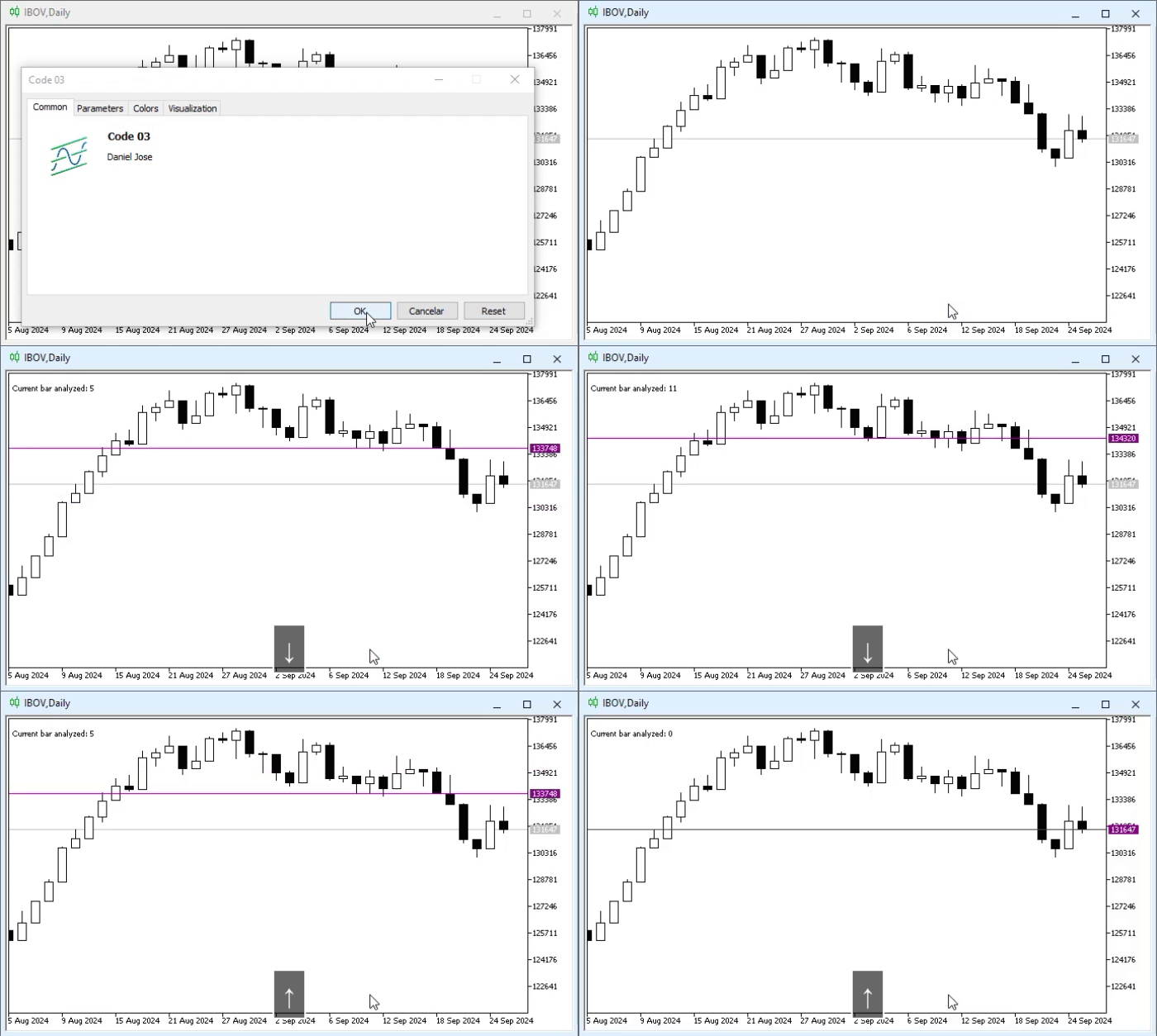
Animation 03
That was interesting, but a little confusing, because we had to count the bars to understand which one is currently being used. However, we almost forgot to mention what line 50 does. When we remove the indicator from the chart, we use line 50 to remove the old text that was there. This is a very simple operation that some people forget to perform, which makes the chart unnecessarily cluttered.
So far, everything is working well. We already know how to perform small and simple manipulations with an object. However, there is one thing we now need to learn to do, because, as you have probably noticed, so far all objects have been given the same name, which is neither very interesting nor practical. And since every object present on a chart must have a unique name, we need to come up with a way to place more than one object on the chart at the same time. To explain how this can be done, let us move on to a new topic.
More Than One Object on the Same Chart
There is one problem that leaves many beginners stumped: they do not fully understand how the code works, but they are interested in it. And when we decide to combine different pieces of code, or even use different programs on the same chart, each of which is intended to create some object on the chart, a problem eventually arises. And I am putting it mildly when I say that the user did not add objects to the chart manually. I am considering only the fact that the user is trying to use code that does this for them.
The problem is that, to simplify the work of both developers and the MetaTrader 5 platform itself, every object on a chart MUST have a unique name. If we try to create an object with a name that already exists on the chart, this will cause problems. This happens because when we try to manipulate something that is not actually on the chart, we will nevertheless manipulate something else that is present on the chart. This creates enormous confusion for a beginner programmer or even a less experienced user.
Since in most cases programs or applications are developed for specific purposes, developers essentially do not bother explaining to the user that they should be careful with the names of objects present on the chart. In principle, every developer assumes that no user will make the mistake of trying to combine several applications into one, or even use different applications on the same chart at the same time.
But returning to programming, the real problem arises because many beginners use only the copy-and-paste technique without really understanding what they are doing in the code and what consequences these actions have at runtime. To demonstrate the problems that this copy-and-paste method used by many beginners can cause, let us create a small code example. It can be seen below.
01. //+------------------------------------------------------------------+
02. #property copyright "Daniel Jose"
03. //+------------------------------------------------------------------+
04. #define def_NameObj     "Demo"
05. #define def_KEY_UP      38
06. #define def_KEY_DOWN    40
07. //+------------------------------------------------------------------+
08. int OnInit()
09. {
10.    ObjectCreate(0, def_NameObj, OBJ_VLINE, 0, 0, 0);
11.    ObjectSetInteger(0, def_NameObj, OBJPROP_COLOR, clrRoyalBlue);
12.    ObjectCreate(0, def_NameObj, OBJ_HLINE, 0, 0, 0);
13.    ObjectSetInteger(0, def_NameObj, OBJPROP_COLOR, clrPurple);
14.
15.    return INIT_SUCCEEDED;
16. };
17. //+------------------------------------------------------------------+
18. int OnCalculate(const int rates_total, const int prev_calculated, const int begin, const double &price[])
19. {
20.    return rates_total;
21. };
22. //+------------------------------------------------------------------+
23. void OnChartEvent(const int id, const long &lparam, const double &dparam, const string &sparam)
24. {
25.    static int p = 0;
26.    MqlRates rate[1];
27.
28.    switch(id)
29.    {
30.       case CHARTEVENT_KEYDOWN:
31.          switch ((int)lparam)
32.          {
33.             case def_KEY_DOWN:
34.                p = (p < Bars(_Symbol, _Period) ? p + 1 : p);
35.                break;
36.             case def_KEY_UP:
37.                p = (p > 0 ? p - 1 : p);
38.                break;
39.             default:
40.                return;
41.          }
42.          Comment(StringFormat("Current bar analyzed: %d", p));
43.          CopyRates(_Symbol, _Period, p, rate.Size(), rate);
44.          ObjectMove(0, def_NameObj, 0, rate[0].time, rate[0].close);
45.          ObjectMove(0, def_NameObj, 0, rate[0].time, rate[0].close);
46.          break;
47.    }
48.    ChartRedraw();
49. };
50. //+------------------------------------------------------------------+
51. void OnDeinit(const int reason)
52. {
53.    Comment("");
54.    ObjectDelete(0, def_NameObj);
55.    ChartRedraw();
56. };
57. //+------------------------------------------------------------------+
Code 04
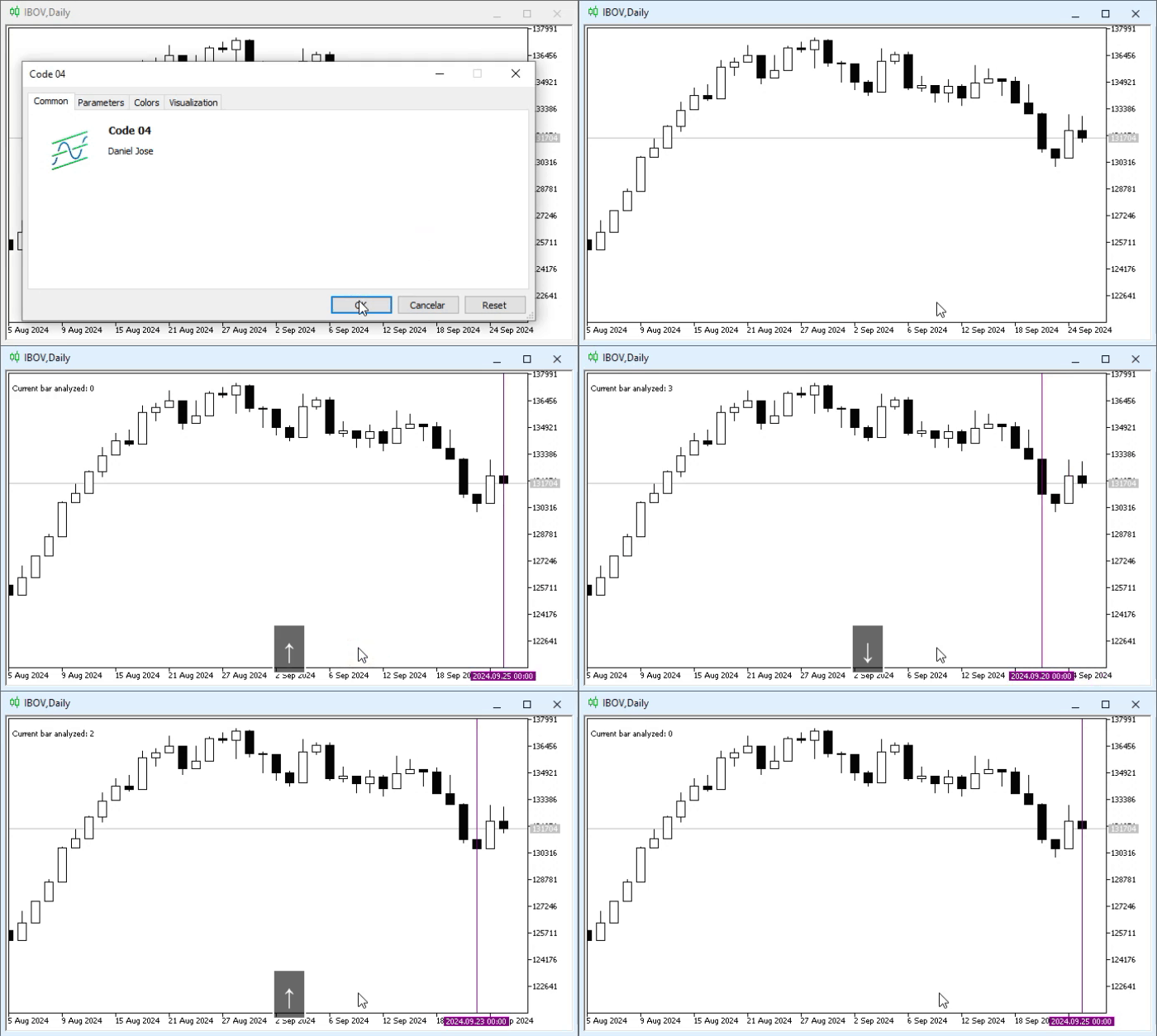
Here we show a rather crude but very common mistake made by programming beginners, since their goal apparently is to create a cross on the chart. However, when this code is executed, the result looks like this:
Animation 04
Hmm, strange. In the OnInit event handler we create two objects: one is a horizontal line and the other is a vertical line. Why, then, is only the vertical line displayed? Well, that is not all. If you look closely, you can see that the vertical line was not originally intended to have the color shown in Animation 04. So what is actually happening here?
The problem is that, although we specify that two objects should be created, one on line 10 and the other on line 12, only the object declared on line 10 is created. This happens because, when line 12 is executed, MetaTrader 5 will report that the chart already has an object with the same name as the one defined on line 12. In fact, it is not on the chart yet, but it is in the execution queue, ready to be placed on the chart as soon as possible.
In any case, the creation of the object declared on line 12 will be rejected. Since most of the code is relatively simple, many people end up ignoring such details, and worse, they often lack interest in studying the documentation. But this mainly happens because of a lack of experience: a beginner programmer ends up thinking that the error may be somewhere else. But when this happens to a user who is trying to use two or more applications simultaneously on the same chart, and the object names coincide, the situation becomes truly confusing. Although such cases are extremely rare, you may encounter this situation.
There are several methods for working with multiple objects on a chart, but in any case, if we try to create an object with the same name as one that already exists on the chart, we may have difficulty handling the errors that will eventually appear. In some cases we can use different objects with the same name, but not at the same time. Since this is a very specific situation, we will not go into the details for now, so as not to confuse those who are trying to learn how to do things correctly and thus avoid strange errors.
In any case, one of the simplest solutions, which works for almost all types of situations, is to create an array of objects, where each object placed on the chart is represented by an element of that array. In my opinion, this is perhaps the simplest and most universal solution one can imagine at the moment. Thus, the same Code 04 can be changed as follows:
01. //+------------------------------------------------------------------+
02. #property copyright "Daniel Jose"
03. //+------------------------------------------------------------------+
04. #define def_KEY_UP          38
05. #define def_KEY_DOWN        40
06. //+----------------+
07. #define macro_NameObject  "Demo" + (string)ObjectsTotal(0)
08. //+------------------------------------------------------------------+
09. string  gl_Objs[2];
10. //+------------------------------------------------------------------+
11. int OnInit()
12. {
13.     ObjectCreate(0, gl_Objs[0] = macro_NameObject, OBJ_VLINE, 0, 0, 0);
14.     ObjectSetInteger(0, gl_Objs[0], OBJPROP_COLOR, clrRoyalBlue);
15.     ObjectCreate(0, gl_Objs[1] = macro_NameObject, OBJ_HLINE, 0, 0, 0);
16.     ObjectSetInteger(0, gl_Objs[1], OBJPROP_COLOR, clrPurple);
17.
18.     return INIT_SUCCEEDED;
19. };
20. //+------------------------------------------------------------------+
21. int OnCalculate(const int rates_total, const int prev_calculated, const int begin, const double &price[])
22. {
23.     return rates_total;
24. };
25. //+------------------------------------------------------------------+
26. void OnChartEvent(const int id, const long &lparam, const double &dparam, const string &sparam)
27. {
28.     static int p = 0;
29.     MqlRates rate[1];
30.
31.     switch(id)
32.     {
33.         case CHARTEVENT_KEYDOWN:
34.             switch ((int)lparam)
35.             {
36.                 case def_KEY_DOWN:
37.                     p = (p < Bars(_Symbol, _Period) ? p + 1 : p);
38.                     break;
39.                 case def_KEY_UP:
40.                     p = (p > 0 ? p - 1 : p);
41.                     break;
42.                 default:
43.                     return;
44.             }
45.             Comment(StringFormat("Current bar analyzed: %d", p));
46.             CopyRates(_Symbol, _Period, p, rate.Size(), rate);
47.             ObjectMove(0, gl_Objs[0], 0, rate[0].time, rate[0].close);
48.             ObjectMove(0, gl_Objs[1], 0, rate[0].time, rate[0].close);
49.             break;
50.     }
51.     ChartRedraw();
52. };
53. //+------------------------------------------------------------------+
54. void OnDeinit(const int reason)
55. {
56.     Comment("");
57.     for (uint c = 0; c < gl_Objs.Size(); c++)
58.         ObjectDelete(0, gl_Objs[c]);
59.     ChartRedraw();
60. };
61. //+------------------------------------------------------------------+
Code 05
Of course, here we are doing everything in the simplest possible way. Anyone who has followed the articles and put them into practice knows that, with the current level of knowledge, it is possible to create a much more complex solution. However, what will truly interest us is always the final result. This can be seen in the following animation:

Animation 05
Please note that the result is completely different from what was shown in Animation 04. However, it is important to note that, if we compare Code 05 with Code 04, we can see that we made almost no changes to the code in order to fix the problem created by Code 04. The most striking change is the declaration visible on line 09 of Code 05. But since that alone would not be enough to solve all the problems, another change was required. It can be seen on line 07 of Code 05.
Please note that in this case we changed the object-name definition to a macro. Something truly important happens in this macro: the use of the ObjectsTotal function. This function from the MQL5 standard library tells us how many objects exist on the chart or are in the queue to be placed on the chart. Thanks to this, no matter how many objects we place on the chart, each of them will always have a unique name, even if we use different programs from different authors. If we delete an object and then create another one, even if their names are very similar, both objects will be unique precisely because of the ObjectsTotal function that we see in the macro.
A very simple but very effective thing. As for the rest, the changes made are very easy to understand for anyone who has studied the articles, so there is no need to go into detail. Despite all this simplicity, the following should not be forgotten: since the macro will always create a unique name, we need to store the name of the already created object somewhere. In this case, the name is stored in the array from line 09. Without this, we would not be able to find the object that is already present on the chart.
Before finishing this article, I want to explain one more thing that we will use very often in several future articles. However, to separate the topics properly, let us move on to a new section.
Short Name
Up to this point, all the codes shown are practically like one single code, and as a rule they should be used one after another. However, in practice and under real conditions, everything is not always so simple and pleasant. Therefore, as programmers, we need to take certain precautions and know how to do certain things. Among them is the need to be able to access the indicator displayed on the chart. We will see the reason for this later, when we begin developing some, shall we say, more complex things.
As a user, you may think: "but of course I know how to access the indicator; all I need to do is press CTRL + I, and a window will open giving me access to the indicators present on the chart. And if I want to place it on the chart, all I need to do is go to the Navigator, find the desired indicator, and that is all. Then I drag it onto the chart, and MetaTrader 5 does the rest. Simple."
All right, as we have already said, that is the user's point of view. However, as programmers, we use different approaches to work, and we need a different perspective to understand how these things work. In this case, such a user interface will not help us at all; on the contrary, it may even make it harder to understand some details that we will look at later.
And since I want you to start getting used to thinking like programmers, we need to talk a little more about what a programmer's view would be regarding what can and cannot be done in MetaTrader 5. We also need to understand how MetaTrader 5 recognizes what we enter in MQL5 code. The fact is that MQL5 was designed as a way to tell MetaTrader 5 what we want to do.
Unlike the way a user sees an application running on a chart in MetaTrader 5, we programmers have ways to ask MetaTrader 5 for information about which applications are currently running. This allows us to automatically add or even remove applications from the list. In most cases, the problem is identifying the indicators displayed on the chart. This happens because, contrary to popular belief, an indicator can have a name that the code uses internally and that is completely different from the name of the application's executable file.
And this name, which will be visible in the code, cannot—or rather should not—be changed by the user. Although you, as a programmer, can certainly allow this. However, doing so is not recommended, in order to avoid problems whose nature would be difficult to explain right now.
So, this means we can assign a name to our application when working with indicators. All right, how do we do that? This is done using a function available in the MQL5 standard library: IndicatorSetString. Although this may seem trivial and even unnecessary, assigning a short name to our indicator will greatly simplify a number of tasks. This function is useful not only for assigning an indicator name. It also serves other, even more important purposes. But first, let us see how we define the internal name for our indicator. This is done with something like this:
01. //+------------------------------------------------------------------+
02. #property copyright "Daniel Jose"
03. //+------------------------------------------------------------------+
04. int OnInit()
05. {
06.     IndicatorSetString(INDICATOR_SHORTNAME, "Version Demo");
07.
08.     return INIT_SUCCEEDED;
09. };
10. //+------------------------------------------------------------------+
11. int OnCalculate(const int rates_total, const int prev_calculated, const int begin, const double &price[])
12. {
13.     return rates_total;
14. };
15. //+------------------------------------------------------------------+
Code 06
It does not matter what name the user gives to the executable file of Code 06. Ultimately, what interests us is the name specified on line 06. Anything can be specified as the indicator name. However, it is advisable to choose an appropriate name that describes the purpose of the indicator in a few words. This is what we call the short name.
But why define such things at all? What is the use of this? Well, explaining it at this point is somewhat difficult. To give a truly clear explanation of why we need to set a short name for our indicators, we would have to show something that, at this stage, would only complicate the situation rather than clarify it. However, I want you always to try to give a short and meaningful name to any indicator you plan to implement, because later this will save you from having to come up with such names when you need to work with the displayed indicator. In any case, it is only one line of code, and it will save you from many problems in the future.
Final Thoughts
In today's article, we looked at how some objects can be controlled in a simple way. We saw how, with the help of a custom application, more than one object can be placed on the same chart. In addition, we began to recognize the importance of assigning a short name to any indicator we plan to implement.
All these concepts, which at first glance may seem not entirely related, should be considered as a single whole. In any case, today's article was intended only to present a simple way of solving various problems, because when we start learning, we often make many mistakes which, despite being simple and easy to prevent, completely undermine our morale. We begin to believe that programming is only for a select few, whereas in fact everyone should learn to program in order to bring their ideas to life.
Just in case, I will leave the codes shown here in the attachment so that you can practice and learn, and avoid making the same mistakes we all make when learning something.
Translated from Portuguese by MetaQuotes Ltd.
Original article: https://www.mql5.com/pt/articles/15987
Warning: All rights to these materials are reserved by MetaQuotes Ltd. Copying or reprinting of these materials in whole or in part is prohibited.
This article was written by a user of the site and reflects their personal views. MetaQuotes Ltd is not responsible for the accuracy of the information presented, nor for any consequences resulting from the use of the solutions, strategies or recommendations described.

 Market Microstructure in MQL5 (Part 4): Volatility That Remembers
 Market Simulation (Part 24): Getting Started with SQL (VII)
 Interactive Supply and Demand Zone Manager in MQL5 (Part I): From Manual to Automated Lifecycle
 Analyzing Price Time Gaps in MQL5 (Part II): Creating a Heat Map of Liquidity Distribution Over Time

- Free trading apps
- Over 8,000 signals for copying
- Economic news for exploring financial markets
You agree to website policy and terms of use