Market Simulation: Position View (XVIII)
 695
695
 0
0

Introduction
Hello, everyone, and welcome to another article in our series on building a replay/simulation system.
In the previous article “Market Simulation: Position View (XVII)”, I showed how to make the position indicator display different types of data. Thus, a trader can view the state of a position as a percentage change, profit/loss result, the number of ticks, or the difference in values. You, my dear reader, can easily expand on this or even improve it.
Although the position indicator is almost ready for use in the replay/simulation system to test the system and check our ability to read the market, we cannot do so yet due to some unresolved issues related to the indicator itself.
In addition, we need to correct a few minor errors. If a trader accidentally makes certain mistakes while trading, they will not be able to use the position indicator because it will stop working properly. In most cases, the indicator will force the trader to take counterintuitive actions.
Therefore, in this article, we will continue to make some improvements to the system to take another step toward our ultimate goal. Let's start with the first topic.
Displaying Volume
The first thing we'll do is display the volume of the open position. Why do we need this information? Because this allows a trader to properly assess the open volume and plan various strategies to increase profit or reduce risk—for example, by using another simultaneous trade. Since these issues are completely beyond the scope of this article, I will not go into detail about such strategies. Here, we'll focus on programming rather than explaining how to trade the market.
To display the volume of the open position, we just need to make a small change to the code. To do this, you need to add an OBJ_EDIT or OBJ_LABEL object to the indicator. Why not use OBJ_TEXT? The reason lies in its positioning system. Unlike OBJ_EDIT and OBJ_LABEL, the OBJ_TEXT object is positioned using price and time coordinates. This doesn't prevent us from using it, but it's much easier to work with other types of objects, since we'll be using Cartesian X and Y coordinates.
Good. As programmers, we need to decide which of these objects is most suitable.. Personally, I don't see much difference between using one or the other, although OBJ_EDIT lets you make the appearance a little neater. This is because we can better control its properties and prevent the text from appearing as a separate “floating” label within the indicator. For this reason, we will use OBJ_EDIT.
The first change we need to make is shown in the following code snippet:
01. //+------------------------------------------------------------------+
02. #property copyright "Daniel Jose"
03. //+------------------------------------------------------------------+
04. #define def_NameHLine       m_Info.szPrefixName + "#HLINE"
05. #define def_NameBtnClose    m_Info.szPrefixName + "#CLOSE"
06. #define def_NameBtnMove     m_Info.szPrefixName + "#MOVE"
07. #define def_NameInfoDirect  m_Info.szPrefixName + "#DIRECT"
08. #define def_NameObjLabel    m_Info.szPrefixName + "#PROFIT"
09. #define def_NameBackGround  m_Info.szPrefixName + "#BACKGROUND"
10. #define def_NameVolume      m_Info.szPrefixName + "#VOLUME"
11. //+------------------------------------------------------------------+
12. #define macro_LineInFocus(A) ObjectSetInteger(0, def_NameHLine, OBJPROP_YSIZE, m_Info.weight = (A ? 3 : 1));
13. //+------------------------------------------------------------------+
C_ElementsTrade snippet
Note that on line 10, we added a new definition that sets the name of the object we will create shortly. The source code already contains a call to create an OBJ_EDIT object. We will modify this call as shown below.
117. //+------------------------------------------------------------------+
118. inline void CreateObjectInfoText(const string szObj, const color _color)
119.         {
120.             CreateObjectGraphics(szObj, OBJ_EDIT, clrNONE, (EnumPriority)(ePriorityDefault));
121.             ObjectSetString(0, szObj, OBJPROP_FONT, def_FontName);
122.             ObjectSetInteger(0, szObj, OBJPROP_FONTSIZE, def_FontSize);
123.             ObjectSetInteger(0, szObj, OBJPROP_COLOR, clrBlack);
124.             ObjectSetInteger(0, szObj, OBJPROP_BORDER_COLOR, _color);
125.             ObjectSetInteger(0, szObj, OBJPROP_ALIGN, ALIGN_CENTER);
126.             ObjectSetInteger(0, szObj, OBJPROP_READONLY, true);
127.         }
128. //+------------------------------------------------------------------+
C_ElementsTrade snippet
Great. Now we need to modify the source code as follows:
171. //+------------------------------------------------------------------+
172. inline void UpdatePrice(const double open, const double price, const double vol = 0, const double var = 0)
173.         {
174.             m_Info.sizeText = 0;
175.             ObjectsDeleteAll(0, m_Info.szPrefixName);
176.             m_Info.volume = (vol > 0 ? vol : m_Info.volume);
177.             m_Info.var = (var > 0 ? var : m_Info.var);
178.             if (price > 0)
179.             {
180.                 CreateLinePrice();
181.                 CreateButtonClose();
182.                 CreateObjectInfoText(def_NameObjLabel, m_Info._color);
183.             }
184.             CreateBoxInfo(m_Info.ev != evMsgClosePositionEA);
185.             m_Info.open = open;
186.             UpdateViewPort(m_Info.price = (price > 0 ? price : open));
187.             if (m_Info.ev != evMsgClosePositionEA)
188.                 ViewValue(m_Info.bIsBuy ? m_Info.price - m_Info.open : m_Info.open - m_Info.price);
189.         }
190. //+------------------------------------------------------------------+
C_ElementsTrade snippet
The change is made on line 182. After this update, the previous code continues to work exactly the same way. The change made on line 118 and the new definition on line 10 allow us to begin creating the desired element. Now the fun really begins. But first, let's make one more small change to make better use of the existing code. The change is shown in the following excerpt.
137. //+------------------------------------------------------------------+
138. inline void AdjustDinamic(const string szObj, const string szTxt)
139.         {
140.             uint w, h;
141.
142.             TextSetFont(def_FontName, def_FontSize * -10);
143.             TextGetSize(szTxt, w, h);
144.             m_Info.Text.Height = (uchar) h + 4;
145.             m_Info.Text.Width = (uchar) w + 4;
146.             m_Info.Text.Width = UpdateViewPort(0, m_Info.Text.Width, h = 32);
147.             ObjectSetInteger(0, szObj, OBJPROP_XSIZE, m_Info.Text.Width);
148.             ObjectSetInteger(0, szObj, OBJPROP_YSIZE, m_Info.Text.Height);
149.             ObjectSetInteger(0, def_NameBackGround, OBJPROP_XSIZE, m_Info.Text.Width + h + (m_Info.ev == evMsgClosePositionEA ? 8 : 0));
150.             ObjectSetInteger(0, def_NameBackGround, OBJPROP_YSIZE, m_Info.Text.Height + 5);
151.         }
152. //+------------------------------------------------------------------+

                   .
                                   .
                                   .

195. //+------------------------------------------------------------------+
196.         void ViewValue(const double profit)
197.         {
198.             string szTxt;
199.
200.             switch (m_Info.ViewMode)
201.             {
202.                 case stInfos::eValue:
203.                     szTxt = StringFormat("%." + (string)m_Info.Text.digits + "f", MathAbs(profit));
204.                     break;
205.                 case stInfos::eFinance:
206.                     szTxt = StringFormat("$ %." + (string)m_Info.Text.digits + "f", (MathAbs(profit) / m_Info.var) * m_Info.volume);
207.                     break;
208.                 case stInfos::eTicks:
209.                     szTxt = StringFormat("%d", (uint)MathRound(MathAbs(profit) / m_Info.tickSize));
210.                     break;
211.                 case stInfos::ePercentage:
212.                     szTxt = StringFormat("%.2f%%", NormalizeDouble((MathAbs(profit) / (m_Info.open ? m_Info.open : m_Info.price)) * 100, 2));
213.                     break;
214.             }
215.             ObjectSetString(0, def_NameObjLabel, OBJPROP_TEXT, szTxt);
216.             ObjectSetInteger(0, def_NameObjLabel, OBJPROP_BGCOLOR, (profit >= 0 ? clrPaleGreen : clrCoral));
217.             if (StringLen(szTxt) != m_Info.sizeText)
218.             {
219.                 AdjustDinamic(def_NameObjLabel, szTxt);
220.                 m_Info.sizeText = StringLen(szTxt);
221.             }
222.         }
223. //+------------------------------------------------------------------+
C_ElementsTrade snippet
Please note that I changed the number of parameters of the procedure on line 138. Thus, on lines 147 and 148, we can reuse the same code to display the volume. Since we have changed this procedure, we also need to update its call right away. This is done on line 219. Thanks to this improvement, we significantly expand our code reuse capabilities and reduce the amount of new code we will have to write.
Now we can create and place an OBJ_EDIT object that will display the open-position volume. This is not a difficult task; we just need to configure and position the created objects correctly. To create an object and assign it the correct value from the very beginning, we will modify the UpdatePrice procedure as shown below.
171. //+------------------------------------------------------------------+
172. inline void UpdatePrice(const double open, const double price, const double vol = 0, const double var = 0)
173.         {
174.             m_Info.sizeText = 0;
175.             ObjectsDeleteAll(0, m_Info.szPrefixName);
176.             m_Info.volume = (vol > 0 ? vol : m_Info.volume);
177.             m_Info.var = (var > 0 ? var : m_Info.var);
178.             if (price > 0)
179.             {
180.                 CreateLinePrice();
181.                 CreateButtonClose();
182.                 CreateObjectInfoText(def_NameObjLabel, m_Info._color);
183.             }
184.             CreateBoxInfo(m_Info.ev != evMsgClosePositionEA);
185.             m_Info.open = open;
186.             m_Info.price = (price > 0 ? price : open);
187.             if (m_Info.ev != evMsgClosePositionEA)
188.                 ViewValue(m_Info.bIsBuy ? m_Info.price - m_Info.open : m_Info.open - m_Info.price);
189.             else
190.             {
191.                 CreateObjectInfoText(def_NameVolume, clrBlack);
192.                 ObjectSetInteger(0, def_NameVolume, OBJPROP_BGCOLOR, clrViolet);
193.                 ObjectSetString(0, def_NameVolume, OBJPROP_TEXT, DoubleToString(m_Info.volume, (MathRound(m_Info.volume) != m_Info.volume ? 2 : 0)));
194.                 AdjustDinamic(def_NameVolume, "88888" + (MathRound(m_Info.volume) != m_Info.volume ? ".88" : ""));
195.             };
196.             UpdateViewPort(m_Info.price);
197.         }
198. //+------------------------------------------------------------------+
C_ElementsTrade snippet
Great. Now we are actually creating an object. Now let's take a look at what is happening in the code. On line 187, we check whether the class is used for the position opening price segment or for another segment. Since we want to display the volume in the opening price segment, this condition must be met. When execution reaches line 189, the actual work begins. On line 191, we create an OBJ_EDIT object that will receive the volume value. On line 192, we set its background color. It is lines 193 and 194 that require clarification. What makes them special? These lines allow the position indicator to adapt to the type of information it is supposed to display.
You probably don't understand what's going on yet, but the way it works is simple. When you need to display a floating-point value, such as 0.02, the code will automatically adjust the format. If, however, the value can be expressed as an integer, the fractional part will be omitted. For example, 234 will be displayed, since in this case it would not make sense to add a decimal point and two zeros after it. Why is it done this way? If you trade a symbol or trade in a market where fractional values are not supported, there is no point in displaying a fractional value. For example, if the indicator is used in a market such as B3, the Brazilian stock exchange, where fractional shares of the same symbol are not traded, the volume will be displayed only as an integer.
However, if you trade on an exchange or market that allows fractional values—such as the U.S. market or FOREX—the indicator will display the volume with decimal places. That is exactly what this code does, although it uses a slightly different criterion. In fact, it checks neither the symbol nor the market itself, but only the volume value. If a volume includes a fractional part, such as 10.25, the indicator will display that value. However, if the volume for that same symbol is 10.00, the indicator will display only 10 and omit the fractional part. That is exactly what makes the code on lines 193 and 194 so strange.
Please note one more detail: the UpdateViewPort function has been moved and is now located on line 196. Previously, when the volume was updated, the object would not move along with the segment and would end up offset from its correct position. This happened because the update was not performed at the right time. Now, because UpdateViewPort is called later, the update is performed correctly.
Great. We have already assigned a value to the OBJ_EDIT object, but we still need to display it on the chart. To do this, we need to look at the code responsible for positioning all objects, that is, the UpdateViewPort procedure. First, we need to change one small detail in the AdjustDinamic procedure, as shown below.
137. //+------------------------------------------------------------------+
138. inline void AdjustDinamic(const string szObj, const string szTxt)
139.         {
140.             uint w, h;
141.
142.             TextSetFont(def_FontName, def_FontSize * -10);
143.             TextGetSize(szTxt, w, h);
144.             m_Info.Text.Height = (uchar) h + 4;
145.             m_Info.Text.Width = (uchar) w + 4;
146.             m_Info.Text.Width = UpdateViewPort(0, m_Info.Text.Width, h = 32);
147.             ObjectSetInteger(0, szObj, OBJPROP_XSIZE, m_Info.Text.Width);
148.             ObjectSetInteger(0, szObj, OBJPROP_YSIZE, m_Info.Text.Height);
149.             ObjectSetInteger(0, def_NameBackGround, OBJPROP_XSIZE, m_Info.Text.Width + h + (m_Info.ev == evMsgClosePositionEA ? m_Info.Text.Width + 8 : 0));
150.             ObjectSetInteger(0, def_NameBackGround, OBJPROP_YSIZE, m_Info.Text.Height + 5);
151.         }
152. //+------------------------------------------------------------------+
C_ElementsTrade snippet
Please note that we had to slightly adjust the calculation on line 149 so that the background would have the correct size. After making this change, we can move on to UpdateViewPort, whose code is shown in the following snippet.
55. //+------------------------------------------------------------------+
56.         short UpdateViewPort(const double price, short size = 0, uint ui = 0)
57.         {
58.             static short _SizeControls;
59.             static short _Width;
60.             uint x, y;
61.
62.             if (size > 0)
63.             {
64.                 size += (short)(ui + 8);
65.                 _SizeControls = (_SizeControls > size ? _SizeControls : size);
66.                 size = (short)(_SizeControls - ui - 12);
67.                 _Width = (_Width > size ? _Width : size);
68.             }else
69.             {
70.                 ChartTimePriceToXY(0, 0, 0, price, x, y);
71.                 x = 125 + (m_Info.ev == evMsgClosePositionEA ? 0 : _Width + (m_Info.ev == evMsgCloseTakeProfit ? _SizeControls : (_SizeControls * 2)));
72.                 ObjectSetInteger(0, def_NameHLine, OBJPROP_XDISTANCE, x);
73.                 ObjectSetInteger(0, def_NameHLine, OBJPROP_YDISTANCE, y - (m_Info.weight > 1 ? (int)(m_Info.weight / 2) : 0));
74.                 ObjectSetInteger(0, def_NameBtnClose, OBJPROP_XDISTANCE, x);
75.                 ObjectSetInteger(0, def_NameBtnClose, OBJPROP_YDISTANCE, y);
76.                 ObjectSetInteger(0, def_NameObjLabel, OBJPROP_XDISTANCE, x + 10 + (m_Info.ev == evMsgClosePositionEA ? _Width + 2 : 0));
77.                 ObjectSetInteger(0, def_NameObjLabel, OBJPROP_YDISTANCE, y - (m_Info.Text.Height / 2));
78.                 ObjectSetInteger(0, def_NameInfoDirect, OBJPROP_XDISTANCE, x + (_Width * 2) + 20);
79.                 ObjectSetInteger(0, def_NameInfoDirect, OBJPROP_YDISTANCE, y);
80.                 ObjectSetInteger(0, def_NameBtnMove, OBJPROP_XDISTANCE, x + _Width + 20);
81.                 ObjectSetInteger(0, def_NameBtnMove, OBJPROP_YDISTANCE, y);
82.                 ObjectSetInteger(0, def_NameBackGround, OBJPROP_XDISTANCE, x - 10);
83.                 ObjectSetInteger(0, def_NameBackGround, OBJPROP_YDISTANCE, y - ((m_Info.Text.Height + 5) / 2));
84.                 ObjectSetInteger(0, def_NameVolume, OBJPROP_XDISTANCE, x + 10);
85.                 ObjectSetInteger(0, def_NameVolume, OBJPROP_YDISTANCE, y - (m_Info.Text.Height / 2));
86.             }
87.             return _Width;
88.         }
89. //+------------------------------------------------------------------+
C_ElementsTrade snippet
Now we have the correct code to display all segments. You can see the result in the following animation.
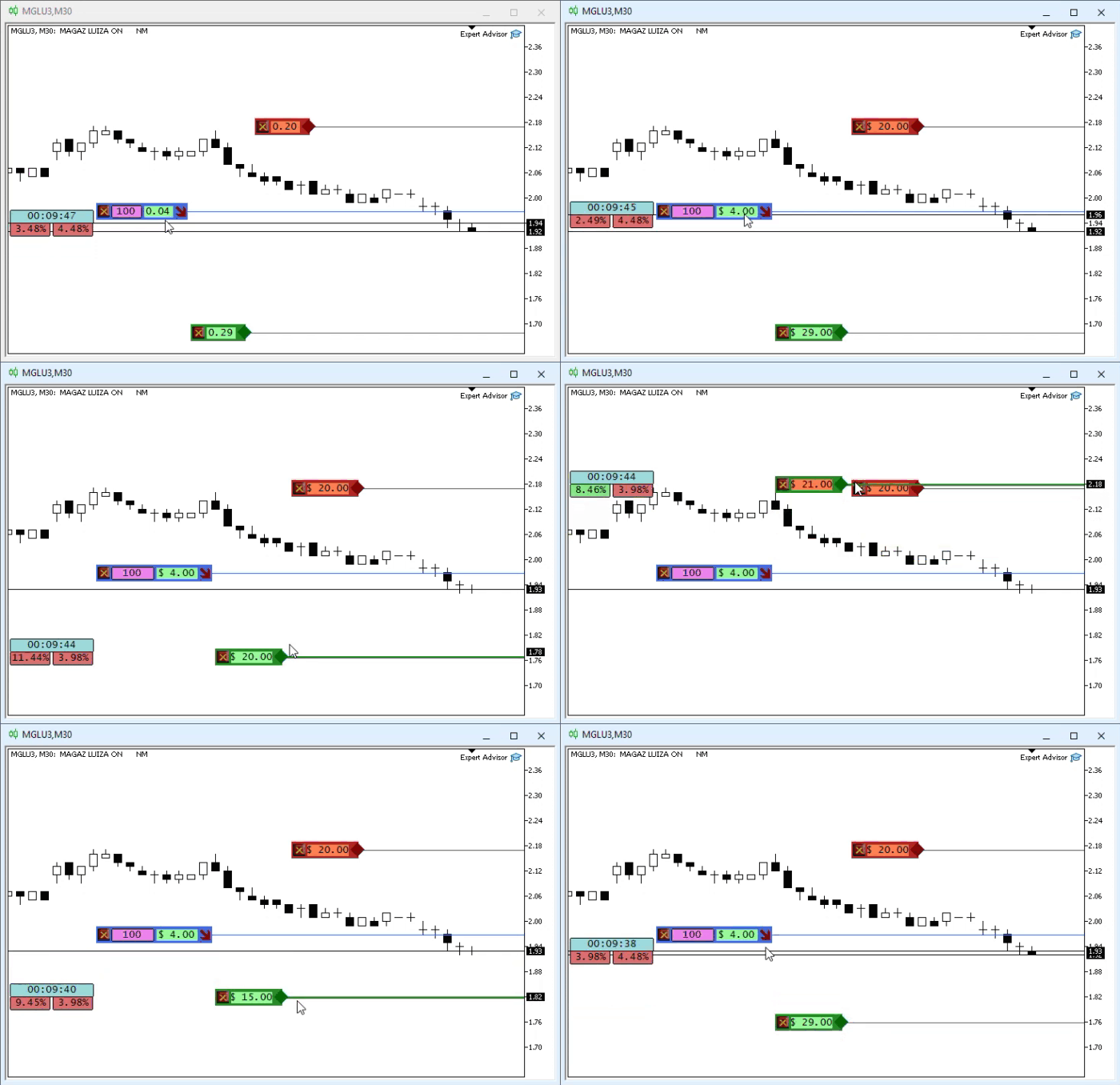
Please note that the indicator adjusts itself to prevent objects from overlapping. Although this approach currently works well with NETTING accounts, it is not particularly suitable for HEDGING accounts, as overlaps will occur between objects representing different positions. Even with NETTING accounts, the problem persists: as the number of objects increases, they shift further and further along the X-axis. At some point, this will inevitably become a problem, but for now, we won't dwell on it.
Since the previous snippet is fairly straightforward and consists only of a series of position adjustments, I don't think it is necessary to explain every detail. All you have to do is draw it on paper to easily understand how the objects are arranged. That concludes this topic, and we can now move on to the next one.
Preventing the Disappearance of Objects
One of the most delicate issues when working with chart objects arises when an object required for the proper operation of the application in MetaTrader 5 is deleted. We haven't addressed this issue yet, as we've been focused on programming the main functions of the position indicator. Now that we have much more code, we need to keep in mind that if a trader or user deletes a critical object, it will prevent the indicator from working properly. This is because all control is handled through objects present on the chart.
Therefore, we must ensure that if any of these objects is accidentally deleted, it is recreated and placed back on the chart. This way, the user or trader will retain access to the features available through the position indicator.
Ensuring that certain objects always remain on the chart is not particularly difficult. However, care should be taken when placing them back, as a specific order must be followed. Otherwise, they will be hidden behind other objects belonging to the same segment of the C_ElementsTrade class. Perhaps the most critical object is the close button. Without it, we cannot send requests directly to the trading server, since it is responsible for generating the custom event for the Expert Advisor. However, we won't limit ourselves to just this button. We will ensure that all objects are correctly preserved on the chart so that traders or users do not encounter any difficulties when using the position indicator.
To do this, we'll use an event. MetaTrader 5 generates this event every time an object is removed from the chart. Since the C_Terminal class already tells MetaTrader 5 that we want to receive this event, there is no need to declare it again in the code, as this is already implemented through inheritance.
Great. Let's start adding the necessary code to the C_ElementsTrade class. It's not particularly difficult, but it does require some attention. In the code, there are essentially only two places where objects can be deleted. Before you begin, make sure that the objects are deleted exactly in these two places. Obviously, in both cases, the ObjectsDeleteAll call—or another call designed to remove objects from the chart—is used. Since this happens in only two places in the code, we can limit ourselves to the changes in the code snippet shown below.
168. //+------------------------------------------------------------------+
169.         ~C_ElementsTrade()
170.         {
171.             ChartSetInteger(0, CHART_EVENT_OBJECT_DELETE, false);
172.             ObjectsDeleteAll(0, m_Info.szPrefixName);
173.             ChartSetInteger(0, CHART_EVENT_OBJECT_DELETE, true);
174.         }
175. //+------------------------------------------------------------------+
176. inline void UpdatePrice(const double open, const double price, const double vol = 0, const double var = 0)
177.         {
178.             m_Info.sizeText = 0;
179.             ChartSetInteger(0, CHART_EVENT_OBJECT_DELETE, false);
180.             ObjectsDeleteAll(0, m_Info.szPrefixName);
181.             ChartSetInteger(0, CHART_EVENT_OBJECT_DELETE, true);
182.             m_Info.volume = (vol > 0 ? vol : m_Info.volume);
C_ElementsTrade snippet
This snippet prevents MetaTrader 5 from generating the event when the code itself needs to remove objects from the chart. Since the code is constantly being updated, the line numbers also change. However, if you've made all the changes from the previous topic, you'll be able to find the places indicated in this snippet. Please note that four new lines have been added. Lines 171 and 179 disable event handling, while lines 173 and 181 re-enable it. However, it is better to do it differently to reduce the likelihood of errors during programming.
Although the previous code snippet solves the problem, ideally these three lines should be grouped in a more appropriate way. One option is to use a macro; another is to create a procedure within the class. Since we would have to explicitly undefine the macro at the end of the header file, and I don't want to confuse you, we'll create a procedure. You can see this in the following snippet.
154. //+------------------------------------------------------------------+
155. inline void RemoveAllsObjects(void)
156.         {
157.             ChartSetInteger(0, CHART_EVENT_OBJECT_DELETE, false);
158.             ObjectsDeleteAll(0, m_Info.szPrefixName);
159.             ChartSetInteger(0, CHART_EVENT_OBJECT_DELETE, true);
160.         }
161. //+------------------------------------------------------------------+
162.     public    :
163. //+------------------------------------------------------------------+

                                   .
                                   .
                                   .

175. //+------------------------------------------------------------------+
176.         ~C_ElementsTrade()
177.         {
178.             RemoveAllsObjects();
179.         }
180. //+------------------------------------------------------------------+
181. inline void UpdatePrice(const double open, const double price, const double vol = 0, const double var = 0)
182.         {
183.             m_Info.sizeText = 0;
184.             RemoveAllsObjects();
185.             m_Info.volume = (vol > 0 ? vol : m_Info.volume);
186.             m_Info.var = (var > 0 ? var : m_Info.var);
187.             if (price > 0)
188.             {
C_ElementsTrade snippet
In this code snippet, I show where the procedure was created and how the previous code was modified to use it within the C_ElementsTrade class. Please note that the code is now much simpler. You might think that the procedure on line 155 isn't necessary, since the previous code snippet already solved this problem. However, as the code becomes more complex, it's very easy to forget to do something important. To avoid problems in the future, it's always best to extract common code into a separate function or procedure.
Therefore, if changes are needed later on, it will be enough to modify just one part of the code. That's much better than updating several places scattered throughout the code. Now that we have explained why the procedure on line 155 was created, we can finally move on to analyzing the DispatchMessage procedure shown below.
235. //+------------------------------------------------------------------+
236.         void DispatchMessage(const int id, const long &lparam, const double &dparam, const string &sparam)
237.         {
238.             string sz0;
239.             long _lparam = lparam;
240.             double _dparam = dparam;
241.
242.             C_Mouse::DispatchMessage(id, lparam, dparam, sparam);
243.             switch (id)
244.             {

                                   .
                                   .
                                   .

294.                 case CHARTEVENT_OBJECT_DELETE:
295.                     if (StringFind(sparam, m_Info.szPrefixName) < 0) break;
296.                     UpdatePrice(m_Info.open, m_Info.price);
297.                     break;
298.             }
299.         }
300. //+------------------------------------------------------------------+
301.
C_ElementsTrade snippet
Please note that I'm highlighting only what we are really interested in. You're probably already wondering if this works. The answer: more or less. Before explaining why we can't simply answer “yes” or “no,” let's take a look at how this snippet works. In this section, I mentioned that MetaTrader 5 generates an event when an object is removed from the chart. At this point, line 294 catches the event sent by MetaTrader 5. The name of the deleted object is passed via the sparam argument. Please refer to the documentation for more information.
We need to check whether the name passed by MetaTrader 5 matches one of the names created by the position indicator. There are several ways to perform this check, but here we'll use one of the simplest. On line 295, we use a call from the MQL5 library to check whether the prefix of the object name created by the position indicator matches the name passed by MetaTrader 5. If they do not match, we skip the rest of the recovery procedure. If they match, then on line 296 we invoke object recreation in C_ElementsTrade.
Now take note of the following: the UpdatePrice procedure recreates the objects, so the code works as expected. However, there is one small problem. It occurs when a position is missing one of its segments, such as take profit. In this case, only the object used to move the line will remain on the chart. If a user or trader deletes this object, the call on line 296 will recreate all the other objects, not just the move object. Therefore, we cannot say that the code works correctly; in fact, it only works partially. To fix this problem, we need to update the code. Don't worry—the change is simple and is shown in the following code snippet.
180. //+------------------------------------------------------------------+
181. inline void UpdatePrice(const double open, const double price, const double vol = 0, const double var = 0)
182.         {
183.             m_Info.sizeText = 0;
184.             RemoveAllsObjects();
185.             m_Info.volume = (vol > 0 ? vol : m_Info.volume);
186.             m_Info.var = (var > 0 ? var : m_Info.var);
187.             if (price > 0)
188.             {
189.                 CreateLinePrice();
190.                 CreateButtonClose();
191.                 CreateObjectInfoText(def_NameObjLabel, m_Info._color);
192.             }
193.             CreateBoxInfo(m_Info.ev != evMsgClosePositionEA);
194.             m_Info.open = open;
195.             m_Info.price = (price > 0 ? price : -open);
196.             if (m_Info.ev != evMsgClosePositionEA)
197.                 ViewValue(m_Info.bIsBuy ? MathAbs(m_Info.price) - m_Info.open : m_Info.open - MathAbs(m_Info.price));
198.             else
199.             {
200.                 CreateObjectInfoText(def_NameVolume, clrBlack);
201.                 ObjectSetInteger(0, def_NameVolume, OBJPROP_BGCOLOR, clrViolet);
202.                 ObjectSetString(0, def_NameVolume, OBJPROP_TEXT, DoubleToString(m_Info.volume, (MathRound(m_Info.volume) != m_Info.volume ? 2 : 0)));
203.                 AdjustDinamic(def_NameVolume, "88888" + (MathRound(m_Info.volume) != m_Info.volume ? ".88" : ""));
204.             };
205.             UpdateViewPort(MathAbs(m_Info.price));
206.         }
207. //+------------------------------------------------------------------+

                                   .
                                   .
                                   .

235. //+------------------------------------------------------------------+
236.         void DispatchMessage(const int id, const long &lparam, const double &dparam, const string &sparam)
237.         {
238.             string sz0;
239.             long _lparam = lparam;
240.             double _dparam = dparam;
241.
242.             C_Mouse::DispatchMessage(id, lparam, dparam, sparam);
243.             switch (id)
244.             {
245.                 case (CHARTEVENT_KEYDOWN):
246.                     if (!TerminalInfoInteger(TERMINAL_KEYSTATE_ESCAPE)) break;
247.                     _lparam = (long) m_Info.ticket;
248.                     _dparam = 0;
249.                     EventChartCustom(0, evUpdate_Position, _lparam, 0, "");
250.                 case CHARTEVENT_CUSTOM + evMsgSetFocus:
251.                     if ((m_Info.ticket == (ulong)(_lparam)) && ((EnumEvents)(_dparam) == m_Info.ev))
252.                         UpdatePrice(m_Info.open, GetPositionsMouse().Position.Price);
253.                     macro_LineInFocus((m_Info.ticket == (ulong)(_lparam)) && ((EnumEvents)(_dparam) == m_Info.ev));
254.                     EventChartCustom(0, (ushort)(_dparam ? evHideMouse : evShowMouse), 0, 0, "");
255.                     m_Info.bClick = false;
256.                 case CHARTEVENT_CHART_CHANGE:
257.                     UpdateViewPort(MathAbs(m_Info.price));
258.                     if (m_Info.ev != evMsgClosePositionEA)
259.                         ViewValue(m_Info.bIsBuy ? MathAbs(m_Info.price) - m_Info.open : m_Info.open - MathAbs(m_Info.price));
260.                     break;
261.                 case CHARTEVENT_CUSTOM + evMsgSwapViewModePosition:
C_ElementsTrade snippet
Please pay special attention, because this is a very subtle point. Please note line 195. In this line, we specify that the value of m_Info.price will be negative if the price parameter is less than or equal to zero. This will happen only if the main code specifies that the segment has no value. To better understand this, keep in mind: when the main indicator code shown in previous articles attempts to retrieve the value of the take-profit or stop-loss line, and the position does not have that line, the price parameter will be zero. If the line exists, its value will be nonzero.
This is exactly where the magic happens. If the value is greater than zero, the previous snippet can restore the segment objects. If it is zero, we assign a negative value to `m_Info.price`. This negative value corresponds to the position opening price. Since there is no line to recreate, the indicator will display only the object that allows the line to be moved so that we can create the missing line. Thus, if a user or trader attempts to delete this specific object, MetaTrader 5 will generate a CHARTEVENT_OBJECT_DELETE event, and line 296 will call the UpdatePrice procedure. At this point, unlike what happened before, only the move object will be recreated.
Why does this happen? Perhaps you haven't figured out the reason yet. The only thing we had to do was update the code so that `m_Info.price` could accept a negative value. To understand this, look at line 296 and note that the second argument passed to `UpdatePrice` is indeed `m_Info.price`. Now take a look at line 187. This value corresponds to the second argument of the call on line 181. Since it is negative, the condition on line 187 returns false and prevents the remaining objects from being recreated.
However, the possibility that `m_Info.price` could be negative has certain implications, so we need to make additional changes to the code. Note that on lines 197, 205, 257, and 259, we had to add a function call from the MQL5 library. This is because we cannot perform such calculations directly with negative values. MathAbs solves this problem by returning the absolute value. Thus, with minimal effort, we corrected the code and ensured that the position indicator would prevent a user or trader from deleting objects created by the indicator itself from the chart.
Before we wrap up, let's tackle one more small problem. Note that there is a duplicate block of code in the previous snippet. Duplication is easy to spot in the snippet provided: lines 257–259 contain code that also appears in lines 196–205. Although at first glance this does not seem like duplication, it actually is. We'll solve this problem the same way we did before: we'll create a procedure to eliminate duplication. The updated snippet is shown below.
161. //+------------------------------------------------------------------+
162. inline void ChartChange(void)
163.         {
164.             UpdateViewPort(MathAbs(m_Info.price));
165.             if (m_Info.ev != evMsgClosePositionEA)
166.                 ViewValue(m_Info.bIsBuy ? MathAbs(m_Info.price) - m_Info.open : m_Info.open - MathAbs(m_Info.price));
167.         }
168. //+------------------------------------------------------------------+
169.     public    :
170. //+------------------------------------------------------------------+

                                   .
                                   .
                                   .

187. //+------------------------------------------------------------------+
188. inline void UpdatePrice(const double open, const double price, const double vol = 0, const double var = 0)
189.         {
190.             m_Info.sizeText = 0;
191.             RemoveAllsObjects();
192.             m_Info.volume = (vol > 0 ? vol : m_Info.volume);
193.             m_Info.var = (var > 0 ? var : m_Info.var);
194.             if (price > 0)
195.             {
196.                 CreateLinePrice();
197.                 CreateButtonClose();
198.                 CreateObjectInfoText(def_NameObjLabel, m_Info._color);
199.             }
200.             CreateBoxInfo(m_Info.ev != evMsgClosePositionEA);
201.             m_Info.open = open;
202.             m_Info.price = (price > 0 ? price : -open);
203.             if (m_Info.ev == evMsgClosePositionEA)
204.             {
205.                 CreateObjectInfoText(def_NameVolume, clrBlack);
206.                 ObjectSetInteger(0, def_NameVolume, OBJPROP_BGCOLOR, clrViolet);
207.                 ObjectSetString(0, def_NameVolume, OBJPROP_TEXT, DoubleToString(m_Info.volume, (MathRound(m_Info.volume) != m_Info.volume ? 2 : 0)));
208.                 AdjustDinamic(def_NameVolume, "88888" + (MathRound(m_Info.volume) != m_Info.volume ? ".88" : ""));
209.             };
210.             ChartChange();
211.         }
212. //+------------------------------------------------------------------+

                                   .
                                   .
                                   .

240. //+------------------------------------------------------------------+
241.         void DispatchMessage(const int id, const long &lparam, const double &dparam, const string &sparam)
242.         {
243.             string sz0;
244.             long _lparam = lparam;
245.             double _dparam = dparam;
246.
247.             C_Mouse::DispatchMessage(id, lparam, dparam, sparam);
248.             switch (id)
249.             {
250.                 case (CHARTEVENT_KEYDOWN):
251.                     if (!TerminalInfoInteger(TERMINAL_KEYSTATE_ESCAPE)) break;
252.                     _lparam = (long) m_Info.ticket;
253.                     _dparam = 0;
254.                     EventChartCustom(0, evUpdate_Position, _lparam, 0, "");
255.                 case CHARTEVENT_CUSTOM + evMsgSetFocus:
256.                     if ((m_Info.ticket == (ulong)(_lparam)) && ((EnumEvents)(_dparam) == m_Info.ev))
257.                         UpdatePrice(m_Info.open, GetPositionsMouse().Position.Price);
258.                     macro_LineInFocus((m_Info.ticket == (ulong)(_lparam)) && ((EnumEvents)(_dparam) == m_Info.ev));
259.                     EventChartCustom(0, (ushort)(_dparam ? evHideMouse : evShowMouse), 0, 0, "");
260.                     m_Info.bClick = false;
261.                 case CHARTEVENT_CHART_CHANGE:
262.                     ChartChange();
263.                     break;
264.                 case CHARTEVENT_CUSTOM + evMsgSwapViewModePosition:
C_ElementsTrade snippet
We now have a new procedure on line 162. This procedure is private in the C_ElementsTrade class. There is an important detail here: although there is another procedure with the same name in the C_Terminal class, this does not create any ambiguity for the compiler, since each procedure is private to the class in which it is declared. Although C_ElementsTrade inherits procedures from C_Terminal, when the procedure from line 162 is called from lines 210 and 262, the compiler can determine that it is not the procedure defined in C_Terminal. This is because this procedure is not accessible outside this class. Therefore, the fact that C_ElementsTrade inherits from C_Terminal does not cause any conflicts in this case. Thus, we were able to completely eliminate another duplicated code block from the system.
Concluding Thoughts
In this article, I have shown—or at least tried to show as clearly as possible—how to modify and develop code capable of solving specific tasks while affecting existing code as little as possible. None of this would have been possible if the system had not been designed using a modular approach. Although developing systems this way may seem complicated at first, it is actually not that difficult. However, this requires you to keep thinking, practicing, and learning in order to take full advantage of the capabilities that a particular programming language can offer.
In the attachments to this article, I will provide a compiled version of the code, as well as the other applications needed to test the position indicator. This way, you'll be able to see it in action before diving into the code presented in the articles. However, we have not yet finished working on this indicator. There are still a few aspects that need to be implemented better in the code before we can actually use it in the replay/simulation system. We are not talking about serious problems here, but rather minor issues that need to be corrected so that the replay/simulation system can use the indicator correctly. We're getting closer and closer to having a truly functional system. Keep following this series of articles. See you in the next part, where we'll continue moving toward creating a fully functional replay/simulation system.
| File | Description |
|---|---|
| Experts\Expert Advisor.mq5 | Shows communication between Chart Trade and the Expert Advisor. Mouse Study must be used for communication. |
| Indicators\Chart Trade.mq5 | Creates a window for configuring the order to be sent. Mouse Study must be used for communication. |
| Indicators\Market Replay.mq5 | Creates controls that allow you to interact with the replay/simulation service. Mouse Study must be used for communication. |
| Indicators\Mouse Study.mq5 | Provides interaction between the graphical controls and the user. This is necessary both for working with the replay/simulation system and for trading in the real market. |
| Indicators\Order Indicator.mq5 | Displays market orders and allows you to interact with and manage them. |
| Indicators\Position View.mq5 | Displays market positions and allows you to interact with and manage them. |
| Services\Market Replay.mq5 | Creates and maintains the market replay/simulation service. This is the main file for the entire system. |
Translated from Portuguese by MetaQuotes Ltd.
Original article: https://www.mql5.com/pt/articles/13457
Warning: All rights to these materials are reserved by MetaQuotes Ltd. Copying or reprinting of these materials in whole or in part is prohibited.
This article was written by a user of the site and reflects their personal views. MetaQuotes Ltd is not responsible for the accuracy of the information presented, nor for any consequences resulting from the use of the solutions, strategies or recommendations described.