

Market Simulation: Position View (XVII)
 1 189
1 189
 0
0

Introduction
Hello, everyone, and welcome to another article in the series devoted to creating a replay/simulation system.
In the previous article “Market Simulation: Position View (XVI)”, we configured the position indicator to display the financial result of an open position. However, not all traders like to use this display mode. The reasons may vary, although in some cases they seem quite valid and justified to me: preventing greed or fear from taking over during a trade. When looking at the amounts of money involved, some traders are afraid of losing even more or giving back profits already earned. In some situations, this can be seriously detrimental to a trader. That is why some traders prefer to step back and avoid looking at an open position, so as not to give in to the temptation to close it prematurely.
Although this approach may be justified, it is not always advisable, since some trading symbols may enter periods of high volatility. Under such circumstances, Stop Loss and Take Profit orders may be executed beyond the expected levels, which could lead to an unexpected result for the trade. When the Take Profit turns out to be higher than expected, I don't see anyone complaining on social media or other platforms for discussion. However, when the loss exceeds what was planned, everyone starts blaming everyone and everything. In such cases, the responsibility lies solely with the trader, who should have remained vigilant since they held an open position during a period of high volatility.
However, I am not here to discuss this issue. I just wanted to explain why we should offer different ways to display position data, since a trader might find one option or another inconvenient.
Adapting the code to provide this capability is by no means the most difficult task. The solution itself is fairly simple, but it is still interesting to examine. This could prove very useful for enthusiasts who use these articles as supplementary material to study and gain a deeper understanding of MQL5. So, let's get right to the point.
Creating a System for Switching Display Modes
Good. Before we begin, let's take a look at the code for the C_ElementsTrade class so you can get a sense of the current state of the code. The full code is shown below.
001. //+------------------------------------------------------------------+
002. #property copyright "Daniel Jose"
003. //+------------------------------------------------------------------+
004. #define def_NameHLine       m_Info.szPrefixName + "#HLINE"
005. #define def_NameBtnClose    m_Info.szPrefixName + "#CLOSE"
006. #define def_NameBtnMove     m_Info.szPrefixName + "#MOVE"
007. #define def_NameInfoDirect  m_Info.szPrefixName + "#DIRECT"
008. #define def_NameObjLabel    m_Info.szPrefixName + "#PROFIT"
009. #define def_NameBackGround  m_Info.szPrefixName + "#BACKGROUND"
010. //+------------------------------------------------------------------+
011. #define macro_LineInFocus(A) ObjectSetInteger(0, def_NameHLine, OBJPROP_YSIZE, m_Info.weight = (A ? 3 : 1));
012. //+------------------------------------------------------------------+
013. #define def_PathBtns "Images\\Market Replay\\Orders\\"
014. #define def_Btn_Close def_PathBtns + "Btn_Close.bmp"
015. #resource "\\" + def_Btn_Close;
016. //+------------------------------------------------------------------+
017. #include "..\Auxiliar\C_Mouse.mqh"
018. //+------------------------------------------------------------------+
019. #ifdef def_FontName
020.     "Why are you trying to do this?"
021. #else
022.     #define def_FontName "Lucida Console"
023.     #define def_FontSize 10
024. #endif
025. //+------------------------------------------------------------------+
026. class C_ElementsTrade : private C_Mouse
027. {
028.     private    :
029. //+------------------------------------------------------------------+
030.         struct st00
031.         {
032.             struct st_01
033.             {
034.                 short   Width,
035.                         Height,
036.                         digits;
037.             }Text;
038.             ulong       ticket;
039.             string      szPrefixName,
040.                         szDescr;
041.             EnumEvents  ev;
042.             double      price,
043.                         open,
044.                         volume,
045.                         var;
046.             bool        bClick,
047.                         bIsBuy;
048.             char        weight;
049.             color       _color;
050.             int         sizeText;
051.         }m_Info;
052. //+------------------------------------------------------------------+
053.         short UpdateViewPort(const double price, short size = 0, uint ui = 0)
054.         {
055.             static short _SizeControls;
056.             static short _Width;
057.             uint x, y;
058.
059.             if (size > 0)
060.             {
061.                 size += (short)(ui + 8);
062.                 _SizeControls = (_SizeControls > size ? _SizeControls : size);
063.                 size = (short)(_SizeControls - ui - 12);
064.                 _Width = (_Width > size ? _Width : size);
065.             }else
066.             {
067.                 ChartTimePriceToXY(0, 0, 0, price, x, y);
068.                 x = 125 + (m_Info.ev == evMsgClosePositionEA ? 0 : (m_Info.ev == evMsgCloseTakeProfit ? _SizeControls : (_SizeControls * 2)));
069.                 ObjectSetInteger(0, def_NameHLine, OBJPROP_XDISTANCE, x);
070.                 ObjectSetInteger(0, def_NameHLine, OBJPROP_YDISTANCE, y - (m_Info.weight > 1 ? (int)(m_Info.weight / 2) : 0));
071.                 ObjectSetInteger(0, def_NameBtnClose, OBJPROP_XDISTANCE, x);
072.                 ObjectSetInteger(0, def_NameBtnClose, OBJPROP_YDISTANCE, y);
073.                 ObjectSetInteger(0, def_NameObjLabel, OBJPROP_XDISTANCE, x + 10);
074.                 ObjectSetInteger(0, def_NameObjLabel, OBJPROP_YDISTANCE, y - (m_Info.Text.Height / 2));
075.                 ObjectSetInteger(0, def_NameInfoDirect, OBJPROP_XDISTANCE, x + _Width + 20);
076.                 ObjectSetInteger(0, def_NameInfoDirect, OBJPROP_YDISTANCE, y);
077.                 ObjectSetInteger(0, def_NameBtnMove, OBJPROP_XDISTANCE, x + _Width + 20);
078.                 ObjectSetInteger(0, def_NameBtnMove, OBJPROP_YDISTANCE, y);
079.                 ObjectSetInteger(0, def_NameBackGround, OBJPROP_XDISTANCE, x - 10);
080.                 ObjectSetInteger(0, def_NameBackGround, OBJPROP_YDISTANCE, y - ((m_Info.Text.Height + 5) / 2));
081.             }
082.             return _Width;
083.         }
084. //+------------------------------------------------------------------+
085. inline void CreateLinePrice(void)
086.         {
087.             string szObj;
088.
089.             CreateObjectGraphics(szObj = def_NameHLine, OBJ_RECTANGLE_LABEL, m_Info._color, (EnumPriority)(ePriorityDefault));
090.             ObjectSetInteger(0, szObj, OBJPROP_BGCOLOR, m_Info._color);
091.             ObjectSetInteger(0, szObj, OBJPROP_XSIZE, TerminalInfoInteger(TERMINAL_SCREEN_WIDTH));
092.             ObjectSetInteger(0, szObj, OBJPROP_BORDER_TYPE, BORDER_FLAT);
093.             ObjectSetInteger(0, szObj, OBJPROP_CORNER, CORNER_LEFT_UPPER);
094.             ObjectSetString(0, szObj, OBJPROP_TOOLTIP, m_Info.szDescr);
095.             macro_LineInFocus(false);
096.             CreateObjectGraphics(szObj = def_NameBackGround, OBJ_RECTANGLE_LABEL, m_Info._color, (EnumPriority)(ePriorityDefault));
097.             ObjectSetInteger(0, szObj, OBJPROP_BGCOLOR, m_Info._color);
098.             ObjectSetInteger(0, szObj, OBJPROP_BORDER_TYPE, BORDER_FLAT);
099.             ObjectSetInteger(0, szObj, OBJPROP_CORNER, CORNER_LEFT_UPPER);
100.         }
101. //+------------------------------------------------------------------+
102. inline void CreateBoxInfo(const bool bMove)
103.         {
104.             string szObj;
105.             const char c[] = {(char)(bMove ? 'u' : (m_Info.bIsBuy ? 236 : 238)), 0};
106.
107.             CreateObjectGraphics(szObj = (bMove ? def_NameBtnMove : def_NameInfoDirect), OBJ_LABEL, clrNONE, (EnumPriority)(ePriorityDefault));
108.             ObjectSetString(0, szObj, OBJPROP_FONT, "Wingdings");
109.             ObjectSetString(0, szObj, OBJPROP_TEXT, CharArrayToString(c));
110.             ObjectSetInteger(0, szObj, OBJPROP_COLOR, (bMove ? (m_Info.ev == evMsgCloseTakeProfit ? clrDarkGreen : clrMaroon) : (m_Info.bIsBuy ? clrDarkGreen : clrMaroon)));
111.             ObjectSetInteger(0, szObj, OBJPROP_FONTSIZE, (bMove ? 17 : 15));
112.             ObjectSetInteger(0, szObj, OBJPROP_ANCHOR, ANCHOR_CENTER);
113.         }
114. //+------------------------------------------------------------------+
115. inline void CreateObjectInfoText(void)
116.         {
117.             string szObj;
118.
119.             CreateObjectGraphics(szObj = def_NameObjLabel, OBJ_EDIT, clrNONE, (EnumPriority)(ePriorityDefault));
120.             ObjectSetString(0, szObj, OBJPROP_FONT, def_FontName);
121.             ObjectSetInteger(0, szObj, OBJPROP_FONTSIZE, def_FontSize);
122.             ObjectSetInteger(0, szObj, OBJPROP_COLOR, clrBlack);
123.             ObjectSetInteger(0, szObj, OBJPROP_BORDER_COLOR, m_Info._color);
124.             ObjectSetInteger(0, szObj, OBJPROP_ALIGN, ALIGN_CENTER);
125.             ObjectSetInteger(0, szObj, OBJPROP_READONLY, true);
126.         }
127. //+------------------------------------------------------------------+
128. inline void CreateButtonClose(void)
129.         {
130.             string szObj;
131.
132.             CreateObjectGraphics(szObj = def_NameBtnClose, OBJ_BITMAP_LABEL, clrNONE, (EnumPriority)(ePriorityDefault));
133.             ObjectSetString(0, szObj, OBJPROP_BMPFILE, 0, "::" + def_Btn_Close);
134.             ObjectSetInteger(0, szObj, OBJPROP_ANCHOR, ANCHOR_CENTER);
135.         }
136. //+------------------------------------------------------------------+
137. inline void AdjustDinamic(const string szTxt)
138.         {
139.             uint w, h;
140.
141.             TextSetFont(def_FontName, def_FontSize * -10);
142.             TextGetSize(szTxt, w, h);
143.             m_Info.Text.Height = (uchar) h + 4;
144.             m_Info.Text.Width = (uchar) w + 4;
145.             m_Info.Text.Width = UpdateViewPort(0, m_Info.Text.Width, h = 32);
146.             ObjectSetInteger(0, def_NameObjLabel, OBJPROP_XSIZE, m_Info.Text.Width);
147.             ObjectSetInteger(0, def_NameObjLabel, OBJPROP_YSIZE, m_Info.Text.Height);
148.             ObjectSetInteger(0, def_NameBackGround, OBJPROP_XSIZE, m_Info.Text.Width + h + (m_Info.ev == evMsgClosePositionEA ? 8 : 0));
149.             ObjectSetInteger(0, def_NameBackGround, OBJPROP_YSIZE, m_Info.Text.Height + 5);
150.         }
151. //+------------------------------------------------------------------+
152.     public    :
153. //+------------------------------------------------------------------+
154.         C_ElementsTrade(const ulong ticket, const EnumEvents ev, color _color, char digits, string szDescr = "\n", const bool IsBuy = true)
155.             :C_Mouse(0, "")
156.         {
157.             ZeroMemory(m_Info);
158.             m_Info.szPrefixName = StringFormat("%I64u@%03d", m_Info.ticket = ticket, (int)(m_Info.ev = ev));
159.             m_Info._color = _color;
160.             m_Info.szDescr = szDescr;
161.             m_Info.bIsBuy = IsBuy;
162.             m_Info.Text.digits = digits;
163.         }
164. //+------------------------------------------------------------------+
165.         ~C_ElementsTrade()
166.         {
167.             ObjectsDeleteAll(0, m_Info.szPrefixName);
168.         }
169. //+------------------------------------------------------------------+
170. inline void UpdatePrice(const double open, const double price, const double vol = 0, const double var = 0)
171.         {
172.             m_Info.sizeText = 0;
173.             ObjectsDeleteAll(0, m_Info.szPrefixName);
174.             m_Info.volume = (vol > 0 ? vol : m_Info.volume);
175.             m_Info.var = (var > 0 ? var : m_Info.var);
176.             if (price > 0)
177.             {
178.                 CreateLinePrice();
179.                 CreateButtonClose();
180.                 CreateObjectInfoText();
181.             }
182.             CreateBoxInfo(m_Info.ev != evMsgClosePositionEA);
183.             m_Info.open = open;
184.             UpdateViewPort(m_Info.price = (price > 0 ? price : open));
185.             if (m_Info.ev != evMsgClosePositionEA)
186.                 ViewValue(m_Info.bIsBuy ? m_Info.price - m_Info.open : m_Info.open - m_Info.price);
187.         }
188. //+------------------------------------------------------------------+
189.         void ViewValue(const double profit)
190.         {
191.             string szTxt;
192.
193.             szTxt = StringFormat("$ %." + (string)m_Info.Text.digits + "f", ((profit < 0 ? -(profit) : profit) / m_Info.var) * m_Info.volume);
194.             ObjectSetString(0, def_NameObjLabel, OBJPROP_TEXT, szTxt);
195.             ObjectSetInteger(0, def_NameObjLabel, OBJPROP_BGCOLOR, (profit >= 0 ? clrPaleGreen : clrCoral));
196.             if (StringLen(szTxt) != m_Info.sizeText)
197.             {
198.                 AdjustDinamic(szTxt);
199.                 m_Info.sizeText = StringLen(szTxt);
200.             }
201.         }
202. //+------------------------------------------------------------------+
203.         void DispatchMessage(const int id, const long &lparam, const double &dparam, const string &sparam)
204.         {
205.             string sz0;
206.             long _lparam = lparam;
207.             double _dparam = dparam;
208.
209.             C_Mouse::DispatchMessage(id, lparam, dparam, sparam);
210.             switch (id)
211.             {
212.                 case (CHARTEVENT_KEYDOWN):
213.                     if (!TerminalInfoInteger(TERMINAL_KEYSTATE_ESCAPE)) break;
214.                     _lparam = (long) m_Info.ticket;
215.                     _dparam = 0;
216.                     EventChartCustom(0, evUpdate_Position, _lparam, 0, "");
217.                 case CHARTEVENT_CUSTOM + evMsgSetFocus:
218.                     if ((m_Info.ticket == (ulong)(_lparam)) && ((EnumEvents)(_dparam) == m_Info.ev))
219.                         UpdatePrice(m_Info.open, GetPositionsMouse().Position.Price);
220.                     macro_LineInFocus((m_Info.ticket == (ulong)(_lparam)) && ((EnumEvents)(_dparam) == m_Info.ev));
221.                     EventChartCustom(0, (ushort)(_dparam ? evHideMouse : evShowMouse), 0, 0, "");
222.                     m_Info.bClick = false;
223.                 case CHARTEVENT_CHART_CHANGE:
224.                     UpdateViewPort(m_Info.price);
225.                     if (m_Info.ev != evMsgClosePositionEA)
226.                         ViewValue(m_Info.bIsBuy ? m_Info.price - m_Info.open : m_Info.open - m_Info.price);
227.                     break;
228.                 case CHARTEVENT_OBJECT_CLICK:
229.                     sz0 = GetPositionsMouse().szObjNameClick;
230.                     if (m_Info.bClick)
231.                     {
232.                         if (sz0 == def_NameBtnMove)
233.                             EventChartCustom(0, evMsgSetFocus, m_Info.ticket, m_Info.ev, "");
234.                         if (sz0 == def_NameBtnClose)
235.                             EventChartCustom(0, (ushort) m_Info.ev, m_Info.ticket, PositionGetDouble(m_Info.ev == evMsgCloseTakeProfit ? POSITION_SL : POSITION_TP), PositionGetString(POSITION_SYMBOL));
236.                     }
237.                     m_Info.bClick = false;
238.                     break;
239.                 case CHARTEVENT_MOUSE_MOVE:
240.                     m_Info.bClick = (CheckClick(C_Mouse::eClickLeft) ? true : m_Info.bClick);
241.                     if (m_Info.weight > 1)
242.                     {
243.                         UpdateViewPort(_dparam = GetPositionsMouse().Position.Price);
244.                         if (m_Info.ev != evMsgClosePositionEA)
245.                             ViewValue(m_Info.bIsBuy ? _dparam - m_Info.open : m_Info.open - _dparam);
246.                         if (m_Info.bClick)
247.                         {
248.                             if ((m_Info.ev == evMsgCloseTakeProfit) || (m_Info.ev == evMsgCloseStopLoss))
249.                                 EventChartCustom(0, (ushort)(m_Info.ev == evMsgCloseTakeProfit ? evMsgNewTakeProfit : evMsgNewStopLoss), m_Info.ticket, GetPositionsMouse().Position.Price, PositionGetString(POSITION_SYMBOL));
250.                             EventChartCustom(0, evMsgSetFocus, 0, 0, "");
251.                         }
252.                     }
253.                     break;
254.             }
255.         }
256. //+------------------------------------------------------------------+
257. };
258. //+------------------------------------------------------------------+
259. #undef macro_LineInFocus
260. //+------------------------------------------------------------------+
261. #undef def_Btn_Close
262. #undef def_PathBtns
263. #undef def_FontName
264. #undef def_FontSize
265. //+------------------------------------------------------------------+
266. #undef def_NameBackGround
267. #undef def_NameObjLabel
268. #undef def_NameInfoDirect
269. #undef def_NameBtnMove
270. #undef def_NameBtnClose
271. #undef def_NameHLine
272. //+------------------------------------------------------------------+
C_ElementsTrade
Why am I showing it in its entirety? Because compiling the entire system is complex, I have gradually shown all the changes made to the code. This way, anyone who wants to study the project or even modify it will have access to the source code. This is a large-scale project consisting of several separate files and applications that are designed to work as a single system, so many people may find it difficult to understand how the entire system functions. For this reason, the files attached to the article include only executable files. However, those who are following this series of articles and would like to obtain the source code will be able to get it in its entirety from the materials I present from one article to the next.
Now that we've cleared that up, let's start with a small change—or, more precisely, let's add one more element to the code. The change is shown in the following excerpt.
25. //+------------------------------------------------------------------+
26. class C_ElementsTrade : private C_Mouse
27. {
28.     private    :
29. //+------------------------------------------------------------------+
30.         struct stInfos
31.         {
32.             struct st_01
33.             {
34.                 short   Width,
35.                         Height,
36.                         digits;
37.             }Text;
38.             ulong       ticket;
39.             string      szPrefixName,
40.                         szDescr;
41.             EnumEvents  ev;
42.             double      price,
43.                         open,
44.                         volume,
45.                         var,
46.                         tickSize;
47.             bool        bClick,
48.                         bIsBuy;
49.             char        weight;
50.             color       _color;
51.             int         sizeText;
52.             enum {eValue, eFinance, eTicks, ePercentage} ViewMode;
53.         }m_Info;
54. //+------------------------------------------------------------------+
Excerpt from C_ElementsTrade
Please note that the name of the structure was changed on line 30. The most interesting part is on line 51. This construct may seem extravagant and even somewhat odd, since you've probably never seen anything like it before. Let's take a closer look at line 52. As you read through the article, the code will become clearer, and you'll understand why it is defined this way. First, we have an anonymous enumeration, that is, an enumeration without a name. It may seem strange, but since we declare a variable of this type at the end, we’ll be able to use the values defined in the enumeration without any problems. However, the main question is probably something else: why is this enumeration inside the structure, and what consequences will this have for the code?
When an enumeration is declared inside a structure, its scope is limited to that structure. This technique allows you to create enumerations whose values have similar names. One of the biggest challenges in programming isn't writing code, but choosing appropriate names. You may have much more trouble remembering what the variable named value_001 represents than figuring out what another variable named Price_01 means. Note that the name of the variable declared on line 52 seems quite clear. However, once you start programming and implementing all of this, you'll find that such a name may no longer be descriptive enough. The same thing can happen with the values in the enumeration. Since the enumeration is inside the structure, I can give it meaning based on its belonging to that structure. Thus, the variable declared on line 52 takes on a specific meaning within this structure.
After that, we need to change one detail in the main code. To show exactly what is being changed, let's look at the snippet below.
018. //+------------------------------------------------------------------+
019. struct st00
020. {
021.     ulong     ticket;
022.     string    szShortName,
023.               szSymbol;
024.     double    priceOpen,
025.               var,
026.               tickSize;
027.     char      digits;
028.     bool      bIsBuy;
029. }m_Infos;
030. //+------------------------------------------------------------------+
031. C_ElementsTrade *Open = NULL, *Stop = NULL, *Take = NULL;
032. //+------------------------------------------------------------------+
033. bool CheckCatch(ulong ticket)
034. {
035.     double vv;
036.
037.     ZeroMemory(m_Infos);
038.     m_Infos.szShortName = StringFormat("%I64u", m_Infos.ticket = ticket);
039.     if (!PositionSelectByTicket(m_Infos.ticket)) return false;
040.     if (ObjectFind(0, m_Infos.szShortName) >= 0)
041.     {
042.         m_Infos.ticket = 0;
043.         return false;
044.     }
045.     m_Infos.szSymbol = PositionGetString(POSITION_SYMBOL);
046.     m_Infos.digits = (char)SymbolInfoInteger(m_Infos.szSymbol, SYMBOL_DIGITS);
047.     m_Infos.tickSize = SymbolInfoDouble(m_Infos.szSymbol, SYMBOL_TRADE_TICK_SIZE);
048.     vv = SymbolInfoDouble(m_Infos.szSymbol, SYMBOL_TRADE_TICK_VALUE);
049.     m_Infos.var = m_Infos.tickSize / vv;
050.     IndicatorSetString(INDICATOR_SHORTNAME, m_Infos.szShortName);
051.     EventChartCustom(0, evUpdate_Position, ticket, 0, "");
052.
053.     return true;
054. }
055. //+------------------------------------------------------------------+
                                   .
                                   .
                                   .
084. //+------------------------------------------------------------------+
085. void OnChartEvent(const int id, const long &lparam, const double &dparam, const string &sparam)
086. {
087.     double volume;
088.
089.     if (Open != NULL) (*Open).DispatchMessage(id, lparam, dparam, sparam);
090.     if (Take != NULL) (*Take).DispatchMessage(id, lparam, dparam, sparam);
091.     if (Stop != NULL) (*Stop).DispatchMessage(id, lparam, dparam, sparam);
092.     switch (id)
093.     {
094.         case CHARTEVENT_CUSTOM + evUpdate_Position:
095.             if (lparam != m_Infos.ticket) break;
096.             if (!PositionSelectByTicket(m_Infos.ticket))
097.             {
098.                 ChartIndicatorDelete(0, 0, m_Infos.szShortName);
099.                 return;
100.             };
101.             if (Open == NULL) Open = new C_ElementsTrade(m_Infos.ticket, evMsgClosePositionEA, clrRoyalBlue, m_Infos.digits, m_Infos.tickSize, StringFormat("%I64u : Position opening price.", m_Infos.ticket), m_Infos.bIsBuy = (PositionGetInteger(POSITION_TYPE) == POSITION_TYPE_BUY));
102.             if (Take == NULL) Take = new C_ElementsTrade(m_Infos.ticket, evMsgCloseTakeProfit, clrForestGreen, m_Infos.digits, m_Infos.tickSize, StringFormat("%I64u : Take Profit price.", m_Infos.ticket), m_Infos.bIsBuy);
103.             if (Stop == NULL) Stop = new C_ElementsTrade(m_Infos.ticket, evMsgCloseStopLoss, clrFireBrick, m_Infos.digits, m_Infos.tickSize, StringFormat("%I64u : Stop Loss price.", m_Infos.ticket), m_Infos.bIsBuy);
104.             volume = PositionGetDouble(POSITION_VOLUME);
105.             (*Open).UpdatePrice(0, m_Infos.priceOpen = PositionGetDouble(POSITION_PRICE_OPEN), volume, m_Infos.var);
106.             (*Take).UpdatePrice(m_Infos.priceOpen, PositionGetDouble(POSITION_TP), volume, m_Infos.var);
107.             (*Stop).UpdatePrice(m_Infos.priceOpen, PositionGetDouble(POSITION_SL), volume, m_Infos.var);
108.             ProfitNow();
109.             break;
110.     }
111.     ChartRedraw();
112. };
113. //+------------------------------------------------------------------+
Excerpt from C_ElementsTrade
Note that on line 26 we added a new variable, to which we assign a value on line 47. We perform this operation here to avoid performing it unnecessarily inside the C_ElementsTrade class. This value is then passed to the class on lines 101–103. This value will be used as a supporting value for displaying the number of ticks. Do not confuse this with the value in points, because they are not the same thing.
As you have probably already guessed, we also need to change the class constructor. This change is shown in the following code snippet.
155. //+------------------------------------------------------------------+
156.         C_ElementsTrade(const ulong ticket, const EnumEvents ev, color _color, char digits, double ticksize, string szDescr = "\n", const bool IsBuy = true)
157.             :C_Mouse(0, "")
158.         {
159.             ZeroMemory(m_Info);
160.             m_Info.szPrefixName = StringFormat("%I64u@%03d", m_Info.ticket = ticket, (int)(m_Info.ev = ev));
161.             m_Info._color = _color;
162.             m_Info.szDescr = szDescr;
163.             m_Info.bIsBuy = IsBuy;
164.             m_Info.Text.digits = digits;
165.             m_Info.tickSize = ticksize;
166.         }
167. //+------------------------------------------------------------------+
C_ElementsTrade snippet
Please note that the changes are very simple, so I will not highlight them separately here. We can go directly to the procedure that forms the values to be displayed and adapt it to apply the appropriate format. So, let us take a look at the new code for the ViewValue procedure, shown below.
191. //+------------------------------------------------------------------+
192.         void ViewValue(const double profit)
193.         {
194.             string szTxt;
195.
196.             switch (m_Info.ViewMode)
197.             {
198.                 case stInfos::eValue:
199.                     szTxt = StringFormat("%." + (string)m_Info.Text.digits + "f ", MathAbs(profit));
200.                     break;
201.                 case stInfos::eFinance:
202.                     szTxt = StringFormat("$ %." + (string)m_Info.Text.digits + "f ", (MathAbs(profit) / m_Info.var) * m_Info.volume);
203.                     break;
204.                 case stInfos::eTicks:
205.                     szTxt = StringFormat(" %d ", (uint)MathRound(MathAbs(profit) / m_Info.tickSize));
206.                     break;
207.                 case stInfos::ePercentage:
208.                     szTxt = StringFormat(" %.2f%% ", NormalizeDouble((MathAbs(profit) / (m_Info.open ? m_Info.open : m_Info.price)) * 100, 2));
209.                     break;
210.             }
211.             ObjectSetString(0, def_NameObjLabel, OBJPROP_TEXT, szTxt);
212.             ObjectSetInteger(0, def_NameObjLabel, OBJPROP_BGCOLOR, (profit >= 0 ? clrPaleGreen : clrCoral));
213.             if (StringLen(szTxt) != m_Info.sizeText)
214.             {
215.                 AdjustDinamic(szTxt);
216.                 m_Info.sizeText = StringLen(szTxt);
217.             }
218.         }
219. //+------------------------------------------------------------------+
C_ElementsTrade snippet
Here we have particularly elegant code, thanks to the simplicity with which it achieves the desired result. Please note that on line 194, we start selecting between the modes declared on line 52 using switch. By default, when the constructor is executed, the mode whose value is zero will be activated. If you want to use the financial mode as the default mode, place it as the first element of the enumeration on line 52.
Now note that lines 198, 201, 204, and 207 check which case branch was triggered in order to apply the required format to the displayed value. Please note that it is not enough to simply specify the enumeration value. You must also specify the name of the structure, followed by a double colon (::). This symbol is the scope resolution operator and allows the compiler to determine which enumeration the given value belongs to. If you have several enumerations with elements whose names are similar, it can be difficult to tell them apart. However, when using a slightly better naming scheme, finding the required enumeration becomes easier. That is exactly why I changed the name of the structure.
The code shown above fully addresses the problem of displaying values in different formats. Nevertheless, one question remains: How can we make it as easy as possible for a trader or user to change the information displayed? We don't want to make programming unnecessarily difficult for ourselves, and we certainly don't want to confuse the user when they try to read the displayed information.
There are several ways to do this. Some of them are very simple, while others are a little more complicated. However, it's important to always keep the following in mind: for the user, the easiest option is to click on a UI element. For us programmers, on the other hand, it would be easier if the user changed the value specified as the indicator's input parameter.
The input parameters I'm referring to are shown in the following image.
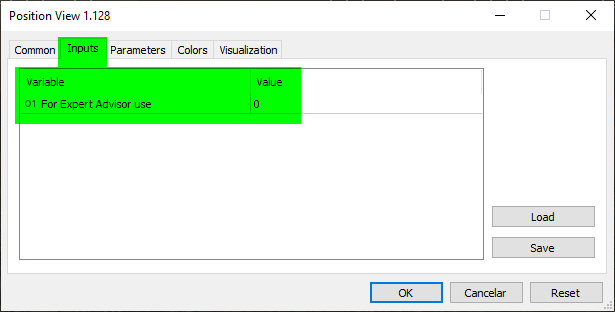
Using the parameters shown in the previous image would certainly be the easiest way to implement this solution. However, for a trader or user, this isn't very intuitive or practical, since it would require them to open the indicator's settings and change the value. On the other hand, clicking on an indicator element or on an object on the chart is quite an intuitive action. That's why we'll use this approach, even if it requires a little more work on our part as programmers.
This approach creates new problems and requires certain decisions to be made. One of these decisions concerns the use of the position indicator on HEDGING accounts, since in this case there may be multiple position indicators on the chart. Another decision concerns how everything should work. To help you understand this second question—the first one will be resolved during implementation—let's assume that the indicator is in “value” mode.
Now let's imagine that the user wants to display Take Profit as a financial result. When it is clicked, will only Take Profit switch to financial mode, or should the other displayed values—namely the open price and Stop Loss—switch as well? What if you want to display Take Profit as a financial result, the opening price as a percentage, and Stop Loss as the difference between prices? Should we allow this combination? Please note that all of these aspects must be determined before the solution is implemented. Another question is where the user or trader will need to click to change the value format. Please note that, although writing the code may seem simple, analyzing these points is also part of the implementation. If you decide to change this behavior later, it may require more or less effort.
So, let's take a look at my proposal. You may disagree with it. That's your right. In any case, the goal here is to show how we arrive at a result that will then be implemented. I suggest that the user click on the OBJ_EDIT object to change the format. The format will cycle through the available options. In other words, every time the user clicks on OBJ_EDIT, the next mode specified in the enumeration will be selected.
With that, I've just given you a hint about the next procedure we'll be changing. And yes, this is exactly the procedure you probably imagined: the DispatchMessage procedure of the C_ElementsTrade class.
But first, we'll make one more change, as shown below.
01. //+------------------------------------------------------------------+
02. #property copyright "Daniel Jose"
03. //+------------------------------------------------------------------+
04. #define def_VERSION_DEBUG
05. //+------------------------------------------------------------------+
06. #ifdef def_VERSION_DEBUG
07.     #define macro_DEBUG_MODE(A) \
08.                     Print(__FILE__, " ", __LINE__, " ", __FUNCTION__ + " " + #A + " = " + (string)(A));
09. #else
10.     #define macro_DEBUG_MODE(A)
11. #endif
12. //+------------------------------------------------------------------+
13. #define def_SymbolReplay          "RePlay"
14. #define def_MaxPosSlider          400
15. #define def_MaskTimeService       0xFED00000
16. #define def_IndicatorTimeFrame    (_Period < 60 ? _Period : (_Period < PERIOD_D1 ? _Period - 16325 : (_Period == PERIOD_D1 ? 84 : (_Period == PERIOD_W1 ? 91 : 96))))
17. #define def_IndexTimeFrame        4
18. //+------------------------------------------------------------------+
19. union uCast_Double
20. {
21.     double   dValue;
22.     long     _long;                                  // 1 Value
23.     datetime _datetime;                              // 1 Value
24.     uint     _32b[sizeof(double) / sizeof(uint)];    // 2 Values
25.     ushort   _16b[sizeof(double) / sizeof(ushort)];  // 4 Values
26.     uchar    _8b [sizeof(double) / sizeof(uchar)];   // 8 Values
27. };
28. //+------------------------------------------------------------------+
29. enum EnumEvents     {
30.             evTicTac,                       //The “Tick-Tock” Event
31.             evHideMouse,                    //Hide the mouse cursor price line
32.             evShowMouse,                    //Show the price line under the mouse cursor
33.             evHideBarTime,                  //Hide bar time
34.             evShowBarTime,                  //Show bar time
35.             evHideDailyVar,                 //Hide daily change
36.             evShowDailyVar,                 //Show daily change
37.             evHidePriceVar,                 //Hide instant change
38.             evShowPriceVar,                 //Show instant change
39.             evCtrlReplayInit,               //Initialize replay controls
40.             evChartTradeBuy,                //market buy event
41.             evChartTradeSell,               //market sell event
42.             evChartTradeCloseAll,           //Event for closing positions
43.             evChartTrade_At_EA,             //communication event
44.             evEA_At_ChartTrade,             //communication event
45.             evChatWriteSocket,              //Event for mini-chat
46.             evChatReadSocket,               //Event for mini-chat
47.             evUpdate_Position,              //communication event
48.             evMsgClosePositionEA,           //communication event
49.             evMsgCloseTakeProfit,           //communication event
50.             evMsgCloseStopLoss,             //communication event
51.             evMsgNewTakeProfit,             //communication event
52.             evMsgNewStopLoss,               //communication event
53.             evMsgSetFocus,                  //communication event
54.             evMsgServiceSwapStatus,         //Event for stopping the market replay/Market Simulation service
55.             evMsgSwapViewModePosition       //mode-switching event
56.                         };
57. //+------------------------------------------------------------------+
58. enum EnumPriority {                         //List of object priorities
59.             ePriorityNull = -1,
60.             ePriorityDefault = 0
61.                         };
62. //+------------------------------------------------------------------+
Defines.mqh
Please note that on line 55, we defined a new event. Now we can move on to the DispatchMessage procedure of the C_ElementsTrade class. To explain as clearly as possible how this works, we'll cover it in a separate section. This will make it easier to distinguish between the concepts and help you understand what's going on.
The DispatchMessage procedure. What confusion!
Although the title of this topic might suggest that what follows will be confusing, it will actually seem quite simple to you if you’ve understood the previous articles, studied the material, and taken the time to understand what was explained. There's nothing confusing or complicated about it. Before we continue, I'd like to point out one detail. Take a look at the following image.
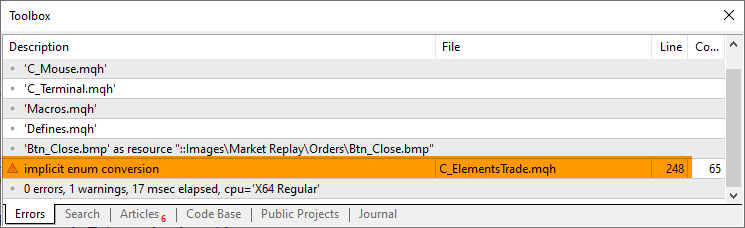
Please note that I've highlighted one line in the compiler's output. What is so special about it that it deserves our attention? This line appeared because of a compiler warning. To understand where it came from, let's take a look at the code snippet that triggered it.
219. //+------------------------------------------------------------------+
220.         void DispatchMessage(const int id, const long &lparam, const double &dparam, const string &sparam)
221.         {
222.             string sz0;
223.             long _lparam = lparam;
224.             double _dparam = dparam;
225.
226.             C_Mouse::DispatchMessage(id, lparam, dparam, sparam);
227.             switch (id)
228.             {
229.                 case (CHARTEVENT_KEYDOWN):
230.                     if (!TerminalInfoInteger(TERMINAL_KEYSTATE_ESCAPE)) break;
231.                     _lparam = (long) m_Info.ticket;
232.                     _dparam = 0;
233.                     EventChartCustom(0, evUpdate_Position, _lparam, 0, "");
234.                 case CHARTEVENT_CUSTOM + evMsgSetFocus:
235.                     if ((m_Info.ticket == (ulong)(_lparam)) && ((EnumEvents)(_dparam) == m_Info.ev))
236.                         UpdatePrice(m_Info.open, GetPositionsMouse().Position.Price);
237.                     macro_LineInFocus((m_Info.ticket == (ulong)(_lparam)) && ((EnumEvents)(_dparam) == m_Info.ev));
238.                     EventChartCustom(0, (ushort)(_dparam ? evHideMouse : evShowMouse), 0, 0, "");
239.                     m_Info.bClick = false;
240.                 case CHARTEVENT_CHART_CHANGE:
241.                     UpdateViewPort(m_Info.price);
242.                     if (m_Info.ev != evMsgClosePositionEA)
243.                         ViewValue(m_Info.bIsBuy ? m_Info.price - m_Info.open : m_Info.open - m_Info.price);
244.                     break;
245.                 case CHARTEVENT_CUSTOM + evMsgSwapViewModePosition:
246.                     if (m_Info.ticket == (ulong)(_lparam))
247.                     {
248.                         m_Info.ViewMode = (stInfos::e1)((m_Info.ViewMode + 1) & 0x03);
249.                         EventChartCustom(0, evUpdate_Position, _lparam, 0, NULL);
250.                     }
251.                     break;
252.                 case CHARTEVENT_OBJECT_CLICK:
253.                     sz0 = GetPositionsMouse().szObjNameClick;
254.                     if (m_Info.bClick)
255.                     {
256.                         if (sz0 == def_NameBtnMove)
257.                             EventChartCustom(0, evMsgSetFocus, m_Info.ticket, m_Info.ev, "");
258.                         if (sz0 == def_NameBtnClose)
259.                             EventChartCustom(0, (ushort) m_Info.ev, m_Info.ticket, PositionGetDouble(m_Info.ev == evMsgCloseTakeProfit ? POSITION_SL : POSITION_TP), PositionGetString(POSITION_SYMBOL));
260.                         if (sz0 == def_NameObjLabel)
261.                             EventChartCustom(0, evMsgSwapViewModePosition, m_Info.ticket, 0, NULL);
262.                     }
263.                     m_Info.bClick = false;
264.                     break;
265.                 case CHARTEVENT_MOUSE_MOVE:
266.                     m_Info.bClick = (CheckClick(C_Mouse::eClickLeft) ? true : m_Info.bClick);
267.                     if (m_Info.weight > 1)
268.                     {
269.                         UpdateViewPort(_dparam = GetPositionsMouse().Position.Price);
270.                         if (m_Info.ev != evMsgClosePositionEA)
271.                             ViewValue(m_Info.bIsBuy ? _dparam - m_Info.open : m_Info.open - _dparam);
272.                         if (m_Info.bClick)
273.                         {
274.                             if ((m_Info.ev == evMsgCloseTakeProfit) || (m_Info.ev == evMsgCloseStopLoss))
275.                                 EventChartCustom(0, (ushort)(m_Info.ev == evMsgCloseTakeProfit ? evMsgNewTakeProfit : evMsgNewStopLoss), m_Info.ticket, GetPositionsMouse().Position.Price, PositionGetString(POSITION_SYMBOL));
276.                             EventChartCustom(0, evMsgSetFocus, 0, 0, "");
277.                         }
278.                     }
279.                     break;
280.             }
281.         }
282. //+------------------------------------------------------------------+
C_ElementsTrade snippet
Please pay special attention to the line shown in the previous image. In it, we perform a type conversion. The code snippet has already been updated so that it no longer triggers this warning. Nevertheless, I want you to take a close look at line 248. If you've been following the code closely, you'll notice that I'm using something there that isn't actually in the code. Therefore, we need to correct one detail explained in the previous section.
The point is this: although enumerations can be anonymous, as we did on line 52 of the `C_ElementsTrade` class, we cannot perform such a conversion correctly without the enumeration type name. This is not due to a code error or a compiler error. MQL5 includes a special function called `EnumToString`, which is designed to convert a numeric enumeration value into a value of type string. We're not talking about just any string, but about the exact name associated with that value within the enumeration.
But wait a minute. At this stage, we do not convert the value to a string, nor do we attempt to retrieve the name associated with that numeric value within the enumeration. So why should we pay attention to the compiler's warning? Can't we just ignore it? This warning indicates that converting the enumeration value to a string may fail if you attempt to do so. You should not ignore every warning. Some of them can be ignored, while others need to be corrected. Each situation requires a separate analysis; there is no general rule that applies to all cases.
In this case, the type conversion will be performed correctly. However, since I don't like seeing warnings, I prefer to address the root cause of them. To do this, we simply need to replace line 52, shown in the previous section, with the line below.
052. enum e1 {eValue, eFinance, eTicks, ePercentage} ViewMode;
After that, if you leave the code for the DispatchMessage procedure as it is in the previous code snippet, the compiler will no longer issue a warning. Now we can return to the DispatchMessage procedure of the C_ElementsTrade class and see how it works. This is not difficult in itself, although it may seem confusing if you have not been following this series of articles. But if you can make sense of the explanations in the articles in this series about the replay/simulation system, this code is actually very simple. So, let's take a look at what's new in it.
On line 260, we check whether the OBJ_EDIT object—which contains the value displayed to the trader or the platform user—was clicked. If the condition is true, we send a custom event on line 261. I've already explained how to interpret this process. Then, on line 245, we intercept this custom event.
On line 246, we check whether the ticket matches the one used by the position indicator. If that is the case, then on line 248 we cycle through the four display modes. After changing the mode, on line 249 we generate a new event whose purpose is to update the remaining segments of the position indicator. In other words, even if you click Take Profit, the Stop Loss and the trade result will also be updated. This way, we avoid a situation where one segment displays a percentage while the others display values of a different type. You can see the result in the following animation.
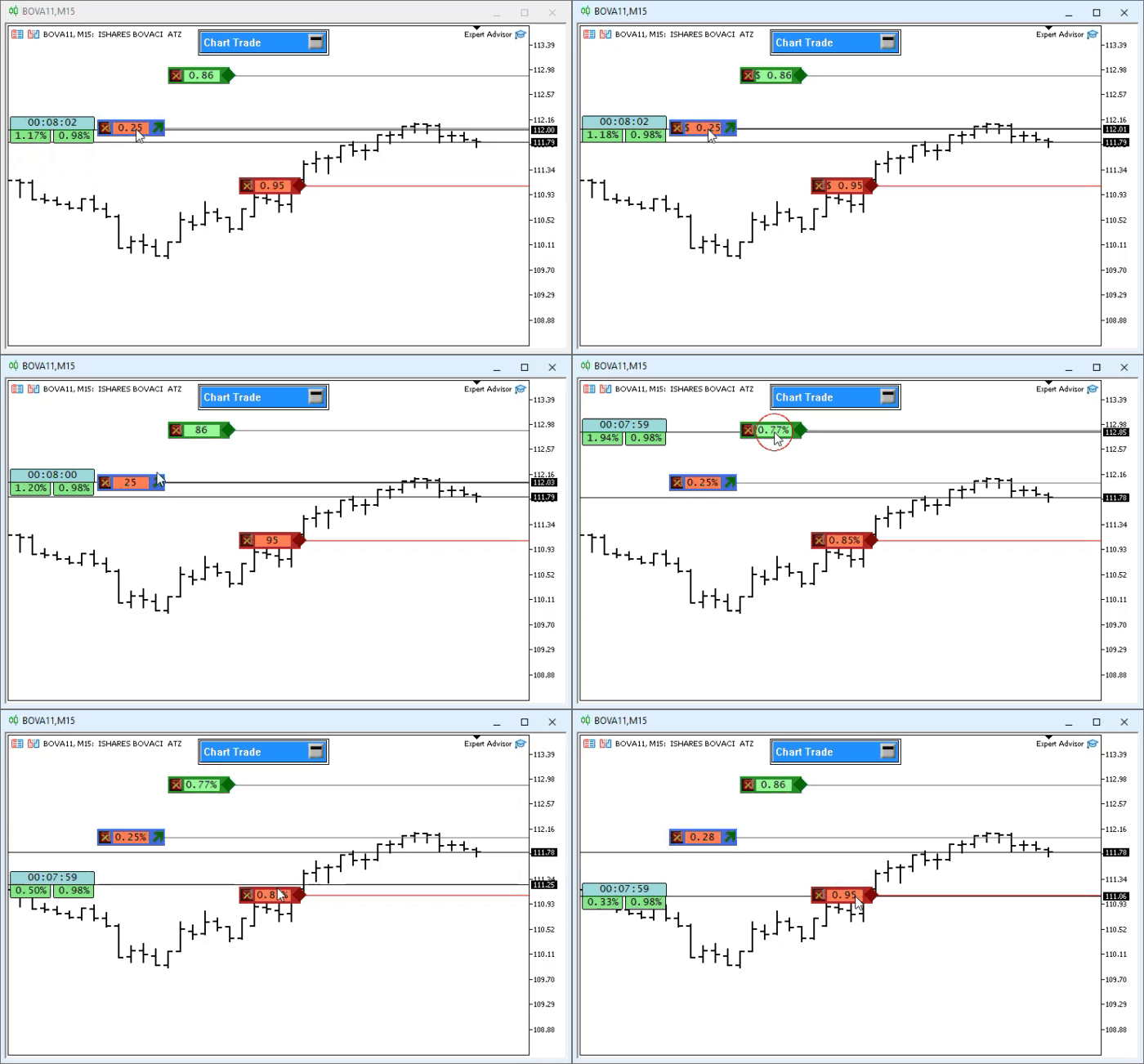
Note that, although we added only a small amount of code to the DispatchMessage procedure, we were able to achieve exactly the behavior we intended and ultimately obtain a satisfactory result. Nevertheless, I would still like to explain a situation that might apply to your case as well. Suppose you want to use this position indicator on a HEDGING account. For those who do not know, this type of account allows you to hold both a buy position and a sell position on the same symbol at the same time. Even if you already have an open buy position, you can open another one, and one position will not directly affect the other. This independence is relative, since, from a financial standpoint, the two positions will be interrelated to some extent.
What happens if there are two position indicators on the chart? Essentially, they will be independent of one another. When you change the way the position data is displayed, only the segments related to that position will change: the opening price, Take Profit, and Stop Loss. For the other positions, the way the result is displayed will remain unchanged. This is due to the check performed on line 246.
If you want the change in the way the data is displayed to apply to the other positions as well, simply remove the check on line 246. However, before doing so, you should take into account that there is a problem—more precisely, a lack of connection between the position indicators.
To understand this, you first need to know that the indicator always starts in mode ZERO of the enumeration declared on line 52. Therefore, when it is added to the chart, it starts operating in mode ZERO. Next, you use the mechanism shown in the previous animation and switch the display mode, for example, to mode ONE. Remember that we have FOUR MODES. Next, you open a new position in a HEDGING account. At that moment, one indicator will be in mode ONE, and the other will be in mode ZERO. Now think about this: if you remove the check on line 246, then when you switch the display mode of the new position indicator to mode “ONE,” you will also change the display of the first position: it will switch from mode “ONE” to mode “THREE.” That's where the confusion begins. If you try to change the display mode of the first position back to mode “ONE,” you will also change the mode of the new position—this time to mode “THREE.”
In other words, you should not modify the system's operation by simply removing a check or any other element. Before doing so, you should stop and analyze the consequences. I don't want to discourage you from modifying or adapting the code to suit your specific needs. I just want you to understand what you are doing before you try to do it.
But I don't want to leave you to deal with this problem on your own. Let's consider a possible solution. When an indicator or Expert Advisor is added to a chart, the code of the OnInit function is executed first. MetaTrader 5 also generates the CHARTEVENT_CHART_CHANGE event, which is handled by the OnChartEvent function. This information is important because it allows us to synchronize the position indicators immediately after each one is added to the chart.
For now, I won't complicate things. I'll show you only part of the solution. Later, I'll show you how to create an even better solution, since it will eventually be needed. Let's take a look at how to synchronize the indicators with minimal effort.
The first part of the solution is shown in the following snippet.
219. //+------------------------------------------------------------------+
220.         void DispatchMessage(const int id, const long &lparam, const double &dparam, const string &sparam)
221.         {
222.             string sz0;
223.             long _lparam = lparam;
224.             double _dparam = dparam;
225.
226.             C_Mouse::DispatchMessage(id, lparam, dparam, sparam);
227.             switch (id)
228.             {
229.                 case (CHARTEVENT_KEYDOWN):
230.                     if (!TerminalInfoInteger(TERMINAL_KEYSTATE_ESCAPE)) break;
231.                     _lparam = (long) m_Info.ticket;
232.                     _dparam = 0;
233.                     EventChartCustom(0, evUpdate_Position, _lparam, 0, "");
234.                 case CHARTEVENT_CUSTOM + evMsgSetFocus:
235.                     if ((m_Info.ticket == (ulong)(_lparam)) && ((EnumEvents)(_dparam) == m_Info.ev))
236.                         UpdatePrice(m_Info.open, GetPositionsMouse().Position.Price);
237.                     macro_LineInFocus((m_Info.ticket == (ulong)(_lparam)) && ((EnumEvents)(_dparam) == m_Info.ev));
238.                     EventChartCustom(0, (ushort)(_dparam ? evHideMouse : evShowMouse), 0, 0, "");
239.                     m_Info.bClick = false;
240.                 case CHARTEVENT_CHART_CHANGE:
241.                     UpdateViewPort(m_Info.price);
242.                     if (m_Info.ev != evMsgClosePositionEA)
243.                         ViewValue(m_Info.bIsBuy ? m_Info.price - m_Info.open : m_Info.open - m_Info.price);
244.                     break;
245.                 case CHARTEVENT_CUSTOM + evMsgSwapViewModePosition:
246.                     m_Info.ViewMode = (stInfos::e1)_dparam;
247.                     m_Info.ViewMode = (stInfos::e1)((m_Info.ViewMode + 1) & 0x03);
248.                     EventChartCustom(0, evUpdate_Position, _lparam, 0, NULL);
249.                     break;
250.                 case CHARTEVENT_OBJECT_CLICK:
251.                     sz0 = GetPositionsMouse().szObjNameClick;
252.                     if (m_Info.bClick)
253.                     {
254.                         if (sz0 == def_NameBtnMove)
255.                             EventChartCustom(0, evMsgSetFocus, m_Info.ticket, m_Info.ev, "");
256.                         if (sz0 == def_NameBtnClose)
257.                             EventChartCustom(0, (ushort) m_Info.ev, m_Info.ticket, PositionGetDouble(m_Info.ev == evMsgCloseTakeProfit ? POSITION_SL : POSITION_TP), PositionGetString(POSITION_SYMBOL));
258.                         if (sz0 == def_NameObjLabel)
259.                             EventChartCustom(0, evMsgSwapViewModePosition, m_Info.ticket, (double)m_Info.ViewMode, NULL);
260.                     }
261.                     m_Info.bClick = false;
262.                     break;
263.                 case CHARTEVENT_MOUSE_MOVE:
264.                     m_Info.bClick = (CheckClick(C_Mouse::eClickLeft) ? true : m_Info.bClick);
265.                     if (m_Info.weight > 1)
266.                     {
267.                         UpdateViewPort(_dparam = GetPositionsMouse().Position.Price);
268.                         if (m_Info.ev != evMsgClosePositionEA)
269.                             ViewValue(m_Info.bIsBuy ? _dparam - m_Info.open : m_Info.open - _dparam);
270.                         if (m_Info.bClick)
271.                         {
272.                             if ((m_Info.ev == evMsgCloseTakeProfit) || (m_Info.ev == evMsgCloseStopLoss))
273.                                 EventChartCustom(0, (ushort)(m_Info.ev == evMsgCloseTakeProfit ? evMsgNewTakeProfit : evMsgNewStopLoss), m_Info.ticket, GetPositionsMouse().Position.Price, PositionGetString(POSITION_SYMBOL));
274.                             EventChartCustom(0, evMsgSetFocus, 0, 0, "");
275.                         }
276.                     }
277.                     break;
278.             }
279.         }
280. //+------------------------------------------------------------------+
C_ElementTrade snippet
Note that now, on line 259, we specify the current display mode using the dparam parameter. When the code on line 246 executes, we will assign the value obtained via dparam to all position indicators. This is the exact point where synchronization occurs. I could have combined lines 246 and 247 into one, but I chose to leave them separate to clearly show you how synchronization is performed. If you run the code and change the display, you will get the result shown in the following animation.
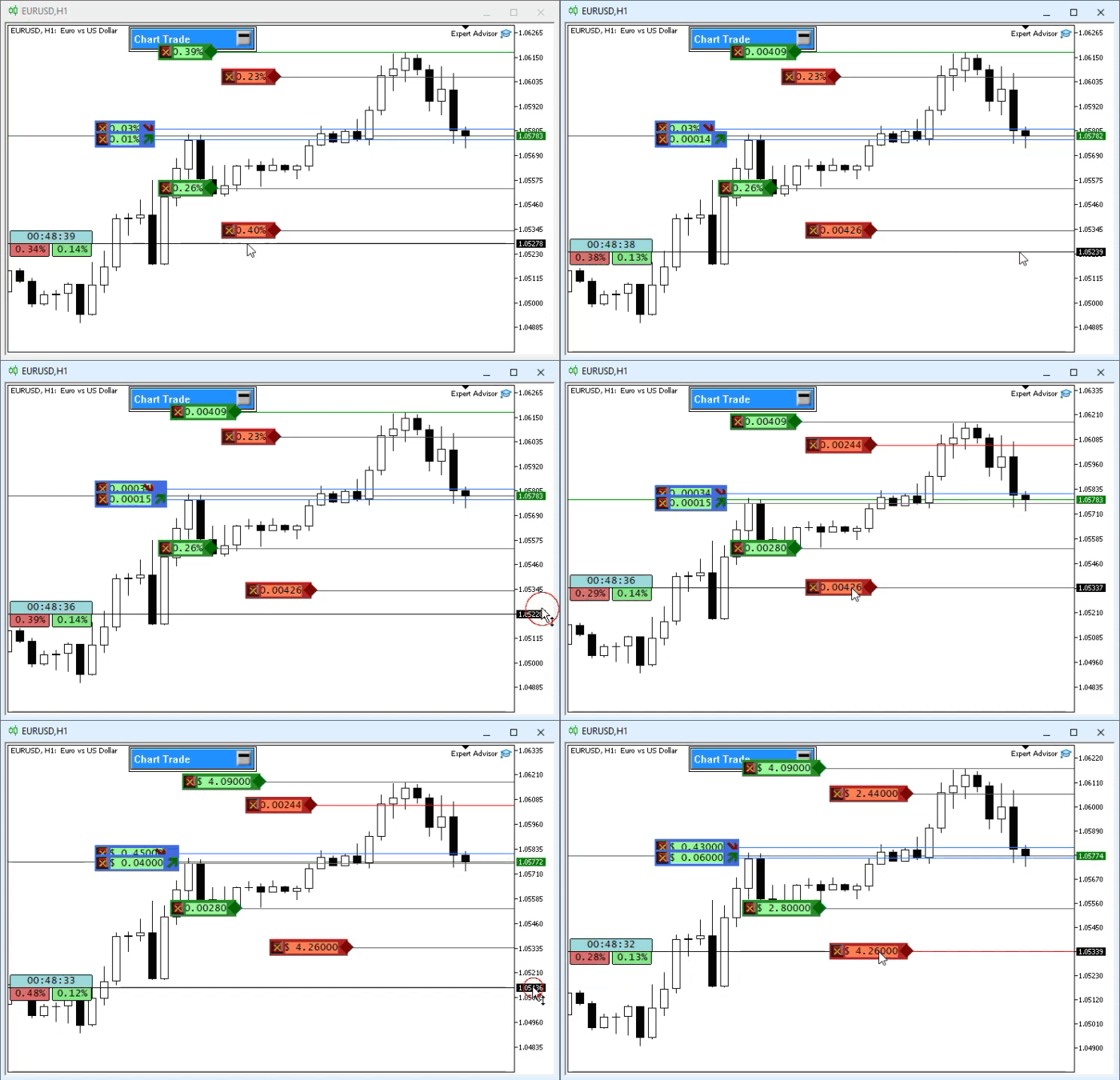
Question: why aren't the segments displayed in sync? Answer: they are synchronized, but we need to update the chart so that the synchronization is displayed visually. What causes this? The reason is line 248, which updates only the indicator that received the user's click event. How can we solve this problem? It's simple: just update all positions. To do this, we'll modify the code as shown below.
245.     case CHARTEVENT_CUSTOM + evMsgSwapViewModePosition:
246.         m_Info.ViewMode = (stInfos::e1)((((stInfos::e1)_dparam) + 1) & 0x03);
247.         for (int c0 = PositionsTotal() - 1; c0 >= 0; c0--)
248.             EventChartCustom(0, evUpdate_Position, PositionGetTicket(c0), 0, NULL);
249.         break;
250.     case CHARTEVENT_OBJECT_CLICK:
C_ElementsTrade snippet
Please note that now I will focus exclusively on the part that has actually changed. Two lines from the previous code have been combined into one. In other words, lines 246 and 247 from the previous snippet have now been combined into line 246, since I assume you already understand how this works. Actually, the fix consists of adding the new line 247. Please note that, unlike the previous code, the evUpdate_Position event is now triggered for all open positions. That solves the problem. You can see the result in the following animation.
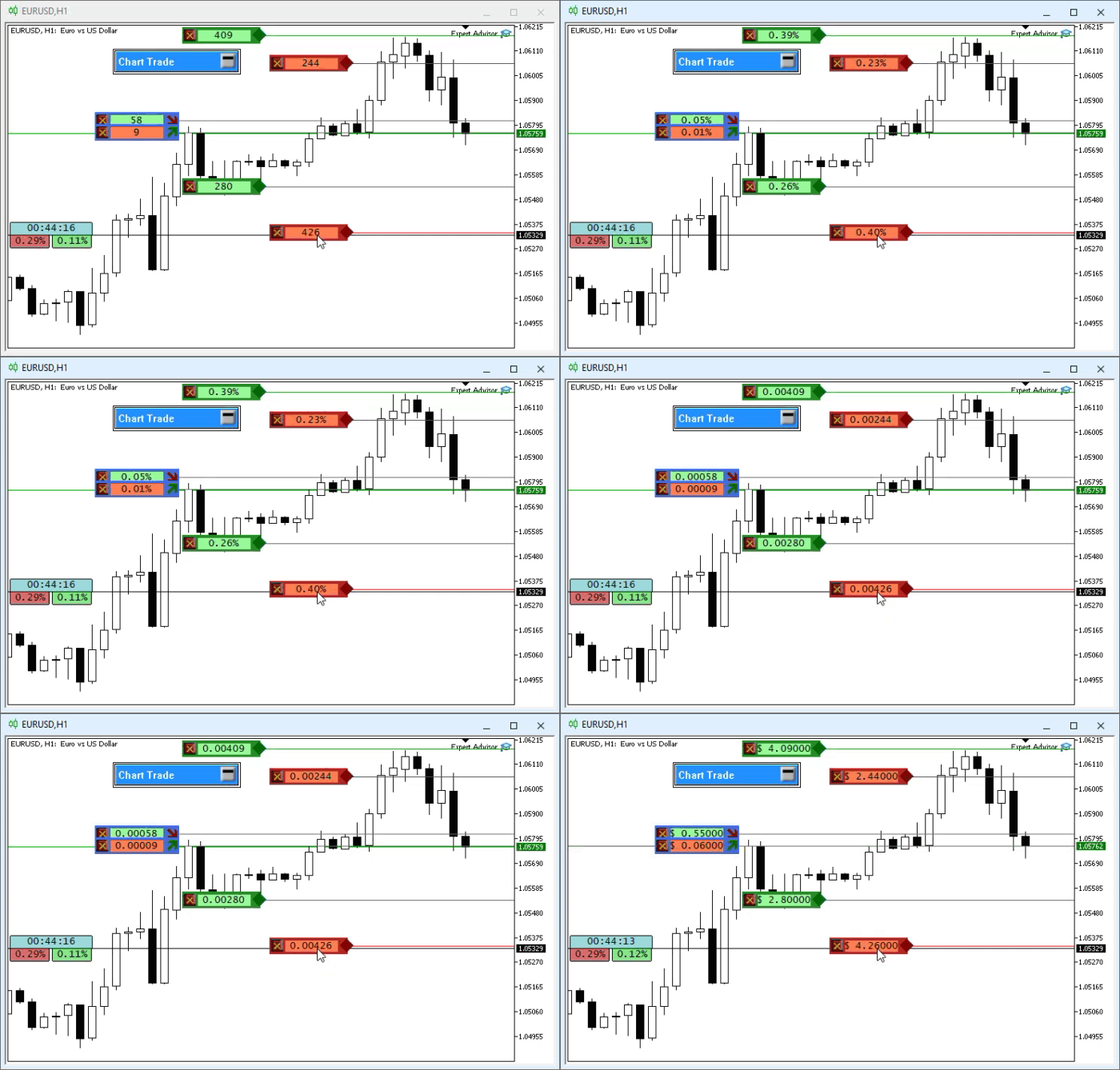
As you can see, it's quite simple. However, this solution is still not ideal. Later, I'll show you a better piece of code with a much more interesting approach. For now, this approach is sufficient.
Concluding Thoughts
In this article, I've shown how you, as an enthusiast eager to learn, can make the position indicator even more interesting to use. However, it is not fully ready yet and requires a few more improvements before we can really use it. The goal is to develop an indicator that will work both in the replay/simulation system and in the market—on both a demo account and a real account. The goal of this series is to present the entire process as clearly as possible. I hope you'll be able to follow the progress of the development, even if at times it seems slow and gives the impression that it has little chance of actually working within the replay/simulation system.
But we're moving forward. Step by step. For those who just want to try out the applications developed so far, I'll include already compiled versions in the attached files. All you need to do is unzip the files and use them to check the current status of the project. Please keep in mind that these applications are intended for educational purposes and may contain errors. Therefore, use them at your own risk.
| File | Description |
|---|---|
| Experts\Expert Advisor.mq5 | Shows the interaction between Chart Trade and the Expert Advisor. You must use Mouse Study for interaction. |
| Indicators\Chart Trade.mq5 | Creates a window for configuring the order to be sent. You must use Mouse Study for interaction. |
| Indicators\Market Replay.mq5 | Creates controls that allow you to interact with the replay/simulation service. You must use Mouse Study for interaction. |
| Indicators\Mouse Study.mq5 | Provides interaction between graphical controls and the user (required both for working with the replay/simulation system and in the live market). |
| Indicators\Order Indicator.mq5 | Displays market orders and allows you to interact with and manage them. |
| Indicators\Position View.mq5 | Displays market positions and allows you to interact with and manage them. |
| Services\Market Replay.mq5 | Creates and maintains the replay/simulation service. This is the main file for the entire system. |
Translated from Portuguese by MetaQuotes Ltd.
Original article: https://www.mql5.com/pt/articles/13447
Warning: All rights to these materials are reserved by MetaQuotes Ltd. Copying or reprinting of these materials in whole or in part is prohibited.
This article was written by a user of the site and reflects their personal views. MetaQuotes Ltd is not responsible for the accuracy of the information presented, nor for any consequences resulting from the use of the solutions, strategies or recommendations described.

 From Basic to Intermediate: Queues, Lists, and Trees (VII)
 Designing a Multi-EA Communication Bus Using Named Pipes in MQL5
 Automating Classic Market Methods in MQL5 (Part 7): The Nicolas Darvas Box System
 Defining your Edge (Part 5): Using GARCH Variance and Volatility-Scaled LSTM in an Expert Advisor

- Free trading apps
- Over 8,000 signals for copying
- Economic news for exploring financial markets
You agree to website policy and terms of use