

Market Simulation: Unity Is Strength (III)
 67
67
 0
0

Introduction
Hello, everyone, and welcome to a new article in this series on building a replay/simulation system.
In my previous article “Market Simulation: Unity Is Strength (II)”, I showed how we will modify our applications to simulate interaction with the trading server. In that article, we implemented a new class: C_InServer. Its purpose is precisely to allow us to easily simulate the behavior of our applications so that it is completely transparent whether our requests are being handled by a real server or a simulated one. I know that for many of you, all of this may seem quite complicated, while for others it will be just another step in what we are building.
In fact, using the C_InServer class, we can very easily adapt our applications and achieve the desired result. As you've probably already guessed, we won't have to implement anything new in either the Expert Advisor or the position indicator. At least at this initial stage, the code will only need very subtle changes. So, without further ado, let's get to the point.
Let’s address two issues at once
Even before the Expert Advisor and position indicator are fully implemented for use in the replay/simulation system, we can already make both pieces of code fully operational within this system. This is possible thanks to the C_InServer class. Unfortunately, I forgot to show one function that we'll also need, since the Expert Advisor can use a symbol associated with a HEDGING account. As you already know, with this type of account, we can hold more than one open position. Therefore, we need to add the code snippet shown below to the C_InServer class.
127. //+------------------------------------------------------------------+
128.     inline const ulong _PositionGetTicket(int arg)
129.     {
130. #define macro_ERROR { Print("Error in accessing the database..."); return 0; }
131.
132.         bool bRet;
133.
134.         if (!m_IsReplay)
135.             return PositionGetTicket(arg);
136.
137.         ZeroMemory(m_Info);
138.         if (!ExecRequestOfData("SELECT * FROM tb_Replay AS tb WHERE tb.history = 0;")) macro_ERROR
139.         for (int c = 0; (bRet = GetRegisterOfRequest(m_Info)) && (c < arg); c++);
140.
141.         return (bRet ? m_Info.ticket : 0);
142.
143. #undef macro_ERROR
144.     }
145. //+------------------------------------------------------------------+
C_InServer Class Snippet
I'm not going to repeat the entire code here, because there's no point in doing so. It is enough to add the snippet shown, and we can start working with the Expert Advisor and the position indicator to see what the code for both will ultimately look like. Let's start with the Expert Advisor code shown below.
001. //+------------------------------------------------------------------+
002. #property copyright "Daniel Jose"
003. #property icon "/Images/Market Replay/Icons/Replay - EA.ico"
004. #property description "Demo version between interaction"
005. #property description "of Chart Trade and Expert Advisor"
006. #property version   "1.135"
007. #property link "https://www.mql5.com/pt/articles/13555"
008. //+------------------------------------------------------------------+
009. #include <Market Replay\Order System\C_Orders.mqh>
010. #include <Market Replay\Auxiliar\C_Terminal.mqh>
011. //+------------------------------------------------------------------+
012. enum eTypeContract {MINI, FULL};
013. //+------------------------------------------------------------------+
014. input eTypeContract user00 = MINI;         //Selecting a Contract Type for an Order
015. //+------------------------------------------------------------------+
016. C_Orders        *Orders = NULL;
017. C_Terminal     *Terminal = NULL;
018. //+------------------------------------------------------------------+
019. int OnInit()
020. {
021.     Orders = new C_Orders(0xC0DEDAFE78514269);
022.
023.     return INIT_SUCCEEDED;
024. }
025. //+------------------------------------------------------------------+
026. void OnTick() {}
027. //+------------------------------------------------------------------+
028. void OnChartEvent(const int id, const long &lparam, const double &dparam, const string &sparam)
029. {
030.     int handle;
031.     ulong ul;
032.
033.     (*Orders).DispatchMessage(id, lparam, dparam, sparam);
034.     switch (id)
035.     {
036.         case CHARTEVENT_CHART_CHANGE:
037.             if (Terminal != NULL) break;
038.             else
039.             {
040.                 Terminal = new C_Terminal(0, 0, user00);
041.                 for (int count = (*Orders)._PositionsTotal() - 1; count >= 0; count--)
042.                 {
043.                     ul = (*Orders)._PositionGetTicket(count);
044.                     if ((*Orders)._PositionGetString(POSITION_SYMBOL) != (*Terminal).GetInfoTerminal().szSymbol)
045.                     {
046.                         ChartIndicatorDelete(0, 0, IntegerToString(ul));
047.                         continue;
048.                     }
049.                     handle = iCustom(NULL, PERIOD_CURRENT, "\\Indicators\\Position View.ex5", ul);
050.                     ChartIndicatorAdd(0, 0, handle);
051.                     IndicatorRelease(handle);
052.                 }
053.             }
054.         case CHARTEVENT_CUSTOM + evChartTrade_At_EA:
055.             EventChartCustom(0, evEA_At_ChartTrade, user00, 0, "");
056.             break;
057.     }
058. }
059. //+------------------------------------------------------------------+
060. void OnTradeTransaction(const MqlTradeTransaction &trans, const MqlTradeRequest &request, const MqlTradeResult &result)
061. {
062.     if (Terminal == NULL) return;
063.     static ulong ticket = 0;
064.     switch (trans.type)
065.     {
066.         case TRADE_TRANSACTION_HISTORY_ADD:
067.             EventChartCustom(0, evUpdate_Position, trans.position, 0, "");
068.             ticket = (trans.order != trans.position ? trans.position : 0);
069.             break;
070.         case TRADE_TRANSACTION_REQUEST:
071.             if ((request.symbol == (*Terminal).GetInfoTerminal().szSymbol) && (result.retcode == TRADE_RETCODE_DONE)) switch (request.action)
072.             {
073.                 case TRADE_ACTION_DEAL:
074.                     if (ticket > 0) EventChartCustom(0, evUpdate_Position, ticket, 0, "");
075.                     else
076.                     {
077.                         int handle = iCustom(NULL, PERIOD_CURRENT, "\\Indicators\\Position View.ex5", result.order);
078.                         ChartIndicatorAdd(0, 0, handle);
079.                         IndicatorRelease(handle);
080.                     }
081.                     ticket = 0;
082.                     break;
083.                 case TRADE_ACTION_SLTP:
084.                     EventChartCustom(0, evUpdate_Position, request.position, 0, "");
085.                     break;
086.             }
087.             break;
088.     };
089. }
090. //+------------------------------------------------------------------+
091. void OnDeinit(const int reason)
092. {
093.     ulong ul;
094.
095.     switch (reason)
096.     {
097.         case REASON_REMOVE:
098.         case REASON_INITFAILED:
099.             EventChartCustom(0, evEA_At_ChartTrade, -1, 0, "");
100.             break;
101.     }
102.     if (Terminal != NULL)
103.     {
104.         for (int count = (*Orders)._PositionsTotal() - 1; count >= 0; count--)
105.         {
106.             ul = (*Orders)._PositionGetTicket(count);
107.             if ((*Orders)._PositionGetString(POSITION_SYMBOL) != (*Terminal).GetInfoTerminal().szSymbol) continue;
108.             ChartIndicatorDelete(0, 0, IntegerToString(ul));
109.         }
110.     }
111.     delete Orders;
112.     delete Terminal;
113. }
114. //+------------------------------------------------------------------+
Expert Advisor
Notice that the code remains the same as before and does not require any additional changes to achieve the desired result. The same applies to the position indicator, the code for which is provided below.
001. //+------------------------------------------------------------------+
002. #property copyright "Daniel Jose"
003. #property icon "/Images/Market Replay/Icons/Positions.ico"
004. #property description "Indicator for tracking an open position on the server."
005. #property description "This should preferably be used together with an Expert Advisor."
006. #property description "For more details see the same article."
007. #property version   "1.135"
008. #property link "https://www.mql5.com/pt/articles/13555"
009. #property indicator_chart_window
010. #property indicator_plots 0
011. //+------------------------------------------------------------------+
012. #define def_ShortName "Position View"
013. //+------------------------------------------------------------------+
014. #include <Market Replay\Order System\C_ElementsTrade.mqh>
015. #include <Market Replay\Order System\C_InServer.mqh>
016. //+------------------------------------------------------------------+
017. input ulong user00 = 0;        //For use in an Expert Advisor
018. //+------------------------------------------------------------------+
019. struct st00
020. {
021.     ulong   ticket;
022.     string  szShortName,
023.             szSymbol;
024.     double  priceOpen,
025.             var,
026.             tickSize;
027.     char    digits;
028.     bool    bIsBuy;
029. }m_Infos;
030. //+------------------------------------------------------------------+
031. C_ElementsTrade *Open = NULL, *Stop = NULL, *Take = NULL;
032. C_InServer *Order = NULL;
033. //+------------------------------------------------------------------+
034. bool CheckCatch(ulong ticket)
035. {
036.     double vv;
037.
038.     ZeroMemory(m_Infos);
039.     m_Infos.szShortName = StringFormat("%I64u", m_Infos.ticket = ticket);
040.     if (!(*Order)._PositionSelectByTicket(m_Infos.ticket)) return false;
041.     if (ChartWindowFind(0, m_Infos.szShortName) >= 0)
042.     {
043.         m_Infos.ticket = 0;
044.         return false;
045.     }
046.     m_Infos.szSymbol = (*Order)._PositionGetString(POSITION_SYMBOL);
047.     m_Infos.digits = (char)SymbolInfoInteger(m_Infos.szSymbol, SYMBOL_DIGITS);
048.     m_Infos.tickSize = SymbolInfoDouble(m_Infos.szSymbol, SYMBOL_TRADE_TICK_SIZE);
049.     vv = SymbolInfoDouble(m_Infos.szSymbol, SYMBOL_TRADE_TICK_VALUE);
050.     m_Infos.var = m_Infos.tickSize / vv;
051.     IndicatorSetString(INDICATOR_SHORTNAME, m_Infos.szShortName);
052.     EventChartCustom(0, evUpdate_Position, ticket, 0, "");
053.
054.     return true;
055. }
056. //+------------------------------------------------------------------+
057. inline void ProfitNow(void)
058. {
059.     double ask, bid, value;
060.
061.     ask = SymbolInfoDouble(m_Infos.szSymbol, SYMBOL_ASK);
062.     bid = SymbolInfoDouble(m_Infos.szSymbol, SYMBOL_BID);
063.     if (Open != NULL)
064.     {
065.         (*Open).ViewValue(value = (m_Infos.bIsBuy ? bid - m_Infos.priceOpen : m_Infos.priceOpen - ask));
066.         (*Take).ViewValue(value, false);
067.         (*Stop).ViewValue(value, false);
068.     }
069. }
070. //+------------------------------------------------------------------+
071. int OnInit()
072. {
073.     Order = new C_InServer();
074.     IndicatorSetString(INDICATOR_SHORTNAME, def_ShortName);
075.     if (!CheckCatch(user00))
076.     {
077.         ChartIndicatorDelete(0, 0, def_ShortName);
078.         return INIT_FAILED;
079.     }
080.
081.     return INIT_SUCCEEDED;
082. }
083. //+------------------------------------------------------------------+
084. int OnCalculate(const int rates_total, const int prev_calculated, const int begin, const double &price[])
085. {
086.     ProfitNow();
087.
088.     return rates_total;
089. }
090. //+------------------------------------------------------------------+
091. void OnChartEvent(const int id, const long &lparam, const double &dparam, const string &sparam)
092. {
093.     double volume;
094.
095.     if (Open != NULL) (*Open).DispatchMessage(id, lparam, dparam, sparam);
096.     if (Take != NULL) (*Take).DispatchMessage(id, lparam, dparam, sparam);
097.     if (Stop != NULL) (*Stop).DispatchMessage(id, lparam, dparam, sparam);
098.     switch (id)
099.     {
100.         case CHARTEVENT_CUSTOM + evUpdate_Position:
101.             if (lparam != m_Infos.ticket) break;
102.             if (!(*Order)._PositionSelectByTicket(m_Infos.ticket))
103.             {
104.                 ChartIndicatorDelete(0, 0, m_Infos.szShortName);
105.                 return;
106.             };
107.             if (Open == NULL) Open = new C_ElementsTrade(
108.                                                          m_Infos.ticket,
109.                                                          m_Infos.szSymbol,
110.                                                          evMsgClosePositionEA,
111.                                                          clrRoyalBlue,
112.                                                          m_Infos.digits,
113.                                                          m_Infos.tickSize,
114.                                                          StringFormat("%I64u : Position opening price.", m_Infos.ticket),
115.                                                          m_Infos.bIsBuy = ((*Order)._PositionGetInteger(POSITION_TYPE) == POSITION_TYPE_BUY)
116.                                                         );
117.             if (Take == NULL) Take = new C_ElementsTrade(
118.                                                          m_Infos.ticket,
119.                                                          m_Infos.szSymbol,
120.                                                          evMsgCloseTakeProfit,
121.                                                          clrForestGreen,
122.                                                          m_Infos.digits,
123.                                                          m_Infos.tickSize,
124.                                                          StringFormat("%I64u : Take Profit price.", m_Infos.ticket),
125.                                                          m_Infos.bIsBuy
126.                                                         );
127.             if (Stop == NULL) Stop = new C_ElementsTrade(
128.                                                          m_Infos.ticket,
129.                                                          m_Infos.szSymbol,
130.                                                          evMsgCloseStopLoss,
131.                                                          clrFireBrick,
132.                                                          m_Infos.digits,
133.                                                          m_Infos.tickSize,
134.                                                          StringFormat("%I64u : Stop Loss price.", m_Infos.ticket),
135.                                                          m_Infos.bIsBuy
136.                                                         );
137.             volume = (*Order)._PositionGetDouble(POSITION_VOLUME);
138.             (*Open).UpdatePrice(0, m_Infos.priceOpen = (*Order)._PositionGetDouble(POSITION_PRICE_OPEN), volume, m_Infos.var);
139.             (*Take).UpdatePrice(m_Infos.priceOpen, (*Order)._PositionGetDouble(POSITION_TP), volume, m_Infos.var, (*Order)._PositionGetDouble(POSITION_SL));
140.             (*Stop).UpdatePrice(m_Infos.priceOpen, (*Order)._PositionGetDouble(POSITION_SL), volume, m_Infos.var, (*Order)._PositionGetDouble(POSITION_TP));
141.             ProfitNow();
142.             break;
143.     }
144.     ChartRedraw();
145. };
146. //+------------------------------------------------------------------+
147. void OnDeinit(const int reason)
148. {
149.     delete Order;
150.     delete Open;
151.     delete Take;
152.     delete Stop;
153. }
154. //+------------------------------------------------------------------+
Position Indicator
Thus, we already have a properly functioning foundation for the system. As for the position indicator, it can be considered complete: it can already be used both in the simulator and on a live or demo account. As for the Expert Advisor, we won't need to change its main code for now. Nevertheless, we need to finish implementing the C_Orders class, since that is where the “magic” will happen that will allow us to truly simulate a trading server. So far, we have only managed to simulate part of what we need.
So far, only the part that handles TRADEACTIONSLTP has been completed, but we cannot fully test it yet because, to check this type of request, we need an open position stored in the database.
At this point, we should pause and think for a moment. Not because TRADE_ACTION_DEAL is particularly difficult to implement, but because of the very nature of what we're about to implement. We use TRADE_ACTION_DEAL both to open and to close a position. However, the real challenge lies in determining exactly what we are trying to do on the two different account types.
In other words, regardless of whether we are using a HEDGING account or a NETTING account, TRADE_ACTION_DEAL must recognize the account type and determine what needs to be done with the open position. On a NETTING account, if the user does not close the position, TRADE_ACTION_DEAL must recalculate the average price of the open position and then update the database. On a HEDGING account, by contrast, it should simply create a new position. Notice that the same request requires updating a position on a NETTING account and creating a new one on a HEDGING account. Therefore, TRADE_ACTION_DEAL is a bit more complicated to implement. Let's take it slow, one step at a time. We will implement TRADE_ACTION_DEAL gradually until we get it working properly. And only after that will we optimize the code we've already written. To separate these two issues, let's move on to a new section.
TRADE_ACTION_DEAL: mission
To avoid overly long and tedious code, we'll make a few minor changes to what we already have. This will make it a little easier and more pleasant to implement and understand. Take a look at the current state of the source code in the following snippet.
067. //+------------------------------------------------------------------+
068.         ulong SimulateServer(void)
069.         {
070.             MqlTradeResult        TradeResult;
071.             MqlTradeTransaction   TradeTrans;
072.             bool                  bResult = false;
073.
074.             ZeroMemory(TradeResult);
075.             ZeroMemory(TradeTrans);
076.
077.             switch (m_Base.TradeRequest.action)
078.             {
079.                 case TRADE_ACTION_SLTP:
080.                     bResult = ExecCommandSQL(StringFormat("UPDATE tb_Replay SET sl = %f, tp = %f WHERE ticket = %d;",
081.                                                                         m_Base.TradeRequest.sl,
082.                                                                         m_Base.TradeRequest.tp,
083.                                                                         m_Base.TradeRequest.position));
084.                     TradeTrans.type = TRADE_TRANSACTION_REQUEST;
085.                     TradeResult.retcode = TRADE_RETCODE_DONE;
086.                     if (bResult)
087.                     {
088.                         OnTradeTransaction(TradeTrans, m_Base.TradeRequest, TradeResult);
089.                         return m_Base.TradeRequest.position;
090.                     }
091.                     break;
092.                 case TRADE_ACTION_DEAL:
093.                     break;
094.             }
095.             TradeResult.retcode = TRADE_RETCODE_INVALID;
096.             OnTradeTransaction(TradeTrans, m_Base.TradeRequest, TradeResult);
097.             return 0;
098.         }
099. //+------------------------------------------------------------------+
100.         ulong SendToPhysicalServer(void)
101.         {
102.             MqlTradeCheckResult   TradeCheck;
103.             MqlTradeResult        TradeResult;
104.
105.             ZeroMemory(TradeCheck);
106.             ZeroMemory(TradeResult);
107.             if (_Symbol == def_SymbolReplay)
108.                 return SimulateServer();
109.             if (!OrderCheck(m_Base.TradeRequest, TradeCheck))
110.             {
111.                 PrintFormat("Order System - Check Error: %d", GetLastError());
112.                 return 0;
113.             }
114.             m_Base.bTrash = OrderSend(m_Base.TradeRequest, TradeResult);
115.             if (TradeResult.retcode != TRADE_RETCODE_DONE)
116.             {
117.                 PrintFormat("Order System - Send Error: %d", TradeResult.retcode);
118.                 return 0;
119.             };
120.
121.             return TradeResult.order;
122.         }
123. //+------------------------------------------------------------------+
C_Orders Snippet
Now we'll extract a portion of the code shown above to produce what is shown in the following snippet.
067. //+------------------------------------------------------------------+
068.         void Decode_TRADE_ACTION_DEAL(MqlTradeTransaction &trans, MqlTradeResult &result)
069.         {
070.         }
071. //+------------------------------------------------------------------+
072.         void SimulateServer(MqlTradeTransaction &trans, MqlTradeResult &result)
073.         {
074.             switch (m_Base.TradeRequest.action)
075.             {
076.                 case TRADE_ACTION_SLTP:
077.                     result.retcode = (ExecCommandSQL(StringFormat("UPDATE tb_Replay SET sl = %f, tp = %f WHERE ticket = %d;",
078.                                                                  m_Base.TradeRequest.sl,
079.                                                                  m_Base.TradeRequest.tp,
080.                                                                  m_Base.TradeRequest.position)) ? TRADE_RETCODE_DONE : TRADE_RETCODE_INVALID);
081.                     trans.type = TRADE_TRANSACTION_REQUEST;
082.                     result.order =  m_Base.TradeRequest.position;
083.                     break;
084.                 case TRADE_ACTION_DEAL:
085.                     Decode_TRADE_ACTION_DEAL(trans, result);
086.                     break;
087.             }
088.             OnTradeTransaction(trans, m_Base.TradeRequest, result);
089.         }
090. //+------------------------------------------------------------------+
091.         ulong SendToPhysicalServer(void)
092.         {
093.             MqlTradeCheckResult   TradeCheck;
094.             MqlTradeResult        TradeResult;
095.             MqlTradeTransaction   TradeTrans;
096.
097.             ZeroMemory(TradeCheck);
098.             ZeroMemory(TradeResult);
099.             ZeroMemory(TradeTrans);
100.             if (_Symbol == def_SymbolReplay) SimulateServer(TradeTrans, TradeResult); else
101.             {
102.                 if (!OrderCheck(m_Base.TradeRequest, TradeCheck))
103.                 {
104.                     PrintFormat("Order System [%s] - Check Error: %d", m_Base.TradeRequest.symbol, GetLastError());
105.                     return 0;
106.                 }
107.                 m_Base.bTrash = OrderSend(m_Base.TradeRequest, TradeResult);
108.             }
109.             if (TradeResult.retcode != TRADE_RETCODE_DONE)
110.             {
111.                 PrintFormat("Order System [%s] - Send Error: %d", m_Base.TradeRequest.symbol, TradeResult.retcode);
112.                 return 0;
113.             };
114.
115.             return TradeResult.order;
116.         }
117. //+------------------------------------------------------------------+
C_Orders Snippet
The result is considerably more elegant because the code handles errors almost identically, both when connected to a real server and when working with a simulated one. To make the messages easier to understand—since they may come from either a real server or a simulated one—I added to each of them the symbol associated with the corresponding request. Therefore, even if you use the replay/simulation system while trading on a live account, you will be able to identify the source of each message displayed in the MetaTrader 5 terminal by the symbol shown alongside it. This makes the solution cleaner and easier to use. Now we can focus on one very specific part of the code: Decode_TRADE_ACTION_DEAL, whose implementation begins on line 68.
Let's start with the basics: opening a market position. When this happens, Decode_TRADE_ACTION_DEAL will receive a set of data from the ToMarket function. All we have to do is interpret them and create a new record in the database. That's it. For now, the simulation won't be entirely accurate, since we won't be using all possible settings. This will be done once we implement the pending-orders system. For now, we'll just work with what we already have. To begin testing, we'll implement the code shown in the following snippet.
67. //+------------------------------------------------------------------+
68.         void Decode_TRADE_ACTION_DEAL(MqlTradeTransaction &trans, MqlTradeResult &result)
69.         {
70.             trans.type = TRADE_TRANSACTION_REQUEST;
71.             if (m_Base.TradeRequest.position == 0)
72.             {
73.                 struct stLocal
74.                 {
75.                     ulong value;
76.                 }Info;
77.
78.                 if ((result.retcode = (ExecRequestOfData("SELECT COUNT(*) FROM tb_Replay AS tb WHERE tb.history = 0;")) ? TRADE_RETCODE_DONE : TRADE_RETCODE_ERROR) == TRADE_RETCODE_ERROR) return;
79.                 if ((result.retcode = (GetRegisterOfRequest(Info) ? TRADE_RETCODE_DONE : TRADE_RETCODE_ERROR)) == TRADE_RETCODE_ERROR) return;
80.                 result.order = Info.value + 10;
81.                 if ((result.retcode = (ExecCommandSQL(StringFormat("INSERT INTO tb_Replay (ticket, type, volume, price, sl, tp, history) values (%d, %d, %f, %f, %f, %f, %d);",
82.                                                                             result.order,
83.                                                                             m_Base.TradeRequest.type,
84.                                                                             m_Base.TradeRequest.volume,
85.                                                                             m_Base.TradeRequest.price,
86.                                                                             m_Base.TradeRequest.sl,
87.                                                                             m_Base.TradeRequest.tp,
88.                                                                             0
89.                                                                            )) ? TRADE_RETCODE_DONE : TRADE_RETCODE_ERROR)) == TRADE_RETCODE_ERROR) return;
90.             }
91.         }
92. //+------------------------------------------------------------------+
C_Orders Snippet
This code snippet does exactly what we need: it allows the Expert Advisor to simulate opening a market position using the same interaction between the Mouse Study indicator and the Chart Trade indicator that we demonstrated in previous articles, when the Expert Advisor was connected to a real trading server. Simply by adding this code snippet to the C_Orders class, we'll be able to test not only opening a position but also changing the values that the position indicator will display. That's the most interesting part.
As soon as everything is displayed on the chart, the system will be able to do what many of you have been waiting for: open positions, move take-profit and stop-loss levels, and display the result for the position. Of course, we're just beginning to refine the replay/simulation system, since for now we can only perform these operations—just as if we were connected to a real trading server.
The result obtained after compiling all the code can be seen in the following animations.
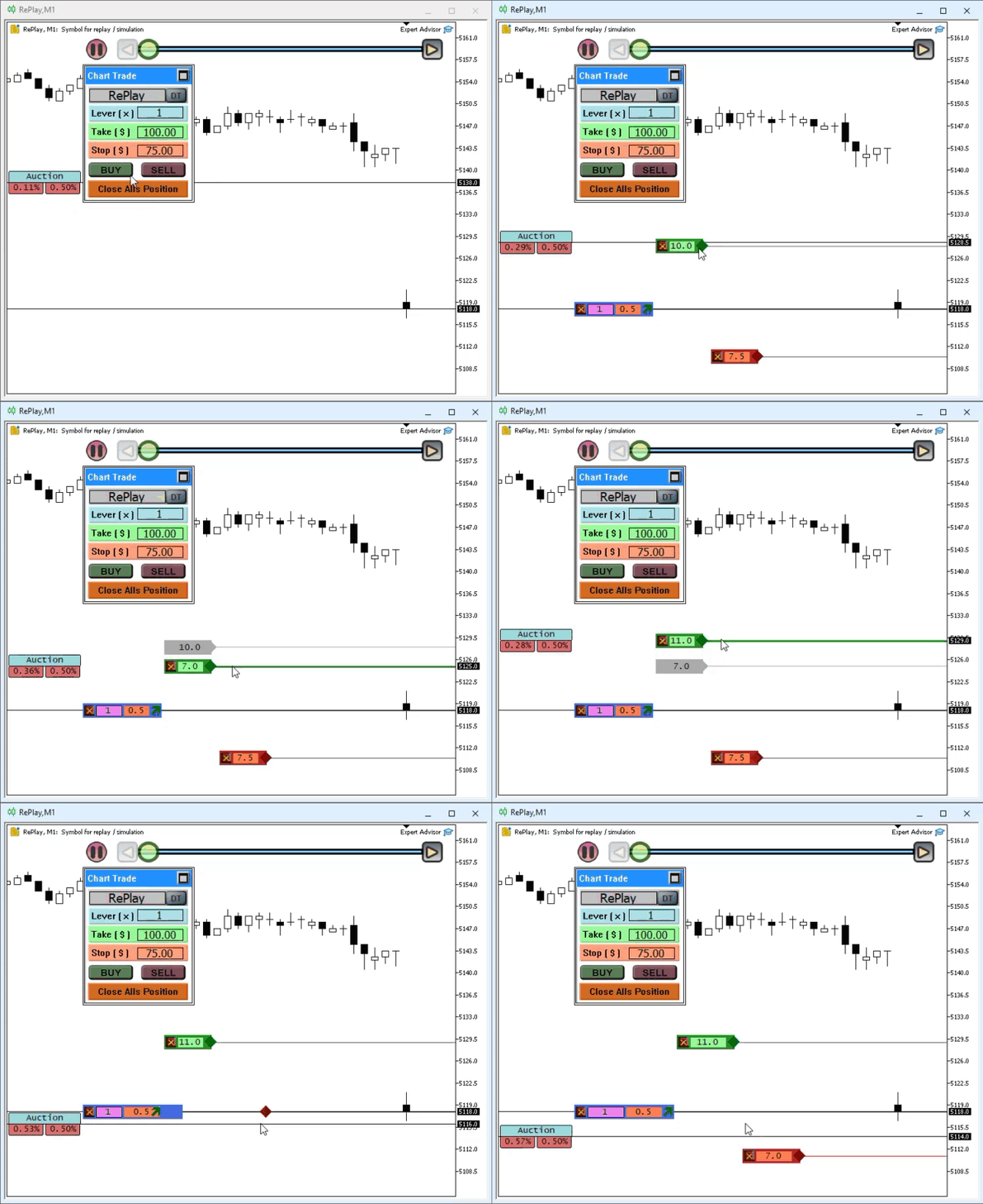
This animation shows the moment a position is opened. The following animation shows how the result for the position is updated.
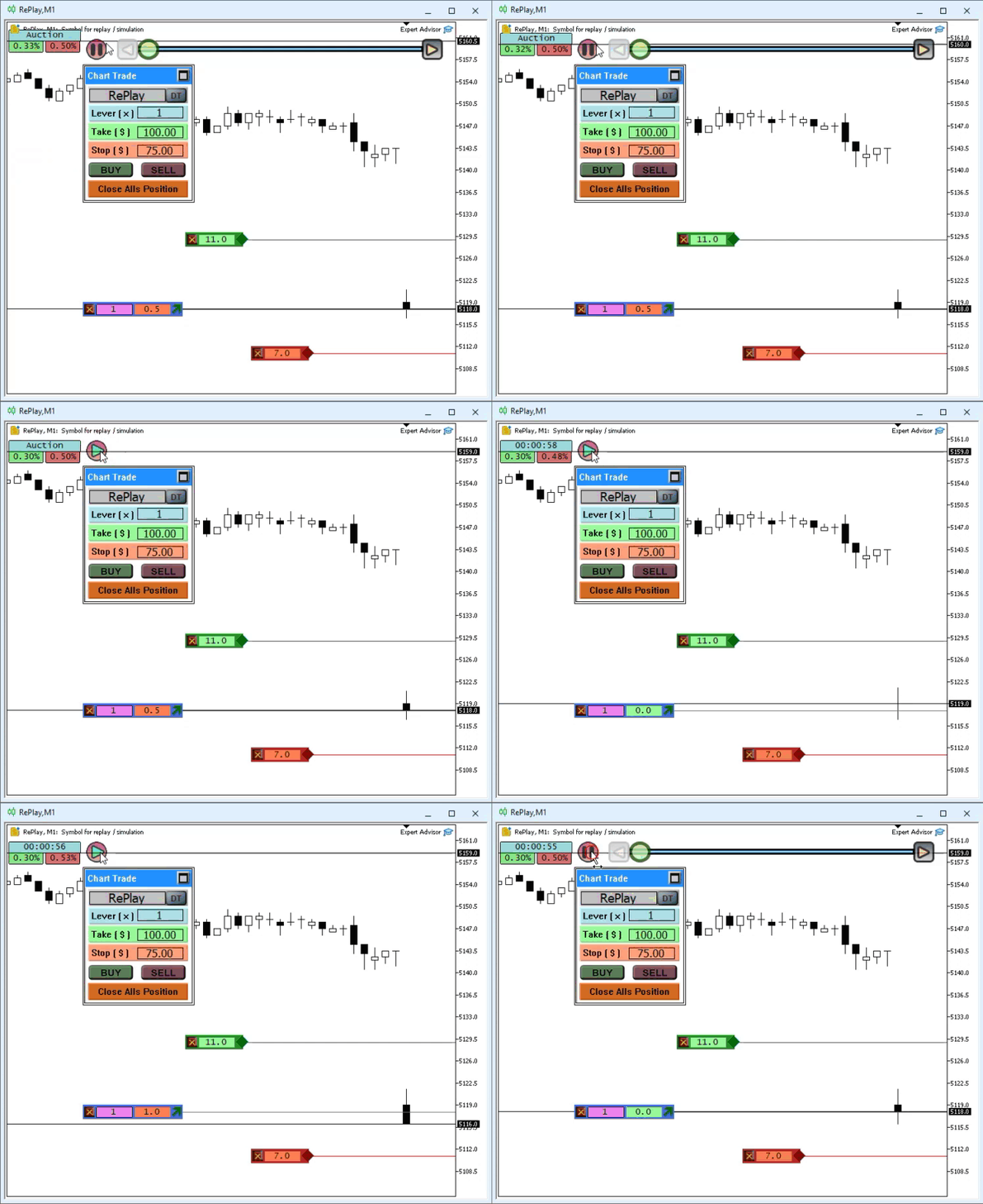
As you can see, the system works almost exactly the same way as it would if it were connected to a real trading server. However, at this point, we can only open positions. The position will still not be closed if the price reaches the take-profit or stop-loss line. We also cannot close it by clicking the close button located on the opening price line. Everything else works perfectly and exactly as expected. Nevertheless, the system still needs some improvements. Keep in mind that this was just the first test; we aren't implementing anything particularly ambitious just yet. However, if you leave this code snippet as shown, you can simulate a HEDGING account, even if the symbol is set up for a NETTING account. So, we will implement this even before we try to do it for real.
Great. We already know that we will be able to use the system with symbols intended for HEDGING accounts, since new positions can be opened even using symbols configured for NETTING accounts. However, we must clearly distinguish between the two cases. You might think this is crazy, but it's not. It's been done this way for a very long time. All we need is for the C_Orders class to receive the data needed to distinguish between a symbol intended for a NETTING account and a symbol intended for a HEDGING account. It's very simple. If you examine the code for the replay/simulation system, you'll find the SetSymbolInfos function in the C_FileTicks class. In this function, we set the value of SYMBOL_TRADE_CALC_MODE to specify how the position will be calculated. However, unlike a system connected to a live account, here we can ignore some of the calculation criteria for now and use only two values to correctly distinguish between account types.
The replay/simulation system already includes a mechanism for distinguishing between these two types of accounts, but now we need to implement it in the C_Orders class as well. You can do this differently from the way I will show you. However, the way I do this should also create—or, more precisely, simulate—a certain delay between the user's request and the server's response. Such a delay always exists, including because of distance. Keep in mind that the signal is not transmitted instantly: it takes some time to travel from your device to the server. To partially simulate this delay, we will modify the code of the C_Orders class as shown below.
092. //+------------------------------------------------------------------+
093.         void SimulateServer(MqlTradeTransaction &trans, MqlTradeResult &result)
094.         {
095.             ENUM_SYMBOL_CALC_MODE Account = (ENUM_SYMBOL_CALC_MODE)SymbolInfoInteger(def_SymbolReplay, SYMBOL_TRADE_CALC_MODE);
096.
097.             switch (m_Base.TradeRequest.action)
098.             {
099.                 case TRADE_ACTION_SLTP:
100.                     result.retcode = (ExecCommandSQL(StringFormat("UPDATE tb_Replay SET sl = %f, tp = %f WHERE ticket = %d;",
101.                                                                  m_Base.TradeRequest.sl,
102.                                                                  m_Base.TradeRequest.tp,
103.                                                                  m_Base.TradeRequest.position)) ? TRADE_RETCODE_DONE : TRADE_RETCODE_INVALID);
104.                     trans.type = TRADE_TRANSACTION_REQUEST;
105.                     result.order =  m_Base.TradeRequest.position;
106.                     break;
107.                 case TRADE_ACTION_DEAL:
108.                     Decode_TRADE_ACTION_DEAL(trans, result, Account == SYMBOL_CALC_MODE_EXCH_STOCKS);
109.                     break;
110.             }
111.             OnTradeTransaction(trans, m_Base.TradeRequest, result);
112.         }
113. //+------------------------------------------------------------------+
C_Orders Class Snippet
Notice that on line 95, we get the data we need. This query will be executed every time we simulate the server. Then we'll use that same value on line 108. I'm doing this to add a slight delay to the remaining calls. I know that line 95 will execute very quickly, but if you want to achieve a more realistic delay, you can add a Sleep call before executing line 97. The decision is up to you, dear reader. For now, I don't want to overcomplicate the explanation and make it harder to understand. Please also note that on line 108, we will be passing a boolean value rather than a numeric value. Simply put, we will pass true if this is a NETTING account, and false if this is a HEDGING account.
Great. Now let's return to the Decode_TRADE_ACTION_DEAL method. Although this method worked, its current implementation isn't entirely suitable, since duplicate values may appear in the ticket field. This is because the previous version was intended solely to verify the system's functionality. Now we need to fix the code. The new fragment, which already includes some additional instructions, is provided below.
067. //+------------------------------------------------------------------+
068.         void Decode_TRADE_ACTION_DEAL(MqlTradeTransaction &trans, MqlTradeResult &result, const bool IsNetting)
069.         {
070.             struct stLocal
071.             {
072.                 ulong value;
073.             }Info;
074.             C_InServer *UseLocal;
075.
076.             trans.type = TRADE_TRANSACTION_REQUEST;
077.             if ((IsNetting) && (m_Base.TradeRequest.position == 0))
078.             {
079.                 result.retcode = (ExecRequestOfData("SELECT tb.ticket FROM tb_Replay AS tb WHERE tb.history = 0;") ? TRADE_RETCODE_DONE : TRADE_RETCODE_ERROR);
080.                 result.retcode = (result.retcode != TRADE_RETCODE_DONE ? result.retcode : (GetRegisterOfRequest(Info) ? TRADE_RETCODE_DONE : TRADE_RETCODE_ERROR));
081.                 m_Base.TradeRequest.position = (result.retcode == TRADE_RETCODE_DONE ? Info.value : 0);
082.             }
083.             if (m_Base.TradeRequest.position == 0)
084.             {
085.                 if ((result.retcode = (ExecRequestOfData("SELECT COUNT(*) FROM tb_Replay;")) ? TRADE_RETCODE_DONE : TRADE_RETCODE_ERROR) == TRADE_RETCODE_ERROR) return;
086.                 if ((result.retcode = (GetRegisterOfRequest(Info) ? TRADE_RETCODE_DONE : TRADE_RETCODE_ERROR)) == TRADE_RETCODE_ERROR) return;
087.                 result.order = Info.value + 10;
088.                 result.retcode = (ExecCommandSQL(StringFormat("INSERT INTO tb_Replay (ticket, type, volume, price, sl, tp, history) values (%d, %d, %f, %f, %f, %f, %d);",
089.                                                                             result.order,
090.                                                                             m_Base.TradeRequest.type,
091.                                                                             m_Base.TradeRequest.volume,
092.                                                                             m_Base.TradeRequest.price,
093.                                                                             m_Base.TradeRequest.sl,
094.                                                                             m_Base.TradeRequest.tp,
095.                                                                             0
096.                                                                            )) ? TRADE_RETCODE_DONE : TRADE_RETCODE_ERROR);
097.             } else
098.             {
099.                 UseLocal = new C_InServer();
100.
101.                 (*UseLocal)._PositionSelectByTicket(m_Base.TradeRequest.position);
102.                 if (UseLocal._PositionGetInteger(POSITION_TYPE) == m_Base.TradeRequest.type)
103.                 {
104.                     m_Base.TradeRequest.price = NormalizeDouble(((*UseLocal)._PositionGetDouble(POSITION_PRICE_OPEN) * (*UseLocal)._PositionGetDouble(POSITION_VOLUME) +
105.                                                           m_Base.TradeRequest.price * m_Base.TradeRequest.volume) /
106.                                                           (UseLocal._PositionGetDouble(POSITION_VOLUME) + m_Base.TradeRequest.volume), (int)SymbolInfoInteger(def_SymbolReplay, SYMBOL_DIGITS));
107.                     m_Base.TradeRequest.sl = NormalizeDouble((m_Base.TradeRequest.sl + (*UseLocal)._PositionGetDouble(POSITION_SL)) / 2, (int)SymbolInfoInteger(def_SymbolReplay, SYMBOL_DIGITS));
108.                     m_Base.TradeRequest.tp = NormalizeDouble((m_Base.TradeRequest.tp + (*UseLocal)._PositionGetDouble(POSITION_TP)) / 2, (int)SymbolInfoInteger(def_SymbolReplay, SYMBOL_DIGITS));
109.                     m_Base.TradeRequest.volume += (*UseLocal)._PositionGetDouble(POSITION_VOLUME);
110.
111.                     result.retcode = (ExecCommandSQL(StringFormat("UPDATE tb_Replay SET volume = %f, price = %f, sl = %f, tp = %f;",
112.                                                                                 m_Base.TradeRequest.volume,
113.                                                                                 m_Base.TradeRequest.price,
114.                                                                                 m_Base.TradeRequest.sl,
115.                                                                                 m_Base.TradeRequest.tp
116.                                                                                 )) ? TRADE_RETCODE_DONE : TRADE_RETCODE_ERROR);
117.                     if (result.retcode == TRADE_RETCODE_DONE)
118.                     {
119.                         trans.type = TRADE_TRANSACTION_HISTORY_ADD;
120.                         trans.order = m_Base.TradeRequest.position;
121.                         trans.position = m_Base.TradeRequest.position;
122.                         OnTradeTransaction(trans, m_Base.TradeRequest, result);
123.                     }
124.                 }
125.
126.                 delete UseLocal;
127.             }
128.         }
129. //+------------------------------------------------------------------+
C_Orders Class Snippet
Now pay close attention, because this is where things start to get a little more complicated. Nevertheless, there is no reason to panic over a flood of details. At first glance, what we're doing here might seem a little confusing, but it's actually not that complicated. Notice that on line 74, we declare a local variable. This will allow us to access the database without interfering with any other database operations that the Expert Advisor may perform.
On line 77, we perform a check to determine whether we are dealing with a HEDGING account or a NETTING account, since this class must perform different operations for each account type. We also check whether the "position" field contains a ticket. If the request comes from ToMarket, this field will be 0, unlike when the call comes from ClosePosition. We'll look at this second case later. If the condition on line 77 is met, we should obtain the ticket of the open position. This is done on line 81.
Now pay close attention, because this is an important point. If we are working with a NETTING account and the query does not return any open positions, `result.retcode` will be set to `TRADE_RETCODE_ERROR`. If the request returns an open position, its ticket will be stored in `m_Base.TradeRequest.position`. This is important because on line 83, we will be checking this particular variable.
Therefore, if we are on a HEDGING account or if the query does not return any open positions on a NETTING account, the condition on line 83 will be met, and we will proceed to open the position. Since several positions may have been closed previously, on line 85 we count the entries in the table to generate a new ticket. This way, we avoid a situation where two positions or operations are assigned the same ticket. The rest works just as we've seen before.
If, however, a position is specified, the condition on line 83 will not be met, and control will proceed to line 97. This can occur with two types of calls: one originates from ClosePosition, and the other from ToMarket. In the latter case, we can close the position, reverse it—that is, close it and open another one in the opposite direction—or increase its volume in the same direction to recalculate its average price. Since we're dealing with three different operations, we need to process them separately, as each one produces a different result.
In the previous snippet, we began with a scenario in which the user requests an increase in the volume of a position in the same direction—that is, a recalculation of its average opening price. Here, we need to decide what to do with the take-profit and stop-loss prices. In this implementation, I assume that these prices will also be recalculated as an average. However, not all platforms necessarily work that way. The reason is simple. When a trader increases a position, some platforms, when recalculating its average price, retain the original take-profit and stop-loss prices of the initial position. In this way, they preserve the original logic of the strategy, and these prices can serve as partial closing points for the newly opened volume.
Since I assume that retaining the original take-profit and stop-loss prices is not part of the strategy, I will make the system recalculate the average values of these prices as well. Dear reader, if you wish, you can change this behavior. However, don't forget to also modify the position indicator so that it displays the resulting prices. Otherwise, you may encounter problems when using the replay/simulation system.
Now that we've figured out how we are going to recalculate these prices, we can move on to the next point. Keep in mind that we are not closing the position yet. The system simply opens it and updates it as the user interacts with it. Closing a position using a call from ClosePosition is very similar to a position reversal. The difference between these two operations lies in the requested volume. Therefore, we can process them using the same block of code if we check this volume to determine whether the request should be limited to closing an open position or whether, in addition to closing it, a new position should be opened in the opposite direction. Personally, I don't usually reverse a position during a trade. I prefer to close it and wait for a new entry. For this reason, I cannot say with complete certainty whether the position's ticket changes when it is reversed. Nevertheless, in this implementation, we will close the current position and open a new one in the opposite direction when the operation involves a position reversal. To do this, we need to replace the previous snippet with the one shown below.
067. //+------------------------------------------------------------------+
068.         void Decode_TRADE_ACTION_DEAL(MqlTradeTransaction &trans, MqlTradeResult &result, const bool IsNetting)
069.         {
070. #define macro_NewPosition     {                                                                                                                                            \
071.                 if ((result.retcode = (ExecRequestOfData("SELECT COUNT(*) FROM tb_Replay;")) ? TRADE_RETCODE_DONE : TRADE_RETCODE_ERROR) == TRADE_RETCODE_ERROR) return;   \
072.                 if ((result.retcode = (GetRegisterOfRequest(Info) ? TRADE_RETCODE_DONE : TRADE_RETCODE_ERROR)) == TRADE_RETCODE_ERROR) return;                             \
073.                 result.order = Info.value + 10;                                                                                                                            \
074.                 result.retcode = (ExecCommandSQL(StringFormat("INSERT INTO tb_Replay (ticket, type, volume, price, sl, tp, history) values (%d, %d, %f, %f, %f, %f, %d);", \
075.                                                                             result.order,                                                                                  \
076.                                                                             m_Base.TradeRequest.type,                                                                      \
077.                                                                             m_Base.TradeRequest.volume,                                                                    \
078.                                                                             m_Base.TradeRequest.price,                                                                     \
079.                                                                             m_Base.TradeRequest.sl,                                                                        \
080.                                                                             m_Base.TradeRequest.tp,                                                                        \
081.                                                                             0                                                                                              \
082.                                                                            )) ? TRADE_RETCODE_DONE : TRADE_RETCODE_ERROR);                                                 \
083.                                 }
084.
085. #define macro_History if (result.retcode == TRADE_RETCODE_DONE) {                             \
086.                                     trans.type = TRADE_TRANSACTION_HISTORY_ADD;               \
087.                                     trans.order = m_Base.TradeRequest.position;               \
088.                                     trans.position = m_Base.TradeRequest.position;            \
089.                                     OnTradeTransaction(trans, m_Base.TradeRequest, result); }
090.
091.             struct stLocal
092.             {
093.                 ulong value;
094.             }Info;
095.             C_InServer *UseLocal;
096.
097.             trans.type = TRADE_TRANSACTION_REQUEST;
098.             if ((IsNetting) && (m_Base.TradeRequest.position == 0))
099.             {
100.                 result.retcode = (ExecRequestOfData("SELECT tb.ticket FROM tb_Replay AS tb WHERE tb.history = 0;") ? TRADE_RETCODE_DONE : TRADE_RETCODE_ERROR);
101.                 result.retcode = (result.retcode != TRADE_RETCODE_DONE ? result.retcode : (GetRegisterOfRequest(Info) ? TRADE_RETCODE_DONE : TRADE_RETCODE_ERROR));
102.                 m_Base.TradeRequest.position = (result.retcode == TRADE_RETCODE_DONE ? Info.value : 0);
103.             }
104.             if (m_Base.TradeRequest.position == 0) macro_NewPosition else
105.             {
106.                 UseLocal = new C_InServer();
107.
108.                 (*UseLocal)._PositionSelectByTicket(m_Base.TradeRequest.position);
109.                 if (UseLocal._PositionGetInteger(POSITION_TYPE) == m_Base.TradeRequest.type)
110.                 {
111.                     m_Base.TradeRequest.price = NormalizeDouble(((*UseLocal)._PositionGetDouble(POSITION_PRICE_OPEN) * (*UseLocal)._PositionGetDouble(POSITION_VOLUME) +
112.                                                           m_Base.TradeRequest.price * m_Base.TradeRequest.volume) /
113.                                                           (UseLocal._PositionGetDouble(POSITION_VOLUME) + m_Base.TradeRequest.volume), (int)SymbolInfoInteger(def_SymbolReplay, SYMBOL_DIGITS));
114.                     m_Base.TradeRequest.sl = NormalizeDouble((m_Base.TradeRequest.sl + (*UseLocal)._PositionGetDouble(POSITION_SL)) / 2, (int)SymbolInfoInteger(def_SymbolReplay, SYMBOL_DIGITS));
115.                     m_Base.TradeRequest.tp = NormalizeDouble((m_Base.TradeRequest.tp + (*UseLocal)._PositionGetDouble(POSITION_TP)) / 2, (int)SymbolInfoInteger(def_SymbolReplay, SYMBOL_DIGITS));
116.                     m_Base.TradeRequest.volume += (*UseLocal)._PositionGetDouble(POSITION_VOLUME);
117.
118.                     result.retcode = (ExecCommandSQL(StringFormat("UPDATE tb_Replay SET volume = %f, price = %f, sl = %f, tp = %f;",
119.                                                                                 m_Base.TradeRequest.volume,
120.                                                                                 m_Base.TradeRequest.price,
121.                                                                                 m_Base.TradeRequest.sl,
122.                                                                                 m_Base.TradeRequest.tp
123.                                                                                 )) ? TRADE_RETCODE_DONE : TRADE_RETCODE_ERROR);
124.                     macro_History;
125.                 } else
126.                 {
127.                     m_Base.TradeRequest.volume = m_Base.TradeRequest.volume - (*UseLocal)._PositionGetDouble(POSITION_VOLUME);
128.
129.                     result.retcode = (ExecCommandSQL(StringFormat("UPDATE tb_Replay SET history = 1 WHERE ticket = %d;",
130.                                                                                 m_Base.TradeRequest.position
131.                                                                                 )) ? TRADE_RETCODE_DONE : TRADE_RETCODE_ERROR);
132.                     macro_History;
133.                     trans.type = TRADE_TRANSACTION_REQUEST;
134.                     macro_NewPosition;
135.                 }
136.
137.                 delete UseLocal;
138.             }
139. #undef macro_History
140. #undef macro_NewPosition
141.         }
142. //+------------------------------------------------------------------+
C_Orders Snippet
This code snippet implements both a position reversal—closing the current position and opening another in the opposite direction—and the closing of a specific position when the button located on the line of its opening price is clicked. However, the Chart Trade button, which is intended to close all positions, will not yet be able to close them. The reason is simple: we don't store the magic number received in the request in the database. This value makes it possible to determine which Expert Advisor opened each position and is used when searching for positions that need to be closed. At this stage, we have two options. Dear reader, you should choose the option that best suits your needs. The first option is to modify the database to store the Expert Advisor's magic number in each table record. The second option is to omit the magic number check when selecting the positions to be closed. Let's take a look at how each of these options can be implemented. Remember that you need to choose one of these options; there's no point in implementing both solutions.
Remove the magic number check
To remove this check and ensure that all positions are closed when you click the Chart Trade button, all you need to do is modify the code snippet below.
221. //+------------------------------------------------------------------+
222.         void CloseAllsPosition(void)
223.         {
224.             for (int count = _PositionsTotal() - 1; count >= 0; count--)
225.             {
226.                 if (_PositionGetSymbol(count) != m_ChartTrade.Data.szContract) continue;
227.                 if (_PositionGetInteger(POSITION_MAGIC) != m_Base.MagicNumber) continue;
228.                 ClosePosition(_PositionGetInteger(POSITION_TICKET));
229.             }
230.         };
231. //+------------------------------------------------------------------+
C_Orders Snippet
All you need to do is delete line 227, which, as you can see, is struck through in this snippet. However, although this solution works very well, it does not allow you to track and distinguish between the operations automatically performed by each Expert Advisor. In the same database created by the replay/simulation system, you'll be able to see when each Expert Advisor performed a particular operation.
By comparing this data—which is very easy to do using SQL—you can identify points where several Expert Advisors interpret the market in the same way, even if they use different timeframes or trading models. Without a doubt, this data comparison will prove very useful to many developers of trading setups. However, to do that, we'll have to change a few details. Let's see how to do this in the next section.
Adding the magic number
The magic number is always present in the requests received by the C_Orders class. To use it when selecting and closing positions, we must store it in every record in the table. To do this, simply modify the code in the following snippet.
01. //+------------------------------------------------------------------+
02. #property copyright "Daniel Jose"
03. //+------------------------------------------------------------------+
04. #include "..\Defines.mqh"
05. #include "..\SQL\C_ReplayDataBase.mqh"
06. //+------------------------------------------------------------------+
07. class C_InServer : public C_ReplayDataBase
08. {
09.     private    :
10.         bool    m_IsReplay;
11.         struct stLocal
12.         {
13.             ulong   numberMagic,
14.                     ticket;
15.             int     type;
16.             double  volume,
17.                     price,
18.                     sl,
19.                     tp;
20.         }m_Info;
21.     public    :
22. //+------------------------------------------------------------------+
23.         C_InServer()
24.             :C_ReplayDataBase(),
25.             m_IsReplay(_Symbol == def_SymbolReplay)
26.         {
27.             ZeroMemory(m_Info);
28.             ExecCommandSQL("CREATE TABLE IF NOT EXISTS tb_Replay ( magic, ticket, type, volume, price, sl, tp, history );");
29.         }
30. //+------------------------------------------------------------------+
                                   .
                                   .
                                   .
49. //+------------------------------------------------------------------+
50.     inline const long _PositionGetInteger(ENUM_POSITION_PROPERTY_INTEGER arg)
51.     {
52.         if (!m_IsReplay)
53.             return PositionGetInteger(arg);
54.
55.         switch (arg)
56.         {
57.             case POSITION_TICKET          : return (long) m_Info.ticket;
58.             case POSITION_TIME            : break;
59.             case POSITION_TIME_MSC        : break;
60.             case POSITION_TIME_UPDATE     : break;
61.             case POSITION_TIME_UPDATE_MSC : break;
62.             case POSITION_TYPE            : return (long) m_Info.type;
63.             case POSITION_MAGIC           : return (long) m_Info.numberMagic;
64.             case POSITION_IDENTIFIER      : break;
65.         }
66.
67.         return 0;
68.     }
69. //+------------------------------------------------------------------+
Snippet from C_InServer
Observe that first, on line 13, we declare a member that will store the magic number. Next, on line 28, we add the magic column to the CREATE TABLE statement. Note one detail: for this new definition to apply, the database must not already exist. Otherwise, the table will retain its previous structure, and the column will not be created. You can also add the magic column to an existing table using the ALTER TABLE command. If you don't know how to do this, refer to the SQL documentation.
Finally, on line 63, we read the magic column from the selected record and return that value as the magic number of the position. After making this change, we also need to modify the C_Orders class so that it records this number when creating the corresponding record and updates it as needed. These changes are even simpler, as the following snippet shows.
67. //+------------------------------------------------------------------+
68.         void Decode_TRADE_ACTION_DEAL(MqlTradeTransaction &trans, MqlTradeResult &result, const bool IsNetting)
69.         {
70. #define macro_NewPosition     {                                                                                                                                           \
71.                 if ((result.retcode = (ExecRequestOfData("SELECT COUNT(*) FROM tb_Replay;")) ? TRADE_RETCODE_DONE : TRADE_RETCODE_ERROR) == TRADE_RETCODE_ERROR) return;  \
72.                 if ((result.retcode = (GetRegisterOfRequest(Info) ? TRADE_RETCODE_DONE : TRADE_RETCODE_ERROR)) == TRADE_RETCODE_ERROR) return;                            \
73.                 result.order = Info.value + 10;                                                                                                                           \
74.                 result.retcode = (ExecCommandSQL(StringFormat("INSERT INTO tb_Replay (magic, ticket, type, volume, price, sl, tp, history)"                               \
75.                                                                                                  "values (%I64u, %d, %d, %f, %f, %f, %f, %d);",                           \
76.                                                                             m_Base.TradeRequest.magic,                                                                    \
77.                                                                             result.order,                                                                                 \
78.                                                                             m_Base.TradeRequest.type,                                                                     \
79.                                                                             m_Base.TradeRequest.volume,                                                                   \
80.                                                                             m_Base.TradeRequest.price,                                                                    \
81.                                                                             m_Base.TradeRequest.sl,                                                                       \
82.                                                                             m_Base.TradeRequest.tp,                                                                       \
83.                                                                             0                                                                                             \
84.                                                                            )) ? TRADE_RETCODE_DONE : TRADE_RETCODE_ERROR);                                                \
85.                                 }
86.
87.                                                             .
88.                                                             .
89.                                                             .
Snippet from C_Orders
See how easy they are to implement. They do not even need to be explained, nor does the entire code need to be shown again, because the solution has already been implemented. Thus, when the Chart Trade button is clicked to close all positions, the class will be able to select the records whose magic numbers match the Expert Advisor and close those positions. In addition, you can now use multiple Expert Advisors in the replay/simulation system and create a database that will allow you to analyze each one in detail. Each record will store the magic number of the Expert Advisor that performed the operation, so you will be able to compare their data for the same period and the same symbol. This will make it easy to determine in which scenario it is better to use one or another of them.
I am not going to compare the replay/simulation system with the MetaTrader 5 Strategy Tester here, although certain comparisons naturally suggest themselves. However, do not get confused, dear reader. The replay/simulation system is being developed for a completely different purpose. Its purpose is to allow traders and users to test various strategies through a form of simulation equivalent to a blind test: what is known as forward testing. Unlike backtesting, whose purpose is to identify patterns in historical data, in forward testing we check whether our model works without being able to see future bars. This is important because when trying to perform proper backtesting, there is always the temptation to peek at subsequent bars. This completely defeats the purpose of any model being evaluated.
Concluding Thoughts
In this article, I presented our system for simulating market operations in order to perform the first operations in the replay/simulation system. Although the system is almost ready, we still need to develop and implement a few things before we can consider the simulation of market orders complete. It will also be necessary to make a few changes in order to properly configure the entire system and ensure that it works correctly.
However, despite everything we have already implemented, I admit that I am tired of still being stuck developing this system. Although many people consider this difficult to implement and develop, I must admit that I expected it to be even more difficult. Developing it turned out to be much easier than it seemed at the beginning of this series of articles. Since I have grown tired of writing so much about this system, I am going to take a break.
Before doing that, I will show you how to finish at least this part devoted to the simulation of market operations, since there are still some details left to implement. Although I have tried to include them in this article, some details still need to be explained, and I will change others so that the applications behave more as they would if they were connected to a real trading server. For now, I will not include them among the attached files, since they are not ready for use yet. However, I will do so soon. See you in the next article, which may be the last one at this stage of the replay/simulation system’s development.
| File | Description |
|---|---|
| Experts\Expert Advisor.mq5 | Shows interaction between Chart Trade and the Expert Advisor. Mouse Study is required for interaction. |
| Indicators\Chart Trade.mq5 | Creates a window in which you can configure the order to be sent. Mouse Study is required for interaction. |
| Indicators\Market Replay.mq5 | Creates the necessary controls for interacting with the replay/simulation service. Mouse Study is required for interaction. |
| Indicators\Mouse Study.mq5 | Enables user interaction with the graphical controls. This is necessary both for using the replay/simulation system and for trading in the real market. |
| Indicators\Order Indicator.mq5 | Displays market orders and allows users to interact with and manage them. |
| Indicators\Position View.mq5 | Responsible for displaying market positions and allowing users to interact with and manage them. |
| Services\Market Replay.mq5 | Creates and maintains the market replay/simulation service. This is the main file for the entire system. |
Translated from Portuguese by MetaQuotes Ltd.
Original article: https://www.mql5.com/pt/articles/13555
Warning: All rights to these materials are reserved by MetaQuotes Ltd. Copying or reprinting of these materials in whole or in part is prohibited.
This article was written by a user of the site and reflects their personal views. MetaQuotes Ltd is not responsible for the accuracy of the information presented, nor for any consequences resulting from the use of the solutions, strategies or recommendations described.

 MQL5 Expert Advisor Builder (Part 1): A Simple Static Template
 Developing a Multi-Currency Expert Advisor (Part 32): Secrets of the Optimization Project Creation Step (II)
 Features of Experts Advisors
 Python-MetaTrader 5 Strategy Tester (Part 06): MQL5-Style Backtesting for Python Expert Advisors

- Free trading apps
- Over 8,000 signals for copying
- Economic news for exploring financial markets
You agree to website policy and terms of use