

Market Simulation: Position View (XVI)
 505
505
 0
0

Introduction
Hello, everyone, and welcome to a new article in our series on how to create a replay/simulation system.
In the previous article “Market Simulation: Position View (XV)”, we finally reached the point where we were able to explain quite clearly how—and, most importantly, why—the replay/simulation system is implemented in this particular way. I think many of you did not even realize that something like this could be done using MQL5, since I have not found any earlier resources that used the same approach described in the previous article.
I know that, at first glance, this kind of material can be a little intimidating and may confuse or overwhelm enthusiasts. However, dear reader, my goal is not to make you give up or see what I am explaining as unattainable. Quite the opposite: I want to motivate you to learn and master new programming techniques, broaden your perspective, and go beyond your usual way of thinking.
In this article, we will cover something simpler but essential so that you can properly understand the content of the previous article. Here, we will make the position indicator a little more user-friendly and visually appealing.
Just a few more steps
Good. As you have probably noticed, the elements of the position indicator's interface still look somewhat disconnected. Although this does not make it any harder to use, we can improve its appearance for the end user. To do this, we will create a few elements, add some information, and make a few changes. These are minor changes, but they will make the position indicator more enjoyable to use.
Adding a background object to the position indicator is a very simple and straightforward task. Below, you can see the necessary changes and the sections of code where they are applied. Note that this is only a code snippet, so you will need the complete code, which is available in the previous articles:
001. //+------------------------------------------------------------------+
002. #property copyright "Daniel Jose"
003. //+------------------------------------------------------------------+
004. #define def_NameHLine       m_Info.szPrefixName + "#HLINE"
005. #define def_NameBtnClose    m_Info.szPrefixName + "#CLOSE"
006. #define def_NameBtnMove     m_Info.szPrefixName + "#MOVE"
007. #define def_NameInfoDirect  m_Info.szPrefixName + "#DIRECT"
008. #define def_NameObjLabel    m_Info.szPrefixName + "#PROFIT"
009. #define def_NameBackGround  m_Info.szPrefixName + "#BACKGROUND"
010. //+------------------------------------------------------------------+

                                 .
                                 .
                                 .

049. //+------------------------------------------------------------------+
050.         void UpdateViewPort(const double price)
051.         {
052.             int x, y;
053.
054.             ChartTimePriceToXY(0, 0, 0, price, x, y);
055.             x = (m_Info.ev == evMsgClosePositionEA ? 150 : (m_Info.ev == evMsgCloseTakeProfit ? 220 : 290));
056.             ObjectSetInteger(0, def_NameHLine, OBJPROP_XDISTANCE, x);
057.             ObjectSetInteger(0, def_NameHLine, OBJPROP_YDISTANCE, y - (m_Info.weight > 1 ? (int)(m_Info.weight / 2) : 0));
058.             ObjectSetInteger(0, def_NameBtnClose, OBJPROP_XDISTANCE, x);
059.             ObjectSetInteger(0, def_NameBtnClose, OBJPROP_YDISTANCE, y);
060.             ObjectSetInteger(0, def_NameObjLabel, OBJPROP_XDISTANCE, x + 10);
061.             ObjectSetInteger(0, def_NameObjLabel, OBJPROP_YDISTANCE, y - (m_Info.Text.Height / 2));
062.             ObjectSetInteger(0, def_NameInfoDirect, OBJPROP_XDISTANCE, x + m_Info.Text.Width + 20);
063.             ObjectSetInteger(0, def_NameInfoDirect, OBJPROP_YDISTANCE, y);
064.             ObjectSetInteger(0, def_NameBtnMove, OBJPROP_XDISTANCE, x + m_Info.Text.Width + 20);
065.             ObjectSetInteger(0, def_NameBtnMove, OBJPROP_YDISTANCE, y);
066.             ObjectSetInteger(0, def_NameBackGround, OBJPROP_XDISTANCE, x - 10);
067.             ObjectSetInteger(0, def_NameBackGround, OBJPROP_YDISTANCE, y - ((m_Info.Text.Height + 5) / 2));
068.         }
069. //+------------------------------------------------------------------+
070. inline void CreateLinePrice(void)
071.         {
072.             string szObj;
073.
074.             CreateObjectGraphics(szObj = def_NameHLine, OBJ_RECTANGLE_LABEL, m_Info._color, (EnumPriority)(ePriorityDefault));
075.             ObjectSetInteger(0, szObj, OBJPROP_BGCOLOR, m_Info._color);
076.             ObjectSetInteger(0, szObj, OBJPROP_XSIZE, TerminalInfoInteger(TERMINAL_SCREEN_WIDTH));
077.             ObjectSetInteger(0, szObj, OBJPROP_BORDER_TYPE, BORDER_FLAT);
078.             ObjectSetInteger(0, szObj, OBJPROP_CORNER, CORNER_LEFT_UPPER);
079.             ObjectSetString(0, szObj, OBJPROP_TOOLTIP, m_Info.szDescr);
080.             macro_LineInFocus(false);
081.             CreateObjectGraphics(szObj = def_NameBackGround, OBJ_RECTANGLE_LABEL, m_Info._color, (EnumPriority)(ePriorityDefault));
082.             ObjectSetInteger(0, szObj, OBJPROP_BGCOLOR, m_Info._color);
083.             ObjectSetInteger(0, szObj, OBJPROP_BORDER_TYPE, BORDER_FLAT);
084.             ObjectSetInteger(0, szObj, OBJPROP_CORNER, CORNER_LEFT_UPPER);
085.             ObjectSetInteger(0, szObj, OBJPROP_XSIZE, m_Info.Text.Width + (m_Info.ev == evMsgClosePositionEA ? 40 : 32));
086.             ObjectSetInteger(0, szObj, OBJPROP_YSIZE, m_Info.Text.Height + 5);
087.         }
088. //+------------------------------------------------------------------+
089. inline void CreateBoxInfo(const bool bMove)
090.         {
091.             string szObj;
092.             const char c[] = {(char)(bMove ? 'u' : (m_Info.bIsBuy ? 236 : 238)), 0};
093.
094.             CreateObjectGraphics(szObj = (bMove ? def_NameBtnMove : def_NameInfoDirect), OBJ_LABEL, clrNONE, (EnumPriority)(ePriorityDefault));
095.             ObjectSetString(0, szObj, OBJPROP_FONT, "Wingdings");
096.             ObjectSetString(0, szObj, OBJPROP_TEXT, CharArrayToString(c));
097.             ObjectSetInteger(0, szObj, OBJPROP_COLOR, (bMove ? (m_Info.ev == evMsgCloseTakeProfit ? clrDarkGreen : clrMaroon) : (m_Info.bIsBuy ? clrDarkGreen : clrMaroon)));
098.             ObjectSetInteger(0, szObj, OBJPROP_FONTSIZE, (bMove ? 17 : 15));
099.             ObjectSetInteger(0, szObj, OBJPROP_ANCHOR, ANCHOR_CENTER);
100.         }
101. //+------------------------------------------------------------------+
C_ElementsTrade Fragment
Note that on line 09, we have added a new definition: this will be the name of the object we are going to create. Since nothing has changed between the definitions block and the UpdateViewPort procedure, there is no point in repeating the entire code here. For simplicity, I am showing only the snippets or functions that have actually changed.
Please note that on lines 66 and 67, we set the position of the object that will serve as the background. There is one interesting thing here. The calculation on line 67 is similar to the one on line 86, where we specify the height of the object being created. However, on line 67, we divide the value by two to position the object correctly on the screen.
The value 10, which is subtracted from the X coordinate on line 66, is due to the fact that the image used in the close button is 16 × 16 pixels in size. Since the image is centered, we need to shift it eight pixels to the left. However, if we stopped there, the background object would start exactly at the left edge of the button image. To leave a small gap, we add two more pixels, resulting in a value of 10, which is used in line 66 to position the object along the X-axis. It is very simple and easy to understand.
Now let's move on to line 97. Please note that I changed the color scheme there. If we had kept the original color scheme, we would not have been able to determine exactly where the object selected for moving was located. We will improve this aspect later, but for now we need to determine its exact position. Therefore, I made its color more vivid so that it would be more visible when the background object is displayed in the position indicator. Now let's take a look at how a background object is created. To do this, look at the code snippet between lines 81 and 86. An object is created there, and its properties are set. Since this is a fairly typical operation, I will just show where the object is created and what properties are assigned to it. I do not think you will have any trouble understanding this code snippet.
At this point, we are almost done. I say “almost” because when a position is opened, the position indicator will be created and positioned correctly, and its elements will be displayed properly. However, we still have two problems. In fact, if you are using a modern computer with a well-configured operating system and without too many MQL5 applications running in MetaTrader 5, you will not encounter any problems other than a minor inconvenience. This happens when you click the button to delete the take profit or stop loss and then decide to create the take profit or stop loss again. In this case, the background object covers part of the move object. Solving this problem is very simple: just modify the UpdatePrice procedure as shown below:
149. //+------------------------------------------------------------------+
150. inline void UpdatePrice(const double open, const double price)
151.         {
152.             ObjectsDeleteAll(0, m_Info.szPrefixName);
153.             if (price > 0)
154.             {
155.                 CreateLinePrice();
156.                 CreateButtonClose();
157.             }
158.             CreateBoxInfo(m_Info.ev != evMsgClosePositionEA);
159.             if (price > 0)
160.                 CreateObjectInfoText();
161.             m_Info.open = open;
162.             UpdateViewPort(m_Info.price = (price > 0 ? price : open));
163.             if (m_Info.ev != evMsgClosePositionEA)
164.                 ViewValue(m_Info.bIsBuy ? m_Info.price - m_Info.open : m_Info.open - m_Info.price);
165.         }
166. //+------------------------------------------------------------------+
C_ElementsTrade fragment
Note that we made only a small change to the code, but it completely solves the problem. You may be concerned that moving the mouse to change the take profit or stop loss value could result in an excessive number of calls or some similar situation, such as objects being deleted on line 152 and immediately recreated. If you have come to that conclusion just by looking at this code, I recommend that you read the previous articles, because you do not yet understand how all of this works.
Great, our position indicator looks quite appealing. Nevertheless, it still has some problems. For example, when the take profit or stop loss lines are moved, they collide with each other, and at certain points the objects overlap. Later, we will develop a more suitable solution. For now, we can use a simpler solution, since NETTING accounts will have only one position indicator on the chart. Although HEDGING accounts allow you to have more than one position indicator on the chart, for now we will not worry about the presence of other position indicators. But this is only temporary.
The easiest way is to offset the objects correctly along the X-axis so that they do not overlap. At this stage, we just need to change the values in one place in the code. The following snippet shows where this needs to be done:
049. //+------------------------------------------------------------------+
050.         void UpdateViewPort(const double price)
051.         {
052.             int x, y;
053.
054.             ChartTimePriceToXY(0, 0, 0, price, x, y);
055.             x = (m_Info.ev == evMsgClosePositionEA ? 150 : (m_Info.ev == evMsgCloseTakeProfit ? 260 : 370));
056.             ObjectSetInteger(0, def_NameHLine, OBJPROP_XDISTANCE, x);
057.             ObjectSetInteger(0, def_NameHLine, OBJPROP_YDISTANCE, y - (m_Info.weight > 1 ? (int)(m_Info.weight / 2) : 0));
Code snippet from C_ElementsTrade
Compare this snippet with the previous ones, and you will be able to see the change. Since this change is fairly easy to understand, I will not go into detail. Let's move on to the next task.
Now let's consider the following: many traders prefer to see the financial result displayed rather than a point value. How can we implement both options while making as few changes to our code as possible? Remember that I want the indicator to display both the result in points and its financial equivalent. In a personal application, I would probably use one of these values as a tooltip. In other words, when you hover the mouse pointer over any element of the position indicator, the value stored in the OBJPROP_TOOLTIP property will be displayed. If you assign text to this property, it will be displayed when the pointer is over the chart object.
Nevertheless, many traders may find this mechanism inconvenient or impractical. In addition, many people may find it difficult to interpret this data. Therefore, we should display the financial result the same way we already display values in points. To calculate it, two more values are required: the volume of the open position and the monetary value per point. With this information, we will be able to display the financial result in the same way as the result in points. It is that simple and straightforward.
Displaying the Financial Result
Great. At this stage, there are some things we can do and others we must do. Let's start with the following scenario. We will completely disregard all other aspects and will now express the values in financial terms. To do this, you first need to modify the following snippet of the main code for the position indicator.
001. //+------------------------------------------------------------------+
002. #property copyright "Daniel Jose"
003. #property icon "/Images/Market Replay/Icons/Positions.ico"
004. #property description "Indicator for tracking an open position on the server."
005. #property description "This should preferably be used together with an Expert Advisor."
006. #property description "For more details see the same article."
007. #property version   "1.128"
008. #property link "https://www.mql5.com/pt/articles/13391"
009. #property indicator_chart_window
010. #property indicator_plots 0
011. //+------------------------------------------------------------------+
012. #define def_ShortName "Position View"
013. //+------------------------------------------------------------------+
014. #include <Market Replay\Order System\C_ElementsTrade.mqh>
015. #include <Market Replay\Defines.mqh>
016. //+------------------------------------------------------------------+
017. input ulong user00 = 0;        //For use in an Expert Advisor
018. //+------------------------------------------------------------------+
019. struct st00
020. {
021.     ulong   ticket;
022.     string  szShortName,
023.             szSymbol;
024.     double  priceOpen,
025.             var;
026.     char    digits;
027.     bool    bIsBuy;
028. }m_Infos;
029. //+------------------------------------------------------------------+
030. C_ElementsTrade *Open = NULL, *Stop = NULL, *Take = NULL;
031. //+------------------------------------------------------------------+
032. bool CheckCatch(ulong ticket)
033. {
034.     double vv, vs;
035.
036.     ZeroMemory(m_Infos);
037.     m_Infos.szShortName = StringFormat("%I64u", m_Infos.ticket = ticket);
038.     if (!PositionSelectByTicket(m_Infos.ticket)) return false;
039.     if (ObjectFind(0, m_Infos.szShortName) >= 0)
040.     {
041.         m_Infos.ticket = 0;
042.         return false;
043.     }
044.     m_Infos.szSymbol = PositionGetString(POSITION_SYMBOL);
045.     m_Infos.digits = (char)SymbolInfoInteger(m_Infos.szSymbol, SYMBOL_DIGITS);
046.     vs = SymbolInfoDouble(PositionGetString(POSITION_SYMBOL), SYMBOL_TRADE_TICK_SIZE);
047.     vv = SymbolInfoDouble(PositionGetString(POSITION_SYMBOL), SYMBOL_TRADE_TICK_VALUE);
048.     m_Infos.var = vs / vv;
049.     IndicatorSetString(INDICATOR_SHORTNAME, m_Infos.szShortName);
050.     EventChartCustom(0, evUpdate_Position, ticket, 0, "");
051.
052.     return true;
053. }
054. //+------------------------------------------------------------------+
055. inline void ProfitNow(void)
056. {
057.     double ask, bid;
058.
059.     ask = SymbolInfoDouble(m_Infos.szSymbol, SYMBOL_ASK);
060.     bid = SymbolInfoDouble(m_Infos.szSymbol, SYMBOL_BID);
061.     if (Open != NULL)
062.         (*Open).ViewValue((m_Infos.bIsBuy ? bid - m_Infos.priceOpen : m_Infos.priceOpen - ask));
063. }
064. //+------------------------------------------------------------------+
065. int OnInit()
066. {
067.     IndicatorSetString(INDICATOR_SHORTNAME, def_ShortName);
068.     if (!CheckCatch(user00))
069.     {
070.         ChartIndicatorDelete(0, 0, def_ShortName);
071.         return INIT_FAILED;
072.     }
073.
074.     return INIT_SUCCEEDED;
075. }
076. //+------------------------------------------------------------------+
077. int OnCalculate(const int rates_total, const int prev_calculated, const int begin, const double &price[])
078. {
079.     ProfitNow();
080.
081.     return rates_total;
082. }
083. //+------------------------------------------------------------------+
084. void OnChartEvent(const int id, const long &lparam, const double &dparam, const string &sparam)
085. {
086.     double volume;
087.
088.     if (Open != NULL) (*Open).DispatchMessage(id, lparam, dparam, sparam);
089.     if (Take != NULL) (*Take).DispatchMessage(id, lparam, dparam, sparam);
090.     if (Stop != NULL)    (*Stop).DispatchMessage(id, lparam, dparam, sparam);
091.     switch (id)
092.     {
093.         case CHARTEVENT_CUSTOM + evUpdate_Position:
094.             if (lparam != m_Infos.ticket) break;
095.             if (!PositionSelectByTicket(m_Infos.ticket))
096.             {
097.                 ChartIndicatorDelete(0, 0, m_Infos.szShortName);
098.                 return;
099.             };
100.             if (Open == NULL) Open = new C_ElementsTrade(m_Infos.ticket, evMsgClosePositionEA, clrRoyalBlue, m_Infos.digits, StringFormat("%I64u : Position opening price.", m_Infos.ticket), m_Infos.bIsBuy = (PositionGetInteger(POSITION_TYPE) == POSITION_TYPE_BUY));
101.             if (Take == NULL) Take = new C_ElementsTrade(m_Infos.ticket, evMsgCloseTakeProfit, clrForestGreen, m_Infos.digits, StringFormat("%I64u : Take Profit price.", m_Infos.ticket), m_Infos.bIsBuy);
102.             if (Stop == NULL) Stop = new C_ElementsTrade(m_Infos.ticket, evMsgCloseStopLoss, clrFireBrick, m_Infos.digits, StringFormat("%I64u : Stop Loss price.", m_Infos.ticket), m_Infos.bIsBuy);
103.             volume = PositionGetDouble(POSITION_VOLUME);
104.             (*Open).UpdatePrice(0, m_Infos.priceOpen = PositionGetDouble(POSITION_PRICE_OPEN), volume, m_Infos.var);
105.             (*Take).UpdatePrice(m_Infos.priceOpen, PositionGetDouble(POSITION_TP), volume, m_Infos.var);
106.             (*Stop).UpdatePrice(m_Infos.priceOpen, PositionGetDouble(POSITION_SL), volume, m_Infos.var);
107.             ProfitNow();
108.             break;
109.     }
110.     ChartRedraw();
111. };
112. //+------------------------------------------------------------------+
113. void OnDeinit(const int reason)
114. {
115.     delete Open;
116.     delete Take;
117.     delete Stop;
118. }
119. //+------------------------------------------------------------------+
Main code
I will briefly explain what has changed. Please note that a new variable has appeared on line 25. It is initialized on line 48 with the data obtained on lines 46 and 47. We calculate this value here so we do not have to recalculate it all the time. Since it will not change as long as the position indicator remains on the chart, we will not have to recalculate it. This value is used together with another value defined on line 103. There, we get the volume of the open position. This is because the position volume will change only when the Expert Advisor sends an event to update the position indicator. In some of these cases, the volume of the open position will need to be updated.
Now take a look at lines 104–106, where these two new values are used. Therefore, we should focus on the UpdatePrice procedure, which we will also need to modify. After completing the changes in the main code, we can return to the C_ElementsTrade class.
Good. We know that we will need space to store two new double values. We will not worry about the value passed by the main code, since at this level it is interpreted as a point value. The C_ElementsTrade class will handle converting it and correctly calculating the value that should be displayed as the financial result. To do this, we will add two new variables to the class structure, as shown in the following code snippet:
26. class C_ElementsTrade : private C_Mouse
27. {
28.     private    :
29. //+------------------------------------------------------------------+
30.         struct st00
31.         {
32.             struct st_01
33.             {
34.                 uchar   Width,
35.                         Height,
36.                         digits;
37.             }Text;
38.             ulong       ticket;
39.             string      szPrefixName,
40.                         szDescr;
41.             EnumEvents  ev;
42.             double      price,
43.                         open,
44.                         volume,
45.                         tickValue;
46.             bool        bClick,
47.                         bIsBuy;
48.             char        weight;
49.             color       _color;
50.         }m_Info;
51. //+------------------------------------------------------------------+
52.         void UpdateViewPort(const double price)
Code snippet from C_ElementsTrade
The new variables are shown on lines 44 and 45. Since the constructor guarantees that they are initialized to zero, we do not need to do anything else at this stage. We can go straight to the `UpdatePrice` procedure and initialize them there, as shown in the following code snippet.
151. //+------------------------------------------------------------------+
152. inline void UpdatePrice(const double open, const double price, const double vol = 0, const double var = 0)
153.         {
154.             ObjectsDeleteAll(0, m_Info.szPrefixName);
155.             m_Info.volume = (vol > 0 ? vol : m_Info.volume);
156.             m_Info.tickValue = (var > 0 ? var : m_Info.tickValue);
157.             if (price > 0)
158.             {
159.                 CreateLinePrice();
160.                 CreateButtonClose();
161.                 CreateObjectInfoText();
162.             }
163.             CreateBoxInfo(m_Info.ev != evMsgClosePositionEA);
164.             m_Info.open = open;
165.             UpdateViewPort(m_Info.price = (price > 0 ? price : open));
166.             if (m_Info.ev != evMsgClosePositionEA)
167.                 ViewValue(m_Info.bIsBuy ? m_Info.price - m_Info.open : m_Info.open - m_Info.price);
168.         }
169. //+------------------------------------------------------------------+
Code snippet from C_ElementsTrade
Now, pay attention. The default values for the last two arguments are zero. Why? Because this procedure is called from two places. The first is the main code, from which we will receive nonzero values. The second call source is the DispatchMessage procedure of the C_ElementsTrade class, from which these values come in as zero. This way, we avoid the risk of assigning an incorrect value. Although it might seem tempting to pass the values of the variables we have just declared in the class as arguments, I prefer to specify a default value—ZERO—for these arguments right in the procedure declaration.
Next, take a look at lines 155 and 156, where we check whether the argument values are zero or positive. If they are greater than zero, we initialize or update—depending on the situation—the variables declared on lines 44 and 45.
This way, we no longer need to worry about keeping track of the position volume and tick value. The class already has this data. Therefore, the following change needs to be made to the ViewValue function, which will be responsible for displaying the desired value. The original version is provided below:
169. //+------------------------------------------------------------------+
170.         void ViewValue(const double profit)
171.         {
172.             ObjectSetString(0, def_NameObjLabel, OBJPROP_TEXT, StringFormat("%." + (string)m_Info.Text.digits + "f", (profit < 0 ? -(profit) : profit)));
173.             ObjectSetInteger(0, def_NameObjLabel, OBJPROP_BGCOLOR, (profit >= 0 ? clrPaleGreen : clrCoral));
174.             ChartRedraw();
175.         }
176. //+------------------------------------------------------------------+
Code snippet from C_ElementsTrade
Please note that on line 172, we format the value that will be displayed to the trader. However, what is displayed here is not the result in points but, more precisely, the absolute price change. Therefore, all we need to do is calculate the financial value based on the absolute price change and the values we now have.
169. //+------------------------------------------------------------------+
170.         void ViewValue(const double profit)
171.         {
172.             ObjectSetString(0, def_NameObjLabel, OBJPROP_TEXT, StringFormat("$ %." + (string)m_Info.Text.digits + "f", ((profit < 0 ? -(profit) : profit) / m_Info.var) * m_Info.volume));
173.             ObjectSetInteger(0, def_NameObjLabel, OBJPROP_BGCOLOR, (profit >= 0 ? clrPaleGreen : clrCoral));
174.             ChartRedraw();
175.         }
176. //+------------------------------------------------------------------+
Code snippet from C_ElementsTrade
In principle, this solves the problem of displaying financial results. Why do I say “in principle”? Because now we have a problem with the available space. The displayed values may exceed the available width of the OBJ_EDIT object. When this happens, the information will be clipped, and the displayed data may become completely incomprehensible to the trader. Nevertheless, for testing purposes, we can already see the financial results in the position indicator; all we need to do is compile the code.
Great. Now we have a new problem that requires a more thorough analysis. To clearly explain what we need to consider, let's look at the complete code of the C_ElementsTrade class below, with all the changes made up to this point:
001. //+------------------------------------------------------------------+
002. #property copyright "Daniel Jose"
003. //+------------------------------------------------------------------+
004. #define def_NameHLine       m_Info.szPrefixName + "#HLINE"
005. #define def_NameBtnClose    m_Info.szPrefixName + "#CLOSE"
006. #define def_NameBtnMove     m_Info.szPrefixName + "#MOVE"
007. #define def_NameInfoDirect  m_Info.szPrefixName + "#DIRECT"
008. #define def_NameObjLabel    m_Info.szPrefixName + "#PROFIT"
009. #define def_NameBackGround  m_Info.szPrefixName + "#BACKGROUND"
010. //+------------------------------------------------------------------+
011. #define macro_LineInFocus(A) ObjectSetInteger(0, def_NameHLine, OBJPROP_YSIZE, m_Info.weight = (A ? 3 : 1));
012. //+------------------------------------------------------------------+
013. #define def_PathBtns "Images\\Market Replay\\Orders\\"
014. #define def_Btn_Close def_PathBtns + "Btn_Close.bmp"
015. #resource "\\" + def_Btn_Close;
016. //+------------------------------------------------------------------+
017. #include "..\Auxiliar\C_Mouse.mqh"
018. //+------------------------------------------------------------------+
019. #ifdef def_FontName
020.     "Why are you trying to do this?"
021. #else
022.     #define def_FontName "Lucida Console"
023.     #define def_FontSize 10
024. #endif
025. //+------------------------------------------------------------------+
026. class C_ElementsTrade : private C_Mouse
027. {
028.     private    :
029. //+------------------------------------------------------------------+
030.         struct st00
031.         {
032.             struct st_01
033.             {
034.                 uchar   Width,
035.                         Height,
036.                         digits;
037.             }Text;
038.             ulong       ticket;
039.             string      szPrefixName,
040.                         szDescr;
041.             EnumEvents  ev;
042.             double      price,
043.                         open,
044.                         volume,
045.                         var;
046.             bool        bClick,
047.                         bIsBuy;
048.             char        weight;
049.             color       _color;
050.         }m_Info;
051. //+------------------------------------------------------------------+
052.         void UpdateViewPort(const double price)
053.         {
054.             int x, y;
055.
056.             ChartTimePriceToXY(0, 0, 0, price, x, y);
057.             x = (m_Info.ev == evMsgClosePositionEA ? 150 : (m_Info.ev == evMsgCloseTakeProfit ? 260 : 370));
058.             ObjectSetInteger(0, def_NameHLine, OBJPROP_XDISTANCE, x);
059.             ObjectSetInteger(0, def_NameHLine, OBJPROP_YDISTANCE, y - (m_Info.weight > 1 ? (int)(m_Info.weight / 2) : 0));
060.             ObjectSetInteger(0, def_NameBtnClose, OBJPROP_XDISTANCE, x);
061.             ObjectSetInteger(0, def_NameBtnClose, OBJPROP_YDISTANCE, y);
062.             ObjectSetInteger(0, def_NameObjLabel, OBJPROP_XDISTANCE, x + 10);
063.             ObjectSetInteger(0, def_NameObjLabel, OBJPROP_YDISTANCE, y - (m_Info.Text.Height / 2));
064.             ObjectSetInteger(0, def_NameInfoDirect, OBJPROP_XDISTANCE, x + m_Info.Text.Width + 20);
065.             ObjectSetInteger(0, def_NameInfoDirect, OBJPROP_YDISTANCE, y);
066.             ObjectSetInteger(0, def_NameBtnMove, OBJPROP_XDISTANCE, x + m_Info.Text.Width + 20);
067.             ObjectSetInteger(0, def_NameBtnMove, OBJPROP_YDISTANCE, y);
068.             ObjectSetInteger(0, def_NameBackGround, OBJPROP_XDISTANCE, x - 10);
069.             ObjectSetInteger(0, def_NameBackGround, OBJPROP_YDISTANCE, y - ((m_Info.Text.Height + 5) / 2));
070.         }
071. //+------------------------------------------------------------------+
072. inline void CreateLinePrice(void)
073.         {
074.             string szObj;
075.
076.             CreateObjectGraphics(szObj = def_NameHLine, OBJ_RECTANGLE_LABEL, m_Info._color, (EnumPriority)(ePriorityDefault));
077.             ObjectSetInteger(0, szObj, OBJPROP_BGCOLOR, m_Info._color);
078.             ObjectSetInteger(0, szObj, OBJPROP_XSIZE, TerminalInfoInteger(TERMINAL_SCREEN_WIDTH));
079.             ObjectSetInteger(0, szObj, OBJPROP_BORDER_TYPE, BORDER_FLAT);
080.             ObjectSetInteger(0, szObj, OBJPROP_CORNER, CORNER_LEFT_UPPER);
081.             ObjectSetString(0, szObj, OBJPROP_TOOLTIP, m_Info.szDescr);
082.             macro_LineInFocus(false);
083.             CreateObjectGraphics(szObj = def_NameBackGround, OBJ_RECTANGLE_LABEL, m_Info._color, (EnumPriority)(ePriorityDefault));
084.             ObjectSetInteger(0, szObj, OBJPROP_BGCOLOR, m_Info._color);
085.             ObjectSetInteger(0, szObj, OBJPROP_BORDER_TYPE, BORDER_FLAT);
086.             ObjectSetInteger(0, szObj, OBJPROP_CORNER, CORNER_LEFT_UPPER);
087.             ObjectSetInteger(0, szObj, OBJPROP_XSIZE, m_Info.Text.Width + (m_Info.ev == evMsgClosePositionEA ? 40 : 32));
088.             ObjectSetInteger(0, szObj, OBJPROP_YSIZE, m_Info.Text.Height + 5);
089.         }
090. //+------------------------------------------------------------------+
091. inline void CreateBoxInfo(const bool bMove)
092.         {
093.             string szObj;
094.             const char c[] = {(char)(bMove ? 'u' : (m_Info.bIsBuy ? 236 : 238)), 0};
095.
096.             CreateObjectGraphics(szObj = (bMove ? def_NameBtnMove : def_NameInfoDirect), OBJ_LABEL, clrNONE, (EnumPriority)(ePriorityDefault));
097.             ObjectSetString(0, szObj, OBJPROP_FONT, "Wingdings");
098.             ObjectSetString(0, szObj, OBJPROP_TEXT, CharArrayToString(c));
099.             ObjectSetInteger(0, szObj, OBJPROP_COLOR, (bMove ? (m_Info.ev == evMsgCloseTakeProfit ? clrDarkGreen : clrMaroon) : (m_Info.bIsBuy ? clrDarkGreen : clrMaroon)));
100.             ObjectSetInteger(0, szObj, OBJPROP_FONTSIZE, (bMove ? 17 : 15));
101.             ObjectSetInteger(0, szObj, OBJPROP_ANCHOR, ANCHOR_CENTER);
102.         }
103. //+------------------------------------------------------------------+
104. inline void CreateObjectInfoText(void)
105.         {
106.             string szObj;
107.
108.             CreateObjectGraphics(szObj = def_NameObjLabel, OBJ_EDIT, clrNONE, (EnumPriority)(ePriorityDefault));
109.             ObjectSetString(0, szObj, OBJPROP_FONT, def_FontName);
110.             ObjectSetInteger(0, szObj, OBJPROP_FONTSIZE, def_FontSize);
111.             ObjectSetInteger(0, szObj, OBJPROP_COLOR, clrBlack);
112.             ObjectSetInteger(0, szObj, OBJPROP_BORDER_COLOR, m_Info._color);
113.             ObjectSetInteger(0, szObj, OBJPROP_ALIGN, ALIGN_CENTER);
114.             ObjectSetInteger(0, szObj, OBJPROP_READONLY, true);
115.             ObjectSetInteger(0, szObj, OBJPROP_YSIZE, m_Info.Text.Height);
116.             ObjectSetInteger(0, szObj, OBJPROP_XSIZE, m_Info.Text.Width);
117.         }
118. //+------------------------------------------------------------------+
119. inline void CreateButtonClose(void)
120.         {
121.             string szObj;
122.
123.             CreateObjectGraphics(szObj = def_NameBtnClose, OBJ_BITMAP_LABEL, clrNONE, (EnumPriority)(ePriorityDefault));
124.             ObjectSetString(0, szObj, OBJPROP_BMPFILE, 0, "::" + def_Btn_Close);
125.             ObjectSetInteger(0, szObj, OBJPROP_ANCHOR, ANCHOR_CENTER);
126.         }
127. //+------------------------------------------------------------------+
128.     public    :
129. //+------------------------------------------------------------------+
130.         C_ElementsTrade(const ulong ticket, const EnumEvents ev, color _color, char digits, string szDescr = "\n", const bool IsBuy = true)
131.             :C_Mouse(0, "")
132.         {
133.             uint w, h;
134.
135.             ZeroMemory(m_Info);
136.             m_Info.szPrefixName = StringFormat("%I64u@%03d", m_Info.ticket = ticket, (int)(m_Info.ev = ev));
137.             m_Info._color = _color;
138.             m_Info.szDescr = szDescr;
139.             m_Info.bIsBuy = IsBuy;
140.             m_Info.Text.digits = digits;
141.             TextSetFont(def_FontName, def_FontSize * -10);
142.             TextGetSize(StringFormat("%." + (string)digits + "f", 8888.88888), w, h);
143.             m_Info.Text.Width = (uchar) w + 4;
144.             m_Info.Text.Height = (uchar) h + 4;
145.         }
146. //+------------------------------------------------------------------+
147.         ~C_ElementsTrade()
148.         {
149.             ObjectsDeleteAll(0, m_Info.szPrefixName);
150.         }
151. //+------------------------------------------------------------------+
152. inline void UpdatePrice(const double open, const double price, const double vol = 0, const double var = 0)
153.         {
154.             ObjectsDeleteAll(0, m_Info.szPrefixName);
155.             m_Info.volume = (vol > 0 ? vol : m_Info.volume);
156.             m_Info.var = (var > 0 ? var : m_Info.var);
157.             if (price > 0)
158.             {
159.                 CreateLinePrice();
160.                 CreateButtonClose();
161.                 CreateObjectInfoText();
162.             }
163.             CreateBoxInfo(m_Info.ev != evMsgClosePositionEA);
164.             m_Info.open = open;
165.             UpdateViewPort(m_Info.price = (price > 0 ? price : open));
166.             if (m_Info.ev != evMsgClosePositionEA)
167.                 ViewValue(m_Info.bIsBuy ? m_Info.price - m_Info.open : m_Info.open - m_Info.price);
168.         }
169. //+------------------------------------------------------------------+
170.         void ViewValue(const double profit)
171.         {
172.             ObjectSetString(0, def_NameObjLabel, OBJPROP_TEXT, StringFormat("$ %." + (string)m_Info.Text.digits + "f", ((profit < 0 ? -(profit) : profit) / m_Info.var) * m_Info.volume));
173.             ObjectSetInteger(0, def_NameObjLabel, OBJPROP_BGCOLOR, (profit >= 0 ? clrPaleGreen : clrCoral));
174.             ChartRedraw();
175.         }
176. //+------------------------------------------------------------------+
177.         void DispatchMessage(const int id, const long &lparam, const double &dparam, const string &sparam)
178.         {
179.             string sz0;
180.             long _lparam = lparam;
181.             double _dparam = dparam;
182.
183.             C_Mouse::DispatchMessage(id, lparam, dparam, sparam);
184.             switch (id)
185.             {
186.                 case (CHARTEVENT_KEYDOWN):
187.                     if (!TerminalInfoInteger(TERMINAL_KEYSTATE_ESCAPE)) break;
188.                     _lparam = (long) m_Info.ticket;
189.                     _dparam = 0;
190.                     EventChartCustom(0, evUpdate_Position, _lparam, 0, "");
191.                 case CHARTEVENT_CUSTOM + evMsgSetFocus:
192.                     if ((m_Info.ticket == (ulong)(_lparam)) && ((EnumEvents)(_dparam) == m_Info.ev))
193.                         UpdatePrice(m_Info.open, GetPositionsMouse().Position.Price);
194.                     macro_LineInFocus((m_Info.ticket == (ulong)(_lparam)) && ((EnumEvents)(_dparam) == m_Info.ev));
195.                     EventChartCustom(0, (ushort)(_dparam ? evHideMouse : evShowMouse), 0, 0, "");
196.                     m_Info.bClick = false;
197.                 case CHARTEVENT_CHART_CHANGE:
198.                     UpdateViewPort(m_Info.price);
199.                     if (m_Info.ev != evMsgClosePositionEA)
200.                         ViewValue(m_Info.bIsBuy ? m_Info.price - m_Info.open : m_Info.open - m_Info.price);
201.                     break;
202.                 case CHARTEVENT_OBJECT_CLICK:
203.                     sz0 = GetPositionsMouse().szObjNameClick;
204.                     if (m_Info.bClick)
205.                     {
206.                         if (sz0 == def_NameBtnMove)
207.                             EventChartCustom(0, evMsgSetFocus, m_Info.ticket, m_Info.ev, "");
208.                         if (sz0 == def_NameBtnClose)
209.                             EventChartCustom(0, (ushort) m_Info.ev, m_Info.ticket, PositionGetDouble(m_Info.ev == evMsgCloseTakeProfit ? POSITION_SL : POSITION_TP), PositionGetString(POSITION_SYMBOL));
210.                     }
211.                     m_Info.bClick = false;
212.                     break;
213.                 case CHARTEVENT_MOUSE_MOVE:
214.                     m_Info.bClick = (CheckClick(C_Mouse::eClickLeft) ? true : m_Info.bClick);
215.                     if (m_Info.weight > 1)
216.                     {
217.                         UpdateViewPort(_dparam = GetPositionsMouse().Position.Price);
218.                         if (m_Info.ev != evMsgClosePositionEA)
219.                             ViewValue(m_Info.bIsBuy ? _dparam - m_Info.open : m_Info.open - _dparam);
220.                         if (m_Info.bClick)
221.                         {
222.                             if ((m_Info.ev == evMsgCloseTakeProfit) || (m_Info.ev == evMsgCloseStopLoss))
223.                                 EventChartCustom(0, (ushort)(m_Info.ev == evMsgCloseTakeProfit ? evMsgNewTakeProfit : evMsgNewStopLoss), m_Info.ticket, GetPositionsMouse().Position.Price, PositionGetString(POSITION_SYMBOL));
224.                             EventChartCustom(0, evMsgSetFocus, 0, 0, "");
225.                         }
226.                     }
227.                     break;
228.             }
229.         }
230. //+------------------------------------------------------------------+
231. };
232. //+------------------------------------------------------------------+
233. #undef macro_LineInFocus
234. //+------------------------------------------------------------------+
235. #undef def_Btn_Close
236. #undef def_PathBtns
237. #undef def_FontName
238. #undef def_FontSize
239. //+------------------------------------------------------------------+
240. #undef def_NameBackGround
241. #undef def_NameObjLabel
242. #undef def_NameInfoDirect
243. #undef def_NameBtnMove
244. #undef def_NameBtnClose
245. #undef def_NameHLine
246. //+------------------------------------------------------------------+
C_ElementTrade
The problem is specifically related to the width of the OBJ_EDIT object. It is set on line 116, although the value assigned to the OBJPROP_XSIZE property is obtained on line 142, inside the class constructor. These aspects are not a problem. In fact, they are part of the solution. However, there is indeed a small problem on line 57. Even if we adjust the width of the OBJ_EDIT object, the position indicator objects may still overlap. Later, we will see how to avoid this, since it will require making a few changes. For now, we can accept this as a temporary limitation. Nevertheless, so that the overlap does not make the position indicator harder to use, we will also have to adjust the values in line 57.
In addition, we will also add a way for the trader to switch between the available display modes. To do this, we will make a few changes to the code shown above. To keep the explanation clearer, let’s move on to a new section.
Small changes for better results
The most interesting thing about everything we are going to do is that it would be enough to change line 142 to increase the space available to the OBJ_EDIT object, thereby solving all the problems with much less effort. However, that would not be very interesting. I want to show you how to make the width of the OBJ_EDIT object dynamically adjust to a size better suited to displaying values on the chart. That is not the hardest part. The real challenge is to prevent chart objects from colliding or overlapping.
Before doing that, we will do the following: we will let the ViewValue procedure tell the OBJ_EDIT object which width to use. This way, we will have a fully dynamic width. This will immediately create another problem, but let's make this change first. To do this, we will remove some of the parts mentioned in the previous section and move them into the ViewValue procedure. The resulting changes are shown in the following code snippet:
051. //+------------------------------------------------------------------+
052.         void UpdateViewPort(const double price)
053.         {
054.             int x, y;
055.
056.             ChartTimePriceToXY(0, 0, 0, price, x, y);
057.             x = (m_Info.ev == evMsgClosePositionEA ? 150 : (m_Info.ev == evMsgCloseTakeProfit ? 260 : 370));
058.             ObjectSetInteger(0, def_NameHLine, OBJPROP_XDISTANCE, x);
059.             ObjectSetInteger(0, def_NameHLine, OBJPROP_YDISTANCE, y - (m_Info.weight > 1 ? (int)(m_Info.weight / 2) : 0));
060.             ObjectSetInteger(0, def_NameBtnClose, OBJPROP_XDISTANCE, x);
061.             ObjectSetInteger(0, def_NameBtnClose, OBJPROP_YDISTANCE, y);
062.             ObjectSetInteger(0, def_NameObjLabel, OBJPROP_XDISTANCE, x + 10);
063.             ObjectSetInteger(0, def_NameObjLabel, OBJPROP_YDISTANCE, y - (m_Info.Text.Height / 2));
064.             ObjectSetInteger(0, def_NameInfoDirect, OBJPROP_XDISTANCE, x + m_Info.Text.Width + 20);
065.             ObjectSetInteger(0, def_NameInfoDirect, OBJPROP_YDISTANCE, y);
066.             ObjectSetInteger(0, def_NameBtnMove, OBJPROP_XDISTANCE, x + m_Info.Text.Width + 20);
067.             ObjectSetInteger(0, def_NameBtnMove, OBJPROP_YDISTANCE, y);
068.             ObjectSetInteger(0, def_NameBackGround, OBJPROP_XDISTANCE, x - 10);
069.             ObjectSetInteger(0, def_NameBackGround, OBJPROP_YDISTANCE, y - ((m_Info.Text.Height + 5) / 2));
070.         }
071. //+------------------------------------------------------------------+
072. inline void CreateLinePrice(void)
073.         {
074.             string szObj;
075.
076.             CreateObjectGraphics(szObj = def_NameHLine, OBJ_RECTANGLE_LABEL, m_Info._color, (EnumPriority)(ePriorityDefault));
077.             ObjectSetInteger(0, szObj, OBJPROP_BGCOLOR, m_Info._color);
078.             ObjectSetInteger(0, szObj, OBJPROP_XSIZE, TerminalInfoInteger(TERMINAL_SCREEN_WIDTH));
079.             ObjectSetInteger(0, szObj, OBJPROP_BORDER_TYPE, BORDER_FLAT);
080.             ObjectSetInteger(0, szObj, OBJPROP_CORNER, CORNER_LEFT_UPPER);
081.             ObjectSetString(0, szObj, OBJPROP_TOOLTIP, m_Info.szDescr);
082.             macro_LineInFocus(false);
083.             CreateObjectGraphics(szObj = def_NameBackGround, OBJ_RECTANGLE_LABEL, m_Info._color, (EnumPriority)(ePriorityDefault));
084.             ObjectSetInteger(0, szObj, OBJPROP_BGCOLOR, m_Info._color);
085.             ObjectSetInteger(0, szObj, OBJPROP_BORDER_TYPE, BORDER_FLAT);
086.             ObjectSetInteger(0, szObj, OBJPROP_CORNER, CORNER_LEFT_UPPER);
087.         }
088. //+------------------------------------------------------------------+

                   .
                   .
                   .

101. //+------------------------------------------------------------------+
102. inline void CreateObjectInfoText(void)
103.         {
104.             string szObj;
105.
106.             CreateObjectGraphics(szObj = def_NameObjLabel, OBJ_EDIT, clrNONE, (EnumPriority)(ePriorityDefault));
107.             ObjectSetString(0, szObj, OBJPROP_FONT, def_FontName);
108.             ObjectSetInteger(0, szObj, OBJPROP_FONTSIZE, def_FontSize);
109.             ObjectSetInteger(0, szObj, OBJPROP_COLOR, clrBlack);
110.             ObjectSetInteger(0, szObj, OBJPROP_BORDER_COLOR, m_Info._color);
111.             ObjectSetInteger(0, szObj, OBJPROP_ALIGN, ALIGN_CENTER);
112.             ObjectSetInteger(0, szObj, OBJPROP_READONLY, true);
113.         }
114. //+------------------------------------------------------------------+

                   .
                   .
                   .

123. //+------------------------------------------------------------------+
124. inline void AdjustDinamic(const string szTxt)
125.         {
126.             uint w, h;
127.
128.             TextSetFont(def_FontName, def_FontSize * -10);
129.             TextGetSize(szTxt, w, h);
130.             m_Info.Text.Height = (uchar) h + 4;
131.             m_Info.Text.Width = (uchar) w + 4;
132.             ObjectSetInteger(0, def_NameObjLabel, OBJPROP_XSIZE, m_Info.Text.Width);
133.             ObjectSetInteger(0, def_NameObjLabel, OBJPROP_YSIZE, m_Info.Text.Height);
134.             ObjectSetInteger(0, def_NameBackGround, OBJPROP_XSIZE, m_Info.Text.Width + (m_Info.ev == evMsgClosePositionEA ? 40 : 32));
135.             ObjectSetInteger(0, def_NameBackGround, OBJPROP_YSIZE, m_Info.Text.Height + 5);
136.         }
137. //+------------------------------------------------------------------+
138.     public    :
139. //+------------------------------------------------------------------+
140.         C_ElementsTrade(const ulong ticket, const EnumEvents ev, color _color, char digits, string szDescr = "\n", const bool IsBuy = true)
141.             :C_Mouse(0, "")
142.         {
143.             ZeroMemory(m_Info);
144.             m_Info.szPrefixName = StringFormat("%I64u@%03d", m_Info.ticket = ticket, (int)(m_Info.ev = ev));
145.             m_Info._color = _color;
146.             m_Info.szDescr = szDescr;
147.             m_Info.bIsBuy = IsBuy;
148.             m_Info.Text.digits = digits;
149.         }
150. //+------------------------------------------------------------------+

                   .
                   .
                   .

173. //+------------------------------------------------------------------+
174.         void ViewValue(const double profit)
175.         {
176.             string szTxt;
177.
178.             szTxt = StringFormat("$ %." + (string)m_Info.Text.digits + "f", ((profit < 0 ? -(profit) : profit) / m_Info.var) * m_Info.volume);
179.             ObjectSetString(0, def_NameObjLabel, OBJPROP_TEXT, szTxt);
180.             ObjectSetInteger(0, def_NameObjLabel, OBJPROP_BGCOLOR, (profit >= 0 ? clrPaleGreen : clrCoral));
181.             AdjustDinamic(szTxt);
182.             ChartRedraw();
183.         }
184. //+------------------------------------------------------------------+
C_ElementsTrade code snippet
You can compare this snippet with the full code from the previous section and easily spot the changes. It should be noted that a new procedure has been added on line 124; its purpose is to make the layout fully dynamic so that both the OBJ_EDIT and OBJ_BITMAP_LABEL objects can adjust to the width of the displayed text.
Also note that we slightly modified the ViewValue procedure to dynamically adjust the width of OBJ_EDIT. However, this approach could be improved, since on line 181 we update this width on every call, even when the text width does not change. To prevent line 181 from calling the AdjustDinamic procedure on every call, it is enough to store the width of the displayed text. If the width has not changed, there is no point in calling AdjustDinamic again.
You might think the solution is simple: use a static variable to store this width. If you have not quite grasped the idea, the code for ViewValue will look like this:
173. //+------------------------------------------------------------------+
174.         void ViewValue(const double profit)
175.         {
176.             static int sizeTxt = 0;
177.             string szTxt;
178.
179.             szTxt = StringFormat("$ %." + (string)m_Info.Text.digits + "f", ((profit < 0 ? -(profit) : profit) / m_Info.var) * m_Info.volume);
180.             ObjectSetString(0, def_NameObjLabel, OBJPROP_TEXT, szTxt);
181.             ObjectSetInteger(0, def_NameObjLabel, OBJPROP_BGCOLOR, (profit >= 0 ? clrPaleGreen : clrCoral));
182.             if (StringLen(szTxt) != sizeTxt)
183.             {
184.                 AdjustDinamic(szTxt);
185.                 sizeTxt = StringLen(szTxt);
186.             }
187.             ChartRedraw();
188.         }
189. //+------------------------------------------------------------------+
C_ElementsTrade code snippet
This line of reasoning is not incorrect, and in many cases, this approach would work. However, in this particular code, that solution will not work. Why? This is because the C_ElementsTrade class is used in three parts of the code: one for displaying the take profit level, another for the stop loss level, and the third for the open price. If you use a static variable in the ViewValue procedure, the compiler will allocate a single memory location for it, and all three parts of the code will access that same cell. Please note this detail, because very often when people try to implement this solution, they get results that differ from what they expected during the planning phase. Static variables, like global variables, which can be visible throughout the entire code, should be used with extreme caution. We will soon use this same construct in a more appropriate way.
If you have not understood what I just explained, dear reader and enthusiast, please reread this section until you have grasped the material, because this concept is important, especially when we want to apply certain programming techniques. As we have already seen, a static variable is not suitable for us in this case. Nevertheless, the solution we need to implement is very similar to the one shown in the previous snippet. Now let's take a look at how this should be implemented. This is shown in the following snippet.
025. //+------------------------------------------------------------------+
026. class C_ElementsTrade : private C_Mouse
027. {
028.     private    :
029. //+------------------------------------------------------------------+
030.         struct st00
031.         {
032.             struct st_01
033.             {
034.                 uchar   Width,
035.                         Height,
036.                         digits;
037.             }Text;
038.             ulong       ticket;
039.             string      szPrefixName,
040.                         szDescr;
041.             EnumEvents  ev;
042.             double      price,
043.                         open,
044.                         volume,
045.                         var;
046.             bool        bClick,
047.                         bIsBuy;
048.             char        weight;
049.             color       _color;
050.             int         sizeText;
051.         }m_Info;
052. //+------------------------------------------------------------------+

                   .
                   .
                   .

156. //+------------------------------------------------------------------+
157. inline void UpdatePrice(const double open, const double price, const double vol = 0, const double var = 0)
158.         {
159.             m_Info.sizeText = 0;
160.             ObjectsDeleteAll(0, m_Info.szPrefixName);
161.             m_Info.volume = (vol > 0 ? vol : m_Info.volume);
162.             m_Info.var = (var > 0 ? var : m_Info.var);
163.             if (price > 0)
164.             {
165.                 CreateLinePrice();
166.                 CreateButtonClose();
167.                 CreateObjectInfoText();
168.             }
169.             CreateBoxInfo(m_Info.ev != evMsgClosePositionEA);
170.             m_Info.open = open;
171.             UpdateViewPort(m_Info.price = (price > 0 ? price : open));
172.             if (m_Info.ev != evMsgClosePositionEA)
173.                 ViewValue(m_Info.bIsBuy ? m_Info.price - m_Info.open : m_Info.open - m_Info.price);
174.         }
175. //+------------------------------------------------------------------+
176.         void ViewValue(const double profit)
177.         {
178.             string szTxt;
179.
180.             szTxt = StringFormat("$ %." + (string)m_Info.Text.digits + "f", ((profit < 0 ? -(profit) : profit) / m_Info.var) * m_Info.volume);
181.             ObjectSetString(0, def_NameObjLabel, OBJPROP_TEXT, szTxt);
182.             ObjectSetInteger(0, def_NameObjLabel, OBJPROP_BGCOLOR, (profit >= 0 ? clrPaleGreen : clrCoral));
183.             if (StringLen(szTxt) != m_Info.sizeText)
184.             {
185.                 AdjustDinamic(szTxt);
186.                 m_Info.sizeText = StringLen(szTxt);
187.             }
188.             ChartRedraw();
189.         }
190. //+------------------------------------------------------------------+
C_ElementsTrade code snippet
Please note that we added a new variable on line 50. It will serve the same purpose as a static variable, but each of the three segments will have its own memory area for that variable. In this way, each segment will be able to retain its own value. In this code snippet, I have also included the UpdatePrice procedure to show where the variable declared on line 50 is reset. This happens on line 159. Why? This is because moving the take profit or stop loss lines can cause the width of the OBJ_EDIT object to change dramatically. To ensure that the appropriate width is always calculated, we reset the variable's value here.
The value is assigned in the same way as in the previous snippet, as can be seen on line 186. In doing so, we solve one of the problems. Now we need to take care of the rest. Since we have already covered many concepts in this article and I do not want to overcomplicate the explanation, let's conclude by looking at how to dynamically adjust the position along the X-axis between the various segments used in the position indicator.
The required code is shown in the following snippet:
052. //+------------------------------------------------------------------+
053.         short UpdateViewPort(const double price, short size = 0, uint ui = 0)
054.         {
055.             static short _SizeControls;
056.             static short _Width;
057.             uint x, y;
058.
059.             if (size > 0)
060.             {
061.                 size += (short)(ui + 8);
062.                 _SizeControls = (_SizeControls > size ? _SizeControls : size);
063.                 size = (short)(_SizeControls - ui - 12);
064.                 _Width = (_Width > size ? _Width : size);
065.             }else
066.             {
067.                 ChartTimePriceToXY(0, 0, 0, price, x, y);
068.                 x = 125 + (m_Info.ev == evMsgClosePositionEA ? 0 : (m_Info.ev == evMsgCloseTakeProfit ? _SizeControls : (_SizeControls * 2)));
069.                 ObjectSetInteger(0, def_NameHLine, OBJPROP_XDISTANCE, x);
070.                 ObjectSetInteger(0, def_NameHLine, OBJPROP_YDISTANCE, y - (m_Info.weight > 1 ? (int)(m_Info.weight / 2) : 0));
071.                 ObjectSetInteger(0, def_NameBtnClose, OBJPROP_XDISTANCE, x);
072.                 ObjectSetInteger(0, def_NameBtnClose, OBJPROP_YDISTANCE, y);
073.                 ObjectSetInteger(0, def_NameObjLabel, OBJPROP_XDISTANCE, x + 10);
074.                 ObjectSetInteger(0, def_NameObjLabel, OBJPROP_YDISTANCE, y - (m_Info.Text.Height / 2));
075.                 ObjectSetInteger(0, def_NameInfoDirect, OBJPROP_XDISTANCE, x + _Width + 20);
076.                 ObjectSetInteger(0, def_NameInfoDirect, OBJPROP_YDISTANCE, y);
077.                 ObjectSetInteger(0, def_NameBtnMove, OBJPROP_XDISTANCE, x + _Width + 20);
078.                 ObjectSetInteger(0, def_NameBtnMove, OBJPROP_YDISTANCE, y);
079.                 ObjectSetInteger(0, def_NameBackGround, OBJPROP_XDISTANCE, x - 10);
080.                 ObjectSetInteger(0, def_NameBackGround, OBJPROP_YDISTANCE, y - ((m_Info.Text.Height + 5) / 2));
081.             }
082.             return _Width;
083.         }
084. //+------------------------------------------------------------------+

                                   .
                                   .
                                   .

136. //+------------------------------------------------------------------+
137. inline void AdjustDinamic(const string szTxt)
138.         {
139.             uint w, h;
140.
141.             TextSetFont(def_FontName, def_FontSize * -10);
142.             TextGetSize(szTxt, w, h);
143.             m_Info.Text.Height = (uchar) h + 4;
144.             m_Info.Text.Width = (uchar) w + 4;
145.             m_Info.Text.Width = UpdateViewPort(0, m_Info.Text.Width, h = 32);
146.             ObjectSetInteger(0, def_NameObjLabel, OBJPROP_XSIZE, m_Info.Text.Width);
147.             ObjectSetInteger(0, def_NameObjLabel, OBJPROP_YSIZE, m_Info.Text.Height);
148.             ObjectSetInteger(0, def_NameBackGround, OBJPROP_XSIZE, m_Info.Text.Width + h + (m_Info.ev == evMsgClosePositionEA ? 8 : 0));
149.             ObjectSetInteger(0, def_NameBackGround, OBJPROP_YSIZE, m_Info.Text.Height + 5);
150.         }
151. //+------------------------------------------------------------------+
C_ElementsTrade code snippet
At first glance, this snippet may seem rather absurd and illogical, and may even give the impression that something almost magical is happening. But that is not the case. We use static variables in a practical and proper way. Note that we combine static variables—each of which has a single memory location shared by all segments—with ordinary variables, each of which occupies a separate memory location in each segment. But why do this strange thing shown in this snippet? The reason, strange as it may seem, is simplicity. It is easier to declare two static variables in lines 55 and 56 that all segments of the C_ElementsTrade class can read than to create a global variable or a static variable in the main code.
That is also possible. However, by declaring variables as static within a function belonging to the C_ElementsTrade class, we very effectively hide and encapsulate the internal implementation details. The main code that will use this class does not need to know how this class works or whether it requires any special type of variable. When using the C_ElementsTrade class, you might forget what a global variable declared in the main code is for, or not understand its purpose. Therefore, it is best to encapsulate all the code in exactly this way.
Unlike what happened before, when an undesirable side effect occurred, in the UpdateViewPort function we actually need each of the variables _SizeControl and _Width to have its own single shared memory location across all segments. This way, we will get exactly the result shown in the following animation:
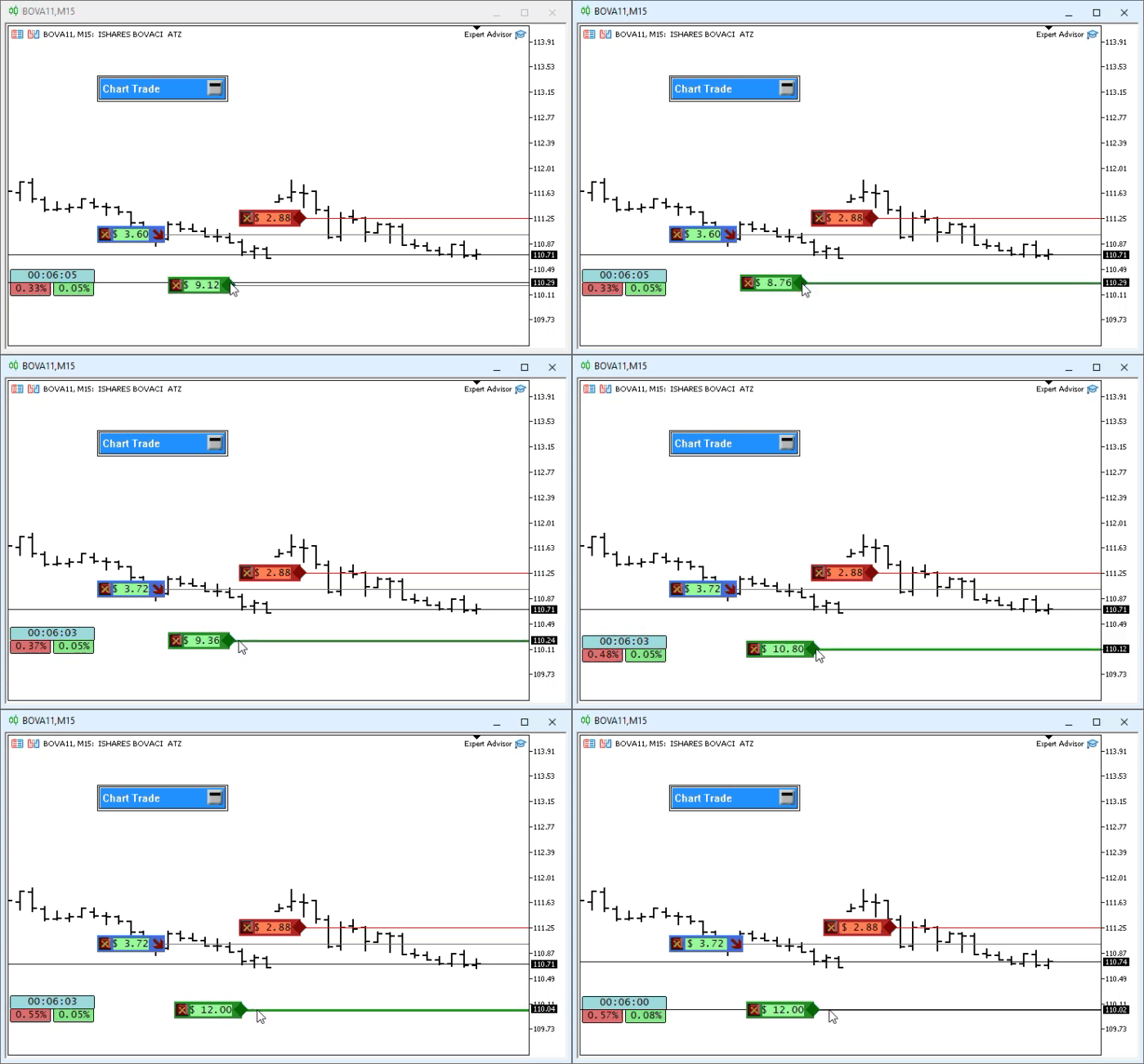
Note: when you move the take profit line to a position that requires changing the width of an OBJ_EDIT object, the other OBJ_EDIT objects in the position indicator are also updated after the move is complete. I know this might seem like magic or even impossible, since you probably were not expecting this kind of behavior.
Concluding Thoughts
In this article, we made the necessary changes so that the position indicator can display the financial result. This way, the trader will be able to get an idea of profit or loss on an open position. Although some traders prefer to rely on other types of information, I believe this article has achieved its goal and introduced you to a concept that many are unaware of even after using MQL5 for a long time: how to use static variables so that multiple segments can access the same memory area allocated for the variable without having to declare a global variable in the main code. That approach can lead to particularly undesirable side effects in the class code, since global variables typically violate class encapsulation.
I realize that the content of this article may seem rather confusing at first. Nevertheless, I recommend that you carefully study both what is presented here and what is shown in these articles from the series devoted to creating a replay/simulation system. For those who want to try out the applications and see for themselves whether it is worth the effort to study this material, I will include precompiled files in the attachments.
| File | Description |
|---|---|
| Experts\Expert Advisor.mq5 | Shows the interaction between Chart Trade and the Expert Advisor (Mouse Study must be used for this interaction) |
| Indicators\Chart Trade.mq5 | Creates a window for configuring the order to be sent (Mouse Study must be used for this interaction) |
| Indicators\Market Replay.mq5 | Creates controls for interacting with the market replay/simulation service (Mouse Study must be used for this interaction) |
| Indicators\Mouse Study.mq5 | Provides interaction between graphical controls and the user (which is necessary both for the replay/simulation system and for live trading) |
| Indicators\Order Indicator.mq5 | Responsible for displaying market orders and allows users to interact with and manage them |
| Indicators\Position View.mq5 | Responsible for displaying market positions and allows users to interact with and manage them |
| Services\Market Replay.mq5 | Creates and maintains the market replay/simulation service (the main file of the entire system) |
Translated from Portuguese by MetaQuotes Ltd.
Original article: https://www.mql5.com/pt/articles/13391
Warning: All rights to these materials are reserved by MetaQuotes Ltd. Copying or reprinting of these materials in whole or in part is prohibited.
This article was written by a user of the site and reflects their personal views. MetaQuotes Ltd is not responsible for the accuracy of the information presented, nor for any consequences resulting from the use of the solutions, strategies or recommendations described.

 Defining your Edge (Part 4): Applying Isotonic Regression and PNN Price-Forecasting in an Expert Advisor
 From Basic to Intermediate: Queues, Lists, and Trees (VI)
 Expectancy and Trade Quality Score Dashboard in MQL5
 Enhanced Colliding Bodies Optimization (ECBO)

- Free trading apps
- Over 8,000 signals for copying
- Economic news for exploring financial markets
You agree to website policy and terms of use