From Basic to Intermediate: Queues, Lists, and Trees (VIII)
 421
421
 0
0

Introduction
In the previous article “From Basic to Intermediate: Queues, Lists, and Trees (VII)”, we explained one of the many possible ways to delete a node from a tree. You need to understand this operation well in order to work with trees used for different purposes. As we mentioned in the previous article, there are other deletion methods. However, in my opinion, the version shown there is one of the simplest among those that do not use recursion. When deleting nodes, you should avoid recursion because, if you need to delete several nodes located deep in the tree, you will have to accumulate many calls on the stack and then unwind the stack again. Such recursive traversal introduces significant overhead and increases the time needed to perform tree construction and maintenance operations.
So, it is important to understand everything that has been explained. Similarly, a search operation must be designed very carefully to avoid unnecessarily increasing its execution time. However, an additional complication arises here: tree balancing has to be maintained. Understanding this issue is no less important—and perhaps even more important—than understanding the insertion, deletion, and search algorithms, whether they have already been implemented or are yet to be implemented.
So, in this article, we'll explore what it means to balance a tree and why it's so important. In addition, we will begin to understand why we sometimes cannot or should not perform tree rebalancing—a topic whose practical application will be discussed in another article—even if a height difference remains between certain subtrees in the structure. This structural imbalance may lengthen some traversals, but it is not, in and of itself, a measure of execution time. The time it takes to perform a search, insertion, or deletion will depend on the path the operation follows and the number of nodes that need to be visited. In any case, let's move on to the main topic of this article.
Queues, lists, and trees (VIII)
Unlike queues and lists, a tree reduces the number of comparisons required during a search. When we were finishing our study of lists, I mentioned that searching a sorted list would be very useful for speeding up this operation. To achieve this, we would have to split the list in half at each iteration. In this way, the search would be performed in the shortest possible time. However, by organizing the list so that it is split in half at each step of the search, we were essentially building a tree.
However, this idea brings us back to lists: we need to determine which element will occupy the central position and serve as the starting point for the search. It seems simple, doesn't it, my dear reader? If the list contains, for example, 100 elements, we should use the element at the 50th position, since it divides the list in half.
In practice, however, selecting the node to place at the center is not as simple as it may seem and can lead to a difference in height between subtrees. The scales in the following figure make this difference easy to visualize.

Figure 01
The two-pan scale shown in Figure 01 illustrates the difference in height between the left and right subtrees. If one side weighs more than the other, the balance scale will tip in that direction. Similarly, if one of the subtrees contains more nodes than the other, its height may be greater. Now think about this: the greater the difference in height between these two subtrees, the longer the path through the deeper one can be. Search and other operations that follow such paths may take longer, whereas operations that terminate on shorter paths will not necessarily require the same amount of time. In addition, this difference in height is linked to another issue, which we will return to later. For now, let's focus on the balance scale.
"Okay, I think I get the idea. However, I have one question. When we insert data into a tree, can't we specify which node each piece of data should be stored in? This would make it possible to avoid imbalance or, at the very least, reduce the problem."
In a sense, my dear reader, theoretically we could indeed specify where to store each piece of data. In practice, however, making such a decision is much more difficult than you might have imagined. So far, we have used discrete values for educational purposes, but the data stored in a real tree can consist of very complex records.
In a real tree, the stored data WILL NOT BE DISCRETE VALUES; they will be records or other data structures.
Now, perhaps, you're beginning to understand where the difficulty lies. An SQL database can serve as a simple example to help visualize the kind of data that could be stored in a tree, although a database is more complex than a single tree. Nevertheless, this will help you visualize what kind of information can be stored in a tree.
Let's consider the following scenario: You have a set of records in an SQL database, each of which contains an identifier (ID) and some associated data. You decide to use the ID as the search key. If the database contains 1,000,000 records, in the worst-case scenario, you'll have to go through them all to find the one you need. However, if you use a perfectly balanced tree as a search index, you'll have to traverse a maximum of 20 nodes. "What? How is that possible? What kind of incredible calculation lets you find a record among 1,000,000 by traversing at most 20 nodes? Come on, explain this trick to me, because I want to understand how to do it, too."
It's not magic, my dear reader, but mathematics. To understand why it takes only a few nodes to find a specific record, you need to understand how differences in the heights of subtrees affect the overall height of the tree.
Let's assume that you are using a node that can have no more than two child nodes, just as we have done in the code snippets shown so far. In this case, each level can contain a number of nodes determined by the equation below.
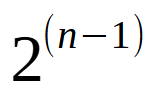
Figure 02
In this equation, n denotes the level under consideration. For example, level 1 contains only the root node, whereas level 5 can contain up to 16 nodes. And so on. In general, the expression shown in Figure 02 can be rewritten to yield the following expression.
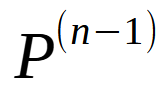
Figure 03
Here, P denotes the maximum number of child nodes that each node can have. For example, if each node in our tree could have five child nodes, the expression would be written as follows.
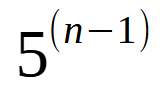
Figure 04
As you can see, the number of nodes that must be traversed during a search is significantly reduced. However, this comes at a cost: at each level, you must determine which child node to move to. Let's return to the simplest case, where each node has no more than two child nodes. With a maximum of 20 levels, we could store the 1,000,000 records mentioned, one per node. However, the number of levels used will always be less than the value of n used in the expression. The reason is very simple: the nodes at each level are added to the total number of nodes from the previous levels. In other words, in practice, we'll need 19 levels to accommodate these 1,000,000 nodes, assuming the tree is well-balanced. Those familiar with chemistry have probably already grasped the concept: each electron shell can hold only a certain number of electrons. And to understand in which shell a bond is formed, you need to distribute the electrons correctly.
"Well, I think I now understand why we have to go through so few nodes to find the data we need. I always wondered why anyone would spend so much time implementing a tree when, in the end, it all seemed like complete nonsense to me. However, now that I've seen these numbers, I understand the reason."
Dear reader, we often use a search method that involves visiting more nodes than necessary, simply because of a lack of knowledge. Once we understand how search trees work, we begin to understand why they were developed. So now you can finally understand why tree balancing is so important for reducing the number of nodes that must be traversed during a search.
Just as the deletion method described in the previous article has different variations, balancing methods also have different variations. I admit that choosing just one of them for this article was quite difficult, since the choice depends on the reason—or, more precisely, on the point at which you want to balance the tree. There is a good and fairly simple algorithm for balancing the tree during insertion. Although it is very easy to implement, it does not align with the approach taken in this article. There are other, more complex algorithms with rather interesting goals. Therefore, my dear reader, what I am about to show you here is just one of many possible options.
To focus exclusively on the balancing algorithm, I will make some changes to the code that implements the tree. This will make it easier for us to focus on the balancing operations. If we showed you all the code at once, you—as someone who is just starting out and wants to understand how everything works—would most likely get lost in so many code snippets and concepts. The code we'll be working with is shown below.
001. //+------------------------------------------------------------------+
002. #property copyright "Daniel Jose"
003. //+------------------------------------------------------------------+
004. template <typename T>
005. class C_TreeNode
006. {
007.     private :
008. //+----------------+
009.         T           info;
010.         C_TreeNode  *left,
011.                     *right;
012. //+----------------+
013.     public  :
014. //+----------------+
015.         C_TreeNode(T arg)
016.             :left(NULL),
017.             right(NULL),
018.             info(arg)
019.         {}
020. //+----------------+
021.         void SetLeft(C_TreeNode *ptr) { left = ptr; }
022. //+----------------+
023.         void SetRight(C_TreeNode *ptr) { right = ptr; }
024. //+----------------+
025.         T GetInfo(void) const { return info; }
026. //+----------------+
027.         C_TreeNode *GetLeft(void) const { return left; }
028. //+----------------+
029.         C_TreeNode *GetRight(void) const { return right; }
030. //+----------------+
031. };
032. //+------------------------------------------------------------------+
033. #define C_TreeNode C_TreeNode<T>
034. template <typename T>
035. class C_Tree
036. {
037. //+----------------+
038.     #define def_InfoToString(A) (A != NULL ? StringFormat("%d ", (*A).GetInfo()) : "")
039.     enum E_SEQ {eInOrder, ePreOrder, ePostOrder, eDestroy};
040. //+----------------+
041.     private :
042.         C_TreeNode *root;
043.         string      m_szInfo;
044. //+----------------+
045.         C_TreeNode *Insert(C_TreeNode *ptr, T info)
046.         {
047.             if (ptr == NULL)
048.                 return new C_TreeNode(info);
049.
050.             if (info < (*ptr).GetInfo()) (*ptr).SetLeft(Insert((*ptr).GetLeft(), info));
051.             else (*ptr).SetRight(Insert((*ptr).GetRight(), info));
052.
053.             return ptr;
054.         }
055. //+----------------+
056.         void Extra(C_TreeNode *ptr, const E_SEQ type)
057.         {
058.             if (ptr == NULL) return;
059.
060.             switch (type)
061.             {
062.                 case eInOrder   :
063.                 case ePostOrder :
064.                 case eDestroy   :
065.                     Extra((*ptr).GetLeft(), type);
066.                     if (type == eInOrder) break;
067.                     Extra((*ptr).GetRight(), type);
068.             }
069.             m_szInfo += def_InfoToString(ptr);
070.             switch (type)
071.             {
072.                 case ePreOrder  :
073.                     Extra((*ptr).GetLeft(), type);
074.                 case eInOrder   :
075.                     Extra((*ptr).GetRight(), type);
076.                     break;
077.                 case eDestroy   :
078.                     delete ptr;
079.             }
080.         }
081. //+----------------+
082.     public  :
083. //+----------------+
084.         C_Tree()
085.             :root(NULL)
086.         {}
087. //+----------------+
088.         ~C_Tree()
089.         {
090.             Extra(root, eDestroy);
091.         }
092. //+----------------+
093.         void Store(T info)
094.         {
095.             if (root == NULL) root = Insert(root, info);
096.             else Insert(root, info);
097.         }
098. //+----------------+
099.         string In_Order(void)
100.         {
101.             m_szInfo = "In Order: ";
102.             Extra(root, eInOrder);
103.
104.             return m_szInfo;
105.         }
106. //+----------------+
107.         string Pre_Order(void)
108.         {
109.             m_szInfo = "Pre Order: ";
110.             Extra(root, ePreOrder);
111.
112.             return m_szInfo;
113.         }
114. //+----------------+
115.         string Post_Order(void)
116.         {
117.             m_szInfo = "Post Order: ";
118.             Extra(root, ePostOrder);
119.
120.             return m_szInfo;
121.         }
122. //+----------------+
123.     #undef def_InfoToString
124. //+----------------+
125. };
126. #undef C_TreeNode
127. //+------------------------------------------------------------------+
128. void OnStart(void)
129. {
130.     C_Tree <int> Tree;
131.
132.     Tree.Store(10);
133.     Tree.Store(-6);
134.     Tree.Store(47);
135.     Tree.Store(35);
136.     Tree.Store(51);
137.     Tree.Store(90);
138.     Tree.Store(85);
139.     Tree.Store(40);
140.
141.     Print(Tree.In_Order());
142.     Print(Tree.Pre_Order());
143.     Print(Tree.Post_Order());
144. }
145. //+------------------------------------------------------------------+
Code 01
In Code 01, you may notice that I removed some parts to adapt it for studying the balancing algorithm. At the same time, I made a few minor changes to make it as compact as possible. In any case, the tree structure generated by Code 01 is shown in the following figure.
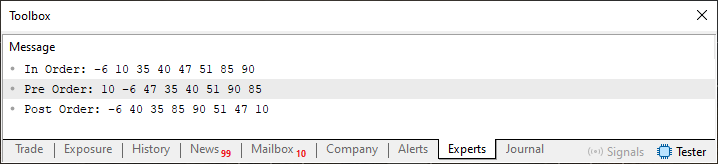
Figure 05
Now, building on the knowledge presented in the previous article, you can examine the structure shown in Figure 05 and visualize how a tree is organized. It is extremely important that you be able to do this. Otherwise, what we see and implement next will make no sense at all. In any case, you can clearly see that the subtrees of the root have different heights. The question is this: what is the difference between these two heights?
So, this is the most interesting and fascinating part of the article, because in order to calculate the difference in height between subtrees, you first need to understand how a tree is structured. However, even without knowing its exact structure, we can implement a code snippet that calculates the local balance factor of the root. The calculation is fairly simple and straightforward. All we need to do is traverse from the root to the deepest leaf in the left subtree and repeat the same traversal in the right subtree. If both subtrees have the same height, the factor will be zero; if one is taller than the other, the result will be nonzero. To test this, we'll use the code snippet below.
001. //+------------------------------------------------------------------+
002. #property copyright "Daniel Jose"
003. //+------------------------------------------------------------------+
004. template <typename T>
005. class C_TreeNode
006. {
007.     private :
008. //+----------------+
009.         T           info;
010.         C_TreeNode  *left,
011.                     *right;
012. //+----------------+
013.     public  :
014. //+----------------+
015.         C_TreeNode(T arg)
016.             :left(NULL),
017.             right(NULL),
018.             info(arg)
019.         {}
020. //+----------------+
021.         void SetLeft(C_TreeNode *ptr) { left = ptr; }
022. //+----------------+
023.         void SetRight(C_TreeNode *ptr) { right = ptr; }
024. //+----------------+
025.         T GetInfo(void) const { return info; }
026. //+----------------+
027.         C_TreeNode *GetLeft(void) const { return left; }
028. //+----------------+
029.         C_TreeNode *GetRight(void) const { return right; }
030. //+----------------+
031. };
032. //+------------------------------------------------------------------+
033. #define C_TreeNode C_TreeNode<T>
034. template <typename T>
035. class C_Tree
036. {
037. //+----------------+
038.     #define def_InfoToString(A) (A != NULL ? StringFormat("%d ", (*A).GetInfo()) : "")
039.     enum E_SEQ {eInOrder, ePreOrder, ePostOrder, eDestroy};
040. //+----------------+
041.     private :
042.         C_TreeNode *root;
043.         string      m_szInfo;
044. //+----------------+
045.         int countL(C_TreeNode *ptr)
046.         {
047.             int count = 0;
048.
049.             while ((*ptr).GetLeft() != NULL)
050.             {
051.                 ptr = (*ptr).GetLeft();
052.                 count++;
053.                 if (((*ptr).GetLeft() == NULL) && ((*ptr).GetRight() != NULL)) while ((*ptr).GetRight() != NULL)
054.                 {
055.                     ptr = (*ptr).GetRight();
056.                     count++;
057.                 }
058.             }
059.
060.             return count;
061.         }
062. //+----------------+
063.         int countR(C_TreeNode *ptr)
064.         {
065.             int count = 0;
066.
067.             while ((*ptr).GetRight() != NULL)
068.             {
069.                 ptr = (*ptr).GetRight();
070.                 count++;
071.                 if (((*ptr).GetRight() == NULL) && ((*ptr).GetLeft() != NULL)) while ((*ptr).GetLeft() != NULL)
072.                 {
073.                     ptr = (*ptr).GetLeft();
074.                     count++;
075.                 }
076.             }
077.
078.             return count;
079.         }
080. //+----------------+
081.         C_TreeNode *Insert(C_TreeNode *ptr, T info)
082.         {
083.             if (ptr == NULL)
084.                 return new C_TreeNode(info);
085.
086.             if (info < (*ptr).GetInfo()) (*ptr).SetLeft(Insert((*ptr).GetLeft(), info));
087.             else (*ptr).SetRight(Insert((*ptr).GetRight(), info));
088.
089.             return ptr;
090.         }
091. //+----------------+
092.         void Seq(C_TreeNode *ptr, const E_SEQ type)
093.         {
094.             if (ptr == NULL) return;
095.
096.             switch (type)
097.             {
098.                 case eInOrder   :
099.                 case ePostOrder :
100.                 case eDestroy   :
101.                     Seq((*ptr).GetLeft(), type);
102.                     if (type == eInOrder) break;
103.                     Seq((*ptr).GetRight(), type);
104.             }
105.             m_szInfo += def_InfoToString(ptr);
106.             switch (type)
107.             {
108.                 case ePreOrder  :
109.                     Seq((*ptr).GetLeft(), type);
110.                 case eInOrder   :
111.                     Seq((*ptr).GetRight(), type);
112.                     break;
113.                 case eDestroy   :
114.                     delete ptr;
115.             }
116.         }
117. //+----------------+
118.     public  :
119. //+----------------+
120.         C_Tree()
121.             :root(NULL)
122.         {}
123. //+----------------+
124.         ~C_Tree()
125.         {
126.             Seq(root, eDestroy);
127.         }
128. //+----------------+
129.         void Store(T info)
130.         {
131.             if (root == NULL) root = Insert(root, info);
132.             else Insert(root, info);
133.         }
134. //+----------------+
135.         void CheckBalance(void)
136.         {
137.             Print("Balance: ", countR(root) - countL(root));
138.         }
139. //+----------------+
140.         string In_Order(void)
141.         {
142.             m_szInfo = "In Order: ";
143.             Seq(root, eInOrder);
144.
145.             return m_szInfo;
146.         }
147. //+----------------+
148.         string Pre_Order(void)
149.         {
150.             m_szInfo = "Pre Order: ";
151.             Seq(root, ePreOrder);
152.
153.             return m_szInfo;
154.         }
155. //+----------------+
156.         string Post_Order(void)
157.         {
158.             m_szInfo = "Post Order: ";
159.             Seq(root, ePostOrder);
160.
161.             return m_szInfo;
162.         }
163. //+----------------+
164.     #undef def_InfoToString
165. //+----------------+
166. };
167. #undef C_TreeNode
168. //+------------------------------------------------------------------+
169. void OnStart(void)
170. {
171.     C_Tree <int> Tree;
172.
173.     Tree.Store(10);
174.     Tree.Store(-6);
175.     Tree.Store(47);
176.     Tree.Store(35);
177.     Tree.Store(51);
178.     Tree.Store(90);
179.     Tree.Store(85);
180.     Tree.Store(40);
181.
182.     Print(Tree.In_Order());
183.     Print(Tree.Pre_Order());
184.     Print(Tree.Post_Order());
185.
186.     Tree.CheckBalance();
187. }
188. //+------------------------------------------------------------------+
Code 02
When you run Code 02, you'll see the result shown below.
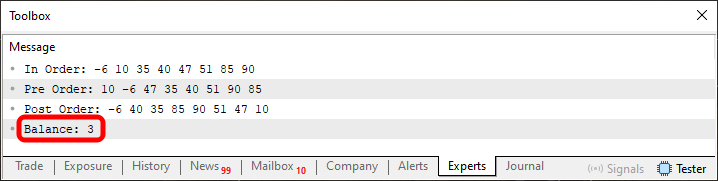
Figure 06
Notice the value highlighted in Figure 06. This is the local balance factor of the root, calculated as the difference between the height of its right subtree and the height of its left subtree. Since the value is positive, the right subtree has a greater height. In this case, the height of the right subtree exceeds the height of the left one by three levels. The highlighted value specifically indicates the local balance factor of the root; by itself, it does not describe the global state of the tree. "How can I be sure you're not misleading me?" So, dear reader, in the previous article I explained how to reconstruct the tree structure based on the results shown in Figures 05 and 06. Try it, and you'll see how the code snippet was able to calculate the local balance factor of the root. Only then will Code 02 make sense to you. Since I want you to study the articles, I won't show you the tree structure that can be reconstructed from these two results.
All right, going back to the code, you'll notice that we use two functions to calculate the height. The declarations on lines 45 and 63, respectively, begin each of these functions. The only difference between them is the subtree in which the search for the deepest leaf begins. Since both functions perform the same traversal, we can replace them with a single parameterized function that computes the height of the specified subtree. This combined function is shown in the following code snippet.
                   .
                   .
                   .
044. //+----------------+
045.         int countLayers(C_TreeNode *ptr, const bool branchR)
046.         {
047.             int count = 0;
048.
049.             while ((branchR ? (*ptr).GetRight() : (*ptr).GetLeft()) != NULL)
050.             {
051.                 ptr = (branchR ? (*ptr).GetRight() : (*ptr).GetLeft());
052.                 count++;
053.                 if (((branchR?(*ptr).GetRight():(*ptr).GetLeft())==NULL)&&((branchR?(*ptr).GetLeft():(*ptr).GetRight())!= NULL)) while((branchR?(*ptr).GetLeft():(*ptr).GetRight())!= NULL)
054.                 {
055.                     ptr = (branchR ? (*ptr).GetLeft() : (*ptr).GetRight());
056.                     count++;
057.                 }
058.             }
059.
060.             return count;
061.         }
062. //+----------------+
                   .
                   .
                   .
116. //+----------------+
117.         void CheckBalance(void)
118.         {
119.             Print("Balance: ", countLayers(root, true) - countLayers(root, false));
120.         }
121. //+----------------+
                   .
                   .
                   .
Code snippet 01
Since the rest of the code remains unchanged, I don't see any reason to keep repeating it. If we show only the parts that have changed, it will be easier for us to focus on what's most important. So, we are already calculating the local balance factor of the root. This raises the question: How will this balance factor help us? What we've done so far is only part of the necessary calculation. Comparing the heights of the left and right subtrees reveals a local imbalance at the root; to determine the global state of the tree, the same calculation must be performed for the remaining nodes. The question is this: How can we adjust those local balance factors that fall outside the allowed range? There are several possible methods, each of which has its own advantages and disadvantages. Here, we'll use rotations.
Balancing with rotations is relatively simple. When a node's local balance factor falls outside the allowed range, a left or right rotation is applied to the subtree rooted at that node. As a result of the rotation, the parent-child links in the affected subtree are rearranged to restore its local balance, while the ordering criterion remains unchanged: after the reorganization, smaller keys are still placed on the left, and larger keys on the right. This local adjustment alone does not mean that the entire tree's global balance has been restored.
To help you, dear reader, understand this better, take a look at the following figure.
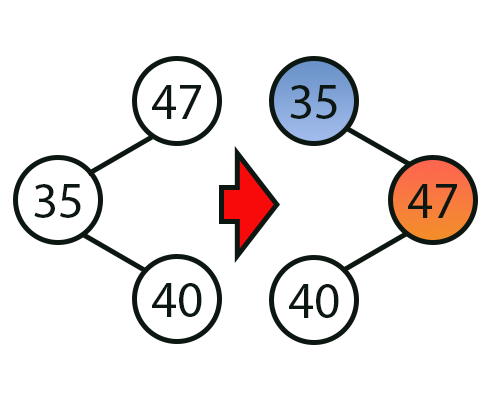
Figure 07
The main thing you need to understand, dear reader, is that a rotation changes the parent-child links but preserves the sequence of keys obtained during an inorder traversal. In the example given, the nodes with values 35 and 47 no longer have the same hierarchical relationship, but in the traversal order, 35 still precedes 47. When a rotation is applied to a node whose local balance factor falls outside the allowed range, the root of the subtree may change, and the local balance factors of the affected nodes are adjusted. Next, you need to update the balance factors of their ancestors. A tree as a whole is considered balanced only when the local balance factors of all its nodes remain within the allowed range.
"Wait a minute. Before implementing the rotation code, I'm concerned about the computational cost of calculating the local balance factors. Let's assume we have a perfectly balanced tree about 30 levels high. And I'm talking about a tree that I consider to be relatively shallow. If, every time we insert new data, we have to traverse the entire tree to recalculate the heights and check whether the local balance factor of any node falls outside the allowed range, then performing such a check after every insertion will ultimately be quite slow. To compute the node's balance factor, we would have to execute the function shown in Code snippet 01 for both of its subtrees. It would be inefficient to repeat these traversals after every insertion. So, my author friend, even if the code gets a little more complicated, isn't there a more efficient way to update the height of each node and calculate its balance factor based on that? Couldn't each node store the height of its own subtree?"
Hmm, let me think about it for a moment. Yes, my dear reader, you are absolutely right. And yes, there is a way to simplify things a little. To do this, we'll have to make a few changes. Nevertheless, I hope you understand the plan we'll be following. In any case, let's do it this way: since the goal here is educational, we can add an additional variable to each node to store the height of the subtree rooted at that node. Even if we don't constantly update it, calculating the local balance factor based on the heights stored in the child nodes and determining whether to apply a rotation to the subtree will be much faster. And when necessary, we'll do it as efficiently as possible. Therefore, the first thing we need to do is modify the C_TreeNode class, as shown in the following code snippet. We'll be working with code snippets to make it easier to understand the changes.
01. //+------------------------------------------------------------------+
02. #property copyright "Daniel Jose"
03. //+------------------------------------------------------------------+
04. template <typename T>
05. class C_TreeNode
06. {
07.     private :
08. //+----------------+
09.         T           info;
10.         C_TreeNode  *left,
11.                     *right;
12.         int         prof;
13. //+----------------+
14.     public  :
15. //+----------------+
16.         C_TreeNode(T arg)
17.             :left(NULL),
18.             right(NULL),
19.             info(arg),
20.             prof(1)
21.         {}
22. //+----------------+
23.         void SetLeft(C_TreeNode *ptr) { left = ptr; }
24. //+----------------+
25.         void SetRight(C_TreeNode *ptr) { right = ptr; }
26. //+----------------+
27.         void SetProf(const int arg) { prof = arg; }
28. //+----------------+
29.         int GetProf(void) { return prof; }
30. //+----------------+
31.         T GetInfo(void) const { return info; }
32. //+----------------+
33.         C_TreeNode *GetLeft(void) const { return left; }
34. //+----------------+
35.         C_TreeNode *GetRight(void) const { return right; }
36. //+----------------+
37. };
38. //+------------------------------------------------------------------+
                   .
                   .
                   .
Code snippet 02
So, now the C_TreeNode class has a new variable. The statement on line 20 initializes the variable that stores the height. However, the assigned value has one peculiarity, which I will explain later, since it would not make sense to mention the consequences of changing it at this point.
All right, now we need to implement a method for getting the height of the subtree rooted at a given node. This is equivalent to the calculation performed in code snippet 01, but now we'll do it much more efficiently. To do this, we'll use the function shown below.
                   .
                   .
                   .
50. //+----------------+
51.         int WhatProf(C_TreeNode *ptr)
52.         {
53.             C_TreeNode *p1, *p2;
54.
55.             p1 = (*ptr).GetLeft();
56.             p2 = (*ptr).GetRight();
57.
58.             if (p1 && p2)
59.                 return MathMax((*p1).GetProf(), (*p2).GetProf()) + 1;
60.             return  (p1 && (p2 == NULL) ? (*p1).GetProf() : (*p2).GetProf()) + 1;
61.         }
62. //+----------------+
                   .
                   .
                   .
Code snippet 03
So, please note that the function shown in this code snippet will return the height stored in the node. We'll come back to this later. Therefore, to calculate the local balance factor, we will need to implement one more function. However, unlike what we did before, we will NOT USE THE ROOT'S BALANCE FACTOR AS A GLOBAL INDICATOR OF THE TREE; INSTEAD, WE WILL CALCULATE A LOCAL BALANCE FACTOR FOR EACH NODE. This factor is defined as the difference in height between the left and right subtrees of the corresponding node. The global state of the structure is not expressed by a single factor: the tree as a whole will be balanced if the local balance factors of all its nodes remain within the allowed range. To perform this calculation, we'll use the function shown in the following code snippet.
                   .
                   .
                   .
62. //+----------------+
63.         int BalanceFactor(C_TreeNode *ptr)
64.         {
65.             C_TreeNode *p1, *p2;
66.
67.             p1 = (*ptr).GetLeft();
68.             p2 = (*ptr).GetRight();
69.
70.             if (p1 && p2) return ((*p1).GetProf() - (*p2).GetProf());
71.             return (p1 && (p2 == NULL) ? (*p1).GetProf() : -(*p2).GetProf());
72.         }
73. //+----------------+
                   .
                   .
                   .
Code snippet 04
And now, pay attention, my dear reader. The function shown in code snippet 04 returns the local balance factor of a node. Its sign indicates which of the subtrees has the greater height, and its value indicates the difference between those heights. Using this factor, we can determine which rotation to apply to the subtree rooted at this node. Depending on the configuration of its child nodes, we will need to perform one of four types of rotation. Below are code snippets corresponding to each rotation.
                   .
                   .
                   .
073. //+----------------+
074.         C_TreeNode *Rotation_R(C_TreeNode *ptr)
075.         {
076.             C_TreeNode *p1;
077.
078.             p1 = (*ptr).GetRight();
079.             (*ptr).SetRight((*p1).GetLeft());
080.             (*p1).SetLeft(ptr);
081.
082.             return p1;
083.         }
084. //+----------------+
085.         C_TreeNode *Rotation_L(C_TreeNode *ptr)
086.         {
087.             C_TreeNode *p1;
088.
089.             p1 = (*ptr).GetLeft();
090.             (*ptr).SetLeft((*p1).GetRight());
091.             (*p1).SetRight(ptr);
092.
093.             return p1;
094.         }
095. //+----------------+
096.         C_TreeNode *Rotation_2R(C_TreeNode *ptr)
097.         {
098.             C_TreeNode *p1, *p2;
099.
100.             p1 = (*ptr).GetRight();
101.             p2 = (*p1).GetLeft();
102.             (*ptr).SetRight((*p2).GetLeft());
103.             (*p1).SetLeft((*p2).GetRight());
104.             (*p2).SetLeft(ptr);
105.             (*p2).SetRight(p1);
106.
107.             return p2;
108.         }
109. //+----------------+
110.         C_TreeNode *Rotation_2L(C_TreeNode *ptr)
111.         {
112.             C_TreeNode *p1, *p2;
113.
114.             p1 = (*ptr).GetLeft();
115.             p2 = (*p1).GetRight();
116.             (*ptr).SetLeft((*p2).GetRight());
117.             (*p1).SetRight((*p2).GetLeft());
118.             (*p2).SetRight(ptr);
119.             (*p2).SetLeft(p1);
120.
121.             return p2;
122.         }
123. //+----------------+
                   .
                   .
                   .
Code snippet 05
All right, to understand code snippet 05, we'll use the figures shown below.
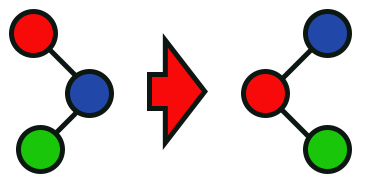
Figure 08
Figure 08 shows how the function, whose declaration begins on line 74, reassigns the parent-child links within the subtree rooted at the node marked in red.
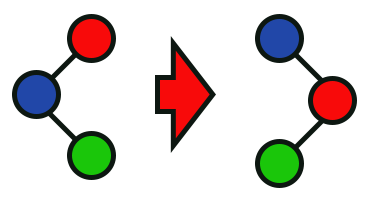
Figure 09
Figure 09 shows how the function, whose declaration begins on line 85, reassigns the parent-child links within the affected subtree without changing the order of the keys.
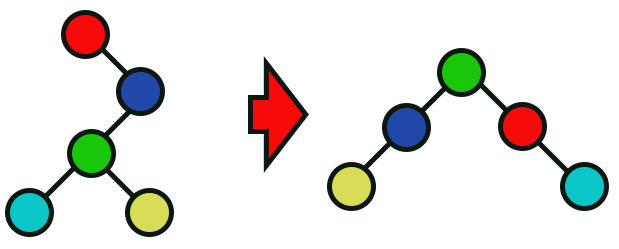
Figure 10
Figure 10 shows the reorganization of parent-child links performed by the function whose declaration begins on line 96.
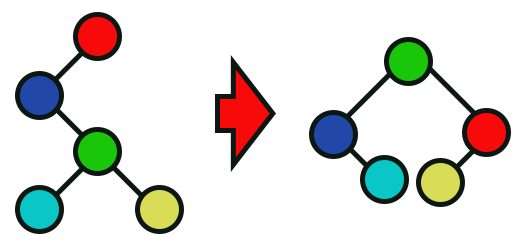
Figure 11
Finally, Figure 11 shows how the function, whose declaration begins on line 110, reorganizes the parent-child links in the subtree. In all four images, the red circle indicates the node that is passed as an argument to the functions in Code snippet 05 and serves as the root of the subtree before rotation.
I know this sounds like one of those instructions for solving a Rubik's Cube. However, although this may seem rather strange at first glance, the four images shown above illustrate how each rotation redistributes the parent-child links in the affected subtree to bring the local balance factor within the allowed range, without changing the order of the keys. And there's one more detail: the algorithm will strive to keep each node's local balance factor within this range. Only when this condition is satisfied for all nodes can we say that the tree as a whole is balanced. That's quite surprising, considering how simple these rotations are.
So, how can this code restore the tree’s global balance? So far, I haven't seen a single operation that updates the local balance factors along the insertion path and applies the necessary rotations to the affected subtrees. So, my dear reader, now for the most important part. We'll need to make a small change to the code snippet responsible for inserting data into the tree. Remember that, up to this point, we have temporarily removed the code snippet responsible for node deletion. This is because I want you to fully understand how the heights will be updated and how rotations will be applied to the affected subtrees as the tree changes.
                   .
                   .
                   .
123. //+----------------+
124.         C_TreeNode *Insert(C_TreeNode *ptr, T info)
125.         {
126.             if (ptr == NULL)
127.                 return new C_TreeNode(info);
128.
129.             if (info < (*ptr).GetInfo()) (*ptr).SetLeft(Insert((*ptr).GetLeft(), info));
130.             else (*ptr).SetRight(Insert((*ptr).GetRight(), info));
131.
132.             (*ptr).SetProf(WhatProf(ptr));
133.             if ((BalanceFactor(ptr) == 2) && (BalanceFactor((*ptr).GetLeft()) == 1)) ptr = Rotation_L(ptr);
134.             else if ((BalanceFactor(ptr) == -2) && (BalanceFactor((*ptr).GetRight()) == -1)) ptr = Rotation_R(ptr);
135.             else if ((BalanceFactor(ptr) == -2) && (BalanceFactor((*ptr).GetRight()) == 1)) ptr = Rotation_2R(ptr);
136.             else if ((BalanceFactor(ptr) == 2) && (BalanceFactor((*ptr).GetLeft()) == -1)) ptr = Rotation_2L(ptr);
137.
138.             return ptr;
139.         }
140. //+----------------+
                   .
                   .
                   .
177. //+----------------+
178.         void Store(T info)
179.         {
180.             root = Insert(root, info);
181.         }
182. //+----------------+
                   .
                   .
                   .
211. //+------------------------------------------------------------------+
212. void OnStart(void)
213. {
214.     C_Tree <int> Tree;
215.
216.     Tree.Store(10);
217.     Tree.Store(-6);
218.     Tree.Store(47);
219.     Tree.Store(35);
220.     Tree.Store(51);
221.     Tree.Store(90);
222.     Tree.Store(85);
223.     Tree.Store(40);
224.
225.     Print(Tree.In_Order());
226.     Print(Tree.Pre_Order());
227.     Print(Tree.Post_Order());
228. }
229. //+------------------------------------------------------------------+
Code snippet 06
Now take a look at the changes made to the code snippet responsible for inserting new data into the tree. Keep in mind that as the tree is built, its root may change. For this reason, we modified the instruction on line 180, which is responsible for updating the reference to the root. I want you to pay special attention to the instructions on lines 132–136: they update the node's height, calculate its local balance factor, and determine whether a subtree rotation needs to be performed. These operations are repeated on the ancestors of the inserted node, so that local adjustments ultimately restore the global balance of the tree. It's amazing that updating the height, calculating the local balance factor, and selecting the rotation require so few instructions. Therefore, I won't explain each one in detail; I just want you to pay attention to how they apply to the ancestors of the inserted node. And no, I didn't develop this algorithm. The strategy used here corresponds to the AVL balancing algorithm, named after the researchers and mathematicians Adelson-Velsky and Landis, who published this concept in 1962. The implementation presented here, written in plain MQL5, builds an AVL tree.
Before concluding, I would like to draw your attention to one detail, my dear reader. Do you remember the instruction on line 20 of code snippet 02? So, if this instruction initializes the node's height property to 1, then when we compile the code, we get the tree structure shown in the following figure.

Figure 12
Now pay attention to the following point, because this is where the most amazing part of the algorithm begins. If you change the value with which the statement on line 20 of code snippet 02 initializes the height property to zero instead of one, the tree structure shown in Figure 12 will be different. Thus, by making only this change to the code provided in the appendix, we will obtain the new structure shown below.

Figure 13
That's really amazing. And that is exactly why I decided to present this algorithm in this article.
So, now that you know how the tree changes as new data is inserted, why don't we look at one possible way to implement node deletion? The approach I propose is shown in the following code snippet.
142. //+----------------+
143.         C_TreeNode *Erase(C_TreeNode *ptr, T info)
144.         {
145.             C_TreeNode *tmp;
146.             int         i;
147.
148.             if (((*ptr).GetLeft() == NULL) && ((*ptr).GetRight() == NULL))
149.             {
150.                 delete ptr;
151.                 return NULL;
152.             }
153.             if ((*ptr).GetInfo() < info) (*ptr).SetRight(Erase((*ptr).GetRight(), info)); else
154.             if ((*ptr).GetInfo() > info) (*ptr).SetLeft(Erase((*ptr).GetLeft(), info)); else
155.             {
156.                 if ((*ptr).GetLeft() != NULL)
157.                 {
158.                     tmp = (*ptr).GetLeft();
159.                     while ((*tmp).GetRight() != NULL) tmp = (*tmp).GetRight();
160.                     (*ptr).SetInfo((*tmp).GetInfo());
161.                     (*ptr).SetLeft(Erase((*ptr).GetLeft(), (*tmp).GetInfo()));
162.                 }else
163.                 {
164.                     tmp = (*ptr).GetRight();
165.                     while ((*tmp).GetLeft() != NULL) tmp = (*tmp).GetLeft();
166.                     (*ptr).SetInfo((*tmp).GetInfo());
167.                     (*ptr).SetRight(Erase((*ptr).GetRight(), (*tmp).GetInfo()));
168.                 }
169.             }
170.             i = BalanceFactor(ptr);
171.             if (i > 1) ptr = (BalanceFactor((*ptr).GetLeft()) >= 0 ? Rotation_L(ptr) : Rotation_2L(ptr));
172.             else if (i < -1) ptr = (BalanceFactor((*ptr).GetRight()) <= 0 ? Rotation_R(ptr) : Rotation_2R(ptr));
173.
174.             return ptr;
175.         }
176. //+----------------+
                   .
                   .
                   .
242. //+----------------+
243.         void DeleteNode(const T info)
244.         {
245.             root = Erase(root, info);
246.         }
247. //+----------------+
                   .
                   .
                   .
252. //+------------------------------------------------------------------+
253. void OnStart(void)
254. {
255.     C_Tree <int> Tree;
256.
257.     Tree.Store(10);
258.     Tree.Store(-6);
259.     Tree.Store(47);
260.     Tree.Store(35);
261.     Tree.Store(51);
262.     Tree.Store(90);
263.     Tree.Store(85);
264.     Tree.Store(40);
265.
266.     Print(Tree.In_Order());
267.     Print(Tree.Pre_Order());
268.     Print(Tree.Post_Order());
269.
270.     Tree.DeleteNode(10);
271.     Tree.DeleteNode(-6);
272.     Print("-----------");
273.     Print(Tree.In_Order());
274.     Print(Tree.Pre_Order());
275.     Print(Tree.Post_Order());
276. }
277. //+------------------------------------------------------------------+
Code snippet 07
Of course, some instructions in other parts of the code were also changed to prevent a crash when attempting to delete a node. However, since these are only minor changes—and you can find the complete code in the attached file to study how it works—I don't think it is necessary to show or explain them. Nevertheless, note that the instructions on lines 270 and 271 completely delete the left subtree of the root. However, if we hadn't applied the new rotations, there wouldn't be a single node left on this side. However, subsequent rotations after deletion will redistribute the parent-child links in the affected subtrees and bring the local balance factors of the changed nodes and their ancestors back into the allowed range. Once these updates are complete, the tree will restore its global balance and assume the configuration shown in the following figure.
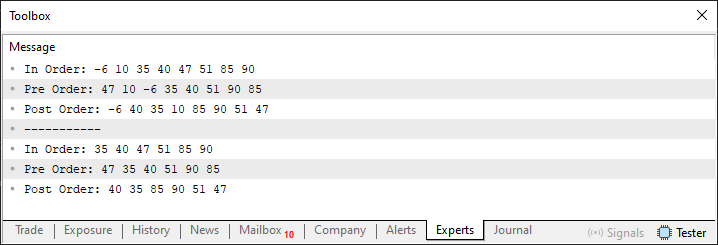
Figure 14
Concluding Thoughts
In this article, we demonstrated how the tree balancing algorithm works. The algorithm presented here is just one of many that can be implemented. This particular version is simply my implementation. There are methods of varying complexity: some reduce the height of the tree and, consequently, the maximum traversal length; others limit the height difference between the subtrees of each node. However, the main thing is for you to understand how important it is to balance a tree and how to do it. The specific method isn't all that important, as long as you distinguish between each node's local balance factor and the global state of the tree structure. A tree as a whole is balanced when the local balance factors of all its nodes remain within the allowed range; there is no single global factor that, on its own, would describe this state. The height of the tree sets the limit on the number of nodes a search can visit, while its actual execution time depends on the chosen path and the amount of work performed at each node.
The section on search algorithms and tree traversals is very interesting. However, we'll return to this later because, in my opinion, you currently need time to master the operations covered so far: insertion, height updates, balance factor calculations, and rotations. Therefore, in the next article, we’ll cover a different topic, which will allow you to study this material at your own pace.
In addition, we still need to consider other aspects of tree implementation. We'll need this when we study search operations in a tree.
| MQ5 file | Description |
|---|---|
| Code 01 | Simple tree |
| Code 02 | Simple tree |
| Code 03 | Simple tree |
| Code 04 | Simple tree |
Translated from Portuguese by MetaQuotes Ltd.
Original article: https://www.mql5.com/pt/articles/16826
Warning: All rights to these materials are reserved by MetaQuotes Ltd. Copying or reprinting of these materials in whole or in part is prohibited.
This article was written by a user of the site and reflects their personal views. MetaQuotes Ltd is not responsible for the accuracy of the information presented, nor for any consequences resulting from the use of the solutions, strategies or recommendations described.