

Market Simulation: First Steps with SQL in MQL5 (III)
 83
83
 1
1

Introduction
Welcome, everyone, to a new article in the replay/simulation system series.
In the previous article, Market Simulation: First Steps with SQL in MQL5 (II), we looked at an example of implementing a class in MQL5 to provide basic support. Its purpose is specifically to allow SQL code to be stored in a separate script file. This way, we won't need to write the same SQL statements as string literals in the MQL5 source code. Although this solution is functional, there are some aspects of it that we can and should improve to make working with SQL more enjoyable—or, at the very least, more convenient—as we use MQL5 more extensively.
However, in today's article, we won't limit ourselves to just these improvements, since this task can be completed fairly quickly and won't cause any major inconvenience. In addition, we'll explore how to embed SQL script files in an executable created in MQL5. This is because many people may want to include SQL code in the final executable so that users cannot easily modify or delete it without fully understanding its purpose.
In addition, if we embed the file—which, in this case, would be an SQL script—in an executable, we'll have one less problem when sharing the program with another user. This is because the executable itself will already contain the data expected and required to perform the task at hand. I'm not going to tell you not to do it, and I won't be the one to stop you from doing it. The decision to embed a file—which, in this case, would be an SQL script—in the executable is entirely up to you as the programmer. That's because every case is unique and requires a tailored approach to arrive at the right solution.
Embedding and using SQL scripts in an executable created in MQL5 is not difficult. But for everything to work perfectly, there are a few things you need to know. Great, then we won't spend too much time on explanations and preparation. Let's get straight to work, because in this article we have a lot to do to prepare everything we need for the upcoming articles.
Changes to the Class Structure
Although the design presented in the previous article looks promising, it has several limitations that make extensive use of SQL scripts—and even individual SQL commands—more difficult. The way everything was structured in the previous article makes it difficult to perform certain tasks. One such task is making it easy to change the implementation approach in the main code. To clarify this point, consider the following: the class structure and the way classes work prevent us from taking advantage of certain programming features. This is because everything will be designed for use with the terminal or with SQLite, which is part of MetaTrader 5.
However, if we want to create a custom build of SQLite using source code available online and use this custom version with MetaTrader 5, we will encounter certain difficulties given the current structure of the code provided. But we have another problem as well. If we want to use the MessageBox dialog available in Windows to notify the user, we'll run into a lot of problems if we use the approach described in the previous article. However, solving this problem is fairly straightforward for now, since we are still designing the structure of the code that will actually be used to work with SQL in the replay/simulation system. We need to make these changes at this stage of development to avoid unnecessary problems when porting the code to the replay/simulation system later on.
So, the first thing you need to do is delete the header file C_DB_SQLite.mqh. The thing is, we're going to structure the code in such a way that we'll be able to use a different SQL implementation in the future. Specifically, a client-server implementation. But that will be done later. For now, we'll continue working with SQLite.
All right. With that in mind, the C_ScriptSQL class has been renamed to C_DB_SQL, and the file name has been changed accordingly. The file name will always match the class name, so the file has been renamed to C_DB_SQL.mqh and will be located in the same directory we discussed in the previous article. However, the code has undergone some changes, as shown below.
001. //+------------------------------------------------------------------+
002. #property copyright "Daniel Jose"
003. //+------------------------------------------------------------------+
004. #include "..\Service Graphics\Support\C_Array.mqh"
005. //+------------------------------------------------------------------+
006. class C_DB_SQL
007. {
008.     private    :
009.         C_Array    m_Arr;
010.         int        m_handleDB;
011. //+------------------------------------------------------------------+
012.         void Convert(const char &buff[], const int size)
013.         {
014.             string sz0 = "";
015.             bool b0, b1, bs1, bs2, bc0, bc1, bc;
016.             int nLine = 1;
017.
018.             b0 = b1 = bs1 = bs2 = bc0 = bc1 = bc = false;
019.             for (int count = 0, nC0 = nLine; count < size; count++)
020.             {
021.                 switch (buff[count])
022.                 {
023.                     case '\t':
024.                         sz0 += (bs1 || bs2 ? "\t" : "");
025.                         break;
026.                     case '\n':
027.                         nC0++;
028.                     case '\r':
029.                         bc0 = false;
030.                         break;
031.                     case ';':
032.                         b0 = (bs1 || bs2 || bc0 || bc1 ? b0 : true);
033.                     default:
034.                         switch (buff[count])
035.                         {
036.                             case '"':
037.                                 bs1 = (bs2 || bc0 || bc1 ? bs1 : !bs1);
038.                                 break;
039.                             case '\'':
040.                                 bs2 = (bs1 || bc0 || bc1 ? bs2 : !bs2);
041.                                 break;
042.                         }
043.                         if (((count + 1) < size) && (!bs1) && (!bs2))
044.                         {
045.                             if (bc = ((buff[count] == '-') && (buff[count + 1] == '-'))) bc0 = true;
046.                             if (bc = ((buff[count] == '/') && (buff[count + 1] == '*'))) bc1 = true;
047.                             if (bc = ((buff[count] == '*') && (buff[count + 1] == '/'))) bc1 = false;
048.                             if (bc)
049.                             {
050.                                 count += 1;
051.                                 bc = false;
052.                                 continue;
053.                             }
054.                         }
055.                         if (!(bc0 || bc1))
056.                         {
057.                             if ((!b1) && (buff[count] > ' '))
058.                             {
059.                                 b1 = true;
060.                                 nLine = nC0;
061.                             }
062.                             sz0 += (b1 ? StringFormat("%c", buff[count]) : "");
063.                         }
064.                 }
065.                 if (b0)
066.                 {
067.                     m_Arr.Add(sz0, nLine);
068.                     sz0 = "";
069.                     b0 = b1 = false;
070.                 }
071.             }
072.         }
073. //+------------------------------------------------------------------+
074.     public    :
075. //+------------------------------------------------------------------+
076.         C_DB_SQL(const string szFileName = ":memory:")
077.         {
078.             m_handleDB = DatabaseOpen(szFileName, DATABASE_OPEN_CREATE | DATABASE_OPEN_READWRITE);
079.         }
080. //+------------------------------------------------------------------+
081.         ~C_DB_SQL()
082.         {
083.             DatabaseClose(m_handleDB);
084.         }
085. //+------------------------------------------------------------------+
086.         const string ExecScriptSQL(const string szFileName)
087.         {
088.             int file, size;
089.             char buff[];
090.             string szCmd;
091.
092.             if ((file = FileOpen(szFileName, FILE_READ | FILE_BIN)) == INVALID_HANDLE)
093.                 return StringFormat("Unable to open script file: %s", szFileName);
094.             ArrayResize(buff, size = (int) FileSize(file));
095.             FileReadArray(file, buff);
096.             FileClose(file);
097.             Convert(buff, size);
098.             ArrayFree(buff);
099.             for (int count = 0, nLine; count >= 0; count++)
100.             {
101.                 szCmd = m_Arr.At(count, nLine);
102.                 if (nLine < 0) break;
103.                 if (!ExecCommandSQL(szCmd))
104.                     return StringFormat("Execution of line %d of the SQL script failed...", nLine);
105.             }
106.
107.             return NULL;
108.         }
109. //+------------------------------------------------------------------+
110.         bool ExecCommandSQL(const string szCmd)
111.         {
112.             return (m_handleDB == INVALID_HANDLE ? false : DatabaseExecute(m_handleDB, szCmd));
113.         }
114. //+------------------------------------------------------------------+
115. };
116. //+------------------------------------------------------------------+
Source code for C_DB_SQL.mqh
I'm showing you these changes before moving on to the next step so that you have a clear understanding of exactly what's being done. There weren't that many changes, but some of them deserve special attention, starting with the class constructor. Please note that on line 76, where we declare the constructor, we can use a default value for the constructor argument. The name shown in the code indicates that the database will be created and opened in RAM, as explained in the documentation. This option is very convenient when we want to test something.
For more information on what value to pass to the constructor, see the documentation for the DatabaseOpen function. There you will find a detailed explanation of which value to use when creating or opening a database on disk. So, here we're going to create or open a database. In this way, the constructor will do its job.
This brings us to the class destructor, which comes immediately after it and can be seen on line 81. Please note that here we will simply be closing the database. Therefore, as long as an instance of the class is in use, the database will remain open. Keep this in mind if you try to access the database while an application within MetaTrader 5 is using it, as this may result in access errors.
Since we know the database will remain open the entire time, we can do things differently within the class. That is precisely why changes were made to the way the SQL script file is executed. Please note that on line 86, we now have a function that returns a string. This means we will no longer force output to the terminal. We will return a text message to the caller. This makes it easier to provide feedback to the user through a native or custom-designed window.
Please note that we've changed only a few details here. We will open the script, read and parse it, and submit its commands for execution. This is done on line 103, which calls the function defined on line 110. Although this function consists of only one line—line 112—here we are setting up the class and the rest of the implementation so that we can use a client-server implementation for SQL in the future. If this happens in the future, we'll need to make as few changes to the code as possible. However, any changes will be made exclusively to the code of this class.
Let's go back to line 103. If an SQL command fails to execute, we format a string on line 104, as you can see. Its purpose is to tell the caller exactly which line of the SQL script failed to execute. However, if everything goes perfectly, we'll get NULL as the return value, as shown in line 107. Thus, using the SQL script we discussed in the previous article, we can test the entire class at once. To do this, we'll use the new version of the MQL5 script, which is shown below.
01. //+------------------------------------------------------------------+
02. #property copyright "Daniel Jose"
03. #property description "Basic script for SQL database written in MQL5"
04. #property version   "1.00"
05. #property script_show_inputs
06. //+------------------------------------------------------------------+
07. #include <Market Replay\SQL\C_DB_SQL.mqh>
08. //+------------------------------------------------------------------+
09. input string user01 = "DataBase01";       //Database File Name
10. input string user02 = "Script 01.sql";    //SQL Script File Name
11. //+------------------------------------------------------------------+
12. void OnStart()
13. {
14.     C_DB_SQL *SQL;
15.     string szMsg;
16.
17.     SQL = new C_DB_SQL(user01);
18.
19.     szMsg = (*SQL).ExecScriptSQL(user02);
20.     Print(szMsg == NULL ? "Result of executing the SQL script: Success" : szMsg);
21.
22.     delete SQL;
23. }
24. //+------------------------------------------------------------------+
MQL5 script source code
I don't think anyone will have any trouble understanding the code above, given how simple it is. If execution succeeds, we will see the result shown in the image below in the MetaTrader 5 terminal:
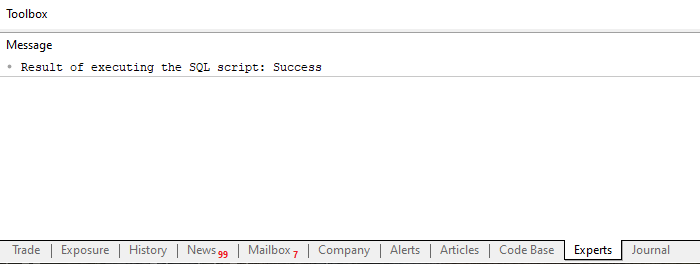
You can test error detection by modifying the SQL script so that it triggers an error. As a result, we will get the image shown below:
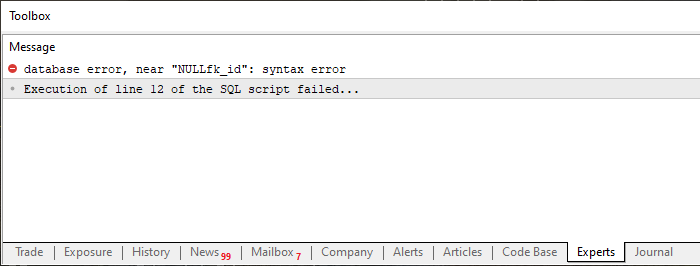
Take a look at how it all works. Using just a single SQL script, we thoroughly tested the entire C_DB_SQL class to ensure that we could both send commands by calling ExecCommandSQL and execute an SQL script by calling ExecScriptSQL. And all of this was tested in one go. This kind of approach is what every programmer strives for. In other words, we create a set of small procedures, each of which is relatively short and has a very specific purpose. And we try to make them perform a very specific task while somehow also causing all the other procedures to run and be tested at the same time. When we actually manage to do this, we can increase development speed exponentially because we need to test fewer procedures or test them less often: they all run quite frequently, allowing us to fix potential bugs much faster.
All right. We have completed the initial part. But many people may think that using an external file is a real hassle, since we’ll always have to make sure the user doesn’t change the directory—or, at the very least, that the user doesn’t edit or modify the SQL script that needs to be executed.
I have to admit that, in theory, I agree with you, dear reader. However, I disagree on one point. You don't have to use an external file. This file can be embedded in an executable created in MQL5. This way, you can be sure that the user will not modify or replace the SQL script that is supposed to run. In addition, we can be sure that the SQL script's syntax is correct. As I mentioned in the previous article, placing SQL commands in a string within an executable is very risky. Because we might, without even realizing it, write something incorrect. But we may only discover the problem much later, when the database is usually already in heavy use.
Therefore, the best solution is to create an SQL script in an editor so that its syntax can be easily checked, then save the script to a file and embed that file in the executable that a user will later run. There are several ways to do this. Some are easier, while others are a little more difficult. However, in MQL5, there is a fairly simple and effective way to embed an SQL script or any other type of file in the final executable.
We'll look at how to do this in the next section. We'll do this to keep the topics separate. This way, there will be no confusion between what we have covered so far and what we will see next.
Embedding an SQL script in an executable
First, you need to make sure that the SQL script to be embedded in the executable actually works. Let's try doing this using SQL itself. Do not use the code that will execute the script within the final executable. As obvious as it may sound, we need to be absolutely certain that the script actually works. To do this, you must first run the script itself in the SQL environment. At this stage, there is one point worth noting. I don't know if you've read the previous articles in this series on building a replay/simulation system. This is because, over the course of several articles in this series, we've already covered the basics of working with SQL so that, if you didn't have the necessary knowledge on this topic, you could get a feel for this environment.
As we mentioned back then, you really shouldn't assume that using SQLite will be any different from using another SQL implementation. Yes, there are a few differences, but overall, if you understand SQL, you'll be able to develop what you need using SQLite in MetaTrader 5. This even applies to code that has been tested, for example, in MySQL or SQL Server. There aren't any significant differences—provided, of course, that you really understand what's going on.
Once we've verified that the script works, we'll need to save it and place it somewhere in the MQL5 directory. As an example, we'll use the script we've been using since the previous article. Therefore, it will be in the same location specified in the previous article. However, first we'll modify the header file C_DB_SQL.mqh so that the script can be run. This is because using an SQL script as a resource embedded in an executable usually requires a different approach from reading an external file. The code for the new header file is shown below.
001. //+------------------------------------------------------------------+
002. #property copyright "Daniel Jose"
003. //+------------------------------------------------------------------+
004. #include "..\Service Graphics\Support\C_Array.mqh"
005. //+------------------------------------------------------------------+
006. class C_DB_SQL
007. {
008.     private    :
009.         C_Array    m_Arr;
010.         int        m_handleDB;
011. //+------------------------------------------------------------------+
012.         void Convert(const char &buff[], const int size)
013.         {
014.             string sz0 = "";
015.             bool b0, b1, bs1, bs2, bc0, bc1, bc;
016.             int nLine = 1;
017.
018.             b0 = b1 = bs1 = bs2 = bc0 = bc1 = bc = false;
019.             for (int count = 0, nC0 = nLine; count < size; count++)
020.             {
021.                 switch (buff[count])
022.                 {
023.                     case '\t':
024.                         sz0 += (bs1 || bs2 ? "\t" : "");
025.                         break;
026.                     case '\n':
027.                         nC0++;
028.                     case '\r':
029.                         bc0 = false;
030.                         break;
031.                     case ';':
032.                         b0 = (bs1 || bs2 || bc0 || bc1 ? b0 : true);
033.                     default:
034.                         switch (buff[count])
035.                         {
036.                             case '"':
037.                                 bs1 = (bs2 || bc0 || bc1 ? bs1 : !bs1);
038.                                 break;
039.                             case '\'':
040.                                 bs2 = (bs1 || bc0 || bc1 ? bs2 : !bs2);
041.                                 break;
042.                         }
043.                         if (((count + 1) < size) && (!bs1) && (!bs2))
044.                         {
045.                             if (bc = ((buff[count] == '-') && (buff[count + 1] == '-'))) bc0 = true;
046.                             if (bc = ((buff[count] == '/') && (buff[count + 1] == '*'))) bc1 = true;
047.                             if (bc = ((buff[count] == '*') && (buff[count + 1] == '/'))) bc1 = false;
048.                             if (bc)
049.                             {
050.                                 count += 1;
051.                                 bc = false;
052.                                 continue;
053.                             }
054.                         }
055.                         if (!(bc0 || bc1))
056.                         {
057.                             if ((!b1) && (buff[count] > ' '))
058.                             {
059.                                 b1 = true;
060.                                 nLine = nC0;
061.                             }
062.                             sz0 += (b1 ? StringFormat("%c", buff[count]) : "");
063.                         }
064.                 }
065.                 if (b0)
066.                 {
067.                     m_Arr.Add(sz0, nLine);
068.                     sz0 = "";
069.                     b0 = b1 = false;
070.                 }
071.             }
072.         }
073. //+------------------------------------------------------------------+
074.         const string ExecSQL(void)
075.         {
076.             string szCmd;
077.
078.             for (int count = 0, nLine; count >= 0; count++)
079.             {
080.                 szCmd = m_Arr.At(count, nLine);
081.                 if (nLine < 0) break;
082.                 if (!ExecCommandSQL(szCmd))
083.                     return StringFormat("Execution of line %d of the SQL script failed...", nLine);
084.             }
085.
086.             return NULL;
087.         }
088. //+------------------------------------------------------------------+
089.     public    :
090. //+------------------------------------------------------------------+
091.         C_DB_SQL(const string szFileName = ":memory:")
092.         {
093.             m_handleDB = DatabaseOpen(szFileName, DATABASE_OPEN_CREATE | DATABASE_OPEN_READWRITE);
094.         }
095. //+------------------------------------------------------------------+
096.         ~C_DB_SQL()
097.         {
098.             DatabaseClose(m_handleDB);
099.         }
100. //+------------------------------------------------------------------+
101.         const string ExecResourceSQL(const string szResource)
102.         {
103.             char buff[];
104.             int size;
105.
106.             ArrayResize(buff, size = StringLen(szResource));
107.             StringToCharArray(szResource, buff);
108.             Convert(buff, size);
109.             ArrayFree(buff);
110.
111.             return ExecSQL();
112.         }
113. //+------------------------------------------------------------------+
114.         const string ExecScriptSQL(const string szFileName)
115.         {
116.             int file, size;
117.             char buff[];
118.
119.             if ((file = FileOpen(szFileName, FILE_READ | FILE_BIN)) == INVALID_HANDLE)
120.                 return StringFormat("Unable to open script file: %s", szFileName);
121.             ArrayResize(buff, size = (int) FileSize(file));
122.             FileReadArray(file, buff);
123.             FileClose(file);
124.             Convert(buff, size);
125.             ArrayFree(buff);
126.
127.             return ExecSQL();
128.         }
129. //+------------------------------------------------------------------+
130.         bool ExecCommandSQL(const string szCmd)
131.         {
132.             return (m_handleDB == INVALID_HANDLE ? false : DatabaseExecute(m_handleDB, szCmd));
133.         }
134. //+------------------------------------------------------------------+
135. };
136. //+------------------------------------------------------------------+
Source code for C_DB_SQL.mqh
Please note that we have made a minor change. The first change is in the ExecScriptSQL function: at line 127, we remove the code that previously ran there. We moved it to another location. You can verify this by looking at the earlier version mentioned in the previous section. Please note that the same code that was previously located here, in the ExecScriptSQL function, is now located in the ExecSQL function. This function starts at line 74 and is a private member function. In other words, we cannot call this procedure outside the class. This is because the ExecSQL function serves no purpose outside the C_DB_SQL class. But here, it makes perfect sense.
Since the code in this function has already been tested, we know that the ExecScriptSQL function will continue to work the same way. In the world of OOP, this is called encapsulation. In other words, we're changing the internal implementation of the ExecScriptSQL function, but for any external code that uses the C_DB_SQL class, everything will remain the same.
Now here's the interesting part: since we've separated out the code that actually executes SQL commands from an external SQL script file, we can use the same ExecSQL procedure to execute code embedded directly in the final executable. In this case, it will be an SQL script file. But that's not all—we can do much more.
However, to keep the explanation simple, I won't go into detail about the full scope of what we've just done. If you think about it for a moment, you'll realize that we can do much more than what I'm about to explain. However, take a look at line 101. There, we see a function that is very similar to the ExecScriptSQL function, but we decided to call it ExecResourceSQL to avoid a conflict with the previous version of ExecScriptSQL.
Now let's take a look inside the function on line 101. Please note that we start by declaring two variables and that on line 106 we allocate memory. The size of this space will correspond to the size of the string we receive. Please take note of this. The code will be contained in a string, just as it was when using a file. However, in this case, the string being passed will not come from a file—at least not directly. You'll understand this better later. In other words, since the string is not coming from a file in binary form, we need to convert it into a binary array. To do this, we use line 107, which converts the string into its representation as a large character array.
At this stage, we are dealing with something equivalent to what would happen if we were reading from a file. This corresponds exactly to what happens on line 122. So, once we have a character array, the next step is to convert that array into SQL statements. This is done on line 108. After that, we release the memory back to the operating system on line 109, and on line 111 we do exactly the same thing as we did when the SQL script data came from an external file. In other words, we call the ExecSQL function, which is located on line 74.
That's why I said you need to make sure the script works. This is because, unlike an external file—which you can continue to modify until everything works—you don't have that option here when using the ExecResourceSQL function. This is because the data will, in a sense, already be contained within the executable as a long string equivalent to an external file.
"Okay. But how are we going to use the ExecResourceSQL function? Will we have to copy and paste the entire contents of the SQL script?" Actually, that is certainly possible, but it would be tedious and completely unnecessary. We can do better. We'll ask MQL5 to copy the file for us. So, if we need to make any changes, we'll make them, and when the final executable is recompiled, MQL5 itself will ensure that everything works as it should. So, the required file will be embedded in the executable in the best possible way, always with the most up-to-date content, no matter how much time has passed. MQL5 will handle most of the work.
To enable this feature when using MQL5, we'll need to modify the main file as follows:
01. //+------------------------------------------------------------------+
02. #property copyright "Daniel Jose"
03. #property description "Basic script for SQL database written in MQL5"
04. #property version   "1.00"
05. #property script_show_inputs
06. //+------------------------------------------------------------------+
07. #resource "\\Files\\Script 01.sql" as string SQL_01
08. //+------------------------------------------------------------------+
09. #include <Market Replay\SQL\C_DB_SQL.mqh>
10. //+------------------------------------------------------------------+
11. input string user01 = "DataBase01";        //Database File Name
12. //+------------------------------------------------------------------+
13. void OnStart()
14. {
15.     C_DB_SQL *SQL;
16.     string szMsg;
17.
18.     SQL = new C_DB_SQL(user01);
19.
20.     szMsg = (*SQL).ExecResourceSQL(SQL_01);
21.     Print(szMsg == NULL ? "Result of executing the SQL script: Success" : szMsg);
22.
23.     delete SQL;
24. }
25. //+------------------------------------------------------------------+
MQL5 script source code
Take a look at line 07 in the code above. Note that on this line, we specify that we want to include the resource in the resulting executable.
Now take a look at what comes after the name in double quotes ("). This is one of the tricks for using resources in MQL5, as well as for performing other actions.
You might even think that line 07 is trivial. However, for the compiler—and, consequently, for the entire code—line 07 defines a string constant named SQL_01, whose contents exactly match the contents of the file specified in double quotes. In short, this is equivalent to manually taking all the code in the file—in this case, Script 01.sql—and inserting it into this code. But you would put it not in a variable, but in a string constant named SQL_01.
I don't know if you really understood what I just said. But this is exactly where the MQL5 compiler really helps us: if you change the contents of Script 01.sql and save it in the directory expected by this main code, the MQL5 compiler will pick up the file's current contents when the code is recompiled and make them available as a string constant named SQL_01.
Things like this make our lives a lot easier. If the Script 01.sql file does not exist in the specified location, the MQL5 compiler will report an error during compilation, indicating that the Script 01.sql file is missing from the specified path. However, once the code has been compiled, you won't have to worry about the Script 01.sql file anymore. This is because it will be embedded in the executable.
Thus, when line 20 of the preceding code is executed, the program will take the string constant SQL_01 and pass it to the ExecResourceSQL function, which will interpret it as if it were code just read from a binary file. That's how the magic happens.
There's no point in writing commands one by one to perform actions that could be included in a script file. You need to use the script file directly. If something goes wrong, you can easily find the error without having to sift through endless lines of code looking for typos or other reasons why the SQL behaves differently from what we expected.
Perhaps this is one of the reasons why many people aren't interested in learning SQL. And if we did everything the way everyone else usually does, we'd have a huge amount of work to do. In small, simple projects, this work may not be all that difficult. But as the code becomes more complex, the situation can turn into a nightmare. Or, at the very least, it’s a massive amount of work that ultimately saps our desire to move forward and do everything as efficiently as possible.
Concluding Thoughts
Looking at the code for the C_DB_SQL class, one might wonder: Why do we need three different—and, at first glance, identical—functions to execute SQL code? Wouldn't it make more sense to have just one function? I've actually thought about that myself. Isn't there a way to simplify the C_DB_SQL class a little? But when we give our code to other developers for review, we end up noticing something. Although we have three functions that appear identical or very similar and are designed to execute SQL code, they are not actually all that alike.
This is because each one is designed to address a specific situation. But, in any case, the code is freely available to everyone. As a programmer, you'll be the one to decide what should be done and what shouldn't. The goal here is always to present one of many possible solutions.
However, in this article, we still do not cover the other aspect of working with SQL. Specifically, we're talking about obtaining the results that SQL returns when our MQL5 code executes a query. This section will be really interesting, since we have different ways of solving the same problem. However, the method for accessing database query results will be discussed in the next article, since we are currently focused on using SQLite, given that it is integrated into MetaTrader 5.
However, what I'll show there is by no means the only or definitive way to complete these tasks. We can accomplish these tasks in many different ways, as we have already done in this article. So always try to learn and discover something new.
| File | Description |
|---|---|
| Experts\Expert Advisor.mq5 | Demonstrates the interaction between Chart Trade and the Expert Advisor (Mouse Study is required for this interaction). |
| Indicators\Chart Trade.mq5 | Creates a window for configuring the order to be sent (Mouse Study is required for this interaction). |
| Indicators\Market Replay.mq5 | Creates controls for interacting with the replay/simulation service (Mouse Study is required for this interaction). |
| Indicators\Mouse Study.mq5 | Enables interaction between graphical controls and the user (required both for operating the replay/simulation system and for use in the live market). |
| Services\Market Replay.mq5 | Creates and maintains the market replay/simulation service (the main file for the entire system) |
| Code VS C++\Servidor.cpp | Creates and maintains a server socket written in C++ (MiniChat version) |
| Code in Python\Server.py | Creates and maintains a socket in Python for communication between MetaTrader 5 and Excel |
| Indicators\Mini Chat.mq5 | Allows you to implement a mini-chat via an indicator (requires a server to function) |
| Experts\Mini Chat.mq5 | Allows you to implement a mini-chat using an Expert Advisor (requires a server to run). |
| Scripts\SQLite.mq5 | Demonstrates how to use an SQL script with MQL5 |
| Files\Script 01.sql | Demonstrates how to create a simple table with a foreign key. |
| Files\Script 02.sql | Shows how to add values to a table |
Translated from Portuguese by MetaQuotes Ltd.
Original article: https://www.mql5.com/pt/articles/13089
Warning: All rights to these materials are reserved by MetaQuotes Ltd. Copying or reprinting of these materials in whole or in part is prohibited.
This article was written by a user of the site and reflects their personal views. MetaQuotes Ltd is not responsible for the accuracy of the information presented, nor for any consequences resulting from the use of the solutions, strategies or recommendations described.


 Zero-Copy Tick Streaming (Part 2) : Reading MetaTrader 5 Ticks into Python and Benchmarking the Result
 Market Simulation: First Steps with SQL in MQL5 (II)
 Neural Networks in Trading: Iterative Forecast Refinement Models (Conclusion)
 Bull Optimization Algorithm (BOA)

- Free trading apps
- Over 8,000 signals for copying
- Economic news for exploring financial markets
You agree to website policy and terms of use