

Market Simulation (Part 21): First Steps with SQL (IV)
 2 422
2 422
 1
1

Introduction
Hello and welcome to another article in the series about the replication/simulation system.
In the previous article “ Market Simulation (Part 20): First steps with SQL (III)” we talked a little about the SELECT command. We need to look at one more concept in order to use SQL more effectively or, more precisely, so that we can take advantage of everything SQL does. This is a much better alternative to writing an application that would do the same job—namely, manage databases and let us manipulate them. This other concept is key when it comes to databases. We are talking about keys, which can be either primary keys or foreign keys.
Although MetaEditor allows us to perform tasks with SQLite, if you are just starting out and want to learn how to work with SQL more consistently, you will need a more sophisticated tool. One important point: I am not saying that MetaEditor is not functional. But MetaEditor is not suitable for understanding some points, and this is because its purpose is different, namely editing and compiling code written in MQL5. The substantial help it provides us in using SQLite is not enough for what we really need when it comes to learning.
Therefore, in this case, I will allow myself to suggest another tool. This is because it is actually oriented toward working with SQLite. Although when using MySQL or any other platform for working with SQL, in practice we will get the same result. As we made clear in previous articles, it does not matter which system we use to access SQL. All of them will be able to do the same thing, provided, of course, that we use only and exclusively SQL syntax, without resorting to anything that exists only in that specific variety of SQL.
So, I suggest that you use the DB Browser tool. It is open source, written in C++, and available for free download on GitHub. At the end of this article, you will find a link to download the tool from GitHub. One advantage of DB Browser is that it makes it much easier to understand various concepts, since translations into other languages are available, which will be very useful for many people who do not speak English.
Another detail is that, unlike MetaEditor, where you cannot edit, save, and use an SQL script, DB Browser lets you do this. Such things are very helpful at the beginning of the learning process. But for those who already know SQL and use it only for database queries, using one tool or another will not change anything. Thus, the choice of tool remains at your own discretion.
The image below shows the DB Browser interface. Of course, in this image we removed some options, since they are not needed for what we are going to study.
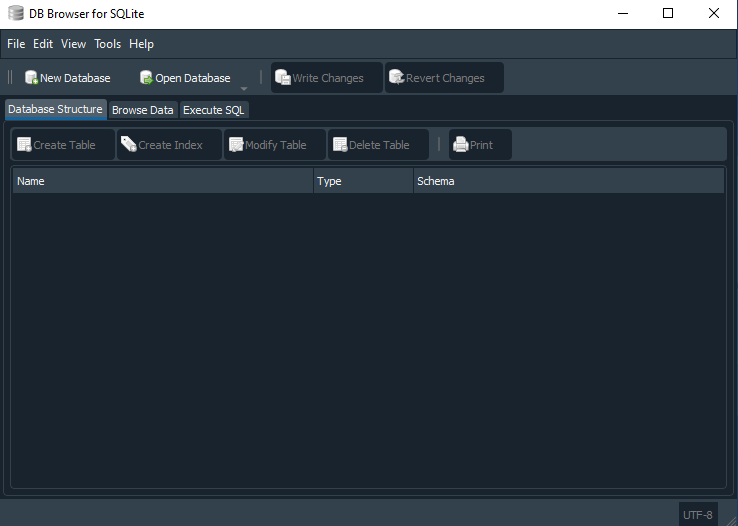
But before we begin looking at the topic of primary keys and foreign keys, I want to explain something that may raise questions, especially if we want to deepen our knowledge of SQL.
Why did the strategy change?
You may feel a little uncomfortable and even disappointed if you try working with SQL in any specific implementation. Some administrators, when hiring a database specialist, often require that the person know how to work with a particular implementation. For example: you may study SQL Server and not get a job because MySQL is used instead. Or you may hear opinions about how Oracle is better than other SQL implementations. In previous articles, we showed that people who think this way actually know nothing about databases. They simply imagine that one is better or worse. They do not have a proper understanding of how everything really works in detail, and they remain stuck where they are, trying to judge something they do not actually understand.
If we are going to use a database or an implementation that uses a server, then we will have a way to access the database. The most common way to do this is through sockets. Before talking about SQL, we explained in several articles how to work with sockets. The idea there was not only to explain how sockets work, but also to show how to set up bidirectional communication between Excel and MetaTrader 5. In other words, both Excel and MetaTrader 5 can exchange data with each other. We will not be limited to using RTD or DDE to transfer data, because in that case data would only be received by Excel. But knowing how to use sockets, we can do much more.
The same knowledge demonstrated there can be used so that MQL5, or an executable file running in MetaTrader 5, can work with SQL to access a database. All you need to know is how to work with SQL commands, and how to send and receive information through a socket. From that point on, the rest is straightforward, since server databases are much more practical when it comes to information flow. To make this clearer, let us explain: a database hosted on an SQL server will be much more scalable than a database stored in a file.
However, when using SQLite, our initial premise is to place the database in a file. This does not mean that we are limited only to this. Yes, it is possible to use an SQLite server, but usually we use files when using SQLite. This creates some limitations and inconveniences for us. Some of these limitations are acceptable, since often the database will be used only by a specific application. In other cases, these limitations will force us to change strategy and use an SQL server.
However, since the purpose of this article is educational and is primarily to show you the following: we do not need to program certain things and we should use existing tools whenever possible. Such limitations, which arise when the database is contained in a file, will not really be a problem. But keep in mind: an SQL server will always be superior in a number of respects to an implementation that uses a file to store the database.
Now that we have explained this point, we can step away from MySQL for a while. Although I really like it, we first need to focus on what is truly necessary. Perhaps in the future, in another article, we will explain how sockets can be used to program a database. But for now, let us look at something else, and in order not to mix one subject with another, we will start a new one.
Why do primary and foreign keys exist?
To explain something that is quite difficult to understand (at least for those who do not know databases), it is first necessary to explain a point that is also quite difficult for those who are completely unfamiliar with programming. In other words, one thing is connected to the other. But let us see whether I can explain to you why primary and foreign keys exist. However, if you know nothing about programming, I advise you to study at least the basics of some programming language in order to understand some concepts that we will use in this explanation.
The reason for the existence of primary and foreign keys, which I always use together, is the same as the reason why relational databases differ from non-relational ones. Now everything has become more complicated, because many people think there is only one type of database. That is, when most people hear the word “database”, they immediately start thinking that there is a relationship between a key and a value. But this is not entirely true. The problem lies in the incorrect use of certain concepts. The concept of “key-value” in no way means that a database is or is not relational. In fact, the concept of “key-value” goes beyond some ideas. To understand this, let us forget about databases for a moment and think about how everything was before the term “database” appeared.
The simplest way to apply the “key-value” concept is to use an array. If you know what an array is, then you know that each index or position in the array can contain a value or a record. Good. Then, using the index, which would be equivalent to the key, you can obtain the record in that position, which would be equivalent to the value. Knowing this, you can modify, delete, or do anything you want with that data. This is the most basic level of the idea.
If you place that same array, which is in memory, into a file, then you can create a format that allows the original array to be easily recreated when the file is read back into memory. And again, this is the most basic level of the idea. At this stage you might think the following: “Well, as a programmer, I can create a whole series of procedures and subroutines to change, search, organize, delete, and so on, any records in the array.” Please note that at this moment you yourself, without realizing it, have just created a database. This is because you are using exactly the same things as a database.
Then, to access any record or value in what is now a database, you load the file into an array in memory, perform the necessary procedures, and immediately after that save the array back to the file. This kind of thing is often practiced and explained when we begin learning programming. However, as far as I know, no one treats this kind of thing as a database. Why? Well, who knows. But the truth is that you have created a personal and private database without even realizing it.
However, this kind of solution is often not scalable. That is, information cannot easily be transferred between different applications. And it is precisely at this point that the concept of a database begins to make sense, because you can use something that others will also use, in this case SQL, and write a database that can be used by different applications. That is why we have said from the beginning that although you can make something new, sometimes it is better to use what already exists.
However, all this explanation still does not answer the question that opens the topic. We will return to that shortly. But since we now already have a basic idea of what a database is, we can move on to the next point. That is, what is the difference between a relational and a non-relational database, and why does this difference exist? Although this is a simple question, the answer is not so simple. Some people with some experience will immediately say: a relational database uses SQL, and a non-relational one does not. I would even like the answer to be that simple, but it is not. The difference between a relational and a non-relational database lies in how the “key-value” set is placed in the database.
“Good Lord! If everything was difficult before, now it has become completely unbearable. But how can that be? How can there be a difference in how the “key-value” set is placed in the database?” At first glance, this makes no sense, but as we gain experience and work with databases, at some point you will understand it. However, so that you can at least understand what we are talking about, even if it seems crazy to you, I will try to explain this point, no matter how difficult it may be.
One of the main characteristics of a relational database is its integrity, or more precisely, the ability of the database to preserve its integrity even when we try to deprive it of this characteristic. You can think of the entire database as having integrity as a whole. But there are cases where this integrity is not a priority. And when this happens, we get an undesirable result, because the database should maintain its integrity. We have duplication of “key-value” sets. “But wait a second. This duplication should not happen, since each index, which will be the key, will be associated with a record, which will be the value.” In fact, if you thought that, you are right. However, if you thought that, it means you are still thinking about an array. Now things have become a little more complicated. In the case of an array, each position represents a value. Thus, it is impossible to occupy a position representing two different values. And this, in essence, is true.
But what if, instead of an index or position, we use something else, for example a value or a string, which in this case would represent the index or key? Now everything starts to look quite familiar. To understand this, let us think about something that has become quite common these days: programming in Python. And why will we use Python in the explanation? The reason is that Python has a concept that is perfect for explaining the difference between relational and non-relational databases. In addition, Python can also use arrays, and then the explanation will be much more logical.
In Python there is a concept called a dictionary. A dictionary, in general terms, is a data structure in which each entry consists of a key and a value. That is, it is no longer the index in the array that indicates which value the key will be associated with. You can place the key at any index, and when searching by the key, we will still find the corresponding value. This analogy is useful because keys and values become explicit fields, and the association is no longer tied to a numeric array index. Just as this can be done in Python, SQL can be used to perform a similar task. That is, we will create a column that contains the values used as keys.
In another column, we would specify the correspondence between each key and the record value. Without proper safeguards, a database, even one written in SQL, would become a non-relational database. Do you see how, although this seems simple, understanding the various elements can help us better understand some concepts? But everything shown up to this point serves only to explain how we can view a database. And how one can resist the temptation to program a series of subroutines and procedures just to do what SQL can do. Or do you think you cannot create a Python dictionary using SQL for this purpose?
At this point it is worth mentioning an interesting detail before moving on to the basics of relational databases. Many people, mainly enthusiasts with little programming experience, have come up with a thousand and one ways to create an artificial intelligence system using Python. I do not want to criticize or say that these people are wrong. However, just think about the following: such artificial intelligence systems essentially use a database. It may be non-relational, like the one we have just examined, or relational, which we will look at a little later. My question is: why create such databases in Python if the same thing can be done with SQL?
Thus, despite all the euphoria around these GPTs, which are making many people learn Python in an attempt to create something similar, or at least something that satisfies some specific need, the same thing can be done with SQL. The important point is this: how much effort will you have to make to do something in one language or another? When I previously wrote a series of articles on how to create an Expert Advisor that would work automatically, some people asked me why I did it. But personally, I do not see any particular difficulty in creating something like that, because it is very simple to implement.
By contrast, an Expert Advisor that uses a database maintained and written in SQL to learn how to trade in the market deserves respect. Although it is not difficult to implement, it requires considerable knowledge and effort, especially so that the Expert Advisor can learn properly and create a database. Most likely, something like this already exists: a robot that, using MetaTrader 5 together with SQL, works just like a person, with full subjectivity in decision-making: whether it should trade, buy or sell, which signal is better than another. In the end, things of this kind can appear if we study the correct concepts.
Now we can turn to what a relational database actually is. If you have some knowledge of programming, you surely understand how a non-relational database can arise. However, without understanding the first, you will not be able to understand the second. Again, whether SQL is used or not makes no difference. The difference lies only in how the foundation is created.
To understand the relational type, we need to go back in time a little. In fact, we need to return to the previous article, where we explained how to change and delete a record from a database. It is enough to read the previous articles to understand what this is about. There we showed quite clearly that something is needed to search for a specific record. Without using this “something” (this is the key), we will not be able to find the correct position. But how does the key used in a relational database differ from the same key used in a non-relational database? One difference is that in a non-relational database this key will not be unique. But it is not only that. Keep this in mind for now.
This key will not be repeated when using a relational database. For this, we usually define it as a primary key. But the fact that it is primary does not mean that it will not be repeated. You can tell SQL that values in a column cannot be repeated. And yet this does not make those data or records belonging to that particular column a set of primary keys.
What makes a column a primary key is the presence of foreign keys. This is what defines and guarantees that the database is relational. This is because we will now have a relationship between a key present in one table and another key present in another table. This approach is often used when building a database in which all records must be unique. But most importantly, all of them must be related to each other in some way, creating something similar to a graph-like structure, very much like the one shown in the image below.
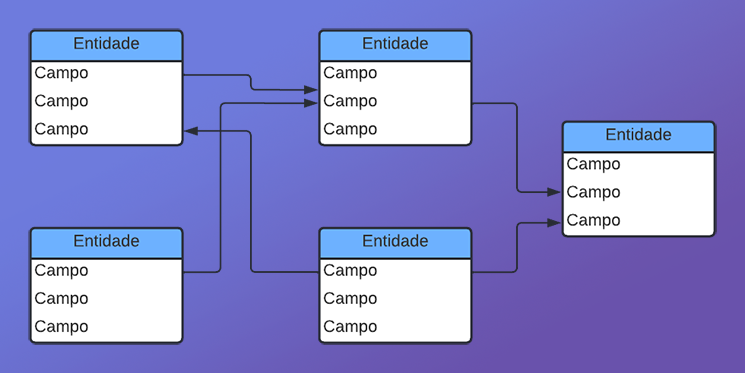
Perhaps, just by looking at this image, the concepts of “primary key” and “foreign key” do not seem particularly clear. But imagine for a moment that we created a database about our personal life. This database would not require a primary or foreign key. However, if we start adding our personal contacts to this same database, whether from social networks or people close to us, each of these contacts will have a key that will be primary. But there will be moments when all these records have points in common. If, while trying to maintain this same database, you duplicated these common points, then when performing a cross-referenced query, the process would be much slower and more difficult.
However, if these common points are placed in a special table, you can use another key (in this case, a foreign key) to match the information much more easily, thereby speeding up both the query and any changes that may eventually need to be made to the database. And this is how a relational database arises. That is, information found in one place will be related to other information placed somewhere else.
Final thoughts
I know that the content of today's article may seem very abstract and difficult to understand. However, I want to emphasize that databases, as they are currently defined and used, did not appear overnight. They were built and implemented gradually over many years. Many of you may have far more experience working with databases than I do, and therefore may have a different opinion.
Since it was necessary to explain why databases are designed the way they are, and why SQL has the form it does—especially why primary and foreign keys emerged—some things had to remain somewhat abstract. Again, if this topic is considered only from the point of view of explanation, it may seem very abstract and without justification.
But since I want to show the basics of this topic so that you can do certain things without going too deeply into SQL, we need to understand such a concept as primary keys and foreign keys, and how they actually work. This is because a correct understanding of this concept will be very important when creating a database, even if it is intended only for learning.
If we are going to start using something, we must do it correctly. Studying different ideas that we do not really understand does not help us grow as professionals. We have already made it clear that using SQL is not what makes a file or group of files a relational database. You can simply create your own set of procedures, instructions, and subroutines to create a database, not only to work with an existing one, but also to create a new one. And if you do not understand some of the concepts involved, you will eventually create a system that becomes unstable over time.
I understood this because for a long time I ignored the use of SQL or existing implementations. I always insisted on creating my own solutions, and even if they worked, after a while I had to do what already existed in SQL. And all that effort and time could have been used much more productively if I had simply started using the existing solution.
In the next article, we will look in practice at how these keys are used in a database. Perhaps in this way the concept, which is currently abstract, will become more concrete and understandable.
| File | Description |
|---|---|
| Experts\Expert Advisor.mq5 | Demonstrates interaction between Chart Trade and the Expert Advisor (Mouse Study is required for interaction). |
| Indicators\Chart Trade.mq5 | Creates a window for configuring the order to be sent (Mouse Study is required for interaction). |
| Indicators\Market Replay.mq5 | Creates controls for interacting with the replication/simulation service (Mouse Study is required for interaction). |
| Indicators\Mouse Study.mq5 | Provides interaction between graphical controls and the user (required both for the replication system and for the real market). |
| Services\Market Replay.mq5 | Creates and maintains the market replication/simulation service (the main file of the entire system). |
| Code VS C++\Servidor.cpp | Creates and maintains a server socket developed in C++ (Mini Chat version). |
| Code in Python\Server.py | Creates and maintains a Python socket for communication between MetaTrader 5 and Excel. |
| Indicators\Mini Chat.mq5 | Allows a mini chat to be implemented through an indicator (using the server is required). |
| Experts\Mini Chat.mq5 | Allows a mini chat to be implemented using an Expert Advisor (a server is required). |
| Scripts\SQLite.mq5 | Demonstrates the use of an SQL script with MQL5. |
| Files\Script 01.sql | Demonstrates the creation of a simple table with a foreign key. |
| Files\Script 02.sql | Shows how to add values to the table. |
Link
Translated from Portuguese by MetaQuotes Ltd.
Original article: https://www.mql5.com/pt/articles/12985
Warning: All rights to these materials are reserved by MetaQuotes Ltd. Copying or reprinting of these materials in whole or in part is prohibited.
This article was written by a user of the site and reflects their personal views. MetaQuotes Ltd is not responsible for the accuracy of the information presented, nor for any consequences resulting from the use of the solutions, strategies or recommendations described.


 Dolphin Echolocation Algorithm (DEA)
 From Basic to Intermediate: Indicator (V)
 Analyzing Price Time Gaps in MQL5 (Part I): Building a Basic Indicator
 Building an EquiVolume Indicator in MQL5

- Free trading apps
- Over 8,000 signals for copying
- Economic news for exploring financial markets
You agree to website policy and terms of use