

Market Simulation: First Steps with SQL in MQL5 (II)
 193
193
 0
0

Introduction
Welcome to another article in our series on how to create a replay/simulation system.
In the previous article, Market Simulation: First Steps with SQL in MQL5 (I), we began using SQL alongside MQL5 code. Although many people believe that we can easily embed SQL code into other code, this is usually not the case. The reason is that the SQL code is included in the executable as a string. Embedding SQL code as a string, while not a problem for small snippets, can ultimately cause us quite a few headaches.
This happens because if we make a typo when converting SQL code to a string, we most likely won't notice it. There is no simple and effective way to visually check whether the string—that is, the SQL code—is correct, because syntax highlighting is not applied to code inside a string.
This kind of problem can be very frustrating. I myself have run into difficulties trying to figure out why SQL code doesn't work properly inside an executable. After carefully reviewing the code, I stumbled upon a small typo that was preventing the SQL from establishing the proper relationships between the tables. I wasted quite a bit of time just trying to figure out the cause, and when I finally found it, I felt that I could have put that time to better use. Since then, I've taken a completely different approach to writing more complex code.
That is precisely the purpose of this article: to show you, dear reader, an alternative way to use SQL code with an executable created in MQL5. If you're really planning to use SQL in MetaTrader 5, I strongly recommend that you seriously consider the method we'll be demonstrating today; you'll even be able to adapt it for other tasks. If you plan to perform truly complex SQL operations, avoid embedding code directly into strings within the executable. There's a good chance that an error will occur somewhere, and you'll spend a lot of time figuring out why. If, on the other hand, the code is short and simple, I see no reason for concern.
Getting Started with SQL Scripts
To start using SQL scripts within an executable written in MQL5, you first need to understand SQL syntax. If you take a look at how SQL statements are structured, you'll see that they all end with a semicolon (;). This already suggests which delimiter we should use to separate each completed SQL statement.
There is an interesting point to note here. Although we usually write SQL statements across multiple lines, each is effectively a single long line. A statement begins at the start of a line and ends with a semicolon (;). However, it can be difficult to read it this way because, in some cases, it is very long. For SQL, this doesn't matter: it will always treat the statement as a single line. This already tells us what we should do.
The next issue we need to address is comments. It is not uncommon for an SQL script to include numerous comments, which is extremely helpful if the file is large or contains sections that require special attention. Since we don't want to waste time sending the interpreter parts that it won't process, we'll have to remove these comments before sending the statement to the SQL engine.
A single-line comment, denoted by two hyphens (--), is easy to process. Block comments, on the other hand, can complicate matters, since words may appear within the block that SQL interprets as statements. That is exactly what we want to avoid, so we'll have to handle this case separately.
There's one more downside. SQL also supports strings, and if comment delimiters appear within a string, they should not be interpreted as the beginning or end of a comment. This situation requires special handling and can be confusing for someone who is just starting to learn to program. To simplify the learning process, we'll leave comment handling for later; for now, we'll assume that SQL scripts don't contain comments to avoid complicating the work we'll be doing in MQL5.
Let's start with this: In the previous article, we created a class for working with SQL. This class is still in the early stages of development, but we can use it to create another class responsible for processing the script. How are we going to do this? It may seem complicated, but if you've been following my articles, you already know that I always try to offer the simplest solution possible, and this time will be no exception. First, you need to separate the SQL class from the main file, which can be easily done using the method shown below.
01. //+------------------------------------------------------------------+
02. #property copyright "Daniel Jose"
03. //+------------------------------------------------------------------+
04. class C_DB_SQLite
05. {
06.     private   :
07.         int    m_handleDB;
08.     public    :
09. //+------------------------------------------------------------------+
10.         C_DB_SQLite(const string szFileName)
11.             :m_handleDB(INVALID_HANDLE)
12.         {
13.             if ((m_handleDB = DatabaseOpen(szFileName, DATABASE_OPEN_CREATE | DATABASE_OPEN_READWRITE)) == INVALID_HANDLE)
14.             {
15.                 Print("Unable to create or open the file ", szFileName);
16.                 return;
17.             }
18.         }
19. //+------------------------------------------------------------------+
20.         ~C_DB_SQLite()
21.         {
22.             DatabaseClose(m_handleDB);
23.             Print("Closing Database...");
24.         }
25. //+------------------------------------------------------------------+
26.         bool Command(const string szRequestSQL)
27.         {
28.             bool ret = (m_handleDB == INVALID_HANDLE ? false : DatabaseExecute(m_handleDB, szRequestSQL));
29.             Print("Request execution: ", (ret ? "Success" : "Failed"), "...");
30.             return ret;
31.         }
32. //+------------------------------------------------------------------+
33. };
34. //+------------------------------------------------------------------+
Source code for C_DB_SQLite.mqh
The code you just saw was in the main file. In other words, we remove the part of the MQL5 script that corresponds to the class and create a header file named C_DB_SQLite.mqh, which we save in the Include\Market Replay\SQL folder. Thus, any future script that needs to apply the same principles for working with SQL will be able to do so using this header file. With this change, the old MQL5 script now looks as shown below.
01. //+------------------------------------------------------------------+
02. #property copyright "Daniel Jose"
03. #property description "Basic script for SQL database written in MQL5"
04. #property version   "1.00"
05. #property script_show_inputs
06. //+------------------------------------------------------------------+
07. #include <Market Replay\SQL\C_DB_SQLite.mqh>
08. //+------------------------------------------------------------------+
09. input string user01 = "DataBase01";        //FileName
10. //+------------------------------------------------------------------+
11. void OnStart()
12. {
13.     C_DB_SQLite *DB;
14.
15.     DB = new C_DB_SQLite(user01 + ".sqlite");
16.
17.     (*DB).Command("PRAGMA FOREIGN_KEYS = ON;");
18.     (*DB).Command("CREATE TABLE IF NOT EXISTS tb_Symbols"
19.                   "("
20.                     "id PRIMARY KEY,"
21.                     "symbol NOT NULL UNIQUE"
22.                   ");");
23.     (*DB).Command("CREATE TABLE IF NOT EXISTS tb_Quotes"
24.                       "("
25.                    "of_day NOT NULL,"
26.                    "price NOT NULL,"
27.                    "fk_id NOT NULL,"
28.                    "FOREIGN KEY (fk_id) REFERENCES tb_Symbols(id)"
29.                  ");");
30.     delete DB;
31. }
32. //+------------------------------------------------------------------+
MQL5 script source code
Take a look at line 07: there, we added a `#include` directive, which allows the script to access the code in the header file as if it were written directly in the main file. That's exactly how we'll organize the project using multiple header files. Also note that on this same line, I specify exactly the same file path that I mentioned earlier. We didn't need to specify the name of the "Include" folder because MQL5 looks for header files in that directory by default.
The file doesn't have to be located exactly there, but we won't go into detail to avoid confusion; it's better to leave everything where it is. This may seem trivial, but some people were unable to get their code to compile, and I had to explain it to them more than once, without knowing for sure whether they really understood everything.
Since this example is very simple, I'm using it to illustrate how header files work. I apologize if this seems obvious, but I want everyone to understand this process. Since we've decided not to attach files to the articles, enthusiasts need to know how to obtain the complete code and place each file at the correct path to generate the final executable.
We already have the basic structure needed to work with SQL scripts, which is stored in a separate file. It’s worth noting something important: although the original idea is to save the SQL script in a separate file, you can use compiler directives to embed that file into the executable generated in MQL5. I think this is a much cleaner solution than embedding SQL statements as strings in MQL5 code. But before we see how to achieve this, we'll set up the processing of this SQL script so that the MQL5 code can use it. To start, let's create a new class, as shown below.
01. //+------------------------------------------------------------------+
02. #property copyright "Daniel Jose"
03. //+------------------------------------------------------------------+
04. #include "C_DB_SQLite.mqh"
05. //+------------------------------------------------------------------+
06. class C_ScriptSQL : private C_DB_SQLite
07. {
08.     private   :
09.     public    :
10. //+------------------------------------------------------------------+
11.         C_ScriptSQL(const string szFileScript, const string szFileDataBase)
12.             :C_DB_SQLite(szFileDataBase)
13.             {
14.             }
15. //+------------------------------------------------------------------+
16.         ~C_ScriptSQL()
17.             {
18.             }
19. //+------------------------------------------------------------------+
20.         bool Execute(void)
21.             {
22.                 return false;
23.             }
24. //+------------------------------------------------------------------+
25. };
26. //+------------------------------------------------------------------+
Initial code for the C_ScriptSQL.mqh file
All right. Let's see what we have here at the beginning. Note the #include directive on line 04. This means that we include the C_DB_SQLite.mqh file in this header file, which we'll call C_ScriptSQL. Now, please note the following point. This is a subtle point, but a very important one. Please note that the name C_DB_SQLite.mqh is enclosed in double quotes. This means that the C_ScriptSQL file we are creating must be located in the same directory as the C_DB_SQLite.mqh file.
Whenever we encounter the syntax shown on line 04 in MQL5 or C/C++ code, we should understand that the current file must be found or placed relative to the path specified in #include. In other words, we can navigate between different folders simply by specifying the path in the `#include` directive. Therefore, this C_ScriptSQL.mqh file must be saved in the Include\Market Replay\SQL folder, which is the same folder where the C_DB_SQLite.mqh file is located. If you do it this way, the code will compile without errors.
Now let's take a look at a few things that might seem a little complicated. Note that on line 06, we declare the C_ScriptSQL class, which privately inherits from the C_DB_SQLite class. The reasons for this approach will become clear later. Because of this inheritance, we need to define a constructor to initialize the C_DB_SQLite class. That's why we have line 11, where we declare the constructor for the C_ScriptSQL class. Note that the constructor takes two parameters here. So, to initialize C_DB_SQLite, we use line 12 to pass one of the parameters to its constructor so that the class is initialized. We'll use the other parameter later.
Since I want to have the class structure ready, I declare its destructor on line 16. And on line 20, we declare the method we'll use in the main code. However, since this method must return a value, we make it return false on line 22. In other words, if I test the code before it's finished, I ensure that any method that is supposed to return a value always returns false.
Okay, but what exactly will this C_ScriptSQL class do? The idea is that this class should take the name of an SQL script file and the name of a database, and then execute the script on the database—perhaps even allowing us to return some value if the script executes a query. For now, the idea is to remove the code that you can see in the main MQL5 code. You can see this SQL code by examining the MQL5 script.
Since there is still a great deal to be done, we need to break the problems down into tasks and implement solutions gradually, one task at a time, until we achieve what we truly need. Therefore, the first task is to extract the SQL script from the main code written in MQL5 and save it to a file on disk. Since MQL5, for security reasons, does not allow access to files outside its directory, we need to save the file in a location that is accessible and easy to use. For simplicity, we'll leave it in the MQL5\Files directory. In other words, in the same directory that we'll use to store our database by default. This way, we'll save the file with a specific name and use the .SQL extension to distinguish it. Here's how the file shown below was created:
01. PRAGMA FOREIGN_KEYS = ON;
02.
03. CREATE TABLE IF NOT EXISTS tb_Symbols
04. (
05.     id PRIMARY KEY,
06.     symbol NOT NULL UNIQUE
07. );
08.
09. CREATE TABLE IF NOT EXISTS tb_Quotes
10. (
11.     of_day NOT NULL,
12.     price NOT NULL,
13.     fk_id NOT NULL,
14.     FOREIGN KEY (fk_id) REFERENCES tb_Symbols(id)
15. );
SQL script source code
In the following image, you can see the highlighted object along with an indication of its location.
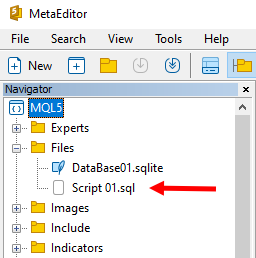
Perfect. We already have everything we need to get started. Take note of the name we gave the SQL script file, because we'll be using it shortly. Please note what we discussed earlier: every SQL statement in an SQL script ends with a semicolon ( ; ). Therefore, we will implement the system in such a way that the SQL script shown above can be executed exactly as written. At this stage, we won't worry about comments, since, as you can see, there aren't any in the SQL script. Therefore, the code that should be placed in the C_ScriptSQL file is shown below.
01. //+------------------------------------------------------------------+
02. #property copyright "Daniel Jose"
03. //+------------------------------------------------------------------+
04. #include "C_DB_SQLite.mqh"
05. #include "..\Service Graphics\Support\C_Array.mqh"
06. //+------------------------------------------------------------------+
07. class C_ScriptSQL : private C_DB_SQLite
08. {
09.     private    :
10.         C_Array    m_Arr;
11.         char       m_Buff[];
12.         int        m_Size;
13. //+------------------------------------------------------------------+
14.         void Convert(void)
15.         {
16.             string sz0 = "";
17.             bool b0 = false, b1 = false;
18.             int nLine = 1;
19.
20.             for (int count = 0, nC0 = nLine; count < m_Size; count++)
21.             {
22.                 switch (m_Buff[count])
23.                 {
24.                     case '\t':
25.                         break;
26.                     case '\n':
27.                         nC0++;
28.                     case '\r':
29.                         break;
30.                     case ';':
31.                         b0 = true;
32.                     default:
33.                         if ((!b1) && (m_Buff[count] > ' '))
34.                         {
35.                             b1 = true;
36.                             nLine = nC0;
37.                         }
38.                         sz0 += (b1 ? StringFormat("%c", m_Buff[count]) : "");
39.                 }
40.                 if (b0)
41.                 {
42.                     m_Arr.Add(sz0, nLine);
43.                     sz0 = "";
44.                     b0 = b1 = false;
45.                 }
46.             }
47.         }
48. //+------------------------------------------------------------------+
49.     public    :
50. //+------------------------------------------------------------------+
51.         C_ScriptSQL(const string szFileScript, const string szFileDataBase)
52.             :C_DB_SQLite(szFileDataBase),
53.              m_Size(-1)
54.         {
55.             int handle;
56.
57.             if ((handle = FileOpen(szFileScript, FILE_READ | FILE_BIN)) == INVALID_HANDLE)
58.             {
59.                 Print("Unable to open script file: ", szFileScript);
60.                 return;
61.             }
62.             ArrayResize(m_Buff, m_Size = (int) FileSize(handle));
63.             FileReadArray(handle, m_Buff);
64.             FileClose(handle);
65.             Convert();
66.         }
67. //+------------------------------------------------------------------+
68.         ~C_ScriptSQL()
69.         {
70.             ArrayFree(m_Buff);
71.         }
72. //+------------------------------------------------------------------+
73.         bool Execute(void)
74.         {
75.             int nLine;
76.             string szInfo;
77.
78.             for (int c = 0; c >= 0; c++)
79.             {
80.                 szInfo = m_Arr.At(c, nLine);
81.                 if (nLine > 0)
82.                     Print(nLine, ">>", szInfo);
83.                 else break;
84.             }
85.             return false;
86.         }
87. //+------------------------------------------------------------------+
88. };
89. //+------------------------------------------------------------------+
Code for C_ScriptSQL.mqh
Please note that the code has already grown considerably. But we've already implemented almost everything we need here. Still, let's take a quick look to see what we're dealing with here. On line 05, we specified that we need to use a header file. This file already exists in the source code of the replay/simulation system. Look for this header file in the previous articles in this series. If you've been following the articles and updating the code as I've shown, you have nothing to worry about, because you'll already have the correct file we need.
Okay, on lines 10 through 12, we see several private variables of this class. On line 14, on the other hand, we have a method whose purpose is to parse the contents of m_Buff and split them into an array of strings. This method is quite interesting because it does all the hard work for us. Essentially, we'll be iterating through the buffer character by character to construct the SQL statement string.
Please note that in each case, the system will check for the presence of a specific character. On line 24, we check for a tab character. For now, this character will simply be ignored. On line 26, we check for a line feed character. When this character is detected, the line counter is incremented, which is what happens on line 27. Please note that on line 28, we check for the presence of a carriage return character.
Both the carriage return character and the line feed character receive the same handling on line 29. However, only the line feed character receives additional handling, since it increments the line counter. If the editor we're using to create the SQL script doesn't use a line feed character—which is quite unusual—we'll have to use a carriage return character to increment the line counter. In any case, I don't think there's any need to change that.
On line 30, we encounter the very character we expected to mark the end of the SQL statement. Please note that we use a variable there to indicate that the statement has been found. However, since this same character must also be included when the statement is sent to SQL, we do not end the block with a break statement. Execution will therefore fall through to the default block. This block will handle any character that has not been processed previously. Let's see how this turns out.
On line 33, we check whether any character other than a space has been found. This is because spaces are not needed at the beginning of an SQL statement. When a character other than a space appears, we'll flag this on line 35 and, immediately afterward, record the line number where the SQL statement begins.
On line 38, we append the current character from the buffer to the string. But there is one important point to note: a character will only be added to the SQL statement string if it already contains at least one character. Otherwise, it will wait until a character appears. Finally, on line 40, once we have an indication that the SQL statement has been fully captured, it will be saved, and the process will restart to search for the next SQL statement.
As for the constructor and destructor, in my opinion, their code is fairly straightforward, so there's no need to comment on them in any special way. However, there are a few points in the code on line 73 that warrant clarification. Let's take a look at them. Note that on line 78, we see a rather strange for loop. This is because the count starts at zero and gradually increases. However, it is not infinite, as many might think. The process ends when the variable's value becomes negative. And this will happen at some point, since the variable is a signed integer.
But before that happens, on line 80, we can retrieve the SQL statements we saved earlier. Note that on line 81, we check whether the specified line is negative. In this case, line 83 will be executed, which will terminate the loop on line 78. If we have anything saved, we'll log it on line 82. That's how it works.
Note that if, instead of outputting the SQL statement to the terminal, we send it to the C_DB_SQLite class, we can execute the statement contained in the SQL script file at this point. It really is very convenient. But before we see this in action, let's take a look at what the main MQL5 code ended up looking like. You can see it below:
01. //+------------------------------------------------------------------+
02. #property copyright "Daniel Jose"
03. #property description "Basic script for SQL database written in MQL5"
04. #property version   "1.00"
05. #property script_show_inputs
06. //+------------------------------------------------------------------+
07. #include <Market Replay\SQL\C_ScriptSQL.mqh>
08. //+------------------------------------------------------------------+
09. input string user01 = "DataBase01";       //Database File Name
10. input string user02 = "Script 01.sql";    //SQL Script File Name
11. //+------------------------------------------------------------------+
12. void OnStart()
13. {
14.     C_ScriptSQL *SQL;
15.
16.     SQL = new C_ScriptSQL(user02, user01);
17.
18.     (*SQL).Execute();
19.
20.     delete SQL;
21. }
22. //+------------------------------------------------------------------+
MQL5 Script Code
When we run this file in the MetaTrader 5 terminal, we'll get the following result:
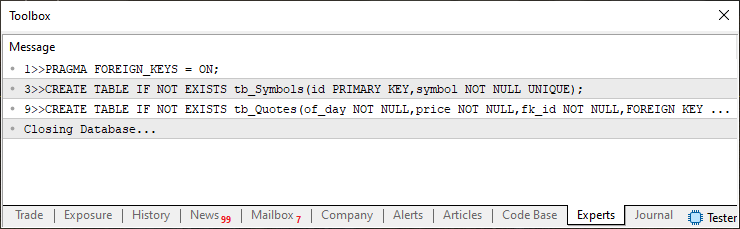
Note that the output gives the line number where the SQL statement begins, along with the statement identified by the system. In other words, we already have what we want, so we can send SQL statements to the C_DB_SQLite class instead of printing them to the terminal. But first, let's figure out how to handle comments in an SQL script file. To handle comments supported by SQL, we need to return to the Convert method in the C_ScriptSQL class and make some changes and additions.
Essentially, our task is to determine whether we are inside or outside a string. It seems pretty simple. However, when it comes to SQL, things get a little more complicated. The reason is that SQL allows the use of both single quotes (') and double quotes ("). And there's no way to know for sure whether the script will use single or double quotes to delimit strings. Therefore, we need to consider both cases. But that's not the hardest part; in fact, the main problem lies elsewhere. Still, let's look at how the code has changed to achieve our goal. You can see this below:
001. //+------------------------------------------------------------------+
002. #property copyright "Daniel Jose"
003. //+------------------------------------------------------------------+
004. #include "C_DB_SQLite.mqh"
005. #include "..\Service Graphics\Support\C_Array.mqh"
006. //+------------------------------------------------------------------+
007. class C_ScriptSQL : private C_DB_SQLite
008. {
009.     private    :
010.         C_Array     m_Arr;
011.         char        m_Buff[];
012.         int         m_Size;
013. //+------------------------------------------------------------------+
014.         void Convert(void)
015.         {
016.             string sz0 = "";
017.             bool b0, b1, bs1, bs2, bc0, bc1, bc;
018.             int nLine = 1;
019.
020.             b0 = b1 = bs1 = bs2 = bc0 = bc1 = bc = false;
021.             for (int count = 0, nC0 = nLine; count < m_Size; count++)
022.             {
023.                 switch (m_Buff[count])
024.                 {
025.                     case '\t':
026.                         sz0 += (bs1 || bs2 ? "\t" : "");
027.                         break;
028.                     case '\n':
029.                         nC0++;
030.                     case '\r':
031.                         bc0 = false;
032.                         break;
033.                     case ';':
034.                         b0 = (bs1 || bs2 || bc0 || bc1 ? b0 : true);
035.                     default:
036.                         switch (m_Buff[count])
037.                         {
038.                             case '"':
039.                                 bs1 = (bs2 || bc0 || bc1 ? bs1 : !bs1);
040.                                 break;
041.                             case '\'':
042.                                 bs2 = (bs1 || bc0 || bc1 ? bs2 : !bs2);
043.                                 break;
044.                         }
045.                         if (((count + 1) < m_Size) && (!bs1) && (!bs2))
046.                         {
047.                             if (bc = ((m_Buff[count] == '-') && (m_Buff[count + 1] == '-'))) bc0 = true;
048.                             if (bc = ((m_Buff[count] == '/') && (m_Buff[count + 1] == '*'))) bc1 = true;
049.                             if (bc = ((m_Buff[count] == '*') && (m_Buff[count + 1] == '/'))) bc1 = false;
050.                             if (bc)
051.                             {
052.                                 count += 1;
053.                                 bc = false;
054.                                 continue;
055.                             }
056.                         }
057.                         if (!(bc0 || bc1))
058.                         {
059.                             if ((!b1) && (m_Buff[count] > ' '))
060.                             {
061.                                 b1 = true;
062.                                 nLine = nC0;
063.                             }
064.                             sz0 += (b1 ? StringFormat("%c", m_Buff[count]) : "");
065.                         }
066.                 }
067.                 if (b0)
068.                 {
069.                     m_Arr.Add(sz0, nLine);
070.                     sz0 = "";
071.                     b0 = b1 = false;
072.                 }
073.             }
074.         }
075. //+------------------------------------------------------------------+
076.     public    :
077. //+------------------------------------------------------------------+
078.         C_ScriptSQL(const string szFileScript, const string szFileDataBase)
079.             :C_DB_SQLite(szFileDataBase),
080.              m_Size(-1)
081.         {
082.             int handle;
083.
084.             if ((handle = FileOpen(szFileScript, FILE_READ | FILE_BIN)) == INVALID_HANDLE)
085.             {
086.                 Print("Unable to open script file: ", szFileScript);
087.                 return;
088.             }
089.             ArrayResize(m_Buff, m_Size = (int) FileSize(handle));
090.             FileReadArray(handle, m_Buff);
091.             FileClose(handle);
092.             Convert();
093.         }
094. //+------------------------------------------------------------------+
095.         ~C_ScriptSQL()
096.         {
097.             ArrayFree(m_Buff);
098.         }
099. //+------------------------------------------------------------------+
100.         bool Execute(void)
101.         {
102.             int nLine;
103.             string szInfo;
104.
105.             for (int c = 0; c >= 0; c++)
106.             {
107.                 szInfo = m_Arr.At(c, nLine);
108.                 if (nLine > 0)
109.                     Print(nLine, ">>", szInfo);
110.                 else break;
111.             }
112.             return false;
113.         }
114. //+------------------------------------------------------------------+
115. };
116. //+------------------------------------------------------------------+
Source code for C_ScriptSQL.mqh
Please note that the code is much more complex. That is exactly why I explained how everything works earlier: this comment-handling code would be much harder to understand without first understanding the previous version. Please be careful—many more variables have now been added. Also note that the tab character, which used to be ignored, will no longer be ignored in all cases. It will be ignored only in specific cases—that is, when we are outside a string. When we are inside a string, the tab character will be retained.
I also had to add something, which you can see on line 31. There, when a line feed character is detected, we reset the value used to indicate that we are inside a comment. Please note that when a semicolon ( ; ) is encountered, we check whether we are inside a comment or a string. This is necessary to prevent SQL statements from being prematurely terminated. Please also note that we added a switch statement on line 36. Its function is to handle quotation marks. But why didn't we leave this in the main code? The reason is that if this processing were performed in the main code, we would have to do additional work to preserve the integrity of the SQL script.
But what I really want to draw your attention to, dear reader, is the code on line 45. This is where we begin checking for comments in the SQL code. Each line checks a condition that identifies a comment. And they all have one thing in common: the variable bc. When this variable is true, it indicates that we have a comment and that any content should be ignored. Let's see how it works. On line 47, we check for a double hyphen (--), which in SQL indicates a comment that extends to the end of the current line. On line 48, we check for the start of a block comment. On line 49, we check for the end of a block comment.
All of these checks are very simple. However, it's worth noting that we will always ignore them when we're inside a string. We will also ignore string detection when we are inside a comment. Essentially, this makes the script read and discard anything that is not part of an SQL statement. Try creating SQL scripts with comments and strings. Run the MQL5 script code in MetaTrader 5 to verify that everything is working as expected. Carefully examine every detail to ensure that the code is processed correctly by the method in the C_ScriptSQL class. This is because, once this analysis is successfully completed, the code on line 100 can be replaced with the code shown below. As a result, the SQL script will actually be executed rather than displayed in the MetaTrader 5 terminal. Thus, we have achieved our goal.
099. //+------------------------------------------------------------------+
100.         bool Execute(void)
101.         {
102.             int nLine;
103.             string szInfo;
104.
105.             for (int c = 0; c >= 0; c++)
106.             {
107.                 szInfo = m_Arr.At(c, nLine);
108.                 if (nLine < 0) return c > 0;
109.                 if (!this.Command(szInfo)) return false;
110.             }
111.             return false;
112.         }
113. //+------------------------------------------------------------------+
Excerpt from the C_ScriptSQL.mqh file
Don't forget to update the main file as well by adding the code shown below:
01. //+------------------------------------------------------------------+
02. #property copyright "Daniel Jose"
03. #property description "Basic script for SQL database written in MQL5"
04. #property version   "1.00"
05. #property script_show_inputs
06. //+------------------------------------------------------------------+
07. #include <Market Replay\SQL\C_ScriptSQL.mqh>
08. //+------------------------------------------------------------------+
09. input string user01 = "DataBase01";       //Database File Name
10. input string user02 = "Script 01.sql";    //SQL Script File Name
11. //+------------------------------------------------------------------+
12. void OnStart()
13. {
14.     C_ScriptSQL *SQL;
15.
16.     SQL = new C_ScriptSQL(user02, user01);
17.
18.     Print("Result of executing the SQL script: ", (*SQL).Execute() ? "Success" : "Failed", "...");
19.
20.     delete SQL;
21. }
22. //+------------------------------------------------------------------+
MQL5 script source code
And if you want to run a lot of tests using an SQL script, update it using the code shown below:
01. PRAGMA FOREIGN_KEYS = ON;
02.
03. DROP TABLE IF EXISTS tb_Symbols;
04. DROP TABLE IF EXISTS tb_Quotes;
05.
06. CREATE TABLE IF NOT EXISTS tb_Symbols
07. (
08.     id PRIMARY KEY,
09.     symbol NOT NULL UNIQUE
10. );
11.
12. CREATE TABLE IF NOT EXISTS tb_Quotes
13. (
14.     of_day NOT NULL,
15.     price NOT NULL,
16.     fk_id NOT NULL,
17.     FOREIGN KEY (fk_id) REFERENCES tb_Symbols(id)
18. );
Code in SQLite
Concluding Thoughts
In this article, we showed how, with just a little knowledge of MQL5 and SQL, you can run SQL code using a script. Or, to put it another way, you can use a file containing SQL code and, by providing the necessary information, execute the exact code contained in that SQL script file.
Indeed, many people might consider the use of an external file to be a problem. This is because you will always have to provide the client with an SQL file. And you'll have to trust that the client won't tamper with or modify the code contained in the SQL file. This is definitely a problem if you don't know exactly what to do in a situation like this. But even if you like what you've seen here and are worried that someone might change or modify the code that executes the SQL, there's no need to worry about it.
If you don't know how to embed this file containing SQL code into an executable created in MQL5, don't miss the next article. I'll show you how to do it there. In addition, we'll cover even more topics related to working with SQL from MQL5.
| File | Description |
|---|---|
| Experts\Expert Advisor.mq5 | Demonstrates the interaction between Chart Trade and the Expert Advisor (Mouse Study is required for this interaction). |
| Indicators\Chart Trade.mq5 | Creates a window for configuring the order to be sent (Mouse Study is required for this interaction). |
| Indicators\Market Replay.mq5 | Creates controls for interacting with the replay/simulation service (Mouse Study is required for this interaction) |
| Indicators\Mouse Study.mq5 | Enables interaction between graphical controls and the user (required both for operating the replay/simulation system and for trading in the real market). |
| Services\Market Replay.mq5 | Creates and maintains the market replay/simulation service (the main file for the entire system) |
| Code VS C++\Servidor.cpp | Creates and maintains a server socket written in C++ (MiniChat version) |
| Code in Python\Server.py | Creates and maintains a socket in Python for communication between MetaTrader 5 and Excel |
| Indicators\Mini Chat.mq5 | Allows you to implement a mini-chat via an indicator (requires a server to function) |
| Experts\Mini Chat.mq5 | Allows you to set up a mini-chat using an Expert Advisor (requires a server to run). |
| Scripts\SQLite.mq5 | Demonstrates how to use an SQL script with MQL5 |
| Files\Script 01.sql | Demonstrates how to create a simple table with a foreign key. |
| Files\Script 02.sql | Shows how to add values to a table |
Translated from Portuguese by MetaQuotes Ltd.
Original article: https://www.mql5.com/pt/articles/13078
Warning: All rights to these materials are reserved by MetaQuotes Ltd. Copying or reprinting of these materials in whole or in part is prohibited.
This article was written by a user of the site and reflects their personal views. MetaQuotes Ltd is not responsible for the accuracy of the information presented, nor for any consequences resulting from the use of the solutions, strategies or recommendations described.

 Market Simulation: First Steps with SQL in MQL5 (III)
 Bull Optimization Algorithm (BOA)
 Zero-Copy Tick Streaming (Part 2) : Reading MetaTrader 5 Ticks into Python and Benchmarking the Result
 Beyond Squared Returns: Path-Dependent Volatility

- Free trading apps
- Over 8,000 signals for copying
- Economic news for exploring financial markets
You agree to website policy and terms of use