

Market Simulation: Getting started with SQL in MQL5 (I)
 1 113
1 113
 0
0

Introduction
Hello everyone, and welcome to another article about creating a replication/simulation system.
In the previous article Market Simulation (Part 24): Getting started with SQL (VII) we completed what I consider the most basic foundation needed so that, even without SQL experience, you can at least understand what we will do next. This is because we are moving to a new stage in the development of the replication/simulation system, and here knowledge of SQL will be of paramount importance so that you can follow this and the following articles.
Do not worry if you have only just started learning SQL and are relying only on the knowledge gained in the previous articles. If this material is used and understood correctly, it will already be enough to solve many of the tasks we really need. At this first stage, my true intention is for us to remain within SQLite, because it is already integrated into MetaTrader 5, which makes it much easier to use without resorting to DLLs or even sockets.
So, if you already use SQLite in your MQL5 programs, this article will not add anything new to what you already know. But if you are just beginning your journey in this world, where the use of databases must be treated very seriously, and you do not know how to implement this with MQL5, I think it is best to sit comfortably in your chair and study this article carefully. Here we will examine how to start working with an SQL database using the MQL5 language. However, we will not use just any database, but SQLite. And, as you have already seen in the previous articles, we can do a lot within this system. All of this with minimal effort in MQL5.
Creating an SQL database using MQL5
All right. The first thing we need to do is create a database. As we have already seen in previous articles, this is quite simple and not difficult. You can work directly in MetaEditor, from the command line, or with a special program for editing SQL scripts. But I want you to understand that we do not necessarily have to do it in exactly this way. It can be implemented directly through programming, using one language or another for our purpose.
If you search, you can find many people explaining the same process in different ways and using different languages. But if you look closely, you will notice that essentially everything comes down to SQL. And this is where things become most interesting. If you understand these principles, you will be able to adapt something written, for example, in Java for implementation in MQL5. The reason is that, ultimately, it is the SQL code that will actually process the data and work with the records. Java will merely provide a friendlier interface for a certain type of user.
You will encounter the same approach in VBA, where we use Excel to present data that will be obtained directly through SQL. That is why it is so important to understand how SQL code really works. In the end, we will be using SQL. The language that serves as support for SQL will merely present the data that SQL provides to us.
Understanding how everything really works will help you a great deal later on. So let us begin with the most basic principle: creating a SQLite database file using MQL5. Since our goal is to explain this as clearly as possible, we will use the simplest method. In other words, we will use an MQL5 script. This is because a script is easier to understand and easier to test. The first code fragment we will use can be seen below:
01. //+------------------------------------------------------------------+
02. #property copyright "Daniel Jose"
03. #property description "Basic script for SQL database written in MQL5"
04. #property version   "1.00"
05. #property script_show_inputs
06. //+------------------------------------------------------------------+
07. input string user01 = "DataBase01";        //FileName
08. //+------------------------------------------------------------------+
09. void OnStart()
10. {
11.     string szFileName = user01 + ".sqlite";
12.     int handleDB;
13.
14.     if ((handleDB = DatabaseOpen(szFileName, DATABASE_OPEN_CREATE | DATABASE_OPEN_READWRITE)) == INVALID_HANDLE)
15.     {
16.         Print("Unable to create or open the file ", szFileName);
17.         return;
18.     }
19.     DatabaseClose(handleDB);
20.     Print("Database file saved successfully..");
21. }
22. //+------------------------------------------------------------------+
Code in MQL5
This is the simplest code for opening or creating a database file. All of this is done using MQL5 and SQLite. Notice that it is very easy to understand. In line 07, we let the script user specify the name of the database that needs to be created or opened. Keep in mind that we do not specify the file extension to use; we will specify it later. The extension used is indicated in line 11. Please note that here we use the name supplied by the script user and concatenate it with another string, which in this case will be the file-name extension.
It is important to note that we can use any extension, but I would advise you to use one that indicates the type of file being used. For an SQL database, the most common extension is .DB or, in the case of SQLite, .sqlite, because we can use SQLite-specific elements. This has already been explained in previous articles. If you have any doubts, consult them and the sources mentioned there for a better understanding of the topic.
So, since we will be working with files, we need a handle. It is shown in line 12. In line 14, we use the DatabaseOpen function, which is part of MQL5, to open or even create the database file. At this point, one important detail should be noted. A database file can be created in three different locations. All of this is done using the same DatabaseOpen function. The data storage locations are as follows: the first is in RAM, which means that after the database is closed it will cease to exist. This is very useful in certain situations, but in our case we will not use it, at least not for now. The second location,
as in the third case, will depend on the arguments passed to the DatabaseOpen function. Please note that in the code shown we use the arguments DATABASE_OPEN_CREATE and DATABASE_OPEN_READWRITE. As a result, the database file will be created somewhere in the MQL5\Files folder. I say "somewhere" because the name specified by the user may contain a valid directory name. If this happens, we will need to go to the directory specified by the user. In any case, this directory will be inside the MQL5\Files folder precisely because of the specified arguments.
However, this location may differ if, in addition to the arguments we saw in the code, we also add the argument DATABASE_OPEN_COMMON. This changes the folder from MQL5\Files to COMMON\Files. "But where is the COMMON folder, and how do I access it?" Such doubts are quite common. So, dear reader, if you do not know where this folder is located, simply go to the following path on your local disk:
C:\Users\<UserName>\AppData\Roaming\MetaQuotes\Terminal
In this location you will find the COMMON folder, and inside it, the Files folder. Do not forget to replace <UserName> with the name of the user logged into Windows.
If creation of or access to the specified file is denied, the message from line 16 will be printed in the MetaTrader 5 terminal. Immediately after that, in line 17, the script will terminate. But if everything goes perfectly, in line 19 we close the database file, and in line 20 we print a message in the MetaTrader 5 terminal saying that everything completed successfully. As a result, you will be able to open it in MetaEditor and see something similar to what is shown in the next image:
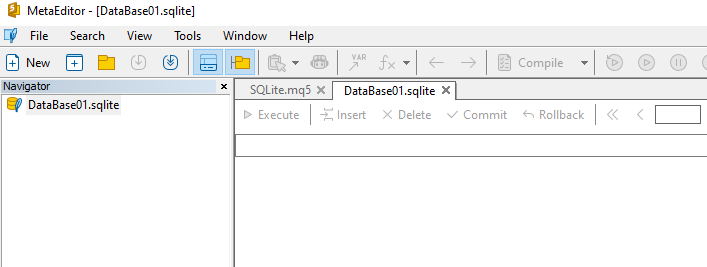
At this point, we could work with SQL in MetaEditor. However, in our case we will be using it from MQL5. Nevertheless, you can use MetaEditor or even the programs shown in the previous articles when SQL was explained to follow what will be done with MQL5. In the early stages of studying SQLite use in MQL5, it is important to be able to monitor the progress of operations. Basic SQL knowledge is very useful for this. Therefore, use the supporting materials from the previous articles to speed up the learning process even more. What we will do here is quite interesting.
Excellent. Now that we already know how to create or open an SQL database file, we can move on to the next stage. But first let me clarify something that may raise doubts. When we say that we will open a file, access data, and add or modify records in SQL, I want you to remember that we will be using SQLite. This is because, to perform the same actions that we will do here but using another SQL implementation, such as MySQL or SQL Server, the way they are performed will be slightly different. So do not confuse things.
SQL as a language is one. There are several types of implementation, and each of them lets us do more or fewer things. Here we will work exclusively with SQLite, at least in the initial stage of implementation. In the future we may change our mind, but if that happens, we will explain how to move from SQLite to another SQL implementation. However, you should not be afraid to learn SQL, because the SQL language will always be the same, regardless of the application or implementation that uses it.
Creating the first tables
As in the explanation of SQL commands, we will do something very similar. This is needed so that the transition from programming in pure SQL to SQL embedded in other code is smooth. In this case, the code that will receive these commands is MQL5. Fortunately, the MQL5 developers have done an excellent job and made everything quite simple to understand and use. Thus, we really need to learn to use six of all the functions available in MQL5 for working with databases. "But then do the other functions become unnecessary?" No, I did not say that. I said that we need to learn to use six functions. And by knowing how to work with these six functions and understanding SQL a little, we can handle any related situation flawlessly. At least this applies to working with SQLite, which is included with MQL5.
If we are going to use SQLite through a DLL, the way of working will be slightly different. This is because in that case we will make calls directly using SQLite included in the DLL file. So, if that is your specific case, I recommend studying the documentation on using SQLite through a DLL, because here everything is somewhat different from what we will examine.
Let us now see which functions we need to learn to use. We have already shown two of them, namely DatabaseOpen and DatabaseClose. But we will also need the DatabaseExecute, DatabasePrepare, DatabaseReadBind, and DatabaseFinalize functions. Of course, knowing how to use the other functions will help a great deal in many situations. But with these six we can now very easily build almost anything, provided, of course, that we have good basic knowledge of SQL programming.
Thanks to what we covered in the previous articles, you will at least already be able to do some fairly interesting things. In addition, of course, you will be able to do things that many would not be able to do in the way you will. But, as I promised, we will do everything gradually so that everyone can follow along and understand what is happening.
All right. As you may have noticed in previous articles, everything we do is somehow related to tables, so let us start with the basics of this topic. Thus, our new script is shown below.
01. //+------------------------------------------------------------------+
02. #property copyright "Daniel Jose"
03. #property description "Basic script for SQL database written in MQL5"
04. #property version   "1.00"
05. #property script_show_inputs
06. //+------------------------------------------------------------------+
07. input string user01 = "DataBase01";        //FileName
08. //+------------------------------------------------------------------+
09. void OnStart()
10. {
11.     string szFileName = user01 + ".sqlite",
12.              szRequestSQL;
13.     int handleDB;
14.
15.     if ((handleDB = DatabaseOpen(szFileName, DATABASE_OPEN_CREATE | DATABASE_OPEN_READWRITE)) == INVALID_HANDLE)
16.     {
17.         Print("Unable to create or open the file ", szFileName);
18.         return;
19.     }
20.     szRequestSQL = "CREATE TABLE IF NOT EXISTS tb_Symbol(id PRIMARY KEY, symbol NOT NULL UNIQUE);";
21.     if (!DatabaseExecute(handleDB, szRequestSQL))
22.     {
23.         Print("Request execution failed.");
24.         DatabaseClose(handleDB);
25.         return;
26.     }
27.     DatabaseClose(handleDB);
28.     Print("Database file saved successfully.");
29. }
30. //+------------------------------------------------------------------+
Code in MQL5
When this script is run in MetaTrader 5, we will get the following result:
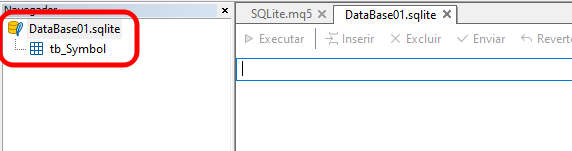
"Wow, that's great. But how was it done?" Simply. We only used what we saw in the previous articles, where we explained SQL. But here we did everything with MQL5. How? Taking the script we saw in the previous section as a basis, we add only a few lines to the code. With one reservation: this code does not yet have the correct structure. Here I want to show you how we can do the same thing we saw before. Thus, we add line 12, which is a string that receives the SQL command we want to execute. In line 20, we specify what this command is. In this case, we ask SQL to create a table named tb_Symbol if it does not exist in the database.
Immediately after that, using the DatabaseExecute function, we tell SQLite to execute the SQL command. If this procedure fails, the message in line 23 will be printed in the MetaTrader 5 terminal. Since the database is open, we need to close it, which is done in line 24. In line 25, we finish executing the script in MetaTrader 5.
Now pay attention to one point. When using SQLite, which is included with MetaTrader 5, any command that we want to send to SQLite for execution will be sent through DatabaseExecute. However, this is suitable only when we want to issue SQL commands. When executing queries, we will also need to use other functions. Notice how everything fits together, and we can develop what we need.
So, before moving on to working with queries, let us make this MQL5 script a little more universal and therefore more suitable for use with the database we are creating. Since the structure can be changed, we can turn this same script into a class. Although at this stage this may seem simple, it will help significantly, because we will be able to make the code more reusable and therefore safer and more stable. Then we transform the same code we saw earlier into the code shown below, only now using classes:
01. //+------------------------------------------------------------------+
02. #property copyright "Daniel Jose"
03. #property description "Basic script for SQL database written in MQL5"
04. #property version   "1.00"
05. #property script_show_inputs
06. //+------------------------------------------------------------------+
07. input string user01 = "DataBase01";         //FileName
08. //+------------------------------------------------------------------+
09. class C_DB_SQLite
10. {
11.     private :
12.             int     m_handleDB;
13.     public  :
14. //+------------------------------------------------------------------+
15.             C_DB_SQLite(const string szFileName)
16.                     :m_handleDB(INVALID_HANDLE)
17.                     {
18.                             if ((m_handleDB = DatabaseOpen(szFileName, DATABASE_OPEN_CREATE | DATABASE_OPEN_READWRITE)) == INVALID_HANDLE)
19.                             {
20.                                     Print("Unable to create or open the file ", szFileName);
21.                                     return;
22.                             }
23.                     }
24. //+------------------------------------------------------------------+
25.             ~C_DB_SQLite()
26.                     {
27.                             DatabaseClose(m_handleDB);
28.                             Print("Closing Database...");
29.                     }
30. //+------------------------------------------------------------------+
31.             bool Command(const string szRequestSQL)
32.                     {
33.                             bool ret = DatabaseExecute(m_handleDB, szRequestSQL);
34.                             Print("Request execution: ", (ret ? "Success" : "Failed"), "...");
35.                             return ret;
36.                     }
37. //+------------------------------------------------------------------+
38. };
39. //+------------------------------------------------------------------+
40. void OnStart()
41. {
42.     C_DB_SQLite *DB;
43.
44.     DB = new C_DB_SQLite(user01 + ".sqlite");
45.
46.     (*DB).Command("CREATE TABLE IF NOT EXISTS tb_Symbol(id PRIMARY KEY, symbol NOT NULL UNIQUE);");
47.
48.     delete DB;
49. }
50. //+------------------------------------------------------------------+
Code in MQL5
Please note that now we have a much more complex structure for working with the database. This is because, no matter what we are going to do, whenever we send commands to the database, we will send them to the correct database, regardless of whether we have one database open or dozens. The command will always be sent to the correct database. This is because the functions are now used inside the class created between lines 9 and 38, and this is only the beginning. Nevertheless, we already have all the safety that the class offers us.
For example, we cannot use a handle if it has not been initialized. And because initialization is performed through the class constructor, we are guaranteed that we will always use a valid handle. This can be seen in line 33, where we use the handle to send a command to SQL.
Now I want you to pay attention to the following point: Many may consider it excessive to use or even create a class to encapsulate the communication system with SQLite, but let us think about this a little, and perhaps it will change your mind. You might think: "Why should I create a class just to use SQLite included in MetaTrader 5? It is much easier to use the MQL5 functions directly. Especially since I am not going to use SQL intensively in my programs." From this point of view I must agree with you, but let us consider it in a somewhat broader context. MQL5 lets us easily and simply access the SQLite built into MetaTrader 5. Fine. But we should not limit ourselves to that.
If we develop a whole range of applications or even a system that uses the SQLite built into MetaTrader 5, and at the same time we use only MQL5 functions, then at some point we will be limited to using only and exclusively the SQLite from MetaTrader 5. We will not be able to use our own SQLite build in a DLL file. And worst of all, if at some point we decide to use another SQL implementation, whether MySQL, SQL Server, or any other, we will have a lot of work rewriting all our code to account for the necessary dependencies. This is because MySQL and SQL Server, which we have only mentioned, do not use a file system that can be accessed with MQL5. We can even use MQL5, but for that we will have to use another tool, the application of which we have already demonstrated in this series. We are talking about sockets.
In other words, to access databases that use a client-server architecture, we will have to use sockets. If our implementation was designed from the beginning with a class system to hide implementation details, all we will need to do is modify the class, extending or adapting it so that it can provide the necessary support for communication through sockets. This greatly simplifies the entire development process. Because if we need to change the SQL implementation by replacing the SQLite used in MetaTrader 5 with our own SQLite compiled into a DLL, this will be easy to do.
The same applies when we need to change the implementation. When moving from file-based SQLite to client-server SQL, we will not have major problems. It will be enough simply to change how the class works, and the rest of the code will benefit from these changes. It is that simple. Therefore, do not underestimate the advantages of developing an application with the expectation that the way it works may change in the future. Remember: technologies change over time. Creating an implementation that is locked to or inseparably tied to one thing is not the best choice.
Understanding some points
Before continuing, I want to show you something, because it is very important for you to understand it. Let us do the following. In the previous articles we created a relationship between tables to build a relational database. We explained how this can be done, as well as the advantages and disadvantages of this way of structuring a database according to the relational model. But when we work with a large number of SQL commands through the SQLite built into MetaTrader 5, we will have to take certain precautions. Or, more precisely, we need to come up with a way to make this safer.
What we will show will force us to make a number of decisions in the next article. Study the MQL5 code below carefully:
01. //+------------------------------------------------------------------+
02. #property copyright "Daniel Jose"
03. #property description "Basic script for SQL database written in MQL5"
04. #property version   "1.00"
05. #property script_show_inputs
06. //+------------------------------------------------------------------+
07. input string user01 = "DataBase01";        //FileName
08. //+------------------------------------------------------------------+
09. class C_DB_SQLite
10. {
11.     private    :
12.         int    m_handleDB;
13.     public    :
14. //+------------------------------------------------------------------+
15.         C_DB_SQLite(const string szFileName)
16.             :m_handleDB(INVALID_HANDLE)
17.             {
18.                 if ((m_handleDB = DatabaseOpen(szFileName, DATABASE_OPEN_CREATE | DATABASE_OPEN_READWRITE)) == INVALID_HANDLE)
19.                 {
20.                     Print("Unable to create or open the file ", szFileName);
21.                     return;
22.                 }
23.             }
24. //+------------------------------------------------------------------+
25.         ~C_DB_SQLite()
26.             {
27.                 DatabaseClose(m_handleDB);
28.                 Print("Closing Database...");
29.             }
30. //+------------------------------------------------------------------+
31.         bool Command(const string szRequestSQL)
32.             {
33.                 bool ret = DatabaseExecute(m_handleDB, szRequestSQL);
34.                 Print("Request execution: ", (ret ? "Success" : "Failed"), "...");
35.                 return ret;
36.             }
37. //+------------------------------------------------------------------+
38. };
39. //+------------------------------------------------------------------+
40. void OnStart()
41. {
42.     C_DB_SQLite *DB;
43.
44.     DB = new C_DB_SQLite(user01 + ".sqlite");
45.
46.     (*DB).Command("PRAGMA FOREIGN_KEYS = ON;");
47.     (*DB).Command("CREATE TABLE IF NOT EXISTS tb_Symbols"
48.                   "("
49.                     "id PRIMARY KEY,"
50.                     "symbol NOT NULL UNIQUE"
51.                   ");");
52.     (*DB).Command("CREATE TABLE IF NOT EXISTS tb_Quotes"
53.                   "("
54.                     "of_day NOT NULL,"
55.                     "price NOT NULL,"
56.                     "fk_id NOT NULL,"
57.                     "FOREIGN KEY (fk_id) REFERENCES tb_Symbols(id)"
58.                   ");");
59.     delete DB;
60. }
61. //+------------------------------------------------------------------+
Code in MQL5
Pay attention to how the commands are arranged in the MQL5 code. This is necessary for executing SQL commands. It often happens that, when writing so many things, we eventually make some kind of mistake. Now look at the script below:
01. PRAGMA FOREIGN_KEYS = ON;
02.
03. CREATE TABLE IF NOT EXISTS tb_Symbols
04. (
05.     id PRIMARY KEY,
06.     symbol NOT NULL UNIQUE
07. );
08.
09. CREATE TABLE IF NOT EXISTS tb_Quotes
10. (
11.     of_day NOT NULL,
12.     price NOT NULL,
13.     fk_id NOT NULL,
14.     FOREIGN KEY (fk_id) REFERENCES tb_Symbols(id)
15. );
Code in SQLite
Compare this script with the previous one. Notice that although the latter uses pure SQL and its syntax can be analyzed while writing, we do not have the same possibility when we insert strings directly into MQL5 code. This is the mechanism through which MQL5 interacts with the SQLite engine built into MetaTrader 5. That is, if we make a typo while writing SQL code inside a string in MQL5 code, SQL will not be able to execute our code correctly. As a result, we may blame MQL5 or even MetaTrader 5, which would be a big mistake. However, it should be noted that in both versions of the code we create a database with related tables. And if by chance at some point we write the table name tb_Symbols as tb_Symbol, the result will be completely different from what is shown in the following figure:
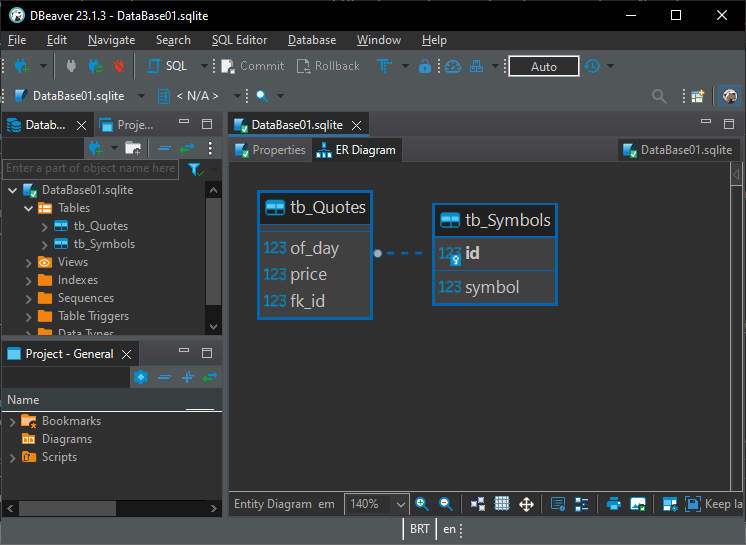
Please note that if we try to see in MetaEditor the same structure shown in the previous figure, we will not succeed. We have already discussed this in another article. If you do not understand what is happening here, I suggest reading the articles where we explained SQL and how to obtain the programs needed to use the SQL system more effectively.
But the point I want to emphasize here is exactly this. When viewing SQL code inside a string, it may contain errors that are not easy to notice. However, if we use an editor capable of analyzing SQL code, finding these errors will be much easier, as can be seen below:
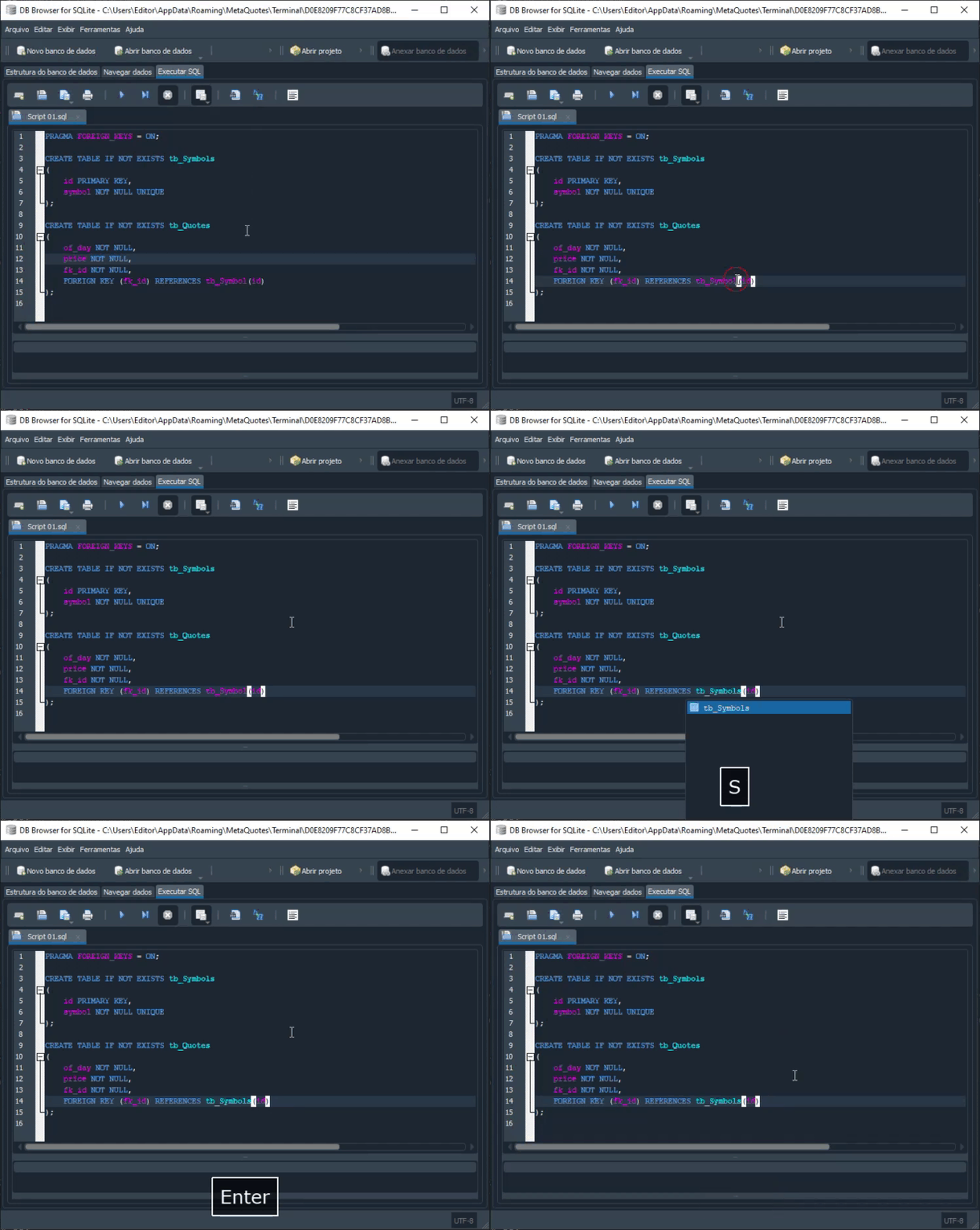
It should be noted that spotting an error in a standalone SQL script is much easier. As I said earlier, it is not uncommon for you, as a programmer, to make typos. Thus, using the right tools can save a lot of time spent figuring out why a particular piece of code works or does not work. In most cases, the error is precisely a typo made while entering some command.
Final thoughts
In today's article we started studying the use of SQL in MQL5 code. We looked at how a database can be created. Or, more precisely, how to create a SQLite database file using the features built into MQL5. We also looked at how to create a table, and then how to establish a relationship between tables by using a primary and a foreign key. All of this, once again, using MQL5. We saw how easy it is to create code that can later be migrated to other SQL implementations by using a class that helps hide the implementation being created.
And most importantly: we made sure that when using SQL there is a risk of problems at various points. This is because, inside MQL5 code, SQL code will be placed inside a string value. And the fact that this happens makes it quite likely that something may go wrong, causing the execution of SQL code inside MQL5 to become problematic because of a typo. However, we can and will create a mechanism that, in addition to giving us more freedom, will allow us to avoid these problems, because there are editors designed to make SQL script code easier to read.
So, in the next article we will create a mechanism to make such portability easier. Many of those with some experience can probably already guess what this is about. But if that is not your case, do not worry; in the next article we will look at how to do it. And we will continue our work in the SQL area, only now using MQL5 as the basis for execution. This is necessary so that MetaTrader 5 allows our replication/simulation system to start using databases in its work. So keep studying, and see you in the next article, where everything will become even more interesting.
| File | Description |
|---|---|
| Experts\Expert Advisor.mq5 | Demonstrates interaction between Chart Trade and the Expert Advisor (Mouse Study is required for interaction). |
| Indicators\Chart Trade.mq5 | Creates a window for configuring the order to be sent (Mouse Study is required for interaction). |
| Indicators\Market Replay.mq5 | Creates controls for interacting with the replication/simulation service (Mouse Study is required for interaction). |
| Indicators\Mouse Study.mq5 | Provides interaction between graphical controls and the user (necessary both for the replication/simulation system and for the real market). |
| Services\Market Replay.mq5 | Creates and maintains the market replication/simulation service (the main file of the entire system). |
| Code VS C++\Servidor.cpp | Creates and maintains a server socket developed in C++ (MiniChat version). |
| Code in Python\Server.py | Creates and maintains a socket in Python for communication between MetaTrader 5 and Excel. |
| Indicators\Mini Chat.mq5 | Allows implementing a mini chat through an indicator (a server is required for operation). |
| Experts\Mini Chat.mq5 | Allows implementing a mini chat using an Expert Advisor (a server is required for operation). |
| Scripts\SQLite.mq5 | Demonstrates the use of an SQL script through MQL5. |
| Files\Script 01.sql | Demonstrates the creation of a simple table with a foreign key. |
| Files\Script 02.sql | Shows adding values to the table. |
Translated from Portuguese by MetaQuotes Ltd.
Original article: https://www.mql5.com/pt/articles/13062
Warning: All rights to these materials are reserved by MetaQuotes Ltd. Copying or reprinting of these materials in whole or in part is prohibited.
This article was written by a user of the site and reflects their personal views. MetaQuotes Ltd is not responsible for the accuracy of the information presented, nor for any consequences resulting from the use of the solutions, strategies or recommendations described.

 Neural Networks in Trading: Anomaly Detection in the Frequency Domain (Final Part)
 Implementing a Breakeven Mechanism in MQL5 (Part 2): ATR- and RRR-Based Breakeven
 Building an Object-Oriented Z-Score Statistical Arbitrage Engine in MQL5
 Interactive Supply and Demand Zone Manager in MQL5 (Part I): From Manual to Automated Lifecycle

- Free trading apps
- Over 8,000 signals for copying
- Economic news for exploring financial markets
You agree to website policy and terms of use