SOMFX1Builder

5

If you like trading by candle patterns and want to reinforce this approach by modern technologies, this script is for you. In fact, it is a part of a toolbox, that includes a neural network engine implementing Self-Organizing Map (SOM) for candle patterns recognition, prediction, and provides you with an option to explore input and resulting data. The toolbox contains:

  • SOMFX1Builder - this script for training neural networks; it builds a file with generalized data about most characteristic price figures which can be used for next bars prediction either in a built-in sub-window (using SOMFX1 indicator), or directly on the chart using SOMFX1Predictor;
  • SOMFX1 - the indicator for price pattern prediction and visual analysis of a trained neural network, input and resulting data (in a separate sub-window);
  • SOMFX1Predictor - another indicator for predicting price patterns just in the main window;
The tools are separated from each other due to some MetaTrader 4 limitations, for example, it's not currently possible to run lengthy calculations in indicators because they are executed in the main thread.

In brief, all the process of price analysis, network training, pattern recognition and prediction supposes the following steps:

  1. Build a neural network by SOMFX1Builder;
  2. Analyze the resulting neural network performance by means of SOMFX1; if not satisfied, repeat step 1 with new settings; you may skip this step if you wish;
  3. Use final neural network for price pattern prediction using SOMFX1Predictor.

The 1-st step is covered in details below. More information about visual analysis and prediction can be found on the web-pages of corresponding indicators.

This is just a warning to make it clear: this script does not predict price patterns itself. It trains a neural network and saves it into a file, which should be loaded into SOMFX1 or SOMFX1Predictor indicators. So, you need to acquire one or both of them in addition to this script.

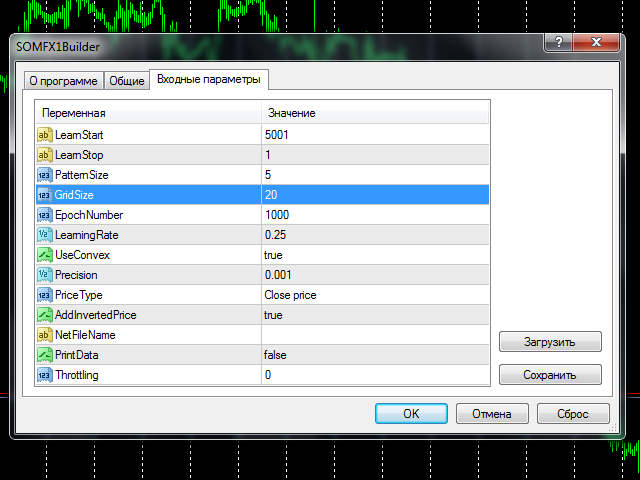
To start training you should choose number of bars in history to train at (LearnStart and LearnStop parameters), number of bars in a single pattern (PatternSize), the size of the map (GridSize), the number of learning cycles (EpochNumber). Some other parameters may also affect learning process, you may find all the details below, in "Parameters" section.

Learning may take considerable time, depending from the given parameters. The larger the number of bars being processed, the longer it takes to finish the process. Pattern size, map size and number of epochs - all work in the similar way. For example, training on 5000 bars with the map 10*10 in size may take several minutes on an average PC. All this time CPU core load is maximum, and terminal may slow down, if your PC doesn't have a couple of cores. You should choose a time for training when you do not expect active trading, or you could use weekends. This is especially important because the training process normally needs some optimization and thus should be repeated several times before you get optimal results. Why? Please find the answer below, in "Choosing optimal parameters" section.

Before you start reading the next sections, it may be worth reading "How it works" section on the SOMFX1 page with an overview of neural network principles.


Parameters

  • LearnStart - number of a bar in history, where training data begins, or an exact date and time of the bar (in the format "YYYY.MM.DD HH:MM"); this parameter is a string, whick allows you to enter either a number or a date; note that bar numbers change every time a new bar is formed, so if you used value 1000 yesterday, today's 1000-th bar will be most likely other one (except for the case you use weekly bars); during training process this is not important because all training data is collected just before the start and is not changed afterwards; default value - 5001;
  • LearnStop - number of a bar in history, where training data ends, or an exact date and time of the bar (in the format "YYYY.MM.DD HH:MM"); this parameter is also a string; LearnStart should be older than LearnStop; the difference between LearnStart and LearnStop is the number of samples (input vectors) passed to the network (more precisely, it's LearnStart-LearnStop-PatternSize); default value - 1 (excluding the last, usually unfinished bar);
  • PatternSize - number of bars in a single pattern; this is the length of input vector (price sample); after the training, the first PatternSize-1 bars will be used to predict the next bar; for example, if PatternSize is 5, 5-bars patterns are extracted from price flow during training, and then 4-bars beginnings will be used to estimate 5-th bar on every moment; allowed values: 3 - 10; default value - 5;
  • GridSize - dimentions of the map; this is a number of cells/units on X and Y axes; the total number of neurons are GridSize*GridSize (2D-map); allowed values: 3 - 50, but be warned: the values larger than 20 implies long enough training with high CPU load; default value - 7 (applicable for first tests to get accustomed with the tools, but will most likely require larger value for real tasks);
  • EpochNumber - number of learning cycles to run; default value - 1000; the training process may finish earlier, if Precision is reached; in every epoch all input samples are feeded into the network;
  • LearningRate - initial learning speed; default value - 0.25; you may use trial and error method to find an optimum value in the range 0.1 - 0.5;
  • UseConvex - enable/disable the convex combination method of neurons' inputs initialization during first epochs; enabling it supposes better pattern separation and is recommended; default value - true;
  • Precision - a float number used as a threshold to stop training, when overall network error changes less than this number; default value - 0.001;
  • PriceType - a price type to use in the patterns; default value - close price;
  • AddInvertedPrice - enable/disable a mode, when inverted price movements are added into the samples; this may help to eliminate trend bias; default value - true; this means that number of samples becomes twice larger: (LearnStart-LearnStop-PatternSize)*2;
  • NetFileName - a name of file to save resulting network; default value - empty string - means that a special filename will be constructed automatically; it has the following strucutre: SOM-V-D-SYMBOL-TF-YYYYMMDDHHMM-YYYYMMDDHHMM-P.candlemap, where V - PatternSize, D - GridSize, SYMBOL - current work symbol, TF - current timeframe, YYYYMMDDHHMM - LearnStart and LearnStop respectively; even if you specified LearnStart and LearnStop as numbers, they are automatically transformed into date and time; P - PriceType; it is recommended to leave this parameter blank, because the autogenerated filenames are parsed by SOMFX1 and SOMFX1Predictor automatically, so you have no need to specify all the settings manually; otherwise, if you give your own filename, all settings used for training the network must be exactly duplicated in SOMFX1 and SOMFX1Predictor dialogs, and it's important to convert LearnStart and LearnStop into date/time format because bar numbers are inconsistent;
  • PrintData - enable/disable debug logging; default - false;
  • Throttling - number of milliseconds to pause training every epoch; this parameter allows you to ease CPU load in the expense of longer time required for the process to finish; it may help if your PC is not powerful enough and you don't want the training to interfere with other interactive tasks you're performing; default value - 0.


Choosing optimal parameters

Most important questions to answer yourself before you start network training are:

  • How many bars to feed into the network?
  • Which pattern size to choose? 
  • Which size of the network to choose?

They all are closely related, and decision on one of the questions affects the others.

By increasing the depth of history used for sampling one could expect better generalization of patterns by the network. This means that every discovered pattern is backed by a larger number of samples, so the network finds regularities in prices, not peculiarities. On the other hand, feeding too many samples to a network of a given size may lead to the effect when generalization becomes averaging, so it clashes different patterns into a single neuron. This happens because network has a limited "memory", defined by its size. The larger the size the larger number of samples can be processed. Unfortunately there is no exact formula for this. The rule of humb is:

D = sqrt(5*sqrt(N))

where N is the number of samples and D is the network dimensions (GridSize).

So, you should probably choose the number of bars on the basis of your preferred trading strategy. Then, having the number, you can calculate required network size. For example, for H1 timeframe, 5760 bars gives a year, which seems a good enough horizon for trading on H1, so you may try the default 5000 number. With this number one can get the size 20 by the formula above. Please note that setting AddInvertedPrice to true will increase the number of samples twice, so the size must be adjusted as well. If after the training network produces too many errors (this can be validated by using SOMFX1 or SOMFX1Predictor) you may consider either to enlarge the size of the map or to reduce the range of training data. PriceType may also be important. Anyway, if you have empirical knowledge that specific candle pattern occurs 10 or more times (in average) on some period of time, you may consider this period as sufficient for learning, because 10 samples should be enough for pattern generalization. You can use SOMFX1 for investigation how many samples mapped into every neuron and how evenly samples are distributed among neurons.

It's possible to consider the problem from the opposite side. Number of units in the network is the maximal number of possible price patterns. Let us assume that the number of known candle patterns is 50. Then the size of the network should be about 7. The problem here is that there are no means to "tell" the network that we want to recognize exactly these 50 patterns and omit all the others: the network will learn on all patterns available in the price series, so that the 50 known candle patterns will be a fraction of all patterns the network tries to learn. What is the fraction is - again - an open question. This is why it is usually required to run training process several times with different settings and find the best configuration.

If we consider classical candle patterns, many of them are built from 3-4-5 candles. For the neural network 3 or 4 bars may prove to be insufficient patterm size for proper pattern separation. So it is recommended to set PatternSize to 5 or more. Larger pattern size will increase computation costs. 

PriceType is implied to be close, when we talk about conventional candle patterns. The neural network allows for recognition of price patterns formed by any other price type, such as typical, high or low. It is especially useful because price series of the close price are very raggy, which "costs" more "memory" for the network. In other words - learning close is much more difficult than learning typical price, and requires larger map size on the same bar range. So, changing the type from close to typical may allow one to reduce the map size or improve accuracy.


Modus operandi

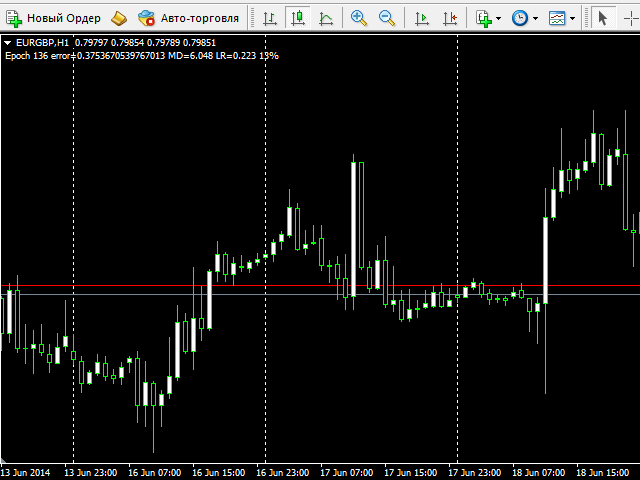
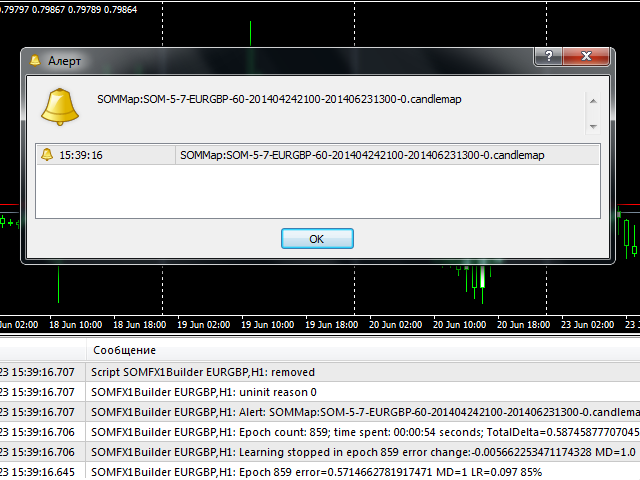
After setting the parameters and pressing OK button the training process starts. During the process the script outputs current epoch number, current error, learning rate and percentage of completion in the comment (in the left upper corner of the window). The same information is printed into the log. When the process finished, an alert is fired with the filename of the generated network. The file is saved in the Files subdirectory of your MQL4 folder. If it's an automatically generated filename (NetFileName was empty), you can copy and paste the filename just from the alert dialog into SOMFX1 or SOMFX1Predict indicator (should be pasted into similar NetFileName parameter there) and run the network. If a custom filename was used, then you should copy all parameters into the indicators - not only the filename but learning region, map size, pattern size, etc.

It's important that the network file does not contain input data - it holds the trained network only. When the network is loaded next time, a SOMFX1 indicator reads from settings all required parameters to extract price samples anew.

Before every learning process the network is initialized by random weights. This means that every next run of the script with the same settings will produce a new map which differs from previous one.

Recommended timeframes: H1 and above. 
推荐产品
Hello friends. I wrote this utility specifically for use in my profile with a large number of Expert Advisors and sets ("Joint_profiles_from_grid_sets" https://www.mql5.com/en/blogs/post/747929 ). Now, in order to limit losses on the account, there is no need to change the "Close_positions_at_percentage_of_loss" parameter on each chart. Just open one additional chart, attach this utility and set the desired percentage for closing all trades on the account. The utility has the following function
Auto Fibo Pro m
DMITRII GRIDASOV
“Auto FIBO Pro” Crypto_Forex 指标 - 是交易中的绝佳辅助工具! - 指标自动计算并放置在图表斐波那契水平和局部趋势线(红色)上。 - 斐波那契水平指示价格可能反转的关键区域。 - 最重要的水平是 23.6%、38.2%、50% 和 61.8%。 - 您可以将其用于反转剥头皮或区域网格交易。 - 还有很多机会可以使用 Auto FIBO Pro 指标来改进您当前的系统。 - 它具有信息价差掉期显示 - 它显示所连接的外汇对的当前价差和掉期。 - 显示屏还显示账户余额、净值和保证金。 - 可以将信息价差掉期显示定位在图表的任何角落: 0 - 左上角,1 - 右上角,2 - 左下角,3 - 右下角。 点击这里查看高质量的交易机器人和指标! 这是仅在此 MQL5 网站上提供的原创产品。
Close_All_Trades_with_TP_SL is a reliable and efficient MQL4 Expert Advisor designed to simplify and automate trade management for all open positions on your MT4 account. This EA is especially useful for traders who open multiple trades quickly or use high-frequency strategies where manual TP/SL placement becomes difficult and time-consuming. The primary purpose of the EA is to ensure that every open trade—whether Buy or Sell—always has a predefined Take Profit (TP) and Stop Loss (SL) applied. M
FREE
News Scalping Executor is an utility which helps to trade high impact and huge volatility   news . This utility helps to create two opposite orders with risk management and profit protection. It moves automatically stop loss level to avoid losses as much as possible by using many different algorithms. It helps to avoid trading the news if spread suddenly becomes very huge. It can lock profit by moving stop loss or partially closing of orders. To be profitable with this type of trading you shou
Stealth Mode TP/SL Manager with AI Protection This AI-powered tool manages Stop Loss and Take Profit dynamically using either price-based or profit-and-loss (PnL) calculations while hiding these levels from the market . Also the this tool is very important to   PROP FIRMS   accounts , so you can set your stoploss to not hitting the daily stop loss ! Key Features: Supports BUY, SELL, or both position types. Flexible symbol selection: Manage the current chart, all symbols, or specific symbols (se
通過追踪止損水平自動關閉交易的實用程序。讓您從您的利潤中獲得最大收益。由專業交易者為交易者創建。該實用程序適用於交易者手動或使用顧問打開的任何市場訂單。可以通過幻數過濾交易。該實用程序可以同時處理任意數量的訂單。 MT5 版本 https://www.mql5.com/ru/market/product/56488 公用事業可以做什麼: 從 1 點設置虛擬追踪止損水平 設置真正的追踪止損水平 分別處理每個訂單(追踪止損水平分別放置在每個訂單上) 處理一籃子單向訂單(追踪止損水平對所有訂單設置通用,分別買入和賣出) 處理一籃子雙向訂單(追踪止損水平對所有訂單設置通用,一起買入和賣出) 對於測試和工作,您可以使用圖表上的按鈕。 選項: TRAILING_STOP - 價格變動的點數; TRAILING_STEP - 每一步利潤增加的點數; BASKET - 一籃子訂單或每個訂單單獨; MULTIDIRECTIONAL - 雙向或單向訂單; 虛擬 - 真實或虛擬的止損和止盈; MAGIC_NUMBER - 訂單的幻數,如果 = -1,則它適用於所有訂單; ORDERS_COMME
Order Blocks Breaker
Suvashish Halder
5 (2)
Introducing Order Blocks Breaker , a brand-new way to identify and leverage order blocks in your trading strategy. After developing multiple order block tools with unique concepts, I’m proud to present this tool that takes things to the next level. Unlike previous tools, Order Blocks Breaker not only identifies order blocks but also highlights Breaker Order Blocks —key areas where the price is likely to retest after a breakout. MT5 -  https://www.mql5.com/en/market/product/124102/ This tool inco
Fever ESM
Evgenii Morozov
Trading Advisor for margin currency pairs and metals. Conservative trading of 100,000 units per 0.01 lot. The standard trade is 10,000 units per 0.01 lot. Aggressive trading with high risks of 1000 units per 0.01 lot. You can always pick up your starting lot.  The EA is fully automated, you only have to put up the initial lot depending on your initial deposit. The recommended timeframe is H1. 1. Test on any steam, iron and fuel oil 2. Try starting with convenient depots 3. When going into a dra
Spread Record
Konstantin Kulikov
This utility allows to record the spread value to the file, which is equal to or greater than the value specified in the settings, at the specified time. The utility also displays useful information on the symbol's chart: current spread value in points, name of account holder, name of trading server, leverage, the size of the swap for buy orders, the size of the swap for sell orders, day of the week for accruing triple swap, the size of a point in the quote currency, the minimum allowed level of
BreakEven Grid Utility for MT4 BreakEven Grid is a powerful utility for manual trade management on the MetaTrader 4 platform. It provides a convenient on-screen panel with buttons to help you manage your open positions with a single click.  Features: Set BE+Profit: Automatically sets Take Profit to breakeven + desired profit in pips or money. Close BUY/SELL: Instantly close all Buy or Sell orders for the current symbol. Close +$/-$/Old/New: Close only profitable, losing, oldest or newest tra
Lot by Risk
Sergey Vasilev
4.83 (23)
风险交易面板是为手动交易而设计的. 这是发送订单的另一种方式。 面板的第一个特点是使用控制线方便地下订单。 第二个特征是在存在止损线的情况下计算给定风险的交易量。 使用热键设置控制行: 获利-默认情况下T键; 价格-默认情况下p键; 止损-默认情况下,S键; 您可以在交易面板的设置中自行配置密钥。 运算算法: 1)-我们把水平在所需的地方(这是没有必要把所有的水平); 2)-指定风险(可选); 3)-点击绿色发送订单按钮; 4)-我们正在等待下订单,或者会出现带有错误消息的警报; 5)-如果我们想关闭当前符号的所有订单,通过魔术链接到专家顾问,然后点击关闭订单按钮。 您不应该多次按下发送订单按钮。 一次就够了。 下单后,按钮将呈现"未按下"状态。 要发送带有风险计算的订单,需要设置止损线并在交易面板的"风险"字段中设置风险。 否则,订单将以当前交易工具的最低手数放置。 风险是从账户余额计算出来的. 由于经纪商对保证金交易细节的限制,不可能承担100%的风险。 在"风险"字段中允许小数(例如,您可以以余额的0.5%的风险进行交易)。 如果指定的风险低于允许
FREE
FDM Strategy
Paranchai Tensit
FDM Strategy is an Expert Advisor based on fractals and five dimension method. Five Dimensions expert system is developed based on a theory combining the Chaos Theory with the trading psychology and the effects that each has on the market movement. There is also an ADX (measuring trend strength with average directional movement index) used as a trading filter. Long and Short Trade Signals: If fractal to buy is above the Alligator's Teeth (red line), the pending Sell Stop order must be placed 1 p
用於自動設置盈虧平衡水平的實用程序,在經過給定距離時將交易轉移到盈虧平衡點。讓您將風險降至最低。由專業交易者為交易者創建。該實用程序適用於交易者手動或使用顧問打開的任何市場訂單。可以通過幻數過濾交易。該實用程序可以同時處理任意數量的訂單。 MT5 版本 https://www.mql5.com/ru/market/product/57077 公用事業可以做什麼: 從 1 點設置虛擬盈虧平衡水平 設定盈虧平衡的實際水平 分別處理每個訂單(為每個訂單分別設置盈虧平衡水平) 處理一籃子單向訂單(盈虧平衡水平設置為所有訂單通用,分別買入和賣出) 處理一籃子雙向訂單(盈虧平衡水平為所有訂單設置通用,一起買入和賣出) 對於測試和工作,您可以使用圖表上的按鈕。 選項: BREAKEVEN_STOP - 將訂單移動到盈虧平衡點的點數; BREAKEVEN_STEP - 訂單關閉時的利潤點數; BASKET - 一籃子訂單或每個訂單單獨; MULTIDIRECTIONAL - 雙向或單向訂單; 虛擬 - 真實或虛擬的止損和止盈; MAGIC_NUMBER - 訂單的幻數,如果 = -1,則它
Trailing Stop Utility MT4 for automatic closing of deals by trailing stop levels.  Allows you to take the maximum from the profit. Created by a professional trader for traders.   Utility   works with any market orders opened manually by a trader or using advisors. Can filter trades by magic number. The utility can work with any number of orders simultaneously. WHAT THE UTILITY CAN DO: Set virtual   trailing stop   levels from 1 pip Set real   trailing stop   levels W ork with each order separat
A trader's assistant that closes positions in parts with a simple trail to take the optimal profit size when the price of the symbol moves towards the position (s). Initially, the stop loss is moved to breakeven + (the so-called breakeven greed level) - this is when the price closes the stop-loss position during the reverse movement and as a result some profit will still be received. Further, while maintaining the movement in the direction of the position, it is closed in parts on price rollback
Trend Ray
Andriy Sydoruk
The indicator shows the potential trend direction by cyclical-wave dependence. Thus, all the rays of the intersection will be optimal rays, in the direction of which the price is expected to move, taking into account the indicator period. Rays can be used as a direction for potential market movement. But we must not forget that the approach must be comprehensive, the indicator signals require additional information to enter the market.
StopLoss and TakeProfit Utility MT4 for automatic setting of stop loss and take profit levels. Created by a professional trader for traders.   The utility   works with any market orders opened by a trader manually or using advisors. Can filter trades by magic number. The utility can work with any number of orders simultaneously. WHAT THE UTILITY CAN DO: Set virtual stop loss and take profit from 1 pip Real   stop loss and take profit W ork with each order separately (   stop loss and take prof
瞬时剥头皮「Tick Scalper」 纯价格行为,无指标。始终固定止损止盈,并使用追踪止损。   核心参数 参数 默认值 描述 TakeProfit — 固定止盈点数。 StopLoss — 固定止损点数。 TrailingStop — 追踪止损距离(点数),用于调整仓位。 cSeconds — 信号检查间隔(秒)。 MinPriceShot — 激活信号的最小价格波动(点数)。 MaxOrdersCount — 最大同时开仓订单数(常量)。 RiskPercent — 基于余额的自动手数计算风险百分比。 FixedLotSize — 固定手数(当UseAutoLot = false时)。 UseAutoLot — 基于余额和风险的自动手数计算。 MagicNumber — 交易策略订单的唯一标识符。 MaxSpread — 允许开仓的最大点差(点数)。   下载外汇对的预设和优化集: Яндекс.Диск   使用建议 测试: 历史测试:   使用 “基于真实点数的每个报价” 模式。 模拟账户:   实盘前测试1-2周。 优化:   3个月   +   向
Expert candle finder for forex in MetaTrader 4 Expert candle finder is one of the practical trader assistant experts that is used in the forex financial market, this expert accurately identifies the candlestick patterns on the price chart as a signal, all the found candles. informs you. This expert is run on your Meta trader platform and in a very precise way, it examines all the currency pairs that are in your watch list and every currency pair that had a professional and good candlestick patt
Kalifx Equity Guard EA
Calvin Andile Mahlangu
Kalifx Equity Guard — Account Protection Utility (MT4) Kalifx Equity Guard is a MetaTrader 4 utility that monitors account equity and floating losses and closes open positions when predefined risk limits are reached. It operates independently of trade entry logic and works with both manual trades and Expert Advisors. The utility runs continuously in the background after being attached to any chart and timeframe. Main Functions Monitors account equity drawdown using percentage or monetary thresh
FREE
This utility is the improved version of Trailing stop for advisors. It manages other EAs' orders as well as the ones opened manually. It is capable of trailing the price (trailing stop function), set a stop loss and take profit if they have not been set before. The Pro version features the ability to set trailing stop based on fractals and points of Parabolic SAR. When configuring the utility for an EA having no trailing stop function, place it to the new window with the same currency pair speci
Beta version of a semi-automatic utility for trading grid strategy. When using, please give feedback on the shortcomings / suggestions. Good luck to us! Parameters: Lot exponent - multiplication of the lot on the next order. Grid pips   - grid size. Take profit pip - distance of the take profit line. Magic number - the magic number of the adviser's work. Trading menu - presence/absence of a trading menu. Menu size - the size of the menu (choose the value for your resolution). Menu font size -
This program calculates the average opening price for sell and buy positions separately. Program allows you to modify the stop loss value to the calculated breakeven price, this value could also be modified by a user-defined integer value in points. All you have to do is press the button. You can also choose Logs_Display_Enable input value if you need to get some additional, useful informations. Enjoy using !!!
FREE
该脚本旨在自动打开MetaTrader 4平台上所有可用的外汇货币对图表,以及黄金(XAUUSD)图表。脚本遍历平台上所有可用的符号,确定哪些是外汇货币对,并在M1(一分钟)时间框架上打开它们的图表。 主要功能: 打开黄金图表: 脚本会自动打开XAUUSD(黄金/美元)图表,如果您的经纪商提供该符号。如果未找到黄金符号,则会显示错误消息。 自动检测外汇货币对: 脚本遍历平台上所有可用的符号,并检查它们是否为外汇货币对。它通过验证符号是否由两个公认的货币组成来实现此目的,如USD、EUR、GBP等。 打开外汇货币对图表: 对于每个检测到的外汇货币对,脚本会在M1时间框架上打开图表。这允许在平台主屏幕上快速自动显示所有必要的外汇工具。 优点: 自动化: 脚本通过自动打开所有外汇货币对和黄金图表,显著节省了交易者的时间,方便进行日常分析和交易。 灵活性: 脚本仅考虑符合外汇货币对标准的符号,避免打开其他工具(如差价合约、期货等)的图表。 易于使用: 无需任何额外设置或参数。只需运行脚本,它将自动执行所有必要的操作。 该脚本非常适合那些处理多个货币对和黄金的交易者,提供快速便捷的方式在一个窗口
News Scalping Executor Pro is an utility which helps to trade high impact and huge volatility   news . This utility helps to create two opposite orders with risk management and profit protection. It moves automatically stop loss level to avoid losses as much as possible by using many different algorithms. It helps to avoid trading the news if spread suddenly becomes very huge. It can lock profit by moving stop loss or partially closing of orders. To be profitable with this type of trading you
This indicator will display current logined mt4 account's orders information of current symbol chart. It also allow import some formated data: 1) MQL5 Signals History CSV file (*.csv) 2) MT4 Account History Statement file (*.htm -> *.txt) *[Next Version] Allow Import data form 'HF HistoryExporter (*.csv)' Sample Data of MQL5 Signals History File Time;Type;Volume;Symbol;Price;S/L;T/P;Time;Price;Commission;Swap;Profit;Comment 2023.12.20 23:00:02;Buy Limit;0.06;EURUSD;1.08994;1.06024;1.09464;202
SpeedManager
Sajiro Yoshizaki
这是一个播放速度管理工具,能够在策略测试器中实现高效的测试和分析。 它提升了策略测试器的可用性,并可作为简化交易策略开发和评估的手段。 工具特点: 播放速度控制:用户可以在策略测试器中自由更改播放速度,使其快进、加速播放并在任意点暂停。 一条栏、一跳前进:'Next Bar'按钮允许用户一次前进一条栏。也可以一跳一跳地前进,以进行更详细的分析。 时间框架和货币对的同步:" Practice Simulator Sync (免费)" 允许您与不同的时间框架和货币对同步播放。这使您能够同时查看MTF和不同货币条件。 自动暂停:您可以在每天的特定时间(例如市场开放时)停下来,然后从那里分析动态。暂停可以根据每日交易时间表设置。 添加指标:不仅是MT4中的标准指标,您创建的自定义指标也可以共存并一起工作。 即时模板反映:即使在启动后图表运行期间,也可以立即更改模板。立即切换到与市场相匹配的模板。 重要说明: 要使用旧数据进行练习,需要历史数据。请提前下载。 请注意,在低配置的PC上性能可能会降低。 Practice Simulator Sync https://www.mql5.com/
FREE
The only drawdown guardian that stops your other EAs from digging you deeper. PropMarshal monitors your account equity in real time and instantly closes all positions the moment a drawdown or profit target threshold is breached. But it doesn't stop there — it closes every chart on your platform too, cutting off any other Expert Advisors before they can open new trades and compound the damage. The Problem   PropMarshal   Solves Most prop firm traders run multiple EAs across multiple charts. When
FREE
这是一个常规面板,放置买卖订单网络。 这个专家顾问关闭设置中定义的利润订单。 然后,有一个名为Ladder的参数,其中包括订单之间的距离开始增加由梯形参数指示的点(这里,在主要设置中,它是10点),这意味着二阶是10点,三阶是20点,四阶 然后,你需要知道这个顾问是什么,因为这不是在设置中,但它会影响这个顾问提出的策略的逻辑。. 假设在这里的设置中,顾问将打开五个订单。.. 或购买。.. 或出售。.. 好。.. 但是,当打开订单时,它会将下一个打开订单的手数增加先前打开订单的一半。 也就是说,如果您在设置中设置了0.1手,那么根据方案将打开五个订单,第一个更接近当前价格的订单将以0.1手的价格打开。 第二,对于给定的步骤,这里50点的步骤将以0.15手的价格打开。 第三个,在另一个50点之后,将以大约0.22手的价格开盘。 第四个,以0.33手的价格通过50点的设定步骤。 第五个,以0.49手的价格设定50点。 也就是说,通过打开订单,这个顾问将增加每个后续订单的一半数量的前一个订单每次。 这种交易的逻辑是什么? (我通常使用日间交易和未平仓头寸,在上午10:00之前的某个时间。.
This Tool Allow you close all open Orders automatics when Equity reach to specific value:  - When Equity is less than  specific value - When Equity is greater than  specific value - And Allow you close all open orders in manual - It will notification to MT4 Mobile app when it execute close all orders. __________________________________________ It very helpful for you when you trade with prop funds. Avoid reach daily drawdown and automatics close all orders when you get target.
FREE
该产品的买家也购买
Local Trade Copier EA MT4
Juvenille Emperor Limited
4.96 (109)
通过 Local Trade Copier EA MT4 获得非常快速的交易复制体验。它的简单1分钟设置,使您可以在同一台Windows计算机或Windows VPS上在多个MetaTrader终端之间复制交易,具有闪电般快速的复制速度,低于0.5秒。 无论您是初学者还是专业交易者, Local Trade Copier EA MT4 都提供了广泛的选项,可根据您的特定需求进行自定义。对于任何希望增加利润潜力的人来说,这都是终极解决方案。 今天就尝试一下,看看为什么它是市场上最快、最简单的贸易复印机! 提示: 您可以在您的模拟账户中下载并试用 Local Trade Copier EA MT4 模拟版: 这里 将下载的免费演示文件粘贴到您的 MT4 >> 文件 >> 打开数据文件夹 >> MQL4 >> 专家文件夹并重新启动您的终端。  免费演示版本每次可在 4 小时内发挥全部功能,仅限演示帐户。 要重置试用期,请转至 MT4 >> 工具 >> 全局变量 >> Control + A >> 删除。 请仅在非关键模拟账户上执行此操作,不要在挑战道具公司账户中执行此操作。 如果您无法在
欢迎来到 Trade Manager EA——这是一个终极风险管理工具,旨在使交易变得更直观、精准和高效。它不仅仅是一个下单工具,而是一个用于无缝交易计划、仓位管理和风险控制的全面解决方案。不论您是新手交易员、资深交易员,还是需要快速执行的剥头皮交易员,Trade Manager EA 都可以满足您的需求,适用于外汇、指数、大宗商品、加密货币等各种市场。 借助 Trade Manager EA,复杂的计算已成过去。只需分析市场,在图表上用水平线标记入场、止损和止盈,设置您的风险水平,Trade Manager 就会立即计算出理想的头寸规模,并实时显示以点、账户货币计价的止损和止盈。每笔交易都得以轻松管理。 主要功能: 头寸规模计算器 :根据定义的风险瞬间确定交易规模。 简单的交易计划 :在图表上用可拖动的水平线直接计划交易,设置入场、止损和止盈。 实时显示 SL 和 TP :以账户货币、点或分显示止损和止盈,便于分析。 高级保护工具 盈亏平衡选项 : 基本盈亏平衡 :当您的交易达到设定水平时自动保护利润。 多级盈亏平衡 :设置多达 4 个级别以逐步保护利润。 尾随止损选项 : 基本尾随
Trade Assistant MT4
Evgeniy Kravchenko
4.42 (193)
它有助于计算每笔交易的风险,容易安装新的订单,具有部分关闭功能的订单管理, 7 种类型的追踪止损和其他有用的功能。 附加材料和说明 安装说明 - 应用程序说明 - 模拟账户应用程序的试用版 线条功能  - 在图表上显示开仓线、止损线、止盈线。 有了这个功能,就可以很容易地设置一个新的订单,并在开仓前看到它的附加特性。   风险管理  - 风险计算功能在考虑到设定的风险和止损单的大小的情况下,计算新订单的成交量。它允许你设置任何大小的止损,同时观察设定的风险。 批量计算按钮 - 启用 / 禁用风险计算。 在 " 风险 " 一栏中设置必要的风险值,从 0 到 100 的百分比或存款的货币。 在 " 设置 " 选项卡上选择风险计算的变量: $ 货币, % 余额, % 资产, % 自由保证金, % 自定义, %AB 前一天, %AB 前一周, %AB 前一个月。   R/TP 和 R/SL - 设置止盈和止损的关系。 这允许你设置相对于损失的利润大小。 例如, 1 : 1 - 这决定了 TP = SL 的大小。 2 : 1 - 这意味着 TP 是 SL 的两倍。 RR - 它禁用比率。  
TradePanel MT4
Alfiya Fazylova
4.85 (93)
交易面板是一款多功能交易助手。该应用包含超过50种手动交易功能,并允许您自动执行大多数交易任务。 在购买之前,您可以在演示账户上测试演示版本。下载用于演示账户的试用版应用程序: https://www.mql5.com/zh/blogs/post/762579 。 完整说明 这里 。 贸易. 只需单击一下即可执行交易操作: 打開掛單和頭寸,並自動計算風險。 一鍵打開多個訂單和頭寸。 打開訂單網格。 按組別關閉掛單和頭寸。 反轉頭寸方向(關閉買入>打開賣出,關閉賣出>打開買入)。 鎖定頭寸(通過開啟缺少的頭寸,使買入和賣出頭寸的數量相等)。 一鍵部分關閉所有頭寸。 將所有頭寸的止盈和止損設置在同一價格水平。 將所有頭寸的止損設置在盈虧平衡水平。 開倉時,可使用以下功能: 在多個訂單或倉位之間分配計算出的數量(在單擊一次時開啟多個訂單和倉位)。 在開啟訂單前在圖表上可視化交易水平。 僅在當前點差不超過設定值時才開啟倉位。 止盈和止損之間的自動比例。 虛擬止損和止盈。 自動將止損和止盈的大小增加為當前點差的大小。 基於ATR指標讀數計算止盈和止損。 設置掛單的到期日期。 為掛單設置追蹤(掛單
Exp COPYLOT CLIENT for MT4
Vladislav Andruschenko
4.65 (66)
MetaTrader 4 的交易复制器。     它从任何账户复制外汇交易、头寸、订单。 它是最好的贸易复印机之一     MT4 - MT4,MT5 - MT4     为了   复制 MT4     版本(或     MT4 - MT5 MT5 - MT5     为了   复制MT5     版本)。 MT5版本 详细描述   +DEMO +PDF 如何购买 如何安装     如何获取日志文件     如何测试和优化     Expforex 的所有产品 复印机 版本       MetaTrader 5 终端 (   МТ5 - МТ5, МТ4 - МТ5   )-   Copylot 客户端 MT5 独特的复制算法将所有交易从主账户准确复制到您的客户账户。 该产品还以其高运行速度而著称,并且具有强大的错误处理能力。 一组强大的功能。 该程序可以在多个终端绑定上运行。 使用它作为您在一个账户上交易的多个账户的交易 的同步器 , - COPYLOT 会将您的交易复制到其他终端。 从已关闭的账户中复制 Invest 密码; 部分关闭仅从 mt4 到 mt4 从模拟账户复制到
Trade copier MT4
Alfiya Fazylova
4.58 (33)
Trade Copier 是一种专业实用程序,旨在复制和同步交易账户之间的交易。 复制发生从供应商的帐户/终端到收件人的帐户/终端,安装在同一台计算机或 vps 上。 在购买之前,您可以在演示帐户上测试演示版本。 演示 这里 。 完整说明 这里 。 主要功能和优点: 支持复制MT4>MT4、MT4>MT5、MT5>MT4,包括МТ5 netting账户。 供应商和收件人模式在同一产品中实现。 简单直观的界面,允许您直接从图表中实时控制复制。 连接中断或终端重新启动时不会丢失设置和位置。 允许您选择要复制的符号,也可以替换接收者的符号,例如 EURUSD> USDJPY。 支持回拷贝。 能够仅复制某些订单。 允许您设置开仓交易价格的最大差异和最大时间延迟。 正确复制部分订单关闭的执行。 计算复制手数的几种方法。 同步止盈和止损。有几种方法可以计算它们的位置。 支持通过执行在“Market account”上工作,其中 SL / TP 仅在开仓后设置。 如何使用简单的设置复制交易 将供应商终端和接收终端安装在同一台计算机或 VPS 上。 在供应商终端上以“Master”模式安装复印机,然后
Copy Cat More Trade Copier MT4 (复制猫MT4) 不仅仅是一个简单的本地交易复制工具;它是一个为当今交易挑战而设计的完整风险管理与执行框架。从 prop firm 挑战到个人账户管理,它都能通过强大的执行力、资本保护、灵活配置以及先进的交易处理来适应各种情况。 该复制器同时支持 Master(发送端) 和 Slave(接收端) 模式,能够实时同步市价单与挂单、交易修改、部分平仓以及 Close By 操作。它兼容模拟账户与真实账户,支持交易或投资者密码,并通过持久交易记忆系统(Persistent Trade Memory)确保即使 EA、终端或 VPS 重启后也能恢复。可同时管理多个 Master 与 Slave,并通过前缀/后缀自动调整或自定义符号映射来处理跨平台或跨经纪商差异。 使用手册/设置: Copy Cat Trading Copier 使用手册 Copy Cat More MT5: https://www.mql5.com/en/market/product/139088 加入频道: https://www.mql5.com/en/cha
MT4 專業級跟單系統(MT4 版) 工業級、超高速的 LOCAL 本地跟單系統 ,適用於專業交易者、信號提供者與多帳戶管理。 工業級 LOCAL 架構 運行於同一 Windows 環境(同一電腦 / 同一 Windows VPS),低延遲、高穩定性,支援 24/7 無人值守運行。 Master / Slave / Self + Cross Copy(MT4 ↔ MT5) 支援 Master、Slave、Self-Copier 模式。 MT4→MT4、MT4→MT5、MT5→MT4、MT5→MT5。 重要:MT4↔MT5 跨平台跟單需同時安裝 MT4 與 MT5 版本。 核心功能 即時複製開倉、SL/TP 修改與平倉,並支援智慧化 Broker 品種名稱映射。 核心優勢 極速跟單、靈活手數管理、智能品種映射、可選風控模組與長期穩定性。
VirtualTradePad mt4 Extra
Vladislav Andruschenko
4.86 (59)
一键交易的交易面板。处理头寸和订单!通过图表或键盘进行交易 交易小组进行人工交易。您可以从图表(图表窗口)或键盘进行交易。打开和关闭,反向和锁定。处理职位和订单! МetaТrader4中主要订单的交易控制面板:买入,卖出,买入,买入,卖出,卖出限制,收盘,删除,修改,追踪止损,止损,止损。 MT5版本 详细描述   +DEMO +PDF 如何购买 如何安装     如何获取日志文件     如何测试和优化     Expforex 的所有产品 从符号窗口交易并从键盘交易! 您正在为MetaTrader 4终端提供一个独特的插件 - 虚拟控制面板VirtualTradePad。 Description on English 注意!如果您想学习如何交易 策略测试器  ,请查看我们的免费 TesterPad 实用程序 VirtualTradePad在“  MQL5语言最佳图形面板  ”竞赛中 获得二等奖 。 工作标签 职位标签   -使用职位: 开/关买入和卖出, 冲销所有头寸, 锁定一个共同的立场, 更改止损/获利, 设定一般的止损/获利的位置, 启用追踪止损, 实现盈亏平衡 只平
The product will copy all telegram signal to MT4   ( which you are member  ) , also it can work as remote copier.  Easy to set up, copy order instant, can work with almost signal formats, image signal, s upport to translate other language to English Work with all type of channel or group, even channel have "Restrict Saving Content", work with  multi channel, multi MT5 Work as remote copier: with signal have ticket number, it will copy exactly via ticket number. Support to backtest signal. How to
Trading History MT4
Siarhei Vashchylka
5 (9)
Trading History - A program for trading and money management on the history of quotes in stratagy tester. It can work with pending and immediate orders, and is equipped with trailing stop, breakeven and take profit functions. Very good for training and testing different strategies. Manual (Be sure to read before purchasing) Advantages 1. Allows you to test any trading strategy in the shortest possible time 2. An excellent simulator for trading training. You can gain months of trading experience
Riskless Pyramid
Snapdragon Systems Ltd
5 (1)
Introduction This powerful MT4 trade mangement EA offers a way potentially to aggressively multiply trade profits in a riskfree manner. Once a trade has been entered with a defined stoploss and take profit target then the EA will add three pyramid add-on trades in order to increase the overall level of profit. The user sets the total combined profit target to be gained if everything works out. This can be specified either as a multiple of the original trade profit or as a total dollar amount. Fo
EchoTrade Telegram to MT4 Copier
Perpetual Chinemerem Vincent
5 (2)
EchoTrade Telegram to MT5 Copier Seamless, Instant, and Reliable Signal Copying - Direct from Telegram to MetaTrader 4! The product does not run in the strategy tester but you can get free trial version   here  for testing before purchase. Tired of manually executing trades from Telegram signals? EchoTrade automates the process, instantly copying trades from any Telegram channel or group directly into your MT5 account—accurately, efficiently, and without delay. Key Features: Universal Compatib
Length Movement
Pavel Verveyko
5 (1)
Measures the length of the selected movement in points, shows the duration of the movement, as well as the speed of movement.   Outputs the average value of each dimension. It is designed to calculate the expected target based on typical market movements. The intended goal will provide information about the ratio of the stop size to the possible profit and will allow you not to open positions with a small expected profit. It will also help you determine the point at which it is more logical to c
Exp4 Duplicator
Vladislav Andruschenko
4.5 (22)
EA 在您的帐户 MetaTrader 4 上重复 交易和头寸或发出预设次数的信号。 它复制所有手动或由另一个“EA 交易”打开的交易。 复制仓位并根据仓位增加手数! 增加其他 EA 的数量。 支持以下功能:复制交易的自定义手数、复制止损、获利、使用追踪止损。 MT5版本 详细描述 +DEMO +PDF 如何购买 如何安装     如何获取日志文件     如何测试和优化     Expforex 的所有产品 链接 MetaTrader 的交易复印机可在此处获得:   COPYLOT 注意力 注意:这不是终端之间交易的复印机。 您可以在策略测试器中测试“EA 交易”,并在可视模式下使用我们的 EAPADPRO 工具栏进行交易! 在 1 个货币对上安装 EA 就足够了。默认情况下,它将监视所有打开的符号。 这个怎么运作? Duplicator/Dublicator 助手 EA 重复在终端中打开的头寸。 EA 能够复制头寸和挂单。 要复制的位置或顺序称为 源 。重复位置是一个 副本 。 The EA repeats the source the specified number o
Ultimate Trade Copier
BLAKE STEVEN RODGER
5 (2)
This trade copy utility allows you to instantly and seamlessly replicate and synchronize unlimited orders from multiple master accounts to multiple slave accounts on your local machine. You can create custom channels (or portfolios) with advanced filtering capabilities to copy from multiple master accounts to multiple slave accounts. Moreover, you can tailor these channels with a range of lot sizing and trade condition options to ensure that copied trades outperform the original source. You can
Trend Line Optimizer
Evgenii Aksenov
4.11 (19)
这是趋势线PRO指标的自动参数优化器 轻松快速地为您最喜爱的趋势线PRO指标选择最佳参数。  优化只需几秒钟。 优化器允许您找到每对和周期的最佳参数:振幅,TP1-TP3,止损,以及所选历史部分(天)上的时间过滤器和HTF过滤器的值  要优化不同的时间框架,您需要不同的历史范围: M5-M15设置计算范围参数(天)=60(三个月) M30-H1设置计算范围参数(天)=120(6个月) H4设置参数计算范围(天)=240(一年) D1-W1设置参数计算范围(天)=720(三年) MN1设置参数计算范围(天)=1200(五年) 优化后,参数自动保存到文件夹中的现成设置文件中:MQL4>Files>trendlineoptimizedsettings  如何使用优化器实用程序: 在需要优化的符号和时间的图形上运行优化器实用程序。 优化结束后单击保存按钮 将趋势线PRO指标添加到图表,然后将趋势线PRO扫描仪 Trend Line PRO指标面板上TP1、TP2、TP3、止损和利润指标的值将变得更好,Trend Line PRO 扫描仪中会出现一个按钮(红色或蓝色  Manual G
CloseIfProfitorLoss with Trailing
Vladislav Andruschenko
4.87 (31)
在 MetaTrader 4 中使用利润跟踪功能在达到总利润/亏损时平仓。 您可以启用 虚拟停止(单独订单)   , 分别计算和平仓 买入和卖出头寸 (Separate BUY SELL)   , 关闭和计算 所有交易品种或仅当前交易品种(所有交易品种)   , 启用追踪获利( 追踪 利润) 关闭存款货币、点数、余额百分比的总损益。 该应用程序旨在与任何其他 EA 一起用于任何账户或与手动交易结合使用。 MT5 版本 详细描述   +DEMO +PDF 如何购买 如何安装     如何获取日志文件     如何测试和优化     Expforex 的所有产品 一旦某些货币对或所有货币对的交易总余额大于或等于设置中指定的值,所有头寸将被关闭并删除订单。 此版本不仅能够在指定的利润水平平仓,而且还可以追踪利润以获得更好的结果。 我们实用程序的主要功能 按所有交易品种的总利润平仓; 按单独交易的总利润结算。 (虚拟模式); 按总利润结算并追踪利润; 按总利润以点数、百分比或货币结算; 所有交易或单独交易均以总亏损结束; 关闭交易后关闭图表和终端、风险管理器、包含关闭信息的邮件、推送通
Trade Dashboard MT4
Fatemeh Ameri
4.96 (52)
疲于复杂的订单下达和手动计算?Trade Dashboard 是您的解决方案。凭借其用户友好的界面,订单下达变得轻而易举,只需点击一下,您就可以开设交易、设置止损和止盈水平、管理交易手数,并计算风险回报比,让您只需专注于您的策略。告别手动计算,使用 Trade Dashboard 简化您的交易体验。 立即下载演示版本 。 您可以在这里找到仪表盘功能和特性的详细信息 。 加入 Telegram 频道 。 购买后请给我发消息以获取支持。如果您需要添加更多功能,可以在产品的评论区留下您的想法,我愿意听取任何建议,希望您能在使用我的产品时获得最佳体验 。 这是 MT5 版本。 风险管理:使用 Trade Dashboard,可以将您的风险设置为账户余额或权益的百分比,或将风险设置为总金额。在图表上直观地定义您的止损,让工具准确计算每个货币对的适当手数。该工具还可以根据您期望的风险回报比自动设置止盈水平。它甚至可以在手数计算中涵盖佣金和点差费用。此外,您的止损和止盈可以转变为虚拟水平,隐藏于经纪商。通过 Trade Dashboard 的高级风险管理功能,掌控风险,保护您的资本。 交易线
Crystal Trade Manager PRO – 高级 MT4 风险与交易控制系统 免费版: https://www.mql5.com/en/market/product/150632 概述 Crystal Trade Manager PRO(CTM)是一款为 MetaTrader 4 打造的完整专业级风险管理与交易控制工具。 它专为需要严格执行、稳定风险保护和智能自动化的交易者而设计。 系统可全面管理风险、保护账户权益、执行每日限制、自动设置 SL/TP,并提供专业级的一键式快速交易面板。 非常适合参与 prop firm 挑战、日内交易、剥头皮交易以及专业资金管理的交易者。 同时提供完整的 MT5 版本。 核心亮点功能 1. 高级风险与回撤保护 支持每日回撤限制 1%–70% 。 一旦达到回撤上限,系统将立即平掉 所有仓位 。 可选:突破后自动删除 所有挂单 。 每日锁仓模式:当天达到限制后阻止新下单,次日自动恢复。 完全符合各大 prop firm 的规则与要求。 2. 日内盈利与亏损目标自动化 可设置每日 盈利目标 与 亏损限制 (账户货币,例如 USD)。 达到任何目
Eezeorder 2
Tawanda Tinarwo
5 (2)
NEW VERSION!  NB: IF YOU ARE USING A VERY HIGH RESOLUTION MACHINE AND THE EA DISPLAY LOOKS TOO SMALL, CONTACT ME SO I CAN HELP YOU. Open Multiple Trades on MT4 in 1 click at one price. Enter the Lot size Specify the number of trades you want to open Choose whether you want TP SL or Trailing Stop Once you are done, click Buy or Sell Open Multiple Pending Orders on MT4 in 1 click at one price. Enter the Lot size Specify the gap from the current price, where you want to place the pending order Spe
Auto Trade Copier
Vu Trung Kien
4.76 (84)
自动交易复制器旨在以 100% 的准确度在多个 MT4/MT5 账户/终端之间复制交易。提供商和接收方账户必须位于同一台 PC/VPS 上。使用此工具,您可以将交易复制到同一台 PC/VPS 上的接收方账户。所有交易操作都将从提供商复制到接收方,不会有任何延迟。此版本仅适用于 MT4 账户。对于 MT5 账户,您必须使用 MT5 的自动交易复制器。参考: 参考: 对于 MT4 接收器,请下载“Trade Receiver Free” 这里 . 对于 MT5 接收器,请下载“Trade Receiver Free MT5”  这里 . 对于同一台 PC/VPS 上的 MT5 提供商,请检查“Auto Trade Copier MT5” 这里 . 如果您需要通过互联网在不同的 PC/VPS 上进行账户复制,请查看“Trade Copier Pro” 这里 . 如果您需要通过互联网在不同的 PC/VPS 账户之间进行复制,且接收方数量不限,请查看“无限交易复制器专业版” 这里 . 以下是重点功能 在 MT4 和 MT5 账户之间复制。 一个提供商可以将交易复制到多个接收者的账户。 一个提
MT4 至 Telegram 信号提供者 是一款易用、可完全自定义的工具,它使发送信号到 Telegram 成为可能,将您的账户变成信号提供者。 消息的格式 可以完全自定义! 但是,为了简便使用,您也可以选择一个预设模板,并能够启用或禁用消息的特定部分。 [ 演示 ]  [ 手册 ] [ MT5 版本 ] [ Discord 版本 ] [ Telegram 频道 ]  New: [ Telegram To MT5 ] 设置 可通过 用户指南 获取逐步说明。 无需了解 Telegram API;开发者提供所需的一切。 主要特性 自定义发送给订阅者的订单详情的能力 您可以创建分层订阅模型,例如铜牌、银牌、金牌。金牌订阅可获得所有信号等。 按订单号、符号或备注过滤订单 包括执行订单的图表的屏幕截图 在发送的屏幕截图上绘制已关闭的订单,以便额外验证 推迟发送新订单消息的可能性,以便在发送前对位置进行调整 订单详情的全透明度: 新的市场订单 *附带屏幕截图 订单修改(止损、获利点) 已关闭订单 *附带屏幕截图 部分关闭订单 ** 新的挂起订单 修改的挂起订单(进场价格) 挂起订单激活(
KT Equity Protector MT4
KEENBASE SOFTWARE SOLUTIONS
3.4 (5)
轻松保护您的交易资金 保护交易资金与增长资金同等重要。KT Equity Protector 是您的个人风险管理助手,持续监控账户权益,在达到预设的利润目标或止损水平时,自动关闭所有持仓和挂单,以防止亏损或锁定盈利。 无需情绪化的决策,也不再需要猜测——只需让这个可靠的资金保护工具为您全天候守护账户。 KT Equity Protector 可自动通过关闭所有图表来阻止其他交易机器人继续操作。这确保在您手动重新启动 KT Equity Protector 之前,不会发生任何进一步的交易行为,从而让您完全掌控并安心交易。 工作原理 权益止损(防止亏损): 假设您的账户余额为 $10,000,设置了 $1,000 的权益止损。一旦账户权益降至 $9,000,KT Equity Protector 将立即关闭所有交易,保护您的资金免受更大亏损。 权益止盈(锁定利润): 同样地,如果您设置了 $2,000 的权益止盈目标,当账户权益达到 $12,000 时,EA 将立即平仓,锁定收益并保障已获得的利润。 两种强大的资金计算模式: 相对模式(基于百分比): 按照账户初始余额的百分比计算止损和
Equity Protect Pro:全方位账户保护专家,让您的交易更安心 如果您正在寻找账户保护、净值保护、投资组合保护、多策略保护、利润保护、利润收割、交易安全、风控程序、自动风控、自动清仓、条件清仓、定时清仓、动态清仓、跟踪止损、一键关闭、一键清仓、一键还原等功能,Equity Protect Pro 就是您要找的程序。 它配置简单,当到达预设条件时,可关闭所有图表,同时支持关闭信号订阅(这意味着所有交易程序也将停止运行)。此时,将不再有新订单产生,最后再关闭所有订单,有效防止意外损失,让您在交易过程中高枕无忧。 Equity Protect Pro Demo Version for yo u to test   Equity Protect Pro MT4 Demo.ex4 Equity Protect Pro MT5 Demo.ex5 Equity Protect Pro 拥有 14 个核心功能,它们都是独立运行的。您可以根据您的交易策略,选择合适的功能组合使用。这些功能默认为关闭状态,不使用时无需修改。需要使用时,只需将“enable (function)”设置为 tru
Basket EA MT4
Juvenille Emperor Limited
5 (5)
Basket EA MT4 是一款强大的盈利收割工具兼全方位账户保护系统,结合简洁易用的设计。其核心作用在于通过对所有持仓的“组合级”管理,而非单笔交易,全面掌控账户盈亏。该 EA 提供了组合级止盈、止损、保本和移动止损功能,支持设定为账户余额百分比、固定货币金额或所有管理交易的平均点数目标。这种灵活性让交易者能够依据自身需求制定风险和盈利策略。 Basket EA MT4 还支持智能交易过滤,可以根据 Magic Number、交易品种或备注选取要管理的交易,确保 EA 只影响您选择的持仓。 为进一步提升安全性,该 EA 内置先进的账户保护机制。当账户权益达到设定的止盈/止损水平,或从历史最高余额达到最大回撤时,EA 会自动平掉所有交易,删除所有挂单,并关闭所有图表,移除其上的所有 EA。这一功能有助于在市场波动或达到预设目标时保护账户资金。 提示 :您可以下载 篮子 EA MT4 演示版并在您的模拟账户上试用: 这里 将下载的免费演示文件粘贴到您的 MT4 >> 文件 >> 打开数据文件夹 >> MQL4 >> 专家文件夹并重新启动您的终端。  免费演示版本每次可在 4 小时内发
Automate your Trendsurfer trailing stop management - day and night With this Expert Advisor for Metatrader 4 you save time, avoid mistakes and trade more relaxed - specially developed for the Trendsurfer trading system. Always the right stop loss Fully automatic Simple to use Saves you time How it works 1. download the Expert Advisor and install it in Metatrader 4 (I will give you instructions on how to do this) 2. define your stop-loss rule 3. run your computer or VPS - the Expert Advisor
The product will copy all  Discord  signal   to MT4   ( which you are member  ) , also it can work as remote copier.  Easy to set up. Work with almost signal formats, support to translate other language to English Work with multi channel, multi MT4. Work with Image signal. Copy order instant, auto detect symbol. Work as remote copier: with signal have ticket number, it will copy exactly via ticket number. How to setup and guide: Let read all details about setup and download Discord To MetaTrader
ManHedger MT4
Peter Mueller
5 (2)
THIS EA IS A SEMI-AUTO EA, IT NEEDS USER INPUT. Manual & Test Version Please TEST this product before   BUYING  and watch my video about it. Contact me for user support or bug reports, or if you want the MT5 version! MT5 Version I do not guarantee any profits or financial success using this EA. With this Expert Advisor, you can: Implement your own   Zone Recovery   strategy to capitalize on trending markets. Create   Grid   trading strategies, to profit from ranging markets. Place orders easil
交易特惠 – 40% 折扣 高级交易管理器 – 终极一体化解决方案,助您更快、更智能、更安全地进行手动交易。 使用 NextGen Trade Manager AI 革新您的手动交易体验。这款专业的图表面板将即时执行、可视化交易计划和强大的风险管理功能整合到一个直观易用的工具中。无需离开图表,即可比以往更快地执行订单、管理风险并保护利润。完美满足所有希望提升交易精准度和效率的交易者的需求。 在 MT4 策略测试器中无风险测试 下载演示版本,解锁模拟交易功能。这是在安全模拟的环境中练习执行、测试风险管理规则和完善策略的理想方式,让您在实盘交易前做好充分准备。 如需完整的用户手册和分步指南,请访问: https://www.mql5.com/en/blogs/post/764217 主要优势: 快速交易:一键执行订单、设置止损和平仓。 更智能的风险管理:根据固定风险、账户余额或净值自动调整手数。轻松验证止损是否符合经纪商规则。 内置保护:自动设置盈亏平衡点、启用追踪止损,并使用部分平仓来锁定利润并最大限度地降低风险。 避免代价高昂的错误:市价单和平仓功能的安全确认确保
作者的更多信息
WalkForwardOptimizer MT5
Stanislav Korotky
3.78 (9)
WalkForwardOptimizer library allows you to perform rolling and cluster walk-forward optimization of expert advisers (EA) in MetaTrader 5. To use the library include its header file WalkForwardOptimizer.mqh into your EA source code, add call provided functions as appropriate. Once the library is embedded into EA, you may start optimization according to the procedure described in the User guide . When it's finished, intermediate results are saved into a CSV file and some special global variables.
VolumeDeltaM1 MT5
Stanislav Korotky
This indicator provides the analysis of tick volume deltas. It monitors up and down ticks and sums them up as separate volumes for buys and sells, as well as their delta volumes. In addition, it displays volumes by price clusters (cells) within a specified period of bars. This indicator is similar to VolumeDeltaMT5 , which uses almost the same algorithms but does not process ticks and therefore cannot work on M1. This is the reason for VolumeDeltaM1 to exist. On the other hand, VolumeDeltaMT5 ca
AutomaticZigZag
Stanislav Korotky
4.5 (2)
This is a non-parametric ZigZag providing 4 different methods of calculation. Upward edge continues on new bars while their `highs` are above highest `low` among previous bars, downward edge continues on next bars while their `lows` are below lowest `high` among previous; Gann swing: upward edge continues while `highs` and `lows` are higher than on the left adjacent bar, downward edge continues while `highs` and `lows` are lower than on the left adjacent bar. Inside bars (with lower `high` and
FREE
CustomVolumeDelta
Stanislav Korotky
5 (1)
This indicator displays volume delta (of either tick volume or real volume) encoded in a custom symbol, generated by special expert advisers, such as RenkoFromRealTicks . MetaTrader does not allow negative values in the volumes, this is why we need to encode deltas in a special way, and then use CustomVolumeDelta indicator to decode and display the deltas. This indicator is applicable only for custom instruments generated in appropriate way (with signed volumes encoded). It makes no sense to ap
FREE
RenkoFromRealTicks
Stanislav Korotky
4.5 (2)
This non-trading expert utilizes so called custom symbols feature ( available in MQL API as well) to build renko charts based on history of real ticks of selected standard symbol. RenkoFromRealTicks generates custom symbol quotes, thus you may open many charts to apply different EAs and indicators to the renko. It also transmits real ticks to update renko charts in real time. The generated renko chart uses M1 timeframe. It makes no sense to switch the renko chart to a timeframe other than M1. T
Order Book, known also as Market Book, market depth, Level 2, - is a dynamically updated table with current volumes of orders to buy and to sell specific financial instument at price levels near Bid and Ask. MetaTrader 5 provides the means for receiving market book from your broker, but in real time only, without access to its history. This expert adviser OrderBook History Playback allows you to playback the market book events on the history using files, created by OrderBook Recorder . The exper
FREE
ADXS
Stanislav Korotky
5 (3)
Ever wondered why standard ADX is made unsigned and what if it would be kept signed? This indicator gives the answer, which allows you to trade more efficient. This indicator calculates ADX values using standard formulae, but excludes operation of taking the module of ADX values, which is forcedly added into ADX for some reason. In other words, the indicator preserves natural signs of ADX values, which makes it more consistent, easy to use, and gives signals earlier than standard ADX. Strictly s
WalkForwardDemo MT5
Stanislav Korotky
WalkForwardDemo is an expert adviser (EA) demonstrating how the built-in library WalkForwardOptimizer (WFO) for walk-forward optimization works. It allows you to easily optimize, view and analyze your EA performance and robustness in unknown trading conditions of future. You may find more details about walk-forward optimization in Wikipedia . Once you have performed optimization using WFO, the library generates special global variables (saved in an "archived" file with GVF-extension) and a CSV-f
FREE
This is a demo version of a non-trading expert , which utilizes so called the custom symbols feature ( available in MQL as well ) to build renko charts based on historical quotes of selected standard symbol and to refresh renko in real-time according to new ticks. Also it translates real ticks to the renko charts, which allows other EAs and indicators to trade and analyze renko. Place the EA on a chart of a working instrument. The lesser timeframe of the source chart is, the more precise resulti
FREE
Order Book, known also as Market Book, market depth, Level 2, - is a dynamically updated table with current volumes of orders to buy and to sell specific financial instument at price levels near Bid and Ask. MetaTrader 5 provides the means for receiving market book from your broker in real time. The expert OrderBook Recorder records market book changes and stores them in local files for further usage in indicators and expert adviser, including testing in the tester. The expert stores market book
FREE
ReturnAutoScale
Stanislav Korotky
5 (2)
The indicator calculates running total of linear weighted returns. It transforms rates into integrated and difference-stationary time series with distinctive buy and sell zones. Buy zones are shown in blue, sell zones in red. Parameters: period - number of bars to use for linear weighted calculation; default value - 96; smoothing - period for EMA; default value - 5; mode - an integer value for choosing calculation mode: 0 - long term trading; 1 - medium term trading; 2 - short term trading; defa
FREE
RenkoCharts
Stanislav Korotky
This non-trading expert utilizes so called custom symbols feature ( available in MQL as well ) to build renko charts based on historical quotes of selected standard symbol and to refresh renko in real-time according to new ticks. Also, it translates real ticks to the renko charts, which allows other EAs and indicators to trade and analyze renko. Place RenkoCharts on a chart of a work instrument. The lesser timeframe of the source chart is, the more precise resulting renko chart is, but the lesse
PointsVsBars
Stanislav Korotky
This indicator provides a statistical analysis of price changes (in points) versus time delta (in bars). It calculates a matrix of full statistics about price changes during different time periods, and displays either distribution of returns in points for requested bar delta, or distribution of time deltas in bars for requested return. Please, note, that the indicator values are always a number of times corresponding price change vs bar delta occurred in history. Parameters: HistoryDepth - numbe
FREE
HZZM
Stanislav Korotky
4 (1)
This is an adaptive ZigZag based on modification of  HZZ indicator (original source code is available in this article ). Most important changes in this version: two additional indicator buffers added for zigzag evolution monitoring - they show cross signs at points where zigzag direction first changes; zigzag range (H) autodetection on day by day basis; time-dependent adjustment of zigzag range. Parameters: H - zigzag range in points; this parameter is similar to original HZZ, but it can take 0
FREE
Comparator
Stanislav Korotky
4.75 (4)
This indicator compares the price changes during the specified period for the current symbol and other reference symbol. It allows to analyze the similar movements of highly correlated symbols, such as XAUUSD and XAGUSD, and find their occasional convergences and divergences for trading opportunities. The indicator displays the following buffers: light-green thick line - price changes of the current symbol for TimeGap bars; light-blue thin line - price changes of the reference symbol ( LeadSymbo
FREE
OrderBook Utilities is a script, which performs several service operations on order book hob-files, created by OrderBook Recorder . The script processes a file for work symbol of the current chart. The file date is selected by means of the input parameter CustomDate (if it's filled in) or by the point where the script is dropped on the chart. Depending from the operation, useful information is written into the log, and optionally new file is created. The operation is selected by the input parame
FREE
This script allows performing a walk-forward analysis of trading experts based on the data collected by the WalkForwardLight MT5 library. The script builds a cluster walk forward report and rolling walk forward reports that refine it, in the form of a single HTML page. This script is optional, as the library automatically generates the report immediate after the optimization in the tester is complete. However, the script is convenient because it allows using the same collected data to rebuild th
FREE
Year2Year
Stanislav Korotky
This indicator shows price changes for the same days in past years. D1 timeframe is required. This is a predictor indicator that finds D1 bars for the same days in past 8 years and shows their relative price changes on the current chart. Parameters: LookForward - number of days (bars) to show "future" price changes; default is 5; Offset - number of days (bars) to shift back in history; default is 0; ShowAverage - mode switch; true - show mean value for all 8 years and deviation bounds; false - s
FREE
Mirror
Stanislav Korotky
This indicator predicts rate changes based on the chart display principle. It uses the idea that the price fluctuations consist of "action" and "reaction" phases, and the "reaction" is comparable and similar to the "action", so mirroring can be used to predict it. The indicator has three parameters: predict - the number of bars for prediction (24 by default); depth - the number of past bars that will be used as mirror points; for all depth mirroring points an MA is calculated and drawn on the ch
If you like trading crosses (such as AUDJPY, CADJPY, EURCHF, and similar), you should take into account what happens with major currencies (especially, USD and EUR) against the work pair: for example, while trading AUDJPY, important levels from AUDUSD and USDJPY may have an implicit effect. This indicator allows you to view hidden levels, calculated from the major rates. It finds nearest extremums in major quotes for specified history depth, which most likely form resistence or support levels, a
EvoLevels
Stanislav Korotky
The indicator displays most prominent price levels and their changes in history. It dynamically detects regions where price movements form attractors and shows up to 8 of them. The attractors can serve as resistance or support levels and outer bounds for rates. Parameters: WindowSize - number of bars in the sliding window which is used for detection of attractors; default is 100; MaxBar - number of bars to process (for performance optimization); default is 1000; when the indicator is called from
ExtraMovingPivots
Stanislav Korotky
This is an intraday indicator that uses conventional formulae for daily and weekly levels of pivot, resistance and support, but updates them dynamically bar by bar. It answers the question how pivot levels would behave if every bar were considered as the last bar of a day. At every point in time, it takes N latest bars into consideration, where N is either the number of bars in a day (round the clock, i.e. in 24h) or the number of bars in a week - for daily and weekly levels correspondingly. So,
Most of traders use resistance and support levels for trading, and many people draw these levels as lines that go through extremums on a chart. When someone does this manually, he normally does this his own way, and every trader finds different lines as important. How can one be sure that his vision is correct? This indicator helps to solve this problem. It builds a complete set of virtual lines of resistance and support around current price and calculates density function for spatial distributi
The indicator draws a histogram of important levels for several major currencies attached to the current cross rates. It is intended for using on charts of crosses. It displays a histogram calculated from levels of nearest extremums of related major currencies. For example, hidden levels for AUDJPY can be detected by analyzing extremums of AUD and JPY rates against USD, EUR, GBP, and CHF. All instruments built from these currencies must be available on the client. This is an extended version of
StatBars
Stanislav Korotky
The indicator provides a statistic histogram of estimated price movements for intraday bars. It builds a histogram of average price movements for every intraday bar in history, separately for each day of week. Bars with movements above standard deviation or with higher percentage of buys than sells, or vice versa, can be used as direct trading signals. The indicator looks up current symbol history and sums up returns on every single intraday bar on a specific day of week. For example, if current
PriceProbability
Stanislav Korotky
This is an easy to use signal indicator which shows and alerts probability measures for buys and sells in near future. It is based on statistical data gathered on existing history and takes into account all observed price changes versus corresponding bar intervals in the past. The statistical calculations use the same matrix as another related indicator - PointsVsBars. Once the indicator is placed on a chart, it shows 2 labels with current estimation of signal probability and alerts when signal
CCFpExtra
Stanislav Korotky
CCFpExtra is an extended version of the classic cluster indicator - CCFp. This is the MT4 version of indicator  CCFpExt available for MT5. Despite the fact that MT5 version was published first, it is MT4 version which was initially developed and tested, long before MT4 market was launched. Main Features Arbitrary groups of tickers or currencies are supported: can be Forex, CFDs, futures, spot, indices; Time alignment of bars for different symbols with proper handling of possibly missing bars, in
PriceProbabilities
Stanislav Korotky
This is a signal indicator for automatic trading which shows probability measures for buys and sells for each bar. It is based on statistical data gathered on existing history and takes into account all observed price changes versus corresponding bar intervals in the past. The core of the indicator is the same as in PriceProbablility indicator intended for manual trading. Unlike PriceProbability this indicator should be called from MQL4 Expert Advisors or used for history visual analysis. The in
FreqoMeterForecast
Stanislav Korotky
The main idea of this indicator is rates analysis and prediction by Fourier transform. Indicator decomposes exchange rates into main harmonics and calculates their product in future. You may use the indicator as a standalone product, but for better prediction accuracy there is another related indicator - FreqoMaster - which uses FreqoMeterForecast as a backend engine and combines several instances of FreqoMeterForecast for different frequency bands. Parameters: iPeriod - number of bars in the ma
FreqoMaster
Stanislav Korotky
The main idea of this indicator is rates analysis and prediction by Fourier transform. The indicator decomposes exchange rates into main harmonics and calculates their product in future. The indicator shows 2 price marks in history, depicting price range in the past, and 2 price marks in future with price movement forecast. Buy or sell decision and take profit size are displayed in a text label in the indicator window. The indicator uses another indicator as an engine for calculations - FreqoMet
筛选:
Mohammed Abdulwadud Soubra
38341
Mohammed Abdulwadud Soubra 2017.06.29 10:24 
 

用户没有留下任何评级信息

回复评论