SOMFX1Builder

5

If you like trading by candle patterns and want to reinforce this approach by modern technologies, this script is for you. In fact, it is a part of a toolbox, that includes a neural network engine implementing Self-Organizing Map (SOM) for candle patterns recognition, prediction, and provides you with an option to explore input and resulting data. The toolbox contains:

  • SOMFX1Builder - this script for training neural networks; it builds a file with generalized data about most characteristic price figures which can be used for next bars prediction either in a built-in sub-window (using SOMFX1 indicator), or directly on the chart using SOMFX1Predictor;
  • SOMFX1 - the indicator for price pattern prediction and visual analysis of a trained neural network, input and resulting data (in a separate sub-window);
  • SOMFX1Predictor - another indicator for predicting price patterns just in the main window;
The tools are separated from each other due to some MetaTrader 4 limitations, for example, it's not currently possible to run lengthy calculations in indicators because they are executed in the main thread.

In brief, all the process of price analysis, network training, pattern recognition and prediction supposes the following steps:

  1. Build a neural network by SOMFX1Builder;
  2. Analyze the resulting neural network performance by means of SOMFX1; if not satisfied, repeat step 1 with new settings; you may skip this step if you wish;
  3. Use final neural network for price pattern prediction using SOMFX1Predictor.

The 1-st step is covered in details below. More information about visual analysis and prediction can be found on the web-pages of corresponding indicators.

This is just a warning to make it clear: this script does not predict price patterns itself. It trains a neural network and saves it into a file, which should be loaded into SOMFX1 or SOMFX1Predictor indicators. So, you need to acquire one or both of them in addition to this script.

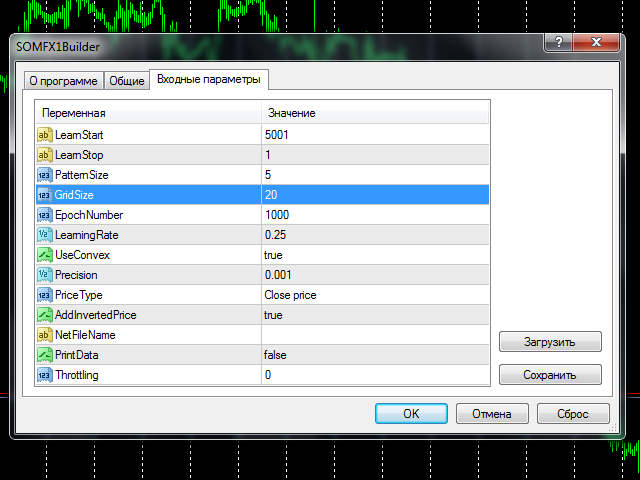
To start training you should choose number of bars in history to train at (LearnStart and LearnStop parameters), number of bars in a single pattern (PatternSize), the size of the map (GridSize), the number of learning cycles (EpochNumber). Some other parameters may also affect learning process, you may find all the details below, in "Parameters" section.

Learning may take considerable time, depending from the given parameters. The larger the number of bars being processed, the longer it takes to finish the process. Pattern size, map size and number of epochs - all work in the similar way. For example, training on 5000 bars with the map 10*10 in size may take several minutes on an average PC. All this time CPU core load is maximum, and terminal may slow down, if your PC doesn't have a couple of cores. You should choose a time for training when you do not expect active trading, or you could use weekends. This is especially important because the training process normally needs some optimization and thus should be repeated several times before you get optimal results. Why? Please find the answer below, in "Choosing optimal parameters" section.

Before you start reading the next sections, it may be worth reading "How it works" section on the SOMFX1 page with an overview of neural network principles.


Parameters

  • LearnStart - number of a bar in history, where training data begins, or an exact date and time of the bar (in the format "YYYY.MM.DD HH:MM"); this parameter is a string, whick allows you to enter either a number or a date; note that bar numbers change every time a new bar is formed, so if you used value 1000 yesterday, today's 1000-th bar will be most likely other one (except for the case you use weekly bars); during training process this is not important because all training data is collected just before the start and is not changed afterwards; default value - 5001;
  • LearnStop - number of a bar in history, where training data ends, or an exact date and time of the bar (in the format "YYYY.MM.DD HH:MM"); this parameter is also a string; LearnStart should be older than LearnStop; the difference between LearnStart and LearnStop is the number of samples (input vectors) passed to the network (more precisely, it's LearnStart-LearnStop-PatternSize); default value - 1 (excluding the last, usually unfinished bar);
  • PatternSize - number of bars in a single pattern; this is the length of input vector (price sample); after the training, the first PatternSize-1 bars will be used to predict the next bar; for example, if PatternSize is 5, 5-bars patterns are extracted from price flow during training, and then 4-bars beginnings will be used to estimate 5-th bar on every moment; allowed values: 3 - 10; default value - 5;
  • GridSize - dimentions of the map; this is a number of cells/units on X and Y axes; the total number of neurons are GridSize*GridSize (2D-map); allowed values: 3 - 50, but be warned: the values larger than 20 implies long enough training with high CPU load; default value - 7 (applicable for first tests to get accustomed with the tools, but will most likely require larger value for real tasks);
  • EpochNumber - number of learning cycles to run; default value - 1000; the training process may finish earlier, if Precision is reached; in every epoch all input samples are feeded into the network;
  • LearningRate - initial learning speed; default value - 0.25; you may use trial and error method to find an optimum value in the range 0.1 - 0.5;
  • UseConvex - enable/disable the convex combination method of neurons' inputs initialization during first epochs; enabling it supposes better pattern separation and is recommended; default value - true;
  • Precision - a float number used as a threshold to stop training, when overall network error changes less than this number; default value - 0.001;
  • PriceType - a price type to use in the patterns; default value - close price;
  • AddInvertedPrice - enable/disable a mode, when inverted price movements are added into the samples; this may help to eliminate trend bias; default value - true; this means that number of samples becomes twice larger: (LearnStart-LearnStop-PatternSize)*2;
  • NetFileName - a name of file to save resulting network; default value - empty string - means that a special filename will be constructed automatically; it has the following strucutre: SOM-V-D-SYMBOL-TF-YYYYMMDDHHMM-YYYYMMDDHHMM-P.candlemap, where V - PatternSize, D - GridSize, SYMBOL - current work symbol, TF - current timeframe, YYYYMMDDHHMM - LearnStart and LearnStop respectively; even if you specified LearnStart and LearnStop as numbers, they are automatically transformed into date and time; P - PriceType; it is recommended to leave this parameter blank, because the autogenerated filenames are parsed by SOMFX1 and SOMFX1Predictor automatically, so you have no need to specify all the settings manually; otherwise, if you give your own filename, all settings used for training the network must be exactly duplicated in SOMFX1 and SOMFX1Predictor dialogs, and it's important to convert LearnStart and LearnStop into date/time format because bar numbers are inconsistent;
  • PrintData - enable/disable debug logging; default - false;
  • Throttling - number of milliseconds to pause training every epoch; this parameter allows you to ease CPU load in the expense of longer time required for the process to finish; it may help if your PC is not powerful enough and you don't want the training to interfere with other interactive tasks you're performing; default value - 0.


Choosing optimal parameters

Most important questions to answer yourself before you start network training are:

  • How many bars to feed into the network?
  • Which pattern size to choose? 
  • Which size of the network to choose?

They all are closely related, and decision on one of the questions affects the others.

By increasing the depth of history used for sampling one could expect better generalization of patterns by the network. This means that every discovered pattern is backed by a larger number of samples, so the network finds regularities in prices, not peculiarities. On the other hand, feeding too many samples to a network of a given size may lead to the effect when generalization becomes averaging, so it clashes different patterns into a single neuron. This happens because network has a limited "memory", defined by its size. The larger the size the larger number of samples can be processed. Unfortunately there is no exact formula for this. The rule of humb is:

D = sqrt(5*sqrt(N))

where N is the number of samples and D is the network dimensions (GridSize).

So, you should probably choose the number of bars on the basis of your preferred trading strategy. Then, having the number, you can calculate required network size. For example, for H1 timeframe, 5760 bars gives a year, which seems a good enough horizon for trading on H1, so you may try the default 5000 number. With this number one can get the size 20 by the formula above. Please note that setting AddInvertedPrice to true will increase the number of samples twice, so the size must be adjusted as well. If after the training network produces too many errors (this can be validated by using SOMFX1 or SOMFX1Predictor) you may consider either to enlarge the size of the map or to reduce the range of training data. PriceType may also be important. Anyway, if you have empirical knowledge that specific candle pattern occurs 10 or more times (in average) on some period of time, you may consider this period as sufficient for learning, because 10 samples should be enough for pattern generalization. You can use SOMFX1 for investigation how many samples mapped into every neuron and how evenly samples are distributed among neurons.

It's possible to consider the problem from the opposite side. Number of units in the network is the maximal number of possible price patterns. Let us assume that the number of known candle patterns is 50. Then the size of the network should be about 7. The problem here is that there are no means to "tell" the network that we want to recognize exactly these 50 patterns and omit all the others: the network will learn on all patterns available in the price series, so that the 50 known candle patterns will be a fraction of all patterns the network tries to learn. What is the fraction is - again - an open question. This is why it is usually required to run training process several times with different settings and find the best configuration.

If we consider classical candle patterns, many of them are built from 3-4-5 candles. For the neural network 3 or 4 bars may prove to be insufficient patterm size for proper pattern separation. So it is recommended to set PatternSize to 5 or more. Larger pattern size will increase computation costs. 

PriceType is implied to be close, when we talk about conventional candle patterns. The neural network allows for recognition of price patterns formed by any other price type, such as typical, high or low. It is especially useful because price series of the close price are very raggy, which "costs" more "memory" for the network. In other words - learning close is much more difficult than learning typical price, and requires larger map size on the same bar range. So, changing the type from close to typical may allow one to reduce the map size or improve accuracy.


Modus operandi

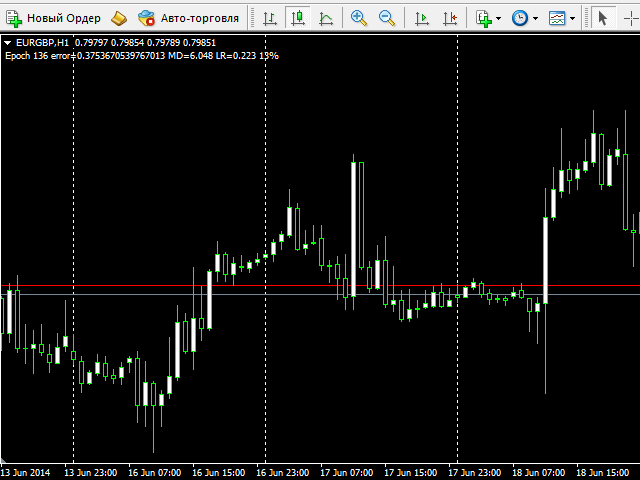
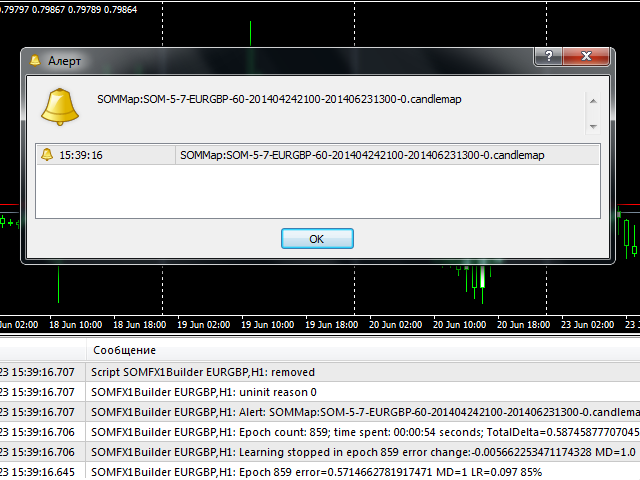
After setting the parameters and pressing OK button the training process starts. During the process the script outputs current epoch number, current error, learning rate and percentage of completion in the comment (in the left upper corner of the window). The same information is printed into the log. When the process finished, an alert is fired with the filename of the generated network. The file is saved in the Files subdirectory of your MQL4 folder. If it's an automatically generated filename (NetFileName was empty), you can copy and paste the filename just from the alert dialog into SOMFX1 or SOMFX1Predict indicator (should be pasted into similar NetFileName parameter there) and run the network. If a custom filename was used, then you should copy all parameters into the indicators - not only the filename but learning region, map size, pattern size, etc.

It's important that the network file does not contain input data - it holds the trained network only. When the network is loaded next time, a SOMFX1 indicator reads from settings all required parameters to extract price samples anew.

Before every learning process the network is initialized by random weights. This means that every next run of the script with the same settings will produce a new map which differs from previous one.

Recommended timeframes: H1 and above. 
Produtos recomendados
Hello friends. I wrote this utility specifically for use in my profile with a large number of Expert Advisors and sets ("Joint_profiles_from_grid_sets" https://www.mql5.com/en/blogs/post/747929 ). Now, in order to limit losses on the account, there is no need to change the "Close_positions_at_percentage_of_loss" parameter on each chart. Just open one additional chart, attach this utility and set the desired percentage for closing all trades on the account. The utility has the following function
O indicador Crypto_Forex "Auto FIBO Pro" é uma ótima ferramenta auxiliar na negociação! - O indicador calcula e coloca automaticamente no gráfico os níveis de Fibonacci e as linhas de tendência locais (cor vermelha). - Os níveis de Fibonacci indicam áreas-chave onde o preço pode reverter. - Os níveis mais importantes são 23,6%, 38,2%, 50% e 61,8%. - Pode utilizá-lo para scalping de reversão ou para negociação de grelha de zona. - Existem muitas oportunidades para melhorar o seu sistema atual u
Close_All_Trades_with_TP_SL is a reliable and efficient MQL4 Expert Advisor designed to simplify and automate trade management for all open positions on your MT4 account. This EA is especially useful for traders who open multiple trades quickly or use high-frequency strategies where manual TP/SL placement becomes difficult and time-consuming. The primary purpose of the EA is to ensure that every open trade—whether Buy or Sell—always has a predefined Take Profit (TP) and Stop Loss (SL) applied. M
FREE
News Scalping Executor is an utility which helps to trade high impact and huge volatility   news . This utility helps to create two opposite orders with risk management and profit protection. It moves automatically stop loss level to avoid losses as much as possible by using many different algorithms. It helps to avoid trading the news if spread suddenly becomes very huge. It can lock profit by moving stop loss or partially closing of orders. To be profitable with this type of trading you shou

Stealth Mode TP/SL Manager with AI Protection This AI-powered tool manages Stop Loss and Take Profit dynamically using either price-based or profit-and-loss (PnL) calculations while hiding these levels from the market . Also the this tool is very important to   PROP FIRMS   accounts , so you can set your stoploss to not hitting the daily stop loss ! Key Features: Supports BUY, SELL, or both position types. Flexible symbol selection: Manage the current chart, all symbols, or specific symbols (se
Utilitário para fechamento automático de negócios por níveis de trailing stop. Permite que você aproveite ao máximo seu lucro. Criado por um trader profissional para traders. O utilitário funciona com quaisquer ordens de mercado abertas por um trader manualmente ou usando consultores. Pode filtrar negociações por número mágico. O utilitário pode trabalhar com qualquer número de pedidos ao mesmo tempo. Versão MT5 https://www.mql5.com/ru/market/product/56488 O QUE O UTILITÁRIO PODE FAZER: defi
Order Blocks Breaker
Suvashish Halder
5 (2)
Introducing Order Blocks Breaker , a brand-new way to identify and leverage order blocks in your trading strategy. After developing multiple order block tools with unique concepts, I’m proud to present this tool that takes things to the next level. Unlike previous tools, Order Blocks Breaker not only identifies order blocks but also highlights Breaker Order Blocks —key areas where the price is likely to retest after a breakout. MT5 -  https://www.mql5.com/en/market/product/124102/ This tool inco
Fever ESM
Evgenii Morozov
Trading Advisor for margin currency pairs and metals. Conservative trading of 100,000 units per 0.01 lot. The standard trade is 10,000 units per 0.01 lot. Aggressive trading with high risks of 1000 units per 0.01 lot. You can always pick up your starting lot.  The EA is fully automated, you only have to put up the initial lot depending on your initial deposit. The recommended timeframe is H1. 1. Test on any steam, iron and fuel oil 2. Try starting with convenient depots 3. When going into a dra
Spread Record
Konstantin Kulikov
This utility allows to record the spread value to the file, which is equal to or greater than the value specified in the settings, at the specified time. The utility also displays useful information on the symbol's chart: current spread value in points, name of account holder, name of trading server, leverage, the size of the swap for buy orders, the size of the swap for sell orders, day of the week for accruing triple swap, the size of a point in the quote currency, the minimum allowed level of
BreakEven Grid Utility for MT4 BreakEven Grid is a powerful utility for manual trade management on the MetaTrader 4 platform. It provides a convenient on-screen panel with buttons to help you manage your open positions with a single click.  Features: Set BE+Profit: Automatically sets Take Profit to breakeven + desired profit in pips or money. Close BUY/SELL: Instantly close all Buy or Sell orders for the current symbol. Close +$/-$/Old/New: Close only profitable, losing, oldest or newest tra
Lot by Risk
Sergey Vasilev
4.83 (23)
O painel de negociação Lot by Risk é projetado para negociação manual. Este é um meio alternativo para enviar ordens. A primeira característica do painel é a colocação conveniente de ordens usando linhas de controle. A segunda característica é o cálculo do volume da transação de acordo com um determinado risco, se houver uma linha stop loss. As linhas de controle são definidas usando as teclas de atalho: take profit-tecla T padrão; price-tecla padrão P; stop loss - tecla padrão S; Você mesmo
FREE
FDM Strategy
Paranchai Tensit
FDM Strategy is an Expert Advisor based on fractals and five dimension method. Five Dimensions expert system is developed based on a theory combining the Chaos Theory with the trading psychology and the effects that each has on the market movement. There is also an ADX (measuring trend strength with average directional movement index) used as a trading filter. Long and Short Trade Signals: If fractal to buy is above the Alligator's Teeth (red line), the pending Sell Stop order must be placed 1 p
Um utilitário para definir automaticamente os níveis de equilíbrio, transfere as negociações para o equilíbrio ao passar uma determinada distância. Permite que você minimize os riscos. Criado por um trader profissional para traders. O utilitário funciona com quaisquer ordens de mercado abertas por um trader manualmente ou usando consultores. Pode filtrar negociações por número mágico. O utilitário pode trabalhar com qualquer número de pedidos ao mesmo tempo. Versão MT5 https://www.mql5.com/ru/
Trailing Stop Utility MT4 for automatic closing of deals by trailing stop levels.  Allows you to take the maximum from the profit. Created by a professional trader for traders.   Utility   works with any market orders opened manually by a trader or using advisors. Can filter trades by magic number. The utility can work with any number of orders simultaneously. WHAT THE UTILITY CAN DO: Set virtual   trailing stop   levels from 1 pip Set real   trailing stop   levels W ork with each order separat
A trader's assistant that closes positions in parts with a simple trail to take the optimal profit size when the price of the symbol moves towards the position (s). Initially, the stop loss is moved to breakeven + (the so-called breakeven greed level) - this is when the price closes the stop-loss position during the reverse movement and as a result some profit will still be received. Further, while maintaining the movement in the direction of the position, it is closed in parts on price rollback
Trend Ray
Andriy Sydoruk
The indicator shows the potential trend direction by cyclical-wave dependence. Thus, all the rays of the intersection will be optimal rays, in the direction of which the price is expected to move, taking into account the indicator period. Rays can be used as a direction for potential market movement. But we must not forget that the approach must be comprehensive, the indicator signals require additional information to enter the market.
StopLoss and TakeProfit Utility MT4 for automatic setting of stop loss and take profit levels. Created by a professional trader for traders.   The utility   works with any market orders opened by a trader manually or using advisors. Can filter trades by magic number. The utility can work with any number of orders simultaneously. WHAT THE UTILITY CAN DO: Set virtual stop loss and take profit from 1 pip Real   stop loss and take profit W ork with each order separately (   stop loss and take prof
Scalper de Ticks «Tick Scalper» Ação de preço pura, sem indicadores. Define StopLoss, TakeProfit e rastreia posições com TrailingStop.   Parâmetros Principais Parâmetro Valor Padrão Descrição TakeProfit — TakeProfit fixo em pips. StopLoss — StopLoss fixo em pips. TrailingStop — Distância do TrailingStop (pips) para modificar posições. cSeconds — Intervalo de verificação de sinais (segundos). MinPriceShot — Movimento mínimo de preço (pips) para ativar um sinal. MaxOrdersCount — Número máxi
Expert candle finder for forex in MetaTrader 4 Expert candle finder is one of the practical trader assistant experts that is used in the forex financial market, this expert accurately identifies the candlestick patterns on the price chart as a signal, all the found candles. informs you. This expert is run on your Meta trader platform and in a very precise way, it examines all the currency pairs that are in your watch list and every currency pair that had a professional and good candlestick patt
Kalifx Equity Guard EA
Calvin Andile Mahlangu
Kalifx Equity Guard — Account Protection Utility (MT4) Kalifx Equity Guard is a MetaTrader 4 utility that monitors account equity and floating losses and closes open positions when predefined risk limits are reached. It operates independently of trade entry logic and works with both manual trades and Expert Advisors. The utility runs continuously in the background after being attached to any chart and timeframe. Main Functions Monitors account equity drawdown using percentage or monetary thresh
FREE
This utility is the improved version of Trailing stop for advisors. It manages other EAs' orders as well as the ones opened manually. It is capable of trailing the price (trailing stop function), set a stop loss and take profit if they have not been set before. The Pro version features the ability to set trailing stop based on fractals and points of Parabolic SAR. When configuring the utility for an EA having no trailing stop function, place it to the new window with the same currency pair speci
Beta version of a semi-automatic utility for trading grid strategy. When using, please give feedback on the shortcomings / suggestions. Good luck to us! Parameters: Lot exponent - multiplication of the lot on the next order. Grid pips   - grid size. Take profit pip - distance of the take profit line. Magic number - the magic number of the adviser's work. Trading menu - presence/absence of a trading menu. Menu size - the size of the menu (choose the value for your resolution). Menu font size -
This program calculates the average opening price for sell and buy positions separately. Program allows you to modify the stop loss value to the calculated breakeven price, this value could also be modified by a user-defined integer value in points. All you have to do is press the button. You can also choose Logs_Display_Enable input value if you need to get some additional, useful informations. Enjoy using !!!
FREE
This script is designed to automatically open charts for all available forex pairs on the MetaTrader 4 platform, as well as the gold (XAUUSD) chart. The script iterates through all symbols available on the platform, determines which of them are forex pairs, and opens their charts on the M1 (one minute) timeframe. Key Features: Gold Chart Opening: The script automatically opens the XAUUSD (gold/dollar) chart if this symbol is available from your broker. If the gold symbol is not found, an error m
News Scalping Executor Pro is an utility which helps to trade high impact and huge volatility   news . This utility helps to create two opposite orders with risk management and profit protection. It moves automatically stop loss level to avoid losses as much as possible by using many different algorithms. It helps to avoid trading the news if spread suddenly becomes very huge. It can lock profit by moving stop loss or partially closing of orders. To be profitable with this type of trading you
This indicator will display current logined mt4 account's orders information of current symbol chart. It also allow import some formated data: 1) MQL5 Signals History CSV file (*.csv) 2) MT4 Account History Statement file (*.htm -> *.txt) *[Next Version] Allow Import data form 'HF HistoryExporter (*.csv)' Sample Data of MQL5 Signals History File Time;Type;Volume;Symbol;Price;S/L;T/P;Time;Price;Commission;Swap;Profit;Comment 2023.12.20 23:00:02;Buy Limit;0.06;EURUSD;1.08994;1.06024;1.09464;202
SpeedManager
Sajiro Yoshizaki
Esta é uma ferramenta de gerenciamento de velocidade de reprodução que permite testes e análises eficientes no Testador de Estratégias. Ele melhora a usabilidade do Testador de Estratégias e pode ser usado como um meio para agilizar o desenvolvimento e avaliação de estratégias de negociação. Características da ferramenta: Controle de velocidade de reprodução: Os usuários podem livremente alterar a velocidade de reprodução no Testador de Estratégias, permitindo avançar rapidamente, acelerar e pa
FREE
The only drawdown guardian that stops your other EAs from digging you deeper. PropMarshal monitors your account equity in real time and instantly closes all positions the moment a drawdown or profit target threshold is breached. But it doesn't stop there — it closes every chart on your platform too, cutting off any other Expert Advisors before they can open new trades and compound the damage. The Problem   PropMarshal   Solves Most prop firm traders run multiple EAs across multiple charts. When
FREE
Este é um painel comum que coloca uma rede de ordens de compra e venda. Fecha esta ordem Expert Advisor de acordo com o lucro definido nas Configurações. Em seguida, há um parâmetro chamado Ladder que inclui que a distância entre as ordens começam a aumentar nos pontos especificados pelo parâmetro ladder (aqui, nas configurações básicas é de 10 Pontos) significa uma segunda ordem de 10 pontos, uma terceira ordem de 20 pontos, uma quarta ordem de 40 pontos, etc. Então, o que você precisa saber
This Tool Allow you close all open Orders automatics when Equity reach to specific value:  - When Equity is less than  specific value - When Equity is greater than  specific value - And Allow you close all open orders in manual - It will notification to MT4 Mobile app when it execute close all orders. __________________________________________ It very helpful for you when you trade with prop funds. Avoid reach daily drawdown and automatics close all orders when you get target.
FREE
Os compradores deste produto também adquirem
Local Trade Copier EA MT4
Juvenille Emperor Limited
4.96 (108)
Experimente uma cópia de negociação excepcionalmente rápida com o Local Trade Copier EA MT4 . Com sua fácil configuração de 1 minuto, este copiador de negociações permite que você copie negociações entre vários terminais MetaTrader no mesmo computador Windows ou em um Windows VPS com velocidades de cópia ultra rápidas de menos de 0.5 segundos. Seja você um trader iniciante ou profissional, o Local Trade Copier EA MT4 oferece uma ampla gama de opções para personalizá-lo de acordo com suas necess
Trade Assistant MT4
Evgeniy Kravchenko
4.42 (193)
Ajuda a calcular o risco por comércio, a fácil instalação de uma nova encomenda, gestão de encomendas com funções de fecho parcial, trailing stop de 7 tipos e outras funções úteis. Materiais e instruções adicionais Instruções de instalação - Instruções para a aplicação - Versão de teste da aplicação para uma conta de demonstração Função de linha Mostra no gráfico a linha de Abertura, Stop Loss, Take Profit. Com esta função é fácil definir uma nova ordem e ver as suas características adicionais
Bem-vindo ao Trade Manager EA—uma ferramenta de gestão de risco criada para tornar o trading mais intuitivo, preciso e eficiente. Não é apenas uma ferramenta para executar ordens, mas uma solução abrangente para planejamento de operações, gerenciamento de posições e controle de risco. Seja você um iniciante, trader avançado ou scalper que precisa de execução rápida, o Trade Manager EA adapta-se às suas necessidades, oferecendo flexibilidade em todos os mercados, desde forex e índices até commodi
Exp COPYLOT CLIENT for MT4
Vladislav Andruschenko
4.65 (66)
Copiadora comercial para MetaTrader 4. Ele copia negociações, posições e pedidos em forex de qualquer conta. É uma das melhores copiadoras comerciais  MT4 - MT4, MT5 - MT4 para a versão COPYLOT MT4  (ou MT4 - MT5 MT5 - MT5 para a versão COPYLOT MT5 ). Versão MT5 Descrição completa +DEMO +PDF Como comprar Como instalar    Como obter arquivos de log    Como testar e otimizar    Todos os produtos da Expforex Versão da copiadora para o terminal MetaTrader 5 ( МТ5 - МТ5, МТ4 - МТ5 ) -  Copylot Cli
The product will copy all telegram signal to MT4   ( which you are member  ) , also it can work as remote copier.  Easy to set up, copy order instant, can work with almost signal formats, image signal, s upport to translate other language to English Work with all type of channel or group, even channel have "Restrict Saving Content", work with  multi channel, multi MT5 Work as remote copier: with signal have ticket number, it will copy exactly via ticket number. Support to backtest signal. How to
Copy Cat More Trade Copier MT4 (Cópia Gato MT4) não é apenas um simples copiador local de operações; é uma estrutura completa de gestão de risco e execução, projetada para os desafios atuais do trading. Desde desafios de prop firms até a gestão de contas pessoais, adapta-se a cada situação com uma combinação de execução robusta, proteção de capital, configuração flexível e tratamento avançado das operações. O copiador funciona tanto no modo Master (emissor) quanto no modo Slave (receptor), sincr
Crystal Trade Manager PRO – Sistema Avançado de Gestão de Risco e Controle de Operações para MT4 Versão Gratuita: https://www.mql5.com/en/market/product/150632 Visão Geral Crystal Trade Manager PRO (CTM) é uma ferramenta profissional de execução de ordens e gestão de risco desenvolvida para MetaTrader 4. Foi projetada para traders que necessitam de disciplina, forte proteção de capital e automação inteligente dentro do MT4. O sistema controla o risco, protege o patrimônio da conta, aplica limite
Trade Dashboard MT4
Fatemeh Ameri
4.96 (53)
Tired of complex order placement and manual calculations? Trade Dashboard is your solution. With its user-friendly interface, placing orders becomes effortless, by a single click, you can open trades, set stop loss and take profit levels, manage trade lot size, and calculate risk to reward ratios, allowing you to only focus on your strategy. Say goodbye to manual calculations and streamline your trading experience with Trade Dashboard. Download  Demo Version  right now. You can find  Details of
Trade copier MT4
Alfiya Fazylova
4.58 (33)
Trade Copier é um utilitário profissional projetado para copiar e sincronizar negociações entre contas de negociação. A cópia ocorre da conta / terminal do fornecedor para a conta / terminal do destinatário, instalada no mesmo computador ou vps. Antes de comprar, você pode testar a versão demo em uma conta demo. Versão de demonstração aqui . Instruções completas aqui . Principais funcionalidades e benefícios: Suporta a cópia de MT4> MT4, MT4> MT5, MT5> MT4, incluindo contas "MT5 netting". Os mod
Take a Break
Eric Emmrich
5 (31)
One tool to protect all your EAs — news filter, equity protection, time filter and more — free demo available Take a Break has evolved from a basic news filter into a comprehensive account protection solution. It pauses your other Expert Advisors during news events or based on custom filters. When trading resumes, it automatically restores your entire chart setup , including all EA settings. Typical use cases: One news filter for all your EAs. Pause trading during news or high volatility — and c
News Filter EA: Advanced Algo Trading Assistant News Filter EA is an advanced algo trading assistant designed to enhance your trading experience. By using the   News Filter EA , you can integrate a Forex economic news filter into your existing expert advisor, even if you do not have access to its source code. In addition to the news filter, you can also specify   trading days   and   hours   for your expert. The News Filter EA also includes   risk management   and   equity protection   features
Equity Protect Pro: Seu Especialista em Proteção de Contas Abrangente para Negociação Tranquila Se você está procurando recursos como proteção de conta, proteção de patrimônio, proteção de portfólio, proteção de múltiplas estratégias, proteção de lucro, coleta de lucro, segurança de negociação, programas de controle de risco, controle automático de risco, liquidação automática, liquidação condicional, liquidação programada, liquidação dinâmica, trailing stop loss, fechamento com um clique, liqu
Copiadora->Interação de interface conveniente e rápida, os usuários podem usá-la imediatamente       ->>>> Recomendado para uso em computadores Windows ou VPS Windows Características: Configurações de negociação de cópias diversificadas e personalizadas: 1. Diferentes modos de lote podem ser definidos para diferentes fontes de sinal 2. Diferentes fontes de sinal podem ser definidas para negociação de cópias direta e reversa 3. Os sinais podem ser definidos com comentários 4. Se deve calibrar o
Veja instantaneamente o seu histórico de negociações fechadas por dia e semana, as suas negociações abertas atuais e a exposição forex num gráfico! Utilize o mapa de calor para identificar operações lucrativas e onde está o seu drawdown atual dentro do seu portfólio de negociação. Botões de fecho rápido Utilize os botões de fecho rápido para fechar todas as operações num único símbolo, fechar operações individuais por completo ou obter lucros ou perdas parciais com o clique de um botão. Chega
O MT4 para Telegram Signal Provider é uma ferramenta fácil de usar e totalmente personalizável que permite o envio de sinais para o Telegram, transformando sua conta em um provedor de sinais. O formato das mensagens é totalmente personalizável! No entanto, para uso simples, você também pode optar por um modelo predefinido e habilitar ou desabilitar partes específicas da mensagem. [ Demonstração ]   [ Manual ] [ Versão MT5 ] [ Versão Discord ] [ Canal do Telegram ]  New: [ Telegram To MT5 ] Conf
Ultimate MT4 to Telegram (UMT) sends controlled trades (via symbol, magic, comment) to your telegram channel. It sends open and closed trades, including pending orders and TP/SL modifications, along with chart screenshots, to any telegram channel. Additionally, you can send trade reports of open trades and summary profit/pip reports for day, week, or month. You can customize the design of the trade actions or reports with variables and emoticons.  A beautiful panel allows you to visualize all t
O Risk/Reward Tool é um Expert Advisor de nível profissional projetado para revolucionar a forma como você planeja, visualiza e executa operações no MetaTrader 4. Seja você um trader discricionário que valoriza a gestão precisa de risco ou um desenvolvedor de estratégias que precisa testar configurações de trading visualmente, esta ferramenta fornece tudo o que você precisa em uma interface elegante e intuitiva. Diferente das calculadoras de posição básicas, o Risk/Reward Tool combina planejamen
OrderManager MT4
Lukas Roth
4.73 (26)
Apresentando o OrderManager : Uma Ferramenta Revolucionária para MT4 Gerencie suas operações como um profissional com o novo utilitário Order Manager para MetaTrader 4. Projetado com simplicidade e facilidade de uso em mente, o Order Manager permite que você defina e visualize facilmente o risco associado a cada operação, possibilitando tomar decisões informadas e otimizar sua estratégia de trading. Para mais informações sobre o OrderManager, por favor, consulte o manual. [ Manual ] [ Versão MT5
Telegram Signal pro
Sara Sabaghi
4.86 (7)
What is it? Think about it, you can send all the orders/positions info to your telegram channel or group to create your community or VIP signals on telegram. Position info means this EA forward all of your new positions open details (Open price, Open time, Position Type, position Symbol and volume), positions changes ( SL or TP modifying or pending price changes) and position close (Close price, profit or loss, position duration time) and also EA Send NEWS alert (Economic calendar event) on you
Rocket FX Trading Manager PRO Note: Once you download the manager, message me for the background files The Ultimate All-in-One Trade Management Solution for MetaTrader 4 Version:   4.5 |   Platform:   MetaTrader 4 |   Category:   Utility / Trade Manager   Overview Rocket Fx Trading Manager v4.5 is a comprehensive, all-in-one trade management system designed to transform your trading experience. This powerful utility combines   intelligent position sizing ,   multi-target order placement
This EA is fully automated , it is built based on  the method of catching the pop-up Alert event and forwarding them to Telegram Channel/Group. Parameters of the EA: -------- <EA Settings> -------- Magic Number:   The identifying (magic) number of the currently selected order. Bot name:   Name of the Expert Advisor. Allow forward Alert: Enable/ Disable Forward Alert. Do not send messages after the current time (seconds) . Number of rows to read from list (>= 4...| affect processing speed). --
VirtualTradePad mt4 Extra
Vladislav Andruschenko
4.86 (59)
Painel de negociação para negociação em 1 clique.  Trabalhando com posições e pedidos!  Negociar a partir do gráfico ou do teclado. Usando nosso painel de negociação, você pode negociar com um clique no gráfico e realizar operações de negociação 30 vezes mais rápido do que o controle MetaTrader padrão. Cálculos automáticos de parâmetros e funções que tornam a vida mais fácil para um trader e ajudam-no a conduzir suas atividades de trading com muito mais rapidez e conveniência. Dicas gráficas e i
Copier4Fee Advanced
Vladimir Tkach
4.75 (16)
The utility copies trades from the signal provider accounts (master accounts, one or multiple providers) to unlimited number of receiver accounts (slave accounts).  Attention! Y ou need to use identifiers (Provider number) of the same length if you use several master copiers. For example. 1, 2, 3 or 11, 13, 22. The copying can be set in the opposite direction. The comments with all the recently performed actions are displayed on the screen to monitor the utility actions in slave mode. To avoid p
--------------Welcome to use [MQL5 Signal Analyze Master]------------------  Function: Draw order tracks of MQL5 MT4 and MT5 signal on MT4 chart. [Using guide] 1.Use it as Experts. 2.Download history record from MQL5 signal(MT4 signal or MT5 signal).  3.Paste history record file below "MQL4/Files/" 4.Load [Signal Analyze Master] on the symbol chart what you want to analyze. 5.Paste the history record file name to parameter 'FileName' 6.Select  SignalType  match the history you download on MT4
TradePanel MT4
Alfiya Fazylova
4.85 (92)
Trade Panel é um assistente de negociação multifuncional. O aplicativo contém mais de 50 funções de negociação para trading manual e permite automatizar a maioria das tarefas de negociação. Versão de teste do aplicativo para conta de demonstração Instruções para a aplicação Comércio. Permite realizar operações de negociação com um clique: Abrir ordens pendentes e posições com cálculo automático de risco. Abrir várias ordens e posições com um clique. Abrir uma grade de ordens. Fechar ordens pende
Comprehensive on chart trade panel with the unique ability to be controllable from mobile as well. Plus has a library of downloadable configuration, e.g. exit rules, extra panel buttons, pending order setup and more. Please see our product video. Works with all symbols not just currency pairs. Features On chart panel plus controllable from free app for Windows, iPhone and Android Built-in script engine with library of downloadable configuration, e.g. add 'Close All Trades in Profit' button, exit
Custom Alerts: Monitore vários mercados e não perca nenhuma oportunidade importante Visão geral Custom Alerts é uma solução dinâmica para traders que desejam monitorar configurações potenciais em vários instrumentos a partir de um único local. Integrando dados de nossas ferramentas principais — como FX Power, FX Volume, FX Dynamic, FX Levels e IX Power — o Custom Alerts notifica automaticamente sobre movimentos importantes do mercado, sem a necessidade de alternar entre diversos gráficos ou pe
Automatic Trailing Stop Based on Take Profit Percentage with Profit Lock EA MT4   Lock in your profits and "let your winners run" past your 100% take profit target with this EA.  This Expert Advisor automatically adjusts your Stop Loss based on up to 4 user-defined Take Profit Target Percentages, locking in your profit.  If price pushes past your 100% take profit target, the EA will automatically trail the price by user-defined pips, so you won't miss that runaway train again.   EA Features The
Oferta Especial para Traders – 40% de desconto Advanced Trade Manager – A solução completa para um trading manual mais rápido, inteligente e seguro. Transforme o seu trading manual com o NextGen Trade Manager AI – o painel profissional no gráfico que combina a execução instantânea, o planeamento visual das operações e a gestão robusta de riscos numa ferramenta intuitiva. Execute ordens, gerencie riscos e proteja os lucros mais rapidamente do que nunca, tudo sem sair do seu gráfico. Perfeito p
Riskless Pyramid
Snapdragon Systems Ltd
5 (1)
Introduction This powerful MT4 trade mangement EA offers a way potentially to aggressively multiply trade profits in a riskfree manner. Once a trade has been entered with a defined stoploss and take profit target then the EA will add three pyramid add-on trades in order to increase the overall level of profit. The user sets the total combined profit target to be gained if everything works out. This can be specified either as a multiple of the original trade profit or as a total dollar amount. Fo
Mais do autor
WalkForwardOptimizer MT5
Stanislav Korotky
3.78 (9)
WalkForwardOptimizer library allows you to perform rolling and cluster walk-forward optimization of expert advisers (EA) in MetaTrader 5. To use the library include its header file WalkForwardOptimizer.mqh into your EA source code, add call provided functions as appropriate. Once the library is embedded into EA, you may start optimization according to the procedure described in the User guide . When it's finished, intermediate results are saved into a CSV file and some special global variables.
RenkoFromRealTicks
Stanislav Korotky
4.5 (2)
This non-trading expert utilizes so called custom symbols feature ( available in MQL API as well) to build renko charts based on history of real ticks of selected standard symbol. RenkoFromRealTicks generates custom symbol quotes, thus you may open many charts to apply different EAs and indicators to the renko. It also transmits real ticks to update renko charts in real time. The generated renko chart uses M1 timeframe. It makes no sense to switch the renko chart to a timeframe other than M1. T
This indicator provides the analysis of tick volume deltas. It monitors up and down ticks and sums them up as separate volumes for buys and sells, as well as their delta volumes. In addition, it displays volumes by price clusters (cells) within a specified period of bars. This indicator is similar to VolumeDeltaMT5 , which uses almost the same algorithms but does not process ticks and therefore cannot work on M1. This is the reason for VolumeDeltaM1 to exist. On the other hand, VolumeDeltaMT5 ca
AutomaticZigZag
Stanislav Korotky
4.5 (2)
This is a non-parametric ZigZag providing 4 different methods of calculation. Upward edge continues on new bars while their `highs` are above highest `low` among previous bars, downward edge continues on next bars while their `lows` are below lowest `high` among previous; Gann swing: upward edge continues while `highs` and `lows` are higher than on the left adjacent bar, downward edge continues while `highs` and `lows` are lower than on the left adjacent bar. Inside bars (with lower `high` and
FREE
CustomVolumeDelta
Stanislav Korotky
5 (1)
This indicator displays volume delta (of either tick volume or real volume) encoded in a custom symbol, generated by special expert advisers, such as RenkoFromRealTicks . MetaTrader does not allow negative values in the volumes, this is why we need to encode deltas in a special way, and then use CustomVolumeDelta indicator to decode and display the deltas. This indicator is applicable only for custom instruments generated in appropriate way (with signed volumes encoded). It makes no sense to ap
FREE
ADXS
Stanislav Korotky
5 (3)
Ever wondered why standard ADX is made unsigned and what if it would be kept signed? This indicator gives the answer, which allows you to trade more efficient. This indicator calculates ADX values using standard formulae, but excludes operation of taking the module of ADX values, which is forcedly added into ADX for some reason. In other words, the indicator preserves natural signs of ADX values, which makes it more consistent, easy to use, and gives signals earlier than standard ADX. Strictly s
ADXSignal
Stanislav Korotky
Classical ADX revamped to provide faster and more solid trading signals. This indicator calculates ADX values using standard formulae, but excludes operation of taking the module of ADX values, which is forcedly added into ADX for some reason. In other words, the indicator preserves natural signs of ADX values, which makes it more consistent, easy to use, and gives signals earlier than standard ADX. Strictly speaking, any conversion to an absolute value destroys a part of information, and it mak
This is a demo version of a non-trading expert , which utilizes so called the custom symbols feature ( available in MQL as well ) to build renko charts based on historical quotes of selected standard symbol and to refresh renko in real-time according to new ticks. Also it translates real ticks to the renko charts, which allows other EAs and indicators to trade and analyze renko. Place the EA on a chart of a working instrument. The lesser timeframe of the source chart is, the more precise resulti
FREE
Order Book, known also as Market Book, market depth, Level 2, - is a dynamically updated table with current volumes of orders to buy and to sell specific financial instument at price levels near Bid and Ask. MetaTrader 5 provides the means for receiving market book from your broker, but in real time only, without access to its history. This expert adviser OrderBook History Playback allows you to playback the market book events on the history using files, created by OrderBook Recorder . The exper
FREE
WalkForwardDemo MT5
Stanislav Korotky
WalkForwardDemo is an expert adviser (EA) demonstrating how the built-in library WalkForwardOptimizer (WFO) for walk-forward optimization works. It allows you to easily optimize, view and analyze your EA performance and robustness in unknown trading conditions of future. You may find more details about walk-forward optimization in Wikipedia . Once you have performed optimization using WFO, the library generates special global variables (saved in an "archived" file with GVF-extension) and a CSV-f
FREE
Comparator
Stanislav Korotky
4.75 (4)
This indicator compares the price changes during the specified period for the current symbol and other reference symbol. It allows to analyze the similar movements of highly correlated symbols, such as XAUUSD and XAGUSD, and find their occasional convergences and divergences for trading opportunities. The indicator displays the following buffers: light-green thick line - price changes of the current symbol for TimeGap bars; light-blue thin line - price changes of the reference symbol ( LeadSymbo
FREE
ReturnAutoScale
Stanislav Korotky
5 (2)
The indicator calculates running total of linear weighted returns. It transforms rates into integrated and difference-stationary time series with distinctive buy and sell zones. Buy zones are shown in blue, sell zones in red. Parameters: period - number of bars to use for linear weighted calculation; default value - 96; smoothing - period for EMA; default value - 5; mode - an integer value for choosing calculation mode: 0 - long term trading; 1 - medium term trading; 2 - short term trading; defa
FREE
RenkoCharts
Stanislav Korotky
This non-trading expert utilizes so called custom symbols feature ( available in MQL as well ) to build renko charts based on historical quotes of selected standard symbol and to refresh renko in real-time according to new ticks. Also, it translates real ticks to the renko charts, which allows other EAs and indicators to trade and analyze renko. Place RenkoCharts on a chart of a work instrument. The lesser timeframe of the source chart is, the more precise resulting renko chart is, but the lesse
HZZM
Stanislav Korotky
4 (1)
This is an adaptive ZigZag based on modification of  HZZ indicator (original source code is available in this article ). Most important changes in this version: two additional indicator buffers added for zigzag evolution monitoring - they show cross signs at points where zigzag direction first changes; zigzag range (H) autodetection on day by day basis; time-dependent adjustment of zigzag range. Parameters: H - zigzag range in points; this parameter is similar to original HZZ, but it can take 0
FREE
OrderBook Utilities is a script, which performs several service operations on order book hob-files, created by OrderBook Recorder . The script processes a file for work symbol of the current chart. The file date is selected by means of the input parameter CustomDate (if it's filled in) or by the point where the script is dropped on the chart. Depending from the operation, useful information is written into the log, and optionally new file is created. The operation is selected by the input parame
FREE
Order Book, known also as Market Book, market depth, Level 2, - is a dynamically updated table with current volumes of orders to buy and to sell specific financial instument at price levels near Bid and Ask. MetaTrader 5 provides the means for receiving market book from your broker in real time. The expert OrderBook Recorder records market book changes and stores them in local files for further usage in indicators and expert adviser, including testing in the tester. The expert stores market book
FREE
PointsVsBars
Stanislav Korotky
This indicator provides a statistical analysis of price changes (in points) versus time delta (in bars). It calculates a matrix of full statistics about price changes during different time periods, and displays either distribution of returns in points for requested bar delta, or distribution of time deltas in bars for requested return. Please, note, that the indicator values are always a number of times corresponding price change vs bar delta occurred in history. Parameters: HistoryDepth - numbe
FREE
This script allows performing a walk-forward analysis of trading experts based on the data collected by the WalkForwardLight MT5 library. The script builds a cluster walk forward report and rolling walk forward reports that refine it, in the form of a single HTML page. This script is optional, as the library automatically generates the report immediate after the optimization in the tester is complete. However, the script is convenient because it allows using the same collected data to rebuild th
FREE
Year2Year
Stanislav Korotky
This indicator shows price changes for the same days in past years. D1 timeframe is required. This is a predictor indicator that finds D1 bars for the same days in past 8 years and shows their relative price changes on the current chart. Parameters: LookForward - number of days (bars) to show "future" price changes; default is 5; Offset - number of days (bars) to shift back in history; default is 0; ShowAverage - mode switch; true - show mean value for all 8 years and deviation bounds; false - s
FREE
Mirror
Stanislav Korotky
This indicator predicts rate changes based on the chart display principle. It uses the idea that the price fluctuations consist of "action" and "reaction" phases, and the "reaction" is comparable and similar to the "action", so mirroring can be used to predict it. The indicator has three parameters: predict - the number of bars for prediction (24 by default); depth - the number of past bars that will be used as mirror points; for all depth mirroring points an MA is calculated and drawn on the ch
If you like trading crosses (such as AUDJPY, CADJPY, EURCHF, and similar), you should take into account what happens with major currencies (especially, USD and EUR) against the work pair: for example, while trading AUDJPY, important levels from AUDUSD and USDJPY may have an implicit effect. This indicator allows you to view hidden levels, calculated from the major rates. It finds nearest extremums in major quotes for specified history depth, which most likely form resistence or support levels, a
EvoLevels
Stanislav Korotky
The indicator displays most prominent price levels and their changes in history. It dynamically detects regions where price movements form attractors and shows up to 8 of them. The attractors can serve as resistance or support levels and outer bounds for rates. Parameters: WindowSize - number of bars in the sliding window which is used for detection of attractors; default is 100; MaxBar - number of bars to process (for performance optimization); default is 1000; when the indicator is called from
This is an intraday indicator that uses conventional formulae for daily and weekly levels of pivot, resistance and support, but updates them dynamically bar by bar. It answers the question how pivot levels would behave if every bar were considered as the last bar of a day. At every point in time, it takes N latest bars into consideration, where N is either the number of bars in a day (round the clock, i.e. in 24h) or the number of bars in a week - for daily and weekly levels correspondingly. So,
Most of traders use resistance and support levels for trading, and many people draw these levels as lines that go through extremums on a chart. When someone does this manually, he normally does this his own way, and every trader finds different lines as important. How can one be sure that his vision is correct? This indicator helps to solve this problem. It builds a complete set of virtual lines of resistance and support around current price and calculates density function for spatial distributi
The indicator draws a histogram of important levels for several major currencies attached to the current cross rates. It is intended for using on charts of crosses. It displays a histogram calculated from levels of nearest extremums of related major currencies. For example, hidden levels for AUDJPY can be detected by analyzing extremums of AUD and JPY rates against USD, EUR, GBP, and CHF. All instruments built from these currencies must be available on the client. This is an extended version of
StatBars
Stanislav Korotky
The indicator provides a statistic histogram of estimated price movements for intraday bars. It builds a histogram of average price movements for every intraday bar in history, separately for each day of week. Bars with movements above standard deviation or with higher percentage of buys than sells, or vice versa, can be used as direct trading signals. The indicator looks up current symbol history and sums up returns on every single intraday bar on a specific day of week. For example, if current
This is an easy to use signal indicator which shows and alerts probability measures for buys and sells in near future. It is based on statistical data gathered on existing history and takes into account all observed price changes versus corresponding bar intervals in the past. The statistical calculations use the same matrix as another related indicator - PointsVsBars. Once the indicator is placed on a chart, it shows 2 labels with current estimation of signal probability and alerts when signal
CCFpExtra
Stanislav Korotky
CCFpExtra is an extended version of the classic cluster indicator - CCFp. This is the MT4 version of indicator  CCFpExt available for MT5. Despite the fact that MT5 version was published first, it is MT4 version which was initially developed and tested, long before MT4 market was launched. Main Features Arbitrary groups of tickers or currencies are supported: can be Forex, CFDs, futures, spot, indices; Time alignment of bars for different symbols with proper handling of possibly missing bars, in
This is a signal indicator for automatic trading which shows probability measures for buys and sells for each bar. It is based on statistical data gathered on existing history and takes into account all observed price changes versus corresponding bar intervals in the past. The core of the indicator is the same as in PriceProbablility indicator intended for manual trading. Unlike PriceProbability this indicator should be called from MQL4 Expert Advisors or used for history visual analysis. The in
The main idea of this indicator is rates analysis and prediction by Fourier transform. Indicator decomposes exchange rates into main harmonics and calculates their product in future. You may use the indicator as a standalone product, but for better prediction accuracy there is another related indicator - FreqoMaster - which uses FreqoMeterForecast as a backend engine and combines several instances of FreqoMeterForecast for different frequency bands. Parameters: iPeriod - number of bars in the ma
Filtro:
Mohammed Abdulwadud Soubra
38331
Mohammed Abdulwadud Soubra 2017.06.29 10:24 
 

O usuário não deixou nenhum comentário para sua avaliação

Responder ao comentário