WalkForwardOptimizer MT5

3.78

WalkForwardOptimizer library allows you to perform rolling and cluster walk-forward optimization of expert advisers (EA) in MetaTrader 5.

To use the library include its header file WalkForwardOptimizer.mqh into your EA source code, add call provided functions as appropriate.

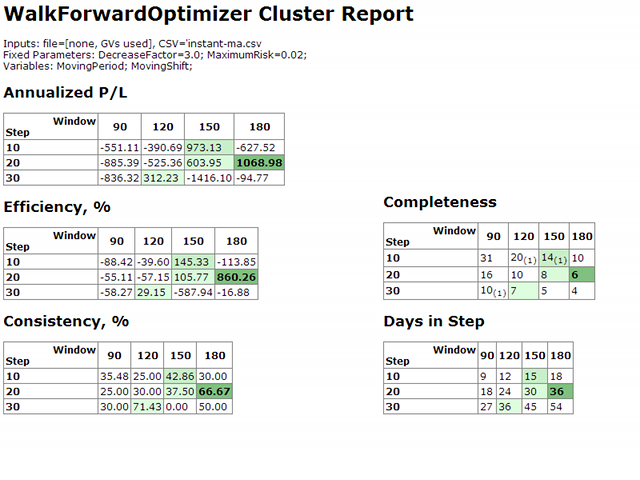
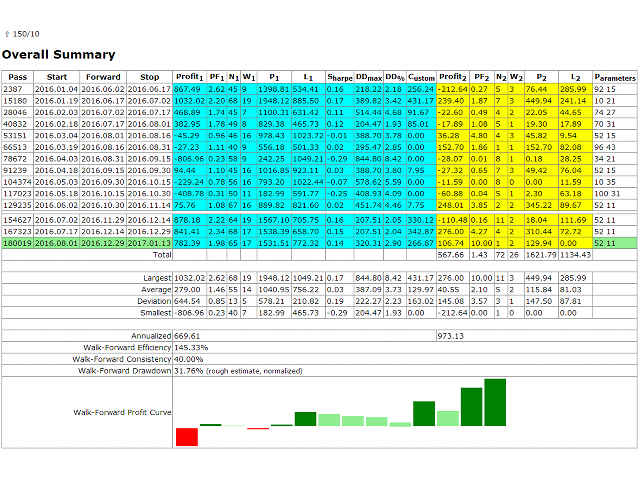
Once the library is embedded into EA, you may start optimization according to the procedure described in the User guide. When it's finished, intermediate results are saved into a CSV file and some special global variables. Also a comprehensible report is generated as HTML page.

Warning! Do not pause optimization process. Clicking Start button (even if it resumes suspended optimization) will rewrite WF results from scratch. MQL5 API does not allow to distinguish new optimization from resumed old one.


This is a library. It requires a user to have some developer skills. If you do not have source codes of your EA (if it's a 3-rd party commercial EA) or do not understand the sources codes (if it's made for you by custom developer), please, contact the author/developer of the EA (source codes) to solve all problems. If he thinks there is a bug in the library, then let the author/developer contact me directly. I need technical details (which are hard to receive from non-developers) to provide proper support.

The text is shortened due to size limit - download full file from Comments.

WalkForwardOptimizer.mqh Header File

#define DAYS_PER_WEEK    7
#define DAYS_PER_MONTH   30
#define DAYS_PER_QUARTER (DAYS_PER_MONTH*3)
#define DAYS_PER_HALF    (DAYS_PER_MONTH*6)
#define DAYS_PER_YEAR    (DAYS_PER_MONTH*12)

#define SEC_PER_DAY     (60*60*24)
#define SEC_PER_WEEK    (SEC_PER_DAY*DAYS_PER_WEEK)
#define SEC_PER_MONTH   (SEC_PER_DAY*DAYS_PER_MONTH)
#define SEC_PER_QUARTER (SEC_PER_MONTH*3)
#define SEC_PER_HALF    (SEC_PER_MONTH*6)
#define SEC_PER_YEAR    (SEC_PER_MONTH*12)

#define CUSTOM_DAYS     -1

enum WFO_TIME_PERIOD {none = 0, year = DAYS_PER_YEAR, halfyear = DAYS_PER_HALF, quarter = DAYS_PER_QUARTER, month = DAYS_PER_MONTH, week = DAYS_PER_WEEK, day = 1, custom = CUSTOM_DAYS};

enum WFO_ESTIMATION_METHOD {wfo_built_in_loose, wfo_built_in_strict, wfo_profit, wfo_sharpe, wfo_pf, wfo_drawdown, wfo_profit_by_drawdown, wfo_profit_trades_by_drawdown, wfo_average, wfo_expression};

#import "WalkForwardOptimizer MT5.ex5" // !after install must be copied into MQL5/Libraries
void wfo_setEstimationMethod(WFO_ESTIMATION_METHOD estimation, string formula);
void wfo_setPFmax(double max);
void wfo_setCloseTradesOnSeparationLine(bool b);
void wfo_OnTesterPass();
int wfo_OnInit(WFO_TIME_PERIOD optimizeOn, WFO_TIME_PERIOD optimizeStep, int optimizeStepOffset, int optimizeCustomW, int optimizeCustomS);
int wfo_OnTick();
double wfo_OnTester();
void wfo_OnTesterInit(string optimizeLog);
void wfo_OnTesterDeinit();
#import

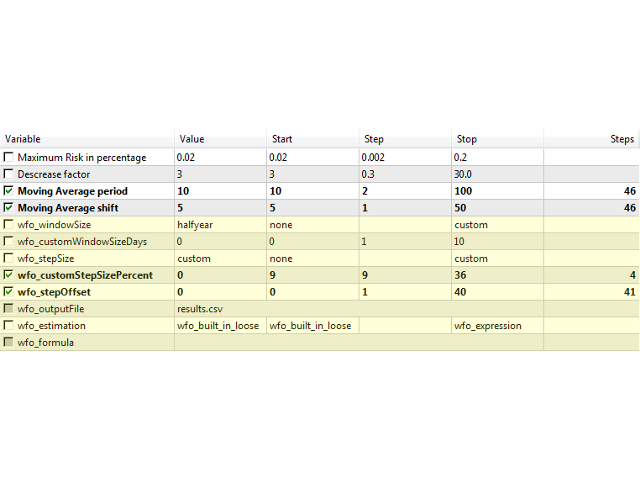
input WFO_TIME_PERIOD wfo_windowSize = year;
input int wfo_customWindowSizeDays = 0;
input WFO_TIME_PERIOD wfo_stepSize = quarter;
input int wfo_customStepSizePercent = 0;
input int wfo_stepOffset = 0;
input string wfo_outputFile = "";
input WFO_ESTIMATION_METHOD wfo_estimation = wfo_built_in_loose;
input string wfo_formula = "";


Example of Usage

#include <WalkForwardOptimizer.mqh>

...

int OnInit(void)
{
  // your actual code goes here
  ...

  wfo_setEstimationMethod(wfo_estimation, wfo_formula); // wfo_built_in_loose by default
  wfo_setPFmax(100); // DBL_MAX by default
  // wfo_setCloseTradesOnSeparationLine(true); // false by default
  
  // this is the only required call in OnInit, all parameters come from the header
  int r = wfo_OnInit(wfo_windowSize, wfo_stepSize, wfo_stepOffset, wfo_customWindowSizeDays, wfo_customStepSizePercent);
  
  return(r);
}

void OnTesterInit()
{
  wfo_OnTesterInit(wfo_outputFile); // required
}

void OnTesterDeinit()
{
  wfo_OnTesterDeinit(); // required
}

void OnTesterPass()
{
  wfo_OnTesterPass(); // required
}

double OnTester()
{
  return wfo_OnTester(); // required
}

void OnTick(void)
{
  int wfo = wfo_OnTick();
  if(wfo == -1)
  {
    // can do some non-trading stuff, such as gathering bar or ticks statistics
    return;
  }
  else if(wfo == +1)
  {
    // can do some non-trading stuff
    return;
  }

  // your actual code goes here
  ...
}
评分 10
Aldo Farandy Medya
235
Aldo Farandy Medya 2025.07.24 16:39 
 

Excellent library! its very simple to setup and not too complex, just make sure to locate the ex5 library correctly (hidden in the market directory, this left me confused for a bit lmao) all in all. 5/5 would use it constantly

Killerplautze
539
Killerplautze 2024.08.27 20:00 
 

Truly a powerful tool. A little complicated at first, but the support is very good. This is how it will work in the end.

BlackOpzFX
211
BlackOpzFX 2023.04.01 04:57 
 

WOW!! Incredible Tool!! - Such a Time Saver. Pretty Easy To Integrate Also. I have tools that can schedule multiple walk-forwards but the analysis report is worth its weight in gold for determining how often to optimize your EA. Other tools that have walk-forward integrate the 'rolling' option and stats. Why Metatrader didn't is a mystery (will probably update one day). Until its properly added to MT5 this library powerfully fills the gap!

推荐产品
OpenAI Library MT5
VitalDefender Inc.
该库旨在提供一种尽可能简单的方法,直接在MetaTrader上使用OpenAI的API。 要深入了解库的潜力,请阅读以下文章: https://www.mql5.com/en/blogs/post/756098 The files needed to use the library can be found here: Manual 重要提示:要使用EA,需要添加以下URL以允许访问OpenAI API  如附图所示 要使用该库,需要包含以下Header,您可以在以下链接找到:  https://www.mql5.com/en/blogs/post/756108 #import "StormWaveOpenAI.ex5" COpenAI *iOpenAI(string); CMessages *iMessages(void); CTools *iTools(void); #import 这就是您需要的所有信息,以便轻松使用该库。 以下是如何轻松使用该库并与OpenAI的API交互的示例 #include <StormWaveOpenAI.mqh>       //--- 包含用于AP
This library allows you to automatically filter events by symbol. Additionally, it requires the use of "flags" to classify events based on their importance (high, low, etc.). Properties: Our library is simple and only requires the export of four functions to work properly. Requirements: The library uses OnTimer , so it is not compatible with programs that also use this event. If your bot utilizes OnTimer , this may interfere with the library’s functionality and prevent event filtering. We recomm
FREE
PulsePanel FREE – The exact same clean, professional and powerful dashboard as the Pro, completely free so you can test it thoroughly before upgrading. Limited to USDCHF and GBPNZD , this free edition gives you full, unrestricted access to every core feature: What You Get in the FREE Version One-click instant execution (buy/sell) Real-time currency strength meter Precise momentum scanner Watchlist with trend, momentum and conviction Live position tracking: net P&L, dynamic risk/reward ratio, sto
FREE
Ajuste BRA50
Claudio Rodrigues Alexandre
4.33 (6)
Este script marca no gráfico do ativo BRA50 da active trades o ponto de ajuste do contrato futuro do Mini Índice Brasileiro (WIN), ***ATENÇÃO***  para este script funcionar é necessário autorizar a URL da BMF Bovespa no Meta Trader. passo a passo: MetaTrader 5 -> Ferramentas -> Opções -> Expert Adivisors * Marque a opção "Relacione no quadro abaixo as URL que deseja permitir a função WebRequest" e no quadro abaixo adicione a URL: https://www2.bmf.com.br/ este indicador usa a seguinte página par
FREE
SymbolMonitor
Oleksandr Kashyrnyi
SymbolMonitor 1.3 – 全面掌控您的交易! 您交易多个金融工具,希望 实时查看您的利润 ? SymbolMonitor 1.3 是一款强大的智能交易系统(EA),可 自动分析每个交易品种的盈利情况 ,并提供 灵活的设置和警报功能! 版本 1.3 新功能 可定制的视觉参数 – 调整 字体、大小和文本颜色 自动通知 – 当利润达到目标时收到警报 精准的收益计算 – 显示 总交易量、利润、库存费(Swap)和手续费 实时数据更新 – 所有指标自动刷新 支持两种语言 – Русский / English (可在设置中切换) 重要! 每手交易的手续费 需要手动输入 ,因为不同的经纪商和交易品种手续费不同。请在参数中设置,以获得准确的净利润计算! SymbolMonitor 适合谁? 交易多个资产的投资者 – 分别监控每个品种的利润 剥头皮和日内交易者 – 无需手动计算,快速分析 专业交易员和资金管理者 – 轻松监控收益并接收提醒 主要特点: 个性化视觉设置 – 选择字体、大小和文本颜色
Molo kumalo
James Ngunyi Githemo
Trading Forex with our platform offers several key advantages and features: Real-time Data : Stay updated with live market data to make informed decisions. User-Friendly Interface : Easy-to-navigate design for both beginners and experienced traders. Advanced Charting Tools : Visualize trends with interactive charts and technical indicators. Risk Management : Set stop-loss and take-profit levels to manage your risk. Multiple Currency Pairs : Access a wide range of forex pairs to diversify your tr
Overview AlgoNLP.mqh   is a standalone MQL5 library that converts   human-written trading instructions   into   structured trade intents   that your Expert Advisor (EA) or indicator can understand. Example input: Buy gold at 2370 with TP 0.3% and SL 1% Output intent: Side: BUY | Type: LIMIT | Symbol: XAUUSD | Entry: 2370 | TP: 0.3% | SL: 1% | Lot: 0.00 This enables you to build   chat-controlled   or   Telegram-integrated EAs   that can interpret plain English commands and execute structured
FREE
Shawrie
Kevin Kipkoech
This Pine Script implements a Gaussian Channel + Stochastic RSI Strategy for TradingView . It calculates a Gaussian Weighted Moving Average (GWMA) and its standard deviation to form an upper and lower channel. A Stochastic RSI is also computed to determine momentum. A long position is entered when the price closes above the upper Gaussian band and the Stoch RSI K-line crosses above D-line . The position is exited when the price falls back below the upper band. The script includes commission, cap
NewsXpert
Steve Rosenstock
点击此处查看我所有免费产品 NewsXpert 专为交易者设计,用于在图表上直接提供所有即将发布的经济事件的清晰、结构化概览。 你的 MetaTrader 5 实时新闻过滤器 。该指标会自动识别所选货币的所有相关新闻,并用颜色编码的线条标记(低、中、高影响)。因此你始终确切知道市场将 何时 、因 哪些新闻 而波动 - 无需打开外部日历或标签页。  NewsXpert 让经济不确定性变得可预测,因为它将所有相关市场信息准确地显示在你需要的位置 - 直接在图表上并实时呈现 。凭借清晰的可视化、精准的提前预警时间,以及仅过滤真正重要的货币和事件的能力,你的交易将变得更加冷静、有序和专业。通过 NewsXpert ,你不再被动反应,而是可以主动出击 - 充分准备、信息充足,并拥有一个能可靠保护你免受强烈市场波动的系统。它会在重要事件前为你提供实时信息、倒计时以及提醒 - 通过警报、推送或电子邮件发送。这样你不会再错过任何市场反应,并能精准控制风险。 规格 在图表上实时显示所有即将发布的经济新闻。 新闻影响等级颜色标识(LOW、MEDIUM、HIGH)。 可按货币过滤显示(如 USD、EU
FREE
AILibrary
Marius Ovidiu Sunzuiana
AI Utility Library for MQL5 The AI Utility Library for MQL5 is a next‑generation development framework that brings artificial intelligence, adaptive logic, and intelligent data processing directly into the MetaTrader ecosystem. Designed for traders, quants, and algorithm developers who demand more than traditional indicator logic, this library transforms MQL5 into a smarter, more predictive, and more efficient environment for building advanced trading systems. Built with a modular architectur
Free version. Only works on EURUSD Do you want to always know in a quick glance where price is going? Are you tired of looking back and forth between different timeframes to understand that? This indicator might just be what you were looking for. Trend Signal Multitimeframe shows you if the current price is higher or lower than N. candles ago, on the various timeframes. It also displays how many pips higher or lower current price is compared to N. candles ago. Number N. is customizable The data
FREE
LSTM Library
Thalles Nascimento De Carvalho
LSTM Library - MetaTrader 5的高级神经网络 专业算法交易神经网络库 LSTM Library为您的MQL5交易策略带来递归神经网络的强大功能。这个专业级实现包括LSTM、BiLSTM和GRU网络,具有通常只在专业机器学习框架中才能找到的高级功能。 "交易机器学习成功的秘诀在于正确的数据处理。 垃圾进,垃圾出 –您的预测质量永远不会超过您的训练数据质量。" — 马科斯·洛佩兹·德·普拉多博士, 金融机器学习进展 主要特点 完整实现LSTM、BiLSTM和GRU 递归Dropout实现更好的泛化 多种优化算法(Adam, AdamW, RAdam) 高级归一化技术 全面的指标评估系统 训练进度可视化 支持通过类权重处理不平衡数据 技术规格 纯MQL5实现 - 无外部依赖 为交易应用程序优化 全面的错误处理和验证 完全支持保存/加载训练模型 详尽的文档 集成说明 要将LSTM Library集成到您的Expert Advisor中,请按照以下步骤操作: 1. 完整库导入 #import "LSTM_Library.ex5"    // 库信息    void Get
Account Info AS 是一款功能強大的 MetaTrader 5 資訊腳本,可將您交易帳戶的完整資訊直接顯示在圖表上。該腳本提供帳戶分析、風險管理和交易決策所需的所有數據。 主要功能 完整財務資訊 帳戶類型(模擬/真實/競賽) 餘額、淨值和保證金 可用保證金(現金和百分比) 保證金水平 當前盈虧 風險管理 追繳保證金和強制平倉水平 目前交易品種1手保證金計算 熱門交易品種的保證金 交易資訊 持倉(數量、方向、總獲利) 按類型列出的掛單 目前交易品種資訊: 手數(最小/最大/步長) 點差(點) 隔夜利息 科技數據 目前伺服器時間 公司和伺服器名稱 帳號和客戶資訊 設定 該腳本有三個簡單的參數: Line_spacing - 在資料之間新增空行,以提高清晰度和可讀性 ShowAllSymbolsInfo - 顯示熱門交易品種(例如 EURUSD、 GBPUSD、XAUUSD 等) 顯示時間(秒)- 訊息顯示時間(0 = 不自動清除) 使用方法 將腳本拖放到 MetaTrader 5 的任意圖表上 如有必要,請在彈出視窗中調整
FREE
Anchor Pro: Funded Guard & Trade Manager Stop Blowing Your Funded Accounts. Trade Visually. Protect Your Capital. Anchor Pro is not just a trade manager—it is a complete Funded Account Guardian and Visual Trading Suite . Designed specifically for traders taking Prop Firm challenges (FTMO, MyForexFunds, etc.), it combines institutional-grade risk protection with a revolutionary "Draw-to-Trade" engine. Whether you are trying to pass a challenge or keep your funded account safe, Anchor Pro locks in
Important: This product is a Library for developers . It is suitable only for users who can write/modify MQL5 code and integrate a compiled library into their own EA/Script. It is not a “drag & run” notifier. Telegram SDK helps you send Telegram messages and photos from MetaTrader 5 in a simple and reliable way. Use it when you want Telegram notifications inside your own automation tools. If you need the MetaTrader 4 version, it is available separately in the Market:   Telegram SDK M T4 . Main f
K Trade Lib5
Kaijun Wang
2 (1)
MT4/5通用交易库(  一份代码通用4和5 ) #import "K Trade Lib5.ex5"    //简单开单    long OrderOpen( int type, double volume, int magic, string symbol= "" , string comment= "" , double opprice= 0 , double sl= 0 , double tp= 0 , int expiration= 0 , bool slsetmode= false , bool tpsetmode= false );    //复杂开单    void SetMagic( int magic, int magic_plus= 0 ); void SetLotsAddMode(int mode=0,double lotsadd=0);    long OrderOpenAdvance( int mode, int type, double volume, int step, int magic, string symbol= "" , string comm
FREE
EX5 Signal Copier
Rajesh Kumar Nait
EX5 信号复制库 — 适用于 MT 的专业交易事件引擎 无需编写复杂的交易跟踪逻辑,即可将任何智能交易系统 (EA) 转换为强大的交易复制器、信号处理器或自动化引擎。 EX5 信号复制库是一个高性能的事件驱动系统,能够捕获 MetaTrader 5 中的所有交易活动,并将其转换为结构化信号,您可以利用这些信号构建: 交易复制器(MT5 → MT5 / MT5 → 外部) 风险管理引擎 分析仪表盘 自定义执行桥接(币安、API 等) 为什么选择此库? 实时交易检测 结构化信号队列 事件分类(开仓、平仓、修改、部分平仓) 内置复制引擎(可选) 通过自定义逻辑实现完全控制 主要特性 实时交易捕获 使用 OnTradeTransaction 即时检测每一笔交易 备份轮询系统确保不遗漏任何信号 完整的交易生命周期支持 捕获所有操作: 买入/卖出 限价/止损单 止损/止盈修改 部分平仓 持仓平仓 反向交易 成交量增加 信号队列系统 线程安全的内部队列 按顺序处理信号 即使在高负载下也不会遗漏任何事件 内置复制引擎
Modern Dark Chart Theme for MT5 Upgrade your MetaTrader 5 chart into a clean, dark, professional trading workspace. Your chart is your trading office. It is where you analyze the market, test Expert Advisors, review setups, record videos, share screenshots, and make trading decisions. If your MT5 chart looks old, bright, noisy, or unprofessional, your trading environment can feel distracted before you even start your analysis. Modern Dark Chart Theme for MT5 helps you create a cleaner, darker,
FREE
适用于 MetaTrader 5 (MT5) 的 UZFX - Set Stop Loss to Breakeven Instantly 脚本是一款功能强大的工具,允许交易者将所有未结头寸的止损点快速移动至其入场价格,确保无风险交易。该脚本尤其适用于有效管理活跃交易,确保一旦头寸出现有利变动,交易者就能免受潜在损失。 (访问简介并查看所有其他 MT4/MT5 产品) (请不要忘记给予评论) 功能: 自动将所有未结头寸的止损设置为盈亏平衡(入市价格)。 通过确保利润和尽量减少潜在损失来加强风险管理。 使用方法 将脚本附加到图表上;它将自动调整所有未结头寸。 如果某个仓位的止损已达到盈亏平衡点,则将跳过该仓位。 注意: 该脚本仅修改现有交易,不会下新订单。 它适用于所有未结头寸,与符号无关。 确保经纪商允许以准确的入市价格修改止损。
FREE
EagleFX10
Youssef Wajih Saeed I Said It Here
概述 EagleFX 是一个面向 MetaTrader 5 的全自动专家顾问(EA),在多种金融工具上全天候(24/7)执行高精度算法交易策略。它剔除交易决策中的情绪因素,对每个信号进行严格的历史回测,动态调整风险参数,并利用先进的机器学习启发式内存模块不断优化自身性能。 持续、无情绪执行 EagleFX 不知疲倦地 24/7 运行,持续监控价格走势,并在满足预设条件的瞬间执行交易。与易受恐惧与贪婪影响的人类交易者不同,它严格遵循预先编码的策略,杜绝任何情绪偏差。 经过验证的回测策略 所有进出场规则均基于量化指标(如 ATR、EMA、RSI),并在多年历史数据上反复回测以保证统计可靠性并避免过拟合。在上线实盘前,每组参数都经过严格的滚动前测(walk-forward)、不同波动率环境下的模拟,以及趋势和震荡市场条件下的双重优化。 先进架构与自适应 EagleFX 作为独立的 MT5 EA,采用 handle-方式调用指标以提高效率,并借鉴 LLM 代理(如 FinMem、TradingGPT)的分层记忆结构,以优先关注最近的市场动态同时保留长期背景。该多层设计使其信号可实时自适
This is a simplified and effective version of the library for walk forward analysis of trading experts. It collects data about the expert's trade during the optimization process in the MetaTrader tester and stores them in intermediate files in the "MQL5\Files" directory. Then it uses these files to automatically build a cluster walk forward report and rolling walk forward reports that refine it (all of them in one HTML file). Using the WalkForwardBuilder MT5 auxiliary script allows building othe
Swap Rate Exporter is the only dedicated MT5 tool that scans every symbol on your broker and exports a complete swap rate table to a CSV file in seconds. Stop checking swap rates one symbol at a time. One click — every symbol, every swap, neatly organized and ready for Excel or Google Sheets. What It Exports For every symbol on your broker: Symbol name and description Swap Long and Swap Short (per standard lot) Swap type (Points, Currency, Interest % and more) Triple swap day (Wednesday / Friday
背景 本产品是基于 周期论 而开发出的实用看盘工具。 当您需要使用 多周期图表 来分析 一个品种 时,手动添加不同周期的图表并且应用模板的时间是个非常大的成本。 这一款产品可以帮助您快捷新增一个或多个交易品种的多个周期的图表,并且 统一应用同一种模板 ,新增后可将图表拖拉至副屏,适用于多屏分析。 使用方法 在需要添加的交易品种图表上应用此脚本,在弹出的面板输入您需要添加图表的数量和应用模板名称即可。 第一行填写需要添加图表的数量,新增图表的周期默认顺序为:M5, M15, M30, H1, H4, D1。 第二行填写您需要应用模板的名称,您可以使用系统自带的模板,也可以使用您自定义的模板,但是名称需同步,包括英文大小写。 点击 这里 查看快捷切换多屏图表的工具,可配合此产品一起使用。 点击 这里 查看基于周期论的指标产品,可配合此产品一起使用。 如果您有任何问题或需要帮助,请通过私信与我联系。 注意! 我的所有产品只能在这里购买,即官方 MQL5 网站。 谨防骗子!
FREE
The Dfx Position Risk Calculation Tool is an MT5 indicator developed by DefenderFX Ltd. designed to assist traders in assessing risk and reward for their trades. The tool automatically calculates the risk-to-reward ratio based on user-defined parameters, such as lot size and take profit (TP) level. It provides visual lines on the chart for entry (Blue Color), stop loss (SL) – Red Color, and TP levels (Green Color), which traders can adjust by dragging. Key Features: Input Parameters : Traders ca
TMS Pro MT5
Surendra Tamang
TMS Pro MT5 is a professional trade management panel that sits directly on your chart. Instead of navigating MT5's built-in order window every time, you control everything — entries, stops, targets, trailing, and position management — with single clicks from a clean, dark-themed panel. It works on any symbol: Forex pairs, Gold (XAUUSD), and Crypto. Default settings are pre-configured for each group automatically. HOW THE PANEL WORKS The panel is divided into four sections from top to bottom: 1.
MT5 Telegram Notifier — Real-Time Account Monitoring Stay informed and in control of your trading account from anywhere. This utility Expert Advisor sends instant notifications and detailed reports directly to your Telegram chat. Key Benefits Real-Time Alerts : Receive notifications when positions open, close, or pending orders change. Risk Management : Margin level alerts help you act before critical thresholds. Hedging Support : Displays every position individually using ticket-based logic. O
AccountTrackerPro
Artem Khakalo
5 (1)
AccountTracker PRO 是一款专业的 MetaTrader 5 账户追踪与交易统计指标,可在图表上直接显示真实交易表现。它将账户绩效监控、回撤分析、每日盈亏、小时统计、星期统计和日历历史整合到一个紧凑的分析面板中。 如果您正在寻找 MT5 account tracker、MetaTrader 5 trading statistics indicator、drawdown monitor、daily profit tracker 或 trading analytics dashboard,AccountTracker PRO 就是为此设计的。它可实时显示 balance、equity、floating P/L、current drawdown、max drawdown、peak balance、交易数、持仓数、Profit Factor、Win Rate 以及按日统计历史。 它最重要的特点之一是正确处理入金和出金。资金流动会被排除在交易 P/L 之外,同时会调整余额峰值,避免存取款被误判为交易回撤。这意味着统计结果反映的是真实交易表现,而不是资金转账。 核心优势: 图表内
EA Performance Monitor is a MetaTrader 5 indicator that presents the performance of running Expert Advisors in a single table. The indicator automatically detects the magic numbers present in trade history and open positions, and shows for each one the EA name (read from order comments), symbol, number of trades, P/L and win rate. Features Automatic detection of magic numbers from deal history and open positions. The indicator groups operations by magic and shows one row per EA. Text identif
FREE
The Expert Advisor will help you forward all alert from  MetaTrader 5 to Telegram channel/ group.  All alert must save to folder <Data folder>MQL5\Files\Alerts\ , text file with format *.txt and screenshot with format *.gif or *.png. Parameters: - Telegram Bot Token: - create bot on Telegram and get token. - Telegram Chat ID:  - input your Telegram user ID,  group / channel ID - Forward Alert: - default true, to forward alert. - Send message as caption of Screenshot: - default false, set true t
Trading Notes   is an innovative tool designed for traders to streamline their decision-making process by allowing them to write and display important reminders or short details directly over their trading charts. This essential feature ensures that traders have quick access to their personalized checklist before opening any positions, enhancing their trading efficiency and accuracy. MT4 Version -  https://www.mql5.com/en/market/product/120613 Join To Learn Market Depth -  https://www.mql5.co
FREE
该产品的买家也购买
ModernUI Library
Levi Dane Benjamin
适用于 MetaTrader 5 的 ModernUI 库 ModernUI 是一个用于 MetaTrader 5 的图表内用户界面库。它可以帮助 MQL5 开发者在 MT5 图表环境中构建更清晰的 EA 面板、仪表盘、设置窗口、表单、表格、对话框、抽屉式面板以及紧凑型交易风格界面。 它适合希望获得比零散图表对象更专业的界面层,同时仍然完全掌控自己 EA、指标或工具逻辑的开发者。 Modern UI - 用户指南   | EA 示例演示 你可以构建什么 ModernUI 并不局限于某一种面板类型。它为你提供了一个可复用的界面层,几乎可以用于任何你想在 MetaTrader 5 图表中构建的工具。 你可以用它创建简单的设置界面、紧凑型交易面板、完整仪表盘、数据视图、控制面板、账户工具、流程界面、监控界面、实用工具窗口、商业 EA 前端界面等等。 随附的演示展示了几个实用示例,但它们只是起点。如果你的 MQL5 项目需要按钮、输入框、表格、对话框、标签页、抽屉面板、图表、状态区域,或需要一种更清晰的方式在图表上展示信息,ModernUI 都可以为你提供构建模块。 主要功能 适用于 Me
If you just want to simply copy your positions and orders from MetaTrader to Binance use the Binance Copier If you're a developer looking to use Binance.com and Binance.us exchanges directly from your MetaTrader 5 terminal, you'll want to check out Binance Library MetaTrader 5. This powerful tool allows you to trade all asset classes on both exchanges, including Spot, USD-M   and COIN-M futures, and includes all the necessary functions for trading activity. Important: you need to have source c
该库将允许您使用任何 EA 来管理交易,并且非常容易集成到任何 EA 上,您可以使用描述中提到的脚本代码以及显示完整过程的视频演示示例自行完成。 - 下限价、止损限价和止盈限价订单 - 下达市场订单、SL 市场订单、TP 市场订单 - 修改限价订单 - 取消订单 - 查询订单 - 更改杠杆、保证金 - 获取位置信息 和更多... 租赁加密货币图表是可选的,除非您的 MT5 上没有币安图表。 对于脚本演示:单击此处 如果您想与交易面板进行交易,您可能对此产品感兴趣 该产品是加密图表的插件 该库将允许您使用任何 EA 来管理交易,并且非常容易集成到任何 EA 上,您可以使用描述中提到的脚本代码以及显示完整过程的视频演示示例自行完成。 - 下限价、止损限价和止盈限价订单 - 下达市场订单、SL 市场订单、TP 市场订单 - 修改限价订单 - 取消订单 - 查询订单 - 更改杠杆、保证金 - 获取位置信息 和更多... 租赁加密货币图表是可选的,除非您的 MT5 上没有币安图表。 对于脚本演示: 单击此处 如果您想与交易面板进行交易, 您可能对
这是一个可以定时自动交易的EA。根据你设定的时间,精确到秒,可以设置最多下几单。下单buy或者Sell.可以设置值止盈止损点。并且可以设定在下单后多久平仓。一般都是用来做事件。祝你好运。 请看图片自己根据设定来使用。每一次使用请重新加载EA。不用的时候记得关闭EA按钮。 我来举个例子。比如英国央行利率决议。你在最后两秒下单(设置的是你本机的时间)。因为可能瞬间点差扩大,你可能不敢直接下最大手数,所以你可以选择小手分批从最后5秒开始进场。我相信做过的人知道我说的意思。因为我专业做这个已经十年。最近才做出了这个自动化EA。并且这里面有个检测就是你点击开始之后如果超过了你设定的时间十秒他就不会执行了。保证你的安全。你自己用DEMO账户测试几次你就知道我这个有多好用了!
The library is dedicated to help manage your trades, calculate lot, trailing, partial close and other functions. Lot Calculation Mode 0: Fixed Lot. Mode 1: Martingale Lot (1,3,5,8,13) you can use it in different way calculate when loss=1 ,when profit=0. Mode 2: Multiplier Lot (1,2,4,8,16) you can use it in different way calculate when loss=1 ,when profit=0. Mode 3: Plus Lot (1,2,3,4,5) you can use it in different way calculate when loss=1 ,when profit=0. Mode 4: SL/Risk Lot calculate based on s
BitMEX Trading API
Romeu Bertho
5 (1)
Cryptocurrency analysis has never been easier with Crypto Charts for MetaTrader 5. Now, trading on BitMEX has never been easier with BitMEX Trading API for MetaTrader 5. BitMEX Trading API library was built to be as easy to use as possible. Just include the library into your Expert Advisor or Script, call the corresponding methods and start trading! Features Trade on BitMEX and BitMEX Testnet. Build and automate your strategies. Concern more with the trading strategy logic and less with the co
Goliath Mt5
Nicolokondwani Biscaldi
Goliath MT5 - scalper fully automated Expert Advisor for medium-volatile forex markets P roperties: The Library trades 10 currency pairs (USDCHF, EURCHF, EURGBP, AUDUSD, USDCAD, GBPUSD, EURUSD, NZDUSD, CADCHF, EURAUD, EURCAD, AUDJPY) The Library does not use martingale The Library sets a fixed stop loss and take profit for all orders The Library only trades a user input volume The Library can be installed on any currency pair and any timeframe Recommendations: Before using on a real account, t
Binance Library
Hadil Mutaqin SE
5 (1)
The library is used to develop automatic trading on Binance Spot Market from MT5 platform. Support all order types: Limit, Market, StopLimit and StopMarket Support Testnet mode Automatically display the chart on the screen Usage: 1. Open MQL5 demo account 2. Download Header   file and EA sample   https://drive.google.com/uc?export=download&id=1kjUX7Hyy02EiwTLgVi8qdaCNvNzazjln Copy Binance.mqh to folder \MQL5\Include Copy  BinanceEA-Sample.mq5 to folder \MQL5\Experts 3. Allow WebRequest from MT5
The library is used to develop automatic trading on Binance Futures Market from MT5 platform. Support Binance Futures USD-M and COIN-M Support Testnet mode Support all order types: Limit, Market, StopLimit, StopMarket, StopLoss and TakeProfit Automatically display the chart on the screen Usage: 1. Open MQL5 demo account 2. Download Header file and EA sample https://drive.google.com/uc?export=download&id=17fWrZFeMZoSvH9-2iv4WDJhcyxG2eW17 Copy BinanceFutures.mqh to folder \MQL5\Include Copy  Bina
AO Core
Andrey Dik
3.67 (3)
AO Core is the core of the optimization algorithm, it is a library built on the author's HMA (hybrid metaheuristic algorithm) algorithm. Pay attention to the MT5 Optimization Booster product , which makes it very easy to manage the regular MT5 optimizer . An example of using AO Core is described in the article: https://www.mql5.com/ru/articles/14183 https://www.mql5.com/en/blogs/post/756510 This hybrid algorithm is based on a genetic algorithm and contains the best qualities and properties of p
EA Toolkit
Esteban Thevenon
EA Toolkit   is a library that allows any developer to quickly and easily program Advisor experts. It includes many functions and enumerations such as trailing stop, lot, stop loss management, market trading authorisations, price table updates, trading conditions and many more. Installation + Documentation : You will find all the information to install this library and the documentation of its functions on this GitHub : https://github.com/Venon282/Expert-Advisor-Toolkit WARNING : The installat
Hello everyone! I am a professional MQL programmer , Making EAs, Indicators and Trading Tools for my clients all over the world. I build 3-7 programs every week but I seldomly sell any ready-made Robots. Because I am fastidious and good strategy is so few...  this EA is the only one so far I think its good enough to be published here.  As we all know, the Ichimoku indicator has become world popular for decades, but still, only few people knows the right way of using it, and if we check the clo
Applying these methods, I managed to arrive at a nuanced conclusion that is crucial to understanding the importance of unique strategies in contemporary trading. Although the neural network advisor showed impressive efficiency in the initial stages, it proved to be highly unstable in the long run. Various factors such as market fluctuations, trend changes, external events, etc. cause its operation to be chaotic and eventually lead to instability. With these experiences, I accepted the challenge
Introducing "TG Trade Service Manager" — your all-in-one solution for seamless trade management in both MQL4 and MQL5 environments. With a focus on speed, reliability, and convenience, this powerful library simplifies the complexities of trade execution and management, empowering developers with a single interface for enhanced efficiency. Metatrader4 Version   |   All Products   |   Contact   Key Features: Unified Interface : TG Trade Service Manager" provides a unified interface for   MQL4   an
Kaseki
Ben Mati Mulatya
The Hybrid Metaheuristic Algorithm (HMA) is a cutting-edge optimization approach that combines the strengths of genetic algorithms with the best features of population-based algorithms. Its high-speed computation ensures unparalleled accuracy and efficient search capabilities, significantly reducing the total time required for optimization while identifying optimal solutions in fewer iterations. HMA outperforms all known population optimization algorithms in both speed and accuracy. Use Cases AO
近段时间买家运行良好,但同时也有朋友担心: 1、EA测试回测数据的真实性; 2、回测效果好不代表实测效果好,而免费演示版的可测试时间太短,无法判断EA的实用性。 针对以上问题,现推出一个完美的解决方案,直接给到限定时间的测试版本,需要的可以私信留言,或者聊天窗口找我,看到后会发送测试版本过来。 此外,为了方便部分已购买源代码的客户熟悉了解代码,进一步优化和提升空间,并且让更多的有意向的客户了解这个EA的编辑逻辑,特将代码拆解,不定期的讲解基本思路,跟着走即便是小白也可以快速上手,以便后续购买源代码后快速上手优化! 知乎专栏: Day01:初始MQL5量化系统 - quanter的文章 - 知乎 https://zhuanlan.zhihu.com/p/1969031679428530490 Wordpress个人网站: https://quanter001.wordpress.com/ 如有任何问题,欢迎邮件沟通:quanter001@163.com ****************************************************************
该产品已经开发了 3 年,它是 MQL5 编程语言中最先进的人工智能和机器学习代码库。它已被用于创建多个基于 AI 的交易机器人和指标,适用于 MetaTrader 5。 这是一个高级版,基于免费开源的 MQL5 机器学习项目,链接如下:  https://github.com/MegaJoctan/MALE5 。免费版本功能较少,文档较少,维护不足,仅适用于小型 AI 模型。 该高级版包含您编写 AI 交易机器人的所有必需工具。 为什么要购买此库? 非常易于使用,代码语法友好,类似于 Python 的流行 AI 库,如 Scikit-learn、TensorFlow 和 Keras。 文档齐全,提供丰富的视频、示例和文档,帮助您快速上手。 计算优化,性能优越,运行方式类似普通 EA。  无需额外依赖,无需 DLL 文件,所有内容可编译为单一 .EX5 文件,便于测试和分发。 全天候技术支持,我将提供帮助,确保您正确使用,并在问题出现时协助修复。  谁适合使用此库? 具有基本机器学习和 AI 知识的用户。 机器学习爱好者,特别是来自 Python ML 社区的开发者。 MQL5 中级
Pionex API EA 连接器(MT5) – 无缝集成MT5 概述 Pionex API EA 连接器 允许 MetaTrader 5(MT5) 无缝集成 Pionex API ,让交易者直接在 MT5 上执行交易、管理订单、获取账户余额并跟踪交易历史。 主要功能 账户和余额管理 Get_Balance(); – 获取 Pionex 账户的当前余额。 订单执行和管理 orderLimit(string symbol, string side, double size, double price); – 按指定价格下 限价单 。 orderMarket(string symbol, string side, double size, double amount); – 以指定数量执行 市价单 。 Cancel_Order(string symbol, string orderId); – 取消特定订单(通过 ID )。 Cancel_All_Order(string symbol); – 取消该交易对的所有 未完成订单 。 订单跟踪和历史 Get_Order(str
Bookeepr
Marvellous Peace Kiragu
Bookeepr is an advanced MQL5 trading bookkeeping software that automates trade logging, tracks real-time P&L, and integrates a ledger-style financial system for deposits, withdrawals, and expenses. It supports multi-currency assets , generates detailed performance reports , and provides risk management tools to help traders optimize their strategies. With secure cloud storage, exportable reports, and seamless MetaTrader 5 integration , Bookeepr ensures accurate, transparent, and hassle-free fina
Ai Prediction MT5
Mochamad Alwy Fauzi
A free indicator for those who purchase the full version This indicator is created by this Ai, with your desired settings Artificial Intelligence at your service Have a complete artificial intelligence and use it in your codes This artificial intelligence is trained to tell you on each candle whether the market is moving up or down. In general, artificial intelligence can be used in all markets, all timeframes and all symbols However, due to the increasing complexity and decreasing accuracy of
快速关仓,无需任何操作。 当前版本的一键关仓主要针对的是来不及手动关仓的情况,目前是不分交易标的类别,是对所有的持仓进行关仓。 未来可能升级的方向: 1、分类别、分标的关仓。 适用场景:开了多个标的的仓位,并且波动不一,快速频繁的波动影响了整体的判断。 2、增加只关闭盈利仓位、只关闭亏损仓位。 适用场景:持仓较多,趋势发生变化。 个人建议:一般建议选择一键全部关仓,因为如果行情与持仓方向一致,只关闭盈利仓位无形就是扩大了亏损。如果行情方向与持仓方向相反,只关闭亏损仓位,当前已盈利的后面又会变为亏损,盈利无法变现。 3、按照仓位顺序由大到小关仓、按照仓位顺序由小到大关仓。 适用 场景:行情发生波动,对于未来行情判断把握不确定的,可根据自己需求选择仓位关仓顺序,由大到小关仓的话,可以避免亏损的进一步扩大。 4、减小仓位量,保持绝对的安全距离。 适用 场景:对未来趋势相对确定,不想错过当前行情,但是认为当前持仓体量又有点大,想降低仓位。
BlitzGeist Telegram Notifier – Stay Connected to Your Trades Anywhere! BlitzGeist Telegram Notifier is a powerful tool that instantly connects your MetaTrader 5 account with Telegram . No matter where you are – you will always receive real-time notifications about your trading activity directly on your phone, PC, or any device with Telegram installed. Perfect for traders who want professional trade reporting, transparency, and risk management monitoring . ️ Key Features Easy Configuratio
TupoT3
Li Guo Yin
突破交易策略:智能风控系统升级版‌ 当价格突破关键阻力位时,往往意味着趋势的质变时刻。我们的突破交易策略通过三重智能系统——‌动态阈值识别‌、‌量能验证机制‌和‌自适应止损算法‌,帮助交易者精准捕捉这些跃迁机会。 ‌核心优势‌: ‌智能预警‌:实时监测200+技术指标,自动标记潜在突破位 ‌风险对冲‌:突破失败时自动触发0.5秒内止损,保护本金安全 ‌多周期验证‌:结合日线/4小时/1小时数据过滤假信号 ‌实战案例‌: 2025年第二季度,该策略在现货黄金市场实现连续23次有效突破,平均持仓周期缩短至4.7小时,收益率达传统趋势策略的3.2倍。 ‌智能风控系统‌: ‌动态止盈‌:根据ATR指标自动调整止盈位,锁定利润的同时保留上行空间 ‌分级止损‌:首次突破失败后自动切换至1:1盈亏比保护模式,二次突破确认后恢复原策略 本EA依下图设置做黄金1小时图线,经长时期实盘验证年利润达到30多倍,修改参数可以用作比特币和纳斯达克指数都有很好的收益。
【黄金智能交易EA|风控稳守,盈利突围】 专为黄金波动特性定制的智能交易EA,以硬核交易系统为核心,每笔下单均源自量化模型对行情趋势、支撑压力的精准研判,杜绝主观干扰,让交易决策更客观高效。 搭载多维风控体系,动态止损止盈+仓位智能调控双保险,严格锁定单笔风险阈值,即便面对黄金跳空、黑天鹅行情,也能有效规避大幅回撤,守护本金安全。 更具备浮盈加仓智能算法,趋势明朗时自动放大盈利头寸,让利润在顺势中滚动增长,既不浪费单边行情红利,又通过阶梯式加仓策略平衡风险与收益,实现“风控打底,盈利上不封顶”的交易闭环! 本款EA历经38次修改与测试,每一次升级都境加了EA的稳定盈利能力,才最终确定此为终极版本发布。 本款EA目前只针对现货黄金 交易的长期回测和实盘验证,按照下图设置实现长期的稳定 盈利。如果需要交易期它品种,请根据实际情况更改设置。 本EA为阶梯定价,每卖出10份价格增加10%
SniperkickEA
Mohamed Maguini
Questo Expert Advisor (EA) è stato progettato per offrire un'esperienza di trading automatizzata di alto livello, adatta sia ai trader principianti che a quelli esperti. Utilizzando algoritmi avanzati e tecniche di analisi del mercato, l'EA è in grado di identificare opportunità di trading redditizie con precisione e velocità. L'EA è configurabile per operare su vari strumenti finanziari, tra cui forex, indici e materie prime, garantendo una flessibilità senza pari. Le caratteristiche princip
本 EA 专为震荡 / 横盘行情设计。 在设定区间内自动补单交易 EA 仅在 预先设定的价格区间内运行 。 当订单平仓、成交、取消后(单数量少了),EA 会自动补充新的订单,以维持交易策略的持续运行。 您以通过 Max Orders 来控制最大订单数量。 示例: 最大订单数(Max Orders):8 当前持仓订单:2 单 挂单 Buy Limit:6 单 在这种情况下,EA 不会继续下新单。 只有当订单 平仓、成交 、 取消 后,EA 才会 自动补单 ,持续捕捉 震荡行情 中的利润。 注意: Buy Limit 订单 只会挂在当前市场价格的下方 。 产品参数说明 Trade Symbol : 交易品种  XAUUSD、USDJPY、BTCUSD 等等... 区间设置 Zone Low :区间下边界 Zone High :区间上边界 说明: 例如,您将黄金的交易区间设定为: Zone Low :4420 Zone High :4455 EA 只会在该价格区间内挂单并自动交易。 当价格突破区间范围时,EA 将停止交易。 当价格回到区间内,EA 会自动恢复交易。 订单设置
本 EA 专为震荡 / 横盘行情设计。 在设定区间内自动补单交易 EA 仅在 预先设定的价格区间内运行 。 当订单平仓、成交、取消后(单数量少了),EA 会自动补充新的订单,以维持交易策略的持续运行。 您可以通过 Max Orders 来控制最大订单数量。 示例: 最大订单数(Max Orders):8 当前持仓订单:2 单 挂单 Sell Limit:6 单 在这种情况下,EA 不会继续下新单。 只有当订单 平仓、成交 、 取消 后,EA 才会 自动补单 ,持续捕捉 震荡行情 中的利润。 注意: Sell Limit   订单 只会挂在当前市场价格的上方 。 产品参数说明 Trade Symbol : 交易品种  XAUUSD、USDJPY、BTCUSD 等等... 区间设置 Zone Low :区间下边界 Zone High :区间上边界 说明: 例如,您将BTCUSD的交易区间设定为: Zone Low : 92000 Zone High : 94500 EA 只会在该价格区间内挂单并自动交易。 当价格突破区间范围时,EA 将停止交易。 当价格回到区间内,EA 会自动恢复
该库允许您使用任何 EA(智能交易系统)来管理交易,并且非常容易集成到任何 EA 中。您可以通过描述中提供的脚本代码自行完成集成,同时还有演示视频示例,完整展示了整个流程。 该产品允许通过 API 在 Bybit 交易所执行交易操作。 图表说明: 用于 OHLC 数据的加密货币图表租赁,或带有订单簿深度的加密货币 Tick 数据是可选的。 下限价单和市价单 修改限价单 根据订单 ID 取消单个订单或取消所有订单 查询订单 更改杠杆 获取持仓信息 创建 Bybit 交易品种 从任意自定义日期加载 K 线历史数据 以及更多功能…… 脚本文档 该库允许您使用任何 EA(智能交易系统)来管理交易,并且非常容易集成到任何 EA 中。您可以通过描述中提供的脚本代码自行完成集成,同时还有演示视频示例,完整展示了整个流程。 该产品允许通过 API 在 Bybit 交易所执行交易操作。 图表说明: 用于 OHLC 数据的加密货币图表租赁,或带有订单簿深度的加密货币 Tick 数据是可选的。 下限价单和市价单 修改限价单 根据订单 ID 取消单个订单或取消所有订单 查询订单 更改杠杆 获取持仓信息 创建
ShreeFx Trade Manager
Dhiraj Shivprabhu Pattewar
️ 1. Interactive User Interface (UI) Dual-Tab System: Cleanly separates execution tools (TRADE) from configuration (️ SETTINGS) to keep the chart clutter-free. Dark/Light Mode: Instantly switch between themes using the ️/ emoji button to match your chart background. Live P&L Dashboard: Real-time display of Account Balance, Equity, Floating Profit/Loss (in USD and %), Total Positions (Buys/Sells), Total Lot Exposure, and current Spread. On-Chart Direct Editing: Change any setting (Lot Size,
A complete PostgreSQL client implemented in pure MQL5 over native MetaTrader 5 TCP sockets. The library implements the PostgreSQL client with MD5 and SCRAM-SHA-256 authentication, SSL/TLS, the Simple Query Protocol, and explicit transactions. No DLLs, no external dependencies, no third-party services. Features Direct TCP connection to any PostgreSQL-compatible database MD5 and SCRAM-SHA-256 authentication, auto-detected SSL/TLS via PostgreSQL's SSLRequest flow Full transaction support Typed res
作者的更多信息
RenkoFromRealTicks
Stanislav Korotky
4.67 (3)
This non-trading expert utilizes so called custom symbols feature ( available in MQL API as well) to build renko charts based on history of real ticks of selected standard symbol. RenkoFromRealTicks generates custom symbol quotes, thus you may open many charts to apply different EAs and indicators to the renko. It also transmits real ticks to update renko charts in real time. The generated renko chart uses M1 timeframe. It makes no sense to switch the renko chart to a timeframe other than M1. T
Order Book, known also as Market Book, market depth, Level 2, - is a dynamically updated table with current volumes of orders to buy and to sell specific financial instument at price levels near Bid and Ask. MetaTrader 5 provides the means for receiving market book from your broker, but in real time only, without access to its history. The indicator OrderBook Cumulative Indicator accumulates market book data online and visualizes them on the chart. In addition, the indicator can show the market
TrueVolumeSurrogate MT5
Stanislav Korotky
5 (1)
This indicator provides a true volume surrogate based on tick volumes. It uses a specific formula for calculation of a near to real estimation of trade volumes distribution , which may be very handy for instruments where only tick volumes are available. Please note that absolute values of the indicator do not correspond to any real volumes data, but the distribution itself, including overall shape and behavior, is similar to real volumes' shape and behavior of related instruments (for example, c
ADXS
Stanislav Korotky
5 (3)
Ever wondered why standard ADX is made unsigned and what if it would be kept signed? This indicator gives the answer, which allows you to trade more efficient. This indicator calculates ADX values using standard formulae, but excludes operation of taking the module of ADX values, which is forcedly added into ADX for some reason. In other words, the indicator preserves natural signs of ADX values, which makes it more consistent, easy to use, and gives signals earlier than standard ADX. Strictly s
RenkoCharts
Stanislav Korotky
This non-trading expert utilizes so called custom symbols feature ( available in MQL as well ) to build renko charts based on historical quotes of selected standard symbol and to refresh renko in real-time according to new ticks. Also, it translates real ticks to the renko charts, which allows other EAs and indicators to trade and analyze renko. Place RenkoCharts on a chart of a work instrument. The lesser timeframe of the source chart is, the more precise resulting renko chart is, but the lesse
SyntheticIndices
Stanislav Korotky
The indicator compares quotes of a given symbol and a synthetic quote calculated from two specified referential symbols. The indicator is useful for checking Forex symbol behavior via corresponding stock indices and detecting their convergence/divergence which can forecast future price movements. The main idea is that all stock indices are quoted in particular currencies and therefore demonstrate correlation with Forex pairs where these currencies are used. When market makers decide to "buy" one
CustomVolumeDelta
Stanislav Korotky
5 (1)
This indicator displays volume delta (of either tick volume or real volume) encoded in a custom symbol, generated by special expert advisers, such as RenkoFromRealTicks . MetaTrader does not allow negative values in the volumes, this is why we need to encode deltas in a special way, and then use CustomVolumeDelta indicator to decode and display the deltas. This indicator is applicable only for custom instruments generated in appropriate way (with signed volumes encoded). It makes no sense to ap
FREE
AutomaticZigZag
Stanislav Korotky
4.5 (2)
This is a non-parametric ZigZag providing 4 different methods of calculation. Upward edge continues on new bars while their `highs` are above highest `low` among previous bars, downward edge continues on next bars while their `lows` are below lowest `high` among previous; Gann swing: upward edge continues while `highs` and `lows` are higher than on the left adjacent bar, downward edge continues while `highs` and `lows` are lower than on the left adjacent bar. Inside bars (with lower `high` and
FREE
VolumeDeltaM1 MT5
Stanislav Korotky
This indicator provides the analysis of tick volume deltas. It monitors up and down ticks and sums them up as separate volumes for buys and sells, as well as their delta volumes. In addition, it displays volumes by price clusters (cells) within a specified period of bars. This indicator is similar to VolumeDeltaMT5 , which uses almost the same algorithms but does not process ticks and therefore cannot work on M1. This is the reason for VolumeDeltaM1 to exist. On the other hand, VolumeDeltaMT5 ca
This is a demo version of a non-trading expert , which utilizes so called the custom symbols feature ( available in MQL as well ) to build renko charts based on historical quotes of selected standard symbol and to refresh renko in real-time according to new ticks. Also it translates real ticks to the renko charts, which allows other EAs and indicators to trade and analyze renko. Place the EA on a chart of a working instrument. The lesser timeframe of the source chart is, the more precise resulti
FREE
WalkForwardDemo MT5
Stanislav Korotky
WalkForwardDemo is an expert adviser (EA) demonstrating how the built-in library WalkForwardOptimizer (WFO) for walk-forward optimization works. It allows you to easily optimize, view and analyze your EA performance and robustness in unknown trading conditions of future. You may find more details about walk-forward optimization in Wikipedia . Once you have performed optimization using WFO, the library generates special global variables (saved in an "archived" file with GVF-extension) and a CSV-f
FREE
Comparator
Stanislav Korotky
4.75 (4)
This indicator compares the price changes during the specified period for the current symbol and other reference symbol. It allows to analyze the similar movements of highly correlated symbols, such as XAUUSD and XAGUSD, and find their occasional convergences and divergences for trading opportunities. The indicator displays the following buffers: light-green thick line - price changes of the current symbol for TimeGap bars; light-blue thin line - price changes of the reference symbol ( LeadSymbo
FREE
Order Book, known also as Market Book, market depth, Level 2, - is a dynamically updated table with current volumes of orders to buy and to sell specific financial instument at price levels near Bid and Ask. MetaTrader 5 provides the means for receiving market book from your broker, but in real time only, without access to its history. This expert adviser OrderBook History Playback allows you to playback the market book events on the history using files, created by OrderBook Recorder . The exper
FREE
PointsVsBars
Stanislav Korotky
This indicator provides a statistical analysis of price changes (in points) versus time delta (in bars). It calculates a matrix of full statistics about price changes during different time periods, and displays either distribution of returns in points for requested bar delta, or distribution of time deltas in bars for requested return. Please, note, that the indicator values are always a number of times corresponding price change vs bar delta occurred in history. Parameters: HistoryDepth - numbe
FREE
This script allows performing a walk-forward analysis of trading experts based on the data collected by the WalkForwardLight MT5 library. The script builds a cluster walk forward report and rolling walk forward reports that refine it, in the form of a single HTML page. This script is optional, as the library automatically generates the report immediate after the optimization in the tester is complete. However, the script is convenient because it allows using the same collected data to rebuild th
FREE
HZZM
Stanislav Korotky
4 (1)
This is an adaptive ZigZag based on modification of  HZZ indicator (original source code is available in this article ). Most important changes in this version: two additional indicator buffers added for zigzag evolution monitoring - they show cross signs at points where zigzag direction first changes; zigzag range (H) autodetection on day by day basis; time-dependent adjustment of zigzag range. Parameters: H - zigzag range in points; this parameter is similar to original HZZ, but it can take 0
FREE
ReturnAutoScale
Stanislav Korotky
5 (2)
The indicator calculates running total of linear weighted returns. It transforms rates into integrated and difference-stationary time series with distinctive buy and sell zones. Buy zones are shown in blue, sell zones in red. Parameters: period - number of bars to use for linear weighted calculation; default value - 96; smoothing - period for EMA; default value - 5; mode - an integer value for choosing calculation mode: 0 - long term trading; 1 - medium term trading; 2 - short term trading; defa
FREE
Order Book, known also as Market Book, market depth, Level 2, - is a dynamically updated table with current volumes of orders to buy and to sell specific financial instument at price levels near Bid and Ask. MetaTrader 5 provides the means for receiving market book from your broker in real time. The expert OrderBook Recorder records market book changes and stores them in local files for further usage in indicators and expert adviser, including testing in the tester. The expert stores market book
FREE
SOMFX1Builder
Stanislav Korotky
5 (1)
If you like trading by candle patterns and want to reinforce this approach by modern technologies, this script is for you. In fact, it is a part of a toolbox, that includes a neural network engine implementing Self-Organizing Map (SOM) for candle patterns recognition, prediction, and provides you with an option to explore input and resulting data. The toolbox contains: SOMFX1Builder  - this script for training neural networks; it builds a file with generalized data about most characteristic pric
FREE
OrderBook Utilities is a script, which performs several service operations on order book hob-files, created by OrderBook Recorder . The script processes a file for work symbol of the current chart. The file date is selected by means of the input parameter CustomDate (if it's filled in) or by the point where the script is dropped on the chart. Depending from the operation, useful information is written into the log, and optionally new file is created. The operation is selected by the input parame
FREE
Year2Year
Stanislav Korotky
This indicator shows price changes for the same days in past years. D1 timeframe is required. This is a predictor indicator that finds D1 bars for the same days in past 8 years and shows their relative price changes on the current chart. Parameters: LookForward - number of days (bars) to show "future" price changes; default is 5; Offset - number of days (bars) to shift back in history; default is 0; ShowAverage - mode switch; true - show mean value for all 8 years and deviation bounds; false - s
FREE
Mirror
Stanislav Korotky
This indicator predicts rate changes based on the chart display principle. It uses the idea that the price fluctuations consist of "action" and "reaction" phases, and the "reaction" is comparable and similar to the "action", so mirroring can be used to predict it. The indicator has three parameters: predict - the number of bars for prediction (24 by default); depth - the number of past bars that will be used as mirror points; for all depth mirroring points an MA is calculated and drawn on the ch
If you like trading crosses (such as AUDJPY, CADJPY, EURCHF, and similar), you should take into account what happens with major currencies (especially, USD and EUR) against the work pair: for example, while trading AUDJPY, important levels from AUDUSD and USDJPY may have an implicit effect. This indicator allows you to view hidden levels, calculated from the major rates. It finds nearest extremums in major quotes for specified history depth, which most likely form resistence or support levels, a
EvoLevels
Stanislav Korotky
The indicator displays most prominent price levels and their changes in history. It dynamically detects regions where price movements form attractors and shows up to 8 of them. The attractors can serve as resistance or support levels and outer bounds for rates. Parameters: WindowSize - number of bars in the sliding window which is used for detection of attractors; default is 100; MaxBar - number of bars to process (for performance optimization); default is 1000; when the indicator is called from
ExtraMovingPivots
Stanislav Korotky
This is an intraday indicator that uses conventional formulae for daily and weekly levels of pivot, resistance and support, but updates them dynamically bar by bar. It answers the question how pivot levels would behave if every bar were considered as the last bar of a day. At every point in time, it takes N latest bars into consideration, where N is either the number of bars in a day (round the clock, i.e. in 24h) or the number of bars in a week - for daily and weekly levels correspondingly. So,
Most of traders use resistance and support levels for trading, and many people draw these levels as lines that go through extremums on a chart. When someone does this manually, he normally does this his own way, and every trader finds different lines as important. How can one be sure that his vision is correct? This indicator helps to solve this problem. It builds a complete set of virtual lines of resistance and support around current price and calculates density function for spatial distributi
The indicator draws a histogram of important levels for several major currencies attached to the current cross rates. It is intended for using on charts of crosses. It displays a histogram calculated from levels of nearest extremums of related major currencies. For example, hidden levels for AUDJPY can be detected by analyzing extremums of AUD and JPY rates against USD, EUR, GBP, and CHF. All instruments built from these currencies must be available on the client. This is an extended version of
StatBars
Stanislav Korotky
The indicator provides a statistic histogram of estimated price movements for intraday bars. It builds a histogram of average price movements for every intraday bar in history, separately for each day of week. Bars with movements above standard deviation or with higher percentage of buys than sells, or vice versa, can be used as direct trading signals. The indicator looks up current symbol history and sums up returns on every single intraday bar on a specific day of week. For example, if current
PriceProbability
Stanislav Korotky
This is an easy to use signal indicator which shows and alerts probability measures for buys and sells in near future. It is based on statistical data gathered on existing history and takes into account all observed price changes versus corresponding bar intervals in the past. The statistical calculations use the same matrix as another related indicator - PointsVsBars. Once the indicator is placed on a chart, it shows 2 labels with current estimation of signal probability and alerts when signal
CCFpExtra
Stanislav Korotky
CCFpExtra is an extended version of the classic cluster indicator - CCFp. This is the MT4 version of indicator  CCFpExt available for MT5. Despite the fact that MT5 version was published first, it is MT4 version which was initially developed and tested, long before MT4 market was launched. Main Features Arbitrary groups of tickers or currencies are supported: can be Forex, CFDs, futures, spot, indices; Time alignment of bars for different symbols with proper handling of possibly missing bars, in
筛选:
Aldo Farandy Medya
235
Aldo Farandy Medya 2025.07.24 16:39 
 

Excellent library! its very simple to setup and not too complex, just make sure to locate the ex5 library correctly (hidden in the market directory, this left me confused for a bit lmao) all in all. 5/5 would use it constantly

newin
107
newin 2024.12.21 19:55 
 

disadvantages: -if you are not very good at coding in mql5 language, don't bother.. -the seller does not know well how to do optimization so that for any step of optimization you won't be sure if the best WFO step is a fake/extreme-one time bulge or not. advantages - a relatively cheap shot for you to understand the core.

Stanislav Korotky
52254
来自开发人员的回复 Stanislav Korotky 2024.12.22 12:18
Yes, this is a library which by definition implies some coding knowledge, so it can't be a reason for downvoting the product. If you have some difficulties with coding, you can buy a 3-d party ready-made EA where the library is already embedded. And how do you know what I know and what I don't? I know the process and answer all technical question, as for your specific EA/strategy/habits - this is completely your competence and resposibility. Do you blame MQ for not giving you a single set of guaranteed parameters after optimization, but showing a complete report? I consider your asessment and explanation baseless.
Killerplautze
539
Killerplautze 2024.08.27 20:00 
 

Truly a powerful tool. A little complicated at first, but the support is very good. This is how it will work in the end.

ma814232
19
ma814232 2023.10.24 09:53 
 

商品のクオリティは高くデータもわかりやすく表示されます。ただし、どのように実装するかという点に関しまして、画像等が少なく、説明が分かりずらいため、時間がかかりました。その点を除けば満足です。 The quality of the product is high and the data is displayed clearly. However, it took a long time to understand how to implement the application because there were few images, etc., and the explanations were not easy to understand. Except for this point, I am satisfied.

Stanislav Korotky
52254
来自开发人员的回复 Stanislav Korotky 2023.10.24 13:16
I did my best to clarify every aspect in my blog and through the comments, but if you have had questions you should contact me directly - I'm ready to provide support.
BlackOpzFX
211
BlackOpzFX 2023.04.01 04:57 
 

WOW!! Incredible Tool!! - Such a Time Saver. Pretty Easy To Integrate Also. I have tools that can schedule multiple walk-forwards but the analysis report is worth its weight in gold for determining how often to optimize your EA. Other tools that have walk-forward integrate the 'rolling' option and stats. Why Metatrader didn't is a mystery (will probably update one day). Until its properly added to MT5 this library powerfully fills the gap!

Marcelo Pereira
25
Marcelo Pereira 2021.02.13 20:33 
 

It should have a better manual. I had some difficulties installing because the automatic deployment doesn't work. And, to put it to use, you need time. The results must show, or indicate, either the best parameters or the main set of parameters (the optimized parameters). For a while, I let side and continue with my method.

Wells Velasquez Maciel
568
Wells Velasquez Maciel 2020.11.21 10:36 
 

Honestly, the best thing I ever bought for MT5! Congrats!

Christopher G Jr Holben
235
Christopher G Jr Holben 2020.10.24 18:50 
 

Very valuable tool! Saves you a huge amount of time. It's exactly what MetaTrader is lacking and i couldn't be happier. slight learning curve as with anything else but worth every penny. Stanislav is also very helpful in providing necessary support!

Grigor Yordanov
221
Grigor Yordanov 2020.09.18 14:57 
 

用户没有留下任何评级信息

Winsor Hoang
3760
Winsor Hoang 2017.05.23 21:54 
 

用户没有留下任何评级信息

回复评论