

MQL5 MVC范式下的表格视图与控制器组件:可调整尺寸的元素
 314
314
 2
2

内容
引言
在现代用户界面中,鼠标拖动调整元素大小是一项十分常见且符合用户预期的功能。用户可以“抓取”窗口、面板或其他可视区域的边框并拖动,以实时改变元素尺寸。这类交互功能需要一套设计完善的架构,以保证界面响应及时,并正确处理所有事件。
构建复杂界面时,一种主流的架构方案是MVC(模型‑视图‑控制器)。在该模式中:
- 模型(Model)负责数据与逻辑;
- 视图(View)负责数据展示以及与用户的可视化交互;
- 控制器(Controller)负责处理用户事件,并在模型与视图之间进行通信。
在实现鼠标拖动调整元素大小的场景中,其核心工作主要在视图组件层面完成。视图负责元素的可视化呈现、追踪鼠标移动、判断光标是否位于边界上,并显示相应的提示(例如改变鼠标光标形状)。在拖动调整过程中,该组件还负责实时渲染已改变尺寸的元素。
控制器组件可以参与处理鼠标事件,向视图组件发送指令,并在需要时更新模型(例如需要保存元素尺寸,或尺寸变化会影响其他数据时)。
实现鼠标拖动调整大小,是MVC架构下视图组件的典型工作场景:视觉交互与用户反馈都尽可能通过直观的可视化交互来实现。
可视化表格(TableView、DataGrid、Spreadsheet等)是现代界面的核心控件之一,用于展示和编辑表格数据。用户期望表格不仅能显示数据,还能提供便捷的外观自定义工具,以适配自身的使用需求。
通过鼠标调整表格及其各组成部分大小(列宽、行高、整个表格区域尺寸),已成为专业软件中TableView控件的事实标准。具备此类功能可以:
- 根据数据量和结构适配界面。用户可拉宽包含长内容的列,或收窄无意义的列。
- 提升信息可读性与观感。灵活调整尺寸可避免横向滚动条和多余的空白区域。
- 营造更具“动态感”的界面体验,与办公软件、数据分析软件的使用习惯一致。
- 支持复杂的数据场景,实现单元格、行、列尺寸的动态变化。
如果不支持尺寸调整,TableView控件会显得静态僵化,难以满足实际的数据处理需求。因此,实现鼠标拖动调整元素大小的机制,是开发现代、易用、专业级表格控件不可或缺的一环。
今天,我们将为所有元素添加拖动边缘和角点调整大小的能力。实现时,光标区域会显示图形提示 —— 指示可拉伸方向的箭头。当鼠标悬停在可拖动区域并按下按下鼠标并占用该交互区域时,调整大小模式将被激活;松开鼠标时,该模式自动关闭。所有状态标记(调整大小模式是否激活、调整方向等)都会保存在共享资源类中,供每个图形元素读取。
我们将为所有图形元素加入调整大小的能力。
实现该功能只需修改已有的类,并新增一个用于创建提示框的类即可。提示框是一类特殊的图形元素:当鼠标悬停在元素的特定区域上,短暂延迟后会自动显示,内容可以是文字、图标或二者兼有。基于该类,我们还可以扩展其他提示框,例如,在光标附近显示箭头图标,指示元素的拉伸方向。
今天我们要实现的正是这类提示框:双向水平、垂直及对角箭头,用于指示图形元素边缘与角点的拖动方向。文字提示框可在后续完成TableView控件后实现,用于对单元格、列和表头进行视觉说明。
我们继续在位于\MQL5\Indicators\Tables\Controls\下的库文件中编写代码。所有文件的旧版本可在前一篇文章中获取。我们将对Base.mqh和Controls.mqh文件进行改进。
完善基类
打开Base.mqh文件,并添加提示框类的前置声明:
//+------------------------------------------------------------------+
//|                                                         Base.mqh |
//|                                  Copyright 2025, MetaQuotes Ltd. |
//|                                             https://www.mql5.com |
//+------------------------------------------------------------------+
#property copyright "Copyright 2025, MetaQuotes Ltd."
#property link      "https://www.mql5.com"

//+------------------------------------------------------------------+
//| Include libraries                                                |
//+------------------------------------------------------------------+
#include <Canvas\Canvas.mqh>              // CCanvas class
#include <Arrays\List.mqh>                // CList class

//--- Forward declaration of control element classes
class    CCounter;                        // Delay counter class
class    CAutoRepeat;                     // Event auto-repeat class
class    CImagePainter;                   // Image drawing class
class    CVisualHint;                     // Hint class
class    CLabel;                          // Text label class
class    CButton;                         // Simple button class
class    CButtonTriggered;                // Two-position button class
class    CButtonArrowUp;                  // Up arrow button class
class    CButtonArrowDown;                // Down arrow button class
class    CButtonArrowLeft;                // Left arrow button class
class    CButtonArrowRight;               // Right arrow button class
class    CCheckBox;                       // CheckBox control class
class    CRadioButton;                    // RadioButton control class
class    CScrollBarThumbH;                // Horizontal scrollbar slider class
class    CScrollBarThumbV;                // Vertical scrollbar slider class
class    CScrollBarH;                     // Horizontal scrollbar class
class    CScrollBarV;                     // Vertical scrollbar class
class    CPanel;                          // Panel control class
class    CGroupBox;                       // GroupBox control class
class    CContainer;                      // Container control class

//+------------------------------------------------------------------+
//| Macro substitutions                                              |
//+------------------------------------------------------------------+
每个元素都应在其边缘设置一段特定区域,当鼠标指针悬停在该区域上时,即可激活对象的尺寸调整功能。请在宏定义块中添加该区域的厚度设置:
//+------------------------------------------------------------------+
//| Macro substitutions                                              |
//+------------------------------------------------------------------+
#define  clrNULL              0x00FFFFFF  // Transparent color for CCanvas
#define  MARKER_START_DATA    -1          // Data start marker in a file
#define  DEF_FONTNAME         "Calibri"   // Default font
#define  DEF_FONTSIZE         10          // Default font size
#define  DEF_EDGE_THICKNESS   3           // Zone width to capture the border/corner

//+------------------------------------------------------------------+
//| Enumerations                                                     |
//+------------------------------------------------------------------+
在图形元素类型的枚举中,新增一种“提示对象”类型。
//+------------------------------------------------------------------+
//| Enumerations                                                     |
//+------------------------------------------------------------------+
enum ENUM_ELEMENT_TYPE                    // Enumeration of graphical element types
  {
   ELEMENT_TYPE_BASE = 0x10000,           // Basic object of graphical elements
   ELEMENT_TYPE_COLOR,                    // Color object
   ELEMENT_TYPE_COLORS_ELEMENT,           // Color object of the graphical object element
   ELEMENT_TYPE_RECTANGLE_AREA,           // Rectangular area of the element
   ELEMENT_TYPE_IMAGE_PAINTER,            // Object for drawing images
   ELEMENT_TYPE_COUNTER,                  // Counter object
   ELEMENT_TYPE_AUTOREPEAT_CONTROL,       // Event auto-repeat object
   ELEMENT_TYPE_CANVAS_BASE,              // Basic canvas object for graphical elements
   ELEMENT_TYPE_ELEMENT_BASE,             // Basic object of graphical elements
   ELEMENT_TYPE_HINT,                     // Tooltip
   ELEMENT_TYPE_LABEL,                    // Text label
   ELEMENT_TYPE_BUTTON,                   // Simple button
   ELEMENT_TYPE_BUTTON_TRIGGERED,         // Two-position button
   ELEMENT_TYPE_BUTTON_ARROW_UP,          // Up arrow button
   ELEMENT_TYPE_BUTTON_ARROW_DOWN,        // Down arrow button
   ELEMENT_TYPE_BUTTON_ARROW_LEFT,        // Left arrow button
   ELEMENT_TYPE_BUTTON_ARROW_RIGHT,       // Right arrow button
   ELEMENT_TYPE_CHECKBOX,                 // CheckBox control
   ELEMENT_TYPE_RADIOBUTTON,              // RadioButton control
   ELEMENT_TYPE_SCROLLBAR_THUMB_H,        // Horizontal scroll bar slider
   ELEMENT_TYPE_SCROLLBAR_THUMB_V,        // Vertical scroll bar slider
   ELEMENT_TYPE_SCROLLBAR_H,              // ScrollBarHorisontal control
   ELEMENT_TYPE_SCROLLBAR_V,              // ScrollBarVertical control
   ELEMENT_TYPE_PANEL,                    // Panel control
   ELEMENT_TYPE_GROUPBOX,                 // GroupBox control
   ELEMENT_TYPE_CONTAINER,                // Container control
  };
#define  ACTIVE_ELEMENT_MIN   ELEMENT_TYPE_LABEL         // Minimum value of the list of active elements
#define  ACTIVE_ELEMENT_MAX   ELEMENT_TYPE_SCROLLBAR_V   // Maximum value of the list of active elements
在调整元素大小的场景中,光标与控件的交互涉及一系列状态概念,例如光标位于元素的某条边框或某个角点上,以及当前正在执行的操作。
添加新的枚举类型,用于描述这些操作与状态值:
enum ENUM_CURSOR_REGION                   // Enumerate the cursor location on the element borders
  {
   CURSOR_REGION_NONE,                    // None
   CURSOR_REGION_TOP,                     // On the top border
   CURSOR_REGION_BOTTOM,                  // On the bottom border
   CURSOR_REGION_LEFT,                    // On the left border
   CURSOR_REGION_RIGHT,                   // On the right border
   CURSOR_REGION_LEFT_TOP,                // In the upper left corner
   CURSOR_REGION_LEFT_BOTTOM,             // In the lower left corner
   CURSOR_REGION_RIGHT_TOP,               // In the upper right corner
   CURSOR_REGION_RIGHT_BOTTOM,            // In the lower right corner
  };

enum ENUM_RESIZE_ZONE_ACTION              // List interactions with the element dragging zone
  {
   RESIZE_ZONE_ACTION_NONE,               // None
   RESIZE_ZONE_ACTION_HOVER,              // Hovering the cursor over the zone
   RESIZE_ZONE_ACTION_BEGIN,              // Start dragging
   RESIZE_ZONE_ACTION_DRAG,               // Dragging
   RESIZE_ZONE_ACTION_END                 // Finish dragging
  };

//+------------------------------------------------------------------+
//| Functions                                                        |
//+------------------------------------------------------------------+
光标与元素边界的交互分为五个关键阶段:
- 无交互。按常规方式处理元素事件。
- 光标悬停在可调整大小的区域上。应在光标旁显示箭头提示,指示可调整大小的方向。此处也可以设置一个全局标记,禁止其他元素响应鼠标交互事件。该功能目前暂未实现。
- 用户刚按下鼠标按键,捕获了图形元素的交互区域。设置激活拖动调整大小模式的公共标记,显示箭头提示,并在共享资源管理器中记录拖动方向。调用图形元素尺寸调整的处理函数。
- 用户按住并拖动元素边缘或角点。在全局资源管理器中设置拖动方向。根据该值调用尺寸调整处理函数,跟随光标持续显示箭头提示。
- 用户在调整模式下松开鼠标按键,共享资源管理器中所有已设置的标记被重置,箭头提示隐藏。元素在处理函数中完成尺寸修改,获得新的大小。
今天我们将实现这套逻辑。上述用于禁止其他元素响应鼠标的标记功能暂不实现,因为它更偏向辅助功能,主要用于简化边缘拖动时的交互处理。
例如,如果滚动条与元素下边缘相邻,当光标悬停在该边缘时,滚动条也可能响应交互。结果就会变成激活容器内容滚动,而非拖动边缘调整大小,因为滚动条会抢占控制权。话说回来,哪个成熟控件会没有可捕获的操作区域呢?大概只有像目前这样尚未完成的控件才会如此。实现这类辅助功能,会让本就复杂的图形元素类代码更加繁琐。
在根据类型返回元素简短名称的函数中,添加一个新的名称值:
//+------------------------------------------------------------------+
//|  Return the short name of the element by type                    |
//+------------------------------------------------------------------+
string ElementShortName(const ENUM_ELEMENT_TYPE type)
  {
   switch(type)
     {
      case ELEMENT_TYPE_ELEMENT_BASE      :  return "BASE";    // Basic object of graphical elements
      case ELEMENT_TYPE_HINT              :  return "HNT";     // Tooltip
      case ELEMENT_TYPE_LABEL             :  return "LBL";     // Text label
      case ELEMENT_TYPE_BUTTON            :  return "SBTN";    // Simple button
      case ELEMENT_TYPE_BUTTON_TRIGGERED  :  return "TBTN";    // Toggle button
      case ELEMENT_TYPE_BUTTON_ARROW_UP   :  return "BTARU";   // Up arrow button
      case ELEMENT_TYPE_BUTTON_ARROW_DOWN :  return "BTARD";   // Down arrow button
      case ELEMENT_TYPE_BUTTON_ARROW_LEFT :  return "BTARL";   // Left arrow button
      case ELEMENT_TYPE_BUTTON_ARROW_RIGHT:  return "BTARR";   // Right arrow button
      case ELEMENT_TYPE_CHECKBOX          :  return "CHKB";    // CheckBox control
      case ELEMENT_TYPE_RADIOBUTTON       :  return "RBTN";    // RadioButton control
      case ELEMENT_TYPE_SCROLLBAR_THUMB_H :  return "THMBH";   // Horizontal scroll bar slider
      case ELEMENT_TYPE_SCROLLBAR_THUMB_V :  return "THMBV";   // Vertical scroll bar slider
      case ELEMENT_TYPE_SCROLLBAR_H       :  return "SCBH";    // ScrollBarHorisontal control
      case ELEMENT_TYPE_SCROLLBAR_V       :  return "SCBV";    // ScrollBarVertical control
      case ELEMENT_TYPE_PANEL             :  return "PNL";     // Panel control
      case ELEMENT_TYPE_GROUPBOX          :  return "GRBX";    // GroupBox control
      case ELEMENT_TYPE_CONTAINER         :  return "CNTR";    // Container control
      default                             :  return "Unknown"; // Unknown
     }
  }
在共享资源管理器类中,添加用于获取并返回鼠标光标坐标、尺寸调整模式标记以及元素边缘(拖动方向)的功能:
//+------------------------------------------------------------------+
//| Singleton class for common flags and events of graphical elements|
//+------------------------------------------------------------------+
class CCommonManager
  {
private:
   static CCommonManager *m_instance;                          // Class instance
   string            m_element_name;                           // Active element name
   int               m_cursor_x;                               // X cursor coordinate
   int               m_cursor_y;                               // Y cursor coordinate
   bool              m_resize_mode;                            // Resize mode
   ENUM_CURSOR_REGION m_resize_region;                         // The edge of the element where the size is changed

//--- Constructor/destructor
                     CCommonManager(void) : m_element_name("") {}
                    ~CCommonManager() {}
public:
//--- Method for getting a Singleton instance
   static CCommonManager *GetInstance(void)
                       {
                        if(m_instance==NULL)
                           m_instance=new CCommonManager();
                        return m_instance;
                       }
//--- Method for destroying a Singleton instance
   static void       DestroyInstance(void)
                       {
                        if(m_instance!=NULL)
                          {
                           delete m_instance;
                           m_instance=NULL;
                          }
                       }
//--- (1) Set and (2) return the name of the active current element
   void              SetElementName(const string name)            { this.m_element_name=name;   }
   string            ElementName(void)                      const { return this.m_element_name; }

//--- (1) Set and (2) return the X cursor coordinate
   void              SetCursorX(const int x)                      { this.m_cursor_x=x;          }
   int               CursorX(void)                          const { return this.m_cursor_x;     }

//--- (1) Set and (2) return the Y cursor coordinate
   void              SetCursorY(const int y)                      { this.m_cursor_y=y;          }
   int               CursorY(void)                          const { return this.m_cursor_y;     }

//--- (1) Set and return (2) the resizing mode
   void              SetResizeMode(const bool flag)               { this.m_resize_mode=flag;    }
   bool              ResizeMode(void)                       const { return this.m_resize_mode;  }

//--- (1) Set and (2) return the element edge
   void              SetResizeRegion(const ENUM_CURSOR_REGION edge){ this.m_resize_region=edge; }
   ENUM_CURSOR_REGION ResizeRegion(void)                    const { return this.m_resize_region;}

  };
//--- Initialize a static instance variable of a class
CCommonManager* CCommonManager::m_instance=NULL;
在事件处理函数中,会将光标坐标写入类变量,从而在程序的任意位置均可访问,这简化了坐标的获取与在控件中的使用。同理,通过将尺寸调整模式标记以及光标交互的元素边缘位置写入变量,我们可以让所有元素都能“感知”到当前模式,并做出相应处理。
对图形元素画布的基类进行改进。声明一个标记,用于标识该元素支持交互式尺寸修改:
//+------------------------------------------------------------------+
//| Base class of graphical elements canvas                          |
//+------------------------------------------------------------------+
class CCanvasBase : public CBaseObj
  {
private:
   bool              m_chart_mouse_wheel_flag;                 // Flag for sending mouse wheel scroll messages
   bool              m_chart_mouse_move_flag;                  // Flag for sending mouse cursor movement messages
   bool              m_chart_object_create_flag;               // Flag for sending messages about the graphical object creation event
   bool              m_chart_mouse_scroll_flag;                // Flag for scrolling the chart with the left button and mouse wheel
   bool              m_chart_context_menu_flag;                // Flag of access to the context menu using the right click
   bool              m_chart_crosshair_tool_flag;              // Flag of access to the Crosshair tool using the middle click
   bool              m_flags_state;                            // State of the flags for scrolling the chart with the wheel, the context menu, and the crosshair

//--- Set chart restrictions (wheel scrolling, context menu, and crosshair)
   void              SetFlags(const bool flag);

protected:
   CCanvas           m_background;                             // Background canvas
   CCanvas           m_foreground;                             // Foreground canvas
   CBound            m_bound;                                  // Object boundaries
   CCanvasBase      *m_container;                              // Parent container object
   CColorElement     m_color_background;                       // Background color control object
   CColorElement     m_color_foreground;                       // Foreground color control object
   CColorElement     m_color_border;                           // Border color control object

   CColorElement     m_color_background_act;                   // Activated element background color control object
   CColorElement     m_color_foreground_act;                   // Activated element foreground color control object
   CColorElement     m_color_border_act;                       // Activated element frame color control object

   CAutoRepeat       m_autorepeat;                             // Event auto-repeat control object

   ENUM_ELEMENT_STATE m_state;                                 // Control state (e.g. buttons (on/off))
   long              m_chart_id;                               // Chart ID
   int               m_wnd;                                    // Chart subwindow index
   int               m_wnd_y;                                  // Cursor Y coordinate offset in the subwindow
   int               m_obj_x;                                  // Graphical object X coordinate
   int               m_obj_y;                                  // Graphical object Y coordinate
   uchar             m_alpha_bg;                               // Background transparency
   uchar             m_alpha_fg;                               // Foreground transparency
   uint              m_border_width_lt;                        // Left frame width
   uint              m_border_width_rt;                        // Right frame width
   uint              m_border_width_up;                        // Top frame width
   uint              m_border_width_dn;                        // Bottom frame width
   string            m_program_name;                           // Program name
   bool              m_hidden;                                 // Hidden object flag
   bool              m_blocked;                                // Blocked element flag
   bool              m_movable;                                // Moved element flag
   bool              m_resizable;                              // Resizing flag
   bool              m_focused;                                // Element flag in focus
   bool              m_main;                                   // Main object flag
   bool              m_autorepeat_flag;                        // Event sending auto-repeat flag
   bool              m_scroll_flag;                            // Flag for scrolling content using scrollbars
   bool              m_trim_flag;                              // Flag for clipping the element to the container borders
   int               m_cursor_delta_x;                         // Distance from the cursor to the left edge of the element
   int               m_cursor_delta_y;                         // Distance from the cursor to the top edge of the element
   int               m_z_order;                                // Graphical object Z-order
添加用于从共享资源管理器中设置和读取尺寸调整模式标记以及交互区域的方法:
//--- (1) Set, return (2) the name and (3) the active element flag
   void              SetActiveElementName(const string name)   { CCommonManager::GetInstance().SetElementName(name);                               }
   string            ActiveElementName(void)             const { return CCommonManager::GetInstance().ElementName();                               }
   bool              IsCurrentActiveElement(void)        const { return this.ActiveElementName()==this.NameFG();                                   }

//--- (1) Set and (2) return the resize mode flag
   void              SetResizeMode(const bool flag)            { CCommonManager::GetInstance().SetResizeMode(flag);                                }
   bool              ResizeMode(void)                    const { return CCommonManager::GetInstance().ResizeMode();                                }

//--- (1) Set and (2) return the element edge, above which the size is changed
   void              SetResizeRegion(const ENUM_CURSOR_REGION edge){ CCommonManager::GetInstance().SetResizeRegion(edge);                          }
   ENUM_CURSOR_REGION ResizeRegion(void)                 const { return CCommonManager::GetInstance().ResizeRegion();                              }

//--- Return the offset of the initial drawing coordinates on the canvas relative to the canvas and the object coordinates
现在,每个图形元素都可以设置和读取所有元素共用的尺寸调整模式相关数据。
当通过拖动左侧或顶部边缘,以及与这些边缘相邻的角点来调整元素大小时,必须在改变尺寸的同时同步移动坐标。测试表明,如果先后分别调用“移动坐标”和“调整尺寸”两个独立方法,在两次方法调用之间,交易平台可能会触发图表刷新与重绘。这样会导致在拖动边缘调整大小时,图表上出现视觉瑕疵 —— 比如元素会闪烁显示之前未改变的旧尺寸。
为避免这种影响观感的问题,需要缩短调整尺寸与移动坐标之间的时间间隔。为此,实现(声明)一个独立的方法,在该方法中同时直接修改元素的尺寸与坐标:
//--- Set the graphical object (1) X, (2) Y and (3) both coordinates
   bool              ObjectSetX(const int x);
   bool              ObjectSetY(const int y);
   bool              ObjectSetXY(const int x,const int y)      { return(this.ObjectSetX(x) && this.ObjectSetY(y));                                 }

//--- Set both the coordinates and dimensions of a graphical object
   virtual bool      ObjectSetXYWidthResize(const int x,const int y,const int w,const int h);
我们需要一个方法,用于返回光标在图形元素边界内的所处位置。声明这样的方法:
//--- (1) Set and (2) relocate the graphical object by the specified coordinates/offset size
   bool              ObjectMove(const int x,const int y)       { return this.ObjectSetXY(x,y);                                                     }
   bool              ObjectShift(const int dx,const int dy)    { return this.ObjectSetXY(this.ObjectX()+dx,this.ObjectY()+dy);                     }

//--- Returns the flag indicating whether the cursor is inside the object
   bool              Contains(const int x,const int y);
//--- Return the cursor location on the object borders
   ENUM_CURSOR_REGION CheckResizeZone(const int x,const int y);
声明虚函数处理程序,用于响应元素边界上的光标交互事件以实现尺寸调整:
//--- Cursor hovering (Focus), (2) button click (Press),
//--- (3) cursor moving (Move), (4) leaving focus (Release), (5) graphical object creation (Create),
//--- (6) wheel scrolling (Wheel) and (7) resizing (Resize) event handlers. Redefined in descendants.
   virtual void      OnFocusEvent(const int id, const long lparam, const double dparam, const string sparam);
   virtual void      OnPressEvent(const int id, const long lparam, const double dparam, const string sparam);
   virtual void      OnMoveEvent(const int id, const long lparam, const double dparam, const string sparam);
   virtual void      OnReleaseEvent(const int id, const long lparam, const double dparam, const string sparam);
   virtual void      OnCreateEvent(const int id, const long lparam, const double dparam, const string sparam);
   virtual void      OnWheelEvent(const int id, const long lparam, const double dparam, const string sparam)         { return;         }  // handler is disabled here
   virtual void      OnResizeZoneEvent(const int id, const long lparam, const double dparam, const string sparam)    { return;         }  // handler is disabled here

//--- Handlers for resizing the element by sides and corners
   virtual bool      OnResizeZoneLeft(const int x, const int y)                                                      { return false;   }  // handler is disabled here
   virtual bool      OnResizeZoneRight(const int x, const int y)                                                     { return false;   }  // handler is disabled here
   virtual bool      OnResizeZoneTop(const int x, const int y)                                                       { return false;   }  // handler is disabled here
   virtual bool      OnResizeZoneBottom(const int x, const int y)                                                    { return false;   }  // handler is disabled here
   virtual bool      OnResizeZoneLeftTop(const int x, const int y)                                                   { return false;   }  // handler is disabled here
   virtual bool      OnResizeZoneRightTop(const int x, const int y)                                                  { return false;   }  // handler is disabled here
   virtual bool      OnResizeZoneLeftBottom(const int x, const int y)                                                { return false;   }  // handler is disabled here
   virtual bool      OnResizeZoneRightBottom(const int x, const int y)                                               { return false;   }  // handler is disabled here
我们将在继承类中实现这些处理函数。
添加用于返回若干对象标记的方法,这些标记此前尚未实现:
//--- Return (1) the object's belonging to the program, the flag (2) of a hidden element, (3) a blocked element,
//--- (4) moved, (5) resized, (6) main element, (7) in focus, (8, 9) graphical object name (background, text)
   bool              IsBelongsToThis(const string name)  const { return(::ObjectGetString(this.m_chart_id,name,OBJPROP_TEXT)==this.m_program_name);}
   bool              IsHidden(void)                      const { return this.m_hidden;                                                             }
   bool              IsBlocked(void)                     const { return this.m_blocked;                                                            }
   bool              IsMovable(void)                     const { return this.m_movable;                                                            }
   bool              IsResizable(void)                   const { return this.m_resizable;                                                          }
   bool              IsMain(void)                        const { return this.m_main;                                                               }
   bool              IsFocused(void)                     const { return this.m_focused;                                                            }
   bool              IsAutorepeat(void)                  const { return this.m_autorepeat_flag;                                                    }
   bool              IsScrollable(void)                  const { return this.m_scroll_flag;                                                        }
   bool              IsTrimmed(void)                     const { return this.m_trim_flag;                                                          }
   string            NameBG(void)                        const { return this.m_background.ChartObjectName();                                       }
   string            NameFG(void)                        const { return this.m_foreground.ChartObjectName();                                       }
以及用于设置这些标记的方法:
//--- Set (1) movability, (2) main object flag for the object and (3) resizability
   void              SetMovable(const bool flag)               { this.m_movable=flag;                                                              }
   void              SetAsMain(void)                           { this.m_main=true;                                                                 }
   virtual void      SetResizable(const bool flag)             { this.m_resizable=flag;                                                            }
   void              SetAutorepeat(const bool flag)            { this.m_autorepeat_flag=flag;                                                      }
   void              SetScrollable(const bool flag)            { this.m_scroll_flag=flag;                                                          }
   void              SetTrimmered(const bool flag)             { this.m_trim_flag=flag;                                                            }
声明一个同时调整元素大小并将其移动到新坐标的方法:
//--- Set the new (1) X, (2) Y, (3) XY coordinate for the object
   virtual bool      MoveX(const int x);
   virtual bool      MoveY(const int y);
   virtual bool      Move(const int x,const int y);

//--- Set both the element coordinates and dimensions
   virtual bool      MoveXYWidthResize(const int x,const int y,const int w,const int h);
在类的构造函数初始化列表中,为元素的尺寸调整标记设置默认值:
//--- Constructors/destructor
                     CCanvasBase(void) :
                        m_program_name(::MQLInfoString(MQL_PROGRAM_NAME)), m_chart_id(::ChartID()), m_wnd(0), m_alpha_bg(0), m_alpha_fg(255),
                        m_hidden(false), m_blocked(false), m_focused(false), m_movable(false), m_resizable(false), m_main(false), m_autorepeat_flag(false), m_trim_flag(true), m_scroll_flag(false),
                        m_border_width_lt(0), m_border_width_rt(0), m_border_width_up(0), m_border_width_dn(0), m_z_order(0),
                        m_state(0), m_wnd_y(0), m_cursor_delta_x(0), m_cursor_delta_y(0) { this.Init(); }
                     CCanvasBase(const string object_name,const long chart_id,const int wnd,const int x,const int y,const int w,const int h);
                    ~CCanvasBase(void);
  };
//+------------------------------------------------------------------+
//| CCanvasBase::Constructor                                         |
//+------------------------------------------------------------------+
CCanvasBase::CCanvasBase(const string object_name,const long chart_id,const int wnd,const int x,const int y,const int w,const int h) :
   m_program_name(::MQLInfoString(MQL_PROGRAM_NAME)), m_wnd(wnd<0 ? 0 : wnd), m_alpha_bg(0), m_alpha_fg(255),
   m_hidden(false), m_blocked(false), m_focused(false), m_movable(false), m_resizable(false), m_main(false), m_autorepeat_flag(false), m_trim_flag(true), m_scroll_flag(false),
   m_border_width_lt(0), m_border_width_rt(0), m_border_width_up(0), m_border_width_dn(0), m_z_order(0),
   m_state(0), m_cursor_delta_x(0), m_cursor_delta_y(0)
  {
//--- Get the adjusted chart ID and the distance in pixels along the vertical Y axis
//--- between the upper frame of the indicator subwindow and the upper frame of the chart main window
   this.m_chart_id=this.CorrectChartID(chart_id);

//--- If the graphical resource and graphical object are created
   if(this.Create(this.m_chart_id,this.m_wnd,object_name,x,y,w,h))
     {
      //--- Clear the background and foreground canvases and set the initial coordinate values,
      //--- names of graphic objects and properties of text drawn in the foreground
      this.Clear(false);
      this.m_obj_x=x;
      this.m_obj_y=y;
      this.m_color_background.SetName("Background");
      this.m_color_foreground.SetName("Foreground");
      this.m_color_border.SetName("Border");
      this.m_foreground.FontSet(DEF_FONTNAME,-DEF_FONTSIZE*10,FW_MEDIUM);
      this.m_bound.SetName("Perimeter");

      //--- Remember permissions for the mouse and chart tools
      this.Init();
     }
  }
在类体外,实现已声明的这些方法。
返回光标在对象边界上位置的方法:
//+--------------------------------------------------------------------+
//|CCanvasBase::Return the cursor location on the object borders       |
//+--------------------------------------------------------------------+
ENUM_CURSOR_REGION CCanvasBase::CheckResizeZone(const int x,const int y)
  {
//--- Coordinates of the element borders
   int top=this.Y();
   int bottom=this.Bottom();
   int left=this.X();
   int right=this.Right();

//--- If outside the object, return CURSOR_REGION_NONE
   if(x<left || x>right || y<top || y>bottom)
      return CURSOR_REGION_NONE;

//--- Left edge and corners
   if(x>=left && x<=left+DEF_EDGE_THICKNESS)
     {
      //--- Upper left corner
      if(y>=top && y<=top+DEF_EDGE_THICKNESS)
         return CURSOR_REGION_LEFT_TOP;
      //--- Bottom left corner
      if(y>=bottom-DEF_EDGE_THICKNESS && y<=bottom)
         return CURSOR_REGION_LEFT_BOTTOM;
      //--- Left edge
      return CURSOR_REGION_LEFT;
     }

//--- Right edge and corners
   if(x>=right-DEF_EDGE_THICKNESS && x<=right)
     {
      //--- Upper right corner
      if(y>=top && y<=top+DEF_EDGE_THICKNESS)
         return CURSOR_REGION_RIGHT_TOP;
      //--- Bottom right corner
      if(y>=bottom-DEF_EDGE_THICKNESS && y<=bottom)
         return CURSOR_REGION_RIGHT_BOTTOM;
      //--- Right side
      return CURSOR_REGION_RIGHT;
     }

//--- Upper edge
   if(y>=top && y<=top+DEF_EDGE_THICKNESS)
      return CURSOR_REGION_TOP;

//--- Bottom edge
   if(y>=bottom-DEF_EDGE_THICKNESS && y<=bottom)
      return CURSOR_REGION_BOTTOM;

//--- The cursor is not on the edges of the element
   return CURSOR_REGION_NONE;
  }
该方法用于检测光标是否位于元素边界周围、宽度为DEF\_EDGE\_THICKNESS的窄边区域内,并返回光标所处的边框或角点位置。
同时设置图形对象坐标与尺寸的方法:
//+------------------------------------------------------------------+
//| CCanvasBase::Set coordinates                                     |
//| and size of the graphical object simultaneously                  |
//+------------------------------------------------------------------+
bool CCanvasBase::ObjectSetXYWidthResize(const int x,const int y,const int w,const int h)
  {
//--- If new coordinates are set, return the resize result
   if(this.ObjectSetXY(x,y))
      return this.ObjectResize(w,h);
//--- Failed to set new coordinates - return 'false'
   return false;
  }
如果对象坐标设置成功,则返回图形对象调整尺寸后的结果。该方法内部调用的子方法会直接访问图形对象的属性,因此相比分别调用“调整尺寸”和“移动坐标”的独立方法,延迟更低,因为那些独立方法还会额外执行其他属性相关操作。
同时设置元素坐标与尺寸的方法:
//+------------------------------------------------------------------+
//| CCanvasBase::Set both the element coordinates and dimensions     |
//+------------------------------------------------------------------+
bool CCanvasBase::MoveXYWidthResize(const int x,const int y,const int w,const int h)
  {
   if(!this.ObjectSetXYWidthResize(x,y,w,h))
      return false;
   this.BoundMove(x,y);
   this.BoundResize(w,h);
   if(!this.ObjectTrim())
     {
      this.Update(false);
      this.Draw(false);
     }
   return true;
  }
首先,调用同时设置图形对象坐标与尺寸的方法;随后,再设置图形元素的各项属性;接下来,将元素按其容器大小进行裁剪。
完善事件处理函数,使其能够处理已允许鼠标光标调整大小的元素。在处理新建图形对象时,这类事件应当仅由容器类元素处理。这里,我们将光标坐标写入资源管理器:
//+------------------------------------------------------------------+
//| CCanvasBase::Event handler                                       |
//+------------------------------------------------------------------+
void CCanvasBase::OnChartEvent(const int id,const long& lparam,const double& dparam,const string& sparam)
  {
//--- Chart change event
   if(id==CHARTEVENT_CHART_CHANGE)
     {
      //--- adjust the distance between the upper frame of the indicator subwindow and the upper frame of the chart main window
      this.m_wnd_y=(int)::ChartGetInteger(this.m_chart_id,CHART_WINDOW_YDISTANCE,this.m_wnd);
     }

//--- Graphical object creation event
   if(id==CHARTEVENT_OBJECT_CREATE)
     {
      //--- If this is not a container element, leave
      if(this.Type()<ELEMENT_TYPE_PANEL)
         return;
      //--- Call the handler for creating the graphical object
      this.OnCreateEvent(id,lparam,dparam,sparam);
     }

//--- If the element is blocked or hidden, leave
   if(this.IsBlocked() || this.IsHidden())
      return;

   //--- Mouse cursor coordinates
   int x=(int)lparam;
   int y=(int)dparam-this.m_wnd_y;  // Adjust Y by the height of the indicator window

//--- Cursor move event
   if(id==CHARTEVENT_MOUSE_MOVE)
     {
      //--- Send the cursor coordinates to the resource manager
      CCommonManager::GetInstance().SetCursorX(x);
      CCommonManager::GetInstance().SetCursorY(y);

      //--- Do not handle inactive elements, except for the main one
      if(!this.IsMain() && (this.Type()<ACTIVE_ELEMENT_MIN || this.Type()>ACTIVE_ELEMENT_MAX))
         return;

      //--- Hold down the mouse button
      if(sparam=="1")
        {
         //--- Cursor within the object
         if(this.Contains(x, y))
           {
            //--- If this is the main object, disable the chart tools
            if(this.IsMain())
               this.SetFlags(false);

            //--- If the mouse button was clicked on the chart, there is nothing to handle, leave
            if(this.ActiveElementName()=="Chart")
               return;

            //--- Fix the name of the active element over which the cursor was when the mouse button was clicked
            this.SetActiveElementName(this.ActiveElementName());

            //--- If this is the current active element, handle its movement
            if(this.IsCurrentActiveElement())
              {
               this.OnMoveEvent(id,lparam,dparam,sparam);

               //--- If the element has auto-repeat events active, indicate that the button is clicked
               if(this.m_autorepeat_flag)
                  this.m_autorepeat.OnButtonPress();

               //--- For resizable elements
               if(this.m_resizable)
                 {
                  //--- If the resize mode is not activated,
                  //--- call the resize start handler
                  if(!this.ResizeMode())
                     this.OnResizeZoneEvent(RESIZE_ZONE_ACTION_BEGIN,x,y,this.NameFG());
                  //--- otherwise, when the resizing mode is active
                  //--- call the edge dragging handler for resizing
                  else
                     this.OnResizeZoneEvent(RESIZE_ZONE_ACTION_DRAG,x,y,this.NameFG());
                 }
              }
           }
         //--- Cursor outside the object
         else
           {
            //--- If this is the active main object, or the mouse button is clicked on the chart, and this is not the resizing mode, enable graphical tools
            if(this.IsMain() && (this.ActiveElementName()==this.NameFG() || this.ActiveElementName()=="Chart"))
               if(!this.ResizeMode())
                  this.SetFlags(true);

            //--- If this is the current active element
            if(this.IsCurrentActiveElement())
              {
               //--- If the element is not movable
               if(!this.IsMovable())
                 {
                  //--- call the mouse hover handler
                  this.OnFocusEvent(id,lparam,dparam,sparam);
                  //--- If the element has auto-repeat events active, indicate that the button is released
                  if(this.m_autorepeat_flag)
                     this.m_autorepeat.OnButtonRelease();
                 }
               //--- If the element is movable, call the move handler
               else
                  this.OnMoveEvent(id,lparam,dparam,sparam);

               //--- For resizable elements
               //--- call the edge dragging handler for resizing
               if(this.m_resizable)
                  this.OnResizeZoneEvent(RESIZE_ZONE_ACTION_DRAG,x,y,this.NameFG());
              }
           }
        }

      //--- Mouse button not pressed
      else
        {
         //--- Cursor within the object
         if(this.Contains(x, y))
           {
            //--- If this is the main element, disable the chart tools
            if(this.IsMain())
               this.SetFlags(false);

            //--- Call the cursor hover handler and
            //--- set the element as the current active one
            this.OnFocusEvent(id,lparam,dparam,sparam);
            this.SetActiveElementName(this.NameFG());

            //--- For resizable elements
            //--- call the handler for hovering the cursor over the resizing area
            if(this.m_resizable)
               this.OnResizeZoneEvent(RESIZE_ZONE_ACTION_HOVER,x,y,this.NameFG());
           }

         //--- Cursor outside the object
         else
           {
            //--- If this is the main object
            if(this.IsMain())
              {
               //--- Enable chart tools and
               //--- set the chart as the currently active element
               this.SetFlags(true);
               this.SetActiveElementName("Chart");
              }
            //--- Call the handler for removing the cursor from focus
            this.OnReleaseEvent(id,lparam,dparam,sparam);

            //--- For resizable elements
            //--- call the handler for the non-resizing mode
            if(this.m_resizable)
               this.OnResizeZoneEvent(RESIZE_ZONE_ACTION_NONE,x,y,this.NameFG());
           }
        }
     }

//--- Event of clicking the mouse button on an object (releasing the button)
   if(id==CHARTEVENT_OBJECT_CLICK)
     {
      //--- If the click (releasing the mouse button) was performed on this object
      if(sparam==this.NameFG())
        {
         //--- Call the mouse click handler and release the current active object
         this.OnPressEvent(id, lparam, dparam, sparam);
         this.SetActiveElementName("");

         //--- If the element has auto-repeat events active, indicate that the button is released
         if(this.m_autorepeat_flag)
            this.m_autorepeat.OnButtonRelease();

         //--- For resizable elements
         if(this.m_resizable)
           {
            //--- Disable the resizing mode, reset the interaction area,
            //--- call the handler for completing the resizing by dragging the edges
            this.SetResizeMode(false);
            this.SetResizeRegion(CURSOR_REGION_NONE);
            this.OnResizeZoneEvent(RESIZE_ZONE_ACTION_END,x,y,this.NameFG());
           }
        }
     }

//--- Mouse wheel scroll event
   if(id==CHARTEVENT_MOUSE_WHEEL)
     {
      if(this.IsCurrentActiveElement())
         this.OnWheelEvent(id,lparam,dparam,sparam);
     }

//--- If a custom chart event has arrived
   if(id>CHARTEVENT_CUSTOM)
     {
      //--- do not handle its own events
      if(sparam==this.NameFG())
         return;

      //--- bring the custom event in line with the standard ones
      ENUM_CHART_EVENT chart_event=ENUM_CHART_EVENT(id-CHARTEVENT_CUSTOM);
      //--- In case of the mouse click on the object, call the user event handler
      if(chart_event==CHARTEVENT_OBJECT_CLICK)
        {
         this.MousePressHandler(chart_event, lparam, dparam, sparam);
        }
      //--- If the mouse cursor is moving, call the user event handler
      if(chart_event==CHARTEVENT_MOUSE_MOVE)
        {
         this.MouseMoveHandler(chart_event, lparam, dparam, sparam);
        }
      //--- In case of scrolling the mouse wheel, call the user event handler
      if(chart_event==CHARTEVENT_MOUSE_WHEEL)
        {
         this.MouseWheelHandler(chart_event, lparam, dparam, sparam);
        }
      //--- If the graphical element changes, call the user event handler
      if(chart_event==CHARTEVENT_OBJECT_CHANGE)
        {
         this.ObjectChangeHandler(chart_event, lparam, dparam, sparam);
        }
     }
  }
处理程序会在不同场景下调用对应的尺寸调整虚函数,具体逻辑均在这些函数中实现。我们将在后续的控件类中编写这些处理函数。
至此,我们完成了对基类的完善。现在,打开Controls.mqh图形元素类文件,并对其进行必要修改。
由于控件支持手动调整大小,需要设置最小尺寸限制。提示框类将支持创建不同类型的提示效果。为区分提示框,可编写一个专用枚举:
//+------------------------------------------------------------------+
//|                                                     Controls.mqh |
//|                                  Copyright 2025, MetaQuotes Ltd. |
//|                                             https://www.mql5.com |
//+------------------------------------------------------------------+
#property copyright "Copyright 2025, MetaQuotes Ltd."
#property link      "https://www.mql5.com"

//+------------------------------------------------------------------+
//| Include libraries                                                |
//+------------------------------------------------------------------+
#include "Base.mqh"

//+------------------------------------------------------------------+
//| Macro substitutions                                              |
//+------------------------------------------------------------------+
#define  DEF_LABEL_W                50          // Text label default width
#define  DEF_LABEL_H                16          // Text label default height
#define  DEF_BUTTON_W               60          // Default button width
#define  DEF_BUTTON_H               16          // Default button height
#define  DEF_PANEL_W                80          // Default panel width
#define  DEF_PANEL_H                80          // Default panel height
#define  DEF_PANEL_MIN_W            60          // Minimum panel width
#define  DEF_PANEL_MIN_H            60          // Minimum panel height
#define  DEF_SCROLLBAR_TH           13          // Default scrollbar width
#define  DEF_THUMB_MIN_SIZE         8           // Minimum width of the scrollbar slider
#define  DEF_AUTOREPEAT_DELAY       500         // Delay before launching auto-repeat
#define  DEF_AUTOREPEAT_INTERVAL    100         // Auto-repeat frequency

//+------------------------------------------------------------------+
//| Enumerations                                                     |
//+------------------------------------------------------------------+
enum ENUM_ELEMENT_SORT_BY                       // Compared properties
  {
   ELEMENT_SORT_BY_ID   =  BASE_SORT_BY_ID,     // Comparison by element ID
   ELEMENT_SORT_BY_NAME =  BASE_SORT_BY_NAME,   // Comparison by element name
   ELEMENT_SORT_BY_X    =  BASE_SORT_BY_X,      // Comparison by element X coordinate
   ELEMENT_SORT_BY_Y    =  BASE_SORT_BY_Y,      // Comparison by element Y coordinate
   ELEMENT_SORT_BY_WIDTH=  BASE_SORT_BY_WIDTH,  // Comparison by element width
   ELEMENT_SORT_BY_HEIGHT= BASE_SORT_BY_HEIGHT, // Comparison by element height
   ELEMENT_SORT_BY_ZORDER= BASE_SORT_BY_ZORDER, // Comparison by element Z-order
   ELEMENT_SORT_BY_TEXT,                        // Comparison by element text
   ELEMENT_SORT_BY_COLOR_BG,                    // Comparison by element background color
   ELEMENT_SORT_BY_ALPHA_BG,                    // Comparison by element background transparency
   ELEMENT_SORT_BY_COLOR_FG,                    // Comparison by element foreground color
   ELEMENT_SORT_BY_ALPHA_FG,                    // Comparison by element foreground transparency color
   ELEMENT_SORT_BY_STATE,                       // Comparison by element state
   ELEMENT_SORT_BY_GROUP,                       // Comparison by element group
  };

enum ENUM_HINT_TYPE                             // Hint types
  {
   HINT_TYPE_TOOLTIP,                           // Tooltip
   HINT_TYPE_ARROW_HORZ,                        // Double horizontal arrow
   HINT_TYPE_ARROW_VERT,                        // Double vertical arrow
   HINT_TYPE_ARROW_NWSE,                        // Double arrow top-left --- bottom-right (NorthWest-SouthEast)
   HINT_TYPE_ARROW_NESW,                        // Double arrow bottom-left --- top-right (NorthEast-SouthWest)
  };
提示框类
提示框对象类将绘制不同样式的箭头,用于指示拖动元素边界进行尺寸调整的方向。系统中已有专门的CImagePainter类负责各类图像绘制。
为其添加(声明)用于绘制提示箭头的方法:
//--- Clear the area
   bool              Clear(const int x,const int y,const int w,const int h,const bool update=true);
//--- Draw a filled (1) up, (2) down, (3) left and (4) right arrow
   bool              ArrowUp(const int x,const int y,const int w,const int h,const color clr,const uchar alpha,const bool update=true);
   bool              ArrowDown(const int x,const int y,const int w,const int h,const color clr,const uchar alpha,const bool update=true);
   bool              ArrowLeft(const int x,const int y,const int w,const int h,const color clr,const uchar alpha,const bool update=true);
   bool              ArrowRight(const int x,const int y,const int w,const int h,const color clr,const uchar alpha,const bool update=true);

//--- Draw (1) horizontal 17х7 and (2) vertical 7х17 double arrow
   bool              ArrowHorz(const int x,const int y,const int w,const int h,const color clr,const uchar alpha,const bool update=true);
   bool              ArrowVert(const int x,const int y,const int w,const int h,const color clr,const uchar alpha,const bool update=true);

//--- Draw a diagonal (1) top-left --- bottom-right and (2) bottom-left --- up-right 17x17 double arrow
   bool              ArrowNWSE(const int x,const int y,const int w,const int h,const color clr,const uchar alpha,const bool update=true);
   bool              ArrowNESW(const int x,const int y,const int w,const int h,const color clr,const uchar alpha,const bool update=true);

//--- Draw (1) checked and (2) unchecked CheckBox
   bool              CheckedBox(const int x,const int y,const int w,const int h,const color clr,const uchar alpha,const bool update=true);
   bool              UncheckedBox(const int x,const int y,const int w,const int h,const color clr,const uchar alpha,const bool update=true);
在类的外部,编写这些新声明方法的具体实现:
//+------------------------------------------------------------------+
//| CImagePainter::Draw a horizontal 17x7 double arrow               |
//+------------------------------------------------------------------+
bool CImagePainter::ArrowHorz(const int x,const int y,const int w,const int h,const color clr,const uchar alpha,const bool update=true)
  {
//--- If the image area is not valid, return 'false'
   if(!this.CheckBound())
      return false;

//--- Shape coordinates
   int arrx[15]={0, 3, 4, 4, 12, 12, 13, 16, 13, 12, 12, 4, 4, 3, 0};
   int arry[15]={3, 0, 0, 2,  2,  0,  0,  3,  6,  6,  4, 4, 6, 6, 3};

//--- Draw the white background
   this.m_canvas.Polyline(arrx,arry,::ColorToARGB(clrWhite,alpha));

//--- Draw the line of arrows
   this.m_canvas.Line(1,3, 15,3,::ColorToARGB(clr,alpha));
//--- Draw the left triangle
   this.m_canvas.Line(1,3, 1,3,::ColorToARGB(clr,alpha));
   this.m_canvas.Line(2,2, 2,4,::ColorToARGB(clr,alpha));
   this.m_canvas.Line(3,1, 3,5,::ColorToARGB(clr,alpha));
//--- Draw the right triangle
   this.m_canvas.Line(13,1, 13,5,::ColorToARGB(clr,alpha));
   this.m_canvas.Line(14,2, 14,4,::ColorToARGB(clr,alpha));
   this.m_canvas.Line(15,3, 15,3,::ColorToARGB(clr,alpha));

   if(update)
      this.m_canvas.Update(false);
   return true;
  }
//+------------------------------------------------------------------+
//| CImagePainter::Draw a vertical 7x17 double arrow                 |
//+------------------------------------------------------------------+
bool CImagePainter::ArrowVert(const int x,const int y,const int w,const int h,const color clr,const uchar alpha,const bool update=true)
  {
//--- If the image area is not valid, return 'false'
   if(!this.CheckBound())
      return false;

//--- Shape coordinates
   int arrx[15]={3, 6, 6, 4,  4,  6,  6,  3,  0,  0,  2, 2, 0, 0, 3};
   int arry[15]={0, 3, 4, 4, 12, 12, 13, 16, 13, 12, 12, 4, 4, 3, 0};

//--- Draw the white background
   this.m_canvas.Polyline(arrx,arry,::ColorToARGB(clrWhite,alpha));

//--- Draw the line of arrows
   this.m_canvas.Line(3,1, 3,15,::ColorToARGB(clr,alpha));
//--- Draw the top triangle
   this.m_canvas.Line(3,1, 3,1,::ColorToARGB(clr,alpha));
   this.m_canvas.Line(2,2, 4,2,::ColorToARGB(clr,alpha));
   this.m_canvas.Line(1,3, 5,3,::ColorToARGB(clr,alpha));
//--- Draw the bottom triangle
   this.m_canvas.Line(1,13, 5,13,::ColorToARGB(clr,alpha));
   this.m_canvas.Line(2,14, 4,14,::ColorToARGB(clr,alpha));
   this.m_canvas.Line(3,15, 3,15,::ColorToARGB(clr,alpha));

   if(update)
      this.m_canvas.Update(false);
   return true;
  }
//+-------------------------------------------------------------------+
//| CImagePainter::Draws a diagonal line from top-left to bottom-right|
//| 13х13 double arrow (NorthWest-SouthEast)                          |
//+-------------------------------------------------------------------+
bool CImagePainter::ArrowNWSE(const int x,const int y,const int w,const int h,const color clr,const uchar alpha,const bool update=true)
  {
//--- If the image area is not valid, return 'false'
   if(!this.CheckBound())
      return false;

//--- Shape coordinates
   int arrx[19]={0, 4, 5, 4, 4, 9, 10, 11, 12, 12,  8,  7,  8, 8, 3, 2, 1, 0, 0};
   int arry[19]={0, 0, 1, 2, 3, 8,  8,  7,  8, 12, 12, 11, 10, 9, 4, 4, 5, 4, 0};

//--- Draw the white background
   this.m_canvas.Polyline(arrx,arry,::ColorToARGB(clrWhite,alpha));

//--- Draw the line of arrows
   this.m_canvas.Line(3,3, 9,9,::ColorToARGB(clr,alpha));
//--- Draw the top-left triangle
   this.m_canvas.Line(1,1, 4,1,::ColorToARGB(clr,alpha));
   this.m_canvas.Line(1,2, 3,2,::ColorToARGB(clr,alpha));
   this.m_canvas.Line(1,3, 3,3,::ColorToARGB(clr,alpha));
   this.m_canvas.Line(1,4, 1,4,::ColorToARGB(clr,alpha));
//--- Draw the bottom-right triangle
   this.m_canvas.Line(11,8, 11, 8,::ColorToARGB(clr,alpha));
   this.m_canvas.Line(9, 9, 11, 9,::ColorToARGB(clr,alpha));
   this.m_canvas.Line(9,10, 11,10,::ColorToARGB(clr,alpha));
   this.m_canvas.Line(8,11, 11,11,::ColorToARGB(clr,alpha));

   if(update)
      this.m_canvas.Update(false);
   return true;
  }
//+------------------------------------------------------------------+
//| CImagePainter::Draw a diagonal line from bottom-left to top-right|
//| 13х13 double arrow (NorthEast-SouthWest)                         |
//+------------------------------------------------------------------+
bool CImagePainter::ArrowNESW(const int x,const int y,const int w,const int h,const color clr,const uchar alpha,const bool update=true)
  {
//--- If the image area is not valid, return 'false'
   if(!this.CheckBound())
      return false;

//--- Shape coordinates
   int arrx[19]={ 0, 0, 1, 2, 3, 8, 8, 7, 8, 12, 12, 11, 10, 9, 4,  4,  5,  4,  0};
   int arry[19]={12, 8, 7, 8, 8, 3, 2, 1, 0,  0,  4,  5,  4, 4, 9, 10, 11, 12, 12};

//--- Draw the white background
   this.m_canvas.Polyline(arrx,arry,::ColorToARGB(clrWhite,alpha));

//--- Draw the line of arrows
   this.m_canvas.Line(3,9, 9,3,::ColorToARGB(clr,alpha));
//--- Draw the bottom-left triangle
   this.m_canvas.Line(1, 8, 1,8, ::ColorToARGB(clr,alpha));
   this.m_canvas.Line(1, 9, 3,9, ::ColorToARGB(clr,alpha));
   this.m_canvas.Line(1,10, 3,10,::ColorToARGB(clr,alpha));
   this.m_canvas.Line(1,11, 4,11,::ColorToARGB(clr,alpha));
//--- Draw the top-right triangle
   this.m_canvas.Line(8, 1, 11,1,::ColorToARGB(clr,alpha));
   this.m_canvas.Line(9, 2, 11,2,::ColorToARGB(clr,alpha));
   this.m_canvas.Line(9, 3, 11,3,::ColorToARGB(clr,alpha));
   this.m_canvas.Line(11,4, 11,4,::ColorToARGB(clr,alpha));

   if(update)
      this.m_canvas.Update(false);
   return true;
  }
先在指定坐标处绘制白色底衬,然后在其上绘制双向箭头。
现在,实现提示框对象类:
//+------------------------------------------------------------------+
//| Hint class                                                       |
//+------------------------------------------------------------------+
class CVisualHint : public CButton
  {
protected:
   ENUM_HINT_TYPE    m_hint_type;                              // Hint type

//--- Draw (1) a tooltip, (2) a horizontal, (3) a vertical arrow,
//--- arrows (4) top-left --- bottom-right, (5) bottom-left --- top-right
   void              DrawTooltip(void);
   void              DrawArrHorz(void);
   void              DrawArrVert(void);
   void              DrawArrNWSE(void);
   void              DrawArrNESW(void);

//--- Initialize colors for the hint type (1) Tooltip, (2) arrows
   void              InitColorsTooltip(void);
   void              InitColorsArrowed(void);

public:
//--- (1) Set and (2) return the hint type
   void              SetHintType(const ENUM_HINT_TYPE type);
   ENUM_HINT_TYPE    HintType(void)                      const { return this.m_hint_type;             }

//--- Draw the appearance
   virtual void      Draw(const bool chart_redraw);

//--- Virtual methods of (1) comparing, (2) saving to file, (3) loading from file, (4) object type
   virtual int       Compare(const CObject *node,const int mode=0) const;
   virtual bool      Save(const int file_handle)               { return CButton::Save(file_handle);   }
   virtual bool      Load(const int file_handle)               { return CButton::Load(file_handle);   }
   virtual int       Type(void)                          const { return(ELEMENT_TYPE_HINT);           }

//--- Initialize (1) the class object and (2) default object colors
   void              Init(const string text);
   virtual void      InitColors(void);

//--- Constructors/destructor
                     CVisualHint(void);
                     CVisualHint(const string object_name, const long chart_id, const int wnd, const int x, const int y, const int w, const int h);
                    ~CVisualHint (void) {}


  };
下面说明该类中声明的方法。
类构造函数:
//+------------------------------------------------------------------+
//| CVisualHint::Default constructor.                                |
//| Builds an element in the main window of the current chart        |
//| at 0,0 coordinates with default dimensions                       |
//+------------------------------------------------------------------+
CVisualHint::CVisualHint(void) : CButton("HintObject","",::ChartID(),0,0,0,DEF_BUTTON_W,DEF_BUTTON_H)
  {
//--- Initialization
   this.Init("");
  }
//+------------------------------------------------------------------+
//| CVisualHint::Parametric constructor.                             |
//| Builds an element in the specified window of the specified chart |
//| with the specified text, coordinates and dimensions              |
//+------------------------------------------------------------------+
CVisualHint::CVisualHint(const string object_name,const long chart_id,const int wnd,const int x,const int y,const int w,const int h) :
   CButton(object_name,"",chart_id,wnd,x,y,w,h)
  {
//--- Initialization
   this.Init("");
  }
传递给构造函数的参数会被设置到父类对象中,并调用对象的初始化方法。
类对象初始化方法:
//+------------------------------------------------------------------+
//| CVisualHint::Initialization                                      |
//+------------------------------------------------------------------+
void CVisualHint::Init(const string text)
  {
//--- Initialize the default colors
   this.InitColors();
//--- Set the offset and dimensions of the image area
   this.SetImageBound(0,0,this.Width(),this.Height());

//--- The object is not clipped to the container boundaries
   this.m_trim_flag=false;

//--- Initialize the auto-repeat counters
   this.m_autorepeat_flag=true;

//--- Initialize the properties of the event auto-repeat control object
   this.m_autorepeat.SetChartID(this.m_chart_id);
   this.m_autorepeat.SetID(0);
   this.m_autorepeat.SetName("VisualHintAutorepeatControl");
   this.m_autorepeat.SetDelay(DEF_AUTOREPEAT_DELAY);
   this.m_autorepeat.SetInterval(DEF_AUTOREPEAT_INTERVAL);
   this.m_autorepeat.SetEvent(CHARTEVENT_OBJECT_CLICK,0,0,this.NameFG());
  }
这里,为对象设置一个标记,禁止沿容器边界对其进行裁剪。所有提示框都保存在各个界面元素的提示框列表中。对象初始状态为隐藏,仅在光标与元素边界发生交互事件时才显示。如果启用了沿容器尺寸裁剪的标记,箭头提示框将始终处于隐藏状态,因为它们的位置通常都在元素外部。
对于提示框类型而言,它默认会沿所属容器边界被裁剪,这是不合理的,因为提示框既可以完全位于元素内部,也可以部分或完全超出元素范围。因此,同样需要为它重置沿容器边界裁剪的标记。
提示框类型的颜色初始化方法:
//+------------------------------------------------------------------+
//| CVisualHint::Initialize colors for the Tooltip hint type         |
//+------------------------------------------------------------------+
void CVisualHint::InitColorsTooltip(void)
  {
//--- The background and foreground are opaque
   this.SetAlpha(255);

//--- Initialize the background colors for the normal and activated states and make it the current background color
   this.InitBackColors(clrWhiteSmoke,clrWhiteSmoke,clrWhiteSmoke,clrWhiteSmoke);
   this.InitBackColorsAct(clrWhiteSmoke,clrWhiteSmoke,clrWhiteSmoke,clrWhiteSmoke);
   this.BackColorToDefault();

//--- Initialize the foreground colors for the normal and activated states and make it the current text color
   this.InitForeColors(clrBlack,clrBlack,clrBlack,clrSilver);
   this.InitForeColorsAct(clrBlack,clrBlack,clrBlack,clrSilver);
   this.ForeColorToDefault();

//--- Initialize the border colors for the normal and activated states and make it the current border color
   this.InitBorderColors(clrLightGray,clrLightGray,clrLightGray,clrLightGray);
   this.InitBorderColorsAct(clrLightGray,clrLightGray,clrLightGray,clrLightGray);
   this.BorderColorToDefault();

//--- Initialize the border color and foreground color for the disabled element
   this.InitBorderColorBlocked(clrNULL);
   this.InitForeColorBlocked(clrNULL);
  }
箭头型提示框颜色的初始化方法:
//+------------------------------------------------------------------+
//| CVisualHint::Initialize colors for the Arrowed tooltip type      |
//+------------------------------------------------------------------+
void CVisualHint::InitColorsArrowed(void)
  {
//--- Background is transparent, foreground is opaque
   this.SetAlphaBG(0);
   this.SetAlphaFG(255);

//--- Initialize the background colors for the normal and activated states and make it the current background color
   this.InitBackColors(clrNULL,clrNULL,clrNULL,clrNULL);
   this.InitBackColorsAct(clrNULL,clrNULL,clrNULL,clrNULL);
   this.BackColorToDefault();

//--- Initialize the foreground colors for the normal and activated states and make it the current text color
   this.InitForeColors(clrBlack,clrBlack,clrBlack,clrSilver);
   this.InitForeColorsAct(clrBlack,clrBlack,clrBlack,clrSilver);
   this.ForeColorToDefault();

//--- Initialize the border colors for the normal and activated states and make it the current border color
   this.InitBorderColors(clrNULL,clrNULL,clrNULL,clrNULL);
   this.InitBorderColorsAct(clrNULL,clrNULL,clrNULL,clrNULL);
   this.BorderColorToDefault();

//--- Initialize the border color and foreground color for the disabled element
   this.InitBorderColorBlocked(clrNULL);
   this.InitForeColorBlocked(clrNULL);
  }
每种提示框都有各自的背景色、前景色和边框色。默认颜色可以随时重新定义,之后提示框将使用新设置的颜色。
默认对象颜色的初始化方法:
//+------------------------------------------------------------------+
//| CVisualHint::Initialize the object default colors                |
//+------------------------------------------------------------------+
void CVisualHint::InitColors(void)
  {
   if(this.m_hint_type==HINT_TYPE_TOOLTIP)
      this.InitColorsTooltip();
   else
      this.InitColorsArrowed();
  }
针对每种提示框类型,调用对应的默认颜色初始化方法。
设置提示框类型的方法:
//+------------------------------------------------------------------+
//| CVisualHint::Set the hint type                                   |
//+------------------------------------------------------------------+
void CVisualHint::SetHintType(const ENUM_HINT_TYPE type)
  {
//--- If the passed type matches the set one, leave
   if(this.m_hint_type==type)
      return;
//--- Set a new hint type
   this.m_hint_type=type;
//--- Depending on the hint type, set the object dimensions
   switch(this.m_hint_type)
     {
      case HINT_TYPE_ARROW_HORZ  :  this.Resize(17,7);   break;
      case HINT_TYPE_ARROW_VERT  :  this.Resize(7,17);   break;
      case HINT_TYPE_ARROW_NESW  :
      case HINT_TYPE_ARROW_NWSE  :  this.Resize(13,13);  break;
      default                    :  break;
     }
//--- Set the offset and dimensions of the image area,
//--- initialize colors based on the hint type
   this.SetImageBound(0,0,this.Width(),this.Height());
   this.InitColors();
  }
一个对象可以有五种提示框:普通提示框以及四个双向箭头。该方法设置指定的类型,调整对象尺寸,并根据设置的提示对象初始化对象颜色。
绘制外观的方法:
//+------------------------------------------------------------------+
//| CVisualHint::Draw the appearance                                 |
//+------------------------------------------------------------------+
void CVisualHint::Draw(const bool chart_redraw)
  {
//--- Depending on the type of hint, call the corresponding drawing method
   switch(this.m_hint_type)
     {
      case HINT_TYPE_ARROW_HORZ  :  this.DrawArrHorz(); break;
      case HINT_TYPE_ARROW_VERT  :  this.DrawArrVert(); break;
      case HINT_TYPE_ARROW_NESW  :  this.DrawArrNESW(); break;
      case HINT_TYPE_ARROW_NWSE  :  this.DrawArrNWSE(); break;
      default                    :  this.DrawTooltip(); break;
     }

//--- If specified, update the chart
   if(chart_redraw)
      ::ChartRedraw(this.m_chart_id);
  }
根据设置的提示框类型,调用对应的绘制方法。
不同类型提示框的绘制方法:
//+------------------------------------------------------------------+
//| CVisualHint::Draw the tooltip                                    |
//+------------------------------------------------------------------+
void CVisualHint::DrawTooltip(void)
  {
//--- Fill the object with the background color, draw the frame and update the background canvas
   this.Fill(this.BackColor(),false);
   this.m_background.Rectangle(this.AdjX(0),this.AdjY(0),this.AdjX(this.Width()-1),this.AdjY(this.Height()-1),::ColorToARGB(this.BorderColor(),this.AlphaBG()));
   this.m_background.Update(false);
  }
//+------------------------------------------------------------------+
//| CVisualHint::Draw the horizontal arrow                           |
//+------------------------------------------------------------------+
void CVisualHint::DrawArrHorz(void)
  {
//--- Clear the drawing area
   this.m_painter.Clear(this.AdjX(this.m_painter.X()),this.AdjY(this.m_painter.Y()),this.m_painter.Width(),this.m_painter.Height(),false);
//--- Draw the double horizontal arrow
   this.m_painter.ArrowHorz(this.AdjX(this.m_painter.X()),this.AdjY(this.m_painter.Y()),this.m_painter.Width(),this.m_painter.Height(),this.ForeColor(),this.AlphaFG(),true);
  }
//+------------------------------------------------------------------+
//| CVisualHint::Draw the vertical arrow                             |
//+------------------------------------------------------------------+
void CVisualHint::DrawArrVert(void)
  {
//--- Clear the drawing area
   this.m_painter.Clear(this.AdjX(this.m_painter.X()),this.AdjY(this.m_painter.Y()),this.m_painter.Width(),this.m_painter.Height(),false);
//--- Draw the double vertical arrow
   this.m_painter.ArrowVert(this.AdjX(this.m_painter.X()),this.AdjY(this.m_painter.Y()),this.m_painter.Width(),this.m_painter.Height(),this.ForeColor(),this.AlphaFG(),true);
  }
//+------------------------------------------------------------------+
//| CVisualHint::Draw arrows from top-left --- bottom-right          |
//+------------------------------------------------------------------+
void CVisualHint::DrawArrNWSE(void)
  {
//--- Clear the drawing area
   this.m_painter.Clear(this.AdjX(this.m_painter.X()),this.AdjY(this.m_painter.Y()),this.m_painter.Width(),this.m_painter.Height(),false);
//--- Draw a double diagonal arrow from top-left to bottom-right
   this.m_painter.ArrowNWSE(this.AdjX(this.m_painter.X()),this.AdjY(this.m_painter.Y()),this.m_painter.Width(),this.m_painter.Height(),this.ForeColor(),this.AlphaFG(),true);
  }
//+------------------------------------------------------------------+
//| CVisualHint::Draws arrows bottom-left --- top-right              |
//+------------------------------------------------------------------+
void CVisualHint::DrawArrNESW(void)
  {
//--- Clear the drawing area
   this.m_painter.Clear(this.AdjX(this.m_painter.X()),this.AdjY(this.m_painter.Y()),this.m_painter.Width(),this.m_painter.Height(),false);
//--- Draw a double diagonal arrow from bottom-left to top-right
   this.m_painter.ArrowNESW(this.AdjX(this.m_painter.X()),this.AdjY(this.m_painter.Y()),this.m_painter.Width(),this.m_painter.Height(),this.ForeColor(),this.AlphaFG(),true);
  }
目前只完整实现了绘制箭头提示框的方法。要实现普通提示框(Tooltip类型),需要完善绘制方法,并实现一个在背景画布上显示指定文本的方法。
完善控件
在CListObj对象列表类的元素创建方法中,添加一个提示框对象:
//+------------------------------------------------------------------+
//| List element creation method                                     |
//+------------------------------------------------------------------+
CObject *CListObj::CreateElement(void)
  {
//--- Create a new object depending on the object type in m_element_type
   switch(this.m_element_type)
     {
      case ELEMENT_TYPE_BASE              :  return new CBaseObj();           // Basic object of graphical elements
      case ELEMENT_TYPE_COLOR             :  return new CColor();             // Color object
      case ELEMENT_TYPE_COLORS_ELEMENT    :  return new CColorElement();      // Color object of the graphical object element
      case ELEMENT_TYPE_RECTANGLE_AREA    :  return new CBound();             // Rectangular area of the element
      case ELEMENT_TYPE_IMAGE_PAINTER     :  return new CImagePainter();      // Object for drawing images
      case ELEMENT_TYPE_CANVAS_BASE       :  return new CCanvasBase();        // Basic object of graphical elements
      case ELEMENT_TYPE_ELEMENT_BASE      :  return new CElementBase();       // Basic object of graphical elements
      case ELEMENT_TYPE_HINT              :  return new CVisualHint();        // Hint
      case ELEMENT_TYPE_LABEL             :  return new CLabel();             // Text label
      case ELEMENT_TYPE_BUTTON            :  return new CButton();            // Simple button
      case ELEMENT_TYPE_BUTTON_TRIGGERED  :  return new CButtonTriggered();   // Toggle button
      case ELEMENT_TYPE_BUTTON_ARROW_UP   :  return new CButtonArrowUp();     // Up arrow button
      case ELEMENT_TYPE_BUTTON_ARROW_DOWN :  return new CButtonArrowDown();   // Down arrow button
      case ELEMENT_TYPE_BUTTON_ARROW_LEFT :  return new CButtonArrowLeft();   // Left arrow button
      case ELEMENT_TYPE_BUTTON_ARROW_RIGHT:  return new CButtonArrowRight();  // Right arrow button
      case ELEMENT_TYPE_CHECKBOX          :  return new CCheckBox();          // CheckBox control
      case ELEMENT_TYPE_RADIOBUTTON       :  return new CRadioButton();       // RadioButton control
      case ELEMENT_TYPE_PANEL             :  return new CPanel();             // Panel control
      case ELEMENT_TYPE_GROUPBOX          :  return new CGroupBox();          // GroupBox control
      case ELEMENT_TYPE_CONTAINER         :  return new CContainer();         // GroupBox control
      default                             :  return NULL;
     }
  }
在图形元素基类中添加(声明)新的变量与方法:
//+------------------------------------------------------------------+
//| Graphical element base class                                     |
//+------------------------------------------------------------------+
class CElementBase : public CCanvasBase
  {
protected:
   CImagePainter     m_painter;                                // Drawing class
   CListObj          m_list_hints;                             // List of hints
   int               m_group;                                  // Group of elements
   bool              m_visible_in_container;                   // Visibility flag in the container

//--- Add the specified hint object to the list
   bool              AddHintToList(CVisualHint *obj);
//--- Create and add a new hint object to the list
   CVisualHint      *CreateAndAddNewHint(const ENUM_HINT_TYPE type, const string user_name, const int w, const int h);
//--- Add an existing hint object to the list
   CVisualHint      *AddHint(CVisualHint *obj, const int dx, const int dy);
//--- (1) Add to the list and (2) remove tooltip objects with arrows from the list
   bool              AddHintsArrowed(void);
   bool              DeleteHintsArrowed(void);
//--- Displays the resize cursor
   bool              ShowCursorHint(const ENUM_CURSOR_REGION edge,int x,int y);

//--- Handler for dragging element edges and corners
   virtual void      ResizeActionDragHandler(const int x, const int y);

//--- Handlers for resizing the element by sides and corners
   virtual bool      ResizeZoneLeftHandler(const int x, const int y);
   virtual bool      ResizeZoneRightHandler(const int x, const int y);
   virtual bool      ResizeZoneTopHandler(const int x, const int y);
   virtual bool      ResizeZoneBottomHandler(const int x, const int y);
   virtual bool      ResizeZoneLeftTopHandler(const int x, const int y);
   virtual bool      ResizeZoneRightTopHandler(const int x, const int y);
   virtual bool      ResizeZoneLeftBottomHandler(const int x, const int y);
   virtual bool      ResizeZoneRightBottomHandler(const int x, const int y);

//--- Return the pointer to a hint by (1) index, (2) ID and (3) name
   CVisualHint      *GetHintAt(const int index);
   CVisualHint      *GetHint(const int id);
   CVisualHint      *GetHint(const string name);

//--- Create a new hint
   CVisualHint      *CreateNewHint(const ENUM_HINT_TYPE type, const string object_name, const string user_name, const int id, const int x, const int y, const int w, const int h);
//--- (1) Show the specified tooltip with arrows and (2) hide all tooltips
   void              ShowHintArrowed(const ENUM_HINT_TYPE type,const int x,const int y);
   void              HideHintsAll(const bool chart_redraw);

public:
//--- Return the pointer to (1) the drawing class and (2) the list of hints
   CImagePainter    *Painter(void)                             { return &this.m_painter;           }
   CListObj         *GetListHints(void)                        { return &this.m_list_hints;        }

//--- Create and add (1) a new and (2) previously created hint object (tooltip only) to the list
   CVisualHint      *InsertNewTooltip(const ENUM_HINT_TYPE type, const string user_name, const int w, const int h);
   CVisualHint      *InsertTooltip(CVisualHint *obj, const int dx, const int dy);

//--- (1) Set the coordinates and (2) change the image area size
   void              SetImageXY(const int x,const int y)       { this.m_painter.SetXY(x,y);        }
   void              SetImageSize(const int w,const int h)     { this.m_painter.SetSize(w,h);      }
//--- Set the area coordinates and image area dimensions
   void              SetImageBound(const int x,const int y,const int w,const int h)
                       {
                        this.SetImageXY(x,y);
                        this.SetImageSize(w,h);
                       }
//--- Return the (1) X, (2) Y coordinate, (3) width, (4) height, (5) right, (6) bottom image area border
   int               ImageX(void)                        const { return this.m_painter.X();        }
   int               ImageY(void)                        const { return this.m_painter.Y();        }
   int               ImageWidth(void)                    const { return this.m_painter.Width();    }
   int               ImageHeight(void)                   const { return this.m_painter.Height();   }
   int               ImageRight(void)                    const { return this.m_painter.Right();    }
   int               ImageBottom(void)                   const { return this.m_painter.Bottom();   }

//--- (1) Set and (2) return the group of elements
   virtual void      SetGroup(const int group)                 { this.m_group=group;               }
   int               Group(void)                         const { return this.m_group;              }

//--- Set the resizing flag
   virtual void      SetResizable(const bool flag);

//--- (1) Set and (2) return the flag of visibility in the container
   virtual void      SetVisibleInContainer(const bool flag)    { this.m_visible_in_container=flag; }
   bool              IsVisibleInContainer(void)          const { return this.m_visible_in_container;}

//--- Return the object description
   virtual string    Description(void);

//--- Resize handler (Resize)
   virtual void      OnResizeZoneEvent(const int id, const long lparam, const double dparam, const string sparam);

//--- Virtual methods of (1) comparing, (2) saving to file, (3) loading from file, (4) object type
   virtual int       Compare(const CObject *node,const int mode=0) const;
   virtual bool      Save(const int file_handle);
   virtual bool      Load(const int file_handle);
   virtual int       Type(void)                          const { return(ELEMENT_TYPE_ELEMENT_BASE);}

//--- Constructors/destructor
                     CElementBase(void) { this.m_painter.CanvasAssign(this.GetForeground()); this.m_visible_in_container=true; }
                     CElementBase(const string object_name, const string text, const long chart_id, const int wnd, const int x, const int y, const int w, const int h);
                    ~CElementBase(void) {}
  };
所有添加到该元素中的提示框对象,都将存放于m_list_hints列表中。m_visible_in_container标记用于设置元素在容器中的可见性。当该标记启用时,元素的可见性由容器的Show()和Hide()方法控制。当该标记禁用时,可见性由程序员手动控制。
例如,如果容器的滚动条处于隐藏状态(容器内容完全适配可见区域),且容器本身是隐藏的,那么在调用容器的Show()方法时,若滚动条启用了该标记,也会一并显示。这并不是我们想要的效果。因此,对于滚动条,需要禁用m_visible_in_container标记,使其仅按照容器内部逻辑显示 —— 即只有当容器内容超出可见区域、需要滚动时才显示。
在类的构造函数中,设置元素在容器内的可见性标记:
//--- Constructors/destructor
                     CElementBase(void) { this.m_painter.CanvasAssign(this.GetForeground()); this.m_visible_in_container=true; }
                     CElementBase(const string object_name, const string text, const long chart_id, const int wnd, const int x, const int y, const int w, const int h);
                    ~CElementBase(void) {}
  };
//+----------------------------------------------------------------------------------+
//| CElementBase::Parametric constructor. Builds an element in the specified         |
//| window of the specified chart with the specified text, coordinates and dimensions|
//+----------------------------------------------------------------------------------+
CElementBase::CElementBase(const string object_name,const string text,const long chart_id,const int wnd,const int x,const int y,const int w,const int h) :
   CCanvasBase(object_name,chart_id,wnd,x,y,w,h),m_group(-1)
  {
//--- Assign the foreground canvas to the drawing object and
//--- reset the coordinates and dimensions, which makes it inactive,
//--- set the visibility flag of the element in the container
   this.m_painter.CanvasAssign(this.GetForeground());
   this.m_painter.SetXY(0,0);
   this.m_painter.SetSize(0,0);
   this.m_visible_in_container=true;
  }
设置可调整标记大小的方法:
//+------------------------------------------------------------------+
//| CElementBase::Set the resizing flag                              |
//+------------------------------------------------------------------+
void CElementBase::SetResizable(const bool flag)
  {
//--- Set the flag to the parent object
   CCanvasBase::SetResizable(flag);
//--- If the flag is passed as 'true', create four hints with arrows for the cursor,
   if(flag)
      this.AddHintsArrowed();
//--- otherwise, remove the arrow hints for the cursor
   else
      this.DeleteHintsArrowed();
  }
为对象设置指定的标记值。如果传入标记为true,则为该元素创建四个箭头提示框;如果传入标记为false,则删除之前创建的箭头提示框。
返回提示框指针的方法:
//+------------------------------------------------------------------+
//| CElementBase::Return the pointer to a hint by index              |
//+------------------------------------------------------------------+
CVisualHint *CElementBase::GetHintAt(const int index)
  {
   return this.m_list_hints.GetNodeAtIndex(index);
  }
//+------------------------------------------------------------------+
//| CElementBase::Return the pointer to a hint by ID                 |
//+------------------------------------------------------------------+
CVisualHint *CElementBase::GetHint(const int id)
  {
   int total=this.m_list_hints.Total();
   for(int i=0;i<total;i++)
     {
      CVisualHint *obj=this.GetHintAt(i);
      if(obj!=NULL && obj.ID()==id)
         return obj;
     }
   return NULL;
  }
//+------------------------------------------------------------------+
//|CElementBase:: Return the pointer to a hint by name               |
//+------------------------------------------------------------------+
CVisualHint *CElementBase::GetHint(const string name)
  {
   int total=this.m_list_hints.Total();
   for(int i=0;i<total;i++)
     {
      CVisualHint *obj=this.GetHintAt(i);
      if(obj!=NULL && obj.Name()==name)
         return obj;
     }
   return NULL;
  }
在列表中查找具有指定属性值的提示框对象,查找成功则返回指向该对象的指针。
将指定提示框对象添加到列表的方法:
//+------------------------------------------------------------------+
//| CElementBase::Add the specified hint object to the list          |
//+------------------------------------------------------------------+
bool CElementBase::AddHintToList(CVisualHint *obj)
  {
//--- If an empty pointer is passed, report this and return 'false'
   if(obj==NULL)
     {
      ::PrintFormat("%s: Error. Empty element passed",__FUNCTION__);
      return false;
     }
//--- Set the sorting flag for the list by ID
   this.m_list_hints.Sort(ELEMENT_SORT_BY_ID);
//--- If such an element is not in the list, return the result of adding it to the list
   if(this.m_list_hints.Search(obj)==NULL)
      return(this.m_list_hints.Add(obj)>-1);
//--- An element with this ID is already in the list - return 'false'
   return false;
  }
该方法接收一个指向待加入列表对象的指针。提示框对象在添加时会通过ID进行追踪管理,这意味着每个对象都必须具备唯一的标识。
创建新提示框对象的方法:
//+------------------------------------------------------------------+
//| CElementBase::Create a new hint                                  |
//+------------------------------------------------------------------+
CVisualHint *CElementBase::CreateNewHint(const ENUM_HINT_TYPE type,const string object_name,const string user_name,const int id, const int x,const int y,const int w,const int h)
  {
//--- Create a new hint object
   CVisualHint *obj=new CVisualHint(object_name,this.m_chart_id,this.m_wnd,x,y,w,h);
   if(obj==NULL)
     {
      ::PrintFormat("%s: Error: Failed to create Hint object",__FUNCTION__);
      return NULL;
     }
//--- Set the hint ID, name, and type
   obj.SetID(id);
   obj.SetName(user_name);
   obj.SetHintType(type);

//--- Return the pointer to a created object
   return obj;
  }
该方法创建一个新对象,并设置其用户名、ID以及提示框类型,返回指向所创建对象的指针。
创建并添加新提示框对象至列表的方法:
//+------------------------------------------------------------------+
//| CElementBase::Create and add a new hint object to the list       |
//+------------------------------------------------------------------+
CVisualHint *CElementBase::CreateAndAddNewHint(const ENUM_HINT_TYPE type,const string user_name,const int w,const int h)
  {
//--- Create a graphical object name
   int obj_total=this.m_list_hints.Total();
   string obj_name=this.NameFG()+"_HNT"+(string)obj_total;

//--- Calculate the coordinates of the object below and to the right of the lower right corner of the element
   int x=this.Right()+1;
   int y=this.Bottom()+1;

//--- Create a new hint object
   CVisualHint *obj=this.CreateNewHint(type,obj_name,user_name,obj_total,x,y,w,h);

//--- If a new object is not created, return NULL
   if(obj==NULL)
      return NULL;

//--- Set the image bounds, container, and z-order
   obj.SetImageBound(0,0,this.Width(),this.Height());
   obj.SetContainerObj(&this);
   obj.ObjectSetZOrder(this.ObjectZOrder()+1);

//--- If the created element is not added to the list, report this, remove the created element and return NULL
   if(!this.AddHintToList(obj))
     {
      ::PrintFormat("%s: Error. Failed to add Hint object with ID %d to list",__FUNCTION__,obj.ID());
      delete obj;
      return NULL;
     }

//--- Return a pointer to the created and attached object
   return obj;
  }
该主要方法用于创建提示框并将其加入元素提示列表。
将已存在的提示框对象添加到列表的方法:
//+------------------------------------------------------------------+
//| CElementBase::Add the existing hint object to the list           |
//+------------------------------------------------------------------+
CVisualHint *CElementBase::AddHint(CVisualHint *obj,const int dx,const int dy)
  {
//--- If the passed object is not of the hint type, return NULL
   if(obj.Type()!=ELEMENT_TYPE_HINT)
     {
      ::PrintFormat("%s: Error. Only an object with the Hint type can be used here. The element type \"%s\" was passed",__FUNCTION__,ElementDescription((ENUM_ELEMENT_TYPE)obj.Type()));
      return NULL;
     }
//--- Save the object ID and set a new one
   int id=obj.ID();
   obj.SetID(this.m_list_hints.Total());

//--- Add an object to the list; if adding fails, report it, set the initial ID, and return NULL
   if(!this.AddHintToList(obj))
     {
      ::PrintFormat("%s: Error. Failed to add Hint object to list",__FUNCTION__);
      obj.SetID(id);
      return NULL;
     }
//--- Set new coordinates, container, and z-order of the object
   int x=this.X()+dx;
   int y=this.Y()+dy;
   obj.Move(x,y);
   obj.SetContainerObj(&this);
   obj.ObjectSetZOrder(this.ObjectZOrder()+1);

//--- Return the pointer to the attached object
   return obj;
  }
该方法将已创建好的提示框对象添加到元素的提示列表中。
将箭头提示对象添加到列表的方法:
//+------------------------------------------------------------------+
//| CElementBase::Add hint objects with arrows to the list           |
//+------------------------------------------------------------------+
bool CElementBase::AddHintsArrowed(void)
  {
//--- Arrays of names and hint types
   string array[4]={"HintHORZ","HintVERT","HintNWSE","HintNESW"};
   ENUM_HINT_TYPE type[4]={HINT_TYPE_ARROW_HORZ,HINT_TYPE_ARROW_VERT,HINT_TYPE_ARROW_NWSE,HINT_TYPE_ARROW_NESW};

//--- In the loop, create four hints with arrows
   bool res=true;
   for(int i=0;i<(int)array.Size();i++)
      res &=(this.CreateAndAddNewHint(type[i],array[i],0,0)!=NULL);

//--- If there were errors during creation, return 'false'
   if(!res)
      return false;

//--- In the loop through the array of names of hint objects
   for(int i=0;i<(int)array.Size();i++)
     {
      //--- get the next object by name,
      CVisualHint *obj=this.GetHint(array[i]);
      if(obj==NULL)
         continue;
      //--- hide the object and draw the appearance (arrows according to the object type)
      obj.Hide(false);
      obj.Draw(false);
     }
//--- All is successful
   return true;
  }
该方法依次创建四种类型的箭头提示框,并将它们添加到元素的提示框列表中。
从列表中移除所有箭头提示框对象的方法:
//+------------------------------------------------------------------+
//| CElementBase::Remove tooltip objects with arrows from the list   |
//+------------------------------------------------------------------+
bool CElementBase::DeleteHintsArrowed(void)
  {
//--- In the loop through the list of hint objects
   bool res=true;
   for(int i=this.m_list_hints.Total()-1;i>=0;i--)
     {
      //--- get the next object and, if it is not a tooltip, delete it
      CVisualHint *obj=this.m_list_hints.GetNodeAtIndex(i);
      if(obj!=NULL && obj.HintType()!=HINT_TYPE_TOOLTIP)
         res &=this.m_list_hints.DeleteCurrent();
     }
//--- Return the result of removing the hints with arrows
   return res;
  }
在循环中遍历提示框列表,查找类型非普通提示框的对象,并将其逐一从列表中删除。
创建并添加普通提示框类型的新提示框对象到列表中的方法:
//+------------------------------------------------------------------+
//| CElementBase::Create and add a new hint object to the list       |
//+------------------------------------------------------------------+
CVisualHint *CElementBase::InsertNewTooltip(const ENUM_HINT_TYPE type,const string user_name,const int w,const int h)
  {
//--- If the hint type is not a tooltip, report this and return NULL
   if(type!=HINT_TYPE_TOOLTIP)
     {
      ::PrintFormat("%s: Error. Only a tooltip can be added to an element",__FUNCTION__);
      return NULL;
     }
//--- Create and add a new hint object to the list;
//--- Return a pointer to the created and attached object
   return this.CreateAndAddNewHint(type,user_name,w,h);
  }
将已创建好的提示框对象添加到列表中的方法:
//+------------------------------------------------------------------+
//| CElementBase::Add a previously created hint object to the list   |
//+------------------------------------------------------------------+
CVisualHint *CElementBase::InsertTooltip(CVisualHint *obj,const int dx,const int dy)
  {
//--- If empty or invalid pointer to the object is passed, return NULL
   if(::CheckPointer(obj)==POINTER_INVALID)
     {
      ::PrintFormat("%s: Error. Empty element passed",__FUNCTION__);
      return NULL;
     }
//--- If the hint type is not a tooltip, report this and return NULL
   if(obj.HintType()!=HINT_TYPE_TOOLTIP)
     {
      ::PrintFormat("%s: Error. Only a tooltip can be added to an element",__FUNCTION__);
      return NULL;
     }
//--- Add the specified hint object to the list;
//--- Return a pointer to the created and attached object
   return this.AddHint(obj,dx,dy);
  }
这些方法支持将新提示框或已存在的提示框添加到元素的提示列表中。当元素需要在鼠标悬停时,动态显示对应区域的提示内容,该功能会非常实用。
在指定坐标显示目标提示框的方法:
//+------------------------------------------------------------------+
//| CElementBase::Display the specified hint                         |
//| at the specified coordinates                                     |
//+------------------------------------------------------------------+
void CElementBase::ShowHintArrowed(const ENUM_HINT_TYPE type,const int x,const int y)
  {
   CVisualHint *hint=NULL; // Pointer to the object being searched for
//--- In a loop through the list of hint objects
   for(int i=0;i<this.m_list_hints.Total();i++)
     {
      //--- get the pointer to the next object
      CVisualHint *obj=this.GetHintAt(i);
      if(obj==NULL)
         continue;
      //--- If this is the required hint type, save the pointer,
      if(obj.HintType()==type)
         hint=obj;
      //--- otherwise - hide the object
      else
         obj.Hide(false);
     }
//--- If the desired object is found and it is hidden
   if(hint!=NULL && hint.IsHidden())
     {
      //--- place the object at the specified coordinates,
      //--- draw the appearance and bring the object to the front, making it visible
      hint.Move(x,y);
      hint.Draw(false);
      hint.BringToTop(true);
     }
  }
该方法会查找指定类型的提示框,并在方法形参指定的坐标位置显示它。它会显示第一个匹配该类型的提示框,其余所有提示框均隐藏。此方法专门用于显示箭头提示框,列表中应存在四个此类对象。执行时会先在循环中隐藏所有提示框,再显示目标提示框。
隐藏所有提示框的方法:
//+------------------------------------------------------------------+
//| CElementBase::Hide all hints                                     |
//+------------------------------------------------------------------+
void CElementBase::HideHintsAll(const bool chart_redraw)
  {
//--- In the loop through the list of hint objects
   for(int i=0;i<this.m_list_hints.Total();i++)
     {
      //--- get the next object and hide it
      CVisualHint *obj=this.GetHintAt(i);
      if(obj!=NULL)
         obj.Hide(false);
     }
//--- If specified, redraw the chart
   if(chart_redraw)
      ::ChartRedraw(this.m_chart_id);
  }
在遍历提示框对象列表的循环中,将列表中的每个常规对象均设为隐藏。
在光标旁显示提示框的方法:
//+------------------------------------------------------------------+
//| CElementBase::Displays the resize cursor                         |
//+------------------------------------------------------------------+
bool CElementBase::ShowCursorHint(const ENUM_CURSOR_REGION edge,int x,int y)
  {
   CVisualHint *hint=NULL;          // Pointer to the hint
   int hint_shift_x=0;              // Hint offset by X
   int hint_shift_y=0;              // Hint offset by Y

//--- Depending on the location of the cursor on the element borders
//--- specify the tooltip offsets relative to the cursor coordinates,
//--- display the required hint on the chart and get the pointer to this object
   switch(edge)
     {
      //--- Cursor on the right or left border - horizontal double arrow
      case CURSOR_REGION_RIGHT         :
      case CURSOR_REGION_LEFT          :
         hint_shift_x=1;
         hint_shift_y=18;
         this.ShowHintArrowed(HINT_TYPE_ARROW_HORZ,x+hint_shift_x,y+hint_shift_y);
         hint=this.GetHint("HintHORZ");
        break;

      //--- Cursor at the top or bottom border - vertical double arrow
      case CURSOR_REGION_TOP           :
      case CURSOR_REGION_BOTTOM        :
         hint_shift_x=12;
         hint_shift_y=4;
         this.ShowHintArrowed(HINT_TYPE_ARROW_VERT,x+hint_shift_x,y+hint_shift_y);
         hint=this.GetHint("HintVERT");
        break;

      //--- Cursor in the upper left or lower right corner - a diagonal double arrow from top left to bottom right
      case CURSOR_REGION_LEFT_TOP      :
      case CURSOR_REGION_RIGHT_BOTTOM  :
         hint_shift_x=10;
         hint_shift_y=2;
         this.ShowHintArrowed(HINT_TYPE_ARROW_NWSE,x+hint_shift_x,y+hint_shift_y);
         hint=this.GetHint("HintNWSE");
        break;

      //--- Cursor in the lower left or upper right corner - a diagonal double arrow from bottom left to top right
      case CURSOR_REGION_LEFT_BOTTOM   :
      case CURSOR_REGION_RIGHT_TOP     :
         hint_shift_x=5;
         hint_shift_y=12;
         this.ShowHintArrowed(HINT_TYPE_ARROW_NESW,x+hint_shift_x,y+hint_shift_y);
         hint=this.GetHint("HintNESW");
        break;

      //--- By default, do nothing
      default: break;
     }

//--- Return the result of adjusting the position of the tooltip relative to the cursor
   return(hint!=NULL ? hint.Move(x+hint_shift_x,y+hint_shift_y) : false);
  }
根据元素的边缘或角点位置,在光标旁显示对应的提示框。
尺寸调整事件处理函数:
//+------------------------------------------------------------------+
//| CElementBase::Resize handler                                     |
//+------------------------------------------------------------------+
void CElementBase::OnResizeZoneEvent(const int id,const long lparam,const double dparam,const string sparam)
  {
   int x=(int)lparam;               // Cursor X coordinate
   int y=(int)dparam;               // Cursor Y coordinate
   int shift_x=0;                   // Offset by X
   int shift_y=0;                   // Offset by Y

//--- Get the cursor position relative to the element borders and the interaction mode
   ENUM_CURSOR_REGION edge=(this.ResizeRegion()==CURSOR_REGION_NONE ? this.CheckResizeZone(x,y) : this.ResizeRegion());
   ENUM_RESIZE_ZONE_ACTION action=(ENUM_RESIZE_ZONE_ACTION)id;

//--- If the cursor is outside the resizing boundaries or has just hovered over the interaction zone
   if(action==RESIZE_ZONE_ACTION_NONE || (action==RESIZE_ZONE_ACTION_HOVER && edge==CURSOR_REGION_NONE))
     {
      //--- disable the resizing mode and the interaction region,
      //--- hide all hints
      this.SetResizeMode(false);
      this.SetResizeRegion(CURSOR_REGION_NONE);
      this.HideHintsAll(true);
     }

//--- The cursor is on one of the resizing boundaries
   if(action==RESIZE_ZONE_ACTION_HOVER)
     {
      //--- Display a hint with the arrow for the interaction region
      if(this.ShowCursorHint(edge,x,y))
         ::ChartRedraw(this.m_chart_id);
     }

//--- Start resizing
   if(action==RESIZE_ZONE_ACTION_BEGIN)
     {
      //--- enable the resizing mode and the interaction region,
      //--- display the corresponding cursor hint
      this.SetResizeMode(true);
      this.SetResizeRegion(edge);
      this.ShowCursorHint(edge,x,y);
     }

//--- Drag the border of an object to resize the element
   if(action==RESIZE_ZONE_ACTION_DRAG)
     {
      //--- Call the handler for dragging the object borders to resize,
      //--- display the corresponding cursor hint
      this.ResizeActionDragHandler(x,y);
      this.ShowCursorHint(edge,x,y);
     }
  }
作为事件标识(id),交互区域内的光标操作会被传入处理函数(指向区域、按住鼠标拖动、松开鼠标)。接下来,我们获取事件发生的元素边界并进行处理。整套逻辑已在代码注释中详细说明,希望不会产生疑问。所有场景均由专用处理函数实现,下文会逐一介绍。
元素边缘与角点拖动处理函数:
//+------------------------------------------------------------------+
//| CElementBase::Handler for dragging element edges and corners     |
//+------------------------------------------------------------------+
void CElementBase::ResizeActionDragHandler(const int x, const int y)
  {
//--- Resize beyond the right border
   if(this.ResizeRegion()==CURSOR_REGION_RIGHT)
      this.ResizeZoneRightHandler(x,y);
//--- Resize beyond the bottom border
   if(this.ResizeRegion()==CURSOR_REGION_BOTTOM)
      this.ResizeZoneBottomHandler(x,y);
//--- Resize beyond the left border
   if(this.ResizeRegion()==CURSOR_REGION_LEFT)
      this.ResizeZoneLeftHandler(x,y);
//--- Resize beyond the upper border
   if(this.ResizeRegion()==CURSOR_REGION_TOP)
      this.ResizeZoneTopHandler(x,y);
//--- Resize by the lower right corner
   if(this.ResizeRegion()==CURSOR_REGION_RIGHT_BOTTOM)
      this.ResizeZoneRightBottomHandler(x,y);
//--- Resize by the upper right corner
   if(this.ResizeRegion()==CURSOR_REGION_RIGHT_TOP)
      this.ResizeZoneRightTopHandler(x,y);
//--- Resize by the lower left corner
   if(this.ResizeRegion()==CURSOR_REGION_LEFT_BOTTOM)
      this.ResizeZoneLeftBottomHandler(x,y);
//--- Resize by the upper left corner
   if(this.ResizeRegion()==CURSOR_REGION_LEFT_TOP)
      this.ResizeZoneLeftTopHandler(x,y);
  }
根据交互发生的元素边缘或角点位置,调用对应的专用事件处理函数。
//+------------------------------------------------------------------+
//| CElementBase::Bottom edge resize handler                         |
//+------------------------------------------------------------------+
bool CElementBase::ResizeZoneBottomHandler(const int x,const int y)
  {
//--- Calculate and set the new element height
   int height=::fmax(y-this.Y(),DEF_PANEL_MIN_H);
   if(!this.ResizeH(height))
      return false;
//--- Get the pointer to the hint
   CVisualHint *hint=this.GetHint("HintVERT");
   if(hint==NULL)
      return false;
//--- Shift the hint by the specified values relative to the cursor
   int shift_x=12;
   int shift_y=4;
   return hint.Move(x+shift_x,y+shift_y);
  }
//+------------------------------------------------------------------+
//| CElementBase::Resize beyond the left border                      |
//+------------------------------------------------------------------+
bool CElementBase::ResizeZoneLeftHandler(const int x,const int y)
  {
//--- Calculate the new X coordinate and element width
   int new_x=::fmin(x,this.Right()-DEF_PANEL_MIN_W+1);
   int width=this.Right()-new_x+1;
//--- Set the new X coordinate and element width
   if(!this.MoveXYWidthResize(new_x,this.Y(),width,this.Height()))
      return false;
//--- Get the pointer to the hint
   CVisualHint *hint=this.GetHint("HintHORZ");
   if(hint==NULL)
      return false;
//--- Shift the hint by the specified values relative to the cursor
   int shift_x=1;
   int shift_y=18;
   return hint.Move(x+shift_x,y+shift_y);
  }
//+------------------------------------------------------------------+
//| CElementBase::Resize beyond the upper border                     |
//+------------------------------------------------------------------+
bool CElementBase::ResizeZoneTopHandler(const int x,const int y)
  {
//--- Calculate the new Y coordinate and element height
   int new_y=::fmin(y,this.Bottom()-DEF_PANEL_MIN_H+1);
   int height=this.Bottom()-new_y+1;
//--- Set the new Y coordinate and element height
   if(!this.MoveXYWidthResize(this.X(),new_y,this.Width(),height))
      return false;
//--- Get the pointer to the hint
   CVisualHint *hint=this.GetHint("HintVERT");
   if(hint==NULL)
      return false;
//--- Shift the hint by the specified values relative to the cursor
   int shift_x=12;
   int shift_y=4;
   return hint.Move(x+shift_x,y+shift_y);
  }
//+------------------------------------------------------------------+
//| CElementBase::Resize by the lower right corner                   |
//+------------------------------------------------------------------+
bool CElementBase::ResizeZoneRightBottomHandler(const int x,const int y)
  {
//--- Calculate and set the new element width and height
   int width =::fmax(x-this.X()+1, DEF_PANEL_MIN_W);
   int height=::fmax(y-this.Y()+1, DEF_PANEL_MIN_H);
   if(!this.Resize(width,height))
      return false;
//--- Get the pointer to the hint
   CVisualHint *hint=this.GetHint("HintNWSE");
   if(hint==NULL)
      return false;
//--- Shift the hint by the specified values relative to the cursor
   int shift_x=10;
   int shift_y=2;
   return hint.Move(x+shift_x,y+shift_y);
  }
//+------------------------------------------------------------------+
//| CElementBase::Resize by the upper right corner                   |
//+------------------------------------------------------------------+
bool CElementBase::ResizeZoneRightTopHandler(const int x,const int y)
  {
//--- Calculate and set the new X coordinate, element width and height
   int new_y=::fmin(y, this.Bottom()-DEF_PANEL_MIN_H+1);
   int width =::fmax(x-this.X()+1, DEF_PANEL_MIN_W);
   int height=this.Bottom()-new_y+1;
   if(!this.MoveXYWidthResize(this.X(),new_y,width,height))
      return false;
//--- Get the pointer to the hint
   CVisualHint *hint=this.GetHint("HintNESW");
   if(hint==NULL)
      return false;
//--- Shift the hint by the specified values relative to the cursor
   int shift_x=5;
   int shift_y=12;
   return hint.Move(x+shift_x,y+shift_y);
  }
//+------------------------------------------------------------------+
//| CElementBase::Resize by the lower left corner                    |
//+------------------------------------------------------------------+
bool CElementBase::ResizeZoneLeftBottomHandler(const int x,const int y)
  {
//--- Calculate and set the new Y coordinate, element width and height
   int new_x=::fmin(x, this.Right()-DEF_PANEL_MIN_W+1);
   int width =this.Right()-new_x+1;
   int height=::fmax(y-this.Y()+1, DEF_PANEL_MIN_H);
   if(!this.MoveXYWidthResize(new_x,this.Y(),width,height))
      return false;
//--- Get the pointer to the hint
   CVisualHint *hint=this.GetHint("HintNESW");
   if(hint==NULL)
      return false;
//--- Shift the hint by the specified values relative to the cursor
   int shift_x=5;
   int shift_y=12;
   return hint.Move(x+shift_x,y+shift_y);
  }
//+------------------------------------------------------------------+
//| CElementBase::Resize by the upper left corner                    |
//+------------------------------------------------------------------+
bool CElementBase::ResizeZoneLeftTopHandler(const int x,const int y)
  {
//--- Calculate and set the new X and Y coordinates, element width and height
   int new_x=::fmin(x,this.Right()-DEF_PANEL_MIN_W+1);
   int new_y=::fmin(y,this.Bottom()-DEF_PANEL_MIN_H+1);
   int width =this.Right() -new_x+1;
   int height=this.Bottom()-new_y+1;
   if(!this.MoveXYWidthResize(new_x, new_y,width,height))
      return false;
//--- Get the pointer to the hint
   CVisualHint *hint=this.GetHint("HintNWSE");
   if(hint==NULL)
      return false;
//--- Shift the hint by the specified values relative to the cursor
   int shift_x=10;
   int shift_y=2;
   return hint.Move(x+shift_x,y+shift_y);
  }
处理函数会计算元素的新尺寸,并在需要时计算其新坐标。随后设置新的尺寸(与坐标),并在光标附近显示带箭头的提示框。
在文件操作相关方法中,添加提示框列表的保存与加载功能,以及容器内的可见性标记:
//+------------------------------------------------------------------+
//| CElementBase::Save to file                                       |
//+------------------------------------------------------------------+
bool CElementBase::Save(const int file_handle)
  {
//--- Save the parent object data
   if(!CCanvasBase::Save(file_handle))
      return false;

//--- Save the list of hints
   if(!this.m_list_hints.Save(file_handle))
      return false;
//--- Save the image object
   if(!this.m_painter.Save(file_handle))
      return false;
//--- Save the group
   if(::FileWriteInteger(file_handle,this.m_group,INT_VALUE)!=INT_VALUE)
      return false;
//--- Save the visibility flag in the container
   if(::FileWriteInteger(file_handle,this.m_visible_in_container,INT_VALUE)!=INT_VALUE)
      return false;

//--- All is successful
   return true;
  }
//+------------------------------------------------------------------+
//| CElementBase::Load from file                                     |
//+------------------------------------------------------------------+
bool CElementBase::Load(const int file_handle)
  {
//--- Load parent object data
   if(!CCanvasBase::Load(file_handle))
      return false;

//--- Load the list of hints
   if(!this.m_list_hints.Load(file_handle))
      return false;
//--- Load the image object
   if(!this.m_painter.Load(file_handle))
      return false;
//--- Load the group
   this.m_group=::FileReadInteger(file_handle,INT_VALUE);
//--- Load the visibility flag in the container
   this.m_visible_in_container=::FileReadInteger(file_handle,INT_VALUE);

//--- All is successful
   return true;
  }
容器(面板、元素组、容器)必须具备各自的尺寸调整方法。
只需在CPanel 类中实现这些虚方法,并添加一个同时修改元素尺寸与坐标的方法即可。
//+------------------------------------------------------------------+
//| Panel class                                                      |
//+------------------------------------------------------------------+
class CPanel : public CLabel
  {
private:
   CElementBase      m_temp_elm;                // Temporary object for element searching
   CBound            m_temp_bound;              // Temporary object for area searching
protected:
   CListObj          m_list_elm;                // List of attached elements
   CListObj          m_list_bounds;             // List of areas
//--- Add a new element to the list
   bool              AddNewElement(CElementBase *element);

public:
//--- Return the pointer to the list of (1) attached elements and (2) areas
   CListObj         *GetListAttachedElements(void)             { return &this.m_list_elm;                         }
   CListObj         *GetListBounds(void)                       { return &this.m_list_bounds;                      }

//--- Return the attached element by (1) index in the list, (2) ID and (3) specified object name
   CElementBase     *GetAttachedElementAt(const uint index)    { return this.m_list_elm.GetNodeAtIndex(index);    }
   CElementBase     *GetAttachedElementByID(const int id);
   CElementBase     *GetAttachedElementByName(const string name);

//--- Return the area by (1) index in the list, (2) ID and (3) specified area name
   CBound           *GetBoundAt(const uint index)              { return this.m_list_bounds.GetNodeAtIndex(index); }
   CBound           *GetBoundByID(const int id);
   CBound           *GetBoundByName(const string name);

//--- Create and add (1) a new and (2) a previously created element to the list
   virtual CElementBase *InsertNewElement(const ENUM_ELEMENT_TYPE type,const string text,const string user_name,const int dx,const int dy,const int w,const int h);
   virtual CElementBase *InsertElement(CElementBase *element,const int dx,const int dy);

//--- Create and add a new area to the list
   CBound           *InsertNewBound(const string name,const int dx,const int dy,const int w,const int h);

//--- Resize the object
   virtual bool      ResizeW(const int w);
   virtual bool      ResizeH(const int h);
   virtual bool      Resize(const int w,const int h);
//--- Draw the appearance
   virtual void      Draw(const bool chart_redraw);

//--- Virtual methods of (1) comparing, (2) saving to file, (3) loading from file, (4) object type
   virtual int       Compare(const CObject *node,const int mode=0) const;
   virtual bool      Save(const int file_handle);
   virtual bool      Load(const int file_handle);
   virtual int       Type(void)                          const { return(ELEMENT_TYPE_PANEL);                      }

//--- Initialize (1) the class object and (2) default object colors
   void              Init(void);
   virtual void      InitColors(void);

//--- Set new XY object coordinates
   virtual bool      Move(const int x,const int y);
//--- Shift the object by XY axes by the specified offset
   virtual bool      Shift(const int dx,const int dy);
//--- Set both the element coordinates and dimensions
   virtual bool      MoveXYWidthResize(const int x,const int y,const int w,const int h);

//--- (1) Hide and (2) display the object on all chart periods,
//--- (3) bring the object to the front, (4) block, (5) unblock the element,
   virtual void      Hide(const bool chart_redraw);
   virtual void      Show(const bool chart_redraw);
   virtual void      BringToTop(const bool chart_redraw);
   virtual void      Block(const bool chart_redraw);
   virtual void      Unblock(const bool chart_redraw);

//--- Display the object description in the journal
   virtual void      Print(void);

//--- Print a list of (1) attached objects and (2) areas
   void              PrintAttached(const uint tab=3);
   void              PrintBounds(void);

//--- Event handler
   virtual void      OnChartEvent(const int id,const long& lparam,const double& dparam,const string& sparam);

//--- Timer event handler
   virtual void      TimerEventHandler(void);

//--- Constructors/destructor
                     CPanel(void);


                     CPanel(const string object_name, const string text, const long chart_id, const int wnd, const int x, const int y, const int w, const int h);
                    ~CPanel (void) { this.m_list_elm.Clear(); this.m_list_bounds.Clear(); }
  };
在类体外编写面板尺寸调整方法的实现代码。
//+------------------------------------------------------------------+
//| CPanel::Change the object width                                  |
//+------------------------------------------------------------------+
bool CPanel::ResizeW(const int w)
  {
   if(!this.ObjectResizeW(w))
      return false;
   this.BoundResizeW(w);
   this.SetImageSize(w,this.Height());
   if(!this.ObjectTrim())
     {
      this.Update(false);
      this.Draw(false);
     }
   return true;
  }
//+------------------------------------------------------------------+
//| CPanel::Change the object height                                 |
//+------------------------------------------------------------------+
bool CPanel::ResizeH(const int h)
  {
   if(!this.ObjectResizeH(h))
      return false;
   this.BoundResizeH(h);
   this.SetImageSize(this.Width(),h);
   if(!this.ObjectTrim())
     {
      this.Update(false);
      this.Draw(false);
     }
   return true;
  }
//+------------------------------------------------------------------+
//| CPanel::Change the object size                                   |
//+------------------------------------------------------------------+
bool CPanel::Resize(const int w,const int h)
  {
   if(!this.ObjectResize(w,h))
      return false;
   this.BoundResize(w,h);
   this.SetImageSize(w,h);
   if(!this.ObjectTrim())
     {
      this.Update(false);
      this.Draw(false);
     }
   return true;
  }
首先,修改图形对象的尺寸,然后设置元素的新尺寸与绘图区域。接下来,按照容器边界对元素进行裁剪。
在绘制外观的方法中,应跳过滚动条,因为由其他方法负责渲染它们。
//+------------------------------------------------------------------+
//| CPanel::Draw the appearance                                      |
//+------------------------------------------------------------------+
void CPanel::Draw(const bool chart_redraw)
  {
//--- Fill the object with background color
   this.Fill(this.BackColor(),false);

//--- Clear the drawing area
   this.m_painter.Clear(this.AdjX(this.m_painter.X()),this.AdjY(this.m_painter.Y()),this.m_painter.Width(),this.m_painter.Height(),false);
//--- Set the color for the dark and light lines and draw the panel frame
   color clr_dark =(this.BackColor()==clrNULL ? this.BackColor() : this.GetBackColorControl().NewColor(this.BackColor(),-20,-20,-20));
   color clr_light=(this.BackColor()==clrNULL ? this.BackColor() : this.GetBackColorControl().NewColor(this.BackColor(),  6,  6,  6));
   this.m_painter.FrameGroupElements(this.AdjX(this.m_painter.X()),this.AdjY(this.m_painter.Y()),
                                     this.m_painter.Width(),this.m_painter.Height(),this.Text(),
                                     this.ForeColor(),clr_dark,clr_light,this.AlphaFG(),true);

//--- Update the background canvas without redrawing the chart
   this.m_background.Update(false);

//--- Draw the list elements
   for(int i=0;i<this.m_list_elm.Total();i++)
     {
      CElementBase *elm=this.GetAttachedElementAt(i);
      if(elm!=NULL && elm.Type()!=ELEMENT_TYPE_SCROLLBAR_H && elm.Type()!=ELEMENT_TYPE_SCROLLBAR_V)
         elm.Draw(false);
     }
//--- If specified, update the chart
   if(chart_redraw)
      ::ChartRedraw(this.m_chart_id);
  }
同时设置面板坐标与尺寸的方法:
//+------------------------------------------------------------------+
//| CPanel::Set both the element coordinates and dimensions          |
//+------------------------------------------------------------------+
bool CPanel::MoveXYWidthResize(const int x,const int y,const int w,const int h)
  {
   //--- Calculate the element movement distance
   int delta_x=x-this.X();
   int delta_y=y-this.Y();

   //--- Move the element to the specified coordinates with a resize
   if(!CCanvasBase::MoveXYWidthResize(x,y,w,h))
      return false;
   this.BoundMove(x,y);
   this.BoundResize(w,h);
   this.SetImageBound(0,0,this.Width(),this.Height());
   if(!this.ObjectTrim())
     {
      this.Update(false);
      this.Draw(false);
     }

//--- Move all bound elements by the calculated distance
   bool res=true;
   int total=this.m_list_elm.Total();
   for(int i=0;i<total;i++)
     {
      //--- Move the bound element taking into account the offset of the parent element
      CElementBase *elm=this.GetAttachedElementAt(i);
      if(elm!=NULL)
         res &=elm.Move(elm.X()+delta_x,elm.Y()+delta_y);
     }
//--- Return the result of moving all bound elements
   return res;
  }
首先,对图形对象进行位置偏移并同步修改尺寸。随后设置面板的新坐标与尺寸、更新绘图区域大小,并按容器边界裁剪元素。再将所有锚定元素按面板的偏移量同步移动。
在用于在图表所有周期上显示对象的方法中,需要排除滚动条以及带有特殊可见性标记的对象的显示。由容器对象类的相关方法控制它们的可见性。
//+------------------------------------------------------------------+
//| CPanel::Display the object on all chart periods                  |
//+------------------------------------------------------------------+
void CPanel::Show(const bool chart_redraw)
  {
//--- If the object is already visible, or it should not be displayed in the container, leave
   if(!this.m_hidden || !this.m_visible_in_container)
      return;

//--- Display the panel
   CCanvasBase::Show(false);
//--- Display attached objects
   for(int i=0;i<this.m_list_elm.Total();i++)
     {
      CElementBase *elm=this.GetAttachedElementAt(i);
      if(elm!=NULL)
        {
         if(elm.Type()==ELEMENT_TYPE_SCROLLBAR_H || elm.Type()==ELEMENT_TYPE_SCROLLBAR_V)
            continue;
         elm.Show(false);
        }
     }
//--- If specified, redraw the chart
   if(chart_redraw)
      ::ChartRedraw(this.m_chart_id);
  }
同理,在将对象置于前景的方法中,必须跳过滚动条:
//+------------------------------------------------------------------+
//| CPanel::Bring an object to the foreground                        |
//+------------------------------------------------------------------+
void CPanel::BringToTop(const bool chart_redraw)
  {
//--- Bring the panel to the foreground
   CCanvasBase::BringToTop(false);
//--- Bring attached objects to the foreground
   for(int i=0;i<this.m_list_elm.Total();i++)
     {
      CElementBase *elm=this.GetAttachedElementAt(i);
      if(elm!=NULL)
        {
         if(elm.Type()==ELEMENT_TYPE_SCROLLBAR_H || elm.Type()==ELEMENT_TYPE_SCROLLBAR_V)
            continue;
         elm.BringToTop(false);
        }
     }
//--- If specified, redraw the chart
   if(chart_redraw)
      ::ChartRedraw(this.m_chart_id);
  }
滚动条自身必须设置一个标记,禁止其沿容器边界被裁剪。如果不这样做,它们的可见性将由ObjectTrim()方法控制,该方法会隐藏所有超出容器可视区域边界的对象。而滚动条恰好就位于此区域内。
在两个滚动条对象的Init方法中,设置如下标记:
//+------------------------------------------------------------------+
//| CScrollBarThumbH::Initialization                                 |
//+------------------------------------------------------------------+
void CScrollBarThumbH::Init(const string text)
  {
//--- Initialize a parent class
   CButton::Init("");
//--- Set the chart relocation and update flags
   this.SetMovable(true);
   this.SetChartRedrawFlag(false);
//--- The element is not clipped by the container borders
   this.m_trim_flag=false;

//+------------------------------------------------------------------+
//| CScrollBarThumbV::Initialization                                 |
//+------------------------------------------------------------------+
void CScrollBarThumbV::Init(const string text)
  {
//--- Initialize a parent class
   CButton::Init("");
//--- Set the chart relocation and update flags
   this.SetMovable(true);
   this.SetChartRedrawFlag(false);
//--- The element is not clipped by the container borders
   this.m_trim_flag=false;
  }
为水平滚动条类添加两个方法 —— 设置滑块位置以及设置容器内可见性标记:
//+------------------------------------------------------------------+
//| Horizontal scrollbar class                                       |
//+------------------------------------------------------------------+
class CScrollBarH : public CPanel
  {
protected:
   CButtonArrowLeft *m_butt_left;                              // Left arrow button
   CButtonArrowRight*m_butt_right;                             // Right arrow button
   CScrollBarThumbH *m_thumb;                                  // Scrollbar slider

public:
//--- Return the pointer to the (1) left, (2) right button and (3) slider
   CButtonArrowLeft *GetButtonLeft(void)                       { return this.m_butt_left;                                              }
   CButtonArrowRight*GetButtonRight(void)                      { return this.m_butt_right;                                             }
   CScrollBarThumbH *GetThumb(void)                            { return this.m_thumb;                                                  }

//--- (1) Sets and (2) return the chart update flag
   void              SetChartRedrawFlag(const bool flag)       { if(this.m_thumb!=NULL) this.m_thumb.SetChartRedrawFlag(flag);         }
   bool              ChartRedrawFlag(void)               const { return(this.m_thumb!=NULL ? this.m_thumb.ChartRedrawFlag() : false);  }

//--- Return (1) the track length (2) start and (3) the slider position
   int               TrackLength(void)    const;
   int               TrackBegin(void)     const;
   int               ThumbPosition(void)  const;

//--- Set the slider position
   bool              SetThumbPosition(const int pos)     const { return(this.m_thumb!=NULL ? this.m_thumb.MoveX(pos) : false);         }
//--- Change the slider size
   bool              SetThumbSize(const uint size)       const { return(this.m_thumb!=NULL ? this.m_thumb.ResizeW(size) : false);      }

//--- Change the object width
   virtual bool      ResizeW(const int size);

//--- Set the flag of visibility in the container
   virtual void      SetVisibleInContainer(const bool flag);

//--- Draw the appearance
   virtual void      Draw(const bool chart_redraw);

//--- Object type
   virtual int       Type(void)                          const { return(ELEMENT_TYPE_SCROLLBAR_H);                                     }

//--- Initialize (1) the class object and (2) default object colors
   void              Init(void);
   virtual void      InitColors(void);

//--- Wheel scroll handler (Wheel)
   virtual void      OnWheelEvent(const int id, const long lparam, const double dparam, const string sparam);

//--- Constructors/destructor
                     CScrollBarH(void);
                     CScrollBarH(const string object_name, const string text, const long chart_id, const int wnd, const int x, const int y, const int w, const int h);
                    ~CScrollBarH(void) {}
  };
在类体外实现设置容器内可见性标记的方法:
//+------------------------------------------------------------------+
//| CScrollBarH::Set the flag of visibility in the container         |
//+------------------------------------------------------------------+
void CScrollBarH::SetVisibleInContainer(const bool flag)
  {
   this.m_visible_in_container=flag;
   if(this.m_butt_left!=NULL)
      this.m_butt_left.SetVisibleInContainer(flag);
   if(this.m_butt_right!=NULL)
      this.m_butt_right.SetVisibleInContainer(flag);
   if(this.m_thumb!=NULL)
      this.m_thumb.SetVisibleInContainer(flag);
  }
这里,为滚动条的每个组件设置传入该方法的标记位。
在初始化方法中,为滚动条的每个组件设置标记:
//+------------------------------------------------------------------+
//| CScrollBarH::Initialization                                      |
//+------------------------------------------------------------------+
void CScrollBarH::Init(void)
  {
//--- Initialize a parent class
   CPanel::Init();
//--- background - opaque
   this.SetAlphaBG(255);
//--- Frame width and text
   this.SetBorderWidth(0);
   this.SetText("");
//--- The element is not clipped by the container borders
   this.m_trim_flag=false;

//--- Create scroll buttons
   int w=this.Height();
   int h=this.Height();
   this.m_butt_left = this.InsertNewElement(ELEMENT_TYPE_BUTTON_ARROW_LEFT, "","ButtL",0,0,w,h);
   this.m_butt_right= this.InsertNewElement(ELEMENT_TYPE_BUTTON_ARROW_RIGHT,"","ButtR",this.Width()-w,0,w,h);
   if(this.m_butt_left==NULL || this.m_butt_right==NULL)
     {
      ::PrintFormat("%s: Init failed",__FUNCTION__);
      return;
     }
//--- Customize the colors and appearance of the left arrow button
   this.m_butt_left.SetImageBound(1,1,w-2,h-4);
   this.m_butt_left.InitBackColors(this.m_butt_left.BackColorFocused());
   this.m_butt_left.ColorsToDefault();
   this.m_butt_left.InitBorderColors(this.BorderColor(),this.m_butt_left.BackColorFocused(),this.m_butt_left.BackColorPressed(),this.m_butt_left.BackColorBlocked());
   this.m_butt_left.ColorsToDefault();
   this.m_butt_left.SetTrimmered(false);
   this.m_butt_left.SetVisibleInContainer(false);

//--- Customize the colors and appearance of the right arrow button
   this.m_butt_right.SetImageBound(1,1,w-2,h-4);
   this.m_butt_right.InitBackColors(this.m_butt_right.BackColorFocused());
   this.m_butt_right.ColorsToDefault();
   this.m_butt_right.InitBorderColors(this.BorderColor(),this.m_butt_right.BackColorFocused(),this.m_butt_right.BackColorPressed(),this.m_butt_right.BackColorBlocked());
   this.m_butt_right.ColorsToDefault();
   this.m_butt_right.SetTrimmered(false);
   this.m_butt_right.SetVisibleInContainer(false);

//--- Create a slider
   int tsz=this.Width()-w*2;
   this.m_thumb=this.InsertNewElement(ELEMENT_TYPE_SCROLLBAR_THUMB_H,"","ThumbH",w,1,tsz-w*4,h-2);
   if(this.m_thumb==NULL)
     {
      ::PrintFormat("%s: Init failed",__FUNCTION__);
      return;
     }
//--- Set the slider colors and set its movability flag
   this.m_thumb.InitBackColors(this.m_thumb.BackColorFocused());
   this.m_thumb.ColorsToDefault();
   this.m_thumb.InitBorderColors(this.m_thumb.BackColor(),this.m_thumb.BackColorFocused(),this.m_thumb.BackColorPressed(),this.m_thumb.BackColorBlocked());
   this.m_thumb.ColorsToDefault();
   this.m_thumb.SetMovable(true);
   this.m_thumb.SetTrimmered(false);
   this.m_thumb.SetVisibleInContainer(false);
//--- Prohibit independent chart redrawing
   this.m_thumb.SetChartRedrawFlag(false);
//--- Initially not displayed in the container
   this.m_visible_in_container=false;
  }
我们将在垂直滚动条类中实行完全相同的优化。
//+------------------------------------------------------------------+
//| Vertical scrollbar class                                         |
//+------------------------------------------------------------------+
class CScrollBarV : public CPanel
  {
protected:
   CButtonArrowUp   *m_butt_up;                                // Up arrow button
   CButtonArrowDown *m_butt_down;                              // Down arrow button
   CScrollBarThumbV *m_thumb;                                  // Scrollbar slider

public:
//--- Return the pointer to the (1) left, (2) right button and (3) slider
   CButtonArrowUp   *GetButtonUp(void)                         { return this.m_butt_up;      }
   CButtonArrowDown *GetButtonDown(void)                       { return this.m_butt_down;    }
   CScrollBarThumbV *GetThumb(void)                            { return this.m_thumb;        }

//--- (1) Sets and (2) return the chart update flag
   void              SetChartRedrawFlag(const bool flag)       { if(this.m_thumb!=NULL) this.m_thumb.SetChartRedrawFlag(flag);         }
   bool              ChartRedrawFlag(void)               const { return(this.m_thumb!=NULL ? this.m_thumb.ChartRedrawFlag() : false);  }

//--- Return (1) the track length (2) start and (3) the slider position
   int               TrackLength(void)    const;
   int               TrackBegin(void)     const;
   int               ThumbPosition(void)  const;

//--- Set the slider position
   bool              SetThumbPosition(const int pos)     const { return(this.m_thumb!=NULL ? this.m_thumb.MoveY(pos) : false);         }
//--- Change the slider size
   bool              SetThumbSize(const uint size)       const { return(this.m_thumb!=NULL ? this.m_thumb.ResizeH(size) : false);      }

//--- Change the object height
   virtual bool      ResizeH(const int size);

//--- Set the flag of visibility in the container
   virtual void      SetVisibleInContainer(const bool flag);

//--- Draw the appearance
   virtual void      Draw(const bool chart_redraw);

//--- Object type
   virtual int       Type(void)                          const { return(ELEMENT_TYPE_SCROLLBAR_V);                                     }

//--- Initialize (1) the class object and (2) default object colors
   void              Init(void);
   virtual void      InitColors(void);

//--- Wheel scroll handler (Wheel)
   virtual void      OnWheelEvent(const int id, const long lparam, const double dparam, const string sparam);

//--- Constructors/destructor
                     CScrollBarV(void);
                     CScrollBarV(const string object_name, const string text, const long chart_id, const int wnd, const int x, const int y, const int w, const int h);
                    ~CScrollBarV(void) {}
  };

//+------------------------------------------------------------------+
//| CScrollBarV::Initialization                                      |
//+------------------------------------------------------------------+
void CScrollBarV::Init(void)
  {
//--- Initialize a parent class
   CPanel::Init();
//--- background - opaque
   this.SetAlphaBG(255);
//--- Frame width and text
   this.SetBorderWidth(0);
   this.SetText("");
//--- The element is not clipped by the container borders
   this.m_trim_flag=false;

//--- Create scroll buttons
   int w=this.Width();
   int h=this.Width();
   this.m_butt_up = this.InsertNewElement(ELEMENT_TYPE_BUTTON_ARROW_UP, "","ButtU",0,0,w,h);
   this.m_butt_down= this.InsertNewElement(ELEMENT_TYPE_BUTTON_ARROW_DOWN,"","ButtD",0,this.Height()-w,w,h);
   if(this.m_butt_up==NULL || this.m_butt_down==NULL)
     {
      ::PrintFormat("%s: Init failed",__FUNCTION__);
      return;
     }
//--- Customize the colors and appearance of the up arrow button
   this.m_butt_up.SetImageBound(1,0,w-4,h-2);
   this.m_butt_up.InitBackColors(this.m_butt_up.BackColorFocused());
   this.m_butt_up.ColorsToDefault();
   this.m_butt_up.InitBorderColors(this.BorderColor(),this.m_butt_up.BackColorFocused(),this.m_butt_up.BackColorPressed(),this.m_butt_up.BackColorBlocked());
   this.m_butt_up.ColorsToDefault();
   this.m_butt_up.SetTrimmered(false);
   this.m_butt_up.SetVisibleInContainer(false);

//--- Customize the colors and appearance of the down arrow button
   this.m_butt_down.SetImageBound(1,0,w-4,h-2);
   this.m_butt_down.InitBackColors(this.m_butt_down.BackColorFocused());
   this.m_butt_down.ColorsToDefault();
   this.m_butt_down.InitBorderColors(this.BorderColor(),this.m_butt_down.BackColorFocused(),this.m_butt_down.BackColorPressed(),this.m_butt_down.BackColorBlocked());
   this.m_butt_down.SetTrimmered(false);
   this.m_butt_down.SetVisibleInContainer(false);

//--- Create a slider
   int tsz=this.Height()-w*2;
   this.m_thumb=this.InsertNewElement(ELEMENT_TYPE_SCROLLBAR_THUMB_V,"","ThumbV",1,w,w-2,tsz/2);
   if(this.m_thumb==NULL)
     {
      ::PrintFormat("%s: Init failed",__FUNCTION__);
      return;
     }
//--- Set the slider colors and set its movability flag
   this.m_thumb.InitBackColors(this.m_thumb.BackColorFocused());
   this.m_thumb.ColorsToDefault();
   this.m_thumb.InitBorderColors(this.m_thumb.BackColor(),this.m_thumb.BackColorFocused(),this.m_thumb.BackColorPressed(),this.m_thumb.BackColorBlocked());
   this.m_thumb.ColorsToDefault();
   this.m_thumb.SetMovable(true);
   this.m_thumb.SetTrimmered(false);
   this.m_thumb.SetVisibleInContainer(false);
//--- prohibit independent chart redrawing
   this.m_thumb.SetChartRedrawFlag(false);
//--- Initially not displayed in the container
   this.m_visible_in_container=false;
  }

//+------------------------------------------------------------------+
//| CScrollBarV::Set the flag of visibility in the container         |
//+------------------------------------------------------------------+
void CScrollBarV::SetVisibleInContainer(const bool flag)
  {
   this.m_visible_in_container=flag;
   if(this.m_butt_up!=NULL)
      this.m_butt_up.SetVisibleInContainer(flag);
   if(this.m_butt_down!=NULL)
      this.m_butt_down.SetVisibleInContainer(flag);
   if(this.m_thumb!=NULL)
      this.m_thumb.SetVisibleInContainer(flag);
  }
在CContainer容器对象类中, 声明新的变量与方法:
//+------------------------------------------------------------------+
//| Container class                                                  |
//+------------------------------------------------------------------+
class CContainer : public CPanel
  {
private:
   bool              m_visible_scrollbar_h;                    // Visibility flag for the horizontal scrollbar
   bool              m_visible_scrollbar_v;                    // Vertical scrollbar visibility flag
   int               m_init_border_size_top;                   // Initial border size from the top
   int               m_init_border_size_bottom;                // Initial border size from the bottom
   int               m_init_border_size_left;                  // Initial border size from the left
   int               m_init_border_size_right;                 // Initial border size from the right

//--- Return the type of the element that sent the event
   ENUM_ELEMENT_TYPE GetEventElementType(const string name);

protected:
   CScrollBarH      *m_scrollbar_h;                            // Pointer to the horizontal scrollbar
   CScrollBarV      *m_scrollbar_v;                            // Pointer to the vertical scrollbar

//--- Handler for dragging element edges and corners
   virtual void      ResizeActionDragHandler(const int x, const int y);

//--- Check the dimensions of the element to display scrollbars
   void              CheckElementSizes(CElementBase *element);
//--- Calculate and return the size (1) of the slider, (2) the full size, (3) the working size of the horizontal scrollbar track
   int               ThumbSizeHorz(void);
   int               TrackLengthHorz(void)               const { return(this.m_scrollbar_h!=NULL ? this.m_scrollbar_h.TrackLength() : 0);       }
   int               TrackEffectiveLengthHorz(void)            { return(this.TrackLengthHorz()-this.ThumbSizeHorz());                           }
//--- Calculate and return the size (1) of the slider, (2) the full size, (3) the working size of the vertical scrollbar track
   int               ThumbSizeVert(void);
   int               TrackLengthVert(void)               const { return(this.m_scrollbar_v!=NULL ? this.m_scrollbar_v.TrackLength() : 0);       }
   int               TrackEffectiveLengthVert(void)            { return(this.TrackLengthVert()-this.ThumbSizeVert());                           }
//--- The size of the visible content area (1) horizontally and (2) vertically
   int               ContentVisibleHorz(void)            const { return int(this.Width()-this.BorderWidthLeft()-this.BorderWidthRight());       }
   int               ContentVisibleVert(void)            const { return int(this.Height()-this.BorderWidthTop()-this.BorderWidthBottom());      }

//--- Full content size (1) horizontally and (2) vertically
   int               ContentSizeHorz(void);
   int               ContentSizeVert(void);

//--- Content position (1) horizontally and (2) vertically
   int               ContentPositionHorz(void);
   int               ContentPositionVert(void);
//--- Calculate and return the amount of content offset (1) horizontally and (2) vertically depending on the slider position
   int               CalculateContentOffsetHorz(const uint thumb_position);
   int               CalculateContentOffsetVert(const uint thumb_position);
//--- Calculate and return the slider offset (1) horizontally and (2) vertically depending on the content position
   int               CalculateThumbOffsetHorz(const uint content_position);
   int               CalculateThumbOffsetVert(const uint content_position);

//--- Shift the content (1) horizontally and (2) vertically by the specified value
   bool              ContentShiftHorz(const int value);
   bool              ContentShiftVert(const int value);

public:
//--- Return pointers to scrollbars, buttons, and scrollbar sliders
   CScrollBarH      *GetScrollBarH(void)                       { return this.m_scrollbar_h;                                                     }
   CScrollBarV      *GetScrollBarV(void)                       { return this.m_scrollbar_v;                                                     }
   CButtonArrowUp   *GetScrollBarButtonUp(void)                { return(this.m_scrollbar_v!=NULL ? this.m_scrollbar_v.GetButtonUp()   : NULL);  }
   CButtonArrowDown *GetScrollBarButtonDown(void)              { return(this.m_scrollbar_v!=NULL ? this.m_scrollbar_v.GetButtonDown() : NULL);  }
   CButtonArrowLeft *GetScrollBarButtonLeft(void)              { return(this.m_scrollbar_h!=NULL ? this.m_scrollbar_h.GetButtonLeft() : NULL);  }
   CButtonArrowRight*GetScrollBarButtonRight(void)             { return(this.m_scrollbar_h!=NULL ? this.m_scrollbar_h.GetButtonRight(): NULL);  }
   CScrollBarThumbH *GetScrollBarThumbH(void)                  { return(this.m_scrollbar_h!=NULL ? this.m_scrollbar_h.GetThumb()      : NULL);  }
   CScrollBarThumbV *GetScrollBarThumbV(void)                  { return(this.m_scrollbar_v!=NULL ? this.m_scrollbar_v.GetThumb()      : NULL);  }

//--- Set the content scrolling flag
   void              SetScrolling(const bool flag)             { this.m_scroll_flag=flag;                                                       }

//--- Return the visibility flag of the (1) horizontal and (2) vertical scrollbar
   bool              ScrollBarHorzIsVisible(void)        const { return this.m_visible_scrollbar_h;                                             }
   bool              ScrollBarVertIsVisible(void)        const { return this.m_visible_scrollbar_v;                                             }

//--- Return the attached element (the container contents)
   CElementBase     *GetAttachedElement(void)                  { return this.GetAttachedElementAt(2);                                           }

//--- Create and add (1) a new and (2) a previously created element to the list
   virtual CElementBase *InsertNewElement(const ENUM_ELEMENT_TYPE type,const string text,const string user_name,const int dx,const int dy,const int w,const int h);
   virtual CElementBase *InsertElement(CElementBase *element,const int dx,const int dy);

//--- (1) Display the object on all chart periods and (2) brings the object to the foreground
   virtual void      Show(const bool chart_redraw);
   virtual void      BringToTop(const bool chart_redraw);

//--- Draw the appearance
   virtual void      Draw(const bool chart_redraw);

//--- Object type
   virtual int       Type(void)                          const { return(ELEMENT_TYPE_CONTAINER);                                                }

//--- Handlers for custom events of the element when hovering, clicking, and scrolling the wheel in the object area
   virtual void      MouseMoveHandler(const int id, const long lparam, const double dparam, const string sparam);
   virtual void      MousePressHandler(const int id, const long lparam, const double dparam, const string sparam);
   virtual void      MouseWheelHandler(const int id, const long lparam, const double dparam, const string sparam);

//--- Initialize a class object
   void              Init(void);

//--- Constructors/destructor
                     CContainer(void);
                     CContainer(const string object_name, const string text, const long chart_id, const int wnd, const int x, const int y, const int w, const int h);
                    ~CContainer (void) {}
  };
在初始化方法中,保留边框的原始尺寸:
//+------------------------------------------------------------------+
//| CContainer::Initialization                                       |
//+------------------------------------------------------------------+
void CContainer::Init(void)
  {
//--- Initialize the parent object
   CPanel::Init();
//--- Border width
   this.SetBorderWidth(0);
//--- Save the set border width on each side
   this.m_init_border_size_top   = (int)this.BorderWidthTop();
   this.m_init_border_size_bottom= (int)this.BorderWidthBottom();
   this.m_init_border_size_left  = (int)this.BorderWidthLeft();
   this.m_init_border_size_right = (int)this.BorderWidthRight();

//--- Create a horizontal scrollbar
   this.m_scrollbar_h=dynamic_cast<CScrollBarH *>(CPanel::InsertNewElement(ELEMENT_TYPE_SCROLLBAR_H,"","ScrollBarH",0,this.Height()-DEF_SCROLLBAR_TH-1,this.Width()-1,DEF_SCROLLBAR_TH));
   if(m_scrollbar_h!=NULL)
     {
      //--- Hide the element and disable independent redrawing of the chart
      this.m_scrollbar_h.Hide(false);
      this.m_scrollbar_h.SetChartRedrawFlag(false);
     }
//--- Create a vertical scrollbar
   this.m_scrollbar_v=dynamic_cast<CScrollBarV *>(CPanel::InsertNewElement(ELEMENT_TYPE_SCROLLBAR_V,"","ScrollBarV",this.Width()-DEF_SCROLLBAR_TH-1,0,DEF_SCROLLBAR_TH,this.Height()-1));
   if(m_scrollbar_v!=NULL)
     {
      //--- Hide the element and disable independent redrawing of the chart
      this.m_scrollbar_v.Hide(false);
      this.m_scrollbar_v.SetChartRedrawFlag(false);
     }
//--- Allow content scrolling
   this.m_scroll_flag=true;
  }
显示容器的方法:
//+------------------------------------------------------------------+
//| CContainer::Display the object on all chart periods              |
//+------------------------------------------------------------------+
void CContainer::Show(const bool chart_redraw)
  {
//--- If the object is already visible, or it should not be displayed in the container, leave
   if(!this.m_hidden || !this.m_visible_in_container)
      return;

//--- Display the panel
   CCanvasBase::Show(false);
//--- Display attached objects
   for(int i=0;i<this.m_list_elm.Total();i++)
     {
      CElementBase *elm=this.GetAttachedElementAt(i);
      if(elm!=NULL)
        {
         if(elm.Type()==ELEMENT_TYPE_SCROLLBAR_H && !this.m_visible_scrollbar_h)
            continue;
         if(elm.Type()==ELEMENT_TYPE_SCROLLBAR_V && !this.m_visible_scrollbar_v)
            continue;
         elm.Show(false);
        }
     }
//--- If specified, redraw the chart
   if(chart_redraw)
      ::ChartRedraw(this.m_chart_id);
  }
首先显示基础面板,再通过遍历附属对象列表循环渲染容器内容;如果滚动条未设置显示标记,则将其排除在外。
将容器置于前景的方法:
//+------------------------------------------------------------------+
//| CContainer::Bring an object to the foreground                    |
//+------------------------------------------------------------------+
void CContainer::BringToTop(const bool chart_redraw)
  {
//--- Bring the panel to the foreground
   CCanvasBase::BringToTop(false);
//--- Bring attached objects to the foreground
   for(int i=0;i<this.m_list_elm.Total();i++)
     {
      CElementBase *elm=this.GetAttachedElementAt(i);
      if(elm!=NULL)
        {
         if(elm.Type()==ELEMENT_TYPE_SCROLLBAR_H && !this.m_visible_scrollbar_h)
           {
            elm.Hide(false);
            continue;
           }
         if(elm.Type()==ELEMENT_TYPE_SCROLLBAR_V && !this.m_visible_scrollbar_v)
           {
            elm.Hide(false);
            continue;
           }
         elm.BringToTop(false);
        }
     }
//--- If specified, redraw the chart
   if(chart_redraw)
      ::ChartRedraw(this.m_chart_id);
  }
整体逻辑与之前的方法相似。
完善用于判断元素尺寸以决定是否显示滚动条的方法:
//+------------------------------------------------------------------+
//| CContainer::Checks the dimensions of the element                 |
//| to display scrollbars                                            |
//+------------------------------------------------------------------+
void CContainer::CheckElementSizes(CElementBase *element)
  {
//--- If an empty element is passed, scrolling is prohibited or scrollbars are not created, leave
   if(element==NULL || !this.m_scroll_flag || this.m_scrollbar_h==NULL || this.m_scrollbar_v==NULL)
      return;

//--- Get the element type and, if it is a scrollbar, leave
   ENUM_ELEMENT_TYPE type=(ENUM_ELEMENT_TYPE)element.Type();
   if(type==ELEMENT_TYPE_SCROLLBAR_H || type==ELEMENT_TYPE_SCROLLBAR_V)
      return;

//--- Initialize the scrollbar display flags
   this.m_visible_scrollbar_h=false;
   this.m_visible_scrollbar_v=false;

//--- If the width of the element is greater than the width of the container visible area,
//--- set the flag for displaying the horizontal scrollbar
//--- and display flag in the container
   if(element.Width()>this.ContentVisibleHorz())
     {
      this.m_visible_scrollbar_h=true;
      this.m_scrollbar_h.SetVisibleInContainer(true);
     }
//--- If the height of the element is greater than the height of the container visible area,
//--- set the flag for displaying the vertical scrollbar
//--- and display flag in the container
   if(element.Height()>this.ContentVisibleVert())
     {
      this.m_visible_scrollbar_v=true;
      this.m_scrollbar_v.SetVisibleInContainer(true);
     }

//--- If both scrollbars should be displayed
   if(this.m_visible_scrollbar_h && this.m_visible_scrollbar_v)
     {
      //--- Adjust the size of both scrollbars to the scrollbar width and
      //--- set the slider sizes to the new track sizes
      if(this.m_scrollbar_v.ResizeH(this.Height()-DEF_SCROLLBAR_TH))
         this.m_scrollbar_v.SetThumbSize(this.ThumbSizeVert());
      if(this.m_scrollbar_h.ResizeW(this.Width() -DEF_SCROLLBAR_TH))
         this.m_scrollbar_h.SetThumbSize(this.ThumbSizeHorz());
     }

//--- If the horizontal scrollbar should be displayed
   if(this.m_visible_scrollbar_h)
     {
      //--- Reduce the size of the visible container window at the bottom by the scrollbar width + 1 pixel
      this.SetBorderWidthBottom(this.m_scrollbar_h.Height()+1);
      //--- Adjust the size of the slider to the new size of the scroll bar and
      //--- move the scrollbar to the foreground, making it visible
      this.m_scrollbar_h.SetThumbSize(this.ThumbSizeHorz());

      int end_track=this.X()+this.m_scrollbar_h.TrackBegin()+this.m_scrollbar_h.TrackLength();
      int thumb_right=this.m_scrollbar_h.GetThumb().Right();
      if(thumb_right>=end_track)
        {
         int pos=end_track-this.ThumbSizeHorz();
         this.m_scrollbar_h.SetThumbPosition(pos);
        }
      this.m_scrollbar_h.SetVisibleInContainer(true);
      this.m_scrollbar_h.MoveY(this.Bottom()-DEF_SCROLLBAR_TH);
      this.m_scrollbar_h.BringToTop(false);
     }
   else
     {
      //--- Restore the size of the visible container window below,
      //--- hide the horizontal scrollbar, disable its display in the container
      //--- and set the height of the vertical scrollbar to the height of the container
      this.SetBorderWidthBottom(this.m_init_border_size_bottom);
      this.m_scrollbar_h.Hide(false);
      this.m_scrollbar_h.SetVisibleInContainer(false);
      if(this.m_scrollbar_v.ResizeH(this.Height()-1))
         this.m_scrollbar_v.SetThumbSize(this.ThumbSizeVert());
     }

//--- If the vertical scrollbar should be displayed
   if(this.m_visible_scrollbar_v)
     {
      //--- Reduce the size of the visible container window to the right by the scrollbar width + 1 pixel
      this.SetBorderWidthRight(this.m_scrollbar_v.Width()+1);
      //--- Adjust the size of the slider to the new size of the scroll bar and
      //--- move the scrollbar to the foreground, making it visible
      this.m_scrollbar_v.SetThumbSize(this.ThumbSizeVert());

      int end_track=this.Y()+this.m_scrollbar_v.TrackBegin()+this.m_scrollbar_v.TrackLength();
      int thumb_bottom=this.m_scrollbar_v.GetThumb().Bottom();
      if(thumb_bottom>=end_track)
        {
         int pos=end_track-this.ThumbSizeVert();
         this.m_scrollbar_v.SetThumbPosition(pos);
        }
      this.m_scrollbar_v.SetVisibleInContainer(true);
      this.m_scrollbar_v.MoveX(this.Right()-DEF_SCROLLBAR_TH);
      this.m_scrollbar_v.BringToTop(false);
     }
   else
     {
      //--- Restore the size of the visible container window at the right,
      //--- hide the vertical scrollbar, disable its display in the container
      //--- and set the width of the horizontal scrollbar to the width of the container
      this.SetBorderWidthRight(this.m_init_border_size_right);
      this.m_scrollbar_v.Hide(false);
      this.m_scrollbar_v.SetVisibleInContainer(false);
      if(this.m_scrollbar_h.ResizeW(this.Width()-1))
         this.m_scrollbar_h.SetThumbSize(this.ThumbSizeHorz());
     }
//--- If any of the scrollbars is visible, trim the anchored element to the new dimensions of the visible area
   if(this.m_visible_scrollbar_h || this.m_visible_scrollbar_v)
     {
      element.ObjectTrim();
     }
  }
该方法的逻辑已在代码注释中做出详细说明,我相信不会产生任何疑问。如有任何问题,可随时在文章的评论区提出。
元素边缘与角点拖动处理函数:
//+------------------------------------------------------------------+
//| CContainer::Handler for dragging element edges and corners       |
//+------------------------------------------------------------------+
void CContainer::ResizeActionDragHandler(const int x, const int y)
  {
//--- Check the validity of the scrollbars
   if(this.m_scrollbar_h==NULL || this.m_scrollbar_v==NULL)
      return;

//--- Depending on the region of interaction with the cursor
   switch(this.ResizeRegion())
     {
      //--- Resize beyond the right border
      case CURSOR_REGION_RIGHT :
         //--- If the new width is successfully set
         if(this.ResizeZoneRightHandler(x,y))
           {
            //--- check the size of the container contents for displaying scrollbars,
            //--- shift the content to the new position of the horizontal scrollbar slider
            this.CheckElementSizes(this.GetAttachedElement());
            this.ContentShiftHorz(this.m_scrollbar_h.ThumbPosition());
           }
        break;

      //--- Resize beyond the bottom border
      case CURSOR_REGION_BOTTOM :
         //--- If the new height is successfully set
         if(this.ResizeZoneBottomHandler(x,y))
           {
            //--- check the size of the container contents for displaying scrollbars,
            //--- shift the content to the new position of the vertical scrollbar slider
            this.CheckElementSizes(this.GetAttachedElement());
            this.ContentShiftVert(this.m_scrollbar_v.ThumbPosition());
           }
        break;

      //--- Resize beyond the left border
      case CURSOR_REGION_LEFT :
         //--- If the new X coordinate and width are successfully set
         if(this.ResizeZoneLeftHandler(x,y))
           {
            //--- check the size of the container contents for displaying scrollbars,
            //--- shift the content to the new position of the horizontal scrollbar slider
            this.CheckElementSizes(this.GetAttachedElement());
            this.ContentShiftHorz(this.m_scrollbar_h.ThumbPosition());
           }
        break;

      //--- Resize beyond the upper border
      case CURSOR_REGION_TOP :
         //--- If the new X coordinate and height are successfully set
         if(this.ResizeZoneTopHandler(x,y))
           {
            //--- check the size of the container contents for displaying scrollbars,
            //--- shift the content to the new position of the vertical scrollbar slider
            this.CheckElementSizes(this.GetAttachedElement());
            this.ContentShiftVert(this.m_scrollbar_v.ThumbPosition());
           }
        break;

      //--- Resize by the lower right corner
      case CURSOR_REGION_RIGHT_BOTTOM :
         //--- If the new width and height are successfully set
         if(this.ResizeZoneRightBottomHandler(x,y))
           {
            //--- check the size of the container contents for displaying scrollbars,
            //--- shift the content to the new positions of the scrollbar sliders
            this.CheckElementSizes(this.GetAttachedElement());
            this.ContentShiftHorz(this.m_scrollbar_h.ThumbPosition());
            this.ContentShiftVert(this.m_scrollbar_v.ThumbPosition());
           }
        break;

      //--- Resize by the upper right corner
      case CURSOR_REGION_RIGHT_TOP :
         //--- If the new Y coordinate, width, and height are successfully set
         if(this.ResizeZoneRightTopHandler(x,y))
           {
            //--- check the size of the container contents for displaying scrollbars,
            //--- shift the content to the new positions of the scrollbar sliders
            this.CheckElementSizes(this.GetAttachedElement());
            this.ContentShiftHorz(this.m_scrollbar_h.ThumbPosition());
            this.ContentShiftVert(this.m_scrollbar_v.ThumbPosition());
           }
        break;

      //--- Resize by the lower left corner
      case CURSOR_REGION_LEFT_BOTTOM :
         //--- If the new X coordinate, width, and height are successfully set
         if(this.ResizeZoneLeftBottomHandler(x,y))
           {
            //--- check the size of the container contents for displaying scrollbars,
            //--- shift the content to the new positions of the scrollbar sliders
            this.CheckElementSizes(this.GetAttachedElement());
            this.ContentShiftHorz(this.m_scrollbar_h.ThumbPosition());
            this.ContentShiftVert(this.m_scrollbar_v.ThumbPosition());
           }
        break;

      //--- Resize by the upper left corner
      case CURSOR_REGION_LEFT_TOP :
         //--- If the new X and Y coordinate, width, and height are successfully set
         if(this.ResizeZoneLeftTopHandler(x,y)) {}
           {
            //--- check the size of the container contents for displaying scrollbars,
            //--- shift the content to the new positions of the scrollbar sliders
            this.CheckElementSizes(this.GetAttachedElement());
            this.ContentShiftHorz(this.m_scrollbar_h.ThumbPosition());
            this.ContentShiftVert(this.m_scrollbar_v.ThumbPosition());
           }
        break;

      //--- By default - leave
      default: return;
     }
   ::ChartRedraw(this.m_chart_id);
  }
这里,根据元素被调整尺寸(及坐标)的边缘或角点,会调用对应边缘或角点拖动的尺寸调整处理函数。当处理程序执行成功后,会根据滚动条滑块的位置,重新调整容器内容的新位置。
以上就是实现通过鼠标光标调整元素尺寸所需的全部优化。本文未涉及一些细微的代码修正与改动,它们仅用于优化代码可读性、方法逻辑,以及鼠标与元素交互时的部分视觉效果。所有修改内容请参考文章所附代码。
测试结果
测试时,在终端目录\MQL5\Indicators\下的Tables\子文件夹中,新建一个名为iTestResize.mq5的指标文件:
//+------------------------------------------------------------------+
//|                                                  iTestResize.mq5 |
//|                                  Copyright 2025, MetaQuotes Ltd. |
//|                                             https://www.mql5.com |
//+------------------------------------------------------------------+
#property copyright "Copyright 2025, MetaQuotes Ltd."
#property link      "https://www.mql5.com"
#property version   "1.00"
#property indicator_separate_window
#property indicator_buffers 0
#property indicator_plots   0

//+------------------------------------------------------------------+
//| Include libraries                                                |
//+------------------------------------------------------------------+
#include "Controls\Controls.mqh"    // Controls library

CContainer       *container=NULL;   // Pointer to the Container graphical element

//+------------------------------------------------------------------+
//| Custom indicator initialization function                         |
//+------------------------------------------------------------------+
int OnInit()
  {
//--- Search for the chart subwindow
   int wnd=ChartWindowFind();

//--- Create "Container" graphical element
   container=new CContainer("Container","",0,wnd,100,40,300,200);
   if(container==NULL)
      return INIT_FAILED;

//--- Set the container parameters
   container.SetID(1);                    // ID
   container.SetAsMain();                 // The chart should have one main element
   container.SetBorderWidth(1);           // Border width (one pixel margin on each side of the container)
   container.SetResizable(true);          // Ability to resize by dragging edges and corners
   container.SetName("Main container");   // Name

//--- Attach the GroupBox element to the container
   CGroupBox *groupbox=container.InsertNewElement(ELEMENT_TYPE_GROUPBOX,"","Attached Groupbox",4,4,container.Width()*2+20,container.Height()*3+10);
   if(groupbox==NULL)
      return INIT_FAILED;
   groupbox.SetGroup(1);         // Group index

//--- In a loop, create and attach 30 rows of "Text label" elements to the GroupBox element
   for(int i=0;i<30;i++)
     {
      string text=StringFormat("This is test line number %d to demonstrate how scrollbars work when scrolling the contents of the container.",(i+1));
      int len=groupbox.GetForeground().TextWidth(text);
      CLabel *lbl=groupbox.InsertNewElement(ELEMENT_TYPE_LABEL,text,"TextString"+string(i+1),8,8+(20*i),len,20);
      if(lbl==NULL)
         return INIT_FAILED;
     }
//--- Draw all created elements on the chart and display their description in the journal
   container.Draw(true);
   container.Print();

//--- Successful
   return(INIT_SUCCEEDED);
  }
//+------------------------------------------------------------------+
//| Custom deindicator initialization function                       |
//+------------------------------------------------------------------+
void OnDeinit(const int reason)
  {
//--- Remove the Container element and destroy the library's shared resource manager
   delete container;
   CCommonManager::DestroyInstance();
  }
//+------------------------------------------------------------------+
//| Custom indicator iteration function                              |
//+------------------------------------------------------------------+
int OnCalculate(const int rates_total,
                const int prev_calculated,
                const datetime &time[],
                const double &open[],
                const double &high[],
                const double &low[],
                const double &close[],
                const long &tick_volume[],
                const long &volume[],
                const int &spread[])
  {
//---

//--- return value of prev_calculated for the next call
   return(rates_total);
  }
//+------------------------------------------------------------------+
//| ChartEvent function                                              |
//+------------------------------------------------------------------+
void OnChartEvent(const int id,
                  const long &lparam,
                  const double &dparam,
                  const string &sparam)
  {
//--- Call the OnChartEvent handler of the Container element
   container.OnChartEvent(id,lparam,dparam,sparam);
  }
//+------------------------------------------------------------------+
//| Timer                                                            |
//+------------------------------------------------------------------+
void OnTimer(void)
  {
//--- Call the OnTimer handler of the Container element
   container.OnTimer();
  }
该指标与前一篇文章中的测试指标基本无差别。
编译该指标并在图表上运行:
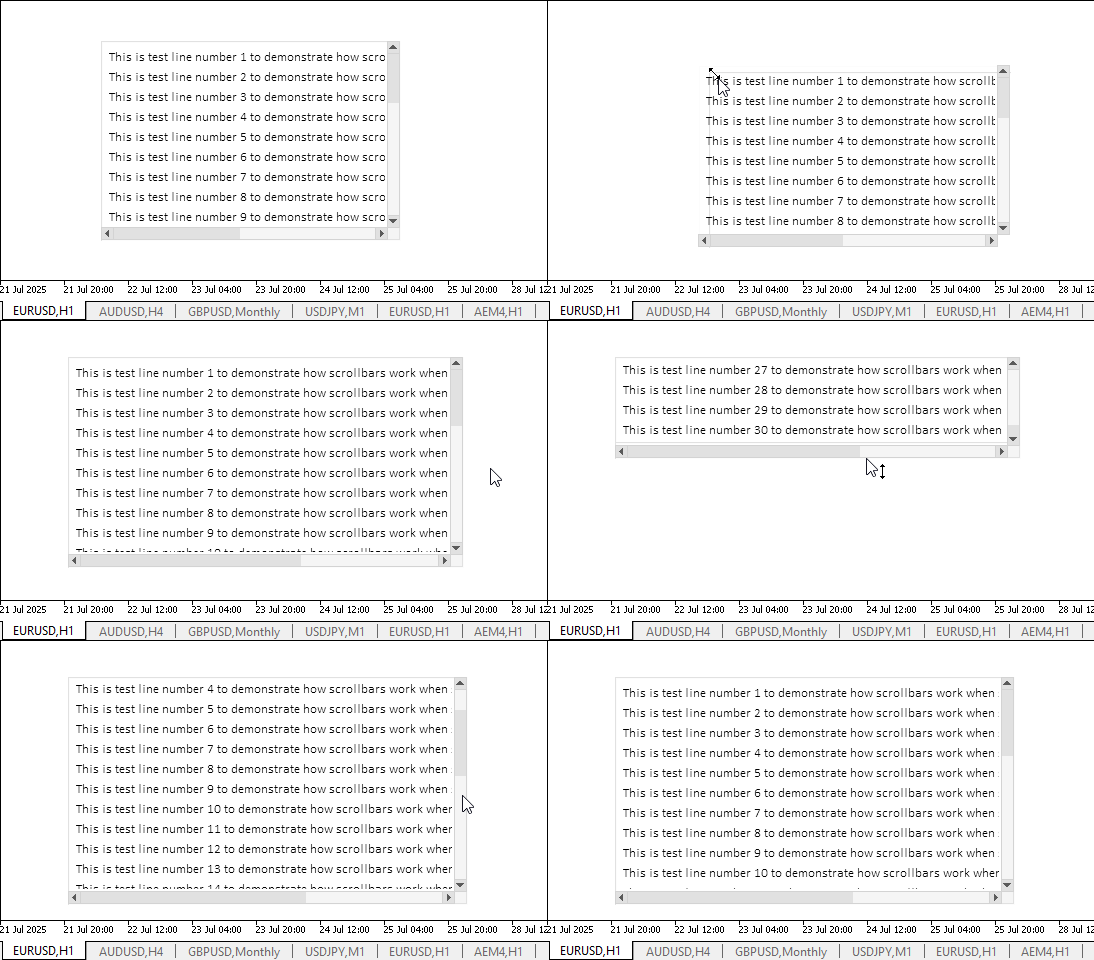
很明显,文中所述功能均可正常运行。较难精准选中元素与滚动条相接的边缘区域。然而,可调整尺寸的图形组件通常不会由单一控件构成,以图形组件“窗体(Form)”为例,它和内部所有控件之间留有充足的边距,借此我们能轻松找到拖拽元素边界的鼠标抓取点。
目前仍存在少量缺陷,后续开发TableView图形组件时,我们会逐步完善修复。
结论
如今我们距离完成TableView控件开发又近了一步,该控件能够在程序中创建并展示表格数据。视图组件的实现逻辑量大且复杂,但完成后基本可以满足绝大多数表格数据展示与交互操作的需求。
在下一篇文章中,我们将着手开发交互式表格表头,实现对表格行列的管理功能。
本文中使用的程序:
| # | 名称 | 类型 | 描述 |
|---|---|---|---|
| 1 | Base.mqh | 类库 | 创建控件基础对象的类 |
| 2 | Controls.mqh | 类库 | 控制类 |
| 3 | iTestResize.mq5 | 测试指标 | 测试控件类操作的指标 |
| 4 | MQL5.zip | 归档 | 以上供解压到客户端终端MQL5目录的文件存档 |
所有创建的文件均随附于本文,供读者自学使用。该压缩文件可解压至终端文件夹,所有文件将自动放置于目标文件夹:\MQL5\Indicators\Tables\。
本文由MetaQuotes Ltd译自俄文
原文地址: https://www.mql5.com/ru/articles/18941
注意: MetaQuotes Ltd.将保留所有关于这些材料的权利。全部或部分复制或者转载这些材料将被禁止。
本文由网站的一位用户撰写,反映了他们的个人观点。MetaQuotes Ltd 不对所提供信息的准确性负责,也不对因使用所述解决方案、策略或建议而产生的任何后果负责。



 神经网络在交易中的应用:基于自适应模态分解(ACEFormer)的时间序列预测
 价格行为分析工具包开发(第34部分):借助高级数据采集管道将原始市场数据转化为预测模型
 MQL5中的自优化智能交易系统(第十一部分):线性代数基础入门
 使用机器学习检测与分类分形模式
