

Los componentes de Vista y Controlador para tablas en el paradigma MVC de MQL5: elementos redimensionables
 393
393
 2
2

Contenido
- Introducción
- Refinando las clases base
- Clase Tooltip
- Perfeccionamiento de los controles
- Probando el resultado
- Conclusión
Introducción
En las interfaces de usuario modernas, la posibilidad de cambiar el tamaño de los elementos con el ratón es una función habitual y esperada. El usuario puede "agarrar" el borde de una ventana, panel u otro bloque visual y arrastrarlo, cambiando el tamaño del elemento en tiempo real. Dicha interactividad requiere una arquitectura bien diseñada para garantizar una respuesta fluida de la interfaz y el manejo correcto de todos los eventos.
Uno de los enfoques arquitectónicos más populares para crear interfaces complejas es MVC (Modelo-Vista-Controlador). En este paradigma:
- El modelo se encarga de los datos y la lógica.
- La vista es responsable de mostrar datos e interacción visual con el usuario.
- El controlador es responsable de gestionar los eventos del usuario y la comunicación entre el Modelo y la Vista.
En el contexto del redimensionamiento de elementos con el ratón, la mayor parte de la lógica se implementa en el componente Vista. Implementa una representación visual del elemento, rastrea los movimientos del ratón, determina si el cursor está en el límite y muestra los tooltips adecuados (por ejemplo, cambiando el cursor). Este componente también se encarga de renderizar el elemento redimensionado durante el proceso de redimensionamiento al ser arrastrado.
El componente Controlador puede participar en el procesamiento de eventos del ratón, pasando comandos al componente Vista y, si es necesario, actualizando el componente Modelo (por ejemplo, si se deben guardar las dimensiones del elemento o si afectan a otros datos).
El redimensionamiento con el ratón es un ejemplo típico de cómo actúa el componente Vista en la arquitectura MVC, donde la interacción visual y la respuesta al usuario se implementan de la forma más clara e interactiva posible.
Las tablas visuales (TableView, DataGrid, Spreadsheet, etc.) son uno de los elementos clave de las interfaces modernas utilizadas para mostrar y editar datos tabulares. El usuario espera que la tabla no solo muestre los datos, sino que también le proporcione herramientas prácticas para personalizar su apariencia según sus necesidades.
La capacidad de redimensionar una tabla y sus partes individuales (anchos de columna, alturas de fila y tamaño de toda el área de la tabla) mediante el ratón es el estándar de facto para el control TableView en aplicaciones profesionales. La disponibilidad de dicha funcionalidad permite:
- Adaptar la interfaz al volumen y la estructura de los datos. El usuario puede expandir una columna con valores largos o reducir el tamaño de las columnas que no aportan información relevante.
- Mejorar la legibilidad y la comprensión de la información. El ajuste flexible del tamaño ayuda a evitar el desplazamiento horizontal y las áreas vacías redundantes.
- Crear una sensación de interfaz dinámica, familiar en programas ofimáticos y analíticos.
- Implementar escenarios de datos complejos donde el tamaño de las celdas, filas y columnas pueda cambiar dinámicamente.
Sin la posibilidad de cambiar el tamaño, el elemento TableView se vuelve estático e inconveniente para el trabajo real con datos. Por lo tanto, la implementación del mecanismo para redimensionar elementos con el ratón es una parte integral de la creación de un componente de tabla moderno, práctico y profesional.
Hoy añadiremos a todos los elementos la funcionalidad que permite redimensionarlos arrastrando sus bordes y esquinas con el ratón. Al mismo tiempo, aparecerán tooltips gráficos en el área del cursor: flechas que apuntan en la dirección donde se puede cambiar el tamaño. Al situar el cursor sobre la zona de redimensionamiento y hacer clic, se activa el modo de redimensionamiento. Al soltar el ratón, el modo se desactivará. Todos los indicadores (activación del modo de movimiento y dirección de redimensionamiento) quedarán almacenados en la clase de recursos compartidos y serán accesibles desde cada elemento gráfico.
Agregaremos nuevas propiedades a todos los elementos para permitir su redimensionamiento.
Para implementar esta funcionalidad, solo será necesario refinar las clases ya creadas y agregar una nueva para crear tooltips. Los tooltips son un tipo de elementos gráficos que, tras un breve retardo, aparecen automáticamente cuando el cursor del ratón se sitúa sobre una determinada zona de un elemento gráfico. Contienen un texto descriptivo, una imagen gráfica o ambas cosas. A partir de esta clase, podemos crear otros tooltips. Por ejemplo, imágenes de flechas que aparecen cerca del cursor e indican la dirección de redimensionamiento.
Hoy vamos a crear precisamente ese tipo de tooltip, concretamente, flechas dobles horizontales, verticales y diagonales que indiquen la dirección en la que pueden arrastrarse los bordes y las esquinas del elemento. Los tooltips de texto se pueden implementar después de crear el control TableView para el diseño visual de sus celdas, columnas y encabezados.
Continuemos escribiendo código en los archivos de la biblioteca ubicados en \MQL5\Indicators\Tables\Controls\. La versión anterior de todos los archivos está disponible en el artículo anterior. Se perfeccionarán los archivos Base.mqh y Controls.mqh.
Refinando las clases base
Abre el archivo Base.mqh e introduce la declaración anticipada de la clase tooltip:
//+------------------------------------------------------------------+
//|                                                         Base.mqh |
//|                                  Copyright 2025, MetaQuotes Ltd. |
//|                                             https://www.mql5.com |
//+------------------------------------------------------------------+
#property copyright "Copyright 2025, MetaQuotes Ltd."
#property link      "https://www.mql5.com"

//+------------------------------------------------------------------+
//| Include libraries                                                |
//+------------------------------------------------------------------+
#include <Canvas\Canvas.mqh>              // CCanvas class
#include <Arrays\List.mqh>                // CList class

//--- Forward declaration of control element classes
class    CCounter;                        // Delay counter class
class    CAutoRepeat;                     // Event auto-repeat class
class    CImagePainter;                   // Image drawing class
class    CVisualHint;                     // Hint class
class    CLabel;                          // Text label class
class    CButton;                         // Simple button class
class    CButtonTriggered;                // Two-position button class
class    CButtonArrowUp;                  // Up arrow button class
class    CButtonArrowDown;                // Down arrow button class
class    CButtonArrowLeft;                // Left arrow button class
class    CButtonArrowRight;               // Right arrow button class
class    CCheckBox;                       // CheckBox control class
class    CRadioButton;                    // RadioButton control class
class    CScrollBarThumbH;                // Horizontal scrollbar slider class
class    CScrollBarThumbV;                // Vertical scrollbar slider class
class    CScrollBarH;                     // Horizontal scrollbar class
class    CScrollBarV;                     // Vertical scrollbar class
class    CPanel;                          // Panel control class
class    CGroupBox;                       // GroupBox control class
class    CContainer;                      // Container control class

//+------------------------------------------------------------------+
//| Macro substitutions                                              |
//+------------------------------------------------------------------+
Cada elemento debe tener una zona determinada a lo largo de sus bordes, y al pasar el cursor del ratón por encima, debe activarse el redimensionamiento del objeto. Introduce el grosor de esta zona en el bloque de sustitución de macros:
//+------------------------------------------------------------------+
//| Macro substitutions                                              |
//+------------------------------------------------------------------+
#define  clrNULL              0x00FFFFFF  // Transparent color for CCanvas
#define  MARKER_START_DATA    -1          // Data start marker in a file
#define  DEF_FONTNAME         "Calibri"   // Default font
#define  DEF_FONTSIZE         10          // Default font size
#define  DEF_EDGE_THICKNESS   3           // Zone width to capture the border/corner

//+------------------------------------------------------------------+
//| Enumerations                                                     |
//+------------------------------------------------------------------+
Añada un nuevo tipo de objeto de tipo ‘hint’ a la enumeración de tipos de elementos gráficos:
//+------------------------------------------------------------------+
//| Enumerations                                                     |
//+------------------------------------------------------------------+
enum ENUM_ELEMENT_TYPE                    // Enumeration of graphical element types
  {
   ELEMENT_TYPE_BASE = 0x10000,           // Basic object of graphical elements
   ELEMENT_TYPE_COLOR,                    // Color object
   ELEMENT_TYPE_COLORS_ELEMENT,           // Color object of the graphical object element
   ELEMENT_TYPE_RECTANGLE_AREA,           // Rectangular area of the element
   ELEMENT_TYPE_IMAGE_PAINTER,            // Object for drawing images
   ELEMENT_TYPE_COUNTER,                  // Counter object
   ELEMENT_TYPE_AUTOREPEAT_CONTROL,       // Event auto-repeat object
   ELEMENT_TYPE_CANVAS_BASE,              // Basic canvas object for graphical elements
   ELEMENT_TYPE_ELEMENT_BASE,             // Basic object of graphical elements
   ELEMENT_TYPE_HINT,                     // Tooltip
   ELEMENT_TYPE_LABEL,                    // Text label
   ELEMENT_TYPE_BUTTON,                   // Simple button
   ELEMENT_TYPE_BUTTON_TRIGGERED,         // Two-position button
   ELEMENT_TYPE_BUTTON_ARROW_UP,          // Up arrow button
   ELEMENT_TYPE_BUTTON_ARROW_DOWN,        // Down arrow button
   ELEMENT_TYPE_BUTTON_ARROW_LEFT,        // Left arrow button
   ELEMENT_TYPE_BUTTON_ARROW_RIGHT,       // Right arrow button
   ELEMENT_TYPE_CHECKBOX,                 // CheckBox control
   ELEMENT_TYPE_RADIOBUTTON,              // RadioButton control
   ELEMENT_TYPE_SCROLLBAR_THUMB_H,        // Horizontal scroll bar slider
   ELEMENT_TYPE_SCROLLBAR_THUMB_V,        // Vertical scroll bar slider
   ELEMENT_TYPE_SCROLLBAR_H,              // ScrollBarHorisontal control
   ELEMENT_TYPE_SCROLLBAR_V,              // ScrollBarVertical control
   ELEMENT_TYPE_PANEL,                    // Panel control
   ELEMENT_TYPE_GROUPBOX,                 // GroupBox control
   ELEMENT_TYPE_CONTAINER,                // Container control
  };
#define  ACTIVE_ELEMENT_MIN   ELEMENT_TYPE_LABEL         // Minimum value of the list of active elements
#define  ACTIVE_ELEMENT_MAX   ELEMENT_TYPE_SCROLLBAR_V   // Maximum value of the list of active elements
La interacción del cursor con un elemento en el contexto del cambio de tamaño se basa en ciertos conceptos, como la ubicación del cursor en uno de los bordes del elemento o en sus esquinas, así como la acción que se está realizando en un momento dado.
Añade nuevas enumeraciones para describir dichas acciones y valores:
enum ENUM_CURSOR_REGION                   // Enumerate the cursor location on the element borders
  {
   CURSOR_REGION_NONE,                    // None
   CURSOR_REGION_TOP,                     // On the top border
   CURSOR_REGION_BOTTOM,                  // On the bottom border
   CURSOR_REGION_LEFT,                    // On the left border
   CURSOR_REGION_RIGHT,                   // On the right border
   CURSOR_REGION_LEFT_TOP,                // In the upper left corner
   CURSOR_REGION_LEFT_BOTTOM,             // In the lower left corner
   CURSOR_REGION_RIGHT_TOP,               // In the upper right corner
   CURSOR_REGION_RIGHT_BOTTOM,            // In the lower right corner
  };

enum ENUM_RESIZE_ZONE_ACTION              // List interactions with the element dragging zone
  {
   RESIZE_ZONE_ACTION_NONE,               // None
   RESIZE_ZONE_ACTION_HOVER,              // Hovering the cursor over the zone
   RESIZE_ZONE_ACTION_BEGIN,              // Start dragging
   RESIZE_ZONE_ACTION_DRAG,               // Dragging
   RESIZE_ZONE_ACTION_END                 // Finish dragging
  };

//+------------------------------------------------------------------+
//| Functions                                                        |
//+------------------------------------------------------------------+
La interacción del cursor con los límites del elemento se divide en cinco etapas:
- No hay interacción. Los eventos de los elementos se gestionan de la forma habitual.
- El cursor se encuentra sobre la zona de cambio de tamaño. Los tooltips con flechas deben aparecer junto al cursor, indicando la dirección en la que se puede cambiar el tamaño. Aquí también puedes activar un indicador global que impide que otros elementos respondan a los eventos de interacción del ratón. Este elemento no se ha implementado todavía.
- Al hacer clic, el usuario pasa a controlar esa zona interactiva del elemento. Al capturar un borde o una esquina con el ratón, se activa la bandera pública del modo de redimensionamiento, se muestran los tooltips con flechas y el valor de la dirección del movimiento se indica en el administrador de recursos compartidos. Se llama a un controlador para redimensionar un elemento gráfico.
- El usuario mueve el cursor siguiendo el borde o la esquina del elemento capturado. La dirección de arrastre del borde se configura en el administrador general de recursos. En función de este valor, se invoca el manejador de redimensionamiento para redimensionar un elemento gráfico y las tooltips de flecha que siguen al cursor continúan mostrándose.
- En cuanto el usuario suelta el botón del ratón mientras el modo de redimensionamiento está activo, se restablecen todas las banderas configuradas en el administrador de recursos compartidos y se ocultan las tooltips de las flechas. El elemento ahora tiene un nuevo tamaño, que se modificó después de mover el cursor en los controladores para redimensionar el elemento gráfico.
Esta lógica se implementará hoy. No implementaremos la bandera mencionada anteriormente, que prohíbe que otros elementos reaccionen a los eventos de interacción del ratón, ya que esto se refiere más a funciones de servicio para simplificar las manipulaciones con la funcionalidad de redimensionamiento mediante el método de arrastre de bordes.
Por ejemplo, si una barra de desplazamiento está en contacto con el borde inferior de un elemento, cuando el cursor se sitúa sobre este borde, la barra de desplazamiento también puede reaccionar a la interacción con el cursor. En lugar de arrastrar el borde, activamos el desplazamiento del contenido del contenedor, ya que la barra de desplazamiento tomará el control. Al mismo tiempo, ¿dónde hemos visto los elementos que no tienen área para ser capturados? Probablemente solo en algún lugar de los controles sin terminar (como aquí en este momento). La implementación de dicha funcionalidad de servicio complicará aún más el código, ya de por sí complejo, de las clases de elementos gráficos.
Añade un nuevo valor a la función que devuelve el nombre abreviado del elemento según su tipo:
//+------------------------------------------------------------------+
//|  Return the short name of the element by type                    |
//+------------------------------------------------------------------+
string ElementShortName(const ENUM_ELEMENT_TYPE type)
  {
   switch(type)
     {
      case ELEMENT_TYPE_ELEMENT_BASE      :  return "BASE";    // Basic object of graphical elements
      case ELEMENT_TYPE_HINT              :  return "HNT";     // Tooltip
      case ELEMENT_TYPE_LABEL             :  return "LBL";     // Text label
      case ELEMENT_TYPE_BUTTON            :  return "SBTN";    // Simple button
      case ELEMENT_TYPE_BUTTON_TRIGGERED  :  return "TBTN";    // Toggle button
      case ELEMENT_TYPE_BUTTON_ARROW_UP   :  return "BTARU";   // Up arrow button
      case ELEMENT_TYPE_BUTTON_ARROW_DOWN :  return "BTARD";   // Down arrow button
      case ELEMENT_TYPE_BUTTON_ARROW_LEFT :  return "BTARL";   // Left arrow button
      case ELEMENT_TYPE_BUTTON_ARROW_RIGHT:  return "BTARR";   // Right arrow button
      case ELEMENT_TYPE_CHECKBOX          :  return "CHKB";    // CheckBox control
      case ELEMENT_TYPE_RADIOBUTTON       :  return "RBTN";    // RadioButton control
      case ELEMENT_TYPE_SCROLLBAR_THUMB_H :  return "THMBH";   // Horizontal scroll bar slider
      case ELEMENT_TYPE_SCROLLBAR_THUMB_V :  return "THMBV";   // Vertical scroll bar slider
      case ELEMENT_TYPE_SCROLLBAR_H       :  return "SCBH";    // ScrollBarHorisontal control
      case ELEMENT_TYPE_SCROLLBAR_V       :  return "SCBV";    // ScrollBarVertical control
      case ELEMENT_TYPE_PANEL             :  return "PNL";     // Panel control
      case ELEMENT_TYPE_GROUPBOX          :  return "GRBX";    // GroupBox control
      case ELEMENT_TYPE_CONTAINER         :  return "CNTR";    // Container control
      default                             :  return "Unknown"; // Unknown
     }
  }
En la clase del gestor de recursos compartidos, añade una función para recuperar y devolver las coordenadas del cursor del ratón, el indicador del modo de redimensionamiento y el borde del elemento:
//+------------------------------------------------------------------+
//| Singleton class for common flags and events of graphical elements|
//+------------------------------------------------------------------+
class CCommonManager
  {
private:
   static CCommonManager *m_instance;                          // Class instance
   string            m_element_name;                           // Active element name
   int               m_cursor_x;                               // X cursor coordinate
   int               m_cursor_y;                               // Y cursor coordinate
   bool              m_resize_mode;                            // Resize mode
   ENUM_CURSOR_REGION m_resize_region;                         // The edge of the element where the size is changed

//--- Constructor/destructor
                     CCommonManager(void) : m_element_name("") {}
                    ~CCommonManager() {}
public:
//--- Method for getting a Singleton instance
   static CCommonManager *GetInstance(void)
                       {
                        if(m_instance==NULL)
                           m_instance=new CCommonManager();
                        return m_instance;
                       }
//--- Method for destroying a Singleton instance
   static void       DestroyInstance(void)
                       {
                        if(m_instance!=NULL)
                          {
                           delete m_instance;
                           m_instance=NULL;
                          }
                       }
//--- (1) Set and (2) return the name of the active current element
   void              SetElementName(const string name)            { this.m_element_name=name;   }
   string            ElementName(void)                      const { return this.m_element_name; }

//--- (1) Set and (2) return the X cursor coordinate
   void              SetCursorX(const int x)                      { this.m_cursor_x=x;          }
   int               CursorX(void)                          const { return this.m_cursor_x;     }

//--- (1) Set and (2) return the Y cursor coordinate
   void              SetCursorY(const int y)                      { this.m_cursor_y=y;          }
   int               CursorY(void)                          const { return this.m_cursor_y;     }

//--- (1) Set and return (2) the resizing mode
   void              SetResizeMode(const bool flag)               { this.m_resize_mode=flag;    }
   bool              ResizeMode(void)                       const { return this.m_resize_mode;  }

//--- (1) Set and (2) return the element edge
   void              SetResizeRegion(const ENUM_CURSOR_REGION edge){ this.m_resize_region=edge; }
   ENUM_CURSOR_REGION ResizeRegion(void)                    const { return this.m_resize_region;}

  };
//--- Initialize a static instance variable of a class
CCommonManager* CCommonManager::m_instance=NULL;
En el controlador de eventos, las coordenadas del cursor se escribirán en variables de clase y estarán disponibles en cualquier parte del programa, lo que simplifica el acceso a las coordenadas y su uso en los controles. Del mismo modo, al asignar a las variables el indicador del modo de redimensionamiento y el borde del elemento con el que interactúa el cursor, hacemos que todos los elementos «detecten» este modo y lo gestionen en consecuencia.
Realiza ajustes en la clase base del lienzo de elementos gráficos. Declara una bandera que indique que el tamaño del elemento puede cambiarse de forma interactiva:
//+------------------------------------------------------------------+
//| Base class of graphical elements canvas                          |
//+------------------------------------------------------------------+
class CCanvasBase : public CBaseObj
  {
private:
   bool              m_chart_mouse_wheel_flag;                 // Flag for sending mouse wheel scroll messages
   bool              m_chart_mouse_move_flag;                  // Flag for sending mouse cursor movement messages
   bool              m_chart_object_create_flag;               // Flag for sending messages about the graphical object creation event
   bool              m_chart_mouse_scroll_flag;                // Flag for scrolling the chart with the left button and mouse wheel
   bool              m_chart_context_menu_flag;                // Flag of access to the context menu using the right click
   bool              m_chart_crosshair_tool_flag;              // Flag of access to the Crosshair tool using the middle click
   bool              m_flags_state;                            // State of the flags for scrolling the chart with the wheel, the context menu, and the crosshair

//--- Set chart restrictions (wheel scrolling, context menu, and crosshair)
   void              SetFlags(const bool flag);

protected:
   CCanvas           m_background;                             // Background canvas
   CCanvas           m_foreground;                             // Foreground canvas
   CBound            m_bound;                                  // Object boundaries
   CCanvasBase      *m_container;                              // Parent container object
   CColorElement     m_color_background;                       // Background color control object
   CColorElement     m_color_foreground;                       // Foreground color control object
   CColorElement     m_color_border;                           // Border color control object

   CColorElement     m_color_background_act;                   // Activated element background color control object
   CColorElement     m_color_foreground_act;                   // Activated element foreground color control object
   CColorElement     m_color_border_act;                       // Activated element frame color control object

   CAutoRepeat       m_autorepeat;                             // Event auto-repeat control object

   ENUM_ELEMENT_STATE m_state;                                 // Control state (e.g. buttons (on/off))
   long              m_chart_id;                               // Chart ID
   int               m_wnd;                                    // Chart subwindow index
   int               m_wnd_y;                                  // Cursor Y coordinate offset in the subwindow
   int               m_obj_x;                                  // Graphical object X coordinate
   int               m_obj_y;                                  // Graphical object Y coordinate
   uchar             m_alpha_bg;                               // Background transparency
   uchar             m_alpha_fg;                               // Foreground transparency
   uint              m_border_width_lt;                        // Left frame width
   uint              m_border_width_rt;                        // Right frame width
   uint              m_border_width_up;                        // Top frame width
   uint              m_border_width_dn;                        // Bottom frame width
   string            m_program_name;                           // Program name
   bool              m_hidden;                                 // Hidden object flag
   bool              m_blocked;                                // Blocked element flag
   bool              m_movable;                                // Moved element flag
   bool              m_resizable;                              // Resizing flag
   bool              m_focused;                                // Element flag in focus
   bool              m_main;                                   // Main object flag
   bool              m_autorepeat_flag;                        // Event sending auto-repeat flag
   bool              m_scroll_flag;                            // Flag for scrolling content using scrollbars
   bool              m_trim_flag;                              // Flag for clipping the element to the container borders
   int               m_cursor_delta_x;                         // Distance from the cursor to the left edge of the element
   int               m_cursor_delta_y;                         // Distance from the cursor to the top edge of the element
   int               m_z_order;                                // Graphical object Z-order
Añade métodos que permitan establecer y obtener la bandera de modo de redimensionamiento y la zona de interacción desde el gestor de recursos compartidos:
//--- (1) Set, return (2) the name and (3) the active element flag
   void              SetActiveElementName(const string name)   { CCommonManager::GetInstance().SetElementName(name);                               }
   string            ActiveElementName(void)             const { return CCommonManager::GetInstance().ElementName();                               }
   bool              IsCurrentActiveElement(void)        const { return this.ActiveElementName()==this.NameFG();                                   }

//--- (1) Set and (2) return the resize mode flag
   void              SetResizeMode(const bool flag)            { CCommonManager::GetInstance().SetResizeMode(flag);                                }
   bool              ResizeMode(void)                    const { return CCommonManager::GetInstance().ResizeMode();                                }

//--- (1) Set and (2) return the element edge, above which the size is changed
   void              SetResizeRegion(const ENUM_CURSOR_REGION edge){ CCommonManager::GetInstance().SetResizeRegion(edge);                          }
   ENUM_CURSOR_REGION ResizeRegion(void)                 const { return CCommonManager::GetInstance().ResizeRegion();                              }

//--- Return the offset of the initial drawing coordinates on the canvas relative to the canvas and the object coordinates
Ahora, cada elemento gráfico podrá configurar y recibir datos sobre el modo de redimensionamiento común a todos los elementos.
Al cambiar el tamaño de un elemento arrastrando el cursor sobre el borde izquierdo o superior, o sobre las esquinas que limitan con estos bordes, también debe desplazar las coordenadas al redimensionar el elemento. Las pruebas realizadas al aplicar secuencialmente métodos separados para cambiar coordenadas y redimensionar un elemento sugieren que, dentro del intervalo entre las llamadas a dos métodos, es posible actualizar el gráfico mediante el terminal con un redibujado. Esto provoca que, al arrastrar los bordes del elemento para cambiar su tamaño, veamos artefactos en el gráfico en forma de destellos del tamaño anterior e inalterado del elemento.
Para evitar estos efectos visuales desagradables, es necesario reducir el retraso entre el cambio de tamaño y el desplazamiento de la coordenada. Para ello, implementa (declara) un método independiente en el que tanto el tamaño como la coordenada del elemento se modifiquen de inmediato:
//--- Set the graphical object (1) X, (2) Y and (3) both coordinates
   bool              ObjectSetX(const int x);
   bool              ObjectSetY(const int y);
   bool              ObjectSetXY(const int x,const int y)      { return(this.ObjectSetX(x) && this.ObjectSetY(y));                                 }

//--- Set both the coordinates and dimensions of a graphical object
   virtual bool      ObjectSetXYWidthResize(const int x,const int y,const int w,const int h);
Necesitamos un método que devuelva la posición del cursor dentro de los límites del elemento gráfico. Declara dicho método:
//--- (1) Set and (2) relocate the graphical object by the specified coordinates/offset size
   bool              ObjectMove(const int x,const int y)       { return this.ObjectSetXY(x,y);                                                     }
   bool              ObjectShift(const int dx,const int dy)    { return this.ObjectSetXY(this.ObjectX()+dx,this.ObjectY()+dy);                     }

//--- Returns the flag indicating whether the cursor is inside the object
   bool              Contains(const int x,const int y);
//--- Return the cursor location on the object borders
   ENUM_CURSOR_REGION CheckResizeZone(const int x,const int y);
Declarar manejadores virtuales para gestionar los eventos de interacción del cursor en los límites de un elemento para redimensionarlo:
//--- Cursor hovering (Focus), (2) button click (Press),
//--- (3) cursor moving (Move), (4) leaving focus (Release), (5) graphical object creation (Create),
//--- (6) wheel scrolling (Wheel) and (7) resizing (Resize) event handlers. Redefined in descendants.
   virtual void      OnFocusEvent(const int id, const long lparam, const double dparam, const string sparam);
   virtual void      OnPressEvent(const int id, const long lparam, const double dparam, const string sparam);
   virtual void      OnMoveEvent(const int id, const long lparam, const double dparam, const string sparam);
   virtual void      OnReleaseEvent(const int id, const long lparam, const double dparam, const string sparam);
   virtual void      OnCreateEvent(const int id, const long lparam, const double dparam, const string sparam);
   virtual void      OnWheelEvent(const int id, const long lparam, const double dparam, const string sparam)         { return;         }  // handler is disabled here
   virtual void      OnResizeZoneEvent(const int id, const long lparam, const double dparam, const string sparam)    { return;         }  // handler is disabled here

//--- Handlers for resizing the element by sides and corners
   virtual bool      OnResizeZoneLeft(const int x, const int y)                                                      { return false;   }  // handler is disabled here
   virtual bool      OnResizeZoneRight(const int x, const int y)                                                     { return false;   }  // handler is disabled here
   virtual bool      OnResizeZoneTop(const int x, const int y)                                                       { return false;   }  // handler is disabled here
   virtual bool      OnResizeZoneBottom(const int x, const int y)                                                    { return false;   }  // handler is disabled here
   virtual bool      OnResizeZoneLeftTop(const int x, const int y)                                                   { return false;   }  // handler is disabled here
   virtual bool      OnResizeZoneRightTop(const int x, const int y)                                                  { return false;   }  // handler is disabled here
   virtual bool      OnResizeZoneLeftBottom(const int x, const int y)                                                { return false;   }  // handler is disabled here
   virtual bool      OnResizeZoneRightBottom(const int x, const int y)                                               { return false;   }  // handler is disabled here
Implementaremos estos manejadores en las clases heredadas.
Añada métodos que devuelvan algunas banderas del objeto que aún no se habían implementado:
//--- Return (1) the object's belonging to the program, the flag (2) of a hidden element, (3) a blocked element,
//--- (4) moved, (5) resized, (6) main element, (7) in focus, (8, 9) graphical object name (background, text)
   bool              IsBelongsToThis(const string name)  const { return(::ObjectGetString(this.m_chart_id,name,OBJPROP_TEXT)==this.m_program_name);}
   bool              IsHidden(void)                      const { return this.m_hidden;                                                             }
   bool              IsBlocked(void)                     const { return this.m_blocked;                                                            }
   bool              IsMovable(void)                     const { return this.m_movable;                                                            }
   bool              IsResizable(void)                   const { return this.m_resizable;                                                          }
   bool              IsMain(void)                        const { return this.m_main;                                                               }
   bool              IsFocused(void)                     const { return this.m_focused;                                                            }
   bool              IsAutorepeat(void)                  const { return this.m_autorepeat_flag;                                                    }
   bool              IsScrollable(void)                  const { return this.m_scroll_flag;                                                        }
   bool              IsTrimmed(void)                     const { return this.m_trim_flag;                                                          }
   string            NameBG(void)                        const { return this.m_background.ChartObjectName();                                       }
   string            NameFG(void)                        const { return this.m_foreground.ChartObjectName();                                       }
y métodos para configurar estas banderas:
//--- Set (1) movability, (2) main object flag for the object and (3) resizability
   void              SetMovable(const bool flag)               { this.m_movable=flag;                                                              }
   void              SetAsMain(void)                           { this.m_main=true;                                                                 }
   virtual void      SetResizable(const bool flag)             { this.m_resizable=flag;                                                            }
   void              SetAutorepeat(const bool flag)            { this.m_autorepeat_flag=flag;                                                      }
   void              SetScrollable(const bool flag)            { this.m_scroll_flag=flag;                                                          }
   void              SetTrimmered(const bool flag)             { this.m_trim_flag=flag;                                                            }
Declara un método que redimensione el elemento y lo desplace a nuevas coordenadas simultáneamente:
//--- Set the new (1) X, (2) Y, (3) XY coordinate for the object
   virtual bool      MoveX(const int x);
   virtual bool      MoveY(const int y);
   virtual bool      Move(const int x,const int y);

//--- Set both the element coordinates and dimensions
   virtual bool      MoveXYWidthResize(const int x,const int y,const int w,const int h);
En los constructores de la clase, en la lista de inicialización, establecer el valor predeterminado para el indicador de redimensionamiento del elemento:
//--- Constructors/destructor
                     CCanvasBase(void) :
                        m_program_name(::MQLInfoString(MQL_PROGRAM_NAME)), m_chart_id(::ChartID()), m_wnd(0), m_alpha_bg(0), m_alpha_fg(255),
                        m_hidden(false), m_blocked(false), m_focused(false), m_movable(false), m_resizable(false), m_main(false), m_autorepeat_flag(false), m_trim_flag(true), m_scroll_flag(false),
                        m_border_width_lt(0), m_border_width_rt(0), m_border_width_up(0), m_border_width_dn(0), m_z_order(0),
                        m_state(0), m_wnd_y(0), m_cursor_delta_x(0), m_cursor_delta_y(0) { this.Init(); }
                     CCanvasBase(const string object_name,const long chart_id,const int wnd,const int x,const int y,const int w,const int h);
                    ~CCanvasBase(void);
  };
//+------------------------------------------------------------------+
//| CCanvasBase::Constructor                                         |
//+------------------------------------------------------------------+
CCanvasBase::CCanvasBase(const string object_name,const long chart_id,const int wnd,const int x,const int y,const int w,const int h) :
   m_program_name(::MQLInfoString(MQL_PROGRAM_NAME)), m_wnd(wnd<0 ? 0 : wnd), m_alpha_bg(0), m_alpha_fg(255),
   m_hidden(false), m_blocked(false), m_focused(false), m_movable(false), m_resizable(false), m_main(false), m_autorepeat_flag(false), m_trim_flag(true), m_scroll_flag(false),
   m_border_width_lt(0), m_border_width_rt(0), m_border_width_up(0), m_border_width_dn(0), m_z_order(0),
   m_state(0), m_cursor_delta_x(0), m_cursor_delta_y(0)
  {
//--- Get the adjusted chart ID and the distance in pixels along the vertical Y axis
//--- between the upper frame of the indicator subwindow and the upper frame of the chart main window
   this.m_chart_id=this.CorrectChartID(chart_id);

//--- If the graphical resource and graphical object are created
   if(this.Create(this.m_chart_id,this.m_wnd,object_name,x,y,w,h))
     {
      //--- Clear the background and foreground canvases and set the initial coordinate values,
      //--- names of graphic objects and properties of text drawn in the foreground
      this.Clear(false);
      this.m_obj_x=x;
      this.m_obj_y=y;
      this.m_color_background.SetName("Background");
      this.m_color_foreground.SetName("Foreground");
      this.m_color_border.SetName("Border");
      this.m_foreground.FontSet(DEF_FONTNAME,-DEF_FONTSIZE*10,FW_MEDIUM);
      this.m_bound.SetName("Perimeter");

      //--- Remember permissions for the mouse and chart tools
      this.Init();
     }
  }
Fuera del cuerpo de la clase, escribe los métodos declarados.
Un método que devuelve la ubicación del cursor en los límites del objeto:
//+--------------------------------------------------------------------+
//|CCanvasBase::Return the cursor location on the object borders       |
//+--------------------------------------------------------------------+
ENUM_CURSOR_REGION CCanvasBase::CheckResizeZone(const int x,const int y)
  {
//--- Coordinates of the element borders
   int top=this.Y();
   int bottom=this.Bottom();
   int left=this.X();
   int right=this.Right();

//--- If outside the object, return CURSOR_REGION_NONE
   if(x<left || x>right || y<top || y>bottom)
      return CURSOR_REGION_NONE;

//--- Left edge and corners
   if(x>=left && x<=left+DEF_EDGE_THICKNESS)
     {
      //--- Upper left corner
      if(y>=top && y<=top+DEF_EDGE_THICKNESS)
         return CURSOR_REGION_LEFT_TOP;
      //--- Bottom left corner
      if(y>=bottom-DEF_EDGE_THICKNESS && y<=bottom)
         return CURSOR_REGION_LEFT_BOTTOM;
      //--- Left edge
      return CURSOR_REGION_LEFT;
     }

//--- Right edge and corners
   if(x>=right-DEF_EDGE_THICKNESS && x<=right)
     {
      //--- Upper right corner
      if(y>=top && y<=top+DEF_EDGE_THICKNESS)
         return CURSOR_REGION_RIGHT_TOP;
      //--- Bottom right corner
      if(y>=bottom-DEF_EDGE_THICKNESS && y<=bottom)
         return CURSOR_REGION_RIGHT_BOTTOM;
      //--- Right side
      return CURSOR_REGION_RIGHT;
     }

//--- Upper edge
   if(y>=top && y<=top+DEF_EDGE_THICKNESS)
      return CURSOR_REGION_TOP;

//--- Bottom edge
   if(y>=bottom-DEF_EDGE_THICKNESS && y<=bottom)
      return CURSOR_REGION_BOTTOM;

//--- The cursor is not on the edges of the element
   return CURSOR_REGION_NONE;
  }
El método comprueba si el cursor se encuentra dentro de una barra estrecha de espesor DEF_EDGE_THICKNESS alrededor del perímetro de los límites del elemento y devuelve la cara o el ángulo donde cae el cursor.
Un método que establece simultáneamente las coordenadas y las dimensiones de un objeto gráfico:
//+------------------------------------------------------------------+
//| CCanvasBase::Set coordinates                                     |
//| and size of the graphical object simultaneously                  |
//+------------------------------------------------------------------+
bool CCanvasBase::ObjectSetXYWidthResize(const int x,const int y,const int w,const int h)
  {
//--- If new coordinates are set, return the resize result
   if(this.ObjectSetXY(x,y))
      return this.ObjectResize(w,h);
//--- Failed to set new coordinates - return 'false'
   return false;
  }
Si las coordenadas del objeto se establecen correctamente, se devuelve el resultado del redimensionamiento del objeto gráfico. Los métodos que operan dentro de este método acceden directamente a las propiedades del objeto gráfico, lo que resulta en una latencia menor que cuando se utilizan métodos que redimensionan un elemento y lo mueven a nuevas coordenadas, ya que además realizan otras operaciones con sus propiedades.
Un método que establece simultáneamente las coordenadas y las dimensiones de un elemento:
//+------------------------------------------------------------------+
//| CCanvasBase::Set both the element coordinates and dimensions     |
//+------------------------------------------------------------------+
bool CCanvasBase::MoveXYWidthResize(const int x,const int y,const int w,const int h)
  {
   if(!this.ObjectSetXYWidthResize(x,y,w,h))
      return false;
   this.BoundMove(x,y);
   this.BoundResize(w,h);
   if(!this.ObjectTrim())
     {
      this.Update(false);
      this.Draw(false);
     }
   return true;
  }
En primer lugar, se llama a un método que establece simultáneamente las coordenadas y las dimensiones del objeto gráfico. Y luego se establecen las propiedades del elemento gráfico. A continuación, el elemento se recorta al tamaño de su contenedor.
Perfecciona el controlador de eventos para que pueda manejar el redimensionamiento de un elemento para el cual se ha configurado el permiso para cambiar el tamaño mediante el cursor del ratón. Al manejar la creación de nuevos objetos gráficos, este tipo de evento solo debe ser manejado por elementos contenedores. Aquí, escribiremos las coordenadas del cursor en el administrador de recursos:
//+------------------------------------------------------------------+
//| CCanvasBase::Event handler                                       |
//+------------------------------------------------------------------+
void CCanvasBase::OnChartEvent(const int id,const long& lparam,const double& dparam,const string& sparam)
  {
//--- Chart change event
   if(id==CHARTEVENT_CHART_CHANGE)
     {
      //--- adjust the distance between the upper frame of the indicator subwindow and the upper frame of the chart main window
      this.m_wnd_y=(int)::ChartGetInteger(this.m_chart_id,CHART_WINDOW_YDISTANCE,this.m_wnd);
     }

//--- Graphical object creation event
   if(id==CHARTEVENT_OBJECT_CREATE)
     {
      //--- If this is not a container element, leave
      if(this.Type()<ELEMENT_TYPE_PANEL)
         return;
      //--- Call the handler for creating the graphical object
      this.OnCreateEvent(id,lparam,dparam,sparam);
     }

//--- If the element is blocked or hidden, leave
   if(this.IsBlocked() || this.IsHidden())
      return;

   //--- Mouse cursor coordinates
   int x=(int)lparam;
   int y=(int)dparam-this.m_wnd_y;  // Adjust Y by the height of the indicator window

//--- Cursor move event
   if(id==CHARTEVENT_MOUSE_MOVE)
     {
      //--- Send the cursor coordinates to the resource manager
      CCommonManager::GetInstance().SetCursorX(x);
      CCommonManager::GetInstance().SetCursorY(y);

      //--- Do not handle inactive elements, except for the main one
      if(!this.IsMain() && (this.Type()<ACTIVE_ELEMENT_MIN || this.Type()>ACTIVE_ELEMENT_MAX))
         return;

      //--- Hold down the mouse button
      if(sparam=="1")
        {
         //--- Cursor within the object
         if(this.Contains(x, y))
           {
            //--- If this is the main object, disable the chart tools
            if(this.IsMain())
               this.SetFlags(false);

            //--- If the mouse button was clicked on the chart, there is nothing to handle, leave
            if(this.ActiveElementName()=="Chart")
               return;

            //--- Fix the name of the active element over which the cursor was when the mouse button was clicked
            this.SetActiveElementName(this.ActiveElementName());

            //--- If this is the current active element, handle its movement
            if(this.IsCurrentActiveElement())
              {
               this.OnMoveEvent(id,lparam,dparam,sparam);

               //--- If the element has auto-repeat events active, indicate that the button is clicked
               if(this.m_autorepeat_flag)
                  this.m_autorepeat.OnButtonPress();

               //--- For resizable elements
               if(this.m_resizable)
                 {
                  //--- If the resize mode is not activated,
                  //--- call the resize start handler
                  if(!this.ResizeMode())
                     this.OnResizeZoneEvent(RESIZE_ZONE_ACTION_BEGIN,x,y,this.NameFG());
                  //--- otherwise, when the resizing mode is active
                  //--- call the edge dragging handler for resizing
                  else
                     this.OnResizeZoneEvent(RESIZE_ZONE_ACTION_DRAG,x,y,this.NameFG());
                 }
              }
           }
         //--- Cursor outside the object
         else
           {
            //--- If this is the active main object, or the mouse button is clicked on the chart, and this is not the resizing mode, enable graphical tools
            if(this.IsMain() && (this.ActiveElementName()==this.NameFG() || this.ActiveElementName()=="Chart"))
               if(!this.ResizeMode())
                  this.SetFlags(true);

            //--- If this is the current active element
            if(this.IsCurrentActiveElement())
              {
               //--- If the element is not movable
               if(!this.IsMovable())
                 {
                  //--- call the mouse hover handler
                  this.OnFocusEvent(id,lparam,dparam,sparam);
                  //--- If the element has auto-repeat events active, indicate that the button is released
                  if(this.m_autorepeat_flag)
                     this.m_autorepeat.OnButtonRelease();
                 }
               //--- If the element is movable, call the move handler
               else
                  this.OnMoveEvent(id,lparam,dparam,sparam);

               //--- For resizable elements
               //--- call the edge dragging handler for resizing
               if(this.m_resizable)
                  this.OnResizeZoneEvent(RESIZE_ZONE_ACTION_DRAG,x,y,this.NameFG());
              }
           }
        }

      //--- Mouse button not pressed
      else
        {
         //--- Cursor within the object
         if(this.Contains(x, y))
           {
            //--- If this is the main element, disable the chart tools
            if(this.IsMain())
               this.SetFlags(false);

            //--- Call the cursor hover handler and
            //--- set the element as the current active one
            this.OnFocusEvent(id,lparam,dparam,sparam);
            this.SetActiveElementName(this.NameFG());

            //--- For resizable elements
            //--- call the handler for hovering the cursor over the resizing area
            if(this.m_resizable)
               this.OnResizeZoneEvent(RESIZE_ZONE_ACTION_HOVER,x,y,this.NameFG());
           }

         //--- Cursor outside the object
         else
           {
            //--- If this is the main object
            if(this.IsMain())
              {
               //--- Enable chart tools and
               //--- set the chart as the currently active element
               this.SetFlags(true);
               this.SetActiveElementName("Chart");
              }
            //--- Call the handler for removing the cursor from focus
            this.OnReleaseEvent(id,lparam,dparam,sparam);

            //--- For resizable elements
            //--- call the handler for the non-resizing mode
            if(this.m_resizable)
               this.OnResizeZoneEvent(RESIZE_ZONE_ACTION_NONE,x,y,this.NameFG());
           }
        }
     }

//--- Event of clicking the mouse button on an object (releasing the button)
   if(id==CHARTEVENT_OBJECT_CLICK)
     {
      //--- If the click (releasing the mouse button) was performed on this object
      if(sparam==this.NameFG())
        {
         //--- Call the mouse click handler and release the current active object
         this.OnPressEvent(id, lparam, dparam, sparam);
         this.SetActiveElementName("");

         //--- If the element has auto-repeat events active, indicate that the button is released
         if(this.m_autorepeat_flag)
            this.m_autorepeat.OnButtonRelease();

         //--- For resizable elements
         if(this.m_resizable)
           {
            //--- Disable the resizing mode, reset the interaction area,
            //--- call the handler for completing the resizing by dragging the edges
            this.SetResizeMode(false);
            this.SetResizeRegion(CURSOR_REGION_NONE);
            this.OnResizeZoneEvent(RESIZE_ZONE_ACTION_END,x,y,this.NameFG());
           }
        }
     }

//--- Mouse wheel scroll event
   if(id==CHARTEVENT_MOUSE_WHEEL)
     {
      if(this.IsCurrentActiveElement())
         this.OnWheelEvent(id,lparam,dparam,sparam);
     }

//--- If a custom chart event has arrived
   if(id>CHARTEVENT_CUSTOM)
     {
      //--- do not handle its own events
      if(sparam==this.NameFG())
         return;

      //--- bring the custom event in line with the standard ones
      ENUM_CHART_EVENT chart_event=ENUM_CHART_EVENT(id-CHARTEVENT_CUSTOM);
      //--- In case of the mouse click on the object, call the user event handler
      if(chart_event==CHARTEVENT_OBJECT_CLICK)
        {
         this.MousePressHandler(chart_event, lparam, dparam, sparam);
        }
      //--- If the mouse cursor is moving, call the user event handler
      if(chart_event==CHARTEVENT_MOUSE_MOVE)
        {
         this.MouseMoveHandler(chart_event, lparam, dparam, sparam);
        }
      //--- In case of scrolling the mouse wheel, call the user event handler
      if(chart_event==CHARTEVENT_MOUSE_WHEEL)
        {
         this.MouseWheelHandler(chart_event, lparam, dparam, sparam);
        }
      //--- If the graphical element changes, call the user event handler
      if(chart_event==CHARTEVENT_OBJECT_CHANGE)
        {
         this.ObjectChangeHandler(chart_event, lparam, dparam, sparam);
        }
     }
  }
El controlador invoca a los controladores de eventos de redimensionamiento virtual correspondientes en diversas situaciones, y todo se gestionará en ellos. Escribiremos estos manejadores más adelante en las clases de control.
Hemos terminado de refinar las clases base. Ahora abre el archivo de clase del elemento gráfico Controls.mqh y realiza los cambios necesarios.
Dado que los controles se pueden redimensionar manualmente, es necesario configurar límites en las dimensiones mínimas.
La clase tooltip proporcionará una función para crear diferentes tipos de tooltip. Para especificar los tipos de tooltip, escribe una enumeración especial:
//+------------------------------------------------------------------+
//|                                                     Controls.mqh |
//|                                  Copyright 2025, MetaQuotes Ltd. |
//|                                             https://www.mql5.com |
//+------------------------------------------------------------------+
#property copyright "Copyright 2025, MetaQuotes Ltd."
#property link      "https://www.mql5.com"

//+------------------------------------------------------------------+
//| Include libraries                                                |
//+------------------------------------------------------------------+
#include "Base.mqh"

//+------------------------------------------------------------------+
//| Macro substitutions                                              |
//+------------------------------------------------------------------+
#define  DEF_LABEL_W                50          // Text label default width
#define  DEF_LABEL_H                16          // Text label default height
#define  DEF_BUTTON_W               60          // Default button width
#define  DEF_BUTTON_H               16          // Default button height
#define  DEF_PANEL_W                80          // Default panel width
#define  DEF_PANEL_H                80          // Default panel height
#define  DEF_PANEL_MIN_W            60          // Minimum panel width
#define  DEF_PANEL_MIN_H            60          // Minimum panel height
#define  DEF_SCROLLBAR_TH           13          // Default scrollbar width
#define  DEF_THUMB_MIN_SIZE         8           // Minimum width of the scrollbar slider
#define  DEF_AUTOREPEAT_DELAY       500         // Delay before launching auto-repeat
#define  DEF_AUTOREPEAT_INTERVAL    100         // Auto-repeat frequency

//+------------------------------------------------------------------+
//| Enumerations                                                     |
//+------------------------------------------------------------------+
enum ENUM_ELEMENT_SORT_BY                       // Compared properties
  {
   ELEMENT_SORT_BY_ID   =  BASE_SORT_BY_ID,     // Comparison by element ID
   ELEMENT_SORT_BY_NAME =  BASE_SORT_BY_NAME,   // Comparison by element name
   ELEMENT_SORT_BY_X    =  BASE_SORT_BY_X,      // Comparison by element X coordinate
   ELEMENT_SORT_BY_Y    =  BASE_SORT_BY_Y,      // Comparison by element Y coordinate
   ELEMENT_SORT_BY_WIDTH=  BASE_SORT_BY_WIDTH,  // Comparison by element width
   ELEMENT_SORT_BY_HEIGHT= BASE_SORT_BY_HEIGHT, // Comparison by element height
   ELEMENT_SORT_BY_ZORDER= BASE_SORT_BY_ZORDER, // Comparison by element Z-order
   ELEMENT_SORT_BY_TEXT,                        // Comparison by element text
   ELEMENT_SORT_BY_COLOR_BG,                    // Comparison by element background color
   ELEMENT_SORT_BY_ALPHA_BG,                    // Comparison by element background transparency
   ELEMENT_SORT_BY_COLOR_FG,                    // Comparison by element foreground color
   ELEMENT_SORT_BY_ALPHA_FG,                    // Comparison by element foreground transparency color
   ELEMENT_SORT_BY_STATE,                       // Comparison by element state
   ELEMENT_SORT_BY_GROUP,                       // Comparison by element group
  };

enum ENUM_HINT_TYPE                             // Hint types
  {
   HINT_TYPE_TOOLTIP,                           // Tooltip
   HINT_TYPE_ARROW_HORZ,                        // Double horizontal arrow
   HINT_TYPE_ARROW_VERT,                        // Double vertical arrow
   HINT_TYPE_ARROW_NWSE,                        // Double arrow top-left --- bottom-right (NorthWest-SouthEast)
   HINT_TYPE_ARROW_NESW,                        // Double arrow bottom-left --- top-right (NorthEast-SouthWest)
  };
Clase Tooltip
La clase de objetos de tooltip dibujará varias flechas para indicar la dirección en la que se deben arrastrar los bordes de los elementos para cambiar su tamaño. Existe una clase especial CImagePainter para dibujar diversas imágenes.
Agrega (declara) métodos para dibujar flechas de tooltip:
//--- Clear the area
   bool              Clear(const int x,const int y,const int w,const int h,const bool update=true);
//--- Draw a filled (1) up, (2) down, (3) left and (4) right arrow
   bool              ArrowUp(const int x,const int y,const int w,const int h,const color clr,const uchar alpha,const bool update=true);
   bool              ArrowDown(const int x,const int y,const int w,const int h,const color clr,const uchar alpha,const bool update=true);
   bool              ArrowLeft(const int x,const int y,const int w,const int h,const color clr,const uchar alpha,const bool update=true);
   bool              ArrowRight(const int x,const int y,const int w,const int h,const color clr,const uchar alpha,const bool update=true);

//--- Draw (1) horizontal 17х7 and (2) vertical 7х17 double arrow
   bool              ArrowHorz(const int x,const int y,const int w,const int h,const color clr,const uchar alpha,const bool update=true);
   bool              ArrowVert(const int x,const int y,const int w,const int h,const color clr,const uchar alpha,const bool update=true);

//--- Draw a diagonal (1) top-left --- bottom-right and (2) bottom-left --- up-right 17x17 double arrow
   bool              ArrowNWSE(const int x,const int y,const int w,const int h,const color clr,const uchar alpha,const bool update=true);
   bool              ArrowNESW(const int x,const int y,const int w,const int h,const color clr,const uchar alpha,const bool update=true);

//--- Draw (1) checked and (2) unchecked CheckBox
   bool              CheckedBox(const int x,const int y,const int w,const int h,const color clr,const uchar alpha,const bool update=true);
   bool              UncheckedBox(const int x,const int y,const int w,const int h,const color clr,const uchar alpha,const bool update=true);
Fuera del cuerpo de la clase, escribe la implementación de los nuevos métodos declarados:
//+------------------------------------------------------------------+
//| CImagePainter::Draw a horizontal 17x7 double arrow               |
//+------------------------------------------------------------------+
bool CImagePainter::ArrowHorz(const int x,const int y,const int w,const int h,const color clr,const uchar alpha,const bool update=true)
  {
//--- If the image area is not valid, return 'false'
   if(!this.CheckBound())
      return false;

//--- Shape coordinates
   int arrx[15]={0, 3, 4, 4, 12, 12, 13, 16, 13, 12, 12, 4, 4, 3, 0};
   int arry[15]={3, 0, 0, 2,  2,  0,  0,  3,  6,  6,  4, 4, 6, 6, 3};

//--- Draw the white background
   this.m_canvas.Polyline(arrx,arry,::ColorToARGB(clrWhite,alpha));

//--- Draw the line of arrows
   this.m_canvas.Line(1,3, 15,3,::ColorToARGB(clr,alpha));
//--- Draw the left triangle
   this.m_canvas.Line(1,3, 1,3,::ColorToARGB(clr,alpha));
   this.m_canvas.Line(2,2, 2,4,::ColorToARGB(clr,alpha));
   this.m_canvas.Line(3,1, 3,5,::ColorToARGB(clr,alpha));
//--- Draw the right triangle
   this.m_canvas.Line(13,1, 13,5,::ColorToARGB(clr,alpha));
   this.m_canvas.Line(14,2, 14,4,::ColorToARGB(clr,alpha));
   this.m_canvas.Line(15,3, 15,3,::ColorToARGB(clr,alpha));

   if(update)
      this.m_canvas.Update(false);
   return true;
  }
//+------------------------------------------------------------------+
//| CImagePainter::Draw a vertical 7x17 double arrow                 |
//+------------------------------------------------------------------+
bool CImagePainter::ArrowVert(const int x,const int y,const int w,const int h,const color clr,const uchar alpha,const bool update=true)
  {
//--- If the image area is not valid, return 'false'
   if(!this.CheckBound())
      return false;

//--- Shape coordinates
   int arrx[15]={3, 6, 6, 4,  4,  6,  6,  3,  0,  0,  2, 2, 0, 0, 3};
   int arry[15]={0, 3, 4, 4, 12, 12, 13, 16, 13, 12, 12, 4, 4, 3, 0};

//--- Draw the white background
   this.m_canvas.Polyline(arrx,arry,::ColorToARGB(clrWhite,alpha));

//--- Draw the line of arrows
   this.m_canvas.Line(3,1, 3,15,::ColorToARGB(clr,alpha));
//--- Draw the top triangle
   this.m_canvas.Line(3,1, 3,1,::ColorToARGB(clr,alpha));
   this.m_canvas.Line(2,2, 4,2,::ColorToARGB(clr,alpha));
   this.m_canvas.Line(1,3, 5,3,::ColorToARGB(clr,alpha));
//--- Draw the bottom triangle
   this.m_canvas.Line(1,13, 5,13,::ColorToARGB(clr,alpha));
   this.m_canvas.Line(2,14, 4,14,::ColorToARGB(clr,alpha));
   this.m_canvas.Line(3,15, 3,15,::ColorToARGB(clr,alpha));

   if(update)
      this.m_canvas.Update(false);
   return true;
  }
//+-------------------------------------------------------------------+
//| CImagePainter::Draws a diagonal line from top-left to bottom-right|
//| 13х13 double arrow (NorthWest-SouthEast)                          |
//+-------------------------------------------------------------------+
bool CImagePainter::ArrowNWSE(const int x,const int y,const int w,const int h,const color clr,const uchar alpha,const bool update=true)
  {
//--- If the image area is not valid, return 'false'
   if(!this.CheckBound())
      return false;

//--- Shape coordinates
   int arrx[19]={0, 4, 5, 4, 4, 9, 10, 11, 12, 12,  8,  7,  8, 8, 3, 2, 1, 0, 0};
   int arry[19]={0, 0, 1, 2, 3, 8,  8,  7,  8, 12, 12, 11, 10, 9, 4, 4, 5, 4, 0};

//--- Draw the white background
   this.m_canvas.Polyline(arrx,arry,::ColorToARGB(clrWhite,alpha));

//--- Draw the line of arrows
   this.m_canvas.Line(3,3, 9,9,::ColorToARGB(clr,alpha));
//--- Draw the top-left triangle
   this.m_canvas.Line(1,1, 4,1,::ColorToARGB(clr,alpha));
   this.m_canvas.Line(1,2, 3,2,::ColorToARGB(clr,alpha));
   this.m_canvas.Line(1,3, 3,3,::ColorToARGB(clr,alpha));
   this.m_canvas.Line(1,4, 1,4,::ColorToARGB(clr,alpha));
//--- Draw the bottom-right triangle
   this.m_canvas.Line(11,8, 11, 8,::ColorToARGB(clr,alpha));
   this.m_canvas.Line(9, 9, 11, 9,::ColorToARGB(clr,alpha));
   this.m_canvas.Line(9,10, 11,10,::ColorToARGB(clr,alpha));
   this.m_canvas.Line(8,11, 11,11,::ColorToARGB(clr,alpha));

   if(update)
      this.m_canvas.Update(false);
   return true;
  }
//+------------------------------------------------------------------+
//| CImagePainter::Draw a diagonal line from bottom-left to top-right|
//| 13х13 double arrow (NorthEast-SouthWest)                         |
//+------------------------------------------------------------------+
bool CImagePainter::ArrowNESW(const int x,const int y,const int w,const int h,const color clr,const uchar alpha,const bool update=true)
  {
//--- If the image area is not valid, return 'false'
   if(!this.CheckBound())
      return false;

//--- Shape coordinates
   int arrx[19]={ 0, 0, 1, 2, 3, 8, 8, 7, 8, 12, 12, 11, 10, 9, 4,  4,  5,  4,  0};
   int arry[19]={12, 8, 7, 8, 8, 3, 2, 1, 0,  0,  4,  5,  4, 4, 9, 10, 11, 12, 12};

//--- Draw the white background
   this.m_canvas.Polyline(arrx,arry,::ColorToARGB(clrWhite,alpha));

//--- Draw the line of arrows
   this.m_canvas.Line(3,9, 9,3,::ColorToARGB(clr,alpha));
//--- Draw the bottom-left triangle
   this.m_canvas.Line(1, 8, 1,8, ::ColorToARGB(clr,alpha));
   this.m_canvas.Line(1, 9, 3,9, ::ColorToARGB(clr,alpha));
   this.m_canvas.Line(1,10, 3,10,::ColorToARGB(clr,alpha));
   this.m_canvas.Line(1,11, 4,11,::ColorToARGB(clr,alpha));
//--- Draw the top-right triangle
   this.m_canvas.Line(8, 1, 11,1,::ColorToARGB(clr,alpha));
   this.m_canvas.Line(9, 2, 11,2,::ColorToARGB(clr,alpha));
   this.m_canvas.Line(9, 3, 11,3,::ColorToARGB(clr,alpha));
   this.m_canvas.Line(11,4, 11,4,::ColorToARGB(clr,alpha));

   if(update)
      this.m_canvas.Update(false);
   return true;
  }
En las coordenadas especificadas, primero se dibuja una capa base blanca y, a continuación, se dibuja una flecha bidireccional encima de ella.
Ahora, implementa una clase de objetos de tooltip:
//+------------------------------------------------------------------+
//| Hint class                                                       |
//+------------------------------------------------------------------+
class CVisualHint : public CButton
  {
protected:
   ENUM_HINT_TYPE    m_hint_type;                              // Hint type

//--- Draw (1) a tooltip, (2) a horizontal, (3) a vertical arrow,
//--- arrows (4) top-left --- bottom-right, (5) bottom-left --- top-right
   void              DrawTooltip(void);
   void              DrawArrHorz(void);
   void              DrawArrVert(void);
   void              DrawArrNWSE(void);
   void              DrawArrNESW(void);

//--- Initialize colors for the hint type (1) Tooltip, (2) arrows
   void              InitColorsTooltip(void);
   void              InitColorsArrowed(void);

public:
//--- (1) Set and (2) return the hint type
   void              SetHintType(const ENUM_HINT_TYPE type);
   ENUM_HINT_TYPE    HintType(void)                      const { return this.m_hint_type;             }

//--- Draw the appearance
   virtual void      Draw(const bool chart_redraw);

//--- Virtual methods of (1) comparing, (2) saving to file, (3) loading from file, (4) object type
   virtual int       Compare(const CObject *node,const int mode=0) const;
   virtual bool      Save(const int file_handle)               { return CButton::Save(file_handle);   }
   virtual bool      Load(const int file_handle)               { return CButton::Load(file_handle);   }
   virtual int       Type(void)                          const { return(ELEMENT_TYPE_HINT);           }

//--- Initialize (1) the class object and (2) default object colors
   void              Init(const string text);
   virtual void      InitColors(void);

//--- Constructors/destructor
                     CVisualHint(void);
                     CVisualHint(const string object_name, const long chart_id, const int wnd, const int x, const int y, const int w, const int h);
                    ~CVisualHint (void) {}


  };
Veamos los métodos declarados en la clase.
Constructores de clase:
//+------------------------------------------------------------------+
//| CVisualHint::Default constructor.                                |
//| Builds an element in the main window of the current chart        |
//| at 0,0 coordinates with default dimensions                       |
//+------------------------------------------------------------------+
CVisualHint::CVisualHint(void) : CButton("HintObject","",::ChartID(),0,0,0,DEF_BUTTON_W,DEF_BUTTON_H)
  {
//--- Initialization
   this.Init("");
  }
//+------------------------------------------------------------------+
//| CVisualHint::Parametric constructor.                             |
//| Builds an element in the specified window of the specified chart |
//| with the specified text, coordinates and dimensions              |
//+------------------------------------------------------------------+
CVisualHint::CVisualHint(const string object_name,const long chart_id,const int wnd,const int x,const int y,const int w,const int h) :
   CButton(object_name,"",chart_id,wnd,x,y,w,h)
  {
//--- Initialization
   this.Init("");
  }
Los parámetros que se pasan al constructor se establecen en el objeto de la clase padre, y se llama al método de inicialización del objeto.
Método de inicialización de objetos de clase:
//+------------------------------------------------------------------+
//| CVisualHint::Initialization                                      |
//+------------------------------------------------------------------+
void CVisualHint::Init(const string text)
  {
//--- Initialize the default colors
   this.InitColors();
//--- Set the offset and dimensions of the image area
   this.SetImageBound(0,0,this.Width(),this.Height());

//--- The object is not clipped to the container boundaries
   this.m_trim_flag=false;

//--- Initialize the auto-repeat counters
   this.m_autorepeat_flag=true;

//--- Initialize the properties of the event auto-repeat control object
   this.m_autorepeat.SetChartID(this.m_chart_id);
   this.m_autorepeat.SetID(0);
   this.m_autorepeat.SetName("VisualHintAutorepeatControl");
   this.m_autorepeat.SetDelay(DEF_AUTOREPEAT_DELAY);
   this.m_autorepeat.SetInterval(DEF_AUTOREPEAT_INTERVAL);
   this.m_autorepeat.SetEvent(CHARTEVENT_OBJECT_CLICK,0,0,this.NameFG());
  }
Aquí, se establece una bandera para el objeto que prohíbe recortarlo a lo largo de los límites del contenedor. Todas las tooltips se almacenan en la lista de tooltips de cada uno de los elementos de la interfaz de usuario. Los objetos en sí están inicialmente ocultos y solo deben mostrarse cuando el cursor interactúa con los límites de los elementos. Si se activa la opción de recorte del tamaño del contenedor, los tooltips de flecha siempre permanecerán ocultos, ya que su ubicación siempre está fuera del elemento.
En lo que respecta al tipo de tooltip, siempre se recortará siguiendo los límites de su contenedor, lo cual es incorrecto, ya que el tooltip puede quedar completamente dentro del elemento o ir más allá de él, ya sea parcial o totalmente. Para ello, también es necesario restablecer el indicador de recorte según los límites del contenedor.
Método de inicialización de color para las tooltips de tipo tooltip:
//+------------------------------------------------------------------+
//| CVisualHint::Initialize colors for the Tooltip hint type         |
//+------------------------------------------------------------------+
void CVisualHint::InitColorsTooltip(void)
  {
//--- The background and foreground are opaque
   this.SetAlpha(255);

//--- Initialize the background colors for the normal and activated states and make it the current background color
   this.InitBackColors(clrWhiteSmoke,clrWhiteSmoke,clrWhiteSmoke,clrWhiteSmoke);
   this.InitBackColorsAct(clrWhiteSmoke,clrWhiteSmoke,clrWhiteSmoke,clrWhiteSmoke);
   this.BackColorToDefault();

//--- Initialize the foreground colors for the normal and activated states and make it the current text color
   this.InitForeColors(clrBlack,clrBlack,clrBlack,clrSilver);
   this.InitForeColorsAct(clrBlack,clrBlack,clrBlack,clrSilver);
   this.ForeColorToDefault();

//--- Initialize the border colors for the normal and activated states and make it the current border color
   this.InitBorderColors(clrLightGray,clrLightGray,clrLightGray,clrLightGray);
   this.InitBorderColorsAct(clrLightGray,clrLightGray,clrLightGray,clrLightGray);
   this.BorderColorToDefault();

//--- Initialize the border color and foreground color for the disabled element
   this.InitBorderColorBlocked(clrNULL);
   this.InitForeColorBlocked(clrNULL);
  }
Inicialización del color; Método para las tooltips de tipo con flecha:
//+------------------------------------------------------------------+
//| CVisualHint::Initialize colors for the Arrowed tooltip type      |
//+------------------------------------------------------------------+
void CVisualHint::InitColorsArrowed(void)
  {
//--- Background is transparent, foreground is opaque
   this.SetAlphaBG(0);
   this.SetAlphaFG(255);

//--- Initialize the background colors for the normal and activated states and make it the current background color
   this.InitBackColors(clrNULL,clrNULL,clrNULL,clrNULL);
   this.InitBackColorsAct(clrNULL,clrNULL,clrNULL,clrNULL);
   this.BackColorToDefault();

//--- Initialize the foreground colors for the normal and activated states and make it the current text color
   this.InitForeColors(clrBlack,clrBlack,clrBlack,clrSilver);
   this.InitForeColorsAct(clrBlack,clrBlack,clrBlack,clrSilver);
   this.ForeColorToDefault();

//--- Initialize the border colors for the normal and activated states and make it the current border color
   this.InitBorderColors(clrNULL,clrNULL,clrNULL,clrNULL);
   this.InitBorderColorsAct(clrNULL,clrNULL,clrNULL,clrNULL);
   this.BorderColorToDefault();

//--- Initialize the border color and foreground color for the disabled element
   this.InitBorderColorBlocked(clrNULL);
   this.InitForeColorBlocked(clrNULL);
  }
Cada tipo de tooltip tiene sus propio color de fondo, primer plano y borde. Los colores predeterminados se pueden redefinir en cualquier momento, y entonces las tooltips utilizarán los colores recién configurados.
Objeto predeterminado; Método de inicialización del color:
//+------------------------------------------------------------------+
//| CVisualHint::Initialize the object default colors                |
//+------------------------------------------------------------------+
void CVisualHint::InitColors(void)
  {
   if(this.m_hint_type==HINT_TYPE_TOOLTIP)
      this.InitColorsTooltip();
   else
      this.InitColorsArrowed();
  }
Para cada uno de los tipos de tooltip, se llama al método de inicialización de color predeterminado correspondiente.
Método que establece el tipo de tooltip:
//+------------------------------------------------------------------+
//| CVisualHint::Set the hint type                                   |
//+------------------------------------------------------------------+
void CVisualHint::SetHintType(const ENUM_HINT_TYPE type)
  {
//--- If the passed type matches the set one, leave
   if(this.m_hint_type==type)
      return;
//--- Set a new hint type
   this.m_hint_type=type;
//--- Depending on the hint type, set the object dimensions
   switch(this.m_hint_type)
     {
      case HINT_TYPE_ARROW_HORZ  :  this.Resize(17,7);   break;
      case HINT_TYPE_ARROW_VERT  :  this.Resize(7,17);   break;
      case HINT_TYPE_ARROW_NESW  :
      case HINT_TYPE_ARROW_NWSE  :  this.Resize(13,13);  break;
      default                    :  break;
     }
//--- Set the offset and dimensions of the image area,
//--- initialize colors based on the hint type
   this.SetImageBound(0,0,this.Width(),this.Height());
   this.InitColors();
  }
Un objeto puede tener cinco tipos de tooltip: tooltip y cuatro flechas bidireccionales. Este método establece el tipo especificado, cambia el tamaño del objeto e inicializa los colores del objeto según el tipo de sugerencia establecido.
Un método que dibuja la apariencia:
//+------------------------------------------------------------------+
//| CVisualHint::Draw the appearance                                 |
//+------------------------------------------------------------------+
void CVisualHint::Draw(const bool chart_redraw)
  {
//--- Depending on the type of hint, call the corresponding drawing method
   switch(this.m_hint_type)
     {
      case HINT_TYPE_ARROW_HORZ  :  this.DrawArrHorz(); break;
      case HINT_TYPE_ARROW_VERT  :  this.DrawArrVert(); break;
      case HINT_TYPE_ARROW_NESW  :  this.DrawArrNESW(); break;
      case HINT_TYPE_ARROW_NWSE  :  this.DrawArrNWSE(); break;
      default                    :  this.DrawTooltip(); break;
     }

//--- If specified, update the chart
   if(chart_redraw)
      ::ChartRedraw(this.m_chart_id);
  }
Dependiendo del tipo de tooltip configurado, se llama al método de dibujo correspondiente.
Métodos para dibujar diferentes tipos de tooltip:
//+------------------------------------------------------------------+
//| CVisualHint::Draw the tooltip                                    |
//+------------------------------------------------------------------+
void CVisualHint::DrawTooltip(void)
  {
//--- Fill the object with the background color, draw the frame and update the background canvas
   this.Fill(this.BackColor(),false);
   this.m_background.Rectangle(this.AdjX(0),this.AdjY(0),this.AdjX(this.Width()-1),this.AdjY(this.Height()-1),::ColorToARGB(this.BorderColor(),this.AlphaBG()));
   this.m_background.Update(false);
  }
//+------------------------------------------------------------------+
//| CVisualHint::Draw the horizontal arrow                           |
//+------------------------------------------------------------------+
void CVisualHint::DrawArrHorz(void)
  {
//--- Clear the drawing area
   this.m_painter.Clear(this.AdjX(this.m_painter.X()),this.AdjY(this.m_painter.Y()),this.m_painter.Width(),this.m_painter.Height(),false);
//--- Draw the double horizontal arrow
   this.m_painter.ArrowHorz(this.AdjX(this.m_painter.X()),this.AdjY(this.m_painter.Y()),this.m_painter.Width(),this.m_painter.Height(),this.ForeColor(),this.AlphaFG(),true);
  }
//+------------------------------------------------------------------+
//| CVisualHint::Draw the vertical arrow                             |
//+------------------------------------------------------------------+
void CVisualHint::DrawArrVert(void)
  {
//--- Clear the drawing area
   this.m_painter.Clear(this.AdjX(this.m_painter.X()),this.AdjY(this.m_painter.Y()),this.m_painter.Width(),this.m_painter.Height(),false);
//--- Draw the double vertical arrow
   this.m_painter.ArrowVert(this.AdjX(this.m_painter.X()),this.AdjY(this.m_painter.Y()),this.m_painter.Width(),this.m_painter.Height(),this.ForeColor(),this.AlphaFG(),true);
  }
//+------------------------------------------------------------------+
//| CVisualHint::Draw arrows from top-left --- bottom-right          |
//+------------------------------------------------------------------+
void CVisualHint::DrawArrNWSE(void)
  {
//--- Clear the drawing area
   this.m_painter.Clear(this.AdjX(this.m_painter.X()),this.AdjY(this.m_painter.Y()),this.m_painter.Width(),this.m_painter.Height(),false);
//--- Draw a double diagonal arrow from top-left to bottom-right
   this.m_painter.ArrowNWSE(this.AdjX(this.m_painter.X()),this.AdjY(this.m_painter.Y()),this.m_painter.Width(),this.m_painter.Height(),this.ForeColor(),this.AlphaFG(),true);
  }
//+------------------------------------------------------------------+
//| CVisualHint::Draws arrows bottom-left --- top-right              |
//+------------------------------------------------------------------+
void CVisualHint::DrawArrNESW(void)
  {
//--- Clear the drawing area
   this.m_painter.Clear(this.AdjX(this.m_painter.X()),this.AdjY(this.m_painter.Y()),this.m_painter.Width(),this.m_painter.Height(),false);
//--- Draw a double diagonal arrow from bottom-left to top-right
   this.m_painter.ArrowNESW(this.AdjX(this.m_painter.X()),this.AdjY(this.m_painter.Y()),this.m_painter.Width(),this.m_painter.Height(),this.ForeColor(),this.AlphaFG(),true);
  }
Solo los métodos que dibujan tooltips con flechas están completamente implementados. Para disponer de una sugerencia de tipo Tooltip, habrá que refinar el método de dibujo e implementar un método que muestre el texto especificado en el lienzo de fondo.
Perfeccionamiento de los controles
En la clase de lista de objetos CListObj, en el método de creación de elementos, añade un objeto de tooltip:
//+------------------------------------------------------------------+
//| List element creation method                                     |
//+------------------------------------------------------------------+
CObject *CListObj::CreateElement(void)
  {
//--- Create a new object depending on the object type in m_element_type
   switch(this.m_element_type)
     {
      case ELEMENT_TYPE_BASE              :  return new CBaseObj();           // Basic object of graphical elements
      case ELEMENT_TYPE_COLOR             :  return new CColor();             // Color object
      case ELEMENT_TYPE_COLORS_ELEMENT    :  return new CColorElement();      // Color object of the graphical object element
      case ELEMENT_TYPE_RECTANGLE_AREA    :  return new CBound();             // Rectangular area of the element
      case ELEMENT_TYPE_IMAGE_PAINTER     :  return new CImagePainter();      // Object for drawing images
      case ELEMENT_TYPE_CANVAS_BASE       :  return new CCanvasBase();        // Basic object of graphical elements
      case ELEMENT_TYPE_ELEMENT_BASE      :  return new CElementBase();       // Basic object of graphical elements
      case ELEMENT_TYPE_HINT              :  return new CVisualHint();        // Hint
      case ELEMENT_TYPE_LABEL             :  return new CLabel();             // Text label
      case ELEMENT_TYPE_BUTTON            :  return new CButton();            // Simple button
      case ELEMENT_TYPE_BUTTON_TRIGGERED  :  return new CButtonTriggered();   // Toggle button
      case ELEMENT_TYPE_BUTTON_ARROW_UP   :  return new CButtonArrowUp();     // Up arrow button
      case ELEMENT_TYPE_BUTTON_ARROW_DOWN :  return new CButtonArrowDown();   // Down arrow button
      case ELEMENT_TYPE_BUTTON_ARROW_LEFT :  return new CButtonArrowLeft();   // Left arrow button
      case ELEMENT_TYPE_BUTTON_ARROW_RIGHT:  return new CButtonArrowRight();  // Right arrow button
      case ELEMENT_TYPE_CHECKBOX          :  return new CCheckBox();          // CheckBox control
      case ELEMENT_TYPE_RADIOBUTTON       :  return new CRadioButton();       // RadioButton control
      case ELEMENT_TYPE_PANEL             :  return new CPanel();             // Panel control
      case ELEMENT_TYPE_GROUPBOX          :  return new CGroupBox();          // GroupBox control
      case ELEMENT_TYPE_CONTAINER         :  return new CContainer();         // GroupBox control
      default                             :  return NULL;
     }
  }
Añade (declara) nuevas variables y métodos a la clase base del elemento gráfico:
//+------------------------------------------------------------------+
//| Graphical element base class                                     |
//+------------------------------------------------------------------+
class CElementBase : public CCanvasBase
  {
protected:
   CImagePainter     m_painter;                                // Drawing class
   CListObj          m_list_hints;                             // List of hints
   int               m_group;                                  // Group of elements
   bool              m_visible_in_container;                   // Visibility flag in the container

//--- Add the specified hint object to the list
   bool              AddHintToList(CVisualHint *obj);
//--- Create and add a new hint object to the list
   CVisualHint      *CreateAndAddNewHint(const ENUM_HINT_TYPE type, const string user_name, const int w, const int h);
//--- Add an existing hint object to the list
   CVisualHint      *AddHint(CVisualHint *obj, const int dx, const int dy);
//--- (1) Add to the list and (2) remove tooltip objects with arrows from the list
   bool              AddHintsArrowed(void);
   bool              DeleteHintsArrowed(void);
//--- Displays the resize cursor
   bool              ShowCursorHint(const ENUM_CURSOR_REGION edge,int x,int y);

//--- Handler for dragging element edges and corners
   virtual void      ResizeActionDragHandler(const int x, const int y);

//--- Handlers for resizing the element by sides and corners
   virtual bool      ResizeZoneLeftHandler(const int x, const int y);
   virtual bool      ResizeZoneRightHandler(const int x, const int y);
   virtual bool      ResizeZoneTopHandler(const int x, const int y);
   virtual bool      ResizeZoneBottomHandler(const int x, const int y);
   virtual bool      ResizeZoneLeftTopHandler(const int x, const int y);
   virtual bool      ResizeZoneRightTopHandler(const int x, const int y);
   virtual bool      ResizeZoneLeftBottomHandler(const int x, const int y);
   virtual bool      ResizeZoneRightBottomHandler(const int x, const int y);

//--- Return the pointer to a hint by (1) index, (2) ID and (3) name
   CVisualHint      *GetHintAt(const int index);
   CVisualHint      *GetHint(const int id);
   CVisualHint      *GetHint(const string name);

//--- Create a new hint
   CVisualHint      *CreateNewHint(const ENUM_HINT_TYPE type, const string object_name, const string user_name, const int id, const int x, const int y, const int w, const int h);
//--- (1) Show the specified tooltip with arrows and (2) hide all tooltips
   void              ShowHintArrowed(const ENUM_HINT_TYPE type,const int x,const int y);
   void              HideHintsAll(const bool chart_redraw);

public:
//--- Return the pointer to (1) the drawing class and (2) the list of hints
   CImagePainter    *Painter(void)                             { return &this.m_painter;           }
   CListObj         *GetListHints(void)                        { return &this.m_list_hints;        }

//--- Create and add (1) a new and (2) previously created hint object (tooltip only) to the list
   CVisualHint      *InsertNewTooltip(const ENUM_HINT_TYPE type, const string user_name, const int w, const int h);
   CVisualHint      *InsertTooltip(CVisualHint *obj, const int dx, const int dy);

//--- (1) Set the coordinates and (2) change the image area size
   void              SetImageXY(const int x,const int y)       { this.m_painter.SetXY(x,y);        }
   void              SetImageSize(const int w,const int h)     { this.m_painter.SetSize(w,h);      }
//--- Set the area coordinates and image area dimensions
   void              SetImageBound(const int x,const int y,const int w,const int h)
                       {
                        this.SetImageXY(x,y);
                        this.SetImageSize(w,h);
                       }
//--- Return the (1) X, (2) Y coordinate, (3) width, (4) height, (5) right, (6) bottom image area border
   int               ImageX(void)                        const { return this.m_painter.X();        }
   int               ImageY(void)                        const { return this.m_painter.Y();        }
   int               ImageWidth(void)                    const { return this.m_painter.Width();    }
   int               ImageHeight(void)                   const { return this.m_painter.Height();   }
   int               ImageRight(void)                    const { return this.m_painter.Right();    }
   int               ImageBottom(void)                   const { return this.m_painter.Bottom();   }

//--- (1) Set and (2) return the group of elements
   virtual void      SetGroup(const int group)                 { this.m_group=group;               }
   int               Group(void)                         const { return this.m_group;              }

//--- Set the resizing flag
   virtual void      SetResizable(const bool flag);

//--- (1) Set and (2) return the flag of visibility in the container
   virtual void      SetVisibleInContainer(const bool flag)    { this.m_visible_in_container=flag; }
   bool              IsVisibleInContainer(void)          const { return this.m_visible_in_container;}

//--- Return the object description
   virtual string    Description(void);

//--- Resize handler (Resize)
   virtual void      OnResizeZoneEvent(const int id, const long lparam, const double dparam, const string sparam);

//--- Virtual methods of (1) comparing, (2) saving to file, (3) loading from file, (4) object type
   virtual int       Compare(const CObject *node,const int mode=0) const;
   virtual bool      Save(const int file_handle);
   virtual bool      Load(const int file_handle);
   virtual int       Type(void)                          const { return(ELEMENT_TYPE_ELEMENT_BASE);}

//--- Constructors/destructor
                     CElementBase(void) { this.m_painter.CanvasAssign(this.GetForeground()); this.m_visible_in_container=true; }
                     CElementBase(const string object_name, const string text, const long chart_id, const int wnd, const int x, const int y, const int w, const int h);
                    ~CElementBase(void) {}
  };
Todos los objetos de tooltip que se añadan al elemento se incluirán en la lista m_list_hints. El indicador m_visible_in_container establece la visibilidad del elemento en el contenedor. Cuando se activa la bandera, la visibilidad del elemento se controla mediante los métodos Show() y Hide() del contenedor. Cuando se restablece el indicador, el programador controla la visibilidad del elemento.
Por ejemplo, si las barras de desplazamiento del contenedor están ocultas (el contenido del contenedor cabe completamente dentro del área visible) y si el contenedor está oculto, entonces cuando se llama al método Show() del contenedor, las barras de desplazamiento también se mostrarán si esta bandera está establecida para ellas. No debería ser así. Por lo tanto, en el caso de las barras de desplazamiento, se restablece el indicador m_visible_in_container, y las barras de desplazamiento se muestran según la lógica interna del contenedor, es decir, solo si el contenido del contenedor no cabe en el área visible y es necesario desplazarse por él.
En los constructores de clase, se establece el indicador de visibilidad del elemento en el contenedor:
//--- Constructors/destructor
                     CElementBase(void) { this.m_painter.CanvasAssign(this.GetForeground()); this.m_visible_in_container=true; }
                     CElementBase(const string object_name, const string text, const long chart_id, const int wnd, const int x, const int y, const int w, const int h);
                    ~CElementBase(void) {}
  };
//+----------------------------------------------------------------------------------+
//| CElementBase::Parametric constructor. Builds an element in the specified         |
//| window of the specified chart with the specified text, coordinates and dimensions|
//+----------------------------------------------------------------------------------+
CElementBase::CElementBase(const string object_name,const string text,const long chart_id,const int wnd,const int x,const int y,const int w,const int h) :
   CCanvasBase(object_name,chart_id,wnd,x,y,w,h),m_group(-1)
  {
//--- Assign the foreground canvas to the drawing object and
//--- reset the coordinates and dimensions, which makes it inactive,
//--- set the visibility flag of the element in the container
   this.m_painter.CanvasAssign(this.GetForeground());
   this.m_painter.SetXY(0,0);
   this.m_painter.SetSize(0,0);
   this.m_visible_in_container=true;
  }
Un método que activa la bandera que permite el redimensionamiento:
//+------------------------------------------------------------------+
//| CElementBase::Set the resizing flag                              |
//+------------------------------------------------------------------+
void CElementBase::SetResizable(const bool flag)
  {
//--- Set the flag to the parent object
   CCanvasBase::SetResizable(flag);
//--- If the flag is passed as 'true', create four hints with arrows for the cursor,
   if(flag)
      this.AddHintsArrowed();
//--- otherwise, remove the arrow hints for the cursor
   else
      this.DeleteHintsArrowed();
  }
Asigna al objeto el valor especificado de la bandera. Si se pasa el indicador como true, crea cuatro tooltips con flechas para el elemento. Si el indicador se pasa como false , elimina las tooltips de las flechas creadas anteriormente.
Métodos que devuelven punteros a tooltips:
//+------------------------------------------------------------------+
//| CElementBase::Return the pointer to a hint by index              |
//+------------------------------------------------------------------+
CVisualHint *CElementBase::GetHintAt(const int index)
  {
   return this.m_list_hints.GetNodeAtIndex(index);
  }
//+------------------------------------------------------------------+
//| CElementBase::Return the pointer to a hint by ID                 |
//+------------------------------------------------------------------+
CVisualHint *CElementBase::GetHint(const int id)
  {
   int total=this.m_list_hints.Total();
   for(int i=0;i<total;i++)
     {
      CVisualHint *obj=this.GetHintAt(i);
      if(obj!=NULL && obj.ID()==id)
         return obj;
     }
   return NULL;
  }
//+------------------------------------------------------------------+
//|CElementBase:: Return the pointer to a hint by name               |
//+------------------------------------------------------------------+
CVisualHint *CElementBase::GetHint(const string name)
  {
   int total=this.m_list_hints.Total();
   for(int i=0;i<total;i++)
     {
      CVisualHint *obj=this.GetHintAt(i);
      if(obj!=NULL && obj.Name()==name)
         return obj;
     }
   return NULL;
  }
Se busca en la lista un objeto de tooltip con el valor de propiedad especificado y, si se encuentra, se devuelve un puntero al objeto hallado.
Método que agrega un objeto de tooltip específico a la lista:
//+------------------------------------------------------------------+
//| CElementBase::Add the specified hint object to the list          |
//+------------------------------------------------------------------+
bool CElementBase::AddHintToList(CVisualHint *obj)
  {
//--- If an empty pointer is passed, report this and return 'false'
   if(obj==NULL)
     {
      ::PrintFormat("%s: Error. Empty element passed",__FUNCTION__);
      return false;
     }
//--- Set the sorting flag for the list by ID
   this.m_list_hints.Sort(ELEMENT_SORT_BY_ID);
//--- If such an element is not in the list, return the result of adding it to the list
   if(this.m_list_hints.Search(obj)==NULL)
      return(this.m_list_hints.Add(obj)>-1);
//--- An element with this ID is already in the list - return 'false'
   return false;
  }
Se pasa un puntero al objeto que se va a colocar en la lista al método. Los objetos de tooltip se rastrean mediante su ID cuando se agregan. Esto significa que cada uno de esos objetos debe tener su propio identificador único.
Método que crea un nuevo objeto de tooltip:
//+------------------------------------------------------------------+
//| CElementBase::Create a new hint                                  |
//+------------------------------------------------------------------+
CVisualHint *CElementBase::CreateNewHint(const ENUM_HINT_TYPE type,const string object_name,const string user_name,const int id, const int x,const int y,const int w,const int h)
  {
//--- Create a new hint object
   CVisualHint *obj=new CVisualHint(object_name,this.m_chart_id,this.m_wnd,x,y,w,h);
   if(obj==NULL)
     {
      ::PrintFormat("%s: Error: Failed to create Hint object",__FUNCTION__);
      return NULL;
     }
//--- Set the hint ID, name, and type
   obj.SetID(id);
   obj.SetName(user_name);
   obj.SetHintType(type);

//--- Return the pointer to a created object
   return obj;
  }
Este método crea un nuevo objeto y establece el nombre del usuario, su ID y el tipo de tooltip. Devuelve un puntero al objeto creado.
Un método que implementa y añade un nuevo tooltip a la lista:
//+------------------------------------------------------------------+
//| CElementBase::Create and add a new hint object to the list       |
//+------------------------------------------------------------------+
CVisualHint *CElementBase::CreateAndAddNewHint(const ENUM_HINT_TYPE type,const string user_name,const int w,const int h)
  {
//--- Create a graphical object name
   int obj_total=this.m_list_hints.Total();
   string obj_name=this.NameFG()+"_HNT"+(string)obj_total;

//--- Calculate the coordinates of the object below and to the right of the lower right corner of the element
   int x=this.Right()+1;
   int y=this.Bottom()+1;

//--- Create a new hint object
   CVisualHint *obj=this.CreateNewHint(type,obj_name,user_name,obj_total,x,y,w,h);

//--- If a new object is not created, return NULL
   if(obj==NULL)
      return NULL;

//--- Set the image bounds, container, and z-order
   obj.SetImageBound(0,0,this.Width(),this.Height());
   obj.SetContainerObj(&this);
   obj.ObjectSetZOrder(this.ObjectZOrder()+1);

//--- If the created element is not added to the list, report this, remove the created element and return NULL
   if(!this.AddHintToList(obj))
     {
      ::PrintFormat("%s: Error. Failed to add Hint object with ID %d to list",__FUNCTION__,obj.ID());
      delete obj;
      return NULL;
     }

//--- Return a pointer to the created and attached object
   return obj;
  }
El método principal para crear tooltip y colocarla en la lista de tooltips de elementos.
Un método que añade un objeto de tooltip ya existente a la lista:
//+------------------------------------------------------------------+
//| CElementBase::Add the existing hint object to the list           |
//+------------------------------------------------------------------+
CVisualHint *CElementBase::AddHint(CVisualHint *obj,const int dx,const int dy)
  {
//--- If the passed object is not of the hint type, return NULL
   if(obj.Type()!=ELEMENT_TYPE_HINT)
     {
      ::PrintFormat("%s: Error. Only an object with the Hint type can be used here. The element type \"%s\" was passed",__FUNCTION__,ElementDescription((ENUM_ELEMENT_TYPE)obj.Type()));
      return NULL;
     }
//--- Save the object ID and set a new one
   int id=obj.ID();
   obj.SetID(this.m_list_hints.Total());

//--- Add an object to the list; if adding fails, report it, set the initial ID, and return NULL
   if(!this.AddHintToList(obj))
     {
      ::PrintFormat("%s: Error. Failed to add Hint object to list",__FUNCTION__);
      obj.SetID(id);
      return NULL;
     }
//--- Set new coordinates, container, and z-order of the object
   int x=this.X()+dx;
   int y=this.Y()+dy;
   obj.Move(x,y);
   obj.SetContainerObj(&this);
   obj.ObjectSetZOrder(this.ObjectZOrder()+1);

//--- Return the pointer to the attached object
   return obj;
  }
Este método permite añadir un objeto de tooltip creado previamente a la lista de tooltips de elementos.
Un método para añadir objetos de indicación con flecha a la lista:
//+------------------------------------------------------------------+
//| CElementBase::Add hint objects with arrows to the list           |
//+------------------------------------------------------------------+
bool CElementBase::AddHintsArrowed(void)
  {
//--- Arrays of names and hint types
   string array[4]={"HintHORZ","HintVERT","HintNWSE","HintNESW"};
   ENUM_HINT_TYPE type[4]={HINT_TYPE_ARROW_HORZ,HINT_TYPE_ARROW_VERT,HINT_TYPE_ARROW_NWSE,HINT_TYPE_ARROW_NESW};

//--- In the loop, create four hints with arrows
   bool res=true;
   for(int i=0;i<(int)array.Size();i++)
      res &=(this.CreateAndAddNewHint(type[i],array[i],0,0)!=NULL);

//--- If there were errors during creation, return 'false'
   if(!res)
      return false;

//--- In the loop through the array of names of hint objects
   for(int i=0;i<(int)array.Size();i++)
     {
      //--- get the next object by name,
      CVisualHint *obj=this.GetHint(array[i]);
      if(obj==NULL)
         continue;
      //--- hide the object and draw the appearance (arrows according to the object type)
      obj.Hide(false);
      obj.Draw(false);
     }
//--- All is successful
   return true;
  }
Este método crea y agrega secuencialmente los cuatro tipos de tooltip con flechas a la lista de tooltip de los elementos.
Un método que elimina todos los objetos de tooltip de flecha de la lista:
//+------------------------------------------------------------------+
//| CElementBase::Remove tooltip objects with arrows from the list   |
//+------------------------------------------------------------------+
bool CElementBase::DeleteHintsArrowed(void)
  {
//--- In the loop through the list of hint objects
   bool res=true;
   for(int i=this.m_list_hints.Total()-1;i>=0;i--)
     {
      //--- get the next object and, if it is not a tooltip, delete it
      CVisualHint *obj=this.m_list_hints.GetNodeAtIndex(i);
      if(obj!=NULL && obj.HintType()!=HINT_TYPE_TOOLTIP)
         res &=this.m_list_hints.DeleteCurrent();
     }
//--- Return the result of removing the hints with arrows
   return res;
  }
En el bucle, buscamos en la lista de tooltip objetos con un tipo de sugerencia que no sea de tooltip y eliminamos cada uno de ellos de la lista.
Un método que implementa y añade un nuevo objeto de tooltip con el tipo «Tooltip» a la lista:
//+------------------------------------------------------------------+
//| CElementBase::Create and add a new hint object to the list       |
//+------------------------------------------------------------------+
CVisualHint *CElementBase::InsertNewTooltip(const ENUM_HINT_TYPE type,const string user_name,const int w,const int h)
  {
//--- If the hint type is not a tooltip, report this and return NULL
   if(type!=HINT_TYPE_TOOLTIP)
     {
      ::PrintFormat("%s: Error. Only a tooltip can be added to an element",__FUNCTION__);
      return NULL;
     }
//--- Create and add a new hint object to the list;
//--- Return a pointer to the created and attached object
   return this.CreateAndAddNewHint(type,user_name,w,h);
  }
Un método que añade a la lista un objeto de tooltip creado previamente:
//+------------------------------------------------------------------+
//| CElementBase::Add a previously created hint object to the list   |
//+------------------------------------------------------------------+
CVisualHint *CElementBase::InsertTooltip(CVisualHint *obj,const int dx,const int dy)
  {
//--- If empty or invalid pointer to the object is passed, return NULL
   if(::CheckPointer(obj)==POINTER_INVALID)
     {
      ::PrintFormat("%s: Error. Empty element passed",__FUNCTION__);
      return NULL;
     }
//--- If the hint type is not a tooltip, report this and return NULL
   if(obj.HintType()!=HINT_TYPE_TOOLTIP)
     {
      ::PrintFormat("%s: Error. Only a tooltip can be added to an element",__FUNCTION__);
      return NULL;
     }
//--- Add the specified hint object to the list;
//--- Return a pointer to the created and attached object
   return this.AddHint(obj,dx,dy);
  }
Estos métodos permiten añadir una tooltip, ya sea nueva o existente, a la lista de tooltips de elementos. Resulta útil que el elemento muestre dinámicamente las áreas donde deberían aparecer las tooltips al pasar el cursor sobre ellas.
Un método que muestra la tooltip indicada en las coordenadas especificadas:
//+------------------------------------------------------------------+
//| CElementBase::Display the specified hint                         |
//| at the specified coordinates                                     |
//+------------------------------------------------------------------+
void CElementBase::ShowHintArrowed(const ENUM_HINT_TYPE type,const int x,const int y)
  {
   CVisualHint *hint=NULL; // Pointer to the object being searched for
//--- In a loop through the list of hint objects
   for(int i=0;i<this.m_list_hints.Total();i++)
     {
      //--- get the pointer to the next object
      CVisualHint *obj=this.GetHintAt(i);
      if(obj==NULL)
         continue;
      //--- If this is the required hint type, save the pointer,
      if(obj.HintType()==type)
         hint=obj;
      //--- otherwise - hide the object
      else
         obj.Hide(false);
     }
//--- If the desired object is found and it is hidden
   if(hint!=NULL && hint.IsHidden())
     {
      //--- place the object at the specified coordinates,
      //--- draw the appearance and bring the object to the front, making it visible
      hint.Move(x,y);
      hint.Draw(false);
      hint.BringToTop(true);
     }
  }
El método busca una tooltip del tipo indicado y la muestra en las coordenadas indicadas en los parámetros formales del método. Muestra el primer tooltip del tipo especificado. El resto de las tooltips están ocultas. El método está diseñado para mostrar tooltips con flechas, de las cuales debe haber cuatro objetos en la lista. En primer lugar, todas las tooltips están ocultas en el bucle, y solo entonces se muestra la deseada.
Un método que oculta todas las tooltips:
//+------------------------------------------------------------------+
//| CElementBase::Hide all hints                                     |
//+------------------------------------------------------------------+
void CElementBase::HideHintsAll(const bool chart_redraw)
  {
//--- In the loop through the list of hint objects
   for(int i=0;i<this.m_list_hints.Total();i++)
     {
      //--- get the next object and hide it
      CVisualHint *obj=this.GetHintAt(i);
      if(obj!=NULL)
         obj.Hide(false);
     }
//--- If specified, redraw the chart
   if(chart_redraw)
      ::ChartRedraw(this.m_chart_id);
  }
En un bucle que recorre la lista de objetos de tooltip, cada objeto de la lista se oculta.
Método para mostrar una tooltip junto al cursor:
//+------------------------------------------------------------------+
//| CElementBase::Displays the resize cursor                         |
//+------------------------------------------------------------------+
bool CElementBase::ShowCursorHint(const ENUM_CURSOR_REGION edge,int x,int y)
  {
   CVisualHint *hint=NULL;          // Pointer to the hint
   int hint_shift_x=0;              // Hint offset by X
   int hint_shift_y=0;              // Hint offset by Y

//--- Depending on the location of the cursor on the element borders
//--- specify the tooltip offsets relative to the cursor coordinates,
//--- display the required hint on the chart and get the pointer to this object
   switch(edge)
     {
      //--- Cursor on the right or left border - horizontal double arrow
      case CURSOR_REGION_RIGHT         :
      case CURSOR_REGION_LEFT          :
         hint_shift_x=1;
         hint_shift_y=18;
         this.ShowHintArrowed(HINT_TYPE_ARROW_HORZ,x+hint_shift_x,y+hint_shift_y);
         hint=this.GetHint("HintHORZ");
        break;

      //--- Cursor at the top or bottom border - vertical double arrow
      case CURSOR_REGION_TOP           :
      case CURSOR_REGION_BOTTOM        :
         hint_shift_x=12;
         hint_shift_y=4;
         this.ShowHintArrowed(HINT_TYPE_ARROW_VERT,x+hint_shift_x,y+hint_shift_y);
         hint=this.GetHint("HintVERT");
        break;

      //--- Cursor in the upper left or lower right corner - a diagonal double arrow from top left to bottom right
      case CURSOR_REGION_LEFT_TOP      :
      case CURSOR_REGION_RIGHT_BOTTOM  :
         hint_shift_x=10;
         hint_shift_y=2;
         this.ShowHintArrowed(HINT_TYPE_ARROW_NWSE,x+hint_shift_x,y+hint_shift_y);
         hint=this.GetHint("HintNWSE");
        break;

      //--- Cursor in the lower left or upper right corner - a diagonal double arrow from bottom left to top right
      case CURSOR_REGION_LEFT_BOTTOM   :
      case CURSOR_REGION_RIGHT_TOP     :
         hint_shift_x=5;
         hint_shift_y=12;
         this.ShowHintArrowed(HINT_TYPE_ARROW_NESW,x+hint_shift_x,y+hint_shift_y);
         hint=this.GetHint("HintNESW");
        break;

      //--- By default, do nothing
      default: break;
     }

//--- Return the result of adjusting the position of the tooltip relative to the cursor
   return(hint!=NULL ? hint.Move(x+hint_shift_x,y+hint_shift_y) : false);
  }
Dependiendo del borde del elemento o de su ángulo, se muestra el tooltip correspondiente junto al cursor.
Un manejador para cambiar el tamaño:
//+------------------------------------------------------------------+
//| CElementBase::Resize handler                                     |
//+------------------------------------------------------------------+
void CElementBase::OnResizeZoneEvent(const int id,const long lparam,const double dparam,const string sparam)
  {
   int x=(int)lparam;               // Cursor X coordinate
   int y=(int)dparam;               // Cursor Y coordinate
   int shift_x=0;                   // Offset by X
   int shift_y=0;                   // Offset by Y

//--- Get the cursor position relative to the element borders and the interaction mode
   ENUM_CURSOR_REGION edge=(this.ResizeRegion()==CURSOR_REGION_NONE ? this.CheckResizeZone(x,y) : this.ResizeRegion());
   ENUM_RESIZE_ZONE_ACTION action=(ENUM_RESIZE_ZONE_ACTION)id;

//--- If the cursor is outside the resizing boundaries or has just hovered over the interaction zone
   if(action==RESIZE_ZONE_ACTION_NONE || (action==RESIZE_ZONE_ACTION_HOVER && edge==CURSOR_REGION_NONE))
     {
      //--- disable the resizing mode and the interaction region,
      //--- hide all hints
      this.SetResizeMode(false);
      this.SetResizeRegion(CURSOR_REGION_NONE);
      this.HideHintsAll(true);
     }

//--- The cursor is on one of the resizing boundaries
   if(action==RESIZE_ZONE_ACTION_HOVER)
     {
      //--- Display a hint with the arrow for the interaction region
      if(this.ShowCursorHint(edge,x,y))
         ::ChartRedraw(this.m_chart_id);
     }

//--- Start resizing
   if(action==RESIZE_ZONE_ACTION_BEGIN)
     {
      //--- enable the resizing mode and the interaction region,
      //--- display the corresponding cursor hint
      this.SetResizeMode(true);
      this.SetResizeRegion(edge);
      this.ShowCursorHint(edge,x,y);
     }

//--- Drag the border of an object to resize the element
   if(action==RESIZE_ZONE_ACTION_DRAG)
     {
      //--- Call the handler for dragging the object borders to resize,
      //--- display the corresponding cursor hint
      this.ResizeActionDragHandler(x,y);
      this.ShowCursorHint(edge,x,y);
     }
  }
Como identificador del evento (id), la acción del cursor en la zona de interacción se transmite al controlador (se sitúa sobre la zona, se desplaza con el botón pulsado y se suelta el botón). A continuación, obtenemos el límite del elemento donde ocurre el evento y lo gestionamos. Toda la lógica se describe en los comentarios del código y, con suerte, no debería generar ninguna duda. Todas las situaciones se gestionan mediante controladores especializados, descritos a continuación.
Un controlador para arrastrar los bordes y las esquinas de un elemento:
//+------------------------------------------------------------------+
//| CElementBase::Handler for dragging element edges and corners     |
//+------------------------------------------------------------------+
void CElementBase::ResizeActionDragHandler(const int x, const int y)
  {
//--- Resize beyond the right border
   if(this.ResizeRegion()==CURSOR_REGION_RIGHT)
      this.ResizeZoneRightHandler(x,y);
//--- Resize beyond the bottom border
   if(this.ResizeRegion()==CURSOR_REGION_BOTTOM)
      this.ResizeZoneBottomHandler(x,y);
//--- Resize beyond the left border
   if(this.ResizeRegion()==CURSOR_REGION_LEFT)
      this.ResizeZoneLeftHandler(x,y);
//--- Resize beyond the upper border
   if(this.ResizeRegion()==CURSOR_REGION_TOP)
      this.ResizeZoneTopHandler(x,y);
//--- Resize by the lower right corner
   if(this.ResizeRegion()==CURSOR_REGION_RIGHT_BOTTOM)
      this.ResizeZoneRightBottomHandler(x,y);
//--- Resize by the upper right corner
   if(this.ResizeRegion()==CURSOR_REGION_RIGHT_TOP)
      this.ResizeZoneRightTopHandler(x,y);
//--- Resize by the lower left corner
   if(this.ResizeRegion()==CURSOR_REGION_LEFT_BOTTOM)
      this.ResizeZoneLeftBottomHandler(x,y);
//--- Resize by the upper left corner
   if(this.ResizeRegion()==CURSOR_REGION_LEFT_TOP)
      this.ResizeZoneLeftTopHandler(x,y);
  }
Dependiendo del borde del elemento, o del ángulo con el que se produce la interacción, se activan los controladores específicos de estos eventos:
//+------------------------------------------------------------------+
//| CElementBase::Bottom edge resize handler                         |
//+------------------------------------------------------------------+
bool CElementBase::ResizeZoneBottomHandler(const int x,const int y)
  {
//--- Calculate and set the new element height
   int height=::fmax(y-this.Y(),DEF_PANEL_MIN_H);
   if(!this.ResizeH(height))
      return false;
//--- Get the pointer to the hint
   CVisualHint *hint=this.GetHint("HintVERT");
   if(hint==NULL)
      return false;
//--- Shift the hint by the specified values relative to the cursor
   int shift_x=12;
   int shift_y=4;
   return hint.Move(x+shift_x,y+shift_y);
  }
//+------------------------------------------------------------------+
//| CElementBase::Resize beyond the left border                      |
//+------------------------------------------------------------------+
bool CElementBase::ResizeZoneLeftHandler(const int x,const int y)
  {
//--- Calculate the new X coordinate and element width
   int new_x=::fmin(x,this.Right()-DEF_PANEL_MIN_W+1);
   int width=this.Right()-new_x+1;
//--- Set the new X coordinate and element width
   if(!this.MoveXYWidthResize(new_x,this.Y(),width,this.Height()))
      return false;
//--- Get the pointer to the hint
   CVisualHint *hint=this.GetHint("HintHORZ");
   if(hint==NULL)
      return false;
//--- Shift the hint by the specified values relative to the cursor
   int shift_x=1;
   int shift_y=18;
   return hint.Move(x+shift_x,y+shift_y);
  }
//+------------------------------------------------------------------+
//| CElementBase::Resize beyond the upper border                     |
//+------------------------------------------------------------------+
bool CElementBase::ResizeZoneTopHandler(const int x,const int y)
  {
//--- Calculate the new Y coordinate and element height
   int new_y=::fmin(y,this.Bottom()-DEF_PANEL_MIN_H+1);
   int height=this.Bottom()-new_y+1;
//--- Set the new Y coordinate and element height
   if(!this.MoveXYWidthResize(this.X(),new_y,this.Width(),height))
      return false;
//--- Get the pointer to the hint
   CVisualHint *hint=this.GetHint("HintVERT");
   if(hint==NULL)
      return false;
//--- Shift the hint by the specified values relative to the cursor
   int shift_x=12;
   int shift_y=4;
   return hint.Move(x+shift_x,y+shift_y);
  }
//+------------------------------------------------------------------+
//| CElementBase::Resize by the lower right corner                   |
//+------------------------------------------------------------------+
bool CElementBase::ResizeZoneRightBottomHandler(const int x,const int y)
  {
//--- Calculate and set the new element width and height
   int width =::fmax(x-this.X()+1, DEF_PANEL_MIN_W);
   int height=::fmax(y-this.Y()+1, DEF_PANEL_MIN_H);
   if(!this.Resize(width,height))
      return false;
//--- Get the pointer to the hint
   CVisualHint *hint=this.GetHint("HintNWSE");
   if(hint==NULL)
      return false;
//--- Shift the hint by the specified values relative to the cursor
   int shift_x=10;
   int shift_y=2;
   return hint.Move(x+shift_x,y+shift_y);
  }
//+------------------------------------------------------------------+
//| CElementBase::Resize by the upper right corner                   |
//+------------------------------------------------------------------+
bool CElementBase::ResizeZoneRightTopHandler(const int x,const int y)
  {
//--- Calculate and set the new X coordinate, element width and height
   int new_y=::fmin(y, this.Bottom()-DEF_PANEL_MIN_H+1);
   int width =::fmax(x-this.X()+1, DEF_PANEL_MIN_W);
   int height=this.Bottom()-new_y+1;
   if(!this.MoveXYWidthResize(this.X(),new_y,width,height))
      return false;
//--- Get the pointer to the hint
   CVisualHint *hint=this.GetHint("HintNESW");
   if(hint==NULL)
      return false;
//--- Shift the hint by the specified values relative to the cursor
   int shift_x=5;
   int shift_y=12;
   return hint.Move(x+shift_x,y+shift_y);
  }
//+------------------------------------------------------------------+
//| CElementBase::Resize by the lower left corner                    |
//+------------------------------------------------------------------+
bool CElementBase::ResizeZoneLeftBottomHandler(const int x,const int y)
  {
//--- Calculate and set the new Y coordinate, element width and height
   int new_x=::fmin(x, this.Right()-DEF_PANEL_MIN_W+1);
   int width =this.Right()-new_x+1;
   int height=::fmax(y-this.Y()+1, DEF_PANEL_MIN_H);
   if(!this.MoveXYWidthResize(new_x,this.Y(),width,height))
      return false;
//--- Get the pointer to the hint
   CVisualHint *hint=this.GetHint("HintNESW");
   if(hint==NULL)
      return false;
//--- Shift the hint by the specified values relative to the cursor
   int shift_x=5;
   int shift_y=12;
   return hint.Move(x+shift_x,y+shift_y);
  }
//+------------------------------------------------------------------+
//| CElementBase::Resize by the upper left corner                    |
//+------------------------------------------------------------------+
bool CElementBase::ResizeZoneLeftTopHandler(const int x,const int y)
  {
//--- Calculate and set the new X and Y coordinates, element width and height
   int new_x=::fmin(x,this.Right()-DEF_PANEL_MIN_W+1);
   int new_y=::fmin(y,this.Bottom()-DEF_PANEL_MIN_H+1);
   int width =this.Right() -new_x+1;
   int height=this.Bottom()-new_y+1;
   if(!this.MoveXYWidthResize(new_x, new_y,width,height))
      return false;
//--- Get the pointer to the hint
   CVisualHint *hint=this.GetHint("HintNWSE");
   if(hint==NULL)
      return false;
//--- Shift the hint by the specified values relative to the cursor
   int shift_x=10;
   int shift_y=2;
   return hint.Move(x+shift_x,y+shift_y);
  }
Los manejadores calculan un nuevo tamaño para el elemento y, si es necesario, sus nuevas coordenadas. Se establecen sus nuevas dimensiones (y coordenadas) y se muestra una tooltip con flechas cerca del cursor.
En los métodos para trabajar con archivos, añade el guardado y la carga de una lista de tooltips, así como un indicador de visibilidad en el contenedor:
//+------------------------------------------------------------------+
//| CElementBase::Save to file                                       |
//+------------------------------------------------------------------+
bool CElementBase::Save(const int file_handle)
  {
//--- Save the parent object data
   if(!CCanvasBase::Save(file_handle))
      return false;

//--- Save the list of hints
   if(!this.m_list_hints.Save(file_handle))
      return false;
//--- Save the image object
   if(!this.m_painter.Save(file_handle))
      return false;
//--- Save the group
   if(::FileWriteInteger(file_handle,this.m_group,INT_VALUE)!=INT_VALUE)
      return false;
//--- Save the visibility flag in the container
   if(::FileWriteInteger(file_handle,this.m_visible_in_container,INT_VALUE)!=INT_VALUE)
      return false;

//--- All is successful
   return true;
  }
//+------------------------------------------------------------------+
//| CElementBase::Load from file                                     |
//+------------------------------------------------------------------+
bool CElementBase::Load(const int file_handle)
  {
//--- Load parent object data
   if(!CCanvasBase::Load(file_handle))
      return false;

//--- Load the list of hints
   if(!this.m_list_hints.Load(file_handle))
      return false;
//--- Load the image object
   if(!this.m_painter.Load(file_handle))
      return false;
//--- Load the group
   this.m_group=::FileReadInteger(file_handle,INT_VALUE);
//--- Load the visibility flag in the container
   this.m_visible_in_container=::FileReadInteger(file_handle,INT_VALUE);

//--- All is successful
   return true;
  }
Los contenedores (panel, grupo de elementos, contenedor) deben tener sus propios métodos de redimensionamiento.
Implemente estos métodos virtuales en la clase CPanel y añada un método que modifique simultáneamente el tamaño y las coordenadas del elemento:
//+------------------------------------------------------------------+
//| Panel class                                                      |
//+------------------------------------------------------------------+
class CPanel : public CLabel
  {
private:
   CElementBase      m_temp_elm;                // Temporary object for element searching
   CBound            m_temp_bound;              // Temporary object for area searching
protected:
   CListObj          m_list_elm;                // List of attached elements
   CListObj          m_list_bounds;             // List of areas
//--- Add a new element to the list
   bool              AddNewElement(CElementBase *element);

public:
//--- Return the pointer to the list of (1) attached elements and (2) areas
   CListObj         *GetListAttachedElements(void)             { return &this.m_list_elm;                         }
   CListObj         *GetListBounds(void)                       { return &this.m_list_bounds;                      }

//--- Return the attached element by (1) index in the list, (2) ID and (3) specified object name
   CElementBase     *GetAttachedElementAt(const uint index)    { return this.m_list_elm.GetNodeAtIndex(index);    }
   CElementBase     *GetAttachedElementByID(const int id);
   CElementBase     *GetAttachedElementByName(const string name);

//--- Return the area by (1) index in the list, (2) ID and (3) specified area name
   CBound           *GetBoundAt(const uint index)              { return this.m_list_bounds.GetNodeAtIndex(index); }
   CBound           *GetBoundByID(const int id);
   CBound           *GetBoundByName(const string name);

//--- Create and add (1) a new and (2) a previously created element to the list
   virtual CElementBase *InsertNewElement(const ENUM_ELEMENT_TYPE type,const string text,const string user_name,const int dx,const int dy,const int w,const int h);
   virtual CElementBase *InsertElement(CElementBase *element,const int dx,const int dy);

//--- Create and add a new area to the list
   CBound           *InsertNewBound(const string name,const int dx,const int dy,const int w,const int h);

//--- Resize the object
   virtual bool      ResizeW(const int w);
   virtual bool      ResizeH(const int h);
   virtual bool      Resize(const int w,const int h);
//--- Draw the appearance
   virtual void      Draw(const bool chart_redraw);

//--- Virtual methods of (1) comparing, (2) saving to file, (3) loading from file, (4) object type
   virtual int       Compare(const CObject *node,const int mode=0) const;
   virtual bool      Save(const int file_handle);
   virtual bool      Load(const int file_handle);
   virtual int       Type(void)                          const { return(ELEMENT_TYPE_PANEL);                      }

//--- Initialize (1) the class object and (2) default object colors
   void              Init(void);
   virtual void      InitColors(void);

//--- Set new XY object coordinates
   virtual bool      Move(const int x,const int y);
//--- Shift the object by XY axes by the specified offset
   virtual bool      Shift(const int dx,const int dy);
//--- Set both the element coordinates and dimensions
   virtual bool      MoveXYWidthResize(const int x,const int y,const int w,const int h);

//--- (1) Hide and (2) display the object on all chart periods,
//--- (3) bring the object to the front, (4) block, (5) unblock the element,
   virtual void      Hide(const bool chart_redraw);
   virtual void      Show(const bool chart_redraw);
   virtual void      BringToTop(const bool chart_redraw);
   virtual void      Block(const bool chart_redraw);
   virtual void      Unblock(const bool chart_redraw);

//--- Display the object description in the journal
   virtual void      Print(void);

//--- Print a list of (1) attached objects and (2) areas
   void              PrintAttached(const uint tab=3);
   void              PrintBounds(void);

//--- Event handler
   virtual void      OnChartEvent(const int id,const long& lparam,const double& dparam,const string& sparam);

//--- Timer event handler
   virtual void      TimerEventHandler(void);

//--- Constructors/destructor
                     CPanel(void);


                     CPanel(const string object_name, const string text, const long chart_id, const int wnd, const int x, const int y, const int w, const int h);
                    ~CPanel (void) { this.m_list_elm.Clear(); this.m_list_bounds.Clear(); }
  };
Fuera del cuerpo de la clase, escribe la implementación de los métodos de redimensionamiento del panel:
//+------------------------------------------------------------------+
//| CPanel::Change the object width                                  |
//+------------------------------------------------------------------+
bool CPanel::ResizeW(const int w)
  {
   if(!this.ObjectResizeW(w))
      return false;
   this.BoundResizeW(w);
   this.SetImageSize(w,this.Height());
   if(!this.ObjectTrim())
     {
      this.Update(false);
      this.Draw(false);
     }
   return true;
  }
//+------------------------------------------------------------------+
//| CPanel::Change the object height                                 |
//+------------------------------------------------------------------+
bool CPanel::ResizeH(const int h)
  {
   if(!this.ObjectResizeH(h))
      return false;
   this.BoundResizeH(h);
   this.SetImageSize(this.Width(),h);
   if(!this.ObjectTrim())
     {
      this.Update(false);
      this.Draw(false);
     }
   return true;
  }
//+------------------------------------------------------------------+
//| CPanel::Change the object size                                   |
//+------------------------------------------------------------------+
bool CPanel::Resize(const int w,const int h)
  {
   if(!this.ObjectResize(w,h))
      return false;
   this.BoundResize(w,h);
   this.SetImageSize(w,h);
   if(!this.ObjectTrim())
     {
      this.Update(false);
      this.Draw(false);
     }
   return true;
  }
En primer lugar, se modifican las dimensiones del objeto gráfico; a continuación, se establecen las nuevas dimensiones del elemento y el área de dibujo. A continuación, el elemento se recorta siguiendo los límites de su contenedor.
Las barras de desplazamiento deben omitirse en el método que dibuja la apariencia, ya que otros métodos se encargan de su representación:
//+------------------------------------------------------------------+
//| CPanel::Draw the appearance                                      |
//+------------------------------------------------------------------+
void CPanel::Draw(const bool chart_redraw)
  {
//--- Fill the object with background color
   this.Fill(this.BackColor(),false);

//--- Clear the drawing area
   this.m_painter.Clear(this.AdjX(this.m_painter.X()),this.AdjY(this.m_painter.Y()),this.m_painter.Width(),this.m_painter.Height(),false);
//--- Set the color for the dark and light lines and draw the panel frame
   color clr_dark =(this.BackColor()==clrNULL ? this.BackColor() : this.GetBackColorControl().NewColor(this.BackColor(),-20,-20,-20));
   color clr_light=(this.BackColor()==clrNULL ? this.BackColor() : this.GetBackColorControl().NewColor(this.BackColor(),  6,  6,  6));
   this.m_painter.FrameGroupElements(this.AdjX(this.m_painter.X()),this.AdjY(this.m_painter.Y()),
                                     this.m_painter.Width(),this.m_painter.Height(),this.Text(),
                                     this.ForeColor(),clr_dark,clr_light,this.AlphaFG(),true);

//--- Update the background canvas without redrawing the chart
   this.m_background.Update(false);

//--- Draw the list elements
   for(int i=0;i<this.m_list_elm.Total();i++)
     {
      CElementBase *elm=this.GetAttachedElementAt(i);
      if(elm!=NULL && elm.Type()!=ELEMENT_TYPE_SCROLLBAR_H && elm.Type()!=ELEMENT_TYPE_SCROLLBAR_V)
         elm.Draw(false);
     }
//--- If specified, update the chart
   if(chart_redraw)
      ::ChartRedraw(this.m_chart_id);
  }
Un método que establece simultáneamente las coordenadas y las dimensiones del panel:
//+------------------------------------------------------------------+
//| CPanel::Set both the element coordinates and dimensions          |
//+------------------------------------------------------------------+
bool CPanel::MoveXYWidthResize(const int x,const int y,const int w,const int h)
  {
   //--- Calculate the element movement distance
   int delta_x=x-this.X();
   int delta_y=y-this.Y();

   //--- Move the element to the specified coordinates with a resize
   if(!CCanvasBase::MoveXYWidthResize(x,y,w,h))
      return false;
   this.BoundMove(x,y);
   this.BoundResize(w,h);
   this.SetImageBound(0,0,this.Width(),this.Height());
   if(!this.ObjectTrim())
     {
      this.Update(false);
      this.Draw(false);
     }

//--- Move all bound elements by the calculated distance
   bool res=true;
   int total=this.m_list_elm.Total();
   for(int i=0;i<total;i++)
     {
      //--- Move the bound element taking into account the offset of the parent element
      CElementBase *elm=this.GetAttachedElementAt(i);
      if(elm!=NULL)
         res &=elm.Move(elm.X()+delta_x,elm.Y()+delta_y);
     }
//--- Return the result of moving all bound elements
   return res;
  }
En primer lugar, el objeto gráfico se desplaza modificando su tamaño. A continuación, se establecen nuevas coordenadas y dimensiones del panel, se define un nuevo tamaño para el área de la imagen y el elemento se recorta siguiendo los límites de su contenedor. A continuación, todos los elementos anclados se desplazan según la distancia de desplazamiento del panel.
En un método que muestra un objeto en todos los periodos del gráfico, es necesario excluir la visualización de las barras de desplazamiento y de los objetos que tengan un indicador de visibilidad especial. Su visibilidad se controla mediante métodos de la clase de objeto contenedor:
//+------------------------------------------------------------------+
//| CPanel::Display the object on all chart periods                  |
//+------------------------------------------------------------------+
void CPanel::Show(const bool chart_redraw)
  {
//--- If the object is already visible, or it should not be displayed in the container, leave
   if(!this.m_hidden || !this.m_visible_in_container)
      return;

//--- Display the panel
   CCanvasBase::Show(false);
//--- Display attached objects
   for(int i=0;i<this.m_list_elm.Total();i++)
     {
      CElementBase *elm=this.GetAttachedElementAt(i);
      if(elm!=NULL)
        {
         if(elm.Type()==ELEMENT_TYPE_SCROLLBAR_H || elm.Type()==ELEMENT_TYPE_SCROLLBAR_V)
            continue;
         elm.Show(false);
        }
     }
//--- If specified, redraw the chart
   if(chart_redraw)
      ::ChartRedraw(this.m_chart_id);
  }
Del mismo modo, en el método que coloca un objeto en primer plano, hay que omitir las barras de desplazamiento:
//+------------------------------------------------------------------+
//| CPanel::Bring an object to the foreground                        |
//+------------------------------------------------------------------+
void CPanel::BringToTop(const bool chart_redraw)
  {
//--- Bring the panel to the foreground
   CCanvasBase::BringToTop(false);
//--- Bring attached objects to the foreground
   for(int i=0;i<this.m_list_elm.Total();i++)
     {
      CElementBase *elm=this.GetAttachedElementAt(i);
      if(elm!=NULL)
        {
         if(elm.Type()==ELEMENT_TYPE_SCROLLBAR_H || elm.Type()==ELEMENT_TYPE_SCROLLBAR_V)
            continue;
         elm.BringToTop(false);
        }
     }
//--- If specified, redraw the chart
   if(chart_redraw)
      ::ChartRedraw(this.m_chart_id);
  }
Las barras de desplazamiento deben tener una bandera configurada que impida que se recorten siguiendo los límites del contenedor. Si no se realiza esta acción, su visibilidad será controlada por el método ObjectTrim(), que oculta todos los objetos que se salgan de los límites del área visible del contenedor. Y es en esta zona donde se encuentran las barras de desplazamiento.
En los métodos Init de ambos objetos de barra de desplazamiento, configura el siguiente indicador:
//+------------------------------------------------------------------+
//| CScrollBarThumbH::Initialization                                 |
//+------------------------------------------------------------------+
void CScrollBarThumbH::Init(const string text)
  {
//--- Initialize a parent class
   CButton::Init("");
//--- Set the chart relocation and update flags
   this.SetMovable(true);
   this.SetChartRedrawFlag(false);
//--- The element is not clipped by the container borders
   this.m_trim_flag=false;

//+------------------------------------------------------------------+
//| CScrollBarThumbV::Initialization                                 |
//+------------------------------------------------------------------+
void CScrollBarThumbV::Init(const string text)
  {
//--- Initialize a parent class
   CButton::Init("");
//--- Set the chart relocation and update flags
   this.SetMovable(true);
   this.SetChartRedrawFlag(false);
//--- The element is not clipped by the container borders
   this.m_trim_flag=false;
  }
Añade dos métodos a la clase de la barra de desplazamiento horizontal: para establecer la posición del deslizador y para establecer el indicador de visibilidad en el contenedor:
//+------------------------------------------------------------------+
//| Horizontal scrollbar class                                       |
//+------------------------------------------------------------------+
class CScrollBarH : public CPanel
  {
protected:
   CButtonArrowLeft *m_butt_left;                              // Left arrow button
   CButtonArrowRight*m_butt_right;                             // Right arrow button
   CScrollBarThumbH *m_thumb;                                  // Scrollbar slider

public:
//--- Return the pointer to the (1) left, (2) right button and (3) slider
   CButtonArrowLeft *GetButtonLeft(void)                       { return this.m_butt_left;                                              }
   CButtonArrowRight*GetButtonRight(void)                      { return this.m_butt_right;                                             }
   CScrollBarThumbH *GetThumb(void)                            { return this.m_thumb;                                                  }

//--- (1) Sets and (2) return the chart update flag
   void              SetChartRedrawFlag(const bool flag)       { if(this.m_thumb!=NULL) this.m_thumb.SetChartRedrawFlag(flag);         }
   bool              ChartRedrawFlag(void)               const { return(this.m_thumb!=NULL ? this.m_thumb.ChartRedrawFlag() : false);  }

//--- Return (1) the track length (2) start and (3) the slider position
   int               TrackLength(void)    const;
   int               TrackBegin(void)     const;
   int               ThumbPosition(void)  const;

//--- Set the slider position
   bool              SetThumbPosition(const int pos)     const { return(this.m_thumb!=NULL ? this.m_thumb.MoveX(pos) : false);         }
//--- Change the slider size
   bool              SetThumbSize(const uint size)       const { return(this.m_thumb!=NULL ? this.m_thumb.ResizeW(size) : false);      }

//--- Change the object width
   virtual bool      ResizeW(const int size);

//--- Set the flag of visibility in the container
   virtual void      SetVisibleInContainer(const bool flag);

//--- Draw the appearance
   virtual void      Draw(const bool chart_redraw);

//--- Object type
   virtual int       Type(void)                          const { return(ELEMENT_TYPE_SCROLLBAR_H);                                     }

//--- Initialize (1) the class object and (2) default object colors
   void              Init(void);
   virtual void      InitColors(void);

//--- Wheel scroll handler (Wheel)
   virtual void      OnWheelEvent(const int id, const long lparam, const double dparam, const string sparam);

//--- Constructors/destructor
                     CScrollBarH(void);
                     CScrollBarH(const string object_name, const string text, const long chart_id, const int wnd, const int x, const int y, const int w, const int h);
                    ~CScrollBarH(void) {}
  };
Fuera del cuerpo de la clase, implementa el método para establecer el indicador de visibilidad en el contenedor:
//+------------------------------------------------------------------+
//| CScrollBarH::Set the flag of visibility in the container         |
//+------------------------------------------------------------------+
void CScrollBarH::SetVisibleInContainer(const bool flag)
  {
   this.m_visible_in_container=flag;
   if(this.m_butt_left!=NULL)
      this.m_butt_left.SetVisibleInContainer(flag);
   if(this.m_butt_right!=NULL)
      this.m_butt_right.SetVisibleInContainer(flag);
   if(this.m_thumb!=NULL)
      this.m_thumb.SetVisibleInContainer(flag);
  }
Aquí se establece un indicador, pasado al método, para cada componente de la barra de desplazamiento.
En el método de inicialización, establece los indicadores para cada componente de la barra de desplazamiento:
//+------------------------------------------------------------------+
//| CScrollBarH::Initialization                                      |
//+------------------------------------------------------------------+
void CScrollBarH::Init(void)
  {
//--- Initialize a parent class
   CPanel::Init();
//--- background - opaque
   this.SetAlphaBG(255);
//--- Frame width and text
   this.SetBorderWidth(0);
   this.SetText("");
//--- The element is not clipped by the container borders
   this.m_trim_flag=false;

//--- Create scroll buttons
   int w=this.Height();
   int h=this.Height();
   this.m_butt_left = this.InsertNewElement(ELEMENT_TYPE_BUTTON_ARROW_LEFT, "","ButtL",0,0,w,h);
   this.m_butt_right= this.InsertNewElement(ELEMENT_TYPE_BUTTON_ARROW_RIGHT,"","ButtR",this.Width()-w,0,w,h);
   if(this.m_butt_left==NULL || this.m_butt_right==NULL)
     {
      ::PrintFormat("%s: Init failed",__FUNCTION__);
      return;
     }
//--- Customize the colors and appearance of the left arrow button
   this.m_butt_left.SetImageBound(1,1,w-2,h-4);
   this.m_butt_left.InitBackColors(this.m_butt_left.BackColorFocused());
   this.m_butt_left.ColorsToDefault();
   this.m_butt_left.InitBorderColors(this.BorderColor(),this.m_butt_left.BackColorFocused(),this.m_butt_left.BackColorPressed(),this.m_butt_left.BackColorBlocked());
   this.m_butt_left.ColorsToDefault();
   this.m_butt_left.SetTrimmered(false);
   this.m_butt_left.SetVisibleInContainer(false);

//--- Customize the colors and appearance of the right arrow button
   this.m_butt_right.SetImageBound(1,1,w-2,h-4);
   this.m_butt_right.InitBackColors(this.m_butt_right.BackColorFocused());
   this.m_butt_right.ColorsToDefault();
   this.m_butt_right.InitBorderColors(this.BorderColor(),this.m_butt_right.BackColorFocused(),this.m_butt_right.BackColorPressed(),this.m_butt_right.BackColorBlocked());
   this.m_butt_right.ColorsToDefault();
   this.m_butt_right.SetTrimmered(false);
   this.m_butt_right.SetVisibleInContainer(false);

//--- Create a slider
   int tsz=this.Width()-w*2;
   this.m_thumb=this.InsertNewElement(ELEMENT_TYPE_SCROLLBAR_THUMB_H,"","ThumbH",w,1,tsz-w*4,h-2);
   if(this.m_thumb==NULL)
     {
      ::PrintFormat("%s: Init failed",__FUNCTION__);
      return;
     }
//--- Set the slider colors and set its movability flag
   this.m_thumb.InitBackColors(this.m_thumb.BackColorFocused());
   this.m_thumb.ColorsToDefault();
   this.m_thumb.InitBorderColors(this.m_thumb.BackColor(),this.m_thumb.BackColorFocused(),this.m_thumb.BackColorPressed(),this.m_thumb.BackColorBlocked());
   this.m_thumb.ColorsToDefault();
   this.m_thumb.SetMovable(true);
   this.m_thumb.SetTrimmered(false);
   this.m_thumb.SetVisibleInContainer(false);
//--- Prohibit independent chart redrawing
   this.m_thumb.SetChartRedrawFlag(false);
//--- Initially not displayed in the container
   this.m_visible_in_container=false;
  }
Haremos exactamente las mismas mejoras en la clase de la barra de desplazamiento vertical:
//+------------------------------------------------------------------+
//| Vertical scrollbar class                                         |
//+------------------------------------------------------------------+
class CScrollBarV : public CPanel
  {
protected:
   CButtonArrowUp   *m_butt_up;                                // Up arrow button
   CButtonArrowDown *m_butt_down;                              // Down arrow button
   CScrollBarThumbV *m_thumb;                                  // Scrollbar slider

public:
//--- Return the pointer to the (1) left, (2) right button and (3) slider
   CButtonArrowUp   *GetButtonUp(void)                         { return this.m_butt_up;      }
   CButtonArrowDown *GetButtonDown(void)                       { return this.m_butt_down;    }
   CScrollBarThumbV *GetThumb(void)                            { return this.m_thumb;        }

//--- (1) Sets and (2) return the chart update flag
   void              SetChartRedrawFlag(const bool flag)       { if(this.m_thumb!=NULL) this.m_thumb.SetChartRedrawFlag(flag);         }
   bool              ChartRedrawFlag(void)               const { return(this.m_thumb!=NULL ? this.m_thumb.ChartRedrawFlag() : false);  }

//--- Return (1) the track length (2) start and (3) the slider position
   int               TrackLength(void)    const;
   int               TrackBegin(void)     const;
   int               ThumbPosition(void)  const;

//--- Set the slider position
   bool              SetThumbPosition(const int pos)     const { return(this.m_thumb!=NULL ? this.m_thumb.MoveY(pos) : false);         }
//--- Change the slider size
   bool              SetThumbSize(const uint size)       const { return(this.m_thumb!=NULL ? this.m_thumb.ResizeH(size) : false);      }

//--- Change the object height
   virtual bool      ResizeH(const int size);

//--- Set the flag of visibility in the container
   virtual void      SetVisibleInContainer(const bool flag);

//--- Draw the appearance
   virtual void      Draw(const bool chart_redraw);

//--- Object type
   virtual int       Type(void)                          const { return(ELEMENT_TYPE_SCROLLBAR_V);                                     }

//--- Initialize (1) the class object and (2) default object colors
   void              Init(void);
   virtual void      InitColors(void);

//--- Wheel scroll handler (Wheel)
   virtual void      OnWheelEvent(const int id, const long lparam, const double dparam, const string sparam);

//--- Constructors/destructor
                     CScrollBarV(void);
                     CScrollBarV(const string object_name, const string text, const long chart_id, const int wnd, const int x, const int y, const int w, const int h);
                    ~CScrollBarV(void) {}
  };

//+------------------------------------------------------------------+
//| CScrollBarV::Initialization                                      |
//+------------------------------------------------------------------+
void CScrollBarV::Init(void)
  {
//--- Initialize a parent class
   CPanel::Init();
//--- background - opaque
   this.SetAlphaBG(255);
//--- Frame width and text
   this.SetBorderWidth(0);
   this.SetText("");
//--- The element is not clipped by the container borders
   this.m_trim_flag=false;

//--- Create scroll buttons
   int w=this.Width();
   int h=this.Width();
   this.m_butt_up = this.InsertNewElement(ELEMENT_TYPE_BUTTON_ARROW_UP, "","ButtU",0,0,w,h);
   this.m_butt_down= this.InsertNewElement(ELEMENT_TYPE_BUTTON_ARROW_DOWN,"","ButtD",0,this.Height()-w,w,h);
   if(this.m_butt_up==NULL || this.m_butt_down==NULL)
     {
      ::PrintFormat("%s: Init failed",__FUNCTION__);
      return;
     }
//--- Customize the colors and appearance of the up arrow button
   this.m_butt_up.SetImageBound(1,0,w-4,h-2);
   this.m_butt_up.InitBackColors(this.m_butt_up.BackColorFocused());
   this.m_butt_up.ColorsToDefault();
   this.m_butt_up.InitBorderColors(this.BorderColor(),this.m_butt_up.BackColorFocused(),this.m_butt_up.BackColorPressed(),this.m_butt_up.BackColorBlocked());
   this.m_butt_up.ColorsToDefault();
   this.m_butt_up.SetTrimmered(false);
   this.m_butt_up.SetVisibleInContainer(false);

//--- Customize the colors and appearance of the down arrow button
   this.m_butt_down.SetImageBound(1,0,w-4,h-2);
   this.m_butt_down.InitBackColors(this.m_butt_down.BackColorFocused());
   this.m_butt_down.ColorsToDefault();
   this.m_butt_down.InitBorderColors(this.BorderColor(),this.m_butt_down.BackColorFocused(),this.m_butt_down.BackColorPressed(),this.m_butt_down.BackColorBlocked());
   this.m_butt_down.SetTrimmered(false);
   this.m_butt_down.SetVisibleInContainer(false);

//--- Create a slider
   int tsz=this.Height()-w*2;
   this.m_thumb=this.InsertNewElement(ELEMENT_TYPE_SCROLLBAR_THUMB_V,"","ThumbV",1,w,w-2,tsz/2);
   if(this.m_thumb==NULL)
     {
      ::PrintFormat("%s: Init failed",__FUNCTION__);
      return;
     }
//--- Set the slider colors and set its movability flag
   this.m_thumb.InitBackColors(this.m_thumb.BackColorFocused());
   this.m_thumb.ColorsToDefault();
   this.m_thumb.InitBorderColors(this.m_thumb.BackColor(),this.m_thumb.BackColorFocused(),this.m_thumb.BackColorPressed(),this.m_thumb.BackColorBlocked());
   this.m_thumb.ColorsToDefault();
   this.m_thumb.SetMovable(true);
   this.m_thumb.SetTrimmered(false);
   this.m_thumb.SetVisibleInContainer(false);
//--- prohibit independent chart redrawing
   this.m_thumb.SetChartRedrawFlag(false);
//--- Initially not displayed in the container
   this.m_visible_in_container=false;
  }

//+------------------------------------------------------------------+
//| CScrollBarV::Set the flag of visibility in the container         |
//+------------------------------------------------------------------+
void CScrollBarV::SetVisibleInContainer(const bool flag)
  {
   this.m_visible_in_container=flag;
   if(this.m_butt_up!=NULL)
      this.m_butt_up.SetVisibleInContainer(flag);
   if(this.m_butt_down!=NULL)
      this.m_butt_down.SetVisibleInContainer(flag);
   if(this.m_thumb!=NULL)
      this.m_thumb.SetVisibleInContainer(flag);
  }
En la clase del objeto contenedor CContainer, declara nuevas variables y métodos:
//+------------------------------------------------------------------+
//| Container class                                                  |
//+------------------------------------------------------------------+
class CContainer : public CPanel
  {
private:
   bool              m_visible_scrollbar_h;                    // Visibility flag for the horizontal scrollbar
   bool              m_visible_scrollbar_v;                    // Vertical scrollbar visibility flag
   int               m_init_border_size_top;                   // Initial border size from the top
   int               m_init_border_size_bottom;                // Initial border size from the bottom
   int               m_init_border_size_left;                  // Initial border size from the left
   int               m_init_border_size_right;                 // Initial border size from the right

//--- Return the type of the element that sent the event
   ENUM_ELEMENT_TYPE GetEventElementType(const string name);

protected:
   CScrollBarH      *m_scrollbar_h;                            // Pointer to the horizontal scrollbar
   CScrollBarV      *m_scrollbar_v;                            // Pointer to the vertical scrollbar

//--- Handler for dragging element edges and corners
   virtual void      ResizeActionDragHandler(const int x, const int y);

//--- Check the dimensions of the element to display scrollbars
   void              CheckElementSizes(CElementBase *element);
//--- Calculate and return the size (1) of the slider, (2) the full size, (3) the working size of the horizontal scrollbar track
   int               ThumbSizeHorz(void);
   int               TrackLengthHorz(void)               const { return(this.m_scrollbar_h!=NULL ? this.m_scrollbar_h.TrackLength() : 0);       }
   int               TrackEffectiveLengthHorz(void)            { return(this.TrackLengthHorz()-this.ThumbSizeHorz());                           }
//--- Calculate and return the size (1) of the slider, (2) the full size, (3) the working size of the vertical scrollbar track
   int               ThumbSizeVert(void);
   int               TrackLengthVert(void)               const { return(this.m_scrollbar_v!=NULL ? this.m_scrollbar_v.TrackLength() : 0);       }
   int               TrackEffectiveLengthVert(void)            { return(this.TrackLengthVert()-this.ThumbSizeVert());                           }
//--- The size of the visible content area (1) horizontally and (2) vertically
   int               ContentVisibleHorz(void)            const { return int(this.Width()-this.BorderWidthLeft()-this.BorderWidthRight());       }
   int               ContentVisibleVert(void)            const { return int(this.Height()-this.BorderWidthTop()-this.BorderWidthBottom());      }

//--- Full content size (1) horizontally and (2) vertically
   int               ContentSizeHorz(void);
   int               ContentSizeVert(void);

//--- Content position (1) horizontally and (2) vertically
   int               ContentPositionHorz(void);
   int               ContentPositionVert(void);
//--- Calculate and return the amount of content offset (1) horizontally and (2) vertically depending on the slider position
   int               CalculateContentOffsetHorz(const uint thumb_position);
   int               CalculateContentOffsetVert(const uint thumb_position);
//--- Calculate and return the slider offset (1) horizontally and (2) vertically depending on the content position
   int               CalculateThumbOffsetHorz(const uint content_position);
   int               CalculateThumbOffsetVert(const uint content_position);

//--- Shift the content (1) horizontally and (2) vertically by the specified value
   bool              ContentShiftHorz(const int value);
   bool              ContentShiftVert(const int value);

public:
//--- Return pointers to scrollbars, buttons, and scrollbar sliders
   CScrollBarH      *GetScrollBarH(void)                       { return this.m_scrollbar_h;                                                     }
   CScrollBarV      *GetScrollBarV(void)                       { return this.m_scrollbar_v;                                                     }
   CButtonArrowUp   *GetScrollBarButtonUp(void)                { return(this.m_scrollbar_v!=NULL ? this.m_scrollbar_v.GetButtonUp()   : NULL);  }
   CButtonArrowDown *GetScrollBarButtonDown(void)              { return(this.m_scrollbar_v!=NULL ? this.m_scrollbar_v.GetButtonDown() : NULL);  }
   CButtonArrowLeft *GetScrollBarButtonLeft(void)              { return(this.m_scrollbar_h!=NULL ? this.m_scrollbar_h.GetButtonLeft() : NULL);  }
   CButtonArrowRight*GetScrollBarButtonRight(void)             { return(this.m_scrollbar_h!=NULL ? this.m_scrollbar_h.GetButtonRight(): NULL);  }
   CScrollBarThumbH *GetScrollBarThumbH(void)                  { return(this.m_scrollbar_h!=NULL ? this.m_scrollbar_h.GetThumb()      : NULL);  }
   CScrollBarThumbV *GetScrollBarThumbV(void)                  { return(this.m_scrollbar_v!=NULL ? this.m_scrollbar_v.GetThumb()      : NULL);  }

//--- Set the content scrolling flag
   void              SetScrolling(const bool flag)             { this.m_scroll_flag=flag;                                                       }

//--- Return the visibility flag of the (1) horizontal and (2) vertical scrollbar
   bool              ScrollBarHorzIsVisible(void)        const { return this.m_visible_scrollbar_h;                                             }
   bool              ScrollBarVertIsVisible(void)        const { return this.m_visible_scrollbar_v;                                             }

//--- Return the attached element (the container contents)
   CElementBase     *GetAttachedElement(void)                  { return this.GetAttachedElementAt(2);                                           }

//--- Create and add (1) a new and (2) a previously created element to the list
   virtual CElementBase *InsertNewElement(const ENUM_ELEMENT_TYPE type,const string text,const string user_name,const int dx,const int dy,const int w,const int h);
   virtual CElementBase *InsertElement(CElementBase *element,const int dx,const int dy);

//--- (1) Display the object on all chart periods and (2) brings the object to the foreground
   virtual void      Show(const bool chart_redraw);
   virtual void      BringToTop(const bool chart_redraw);

//--- Draw the appearance
   virtual void      Draw(const bool chart_redraw);

//--- Object type
   virtual int       Type(void)                          const { return(ELEMENT_TYPE_CONTAINER);                                                }

//--- Handlers for custom events of the element when hovering, clicking, and scrolling the wheel in the object area
   virtual void      MouseMoveHandler(const int id, const long lparam, const double dparam, const string sparam);
   virtual void      MousePressHandler(const int id, const long lparam, const double dparam, const string sparam);
   virtual void      MouseWheelHandler(const int id, const long lparam, const double dparam, const string sparam);

//--- Initialize a class object
   void              Init(void);

//--- Constructors/destructor
                     CContainer(void);
                     CContainer(const string object_name, const string text, const long chart_id, const int wnd, const int x, const int y, const int w, const int h);
                    ~CContainer (void) {}
  };
En el método de inicialización, conserva las dimensiones originales del borde:
//+------------------------------------------------------------------+
//| CContainer::Initialization                                       |
//+------------------------------------------------------------------+
void CContainer::Init(void)
  {
//--- Initialize the parent object
   CPanel::Init();
//--- Border width
   this.SetBorderWidth(0);
//--- Save the set border width on each side
   this.m_init_border_size_top   = (int)this.BorderWidthTop();
   this.m_init_border_size_bottom= (int)this.BorderWidthBottom();
   this.m_init_border_size_left  = (int)this.BorderWidthLeft();
   this.m_init_border_size_right = (int)this.BorderWidthRight();

//--- Create a horizontal scrollbar
   this.m_scrollbar_h=dynamic_cast<CScrollBarH *>(CPanel::InsertNewElement(ELEMENT_TYPE_SCROLLBAR_H,"","ScrollBarH",0,this.Height()-DEF_SCROLLBAR_TH-1,this.Width()-1,DEF_SCROLLBAR_TH));
   if(m_scrollbar_h!=NULL)
     {
      //--- Hide the element and disable independent redrawing of the chart
      this.m_scrollbar_h.Hide(false);
      this.m_scrollbar_h.SetChartRedrawFlag(false);
     }
//--- Create a vertical scrollbar
   this.m_scrollbar_v=dynamic_cast<CScrollBarV *>(CPanel::InsertNewElement(ELEMENT_TYPE_SCROLLBAR_V,"","ScrollBarV",this.Width()-DEF_SCROLLBAR_TH-1,0,DEF_SCROLLBAR_TH,this.Height()-1));
   if(m_scrollbar_v!=NULL)
     {
      //--- Hide the element and disable independent redrawing of the chart
      this.m_scrollbar_v.Hide(false);
      this.m_scrollbar_v.SetChartRedrawFlag(false);
     }
//--- Allow content scrolling
   this.m_scroll_flag=true;
  }
Un método que muestra el contenedor:
//+------------------------------------------------------------------+
//| CContainer::Display the object on all chart periods              |
//+------------------------------------------------------------------+
void CContainer::Show(const bool chart_redraw)
  {
//--- If the object is already visible, or it should not be displayed in the container, leave
   if(!this.m_hidden || !this.m_visible_in_container)
      return;

//--- Display the panel
   CCanvasBase::Show(false);
//--- Display attached objects
   for(int i=0;i<this.m_list_elm.Total();i++)
     {
      CElementBase *elm=this.GetAttachedElementAt(i);
      if(elm!=NULL)
        {
         if(elm.Type()==ELEMENT_TYPE_SCROLLBAR_H && !this.m_visible_scrollbar_h)
            continue;
         if(elm.Type()==ELEMENT_TYPE_SCROLLBAR_V && !this.m_visible_scrollbar_v)
            continue;
         elm.Show(false);
        }
     }
//--- If specified, redraw the chart
   if(chart_redraw)
      ::ChartRedraw(this.m_chart_id);
  }
En primer lugar, se muestra el panel base y, a continuación, se muestra el contenido del contenedor en un bucle que recorre la lista de objetos adjuntos, salvo las barras de desplazamiento, si no se ha activado la opción de visualización para ellas.
Un método que pone el contenedor en primer plano:
//+------------------------------------------------------------------+
//| CContainer::Bring an object to the foreground                    |
//+------------------------------------------------------------------+
void CContainer::BringToTop(const bool chart_redraw)
  {
//--- Bring the panel to the foreground
   CCanvasBase::BringToTop(false);
//--- Bring attached objects to the foreground
   for(int i=0;i<this.m_list_elm.Total();i++)
     {
      CElementBase *elm=this.GetAttachedElementAt(i);
      if(elm!=NULL)
        {
         if(elm.Type()==ELEMENT_TYPE_SCROLLBAR_H && !this.m_visible_scrollbar_h)
           {
            elm.Hide(false);
            continue;
           }
         if(elm.Type()==ELEMENT_TYPE_SCROLLBAR_V && !this.m_visible_scrollbar_v)
           {
            elm.Hide(false);
            continue;
           }
         elm.BringToTop(false);
        }
     }
//--- If specified, redraw the chart
   if(chart_redraw)
      ::ChartRedraw(this.m_chart_id);
  }
Todo es similar al método anterior.
Perfeccione el método que comprueba el tamaño de los elementos para mostrar las barras de desplazamiento:
//+------------------------------------------------------------------+
//| CContainer::Checks the dimensions of the element                 |
//| to display scrollbars                                            |
//+------------------------------------------------------------------+
void CContainer::CheckElementSizes(CElementBase *element)
  {
//--- If an empty element is passed, scrolling is prohibited or scrollbars are not created, leave
   if(element==NULL || !this.m_scroll_flag || this.m_scrollbar_h==NULL || this.m_scrollbar_v==NULL)
      return;

//--- Get the element type and, if it is a scrollbar, leave
   ENUM_ELEMENT_TYPE type=(ENUM_ELEMENT_TYPE)element.Type();
   if(type==ELEMENT_TYPE_SCROLLBAR_H || type==ELEMENT_TYPE_SCROLLBAR_V)
      return;

//--- Initialize the scrollbar display flags
   this.m_visible_scrollbar_h=false;
   this.m_visible_scrollbar_v=false;

//--- If the width of the element is greater than the width of the container visible area,
//--- set the flag for displaying the horizontal scrollbar
//--- and display flag in the container
   if(element.Width()>this.ContentVisibleHorz())
     {
      this.m_visible_scrollbar_h=true;
      this.m_scrollbar_h.SetVisibleInContainer(true);
     }
//--- If the height of the element is greater than the height of the container visible area,
//--- set the flag for displaying the vertical scrollbar
//--- and display flag in the container
   if(element.Height()>this.ContentVisibleVert())
     {
      this.m_visible_scrollbar_v=true;
      this.m_scrollbar_v.SetVisibleInContainer(true);
     }

//--- If both scrollbars should be displayed
   if(this.m_visible_scrollbar_h && this.m_visible_scrollbar_v)
     {
      //--- Adjust the size of both scrollbars to the scrollbar width and
      //--- set the slider sizes to the new track sizes
      if(this.m_scrollbar_v.ResizeH(this.Height()-DEF_SCROLLBAR_TH))
         this.m_scrollbar_v.SetThumbSize(this.ThumbSizeVert());
      if(this.m_scrollbar_h.ResizeW(this.Width() -DEF_SCROLLBAR_TH))
         this.m_scrollbar_h.SetThumbSize(this.ThumbSizeHorz());
     }

//--- If the horizontal scrollbar should be displayed
   if(this.m_visible_scrollbar_h)
     {
      //--- Reduce the size of the visible container window at the bottom by the scrollbar width + 1 pixel
      this.SetBorderWidthBottom(this.m_scrollbar_h.Height()+1);
      //--- Adjust the size of the slider to the new size of the scroll bar and
      //--- move the scrollbar to the foreground, making it visible
      this.m_scrollbar_h.SetThumbSize(this.ThumbSizeHorz());

      int end_track=this.X()+this.m_scrollbar_h.TrackBegin()+this.m_scrollbar_h.TrackLength();
      int thumb_right=this.m_scrollbar_h.GetThumb().Right();
      if(thumb_right>=end_track)
        {
         int pos=end_track-this.ThumbSizeHorz();
         this.m_scrollbar_h.SetThumbPosition(pos);
        }
      this.m_scrollbar_h.SetVisibleInContainer(true);
      this.m_scrollbar_h.MoveY(this.Bottom()-DEF_SCROLLBAR_TH);
      this.m_scrollbar_h.BringToTop(false);
     }
   else
     {
      //--- Restore the size of the visible container window below,
      //--- hide the horizontal scrollbar, disable its display in the container
      //--- and set the height of the vertical scrollbar to the height of the container
      this.SetBorderWidthBottom(this.m_init_border_size_bottom);
      this.m_scrollbar_h.Hide(false);
      this.m_scrollbar_h.SetVisibleInContainer(false);
      if(this.m_scrollbar_v.ResizeH(this.Height()-1))
         this.m_scrollbar_v.SetThumbSize(this.ThumbSizeVert());
     }

//--- If the vertical scrollbar should be displayed
   if(this.m_visible_scrollbar_v)
     {
      //--- Reduce the size of the visible container window to the right by the scrollbar width + 1 pixel
      this.SetBorderWidthRight(this.m_scrollbar_v.Width()+1);
      //--- Adjust the size of the slider to the new size of the scroll bar and
      //--- move the scrollbar to the foreground, making it visible
      this.m_scrollbar_v.SetThumbSize(this.ThumbSizeVert());

      int end_track=this.Y()+this.m_scrollbar_v.TrackBegin()+this.m_scrollbar_v.TrackLength();
      int thumb_bottom=this.m_scrollbar_v.GetThumb().Bottom();
      if(thumb_bottom>=end_track)
        {
         int pos=end_track-this.ThumbSizeVert();
         this.m_scrollbar_v.SetThumbPosition(pos);
        }
      this.m_scrollbar_v.SetVisibleInContainer(true);
      this.m_scrollbar_v.MoveX(this.Right()-DEF_SCROLLBAR_TH);
      this.m_scrollbar_v.BringToTop(false);
     }
   else
     {
      //--- Restore the size of the visible container window at the right,
      //--- hide the vertical scrollbar, disable its display in the container
      //--- and set the width of the horizontal scrollbar to the width of the container
      this.SetBorderWidthRight(this.m_init_border_size_right);
      this.m_scrollbar_v.Hide(false);
      this.m_scrollbar_v.SetVisibleInContainer(false);
      if(this.m_scrollbar_h.ResizeW(this.Width()-1))
         this.m_scrollbar_h.SetThumbSize(this.ThumbSizeHorz());
     }
//--- If any of the scrollbars is visible, trim the anchored element to the new dimensions of the visible area
   if(this.m_visible_scrollbar_h || this.m_visible_scrollbar_v)
     {
      element.ObjectTrim();
     }
  }
La lógica del método se describe detalladamente en los comentarios del código y, en mi opinión, no debería haber ninguna duda. En cualquier caso, siempre puedes hacer preguntas en la discusión del artículo.
Un controlador para arrastrar los bordes y las esquinas de un elemento:
//+------------------------------------------------------------------+
//| CContainer::Handler for dragging element edges and corners       |
//+------------------------------------------------------------------+
void CContainer::ResizeActionDragHandler(const int x, const int y)
  {
//--- Check the validity of the scrollbars
   if(this.m_scrollbar_h==NULL || this.m_scrollbar_v==NULL)
      return;

//--- Depending on the region of interaction with the cursor
   switch(this.ResizeRegion())
     {
      //--- Resize beyond the right border
      case CURSOR_REGION_RIGHT :
         //--- If the new width is successfully set
         if(this.ResizeZoneRightHandler(x,y))
           {
            //--- check the size of the container contents for displaying scrollbars,
            //--- shift the content to the new position of the horizontal scrollbar slider
            this.CheckElementSizes(this.GetAttachedElement());
            this.ContentShiftHorz(this.m_scrollbar_h.ThumbPosition());
           }
        break;

      //--- Resize beyond the bottom border
      case CURSOR_REGION_BOTTOM :
         //--- If the new height is successfully set
         if(this.ResizeZoneBottomHandler(x,y))
           {
            //--- check the size of the container contents for displaying scrollbars,
            //--- shift the content to the new position of the vertical scrollbar slider
            this.CheckElementSizes(this.GetAttachedElement());
            this.ContentShiftVert(this.m_scrollbar_v.ThumbPosition());
           }
        break;

      //--- Resize beyond the left border
      case CURSOR_REGION_LEFT :
         //--- If the new X coordinate and width are successfully set
         if(this.ResizeZoneLeftHandler(x,y))
           {
            //--- check the size of the container contents for displaying scrollbars,
            //--- shift the content to the new position of the horizontal scrollbar slider
            this.CheckElementSizes(this.GetAttachedElement());
            this.ContentShiftHorz(this.m_scrollbar_h.ThumbPosition());
           }
        break;

      //--- Resize beyond the upper border
      case CURSOR_REGION_TOP :
         //--- If the new X coordinate and height are successfully set
         if(this.ResizeZoneTopHandler(x,y))
           {
            //--- check the size of the container contents for displaying scrollbars,
            //--- shift the content to the new position of the vertical scrollbar slider
            this.CheckElementSizes(this.GetAttachedElement());
            this.ContentShiftVert(this.m_scrollbar_v.ThumbPosition());
           }
        break;

      //--- Resize by the lower right corner
      case CURSOR_REGION_RIGHT_BOTTOM :
         //--- If the new width and height are successfully set
         if(this.ResizeZoneRightBottomHandler(x,y))
           {
            //--- check the size of the container contents for displaying scrollbars,
            //--- shift the content to the new positions of the scrollbar sliders
            this.CheckElementSizes(this.GetAttachedElement());
            this.ContentShiftHorz(this.m_scrollbar_h.ThumbPosition());
            this.ContentShiftVert(this.m_scrollbar_v.ThumbPosition());
           }
        break;

      //--- Resize by the upper right corner
      case CURSOR_REGION_RIGHT_TOP :
         //--- If the new Y coordinate, width, and height are successfully set
         if(this.ResizeZoneRightTopHandler(x,y))
           {
            //--- check the size of the container contents for displaying scrollbars,
            //--- shift the content to the new positions of the scrollbar sliders
            this.CheckElementSizes(this.GetAttachedElement());
            this.ContentShiftHorz(this.m_scrollbar_h.ThumbPosition());
            this.ContentShiftVert(this.m_scrollbar_v.ThumbPosition());
           }
        break;

      //--- Resize by the lower left corner
      case CURSOR_REGION_LEFT_BOTTOM :
         //--- If the new X coordinate, width, and height are successfully set
         if(this.ResizeZoneLeftBottomHandler(x,y))
           {
            //--- check the size of the container contents for displaying scrollbars,
            //--- shift the content to the new positions of the scrollbar sliders
            this.CheckElementSizes(this.GetAttachedElement());
            this.ContentShiftHorz(this.m_scrollbar_h.ThumbPosition());
            this.ContentShiftVert(this.m_scrollbar_v.ThumbPosition());
           }
        break;

      //--- Resize by the upper left corner
      case CURSOR_REGION_LEFT_TOP :
         //--- If the new X and Y coordinate, width, and height are successfully set
         if(this.ResizeZoneLeftTopHandler(x,y)) {}
           {
            //--- check the size of the container contents for displaying scrollbars,
            //--- shift the content to the new positions of the scrollbar sliders
            this.CheckElementSizes(this.GetAttachedElement());
            this.ContentShiftHorz(this.m_scrollbar_h.ThumbPosition());
            this.ContentShiftVert(this.m_scrollbar_v.ThumbPosition());
           }
        break;

      //--- By default - leave
      default: return;
     }
   ::ChartRedraw(this.m_chart_id);
  }
En este caso, dependiendo del borde o ángulo en el que se redimensionen las dimensiones (y coordenadas) del elemento, se llaman los controladores de redimensionamiento correspondientes al arrastrar el borde o la esquina. Tras el correcto funcionamiento del manejador, la nueva posición del contenido del contenedor se ajusta según la posición de los controles deslizantes de la barra de desplazamiento.
Estas son todas las mejoras necesarias para redimensionar elementos usando el cursor del ratón. No hemos tenido en cuenta algunas correcciones y cambios menores en el código, ya que solo aportan mejoras en la claridad del código, los métodos y algunos componentes visuales cuando los elementos interactúan con el cursor del ratón. Puedes ver todos los cambios en los códigos adjuntos al artículo.
Probando el resultado
Para realizar pruebas, en el directorio del terminal \MQL5\Indicators\ y dentro de la subcarpeta Tables\, crea un nuevo indicador llamado iTestResize.mq5:
//+------------------------------------------------------------------+
//|                                                  iTestResize.mq5 |
//|                                  Copyright 2025, MetaQuotes Ltd. |
//|                                             https://www.mql5.com |
//+------------------------------------------------------------------+
#property copyright "Copyright 2025, MetaQuotes Ltd."
#property link      "https://www.mql5.com"
#property version   "1.00"
#property indicator_separate_window
#property indicator_buffers 0
#property indicator_plots   0

//+------------------------------------------------------------------+
//| Include libraries                                                |
//+------------------------------------------------------------------+
#include "Controls\Controls.mqh"    // Controls library

CContainer       *container=NULL;   // Pointer to the Container graphical element

//+------------------------------------------------------------------+
//| Custom indicator initialization function                         |
//+------------------------------------------------------------------+
int OnInit()
  {
//--- Search for the chart subwindow
   int wnd=ChartWindowFind();

//--- Create "Container" graphical element
   container=new CContainer("Container","",0,wnd,100,40,300,200);
   if(container==NULL)
      return INIT_FAILED;

//--- Set the container parameters
   container.SetID(1);                    // ID
   container.SetAsMain();                 // The chart should have one main element
   container.SetBorderWidth(1);           // Border width (one pixel margin on each side of the container)
   container.SetResizable(true);          // Ability to resize by dragging edges and corners
   container.SetName("Main container");   // Name

//--- Attach the GroupBox element to the container
   CGroupBox *groupbox=container.InsertNewElement(ELEMENT_TYPE_GROUPBOX,"","Attached Groupbox",4,4,container.Width()*2+20,container.Height()*3+10);
   if(groupbox==NULL)
      return INIT_FAILED;
   groupbox.SetGroup(1);         // Group index

//--- In a loop, create and attach 30 rows of "Text label" elements to the GroupBox element
   for(int i=0;i<30;i++)
     {
      string text=StringFormat("This is test line number %d to demonstrate how scrollbars work when scrolling the contents of the container.",(i+1));
      int len=groupbox.GetForeground().TextWidth(text);
      CLabel *lbl=groupbox.InsertNewElement(ELEMENT_TYPE_LABEL,text,"TextString"+string(i+1),8,8+(20*i),len,20);
      if(lbl==NULL)
         return INIT_FAILED;
     }
//--- Draw all created elements on the chart and display their description in the journal
   container.Draw(true);
   container.Print();

//--- Successful
   return(INIT_SUCCEEDED);
  }
//+------------------------------------------------------------------+
//| Custom deindicator initialization function                       |
//+------------------------------------------------------------------+
void OnDeinit(const int reason)
  {
//--- Remove the Container element and destroy the library's shared resource manager
   delete container;
   CCommonManager::DestroyInstance();
  }
//+------------------------------------------------------------------+
//| Custom indicator iteration function                              |
//+------------------------------------------------------------------+
int OnCalculate(const int rates_total,
                const int prev_calculated,
                const datetime &time[],
                const double &open[],
                const double &high[],
                const double &low[],
                const double &close[],
                const long &tick_volume[],
                const long &volume[],
                const int &spread[])
  {
//---

//--- return value of prev_calculated for the next call
   return(rates_total);
  }
//+------------------------------------------------------------------+
//| ChartEvent function                                              |
//+------------------------------------------------------------------+
void OnChartEvent(const int id,
                  const long &lparam,
                  const double &dparam,
                  const string &sparam)
  {
//--- Call the OnChartEvent handler of the Container element
   container.OnChartEvent(id,lparam,dparam,sparam);
  }
//+------------------------------------------------------------------+
//| Timer                                                            |
//+------------------------------------------------------------------+
void OnTimer(void)
  {
//--- Call the OnTimer handler of the Container element
   container.OnTimer();
  }
El indicador prácticamente no difiere del indicador de prueba del artículo anterior.
Compila el indicador y ejecútalo en el gráfico:
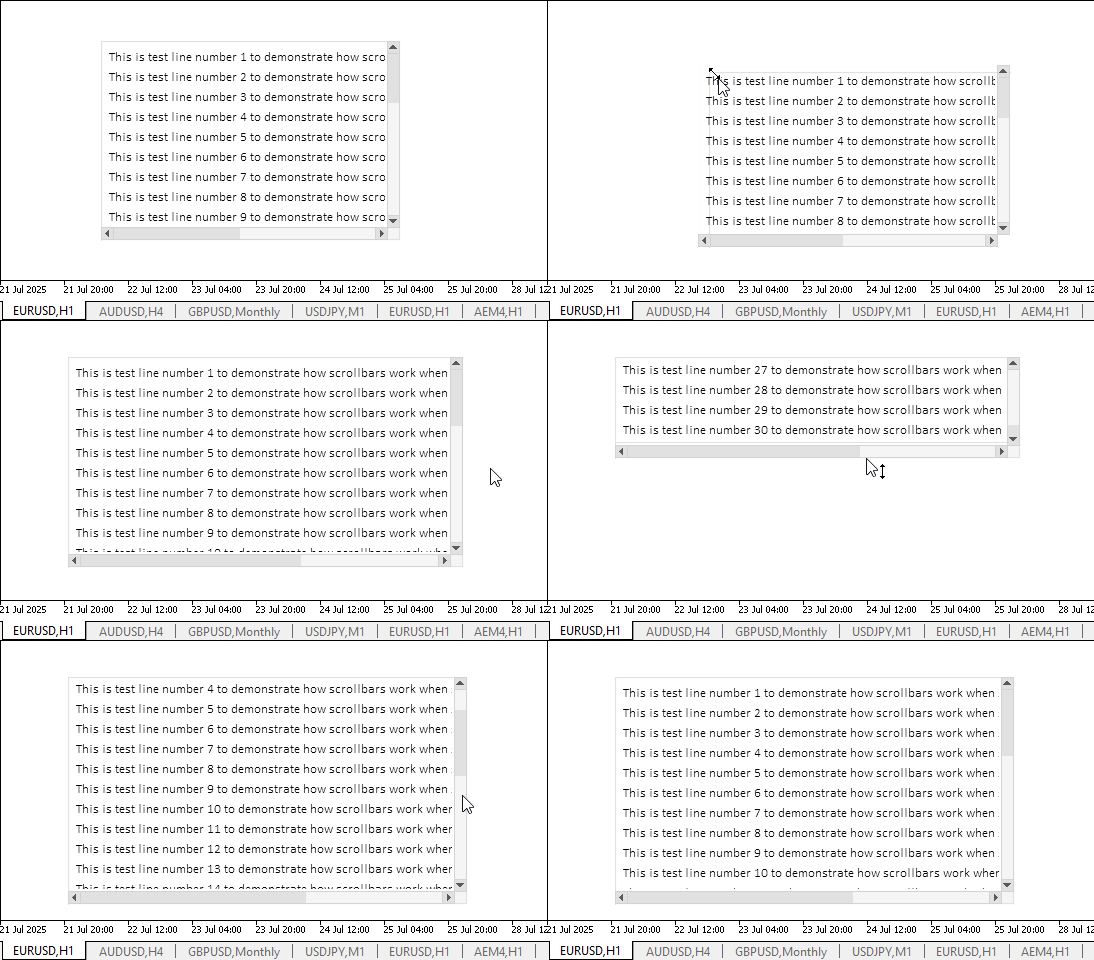
Obviamente, la funcionalidad declarada funciona correctamente. Es difícil capturar los bordes de un elemento donde entran en contacto con las barras de desplazamiento. Sin embargo, los elementos redimensionables generalmente no constan de un solo control. Como ejemplo, un elemento gráfico "Form". Tiene márgenes suficientes alrededor de los controles, gracias a las cuales es fácil encontrar el punto de agarre para arrastrar el contorno del elemento con el ratón.
Todavía existen algunas deficiencias que iremos subsanando gradualmente a medida que continuemos trabajando en la creación del elemento gráfico TableView.
Conclusión
Hoy estamos un paso más cerca de completar el trabajo en el control TableView, que nos permitirá crear y mostrar datos tabulares en nuestros programas. La implementación del componente View es bastante extensa y compleja, pero el resultado debería cubrir la mayoría de los requisitos para la representación tabular de datos y el trabajo con ellos.
En el próximo artículo, comenzaremos a crear encabezados de datos tabulares interactivos que le permitirán administrar las columnas de la tabla y sus filas.
Programas utilizados en el artículo:
| # | Nombre | Tipo | Descripción |
|---|---|---|---|
| 1 | Base.mqh | Biblioteca de clases | Clases para crear un objeto base de controles. |
| 2 | Controls.mqh | Biblioteca de clases | Clases de control |
| 3 | iTestResize.mq5 | Indicador de prueba | Indicador para probar manipulaciones con clases de controles. |
| 4 | MQL5.zip | Archivo | Un archivo comprimido con los archivos anteriores para descomprimirlo en el directorio MQL5 del terminal del cliente. |
Todos los archivos creados se adjuntan al artículo para su autoaprendizaje. El archivo comprimido se puede descomprimir en la carpeta de la terminal, y todos los archivos se guardarán en la carpeta deseada: \MQL5\Indicators\Tables\.
Traducción del ruso hecha por MetaQuotes Ltd.
Artículo original: https://www.mql5.com/ru/articles/18941
Advertencia: todos los derechos de estos materiales pertenecen a MetaQuotes Ltd. Queda totalmente prohibido el copiado total o parcial.
Este artículo ha sido escrito por un usuario del sitio web y refleja su punto de vista personal. MetaQuotes Ltd. no se responsabiliza de la exactitud de la información ofrecida, ni de las posibles consecuencias del uso de las soluciones, estrategias o recomendaciones descritas.



 De novato a experto: Noticias animadas utilizando MQL5 (VIII) Botones de operación rápida para trading de noticias
 Creación de un sistema de trading (Parte 1): Enfoque cuantitativo
 Formulación de un Asesor Experto Multipar Dinámico (Parte 4): Ajuste de volatilidad y riesgo
 Procesos gaussianos en el aprendizaje automático (Parte 1): Modelo de clasificación en MQL5

- Aplicaciones de trading gratuitas
- 8 000+ señales para copiar
- Noticias económicas para analizar los mercados financieros
Usted acepta la política del sitio web y las condiciones de uso