Symbol Manager

5
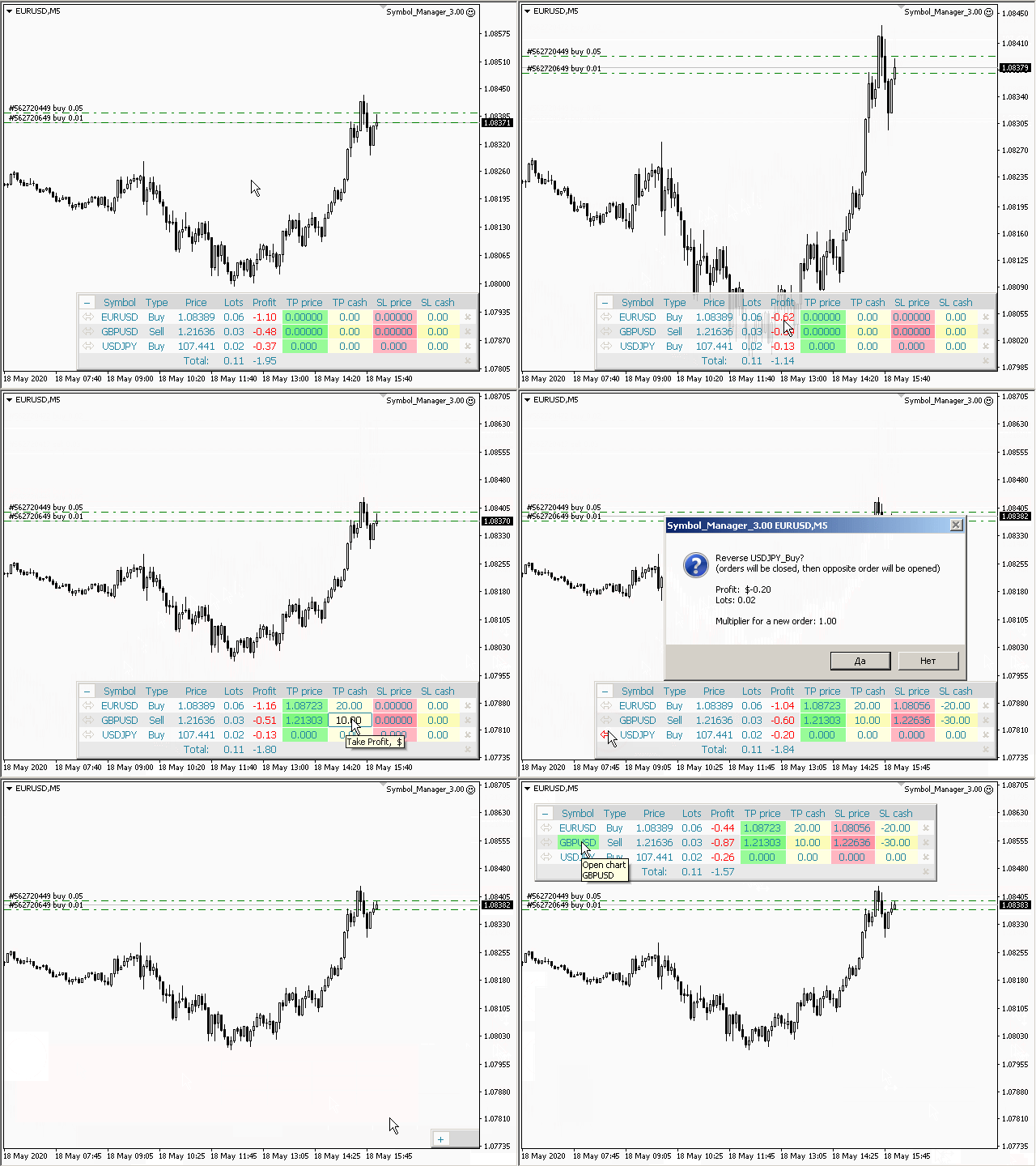
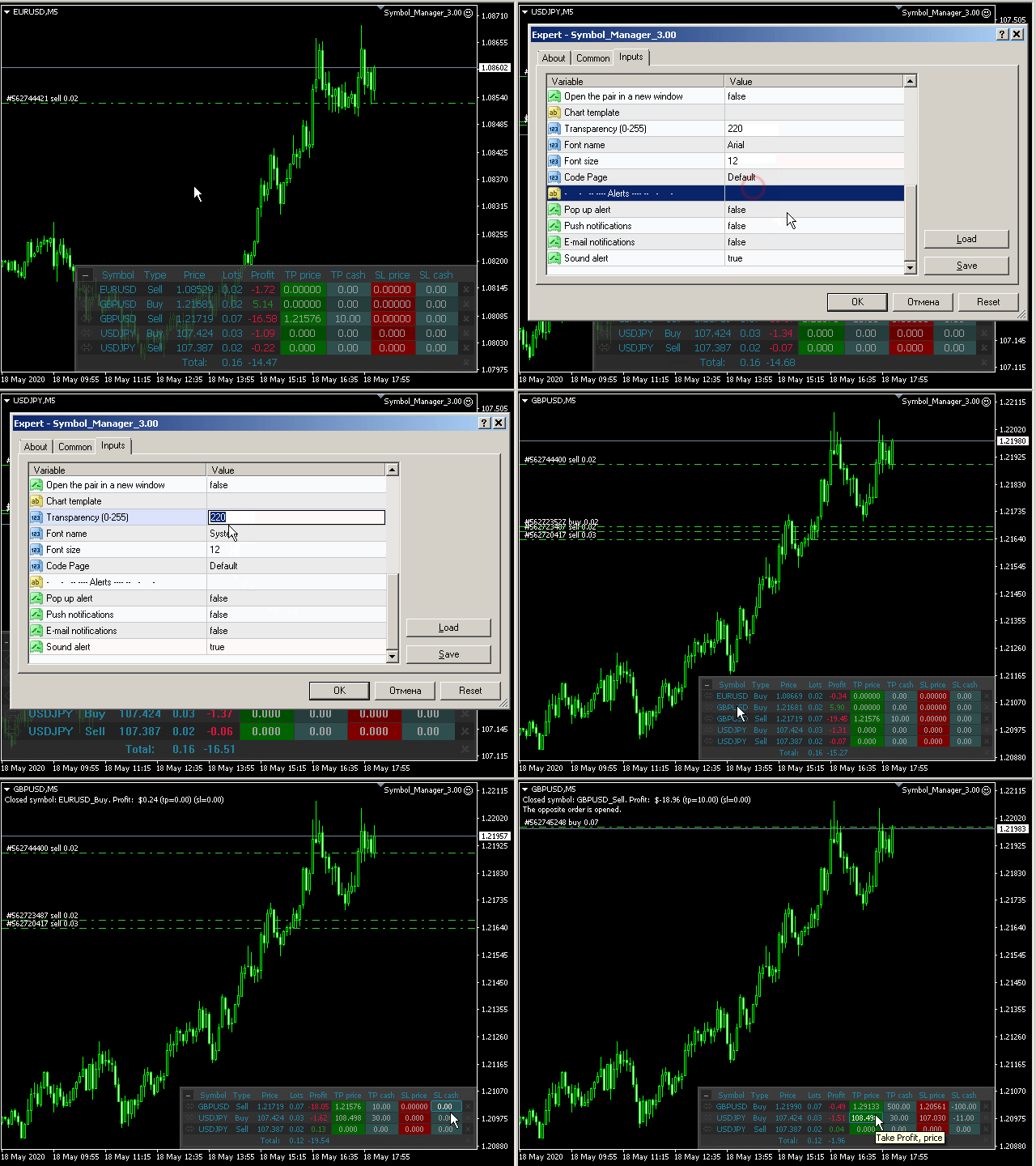
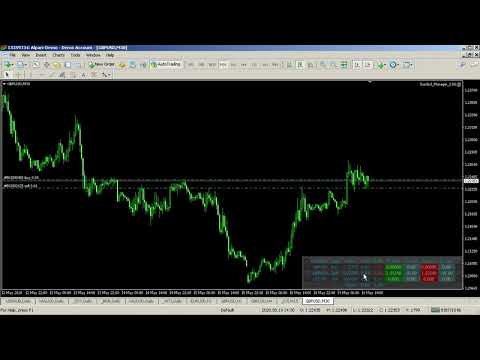
Symbol Manager or Grid Manager, designed to group orders into one position (by Symbol or by Magic Number). This utility will be useful to multi-currency traders (many EAs), who can have multiple orders on several pairs. You will be able to see the total number of lots, the total profit, and set virtual stop loss and virtual take profit. To set a real TP (or SL), you must first set the virtual value, and then enter the command in this cell: "set". If you want to set real TP/SL for all orders at once, then enter the command: "set all" or "setall".

The Symbol Manager collects orders all together into one position. So you see not dozens of orders, but positions collected by type and pair, which you can manage. EA does not trade by itself, it only does what you tell it to do.

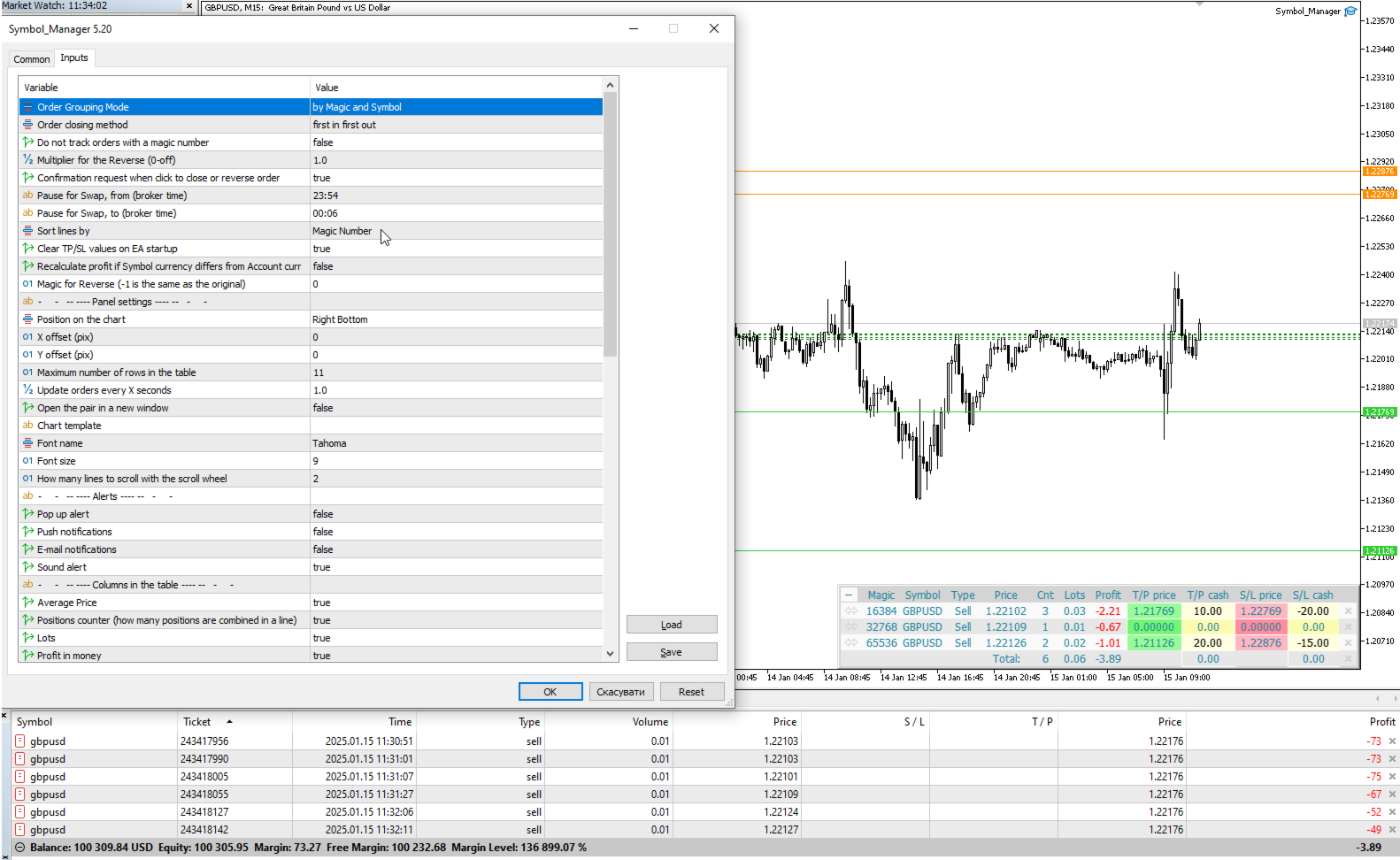
Parameters

Order Grouping Mode:
 by Symbol
 by Magic and Symbol
 do not group
Order closing method — order closing modes:
    — first in first out — (FIFO) starting from the first open orders;
    — first in last out — (FILO) starting from the last open orders;
    — profitable orders first — starting with the most profitable;
    — unprofitable orders first — starting with the least profitable;
    — first the largest volumes — starting with the largest volumes;
    — first the smallest volumes — starting with the smallest volumes;
    — without sorting — don't sort;
    Do not track orders with a magic number — do not manage orders with a magic number;
    Multiplier for the Reverse — multiplication factor for position reversal;
    Confirmation request when click to close or reverse order — ask for confirmation when closing or reversing positions;
    Show arrows on the chart when closing and opening orders — display trade arrows on the chart;
    Pause for Swap, from (broker time) — the beginning of a pause in the work of EA;
    Pause for Swap, to (broker time) — the end of a pause in the work of EA.
    Sort lines by:
     Symbol
     Price
     Type
     Lot
     Positions counter
     Magic Number
     do not sort
    Clear TP/SL values on EA startup.
    Magic for Reverse (-1 is the same as the original).
      Panel setup:
      Position on chart — the angle of the panel on the chart;
      X offset (pix) — shift the panel along the X axis;
      Y offset (pix) — shift the panel along the Y axis;
      Maximum number of rows in the table — the number of rows in the window;
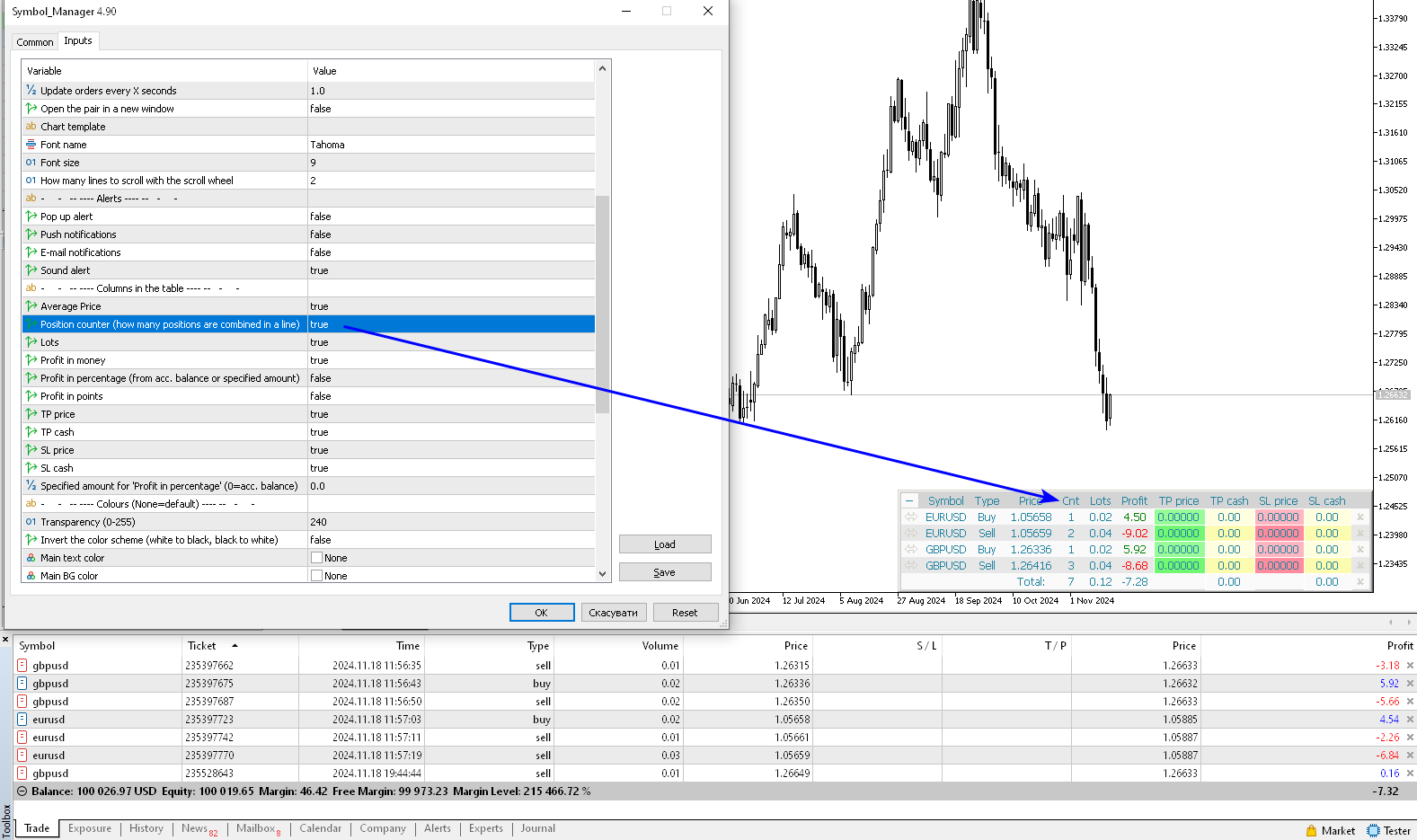
      Update orders every X seconds —  update period for all pairs and timeframes;
      Open the pair in a new window — open a symbol in a new chart window by clicking.
      Chart template — the name of the template for the chart, if the chart opens in a new window.
      Font name.
      Font size.
        Notification setup:
        Pop up alert.
        Push notifications.
        E-mail notifications.
        Sound alert.
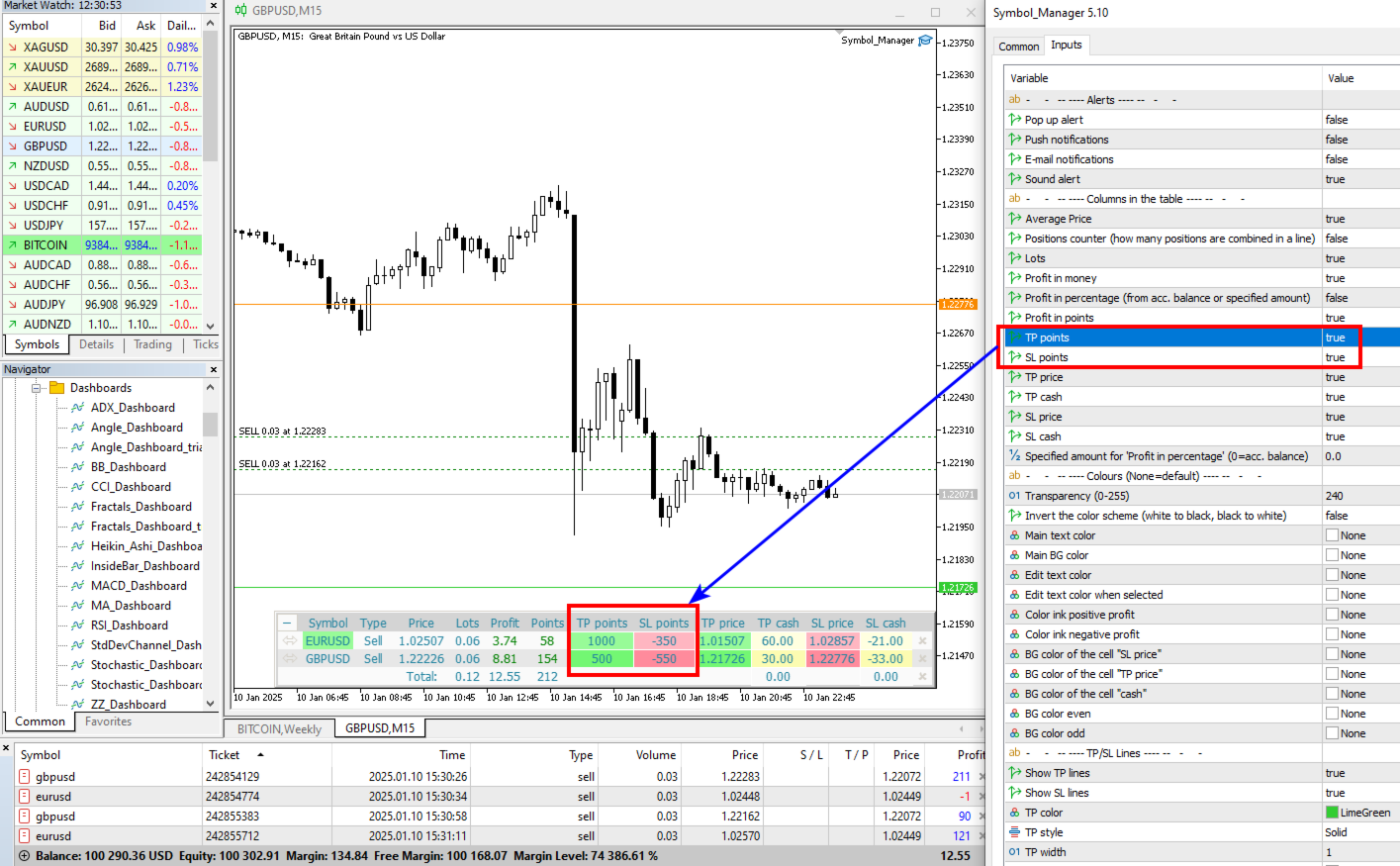
          Columns in the table:
          Average Price — show average price column;
          Positions counter — how many positions are combined in a line;
          Lots — show lots column;
          Profit in money — show profit column in deposit currency;
          Profit in percentage (from acc. balance or specified amount) — show profit column as a percentage. The percentage is calculated either from the account balance or from a given amount;
          Profit in points — show profit column in points;
          TP points — show take profit column in points;
          SL points — show stoploss column in points;
          TP price — show take profit column in prices;
          TP cash — show the take profit column in money;
          SL price — show stoploss column in prices;
          SL cash — show stoploss column in money.
          Magic Number for orders.
          Specified amount for 'Profit in percentage' (0=acc. balance) — amount for calculating the percentage, for the column "Profit in percentage".

          Colours (None=default) — here you can change the panel colors. The clrNONE color means use the default color.
          Invert the color scheme (white to black, black to white) — inverting the color scheme, black color turns to white and white to black.
          Avis 5
          GoodMorningg
          538
          GoodMorningg 2021.12.16 18:40 
           

          Очень хороший помощник в торговле. Лучшая поддержка от автора! 5 звезд

          Jia Bin Zheng
          310
          Jia Bin Zheng 2021.12.15 00:36 
           

          I like the author's products very much, but the only small feature I want to add is the sorting of the table columns, otherwise the sorting order is very messy when selecting "do not group".

          Max
          1584
          Max 2021.09.17 18:18 
           

          very good, perfect really, so useful, setting tp/sl function is so great and works perfect, text size can be changed to suit

          Produits recommandés
          Risk Commander
          Adisorn Soodkanueng
          Product Name: Risk Commander: Trade Assistant & Strategy Simulator Risk Commander is more than just a trade panel—it is a complete Manual Trading Ecosystem . It serves two powerful purposes: Live Assistant: Helps you execute trades with speed, precision, and perfect risk management in real-time markets. Training Simulator: Fully compatible with the Strategy Tester (Visual Mode) , allowing you to practice manual trading on historical data without risking a cent. NEW! Built-in Simulator Mode S
          Trade Manager MT4 DaneTrades
          Levi Dane Benjamin
          4.09 (11)
          Trade Manager pour vous aider à entrer et sortir rapidement des transactions tout en calculant automatiquement votre risque. Y compris des fonctionnalités pour vous aider à éviter le sur-trading, le trading de vengeance et le trading émotionnel. Les transactions peuvent être gérées automatiquement et les mesures de performances du compte peuvent être visualisées dans un graphique. Ces fonctionnalités rendent ce panneau idéal pour tous les traders manuels et contribuent à améliorer la plateforme
          L'indicateur montre les heures d'ouverture des bourses mondiales. Vous aide à voir quels marchés sont actuellement les plus actifs Découvrez mon  #1 Pro  Utility : 66+ fonctionnalités, incluant cet outil  |   Contactez-moi  si vous avez des questions Aide à sélectionner les instruments les plus volatils en ce moment; Particulièrement utile pour les traders intraday; 1) Lors de l'utilisation sur des délais 1H et inférieurs: les lignes correspondront à la position réelle des barres sur le graphiq
          Symbol Order Close EA was developed to handle the closing and trailing of profit per symbol. The expert can also trail by dollars and the user can specify a particular magic number in case multiple experts are used on the same account. You can close by total profit on a symbol, start trailing, stop trailing and trailing step, all in a dollar value This EA is VERY handy if you are running an expert that trades multiple symbols and ends up with a floating profit. It can also be used to close man
          VR Cub
          Vladimir Pastushak
          VR Cub est un indicateur permettant d'obtenir des points d'entrée de haute qualité. L'indicateur a été développé pour faciliter les calculs mathématiques et simplifier la recherche de points d'entrée dans un poste. La stratégie de trading pour laquelle l'indicateur a été rédigé prouve son efficacité depuis de nombreuses années. La simplicité de la stratégie de trading est son grand avantage, qui permet même aux traders débutants de négocier avec succès avec elle. VR Cub calcule les points d'ouve
          This tool will perform Trailing stop loss and Break even management for orders. Helps you limit or reduce the time spend watching orders on the screen, especially when you need to go to sleep. Just add this EA to 1 chart, you can manage all pairs. You can filter orders by comment, magic number, symbol, and order ticket number. When Breakeven it can add shift/offset pips (to cover the commission...). You can try in strategy tester before purchase. The EA will add Buy and Sell alternately, so yo
          Smartility
          Syed Oarasul Islam
          This utility is designed to help you with your Manual Trading. It allows different ways of closing trades. It can display total number of BUY and SELL orders individually and also their individual profits. It can enter trades without stopl loss and take profits. However upon selecting UseStopLossTakeProfit from the settings it can use best possible stop loss and take profits based on the market conditions. Upon selecting the CloseOppositeTrades  from the settings it can close opposite trades. Fo
          This simple but useful script calculates the lot in % of the deposit. It is indispensable for risk management. There is only one customizable parameter: MaxRisk - risk in % for lot calculation. The product works as a standard script. Launch it once on an appropriate chart and start trading using the calculated lot value. Genious is simplicity! Happy trading!
          FREE
          Symbol Cycler is a lightweight on-chart utility that lets you quickly switch between symbols in your Market Watch list using two simple arrow buttons (). With a single click, you can scroll forward or backward through your predefined symbols without leaving the chart. Key Features: One-click symbol switching from the chart Works with your Market Watch list order Buttons can be placed in any chart corner or even the center Timeframe remains locked while switching symbols Clean, responsive UI
          FREE
          You can change the time period of the chart at the touch of a button. You can also change multiple charts at the touch of a button. You can also change multiple charts at the touch of a button, saving you the trouble of changing time periods. We are live-streaming the actual operation of the system. https://www.youtube.com/@ganesha_forex We do not guarantee your investment results. Investments should be made at your own risk. We sharll not be liable for any disadvantage or damage caused by th
          This script is designed to automatically open charts for all available forex pairs on the MetaTrader 4 platform, as well as the gold (XAUUSD) chart. The script iterates through all symbols available on the platform, determines which of them are forex pairs, and opens their charts on the M1 (one minute) timeframe. Key Features: Gold Chart Opening: The script automatically opens the XAUUSD (gold/dollar) chart if this symbol is available from your broker. If the gold symbol is not found, an error m
          Smart Key Trade Manager
          Stephen Sanjeeve Sahayam
          La plupart des commerçants de détail ne peuvent pas gérer les risques et faire exploser les comptes en surrisquant ou en surnégociant. Cet outil automatise entièrement la gestion des prélèvements et des risques, laissant un trader se concentrer uniquement sur ses entrées. C'est le premier et le seul trade manager qui utilise l'action des prix avec sa fonction Aggressive Risk Control pour clôturer automatiquement des positions partielles lorsque le prix va à l'encontre du trade. Cela garantit q
          Three 3TP Easy Trade Pad Expert for MT4 – Download The 3TP Easy Trade Pad Expert is an advanced tool designed for capital management, risk control, and streamlined trading within the MetaTrader 4 (MT4) platform. With its functional and specialized interface, this expert advisor allows traders to effortlessly set and manage Stop Loss (SL) and Take Profit (TP) levels. In addition to simplifying trade execution, the tool provides features for defining acceptable risk, expected profit (R/R), and adv
          PZ Trade Pad EA
          PZ TRADING SLU
          4.27 (30)
          This simple visual expert advisor allows you to trade easily from the chart. It handles risk management for you and can perform several useful tasks with your existing trades, saving time and making risk-management for each individual trade easier.  [ Installation Guide | Update Guide | Troubleshooting | FAQ | All Products ] Trade easily from the chart Trade with precise risk management, hassle free Trade pending order with drag and drop price selection Set SL and TP levels with drag and drop pr
          FREE
          TP SL Bot
          Ruslan Brezovskiy
          TP SL Bot - un utilitaire qui définit automatiquement les Stop Loss et Take Profit pour les nouveaux ordres ouverts de différentes manières selon vos indications. Il dispose également d'une fonction de calcul du volume nécessaire pour ouvrir un trade afin d'atteindre le montant souhaité avec la taille de Stop Loss/Take Profit spécifiée. Il existe plusieurs façons de calculer la taille et de définir les paramètres : 1. Réglages basés sur le montant spécifié par l'utilisateur en pourcentage du sol
          ASTA Trade Manager is a semi-automated trading tool designed to assist professional traders in Exit Strategy Management . This EA will not open trading positions automatically. This version is made to manage manual transactions on 1 chart (pair) only. For the Multipair version, you can check the product at:  ASTA Multipair Trade Manager . FEATURES: 1. Entry and Exit Panel Order Panel: Buy, Sell and Pending Orders Exit Button: Close All Order, Close All Buy, Close All Sell Can be used on strategy
          The utility displays in a convenient form the historical trades made on the account. You can filter trades by magic or comcent, display only profitable or losing trades, and only buy or sell trades. Using this utility, you can see trade entry and exit points, stop loss and take profit levels, trade profit, magic number and comment, order ticket and order size - you only need to run the utility on the chart of the currency pair you want information on get and customize the input parameters. MT5
          News Scalping Executor Pro is an utility which helps to trade high impact and huge volatility   news . This utility helps to create two opposite orders with risk management and profit protection. It moves automatically stop loss level to avoid losses as much as possible by using many different algorithms. It helps to avoid trading the news if spread suddenly becomes very huge. It can lock profit by moving stop loss or partially closing of orders. To be profitable with this type of trading you
          The indicator displays the data of the Stochastic oscillator from a higher timeframe on the chart. The main and signal lines are displayed in a separate window. The stepped response is not smoothed. The indicator is useful for practicing "manual" forex trading strategies, which use the data from several screens with different timeframes of a single symbol. The indicator uses the settings that are identical to the standard ones, and a drop-down list for selecting the timeframe. Indicator Paramet
          Magic Balance
          Daniil Evstratenko
          The indicator shows which trading pairs, strategies, robots and signals that you use are profitable and which are not. The statistic of trades and balance graph are displayed in the account currency and pips - to switch simply click on the graph. button "$"(top left) - minimize/expand and move the indicator panel button ">"(bottom right) - stretching and resetting to the original size Statistic of trades 1 line - account balance, current profit and lot of open trades; 2 line - the number of all
          Fast Trade Copier
          Volodymyr Hrybachov
          4.2 (5)
          The trade copier is designed for a fast and accurate copying of orders between the MetaTrader 4 terminals. The trade copier copies trades from the Master account to the Slave account by writing information to the total file, which is located in the common directory of the MetaTrader 4 terminals. This allows the trade copier to either customize various schemes for receiving and transmitting trade signals by changing the file name. Reading and writing the copier file is performed by timer. The tra
          Lucky Trade Panel MT4
          Nina Yermolenko
          5 (1)
          Trading panel for manual trading. Has a fairly wide functionality. Allows you to automatically calculate the order size, open both market and pending orders. It has a wide range of options for closing orders, it is possible to partially close orders, close orders after reaching a certain profit or loss, separately close profitable and unprofitable, buy and sell, as well as pending orders. The panel also contains a simple implementation of a grid of pending orders, reverse and lock functions, tr
          Free Self Binary Tester
          Aleksander Antonov
          5 (1)
          Tester for binary options, strategies and indicators. It allows you to test yourself, test strategies and indicators on binary options. The EA does not perform any real deals! It is for testing purposes only. It can be run both on a live chart, and in the MetaTrader 4 Strategy Tester. MetaTrader 4 provides numerous indicators, you can attach them to the chart and test indefinitely. There are two buttons on the chart, Call and Put, as well as a field for specifying the lot. During testing, it dis
          FREE
          "Auto FIBO Pro" Crypto_Forex indicator - est un excellent outil auxiliaire dans le trading ! - L'indicateur calcule et place automatiquement sur le graphique les niveaux de Fibo et les lignes de tendance locales (couleur rouge). - Les niveaux de Fibonacci indiquent les zones clés où le prix peut s'inverser. - Les niveaux les plus importants sont 23,6 %, 38,2 %, 50 % et 61,8 %. - Vous pouvez l'utiliser pour le scalping inversé ou pour le trading en grille de zones. - Il existe également de nomb
          Trade Assistant Pro 36 in 1
          Makarii Gubaydullin
          4.76 (21)
          Outil Multifonction : Calculatrice de Lots, Ordres Grid, Ratio R/R, Gestionnaire de Trades, Zones d'Offre et de Demande, Price Action et bien plus Version Démo   |   Manuel d'utilisation L'Assistant de Trading ne fonctionne pas dans le testeur de stratégies : vous pouvez télécharger la Version Démo ICI pour tester l' utilitaire . Contactez-moi pour toute question / idées d'amélioration / en cas de bug trouvé Si vous avez besoin d'une version MT5, elle est disponible ici Simplifiez, accélérez et
          Commodity Channel Index Message is an indicator for the MetaTrader 4 trading platform. Unlike the original indicator, this three in one version has a system of alerts that inform on market situation changes. It consists of the following signals: when the Main line crosses the levels of extreme zones and 50% level; when the Main line crosses the Trend line in the indicator window; Divergence on the last bar. Values of the middle and extreme levels and divergence zones are customizable. Parameter
          Trade panel manual is a multifunctional trading assistant. It allows you to open market and pending orders in one click. Value is set via button menu edit or deleted by specific buttons pending orders and the value of take profit and stop loss in one click. Through the edit menu of the button, a value is set that can be easily changed by simply moving level_tp lines for take profit or stop loss levels and for pending orders. It is possible to select orders and determine for them and set the leve


          Close All Selected Chart Overview: This is one of the smart choices to help you make your trading management a lot easier. Especially when you have to manage a large number of orders. This utility will work like a helping hand to close all the unrelated order windows in less than no time, plus without making any kind of unwanted effects. :: 3 simple steps to use :: 1. Select your chart window.  2. Click "Close All" 3. Click "OK" Note: For the better understanding on how this utility works, plea
          Crypto_Forex Indicator HTF Ichimoku pour MT4. - L'indicateur Ichimoku est l'un des indicateurs de tendance les plus puissants. HTF signifie - Higher Time Frame. - Cet indicateur est excellent pour les traders de tendance ainsi que pour la combinaison avec les entrées Price Action. - L'indicateur HTF Ichimoku vous permet d'attacher Ichimoku d'une période plus élevée à votre graphique actuel. - Tendance à la hausse - ligne rouge au-dessus de la bleue (et les deux lignes sont au-dessus du nuage)
          Virtual Collider Manual   is a trading assistant with a built-in panel for manual trading. It automatically moves a position opened by a trader in profit using innovative adaptive grid algorithm of averaging and adaptive pyramiding Know-how of the grid algorithm of averaging and pyramiding of the   Virtual Collider Manual   trading robot is based on fully automatic adaptation of all characteristics of dynamically build order grid and pyramid with actual price movement with no need for adjusting
          Les acheteurs de ce produit ont également acheté
          Local Trade Copier EA MT4
          Juvenille Emperor Limited
          4.96 (105)
          Découvrez une expérience exceptionnellement rapide de copie de trades avec le Local Trade Copier EA MT4 . Avec sa configuration facile en 1 minute, ce copieur de trades vous permet de copier des trades entre plusieurs terminaux MetaTrader sur le même ordinateur Windows ou Windows VPS avec des vitesses de copie ultra-rapides de moins de 0.5 seconde. Que vous soyez un trader débutant ou professionnel, le Local Trade Copier EA MT4 offre une large gamme d'options pour le personnaliser en fonction d
          Trade Assistant MT4
          Evgeniy Kravchenko
          4.42 (192)
          It helps to calculate the risk per trade, the easy installation of a new order, order management with partial closing functions, trailing stop of 7 types and other useful functions. Additional materials and instructions Installation instructions   -   Application instructions   -   Trial version of the application for a demo account Line function -   shows on the chart the Opening line, Stop Loss, Take Profit. With this function it is easy to set a new order and see its additional characteris
          Bienvenue sur Trade Manager EA, l’outil ultime de gestion des risques conçu pour rendre le trading plus intuitif, précis et efficace. Ce n’est pas seulement un outil d’exécution d’ordres ; c’est une solution complète pour la planification des trades, la gestion des positions et le contrôle des risques. Que vous soyez débutant, trader expérimenté ou scalpeur ayant besoin d’une exécution rapide, Trade Manager EA s’adapte à vos besoins, offrant une flexibilité sur tous les marchés, des devises et i
          Unlimited Trade Copier Pro is a tool to copy trade remotely to multiple MT4, MT5 and cTrader accounts at different computers/locations over internet. This is an ideal solution for you if you are a signal provider and want to copy your trades to other receivers globally on your own rules. One provider can copy trades to multiple receivers and one receiver can get trade from multiple providers as well. The provider can even set the subscription expiry for each receiver, so that receiver will not b
          Le MT4 to Telegram Signal Provider est un outil facile à utiliser et entièrement personnalisable qui permet d'envoyer des signaux à Telegram, transformant ainsi votre compte en fournisseur de signaux. Le format des messages est entièrement personnalisable ! Cependant, pour une utilisation simple, vous pouvez également opter pour un modèle prédéfini et activer ou désactiver des parties spécifiques du message. [ Démonstration ]   [ Manuel ] [ Version MT5 ] [ Version Discord ] [ Canal Telegram ]  N
          Exp COPYLOT CLIENT for MT4
          Vladislav Andruschenko
          4.69 (65)
          Copieur commercial pour MetaTrader 4.       Il copie les transactions de change, les positions et les ordres de tous les comptes. C'est l'un des meilleurs copieurs commerciaux       MT4 - MT4, MT5 - MT4       pour le       COPYLOTE MT4       version (ou       MT4 - MT5 MT5 - MT5       pour le       COPYLOTE MT5       version). Version MT5 Description complète   +DEMO +PDF Comment acheter Comment installer     Comment obtenir des fichiers journaux     Comment tester et optimiser     Tous les p
          The product will copy all telegram signal to MT4   ( which you are member  ) , also it can work as remote copier.  Easy to set up, copy order instant, can work with almost signal formats, image signal, s upport to translate other language to English Work with all type of channel or group, even channel have "Restrict Saving Content", work with  multi channel, multi MT5 Work as remote copier: with signal have ticket number, it will copy exactly via ticket number. Support to backtest signal. How to
          Strategy Builder offers an incredible amount of functionality. It combines a trade panel with configurable automation (covert indicators into an EA), real-time statistics (profit & draw down) plus automatic optimization of SL, TP/exit, trading hours, indicator inputs. Multiple indicators can be combined into an single alert/trade signal and can include custom indicators, even if just have ex4 file or purchased from Market. The system is easily configured via a CONFIG button and associated pop-up
          TradePanel MT4
          Alfiya Fazylova
          4.84 (89)
          Trade Panel est un assistant commercial multifonctionnel. L'application contient plus de 50 fonctions de trading pour le trading manuel et vous permet d'automatiser la plupart des opérations de trading. Attention, l'application ne fonctionne pas dans le testeur de stratégie. Avant d'acheter, vous pouvez tester la version démo sur un compte démo. Version démo ici . Instructions complètes ici . Commerce. Permet d'effectuer des opérations de trading en un clic : Ouvrez des ordres et des positions e
          The News Filter
          Leolouiski Gan
          5 (25)
          Ce produit filtre tous les conseillers experts et les graphiques manuels pendant les heures de publication des actualités, de sorte que vous n'avez pas à vous soucier des pics de prix soudains qui pourraient détruire vos configurations de trading manuelles ou les transactions entrées par d'autres conseillers experts. Ce produit est également livré avec un système de gestion des ordres complet qui peut gérer vos positions ouvertes et vos ordres en attente avant la publication de toute actualité.
          Trade Dashboard MT4
          Fatemeh Ameri
          4.96 (53)
          Tired of complex order placement and manual calculations? Trade Dashboard is your solution. With its user-friendly interface, placing orders becomes effortless, by a single click, you can open trades, set stop loss and take profit levels, manage trade lot size, and calculate risk to reward ratios, allowing you to only focus on your strategy. Say goodbye to manual calculations and streamline your trading experience with Trade Dashboard. Download  Demo Version  right now. You can find  Details of
          VirtualTradePad mt4 Extra
          Vladislav Andruschenko
          4.86 (59)
          Panneau de trading pour trader en 1 clic.   Travailler avec des positions et des commandes!   Trading à partir du graphique ou du clavier. En utilisant notre panel de trading, vous pouvez trader en un clic à partir du graphique et effectuer des opérations de trading 30 fois plus rapidement que le contrôle MetaTrader standard. Des calculs automatiques de paramètres et de fonctions qui facilitent la vie d'un trader et aident un trader à mener ses activités de trading beaucoup plus rapidement et pl
          News Filter EA: Advanced Algo Trading Assistant News Filter EA is an advanced algo trading assistant designed to enhance your trading experience. By using the   News Filter EA , you can integrate a Forex economic news filter into your existing expert advisor, even if you do not have access to its source code. In addition to the news filter, you can also specify   trading days   and   hours   for your expert. The News Filter EA also includes   risk management   and   equity protection   features
          Consultez instantanément l'historique de vos transactions clôturées par jour et par semaine, vos transactions ouvertes actuelles et votre exposition au forex sur un seul graphique ! Utilisez la carte thermique pour identifier les transactions rentables et où se situe votre baisse actuelle au sein de votre portefeuille de trading. Boutons de fermeture rapide Utilisez les boutons de fermeture rapide pour clôturer chaque transaction sur un seul symbole, clôturer des transactions individuelles en
          Copy Cat More Trade Copier MT4 (Copie Chat MT4) n’est pas seulement un simple copieur de trades local ; c’est un cadre complet de gestion des risques et d’exécution conçu pour les défis actuels du trading. Des challenges de prop firms à la gestion de comptes personnels, il s’adapte à chaque situation grâce à une combinaison d’exécution robuste, de protection du capital, de configuration flexible et de traitement avancé des opérations. Le copieur fonctionne en mode Master (émetteur) et en mode Sl
          EchoTrade Telegram to MT4 Copier
          Perpetual Chinemerem Vincent
          5 (2)
          EchoTrade Telegram to MT5 Copier Seamless, Instant, and Reliable Signal Copying - Direct from Telegram to MetaTrader 4! The product does not run in the strategy tester but you can get free trial version   here  for testing before purchase. Tired of manually executing trades from Telegram signals? EchoTrade automates the process, instantly copying trades from any Telegram channel or group directly into your MT5 account—accurately, efficiently, and without delay. Key Features: Universal Compatib
          Grid Manual MT4
          Alfiya Fazylova
          4.71 (17)
          Grid Manual est un panneau de trading permettant de travailler avec une grille d'ordres. L'utilitaire est universel, possède des paramètres flexibles et une interface intuitive. Il fonctionne avec une grille d'ordres non seulement dans le sens des pertes, mais aussi dans le sens de l'augmentation des profits. Le commerçant n'a pas besoin de créer et de maintenir une grille d'ordres, l'utilitaire le fera. Il suffit d'ouvrir une ordre et "Grid Manual" créera automatiquement une grille de ordres po
          Everything for chart Technical Analysis indicator MT4 in one tool Draw your supply demand zone with rectangle and support resistance with trendline and get alerts to mobile phone or email alert -  Risk reward indicator Video tutorials, manuals, DEMO download   here .  Find contacts on my   profile . 1.   Extended rectangles and trendlines Object will be extended to the right edge of the chart when price will draw new candles on chart. This is rectangle extender or trendline extender. 2. Price to
          Ultimate Extractor - Professional Trading Analytics for MT4 Ultimate Extractor transforms your MetaTrader 4 trading history into actionable insights with comprehensive analytics, interactive charts, and real-time performance tracking. Ability to combine multiple accounts and MT4 and MT5 into a single dashboard. What It Does Automatically analyzes your MT4 trading history across all Expert Advisors and generates detailed HTML reports with interactive visualizations. Tracks live performance metric
          Trading History MT4
          Siarhei Vashchylka
          5 (9)
          Trading History - A program for trading and money management on the history of quotes in stratagy tester. It can work with pending and immediate orders, and is equipped with trailing stop, breakeven and take profit functions. Very good for training and testing different strategies. Manual (Be sure to read before purchasing) Advantages 1. Allows you to test any trading strategy in the shortest possible time 2. An excellent simulator for trading training. You can gain months of trading experience
          Exp4 Duplicator
          Vladislav Andruschenko
          4.5 (22)
          L'Expert Advisor   répète les   transactions et les positions un nombre prédéfini de fois sur votre compte   MetaTrader 4   . Il copie toutes les transactions ouvertes manuellement ou par un autre Expert Advisor. Copie les signaux et augmente le lot des signaux   ! Augmente le lot des autres EA. Les fonctions suivantes sont prises en charge : lot personnalisé pour les transactions copiées, copie du Stop Loss, Take Profit, utilisation du stop suiveur. Version MT5 Description complète +DEMO +PDF
          This EA is fully automated , it is built based on  the method of catching the pop-up Alert event and Open Market Orders (BUY/SELL) . Download trial version here:  https://www.mql5.com/en/blogs/post/751340 ***NOTE:   It is recommended to remove the available filter settings, only install the filter for your indicator. Parameters of the EA: -------- <EA Settings> -------- Magic Number:   The identifying (magic) number of the currently selected order. Allow Open trade:   Enable/ Disable Open Trade
          Trade Reverse Copie4
          Chukwuemeka Kingsley Anyanwu
          Feel free to contact me for any extra features :) [SEE MT5 VERSION  https://www.mql5.com/en/market/product/128846 The Local Reverse Copier is an Expert Advisor designed to synchronize positions between a Master account and a Slave account with a twist: it reverses the trades. When a buy position is opened on the Master account, the EA opens a sell position on the Slave account, and vice versa. This allows for a unique form of trade copying where positions are mirrored in opposite directions bet
          Seconds Chart — un outil unique pour créer des graphiques en secondes dans MetaTrader 4 . Grâce à Seconds Chart , vous pouvez créer un graphique avec une période définie en secondes, offrant une flexibilité et une précision idéales pour l'analyse, indisponibles sur les graphiques standards en minutes ou en heures. Par exemple, la période S15 indique un graphique avec des bougies d'une durée de 15 secondes. Vous pouvez utiliser n'importe quel indicateur, expert advisor (EA) ou script. Leur utilis
          Copieur ->Interaction d'interface pratique et rapide, les utilisateurs peuvent l'utiliser immédiatement       ->>>> Recommandé pour une utilisation sur des ordinateurs Windows ou VPS Windows Caractéristiques: Paramètres de copy trading diversifiés et personnalisés : 1. Différents modes de lot peuvent être définis pour différentes sources de signaux 2. Différentes sources de signaux peuvent être définies pour le copy trading avant et arrière 3. Les signaux peuvent être définis avec des commentai
          Custom Alerts AIO : Surveillez tous les marchés à la fois — sans aucune configuration Présentation Custom Alerts AIO est une solution de surveillance du marché prête à l’emploi, sans configuration nécessaire. Tous les indicateurs requis — FX Power, FX Volume, FX Dynamic, FX Levels, IX Power — sont directement intégrés. Aucun graphique n’est affiché, ce qui rend cet outil idéal pour la génération d’alertes en temps réel. Il prend en charge toutes les classes d’actifs proposées par votre courtie
          EasyTrade MT4
          Alain Verleyen
          5 (1)
          Easy Trade – Gestion des transactions intelligente, simple et puissante Easy Trade est la solution tout-en-un pour la gestion des transactions destinée aux utilisateurs de MetaTrader souhaitant garder le contrôle du risque et assurer une exécution fluide. Conçu dès le départ avec les retours des traders, Easy Trade facilite l'exécution, la surveillance et la gestion des transactions sur plusieurs symboles – sans complexifier votre flux de travail. Que vous pratiquiez le scalping manuel ou que
          Simple Assistant for Trading Precise  Risk Management in each Automatic Money Management Visual Trading Open Position Management User friendly and practical during 15 years of  considerable experience in stock market, we have dealt with many professional traders who have been used profitable and unrivalled methods in this market but failed in the long term. The reason is undoubtedly the lack of standard in their manner during their trade. Standard means the accurate repetition of a process….
          Négociez automatiquement les zones de support et de résistance ou d'offre et de demande une fois que vous avez identifié les zones clés à partir desquelles vous souhaitez négocier. Cet EA vous permet de dessiner des zones d'achat et de vente en un seul clic, puis de les placer exactement là où vous vous attendez à ce que le prix change. L'EA surveille ensuite ces zones et effectuera automatiquement des transactions en fonction de l'action des prix que vous spécifiez pour les zones. Une fois la
          Le Risk/Reward Tool est un Expert Advisor de niveau professionnel conçu pour révolutionner la façon dont vous planifiez, visualisez et exécutez vos trades dans MetaTrader 4. Que vous soyez un trader discrétionnaire qui valorise une gestion précise des risques ou un développeur de stratégies qui a besoin de tester visuellement des configurations de trading, cet outil fournit tout ce dont vous avez besoin dans une interface élégante et intuitive. Contrairement aux calculateurs de position basiques
          Plus de l'auteur
          Easy Grider
          Taras Slobodyanik
          4.5 (2)
          The EA creates an order grid using labels. Opening and closing of the grid is done either automatically by the system signals or manually. In the same grid can be both Limit and Stop orders. It is possible to reverse the grid on specified condition. You can enter the breakdown/rebound from established levels. All types of Sell limit, Buy limit, Buy stop, Sell stop orders are supported. The grid is rebuilt with a single click. The stop loss and take profit lines can be easily modified. You are fr

          Time Scale for MT5
          Taras Slobodyanik
          4.75 (28)
          The indicator draws the time scale on the chart. You can specify the time offset, adjust the size and font to display on the chart ( it is displaying your local time on your chart instead of MT time ). You can also select the desired format for displaying the date and time. You may be interested in my other product , which contains a more advanced version of the Time Scale . You can also find my other products here Parameters Hours (time shift) — time shift (hours); Minutes (time shift) — time
          FREE
          Modification multidevises et multitemporelles de l’indicateur Relative Strength Index (RSI). Vous pouvez spécifier les devises et les délais souhaités dans les paramètres. En outre, le panneau peut envoyer des notifications lors du franchissement des niveaux de surachat et de survente. En cliquant sur une cellule avec un point, ce symbole et ce point seront ouverts. Il s'agit du scanner MTF. La clé pour masquer le tableau de bord du graphique est "D" par défaut. Semblable au Currency Strength
          Lines Profit Loss MT5
          Taras Slobodyanik
          4.62 (13)
          L'indicateur affiche le profit (la perte) sur le symbole actuel. Vous pouvez librement faire glisser et déposer la ligne pour afficher le profit ou la perte actuel. Vous pouvez retrouver mes produits   ici Paramètres Calculation in money or in points — calculez le profit/la perte en points ou en argent. Add pending orders to calculate — prenez en compte les commandes en attente dans les calculs. Magic Number (0 - all orders on symbol) — nombre magique, s'il est nécessaire d'évaluer des comma
          FREE
          News Dashboard MT4
          Taras Slobodyanik
          4.5 (8)
          This dashboard displaying current news from ForexFactory.com (calendar FFC) and from the Investing.com website . You can sort news by impact and by country, and display them on the chart with one click. By holding down the 'Ctrl' key, you can select several different 'currencies' or 'impacts' to sort. Also, this utility shows not only the forecast, but also the actual values ​​after they appear on the site. You can set a separate notification for each news. You can read the news using your EA


          ADX Dashboard
          Taras Slobodyanik
          5 (5)
          L'indicateur ADX est utilisé pour déterminer la tendance et sa force. La direction du prix est indiquée par les valeurs +DI et -DI, ​​et la valeur ADX montre la force de la tendance. Si +DI est supérieur à -DI, ​​alors le marché est dans une tendance haussière, si au contraire, c'est une tendance baissière. Si l’ADX est inférieur à 20, il n’y a pas de direction définie. Dès que l'indicateur dépasse ce niveau, une tendance de force moyenne commence. Les valeurs supérieures à 40 indiquent une ten
          ADX Dashboard MT5
          Taras Slobodyanik
          5 (4)
          L'indicateur ADX est utilisé pour déterminer la tendance et sa force. La direction du prix est indiquée par les valeurs +DI et -DI, ​​et la valeur ADX montre la force de la tendance. Si +DI est supérieur à -DI, ​​alors le marché est dans une tendance haussière, si au contraire, c'est une tendance baissière. Si l’ADX est inférieur à 20, il n’y a pas de direction définie. Dès que l'indicateur dépasse ce niveau, une tendance de force moyenne commence. Les valeurs supérieures à 40 indiquent une ten
          The Gann Box (or Gann Square) is a market analysis method based on the "Mathematical formula for market predictions" article by W.D. Gann. This indicator can plot three models of Squares: 90, 52(104), 144. There are six variants of grids and two variants of arcs. You can plot multiple squares on one chart simultaneously. Parameters Square — selection of a Gann square model: 90 — square of 90 (or square of nine); 52 (104) — square of 52 (or 104); 144 — universal square of 144; 144 (full) — "fu
          Multicurrency and multitimeframe modification of the indicator Bollinger Bands. On the dashboard you can see breakouts and touches of the Bollinger Bands. In the parameters you can specify any desired currencies and timeframes. The indicator can also send notifications when the price touches the Bollinger Bands, when the current volatility changes (expands or falls), and when the price touches all the bands. By clicking on a cell with a period, this symbol and period will be opened. This is MTF
          Multicurrency and multi-timeframe indicator Inside Bar (IB). In the parameters, you can specify any desired currencies and timeframes. The panel displays the last found Inside Bar (and Mother Bar) pattern, the current price position and the breakout of the levels of the Mother and Inside Bars. You can set the size and color for bars and text in the cells. The indicator can also send notifications when levels are broken. The dashboard highlights Double Inside Bar in a special color. By clicking
          Pro Sessions MT5
          Taras Slobodyanik
          5 (1)
          This is an indicator of trading sessions  that can display all levels (Open-High-Low-Close) for four sessions . The indicator can also predict session levels. Sessions can be drawn with lines or rectangles (empty or filled), lines can be extended to the next session. You can easily hide/show each session by pressing hotkeys (by default '1', '2', '3', '4'). You can see ASR (Average Session Range) lines  (default hotkey 'A'). This is similar to the ADR calculation, only it is calculated based on
          Modification multidevises et multitemporelles de l'oscillateur stochastique. Vous pouvez spécifier les devises et les délais souhaités dans les paramètres. Le panneau affiche les valeurs actuelles et les intersections des lignes — Signal et Principal (croisement stochastique). En outre, l'indicateur peut envoyer des notifications lors du franchissement des niveaux de surachat et de survente. En cliquant sur une cellule avec un point, ce symbole et ce point seront ouverts. Il s'agit du scanner M
          ZigZag Lines MTF for MT5
          Taras Slobodyanik
          5 (11)
          Multi timeframe ZigZag indicator. It displays the support/resistance horizontal lines and their breakouts, as well as draws the current targets of the market. It can also display lines of the Fractals indicator and candles from other periods (up to Quarterly). So, you can actually see the supply and demand levels. Indicator – connects key lows and highs to show trend lines. You can also use it as indicator for the Break of Structure(BOS) & Market Structure Shift(MSS). The indicator redraws the
          ZigZag Dashboard for MT5
          Taras Slobodyanik
          5 (4)
          Multicurrency and multitimeframe modification of the ZigZag indicator. Displays the current direction of the market, the height of the last movement, the number of bars in this movement and the breaking of the previous point of the ZigZag (horizontal line). This is MTF Scanner, you can actually see the supply and demand levels. You can specify any desired currencies and timeframes in the parameters. Also, the panel can send notifications when the ZigZag changes direction or when there was a br
          CCI Dashboard for MT4
          Taras Slobodyanik
          5 (3)
          Multicurrency and multitimeframe modification of the Commodity Channel Index (CCI) indicator. You can specify any desired currencies and timeframes in the parameters. Also, the panel can send notifications when crossing overbought and oversold levels. By clicking on a cell with a period, this symbol and period will be opened. This is MTF Scanner. The key to hide the dashboard from the chart is "D" by default. Parameters CCI Period — averaging period. CCI Applied price — price type. Clear the
          Lines Profit Loss
          Taras Slobodyanik
          4.63 (16)
          L'indicateur affiche le profit (la perte) sur le symbole actuel. Vous pouvez librement faire glisser et déposer la ligne pour afficher le profit ou la perte actuel. Vous pouvez retrouver mes produits ici Paramètres Calculation in money or in points — calculez le profit/la perte en points ou en argent. Add pending orders to calculate — prenez en compte les commandes en attente dans les calculs. Magic Number (0 - all orders on symbol) — nombre magique, s'il est nécessaire d'évaluer des commande
          FREE
          Pro Sessions MT4
          Taras Slobodyanik
          4.75 (4)
          This is an indicator of trading sessions  that can display all levels (Open-High-Low-Close) for four sessions. The indicator can also predict session levels. Sessions can be drawn with lines or rectangles (empty or filled), lines can be extended to the next session. You can easily hide/show each session by pressing hotkeys (by default '1', '2', '3', '4'). You can see ASR (Average Session Range) lines  (default hotkey 'A'). This is similar to the ADR calculation, only it is calculated based on t
          ZigZag Lines MTF
          Taras Slobodyanik
          4.38 (13)
          Multi timeframe ZigZag indicator. It displays the support/resistance horizontal lines and their breakouts, as well as draws the current targets of the market. It can also display lines of the Fractals indicator and candles from other periods (up to Quarterly). So, you can actually see the supply and demand levels. Indicator – connects key lows and highs to show trend lines. You can also use it as indicator for the Break of Structure(BOS) & Market Structure Shift(MSS). The indicator redraws the
          Time Scale
          Taras Slobodyanik
          4.87 (15)
          The indicator draws the time scale on the chart. You can specify the time offset, adjust the size and font to display on the chart (it is displaying your local time on your chart instead of MT time). You can also select the desired format for displaying the date and time. While holding down the middle mouse button, and moving the cursor, a slider will appear on the scale. You may be interested in my other product , which contains a more advanced version of the Time Scale. You can also find my o
          FREE
          Modification multidevises et multitemporelles de l'oscillateur stochastique. Vous pouvez spécifier les devises et les délais souhaités dans les paramètres. Le panneau affiche les valeurs actuelles et les intersections des lignes — Signal et Principal (croisement stochastique). En outre, l'indicateur peut envoyer des notifications lors du franchissement des niveaux de surachat et de survente. En cliquant sur une cellule avec un point, ce symbole et ce point seront ouverts. Il s'agit du scanner M
          ZigZag Dashboard for MT4
          Taras Slobodyanik
          4.8 (5)
          Multicurrency and multitimeframe modification of the ZigZag indicator. Displays the current direction of the market, the height of the last movement, the number of bars in this movement and the breaking of the previous point of the ZigZag (horizontal line). This is MTF Scanner, you can actually see the supply and demand levels. You can specify any desired currencies and timeframes in the parameters. Also, the panel can send notifications when the ZigZag changes direction or when there was a br
          CCI Dashboard for MT5
          Taras Slobodyanik
          5 (1)
          Multicurrency and multitimeframe modification of the Commodity Channel Index (CCI) indicator. You can specify any desired currencies and timeframes in the parameters. Also, the panel can send notifications when crossing overbought and oversold levels. By clicking on a cell with a period, this symbol and period will be opened. This is MTF Scanner. The key to hide the dashboard from the chart is "D" by default. Parameters CCI Period  — averaging period. CCI Applied price  — price type. Clear th
          Gann Square of 144
          Taras Slobodyanik
          5 (6)
          The Gann Box (or Gann Square) is a market analysis method based on the "Mathematical formula for market predictions" article by W.D. Gann. This indicator can plot three models of Squares: 90, 52(104), 144. There are six variants of grids and two variants of arcs. You can plot multiple squares on one chart simultaneously. Parameters Square — selection of a Gann square model: 90 — square of 90 (or square of nine); 52 (104) — square of 52 (or 104); 144 — universal square of 144; 144 (full) — "fu
          Multicurrency and multitimeframe modification of the indicator Bollinger Bands. On the dashboard you can see breakouts and touches of the Bollinger Bands. In the parameters you can specify any desired currencies and timeframes. The indicator can also send notifications when the price touches the Bollinger Bands, when the current volatility changes (expands or falls), and when the price touches all the bands. By clicking on a cell with a period, this symbol and period will be opened. This is MTF
          The indicator has three main tools: Magnifier (Zoom chart), Ruler  ( Time and Price scales ),   and Crosshair. You can move it all around with your mouse and customize different formats for  displaying , customize   size and color of each element. The Magnifier (zoom chart) allows you to display candles from any time frame and at different scales. Hotkeys: 'Q' - higher timeframe, 'A' - lower timeframe, 'W' - decrease candle size, 'S' - increase candle size, 'Z' - show/hide zoom chart You can
          The indicator has three main tools: Magnifier (Zoom chart), Ruler  ( Time and Price scales ),   and Crosshair. You can move it all around with your mouse and customize different formats for  displaying , customize   size and color of each element. The Magnifier (zoom chart) allows you to display candles from any time frame and at different scales. Hotkeys: 'Q' - higher timeframe, 'A' - lower timeframe, 'W' - decrease candle size, 'S' - increase candle size, 'Z' - show/hide zoom chart. You can
          Inside Bar Dashboard
          Taras Slobodyanik
          5 (3)
          Multicurrency and multi-timeframe indicator Inside Bar (IB). In the parameters, you can specify any desired currencies and timeframes. The panel displays the last found Inside Bar (and Mother Bar) pattern, the current price position and the breakout of the levels of the Mother and Inside Bars. You can set the size and color for bars and text in the cells. The indicator can also send notifications when levels are broken. The dashboard highlights Double Inside Bar in a special color. By clicking
          Heikin Ashi Dashboard
          Taras Slobodyanik
          5 (5)
          Multi-currency and multitimeframe Heikin Ashi indicator. Shows the current state of the market. On the scanner panel you can see the direction, strength and number of bars of the current trend. The Consolidation/Reversal candles are also shown using color. You can specify any desired currencies and periods in the parameters. Also, the indicator can send notifications when the trend changes or when reversal and consolidation candles (dojis) appear. By clicking on a cell, this symbol and period wi
          Multi-currency and multitimeframe Heikin Ashi indicator. Shows the current state of the market. On the scanner panel you can see the direction, strength and number of bars of the current trend. The Consolidation/Reversal candles are also shown using color. You can specify any desired currencies and periods in the parameters. Also, the indicator can send notifications when the trend changes or when reversal and consolidation candles (dojis) appear. By clicking on a cell, this symbol and period wi
          MA Dashboard
          Taras Slobodyanik
          4.5 (2)
          Modification multidevises et multitemporelles de l'indicateur Moving Average (MA). Sur le tableau de bord, vous pouvez voir l'état actuel de l'indicateur - les cassures et les touches (par prix) du Fast MA et du Slow MA, ainsi que l'intersection des lignes MA entre elles (croisement de moyenne mobile). Dans les paramètres, vous pouvez spécifier les devises et les délais souhaités. En outre, l'indicateur peut envoyer des notifications sur le prix touchant les lignes et sur leur franchissement. E
          Filtrer:
          GoodMorningg
          538
          GoodMorningg 2021.12.16 18:40 
           

          Очень хороший помощник в торговле. Лучшая поддержка от автора! 5 звезд

          Jia Bin Zheng
          310
          Jia Bin Zheng 2021.12.15 00:36 
           

          I like the author's products very much, but the only small feature I want to add is the sorting of the table columns, otherwise the sorting order is very messy when selecting "do not group".

          Taras Slobodyanik
          91397
          Réponse du développeur Taras Slobodyanik 2021.12.16 11:39
          Added the "Sort symbols alphabetically" parameter.
          Max
          1584
          Max 2021.09.17 18:18 
           

          very good, perfect really, so useful, setting tp/sl function is so great and works perfect, text size can be changed to suit

          Taras Slobodyanik
          91397
          Réponse du développeur Taras Slobodyanik 2021.09.17 18:24
          You can change the 'Font size' and the whole panel will become larger.
          Hisayoshi Muramatsu
          570
          Hisayoshi Muramatsu 2020.08.20 11:41 
           

          L'utilisateur n'a laissé aucun commentaire sur la note

          jcnovoa21
          750
          jcnovoa21 2020.06.07 01:23 
           

          I like it! Its pretty usefull and it helps to use better your space when trading while seeing all the information. The programmer is very kind! I asked for some modifications to the code and he did it quite soon. I really like this tool!

          Répondre à l'avis