 MetaTrader 5
 Uzmanlar
 Göstergeler
 Kütüphaneler
 Yardımcı programlar
 Widget'lar
 Kurallar
YouTube'dan Mağaza ile ilgili öğretici videoları izleyin
Bir alım-satım robotu veya gösterge nasıl satın alınır?
Uzman Danışmanınızı
sanal sunucuda çalıştırın
sanal sunucuda çalıştırın
Satın almadan önce göstergeyi/alım-satım robotunu test edin
Mağazada kazanç sağlamak ister misiniz?
Satış için bir ürün nasıl sunulur?
MetaTrader 5 için alım-satım yardımcı programları
 Aşağıda MetaTrader 5'te işlem yapmayı kolaylaştıran alım-satım programları bulunmaktadır. Açıklamasını ve amacını okumak için aşağıdaki listeden ürünün üzerine gelin.
It helps to calculate the risk per trade, the easy installation of a new order, order management with partial closing functions, trailing stop of 7 types and other useful functions.
Additional materials and instructions
Installation instructions - Application instructions
Line function - shows on the chart the Opening line, Stop Loss, Take Profit. With this function it is easy to set a new order and see its additional characteristics before opening. Risk management - The risk calculation

Trade Manager EA’ye hoş geldiniz! Ticaretin daha sezgisel, hassas ve verimli hale gelmesi için tasarlanmış nihai risk yönetim aracı ile tanışın. Bu sadece bir emir verme aracı değil; ticaret planlaması, pozisyon yönetimi ve risk kontrolü için kapsamlı bir çözüm. İster yeni başlayan bir yatırımcı olun, ister deneyimli bir trader ya da hızlı emir gerektiren bir scalper, Trade Manager EA ihtiyaçlarınıza uyum sağlar ve forex, endeksler, emtialar ve kripto paralar dahil tüm piyasalarda esneklik sunar

Farmed Hedge Yield Farming | All Markets
(Manual - Hybrid - Semi/Automated EA)
VERIFIED TRADING RESULTS - Farmed Hedge Yield Axi Copy: https://www.mql5.com/en/signals/2356376 - Farmed Hedge Yield Exn Copy: https://www.mql5.com/en/signals/2356404
- Farmed Hedge Yield V Copy: https://www.mql5.com/en/signals/2357156
IMPORTANT NOTICE: FarmedHedge is a MANUAL-FOCUSED TRADING UTILITY ,not a fully automated EA.
Results shown on this Signal include manual trades and overall strategic management.

Telegram to MT5 Multi-Channel Copier , Telegram ve Discord kanallarınızdaki alım-satım sinyallerini doğrudan MetaTrader 5'e otomatik kopyalar. Bot yok, tarayıcı uzantısı yok, elle kopyalama yok. Sinyal Telegram'a veya Discord'a düşer ve EA birkaç saniye içinde terminalinizde işlemi açar. Ve bir kanalı kopyalamadan önce, yerleşik backtester o kanalın hesabınızda ne yapmış olacağını gösterir. Ürün iki bileşenden oluşur: Telegram kanallarınızı dinleyen bir Windows uygulaması ve sinyalleri MT5 ter

Local Trade Copier EA MT5, aynı Windows bilgisayarı veya Windows VPS üzerinde çalışan birden fazla MetaTrader 5 hesabı arasında işlemleri kopyalamak ve yönetmek için hızlı ve esnek bir işlem kopyalayıcıdır. Yerel işlem senkronizasyonunu, Receiver tarafında lot büyüklüğü, risk yönetimi, işlem filtreleme, sembol eşleştirme, işlem yönetimi ve hesap koruması kontrolleriyle birleştirir. Transmitter ve Receiver terminallerinizi yaklaşık 1 dakika içinde ayarlayın ve aynı veya farklı brokerlardaki hesa

Trade Panel, çok işlevli bir ticaret asistanıdır. Uygulama, manuel ticaret için 50'den fazla ticaret fonksiyonu içerir ve çoğu ticaret görevini otomatikleştirmeyi mümkün kılar. Uygulama talimatları: https://www.mql5.com/en/blogs/post/756482 Demo hesabı için uygulamanın deneme sürümü: https://www.mql5.com/en/blogs/post/750865 Uygulamayı nasıl kurulur: https://www.mql5.com/en/blogs/post/756239 Uygulamayı görsel modda nasıl test edilir: https://www.mql5.com/en/blogs/post/770277 Uygulamayı VPS MetaT

Telegram sinyallerini kendi işlem kurallarınızla kopyalayın Telegram to MT5 Signal Trader , herkese açık ve özel Telegram kanallarındaki ve gruplarındaki metin tabanlı işlem sinyallerini otomatik olarak MetaTrader 5'e kopyalar. Tek bir masaüstü uygulamasından birden fazla sinyal sağlayıcısını ve MT5 hesabını yönetin; her sağlayıcı için ayrı risk ve işlem ayarları belirleyin. Sinyal kopyalamak için Telegram botu veya API kurulumu gerekmez. Kendi Telegram hesabınızla telefon numarası veya QR kod k

Şimdi Türkçe dil desteği ile. Strategy Ledger Pro , MetaTrader 5 için salt okunur bir hesap analiz panelidir. Hesap sonuçlarını Uzman Danışman (EA), strateji, sembol ve magic numaraya göre ayırır; böylece her birinin gerçekte ne kattığını görürsünüz. Panel 11 dilde kullanılabilir: English, Français, Deutsch, Español, Italiano, Português, Русский, Türkçe, 中文, 日本語 ve 한국어. Demoyu indirmeden önce. Market, her ücretli ürünün demosunu yalnızca Strateji Test Cihazında çalıştırır. Bu panel kendi hesabı

================================================================================ POC BREAKOUT - V20.72. Full Professional Grade Toolkit ================================================================================ POC Breakout is a full MetaTrader 5 trading dashboard for discretionary traders who want breakout signals, Point of Control (POC) context, volume profiles, order flow, market structure, news, alerts, and advanced trade planning in one professional workspace. Attached directly to you

REVDEN AI Desk: Trading'inizi Kendi Yapay Zekanızla Tek Bir Sohbetten Yönetin, REVDEN'in Piyasa Bağlamıyla Trading'inizi tek bir sohbetten yönettiğinizi düşünün. REVDEN AI Desk bunu MetaTrader 5'e getiriyor: kendi yapay zekanıza piyasayı nasıl okuduğunu sorarsınız, o da işlem yaptığınız semboller hakkında REVDEN'in tam bağlamından, yani durumlarından, risk görünümlerinden ve yaklaşan açıklamalardan yanıt verir. Önerileri giriş, stop, hedef ve riskle gelir; uygun olanları siz onaylarsınız. Kurall

VirtualTradePad PRO SE MT5 — MetaTrader 5 için profesyonel işlem kontrol merkezi VirtualTradePad PRO SE , MetaTrader 5 için grafik tabanlı premium bir işlem paneli ve trade yönetim çalışma alanıdır. Daha hızlı emir yürütme, daha net pozisyon kontrolü, yapılandırılmış trade yönetimi, görsel seviye planlama ve doğrudan grafik üzerinden profesyonel bir çalışma akışı isteyen traderlar için tasarlanmıştır. Bu yalnızca basit bir BUY / SELL paneli değildir. PRO SE; manuel işlem, bekleyen emirler, pozis

MetaTrader 5 için profesyonel işlem kopyalayıcı MetaTrader için hızlı, profesyonel ve güvenilir bir işlem kopyalayıcı .
COPYLOT , MT4 ve MT5 terminalleri arasında Forex işlemlerini kopyalamanıza olanak tanır ve Hedge ile Netting hesaplarını destekler. COPYLOT MT5 sürümü şunları destekler:
- MT5 Hedge → MT5 Hedge
- MT5 Hedge → MT5 Netting
- MT5 Netting → MT5 Hedge
- MT5 Netting → MT5 Netting
- MT4 → MT5 Hedge
- MT4 → MT5 Netting MT4 sürümü Tam açıklama + DEMO + PDF Nasıl satın alınır Nasıl kurul

The product will copy all telegram signal to MT5 ( which you are member) , also it can work as remote copier. Easy to set up, copy order instant, can work with almost signal formats, image signal, s upport to translate other language to English Work with all type of channel or group, even channel have "Restrict Saving Content", work with multi channel, multi MT5 Work as remote copier: with signal have ticket number, it will copy exactly via ticket number. Support to backtest signal. How to s
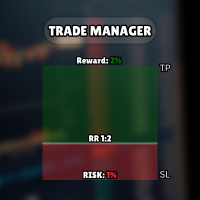
Diğer ürünlerime göz atın: Buraya tıklayın Görsel İşlem Kolaylaştı: Giriş, Zarar Durdur ve Kâr Al seviyelerinizi ayarlamak için grafiğinizde yatay çizgileri yerleştirin ve sürükleyin. Ne görüyorsanız onu alırsınız. Görsel çizgiler, işlem kurulumunuz hakkında size anında netlik sağlar. Otomatik Lot Büyüklüğü Hesaplama: Niyet ettiğinizden daha fazlasını riske atmayı bırakın. Riskinizi sabit bir miktar para veya hesap bakiyenizin bir yüzdesi (ör. %1) olarak ayarlayın. EA, zarar durdurma mesafenize
FREE

Birkaç yıldır kullandığım çok yararlı bir robotu tanıtıyorum. Hem yarı otomatik hem de tam otomatik modlarda kullanılabilir. >>> Chat <<<
Program, ekonomik takvim haberlerinde esnek ticaret ayarlarını içeriyor. Stratejiler test cihazında kontrol edilemez. Sadece gerçek bir iş. Ayarların en son arşivini indirin: https://www.mql5.com/en/blogs/post/747929 Sinyal izleme: https://www.mql5.com/en/signals/author/test-standart Bu bilirkişi için kendi ayarlar setinizi oluştururken, blogdaki tüm paramet

MT5 to Telegram Signal Provider , hesabınızı bir sinyal sağlayıcı haline getirerek belirtilen sinyalleri Telegram'ın sohbetine, kanalına veya grubuna göndermeyi sağlayan kullanımı kolay, tamamen özelleştirilebilir bir araçtır. Rakip ürünlerin çoğunun aksine, DLL içe aktarması yapmaz. [ Demo ] [ Kılavuz ] [ MT4 Versiyonu ] [ Discord Versiyonu ] [ Telegram Kanalı ] New: [ Telegram To MT5 ]
Kurulum Adım adım bir kullanıcı kılavuzu mevcuttur. Telegram API'si hakkında bilgi gerekmemektedir; ihtiyac

Seconds Chart - MetaTrader 5 için saniye bazlı grafikler oluşturmanıza olanak sağlayan eşsiz bir araçtır. Seconds Chart sayesinde saniye cinsinden zaman dilimleriyle grafik oluşturabilir, standart dakika veya saatlik grafiklerde mümkün olmayan esneklik ve analiz hassasiyetine ulaşabilirsiniz. Örneğin, S15 zaman dilimi 15 saniyelik mum çubuklarını ifade eder. Desteklenen özel sembollerle herhangi bir gösterge ve danışman kullanabilirsiniz. Onlarla çalışmak, standart grafiklerde işlem yapmak kadar

The Patch
It never opens a trade. It walks behind the ones that did.
Every open position, every pending order — checked twice a second for the one thing that's easy to forget: a stop, a target. Found bare, it doesn't ask. It writes the missing number in, measured in points from wherever the position began, and moves on to the next.
No strategy, no opinion on direction. Just the quiet assumption that nothing should ever sit on the market unprotected — not because someone decided it shouldn't,

That backtest looks great. But will it still be making money tomorrow, next week, next month?
EA Overfitter re-runs your EA on 100 price histories it has never seen. One score tells you if the edge is real.
A backtest tells you what an EA did on one price history — the one that happened to occur. What you cannot tell from it is how much of that result was the strategy and how much was the particular path.
EA Overfitter answers that. It builds up to 100 synthetic price histories your EA has n

HINN MAGIC ENTRY – the ultimate tool for entry and position management!
SIMPLE. FASTEST. INTUITIVE. MAX AUTOMATED. Place orders by selecting a level directly on the chart!
full description :: demo-version :: 60-sec-video-description
Key features:
- Market, limit, and pending orders
- Automatic lot size calculation
- Automatic spread and commission accounting
- Unlimited partitial take-profits
- Breakeven and trailing stop-loss and take-profit functions
- Invalidation leves
- Intuitive, a

Trade Copier, ticaret hesapları arasındaki işlemleri kopyalamak ve senkronize etmek için tasarlanmış profesyonel bir yardımcı programdır. Kopyalama, tedarikçinin hesabından/terminalinden alıcının aynı bilgisayarda veya vps'de kurulu olan hesabına/terminaline gerçekleşir. Satın almadan önce demo sürümünü bir demo hesabında test edebilirsiniz. Demo versiyonu burada . Tüm talimatlar burada . Ana işlevler ve avantajlar: Emirlerin kopyalanmasını destekler: МТ5> МТ5, МТ4> МТ5, МТ5> МТ4. Emirlerin kopy

Riskinizi otomatik olarak hesaplarken işlemlere hızlı bir şekilde girip çıkmanıza yardımcı olacak Ticaret Yöneticisi. Aşırı Ticaret, İntikam Ticareti ve Duygusal Ticaretten korunmanıza yardımcı olacak özellikler içerir. İşlemler otomatik olarak yönetilebilir ve hesap performans ölçümleri bir grafikte görselleştirilebilir. Bu özellikler, bu paneli tüm manuel yatırımcılar için ideal kılar ve MetaTrader 5 platformunun geliştirilmesine yardımcı olur. Çoklu Dil desteği. MT4 Sürümü | Kullanım Kılavu

RETAILBERG FOOTPRINT CHART PRO — Order-Flow Workspace for MetaTrader 5 Version 7.00 | Professional System | 31 tools | One chart
A full 150-page illustrated User Manual is included. Please read the full manual to understand this feature packed footprint chart elements and ui. https://www.mql5.com/en/blogs/post/777982 DEMO / STRATEGY TESTER — PLEASE READ FIRST

Demo ve gerçek hesaplarda grafikten işlem hazırlamanıza ve yönetmenize yardımcı olur. Lot büyüklüğü seçtiğiniz risk ayarlarından hesaplanabilir. Görsel Buy ve Sell çizgileri grafiğe yerleştirilip taşınabilir, ardından emir göndermek için kullanılabilir.
Pozisyon büyüklüğü seçenekleri: Sabit lot Nakit risk Bakiye yüzdesi Equity yüzdesi
Kısmi kâr alma: Grafikte en fazla üç kısmi kâr alma seviyesi Her seviye, seçilen fiyattan pozisyonun bir kısmını kapatabilir Seviyeler işlem çizgileriyle görsel
FREE

Trade Indicator Assistant is a powerful MT5 utility designed to turn indicators into automated trading systems. Its main feature is the ability to automatically detect an indicator’s BUY and SELL signal buffers , without requiring you to know the buffer numbers, search through indicator settings, or modify the indicator source code. Bonus Indicator: After purchasing Trade Indicator Assistant, contact me to receive Trade Signal Pro completely free as a bonus indicator.
[Download Demo V

Timeless Charts, profesyonel yatırımcılar için hepsi bir arada bir trading aracıdır. Saniye Grafikleri ve Renko gibi özel grafik türlerini, Footprints , Clusters , Hacim Profilleri , VWAP çalışmaları ve gelişmiş piyasa analizi sağlayan sabitlenmiş analiz araçlarıyla gelişmiş emir akışı analiziyle birleştirir. İşlem ve pozisyon yönetimi, entegre işlem yönetim paneli aracılığıyla doğrudan grafik üzerinden gerçekleştirilirken, Market Replay ve Sanal Hesaplar trading becerileri ve stratejileri üzeri

Floor Watch
One number, watched every thirty seconds: how far equity has fallen since the day began — or since its highest point, if it's told to trail the peak instead of the open.
Cross the line and it doesn't argue. Every open position closes, every pending order vanishes, and anything that slips through afterward gets shut the moment it appears. Not asked. Removed. The floor holds until the clock turns 5 AM Pakistan time — then, and only then, does the day start over.
One rule. No except

Sonraki Güncelleme — Sürüm 2.52 Çok Yakında! [YENİ] Piyasa Analizinizi ve İşlem Sürecinizi Geliştirmek İçin Tasarlanmış 4 Büyük Yeni Özelliğe Hazır Olun İşlem ihtiyaçlarınızı karşılamak üzere tasarlanmış 4 yeni özellikle piyasa analizini bir üst seviyeye taşıyoruz. İşte yeni özellikler: TRADE OVERVIEW DASHBOARD CONFLUENCE AT ZONE STRONG & WEAK HIGH/LOW OTE 1. TRADE OVERVIEW DASHBOARD Piyasanın genel görünümünü daha kolay anlamanıza yardımcı olan, işlem kararlarınızı desteklemek için rehberlik s

25% discount on the release of the tool: only for the next 3 buyers Send a message to receive a demo version. AstroTrade Trading Assistant
AstroTrade is a comprehensive multi-functional trading utility developed for the MetaTrader 5 platform. It integrates essential tools for trade execution, risk management, and technical monitoring into a single unified interface. The application is designed to assist traders in managing their daily operations through a visual and structured environment.
Vi

Telegram To MT5 — Sinyal Kopyalayıcı Telegram kanallarınızdaki işlem çağrılarını gerçek MT5 emirlerine dönüştürün — otomatik olarak, istediğiniz kadar hesapta ve risk ile kurallar tamamen sizin kontrolünüzde. Telegram To MT5, Telegram'da zaten takip ettiğiniz VIP / sinyal kanallarını MetaTrader 5 terminalinize bağlar. Ücretsiz bir eşlik eden masaüstü uygulaması mesajları okur (botlara izin vermeyen kanallardan bile), ve bu Expert Advisor bunları hesabınızda yürütür — kendi risk ayarlarınızı, sem

Telegram'dan MT5'e: Nihai Sinyal Kopyalama Çözümü Telegram'dan MT5'e işlemlerinizi basitleştirin, DLL'lere ihtiyaç duymadan işlem sinyallerini doğrudan Telegram kanallarından ve sohbetlerinden MetaTrader 5 platformunuza kopyalayan modern araç. Bu güçlü çözüm hassas sinyal yürütme, kapsamlı özelleştirme seçenekleri sağlar, zamandan tasarruf sağlar ve verimliliğinizi artırır. [ Instructions and DEMO ] Temel Özellikler Doğrudan Telegram API Entegrasyonu Telefon numarası ve güvenli kod ile kimlik

RS Trade Copier - gerçek grafik arayüze sahip, ultra hızlı yerel işlem kopyalayıcı. Hesap numaralarını elle girmeyi bırakın. Artık 200'den fazla anlaşılmaz giriş parametresiyle uğraşmak yok. Birden fazla MT5 ve MT4 terminali arasında işlem operasyonlarını kopyalamak için güvenilir ve esnek bir araçtır. Hem profesyonel yatırımcılar, sinyal hizmetleri hem de bireysel yatırımcılar için uygundur. Bir veya birden fazla Sağlayıcıdan bir veya birden fazla Alıcıya ticareti senkronize eder ve bunu yüksek

MT5 Professional Copy Trading System (MT5 Sürümü) MT5 Professional Copy Trading System, profesyonel traderlar, sinyal sağlayıcılar ve kurumsal düzeyde çoklu hesap yönetimi için tasarlanmış, endüstriyel seviyede ultra hızlı bir LOCAL işlem kopyalama sistemi dir. Tipik perakende veya bulut tabanlı kopyalama araçlarından farklı olarak, bu sistem aynı Windows ortamında çalışan birden fazla terminal için optimize edilmiş LOCAL bir mimari üzerine kurulmuştur. Endüstriyel LOCAL Mimari
LOCAL tasarım sa

ScalperBoleta Ultra — MetaTrader 5 İşlem Paneli ScalperBoleta Ultra , MetaTrader 5 için geliştirilmiş, scalping ve gün içi işlemlere odaklanan manuel bir işlem panelidir. Emir yürütme, pozisyon yönetimi ve risk kontrolü işlevlerini doğrudan grafik üzerinde bir araya getirerek işlem süreçlerinde kolaylık ve operasyonel verimlilik sağlar. Başlıca Özellikler: Alış ve Satış: Ekran üzerindeki düğmeler veya klavye kısayolları aracılığıyla emir gerçekleştirme. Pozisyon Yönetimi: Açık pozisyonları tamam

MetaTrader 5 için Trading Panel — grafik ve klavyeden profesyonel tek tıkla işlem kontrolü Aktif traderlar için geliştirilmiş güçlü bir Trading Panel; işlemleri standart MetaTrader arayüzüne göre çok daha hızlı açmanıza, yönetmenize ve kapatmanıza yardımcı olur. Bu çözüm; pozisyonları, bekleyen emirleri, toplam kârı ve işlem yürütmesini tek bir profesyonel çalışma alanında kontrol etmek isteyen kullanıcılar için tasarlanmıştır. Bu sadece sıradan bir yardımcı araç değildir. MetaTrader 5 için ger

Chart Drawing Toolkit is a complete drawing and chart-analysis workspace for MetaTrader 5 . It places more than 50 drawing and markup tools in one fast, clean panel that docks to the edge of your chart, so every manual analysis tool you need is a single click away. It runs as an indicator, so it works alongside your Expert Advisors and other indicators on the same chart. JOIN ALL OUR TOOLS public channel for UPDATES: CLICK HERE . Read the detailed TOOL ROADMAP in this post: CLICK TO READ POST .
FREE

Trade Dashboard simplifies how you open, manage, and control your trades, with built-in lot size calculation. It allows you to execute trades, manage risk, and control positions directly on the chart, with tools such as partial close, breakeven, and trailing stop. Designed to reduce manual work and help you stay focused on your trading decisions. A demo version is available for testing. Detailed explanations of features are provided within the MQL5 platform. Installation instructions are include
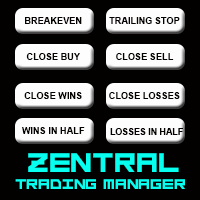
Zentral Manager Your Command Center for Precision Trading — Now Stronger than Ever Take control of your trades like never before.
Zentral Trading Manager is your all-in-one manual trading panel for MetaTrader 5 — built for scalpers, day traders, and serious strategy execution. Fully compatible with both Mac and Windows laptops. High-DPI safe. No more layout issues. Key Features (Latest 2025 Update): • One-Click Close – Instantly close Buy/Sell, winning/losing trades, or even half positions with

Your EAs cannot see each other, but Anchor can. Anchor gives you one place to coordinate your EAs, manage risk, and decide when trading is allowed. It works alongside the trading bots you already use without any changes to them. The Problem One EA opens a trade. Then another starts trading. The next thing you know, you wake up to multiple grids built across your account. Each EA may be doing exactly what it was designed to do, but together they can place far more risk on your account than you in

Master Your Trading Discipline
Stop losing your hard-earned gains to overtrading and emotional decisions. The Discipline Tool is your ultimate trading assistant, ensuring strict risk management in real-time. Key Protection Features: Advanced Drawdown Defense : Automatically halts trading if your daily drawdown exceeds a preset threshold (percentage or dollar amount). Real-Time Equity Lock : Safeguard profits by referencing peak equity, ensuring drawdown stays within control. Hard Profit Target

Power Candles Strateji Tarayıcısı - Kendi Kendini Optimize Eden Çoklu Sembol Kurulum Bulucu Power Candles Strateji Tarayıcısı , Power Candles göstergesini çalıştıran aynı kendinden optimize edici motoru, Piyasa İzleyicinizdeki her sembol üzerinde yan yana çalıştırır. Tek bir panel, şu anda istatistiksel olarak hangi sembollerin işlem yapılabilir olduğunu, her birinde hangi stratejinin kazandığını, en uygun Stop Loss / Take Profit çiftini gösterir ve yeni bir sinyal geldiği anda size bildirim gön

Grid Manual, sipariş ızgarasıyla çalışmak için kullanılan bir ticaret yardımcı programıdır. Yardımcı program evrenseldir, esnek ayarlara ve sezgisel bir arayüze sahiptir. Sadece kayıpların ortalaması yönünde değil, aynı zamanda kazanç artışı yönünde de bir emir ızgarası ile çalışır. Tüccarın bir emir ızgarası oluşturmasına ve eşlik etmesine gerek yoktur, bu yardımcı programı yapacaktır. Emri açmanız yeterlidir ve Grid manual otomatik olarak ona bir emir ızgarası oluşturacak ve kapanana kadar ona

Dealer's Panel
No signal decides anything here — a hand does. One click, and the panel calculates what's underneath: lot size from risk, target from a 30-step balance ladder that remembers exactly how far an account has climbed.
Toggle between market and pending without touching an input field. Set a stop, and the take-profit can write itself — a fixed share of the balance, translated into price with no arithmetic left for the trader to get wrong. One trade live at a time; it won't let a seco

Çok Fonksiyonlu Araç: Lot Hesaplayıcı, Grid Emirleri, R/R Oranı, İşlem Yöneticisi, Arz ve Talep Bölgeleri, Fiyat Hareketi ve çok daha fazlası Demo Sürüm | Kullanım Kılavuzu İşlem Asistanı strateji test cihazında çalışmaz : Demo Sürümü BURADAN indirerek aracı test edebilirsiniz.
Herhangi bir sorunuz / iyileştirme fikriniz / bulunan bir hata için benimle iletişime geçin MT4 sürümüne ihtiyacınız varsa burada mevcuttur İşlem sürecinizi basitleştirin, hızlandırın ve otomatikleştirin. Sta

Copy Trader Pro FAST MT5 – Yerel İşlem Kopyalayıcı Copy Trader Pro FAST MT5, aynı bilgisayarda çalışan MetaTrader terminalleri arasında işlemleri kopyalayan bir Uzman Danışmandır. Terminaller ortak dosya klasörü üzerinden haberleşir; DLL veya ek bir program gerekmez. Birden fazla hesabı birlikte yönetmek, fon (prop firm) hesaplarını senkronize etmek veya ana hesaptaki işlemleri diğer hesaplara aktarmak için kullanılabilir. Yenileme aralığı 50 ms'ye kadar düşürülebilir. Aynı bilgisayarda tipik ko

What if your chart adapted to the market instead of the clock? THE PROBLEM IT SOLVES Instead of trying to find the best indicator that fits your timeframe chart, build a chart and find the most appropriate indicator. My Chart Generator is a MetaTrader 5 background service that builds live, fully historical three types of custom charts :1. Range/Volume Balanced chart, 2. Range/Volume Absorption chart and 3. Constant Volume chart from any symbol — Forex pairs, crypto, indices, commodities,

All new interface and function Add telegram notify (you have to get Telegram bot API and chat ID). With this ea, you can earn 10-40% even more profit/month!
1. This EA is used to automatically take profit or DCA your orders on MT5 according to the parameters you set. You can enter first order on your phone or MT5 terminal on your computer and it automatically take profit or DCA your orders. 2. Enter buy/sell limit-stop price * Buy limit price/ Sell limit price/ Buy stop price/ Sell stop price:

EA Portfolio Control & Cloud Monitoring for MetaTrader 5
Your EAs manage trades. KONTROL_01 manages your EAs. A control system for traders running multiple Expert Advisors on the same account. Coordinate EA activity, manage trading risks and monitor your setup remotely.
A detailed User Manual is available via DM after purchase.
IN PRACTICE Multiple EAs. No coordination. Your EAs trade independently, unaware of each other's activity. KONTROL_01 coordinates them, limits simultaneous activity a

MT5 için Stats Dashboard & Journal ULTRA Tam Kapsamlı Ticaret Komuta Merkezi: Analitik, Otomasyon ve Haber İstihbaratı. Stats Dashboard ULTRA, Pro analiz aracının nihai evrimidir. MetaTrader 5'i, kurumsal düzeyde performans analizini otomatik haber koruması ve gelişmiş psikolojik metriklerle birleştiren profesyonel bir ticaret istasyonuna dönüştürür. Tam kontrol talep eden manuel işlemciler (traderlar) ve EA portföy yöneticileri için tasarlanmıştır. ULTRA VERSİYONDAKİ YENİLİKLER Haber İstihbarat

Equity Protect Pro: Endişesiz İşlem İçin Kapsamlı Hesap Koruma Uzmanınız Hesap koruması, öz sermaye koruması, portföy koruması, çoklu strateji koruması, kar koruması, kar toplama, işlem güvenliği, risk kontrol programları, otomatik risk kontrolü, otomatik tasfiye, koşullu tasfiye, planlı tasfiye, dinamik tasfiye, iz süren stop loss, tek tıklamayla kapatma, tek tıklamayla tasfiye ve tek tıklamayla geri yükleme gibi özellikler arıyorsanız, Equity Protect Pro ihtiyacınız olan programdır. Kurulumu

The Ultimate TradingView to MT5 Bridge Automation Manuel işlemleri ve gecikme sorunlarını durdurun. TradingView to MT5 Copier PRO , TradingView alarmlarınızı doğrudan MetaTrader 5 üzerinde yürütmek için en hızlı ve en güvenilir köprüdür (bridge). İster özel göstergeler, ister Strateji Test Komut Dosyaları veya manuel çizimler kullanın, bu Uzman Danışman (EA), Yüksek Hızlı WebSocket teknolojisini kullanarak işlemlerinizi anında gerçekleştirir. Basit kopyalayıcıların aksine, bu PRO sürüm Arena Sta

Satın aldıktan sonra bana mesaj göndererek tam kullanım kılavuzu paketini + AI özelliklerini test etmek için 3 günlük OpenAI API denemesini + bir başka bonus hediyeyi alabilirsiniz
Mevcut fiyat, Ağustos Yeniden Lansman Güncellemesi için sınırlı süreli indirimli fiyattır — fiyat artmadan önce sürümünüzü şimdi güvence altına alın.
Sonraki fiyat: $340 Bu, piyasada şimdiye kadar denediğiniz veya gördüğünüz tüm trading panellerinden tamamen farklıdır. Şu anda perakende piyasasında bulunan en yenilik

Trade Signal Pro (MT5) — Telegram Signal Provider (Utility)
A lightweight utility that sends trade notifications from your MT5 account to Telegram. It does NOT open/close trades. It only reads positions/deals and sends messages.
What it sends Entry signal (BUY/SELL) with Entry, SL, TP, pips + Risk:Reward Updates when SL/TP is modified (reply/tag to the original signal) Close notifications: TP hit / SL hit / Breakeven / Manual close Optional Daily & Weekly performance summary (win

Riske göre boyutlanan giriş, başa baş, kısmi kapanışlar, takip eden stop ve günlük zarar limiti, MetaTrader 5 için tek bir panelde. Stopunuzu işlemin yanlış çıktığı yere sürükleyin, lot büyüklüğü riskinize göre ayarlansın. Düğmesi emri bu büyüklükte gönderir. Ardından işlemi, panelden, elle, telefondan ya da başka bir EA ile açmış olun, her tikte yönetir ve zarar limitinize ulaşıldığında o gün sizi durdurur. İşlem açmaya asla kendisi karar vermez. İçinde sinyal de strateji de yoktur. Yönü ve sev

Signal TradingView to MT5 Pro Automator TradingView ve MetaTrader 5 arasında anında profesyonel uygulama TradingView alarmları ile MT5'teki gerçek uygulama arasındaki en güçlü iletişim köprüsüyle ticaret stratejinizi otomatikleştirin. Hız, esneklik ve kusursuz risk yönetimi talep eden yatırımcılar için tasarlanan bu Uzman Danışman (Expert Advisor), herhangi bir alarm mesajını hassas bir piyasa (market) veya limit emrine dönüştürür. GÜÇLÜ YÖNLER VE AVANTAJLAR Evrensel Ayrıştırma Motoru (Tescilli)

EasyTradePad – MetaTrader 5 için Ticaret Paneli EasyTradePad , manuel ve yarı otomatik ticaret için bir araçtır. Panel, emirlerin ve pozisyonların hızlı bir şekilde yönetilmesini ve tek tıklamayla risk yönetimi hesaplamalarının yapılmasını sağlar. Panel Özellikleri: Önceden tanımlanmış risk (% veya mevduat para birimi) ile işlemleri açın ve kapatın SL ve TP'yi puan, yüzde veya parasal değerler olarak ayarlayın Risk-ödül oranını otomatik olarak hesaplayın Zarar durdurmayı breakeven'a taşıyın K

Desteğe mi ihtiyacınız var? Nasıl kurulur? Sorunuz mu var? Buradan kendi dilinizde sorun, hızlı yanıt: https://www.mql5.com/en/market/product/139088/comments Çalışan Demo İndir
Copy Cat More (Taklitçi Kedi) — İşlem Kopyalayıcı (Trade Copier) MT5 , yerel bir işlem kopyalayıcı ve bugünün ticaret zorlukları için tasarlanmış eksiksiz bir risk yönetimi ve yürütme çerçevesidir. Prop firm challenge'larından kişisel portföy yönetimine kadar, sağlam yürütme, sermaye koruması, esnek yapılandırma ve geli

Bir kez satın alın. Şu anda sunulan ve gelecekte yayımlayacağım tüm MT4 ve MT5 göstergelerimi ve işlem robotlarımı (EA) ek ücret ödemeden edinin. Satın aldıktan sonra edinme talimatları için benimle iletişime geçin. Her 10 satın alımdan sonra fiyatın 50$ artırılarak en fazla 999$ olması planlanmaktadır. Ödeme sırasında Market’te görünen fiyat geçerlidir. Güvendiğiniz göstergeyi kullanmaya devam edin. Çevresindeki işleri otomatikleştirin. Sizin sinyaliniz. Sizin kurallarınız. Sizin işlem yürütme
Merhaba beyler
Tüccarlar için başka bir ücretsiz araç.
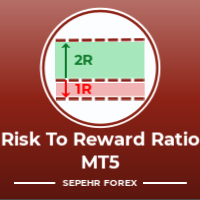
Risk-Ödül Oranı:
Her tüccarın, bunun iyi bir ticaret olup olmadığına karar verebilmesi için kârın büyüklüğüne göre zararın büyüklüğünü hesaplaması kullanışlıdır. Ayrıca kayıp ve karı pip ve yüzde cinsinden gösterir.
Her parçanın rengini istediğiniz gibi ayarlayabilirsiniz. Ya bu panelle de ticaret yapabiliyorsanız?! Aşağıdaki bağlantıya bakın Trader Assistant Mini MT5 MT4 sürümünü aşağıdaki bağlantıdan görebilirsiniz:
Risk to Reward Ra
FREE

PROFESSIONAL MULTI-ACCOUNT TRADE COPYING FOR METATRADER 5 Sentinel Master is a trade-publishing Expert Advisor designed to work together with Sentinel Follower , providing a reliable and configurable solution for copying trades between MetaTrader 5 accounts. The system is designed for traders who manage multiple accounts and want to replicate their trading activity without manually opening and closing positions on every account. Sentinel Master continuously monitors the source account and publis
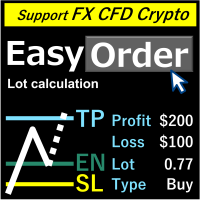
Genel bakış Sadece satırları hareket ettirin, lot, kayıp kesim miktarını doldurarak otomatik olarak hesaplanır. Aşağıda sekiz para birimi hesaplanabilir. (USD, EUR, GBP, JPY, AUD, NZD, CHF, NZD) Sabit denge miktarı veya oranı seçilebilir. Risk ödüllerini hesaplayın. Piyasa siparişi, sınır siparişi ve durdurma siparişi otomatik olarak uygulanır. FX, CFD ve kripto para birimini destekler. Dikkat
"Ücretsiz demo" işe yaramaz. Demo sürümünü bir sonraki sayfadan indirebilirsiniz.
https://www.mql5

Set your limits before the market tests your discipline Risk Manager Pro MT5 turns your risk plan into active monitoring inside MetaTrader 5. Define daily and weekly limits, monitor open-position exposure, and let the utility take protective action when an enabled rule is triggered. A difficult session can lead to one more trade, a larger position, or an attempt to recover losses. A profitable day can also turn into an unnecessary giveback. Risk Manager Pro MT5 helps you put clear boundaries aro

Quant AI Agents are independent trading Expert Advisors. Instead of trading using a fixed strategy like other conventional EAs, Quant AI Agents is a multi-agent AI trading framework that turns natural-language strategy prompts into live.
WANT THE SAME RESULTS AS MY LIVE SIGNAL? Use the exact same brokers I do: IC MARKETS , IC TRADING . Unlike the centralized stock market, Forex has no single, unified price feed. Every broker sources liquidity from different providers, creating un

EASY Insight AIO – Akıllı ve zahmetsiz yatırım için hepsi bir arada çözüm Genel Bakış
Tüm piyasayı — Forex, Altın, Kripto, Endeksler ve hatta Hisseler — saniyeler içinde, manuel grafik incelemesi, gösterge kurulumu ya da karmaşık ayarlar olmadan analiz edebildiğinizi hayal edin.
EASY Insight AIO , yapay zekâ destekli yatırım için nihai, kullanıma hazır dışa aktarma aracınızdır. Tüm piyasanın kapsamlı bir anlık görüntüsünü tek bir temiz CSV dosyasında sunar; bu dosya ChatGPT, Claude, Gemini, Pe

Attention: You can view the program operation in the free version YuClusters DEMO . YuClusters is a professional market analysis system. The trader has unique opportunities to analyze the flow of orders, trade volumes, price movements using various charts, profiles, indicators, and graphical objects. YuClusters operates on data based on Time&Sales or ticks information, depending on what is available in the quotes of a financial instrument. YuClusters allows you to build graphs by combining da

Ürün Adı Trade Builder - Grafik Üzerinde İnteraktif Görsel İşlem Yöneticisi ve Risk Yardımcısı Kısa Açıklama Kullanımı kolay Trade Builder işlem yardımcısı ( Trade Assistant ) ve işlem yöneticisi ( Trade Manager ) ile işlemlerinizi kolaylaştırın. Giriş, zarar durdur ve kâr al seviyelerini doğrudan grafik üzerinde ayarlayın, lot büyüklüğü ve risk ödül oranı ( risk reward ratio ) gerçek zamanlı olarak otomatik hesaplansın. Genel Bakış Başarılı bir işlem yönetimi ( Trade Management ) sürdürülebilir
FREE

Trading Pozisyonu ve Geri Test Aracı:
"Trading Pozisyonu ve Geri Test Aracı", aynı zamanda "Risk Ödül Oranı Aracı" olarak da bilinen kapsamlı ve yenilikçi bir göstergedir ve teknik analizinizi ve ticaret stratejilerinizi geliştirmek için tasarlanmıştır. Risk Aracı, forex ticaretinde etkili risk yönetimi için kapsamlı ve kullanıcı dostu bir çözümdür. Giriş fiyatı, stop-loss (SL) ve take-profit (TP) seviyeleri de dahil olmak üzere ticaret pozisyonlarını önizleme yeteneği ile gelecek işlemlerin ş
FREE

" Trader Evolution " - A utility designed for traders who use wave and technical analysis in their work. One tab of the utility is capable of money management and opening orders, and the other can help in making Elliott wave and technical analysis.
Manual (Be sure to read before purchasing) | Version for MT4
Advantages
1. Trading in a few clicks. Immediate and pending orders are available in the panel
2. Money management. The program automatically selects the appropriate lot size
3. Simplifies

OrderManager 'ı Tanıtıyoruz: MT5 için Devrim Niteliğinde Bir Yardımcı Program Yepyeni Order Manager yardımcı programı ile MetaTrader 5 için işlemlerinizi bir profesyonel gibi yönetin. Basitlik ve kullanım kolaylığı göz önünde bulundurularak tasarlanmış olan Order Manager, her işlemle ilişkilendirilen riski kolayca tanımlamanıza ve görselleştirmenize olanak tanır, böylece bilinçli kararlar alabilir ve ticaret stratejinizi optimize edebilirsiniz. OrderManager hakkında daha fazla bilgi için lütfen

Easy Trade Executor, MT5 için hızlı pozisyon büyüklüğü hesaplama, emir yürütme ve işlem yönetimi aracıdır. Open Price, Stop Loss ve Take Profit seviyelerini doğrudan grafik üzerine yerleştirin, pozisyon büyüklüğünü otomatik olarak hesaplayın ve yalnızca birkaç tıklamayla kontrollü risk altında işlemler açın.
Neden Easy Trade Executor?
Easy Trade Executor, yalnızca risk hesaplamakla kalmayıp işlemlerini doğrudan grafik üzerinden hızlı ve verimli şekilde yönetmek isteyen yatırımcılar için tasarla
MetaTrader Mağazası - yatırımcılar için alım-satım robotları ve teknik göstergeler doğrudan işlem terminalinde mevcuttur.
MQL5.community ödeme sistemi, MetaTrader Hizmetlerindeki işlemler için MQL5.com sitesinin tüm kayıtlı kullanıcıları tarafından kullanılabilir. WebMoney, PayPal veya banka kartı kullanarak para yatırabilir ve çekebilirsiniz.

Alım-satım fırsatlarını kaçırıyorsunuz:
- Ücretsiz alım-satım uygulamaları
- İşlem kopyalama için 8.000'den fazla sinyal
- Finansal piyasaları keşfetmek için ekonomik haberler
Kayıt
Giriş yap
Web sitesi politikasını ve kullanım şartlarını kabul edersiniz
Hesabınız yoksa, lütfen kaydolun