

Внедрение в MQL5 практических модулей из других языков (Часть 05): Модуль Logging из Python — ведите логи профессионально
 581
581
 0
0

Разделы
- Введение
- Проблемы с механизмом ведения логов в MetaTrader 5.
- Система ведения логов для Python в MQL5
- Основные настройки механизма ведения логов
- Запись некоторой информации в логи
- Отдельная функция для каждого сообщения в логе
- Оптимизация процесса создания и ведения логов
- Упрощение ведения логов — подход в языке Python
- Заключение
Введение
Ведение логов имеет решающее значение в любом современном устройстве, программе или программном обеспечении. Это просто процесс ведения записей обо всем, что произошло за время существования конкретной операции.
- Компьютеры хранят записи об использовании программного обеспечения, подключениях и системных событиях.
- Наши браузеры сохраняют историю посещенных нами сайтов и информацию о том, как мы с ними взаимодействуем.
Ведение таких записей имеет важное значение по многим существенным причинам, включая поиск и устранение неисправностей, отладку, аудит, мониторинг производительности и понимание поведения наших систем с течением времени.

В сфере алгоритмической торговли ведение логов имеет очень большое значение, поскольку оно помогает нам:
- отслеживать торговые решения, то есть мы можем видеть, что произошло и когда и почему советники открыли, изменили или закрыли позицию и т. д.;
- проверять свою логику и убеждаться, что она работает точно так, как задумано, при любых рыночных условиях;
- отслеживать сложную логику, чтобы понять, где произошла ошибка в расчетах или почему сделка была отклонена, а также многое другое.
В MetaTrader 5 есть встроенный механизм ведения логов, который довольно неплох и отлично работает, но у него есть ряд ограничений.
Проблемы с механизмом ведения логов в MetaTrader 5.
Все логи перемешаны с логами, сгенерированными системой.
Вкладка «Эксперты» не отображает информацию о конкретной программе; все логи выводятся в одну и ту же консоль и сохраняются в одном лог-файле за определенный день.
Это затрудняет мониторинг логов для конкретной программы или функции.
Их сложно отформатировать.
Поскольку в MQL5 нет специального или конкретного способа вывода информации, все логи могут выглядеть по-разному. Эта непоследовательность затрудняет выявление ошибок и обнаружение недостатков.
Вы практически не можете контролировать уровень детализации логов.
Если вы не добавите пару операторов if перед каждым «Вызовом функции Print» в явном виде, нет возможности контролировать информацию, которая отображается на вкладке «Эксперты».
Это лишь некоторые из ограничений встроенной функции создания и ведения логов в MetaTrader 5. В Python существует встроенный модуль logging, который устраняет некоторые из описанных выше ограничений. В этой статье мы рассмотрим, что представляет собой этот модуль, и реализуем очень похожую библиотеку на языке программирования MQL5.
Система ведения логов для Python в MQL5
Согласно документации Python:
Модуль logging определяет функции и классы, которые реализуют гибкую систему регистрации событий для приложений и библиотек.
Этот модуль концентрируется на гибкости, сохраняя при этом основные принципы ведения логов, что обеспечивает пользователей простым и универсальным способом регистрации событий в своих приложениях на языке Python.
Пример ниже.
import logging
logger = logging.getLogger(__name__)

def do_something():
    logger.info('Doing something important')

def main():
    logging.basicConfig(filename='myapp.log', level=logging.INFO)

    logger.info('Started')
    do_something()
    logger.info('Finished')

if __name__ == '__main__':
    main()
Результаты (myapp.log).
INFO:__main__:Finished
INFO:__main__:Started
INFO:__main__:Doing something important
INFO:__main__:Finished
Всего несколькими строками кода нам удалось указать файл, который мы будем использовать для хранения логов, и записать в него некоторую информацию.
Но в аналогичном классе MQL5 нам не нужна функция с именем getLogger, потому что все, что она делает, это извлекает (или создает) устройство ведения логов с определенным именем.
Это можно сделать в конструкторе классов с возможностью присвоить имя. Конструктор классов может возвращать объект CLogger.
class CLogger
  {
private:

   string            m_name;
   LogLevels         m_loglevel;
   string            m_filename;
   int               m_filehandle; // Handle of log file
   bool              m_iscommon;
   string            m_logs_format;
   bool              m_console_on;

   int               m_fileflags;
   bool              is_configured;

public:

   void              CLogger(const string name);
   void              CLogger(void); // Constructor
   void             ~CLogger(void); // Destructor
  };
//+------------------------------------------------------------------+
//|                                                                  |
//+------------------------------------------------------------------+
CLogger::CLogger(void):
   m_filename("logs.log"),
   is_configured(false),
   m_filehandle(-1),
   m_console_on(true),
   m_iscommon(false),
   m_logs_format(DEFAULT_MSG_FORMAT),
   m_loglevel(LOG_LEVEL_INFO)
  {

  }
//+------------------------------------------------------------------+
//|                                                                  |
//+------------------------------------------------------------------+
CLogger::CLogger(const string name):
   m_name(name)
  {
   CLogger();
  }
Одна из важнейших функций в этом классе — это функция с именем basicConfig.
Основные настройки механизма ведения логов
Возможность указать, чего ожидать от логов, имеет решающее значение, и получить эту возможность можно только внутри этой функции. Ниже перечислены несколько параметров (переменных), которые нам необходимо настроить.
Имя файла (filename)
Это имя файла, в который вы хотите записать все логи.
Расширение имени файла должно быть либо .txt, либо .log.
bool CLogger::basicConfig(LogLevels log_level = LOG_LEVEL_INFO,
                          string filename = "logs.log",
                          bool console_on = true,
                          string format = DEFAULT_MSG_FORMAT,
                          bool file_common = false)
  {
   m_filename = filename;
   m_logs_format = format;
   m_console_on = console_on;
   m_iscommon = file_common;
   m_loglevel = log_level;


//--- Before reading the file check if the extension is ok

   if(!checkFileExtenstion(filename))
     {
      is_configured = false;
      return false;
     }
Проверка расширения имени файла.
bool CLogger::checkFileExtenstion(string filename)
  {
   if(StringFind(filename, ".txt") > 0 || StringFind(filename, ".log") > 0)
      return true;

   printf("Unsupported file extension, the logger expects a file [.txt, .log] file extensions (types)");

   return false;
  }
Повторюсь, ведение логов — это процесс сохранения информации в указанном файле. Давайте откроем указанный текстовый файл.
bool CLogger::basicConfig(LogLevels log_level = LOG_LEVEL_INFO,
                          string filename = "logs.log",
                          bool console_on = true,
                          string format = DEFAULT_MSG_FORMAT,
                          bool file_common = false)
  {
   m_filename = filename;
   m_logs_format = format;
   m_console_on = console_on;
   m_iscommon = file_common;
   m_loglevel = log_level;


//--- Before reading the file check if the extension is ok

   if(!checkFileExtenstion(filename))
     {
      is_configured = false;
      return false;
     }

//--- Open the file for writting

   m_fileflags = FILE_READ | FILE_WRITE | FILE_SHARE_WRITE | FILE_TXT | FILE_ANSI;

   if(m_iscommon)
      m_fileflags |= FILE_COMMON;

   m_filehandle = FileOpen(filename, m_fileflags); // Open or create file

   if(m_filehandle == INVALID_HANDLE)
     {
      printf("func=%s line=%d, failed to open a '%s'. Error = %d", __FUNCTION__, __LINE__, filename, GetLastError());
      is_configured = false;
      return false;
     }

   FileSeek(m_filehandle, 0, SEEK_END); //Move to the end of the file

//--- Handle large files than accepted

   fileRotate(m_filehandle, m_filename, m_fileflags, m_iscommon);

   is_configured = true;
   return true;
  }
Для повышения эффективности и ускорения процесса регистрации данных необходимо оптимизировать процессы чтения и записи в лог-файл. Необходимо строго контролировать размер лог-файла (большие текстовые файлы сложнее читать и записывать, так как они потребляют слишком много памяти).
// Max file size in megabytes
#define MAX_FILE_SIZEMB 10
// The maximum number of files of FILE_SIZEMB to create before the system stop writting for good
#define MAX_LOG_FILES 1000
Значение по умолчанию — 10 мегабайт. Как вы, возможно, знаете, текстовый файл размером более 10 МБ огромен. Слишком большой размер для обычного текстового файла, содержащего всего несколько байтов информации в каждой строке.
Каждый раз, когда размер файла превысит этот лимит, будет автоматически создаваться новый лог-файл с тем же базовым именем + _[существующие лог-файлы с тем же именем++]. Например, если существует лог-файл с именем mylogs.log, будет создан новый файл с именем mylogs_1.log.
Кроме того, существует ограничение на количество файлов, которые можно создать для определенного базового имени, а именно — 1000 файлов (по умолчанию).
Функция с именем fileRotate справится с этой задачей.
void CLogger::fileRotate(int &handle, string &filename, int flags, bool is_common)
  {
   if (!isFileSizeLimitReached(handle))
      return;   // No rotation

//--- Close the current larger file

   FileClose(handle);

//---

   if(!checkFileExtenstion(filename))
      return;

//--- Get the base name of the file

   string extension = StringFind(filename, ".log") < 0 ? ".txt" : ".log";
   int ext_start = MathMax(StringFind(filename, ".log"), StringFind(filename, ".txt"));
   string base_name = StringSubstr(filename, 0, ext_start);

//--- Get the incremented file names

   string new_name = "";
   for(int i = 1; i <= MAX_LOG_FILES; i++)
     {
      new_name = base_name + "_" + string(i) + extension;

      if (!FileIsExist(new_name, is_common))
        {
         handle = FileOpen(new_name, flags);
         if(handle == INVALID_HANDLE)
           {
            printf("Failed to rotate into a new file");
            return;
           }

          break;
        }
      else //Check whether an existing file is full or not, if it's not log into that file until it's full
        {
         int temp_handle = FileOpen(new_name, flags);
         if(temp_handle == INVALID_HANDLE)
            continue;

         if (!isFileSizeLimitReached(temp_handle))
            {
               handle = temp_handle;
               break;
            }
         else
             FileClose(temp_handle); //Close a temporarily opened file
        }
     }

//---

   FileSeek(handle, 0, SEEK_END); //Move to the end of the file
  }
   bool              isFileSizeLimitReached(int handle)
     {
      int size = (int)FileSize(handle);
      if(size <= MAX_FILE_SIZEMB * 1000000)
         return false;   // No rotation

      //---

      return true;
     }
Примеры результатов.
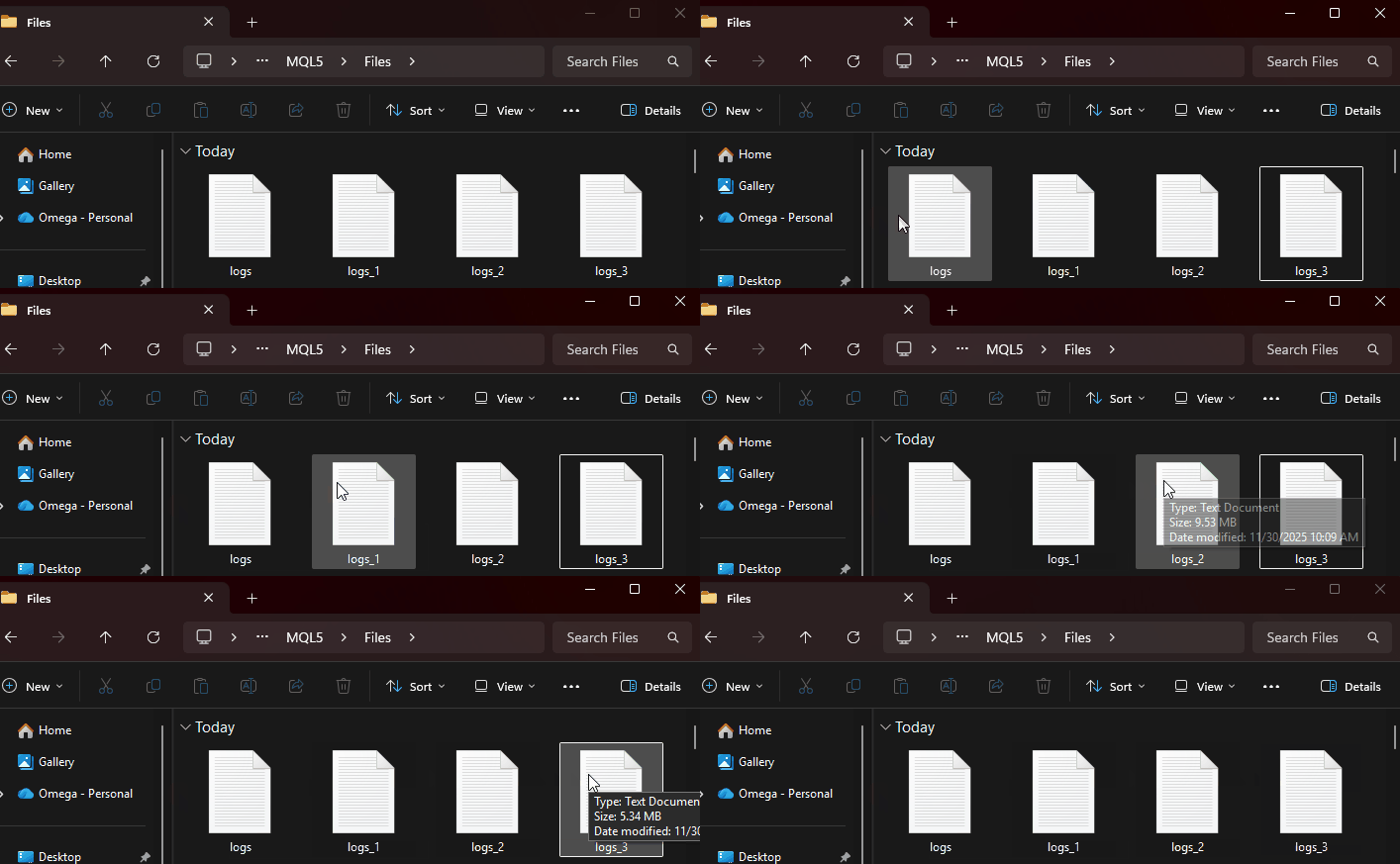
Оценка размера файла, возможно, не самая точная, но очень близка к идеалу. Когда размер файла приближается к отметке в 10 мегабайт, создается новый файл, и в него записываются новые данные логов.
console_on
Если установить значение этого параметра на true, все записи будут выводиться в консоль (вкладка «Эксперты») после их сохранения в указанный лог-файл.
Это помогает нам избежать написания дополнительной строки кода только для вывода информации.
file_common
Эта логическая переменная рассказывает, находится ли указанный «лог-файл» в Общем каталоге (если установлено значение true) или по обычному пути передачи данных MQL5 (если установлено значение false).
//--- Open the file for writting

   m_fileflags = FILE_READ | FILE_WRITE | FILE_SHARE_WRITE | FILE_TXT | FILE_ANSI;

   if(m_iscommon)
      m_fileflags |= FILE_COMMON;
log_level
Эта переменная поясняет устройству ведения логов, насколько далеко или глубоко мы хотим выводить информацию.
enum LogLevels
  {
   LOG_LEVEL_DEBUG    = 10,
   LOG_LEVEL_INFO     = 20,
   LOG_LEVEL_WARNING  = 30,
   LOG_LEVEL_ERROR    = 40,
   LOG_LEVEL_CRITICAL = 50
  };
Что делает с классом переменная LOG_LEVEL?
Эта переменная важна, как многие могут подумать, поскольку она определяет минимальный уровень серьезности, который регистратор фактически запишет в файл или выведет на экран: выступает в качестве фильтра.
Предположим, пользователь выбрал параметр LOG_LEVEL_INFO. Это означает, что все уровни записей ниже этого уровня будут игнорироваться.
| Функция | Уровень | Будет ли информация регистрироваться в лог или выводиться на экран? |
|---|---|---|
CLogger.debug() | 10 | нет |
CLogger.info() | 20 | ДА |
CLogger.warning() | 30 | ДА |
CLogger.error() | 40 | ДА |
CLogger.critical() | 50 | ДА |
Таким образом, несмотря на то что функция debug() запускает процесс, он ни на что не влияет, поскольку уровень ниже минимально допустимого.
Это очень полезно, поскольку позволяет регулировать уровень детализации записей с помощью настроек. Например, в режиме разработки вы можете выбрать LOG_LEVEL_DEBUG, что заставит класс регистрировать все события, помогая эффективно отлаживать программы. В то же время в режиме реальной торговли вы можете выбрать LOG_LEVEL_WARNING, чтобы регистрировать только предупреждения, ошибки и наиболее критические/фатальные ошибки, которые необходимо внести в лог.
format
Переменная format — одна из важнейших переменных в классе; это единственное место, где можно управлять процессом отображения логов на вкладке «Эксперты» и при сохранении в файлах.
В таблице ниже приведено описание заполнителей переменной format и результатов их работы.
| Заполнитель | Описание | Примечания и пример |
|---|---|---|
%(asctime)s | Локальная метка времени записи в логе TimeLocal, отформатированная как ГГГГ.ММ.ДД ЧЧ:ММ:СС. | Значение datetime: 2025.01.01 00:00:05. |
%(levelname)s | Имя уровня записи в логе в виде текста | Это может быть INFO, DEBUG, ERROR, WARNING, CRITICAL |
%(programname)s | Название программы или компонента. Его можно задать с помощью опционального конструктора класса, передав соответствующий аргумент name. | Example, My Indicator. |
%(functionname)s | Название функции, в которой генерируется лог. | Может быть задано вручную с помощью функций создания логов, таких как OnTick или OnInit. |
%(linenumber)d | Номер строки кода, где генерируется лог. | Например, строка 118. Только если номер строки считан правильно, иначе возвращает empty. |
%(programtype)s | Тип запускаемой программы. Его можно задать с помощью пользовательского конструктора. Зависит от ENUM_PROGRAM_TYPE. CLogger::CLogger(const string name,ENUM_PROGRAM_TYPE program_type): m_name(name), m_program_type(ProgramTypeToSTring(program_type)) { } //+------------------------------------------------------------------+ //| | //+------------------------------------------------------------------+ string CLogger::ProgramTypeToSTring(ENUM_PROGRAM_TYPE prog_type) { switch(prog_type) { case PROGRAM_SCRIPT: return "Script"; case PROGRAM_EXPERT: return "EA"; case PROGRAM_INDICATOR: return "Indicator"; case PROGRAM_SERVICE: return "Service"; default: return "Unknown"; } } | Это может быть Script (скрипт), EA (советник), Indicator (индикатор), Service (служба) или Unknown (неизвестное имя). |
%(message)s | Само сообщение в логе. | Например, Не удалось создать отложенный ордер. |
В последующих разделах этой статьи мы подробно рассмотрим, как эти форматы взаимодействуют с логами.
Пример формата.
string format = "%(asctime)s: %(levelname)s:%(programname)s:%(programtype)s:%(functionname)s:%(linenumber)d:%(message)s";
logger.basicConfig(LOG_LEVEL_DEBUG, "logs.log", false, format);
Результаты.
2025.12.02 09:13:54:INFO:Logging Test:Script:OnStart:36:The script has started
2025.12.02 09:13:54:ERROR:Logging Test:Script:OnStart:40:Some operation has failed Error = 0
Пример формата.
string format = "%(asctime)s | [%(levelname)s] [%(programname)s] [%(programtype)s] func:%(functionname)s line:%(linenumber)d --> [%(message)s]";
logger.basicConfig(LOG_LEVEL_DEBUG, "logs.log", false, format);
Результаты.
2025.12.02 09:15:41 | [INFO] [Logging Test] [Script] func:OnStart line:37 --> [The script has started]
2025.12.02 09:15:41 | [ERROR] [Logging Test] [Script] func:OnStart line:41 --> [Some operation has failed Error = 0]
Запись некоторой информации в логи
Закрытая функция в классе с именем Log — функция, отвечающая за форматирование, создание и запись сообщения (лога) в файл, не говоря уже об отображении информации на вкладке «Эксперты» (печать).
void Log(LogLevels level, string msg, string func_name = "", int line_no = -1);
Поскольку все конструкторы классов являются опциональными, это позволяет пользователям начинать ведение логов без особой настройки, если в этом нет необходимости.
Функция basicConfig, выполняющая настройки, тоже является необязательным методом. Перед попыткой записи (регистрации в логе) какой-либо информации или значений необходимо подтвердить настройки по умолчанию (если пользователь не предоставил свои).
void CLogger::Log(LogLevels level,
                  string msg,
                  string func_name = "",
                  int line_no = -1)
  {
//---

   if(!is_configured)  //Auto-configure if the function basicConfig wasn't called
      basicConfig();
Как уже говорилось ранее об уровнях логов, необходимо проверить, не ниже ли текущий уровень требуемого уровня лога, установленного пользователем.
//--- Level filtering

   if(level < m_loglevel)
      return;
Форматирование логов
Нам необходимо удалить все заполнители и заменить их желаемым значением.
// Standard placeholders

   StringReplace(entry, "%(asctime)s", t);
   StringReplace(entry, "%(levelname)s", LevelToString(level));
   StringReplace(entry, "%(message)s", msg);

// Custom placeholders

// ---- Custom placeholders ----

// Program name

   if(m_name != "")
       StringReplace(entry, "%(programname)s", m_name);
   else
      StringReplace(entry, "%(programname)s", "");

// Function name
   if(func_name != "")
      StringReplace(entry, "%(functionname)s", func_name);
   else
      StringReplace(entry, "%(functionname)s", "");

// Program type

   if(m_program_type != "")
      StringReplace(entry, "%(programtype)s", m_program_type);
   else
      StringReplace(entry, "%(programtype)s", "");

// Line number
   if(line_no >= 0)
      StringReplace(entry, "%(linenumber)d", IntegerToString(line_no));
   else
      StringReplace(entry, "%(linenumber)d", "");

   entry += "\n";
Обработка ротации файлов
Поскольку размер любого файла может достигать 10 МБ (по умолчанию), нам приходится проверять это условие каждый раз, прежде чем пытаться добавить в файл новую информацию.
//--- Handle file rotations before writing

   fileRotate(m_filehandle, m_filename, m_fileflags, m_iscommon);
Запись и печать логов
//--- Write to log file (plain text)

   FileWriteString(m_filehandle, entry);
   FileFlush(m_filehandle);

   if(m_console_on)
      Print(entry);
Функция с именем Log недоступна за пределами класса, поскольку она предназначена для заполнения других функций обработки очень специфических сообщений журнала. Ниже представлен раздел, описывающий эти функции.
Отдельная функция для каждого сообщения в логе
Логи для отладки
   void              debug(string msg, string func_name = "", int line_no = -1)
     {
      this.Log(LOG_LEVEL_DEBUG, msg, func_name, line_no);
     }
Эта функция предназначена для вывода сообщения на самом низком уровне, обычно для разработчиков, которые хотят понять все характеристики некоторых строк кода и функций.
Пример использования.
string format = "%(asctime)s | [%(levelname)s] [%(programname)s] [%(programtype)s] func:%(functionname)s line:%(linenumber)d --> [%(message)s]";
logger.basicConfig(LOG_LEVEL_DEBUG, "logs.log", false, format);

bool num_a = 10;
bool num_b = -10;

logger.debug("num_a>num_b "+(string)bool(num_a>num_b), __FUNCTION__, __LINE__);
Результаты.
2025.12.02 09:26:06 | [DEBUG] [Logging Test] [Script] func:OnStart line:43 --> [num_a>num_b false]
Информативные логи
Чаще всего они представляют собой такой тип сообщений, который используется для обозначения какого-либо текущего процесса или деятельности.
void OnStart()
  {
//---

   logger.info("The script has started");

   // some activity

   logger.info("End of the script!");
  }
Результаты.
2025.12.02 09:26:06 | [INFO] [Logging Test] [Script] func:OnStart line:38 --> [The script has started]
2025.12.02 09:26:06 | [INFO] [Logging Test] [Script] func: line: --> [End of the script!]
Отображение ошибок для пользователей
Это логи, предназначенные для отображения сбоев в работе программы.
   void              error(string msg, string func_name = "", int line_no = -1)
     {
      this.Log(LOG_LEVEL_ERROR, msg, func_name, line_no);
     }
Результаты.
void OnStart()
  {
//---

   if (!doSomething())
      {
        logger.error(StringFormat("Some operation has failed Error = %d",GetLastError()), __FUNCTION__, __LINE__);
      }

  }
//+------------------------------------------------------------------+
//|                                                                  |
//+------------------------------------------------------------------+
bool doSomething()
 {
   return false;
 }
Результаты.
2025.12.02 09:29:26 | [ERROR] [Logging Test] [Script] func:OnStart line:47 --> [Some operation has failed Error = 0]
Ведение логов некоторых предупреждений
Такие логи используются для предупреждения пользователей о чем-то, что может не быть критическим для программы, но требует внимания.
Пример использования.
input int risk_per_trade = 50; //Risk Per Trade
//+------------------------------------------------------------------+
//| Script program start function                                    |
//+------------------------------------------------------------------+
void OnStart()
  {
//---

   string format = "%(asctime)s | [%(levelname)s] [%(programname)s] [%(programtype)s] func:%(functionname)s line:%(linenumber)d --> [%(message)s]";
   logger.basicConfig(LOG_LEVEL_DEBUG, "logs.log", false, format);

   logger.info("The script has started",__FUNCTION__,__LINE__);

   if (risk_per_trade>10) //if a user has set the risk higher than 10% of the account balance
      logger.warning(StringFormat("You have risked too much for a single trade. Risk percentage = %d", risk_per_trade));
  }
Результаты.
2025.12.02 09:15:41 | [WARNING] [Logging Test] [Script] func: line: --> [You have risked too much for a single trade. Risk percentage = 50]
Логи фатальных или критических ошибок
Это самые важные логи, поскольку они фиксируют серьезные проблемы. Они часто используются для демонстрации серьезного недостатка в системе, который обычно означает, что программа не может продолжить выполнение, пока не будет устранена конкретная проблема.
   void              critical(string msg, string func_name = "", int line_no = -1)
     {
      this.Log(LOG_LEVEL_CRITICAL, msg, func_name, line_no);
     }
Предположим, у вас есть индикатор, настолько полезный для вашей стратегии, что если программа не сможет его загрузить, вся программа должна прекратить работу.
#include <PyMQL5\logging.mqh>
CLogger logger(PROG_NAME, PROG_TYPE);

int important_indicator_handle;
//+------------------------------------------------------------------+
//| Script program start function                                    |
//+------------------------------------------------------------------+
void OnStart()
  {
//---

   string format = "%(asctime)s | [%(levelname)s] [%(programname)s] [%(programtype)s] func:%(functionname)s line:%(linenumber)d --> [%(message)s]";
   logger.basicConfig(LOG_LEVEL_DEBUG, "logs.log", false, format);

   important_indicator_handle = iMA(Symbol(), Period(), -1, 0, MODE_SMA, PRICE_CLOSE); //An indicator with a negative period

   if (important_indicator_handle == INVALID_HANDLE)
     {
       logger.critical("Failed to load the Moving Average indicator, Error = "+(string)GetLastError(), __FUNCTION__, __LINE__);
       return;
     }
 }
Результаты.
2025.12.02 09:34:54 | [CRITICAL] [Logging Test] [Script] func:OnStart line:56 --> [Failed to load the Moving Average indicator, Error = 4002]
Оптимизация процесса создания и ведения логов
Процесс чтения и записи в текстовые файлы (операции ввода/вывода) является одним из самых ресурсоемких процессов в языке MQL5, не говоря уже о встроенной функции с именем Print, которую мы используем для отображения информации на вкладке «Эксперты».
Вместо того чтобы очень часто (за считанные секунды) записывать данные в текстовый файл, мы можем предоставить пользователям возможность временно сохранять логи в памяти (кэше), прежде чем они решат, сохранять ли эту информацию в какой-то заданный файл.
Процесс прост: у нас есть глобальный массив, в который мы планируем записывать логи, и функция, которая записывает весь массив в указанный файл.
class CLogger
  {
private:

   //--- Caching

   bool              m_cache_mode;
   string            m_logs_cache[];
   uint              m_logs_count;

public:

   void              CLogger(const string name);
   void              CLogger(const string name, ENUM_PROGRAM_TYPE program_type);
   void              CLogger(void); // Constructor
   void             ~CLogger(void); // Destructor

   bool              basicConfig(LogLevels log_level = LOG_LEVEL_INFO,
                                 string filename = "logs.log",
                                 bool console_on = true,
                                 string format = DEFAULT_MSG_FORMAT,
                                 bool file_common = false,
                                 bool cache_mode = false);

   //---

   void              WriteCache()
     {
       for (uint i=0; i<m_logs_count; i++)
         {
           if (m_filehandle==INVALID_HANDLE)
             DebugBreak();

           fileRotate(m_filehandle, m_filename, m_fileflags, m_iscommon);

           FileWriteString(m_filehandle, m_logs_cache[i]);
           FileFlush(m_filehandle);
         }
     }
  };
//+------------------------------------------------------------------+
//|         Basic configurations                                     |
//+------------------------------------------------------------------+
bool CLogger::basicConfig(LogLevels log_level = LOG_LEVEL_INFO,
                          string filename = "logs.log",
                          bool console_on = true,
                          string format = DEFAULT_MSG_FORMAT,
                          bool file_common = false,
                          bool cache_mode = false)
  {
   m_filename = filename;
   m_logs_format = format;
   m_console_on = console_on;
   m_iscommon = file_common;
   m_loglevel = log_level;
   m_cache_mode = cache_mode;

//--- some lines of code

   return true;
  }
//+------------------------------------------------------------------+
//|                                                                  |
//+------------------------------------------------------------------+
void CLogger::Log(LogLevels level,
                  string msg,
                  string func_name = "",
                  int line_no = -1)
  {
//---

// some lines of code....

//--- Write to log file (plain text)

   if (m_cache_mode) //Write to an array
     {
       this.m_logs_count++;
       if (m_logs_count>m_logs_cache.Size())
         ArrayResize(m_logs_cache, m_logs_count+MAX_CACHE_SIZE);

       //---

       m_logs_cache[m_logs_count-1] = entry;
     }
   else // write to a file
     {
       FileWriteString(m_filehandle, entry);
       FileFlush(m_filehandle);
     }

   if(m_console_on)
      Print(entry);
  }
Функция под именем WriteCache записывает всю хранящуюся в массиве m_logs_cache информацию в нужный файл, аналогично тому, как информация автоматически записывается в файлы при установлении переменной cache_mode на false внутри функции basicConfig.
Поскольку пользователи способны вызывать эту функцию по своему усмотрению, давайте значительно упростим задачу, введя логическую переменную с именем write_cache_automatically в функцию basicConfig, когда эта переменная установлена на true. Вся информация, хранящаяся во временном кэшированном массиве, будет записана в указанный файл в деструкторе класса.
Предположим, что мы хотим сохранить логи после завершения всех операций. То есть советник удален с графика, или операция тестирования стратегий завершена.
bool CLogger::basicConfig(LogLevels log_level = LOG_LEVEL_INFO,
                          string filename = "logs.log",
                          bool console_on = true,
                          string format = DEFAULT_MSG_FORMAT,
                          bool file_common = false,
                          bool cache_mode = false,
                          bool write_cache_automatically = false)
  {
   m_filename = filename;
   m_logs_format = format;
   m_console_on = console_on;
   m_iscommon = file_common;
   m_loglevel = log_level;
   m_cache_mode = cache_mode;
   m_write_cache_automatically = write_cache_automatically;
CLogger::~CLogger(void)
  {
   if (m_cache_mode && m_write_cache_automatically)
      WriteCache();

//---

   if(m_filehandle != INVALID_HANDLE)
      FileClose(m_filehandle); //Close the file, finally
  }
В итоге мне удалось заметить некоторые улучшения в тестере стратегий (примерно на 50% сократилось время тестирования) по сравнению с версией без кэширования.
Это произошло также после внесения ряда изменений в функцию, отвечающую за ротацию файлов.
void CLogger::fileRotate(int &handle, string &filename, int flags, bool is_common)
{
   //---If first time -> open main file
   if(handle == -1)
   {
      handle = OpenFile(filename, flags);
      if(handle == -1)
         return;
   }

   //--- Check rotation trigger
   if(!isFileSizeLimitReached(handle))
      return;

   //--- Close current big file
   FileClose(handle);

   //--- Rotate through numbered files
   for(int i = 1; i <= MAX_LOG_FILES; i++)
   {
      string new_name = m_base_name + "_" + (string)i + m_file_extension;

      // File exists → check if it still has space
      if(is_common?FileIsExist(new_name, FILE_COMMON):FileIsExist(new_name))
      {
         int temp = OpenFile(filename, flags);

         //---

         if (MQLInfoInteger(MQL_DEBUG))
           printf("Filename %s size MB = %f",new_name, FileSize(temp)/1e6);

         if (temp != -1)
          {
            bool too_big = isFileSizeLimitReached(temp);
            FileClose(temp);

            if(too_big)
               continue;   //--- The fill is full try the next one
          }
      }

      // File does not exist or is small, use it
      if (filename == new_name)
        return;

      filename = new_name;
      handle = OpenFile(filename, flags);

      if(handle == -1)
         DebugBreak();

      FileSeek(handle, 0, SEEK_END);
      return;   // IMPORTANT: stop rotation here
   }
}
Оптимальное тестирование стратегий с помощью ведения логов
Убедившись, что режим кэширования установлен в значение true, необходимо предотвратить печать, установив в тестере стратегий переменную console_on в значение false, если у вас нет веской причины для вывода на печать; это может помочь сократить общее время выполнения теста.
#define PROG_NAME MQLInfoString(MQL_PROGRAM_NAME)
#define PROG_TYPE (ENUM_PROGRAM_TYPE)MQLInfoInteger(MQL_PROGRAM_TYPE)
//+------------------------------------------------------------------+
//|                                                                  |
//+------------------------------------------------------------------+
#include <PyMQL5\logging.mqh>
CLogger logger(PROG_NAME, PROG_TYPE);
//+------------------------------------------------------------------+
//| Expert initialization function                                   |
//+------------------------------------------------------------------+
int OnInit()
  {
//---

   string format = "%(asctime)s:%(programname)s:%(programtype)s:%(functionname)s:%(linenumber)d:%(message)s";

   bool is_tester = (bool)MQLInfoInteger(MQL_TESTER);
   logger.basicConfig(LOG_LEVEL_DEBUG, "logs.log", !is_tester, format, is_tester, true, true);

   logger.info("Program started!");

//---
   return(INIT_SUCCEEDED);
  }
Поскольку Тестер стратегий хранит всю имеющуюся в файлах информацию по другому пути к данным, нам необходимо установить переменную file_common в значение true, чтобы мы могли получить все логи, хранящиеся в общей папке.
Оставшаяся часть советника.
void OnDeinit(const int reason)
  {
//---
   logger.info("Program stopped. Reason = "+UninitializeReasonDescription(reason), __FUNCTION__, __LINE__);
  }
//+------------------------------------------------------------------+
//| Expert tick function                                             |
//+------------------------------------------------------------------+
void OnTick()
  {
//---

   logger.info("Program running");
  }
//+------------------------------------------------------------------+
//|                                                                  |
//+------------------------------------------------------------------+
string UninitializeReasonDescription(const int reason)
  {
   switch(reason)
     {
      //--- the EA has stopped working calling the ExpertRemove() function
      case REASON_PROGRAM :
        return("Expert Advisor terminated its operation by calling the ExpertRemove() function");
      //--- program removed from a chart
      case REASON_REMOVE :
        return("Program has been deleted from the chart");
      //--- program recompiled
      case REASON_RECOMPILE :
        return("Program has been recompiled");
      //--- symbol or chart period changed
      case REASON_CHARTCHANGE :
        return("Symbol or chart period has been changed");
      //--- chart closed
      case REASON_CHARTCLOSE :
        return("Chart has been closed");
      //--- inputs changed by user
      case REASON_PARAMETERS :
        return("Input parameters have been changed by a user");
      //--- another account has been activated or reconnection to the trade server has occurred due to changes in the account settings
      case REASON_ACCOUNT :
        return("Another account has been activated or reconnection to the trade server has occurred due to changes in the account settings");
      //--- another chart template applied
      case REASON_TEMPLATE :
        return("A new template has been applied");
      //--- OnInit() handler returned a non-zero value
      case REASON_INITFAILED :
        return("This value means that OnInit() handler has returned a nonzero value");
      //--- terminal closed
      case REASON_CLOSE :
        return("Terminal has been closed");
     }

//--- deinitialization reason unknown
   return("Unknown reason");
  }
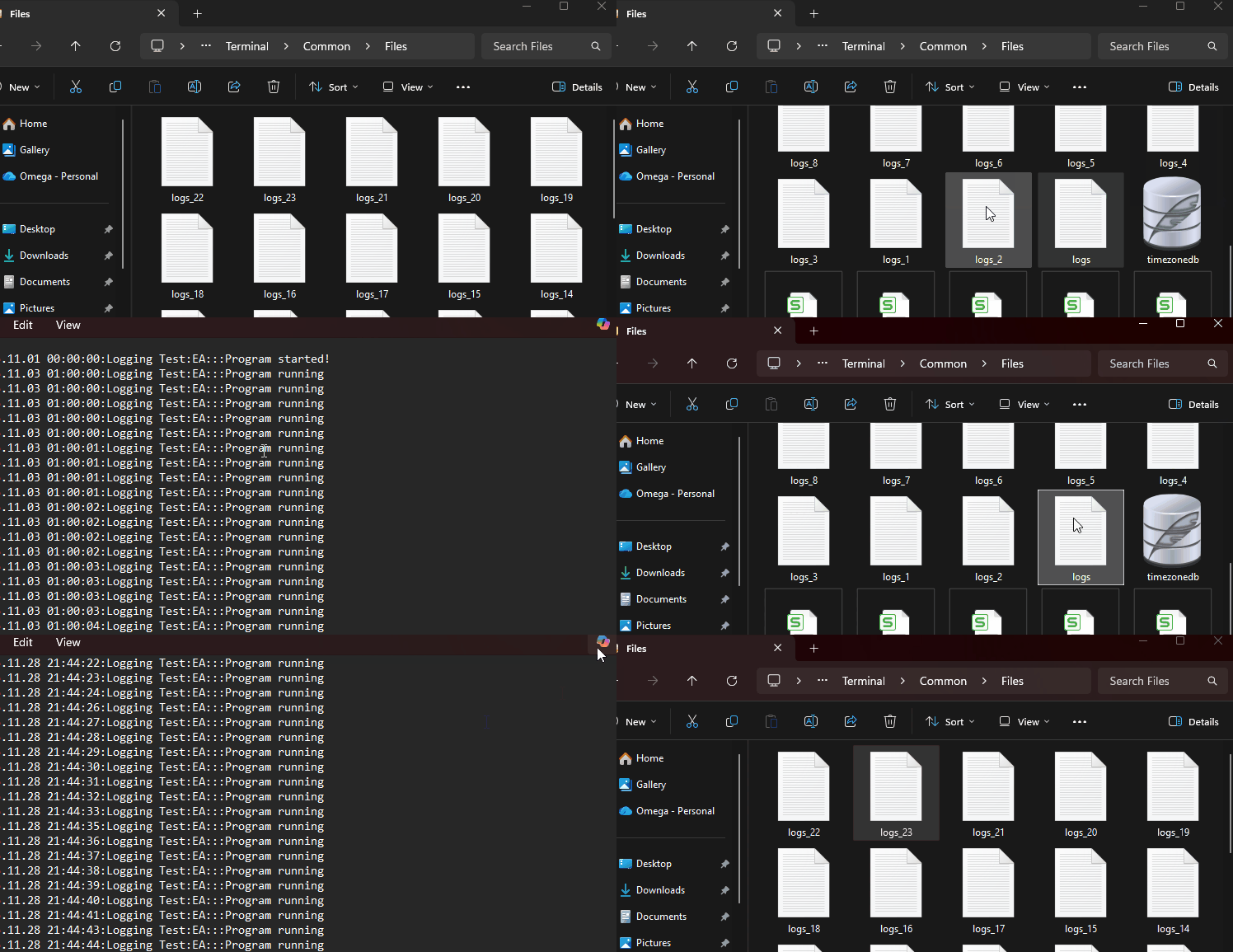
Результаты.
Как и ожидалось, в общей директории было создано несколько файлов, каждый размером около 10 МБ.
Упрощение ведения логов — подход в языке Python
Если вы знакомы с модулем logging в языке Python, вы можете заметить, что он не требует от вас разбора имени функции и конкретной строки кода, вызывающей ошибку.
import logging
logger = logging.getLogger(__name__)

logging.basicConfig(filename='myapp.log', level=logging.INFO, format='%(asctime)s - %(levelname)s - %(message)s - file:%(filename)s - line:%(lineno)d - func:%(funcName)s')

def some_function():
    logger.info('Doing something')

some_function()
Результаты.
2025-12-01 20:01:42,542 - INFO - Doing something - file:log.py - line:9 - func:some_function
В MQL5 нам приходится жестко прописывать большинство значений (строку и имя функции для каждого сообщения в логе, имя программы (имя файла) в конструкторе класса). Во избежание этого утомительного (повторяющегося) процесса, мы можем использовать макросы #define.
#define logger_info(msg) logger.info(msg, __FUNCTION__, __LINE__)
#define logger_debug(msg) logger.debug(msg, __FUNCTION__, __LINE__)
#define logger_warning(msg) logger.warning(msg, __FUNCTION__, __LINE__)
#define logger_error(msg) logger.error(msg, __FUNCTION__, __LINE__)
#define logger_critical(msg) logger.critical(msg, __FUNCTION__, __LINE__)
Применение.
void OnStart()
  {
//---

   string format = "%(asctime)s | [%(levelname)s] [%(programname)s] [%(programtype)s] func:%(functionname)s line:%(linenumber)d --> [%(message)s]";
   logger.basicConfig(LOG_LEVEL_DEBUG, "logs.log", false, format);

   logger_info("The script has started");

   bool num_a = 10;
   bool num_b = -10;

   logger_info("num_a>num_b "+(string)bool(num_a>num_b));

   if (!doSomething())
      {
        logger_error(StringFormat("Some operation has failed Error = %d",GetLastError()));
      }

   if (risk_per_trade>10) //if a user has set the risk higher than 10% of the account balance
      logger_warning(StringFormat("You have risked too much for a single trade. Risk percentage = %d", risk_per_trade));

   important_indicator_handle = iMA(Symbol(), Period(), -1, 0, MODE_SMA, PRICE_CLOSE); //An indicator with a negative period

   if (important_indicator_handle == INVALID_HANDLE)
     {
       logger_critical("Failed to load the Moving Average indicator, Error = "+(string)GetLastError());
       //return;
     }

//---

   logger_info("End of the script!");
  }
Результаты.
2025.12.02 09:47:49 | [INFO] [Logging Test] [Script] func:OnStart line:43 --> [The script has started]
2025.12.02 09:47:49 | [INFO] [Logging Test] [Script] func:OnStart line:48 --> [num_a>num_b false]
2025.12.02 09:47:49 | [ERROR] [Logging Test] [Script] func:OnStart line:52 --> [Some operation has failed Error = 0]
2025.12.02 09:47:49 | [WARNING] [Logging Test] [Script] func:OnStart line:56 --> [You have risked too much for a single trade. Risk percentage = 50]
2025.12.02 09:47:49 | [CRITICAL] [Logging Test] [Script] func:OnStart line:62 --> [Failed to load the Moving Average indicator, Error = 4002]
2025.12.02 09:47:49 | [INFO] [Logging Test] [Script] func:OnStart line:68 --> [End of the script!]
Заключительные мысли
Ведение логов — это не просто вывод простого текста на вкладку «Эксперты».. Это фундаментальная часть разработки программного обеспечения, помогающая нам понять, как работает наша программа, диагностировать проблемы и отслеживать события во времени.
Путем внедрения структурированного и многократно используемого модуля создания логов на языке MQL5, аналогичного библиотеке logging языка Python. Мы внедряем в свои торговые системы современные методы разработки. Это упрощает сопровождение и отладку нашего кода, а также делает его более согласованным с тем, как профессиональные разработчики по всему миру хранят и интерпретируют логи в системах на основе Python, на веб-серверах и т. д.
Надежный модуль ведения логов — это не просто удобство; это инструмент, который помогает нам оставаться организованными, эффективными и соответствовать отраслевым стандартам программирования.
Репозиторий, содержащий весь код, рассмотренный в этой серии статей, можно найти здесь: https://github.com/MegaJoctan/PyMQL5 для внесения предложений и исправления ошибок.
Таблица вложений
| Имя файла | Описание и использование |
|---|---|
| Include\PyMQL5\logging.mqh | Класс типа библиотеки logging в Python, предназначенный для отображения и хранения логов. В нем есть класс с именем CLogger. |
| Scripts\Logging Test.mq5 | Простой скрипт для тестирования методов, представленных в классе CLogger. |
| Experts\Logging Test.mq5 | Советник (Expert Advisor, EA), разработанный для тестирования методов, представленных в классе CLogger, в реальных условиях торговли. |
Перевод с английского произведен MetaQuotes Ltd.
Оригинальная статья: https://www.mql5.com/en/articles/20458
Предупреждение: все права на данные материалы принадлежат MetaQuotes Ltd. Полная или частичная перепечатка запрещена.
Данная статья написана пользователем сайта и отражает его личную точку зрения. Компания MetaQuotes Ltd не несет ответственности за достоверность представленной информации, а также за возможные последствия использования описанных решений, стратегий или рекомендаций.

 Торговые инструменты на MQL5 (Часть 17): Изучение векторных скругленных прямоугольников и треугольников
 Нелинейные признаки OHLC из эллиптических кривых
 Разработка инструментария для анализа Price Action (Часть 25): Пробой фракталов по двум EMA
 Гипотеза случайности: поиск скрытых паттернов в ценовых рядах

- Бесплатные приложения для трейдинга
- 8 000+ сигналов для копирования
- Экономические новости для анализа финансовых рынков
Вы принимаете политику сайта и условия использования