

Знакомство с языком MQL5 (Часть 26): Советник по зонам поддержки/сопротивления — выявление, проверка пробоя и вход
 811
811
 0
0

Введение
И снова приветствуем вас в Части 26 серии "Знакомство с языком MQL5"! В этой статье мы сосредоточимся на зонах поддержки и сопротивления, которые считаются одними из фундаментальных понятий технического анализа, и изучим, как создать советник, исполняющий сделки на основе этих важнейших ценовых уровней. Участники рынка частно принимают значимые торговые решения на психологически важных уровнях-барьерах, которые известны как зоны поддержки и сопротивления. Сопротивление указывает на уровень, где давление продаж достаточно сильно, чтобы остановить движение вверх, в то время как поддержка указывает на уровень, где давление покупок склонно преодолевать давление продаж и вызывает отскок цен.
В Части 24 этой серии мы рассмотрели, как настроить зоны поддержки и сопротивления вручную с помощью графического объекта "прямоугольник". Это позволило вам создать полуавтоматическую торговую систему, реагирующую на зоны, которые вы нарисуете. Но что если вы хотите, чтобы советник автоматически (без человеческого вмешательства) выявлял каждую зону поддержки и сопротивления на графике? Данная статья будет посвящена именно этому. Как обычно, мы рассмотрим принципы языка MQL5 в практическом, удобном для начинающих формате, используя проектно-ориентированный подход. Вы узнаете, как выявлять эти зоны программно, отслеживать движение цены вокруг них и создать советника, который адекватно реагирует на потенциальные развороты.
Как работает советник
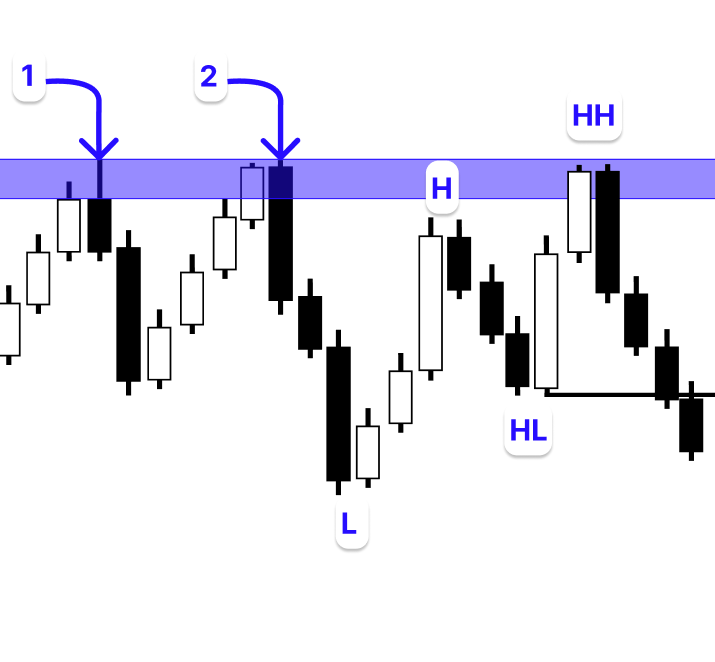
В этом проекте мы создадим советник, который автоматически ищет зоны поддержки и сопротивления в пределах заданного количества баров. Вместо использования вручную нарисованных зон советник будет анализировать недавние движения цены, выявляя области, в которых рынок неоднократно демонстрировал реакцию: либо отскакивая вверх (поддержка), либо разворачиваясь вниз (сопротивление).
Поддержка
Чтобы найти каждый минимум свинга, советник сначала проходит по указанному количеству баров. Минимум свинга – это свеча, которая знаменует краткосрочный минимум в ценовом действии, когда ее минимальная цена ниже, чем у свечей, которые идут сразу перед ней и после нее.
После выявления минимума свинга советник определяет что меньше – цена открытия свечи или цена ее закрытия, а также берет точную цену минимума свечи, которая образовала минимум свинга. Эти два значения определяют потенциальную зону поддержки, но она еще не подтверждена. После нахождения этого минимума свинга советник проверяет, не образовался ли другой минимум свинга в той же зоне. Минимальное из значений цен открытия и закрытия свечи, которая образовала первый минимум свинга, должно быть выше второго минимума свинга. Такое повторение подразумевает, что рынок снова протестировал эту область, увеличивая ее значимость.
После выявления этой зоны поддержки советник подтверждает, что ни одна свеча не пробилась ниже нее. Зона считается недействительной и не учитывается, если какая-либо свеча закрывается ниже нее. Пока зона продолжает оставаться действительной, советник отслеживает более низкий таймфрейм на предмет бычьей смены характера. Сделка на покупку инициируется, когда выявляется такая смена структуры, указывающая, что покупатели перехватывают инициативу на рынке, и что зона поддержки остается устойчивой.

Сопротивление
Чтобы найти каждый максимум свинга, советник сначала проходит по выбранному количеству баров. Максимум свинга – это свеча, которая знаменует краткосрочный максимум в ценовом движении, когда ее максимальная выше ниже, чем у свечей, которые идут сразу перед ней и после нее.
Как только максимум свинга определен, советник записывает максимальную цену образовавшей его свечи, а также максимально из значений ее цен открытия и закрытия. Эти цифры указывают на потенциальную зону сопротивления, хотя он еще не подтверждена. Далее, чтобы определить возникновение еще одного максимума свинга в той же зоне, советник проверяет свечи, следующие за первым максимумом свинга. Отрезок между ценой открытия и ценой закрытия свечи, которая образовала первый максимум свинга, должен быть ниже второго максимума свинга. Такой повторный отскок от того же уровня указывает на сильное давление продавцов, что подтверждает потенциал этой области в качестве барьера.
Затем советник убеждается, что ни одна свеча не пробила выявленную зону сопротивления. Зона считается недействительной и игнорируется, если какая-либо свеча закрывается выше нее. Пока зона продолжает оставаться действительной, советник отслеживает более низкий таймфрейм на предмет медвежьей смены характера. Советник инициирует сделку на продажу, когда происходит такой медвежий структурный сдвиг, поскольку это указывает, что продавцы вновь перехватывают инициативу на этом уровне сопротивления.
Выявление первых минимумов свинга
Теперь, когда мы лучше понимаем проект, нашим следующим шагом будет нахождение зоны поддержки. Первым этапом данного процесса является нахождение нескольких важных минимумов свинга на графике. Эти минимумы свинга указывают на возможные области, где может присутствовать покупательское давление, поскольку они показывают точки, в которых рынок на мгновение остановился в движении вниз и развернулся обратно вверх. Распознавая эти минимумы свинга, советник сможет обнаруживать возможные зоны поддержки, которые впоследствии могут послужить точками входа для бычьих сетапов.
Сначала нам нужно скопировать данные соответствующих свечей. Далее мы укажем количество баров, которое советник должен сканировать на предмет потенциальных зон поддержки и сопротивления. Затем будет разработана функция, которая определяет максимумы и минимумы свинга в выбранном диапазоне. Эта характеристика послужит основой для выявления важных точек разворота цен, которые необходимы для определения надежных уровней поддержки и сопротивления.
Пример:input ENUM_TIMEFRAMES timeframe = PERIOD_W1; //SUPPORT AND RESISTANCE TIMEFRAME double open[]; double close[]; double low[]; double high[]; datetime time[]; int bars_check = 200; //+------------------------------------------------------------------+ //| Expert initialization function | //+------------------------------------------------------------------+ int OnInit() { //--- //--- return(INIT_SUCCEEDED); } //+------------------------------------------------------------------+ //| Expert deinitialization function | //+------------------------------------------------------------------+ void OnDeinit(const int reason) { //--- } //+------------------------------------------------------------------+ //| Expert tick function | //+------------------------------------------------------------------+ void OnTick() { //--- CopyOpen(_Symbol, timeframe, TimeCurrent(), bars_check, open); CopyClose(_Symbol, timeframe, TimeCurrent(), bars_check, close); CopyLow(_Symbol, timeframe, TimeCurrent(), bars_check, low); CopyHigh(_Symbol, timeframe, TimeCurrent(), bars_check, high); CopyTime(_Symbol, timeframe, TimeCurrent(), bars_check, time); } //+------------------------------------------------------------------+ //| FUNCTION FOR SWING LOW | //+------------------------------------------------------------------+ bool IsSwingLow(const double &low_price[], int index, int lookback) { for(int i = 1; i <= lookback; i++) { if(low_price[index] > low_price[index - i] || low_price[index] > low_price[index + i]) return false; } return true; } //+------------------------------------------------------------------+ //| FUNCTION FOR SWING HIGH | //+------------------------------------------------------------------+ bool IsSwingHigh(const double &high_price[], int index, int lookback) { for(int i = 1; i <= lookback; i++) { if(high_price[index] < high_price[index - i] || high_price[index] < high_price[index + i]) return false; // If the current high is not the highest, return false. } return true; }
Пояснение:
Пользователь может выбрать таймфрейм для поиска зон сопротивления и поддержки. Массивы будут содержать свечные данные. Согласно параметру bars_check, советник будет анализировать 200 свечей в поисках точек свинга. Каждая свеча на графике имеет свои данные о цене и времени, которые программа копирует. Первый аргумент _Symbol дает советнику указание передать данные по активу, который в данный момент показан в окне графика. Второй параметр timeframe указывает на выбранный пользователем таймфрейм. Пользователь может указать любой желаемый таймфрейм для анализа, поскольку он определяется на входе. В следующем параметре, с которого должно начаться копирование данных, мы вызываем функцию TimeCurrent().
Поскольку эта функция возвращает текущее серверное время, советник начинает копировать данные с самой последней свечи. Чтобы узнать, сколько свечей должен скопировать советник, используйте аргумент bars_check. Здесь этот аргумент указывает на то, что советник будет извлекать информацию за 200 баров, предшествующих текущему. С помощью последнего аргумента, в котором указывается массив (open, close, low, high или time) для сохранения копируемых данных, советник может сохранить данные для дальнейшего анализа.
Функция IsSwingLow() требует три аргумента. Первым параметром является массив low_price[], содержащий минимальные цены всех свечей. Во втором параметре указывается индекс свечи, анализируемой на текущий момент. Количество свечей, которое необходимо проверить до и после текущей, определяется третьим параметром, lookback. Цикл внутри функции сравнивает минимум текущей свечи с минимумами ближайших свечей (от 1 до значения интервала проверки). Функция возвращает false, сообщая, что текущий минимум не является минимумом свинга, если он выше любого из соседних минимумов. Функция возвращает true, сообщая, что это действительный минимум свинга, если он остается самым низким по сравнению со всеми ближайшими свечами.
Функция IsSwingHigh() работает прямо противоположным образом. Чтобы определить, находится ли максимум текущей свечи выше максимумов соседних свечей в пределах указанного интервала проверки, используется массив high_price[]. Для текущего максимума возвращается false, если он оказывается ниже любого из своих соседей. В противном случае, функция возвращает true, и он определяется как действительный максимум свинга.
Следующим шагом после копирования свечных данных является нахождение каждого минимума свинга на графике. Эти минимумы свинга – это места, где цена на мгновение развернулась вверх, создавая возможные зоны поддержки. Наши зоны поддержки будут созданы с использованием каждого обнаруженного минимума свинга в качестве первой эталонной точки. Советник затем проверит эти зоны, отслеживая новые касания и отскоки в пределах того же ценового диапазона.
Пример:input ENUM_TIMEFRAMES timeframe = PERIOD_W1; //SUPPORT AND RESISTANCE TIMEFRAME double open[]; double close[]; double low[]; double high[]; datetime time[]; int bars_check = 200; double first_sup_price; double first_sup_min_body_price; datetime first_sup_time; string support_object; ulong chart_id = ChartID(); int total_symbol_bars; int z = 7; //+------------------------------------------------------------------+ //| Expert initialization function | //+------------------------------------------------------------------+ int OnInit() { //--- //--- return(INIT_SUCCEEDED); } //+------------------------------------------------------------------+ //| Expert deinitialization function | //+------------------------------------------------------------------+ void OnDeinit(const int reason) { //--- ObjectsDeleteAll(chart_id); } //+------------------------------------------------------------------+ //| Expert tick function | //+------------------------------------------------------------------+ void OnTick() { //--- CopyOpen(_Symbol, timeframe, TimeCurrent(), bars_check, open); CopyClose(_Symbol, timeframe, TimeCurrent(), bars_check, close); CopyLow(_Symbol, timeframe, TimeCurrent(), bars_check, low); CopyHigh(_Symbol, timeframe, TimeCurrent(), bars_check, high); CopyTime(_Symbol, timeframe, TimeCurrent(), bars_check, time); total_symbol_bars = Bars(_Symbol, timeframe); if(total_symbol_bars >= bars_check) { for(int i = z ; i < bars_check - z; i++) { if(IsSwingLow(low, i, z)) { first_sup_price = low[i]; first_sup_min_body_price = MathMin(close[i], open[i]); first_sup_time = time[i]; support_object = StringFormat("SUPPORT %f",first_sup_price); ObjectCreate(chart_id,support_object,OBJ_RECTANGLE,0,first_sup_time,first_sup_price,TimeCurrent(),first_sup_min_body_price); ObjectSetInteger(chart_id,support_object,OBJPROP_COLOR,clrBlue); ObjectSetInteger(chart_id,support_object,OBJPROP_BACK,true); ObjectSetInteger(chart_id,support_object,OBJPROP_FILL,true); } } } } //+------------------------------------------------------------------+ //| FUNCTION FOR SWING LOW | //+------------------------------------------------------------------+ bool IsSwingLow(const double &low_price[], int index, int lookback) { for(int i = 1; i <= lookback; i++) { if(low_price[index] > low_price[index - i] || low_price[index] > low_price[index + i]) return false; } return true; } //+------------------------------------------------------------------+ //| FUNCTION FOR SWING HIGH | //+------------------------------------------------------------------+ bool IsSwingHigh(const double &high_price[], int index, int lookback) { for(int i = 1; i <= lookback; i++) { if(high_price[index] < high_price[index - i] || high_price[index] < high_price[index + i]) return false; // If the current high is not the highest, return false. } return true; }
Вывод:
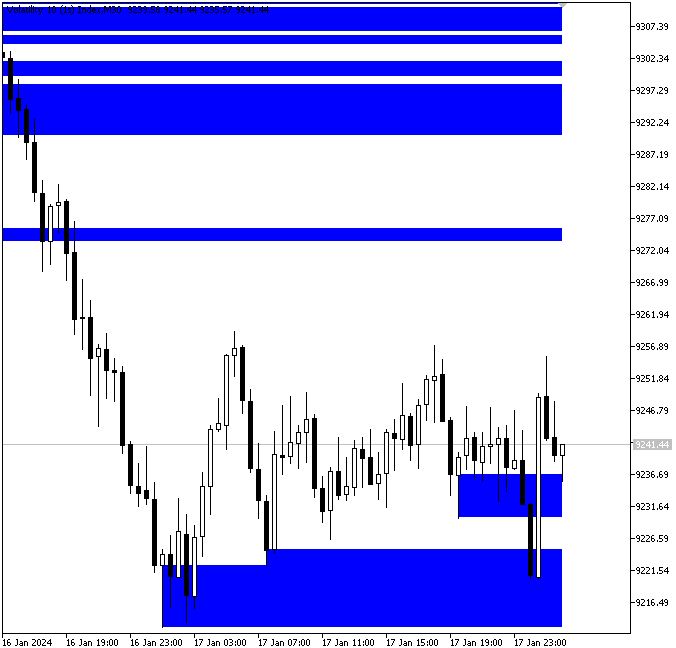
Пояснение:
Каждый минимум свинга, который мы находим, содержит основную информацию, которую мы сохраняем в переменные, объявленные для хранения важнейших характеристик. Фиксируется фактическая минимальная цена свечи, образовавшей минимум свинга, сохраняется время, в которое минимум свинга был образован, а нижняя граница тела свечи определяется как минимальная из цен открытия и закрытия.
Мы отслеживаем важную информацию о каждом минимуме свинга, такую как время его возникновения, нижняя граница тела свечи и фактическая минимальная цена. Для управления графическими объектами извлекается идентификатор графика, а также создается переменная для сохранения имени графического объекта "прямоугольник", который будет представлять зону поддержки. Благодаря интервалу проверки из семи свечей идентифицируются подлинные минимумы свинга. После подтверждения того, что на графике доступно как минимум 200 свечей, компьютер проходит по данным, начиная с седьмой свечи.
Функция минимума свинга используется программой внутри цикла для определения, образует ли каждая из проверяемых свечей паттерн минимума свинга. Если это происходит, программа сохраняет временную метку свечи, ее минимум и наименьшее значение между ее ценой открытия и ценой закрытия. После этого он приклеивает к слову "SUPPORT" реальную цену поддержки, чтобы дать обнаруженной зоне поддержки отличительное название.
Проверяя каждую из свечей на предмет того, находится ли ее минимум ниже минимумов семи свечей, предшествующих ей, и семи свечей, следующих за ней, компьютер автоматически обнаруживает минимумы свинга. Когда минимум свинга идентифицирован, отмечается точное время свечи для определения зоны поддержки, а также ее цена минимума и наименьшее значение между ее ценой открытия и ценой закрытия. Затем эта зона визуально отображается на графике с помощью прямоугольника, который стилизован цветом и заливкой и растянут от минимума свинга до текущего времени. Каждой зоне поддержки также присваивается отличительное название, состоящее из слова "SUPPORT" и соответствующего ценового уровня, что упрощает мониторинг и нахождение зоны на графике.
Для графического обозначения зон поддержки на графике программа использует прямоугольник, который охватывает расстояние между минимумом свечи, образовавшей минимум свинга, и нижней границей ее тела и растягивается от времени минимума свинга до текущей свечи.
Выявление второго минимума свинга
Следующий этап заключается в определении того, образовался ли еще один минимум свинга в зоне, которая ранее была отмечена первым минимумом свинга. Это подтвердит подлинность и надежность зоны поддержки. С момента установления первого минимума свинга советник будет отслеживать появление второго минимума свинга, цена которого все еще находится в пределах ранее определенной зоны поддержки, то есть между минимальной ценой свечи, образовавшей первый минимум свинга, и минимальной ценой ее тела. Когда данное требование удовлетворено, это означает, что рынок повторно отскочил от одного и того же ценового уровня, подтверждая зону поддержки и увеличивая ее надежность для потенциальных сетапов на покупку.
Пример:double second_sup_price; datetime second_sup_time; string first_low_txt; string second_low_txt;
//+------------------------------------------------------------------+
//| Expert tick function                                             |
//+------------------------------------------------------------------+
void OnTick()
  {
//---
   CopyOpen(_Symbol, timeframe, TimeCurrent(), bars_check, open);
   CopyClose(_Symbol, timeframe, TimeCurrent(), bars_check, close);
   CopyLow(_Symbol, timeframe, TimeCurrent(), bars_check, low);
   CopyHigh(_Symbol, timeframe, TimeCurrent(), bars_check, high);
   CopyTime(_Symbol, timeframe, TimeCurrent(), bars_check, time);

   total_symbol_bars = Bars(_Symbol, timeframe);

   if(total_symbol_bars >= bars_check)
     {

      for(int i = z ; i < bars_check - z; i++)
        {

         if(IsSwingLow(low, i, z))
           {

            first_sup_price = low[i];
            first_sup_min_body_price = MathMin(close[i], open[i]);
            first_sup_time = time[i];


            for(int j = i+1; j < bars_check - z; j++)
              {

               if(IsSwingLow(low, j, z) && low[j] <= first_sup_min_body_price &&  low[j] >= first_sup_price)
                 {

                  second_sup_price = low[j];
                  second_sup_time = time[j];

                  support_object = StringFormat("SUPPORT %f",first_sup_price);

                  ObjectCreate(chart_id,support_object,OBJ_RECTANGLE,0,first_sup_time,first_sup_price,TimeCurrent(),first_sup_min_body_price);
                  ObjectSetInteger(chart_id,support_object,OBJPROP_COLOR,clrBlue);
                  ObjectSetInteger(chart_id,support_object,OBJPROP_BACK,true);
                  ObjectSetInteger(chart_id,support_object,OBJPROP_FILL,true);

                  first_low_txt = StringFormat("FIRST LOW%d",i);
                  ObjectCreate(chart_id,first_low_txt,OBJ_TEXT,0,first_sup_time,first_sup_price);
                  ObjectSetString(chart_id,first_low_txt,OBJPROP_TEXT,"1");

                  second_low_txt = StringFormat("SECOND LOW%d",i);
                  ObjectCreate(chart_id,second_low_txt,OBJ_TEXT,0,second_sup_time,second_sup_price);
                  ObjectSetString(chart_id,second_low_txt,OBJPROP_TEXT,"2");

                  break;
                 }
              }
           }
        }
     }
  }
Вывод:
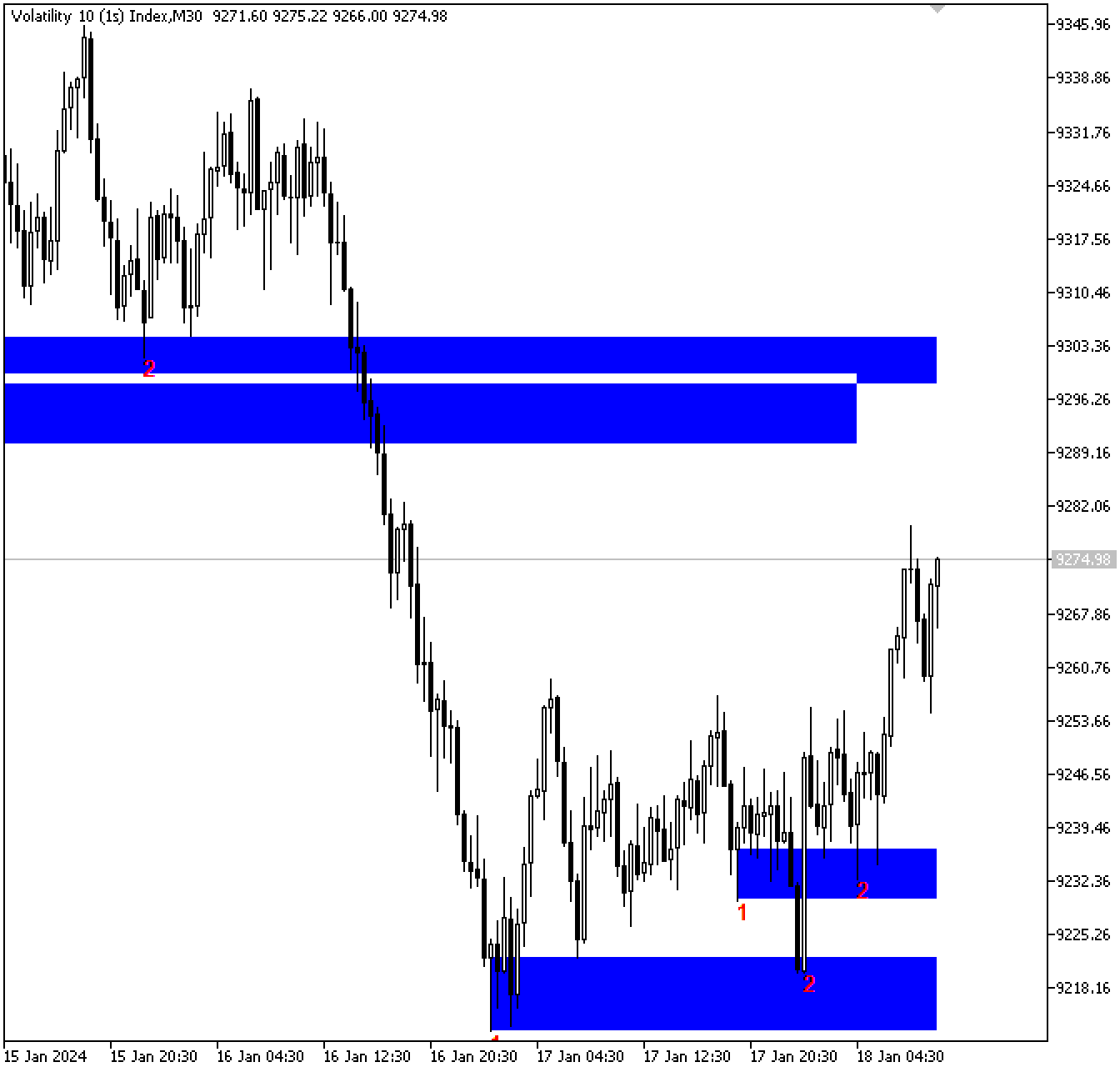
Пояснение:
Мы отслеживаем время и цену первого минимума свинга перед тем, как искать второй, и отмечаем оба минимума свинга на графике для простой визуальной идентификации. Затем с помощью цикла for осуществляется поиск второго минимума свинга, который возникает после первого. Спустя одну свечу после первого минимума свинга (i + 1), цикл начинает проверку и проходит по оставшимся барам. Функция минимума свинга оценивает каждую свечу внутри цикла, чтобы определить, образует ли она еще один паттерн минимума свинга.
Программа одновременно определяет, попадает ли минимальная цена второго минимума свинга в первичную зону поддержки (область между наименьшей ценой первого минимума свинга и минимумом тела соответствующей свечи). Если эти критерии выполнены, программа подтверждает, что в зоне поддержки второй действительный минимум образовался, фиксируя цену и время нового минимума свинга.
Чтобы рисовать зону поддержки только тогда, когда оба минимума свинга подтверждают одну и ту же область, теперь мы должны переместить объект "прямоугольник", который мы ранее построили, в этот цикл. Это гарантирует, что зона будет лишь подтвержденным уровнем поддержки и не будет построена на графике слишком рано.
Выявление пробоя зоны поддержки
Два минимума свинга, которые мы нашли до сих пор, совершили отскок в одном и том же ценовом диапазоне, образуя что-то похожее на потенциальную зону поддержки. Но для нашего метода подходит не каждая зона с двумя разворотами. Мы хотим сохранить только зоны, в которых рынок отскочил дважды, не опускаясь ниже. Чтобы гарантировать это, мы должны исключить любые зоны, в которых ранее был пробой. Этот шаг повысит точность будущих торговых сигналов, ограничив советник только надежными и активными зонами поддержки, в которых цена продемонстрировала однозначный отскок.
Пример:double second_sup_price; datetime second_sup_time; string first_low_txt; string second_low_txt; int sup_bars; int sup_min_low_index; double sup_min_low_price;
if(total_symbol_bars >= bars_check)
  {

   for(int i = z ; i < bars_check - z; i++)
     {

      if(IsSwingLow(low, i, z))
        {

         first_sup_price = low[i];
         first_sup_min_body_price = MathMin(close[i], open[i]);
         first_sup_time = time[i];

         for(int j = i+1; j < bars_check - z; j++)
           {

            if(IsSwingLow(low, j, z) && low[j] <= first_sup_min_body_price &&  low[j] >= first_sup_price)
              {

               second_sup_price = low[j];
               second_sup_time = time[j];

               sup_bars = Bars(_Symbol,timeframe,first_sup_time,TimeCurrent());
               sup_min_low_index = ArrayMinimum(low,i,sup_bars);
               sup_min_low_price = low[sup_min_low_index];

               if(sup_min_low_price >= first_sup_price)
                 {

                  support_object = StringFormat("SUPPORT %f",first_sup_price);

                  ObjectCreate(chart_id,support_object,OBJ_RECTANGLE,0,first_sup_time,first_sup_price,TimeCurrent(),first_sup_min_body_price);
                  ObjectSetInteger(chart_id,support_object,OBJPROP_COLOR,clrBlue);
                  ObjectSetInteger(chart_id,support_object,OBJPROP_BACK,true);
                  ObjectSetInteger(chart_id,support_object,OBJPROP_FILL,true);

                  first_low_txt = StringFormat("FIRST LOW%d",i);
                  ObjectCreate(chart_id,first_low_txt,OBJ_TEXT,0,first_sup_time,first_sup_price);
                  ObjectSetString(chart_id,first_low_txt,OBJPROP_TEXT,"1");

                  second_low_txt = StringFormat("SECOND LOW%d",i);
                  ObjectCreate(chart_id,second_low_txt,OBJ_TEXT,0,second_sup_time,second_sup_price);
                  ObjectSetString(chart_id,second_low_txt,OBJPROP_TEXT,"2");

                 }
               break;
              }
           }
        }
     }
  }
Вывод:
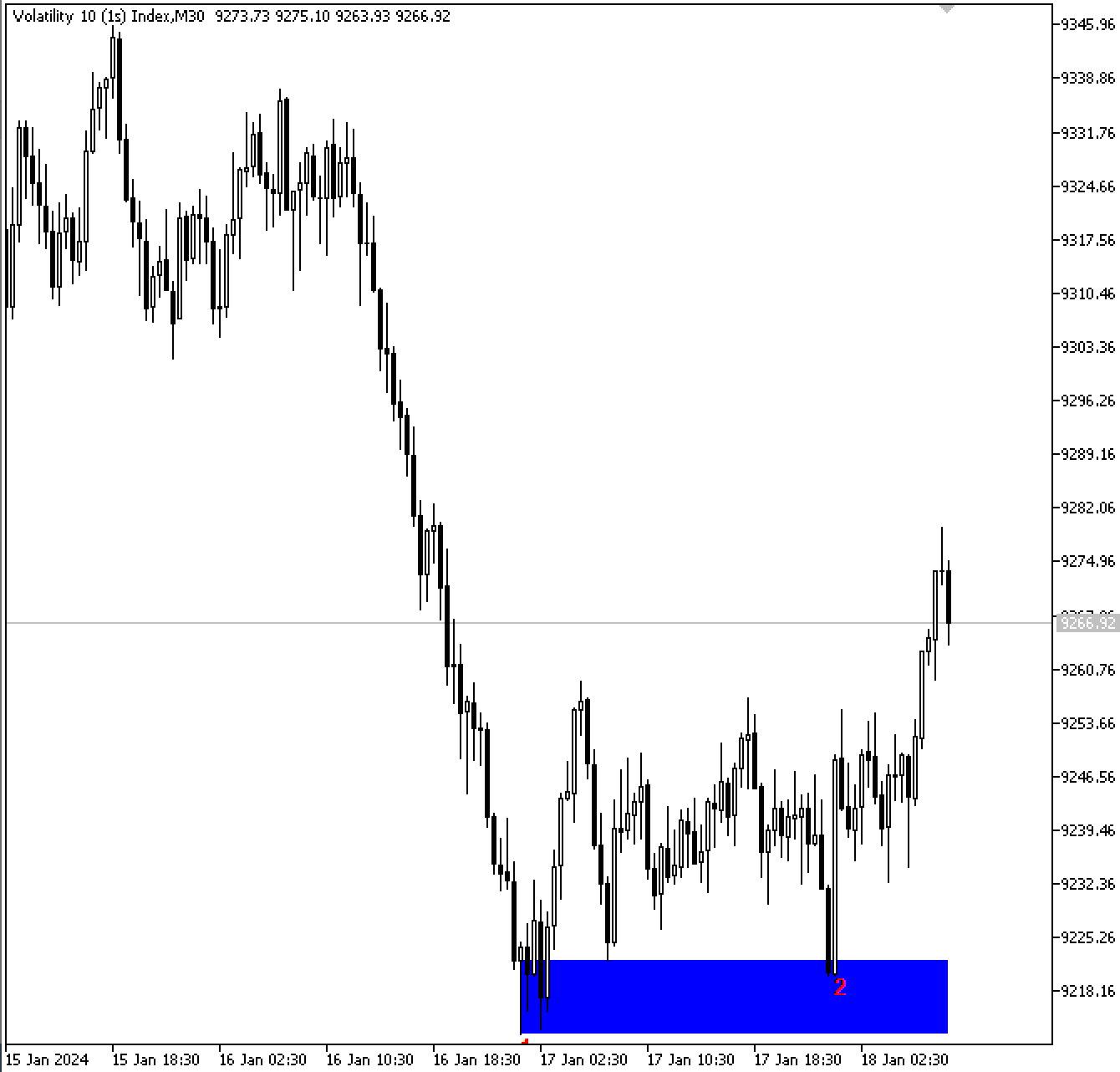
Пояснение:
Чтобы определить, пробил ли рынок обозначенную зону поддержки, и действительна ли эта зона по-прежнему, в этом разделе пояснений вводятся три переменные. Первая переменная считает количество свечей, сформировавшихся между временем первоначального минимума свинга и настоящим моментом. Она помогает определить диапазон баров, который будет исследоваться для подтверждения зоны поддержки или поиска возможного пробоя.
Затем программа определяет, какая свеча в этом диапазоне имеет минимальную цену, отмечая точку, в которой произошло наибольшее снижение с момента первого минимума свинга. Затем реальное значение цены в этой минимальной точке извлекается и сохраняется для последующего изучения.
После этого применяется критерий, определяющий, пробил ли рынок уровень поддержки или отскочил от него. Зона поддержки считается действительной, и предполагается, что рынок отскочил от этого уровня, если наименьшая цена, обнаруженная на рынке, остается выше или равной цене первого минимума свинга. В этой ситуации область поддержки визуально отмечается на графике посредством рисования графических объектов, таких как прямоугольники, линии или метки. Пробой выявляется, если минимальная цена опускается ниже изначального уровня поддержки; в этом случае графические объекты не рисуются, так как зона более не действительна.
Выявление бычьей смены характера
После подтверждения действительности зоны поддержки следующим этапом является выявление бычьей смены характера. Рынок дважды отскочил от данной зоны поддержки, указывая на активность покупателей, и на данный момент зона поддержки уже была подтверждена двумя минимумами свинга. Но наличие зоны, от которой дважды произошел отскок, недостаточно для установления потенциального бычьего разворота; нам также необходимо увидеть заметное изменение в структуре рынка.
Чтобы сделать это, мы подождем, когда рынок снова вернется в зону поддержки. Когда цена возвращается в зону, мы начинаем искать паттерн бычьей смены характера (ChOCh). Этот паттерн отражает переход от медвежьего моментума к бычьему. В нашем случае паттерн должен формироваться в виде последовательности точек рыночной структуры, а именно максимума, минимума, более низкого максимума и более низкого минимума. Как только сформируется более низкий минимум, мы начинаем ждать, чтобы свеча пробила более низкий максимум и закрылась выше него. Этот пробой указывает на смену направления и подтверждает, что покупатели перехватили инициативу.
Сделка исполняется на более низком таймфрейме, на котором обнаруживается смена характера. Более низкий таймфрейм используется для подтверждения входа, выявляя бычью смену характера внутри или вблизи зон поддержки и сопротивления, которые были впервые выявлены на более высоком таймфрейме. Такой подход с несколькими таймфреймами обеспечивает точный и своевременный вход в сделки.
Выявление более низкого минимума и более низкого максимума
Мы начнем наше исследование с самого последнего бара на графике, так как мы хотим найти самую недавнюю смену характера. Это подразумевает, что первым делом нам нужно обратить внимание на более низкий минимум, то есть на последнюю точку, в которой цена установила новый минимум. Затем мы определим более низкий максимум, затем минимум и, наконец, максимум.
Пример:
input ENUM_TIMEFRAMES timeframe = PERIOD_M30; //SUPPORT AND RESISTANCE TIMEFRAME
input ENUM_TIMEFRAMES exe_timeframe = PERIOD_M5; //EXECUTION TIMEFRAME
double exe_open[];
double exe_close[];
double exe_low[];
double exe_high[];
datetime exe_time[];

int exe_total_symbol_bars;

double lower_high;
datetime lower_high_time;
double lower_low;
datetime lower_low_time;
//+------------------------------------------------------------------+
//| Expert initialization function                                   |
//+------------------------------------------------------------------+
int OnInit()
  {
//---

   ArraySetAsSeries(exe_close,true);
   ArraySetAsSeries(exe_open,true);
   ArraySetAsSeries(exe_high,true);
   ArraySetAsSeries(exe_low,true);
   ArraySetAsSeries(exe_time,true);

//---
   return(INIT_SUCCEEDED);
  }
CopyOpen(_Symbol, exe_timeframe, TimeCurrent(), bars_check, exe_open);
CopyClose(_Symbol, exe_timeframe, TimeCurrent(), bars_check, exe_close);
CopyLow(_Symbol, exe_timeframe, TimeCurrent(), bars_check, exe_low);
CopyHigh(_Symbol, exe_timeframe, TimeCurrent(), bars_check, exe_high);
CopyTime(_Symbol, exe_timeframe, TimeCurrent(), bars_check, exe_time);
if(total_symbol_bars >= bars_check)
  {

   for(int i = z ; i < bars_check - z; i++)
     {

      if(IsSwingLow(low, i, z))
        {

         first_sup_price = low[i];
         first_sup_min_body_price = MathMin(close[i], open[i]);
         first_sup_time = time[i];

         for(int j = i+1; j < bars_check - z; j++)
           {

            if(IsSwingLow(low, j, z) && low[j] <= first_sup_min_body_price &&  low[j] >= first_sup_price)
              {

               second_sup_price = low[j];
               second_sup_time = time[j];

               sup_bars = Bars(_Symbol,timeframe,first_sup_time,TimeCurrent());
               sup_min_low_index = ArrayMinimum(low,i,sup_bars);
               sup_min_low_price = low[sup_min_low_index];

               if(sup_min_low_price >= first_sup_price)
                 {

                  support_object = StringFormat("SUPPORT %f",first_sup_price);

                  ObjectCreate(chart_id,support_object,OBJ_RECTANGLE,0,first_sup_time,first_sup_price,TimeCurrent(),first_sup_min_body_price);
                  ObjectSetInteger(chart_id,support_object,OBJPROP_COLOR,clrBlue);
                  ObjectSetInteger(chart_id,support_object,OBJPROP_BACK,true);
                  ObjectSetInteger(chart_id,support_object,OBJPROP_FILL,true);

                  first_low_txt = StringFormat("FIRST LOW%d",i);
                  ObjectCreate(chart_id,first_low_txt,OBJ_TEXT,0,first_sup_time,first_sup_price);
                  ObjectSetString(chart_id,first_low_txt,OBJPROP_TEXT,"1");

                  second_low_txt = StringFormat("SECOND LOW%d",i);
                  ObjectCreate(chart_id,second_low_txt,OBJ_TEXT,0,second_sup_time,second_sup_price);
                  ObjectSetString(chart_id,second_low_txt,OBJPROP_TEXT,"2");

                  exe_total_symbol_bars = Bars(_Symbol, exe_timeframe);

                  if(exe_total_symbol_bars >= bars_check)
                    {
                     for(int k = 4; k < bars_check-3; k++)
                       {
                        if(IsSwingLow(exe_low, k, 3))
                          {

                           lower_low = exe_low[k];
                           lower_low_time = exe_time[k];

                           for(int l = k; l < bars_check-3; l++)
                             {

                              if(IsSwingHigh(exe_high,l,3))
                                {
                                 lower_high = exe_high[l];
                                 lower_high_time = exe_time[l];

                                 break;
                                }
                             }

                           break;
                          }
                       }

                    }

                 }
               break;
              }
           }
        }
     }
  }
Пояснение:
В этом разделе программы основное внимание уделяется подготовке и анализу данных для исполнения сделок на основе смены характера (ChOCh). Сначала определяется таймфрейм для исполнения сделки, который в данном случае имеет будет ниже, например, 5-минутный таймфрейм. Чтобы зафиксировать более точные движения рынка, поиск фактических подтверждений для входа в сделки происходит на более низком таймфрейме, даже когда зоны поддержки и сопротивления указаны на более высоких таймфреймах, таких как дневные или недельные графики.
После этого создаются массивы для хранения свечных данных о цене и времени на таймфрейме исполнения. Эти массивы необходимы для структурного анализа, так как они предоставляют советнику точные ссылки на цены максимума, минимума, открытия и закрытия каждой свечи. Вместе с ценой и временем последнего более низкого максимума и более низкого минимума объявляются и другие переменные для хранения общего количества доступных для анализа свечей.
Сначала программа проверяет, достаточно ли свечей на выбранном таймфрейме для проведения полноценного анализа, прежде чем продолжить. После подтверждения она ищет минимумы свинга, проходя по каждой из свечей. Когда минимум текущей свечи ниже минимумов нескольких свечей до и после нее, тогда текущая свеча подтверждается как минимум свинга, указывая на локальное дно рынка. За более низкий минимум берутся цена и время минимума свинга, как только таковой будет обнаружен.
После определения более низкого минимума программа продолжает искать следующий за ним максимум свинга. Когда максимум свечи превышает максимумы соседних свечей, указывая на временный пик, такая свеча признается максимумом свинга. После выявления более низкого минимума и более низкого максимума фаза анализа завершена, и советник готов оценить рыночную структуру на предмет возможных медвежьих или бычьих смен характера.
Выявление минимума и максимума
Следующим этапом после определения более низкого минимума и более низкого максимума является нахождение следующих за ними нового минимума и нового максимума. Эта фаза проверяет, что образовалась корректная рыночная структура, подтверждающая действительность смены характера. Ранее рынок пребывал в состоянии снижения, когда более низкий максимум был выше более низкого минимума.
Чтобы указывать на ослабление медвежьего движения, вновь сформированный минимум должен находиться между этими двумя точками, то есть ниже более низкого максимума, но выше более низкого минимума. Если последующий максимум, который превращается в более высокий максимум, будет выше всех предыдущих максимумов и минимумов, это указывает на то, что рынок изменил моментум с медвежьего на бычий, и предположительно начинается потенциальное движение вверх.
Пример:
double low_l;
datetime low_time;
double high_h;
datetime high_time;
for(int m = l; m < bars_check-3; m++)
  {

   if(IsSwingLow(exe_low, m, 3))
     {

      low_l = exe_low[m];
      low_time = exe_time[m];

      for(int n = m; n < bars_check-3; n++)
        {

         if(IsSwingHigh(exe_high,n,3))
           {

            high_h = exe_high[n];
            high_time = exe_time[n];

            break;
           }
        }
      break;
     }
Пояснение:
Этот раздел программы использует ряд критериев для выявления следующих значимых точек свинга, которые подтверждают бычью смену характера. Эти точки включают цену и время вновь образованных минимума свинга и максимума свинга. Отслеживая эти параметры, советник может определить, изменилась ли рыночная структура с медвежьего тренда на бычий.
Чтобы найти эти точки, программа сканирует недавние свечи в поисках нового минимума свинга. После обнаружения нового минимума и фиксации его цены и времени, программа быстро переходит к поиску следующего максимума свинга. Нахождение нового максимума свинга и сохранение его данных завершает процесс идентификации ключевой последовательности свингов, необходимой для оценки структурного изменения.
Когда бычья свеча закрывается выше более низкого максимума, который был образован ранее, это подтверждает бычью смену характера. Это событие по сути завершает медвежий период, указывая на то, что покупатели перехватили контроль над рынком. Формирование рынком более высоких максимумов и более высоких минимумов указывает на потенциальный разворот тренда и начало новой бычьей структуры.
Пример:
datetime start_choch_time;if(total_symbol_bars >= bars_check) { for(int i = z ; i < bars_check - z; i++) { if(IsSwingLow(low, i, z)) { first_sup_price = low[i]; first_sup_min_body_price = MathMin(close[i], open[i]); first_sup_time = time[i]; for(int j = i+1; j < bars_check - z; j++) { if(IsSwingLow(low, j, z) && low[j] <= first_sup_min_body_price && low[j] >= first_sup_price) { second_sup_price = low[j]; second_sup_time = time[j]; start_choch_time = time[j+z]; sup_bars = Bars(_Symbol,timeframe,first_sup_time,TimeCurrent()); sup_min_low_index = ArrayMinimum(low,i,sup_bars); sup_min_low_price = low[sup_min_low_index]; if(sup_min_low_price >= first_sup_price) { support_object = StringFormat("SUPPORT %f",first_sup_price); ObjectCreate(chart_id,support_object,OBJ_RECTANGLE,0,first_sup_time,first_sup_price,TimeCurrent(),first_sup_min_body_price); ObjectSetInteger(chart_id,support_object,OBJPROP_COLOR,clrBlue); ObjectSetInteger(chart_id,support_object,OBJPROP_BACK,true); ObjectSetInteger(chart_id,support_object,OBJPROP_FILL,true); first_low_txt = StringFormat("FIRST LOW%d",i); ObjectCreate(chart_id,first_low_txt,OBJ_TEXT,0,first_sup_time,first_sup_price); ObjectSetString(chart_id,first_low_txt,OBJPROP_TEXT,"1"); second_low_txt = StringFormat("SECOND LOW%d",i); ObjectCreate(chart_id,second_low_txt,OBJ_TEXT,0,second_sup_time,second_sup_price); ObjectSetString(chart_id,second_low_txt,OBJPROP_TEXT,"2"); exe_total_symbol_bars = Bars(_Symbol, exe_timeframe); if(exe_total_symbol_bars >= bars_check) { for(int k = 4; k < bars_check-3; k++) { if(IsSwingLow(exe_low, k, 3)) { lower_low = exe_low[k]; lower_low_time = exe_time[k]; for(int l = k; l < bars_check-3; l++) { if(IsSwingHigh(exe_high,l,3)) { lower_high = exe_high[l]; lower_high_time = exe_time[l]; for(int m = l; m < bars_check-3; m++) { if(IsSwingLow(exe_low, m, 3)) { low_l = exe_low[m]; low_time = exe_time[m]; for(int n = m; n < bars_check-3; n++) { if(IsSwingHigh(exe_high,n,3)) { high_h = exe_high[n]; high_time = exe_time[n]; for(int o = k; o > 0; o--) { if(exe_close[o] > lower_high && exe_open[o] < lower_high) { if(lower_high > lower_low && low_l < lower_high && low_l > lower_low && high_h > low_l && high_h > lower_high && lower_low <= first_sup_min_body_price && lower_low >= first_sup_price && high_time > start_choch_time) { ObjectCreate(chart_id,"LLLH",OBJ_TREND,0,lower_low_time,lower_low,lower_high_time,lower_high); ObjectSetInteger(chart_id,"LLLH",OBJPROP_COLOR,clrRed); ObjectSetInteger(chart_id,"LLLH",OBJPROP_WIDTH,2); ObjectCreate(chart_id,"LHL",OBJ_TREND,0,lower_high_time,lower_high,low_time,low_l); ObjectSetInteger(chart_id,"LHL",OBJPROP_COLOR,clrRed); ObjectSetInteger(chart_id,"LHL",OBJPROP_WIDTH,2); ObjectCreate(chart_id,"LH",OBJ_TREND,0,low_time,low_l,high_time,high_h); ObjectSetInteger(chart_id,"LH",OBJPROP_COLOR,clrRed); ObjectSetInteger(chart_id,"LH",OBJPROP_WIDTH,2); ObjectCreate(chart_id,"S Cross Line",OBJ_TREND,0,lower_high_time,lower_high,exe_time[o],lower_high); ObjectSetInteger(chart_id,"S Cross Line",OBJPROP_COLOR,clrRed); ObjectSetInteger(chart_id,"S Cross Line",OBJPROP_WIDTH,2); } break; } } break; } } break; } } break; } } break; } } } } break; } } } } }
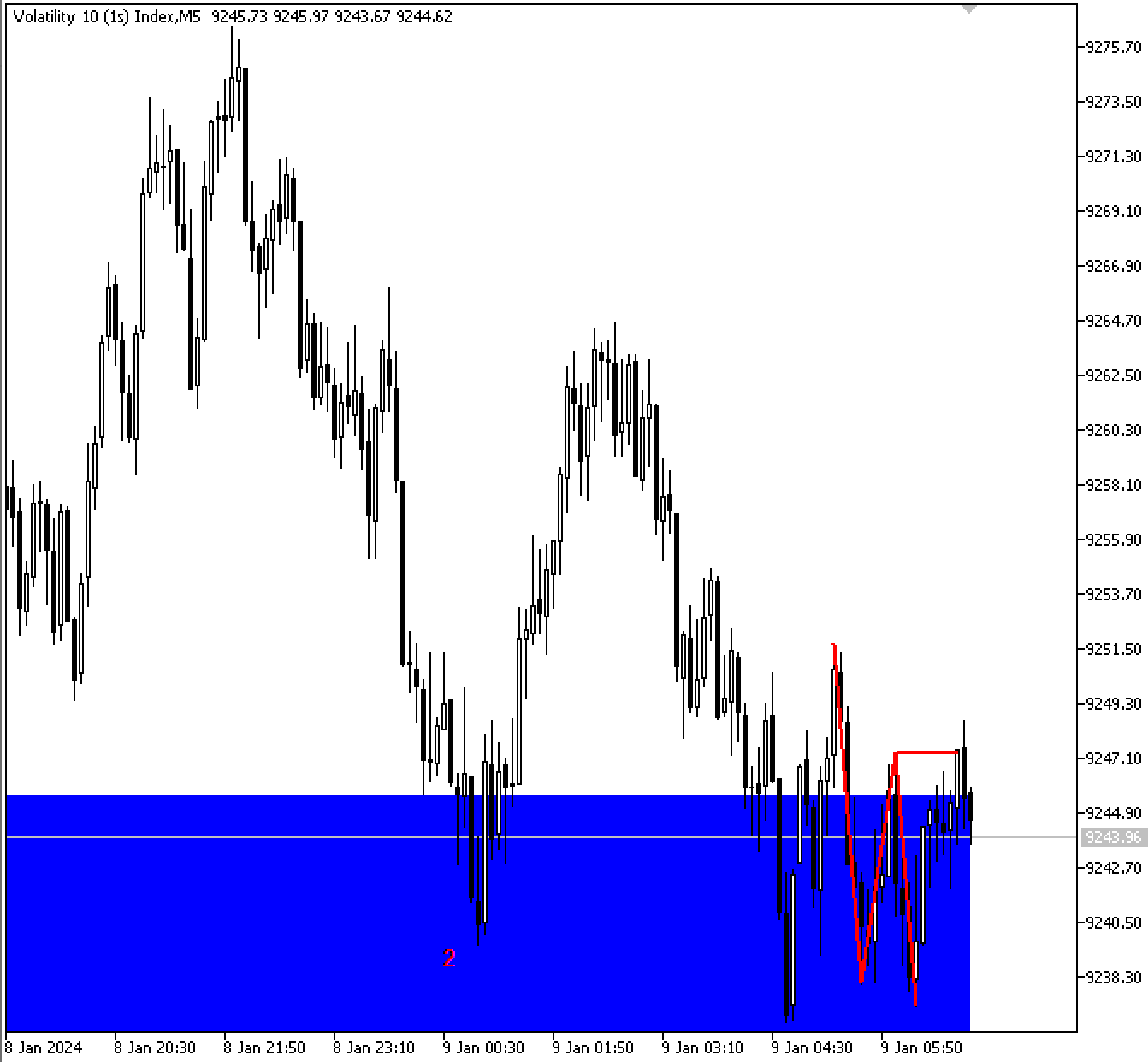
Пояснение:
В этой части сначала определяется эталонная точка, указывающая подходящее время для начала анализа смены характера (ChOCh). Это гарантирует, что программа начнет искать структурные изменения только после проверки наиболее актуальной зоны поддержки.
Затем программа сканирует свечи в обратном порядке, чтобы найти ту, которая закрывается выше более низкого максимума, что указывает на начало изменения рыночного сентимента на бычий. Сильным признаком прорыва и потенциального разворота рынка является свеча, которая закрывается выше более низкого максимума, открывшись ниже него.
После нахождения такой свечи программа выполняет ряд подтверждающих проверок, чтобы убедиться в действительности смены характера. После выполнения всех этих требований советник соединяет основные точки свинга (более низкий минимум, более низкий максимум, новый минимум и более высокий максимум) на графике, чтобы графически обозначить структуру. Кроме того, он визуально выделяет пробойную свечу, закрывшуюся выше более низкого максимума, которая указывает на то, что покупатели вернули себе контроль над рынком, и выступает финальным подтверждением бычьей смены характера.
Исполнение сделок
В последнем разделе программы, который посвящен исполнению сделок, все предыдущие подтверждения объединяются, образуя потенциальный торговый сетап. Код теперь определяет, выполнены ли все указанные требования для бычьей смены характера (ChOCh). Затем программа отмечает структуру на графике и готовится исполнять сделку после подтверждения.
Пример:
#include <Trade/Trade.mqh>
CTrade trade;
input ENUM_TIMEFRAMES timeframe = PERIOD_W1; //SUPPORT AND RESISTANCE TIMEFRAME
input ENUM_TIMEFRAMES exe_timeframe = PERIOD_M30; //EXECUTION TIMEFRAME
input double lot_size = 0.2; // Lot Size
input double RRR = 3; //RRR

double ask_price;
double take_profit;
datetime lastTradeBarTime = 0;
datetime currentBarTime = iTime(_Symbol, exe_timeframe, 0);
ask_price = SymbolInfoDouble(_Symbol,SYMBOL_ASK);
for(int o = k; o > 0; o--)
  {
   if(exe_close[o] > lower_high && exe_open[o] < lower_high)
     {

      if(lower_high > lower_low && low_l < lower_high && low_l > lower_low && high_h > low_l && high_h > lower_high && lower_low <= first_sup_min_body_price && lower_low >= first_sup_price
         && high_time > start_choch_time)
        {

         ObjectCreate(chart_id,"LLLH",OBJ_TREND,0,lower_low_time,lower_low,lower_high_time,lower_high);
         ObjectSetInteger(chart_id,"LLLH",OBJPROP_COLOR,clrRed);
         ObjectSetInteger(chart_id,"LLLH",OBJPROP_WIDTH,2);

         ObjectCreate(chart_id,"LHL",OBJ_TREND,0,lower_high_time,lower_high,low_time,low_l);
         ObjectSetInteger(chart_id,"LHL",OBJPROP_COLOR,clrRed);
         ObjectSetInteger(chart_id,"LHL",OBJPROP_WIDTH,2);

         ObjectCreate(chart_id,"LH",OBJ_TREND,0,low_time,low_l,high_time,high_h);
         ObjectSetInteger(chart_id,"LH",OBJPROP_COLOR,clrRed);
         ObjectSetInteger(chart_id,"LH",OBJPROP_WIDTH,2);

         ObjectCreate(chart_id,"S Cross Line",OBJ_TREND,0,lower_high_time,lower_high,exe_time[o],lower_high);
         ObjectSetInteger(chart_id,"S Cross Line",OBJPROP_COLOR,clrRed);
         ObjectSetInteger(chart_id,"S Cross Line",OBJPROP_WIDTH,2);

         if(exe_time[1] == exe_time[o] && currentBarTime != lastTradeBarTime)
           {

            take_profit = MathAbs(ask_price + ((ask_price - lower_low) * RRR));

            trade.Buy(lot_size,_Symbol,ask_price,lower_low,take_profit);
            lastTradeBarTime = currentBarTime;

           }

        }
      break;
     }
  }
Вывод:
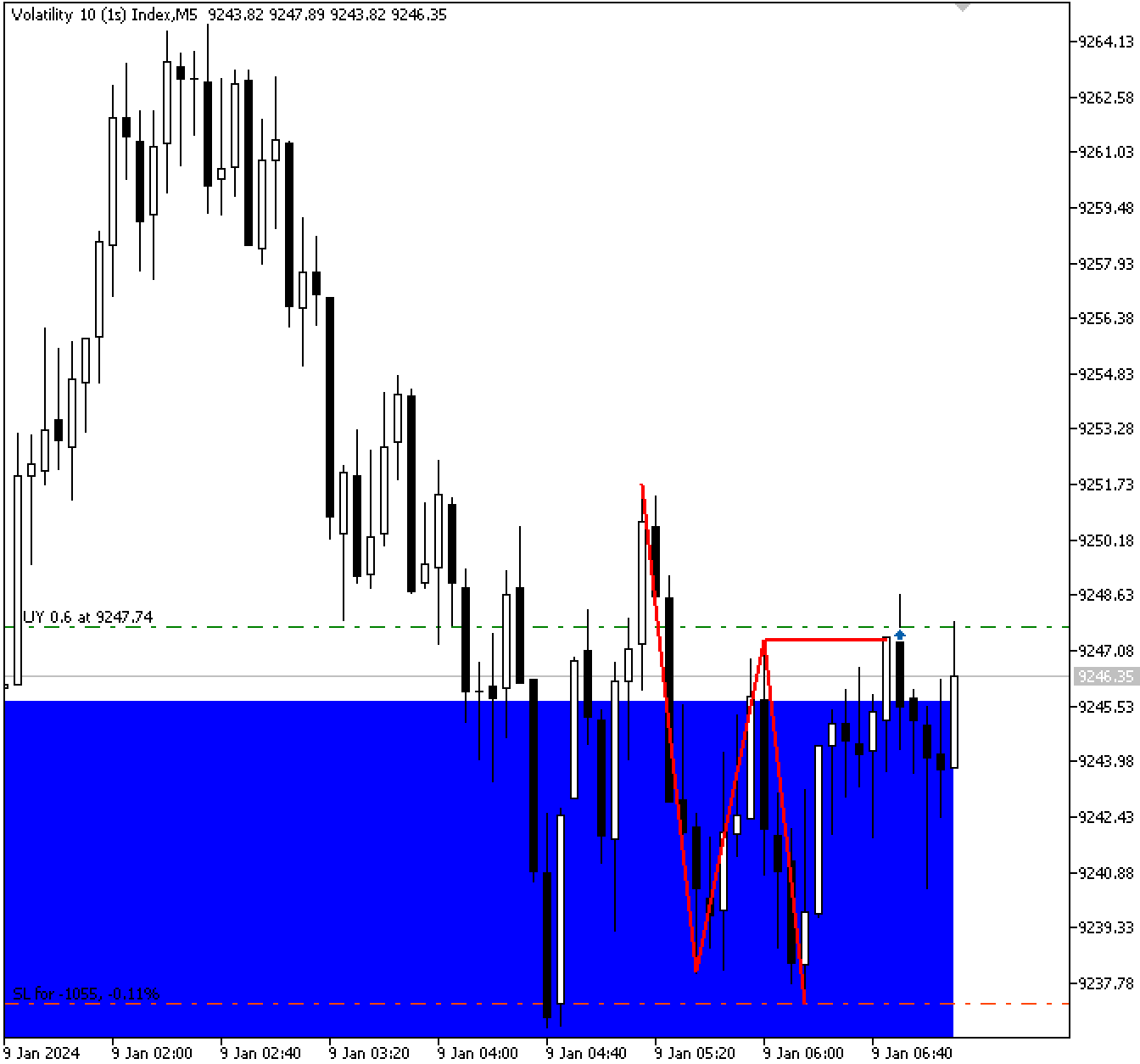
Пояснение:
После подтверждения бычьей смены характера (ChOCh) в этом разделе описывается торговый сетап и процедура исполнения сделки. Для того чтобы система автоматически размещала ордера на покупку, когда все требования для открытия сделки выполнены, сначала включается торговая библиотека. Параметры транзакции определяются рядом входных переменных, включая размер лота для каждой сделки, таймфрейм для определения уровней поддержки/сопротивления и таймфрейм для исполнения сделки, а также соотношение риска и вознаграждения (RRR), которое определяет желаемую прибыль в зависимости от риска.
Чтобы обеспечить, что алгоритм будет реагировать только один раз за каждую свечу, в нем также отслеживаются текущая рыночная цена и время свечи. Это предотвращает множественные входы на одном и том же баре. Перед размещением сделки, программа проверяет, что все параметры соответствуют требованиям, таким как ожидаемое время свечи и отсутствие предыдущих сделок на текущем баре. После подтверждения программа определяет уровень тейк-профита на основе RRR, устанавливает стоп-лосс на более низком минимуме и автоматически инициирует покупку. В результате входы в сделки гарантированно будут дисциплинированными, последовательными и основанными на выявленных рыночных механизмах, а не на произвольных суждениях.
Выявление зоны сопротивления
Зона сопротивления, которая является противоположностью зоны поддержки, также требует определения. Для выявления зоны сопротивления используются максимумы свинга, в то время как для выявления зоны поддержки используются минимумы свинга. Иными словами, вместо областей, в которых рынок прекратил движение вниз, мы ищем места, где он прекратил движение вверх.
Та же логика, которая определяет зону поддержки, также применима к зоне сопротивления, но также верно и обратное. Прежде чем определить зону вокруг максимума свинга, мы сначала выявляем сам максимум. Следующим шагом после определения первого максимума свинга и отметки его на графике является оценка того, образовался ли в той же зоне сопротивления второй максимум свинга. Если рынок формирует второй максимум свинга внутри выделенной зоны, это означает, что цена дважды протестировала эту область и отскочила от нее, что подтверждает ее действительность в качестве зоны сопротивления.
Рынок может столкнуться с трудностями при пробое этой зоны сопротивления и даже вернуться ниже, что может быть потенциальной возможностью для продажи. Мы должны дождаться медвежьей смены характера, чтобы подтвердить, действительно ли развивается медвежий сетап. В результате рынок должен начать формировать более низкие максимумы и более низкие минимумы вместо более высоких максимумов и более низких минимумов. Такая медвежья смена характера, которая происходит внутри зоной сопротивления или вблизи нее, является окончательным признаком того, что продавцы заполучили контроль, и что далее может последовать нисходящее движение.
Пример:
double first_res_price;
double first_res_max_body_price;
datetime first_res_time;

double second_res_price;
datetime second_res_time;

string resistance_object;
int res_bars;
int res_max_high_index;
double res_max_high_price;

string first_high_txt;
string second_high_txt;

double higher_high;
datetime higher_high_time;
double higher_low;
datetime higher_low_time;
//RESISTANCE
for(int i = z ; i < bars_check - z; i++)
  {

   if(IsSwingHigh(high, i, z))
     {

      first_res_price = high[i];
      first_res_max_body_price = MathMax(close[i], open[i]);
      first_res_time = time[i];

      for(int j = i+1; j < bars_check - z; j++)
        {
         if(IsSwingHigh(high, j, z) && high[j] >= first_res_max_body_price &&  high[j] <= first_res_price)
           {

            second_res_price = high[j];
            second_res_time = time[j];
            start_choch_time = time[j+z];

            resistance_object = StringFormat("RESISTANCE %f",first_res_price);

            res_bars = Bars(_Symbol,timeframe,first_res_time,TimeCurrent());
            res_max_high_index = ArrayMaximum(high,i,res_bars);
            res_max_high_price = high[res_max_high_index];

            if(res_max_high_price <= first_res_price)
              {
               ObjectCreate(chart_id,resistance_object,OBJ_RECTANGLE,0,first_res_time,first_res_price,TimeCurrent(),first_res_max_body_price);
               ObjectSetInteger(chart_id,resistance_object,OBJPROP_COLOR,clrGreen);
               ObjectSetInteger(chart_id,resistance_object,OBJPROP_BACK,true);
               ObjectSetInteger(chart_id,resistance_object,OBJPROP_FILL,true);

               first_high_txt = StringFormat("FIRST HIGH%d",i);
               ObjectCreate(chart_id,first_high_txt,OBJ_TEXT,0,first_res_time,first_res_price);
               ObjectSetString(chart_id,first_high_txt,OBJPROP_TEXT,"1");

               second_high_txt = StringFormat("SECOND HIGH%d",i);
               ObjectCreate(chart_id,second_high_txt,OBJ_TEXT,0,second_res_time,second_res_price);
               ObjectSetString(chart_id,second_high_txt,OBJPROP_TEXT,"2");

               if(exe_total_symbol_bars >= bars_check)
                 {

                  for(int k = 4; k < bars_check-3; k++)
                    {
                     if(IsSwingHigh(exe_high, k, 3))
                       {

                        higher_high = exe_high[k];
                        higher_high_time = exe_time[k];

                        for(int l = k; l < bars_check-3; l++)
                          {

                           if(IsSwingLow(exe_low,l,3))
                             {

                              higher_low = exe_low[l];
                              higher_low_time = exe_time[l];

                              for(int m = l; m < bars_check-3; m++)
                                {

                                 if(IsSwingHigh(exe_high, m, 3))
                                   {

                                    high_h = exe_high[m];
                                    high_time = exe_time[m];

                                    for(int n = m; n < bars_check-3; n++)
                                      {

                                       if(IsSwingLow(exe_low,n,3))
                                         {

                                          low_l = exe_low[n];
                                          low_time = exe_time[n];

                                          for(int o = k; o > 0; o--)
                                            {
                                             if(exe_close[o] < higher_low && exe_open[o] > higher_low)
                                               {

                                                if(higher_low < higher_high && high_h > higher_low && high_h < higher_high && low_l < high_h && low_l < higher_low && higher_high >= first_res_max_body_price
                                                   && higher_high <= first_res_price && low_time > start_choch_time)
                                                  {

                                                   ObjectCreate(chart_id,"HHHL",OBJ_TREND,0,higher_high_time,higher_high,higher_low_time,higher_low);
                                                   ObjectSetInteger(chart_id,"HHHL",OBJPROP_COLOR,clrRed);
                                                   ObjectSetInteger(chart_id,"HHHL",OBJPROP_WIDTH,2);

                                                   ObjectCreate(chart_id,"HLH",OBJ_TREND,0,higher_low_time,higher_low,high_time,high_h);
                                                   ObjectSetInteger(chart_id,"HLH",OBJPROP_COLOR,clrRed);
                                                   ObjectSetInteger(chart_id,"HLH",OBJPROP_WIDTH,2);

                                                   ObjectCreate(chart_id,"HL",OBJ_TREND,0,high_time,high_h,low_time,low_l);
                                                   ObjectSetInteger(chart_id,"HL",OBJPROP_COLOR,clrRed);
                                                   ObjectSetInteger(chart_id,"HL",OBJPROP_WIDTH,2);

                                                   ObjectCreate(chart_id,"R Cross Line",OBJ_TREND,0,higher_low_time,higher_low,exe_time[o],higher_low);
                                                   ObjectSetInteger(chart_id,"R Cross Line",OBJPROP_COLOR,clrRed);
                                                   ObjectSetInteger(chart_id,"R Cross Line",OBJPROP_WIDTH,2);

                                                   if(exe_time[1] == exe_time[o] && currentBarTime != lastTradeBarTime)
                                                     {

                                                      take_profit = MathAbs(ask_price - ((high_h - ask_price) * RRR));

                                                      trade.Sell(lot_size,_Symbol,ask_price,higher_high,take_profit);
                                                      lastTradeBarTime = currentBarTime;

                                                     }

                                                  }

                                                break;
                                               }
                                            }

                                          break;
                                         }
                                      }

                                    break;
                                   }
                                }
                              break;
                             }
                          }
                        break;
                       }
                    }

                 }

              }
            break;
           }

        }

     }
  }
Вывод:
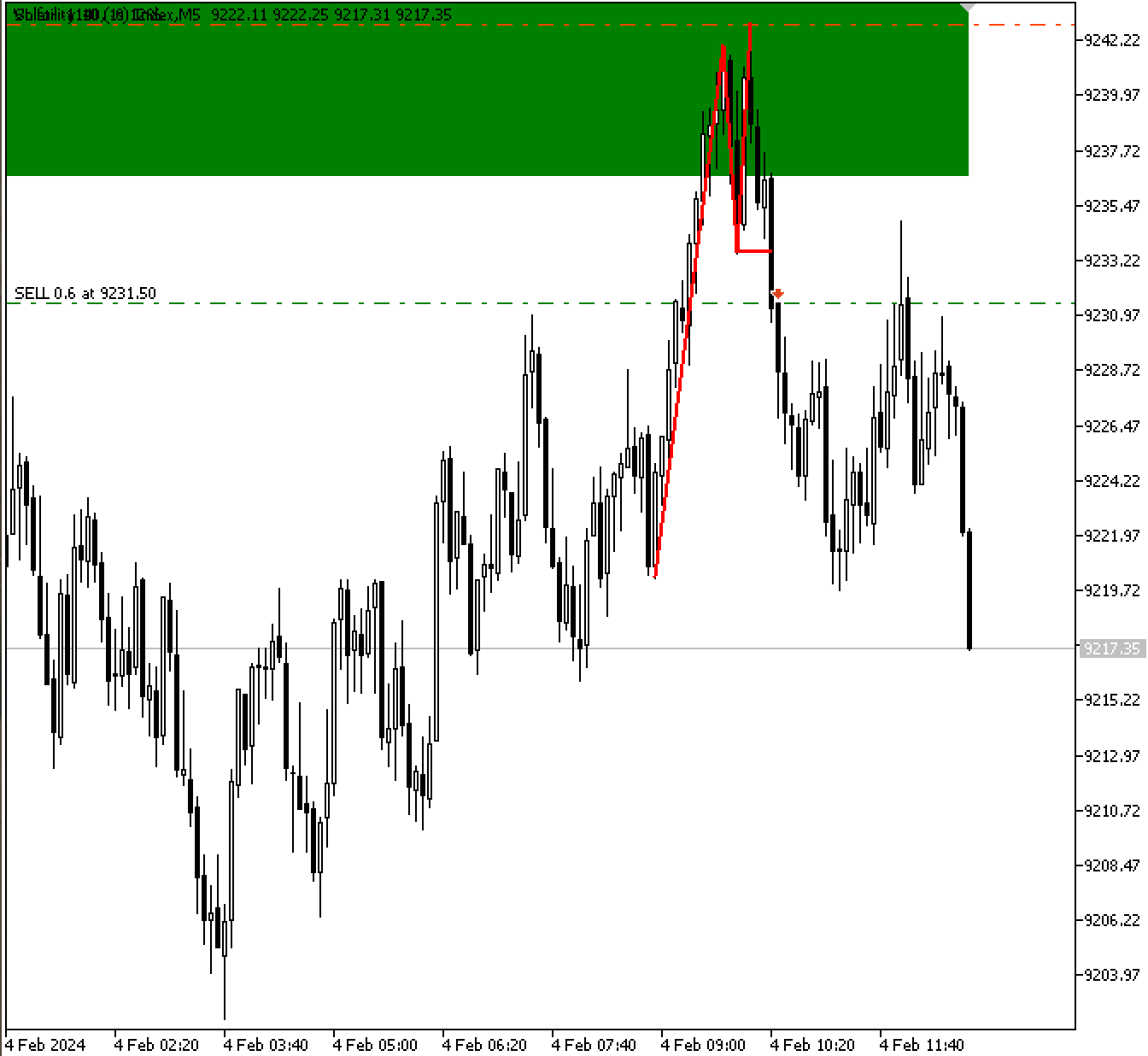
Пояснение:
Первым этапом в определении зоны сопротивления является нахождение значимых максимумов свинга на графике посредством итерирования по свечам. Сначала мы находим максимум свинга и сохраняем его максимальную цену, время его формирования, а также наибольшую из его цен открытия и закрытия. После обнаружения этого начального максимума свинга программа ищет второй максимум свинга, который попадает в зону, определяемую первым максимумом.
Если такой второй максимум найден, это означает, что рынок дважды протестировал эту область, подтвердив ее действительность как зоны сопротивления. Перед тем как нарисовать визуальный прямоугольник для зоны сопротивления на графике, компьютер определяет максимальную цену в промежутке между двумя максимумами, чтобы убедиться, что ни одна свеча не пробила зону. Затем, чтобы обозначить две точки, которые формируют нашу зону, программа использует текстовые объекты для маркировки первого и второго максимумов свинга.
После разметки зоны сопротивления программа ищет медвежью смену характера для подтверждения сделки. На меньшем таймфрейме, предназначенном для исполнения сделок, ищется последовательность ценового действия, состоящая из более высокого максимума, за которым следует более высокий минимум, затем более низкий максимум и более низкий минимум, что создает медвежий паттерн. Приложение рисует трендовые линии, соединяя соответствующие максимумы и минимумы для визуализации с учетом их соответствующих временных меток.
Когда медвежья свеча закрывается ниже более высокого минимума паттерна, это служит окончательным подтверждением. Советник определяет тейк-профит, умножая расстояние между ценой входа и максимумом паттерна на соотношение вознаграждения и риска, а затем исполняет сделку на продажу, когда это условие совпадает с зоной сопротивления. Сравнивая время текущего бара с самой последней сделкой, которая была исполнена, метод гарантирует, что на каждой свече может быть открыта только одна сделка. Благодаря этому методу зоны сопротивления автоматически определяются и проверяются паттернами ценового действия, а сделки исполняются только тогда, когда все требования выполнены.
Примечание
Стратегия в этой статье полностью проектно-ориентированная и предназначена для обучения читателей языку MQL5 через практическое применение в реальном мире. Этот метод не гарантирует получение прибыли в реальной торговле.
Заключение
Советник, который мы создали, определяет зоны поддержки и сопротивления, выявляя максимумы и минимумы свинга, которые были протестированы как минимум дважды, что гарантирует значимость этих зон. Затем он отслеживает бычью или медвежью смену характера на более низком таймфрейме, подтверждая правильные точки входа. Сочетая определение зон на более высоком таймфрейме с ценовым действием на более низком таймфрейме, советник способен автоматически исполнять сделки с установкой стоп-лосса и тейк-профита.
Перевод с английского произведен MetaQuotes Ltd.
Оригинальная статья: https://www.mql5.com/en/articles/20021
Предупреждение: все права на данные материалы принадлежат MetaQuotes Ltd. Полная или частичная перепечатка запрещена.
Данная статья написана пользователем сайта и отражает его личную точку зрения. Компания MetaQuotes Ltd не несет ответственности за достоверность представленной информации, а также за возможные последствия использования описанных решений, стратегий или рекомендаций.

 Машинное обучение и Data Science (Часть 35): NumPy в MQL5 – искусство создания сложных алгоритмов с меньшим объемом кода
 От новичка до эксперта: Торговля по RSI с учетом структуры рынка
 Нейросети в трейдинге: Возмущённые модели пространства состояний для анализа рыночной динамики (Основные компоненты)
 Нейросети в трейдинге: Возмущённые модели пространства состояний для анализа рыночной динамики (Энкодер)

- Бесплатные приложения для трейдинга
- 8 000+ сигналов для копирования
- Экономические новости для анализа финансовых рынков
Вы принимаете политику сайта и условия использования