

Знакомство с языком MQL5 (Часть 30): Освоение API и функции WebRequest в языке MQL5 (IV)
 422
422
 2
2
Введение
И снова приветствуем вас в Части 30 серии "Знакомство с языком MQL5"! В этой статье мы продолжаем изучать работу с внешними API в языке MQL5, выходя за рамки простого извлечения данных и базовых запросов. Вы уже знаете, как отправить запрос, получить ответ, очистить исходные данные и разделить результат на компоненты, которые можно использовать.
В предыдущей статье мы получили и обработали данные за последние пять дневных свечей. Мы проанализировали их состав, удалили ненужные символы и разделили каждую свечу на отдельные элементы. Теперь, когда данные четко разделены, пришло время более эффективно организовать исходные данные.
Вы научитесь группировать однотипные элементы разных свечей в отдельные массивы, вместо того чтобы работать с каждой свечой по отдельности. Например, один массив будет содержать время открытия каждой свечи. Цены открытия, цены максимума, цены минимума, цены закрытия, объемы и любые другие компоненты свечи, которые вы захотите анализировать, будут обрабатываться по той же схеме. Сравнение чисел за разные дни, выявление трендов, выполнение вычислений и подготовка данных для индикаторов или торговой логики становятся проще благодаря этому методическому подходу. После прочтения этой статьи у вас будет четкий и эффективный метод для организации API свечных данных, который улучшит читаемость и масштабируемость вашего кода MQL5 и подготовит его к более сложному анализу.
Группировка всех времен открытия в один массив
Мы начнем с объединения всех времен открытия нескольких свечей в один массив. Ранее, когда мы получали и очищали данные из ответа API, время открытия каждой свечи хранилось отдельно. Чтобы упростить доступ к ним и их обработку, теперь мы объединяем их в один структурированный массив, а не храним по отдельности. Храня все времена открытия в одном массиве, мы получаем корректную последовательность временных меток, соответствующую порядку свечей. В результате становится гораздо проще выполнять вычисления по времени: находить паттерны, считать интервалы между свечами, сравнивать даты или сопоставлять время с другими элементами свечи, такими как цены открытия, максимума, минимума и закрытия.
При таком размещении у каждого элемента массива есть свой индекс в структуре конкретной свечи. Например, индекс 0 содержит время открытия первой свечи, индекс 1 – время открытия второй свечи и т.д. Вывод массива после сохранения всех значений позволяет визуально проверить, что времена открытия правильно сгруппированы и упорядочены. Этот простой, но важный шаг закладывает основу для сортировки остальных свечных данных. Цены открытия, цены максимума, цены минимума, цены закрытия и объемы будут группироваться по тому же принципу после времен открытия. По мере работы с большим количеством свечей или более сложными приемами группировка однотипных данных упростит масштабирование скриптов MQL5, сделает код понятнее, а анализ – чище.
Напомним, что в предыдущей части мы разделили ответ сервера на массив строк дневных свечей и удалили все ненужные символы. В качестве разделителя мы использовали запятую, чтобы разделить данные каждой свечи на отдельные элементы. Однако мы еще не указали, какой элемент в каждом полученном массиве соответствует времени открытия. Прежде чем что-либо группировать, нужно сначала определить это.
Время открытия всегда находится в одном и том же месте, потому что все свечи в наборе данных имеют одинаковую структуру. После того как мы проверили эту позицию на первой свече, мы можем тем же способом извлечь время открытия из остальных свечей. Это позволяет собрать все времена открытия в один хорошо организованный массив, к которому будет легко обращаться, и который будет удобно использовать в дальнейшем.
Пример:
//DAY 1
string day1_data = candle_data[0];
StringReplace(day1_data,"[[","");
StringReplace(day1_data,"\"","");

string day1_data_array[];
StringSplit(day1_data,',',day1_data_array);
ArrayPrint(day1_data_array);
day1_data_array[]:
 1763424000000,              // opening time (0)
 92215.14000000,             // open price (1)
 93836.01000000,             // high price (2)
 89253.78000000,             // low price (3)
 92960.83000000,             // close price (4)
 39835.14769000,             // volume (5)
 1763510399999,              // closing time (6)
 3641033186.30045840,        // quote asset volume (7)
 8786593,                    // number of trades (8)
 20130.95957000,             // taker buy base asset volume (9)
 1841176605.14182350,        // taker buy quote asset volume (10)
 0                           // placeholder (11)
Из результата разделения данных видно, что время открытия сохранено как первый элемент массива. Это означает, что мы можем использовать массив данных первого дня, чтобы получить время открытия первой свечи, которое находится по индексу 0.
Пример:
Print(day1_data_array[0]);
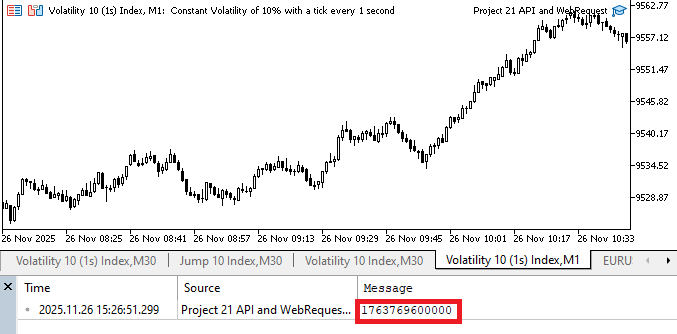
Как видно из первого элемента свечных данных первого дня, это значение находится по индексу 0 массива. Вывод, который показывает точный момент открытия свечи, представлен в миллисекундах. Иными словами, число, которое вы видите, – это точное время открытия свечи, то есть временная метка в миллисекундах.
Сейчас невозможно использовать время открытия как реальную дату и время в MQL5, потому что оно задано в строковом формате. Сначала эту строку нужно преобразовать в подходящий тип datetime, чтобы корректно работать с этим значением или хранить его вместе с другими временными метками открытия свечи. Сначала мы делим значение времени, полученное от сервера, на 1000, чтобы перевести миллисекунды в секунды. Это изменение важно, потому что базовая единица datetime в MQL5 – секунды, а не миллисекунды. После преобразования мы можем сохранить результат в массиве datetime, что позволит выполнять вычисления, сравнивать времена открытия и использовать значения для дополнительного анализа.
Пример:
//+------------------------------------------------------------------+
//| Expert initialization function                                   |
//+------------------------------------------------------------------+
int OnInit()
  {
//---

   WebRequest(method, url, headers, time_out, data, result, result_headers);
   string server_result = CharArrayToString(result);
// Print(server_result);

   string candle_data[];
   int array_count = StringSplit(server_result,']', candle_data);

//DAY 1
   string day1_data = candle_data[0];
   StringReplace(day1_data,"[[","");
   StringReplace(day1_data,"\"","");

   string day1_data_array[];
   StringSplit(day1_data,',',day1_data_array);
//  ArrayPrint(day1_data_array);

//DAY 2
   string day2_data = candle_data[1];
   StringReplace(day2_data,",[","");
   StringReplace(day2_data,"\"","");

   string day2_data_array[];
   StringSplit(day2_data,',',day2_data_array);

//DAY 3

   string day3_data = candle_data[2];
   StringReplace(day3_data,",[","");
   StringReplace(day3_data,"\"","");

   string day3_data_array[];
   StringSplit(day3_data,',',day3_data_array);

//DAY 4

   string day4_data = candle_data[3];
   StringReplace(day4_data,",[","");
   StringReplace(day4_data,"\"","");

   string day4_data_array[];
   StringSplit(day4_data,',',day4_data_array);

//DAY 5

   string day5_data = candle_data[4];
   StringReplace(day5_data,",[","");
   StringReplace(day5_data,"\"","");

   string day5_data_array[];
   StringSplit(day5_data,',',day5_data_array);

// Opening Time Array
   long day1_time_s = (long)StringToInteger(day1_data_array[0])/1000;
   datetime day1_time = (datetime)day1_time_s;
   Print(day1_time);

//---
   return(INIT_SUCCEEDED);
  }
Вывод:
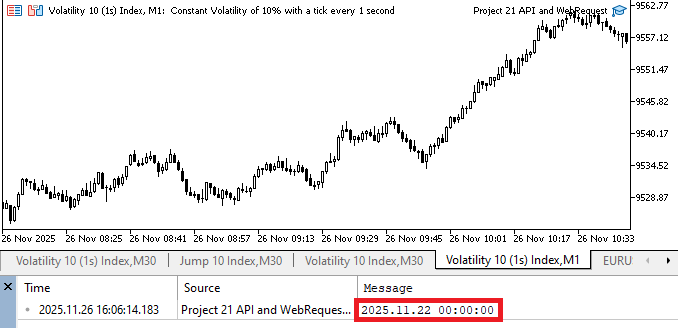
Пояснение:
Поскольку время открытия, взятое из первого элемента, изначально было в строковом формате, его нельзя напрямую использовать в операциях MQL5. Сначала мы преобразуем его в целое число, а затем – в формат времени, который MQL5 воспринимает как корректный. Это преобразование гарантирует, что значение можно будет без проблем обрабатывать, сохранять и сравнивать с другими временными метками свечи. После того как мы перевели миллисекунды в секунды, мы сохраняем это число в переменной типа long. Благодаря типу long мы можем безопасно обрабатывать большие числа, которые часто встречаются при подсчете миллисекунд за многие годы.
Затем это значение типа long преобразуется в тип datetime. На этом этапе исходное числовое значение преобразуется в представление даты и времени, понятное языку MQL5. После того как значение преобразовано в datetime, его можно сохранить в массиве времен открытия или использовать для вычислений и сравнений. Затем тот же процесс выполняется для второго дня. Мы берем время открытия из данных второго дня, преобразуем его из текста в пригодный формат времени и сохраняем или выводим его так же, как для первой свечи. Это гарантирует, что время открытия второго дня можно будет сгруппировать с другими свечами, сохранив ту же структуру.
Пример://+------------------------------------------------------------------+ //| Expert initialization function | //+------------------------------------------------------------------+ int OnInit() { //--- WebRequest(method, url, headers, time_out, data, result, result_headers); string server_result = CharArrayToString(result); // Print(server_result); string candle_data[]; int array_count = StringSplit(server_result,']', candle_data); //DAY 1 string day1_data = candle_data[0]; StringReplace(day1_data,"[[",""); StringReplace(day1_data,"\"",""); string day1_data_array[]; StringSplit(day1_data,',',day1_data_array); // ArrayPrint(day1_data_array); //DAY 2 string day2_data = candle_data[1]; StringReplace(day2_data,",[",""); StringReplace(day2_data,"\"",""); string day2_data_array[]; StringSplit(day2_data,',',day2_data_array); //DAY 3 string day3_data = candle_data[2]; StringReplace(day3_data,",[",""); StringReplace(day3_data,"\"",""); string day3_data_array[]; StringSplit(day3_data,',',day3_data_array); //DAY 4 string day4_data = candle_data[3]; StringReplace(day4_data,",[",""); StringReplace(day4_data,"\"",""); string day4_data_array[]; StringSplit(day4_data,',',day4_data_array); //DAY 5 string day5_data = candle_data[4]; StringReplace(day5_data,",[",""); StringReplace(day5_data,"\"",""); string day5_data_array[]; StringSplit(day5_data,',',day5_data_array); // Opening Time Array long day1_time_s = (long)StringToInteger(day1_data_array[0])/1000; datetime day1_time = (datetime)day1_time_s; long day2_time_s = (long)StringToInteger(day2_data_array[0])/1000; datetime day2_time = (datetime)day2_time_s; Print("DAY 1 TIME: ", day1_time,"\nDAY 2 TIME: ",day2_time); //--- return(INIT_SUCCEEDED); }
Вывод:
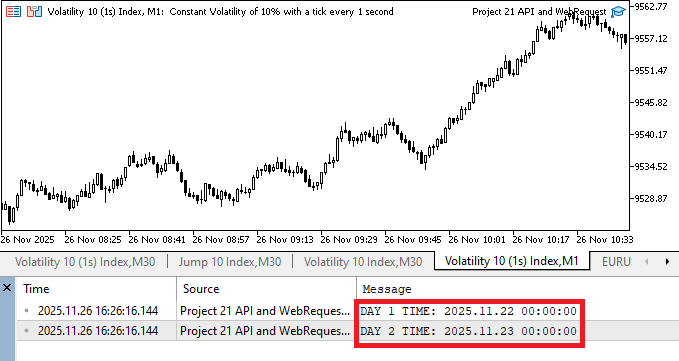
Пояснение:
Рассматривайте время открытия в строковом массиве как сверхточные часы, показывающие время в миллисекундах. Хотя значение точно измеряет время, его трудно воспринимать как обычное, потому что это всего лишь строка чисел.
Сначала эту строку нужно преобразовать в число. Это похоже на момент, когда вы понимаете, что записанное на секундомере значение – это реальное число, пригодное для расчетов. Поскольку большинство систем, работающих с датой и временем, используют секунды, а не миллисекунды с начала Unix-эпохи, мы делим полученное значение на 1000, переводя миллисекунды в секунды. Чтобы вписаться в систему времени, это сравнимо с превращением крошечных долей секунды в полные секунды. После перевода в секунды мы преобразуем значение в datetime. Этот этап фиксирует точный момент открытия второй дневной свечи и позволяет системе воспринимать значение как конкретный момент времени.
Когда мы выводим времена открытия за первый и второй дни, они становятся наглядными и читаемыми. Это позволяет нам оценивать, сравнивать и использовать их в вычислениях или индикаторах. Это значение дает нам точную временную метку для проекта, поскольку отражает точку на графике, где свеча официально начала формироваться.
Теперь, когда мы хорошо понимаем, как определить и преобразовать время открытия для первых двух дневных свечей, следующим шагом будет применить тот же процесс к оставшимся трем дням. Мы можем точно зафиксировать время открытия каждой свечи: проверить соответствующий строковый массив для каждой дневной свечи, перевести первое значение из миллисекунд в секунды, а затем привести его к типу datetime. Это гарантирует, что время открытия каждой из пяти дневных свечей будет надежно записано в формате datetime, подготавливая данные к группировке в единый массив для последующего использования в торговых методах или дополнительном анализе.
Пример:
//+------------------------------------------------------------------+
//| Expert initialization function                                   |
//+------------------------------------------------------------------+
int OnInit()
  {
//---

   WebRequest(method, url, headers, time_out, data, result, result_headers);
   string server_result = CharArrayToString(result);
// Print(server_result);

   string candle_data[];
   int array_count = StringSplit(server_result,']', candle_data);

//DAY 1
   string day1_data = candle_data[0];
   StringReplace(day1_data,"[[","");
   StringReplace(day1_data,"\"","");

   string day1_data_array[];
   StringSplit(day1_data,',',day1_data_array);
//  ArrayPrint(day1_data_array);


//DAY 2
   string day2_data = candle_data[1];
   StringReplace(day2_data,",[","");
   StringReplace(day2_data,"\"","");

   string day2_data_array[];
   StringSplit(day2_data,',',day2_data_array);

//DAY 3

   string day3_data = candle_data[2];
   StringReplace(day3_data,",[","");
   StringReplace(day3_data,"\"","");

   string day3_data_array[];
   StringSplit(day3_data,',',day3_data_array);

//DAY 4

   string day4_data = candle_data[3];
   StringReplace(day4_data,",[","");
   StringReplace(day4_data,"\"","");

   string day4_data_array[];
   StringSplit(day4_data,',',day4_data_array);

//DAY 5

   string day5_data = candle_data[4];
   StringReplace(day5_data,",[","");
   StringReplace(day5_data,"\"","");

   string day5_data_array[];
   StringSplit(day5_data,',',day5_data_array);

// Opening Time Array

   long day1_time_s = (long)StringToInteger(day1_data_array[0])/1000;
   datetime day1_time = (datetime)day1_time_s;

   long day2_time_s = (long)StringToInteger(day2_data_array[0])/1000;
   datetime day2_time = (datetime)day2_time_s;

   long day3_time_s = (long)StringToInteger(day3_data_array[0])/1000;
   datetime day3_time = (datetime)day3_time_s;

   long day4_time_s = (long)StringToInteger(day4_data_array[0])/1000;
   datetime day4_time = (datetime)day4_time_s;

   long day5_time_s = (long)StringToInteger(day5_data_array[0])/1000;
   datetime day5_time = (datetime)day5_time_s;

   Print("DAY 1 TIME: ", day1_time,"\nDAY 2 TIME: ",day2_time,"\nDAY 3 TIME: ",day3_time,"\nDAY 4 TIME: ",day4_time,"\nDAY 5 TIME: ",day5_time);

  }
Вывод:
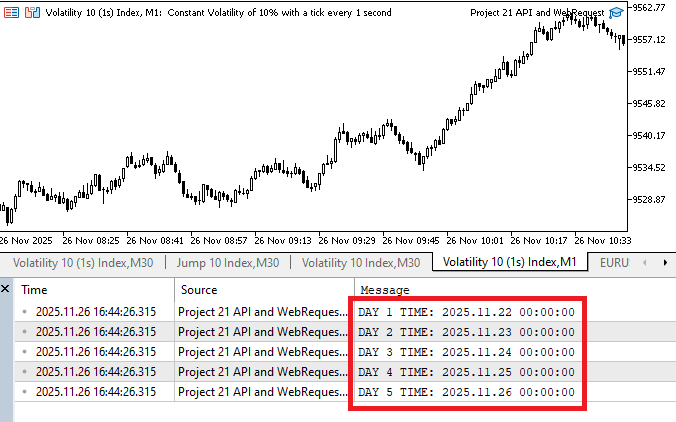
Используя для оставшихся трех свечей тот же процесс, что и для первых двух, мы смогли получить все пять времен открытия. Первый элемент массива каждого дня был приведен к типу datetime после преобразования из строки в целое число типа long (в секундах). В результате получается полный набор времен открытия, который можно проверить, выведя все пять значений, а затем объединив или изучив их.
Время открытия каждой из пяти дневных свечей было успешно извлечено. Следующим шагом будет создать массив datetime, чтобы наша программа могла работать со всеми этими временами открытия как с единой коллекцией.
Пример://+------------------------------------------------------------------+ //| Expert initialization function | //+------------------------------------------------------------------+ int OnInit() { //--- WebRequest(method, url, headers, time_out, data, result, result_headers); string server_result = CharArrayToString(result); // Print(server_result); string candle_data[]; int array_count = StringSplit(server_result,']', candle_data); //DAY 1 string day1_data = candle_data[0]; StringReplace(day1_data,"[[",""); StringReplace(day1_data,"\"",""); string day1_data_array[]; StringSplit(day1_data,',',day1_data_array); // ArrayPrint(day1_data_array); //DAY 2 string day2_data = candle_data[1]; StringReplace(day2_data,",[",""); StringReplace(day2_data,"\"",""); string day2_data_array[]; StringSplit(day2_data,',',day2_data_array); //DAY 3 string day3_data = candle_data[2]; StringReplace(day3_data,",[",""); StringReplace(day3_data,"\"",""); string day3_data_array[]; StringSplit(day3_data,',',day3_data_array); //DAY 4 string day4_data = candle_data[3]; StringReplace(day4_data,",[",""); StringReplace(day4_data,"\"",""); string day4_data_array[]; StringSplit(day4_data,',',day4_data_array); //DAY 5 string day5_data = candle_data[4]; StringReplace(day5_data,",[",""); StringReplace(day5_data,"\"",""); string day5_data_array[]; StringSplit(day5_data,',',day5_data_array); // Opening Time Array long day1_time_s = (long)StringToInteger(day1_data_array[0])/1000; datetime day1_time = (datetime)day1_time_s; long day2_time_s = (long)StringToInteger(day2_data_array[0])/1000; datetime day2_time = (datetime)day2_time_s; long day3_time_s = (long)StringToInteger(day3_data_array[0])/1000; datetime day3_time = (datetime)day3_time_s; long day4_time_s = (long)StringToInteger(day4_data_array[0])/1000; datetime day4_time = (datetime)day4_time_s; long day5_time_s = (long)StringToInteger(day5_data_array[0])/1000; datetime day5_time = (datetime)day5_time_s; datetime OpenTime[5] = {day1_time, day2_time, day3_time, day4_time, day5_time}; ArrayPrint(OpenTime); }
Вывод:
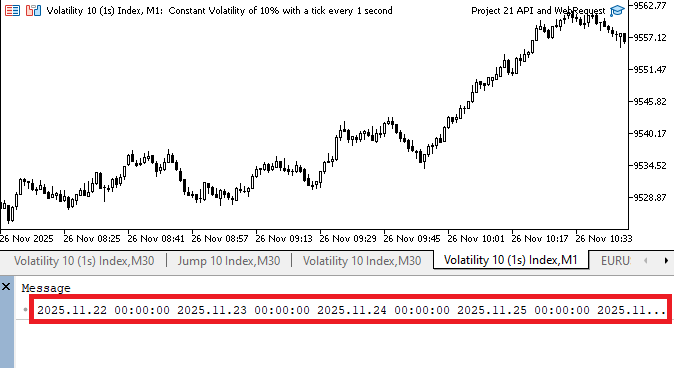
Пояснение:
Был создан единый массив, объединивший времена открытия пяти дневных свечей. Вместо того чтобы каждый день жонглировать несколькими переменными, этот подход дает нам один хорошо организованный контейнер, с которым удобно работать, и позволяет эффективно обрабатывать данные. После определения массива мы использовали ArrayPrint(OpenTime). Эта функция вывела полный массив в окне лога MetaTrader. Просматривая все сохраненные значения datetime, мы смогли убедиться, что процедура преобразования сработала, и что время открытия каждого дня было правильно расположено в массиве.
Массив можно вывести, не ограничиваясь одной функцией. Мы можем выводить каждый элемент отдельно, перебирая массив, и даже менять формат вывода для наглядности. Для более краткого резюме можно вывести все значения в одной строке. Такая гибкость дает нам полный контроль над тем, как отображается массив.
Пример:Print("DAY 1 TIME: ", OpenTime[0],"\nDAY 2 TIME: ",OpenTime[1],"\nDAY 3 TIME: ",OpenTime[2],"\nDAY 4 TIME: ",OpenTime[3],"\nDAY 5 TIME: ",OpenTime[4]);
От первого до пятого дня каждое число в массиве соответствует времени открытия определенной свечи. Когда значения показаны отдельно, вы можете легко определить, какое время открытия к какой свече относится. Это полезно, когда вы хотите проверить или отладить конкретные значения, а не просматривать весь набор сразу.
Группировка всех цен открытия в один массив
По структуре дневных данных видно, что в каждом строковом массиве цена открытия идет сразу после времени открытия. Поэтому в этой части мы сосредоточились на том, чтобы определить цену открытия каждой свечи.
После того как мы нашли цену открытия по нужному индексу в строковом массиве, мы преобразовали строковое значение в тип данных double, чтобы его можно было использовать в вычислениях на языке MQL5. После преобразования мы получили цены открытия для каждой из пяти свечей, следуя той же процедуре. Это позволило нам последовательно и аккуратно извлекать цену открытия за каждый день, подготавливая данные так, чтобы, как и с временами открытия, мы могли собрать всю информацию в один массив.
  1763424000000,       // opening time (0)
  92215.14000000,      // open price (1)
  93836.01000000,      // high price (2)
  89253.78000000,      // low price (3)
  92960.83000000,      // close price (4)
  39835.14769000,      // volume (5)
  1763510399999,       // closing time (6)
  3641033186.30045840, // quote asset volume (7)
  8786593,             // number of trades (8)
  20130.95957000,      // taker buy base asset volume (9)
  1841176605.14182350, // taker buy quote asset volume (10)
  0                    // placeholder (11)
Пример:
//+------------------------------------------------------------------+
//| Expert initialization function                                   |
//+------------------------------------------------------------------+
int OnInit()
  {
//---

   WebRequest(method, url, headers, time_out, data, result, result_headers);
   string server_result = CharArrayToString(result);
// Print(server_result);

   string candle_data[];
   int array_count = StringSplit(server_result,']', candle_data);

//DAY 1
   string day1_data = candle_data[0];
   StringReplace(day1_data,"[[","");
   StringReplace(day1_data,"\"","");

   string day1_data_array[];
   StringSplit(day1_data,',',day1_data_array);
//  ArrayPrint(day1_data_array);

//DAY 2
   string day2_data = candle_data[1];
   StringReplace(day2_data,",[","");
   StringReplace(day2_data,"\"","");

   string day2_data_array[];
   StringSplit(day2_data,',',day2_data_array);

//DAY 3

   string day3_data = candle_data[2];
   StringReplace(day3_data,",[","");
   StringReplace(day3_data,"\"","");

   string day3_data_array[];
   StringSplit(day3_data,',',day3_data_array);

//DAY 4

   string day4_data = candle_data[3];
   StringReplace(day4_data,",[","");
   StringReplace(day4_data,"\"","");

   string day4_data_array[];
   StringSplit(day4_data,',',day4_data_array);

//DAY 5

   string day5_data = candle_data[4];
   StringReplace(day5_data,",[","");
   StringReplace(day5_data,"\"","");

   string day5_data_array[];
   StringSplit(day5_data,',',day5_data_array);

// Opening Time Array

   long day1_time_s = (long)StringToInteger(day1_data_array[0])/1000;
   datetime day1_time = (datetime)day1_time_s;

   long day2_time_s = (long)StringToInteger(day2_data_array[0])/1000;
   datetime day2_time = (datetime)day2_time_s;

   long day3_time_s = (long)StringToInteger(day3_data_array[0])/1000;
   datetime day3_time = (datetime)day3_time_s;

   long day4_time_s = (long)StringToInteger(day4_data_array[0])/1000;
   datetime day4_time = (datetime)day4_time_s;

   long day5_time_s = (long)StringToInteger(day5_data_array[0])/1000;
   datetime day5_time = (datetime)day5_time_s;

   datetime OpenTime[5] = {day1_time, day2_time, day3_time, day4_time, day5_time};

// Opening Price Array
   double day1_open = StringToDouble(day1_data_array[1]);

//---
   return(INIT_SUCCEEDED);
  }
Пояснение:
Мы начали с того, что определили цену открытия в массиве данных первого дня. Мы проверили, что цена открытия хранится по индексу 1, изучив структуру дневных свечных данных. Это логично: время открытия хранится по индексу 0, а цена открытия – по индексу 1. После того как мы определили индекс, мы преобразовали строку в тип данных double. Поскольку значения цен обычно содержат десятичные дроби, а хранение их как целых чисел или строк мешает корректным расчетам, мы использовали тип данных double. Значение было преобразовано в double, чтобы его можно было использовать для математических операций – например, для вычисления средних, сравнения и дополнительного анализа.
Чтобы лучше понять это, представьте сырые данные, полученные от API, как записанную информацию. Как число, начертанное ручкой, цена открытия была записана текстом. Компьютер воспринимал это как текст, хотя визуально это выглядело как число. По сути, мы преобразовали это значение с помощью функции преобразования, чтобы его можно было использовать для реальных вычислений. На этом этапе значение превратилось из простой текстовой записи в полезное числовое значение. После этого преобразования мы смогли записать корректное значение типа double в day1_open и затем повторить ту же процедуру для остальных свечей.
Мы решили применить тот же процесс к остальным четырем свечам, поскольку теперь мы знали, как определить и преобразовать цену открытия для первой свечи. Подход остался тем же. Все, что мы сделали, это придерживались того же паттерна, что и раньше. Чтобы убедиться, что мы выбираем правильную цену открытия для каждого из других дней, мы сначала проверили, что каждый массив строк имеет правильный индекс. Как и в первый день, цены открытия второго, третьего, четвертого и пятого дней также находились по индексу 1 в соответствующих массивах. После того как позиция проверена, значение нужно преобразовать из строки в тип данных double. Поскольку значения цен обычно содержат десятичные дроби, это преобразование важно. Например, если мы хотим использовать цену вроде 1.08512 или 154.72 в расчетах или сравнивать ее с другими ценами, ее нужно хранить как double. MetaTrader не будет обрабатывать это значение как числовое, если оставить его строкой.
Этот процесс можно сравнить с вводом напечатанных чисел в калькулятор. Калькулятор может работать только с реальными числовыми значениями, даже если числа на бумаге выглядят корректными. По сути, мы подготавливали значения к будущим расчетам в языке MQL5, преобразуя каждую цену открытия из строки в double.
Пример:
// Opening Price Array
 double day1_open = StringToDouble(day1_data_array[1]);
 double day2_open = StringToDouble(day2_data_array[1]);
 double day3_open = StringToDouble(day3_data_array[1]);
 double day4_open = StringToDouble(day4_data_array[1]);
 double day5_open = StringToDouble(day4_data_array[1]);

 double OpenPrice[5] = {day1_open, day2_open, day3_open, day4_open, day5_open};

 Print("DAY 1 OPEN PRICE: ", OpenPrice[0],"\nDAY 2 OPEN PRICE: ",OpenPrice[1],"\nDAY 3 OPEN PRICE: "
  ,OpenPrice[2],"\nDAY 4 OPEN PRICE: ",OpenPrice[3],"\nDAY 5 OPEN PRICE: ",OpenPrice[4]);
Вывод:
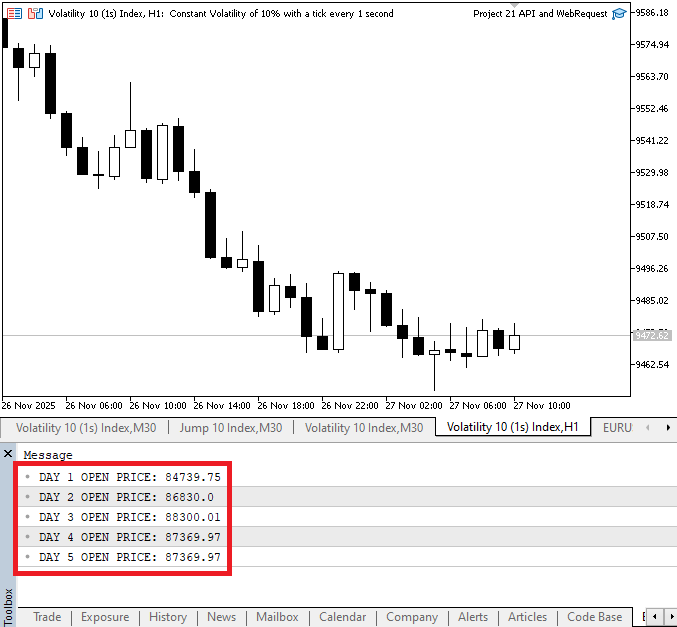
Пояснение:
В первых четырех строках берется строковое значение цены открытия из массива данных соответствующего дня, затем оно преобразуется в double и сохраняется в переменной этого дня. Цены нужно преобразовать из строк в double, потому что они содержат десятичные дроби и должны обрабатываться как числа с плавающей запятой для расчетов, сравнений и индикаторов. Поскольку ранее мы определили, что второй элемент разделенных данных каждого дня (индекс 1) соответствует цене открытия в структуре свечи, на шаге преобразования мы считываем именно его.
Пятое преобразование заметно отличается от остальных: оно снова считывает данные из day4_data_array, тогда как первые четыре используют массив данных каждого дня, чтобы получить цену открытия. Если это не исправить, цена открытия пятого дня будет такой же, как цена открытия четвертого. Чтобы цена каждого дня бралась из правильного элемента, нужно проверить исходный массив в пятом преобразовании и заменить его на массив данных пятого дня.
Когда цена открытия каждого дня преобразована в числовое значение, все пять цен объединяются в один массив. Когда все значения находятся в одном массиве, проще выполнять вычисления, анализировать тренды и использовать их в индикаторах. По сравнению с обработкой цен как отдельных текстовых строк, этот подход более надежен и эффективен. После того как цена открытия каждого дня преобразована в числовое значение, все пять цен собираются в один массив. Расчеты, анализ трендов и использование индикаторов упрощаются, когда все значения находятся в одном массиве. Это надежнее и эффективнее, чем хранить цены как отдельные текстовые строки.
Наконец, чтобы показать цену открытия каждого дня в понятном виде, мы выводим элементы массива по индексам. По этому выводу вы можете быстро убедиться, что все преобразования и группировка прошли успешно, и что последовательность данных соответствует вашим ожиданиям. Перед тем как использовать исходные индексы и имена массивов в вычислениях, убедитесь, что они указаны верно.
Группировка всех цен закрытия в один массив
Мы применяем тот же методический подход, что и при работе с ценами открытия, чтобы извлечь цены закрытия из каждой дневной свечи. Мы уже знаем точную позицию цены закрытия в каждом массиве, потому что данные каждой свечи организованы единообразно. Поскольку нам не нужно строить догадки или проводить поиск среди элементов, эта предсказуемая структура упрощает процесс извлечения. Вместо этого мы просто обращаемся к нужной позиции, зная, что каждая свеча следует одному и тому же шаблону. Пока структура данных не меняется, эта стабильность позволяет писать надежный код, который работает с любым количеством свечей.
После того как мы определим, какая позиция в данных каждого дня содержит цену закрытия, следующим шагом будет извлечь это значение. На этом этапе данные по‑прежнему хранятся в строковом массиве как текст. Хотя оно и выглядит как цена, число нужно преобразовать в числовой тип, прежде чем использовать его в вычислениях. Чтобы язык MQL5 обрабатывал значение как число, нужно извлечь его из массива и преобразовать в double.
Когда цена закрытия имеет тип double, расчеты, сравнения и другая обработка выполняются без ошибок. Поскольку язык MQL5 по‑разному обрабатывает строки и числа и требует правильный тип данных перед выполнением любых математических операций, этот этап преобразования крайне важен. Теперь, когда каждая цена закрытия преобразована в полезное числовое значение, следующим шагом будет упорядочить эти данные. Мы объединяем значения в один массив, который хранит цены закрытия за каждый из пяти дней, вместо того чтобы разносить их по нескольким переменным. Благодаря такому подходу проще получать доступ к данным и писать более чистый код.
Кроме того, мы можем перебрать значения в цикле, выполнить расчеты, передать их в индикаторы, сравнить закрытие одного дня с закрытием другого и выполнить любой анализ, для которого нужны структурированные данные, если хранить их в массиве. Поскольку массивы позволяют управлять несколькими связанными значениями как единым, хорошо организованным набором, они упрощают рабочий процесс. Чтобы убедиться, что все записано корректно, мы можем вывести цены закрытия после того, как массив будет создан и заполнен. Эта важная проверка подтверждает, что извлечение и преобразование выполнены корректно. Когда все цены закрытия показаны вместе, проще визуально проверить данные и убедиться, что ошибок нет.
 1763424000000,     // opening time (0)
 92215.14000000,    // open price (1)
 93836.01000000,    // high price (2)
 89253.78000000,    // low price (3)
 92960.83000000,    // close price (4)
 39835.14769000,    // volume (5)
Такое расположение показывает, что цена закрытия находится по индексу 4 – это пятый элемент в массиве данных. Мы находим индекс с ценой закрытия, преобразуем строковое значение в double и сохраняем каждый результат в новом массиве, используя ту же методику. Поскольку значения цен должны храниться в числовом типе, который поддерживает дробные части и содержит десятичные разряды, преобразование в double крайне важно.
После того как мы определили каждую цену закрытия, мы объединяем цены закрытия за пять дней в один массив. Как и с ценами открытия, это позволяет нам работать со всеми ценами закрытия одновременно. Эти сгруппированные данные позволяют легко получить цену закрытия любого дня по индексу массива и использовать ее для вычислений, сравнений, построения графиков и другой обработки в нашем индикаторе или скрипте.
Пример:// Opening Time Array long day1_time_s = (long)StringToInteger(day1_data_array[0])/1000; datetime day1_time = (datetime)day1_time_s; long day2_time_s = (long)StringToInteger(day2_data_array[0])/1000; datetime day2_time = (datetime)day2_time_s; long day3_time_s = (long)StringToInteger(day3_data_array[0])/1000; datetime day3_time = (datetime)day3_time_s; long day4_time_s = (long)StringToInteger(day4_data_array[0])/1000; datetime day4_time = (datetime)day4_time_s; long day5_time_s = (long)StringToInteger(day5_data_array[0])/1000; datetime day5_time = (datetime)day5_time_s; datetime OpenTime[5] = {day1_time, day2_time, day3_time, day4_time, day5_time}; // Opening Price Array double day1_open = StringToDouble(day1_data_array[1]); double day2_open = StringToDouble(day2_data_array[1]); double day3_open = StringToDouble(day3_data_array[1]); double day4_open = StringToDouble(day4_data_array[1]); double day5_open = StringToDouble(day4_data_array[1]); double OpenPrice[5] = {day1_open, day2_open, day3_open, day4_open, day5_open}; // Closing Price Array double day1_close = StringToDouble(day1_data_array[4]); double day2_close = StringToDouble(day2_data_array[4]); double day3_close = StringToDouble(day3_data_array[4]); double day4_close = StringToDouble(day4_data_array[4]); double day5_close = StringToDouble(day4_data_array[4]); double ClosePrice[5] = {day1_close, day2_close, day3_close, day4_close, day5_close}; Print("DAY 1 CLOSE PRICE: ", ClosePrice[0],"\nDAY 2 CLOSE PRICE: ",ClosePrice[1],"\nDAY 3 CLOSE PRICE: " ,ClosePrice[2],"\nDAY 4 CLOSE PRICE: ",ClosePrice[3],"\nDAY 5 CLOSE PRICE: ",ClosePrice[4]);
Вывод:
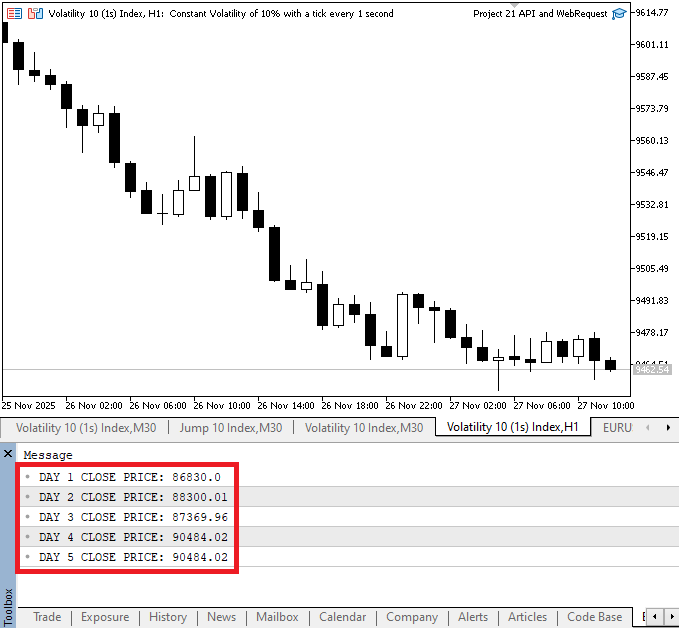
Пояснение:
Первым шагом было определить, какой индекс соответствует цене закрытия. По расположению значений видно, что цена закрытия для каждой свечи всегда находится в одном и том же месте, поэтому мы можем уверенно извлекать ее для каждого дня. После того как мы подтвердили позицию цены закрытия, каждое значение нужно было преобразовать из строки в числовой тип, пригодный для вычислений. Поскольку для сравнений и вычислений нужны числовые значения, а данные от сервера изначально приходят в строковом формате, это преобразование крайне важно. Мы применили тот же процесс к каждой из пяти дневных свечей, преобразовав каждую цену закрытия в числовой формат.
После того как каждая цена закрытия была преобразована в double, мы создали один массив ClosePrice, чтобы объединить все дневные цены закрытия. В этом массиве первый элемент соответствует самой последней свече, а последний – пятой свече в нашей последовательности; таким образом, сохраняется последовательный порядок цен закрытия по дням. Этот способ организации данных упрощает получение цены закрытия любой конкретной свечи и анализ нескольких свечей. После того как мы нашли цену закрытия каждой дневной свечи, ее нужно было преобразовать из строки в число, пригодное для вычислений. Чтобы избежать проблем из‑за строковых данных, этот этап гарантирует, что все пять цен закрытия будут в формате, который можно использовать для анализа, сравнения и дальнейшей обработки.
Группировка всех цен максимума в один массив
Цель этого раздела – собрать все цены максимума каждой из дневных свечей в один массив. Первым шагом будет определить, какой элемент в каждом массиве свечи соответствует цене максимума, так же как мы делали с ценами открытия и закрытия. Мы можем определить нужный индекс, содержащий цену максимума для каждого дня, посмотрев на паттерн свечных данных.
 1763424000000,     // opening time (0)
 92215.14000000,    // open price (1)
 93836.01000000,    // high price (2)
 89253.78000000,    // low price (3)
 92960.83000000,    // close price (4)
 39835.14769000,    // volume (5)
По структуре свечных данных мы можем определить нужный индекс, по которому для каждого дня находится цена максимума. После того как мы определили индекс, мы преобразуем цену максимума из строки в число для каждого дня. После того как мы преобразовали все цены максимума, мы объединим их в один массив, где каждый элемент будет представлять максимум конкретной дневной свечи. Если цены максимума организованы в одном массиве, проще оценивать тренды, сравнивать значения по нескольким свечам и использовать данные в индикаторах или торговых методах. Чтобы обеспечить единый подход к обработке свечных данных, мы выполним эту процедуру так же, как для цен открытия и закрытия.
Пример:
// High Price Array
 double day1_high = StringToDouble(day1_data_array[2]);
 double day2_high = StringToDouble(day2_data_array[2]);
 double day3_high = StringToDouble(day3_data_array[2]);
 double day4_high = StringToDouble(day4_data_array[2]);
 double day5_high = StringToDouble(day4_data_array[2]);

 double HighPrice[5] = {day1_high, day2_high, day3_high, day4_high, day5_high};
Пояснение:
Здесь мы создаем один массив, который содержит все цены максимума каждой дневной свечи. Первым этапом будет найти элемент в строковом массиве каждого дня, который соответствует цене максимума. По результатам анализа данных цена максимума находится в третьем элементе массива дневной свечи – по индексу 2.
На этом этапе мы преобразуем строковое значение в double для каждого дня. Значения цен часто содержат десятичные дроби, поэтому хранение их в числовом виде позволяет выполнять вычисления, сравнения и анализ позже. Например, третий элемент массива свечей первого дня преобразуется в double, чтобы получить day1_high. Затем тот же процесс повторяется для следующих четырех дней.
После преобразования цен максимума для каждого дня мы объединили значения за все пять дней в один массив. Поскольку каждый элемент массива представляет цену максимума конкретного дня, мы можем организованно получать доступ к этим значениям, оценивать их и при необходимости изменять для нескольких свечей.
Группировка всех цен минимума в один массив
Собрать все цены минимума в один массив – следующий этап в организации наших свечных данных. Мы начинаем с того, что находим цену минимума в каждом массиве дневной свечи, так же как мы делали с ценой максимума и ценой открытия. Согласно данным, цена минимума находится по индексу 3 – это четвертый элемент в массиве каждой свечи.
Для каждого дня мы преобразуем цену минимума из строки в double. Это гарантирует, что значения будут пригодны для вычислений, сравнений и дополнительного анализа. После преобразования мы объединяем цены минимума всех пяти дневных свечей в один массив. Этот массив упрощает доступ к отдельным ценам минимума и работу с ними, потому что каждый индекс соответствует определенному дню. Группируя цены минимума таким образом, мы получаем структурированную систему, где каждый компонент свечи хранится в отдельном массиве. Помимо упрощения управления данными, этот метод подготавливает свечные данные к любому анализу, индикаторам или торговым методам, которые мы захотим использовать.
Пример:
// Low Price Array

 double day1_low = StringToDouble(day1_data_array[3]);
 double day2_low = StringToDouble(day2_data_array[3]);
 double day3_low = StringToDouble(day3_data_array[3]);
 double day4_low = StringToDouble(day4_data_array[3]);
 double day5_low = StringToDouble(day4_data_array[3]);


  double LowPrice[5] = {day1_low, day2_low, day3_low, day4_low, day5_low};
Пояснение:
После того как мы преобразовали значения из строк в double и извлекли цены минимума из данных свечей для каждого дня, мы записали цены минимума за все пять дней в один массив. Вывод массива подтверждает, что значения подготовлены и упорядочены корректно для использования в индикаторах, стратегиях или советниках. Каждому элементу массива соответствует определенный день.
Заключение
В этой статье мы сделали следующий шаг в организации свечных данных API, сгруппировав похожие элементы нескольких дневных свечей в отдельные массивы. Времена открытия, цены открытия, цены максимума, цены минимума и цены закрытия были извлечены, преобразованы и сохранены в структурированных массивах. Этот метод значительно упрощает доступ к нужным точкам данных, выполнение вычислений и использование данных в индикаторах или советниках. Когда вы дочитаете этот материал, у вас будет четкий и эффективный метод управления несколькими свечами в языке MQL5, который станет основой для более сложного анализа и автоматизации торговых стратегий.
Перевод с английского произведен MetaQuotes Ltd.
Оригинальная статья: https://www.mql5.com/en/articles/20425
Предупреждение: все права на данные материалы принадлежат MetaQuotes Ltd. Полная или частичная перепечатка запрещена.
Данная статья написана пользователем сайта и отражает его личную точку зрения. Компания MetaQuotes Ltd не несет ответственности за достоверность представленной информации, а также за возможные последствия использования описанных решений, стратегий или рекомендаций.



 От новичка до эксперта: Разработка стратегии торговли по зонам ликвидности
 От новичка до эксперта: Подтверждение зон спроса и предложения через статистические данные
 Разработка пользовательского индикатора матрицы эффективности торгового счёта
 Как получить синхронизированные массивы для использования в алгоритмах портфельной торговли

- Бесплатные приложения для трейдинга
- 8 000+ сигналов для копирования
- Экономические новости для анализа финансовых рынков
Вы принимаете политику сайта и условия использования