Copy Cat More Trade Copier MT4

5

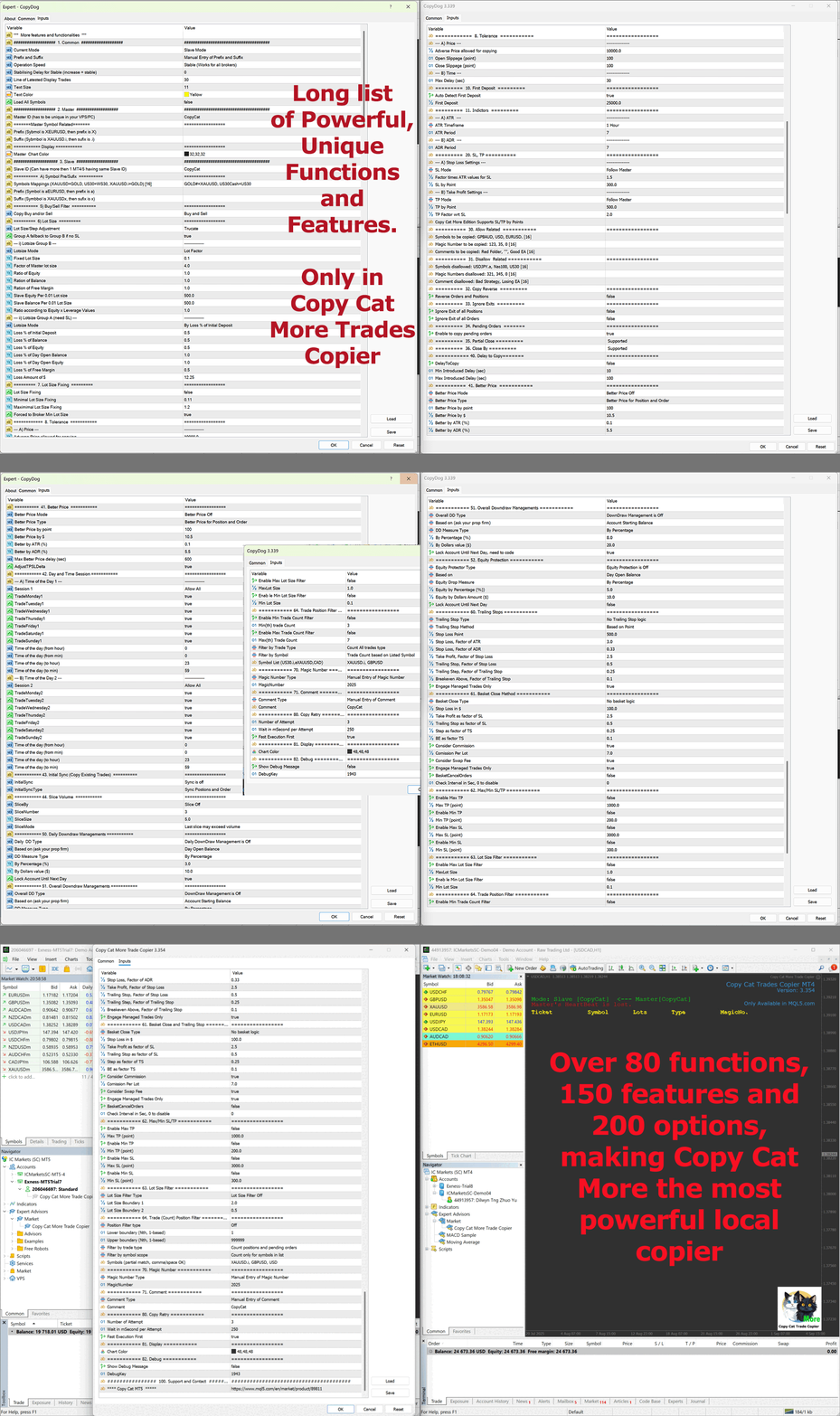
Copy Cat More Trade Copier MT4 (복사 고양이 MT4) 는 단순한 로컬 트레이드 카피어가 아니라, 오늘날의 거래 환경을 위해 설계된 완전한 리스크 관리 및 실행 프레임워크입니다. Prop Firm 챌린지부터 개인 계좌 관리까지, 강력한 실행력, 자본 보호, 유연한 설정, 고급 거래 처리 기능을 통해 모든 상황에 적응합니다.

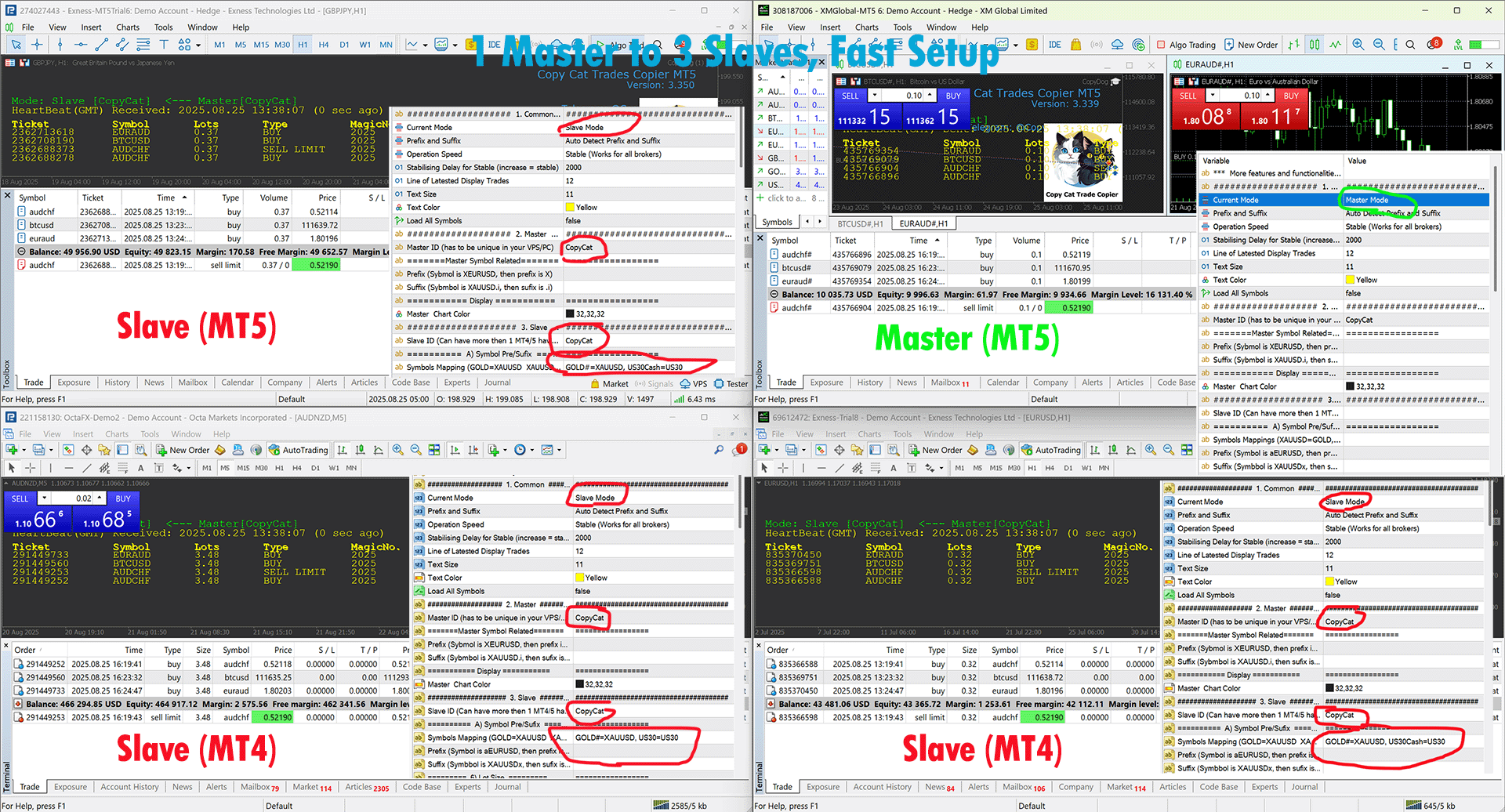
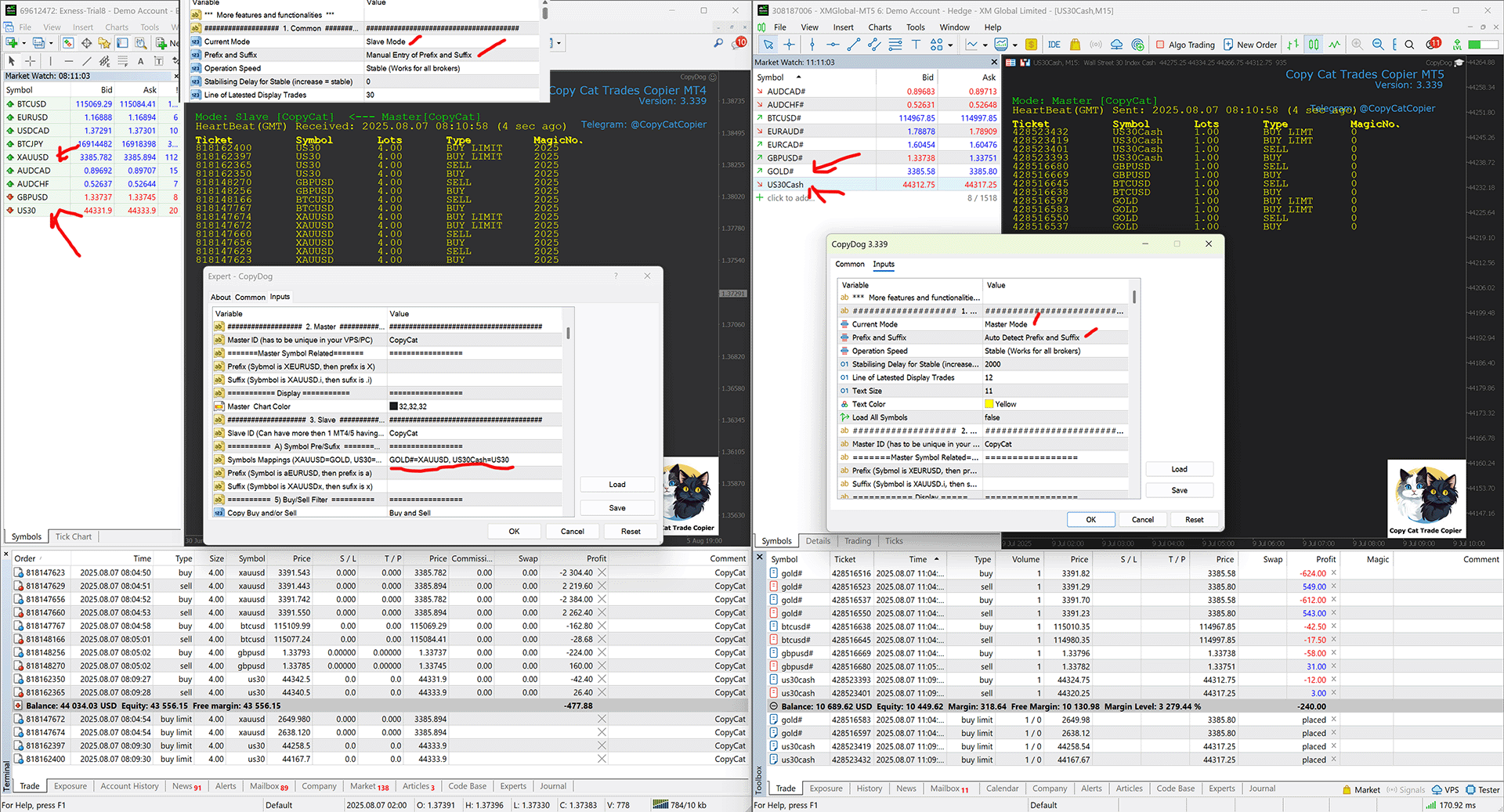
이 카피어는 Master(송신자) 와 Slave(수신자) 모드 모두에서 작동하며, 실시간으로 시장가/지정가 주문, 거래 수정, 부분 청산, Close By 작업을 동기화합니다. 데모 및 실계좌 모두 호환되며, 거래용 비밀번호 또는 투자자 비밀번호로도 사용할 수 있습니다. Persistent Trade Memory 기술을 통해 EA, 터미널, VPS가 재시작되더라도 거래가 복원됩니다. 여러 Master와 Slave를 동시에 관리할 수 있으며, 브로커 간 차이는 접두사/접미사 자동 감지 또는 심볼 매핑으로 처리됩니다.


주요 기능:
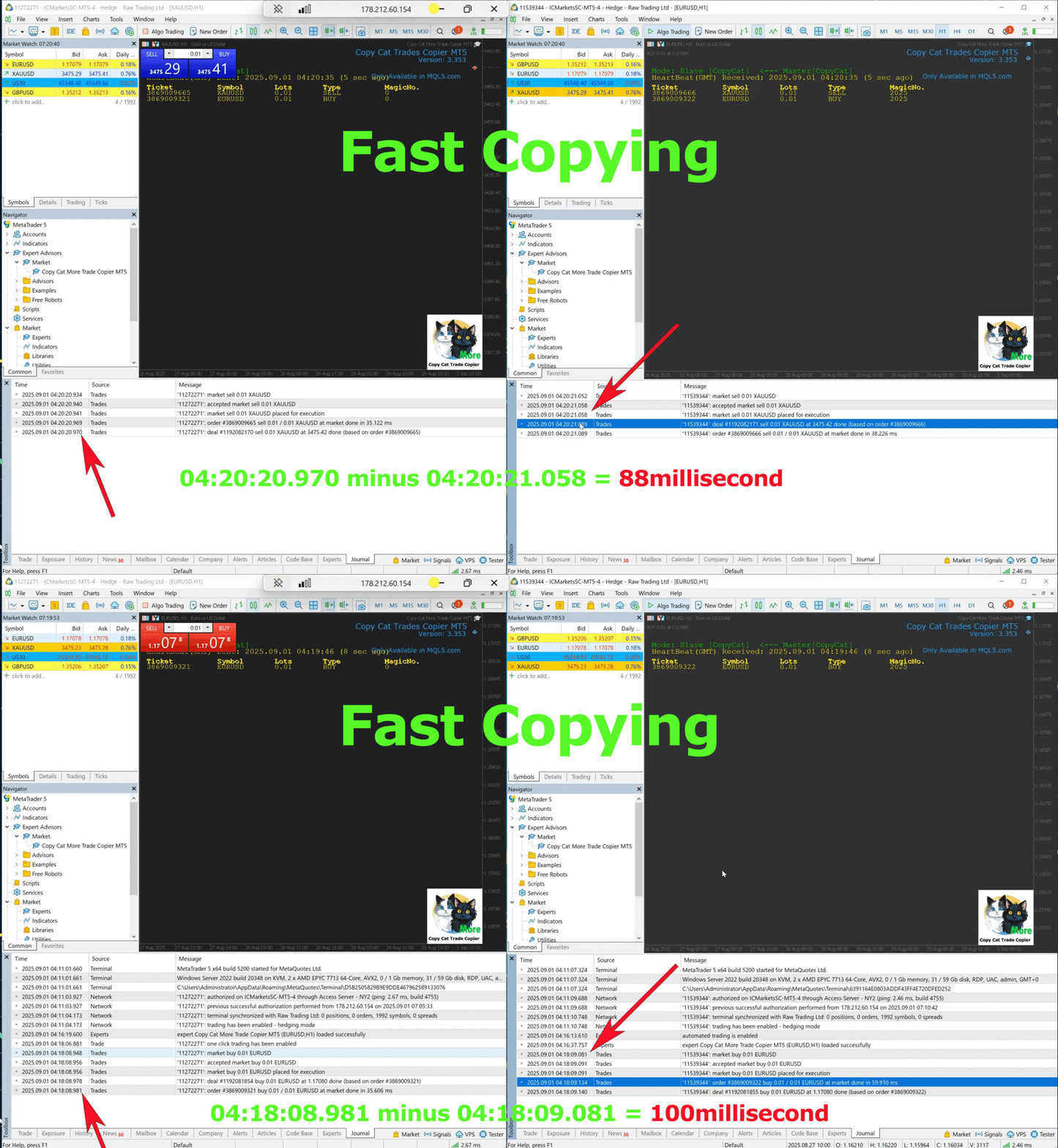
  • 빠르고 안정적이며 정확한 동작
  • 높은 보안성: 위험한 DLL 및 Webrequest 사용 안 함
  • Persistent Trades Memory 기술
  • 심볼 접두사/접미사 자동 인식
  • 부분 청산 기능 (MT4/5 지원)
  • Close By 지원
  • 역방향 복사 지원
  • 복사된 거래의 Magic Number와 코멘트를 공란으로 유지 가능
  • 계좌 리스크 관리 및 보호
  • 트레일링 스탑, 테이크프로핏, 스톱로스 옵션 지원
  • 거래 기반 로트 사이즈 및 리스크 제어
  • Better Price 로직(더 나은 가격)
  • 그리고 더 많은 고급 기능들

스톱로스 및 테이크프로핏 관리

스톱로스와 테이크프로핏은 Master를 따르거나, 미설정, 포인트 지정, ATR/ADR 기반 동적 계산이 가능합니다. 테이크프로핏은 스톱로스의 배수로도 설정할 수 있습니다. 모든 설정은 브로커의 StopLevel 및 FreezeLevel 제한을 준수하여 거절을 방지합니다.

거래 필터링 및 제어

거래는 심볼, Magic Number, 코멘트 로 필터링할 수 있으며, 포함 및 제외 리스트 모두 지원합니다. 리스트는 부분 일치(예: “USD”로 모든 달러 페어) 또는 완전 일치를 처리할 수 있습니다.

또한, 역방향 복사(매수 → 매도, 매도 → 매수)를 지원하며, Master의 청산 무시 기능을 통해 Slave 쪽에서 독립적으로 청산을 관리할 수 있습니다. 지정가 주문은 복사 또는 무시가 가능하며, 부분 청산Close By 작업은 정확하게 인식 및 복제됩니다.

복사 속도, 가격 필터, 세션

실행은 Prop Firm 요구 사항에 맞추어 의도적으로 지연 또는 랜덤화할 수 있습니다. Better Price 로직(더 나은 가격)을 활성화하면 포인트 거리, 금액, ATR%, ADR% 기준으로 진입을 필터링하고, 허용 범위와 SL/TP 자동 조정을 지원합니다.

시간 기반 거래 제어는 두 개의 독립 세션 필터를 통해 가능하며, 요일과 특정 시간으로 거래를 제한할 수 있습니다. 이를 통해 거래 일정, 뉴스 이벤트 또는 Prop Firm 규정을 정확하게 반영할 수 있습니다.

초기 동기화 및 로트 분할

시작 시 기존 거래를 즉시 복사(전체, 이익 거래만, 손실 거래만, 또는 없음) 여부를 선택할 수 있습니다. 거래 로트는 고정, 배수, 계좌 기반 모드(에쿼티, 잔고, 사용가능 마진, 에쿼티×레버리지)로 조정할 수 있으며, 분할 하여 작은 포지션으로 나눌 수도 있습니다. 분할은 로트 사이즈 또는 거래 수 기준으로 가능하며, 오버플로우 또는 잔여 처리 모드를 통해 엄격한 브로커 로트 제한을 준수합니다.

드로우다운 및 자금 보호

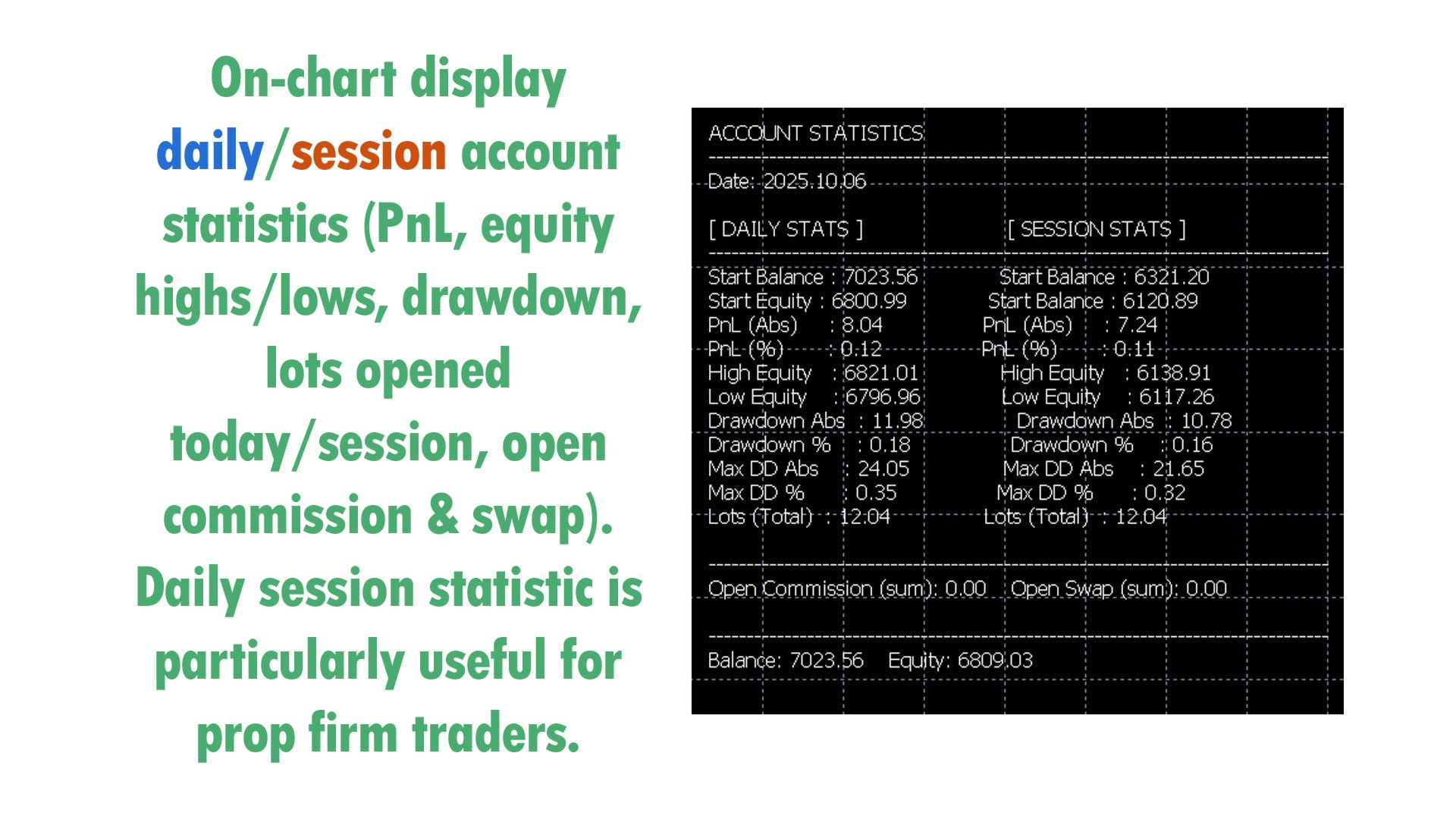
일일 드로우다운, 전체 드로우다운, 에쿼티 보호 기능이 포함되어 있으며, 특히 Prop Firm 환경에서 계좌를 보호합니다. 제한은 % 또는 금액으로 설정할 수 있으며, 도달 시 다음 날 또는 조건 회복까지 자동으로 거래를 차단합니다. 보호는 잔고, 에쿼티, 초기 입금을 기준으로 적용할 수 있습니다.

고급 리스크 관리 도구

카피어에는 트레일링 스탑 엔진이 내장되어 있으며, 포인트, ATR, ADR 방식 모두 지원합니다. 스톱로스 계수 기반, 트레일링 스텝, 손익분기점, 관리 거래 전용 실행 등을 설정할 수 있습니다. 또한, 바스켓 클로즈 시스템은 거래 그룹을 전체적으로 관리하며, 글로벌 SL, TP, 트레일링, 손익분기점, 수수료/스왑 고려까지 포함합니다. 이를 통해 포트폴리오 단위의 종료 전략을 구현할 수 있습니다. 로트 사이즈 최소/최대 필터 및 거래 수 제한을 통해 리스크 노출을 통제할 수 있습니다.

Magic Number, 코멘트 및 재시도 로직

복사된 거래는 빈 Magic Number, Master의 Magic Number 상속, 사용자 정의 입력 모두 가능합니다. 코멘트 역시 빈칸, Master 상속, 사용자 지정이 가능합니다. 고유 기능: Master에 Magic Number와 코멘트가 있어도 Slave 거래는 빈칸으로 둘 수 있습니다. 브로커 제한이나 일시적 연결 문제로 복사 실패 시, 카피어는 자동으로 여러 차례 재시도를 수행해 신뢰성과 속도의 균형을 유지합니다.

최초 입금 및 지표

최초 입금을 자동 감지하여 기준선을 설정할 수 있으며, 수동 설정도 가능합니다. ATR 및 ADR 지표가 내장되어 있어 동적 스톱 관리와 변동성 기반 거래 관리를 지원합니다.

리뷰 3
Erlon Diamante Neiva
291
Erlon Diamante Neiva 2025.11.23 21:12 
 

Execelente copiador, utilizo em várias contas financiadas. Não tem problema alguma quanto a execução das ordens. Recomendo!!

Grab
52
Grab 2025.09.15 16:47 
 

I been using Copy Cat Trade Copier MT4 for couple months now and honestly its the best copier I tried. What really blow me away is the Better Price logic. It don’t just copy a trade, it check the market price and sometimes give me a better entry than the master. That’s like having extra edge build right into the copier.

The functions are super fexible too. I can change lot sizing, symbol mapping, time filters, even risk controls. Its way more than just basic copy, it feels like a full risk management tool.

I tried other copiers before but nothing come close, this one really stand out as best in the market. For me its 5 stars no question.

Benson III
63
Benson III 2025.07.08 17:30 
 

Yo. I bought this copier end of last week for the "Close By" and partial close functions. Turns out it does those really well, and the copier is faster than other copiers Ive used (Im not joking). Im solely a guy that trawls through telegram looking for investor passes to login a copy. I have hundreds of active investor passes, some good, some crap. But going forward this is the copier Ill use cos its quick and smart. Doesnt seem to slow down my my PC like other ones (Ive used TS Copier for a few years but its super heavy on PC resources) so this is my new choice of copier to go fwd with. Im using mostly default settings, but have set pending orders to false. Only trade executions Ill have incase spreads and shit are different. Only other thing Ive found is this copier cant copy the source Comment the way I'd like, but the actual options, functions (including equity protector and copying is a 10/10. I bought the MORE version MT4 to get all the functions. Once you get it running its top banana. Oh andthe guy on user support is excellent as well, answered all my questions including user guide. 19/11 - Have just seen your reply - Most Welcome.

추천 제품
Virtual Collider Manual   is a trading assistant with a built-in panel for manual trading. It automatically moves a position opened by a trader in profit using innovative adaptive grid algorithm of averaging and adaptive pyramiding Know-how of the grid algorithm of averaging and pyramiding of the   Virtual Collider Manual   trading robot is based on fully automatic adaptation of all characteristics of dynamically build order grid and pyramid with actual price movement with no need for adjusting
차트를 전문 거래 데스크로 바꾸고, 시장에서 가장 강력하고 직관적이며 기능이 풍부한 거래 패널 중 하나를 사용하세요 — 지금 한정 기간 할인 가격으로 제공됩니다. 구매 후 메시지를 보내면 사은품을 드립니다 주요 기능: 차트 시각 거래 차트에서 직접 Entry, Stop Loss 및 Take Profit 을 드래그하세요. 위험, 수익, R:R 비율, 로트 크기 및 포인트가 실시간으로 업데이트 되는 것을 확인하세요. 다중 Take Profit / SL (최대 4단계) 전문가처럼 부분 청산하세요. • 최대 4단계 Take Profit / Stop Loss • 자동 로트 분할 • 한 번의 진입, 여러 번의 청산 스텔스 모드 브로커에게 TP와 SL 을 숨기세요. 레벨은 시스템 내부에서 관리됩니다. 빠른 모드 즉시 실행. • 원클릭 Buy / Sell • 자동 SL 및 TP 설정 실시간 거래 편집 차트에서 직접 거래를 수정하세요. TP/SL 레벨을 드래그하고 변경 사항을 즉시 적용 하세



손익분기점을 자동으로 설정하는 유틸리티로, 주어진 거리를 지나갈 때 거래를 손익분기점으로 전환합니다. 위험을 최소화할 수 있습니다. 상인을 위해 전문 상인이 만들었습니다. 유틸리티는 거래자가 수동으로 또는 고문을 사용하여 개설한 모든 시장 주문과 함께 작동합니다. 매직 넘버로 거래를 필터링할 수 있습니다. 유틸리티는 동시에 원하는 수의 주문을 처리할 수 있습니다. MT5 버전 https://www.mql5.com/ru/market/product/57077 유틸리티가 할 수 있는 일: 1핍에서 가상 손익분기점 설정 실제 수준의 손익분기점 설정 각 주문에 대해 개별적으로 작업(손익분기 수준은 각 주문에 대해 별도로 설정됨) 단방향 주문 바구니로 작업(손익분기 수준은 모든 주문에 대해 공통으로 설정되고 별도로 구매 및 판매) 양방향 주문 바스켓으로 작업(손익분기 수준은 모든 주문에 대해 공통으로 설정되며, 함께 구매 및 판매) 테스트 및 작업을 위해 차트의 버튼을 사용할 수 있습니
TradePilot
Hossein Khalil Alishir
TradePilot Expert Advisor (EA) for MetaTrader 4 TradePilot is a professional and user-friendly Expert Advisor (EA) for MetaTrader 4 (MT4) . It simplifies automated trading , risk management , and trade execution using a smart trading panel . Perfect for beginners and experienced traders looking for a reliable trade manager EA with automated lot size calculation . Key Advantages User-Friendly Trading Panel: Customizable panel with buttons and hotkeys. Smart Risk Management: Supports percen
프리셋 주문 및 자동 로트 계산이 가능한 트레이딩 패널. 트레이딩 패널은 전략 테스터에서 작동하지 않습니다(추적손절 테스트만 가능). 매뉴얼, 설명, 라이트 데모 다운로드. 성공적인 거래자는 자기 훈련과 유능한 자금 관리로 구별됩니다. 고정 된 롯을 사용하는 경우,당신은 위험에 처해 있습니다. 결국,다른 시간대에 다른 거리가 있으며 하나의 수익성이없는 거래는 여러 수익성있는 거래를 커버 할 수 있습니다. 각 트랜잭션에 대한 정지 손실이 보증금의 1%를 초과하지 않도록 자동 로트를 사용하는 경우,당신은이 문제를 해결한다. 또한 거래자는 부분 폐쇄,거래 이전을 손익분기 점,후행 정지,차트 상의 과거 거래 분석을 사용합니다. 이 충분한 뉘앙스,그래서 나는 거래 패널을 작성하기로 결정했다. 내 취향을 위해,그것은 매우 기능적이고 편안한 것으로 밝혀졌습니다. 거래 패널 기능. 모든 계정 및 통화로 작업. 로트 계산을 위한 주문의 시각적 사전 설정. 로트 계산을 위한 보류 중인 주문의 시각적
Commodity Channel Index Message is an indicator for the MetaTrader 4 trading platform. Unlike the original indicator, this three in one version has a system of alerts that inform on market situation changes. It consists of the following signals: when the Main line crosses the levels of extreme zones and 50% level; when the Main line crosses the Trend line in the indicator window; Divergence on the last bar. Values of the middle and extreme levels and divergence zones are customizable. Parameter
Utility, which draws buy or sell trendlines, which can also become support or resistances able to close any position on the screen Algorithm that calculates the gain of the position, at the touch closure of the line.   The benefits you get: Works on forex and CFD, timeframe from M1 to Weekly. Easy to use screen control panel. Audible warning messages at the touch of the line. Easy to use.
Fever ESM
Evgenii Morozov
Trading Advisor for margin currency pairs and metals. Conservative trading of 100,000 units per 0.01 lot. The standard trade is 10,000 units per 0.01 lot. Aggressive trading with high risks of 1000 units per 0.01 lot. You can always pick up your starting lot.  The EA is fully automated, you only have to put up the initial lot depending on your initial deposit. The recommended timeframe is H1. 1. Test on any steam, iron and fuel oil 2. Try starting with convenient depots 3. When going into a dra
Grid Manual MT4
Alfiya Fazylova
4.71 (17)
"Grid Manual"은 주문 그리드 작업을 위한 거래 패널입니다. 이 유틸리티는 보편적이며 유연한 설정과 직관적인 인터페이스를 제공합니다. 그것은 손실을 평균화하는 방향뿐만 아니라 이익을 증가시키는 방향으로 주문 그리드와 함께 작동합니다. 거래자는 주문 그리드를 만들고 유지할 필요가 없으며 유틸리티에서 수행합니다. 거래자가 주문을 시작하는 것으로 충분하며 "Grid Manual"는 자동으로 그를 위한 주문 그리드를 생성하고 거래가 마감될 때까지 그와 동행할 것입니다. 전체 설명 및 데모 버전 여기 . 유틸리티의 주요 기능: 모바일 터미널을 포함하여 어떤 방식으로든 열린 주문과 함께 작동합니다. "제한" 및 "중지"의 두 가지 유형의 그리드와 함께 작동합니다. 고정 및 동적(ATR 표시기 기반)의 두 가지 유형의 그리드 간격 계산과 함께 작동합니다. 오픈 오더 그리드의 설정을 변경할 수 있습니다. 차트에서 각 주문 그리드의 손익분기점 수준을 표시합니다. 각 주문 그리드에 대한 이익
Auto SLTP Maker MT4  is an assistant for all those who forget to set StopLoss and/or TakeProfit in deal parameters, or trade on a very fast market and fail to place them in time. This tool automatically tracks trades without StopLoss and/or TakeProfit and checks what level should be set in accordance with the settings. The tool works both with market and pending orders. The type of orders to work with can be set in the parameters. It can track either trades for the instrument it runs on, or all
Close all trades at the specified hour and minute! Once the specified time is hit, all orders will be automatically closed. ========================================== INPUTS: Closing type:   Set to specify if you wanted to close all of the trades on the account or just the trades under the current chart symbol. Closing hour:   Set the exact closing hour. Closing minute:   Set the exact closing minute. If current time is equal or more than the closing minute and is equal to closing hour, then all
MT4용 Crypto_Forex 지표 "FORCE 지수 및 2개 이동 평균". 리페인트 불필요. - 이 지표는 추세 방향의 모멘텀 트레이딩에 매우 유용합니다. - "FORCE 지수 및 2개 이동 평균" 지표를 사용하면 Force 지수의 빠르고 느린 이동 평균을 확인할 수 있습니다. - Force 지수는 가격과 거래량 데이터를 단일 값으로 결합하는 최고의 지표 중 하나입니다. - Force 지수 자체는 가격 변동에 사용된 파워의 양을 측정하는 강력한 오실레이터입니다. - 지표는 추세 변화를 매우 조기에 확인할 수 있는 기회를 제공합니다. - 이 지표는 매개변수를 통해 매우 쉽게 설정할 수 있으며, 모든 시간대에서 사용할 수 있습니다. - 그림에서 매수 및 매도 진입 조건을 확인할 수 있습니다. 여기를 클릭하여 고품질 트레이딩 로봇과 지표를 확인하세요! MQL5 웹사이트에서만 제공되는 오리지널 제품입니다.
Trading Helper
Siarhei Vashchylka
Trading Helper - Program for trading and money management. It works with pending and immediate orders, and is equipped with trailing stop, breakeven and take profit functions. Manual (Be sure to read before purchasing) Advantages 1. Comfortable trading in a few clicks. Immediate and pending orders are available in the panel 2. Fixed percent method. The panel can select the lot size based on a predetermined risk 3. Trading with a fixed lot. In a few clicks, select a lot and open a Trade 4. Posi
SimpleStop is a utility for professional traders: full support for the strategy tester for manual trading (Backtest) - placing, dragging, deleting orders (also available in the demo version); placing orders in one click at the price with no limits on the maximum allowed offset level, as well as in a closed market. The EA places an appropriate order at the appropriate time - stop, limit or opening a position by market within the maximum slippage; automatic Money Management; automatic placement of
Panel "panel_kjutaMultiTerminal" for trading. Opens, modifies, closes and deletes trading and pending orders from the chart using virtual lines, buttons and the active information terminal. Automatically opens an order by indicator levels. Hints in Russian, English or disabled. It has a number of functions for trailing virtual Take Profit lines and limit orders. Displays information on the active information terminal.  Hides and includes virtual lines S/L , T / P, buttons "<>","M","X", as well a
It is so very disappointing when the price does not have enough points to achieve Take Profit and makes a reversal. This EA sets virtual levels near the TakeProfit levels. This EA sets virtual levels next to TakeProfit orders. If these levels are reached by price, breakeven or trailing stop is applied for an order. Features This EA does not set new orders. The aim of this EA is to manage stop losses of existing orders that are set by another EA or manually (magic number equals 0). For correct w
Savage Trades M.T.A.  is a Manual Trade Assistant expert advisor. This EA contains self-adaptive market algorithm, which uses price action patterns and standard trading indicators. 1.) Quickly Execute trade entries with the click of a button with your own predetermined Stop Loss and Take Profit. 2.) Non-Repainting retracement and reversal warnings indicated by arrows and system alert. 3.) Auto adjusting Support and Resistance levels with strength indicated by color shade. 4.) Auto adjusting Fibo
VN Trade Panel II
Vyacheslav Nekipelov
4 (1)
The new version of the trading panel, which now has the ability to separately close Buy and Sell orders, display targets for all orders on the chart, as well as the ability to use the panel to trade with brokers working on the FIFO rule. Also, the new version adds option buttons for separate management of open orders. It has a convenient visualized interface and intuitive control without a lot of additional tabs to which traders have to be distracted and switch their attention. Thanks to this,
RJDJ Trade Manager is a powerful all-in-one MetaTrader 4 trade management panel for traders who want faster chart-based execution, cleaner position control, and a more efficient manual trading workflow. With built-in tools for market orders, pending orders, trailing stop management, account monitoring, and a dedicated MANAGE dialog, it helps simplify daily trading operations directly on the chart. Product Description RJDJ Trade Manager is a professional chart-based trading panel for MetaTrader 4
Expert Advisor for MT4 Useful utility MUST have for all traders.  With 1 click button, you're able to close all your open positions. Its come with a warning pop up notification when you click to close all your trades, to avoid an accident press the button. Just press 'Yes' to confirm or 'No' to cancel it. The expert will close all your open positions no matter what pairs you currently open or directions. Just attach the expert on 1 of your chart, and you're good to go.
Hedge Trade
Mothusi Malau
1 (1)
️ Hedge Trade — Smart Fixed-Offset Hedging EA Turn adverse moves into controlled recovery cycles. Hedge Trade is a professional-grade MetaTrader 4 Expert Advisor that protects any open trade by automatically placing and managing one intelligent hedge order. It’s built for traders who prefer to open their own base position but want an automated, disciplined hedging system to manage drawdown and capture counter-moves — safely, transparently, and without martingale. Key Features Automatic Hedg
SL InfoPanel is an information panel that displays operational trading information on the current instrument. The panel contains the following information: The first column: The fixed profit for the specified period of time and the percentage of this profit to the current deposit (the time period is configured in the "Account History"). The value is colored blue if there is a profit and red if there is a loss. Open Long orders (number of lots/number of orders). Open Short orders (number of l
후행 정지 수준으로 거래를 자동으로 마감하는 유틸리티입니다. 수익을 최대한 활용할 수 있습니다. 상인을 위해 전문 상인이 만들었습니다. 유틸리티는 거래자가 수동으로 또는 고문을 사용하여 개설한 모든 시장 주문과 함께 작동합니다. 매직 넘버로 거래를 필터링할 수 있습니다. 유틸리티는 동시에 원하는 수의 주문을 처리할 수 있습니다. MT5 버전 https://www.mql5.com/ru/market/product/56488 유틸리티가 할 수 있는 일: 1핍에서 가상 후행 정지 수준 설정 실제 후행 정지 수준 설정 각 주문에 대해 개별적으로 작업(후행 정지 수준은 각 주문에 별도로 배치됨) 단방향 주문 바스켓으로 작업(후행 정지 수준은 모든 주문에 대해 공통으로 설정되며 별도로 구매 및 판매) 양방향 주문 바스켓으로 작업(추적 정지 수준은 모든 주문에 대해 공통으로 설정되며 BUY 및 SELL을 함께 사용) 테스트 및 작업을 위해 차트의 버튼을 사용할 수 있습니다. 옵션: TR
소개 가상 TPSL 마감 M4 주문 관리 유틸리티 도구(전문 고문)는 귀하가 사용하는 다른 전문 고문이 만든 기존 오픈 포지션이나 수동으로 개설된 주문을 관리하고 가상 이익실현 및 손절매 수준으로 마감합니다. Adviser는 완전한 가상 모드에서 작동하며, 모니터링된 위치가 닫혀 있을 때 그려지는 색상 화살표 개체 이상의 시각적 레벨은 존재하지 않으며, 하나가 열려 있고 연결된 유틸리티와 함께 표시되는 경우 차트에 닫는 위치를 표시하기 위해 손익 여부에 관계없이 표시됩니다. 이 유틸리티를 사용하는 방법은 무엇입니까? 간단하고 차트를 엽니다. 하나의 단일 차트에서만 모니터링을 제어하므로 모든 차트와 기간이 괜찮습니다. 이 어드바이저를 부착하고 모니터링하려는 기호 및 매직 넘버(수동 주문의 경우 0)와 포지션 유형을 지정하세요. - 매수, 매도 또는 둘 다를 지정하고 포지션이 종료되지 않도록 원하는 가상 이익 실현 수준을 설정하세요. . 정지 손실 수준을 모니터링하는 것도 가능합니
Trailing Stop Utility MT4 for automatic closing of deals by trailing stop levels.  Allows you to take the maximum from the profit. Created by a professional trader for traders.   Utility   works with any market orders opened manually by a trader or using advisors. Can filter trades by magic number. The utility can work with any number of orders simultaneously. WHAT THE UTILITY CAN DO: Set virtual   trailing stop   levels from 1 pip Set real   trailing stop   levels W ork with each order separat
Один из главных секретов успешного трейдинга - это адекватное управление рисками. Но не всегда получается следовать этому правилу, т.к. иногда эмоции берут верх над трейдером и вход в рынок случается необдуманным. Программа Optimal lot исключает такие ошибки и позволяет быстро принять решение, входить в рынок или нет. Ее уникальность в том, что Вы строите горизонтальную линию с именем "risk". При перемещении этой линии в информационном блоке отображаются следующие данные: Balance - Размер д
VERY EASY TO USE. PERFECT TO HELP YOU TO AVOID REACHING THE DAILY LOSS LIMIT ON YOUR PROP FIRM ACCOUNT OR ON YOUR PERSONAL ACCOUNT IN CASE YOUR EA GETS OUT OF CONTROL AND STARTS OPENING HIGH LOT SIZES OR SIMPLY IF MARKET WILL GO WILD. Product Description: Name: Daily Loss and DD Protector Use:  This EA tracks and display on the monitor your daily loss (considering profits also) and stops trading when the floating drawdown + loss reaches a value determined by the user in its input parameters. Fu
Easy Trade Executor는 MT4에서 빠른 포지션 크기 계산, 주문 실행 및 트레이드 관리를 위한 도구입니다. 차트에 Entry Price, Stop Loss, Take Profit 레벨을 직접 배치하고, 포지션 크기를 자동으로 계산한 후 몇 번의 클릭만으로 리스크가 관리된 트레이드를 실행할 수 있습니다. 왜 Easy Trade Executor를 선택해야 할까요? Easy Trade Executor는 단순한 리스크 계산 이상의 기능을 원하는 트레이더를 위해 설계되었습니다. 트레이더는 차트에서 직접 빠르고 효율적으로 트레이드를 관리하고 싶어 합니다. 이 도구는 포지션 크기 계산, 주문 실행 및 트레이드 관리를 하나의 워크플로우로 통합하여 수동 계산이나 여러 터미널 창 간 전환 대신 트레이딩에 집중할 수 있도록 해줍니다. Easy Trade Executor의 주요 기능: 리스크 기반 자동 포지션 크기 계산; 차트에서 직접 Market Order 및 Pending Order
NRP Risk Manager Pro Institutional-Grade Trade Management & Prop Firm Protection Get the MetaTrader 4 Version Here: https://www.mql5.com/en/market/product/179888 Get the MetaTrader 5 Version Here: https://www.mql5.com/en/market/product/179885 Trading isn't just about finding the right entry; it is about flawlessly executing your edge while fiercely protecting your capital. NRP Risk Manager Pro is not an automated trading robot—it is a comprehensive, institutional-grade trade terminal d
SMART TRADE PANEL PRO MT4용 전문 수동 트레이딩 유틸리티 Smart Trade Panel PRO V3는 빠른 주문 실행, 고급 포지션 관리 및 차트 내 전문 도구를 필요로 하는 트레이더를 위해 설계된 MetaTrader 4용 전문 트레이딩 패널입니다. Smart Trade Panel PRO V3는 수동 트레이딩, 스캘핑, Forex Trading, Gold Trading 및 Crypto CFD Trading을 위해 개발되었습니다. 이 유틸리티는 빠른 실행 속도, 전문적인 포지션 관리, 그리고 Breakeven, Trailing Stop, Reverse Position 및 통합 Recovery 시스템과 같은 고급 기능을 결합합니다. 깔끔하고 가벼우며 효율적인 인터페이스를 유지하면서 수동 트레이딩을 더욱 쉽고 편리하게 만들기 위해 설계되었습니다. 지원 시장: - Forex - Gold (XAUUSD) - 지수 - Crypto CFD - Scalping - Intrad
이 제품의 구매자들이 또한 구매함
Trade Manager EA에 오신 것을 환영합니다. 이 도구는 거래를 보다 직관적이고 정확하며 효율적으로 만들기 위해 설계된 궁극적인 리스크 관리 도구 입니다. 단순한 주문 실행 도구가 아닌, 원활한 거래 계획, 포지션 관리 및 리스크 제어를 위한 종합 솔루션입니다. 초보자부터 고급 트레이더, 빠른 실행이 필요한 스캘퍼에 이르기까지 Trade Manager EA는 외환, 지수, 상품, 암호화폐 등 다양한 시장에서 유연성을 제공합니다. Trade Manager EA를 사용하면 복잡한 계산은 이제 과거의 일이 됩니다. 시장을 분석하고 진입, 손절 및 익절 수준을 차트의 수평선으로 표시한 후 리스크를 설정하면, Trade Manager가 이상적인 포지션 크기를 즉시 계산하고 SL 및 TP 값을 실시간으로 표시합니다. 모든 거래가 간편하게 관리됩니다. 주요 기능: 포지션 크기 계산기 : 정의된 리스크에 따라 거래 크기를 즉시 결정합니다. 간단한 거래 계획 : 진입, 손절, 익절을 위한
Exp COPYLOT CLIENT for MT4
Vladislav Andruschenko
4.69 (65)
MetaTrader 4용 전문 트레이드 복사기 MetaTrader 4 용 빠르고 안정적이며 전문적인 트레이드 복사기입니다. COPYLOT 은 MetaTrader 4 와 MetaTrader 5 터미널 간에 Forex 거래를 복사할 수 있으며, 다양한 계좌 유형과 운용 방식에 맞춰 유연한 동기화 환경을 제공합니다. COPYLOT MT4 버전 지원 방식: MetaTrader 4 → MetaTrader 4 MetaTrader 5 Hedge → MetaTrader 4 MetaTrader 5 Netting → MetaTrader 4   MT5 버전 상세 설명 + DEMO + PDF 구매 방법 설치 방법 로그 파일 확인 방법 테스트 및 최적화 방법 Expforex의 모든 제품 MetaTrader 5 버전 을 사용하면 MetaTrader 5 → MetaTrader 5 및 MetaTrader 4 → MetaTrader 5 복사도 지원됩니다: COPYLOT CLIENT for MT5 COPYLOT 은
TradePanel MT4
Alfiya Fazylova
4.84 (95)
Trade Panel은 다기능 거래 도우미입니다. 이 애플리케이션에는 50개 이상의 수동 거래 기능이 포함되어 있으며 대부분의 거래 작업을 자동화할 수 있습니다. 구매하기 전에 데모 계정에서 데모 버전을 테스트할 수 있습니다. 데모 계정용 애플리케이션 체험판 다운로드: https://www.mql5.com/en/blogs/post/750865 . 전체 지침 여기 . 거래. 한 번의 클릭으로 거래를 수행할 수 있습니다: 리스크 자동 계산과 함께 예약 주문 및 포지션 열기. 한 번의 클릭으로 여러 주문 및 포지션 열기. 주문 그리드 열기. 예약 주문 및 포지션을 그룹별로 닫기. 포지션 방향 전환 (Buy 닫기 > Sell 열기, Sell 닫기 > Buy 열기). 포지션 잠금 (부족한 포지션을 열어 Buy와 Sell 포지션의 수량을 동일하게 만들기). 모든 포지션 한 번의 클릭으로 부분적으로 닫기. 모든 포지션의 테이크 프로핏과 스톱로스를 같은 가격 수준에 설정. 모든 포지션의 스톱로스를
Custom Alerts AIO: 다중 시장을 동시에 모니터링 – 설정 없이 즉시 사용 가능 개요 Custom Alerts AIO 는 복잡한 설정 없이 즉시 사용할 수 있는 통합 시장 모니터링 도구입니다. FX Power, FX Volume, FX Dynamic, FX Levels, IX Power 등 필요한 모든 지표가 내장되어 있어 별도의 설치나 구성 없이 알림 기능을 바로 사용할 수 있습니다. 차트 그래픽 없이 작동하며, Forex, 금속, 지수, 암호화폐 등 주요 자산군을 모두 지원합니다. 주식(Symbols)은 별도로 입력하여 추가할 수 있으나, MetaTrader에서는 일반적으로 제한적으로만 사용됩니다. 1. 왜 Custom Alerts AIO를 선택해야 하나요? 추가 라이선스가 필요 없습니다 • 모든 Stein Investments 지표가 내장되어 있어 별도 구매가 필요 없습니다. • 즉시 알림 기능을 시작할 수 있어 빠르고 간편합니다. 모든 시장을 하나의 도구로
Telegram to MT4 Multi-Channel Copier 는 Telegram 채널의 트레이딩 시그널을 MetaTrader 4로 자동으로 직접 복사합니다. 봇도, 브라우저 확장 프로그램도, 수동 복사도 필요 없습니다. Telegram에서 시그널을 받으면 EA가 몇 초 안에 터미널에서 거래를 엽니다. 제품은 두 가지 구성 요소를 포함합니다: Telegram 채널을 듣는 Windows 애플리케이션과 MT4 터미널에서 시그널을 실행하는 이 Expert Advisor입니다. MT5 버전도 사용할 수 있습니다. 설치 가이드 및 애플리케이션 다운로드: https://www.mql5.com/en/blogs/post/768988 작동 방식 Windows 애플리케이션은 봇이 아닌 사용자 본인의 API 자격 증명을 사용하여 Telegram에 연결합니다. 즉, 비공개 및 VIP 채널을 포함하여 가입한 모든 채널, 그룹 또는 포럼 토픽을 읽을 수 있습니다. 시그널을 감지하면 이를 파싱하여 EA로
MT4 to Telegram Signal Provider 는 사용하기 쉽고 완전히 사용자 정의가 가능한 도구로, 텔레그램으로 신호를 보내어 계정을 신호 제공자로 변환할 수 있습니다. 메시지 형식은 완전히 사용자 정의가 가능합니다! 그러나 간단한 사용을 위해 미리 정의된 템플릿을 선택하고 메시지의 특정 부분을 활성화하거나 비활성화할 수도 있습니다. [ 데모 ]  [ 매뉴얼 ] [ MT5 버전 ] [ 디스코드 버전 ] [ 텔레그램 채널 ]  New: [ Telegram To MT5 ] 설정 단계별 사용자 가이드 가 제공됩니다. 텔레그램 API에 대한 지식이 필요 없으며, 개발자가 필요한 모든 것을 제공합니다. 주요 기능 구독자에게 보낸 주문 세부 정보를 사용자 정의할 수 있는 기능 예를 들어 브론즈, 실버, 골드와 같은 계층 구독 모델을 만들 수 있습니다. 골드 구독은 모든 신호 등을 받게 됩니다. ID, 심볼 또는 코멘트별 주문 필터링 주문이 실행된 차트의 스크린샷을 포함 보낸
Telegram to MT4 Coppy
Sergey Batudayev
4 (10)
Telegram에서 MT4로:   최고의 신호 복사 솔루션 최첨단 유틸리티인   Telegram to MT4를   사용하여 거래를 간소화하세요. DLL 없이도 Telegram 채널과 채팅에서 MetaTrader 4 플랫폼으로 거래 신호를 직접 복사할 수 있습니다. 이 강력한 솔루션은 탁월한 정밀도와 맞춤 설정 옵션을 통해 원활한 신호 실행을 보장하여 시간을 절약하고 효율성을 높여줍니다. [ Instructions and DEMO ] 주요 특징 직접 Telegram API 통합 전화번호와 보안 코드를 통해 인증하세요. 사용자 친화적인 EXE 브리지를 사용하여 채팅 ID를 손쉽게 가져오고 관리하세요. 여러 채널/채팅을 추가, 삭제, 새로 고침하여 동시에 신호를 복사합니다. 고급 필터를 사용한 신호 파싱 사용자 정의 예외 단어(예: "보고서", "요약")가 포함된 원치 않는 신호를 건너뜁니다. 유연한 SL 및 TP 형식을 지원합니다: 가격, 핍 또는 포인트. 신호가 가격 대신 지점을 지정
Unlimited Trade Copier Pro is a tool to copy trade remotely to multiple MT4, MT5 and cTrader accounts at different computers/locations over internet. This is an ideal solution for you if you are a signal provider and want to copy your trades to other receivers globally on your own rules. One provider can copy trades to multiple receivers and one receiver can get trade from multiple providers as well. The provider can even set the subscription expiry for each receiver, so that receiver will not b
The product will copy all telegram signal to MT4   ( which you are member  ) , also it can work as remote copier.  Easy to set up, copy order instant, can work with almost signal formats, image signal, s upport to translate other language to English Work with all type of channel or group, even channel have "Restrict Saving Content", work with  multi channel, multi MT5 Work as remote copier: with signal have ticket number, it will copy exactly via ticket number. Support to backtest signal. How to
MT4 to Discord Signal Provider 는 Discord로 직접 거래 신호를 보내는 데에 설계된 사용자 친화적이고 완전히 맞춤화할 수 있는 유틸리티입니다. 이 도구는 귀하의 거래 계좌를 효율적인 신호 제공자로 변환합니다. 귀하의 스타일에 맞게 메시지 형식을 사용자 정의하세요! 사용 편의성을 위해 사전에 디자인된 템플릿을 선택하고 포함하거나 제외할 메시지 요소를 선택할 수 있습니다. [ 데모 ] [ 매뉴얼 ] [ MT5 버전 ] [ Telegram 버전 ]  New: [ Telegram To MT5 ] 설정 간편한 설정을 위해 저희의 상세한 사용자 가이드 를 따르세요. Discord API에 대한 사전 지식이 필요 없습니다; 필요한 모든 도구를 제공합니다. 주요 기능 구독자 업데이트를 위한 주문 세부 정보를 사용자 정의합니다. 각 계층이 다른 수준의 신호 접근을 제공하는 브론즈, 실버, 골드와 같은 계층적 구독 모델을 구현합니다. 주문이 실행된 차트의 스크린샷을 첨
VirtualTradePad PRO SE MT4 — MetaTrader 4용 고급 트레이딩 패널 및 차트 워크스페이스 VirtualTradePad PRO SE 는 MetaTrader 4 용 전문 트레이딩 패널이자 거래 관리 워크스페이스입니다. 하나의 차트 기반 인터페이스에서 거래를 더 빠르게 열고, 관리하고, 보호하고, 닫고, 분석할 수 있도록 도와줍니다. 이 제품은 단순한 버튼 모음 이상의 기능이 필요한 적극적인 수동 트레이더를 위해 만들어졌습니다. PRO SE는 원클릭 실행, 예약 주문, 포지션 제어, 부분 청산, 바스켓 손익 로직, 평균가 레벨, ATM 규칙, 신호 모니터링, 시장 정보, 전략 테스터 워크플로, VPS 중심 준비를 하나의 구조화된 워크스페이스로 통합합니다. MT5 버전 | 전체 설명 및 스크린샷 | 구입 방법 | 설치 방법 | 로그 파일을 얻는 방법 | 테스트 및 최적화 방법 | Expforex의 모든 제품 일반 수동 트레이딩 대비 장점 여러 창 대신 하나의 워
Smart Channel M4
Vahidreza Heidar Gholami
The trend in the market can be predicted using trend lines but the problem is you don’t know where exactly the price is going to touch the trend line where you can put your pending orders on. Smart Channel Expert Advisor makes it possible to put an advanced channel around the price data, which can be configured to handle placing orders, opening and closing positions, managing risk per trade, spread, slippage, and trailing stop-loss and take-profit automatically. Features Money Management (Calcul
ManHedger MT4
Peter Mueller
5 (2)
THIS EA IS A SEMI-AUTO EA, IT NEEDS USER INPUT. Manual & Test Version Please TEST this product before   BUYING  and watch my video about it. Contact me for user support or bug reports, or if you want the MT5 version! MT5 Version I do not guarantee any profits or financial success using this EA. With this Expert Advisor, you can: Implement your own   Zone Recovery   strategy to capitalize on trending markets. Create   Grid   trading strategies, to profit from ranging markets. Place orders easil
Coppy Master MT4
Sergey Batudayev
4 (3)
카피 마스터 MT4       MetaTrader 4 및 MetaTrader 5 터미널용 트레이딩 복사 도구입니다. 양방향 복사를 지원합니다. MT4에서 MT5로, MT5에서 MT4로, 그리고 동일 유형의 계정 간 MT4에서 MT4로. 올바르게 작동하려면 모든 터미널이 동일한 PC나 VPS에서 실행되어야 합니다. [ Instruction  and Demo ]  MetaTrader 4에 복사하려면 별도 버전이 필요합니다.       카피마스터 MT5       — 필수입니다. 주요 특징: 복사 모드 마스터 및 리시버 역할을 모두 지원합니다. 거래 송수신을 위한 유연한 설정이 가능합니다. 주문 관리 시장가 및 보류 주문을 복사합니다. 동기화 및 부분 마감, 매매 반전, 손절매/실현가 수정을 지원합니다. 심볼 처리 접두사와 접미사를 지원합니다. 특정 기호를 제외하거나 포함하고, 자산에 사용자 지정 이름을 지정할 수 있습니다. 위험 관리 및 한도 일일 거래 한도, 최대 손실 한도,
News Filter EA: Advanced Algo Trading Assistant News Filter EA is an advanced algo trading assistant designed to enhance your trading experience. By using the   News Filter EA , you can integrate a Forex economic news filter into your existing expert advisor, even if you do not have access to its source code. In addition to the news filter, you can also specify   trading days   and   hours   for your expert. The News Filter EA also includes   risk management   and   equity protection   features
Elevate Your Trading Signals with Our Advanced Telegram Bridge EA It’s time to captivate your audience with real-time trading updates that are both professional and visually appealing. Contact me to receive a trial and see the demo channel! We have significantly invested in user friendly features that create a unique experience for customers and providers.  SIGNAL BRIDGE is able to deliver 100% COPIER FRIENDLY SIGNALS for all business cases, even bypassing Metatrader logics where other EAs stru
The News Filter
Leolouiski Gan
5 (25)
이 제품은 뉴스 시간 동안 모든 전문가 어드바이저 및 수동 차트를 필터링하여 수동 거래 설정이나 다른 전문가 어드바이저가 입력한 거래가 파괴될 수 있는 급격한 가격 상승으로부터 걱정하지 않아도 됩니다. 이 제품은 또한 뉴스 발표 전에 열린 포지션과 대기 주문을 처리할 수 있는 완전한 주문 관리 시스템이 함께 제공됩니다. The News Filter  를 구매하면 더 이상 내장 뉴스 필터에 의존할 필요가 없으며 이제부터 모든 전문가 어드바이저를 여기서 필터링할 수 있습니다. 뉴스 선택 뉴스 소스는 Forex Factory의 경제 캘린더에서 얻어집니다. USD, EUR, GBP, JPY, AUD, CAD, CHF, NZD 및 CNY와 같은 어떤 통화 기준으로 선택할 수 있습니다. Non-Farm (NFP), FOMC, CPI 등과 같은 키워드 식별을 기준으로 선택할 수도 있습니다. 저, 중, 고 영향을 가지는 뉴스를 필터링할 수 있도록 선택할 수 있습니다. 차트와 관련된 뉴스만 선택하
Trade Manager MT4 DaneTrades
Levi Dane Benjamin
4.09 (11)
거래 관리자는 위험을 자동으로 계산하는 동시에 거래를 빠르게 시작하고 종료하는 데 도움을 줍니다. 과잉 거래, 복수 거래 및 감정 거래를 방지하는 데 도움이 되는 기능이 포함되어 있습니다. 거래를 자동으로 관리할 수 있으며 계정 성과 지표를 그래프로 시각화할 수 있습니다. 이러한 기능은 이 패널을 모든 수동 거래자에게 이상적으로 만들고 MetaTrader 4 플랫폼을 향상시키는 데 도움이 됩니다. 다중 언어 지원. MT5 버전  |  사용자 가이드 + 데모 트레이드 매니저는 전략 테스터에서 작동하지 않습니다. 데모를 보려면 사용자 가이드로 이동하세요. 위기 관리 % 또는 $를 기준으로 위험 자동 조정 고정 로트 크기 또는 거래량과 핍을 기반으로 한 자동 로트 크기 계산을 사용하는 옵션 RR, Pips 또는 Price를 사용한 손익분기점 손실 설정 추적 중지 손실 설정 목표 달성 시 모든 거래를 자동으로 마감하는 최대 일일 손실률(%)입니다. 과도한 손실로부터 계정을 보호하고 과도한
EasyTrade MT4
Alain Verleyen
5 (1)
Easy Trade – 스마트하고 간단하며 강력한 트레이드 관리 Easy Trade는 리스크를 철저히 관리하고 실행을 더욱 원활하게 하려는 MetaTrader 사용자들을 위한 올인원 트레이드 관리 솔루션입니다. 트레이더들의 피드백을 바탕으로 처음부터 설계된 Easy Trade는 여러 종목의 거래를 간단하게 실행, 모니터링 및 관리할 수 있도록 하며, 작업 흐름을 복잡하게 만들지 않습니다. 수동 스캘핑이든, 소규모 전략 포트폴리오 관리든, Easy Trade는 트레이더가 현명한 판단과 안정적인 수익에 집중할 수 있도록 돕습니다. ⸻ Easy Trade를 사용해야 하는 이유 정밀한 리스크 관리: 고정 로트 또는 퍼센트 기반 리스크 설정 가능. 실시간 리스크 및 수익률 정보 제공. 바스켓 기반 트레일링: 여러 거래의 수익을 모니터링하고 목표 달성 시 이익을 부분 확정 가능. 군집 진입에 이상적. 거래 캡처: 각 거래를 스크린샷으로 기록 가능 – 트레이딩 저널 및 성과 분석에 적합.
The Expert Advisor will help you forward all pop-up alert with screenshot from  MetaTrader 4 to Telegram channel/ group, also forward all notifications to Telegram. Parameters  -  Telegram Bot Token - create bot on Telegram and get token.  -  Telegram Chat ID  - input your Telegram user ID,  group / channel ID  -  Forward Alert - default true, to forward alert.  -  Send message as caption of Screenshot - default false, set true to send message below Screenshot  How to setup and guide  - Telegram
Crystal Trade Manager PRO – MT4 고급 리스크 및 트레이드 관리 시스템 무료 버전: https://www.mql5.com/en/market/product/150632 개요 Crystal Trade Manager PRO(CTM)는 MetaTrader 4를 위한 전문급 거래 실행 및 리스크 관리 유틸리티입니다. 엄격한 실행, 견고한 자본 보호, 그리고 똑똑한 자동화를 필요로 하는 트레이더를 위해 설계되었습니다. 본 시스템은 계좌 리스크를 관리하고, 자본(EQ)을 보호하며, 일일 제한을 적용하고, SL/TP를 자동으로 설정하며, 전문급 기능을 갖춘 초고속 원클릭 트레이딩 패널을 제공합니다. Prop Firm 챌린지, 데이트레이딩, 스캘핑, 포트폴리오 매니저에게 최적화되어 있습니다. MT5 버전도 제공됩니다. 주요 기능 1. 고급 리스크 및 드로우다운 보호 기능 하루 드로우다운을 1%~70% 범위에서 설정 가능 설정한 한도를 초과할 경우 모든 포지션 즉시 종료 조건
Take a Break
Eric Emmrich
5 (31)
News filter, equity guard & session control for all your EAs — one tool, full protection — Free Demo | Latest Updates Take a Break has evolved from a basic news filter into a comprehensive account protection solution . It pauses your other Expert Advisors during news events or based on custom filters. When trading resumes, it automatically restores your entire chart setup , including all EA settings. Why traders choose Take a Break One news filter for all your EAs — no more relying on individua
Riskless Pyramid
Snapdragon Systems Ltd
5 (1)
Introduction This powerful MT4 trade mangement EA offers a way potentially to aggressively multiply trade profits in a riskfree manner. Once a trade has been entered with a defined stoploss and take profit target then the EA will add three pyramid add-on trades in order to increase the overall level of profit. The user sets the total combined profit target to be gained if everything works out. This can be specified either as a multiple of the original trade profit or as a total dollar amount. Fo
The product will copy all  Discord  signal   to MT4   ( which you are member  ) , also it can work as remote copier.  Easy to set up. Work with almost signal formats, support to translate other language to English Work with multi channel, multi MT4. Work with Image signal. Copy order instant, auto detect symbol. Work as remote copier: with signal have ticket number, it will copy exactly via ticket number. How to setup and guide: Let read all details about setup and download Discord To MetaTrader
EchoTrade Telegram to MT4 Copier
Perpetual Chinemerem Vincent
5 (2)
EchoTrade Telegram to MT5 Copier Seamless, Instant, and Reliable Signal Copying - Direct from Telegram to MetaTrader 4! The product does not run in the strategy tester but you can get free trial version   here  for testing before purchase. Tired of manually executing trades from Telegram signals? EchoTrade automates the process, instantly copying trades from any Telegram channel or group directly into your MT5 account—accurately, efficiently, and without delay. Key Features: Universal Compatib
Auto Trade Copier
Vu Trung Kien
4.76 (85)
Auto Trade Copier is designed to copy trades to multiple MT4, MT5 and cTrader accounts/terminals with 100% accuracy. The provider and receiver accounts must be on the same PC/VPS. With this tool, you can copy trades to receiver accounts on the same PC/VPS. All trading actions will be copied from provider to receiver perfectly. This version can be used on MT4 accounts only. For MT5 accounts, you must use Auto Trade Copier for MT5 . Reference: - For MT4 receiver, please download Trade Receiver Fre
DrawDown Limiter MT4
Haidar Lionel Haj Ali
5 (8)
Drawdown Limiter EA You are in the right place if you were searching for Drawdown control, Drawdown limiter, Balance protection, Equity Protection or Daily Drawdown Limit related to Prop Firm, FTMO, or Funded account trading, or if you want to protect your trading account. Have you suffered from controlling your drawdown when trading funded accounts? This EA is meant for you. Prop firms usually set a rule called “Trader Daily Drawdown”, and if it is not respected, you are disqualified.  I am an
특별 할인 – 40% 할인 고급 거래 관리자 – 더 빠르고, 더 스마트하고, 더 안전한 수동 거래를 위한 최고의 올인원 솔루션 차트엔드 거래 관리자 AI로 수동 거래를 혁신하세요. 즉각적인 주문 실행, 시각적인 거래 계획, 강력한 위험 관리 기능을 하나의 직관적인 도구에 통합한 전문가급 차트 패널입니다. 차트를 벗어나지 않고도 그 어느 때보다 빠르게 주문을 실행하고, 위험을 관리하고, 수익을 보호할 수 있습니다. 정확성과 효율성을 높이고자 하는 모든 트레이더에게 적합합니다. MT4 전략 테스터에서 위험 부담 없이 테스트해 보세요 데모 버전을 다운로드하여 모의 거래 기능을 사용해 보세요. 실제 거래에 들어가기 전에 안전한 시뮬레이션 환경에서 주문 실행 연습, 위험 관리 규칙 테스트, 전략 개선을 할 수 있습니다. 자세한 사용자 설명서 및 단계별 가이드는 다음 링크를 참조하세요. https://www.mql5.com/en/blogs/post/764217 주요 장점: 빠른 거래
RSI Divergence Scanner is a multi-timeframe and multi-symbol dashboard and alert that checks all timeframes and symbols to find divergences between price chart and RSI indicator. This divergence scanner is integrated with support and resistance zones so you can check the RSI divergences in the most important areas of the chart to find trend reversals in the price chart. Download demo version   (works on M 1,M5,M30,W1 timeframes) Full description of scanner parameters ->   click here . How to get
Risk Manager for MT4
Sergey Batudayev
4.6 (10)
MT4의 Expert Advisor Risk Manager는 매우 중요하며 제 생각에는 모든 거래자에게 필요한 프로그램입니다. 이 Expert Advisor를 사용하면 거래 계정의 위험을 제어할 수 있습니다. 위험 및 이익 통제는 금전적 측면과 백분율 측면에서 모두 수행될 수 있습니다. Expert Advisor가 작동하려면 통화 쌍 차트에 첨부하고 예금 통화 또는 현재 잔액의 %로 허용되는 위험 값을 설정하기만 하면 됩니다. 어드바이저 기능 이 위험 관리자는 위험을 제어하는 ​​데 도움이 됩니다. - 거래를 위해 - 하루 - 일주일 동안 - 한 달 동안 당신은 또한 제어할 수 있습니다 1) 거래 시 최대 허용 랏 2) 1일 최대 주문 수 3) 하루 최대 수익 4) 지분 인수 이익 설정 그게 다가 아닙니다. 설정에서 자동 설정을 지정하면 고문이 기본 SL 및 TP를 설정할 수도 있습니다. 상담원은 각 이벤트에 경고와 함께 동행하며 주문을 삭제하는 이유를 설명합니다.
제작자의 제품 더 보기
HFT PropFirm EA MT5
Dilwyn Tng
4.93 (81)
MT4 버전: https://www.mql5.com/en/market/product/104871 HFT MT5 챌린지 성능 모니터 (실계정용 아님): 브로커: Fusion Market 로그인: 89600 비밀번호: Greenman89$ 서버: FusionMarkets-demo 이전에 출시된 MT4 버전의 700개 이상의 진정한 5성 리뷰: https://www.mql5.com/en/market/product/104871?source=Unknown#!tab=reviews 공개 채널: https://www.mql5.com/en/channels/hftpropfirmea MT4 버전: https://www.mql5.com/en/market/product/104871 주요 기능 HFT 챌린지를 위해 특별히 설계: Prop Firms 챌린지를 낮은 드로우다운과 스톱 로스로 효율적으로 통과하도록 맞춤화되었습니다. 지원: 설정 파일 제공 외에도 VPS 설정, MT 설정, EA 다운로드, 봇 설정
하나의 가격, 두 가지 전략 라이브 시그널:   QL Drive   |   QL Steady          셋파일 Quant Lattice (퀀트 래티스)란? Quant Lattice (퀀트 래티스)는 단일 통화쌍 AUDCAD만을 거래하는 완전 자동 Expert Advisor입니다. Steady (스테디)와 Drive (드라이브) 두 가지 서로 다른 전략을 탑재하고 있습니다.  한 번 설치하고, 전략을 선택하고, 자금 관리를 설정하면, 당신이 손대지 않아도 알아서 거래합니다. 왜 AUDCAD인가?  호주 달러와 캐나다 달러는 모두 원자재 연동 통화로, 서로 긴밀하게 동조하여 움직입니다. AUDCAD는 조용한 박스권 움직임과 신뢰할 수 있는 평균 회귀로 정평이 나 있습니다. Quant Lattice (퀀트 래티스)는 이 하나의 통화쌍을 위해 처음부터 설계되었으며, 저는 이 통화쌍을 잘 알고 있습니다. 모든 것이 사전 설정되어 있습니다. 조정할 파라미터가 없습니다(자금 관리만 설
브레이크아웃 전략은 가장 오래 검증되고, 지속 가능하며 신뢰할 수 있는 트레이딩 접근 방식 중 하나입니다. 이러한 전략은 일반적으로 시장이 통합된 기간 이후 핵심 가격 수준에서 모멘텀을 포착하는 것을 목표로 하며, 이때 강한 움직임이 발생하는 경향이 있습니다. 따라서 브레이크아웃 시스템은 일중 또는 세션 기반 트렌드를 따라가려는 트레이더들에게 이상적입니다. All-In-One Breakout EA (올인원 브레이크아웃 EA) 는 조용한 시기(예: 도쿄 개장 전, 런던 개장 전 또는 뉴욕 개장 전)에 가격 범위를 식별하고, 가격이 해당 범위를 돌파할 때 거래에 진입함으로써 이 원칙을 최대한 활용합니다. 이를 통해 전략은 다음을 수행할 수 있습니다: 대부분의 움직임이 소진되기 전에 트렌드 초기에 거래를 진입합니다. 모멘텀 확인을 기다려 횡보 또는 불안정한 시장을 피합니다. 다양한 거래 세션과 상품에 적응하여 다재다능성을 높입니다. 이 전략적 이점은 EA의 컨플루언스 필터, 맞춤형 종료
Copy Cat More Trade Copier MT5 (복사 고양이 MT5) 는 오늘날의 거래 과제를 위해 설계된 로컬 거래 복사기이자 완전한 위험 관리 및 실행 프레임워크입니다. 프롭펌 챌린지부터 개인 포트폴리오 관리까지, 견고한 실행, 자본 보호, 유연한 구성 및 고급 거래 처리의 조합으로 모든 상황에 적응합니다. 복사기는 마스터(송신자)와 슬레이브(수신자) 모드 모두에서 작동하며, 시장 주문과 예약 주문, 거래 수정, 부분 청산 및 헷지 청산 작업의 실시간 동기화를 제공합니다. 데모 및 실계좌, 거래 또는 투자자 로그인과 호환되며, EA, 터미널 또는 VPS가 재시작되어도 지속적인 거래 메모리 시스템을 통해 복구를 보장합니다. 고유 ID로 여러 마스터와 슬레이브를 동시에 관리할 수 있으며, 브로커 간 차이는 접두사/접미사 조정 또는 사용자 정의 심볼 매핑을 통해 자동으로 처리됩니다. 매뉴얼/설정  | Copy Cat More MT4 | 채널  특별 기능: 설정이 간편함 —
HFT Prop Firm EA
Dilwyn Tng
4.96 (631)
HFT Prop Firm EA는 고유한 로고로 인해 Green Man으로도 알려져 있으며, 고빈도 거래(HFT) 전략을 허용하는 독점 트레이딩 회사(prop firms)의 도전 과제나 평가를 극복하기 위해 특별히 제작된 전문가 자문(EA)입니다. 한정 기간: HFT Prop Firm EA를 구매하면 $198 상당의 무료 유틸리티 제공 MT5 버전: https://www.mql5.com/en/market/product/117386 HFT 챌린지 성능 모니터(시작가 $200): 브로커: IC Markets 계좌 번호: 66603384 서버: ICmarketsSC-Demo06 비밀번호: Greenman 브로커: IC Markets 계좌 번호: 21718043 서버: ICmarketsSC-Demo02 비밀번호: Greenman 결과 1: https://c.mql5.com/31/1055/hft-prop-firm-ea-screen-4333.gif 결과 2: https://c.mql5.com/3
POBE Prop Firm
Dilwyn Tng
5 (3)
Pass or Breakeven (POBE) — Prop Firm Challenge EA One thing POBE users consistently report: the fear of a failed challenge is gone. With prop firms that set a lower target than their max drawdown — such as FTMO, FundedNext, and FundingPips — failing Phase 1 can leave the broker account recovering more than the original setup cost, net positive . Failing Phase 2 recovers even further above that. Every outcome — pass or fail — is calculated before a single trade is placed. The Phase 2 effect is wh
Range Auto TP SL
Dilwyn Tng
4.56 (45)
Range Auto TP SL  is for you, 100% free for now, download it and give me a good review and you are free to use it for lifetime !!!! Range Auto TP SL is a EA to set Stop Loss and Take Profit level based on range using Average True Range (ATR). It works on both manually opened positions via PC MT5 Teriminals or MT5 Mobiles and EA/robots opened position. You can specify magic number for it to work on or it can work on all the positions. Many EA does not good Stop Loss and Take Profit function and
FREE
News Hound for   MT4   / MT5 A professional economic news calendar for every chart —   MT4   and MT5 — from the same trusted MQL5.com source. MetaTrader 5 has a built-in economic calendar. MetaTrader 4 doesn't. This tool fixes that — and gives you a   single, shared news feed   that every chart on your PC or VPS can read, in both platforms. Why I built it This is the foundation for something bigger. All my upcoming   Expert Advisors   are built around this news engine. Instead of locking news
FREE
News Hound
Dilwyn Tng
News Hound for MT4 / MT5 A professional economic news calendar for every chart — MT4 and MT5 — from the same trusted MQL5.com source. MetaTrader 5 has a built-in economic calendar. MetaTrader 4 doesn't. This tool fixes that — and gives you a single, shared news feed that every chart on your PC or VPS can read, in both platforms. Why I built it This is the foundation for something bigger. All my upcoming Expert Advisors are built around this news engine. Instead of locking news filtering insid
FREE
Protectron — Account Protection System A utility that monitors account equity in real time and closes all open positions automatically when a defined upper or lower threshold is reached. Works alongside any Expert Advisor or manual trading strategy without interfering with their logic. Overview Protectron attaches to a chart and monitors total account equity continuously — including floating positions. When equity reaches a configured threshold in either direction, all open positions are closed
FREE
Protectron — Account Protection System A utility that monitors account equity in real time and closes all open positions automatically when a defined upper or lower threshold is reached. Works alongside any Expert Advisor or manual trading strategy without interfering with their logic. Overview Protectron attaches to a chart and monitors total account equity continuously — including floating positions. When equity reaches a configured threshold in either direction, all open positions are closed
FREE
Prop Firm Equity Protector safe guard your hard earned prop firm account from balance or equity downdraw. It can be used for live/personal account too. It will close all positions if drawdown hit the preset level or percentage. It can be set to close other EA in the same MT4 terminal too.  This utility is not need to use conjuction with  HFT Prop Firm EA (Green Man),   HFT Prop Firm EA has it build-in equity protector and also it has ultra low drawdown. Setting: Prop Firm Account Size Drawdown
Prop Firm Toolbox contains the important tools for maximising your funded account prop firm accounts. It contains function: - Lot Size Consistency Advisor  (This is the number one reason of prop firm not paying if you soft bleach this rule) - Biggest Profit Size Warning  (This is the number two reason of prop firm not paying if you soft bleach this rule) - Spread Meter
필터:
Erlon Diamante Neiva
291
Erlon Diamante Neiva 2025.11.23 21:12 
 

Execelente copiador, utilizo em várias contas financiadas. Não tem problema alguma quanto a execução das ordens. Recomendo!!

Grab
52
Grab 2025.09.15 16:47 
 

I been using Copy Cat Trade Copier MT4 for couple months now and honestly its the best copier I tried. What really blow me away is the Better Price logic. It don’t just copy a trade, it check the market price and sometimes give me a better entry than the master. That’s like having extra edge build right into the copier.

The functions are super fexible too. I can change lot sizing, symbol mapping, time filters, even risk controls. Its way more than just basic copy, it feels like a full risk management tool.

I tried other copiers before but nothing come close, this one really stand out as best in the market. For me its 5 stars no question.

Dilwyn Tng
57077
개발자의 답변 Dilwyn Tng 2025.10.02 08:55
Thank you, Grab! 🙏 I’m glad the Better Price logic impressed you — that’s one of the unique features I wanted to give traders an edge beyond simple copying. Great to know you’re also making use of the flexible functions like lot sizing, symbol mapping, and time/risk controls. Your feedback means a lot, and I’m happy the copier stands out for you as the best choice. Thanks again for the 5 stars and continued support!
Benson III
63
Benson III 2025.07.08 17:30 
 

Yo. I bought this copier end of last week for the "Close By" and partial close functions. Turns out it does those really well, and the copier is faster than other copiers Ive used (Im not joking). Im solely a guy that trawls through telegram looking for investor passes to login a copy. I have hundreds of active investor passes, some good, some crap. But going forward this is the copier Ill use cos its quick and smart. Doesnt seem to slow down my my PC like other ones (Ive used TS Copier for a few years but its super heavy on PC resources) so this is my new choice of copier to go fwd with. Im using mostly default settings, but have set pending orders to false. Only trade executions Ill have incase spreads and shit are different. Only other thing Ive found is this copier cant copy the source Comment the way I'd like, but the actual options, functions (including equity protector and copying is a 10/10. I bought the MORE version MT4 to get all the functions. Once you get it running its top banana. Oh andthe guy on user support is excellent as well, answered all my questions including user guide. 19/11 - Have just seen your reply - Most Welcome.

Dilwyn Tng
57077
개발자의 답변 Dilwyn Tng 2025.10.02 09:01
Thanks a lot, Benson! 🙏 Glad to hear the speed and resource usage really stood out — I’ve put a lot of effort into making the copier lightweight but powerful. Great that the Close By and Partial Close features are working exactly as you needed, and I understand about the comment copying, currently comment function does these:
- blank Slave Trades Comment
- copy Master Comment into Slave Trades
- user can specify a Comment for Slave Trades
You may want to chat with me on the Comment new features you need.
Really appreciate you highlighting both the performance and support side. Happy to have you using the MORE version, and I’ll keep working to make it even better for traders like you.
리뷰 답변