Precise Cross Point
- Indicatori
- Versione: 1.0

Designed to mark a specific price and time point on an MT4 chart based on a single mouse click, synchronizing this data across all timeframes for the same symbol. Its primary purpose is to help traders pinpoint and track critical levels or events (e.g., support/resistance or entry points) with persistent visual markers. The indicator uses dashed lines for price and time crosshairs, accompanied by labels that dynamically adjust to stay within chart boundaries, ensuring clarity regardless of window size or resizing. This makes it a practical tool for multi-timeframe analysis without cluttering the chart.
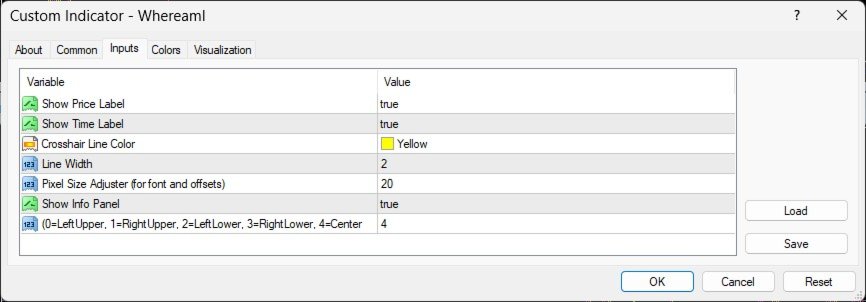
- ShowPriceLabel (bool, default: true): Enables/disables the display of the price label. Useful for toggling visibility when focusing on time data or minimizing chart clutter.
- ShowTimeLabel (bool, default: true): Enables/disables the time label. Allows traders to hide time details if not needed.
- LineColor (color, default: clrYellow): Sets the color of the crosshair lines. Customizable to match trader preferences or chart themes (e.g., clrWhite, clrRed).
- LineWidth (int, default: 1): Adjusts the thickness of the crosshair lines. Higher values (e.g., 2) make lines more prominent; lower values reduce visibility.
- PixelSize (int, default: 20): Controls the font size and spacing offsets for all labels. A larger value (e.g., 25) increases text size and spacing; a smaller value (e.g., 15) reduces them, ensuring scalability.
- ShowInfoPanel (bool, default: true): Enables/disables an info panel displaying the marked price and time. Handy for quick reference or disabling if unnecessary.
- LabelCorner (int, default: 3): Determines label placement (0=LeftUpper, 1=RightUpper, 2=LeftLower, 3=RightLower, 4=Center). Allows flexible positioning to suit trader layout preferences, with center alignment approximated.
Functionality Notes
- Clicking the chart sets a price/time marker, stored in global variables for synchronization.
- Labels adjust dynamically to stay within chart boundaries, updating on chart resize (via CHARTEVENT_CHART_CHANGE).
- The indicator compiles with zero errors and warnings, providing a reliable, trader-focused tool for marking specific points across timeframes.