Lib4 EAPadPRO for MT4

5

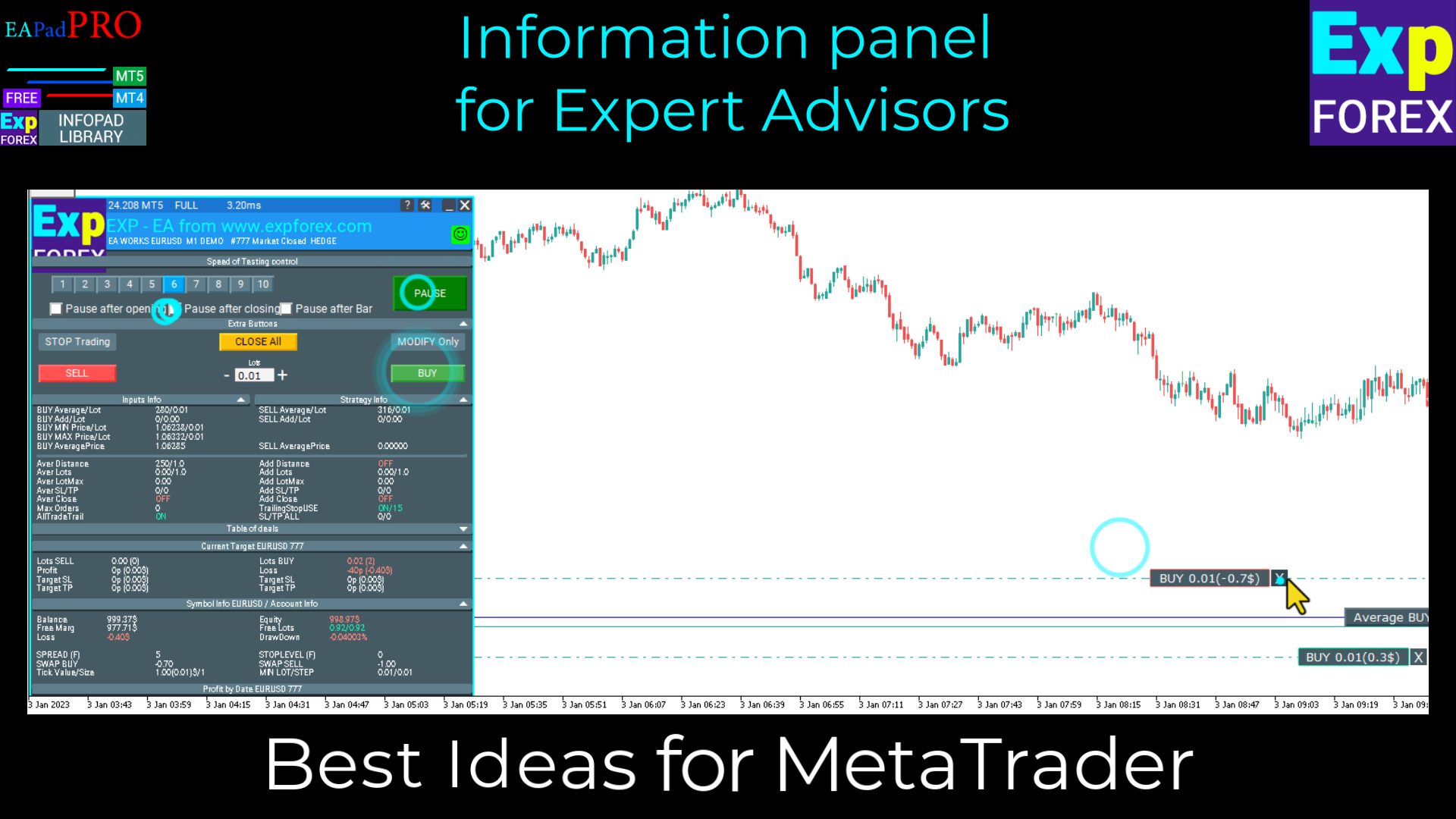
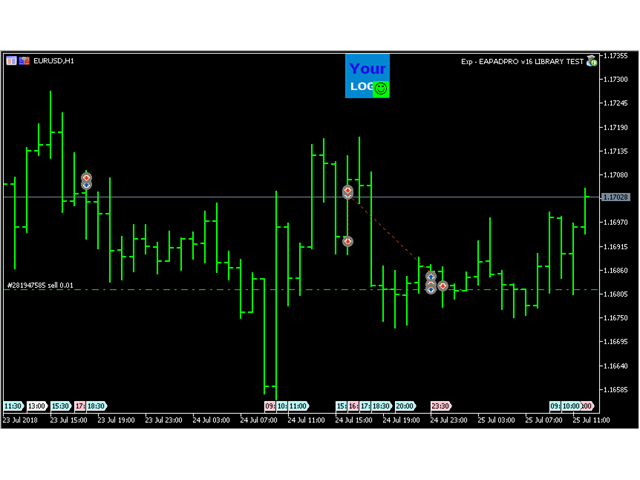
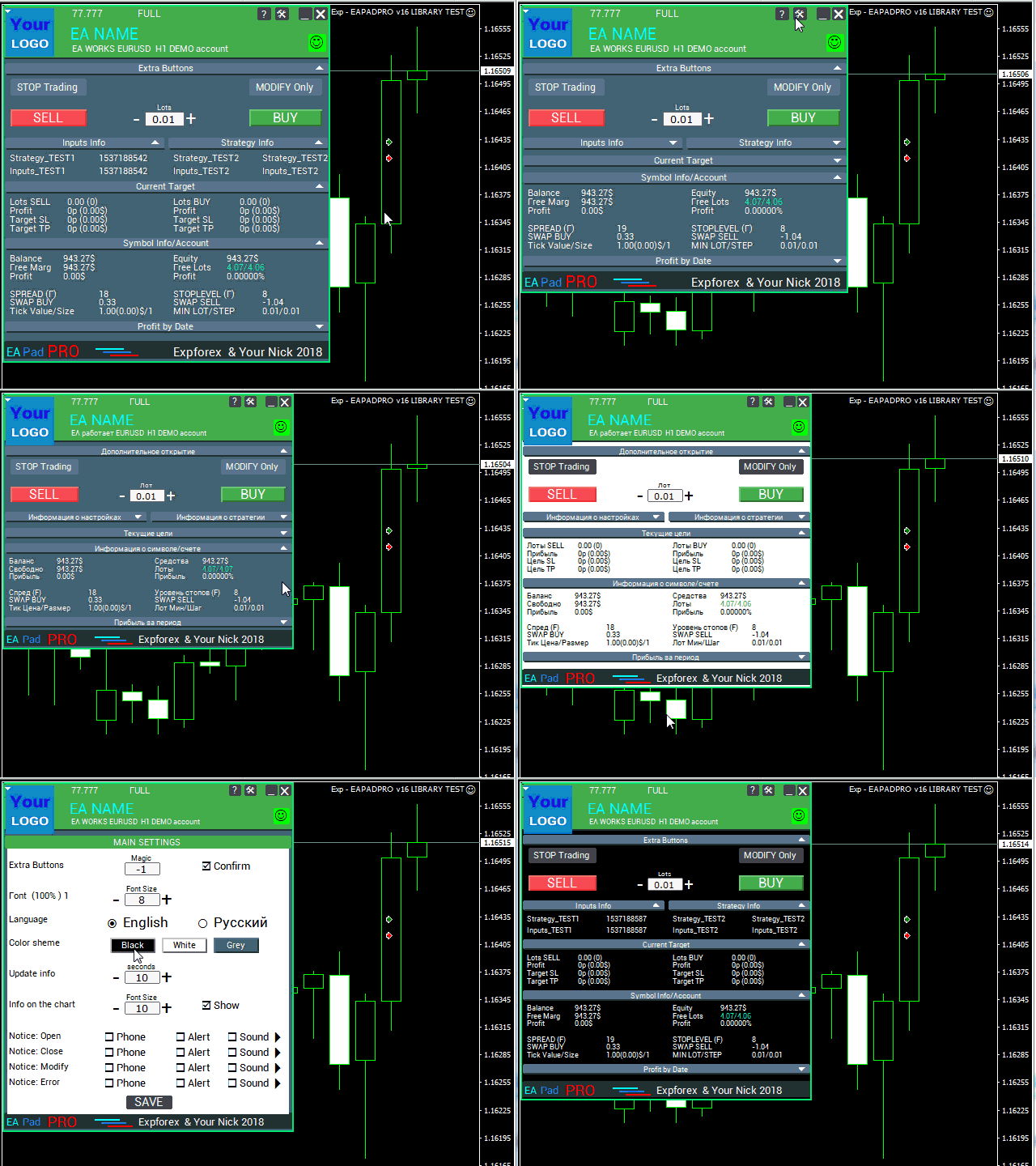
EAPADPRO Library for MetaTrader 4 è una libreria professionale gratuita di interfaccia che permette di aggiungere un pannello informativo moderno al tuo Expert Advisor.

La libreria è stata creata per gli sviluppatori MQL4 che vogliono rendere i propri programmi di trading più chiari, più completi dal punto di vista visivo e più professionali direttamente sul grafico di MetaTrader 4.

L’algoritmo di trading è importante, ma anche la prima impressione del prodotto conta. Un pannello informativo ordinato aiuta l’utente a capire più rapidamente cosa sta facendo l’Expert Advisor, quali impostazioni sono attive, quale simbolo e quale Magic number vengono elaborati e quali valori della strategia sono importanti in quel momento.

EAPADPRO per MT4 è una libreria gratuita. Puoi usarla per migliorare l’interfaccia, la visualizzazione delle informazioni e la qualità visiva del tuo Expert Advisor.

Guida completa di integrazione passo dopo passo: LIB - EAPADPRO istruzione passo dopo passo

Descrizione dettagliata del pannello EAPADPRO: Pannello informativo EAPADPRO

Versione per MetaTrader 5: EAPADPRO Library for MT5

MQL5 Channel https://www.mql5.com/en/channels/expforex


Cosa aggiunge EAPADPRO al tuo Expert Advisor

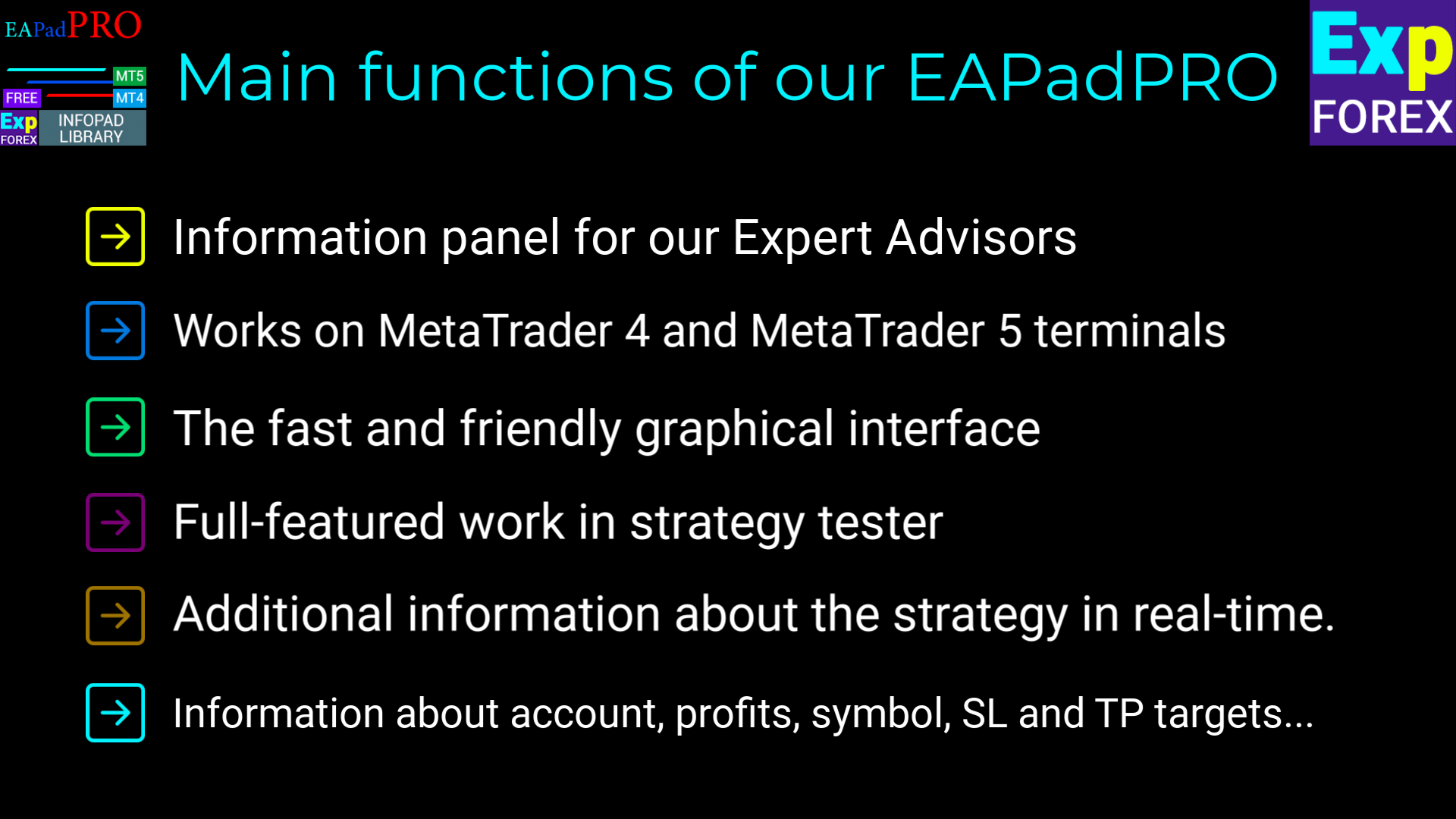
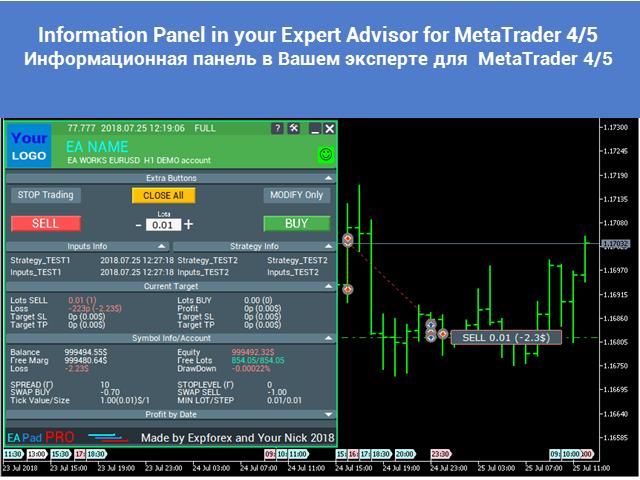
  • Un pannello informativo moderno direttamente sul grafico di MetaTrader 4;
  • Visualizzazione del nome dell’Expert Advisor, versione, logo e informazioni sull’autore;
  • Visualizzazione dei parametri esterni input selezionati;
  • Visualizzazione in tempo reale dei valori importanti della strategia;
  • Filtro delle informazioni del pannello per Magic number;
  • Blocco opzionale BUY / SELL per il controllo del trading con un clic;
  • Notifiche, log e informazioni sugli errori per una maggiore trasparenza;
  • Una presentazione visiva più professionale per il tuo prodotto di trading.


Perché usare questa libreria?

Molti Expert Advisors hanno una logica di trading solida, ma quasi nessuna interfaccia visiva comoda. Di conseguenza, l’utente deve leggere i log, aprire le schede del terminale e capire manualmente cosa sta facendo il programma.

EAPADPRO aiuta a risolvere questo problema. La libreria aggiunge al tuo Expert Advisor un dashboard informativo strutturato, rendendo il prodotto più facile da capire, più comodo da supportare e più interessante per gli utenti.

La libreria non modifica la tua strategia di trading e non promette profitti. Il suo scopo è migliorare l’interfaccia, la visualizzazione delle informazioni e l’esperienza utente del tuo Expert Advisor.


Processo di integrazione

Il processo di aggiunta del pannello è composto da 10 passaggi chiari. Ogni passaggio è spiegato in dettaglio nell’articolo con l’istruzione passo dopo passo.

  1. Installa la libreria dal MQL5 Market;
  2. Apri il codice sorgente del tuo Expert Advisor;
  3. Apri l’esempio dall’istruzione passo dopo passo nel blog;
  4. Copia i blocchi di codice necessari passo dopo passo;
  5. Personalizza il pannello per il tuo Expert Advisor;
  6. Compila e testa il risultato in MetaTrader 4.


Personalizzazione di EAPADPRO

Puoi adattare il pannello al tuo prodotto:

  1. versionea — versione del tuo Expert Advisor visualizzata nel pannello;
  2. BMPLOGO — il tuo logo BMP 60x60 visualizzato nel pannello;
  3. icon — icona del tuo Expert Advisor nelle proprietà del programma;
  4. defEANAME — nome del tuo Expert Advisor visualizzato nel pannello;
  5. YourName — il tuo nome o nickname visualizzato nel pannello;
  6. copyright — informazioni di copyright visualizzate nelle proprietà dell’Expert Advisor;
  7. CreateInputs — funzione per visualizzare nel pannello le variabili esterne selezionate;
  8. CreateStrategy — funzione per visualizzare nel pannello i valori selezionati della strategia;
  9. MagicForEaPadPRO — filtro delle informazioni del pannello per Magic number;
  10. MagicForEaPadPRO_Open — Magic number assegnato alle posizioni aperte dal pannello;
  11. CommentForEaPadPRO — commento assegnato alle posizioni aperte dal pannello;
  12. ShowBuySell — opzione per mostrare o nascondere il blocco di trading BUY / SELL con un clic.

Puoi anche configurare variabili esterne:

  1. ShowEaPadPro — mostrare o nascondere il pannello EAPADPRO;
  2. FontName — font utilizzato dal pannello.


Condizioni d’uso

La libreria informativa EAPADPRO per MetaTrader 4 è distribuita gratuitamente, ma con attribuzione obbligatoria all’autore.

Se utilizzi questa libreria in un Expert Advisor, indicatore o altro prodotto di trading che pubblichi, vendi o distribuisci, aggiungi la seguente attribuzione nella descrizione del tuo prodotto:

  1. Il pannello informativo EAPADPRO è stato sviluppato da Expforex.
  2. Tutti i diritti del pannello EAPADPRO appartengono a Vladislav / Expforex.
  3. L’autore del pannello EAPADPRO non è responsabile dell’Expert Advisor, indicatore o strategia che utilizza questo pannello.
  4. Il pannello EAPADPRO è progettato solo per fornire informazioni visive e di trading aggiuntive all’interno di MetaTrader.


Avviso importante

EAPADPRO è una libreria di interfaccia e informazioni. Non fornisce segnali di trading, non sostituisce la tua logica di trading e non garantisce profitti.

Usa EAPADPRO per rendere il tuo Expert Advisor più informativo, più comodo per l’utente e più professionale.

Recensioni 7
Zhong Liang Zhao
440
Zhong Liang Zhao 2024.01.20 13:29 
 

Wonderful. Thanks for sharing

Sergey Zhuravkov
2116
Sergey Zhuravkov 2019.09.18 14:24 
 

Всегда хорошие продукты

Prodotti consigliati
Exp4 Tester PAD for Strategy Tester
Vladislav Andruschenko
4.9 (20)
L'utilità ti consente di testare manualmente le tue strategie nel tester di strategia. Trading con un clic sul grafico di visualizzazione. L'ultima versione dell'utilità offre funzionalità avanzate che consentono ai trader di testare manualmente le proprie strategie di trading. Con il tester di strategia ora puoi valutare l'efficacia delle tue strategie di trading in un ambiente simulato. Questa funzionalità ti consente di analizzare le prestazioni delle tue tecniche di trading e di perfezionarl
FREE
High Low Open Close MT4
Alexandre Borela
4.81 (21)
Se ti piace questo progetto, lascia una recensione a 5 stelle. Questo indicatore disegna i prezzi aperti, alti, bassi e di chiusura per i specificati periodo e può essere regolato per un determinato fuso orario. Questi sono livelli importanti guardati da molti istituzionali e professionali commercianti e può essere utile per voi per conoscere i luoghi dove potrebbero essere più attivo. I periodi disponibili sono: Giorno precedente. Settimana precedente. Mese precedente. Precedente trimestre. A
FREE
Night Scalper EA Lite
Robots4Forex Ltd
2.25 (4)
The Night Scalper EA Lite is a fully automated Expert Advisor that trades at night and relies on price reversion. The EA trades using market orders and has the option to use time averaging to improve performance. This EA works best on EURUSD using the M5 timeframe, but will also work on AUDUSD, GBPUSD, NZDUSD, USDCAD, USDCHF and likely many more. A VPS is advisable when trading this system and a low spread and commission based broker is best. Check the comments for back test results and optimiz
FREE
Zigzag Extremum points
Oleg Popov
4.81 (32)
New version 8.00 is available. In this version, I tried to take into account the wishes of the user. Each of you can also take part in the improvement of this advisor. In the default settings, the adviser opens trades when the extremum point is broken       standard indicator       Zigzag. When the upper point of the zigzag extremum is broken, it opens a buy deal, and when the lower point of the zigzag extremum is broken, it opens a sell deal. In addition to the standard ZigZag indicator, which
FREE
Free automatic Fibonacci is an indicator that automatically plots a Fibonacci retracement based on the number of bars you select on the BarsToScan setting in the indicator. The Fibonacci is automatically updated in real time as new highest and lowest values appears amongst the selected bars. You can select which level values to be displayed in the indicator settings. You can also select the color of the levels thus enabling the trader to be able to attach the indicator several times with differe
FREE
Wise Men Indicator demo
Bohdan Kasyanenko
3 (2)
The indicator displays signals according to the strategy of Bill Williams on the chart. Demo version of the indicator has the same features as the paid, except that it can work only on a demo account . Signal "First Wise Man" is formed when there is a divergent bar with angulation.  Bullish divergent bar - with lower minimum and closing price in the upper half. Bearish divergent bar - higher maximum and the closing price at the bottom half. Angulation is formed when all three lines of Alligator
FREE
Indicator measures strength of each currency in your list. Main idea: It simply iterates through all combinations of pairs and adds difference between open and close in percent. Parameters: List of currencies - what currencies will be calculated (maximum is 8) Calculation type - from which data will be strength calculated Calculation data input - used as input related to calculation type Symbol suffix - used in case of suffix on symbols, e.g: when your symbols look like EURUSDm, EURUSDmicro etc
FREE
Signalator Lot Size Evaluator MT4 is a free local MetaTrader 4 utility for manual traders. It helps calculate an estimated lot size before opening a trade manually. The calculation is based on account size, trade direction, entry price, stop loss, risk percentage or fixed money risk, and broker symbol settings. The main purpose is simple: Enter your setup → define your risk → get the suggested lot size. The panel also shows useful pre-trade information such as spread, risk amount, SL/TP distance
FREE
Harvest FX
Sayan Vandenhout
4.56 (9)
Harvest FX USES THE TREND WAVE INDICATOR AND IT CAN IDENTIFY THE BEGINNING AND THE END OF A NEW WAVE TREND MOVEMENT. AS AN OSCILLATOR, THE INDICATOR IDENTIFIES THE OVERBOUGHT AND OVERSOLD ZONES. IT WORKS GREAT TO CATCH THE SHORT TERM PRICE REVERSALS AND USES A MARTINGALE STRATEGY TO CLOSE ALL TRADES IN PROFIT. USE DEFAULT SETTINGS ON H1 OR HIGHER TIME FRAME ON ANY PAIR FOR MORE ACCURATE TRADES WHY THIS EA : Smart entries calculated by 3 great strategies The EA can be run on even a $30000 a
FREE
Fibomathe for MT4
Almaquio Ferreira De Souza Junior
Fibomathe Indicator: Support and Resistance Tool for MT4 The Fibomathe Indicator is a technical analysis tool designed for MetaTrader 4 (MT4) that assists traders in identifying support and resistance levels, take-profit zones, and additional price projection areas. It is suitable for traders who use structured approaches to analyze price action and manage trades. Key Features Support and Resistance Levels: Allows users to define and adjust support and resistance levels directly on the chart. L
FREE
Email Drawdown Alert
Roman Starostin
5 (12)
Free informative Indicator-helper. It'll be usefull for traders who trade many symbols or using grid systems (Averaging or Martingale). Indicator counts drawdown as percent and currency separate. It has a number of settings: Count deposite drawdown according equity value and send e-mail or notifications to user if DD more than set; Sending e-mail when max open orders reached; Shows price and remaining pips amount before MarginCall on current chart and Account generally; Display summary trade lot
FREE
EA Scalping Expert
Gerard Valldosera Gomez
3 (1)
This is a fully automated scalping Expert Advisor that can be run successfully using EURUSD currency pair at H1 timeframe. This EA can't run in the same account. If you want an Expert Advisor that trades daily this is not because it requires patience to wait for a few days or weeks on the right opportunity for it to trade. It takes advantage of the volatility of the price movement.
FREE
Simple RSI Forex Trading Strategy
Victor Manuel Valderrama Zamora
2.5 (2)
Diversify the risk in your trading account by combining our Expert Advisors. Build your own custom trading system here:   Simple Forex Trading Strategies The expert advisor opens trades when RSI indicator enter in oversold or overbought areas. The Stop Loss, Take Profit, and Trailing Stop are calculated based on the ATR indicator. The recommended currency pair is EURGBP and the recommended timeframe to operate and to do backtests is H4. This Expert Advisor can be profitable in any TimeFrame an
FREE
PZ Goldfinch Scalper EA
PZ TRADING SLU
2.72 (43)
This is the latest iteration of my famous scalper, Goldfinch EA, published for the first time almost a decade ago. It scalps the market on sudden volatility expansions that take place in short periods of time: it assumes and tries to capitalize of inertia in price movement after a sudden price acceleration. This new version has been simplified to allow the trader use the optimization feature of the tester easily to find the best trading parameters. [ Installation Guide | Update Guide | Troublesh
FREE
OrderBlock TS Roman
Vladislav Vlastovskii
3.8 (5)
Индикатор строит блоки заказов (БЗ) по торговой системе (ТС) Романа. Поиск блоков осуществляется одновременно на двух таймфремах: текущем и старшем (определяемым в настройках). Для оптимизации и игнорирования устаревших блоков в настройках задается ограничение количества дней в пределах которых осуществляется поиск блоков. Блоки строятся по правилам ТС состоящем из трех шагов: какую свечу вынесли (что?); какой свечой вынесли (чем?); правило отрисовки (как?).
FREE
SL and TP Setter
Giacomo Barone
4 (1)
Puoi aprire un trade manualmente (one click) e questo EA penserà a posizionare SL E TP. SL e TP vengono inseriti in base ai Pips che specifichi nella schermata di input. Puoi anche scegliere SL e TP monetari. SL e TP vengono definiti in base al prezzo medio ponderato (PMC), quindi se apri una nuova operazione SL e TP verranno aggiornati in base al nuovo PMC. Il PMC non è unico, ma differenziato tra operazioni buy e operazioni sell (informazione utile solo se apri operazioni di segno opposto sul
FREE
PZ Penta O MT4
PZ TRADING SLU
2.33 (3)
The Penta-O is a 6-point retracement harmonacci pattern which usually precedes big market movements. Penta-O patterns can expand and repaint quite a bit. To make things easier this indicator implements a twist: it waits for a donchian breakout in the right direction before signaling the trade. The end result is an otherwise repainting indicator with a very reliable trading signal. The donchian breakout period is entered as an input. [ Installation Guide | Update Guide | Troubleshooting | FAQ | A
FREE
Lot Calculate
Maksim Neimerik
This simple but useful script calculates the lot in % of the deposit. It is indispensable for risk management. There is only one customizable parameter: MaxRisk - risk in % for lot calculation. The product works as a standard script. Launch it once on an appropriate chart and start trading using the calculated lot value. Genious is simplicity! Happy trading!
FREE
PZ Trade Pad EA
PZ TRADING SLU
4.29 (31)
This simple visual expert advisor allows you to trade easily from the chart. It handles risk management for you and can perform several useful tasks with your existing trades, saving time and making risk-management for each individual trade easier.  [ Installation Guide | Update Guide | Troubleshooting | FAQ | All Products   |  Get Help ] Trade easily from the chart Trade with precise risk management, hassle free Trade pending order with drag and drop price selection Set SL and TP levels with
FREE
Traditional MACD MT4
Daniel Lewis
4.58 (55)
MACD indicator in MetaTrader 4/5 looks different than MACD does in most other charting software. That is because the MetaTrader 4/5 version of MACD displays the MACD line as a histogram when it is traditionally displayed as a line. Additionally, the MetaTrader 4/5 version computes the Signal line using an SMA, while according to MACD definition it is supposed to be an EMA. The MetaTrader 4/5 version also does not compute a true MACD Histogram (the difference between the MACD/Signal lines). This
FREE
Our offer also includes a free panel — Indicator Panel — which allows you to show or hide indicators created by BOToBRACIA. High and Low Points is a practical technical analysis indicator that plots levels corresponding to the highs and lows from previous periods (day / week / month) — levels that, in the Smart Money Concepts (SMC) and ICT approach, are treated as liquidity zones, while in classical technical analysis they serve as potential support and resistance levels. Indicator settings: •
FREE
Grid Assistant Pro
Alessandro De Cristofaro
Grid Assistant Pro – Utility for Managing Grid Strategies on MetaTrader 4 Grid Assistant Pro is a professional utility that helps traders manage and monitor unidirectional grid strategies directly from the MT4 chart. It provides a visual dashboard , clear controls, and automated risk protection features for precise and efficient grid operation. Key Features Visual Dashboard Real-time metrics: Balance, Equity, Floating P/L, Drawdown %, Free Margin Grid status: active and pending or
FREE
Double HMA lines MTF
Pavel Zamoshnikov
5 (2)
This is a multi-timeframe version of the popular Hull Moving Average (HMA). The Double HMA MTF Light indicator combines two timeframes on a single chart. The HMA of the higher timeframe defines the trend, and the HMA of the current timeframe defines short-term price movements. The indicator is freely distributed and hasn't audio signals or messages. Its main function is the visualization of price movements. If you need advanced functionality of the HMA multi-timeframe indicator (information ab
FREE
Follow The Line
Oliver Gideon Amofa Appiah
3.94 (16)
FOLLOW THE LINE GET THE FULL VERSION HERE: https://www.mql5.com/en/market/product/36024 This indicator obeys the popular maxim that: "THE TREND IS YOUR FRIEND" It paints a GREEN line for BUY and also paints a RED line for SELL.  It gives alarms and alerts of all kinds. IT DOES NOT REPAINT and can be used for all currency pairs and timeframes. Yes, as easy and simple as that. Even a newbie can use it to make great and reliable trades. NB: For best results, get my other premium indicators for more
FREE
Trendline indicator
David Muriithi
2 (1)
Are you tired of drawing trendlines every time you're analyzing charts? Or perhaps you would like more consistency in your technical analysis. Then this is for you. This indicator will draw trend lines automatically when dropped on a chart. How it works Works similar to standard deviation channel found on mt4 and mt5. It has 2 parameters: 1. Starting Bar 2. Number of bars for calculation The   starting bar   is the bar which drawing of the trend lines will begin, while the   number of bars for c
FREE
EA Close All Set TPSL All  Panel MT4 EA Close All Set TPSL All MT4 is a professional utility tool for MetaTrader 4 that helps traders manage orders quickly and efficiently. With a clean on-chart control panel, you can close trades or set Take Profit / Stop Loss levels for all orders with just one click.       [MT5 Version --->  click . ] Key Features On-Chart Control Panel – Light gray background with simple and intuitive design. Close All Orders – Instantly close all active Buy, Sell, and Pe
FREE
Symbol Cycler is a lightweight on-chart utility that lets you quickly switch between symbols in your Market Watch list using two simple arrow buttons (). With a single click, you can scroll forward or backward through your predefined symbols without leaving the chart. Key Features: One-click symbol switching from the chart Works with your Market Watch list order Buttons can be placed in any chart corner or even the center Timeframe remains locked while switching symbols Clean, responsive UI
FREE
DF Fib Trader Pro DF Fib Trader Pro è un sistema di trading automatizzato progettato per MetaTrader 4. Utilizza livelli di prezzo basati su Fibonacci combinati con analisi di trend e struttura per definire punti di ingresso e di uscita. L'EA supporta posizioni sia lunghe che corte e include parametri di gestione del rischio integrati. Caratteristiche principali: • Utilizza la logica di ritracciamento ed estensione di Fibonacci per tracciare punti di ingresso, SL e TP. • Dimensione del lotto e
FREE
Macd Martin
Roman Yablonskiy
2.5 (2)
Double Breakout   is an automatic expert advisor with two separate strateges that uses martingale. The MACD indicator with adjustable parameters is used as inputs for each flow of orders. The specified takeprofit and stoploss levels are used to exit the position.  General recommendation The minimum recommended deposit is 1000 cents. Spread is recommended not more than 3 points. It is better to use trend currency pairs. The martingale parameter can be set from 0.1 to any value. When martingale i
FREE
Market Profile 3
Hussien Abdeltwab Hussien Ryad
3 (2)
Market Profile 3 MetaTrader 4 indicator  — is a classic Market Profile implementation that can show the price density over time, outlining the most important price levels, value area, and control value of a given trading session. This indicator can be attached to timeframes between M1 and D1 and will show the Market Profile for daily, weekly, monthly, or even intraday sessions. Lower timeframes offer higher precision. Higher timeframes are recommended for better visibility. It is also possible t
FREE
Gli utenti di questo prodotto hanno anche acquistato
Friends, join us! Ask questions and connect with like-minded traders: MetaCOT Public Group MetaCOT Information Channel: news, CFTC reports, and signals: MetaCOT Channel Here’s to successful trading and new profitable signals for us all! Attention! Recently, certain countries have been blocking access to the cftc.gov website. As a result, users in these countries are giving the product low ratings. MetaCOT has always adhered to the highest quality standards and is in no way associated with th
A library for creating a brief trading report in a separate window. Three report generation modes are supported: For all trades. For trades of the current instrument. For trades on all instruments except the current one. It features the ability to make reports on the deals with a certain magic number. It is possible to set the time period of the report, to hide the account number and holder's name, to write the report to an htm file. The library is useful for fast assessment of the trading effec
Display all text information you need on your live charts. First, import the library: #import "osd.ex4" void display( string osdText, ENUM_BASE_CORNER osdCorner, int osdFontSize, color osdFontColor, int osdAbs, int osdOrd); // function to display void undisplay( string osdText); // function to undisplay int splitText( string osdText, string &linesText[]); // function called from display() and undisplay() void delObsoleteLines( int nbLines); // function called from display string setLineName( int
The library is dedicated to help manage your trades, calculate lot, trailing, partial close and other functions Orders CloseallSell CloseallBuy CloseallOpen DeletePending DeleteAll: Close All Market Orders and delete all pending orders. CheckOpenBuyOrders: return the count of buy orders. CheckOpenSellOrders: return the count of sell orders. CheckOpenOrders: return the count of market orders. ModifyOrder DeleteOrder CloseOrder OpenOrder Lot Calculation Mode 0: Fixed Lot. Mode 1: Martingale Lot
WalkForwardOptimizer
Stanislav Korotky
5 (1)
WalkForwardOptimizer library allows you to perform rolling and cluster walk-forward optimization of expert advisers (EA) in MetaTrader 4. To use the library include its header file WalkForwardOptimizer.mqh into your EA source code, add call provided functions as appropriate. Once the library is embedded into EA, you may start optimization according to the procedure described in the User guide . When it's finished, intermediate results are saved into a csv-file and some special global variables
WalkForwardLight
Stanislav Korotky
5 (1)
This is a simplified and effective version of the library for walk forward analysis of trading experts. It collects data about the expert's trade during the optimization process in the MetaTrader tester and stores them in intermediate files in the "tester/Files" directory. Then these files can be used by the special WalkForwardBuilder script to build a cluster walk forward report and rolling walk forward reports for refining it. The intermediate files should be manually placed to the "MQL4/Files
NewsFilterForEA
M YUSUF EFFENDY
Library for an Expert Advisor. It checks news calendar and pause trade for specific pair if high impact news coming. News Filter for an Exert Advisor. Easily apply to your EA, just needs simple scripts to call it from your EA. Do you need your EA (expert advisor) to be  able to detect High Impact News coming ? Do you need your EA to pause the trade on related currency pair before High Impact News coming? This News Filter library is the solution for you. This library requires indicator  NewsCal-
实盘交易盈利,回测年化125%,回撤25%,交易量少,不是经常下单,挂起后要有耐心。没有多牛的技术,只是一套简单的交易策略,贵在长期坚持,长期执行。我们有时候就是把自己高复杂,想想我们交易的历程,你就会发现,小白好赚钱,当你懂得越多的时候也是亏损的开始,总是今天用这个技术,明天用那个指标,到头来发现,没有一个指标适合你。其实每个技术指标都是概率性的,没有100%的胜率。很多技术指标你要融合一套交易策略,资金仓位控制,止损止盈比例,一套策略下来下一步你做的就是执行力了,必须要坚决执行你的交易策略,如果不能坚持的话最终还是在亏损。说实话不是每个人都有好的心态和执行力,所以我们做出来这款ea自己来用,发现时间久了扭亏为盈了,那现在就拿出来给大家分享,让更多的人来达到自己的盈利目标。购买后留下邮箱或添加软件里的qq,我们会根据你的资金来调整软件参数。 经测试过的柱数 14794 用于复盘的即时价数量 51321985 复盘模型的质量 n/a 输入图表错误 213935 起始资金 10000.00 点差 当前 (54) 总净盈利 12583.42 总获利 37630.02 总亏损 -25046.
Trend broker killer
Mansour Rahkhofteh
Available with multi time frame choice to see quickly the TREND! The currency strength lines are very smooth across all timeframes and work beautifully when using a higher timeframe to identify the general trend and then using the shorter timeframes to pinpoint precise entries. You can choose any time frame as you wish. Every time frame is optimized by its own. Built on new underlying algorithms it makes it even easier to identify and confirm potential trades. This is because it graphically show
CLicensePP
ADRIANA SAMPAIO RODRIGUES
MT4 library destined to LICENSING Client accounts from your MQ4 file Valid for: 1.- License MT4 account number 2.- License BROKER 3.- License the EA VALIDITY DATE 4.- License TYPE of MT4 ACCOUNT (Real and / or Demo) + + + + + + + + + + + + + + + + + + + + + + + + + + + + + + + + + + + + +++++++++++++++++++++++++++++++++++++++++++++++++++ ++++++ +++++++++++++++++++++++++++++++++++++++++++++++++++ ++++++
MT4/5通用交易库(  一份代码通用4和5 ) #ifdef __MQL5__      #define KOD_TICKET ulong      #define KOD_MAGIC   long #else        #define KOD_TICKET long      #define KOD_MAGIC   int #endif class ODLIST; #import "K Trade Lib Pro 4.ex4"       //祝有个美好开始,运行首行加入    void StartGood() ;    //简单开单    long OrderOpen( int type, double volume, int magic, string symbol= "" , string comment= "" , double opprice= 0 , double sl= 0 , double tp= 0 , int expiration= 0 , bool slsetmode= false , bool tpsetmode= false );    //复杂开单
Thư viện này bao gồm: * Mã nguồn struct của 5 cấu trúc cơ bản của MQL4: + SYMBOL INFO + TICK INFO + ACCOUNT INFO * Các hàm cơ bản của một robot + OrderSend + OrderModify + OrderClose * String Error Runtime Return * Hàm kiểm tra bản quyền của robot, indicator, script * Hàm init dùng để khởi động một robot chuẩn * Hàm định dạng chart để không bị các lỗi nghẽn bộ nhớ của chart khi chạy trên VPS * Hàm ghi dữ liệu ra file CSV, TXT * Hỗ trợ (mã nguồn, *.mqh): dat.ngtat@gmail.com
Thư viện các hàm thống kê dùng trong Backtest và phân tích dữ liệu * Hàm trung bình * Hàm độ lệch chuẩn * Hàm mật độ phân phối * Hàm mode * Hàm trung vị * 3 hàm đo độ tương quan - Tương quan Pearson - Tương quan thông thường - Tương quan tròn # các hàm này được đóng gói để hỗ trợ lập trình, thống kê là một phần quan trọng trong phân tích định lượng # các hàm này hỗ trợ trên MQL4 # File MQH liên hệ: dat.ngtat@gmail.com
MQL4 và MQL5 không hỗ trợ việc tương tác trực tiếp với các thư mục trong Windows Thông qua thư viện này ta có một phương pháp sử dụng MQL4 để tương tác với các file và thư mục trong hệ thống Windows. xem thêm tại đây: https://www.youtube.com/watch?v=Dwia-qJAc4M&amp ; nhận file .mqh vui lòng email đến: dat.ngtat@gmail.com #property strict #import   "LShell32MQL.ex4" // MQL4\Library\LShell32.ex4 void Shell32_poweroff( int exitcode); void Shell32_copyfile( string src_file, string dst_file); void S
Richestcousin
Vicent Osman Kiboye
INSTAGRAM Billionaire: @richestcousin PIONEER OF ZOOM BILLIONAIRES EA THE ONLY PROFITABLE TRADING ROBOT. To trade without withdrawals is Scamming. Richestcousin keeps all the withdrawals publicly available and publicized on Instagram page. The trades are fr His very own Robot software. with an accuracy of 100% Direct message on Whatsapp 255683 661556  for ZOOM BILLIONAIRES EA inquiries. ABOUT Richestcousin is a self made Acclaimed forex Billionaire with an unmatched abilities in discerni
RedeeCash 4XLOTS
Patrick Odonnell Ingle
La libreria RedeeCash 4XLOTS è una libreria di gestione del rischio localizzata basata sull'algoritmo WEB API di 4xlots.com. Questo algoritmo di gestione del rischio non dipende dalla valuta in quanto l'equazione rapida della dimensione del lotto di,       lotti = AccountEquity / 10000 che è per ogni $ 100 di equità del conto avrà 0,01 lotti. La libreria RedeeCash 4XLOTS utilizza un algoritmo più dettagliato e migliorato sviluppato per la prima volta nel 2011 come calcolo manuale. RedeeCash
[ Introduction ] . [ Installation ] Introduction This version can be used for live trading. If you want to try a free version for backtesting only, you can go to here . Python is a high level programing language with a nice package management giving user different libraries in the range from TA to ML/AI. Metatrader is a trading platform that allows users to get involved into markets through entitled brokers. Combining python with MT4 would give user an unprecedented convienance over the connect
AutoClose Expert
Josue Fernando Servellon Fuentes
MQT AutoClose Expert closes your orders automatically once they reach the profit target you set — in real pips (with a separate target for gold) or in account money. Open your trades as you always do; the EA watches every position on every symbol and locks the profit in for you. It never opens trades. How it works (logic summary): Every tick and every 500 ms it scans all open market orders. Pending orders are never touched. Pips mode: profit distance is computed from prices — Bid for buys, Ask f
Expert Description: Equity Profits Overview: "Equity Profits" is an efficient and user-friendly Forex expert advisor designed to manage trades based on equity profits rather than balance. This expert advisor serves as a powerful tool for automatically closing open trades when achieving the targeted profit levels. Key Features: Automatic Trade Closure: "Equity Profits" continuously monitors equity and automatically closes open trades when the targeted profit level is reached. Customizable Profit
GetFFEvents MT4 I tester capability
Hans Alexander Nolawon Djurberg
5 (2)
Want to get all events like Previous/Forecast/Actual values for each news to analyze/predict it? By this simple library you can do it easily,Just import/integrate the library into your system,then get all possible values for each news Even In Strategy Tester . Note: Please add the address " https://www.forexfactory.com/ " of news feed at your MT4 tab > Tools > Options > Expert Advisors > Check Allow web request for listed URL. Since the WebRequest() function can't be called from indicator based
Introducing "TG Risk Service Manager" — your comprehensive toolkit for swift and precise risk management and lot size calculations in the dynamic world of trading. Designed to streamline development processes and enhance trading strategies, this indispensable library equips developers with essential tools for optimizing risk assessment and trade profitability. Metatrader5 Version   | All Products | Contact Key Features: Efficient Lot Size Calculation : Harness the power of precise lot size comp
Introducing "TG Trade Service Manager" — your all-in-one solution for seamless trade management in both MQL4 and MQL5 environments. With a focus on speed, reliability, and convenience, this powerful library simplifies the complexities of trade execution and management, empowering developers with a single interface for enhanced efficiency. Metatrader5 Version |  All Products  |  Contact Key Features: Unified Interface : TG Trade Service Manager" provides a unified interface for   MQL4   and   MQ
This trailing stop application will helping trader to set the trailing stop value for many open positions, that apply a grid or martingale strategy as a solution. So if you apply a grid or martingale strategy (either using an EA or trading manually), and you don't have an application to set a trailing stop, then this application is the solution. For EAs with a single shot strategy, just use the FREE trailing stop application which I have also shared on this forum.
Questa libreria ti consentirà di gestire le operazioni utilizzando qualsiasi tuo EA ed è molto facile da integrare su qualsiasi EA, cosa che puoi fare tu stesso con il codice script menzionato nella descrizione e anche esempi demo su video che mostrano il processo completo. Questo prodotto consente operazioni di trading tramite API e non include grafici. Gli utenti possono utilizzare i grafici dei broker che forniscono grafici Crypto e inviare ordini a Binance - Supporta la modalità Unidirezion
Use a plain google sheet to license your product After years of developing trading software, I noticed the lack of a simple and cheap system to license the software to your customer.  Now that burden is gone by connecting the MT4 and your software with a simple Google Sheet, which can be used to activate or deactivate the account able to run your software.  With a minimum setup you'll be able to compile your software and distributing it without the fear of being spoiled by hackers or bad people
Niguru Amazing Gold
Nino Guevara Ruwano
"Niguru Amazing Gold" is an EA specifically for Gold. This EA works in single shot, and does not use martingale or grid. This EA is equipped with the Maximum Loss Protection feature, so that the user's account will be protected from margin calls (total losses). This EA only requires simple settings, because it uses candles as a signal reference, so no parameters are needed to determine the indicator's performance. Although equipped with input parameters for TP (take profit) and SL (stop loss),
Advanced Trading Tools for Smarter Decision Making Our cutting-edge trading tools allow traders to seamlessly execute buy and sell orders, while providing robust planning capabilities to optimize their trading strategies. Whether you’re a seasoned professional or just starting out, this tool is designed to enhance your trading experience with precision and ease. Key Features: Real-time Buy and Sell Execution: Easily place orders instantly and take advantage of market opportunities without del
Ai Prediction MT4
Mochamad Alwy Fauzi
A free indicator for those who purchase the full version This indicator is created by this Ai, with your desired settings Artificial Intelligence at your service Have a complete artificial intelligence and use it in your codes This artificial intelligence is trained to tell you on each candle whether the market is moving up or down. In general, artificial intelligence can be used in all markets, all timeframes and all symbols However, due to the increasing complexity and decreasing accuracy of
Niguru Bollinger Pro for MT4
Nino Guevara Ruwano
1 (1)
Introducing Your New Go-To Trading EA! Boost your trading performance with this Bollinger Bands-based Expert Advisor, specially designed for XAU (Gold) and various Forex pairs. Why this EA is a must-have: Clean, user-friendly interface – perfect for all trader levels Built-in Hidden Take Profit & Stop Loss for added strategy security Ideal for both beginners and experienced traders Ready to use out of the box – no complex setup required. Trade smarter, not harder!
Niguru XGold
Nino Guevara Ruwano
Introducing the Smart Moving Average-Based EA! Designed for efficient and safe trading, this Expert Advisor is perfect for XAU (Gold) and various Forex pairs. Key Benefits: Simple, user-friendly interface – great for beginners and experienced traders alike No need for TP or SL – each trade automatically closes based on the opposite price signal Single Shot Mode – for better control Safer strategy – no Martingale, no Grid Ready to run with no complicated setup – the ideal choi
Altri dall’autore
Exp COPYLOT CLIENT for MT5
Vladislav Andruschenko
3.94 (34)
Copiatore professionale di trade per MetaTrader 5 Un copiatore di trade veloce, professionale e affidabile per MetaTrader . COPYLOT consente di copiare operazioni Forex tra terminali MT4 e MT5 con supporto per conti Hedge e Netting . La versione MT5 di COPYLOT supporta: - MT5 Hedge → MT5 Hedge - MT5 Hedge → MT5 Netting - MT5 Netting → MT5 Hedge - MT5 Netting → MT5 Netting - MT4 → MT5 Hedge - MT4 → MT5 Netting Versione MT4 Descrizione completa + DEMO + PDF Come acquistare Come installare Come ot
Exp COPYLOT CLIENT for MT4
Vladislav Andruschenko
4.69 (65)
Copiatore professionale di operazioni per MetaTrader 4 Un copiatore di operazioni veloce, affidabile e professionale per MetaTrader 4 . COPYLOT consente di copiare operazioni Forex tra i terminali MetaTrader 4 e MetaTrader 5 , offrendo una sincronizzazione flessibile per diversi tipi di conto e modalità operative. La versione COPYLOT MT4 supporta: MetaTrader 4 → MetaTrader 4 MetaTrader 5 Hedge → MetaTrader 4 MetaTrader 5 Netting → MetaTrader 4   Versione MT5 Descrizione completa + DEMO + PDF Com
Exp5 AI Sniper for MT5
Vladislav Andruschenko
2 (3)
AI Sniper per MetaTrader 5 — robot di trading intelligente progettato per la precisione AI Sniper è un robot di trading potente e intelligente per MetaTrader 5 , sviluppato per trader che desiderano molto più di un Expert Advisor tradizionale. Combina logica di mercato avanzata, comportamento adattivo e timing di ingresso preciso per individuare opportunità BUY e SELL ad alta probabilità in mercati dinamici e volatili. AI Sniper è un sistema di trading auto-ottimizzante per MT5, progettato per a
Exp TickSniper PRO FULL
Vladislav Andruschenko
3.95 (57)
TickSniper per MetaTrader 5 — scalper ad alta velocità con adattamento automatico dei parametri Un Expert Advisor completamente automatico, progettato per adattare la propria logica operativa allo strumento corrente senza richiedere configurazioni manuali complesse. TickSniper per MetaTrader 5 è stato creato per i trader che cercano un sistema veloce, intelligente e quasi pronto all’uso, senza dover ottimizzare manualmente decine di parametri per ogni coppia di valute. L’Expert Advisor analizza
VirtualTradePad One Click Trading Panel
Vladislav Andruschenko
4.59 (74)
Pannello di trading per MetaTrader 5 — controllo professionale del trading in un clic dal grafico e dalla tastiera Un pannello di trading avanzato progettato per trader attivi, pensato per aprire, gestire e chiudere operazioni molto più velocemente rispetto all’interfaccia standard di MetaTrader. Questa soluzione è dedicata a chi desidera controllare posizioni, ordini pendenti, profitto totale ed esecuzione da un unico spazio di lavoro professionale. Non si tratta di un semplice utilitario. È u
VirtualTradePad PRO SE MT5 — centro di controllo professionale per il trading su MetaTrader 5 VirtualTradePad PRO SE è un pannello di trading premium basato sul grafico e un ambiente di gestione delle operazioni per MetaTrader 5 . È progettato per i trader che desiderano esecuzione più rapida, controllo più chiaro delle posizioni, gestione strutturata delle operazioni, pianificazione visiva dei livelli e un workflow professionale direttamente dal grafico. Non è soltanto un semplice pannello BUY
CloseIfProfitorLoss with Trailing
Vladislav Andruschenko
4.87 (31)
Close If Profit or Loss with Trailing per MetaTrader 4 — chiusura automatica per profitto totale o perdita totale Un’utilità pratica per MetaTrader 4 che chiude automaticamente le posizioni quando il profitto totale o la perdita totale raggiunge il livello impostato. L’Expert Advisor monitora le operazioni aperte, calcola il risultato flottante, può usare Trailing Profit e aiuta a gestire le posizioni più rapidamente rispetto a una reazione manuale. MetaTrader 4 è ancora molto utilizzato da tra
Exp5 Duplicator
Vladislav Andruschenko
4.78 (9)
Duplicator per MetaTrader 5 — sistema professionale di duplicazione delle posizioni all'interno di un solo terminale Un Expert Advisor affidabile pensato per i trader che vogliono duplicare automaticamente posizioni già aperte in MetaTrader 5, aumentare il volume complessivo, applicare regole personalizzate sul lotto e gestire i duplicati con una logica precisa. È uno strumento pratico per il trading manuale, per i sistemi automatici e per una gestione più flessibile delle posizioni già esisten
Profit or Loss Pad
Vladislav Andruschenko
4.27 (11)
Close If Profit or Loss with Trailing per MetaTrader 5 — chiusura automatica per profitto totale o perdita totale Un'utilità professionale di gestione del rischio per MetaTrader 5, progettata per chiudere automaticamente le posizioni quando il profitto totale o la perdita totale raggiunge il livello configurato. L'Expert Advisor monitora le posizioni aperte, calcola il risultato flottante, può applicare il trailing del profitto e chiudere le operazioni secondo le regole impostate. Non è un semp
Exp Tick Hamster MT4
Vladislav Andruschenko
3.62 (13)
Tick Hamster per MetaTrader 4 — Expert Advisor completamente automatico Trading senza configurazioni complicate. Tick Hamster è un Expert Advisor automatico per MetaTrader 4, progettato per i trader che cercano una soluzione semplice, pronta all’uso e con ottimizzazione interna automatica per qualsiasi simbolo di trading. Questo robot è pensato per chi desidera iniziare rapidamente, evitare impostazioni tecniche complesse e utilizzare un sistema capace di adattare automaticamente la propria logi
VirtualTradePad mt4 Extra
Vladislav Andruschenko
4.85 (61)
Pannello di trading per il trading in 1 clic.   Lavorare con posizioni e ordini!   Trading dal grafico o dalla tastiera. Utilizzando il nostro pannello di trading, puoi fare trading con un clic dal grafico ed eseguire operazioni di trading 30 volte più velocemente rispetto al controllo MetaTrader standard. Calcoli automatici di parametri e funzioni che semplificano la vita di un trader e lo aiutano a condurre le proprie attività di trading in modo molto più rapido e conveniente. Suggerimenti gra
Averager FULL
Vladislav Andruschenko
4.64 (14)
Averager per MetaTrader 5 — sistema professionale di mediazione e gestione di serie di posizioni Un Expert Advisor potente, progettato per mediare posizioni entrate in drawdown, con la possibilità di aprire operazioni aggiuntive sia nella direzione del trend sia contro trend. Questo prodotto non è un semplice strumento di mediazione, ma una soluzione flessibile per gestire una serie di operazioni, migliorare il prezzo medio di entrata e portare l’intero paniere verso un punto di uscita comune i
Exp5 The xCustomEA for MT5
Vladislav Andruschenko
4.27 (11)
The xCustomEA per MetaTrader 5 — Expert Advisor universale per indicatori personalizzati Trasforma praticamente qualsiasi indicatore personalizzato in una strategia di trading automatizzata. The xCustomEA per MetaTrader 5 è un Expert Advisor universale progettato per leggere i segnali dei tuoi indicatori personalizzati ed eseguire operazioni in base alla logica che definisci. È sufficiente indicare il nome dell’indicatore, i buffer di segnale e i parametri principali, e l’EA utilizzerà queste in
Lib5 EAPadPRO for MT5
Vladislav Andruschenko
4.5 (6)
EAPADPRO Library for MetaTrader 5 è una libreria professionale gratuita di interfaccia per aggiungere un pannello informativo moderno al tuo Expert Advisor. La libreria è pensata per sviluppatori MQL5 che vogliono dare ai propri programmi di trading una presentazione visiva più pulita, più informativa e più professionale direttamente sul grafico di MetaTrader 5. Gli Expert Advisors per MetaTrader 5 spesso contengono logiche più complesse, molte impostazioni, filtri per Magic number, regole di es
FREE
Exp5 Swing PRO for MT5
Vladislav Andruschenko
5 (1)
La strategia di trading basata sul modello Swing prevede l'immissione di due ordini pendenti opposti con lotti aumentati. Quando il prezzo di mercato si muove in una certa direzione, uno degli ordini viene attivato mentre la dimensione del lotto dell'altro viene aumentata. Questo approccio consente ai trader di ottenere profitti riducendo al minimo i rischi, rendendolo un modo affidabile per negoziare forex, azioni e materie prime. L’uso di questa strategia nel trading finanziario è stato ampiam
Exp5 Tester PAD for Strategy Tester
Vladislav Andruschenko
4.53 (30)
L'utilità ti consente di testare manualmente le tue strategie nel tester di strategia. Trading con un clic sul grafico di visualizzazione. Funzionalità comode e complete per testare le abilità di trading sono ora disponibili anche nel tester di strategia. Forex Tester Pad è un simulatore di trading per tester di strategia. Trading utilizzando gli indicatori. Le principali funzioni della nostra utilità Versione MT4 Descrizione completa +DEMO +PDF Come comprare Come installare     Come ottenere
FREE
Exp Assistant 5
Vladislav Andruschenko
4.77 (125)
Impostazione automatica, stop loss, take profit, trailing stop, livelli di pareggio, attivazione di stop loss e take profit   virtuali   . Exp Assistant   ti aiuterà a organizzare il mantenimento delle tue posizioni. Questo programma, l'Expert Advisor, è progettato per impostare automaticamente il   Reale o il Virtuale       Livelli   di Stop Loss e Take Profit   per le tue posizioni durante il trading. Puoi gestire facilmente tutte le operazioni dell'Expert Advisor dal pannello di controllo sul
FREE
SAFETYLOCK for MetaTrader 5 — sistema premium di blocco protettivo e gestione del rischio SAFETYLOCK for MT5 è una utility professionale per MetaTrader 5 che crea automaticamente un ordine pendente protettivo opposto per una posizione già aperta. Quando un trader o un altro Expert Advisor apre una posizione, SAFETYLOCK può posizionare un Buy Stop o Sell Stop protettivo alla distanza specificata. Se il mercato si muove contro la posizione originale, questo ordine viene attivato e forma una strutt
Exp5 COPYLOT MASTER for MT5
Vladislav Andruschenko
4.42 (12)
Exp5 - COPYLOT MASTER è una copiatrice commerciale per МetaТrader 5 e MetaTrader 4. Copia le operazioni Forex da qualsiasi conto. Installazione Questo Expert Advisor è un master copiatore. Installa l'Expert Advisor nel terminale da cui vuoi copiare le operazioni. Specificare qualsiasi nome di etichetta di testo come pathWrite, ad esempio "COPY". Installa COPYLOT MASTER per MT5 sul terminale da cui vuoi copiare le operazioni. Quindi installa   COPYLOT Client MT4   sul   terminale MT4 su cui vuoi
FREE
Exp4 AI Sniper for MT4
Vladislav Andruschenko
2.33 (3)
AI Sniper per MetaTrader 4 — robot di trading intelligente progettato per la precisione AI Sniper è un robot di trading intelligente e adattivo, sviluppato specificamente per MetaTrader 4 . Non è stato creato per essere semplicemente l’ennesimo bot Forex, ma per offrire ai trader una soluzione più precisa, più strutturata e nettamente più professionale. AI Sniper per MT4 combina logica algoritmica avanzata, lettura del mercato in tempo reale ed esecuzione accuratamente progettata per individuare

Exp Swing
Vladislav Andruschenko
4.43 (63)
Utilizza il modello di una famosa strategia chiamata Swinger (Pendulum, Cheburashka) - posizionamento alternativo di ordini pendenti con aumento del lotto. La strategia consiste nel piazzare due ordini pendenti opposti. Quando il prezzo si muove in una determinata direzione, viene attivato un ordine pendente, mentre la dimensione del lotto dell'altro ordine viene aumentata. L'EA prevede tre tipologie di apertura degli ordini pendenti (TypeofTrade) Apertura automatica dopo il posizionamento (Ape
FREE
Ind5 Extra Report Pad
Vladislav Andruschenko
4.77 (35)
Traders Diary: questo è un pannello di statistiche che fornisce l'analisi del tuo conto di trading per MetaTrader 5. I risultati dell'analisi vengono visualizzati sul grafico in tempo reale. Il trading multivaluta è molto popolare. Versione MT4 Descrizione completa +PDF Come comprare Come installare     Come ottenere i file di registro     Come testare e ottimizzare     Tutti i prodotti di Expforex Tuttavia, maggiore è la quantità di operazioni, più difficile è analizzare la redditività di
FREE
Exp4 Duplicator
Vladislav Andruschenko
4.5 (22)
Duplicator per MetaTrader 4 — sistema professionale di duplicazione di operazioni e ordini all'interno di un solo terminale Un Expert Advisor potente pensato per i trader che vogliono duplicare automaticamente operazioni già aperte, aumentare il volume, applicare la propria logica sui lotti e gestire i duplicati con regole precise. È uno strumento pratico per il trading manuale, per i sistemi automatici e per la gestione flessibile di posizioni già presenti nel terminale. Duplicator non apre op

Exp Tick Hamster MT5
Vladislav Andruschenko
3.59 (17)
Tick Hamster per MetaTrader 5 — Expert Advisor di trading completamente automatico Trading senza configurazioni complicate. Tick Hamster per MetaTrader 5 è stato creato per i trader che cercano una soluzione semplice, pronta all’uso e capace di ottimizzare automaticamente la propria logica interna per qualsiasi simbolo di trading. Questo prodotto è pensato per chi vuole iniziare rapidamente, evitare lunghi elenchi di parametri e utilizzare un sistema che si adatti in modo automatico alle condizi
Exp COPYLOT MASTER for MT4
Vladislav Andruschenko
4.52 (27)
Copiatore commerciale per МetaТrader 4. Copia le operazioni, le posizioni e gli ordini forex da qualsiasi conto. # È una delle migliori fotocopiatrici   commerciali   МТ4   -   МТ4, МТ5   -   МТ5, МТ4   -   МТ5, МТ5   -   МТ4 oggi. #       L'algoritmo di copia unico copia esattamente tutte le operazioni dal conto principale al conto cliente. Elevata velocità di funzionamento. Difficile gestione degli errori. Un potente set di funzionalità. #       Tutte queste qualità sono combinate in un unico
FREE
VirtualTradePad PRO SE MT4 — pannello di trading avanzato e workspace grafico per MetaTrader 4 VirtualTradePad PRO SE è un pannello di trading professionale e un ambiente di gestione delle operazioni per MetaTrader 4 . Aiuta i trader ad aprire, gestire, proteggere, chiudere e analizzare le operazioni più rapidamente da un’unica interfaccia basata sul grafico. Il prodotto è stato creato per trader manuali attivi che hanno bisogno di qualcosa di più di un semplice insieme di pulsanti. PRO SE combi
Assistant EA premium per chiusura parziale e trailing stop per MetaTrader 5. Chiude automaticamente una parte di una posizione in profitto durante un rollback e continua a gestire il volume rimanente con una logica di trailing intelligente. Exp Trail Partial Close PRO for MT5 è un Expert Advisor professionale per la gestione delle operazioni, progettato per proteggere il profitto flottante passo dopo passo. L’EA monitora una posizione aperta in profitto, fissa i livelli di profitto mentre il p
Exp THE X FULL
Vladislav Andruschenko
4.79 (28)
Expert Advisor automatico universale per MetaTrader 5 che lavora su indicatori standard. UniversalEA Il costruttore EA è dotato di un ampio set di funzioni. Puoi selezionare uno dei 20 segnali per aprire una posizione e 5 dei 20 filtri per ordinare i segnali degli indicatori standard inclusi nel pacchetto MetaTrader. Inoltre, puoi regolare i parametri dell'indicatore, selezionare un intervallo di tempo e specificare una barra del segnale per ciascun segnale. Puoi anche scaricare The X EA per il

Exp Assistant 4
Vladislav Andruschenko
4.88 (76)
AutoSetting stop loss, take profit, trailing stop, livelli di pareggio, abilitazione di stop virtuali. Exp Assistant   ti aiuterà a organizzare il mantenimento delle tue posizioni. Questo Expert Advisor imposterà tutti i livelli di stop loss e take profit necessari per le tue posizioni. Tutte le operazioni di Expert Advisor sono gestite dal pannello di controllo sulla carta. Se hai posizioni aperte, ma il tuo Expert Advisor non può impostare stop loss, take profit, trailing stop o pareggio e se
FREE
Exp SafetyLock PRO
Vladislav Andruschenko
4.57 (28)
SAFETYLOCK for MetaTrader 4 è una utility premium di protezione del trading progettata per difendere le posizioni aperte dalle improvvise inversioni del mercato, posizionando automaticamente un ordine di sicurezza opposto. Non appena un trader o un Expert Advisor (EA) apre una posizione, SAFETYLOCK for MT4 crea un corrispondente ordine pendente (Buy Stop o Sell Stop) nella direzione opposta. Se il mercato si muove contro il trade originale, l'ordine pendente viene attivato e crea un lock protett
Filtro:
Zhong Liang Zhao
440
Zhong Liang Zhao 2024.01.20 13:29 
 

Wonderful. Thanks for sharing

Rafael Vieira
87
Rafael Vieira 2023.11.20 20:39 
 

L'utente non ha lasciato alcun commento sulla valutazione.

Bradford Marsh
35
Bradford Marsh 2021.11.23 08:12 
 

L'utente non ha lasciato alcun commento sulla valutazione.

Vladislav Andruschenko
309491
Risposta dello sviluppatore Vladislav Andruschenko 2021.11.23 08:30
Thank you
Jovo Pavkovic
28
Jovo Pavkovic 2021.07.05 17:19 
 

I haven't bought anything yet.

But is ok.

Vladislav Andruschenko
309491
Risposta dello sviluppatore Vladislav Andruschenko 2021.07.05 17:21
Try my guide =======================================================
🏬🏬🏬 You can install all ea from your terminal 🏬🏬🏬
MARKET MQL5.COM: HOW TO INSTALL ea from terminal?: https://www.mql5.com/en/blogs/post/734585
====================================================
Sydney Pate
51
Sydney Pate 2021.02.24 12:41 
 

L'utente non ha lasciato alcun commento sulla valutazione.

Sergey Zhuravkov
2116
Sergey Zhuravkov 2019.09.18 14:24 
 

Всегда хорошие продукты

AirOne1
1344
AirOne1 2018.10.12 14:12 
 

L'utente non ha lasciato alcun commento sulla valutazione.

Rispondi alla recensione