Respect4DualChart
- Indicatori
- Versione: 2.0
- Aggiornato: 25 ottobre 2025

is designed to enhance the visual representation of financial charts in MetaTrader 4 by dynamically altering the colors of various chart elements, including candlesticks, bars, line charts, and volume bars. Its primary purpose is to improve trader intuition and engagement during market analysis by introducing smooth, cyclical color transitions that can highlight momentum shifts, trends, or volatility without overwhelming the display. This functionality is particularly beneficial for traders who frequently switch between chart types, as it ensures aesthetic consistency and emphasizes price behavior through non-static visuals. The indicator supports multiple predefined color palettes or custom color oscillations, updating in real-time based on a configurable cycle period to create a lively yet professional charting experience.
Input Parameters
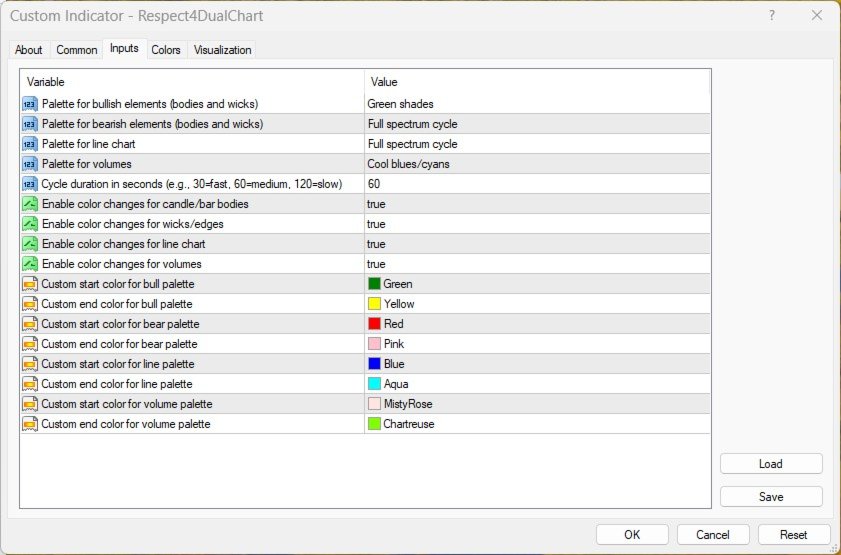
- BullPalette (EPalette, default: Forest): Specifies the color palette applied to bullish elements, such as upward candle bodies and wicks. This parameter determines the hue range and transition style for positive price movements, with options from the EPalette enumeration including None (no change), RainbowFull (full spectrum cycle), WarmTones (reds to yellows), CoolTones (blues to greens), Fire (fiery reds/oranges with flicker), Ice (cool blues/cyans), Forest (green shades), Sunset (reds to purples), Neon (bright full cycle), Greyscale (shades of gray), or Custom (user-defined oscillation).
- BearPalette (EPalette, default: RainbowFull): Defines the color palette for bearish elements, including downward candle bodies and wicks. It controls the color scheme for negative price movements, utilizing the same EPalette options as BullPalette to allow for contrasting or complementary visual distinctions.
- LinePalette (EPalette, default: CoolTones): Sets the color palette for the line chart representation. This parameter enables dynamic coloring of the price line to reflect market cycles, drawing from the EPalette enumeration to provide smooth transitions that aid in quick trend identification in simplified chart views.
- VolumePalette (EPalette, default: Ice): Determines the color palette for volume bars. It applies cyclical colors to volume data, enhancing the visibility of trading activity levels through the available EPalette options, which can be set to None if no volume color changes are desired.
- CyclePeriodSeconds (int, default: 60): Establishes the duration of the color cycle in seconds. This value influences the speed of transitions, with lower numbers (e.g., 30) producing faster changes for dynamic effects and higher numbers (e.g., 120) offering slower, more subtle shifts to maintain focus on analysis.
- ApplyToBodies (bool, default: true): Enables or disables color changes for candle and bar bodies. When set to true, it activates the dynamic palettes for the main price elements; setting it to false preserves the default static colors for these components.
- ApplyToWicks (bool, default: true): Controls whether color transitions apply to candle wicks and bar edges. A true value integrates wicks into the dynamic scheme, while false retains original colors for these finer details.
- ApplyToLine (bool, default: true): Toggles color changes for the line chart. Enabling this (true) allows the LinePalette to dynamically update the line color; disabling it (false) keeps the line in its standard appearance.
- ApplyToVolumes (bool, default: true): Activates or deactivates color modifications for volume bars. When true, it applies the VolumePalette; when false, volumes remain unchanged.
- CustomBullStart (color, default: clrGreen): Defines the starting color for the Custom palette option in bullish elements. This parameter is used only when BullPalette is set to Custom, initiating the oscillation from this hue.
- CustomBullEnd (color, default: clrYellow): Specifies the ending color for the Custom bullish palette. It pairs with CustomBullStart to create a smooth interpolation between the two colors when the Custom option is selected.
- CustomBearStart (color, default: clrRed): Sets the initial color for the Custom palette in bearish elements. Active solely under the Custom BearPalette setting, it begins the color transition sequence.
- CustomBearEnd (color, default: clrPink): Establishes the terminal color for the Custom bearish palette, facilitating a gradual shift from CustomBearStart when Custom is chosen.
- CustomLineStart (color, default: clrBlue): Determines the starting color for the Custom palette on the line chart. This is relevant only if LinePalette is Custom, marking the beginning of the color oscillation.
- CustomLineEnd (color, default: clrCyan): Defines the ending color for the Custom line chart palette, enabling interpolation from CustomLineStart under the Custom selection.
- CustomVolumeStart (color, default: clrMistyRose): Specifies the initial color for the Custom volume palette. It activates when VolumePalette is set to Custom, starting the transition.
- CustomVolumeEnd (color, default: clrChartreuse): Sets the final color for the Custom volume palette, completing the oscillation range from CustomVolumeStart.