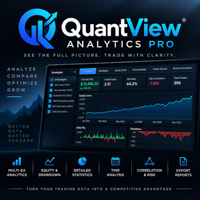
QuantView AnalyticsPro

QuantView Analytics Pro

A dashboard that analyses performance across several strategies in MetaTrader 5. It tracks every EA and magic number in your terminal and shows equity curves, drawdown, risk ratios, time-of-day heatmaps, correlation between strategies and exportable reports. It is read-only and never places, changes or closes a trade.

Overview

When you run several Expert Advisors, or several copies of the same EA with different presets and timeframes, MetaTrader 5's built-in history shows only one combined account result. You can't easily see which strategy is making money, which one is losing it, or whether your "diversified" EAs are actually taking on the same risk.

QuantView Analytics Pro solves this. It reads your full account history, rebuilds every position from its entry and exit deals, and groups the results by strategy (magic number + symbol), by magic number or by symbol. You then get a full analytics dashboard for any combination of strategies over any date range, on a single chart that resizes to fit your screen.

It is a read-only analytics tool. It does not trade, does not change orders and does not affect your running EAs.

Who it's for

  • Traders running several EAs who need to see results for each strategy separately.
  • Strategy developers forward-testing several presets or timeframes side by side on demo accounts.
  • Portfolio-minded traders who want to know whether their strategies diversify or just add to the same risk.
  • Signal providers and account managers who need clean reports in CSV, Excel, HTML/PDF or Word.

Key features

1. Analysis by strategy

  • Automatically finds every magic number and symbol in your history.
  • Three ways to group results: Strategy (Magic + Symbol), Magic number or Symbol.
  • Custom names for magic numbers, e.g. 704111=XAU HF M1;704112=XAU Quality M5 , so you see readable names instead of numbers.
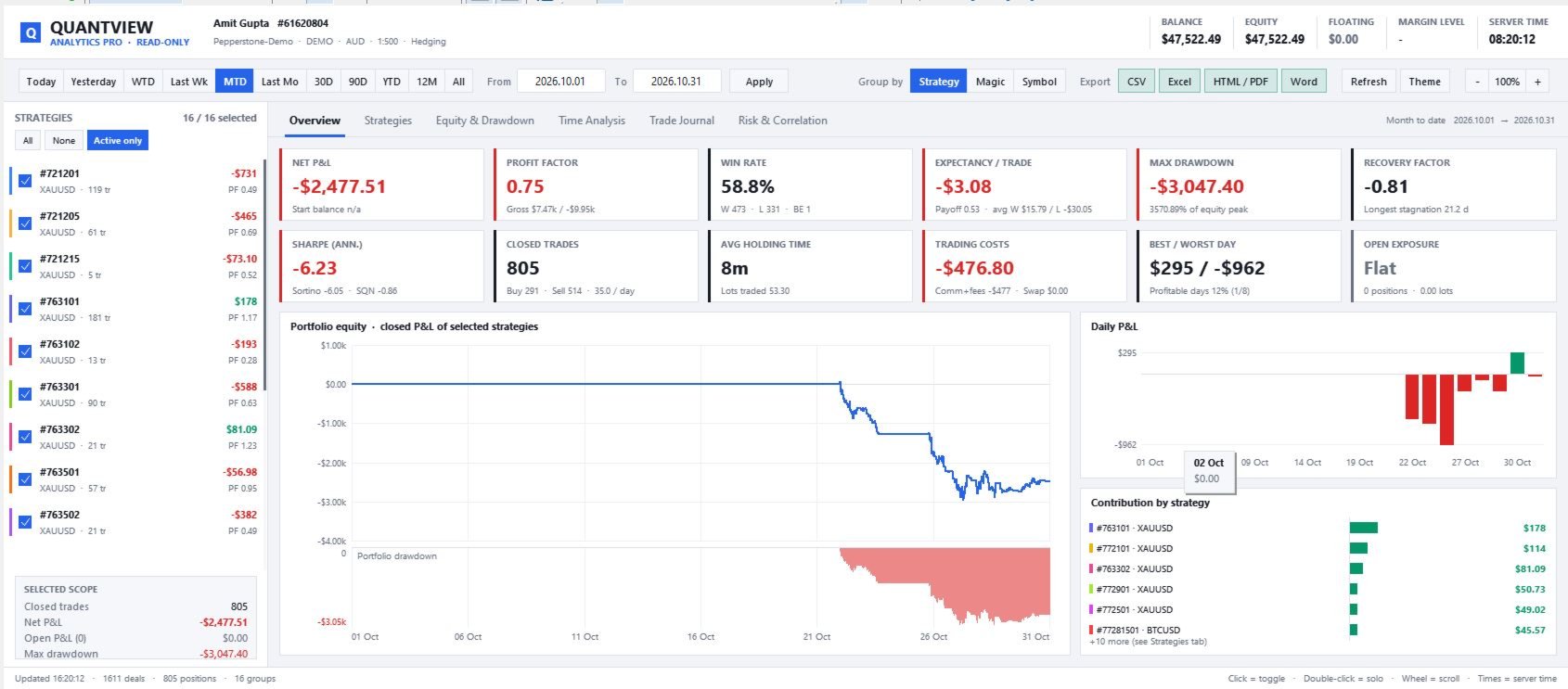
  • A sidebar of strategies with net P&L and profit factor at a glance. Click a strategy to include or exclude it, or double-click to view it on its own.
  • Every chart, table and figure updates to reflect the strategies you've selected.

2. Accurate trade accounting

  • Trades are counted per position, not per deal. Partial closes don't inflate the trade count or the win rate.
  • Net P&L includes commission on entry and exit, swap and fees, so you see the real cost of trading.
  • Breakeven trades are counted separately so they don't inflate the win rate.
  • Works on both hedging and netting accounts, including position reversals.

3. Date range presets and custom ranges

  • One-click presets: Today, Yesterday, Week to date, Last week, Month to date, Last month, 30 days, 90 days, Year to date, 12 months, All history.
  • A custom From/To date range for any period you choose.

4. Six analysis tabs

Overview

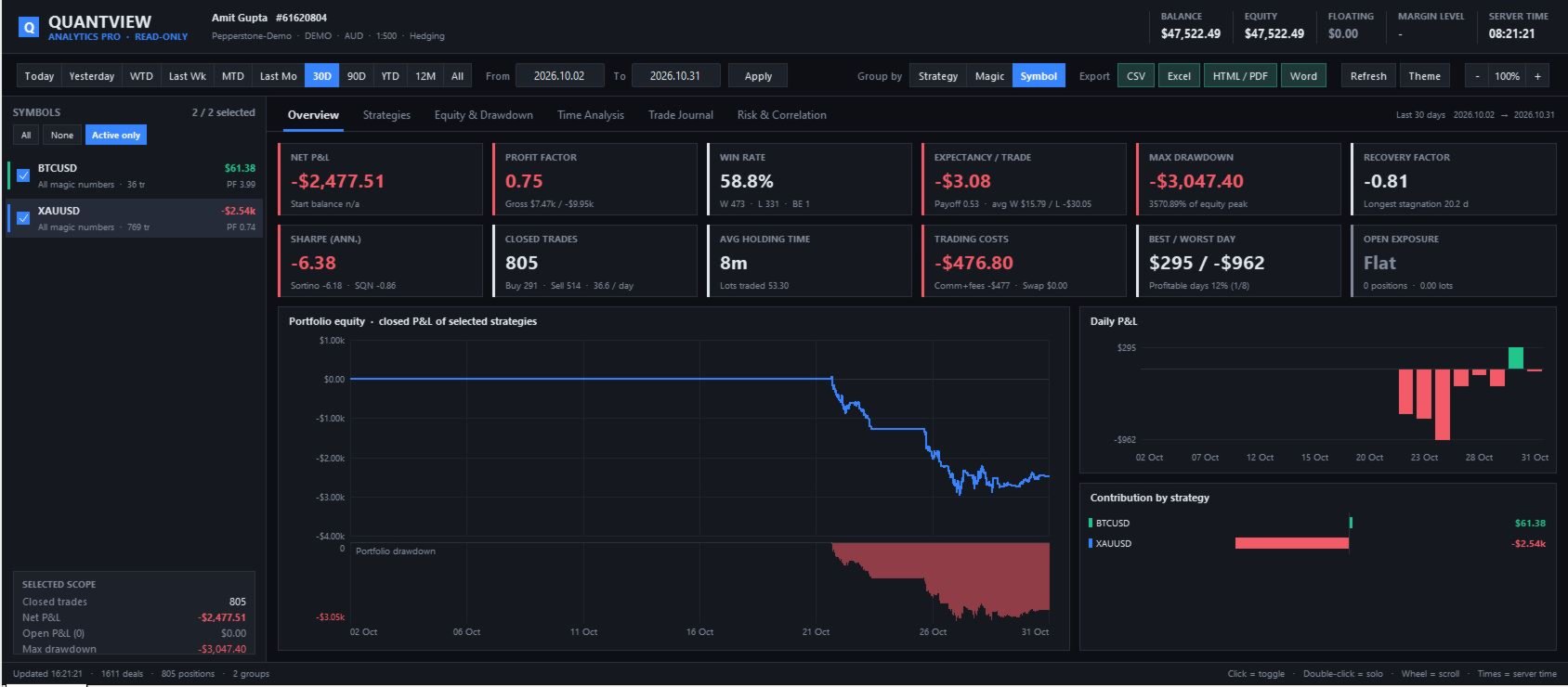
  • 12 headline figures: Net P&L and return %, Profit Factor, Win Rate, Expectancy and payoff ratio, Max Drawdown in money and %, Recovery Factor, Sharpe, Sortino, SQN, trade count and trades per day, average holding time, trading costs, best and worst day, and open exposure.
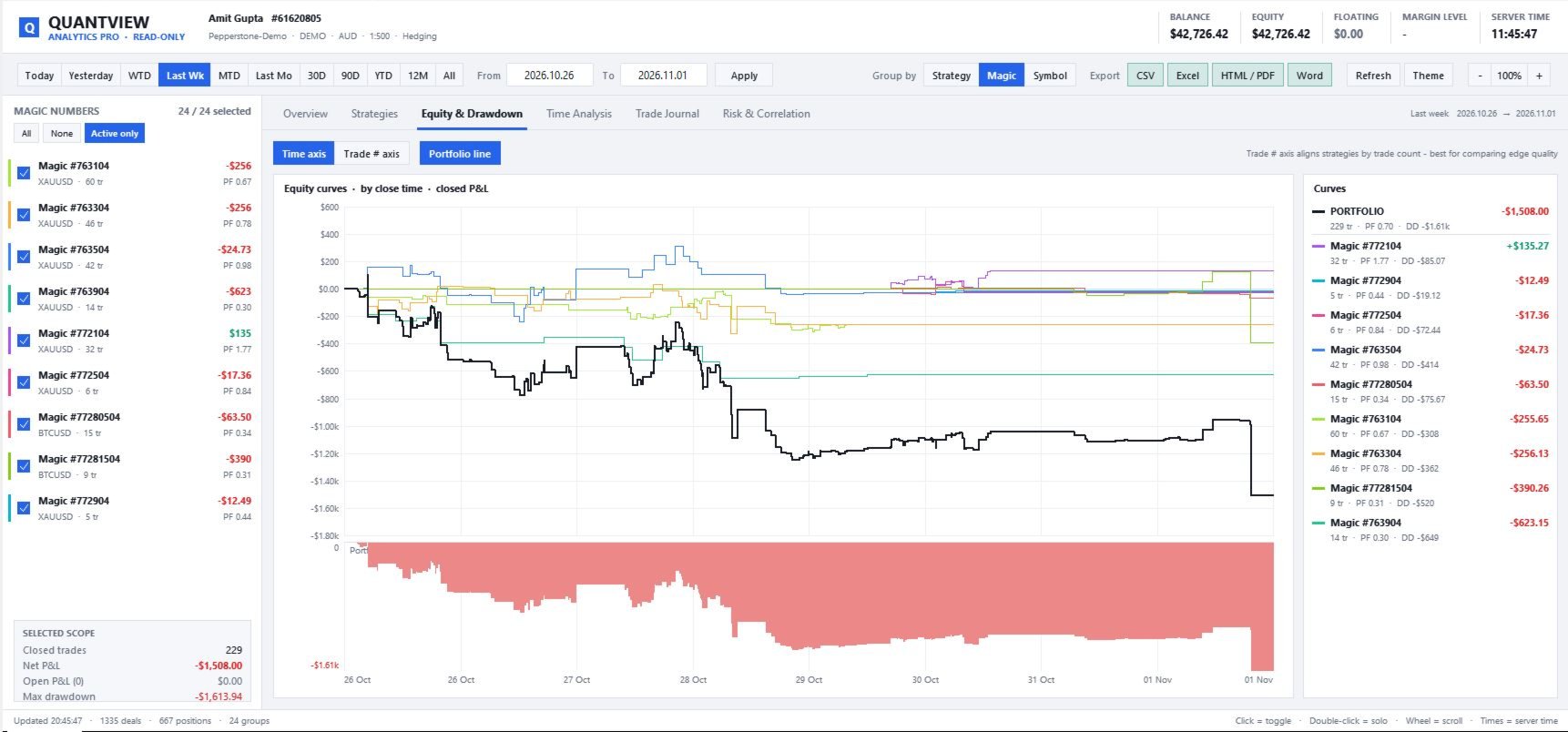
  • Portfolio equity curve with a drawdown chart underneath.
  • Daily P&L bars and a chart of each strategy's contribution.

Strategies

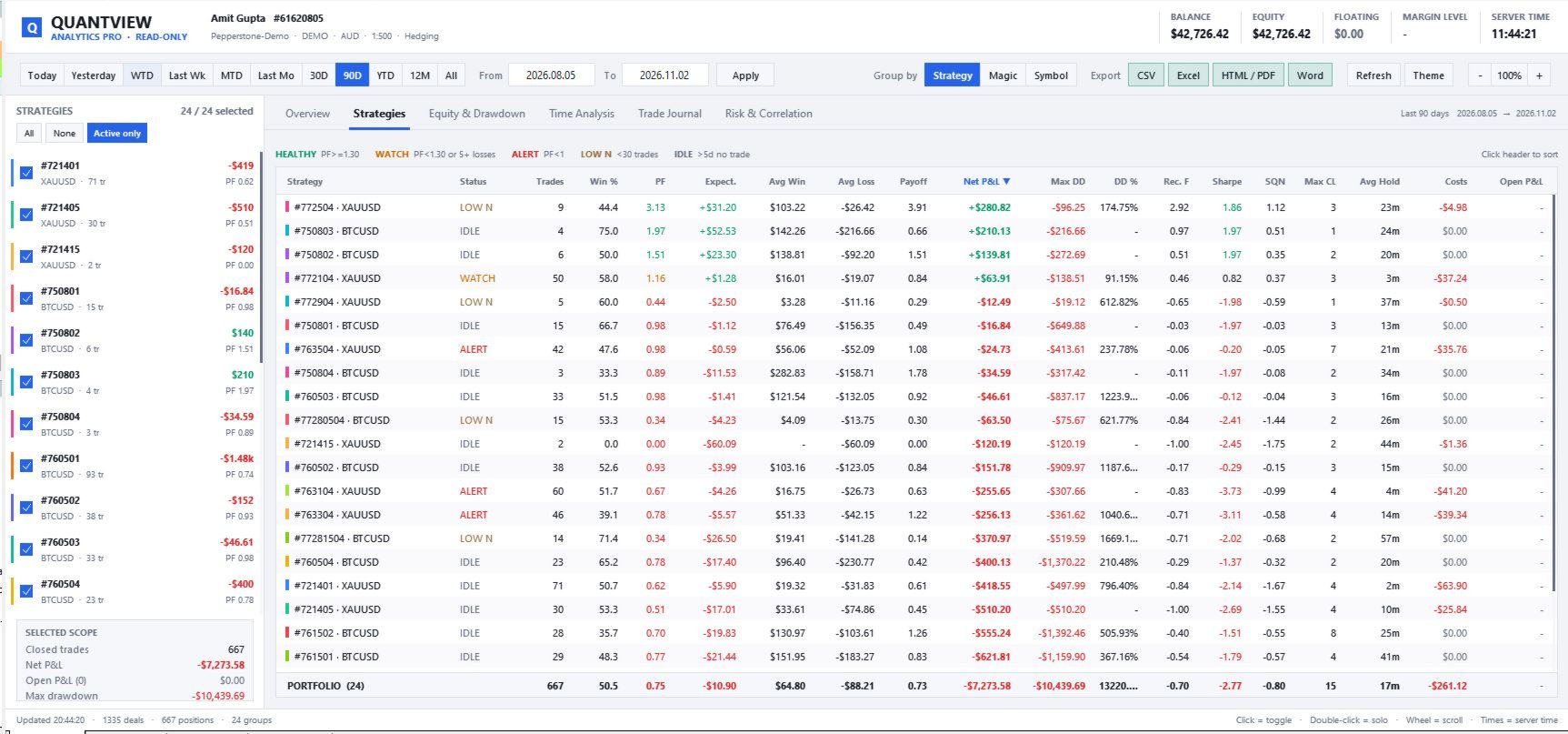
  • A comparison table with 21 columns, sortable by any of them: trades, win %, PF, expectancy, average win and loss, payoff, net P&L, max DD and DD %, recovery factor, Sharpe, SQN, maximum consecutive losses, average holding time, lots, costs, open P&L and last trade time.
  • A health status for each strategy:
    • HEALTHY: profit factor at or above your threshold.
    • WATCH: profit factor below your threshold, or a run of consecutive losses.
    • ALERT: losing money (profit factor below 1).
    • LOW N: too few trades for the results to be reliable.
    • IDLE: no trades for a set number of days.
  • A portfolio totals row.

Equity & Drawdown

  • Equity curves for every selected strategy, plus the combined portfolio curve.
  • Time axis for comparing strategies by date, or trade-number axis for comparing how good each strategy's results are trade for trade, whatever its trading frequency.
  • A crosshair tooltip showing the value and drawdown of each strategy at any point.

Time Analysis

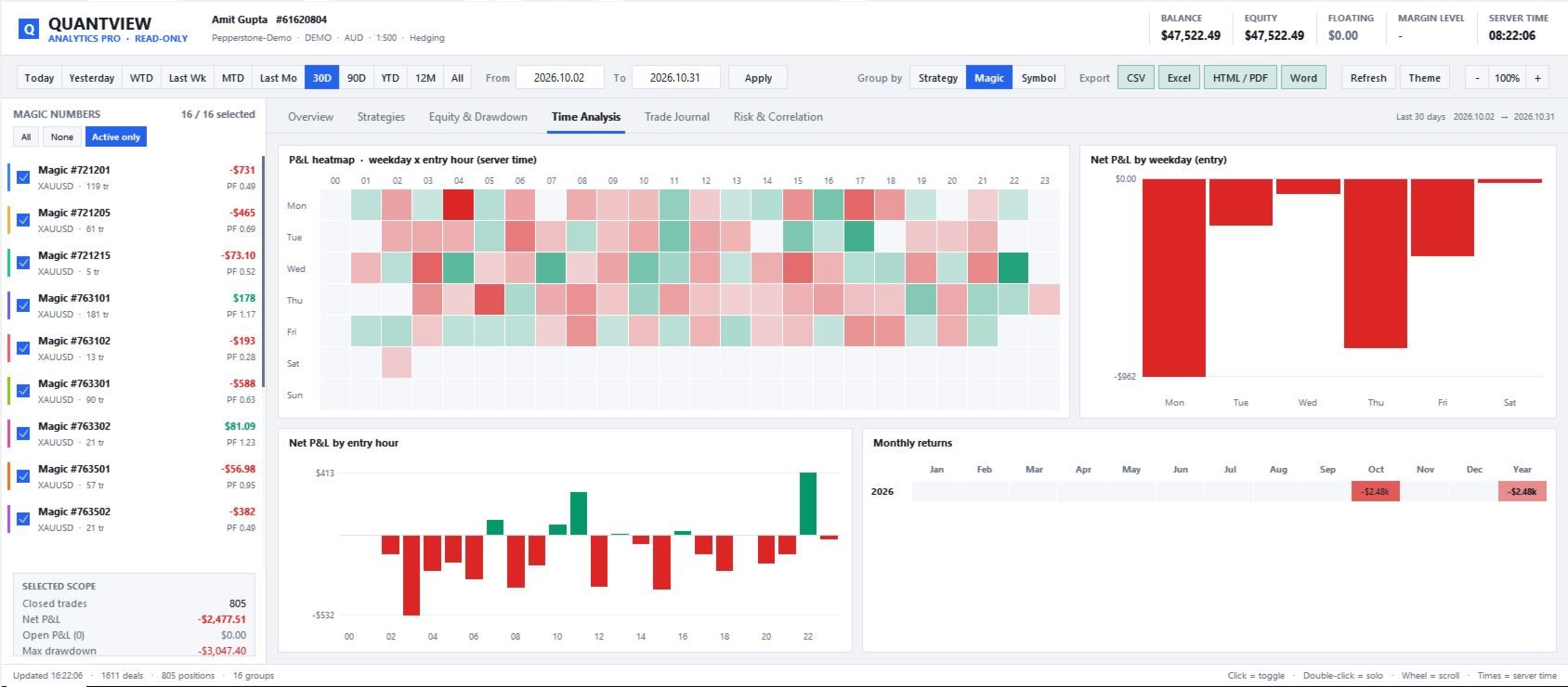
  • A heatmap of P&L by weekday and entry hour (in server time), to spot your best and worst trading windows.
  • P&L by weekday and by entry hour.
  • A grid of monthly returns by year.

Trade Journal

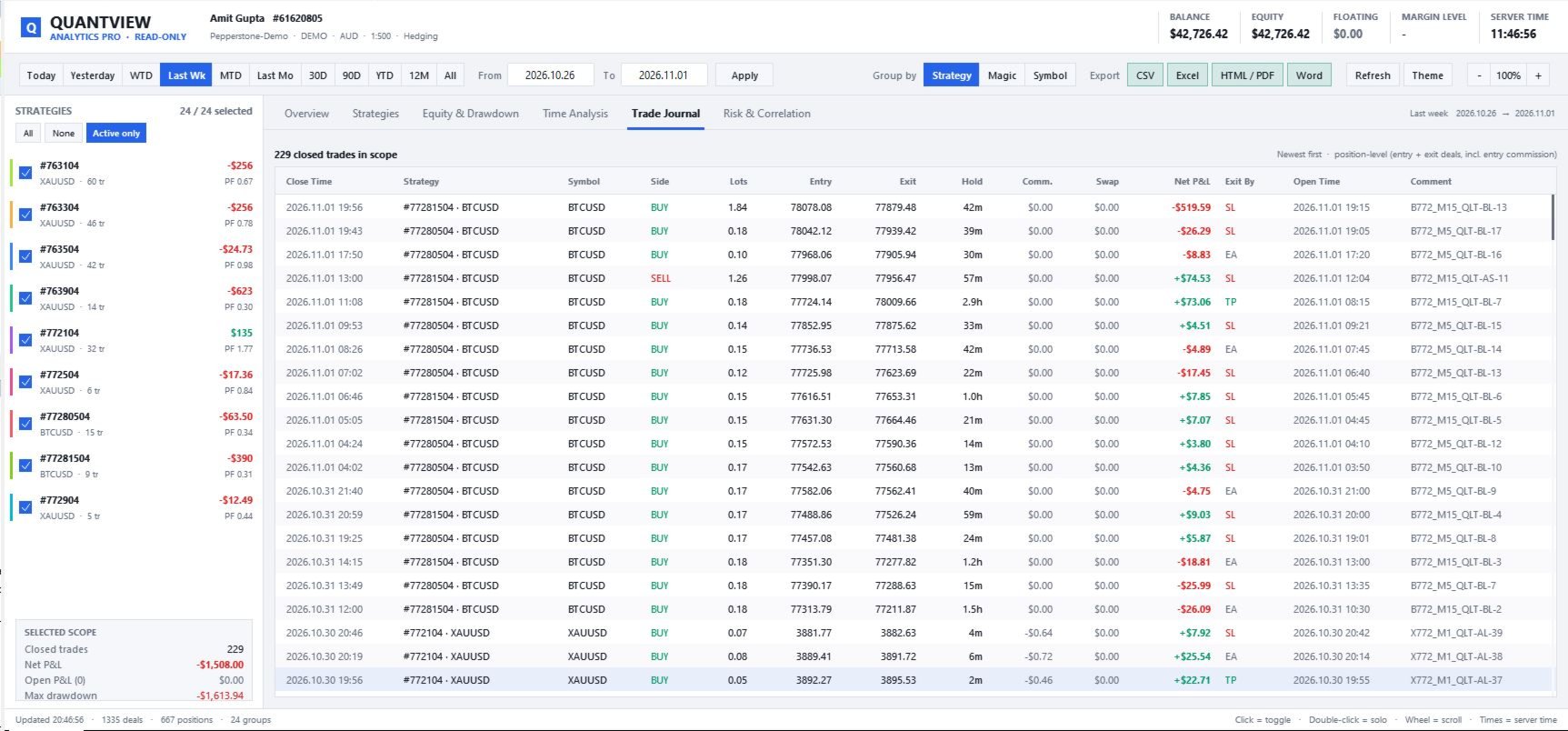
  • Every closed position: entry and exit prices, lots, holding time, commission, swap, net P&L, how it was closed (SL, TP, EA, manual, stop-out) and the order comment.

Risk & Correlation

  • Trade P&L distribution histogram with mean, median, standard deviation and skew.
  • A correlation matrix of daily P&L between strategies, showing which EAs lose on the same days (concentrated risk) and which ones offset each other (real diversification).
  • A risk table for each strategy: current streak, maximum winning and losing streaks, best and worst trade, best and worst day, daily VaR95, daily standard deviation, % of winning days, longest stagnation, long vs short P&L, and open positions.

5. Professional, resizable interface

  • Fills the chart window and adjusts automatically when you resize it.
  • UI scale buttons (– / 100% / +) on the dashboard, from 70% to 160%, with support for high-resolution screens.
  • Dark and light themes.
  • Hover tooltips on charts, heatmaps and the correlation matrix.
  • Scrollable tables and strategy list.
  • Remembers your tab, period, grouping, sort order and scale for each chart.

6. Export your analysis

All reports are saved to MQL5\Files\QuantView\Reports :

  • CSV: strategies, trades, daily P&L and monthly returns.
  • Excel workbook: five sheets (Summary, Strategies, Trades, Daily, Monthly) that open directly in Excel and can be saved as .xlsx.
  • HTML report: includes equity curves. Open it in a browser and use Print → Save as PDF to get a PDF.
  • Word report (.doc): ready to edit and share.

7. Lightweight and safe

  • Never sends, changes or closes orders.
  • No DLLs and no internet connection needed.
  • History updates automatically when new trades close.

How pro traders benefit

  1. Stop guessing which EA pays the bills. See each strategy's net P&L, profit factor and expectancy for any period.
  2. Find failing strategies early. The WATCH and ALERT statuses flag declining performance and long losing runs before they cost you much.
  3. Avoid hidden concentration risk. The correlation matrix shows when several "different" EAs are really making the same bet.
  4. Make sure results are statistically meaningful. The LOW N status and SQN keep you from scaling up a strategy on too few trades.
  5. Choose when to trade using data. The heatmap shows which sessions, hours and weekdays add to your P&L and which take away from it.
  6. See the real cost of trading. Commission and swap are shown for every strategy, which matters for scalping and high-frequency systems.
  7. Compare presets fairly. The trade-number axis lines up strategies with very different trading frequencies on the same scale.
  8. Report professionally. Export clean reports for investors, followers, or your own trading journal.

How to use

  1. Attach QuantView Analytics Pro to any empty chart in the terminal where your EAs run. A separate chart is recommended.
  2. Optional: give your magic numbers names in Strategy names.
  3. Pick a period, a grouping and the strategies you want to analyse in the sidebar.
  4. Switch between tabs to analyse, and use Export to save reports.

Input parameters

Group Parameter Description
Scope Only these magics Comma-separated magic numbers to include (empty = all)
Scope Only these symbols Comma-separated symbols to include (empty = all)
Scope Include manual trades Include trades with magic number 0
Strategy names Aliases e.g. 1001=Gold Trend;1002=Gold MeanRev
Display Theme Dark or Light
Display Default period / grouping Starting date range and grouping
Display Initial UI scale 0.7–1.6 (can be adjusted on the dashboard)
Display Font, hide price chart, refresh interval Display preferences
Analytics Min trades for confidence Threshold for the LOW N status
Analytics Idle days Threshold for the IDLE status
Analytics Losing streak warning Number of consecutive losses that triggers WATCH
Analytics Profit factor for WATCH Profit factor below which WATCH is shown
Analytics Weekends in daily stats Include zero-P&L Saturdays and Sundays in daily statistics

FAQ

Does it trade? No. It is purely an analytics tool.

Does it work with any EA? Yes. It works with any EA that uses a magic number, and with manual trades.

Is drawdown calculated on equity or on closed trades? Drawdown is based on closed-trade P&L. Floating P&L from open positions is shown separately.

Why is the correlation matrix empty? You need at least 2 selected strategies, each with 5 or more trading days in the chosen period.

Can I export to PDF? Yes. Export the HTML report, open it in a browser, and use Print → Save as PDF.
Recommended products
TradePilotmt5
Hossein Khalil Alishir
TradePilot Expert Advisor (EA) for MetaTrader 5 TradePilot is a professional and user-friendly Expert Advisor (EA) for MetaTrader 5 (MT5) . It simplifies automated trading , risk management , and trade execution with a smart trading panel . Perfect for beginners and experienced traders looking for a reliable trade manager EA with automated lot size calculation and smart position management. Key Advantages User-Friendly Trading Panel: Customizable panel with buttons and hotkeys for fast ex
Inverted_Chart_EA Utility Expert Advisor Inverted_Chart_EA creates and maintains a mirror-inverted chart of any symbol and timeframe. It automatically generates a custom instrument (e.g. US30_INV ) and keeps its price history updated in real time, with bars mirrored around a chosen pivot. This utility gives traders a new way to analyze the market from a different perspective by flipping the chart upside down. Why use an inverted chart? Highlight hidden patterns – price formations that look ordin
Bastion is a monitor-and-close-only risk manager for prop-firm traders. It watches your account against your firm's daily-loss and maximum-drawdown limits in real time and force-closes your open positions BEFORE you cross a line. It never opens a trade of its own, so it stays fully within the tools allowed by FTMO, FundedNext, The5ers, FTUK and FXIFY. Why traders fail challenges A large share of failed evaluations end on a single daily-loss breach: a moment of inattention, a news spike, one tra
Overview Mirror Signals Service EA (Text only)   is a powerful monitoring Expert Advisor that automatically sends   real-time Telegram notifications   for all important trade events on your MetaTrader 5 account. It is engineered specifically for   signal providers ,   trade-copier operators ,   auditors ,   educators , and   professional trading services   that require immediate, detailed, and reliable reporting. Everything from   entries, exits, SL/TP changes, comment changes, trailing sto
CosmiCLab SMC FIBO CosmiCLab SMC FIBO is a professional trading indicator designed for traders who use Smart Money Concepts (SMC), market structure analysis and Fibonacci retracement levels. The indicator automatically detects market swings and builds Fibonacci levels based on the latest impulse movement. It also identifies market structure changes such as BOS (Break of Structure) and CHOCH (Change of Character), helping traders understand the current market direction. CosmiCLab SMC FIBO also pr
Trading Utility for Forex Currency Pairs Only not for Gold  Functions Auto Lot Calculation based on Risk Auto stoploss  Auto TakeProfit Breakeven Auto Close Half % Close in percentage with respect to the PIPs Pending Orders BuyLimit Sell Limit with distances BuyStop Sell Stop    with distances Trading Informations Risk in percentage For Multiple trades Combine Takeprofit and Combine Stoplosses
Fabii Half Trend Baseline
Fabien Georges Andre Guillemaud
Stop trading against the higher timeframe trend. Two baselines, one chart. No repaint. Any pair, any timeframe. On your chart in 2 minutes. Free demo in the Strategy Tester. Get more indicators here Baselines, volatility filters and oscillators. No repaint. Why you need it You enter a trade because a line turned green on your chart. Then you open a higher timeframe and see that the bigger trend points the other way. The signal was real. The trend behind it was not on your side. Every trade ta
Overview Mirror Signals EA is a powerful monitoring Expert Advisor that automatically sends real-time Telegram notifications for all important trade events on your MetaTrader 5 account. It is engineered specifically for signal providers , trade-copier operators , auditors , educators , and professional trading services that require immediate, detailed, and reliable reporting. Everything from entries, exits, SL/TP changes, comment changes, trailing stop activations, pending order modifications
Best Tested Pairs :-  Step Index (Also can use on other pairs which spread is lowest) How does the Magic Storm work The Magic Storm will commence only if the Initial Trade becomes a losing trade. In case the initial trade is a profitable one, or has been closed by the trader there is no need for the Magic Stormto be initiated. Let’s assume that the initial trade was a 1 lot buy trade with Recovery Zone Range Pips is 50 and Recovery Zone Exit Pips is 150 pips. The take profit for this tr
Master Edition
Peter Ofunda Fischer
Harvester Pro Universal Master The Ultimate Volatility Breakout & Trend-Following Solution for XAUUSD and Major Pairs. Harvester Pro Universal Master is a professional-grade Expert Advisor (EA) engineered for high-performance trading on the MetaTrader 5 (MT5) platform. Optimized specifically for XAUUSD (Gold) and major currency pairs like EURUSD , this EA combines a sophisticated Volatility Breakout engine with a robust EMA/TEMA Trend-Following filter to capture explosive market moves with surg
SolarTrade Suite Financial Robot: LaunchPad Market Expert - designed to open trades! This is a trading robot that uses special innovative and advanced algorithms to calculate its values, Your Assistant in the World of Financial Markets. Use our set of indicators from the SolarTrade Suite series to better choose the moment to launch this robot. Check out our other products from the SolarTrade Suite series at the bottom of the description. Do you want to confidently navigate the world of inves
CRYPTO ZEUS DUAL-CORE PROTOCOL  Advanced Crypto Matrix: Supertrend AI + External Sync Module - [NEW] 24/7 Crypto Unlock: The EA now fully supports weekend trading by auto-detecting Crypto assets. - [NEW] Continuous Trend Rider: Re-enters trades continuously on pullbacks if the macro-trend remains strong, maximizing profit on long runs. - [NEW] Ghost Trailing Stop: Added a virtual trailing stop to fully ride breakouts instead of exiting at fixed Fibo targets. - [NEW] Preset System: Added a buil
RSI Currency Strength Meter is a powerful and elegant multi-currency indicator that measures the real-time relative strength of the 8 major currencies using RSI logic. By calculating the smoothed performance of each currency across its major pairs and applying the RSI formula, it delivers clean and responsive strength lines that make it easy to spot which currencies are truly strong or weak at any moment. This indicator is particularly useful for visualizing currency correlations and divergence
HMA Scalper Pro EA
Vladimir Shumikhin
5 (2)
HMA Scalper Pro EA — Automated Trading Advisor Based on Hull Moving Average (HMA) for MetaTrader 5 OVERVIEW HMA Scalper Pro EA is a professional trading robot (Expert Advisor) for MetaTrader 5 that trades in the direction of the Hull Moving Average (HMA). The HMA indicator determines the current trend direction, and the EA opens trades in that direction, enhanced by Smart Risk capital management, adaptive grid trading, trailing stop, breakeven, and time filters. The EA supports both Netting a
TradePad
Ruslan Khasanov
5 (1)
TradePad is a tool for both manual and algorithmic trading. We present you a simple solution for fast trading operations and control of positions on several trading instruments. Attention, the application does not work in the strategy tester! Trial version of the application for a demo account and a description of all the tools The application interface is adapted for high-resolution monitors, simple and intuitive. For comfortable work, the trader is offered the following set of tools: A hot ke
Trade History By Magic Indicator Unlock Your Trading Insights with Trade History By Magic! Enhance your MetaTrader 5 experience with this powerful indicator designed for traders who demand precision and clarity. Trade History By Magic provides a clear, real-time display of your trading history, organized by magic numbers, directly on your chart. Perfect for both automated and manual traders, this tool helps you track performance effortlessly. Key Features: Organized Trade Tracking : Displays tra
Confluence Meter: one consolidated rating from 26 indicators Confluence Meter calculates the signals of 26 popular indicators and merges them into a simple sell / neutral / buy rating. You don't have to open dozens of windows and compare readings by hand. One glance at the panel is enough to see which way the market is leaning on the selected timeframe. MT4-version:  https://www.mql5.com/en/market/product/199466 Our products: https://www.mql5.com/en/users/trendhunter/seller What you see on the c
"Impulses and Corrections 5" is created to help traders navigate the market situation. The indicator shows multi-time frame upward and downward "Impulses" of price movements. These impulses are the basis for determining the "Base" , which is composed of zones of corrections of price movements, as well as "Potential" zones for possible scenarios of price movement. Up and down impulses are determined based on a modified formula of Bill Williams' "Fractals" indicator. The last impulse is always "U
Trade Assistant 38 in 1
Makarii Gubaydullin
4.91 (23)
Multifunctional tool: Lot Calculator, Grid Orders, R/R ratio, Trade Manager, Supply and Demand zones, Price Action and much more Demo version   |   User manual Trade Assistant   doesn't work in the strategy tester : you can download the   Demo Version HERE  to test the utility . Contact me   for any questions  / ideas for improvement / in case of a bug found If you need a MT4 version, it is available here Simplify, speed up and automate your trading   process . Expand the standard terminal capa
Margin Call Shield – Defend Your Margin on Your Terms Margin Call Shield is a tool for MetaTrader 5 traders who want to decide for themselves which open positions are closed during margin call situations before the platform does so automatically based on its internal rules. By default, the broker or platform decides which positions to close, often using undisclosed algorithms. Margin Call Shield lets you set this order according to your own strategy. Why Was Margin Call Shield Created? In a mar
Crypto_Forex Indicator "WPR with 2 Moving Averages" for MT5, No Repaint. - WPR itself is one of the best oscillators for scalping. - "WPR and 2 Moving Averages" Indicator allows you to see Fast and Slow Moving Averages of WPR oscillator. - Indicator gives opportunities to see the price corrections very early. - It is very easy to set up this indicator via parameters, it can be used on any time-frame. - You can see Buy and Sell entry conditions on the pictures. - With PC and Mobile alerts on WP
Eabotpro Signals v3.0 A professional MetaTrader 5 indicator designed to deliver high-precision trading signals with real-time notifications, trade management tools, and a clean interface. "Recommended Base time frame is 4H Fibo From input . and trade time frame 1 mint , and 5 mint " Key Features: High-Accuracy Signals : Optimized for precision and consistency across different market conditions. Smart Trade Panel : Displays entry price, targets, stop levels, performance stats, and profit trackin
Hempmend Gold
Agil Okta Yohan Ferzia
IMPORTANT — DETAILED INPUT DESCRIPTION Active HEMPMEND rental users may request the Detailed Input Description through MQL5 Private Message. Please contact the seller through MQL5 Private Message to request your copy. RENTAL PRICING NOTICE Current rental pricing is promotional and valid through December 31, 2026. Rental pricing is scheduled to increase effective January 1, 2027. Current rental terms and pricing are displayed in the MQL5 Market listing. PUBLIC LIVE TRADING MONITORING ACCOUNT 1 —
MT5 To Telegram Copier
Levi Dane Benjamin
2.67 (3)
Send fully customisable trade signals from MetaTrader 5 to Telegram and run your own signal channel. Configure what gets sent, how it looks, and which trades are included using an easy on-chart interface. Made for signal providers : keep messages consistent, branded, and informative without manual posting. User Guide + Demo | MT4 Version | Discord Version Main features Highly customisable signal format with many configuration options Add your own text before/after each signal (tags, links, chan
Wulf BTC Bot
Riaan Adriaan Swanepoel
Wulf BTC Bot is a high-precision automated algorithmic trading system engineered for Bitcoin (BTC) on the H1 timeframe. It leverages a robust entry logic combining cyclical momentum and trend exhaustion via the Schaff Trend Cycle (STC) , dynamic breakout boundaries ( Lowest/Highest Price channels), and volatility-adaptive exits powered by ATR . The Expert Advisor is 100% Standalone , packing all custom indicators and math engines directly inside the .ex5 binary, requiring zero external dependenc
Net Exposure & Net Average Price is a lightweight utility Expert Advisor for MetaTrader 5 hedge accounts . This tool helps traders instantly understand their true market exposure when multiple Buy and Sell positions are open on the same symbol. What the EA Does The EA displays a clear on-chart panel showing: Total Buy Trades Total Buy Lots Total Sell Trades Total Sell Lots Net Lots (Net Exposure) Net Average Price (hedge-adjusted breakeven) The Net Average Price represents the true breakeven
Reversal Master for MT5 Reversal Master for MT5 is a non‑repainting reversal indicator for MetaTrader 5. It helps you detect potential market reversal points and shows the maximum favourable price movement after each historical signal, so you can better understand how price behaved after similar situations in the past. The MT5 version keeps the familiar reversal‑signal logic of the original Reversal Master for MT4, but adds improved visualisation, historical statistics and a points summary panel
Trading Assistent is a multifunctional trading panel that combines all necessary tools for professional trading. The panel provides complete control over positions, in-depth risk analysis, and fast order execution. MAIN FUNCTIONAL BLOCKS Position Management: - Real-time viewing of all open positions - Sorting by symbol, profit, volume, and type - Visual indication of profitable and losing positions - Bulk closing operations - Breakeven function for profit protection Trading Operations: - I
Universal Trend
Maryna Shulzhenko
The Universal Trend indicator was created to detect trends in price movement and allows you to quickly determine not only the direction of the trend, but also understand the levels of interaction between buyers and sellers. The indicator works on all timeframes and currency pairs. The indicator gives fairly accurate signals and it is customary to use it both in trending and flat markets. It is advisable to use the indicator in combination with other tools for more reliable signals and making a
Classic Market Surfer EA - A Timeless, Proven Strategy for Gold Trading For years, this powerful trading strategy has been hidden from the public-reserved for a select few. Now, for the first time, the Classic Market Surfer EA is available to traders like you.   Built on pure, time-tested trading principles, this EA doesn't rely on trendy gimmicks like AI or machine learning. Instead, it harnesses a classic, robust strategy that has consistently delivered results over the years. This is not a "g
Buyers of this product also purchase
Trade Assistant MT5
Evgeniy Kravchenko
4.43 (216)
It helps to calculate the risk per trade, the easy installation of a new order, order management with partial closing functions, trailing stop of 7 types and other useful functions. Additional materials and instructions Installation instructions - Application instructions Line function -   shows on the chart the Opening line, Stop Loss, Take Profit. With this function it is easy to set a new order and see its additional characteristics before opening.   Risk management  - The risk calculation
Forex Trade Manager MT5
InvestSoft
4.98 (689)
Trade Manager MT5 is an advanced position size calculator and trade management tool for MetaTrader 5, designed to help traders plan trades faster, control risk more precisely, and manage open positions directly from the chart. It combines order placement, risk based lot calculation, Stop Loss and Take Profit management, Break Even, Trailing Stop, Partial Close, Equity Protection, and external trade management in one panel. Whether you trade forex, indices, metals, commodities, crypto, or future
FarmedHedge Pair Trading Dashboard
Tanapisit Tepawarapruek
5 (7)
Farmed Hedge Yield Farming | All Markets (Manual - Hybrid - Semi/Automated EA) VERIFIED TRADING RESULTS - Farmed Hedge Yield Axi Copy:  https://www.mql5.com/en/signals/2356376 - Farmed Hedge Yield Exn Copy:   https://www.mql5.com/en/signals/2356404 - Farmed Hedge Yield V Copy:  https://www.mql5.com/en/signals/2357156 IMPORTANT NOTICE: FarmedHedge is a MANUAL-FOCUSED TRADING UTILITY ,not a fully automated EA. Results shown on this Signal include manual trades and overall strategic management.
Telegram to MT5 MultiChannel Copier
Sergio Marquez Uroz
4.68 (22)
Telegram to MT5 Multi-Channel Copier   automatically copies trading signals from your Telegram and Discord channels straight to MetaTrader 5. No bots, no browser extensions, no manual copying. A signal arrives in Telegram or Discord and the EA opens the trade in your terminal within seconds. And before you copy a channel, the built-in backtester shows you what that channel would have done in your account. The product has two components: a Windows application that listens to your Telegram channel
Copy Telegram signals with your own trading rules Telegram to MT5 Signal Trader automatically copies text-based trading signals from public and private Telegram channels and groups into MetaTrader 5. Manage multiple providers and MT5 accounts from one desktop app, with individual risk and trade settings for each provider . No Telegram bot or API setup needed for copying. Simply sign in with your own Telegram account by phone or QR code and select the channels or groups you have already joined. Y
TradePanel MT5
Alfiya Fazylova
4.88 (170)
Trade Panel is a multi-functional trading assistant. The app contains over 50 trading functions for manual trading and allows you to automate most trading tasks. Application instructions: https://www.mql5.com/en/blogs/post/756482 Trial version of the application for a demo account: https://www.mql5.com/en/blogs/post/750865 How to install the application: https://www.mql5.com/en/blogs/post/756239 How to test the application in visual mode: https://www.mql5.com/en/blogs/post/770277 How to install
================================================================================ POC BREAKOUT - V20.72. Full Professional Grade Toolkit ================================================================================ POC Breakout is a full MetaTrader 5 trading dashboard for discretionary traders who want breakout signals, Point of Control (POC) context, volume profiles, order flow, market structure, news, alerts, and advanced trade planning in one professional workspace. Attached directly to you
MT5 to Telegram Signal Provider turns your trading account into a signal provider. Every trade action, whether manual, by EA or from your phone, is instantly sent as a message to Telegram. You can fully customize the format or use a ready-made template for quick setup. [ Demo ] [ Manual ] [ MT4 Version ] [ Discord Version ]     New: [ Telegram To MT5 ] Setup A step by step user guide is available. Key Features Ability to customize order details sent to subscribers You can create a tiered subs
VirtualTradePad PRO SE MT5 — professional trading control center for MetaTrader 5 VirtualTradePad PRO SE is a premium chart-based trading panel and trade-management workspace for MetaTrader 5 . It is designed for traders who want faster execution, clearer position control, structured trade management, visual level planning and a professional workflow directly from the chart. This is not only a BUY / SELL panel. PRO SE combines manual trading, pending orders, position management, partial exits, b
REVDEN AI Desk: Run Your Trading From One Conversation With Your Own AI, on REVDEN's Market Context Imagine running your trading from one conversation. REVDEN AI Desk brings it into MetaTrader 5: you ask your own AI how it reads the market, and it answers from REVDEN's full context on the symbols you trade, with their state, their risk picture and the releases ahead. Its proposals arrive with entry, stop, target and risk, and you approve the ones that fit. Your rules change the same way: write w
News Trade EA MT5
Konstantin Kulikov
4.55 (11)
Present to you the useful robot that I have been using for several years. It can be used in both semi-automatic mode and fully automatic mode. >>> Chat <<< The program contains flexible settings for trading on the news of the economic calendar. It cannot be checked in the strategy tester. Only real work. Download the latest archive of settings: https://www.mql5.com/en/blogs/post/747929 Signals monitoring: https://www.mql5.com/en/signals/author/test-standart When creating your own sets of setti
RETAILBERG FOOTPRINT CHART PRO — Order-Flow Workspace for MetaTrader 5 Version 7.00  |  Professional System  |  31 tools  |  One chart A full 150-page illustrated User Manual is included. Please read the full manual to understand this feature packed footprint chart elements and ui. https://www.mql5.com/en/blogs/post/777982 DEMO / STRATEGY TESTER — PLEASE READ FIRST
The Patch
Mian Rameez Ali
The Patch It never opens a trade. It walks behind the ones that did. Every open position, every pending order — checked twice a second for the one thing that's easy to forget: a stop, a target. Found bare, it doesn't ask. It writes the missing number in, measured in points from wherever the position began, and moves on to the next. No strategy, no opinion on direction. Just the quiet assumption that nothing should ever sit on the market unprotected — not because someone decided it shouldn't,
Next Update — Version 2.52 Coming Soon! [NEW] Get Ready for 4 Major New Features Designed to Enhance Your Market Analysis and Trading Workflow We’re taking market analysis to the next level with 4   new features designed to meet your trading needs. Introducing: TRADE OVERVIEW DASHBOARD CONFLUENCE AT ZONE STRONG & WEAK HIGH/LOW OPTIMAL TRADE ENTRY —  OTE 1. TADE OVERVIEW DASHBOARD  A dashboard that helps you understand the overall market picture more easily, providing guidance to support your
Grid Manual MT5
Alfiya Fazylova
4.73 (22)
Grid Manual is a trading panel for working with grid strategies. The utility is universal, has flexible settings and an intuitive interface. It works with a grid of orders not only in the direction of averaging losses, but also in the direction of increasing profits. The trader does not need to create and maintain a grid of orders, the utility will do it. It is enough to open an order and the "Grid manual" will automatically create a grid of orders for it and will accompany it until the close. F
Anchor Trade Manager
Kalinskie Gilliam
5 (8)
Your EAs cannot see each other, but Anchor can. Anchor gives you one place to coordinate your EAs, manage risk, and decide when trading is allowed. It works alongside the trading bots you already use without any changes to them. The Problem One EA opens a trade. Then another starts trading. The next thing you know, you wake up to multiple grids built across your account. Each EA may be doing exactly what it was designed to do, but together they can place far more risk on your account than you in
EA Portfolio Control & Cloud Monitoring for MetaTrader 5 Your EAs manage trades. KONTROL_01 manages your EAs. A control system for traders running multiple Expert Advisors on the same account. Coordinate EA activity, manage trading risks and monitor your setup remotely. A detailed User Manual is available via DM after purchase. IN PRACTICE Multiple EAs. No coordination. Your EAs trade independently, unaware of each other's activity. KONTROL_01 coordinates them, limits simultaneous activity a
The product will copy all telegram signal to MT5 ( which you are member) , also it can work as remote copier.  Easy to set up, copy order instant, can work with almost signal formats, image signal,  s upport to translate other language to English Work with all type of channel or group, even channel have "Restrict Saving Content", work with  multi channel, multi MT5 Work as remote copier: with signal have ticket number, it will copy exactly via ticket number. Support to backtest signal. How to s
Astro Trade MT5
Indra Maulana
5 (8)
25% discount on the release of the tool: only for the next 3 buyers Send a message to receive a demo version. AstroTrade Trading Assistant AstroTrade is a comprehensive multi-functional trading utility developed for the MetaTrader 5 platform. It integrates essential tools for trade execution, risk management, and technical monitoring into a single unified interface. The application is designed to assist traders in managing their daily operations through a visual and structured environment. Vi
Floor Watch
Syed Tauqeer Hussain Shah
Floor Watch One number, watched every thirty seconds: how far equity has fallen since the day began — or since its highest point, if it's told to trail the peak instead of the open. Cross the line and it doesn't argue. Every open position closes, every pending order vanishes, and anything that slips through afterward gets shut the moment it appears. Not asked. Removed. The floor holds until the clock turns 5 AM Pakistan time — then, and only then, does the day start over. One rule. No except
Power Candles Strategy Scanner - Self-Optimizing Multi-Symbol Setup Finder Self-optimizing settings work one chart at a time, and finding where they pay off right now means opening chart after chart. Power Candles Strategy Scanner runs the same self-optimizing engine as the Power Candles indicator on every symbol in your Market Watch, side by side. One panel ranks where it pays off: the winning strategy per symbol, its optimized Stop Loss and Take Profit. An alert fires the moment a fresh signal
Trader Evolution
Siarhei Vashchylka
5 (7)
" Trader Evolution " - A utility designed for traders who use wave and technical analysis in their work. One tab of the utility is capable of money management and opening orders, and the other can help in making Elliott wave and technical analysis. Manual (Be sure to read before purchasing) | Version for MT4 Advantages 1. Trading in a few clicks. Immediate and pending orders are available in the panel 2. Money management. The program automatically selects the appropriate lot size 3. Simplifies
MT5 Professional Copy Trading System Industrial Grade Ultra Fast Local Trade Copier for Serious Traders The MT5 Professional Copy Trading System is a powerful and ultra fast local trade copier built for serious traders, signal providers, account managers, and advanced multi terminal setups. If you need fast execution, stable synchronization, flexible lot control, and reliable long term performance, this system is designed for exactly that purpose. Unlike many basic retail trade copiers, this sol
Trade Manager DaneTrades
Levi Dane Benjamin
4.13 (31)
DaneTrades Trade Manager is a professional trade panel for MetaTrader 5, designed for fast, accurate execution with built‑in risk control. Place market or pending orders directly from the chart while the panel automatically calculates position size from your chosen risk, helping you stay consistent and avoid emotional decision‑making. The Trade Manager is built for manual traders who want structure: clear risk/reward planning, automation for repeatable management, and safeguards that help reduc
Trade Manager DashPlus
Henry Lyubomir Wallace
4.85 (13)
DashPlus is an advanced trade management tool designed to enhance your trading efficiency and effectiveness on the MetaTrader 5 platform. It offers a comprehensive suite of features, including risk calculation, order management, advanced grid systems, chart-based tools, and performance analytics. Key Features 1. Recovery Grid Implements an averaging and flexible grid system to manage trades during adverse market conditions. Allows for strategic entry and exit points to optimize trade recovery
EA Auditor
Stephen J Martret
5 (6)
EA Auditor is an independent analysis tool for traders evaluating Expert Advisors and trading signals on MetaTrader 5. It audits backtest reports, reviews posted developer signals, and cross-verifies the two against each other to help traders assess strategies before committing capital. The MQL5 market offers a wide range of Expert Advisors from many developers, with varying approaches, quality, and transparency. EA Auditor provides a consistent, data-driven framework for reviewing them, answer
YuClusters
Yury Kulikov
4.93 (43)
Attention: You can view the program operation in the free version  YuClusters DEMO .  YuClusters is a professional market analysis system. The trader has unique opportunities to analyze the flow of orders, trade volumes, price movements using various charts, profiles, indicators, and graphical objects. YuClusters operates on data based on Time&Sales or ticks information, depending on what is available in the quotes of a financial instrument. YuClusters allows you to build graphs by combining da
DrawDown Limiter
Haidar Lionel Haj Ali
5 (23)
DrawDown Limiter v5.0 — Advanced Account Protection Controller DrawDown Limiter v5.0 is a client-side account protection controller designed to supervise your trading account and automatically react when configured risk, profit, news, schedule, rollover, or position limits are reached. It can monitor manual trades, automated strategies, multiple Expert Advisors, pending orders and floating positions from one dedicated chart. It can protect the complete account or be configured to supervise a spe
Master Your Trading Discipline   Stop losing your hard-earned gains to overtrading and emotional decisions. The Discipline Tool is your ultimate trading assistant, ensuring strict risk management in real-time. Key Protection Features: Advanced Drawdown Defense : Automatically halts trading if your daily drawdown exceeds a preset threshold (percentage or dollar amount). Real-Time Equity Lock : Safeguard profits by referencing peak equity, ensuring drawdown stays within control. Hard Profit Target
Dealer Panel
Mian Rameez Ali
Dealer's Panel No signal decides anything here — a hand does. One click, and the panel calculates what's underneath: lot size from risk, target from a 30-step balance ladder that remembers exactly how far an account has climbed. Toggle between market and pending without touching an input field. Set a stop, and the take-profit can write itself — a fixed share of the balance, translated into price with no arithmetic left for the trader to get wrong. One trade live at a time; it won't let a seco
More from author
Title: QuantView MTF Sniper Dashboard Quick Overall Summary The QuantView MTF Sniper Dashboard is a professional-grade, trend-following Multi-Timeframe (MTF) trading engine designed exclusively for MetaTrader 5 Hedging accounts. Engineered for sophisticated portfolio managers, it utilizes a proprietary 6-point scoring system across a confluence of momentum and volatility indicators to calculate precise market bias. Whether you are trading Forex, Commodities like Gold (XAUUSD), or Cryptocurrenci
FREE
LIMITED TIME OFFER to download for FREE for Unlimited use license ================================================================ QuantView Analytics Master Advanced On-Chart Portfolio Diagnostics & Equity Forensics for MetaTrader 5 Standard MT5 history reports simply show you how much money was made or lost. QuantView Analytics Master is designed to answer the "Why" and the "How." By segmenting your trading history across four distinct analytical dimensions, this institutional-grade terminal
FREE
Filter:
No reviews
Reply to review