TH Systems Time Invest
- Experts
-
Tom Haecker
 TH SYSTEMS – DISCIPLINE · SYSTEM · EDGE
Independent developer focused on systematic and automated trading.
I develop rule-based trading systems based on clearly defined market concepts, structured risk management and extensive testing. - Version: 2.15
- Updated: 29 September 2026
TH Systems Time Invest is a free, fully automated Multi-Index Expert Advisor for MetaTrader 5.
The strategy follows a deliberately simple approach: selected stock indices are traded Long only on predefined weekdays and at defined trading times.
The EA automatically manages all activated markets from a single chart.
IMPORTANT – Installation
The EA must be attached to a chart of one of the five supported markets:
US100, US500, DAX, US30 or UK100
Only one chart and one EA instance are required. From there, the EA automatically searches for and manages all supported and activated markets.
Please do not attach the EA to EURUSD, Gold or any other unsupported market.
Broker / Strategy Profile
Time Invest provides different strategy profiles.
FTMO
The FTMO profile contains the original settings tested by TH Systems.
| Market | Entry | Exit | Trading Days |
|---|---|---|---|
| US100 | 01:15 | 21:45 | Monday, Tuesday, Wednesday |
| US500 | 01:15 | 21:45 | Monday, Tuesday, Wednesday |
| DAX | 07:15 | 22:45 | Monday, Tuesday, Wednesday, Thursday |
| US30 | 01:15 | 21:45 | Monday, Tuesday, Wednesday, Friday |
| UK100 | 10:00 | 21:45 | Monday, Tuesday, Wednesday, Thursday |
These settings are fixed within the FTMO profile.
Important: Other brokers may use different server times and CFD trading sessions. Therefore, these settings may not automatically be suitable for other brokers.
Additional broker profiles tested by TH Systems may be added in future updates.
Custom
With the Custom profile, you can use your own settings for each of the five markets and test them in the MT5 Strategy Tester.
For each market, you can separately configure:
- Enable/disable the market
- Entry hour and entry minute
- Exit hour and exit minute
- Monday to Friday individually ON/OFF
This allows you, for example, to trade only US100, DAX and UK100 or to test different trading times and weekdays for each individual market.
The basic concept remains the same in Custom mode:
One EA instance manages all activated markets.
Custom settings have not been validated by TH Systems for your broker and should be thoroughly tested in the Strategy Tester and on a demo account before live trading.
Strategy
TH Systems Time Invest uses:
- Long positions only
- Time-based entries and exits
- Defined trading days
- Automatic position size scaling
- Multi-Index trading from a single EA instance
- Optional account protection
- No Martingale
- No Grid
- No Recovery system
No additional entry indicators or complicated signal conditions are used.
A conventional Take Profit or Stop Loss is not part of the regular trading logic. Positions are closed according to the defined Exit time.
Account Size and Lot Sizes
The reference account size is 100,000 EUR/USD.
With Account Size = 100000 , the EA uses the following base lot sizes:
| Market | Base Lot |
|---|---|
| US100 | 1.00 |
| US500 | 5.00 |
| DAX | 1.00 |
| US30 | 0.80 |
| UK100 | 3.00 |
Using Account Size, all lot sizes are automatically scaled proportionally.
Example
For an account with 1,000 EUR/USD:
Account Size = 1000
→ Lot sizes are scaled proportionally for this account size.
If your actual account size is 1,000 but you set:
Account Size = 5000
the EA calculates its position sizes based on 5,000. The resulting position sizes are therefore five times larger than with Account Size = 1000 .
A higher setting also increases the potential risk of loss and possible drawdown.
The selected setting should therefore be tested in the MT5 Strategy Tester before live trading.
Dashboard
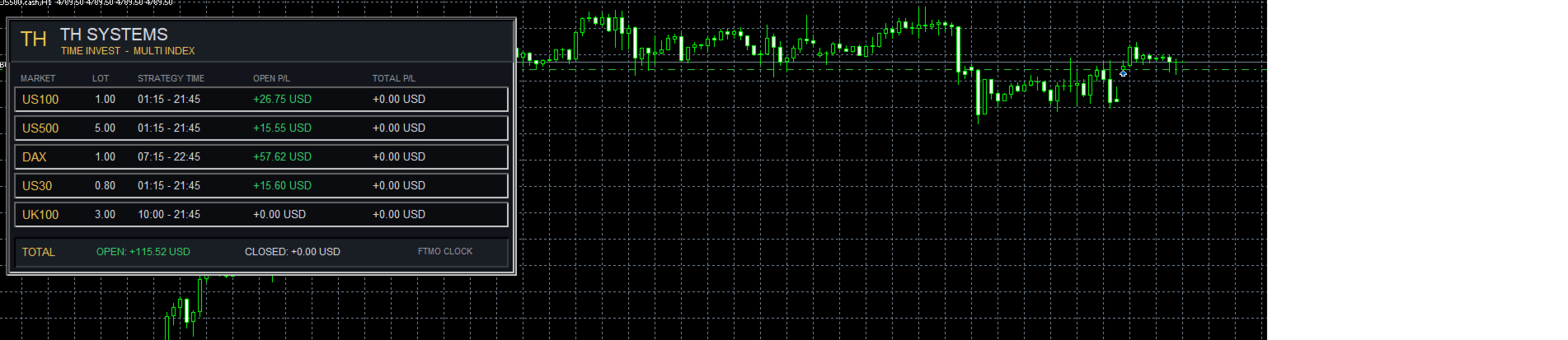
The integrated dashboard displays, among other things:
- Selected strategy profile
- All five markets
- ACTIVE / OFF status for each market
- Lot sizes being used
- Strategy times
- Open profit and loss
- Realized results
Especially in Custom mode, this makes it easy to see which markets are currently being traded and which are disabled.
The dashboard can be disabled for faster backtests.
Symbol Names and Brokers
Brokers sometimes use different symbol names for the same market.
For example, the same market may be called US100, NAS100 or USTEC, depending on the broker. For US30, common names include US30 and DJ30.
Many common symbol names are already included in the EA.
If a symbol is not recognized or the EA does not trade with your broker, please send me a message via MQL5 and include:
Broker + exact symbol name + current MT5 server time
Missing symbol names can then be added in future updates.
Before Live Trading
I recommend testing the EA first in the MT5 Strategy Tester and then running it on a demo account.
Please check in particular:
- Whether all required markets are recognized
- Whether the correct Strategy Profile is selected
- Broker/server time and trading sessions
- The selected Account Size
- The resulting lot sizes
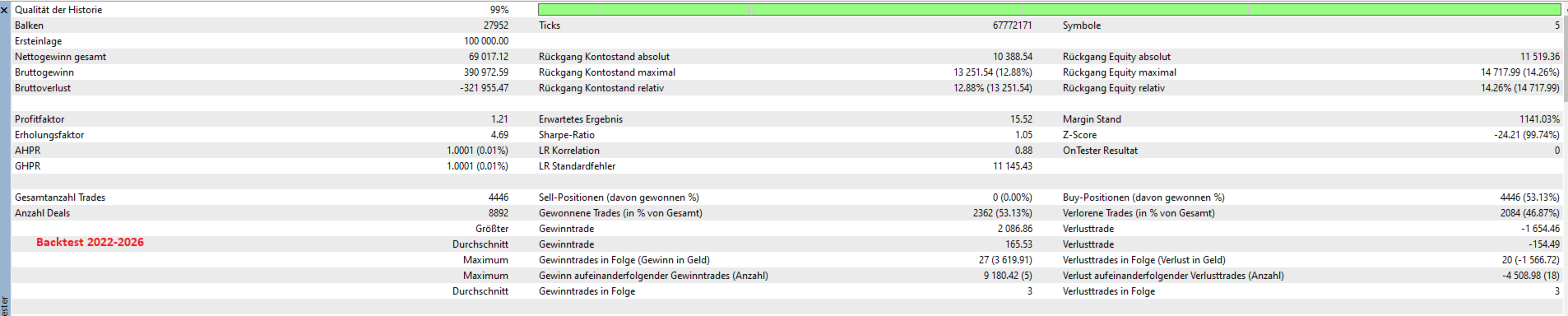
Backtest results may differ between brokers. Price data, spreads, execution, contract specifications, trading sessions and server times can all affect the results.
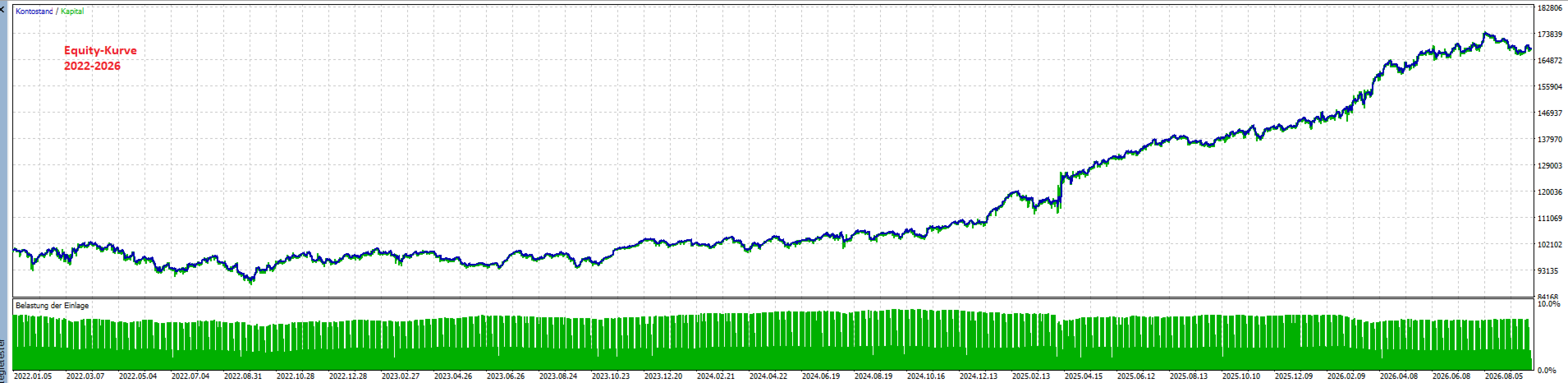
Historical results are no guarantee of future performance.
TH Systems Time Invest is free.
If something does not work or your broker uses a symbol name that is not yet supported, simply send me a message via MQL5.