TH Systems Time Invest
- Experts
-
Tom Haecker
 TH SYSTEMS – DISCIPLINE · SYSTEM · EDGE
Independent developer focused on systematic and automated trading.
I develop rule-based trading systems based on clearly defined market concepts, structured risk management and extensive testing. - Versão: 1.0
TH Systems Time Invest is a free, fully automated Multi-Index Expert Advisor for MetaTrader 5.
The strategy follows a deliberately simple approach: selected stock indices are traded exclusively Long at predefined trading times.
The EA automatically manages all supported markets from a single chart.
IMPORTANT – EA MUST BE ATTACHED TO ONE OF THE 5 SUPPORTED MARKETS
TH Systems Time Invest must be installed on a chart of one of the five supported markets:
US100, US500, DAX, US30 or UK100
Only one chart and one EA instance are required. The EA will then automatically search for and manage all five supported markets.
Do not attach the EA to EURUSD, Gold or any other unsupported market.
IMPORTANT – Questions, Problems or Missing Symbols
If the EA does not trade on your account or if you have any questions about the setup, please simply send me a message via MQL5.
If the EA does not trade, please provide:
- your broker
- the current broker/server time shown in MetaTrader 5
- which symbol is not being traded
- the exact symbol name as displayed by your broker
The EA already contains many different symbol names for US100, US500, US30, DAX and UK100, as symbol names can vary significantly between brokers.
However, it is impossible to include every broker and every possible symbol name in advance.
If your symbol is not recognized by the EA, simply send me the broker name and exact symbol name. I can then add the symbol name in a future update.
The same applies to problems with trading times: send me your broker and current MT5 server time, so we can determine which time adjustment is required for your broker.
Multi-Index System
You do not need to install the EA on five different charts.
One EA instance on a single chart is sufficient.
The EA automatically searches for the supported markets and manages them independently.
Many common broker symbol names and variations are already included. However, due to the large number of different brokers, it cannot be guaranteed that every symbol name will be recognized.
If your broker's symbol is missing, please send me a message. I am happy to add additional symbol names in future updates.
Traded Markets and Trading Times
The following times correspond to the original TH Systems reference time used for development and testing:
| Market | Entry | Exit | Trading Days |
|---|---|---|---|
| US100 | 01:15 | 21:45 | Monday, Tuesday, Wednesday |
| US500 | 01:15 | 21:45 | Monday, Tuesday, Wednesday |
| DAX | 07:15 | 22:45 | Monday, Tuesday, Wednesday, Thursday |
| US30 | 01:15 | 21:45 | Monday, Tuesday, Wednesday, Friday |
| UK100 | 10:00 | 21:45 | Monday, Tuesday, Wednesday, Thursday |
Reference: Germany / FTMO time basis used for the original tests.
The trading times and trading days are fixed within the strategy.
IMPORTANT – Time Adjustment
The correct time setting is particularly important for the proper operation of the EA.
The parameter
Time Adjustment Hours = 0
means:
0 = original TH Systems time basis
If your broker's server time differs from this reference, you can shift all Entry and Exit times together.
| Setting | Effect |
|---|---|
| -3 | 3 hours earlier |
| -2 | 2 hours earlier |
| -1 | 1 hour earlier |
| 0 | Original TH Systems time basis |
| +1 | 1 hour later |
| +2 | 2 hours later |
| +3 | 3 hours later |
Example: If the trades need to be executed one hour earlier with your broker, set Time Adjustment Hours = -1 .
This setting applies both in the Strategy Tester and in live trading.
Please check your broker's server time before using the EA. Depending on your broker and daylight-saving/winter-time changes, an adjustment may be necessary.
If you are unsure, simply send me your broker name and current MT5 server time via message.
The Strategy
TH Systems Time Invest is based on a long-term, time-based Long approach for stock indices.
The EA uses:
- Long positions only
- fixed Entry and Exit times
- predefined trading days for each market
- automatic position-size scaling
- Multi-Index trading from a single EA instance
- optional account protection
- no Martingale
- no Grid
- no Recovery System
No additional entry indicators or complicated signal conditions are deliberately used.
A conventional Take Profit or Stop Loss is not part of the regular trading logic. Positions are closed according to the predefined strategy time.
Account Size, Lot Sizes and Risk
The reference account size is 100,000 EUR/USD.
With Account Size = 100000 , the EA uses the following base lot sizes:
| Market | Base Lot |
|---|---|
| US100 | 1.00 |
| US500 | 5.00 |
| DAX | 1.00 |
| US30 | 0.80 |
| UK100 | 3.00 |
The Account Size parameter automatically scales all lot sizes proportionally.
The base setting can be considered a medium starting position size. However, actual risk depends on factors including the broker, contract specifications, leverage and market movements.
Example
You have an account with 1,000 EUR/USD:
Account Size = 1000
→ Lot sizes are proportionally scaled for a 1,000 account.
If you intentionally want to trade more aggressively, you could, for example, use:
Account Size = 5000
Even though your actual account balance is only 1,000, the EA will then calculate its lot sizes based on 5,000. The resulting position sizes would therefore be five times larger than with Account Size = 1000 .
Conversely, you can enter a lower value to reduce the position sizes.
A higher setting also means higher loss potential and potentially significantly higher drawdown.
It is strongly recommended to test your desired setting in the MT5 Strategy Tester first.
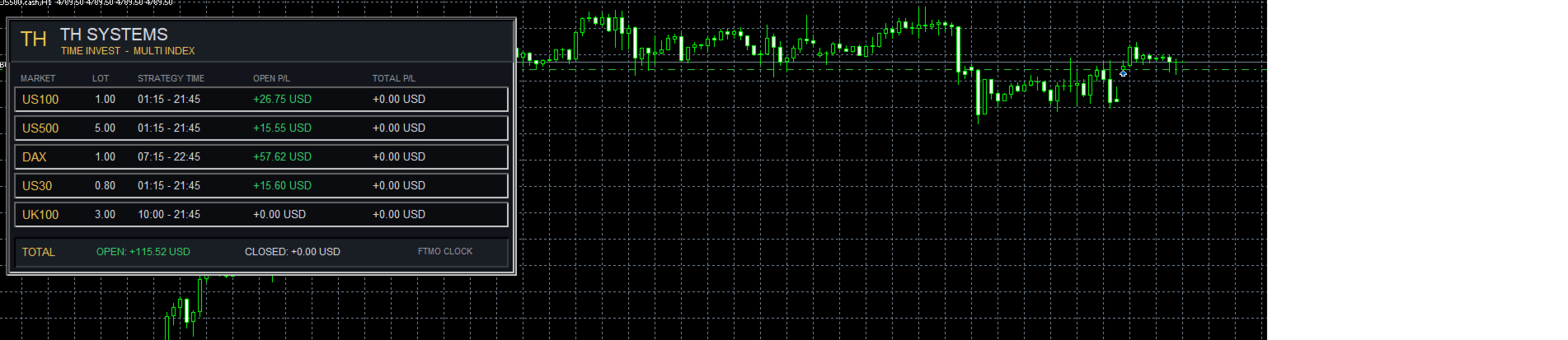
Dashboard
The integrated dashboard displays information directly on the chart, including:
- detected markets
- lot sizes being used
- strategy times
- open profit and loss
- realized results
The dashboard can be enabled or disabled in the EA settings.
For faster backtests, it can be disabled.
Notes for Use
Before using the EA on a live account, I recommend:
- Test the EA first in the Strategy Tester.
- Check whether all required symbols are detected.
- Check your broker/server time.
- Adjust Time Adjustment Hours if necessary.
- Check the desired Account Size and resulting position sizes.
- Then test the EA on a demo account first.
Backtest results may differ between brokers. Historical data, spreads, execution, contract specifications, symbol names and server times can all affect the results.
Historical results are not a guarantee of future performance.
TH Systems Time Invest is free. If something does not work, a symbol is missing, or you are unsure about the time setting, simply send me a message via MQL5 – preferably including your broker, exact symbol name and current MT5 server time.