Hyakurai MT5
- Experts
- Version: 3.1
- Activations: 5

Overview
This makes the EA accessible even for those new to system trading. It also meets the needs of those looking for an easy way to run a multi-strategy portfolio, since three strategies are managed as one. We recommend first checking it out on a demo account.
Strategies
- Anomaly | Trades according to USDJPY-specific time-based regularities
- Swing | Captures trend reversals and trails the position once it becomes profitable
- Scalping | Captures short-term counter-trend price swings in both directions
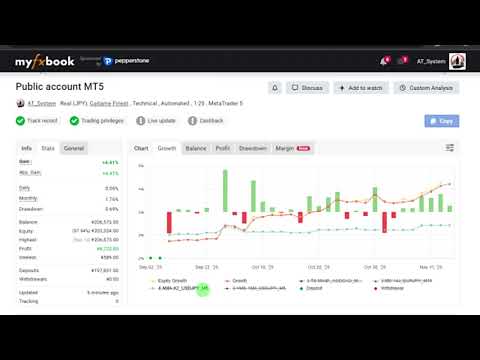
Live Forward Test
Note that Str2 (Swing) also trades short positions, which this EA does not.
This is an MT5 account. The strategies are identical between MT4 and MT5.
Setup
- Currency pair | USDJPY
- Timeframe | 5-minute
- GMT | +2/+3 (for Daily chart with 5 bars per week only)
- MT4 chart history bar count | 1000 or more
* Even if set on an FX pair other than USDJPY, it will automatically switch to and be set on the USDJPY chart.* All 3 strategies run on a single chart.
Specifications
- Number of positions | 3
- Max TP/SL | 250/140 pips (adjustable)
- Weekend carryover | Yes
- Year-end/New Year | No new entries from 12/21–1/3; only closing trades are executed
Parameter Overview
- Magic No. | The entered value is assigned to Strategy 1. Strategy 2 is automatically set to +1, and Strategy 3 to +2, from the entered value.
- Initial Balance | The reference balance for Lot Growth Rate. Enter your balance at the start of trading, in your account currency.
- Lot Growth Rate | Rapid lot changes carry higher risk, so lot changes can be controlled. At 0 the base is fixed at Initial Balance; at 100 it fully follows the selected fund balance.
- Allowed range from average spread | The permitted deviation from the internally measured average spread. Since the rollover period is hard to control with a maximum value alone, setting a deviation range from the average allows for broader coverage.
- Show P/L pips on chart | Displays the trade line and pips on the chart.
How to Determine Compound Lot Size
Lot size should be decided at your own responsibility, according to your trading environment and capital. No recommended values are provided.
When Lot Calculation Mode is set to 1=Balance or 2=Free Margin, the lot size is determined as follows:
- Base balance = Initial Balance + (Fund balance for 1 or 2 − Initial Balance) × Lot Growth Rate
- Lot size = Base balance × Risk Percent ÷ (SL pips × profit/loss per pip for 1 lot)
* SL pips uses the largest value among the three strategies.
- Enter your balance at the start of trading in Initial Balance, in your account currency.
- Run a backtest optimization on two parameters: Risk Percent and Lot Growth Rate.
- Check the maximum drawdown in the results list and choose a combination you can tolerate.
* In backtests, currency conversion rates may be calculated with approximate values. The lot size will not exactly match live trading, so please use it as a guide.