Shiranui MT5
- Experts
- Version: 3.8
- Updated: 19 September 2026
- Activations: 5

Overview
"Shiranui" is an EA that performs short-term trading on the major currency pair EURUSD. EURUSD is the most heavily traded currency pair in the world, but while it stays calm during the Tokyo session, it suddenly turns volatile during the London session and around US/European economic indicators. Capturing this shift between calm and volatility is surprisingly difficult with this pair.
Average holding time is 8 hours for buy positions and 7 hours for sell positions, and positions may be carried over the weekend. Backtest analysis shows a trading frequency of roughly 80 to 160 trades per year.
Position management is a fully single-position system with no grid, no averaging down, no martingale, and no hedging, and losses are limited by always setting TP/SL. Because the profit target per trade is kept small, the win rate runs high at around 70%, while gains and losses accumulate in small increments — and this also makes the EA more sensitive to spread.
To ensure reproducibility while avoiding overfitting, this EA was developed using a combination of MT5 real tick data and MT4's Tick Data Suite (TDS).
To prevent unnecessary losses, the EA is equipped with a range of support features that reduce the risk of operational mistakes, including automatic chart setup, duplicate magic number alerts, and prevention of entries when funds are insufficient.
For verification support, it also retains the trade-detail export function and on-chart trade history display that were used during development.
These features make the EA approachable for those new to systematic trading, while still meeting the needs of experienced users. Please start by trying it out on a demo account.
Live Forward Test
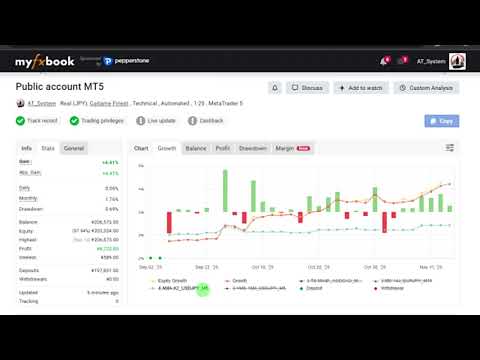
Please check the myfxbook page linked in the video channel's description.
This is an MT5 account. The strategies are identical between MT4 and MT5.
Setup
- Currency pair | EURUSD
- Timeframe | M5
- GMT | +2/+3 (for 5-day daily candles only)
- MT4 bars displayed setting | 1000 or more
- Recommended account | Low-spread account
*Even if attached to a chart of an FX pair other than EURUSD, it will automatically switch to and set up a EURUSD chart.
Specifications
- Number of positions | 1
- Hedging | None
- Max TP/SL | 90/150 pips (adjustable)
- Weekend carryover | Yes (adjustable)
- Year-end/New Year | No new entries from Dec 21 to Jan 3, closing only
Parameter Overview
- Initial Balance | The reference balance for Lot Growth Rate. Enter your balance at the start of trading, in your account currency.
- Lot Growth Rate | Rapid lot changes carry higher risk, so lot changes can be controlled. At 0 the base is fixed at Initial Balance; at 100 it fully follows the selected fund balance.
- Allowed range from average spread | This sets the allowed deviation from the internally measured average spread. Since rollover periods are hard to control with a maximum value alone, setting a deviation range from the average provides broader coverage.
- CooldownHours / CooldownLoss_pips | If the loss from a single position closure is equal to or greater than CooldownLoss_pips, new entries are prohibited for the duration specified by CooldownHours. This is used to suppress overtrading during sudden market moves. Setting CooldownHours to 0 disables this function.
- Export trade info to CSV | Outputs details such as execution spread, average spread, and slippage for each trade.
*Note that logs may be output twice when a position closes via TP/SL. - Show P/L pips on chart | Displays the trade line and pips on the chart.
How to Determine Compound Lot Size
Lot size should be decided at your own responsibility, according to your trading environment and capital. No recommended values are provided.
When Lot Calculation Mode is set to 1=Balance or 2=Free Margin, the lot size is determined as follows:
- Base balance = Initial Balance + (balance of 1 or 2 - Initial Balance) x (Lot Growth Rate / 100)
- Lot = Base balance x (Risk Percent / 100) / (SL pips x profit/loss per pip per 1 lot)
* The larger of the Buy SL and Sell SL (in pips) is used.
- Enter your balance at the start of trading in Initial Balance, in your account currency.
- Run a backtest optimization on two parameters: Risk Percent and Lot Growth Rate.
- Check the maximum drawdown in the results list and choose a combination you can tolerate.
* In backtests, currency conversion rates may be calculated with approximate values. The lot size will not exactly match live trading, so please use it as a guide.