NexaPulse
- Experts
- Version: 1.70
- Updated: 23 July 2026
- Activations: 5

NexaPulse
Fully Automated Trading EA – MQL5 Algorithmic Trading Robot
SHORT DESCRIPTION
NexaPulse US100 H1 is an automated trading system with strategy values adjusted for the Nasdaq 100 (US100) H1 chart. This EA is not limited to a specific symbol — it operates based on the symbol of the chart it is attached to, so you can apply it to the chart of your choice. Buyers can adjust the trading symbol (selected by attaching the EA to the chart), the lot size, the leverage reference (default 1:1000), the trailing-stop start point value in points (default 7000pt) — the full-close profit target is always fixed at a set multiple above this same point value — and the daily maximum loss limit percentage (default 25%). The only value fixed in the product build is the chart timeframe: H1. Built as an MQL5 automated trading program, NexaPulse runs as an algorithmic trading bot that requires no manual intervention once attached.
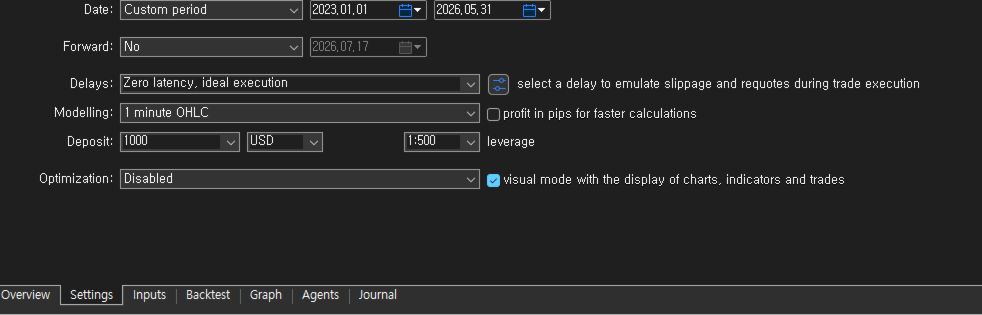
TEST CONDITIONS (Default / Recommended Settings)
- Broker: XM
- Initial deposit: $1,000
- Leverage: 1:1000
- Symbol: Nasdaq 100 (US100)
- Timeframe: H1 (fixed)
- Lot size: 1.00
- Max drawdown limit: 25%
- Trailing-stop start point value (pt): 7000pt (default)
- Test period: January 1, 2023 – July 20, 2026 (Strategy Tester)
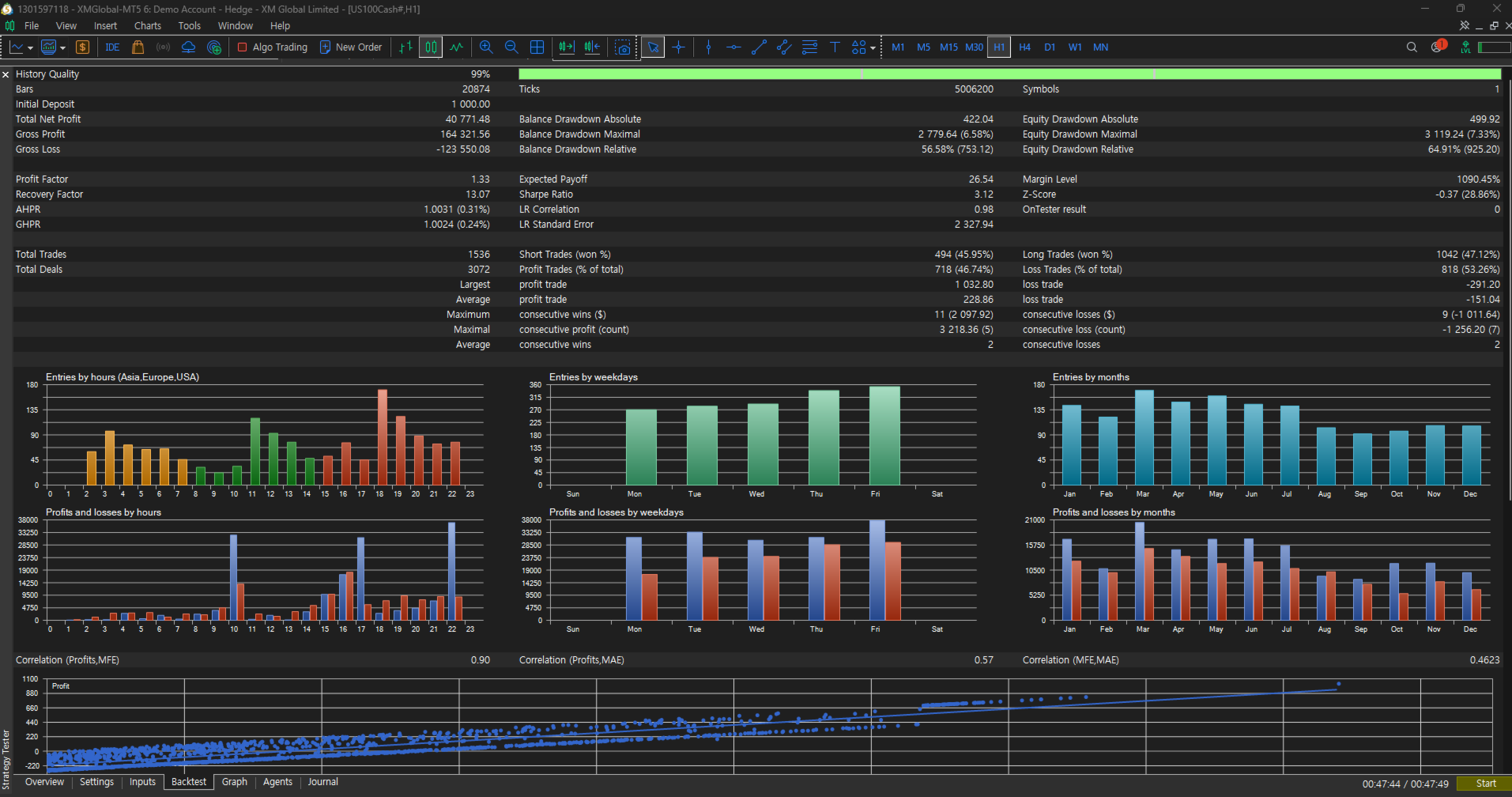
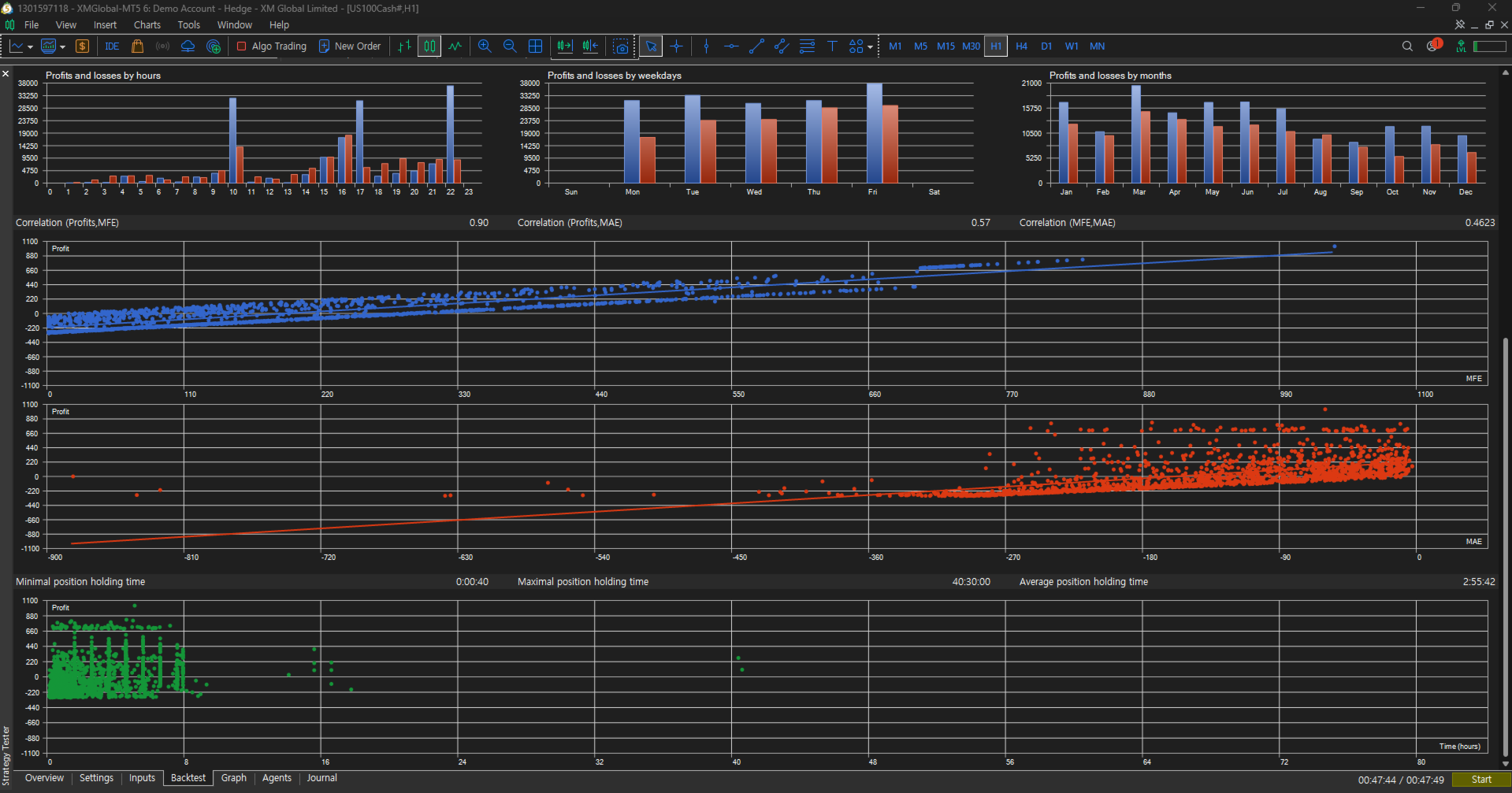
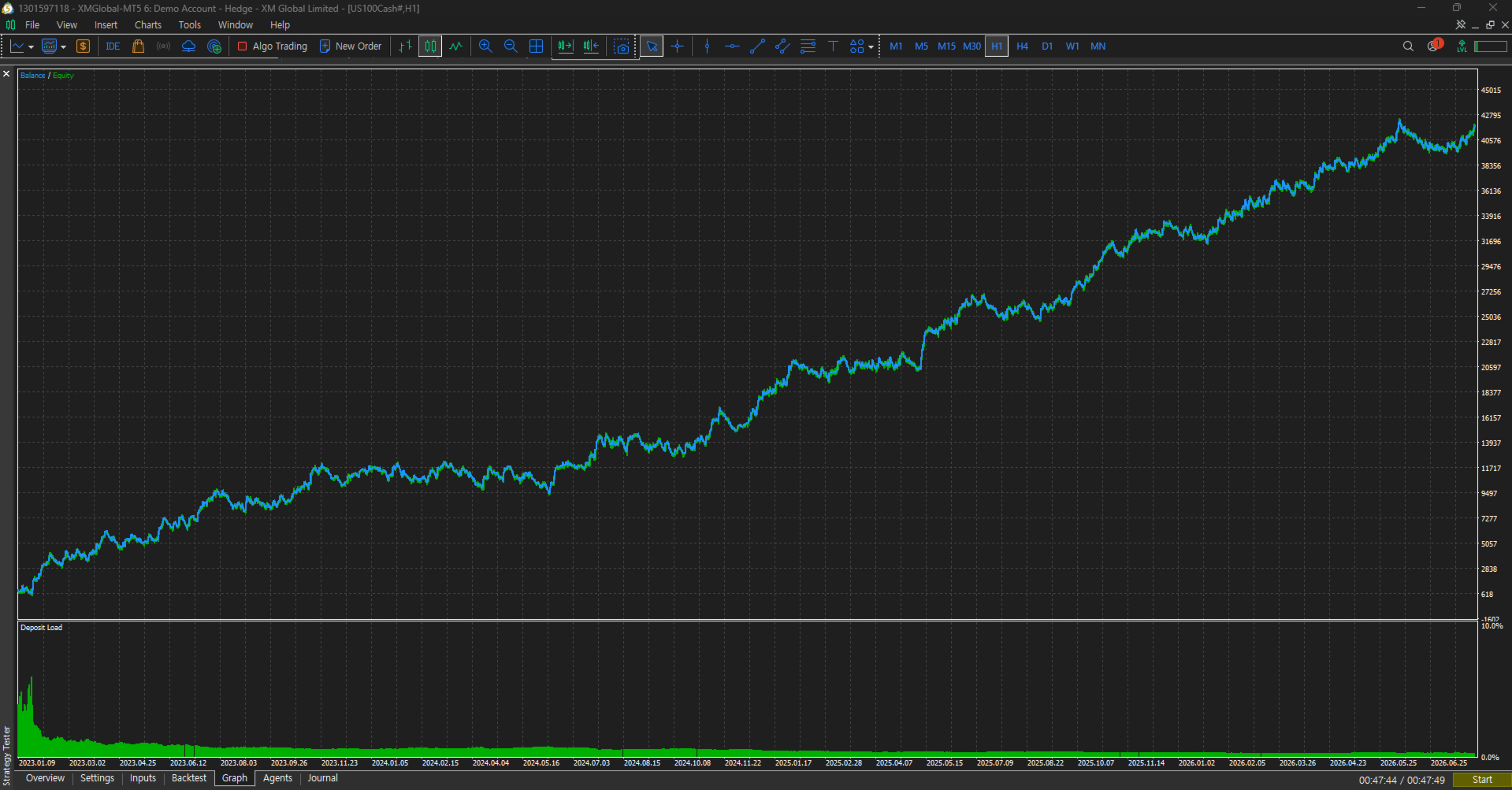
The test result shown in the image was run under identical conditions to those above, with the sole difference being a lot size of 4.00.
Backtest results do not represent live trading performance. Any yearly performance figures shown have been personally verified by the seller using Strategy Tester before upload.
DETAILED DESCRIPTION
NexaPulse US100 H1 is an Expert Advisor with strategy values tuned around the Nasdaq 100 index on the H1 timeframe. It is not tied to a single instrument — it operates based on whichever symbol's chart it is attached to, so you're free to run it on the chart of your choice. To keep the intended execution behavior consistent, the core strategy values are fixed inside the product build. As a backtested automated-trading EA, NexaPulse also includes built-in risk management to help control drawdown. Buyers can change:
1. Trading symbol — selected simply by attaching the EA to the chart of the instrument you want
2. Lot size input
3. Daily maximum loss limit (%) — default 25%, locks new entries for the rest of the day once reached. Note that setting the loss limit too low may cause entries to be blocked prematurely even during normal fluctuation ranges, reducing profit opportunities.
4. Leverage reference — default 1:1000 (same as tested), used for the optional leverage-based lot scale reference; it does not override your broker's real account leverage
5. Trailing-stop start point value (pt) — default 7000pt; sets how far below (long) / above (short) the entry price the trailing stop begins. The full-close target is fixed at a set multiple above/below this same point value, so changing the pt value moves both the trailing stop and the target together
KEY SAFE TRADING FEATURES
- Daily loss-limit lock: if the daily loss reaches the buyer-configured percentage of the balance at the start of the day (default 25%, set via the Daily maximum loss limit input), all open positions are closed and new entries are locked for the rest of that trading day. The lock releases automatically at the start of the next trading day.
- Trailing stop active from entry: a protective trailing stop is applied as soon as a position opens.
- Close at target profit: when the target profit is reached, the position is closed immediately in full.
- First 40 minutes after market open: entries blocked to avoid volatility risk
- Near market close: entries automatically blocked
- These built-in mechanisms make up the complete list of the EA's safe-trading features.
- Entries are taken across all three major sessions: US, Europe, and Asia
- Enters only at optimal setups → may wait 24+ hours if no signal appears
RECOMMENDED ENVIRONMENT
- Symbol: US100 / NAS100 / your broker's Nasdaq 100 index symbol (recommended, not mandatory — other symbols can be used too)
- Timeframe: H1 (fixed — the only value that cannot be changed)
- Preset mode: internal fixed preset based on the bundled configuration
FREQUENTLY ASKED QUESTIONS
Q1. Can I customize the settings?
A1. Yes — see the adjustable settings listed under Detailed Description above (trading symbol, lot size, daily maximum loss limit, leverage reference, and trailing-stop point value). Everything else is fixed internally to preserve the intended execution behavior; the chart timeframe (H1) is the only value that cannot be changed at all.
Q2. Can I use it with any broker?
A2. It works with any broker that supports MetaTrader 5. Testing and the recommended conditions are based on an XM-style spread/execution environment, so a low-spread account is recommended. You can also adjust the leverage reference and the trailing-stop point value to match your own broker's conditions.
Q3. Is it built for one specific symbol only?
A3. No. It runs on whichever symbol's chart you attach it to. That said, the strategy values are tuned specifically for the Nasdaq 100 (US100) on H1, so that combination is recommended for best results.
Q4. Does it trade fully automatically?
A4. Yes. Once attached and Algo Trading is enabled, entries and exits are handled automatically whenever the built-in conditions are met.
Q5. How does risk management work?
A5. Through the built-in safeguards described above under Key Safe Trading Features: the daily loss-limit lock, the entry block during the first 40 minutes after market open, the entry block near market close, the immediate trailing stop, and the close at target profit.
Q6. What do I receive after purchase?
A6. The EA file (.ex5), ready to run immediately — every strategy value is already set to the tested defaults inside the EA, so no separate settings file is needed. Just attach it to the chart of the symbol you want, and adjust the lot size, daily loss limit, leverage reference, and the trailing-stop point value from the input panel if needed. For questions, support is available through MQL5 comments or MQL5 private messages.
Q7. How should I test it properly?
A7. In the Strategy Tester, set a $1,000 deposit, the Nasdaq 100 (US100) H1 chart, and "1 Minute OHLC" mode. The leverage reference and the trailing-stop point value already default to the tested values (1:1000 and 7000pt), so you only need to set the lot size — leave everything else unchanged.
HOW TO USE
1. Attach the EA to the chart of the symbol you want to trade (Nasdaq 100 / US100 H1 recommended).
2. Enable Algo Trading.
3. Adjust the lot size and, if needed, the other buyer-adjustable settings listed above — all default to the tested values.
4. Do not change any other values; the chart timeframe (H1) is the only value that is fixed.
RISK DISCLOSURE
Trading involves risk of loss. Past performance does not guarantee future results. This description does not guarantee profits, and backtest results must not be presented as live trading performance. Please test thoroughly in a demo environment before using it on a live account. Additionally, before live trading, always run a backtest first and enter with a lot size appropriate to your investment capital.
SUPPORT
Support is provided only through MQL5 comments or MQL5 private messages.