ATR Pulse Engine
- Experts
-
Lucas Johannes Martinus Vercoulen
 My name is Luc, 25 years old and living in The Netherlands.
 - Version: 3.30
- Updated: 29 September 2026
- Activations: 5
ATR Pulse Engine enters on a candle that is materially larger than current volatility, and surrounds that entry with the risk management, account protection and filtering needed to run it unattended.
The entry itself is a single piece of logic: when a completed candle exceeds the current ATR by a configurable multiple, the move is treated as momentum rather than noise. Everything else in the EA decides whether that signal should be acted on, how large the position should be, and what happens to it afterwards.
No martingale, no grid, no averaging down. Every position carries a stop loss from the moment it exists, and every filter, risk profile and protection layer is optional and set by you.
Curious about live, verified results? This EA, together with my other publicly available EAs, are actively traded as part of my portfolio. Check out my MQL5 signal page.
The entry, and what can narrow it
The base signal fires on any completed candle larger than the ATR multiple you set. On its own that is deliberately broad, so five optional filters are available to narrow it. Each is off by default and each reports in the journal when it blocks a signal, so you can see what a filter costs you before deciding to keep it.
- Trend filter — only takes signals in the direction of a moving average on a timeframe you choose
- Multi-timeframe ATR confirmation — requires the higher timeframe candle to be oversized as well
- Candle quality filter — sets a minimum body-to-range ratio, which removes dojis and spinning tops from the signal set
- Support/resistance zones — blocks entries that would open directly into a level the market has repeatedly respected
- Time window filter — restricts entries to a range of hours
The signal timeframe is set inside the EA and is independent of the chart it runs on. Direction can be limited to long only or short only.
Position sizing
Four sizing profiles are available: a fixed amount per trade, a percentage of equity, a fixed lot size, or a daily risk budget divided across the number of trades you expect that day. The last of these is aimed at accounts with a hard daily loss limit, such as prop firm accounts.
Two situations that normally end in a rejected order are handled before the order is sent. If the calculated size falls below your broker's minimum, you choose in advance whether the trade is skipped or executed at the minimum lot — the second option means the trade carries more risk than configured, which is why it is a choice rather than a default. If the position would need more free margin than the account has, the EA reports the shortfall in the journal and skips the trade instead of sending an order the broker can only reject.
Account protection
A maximum drawdown blocks new entries once it is reached, and a profit target closes everything once it is genuinely reached, spread and commission included. Both can be measured against a fixed starting balance or a trailing equity high, and both can be left switched off. The trailing equity high is stored in a terminal Global Variable, so it survives a restart.
News filter
The filter reads the live economic calendar and can block new entries, close open positions, or temporarily remove stop-loss and take-profit levels around an event so they are not taken out by a spread spike. Which currencies and impact levels count is configurable. Its state is written to disk, so a restart or a crash during a news window does not leave a position unprotected.
Trade management
Trailing stop, break-even and trailing take profit are independent of one another and each can be configured or left off. All three work in either points or a percentage of the entry price.
The two built-in presets
The EA ships with a preset for XAUUSD and one for BTCUSD. Selecting one locks the strategy and filter settings to a configuration that has been optimised and then verified on out-of-sample data; your risk profile, account protection, chart visuals, magic number and slippage stay your own.
The two are the same engine with different numbers, and the difference is instructive. Gold works with a tight stop and a wide target, and takes its profits mainly from the take profit and a trailing stop that follows at a distance. Bitcoin needs a far wider stop, places its take profit well out of the way, and leaves the exiting to the trailing stop. Both run long only on the H1 timeframe.
Everything remains editable. If you want to run the EA on another market, change the configuration and the entire risk and protection layer comes with it.
Backtest results
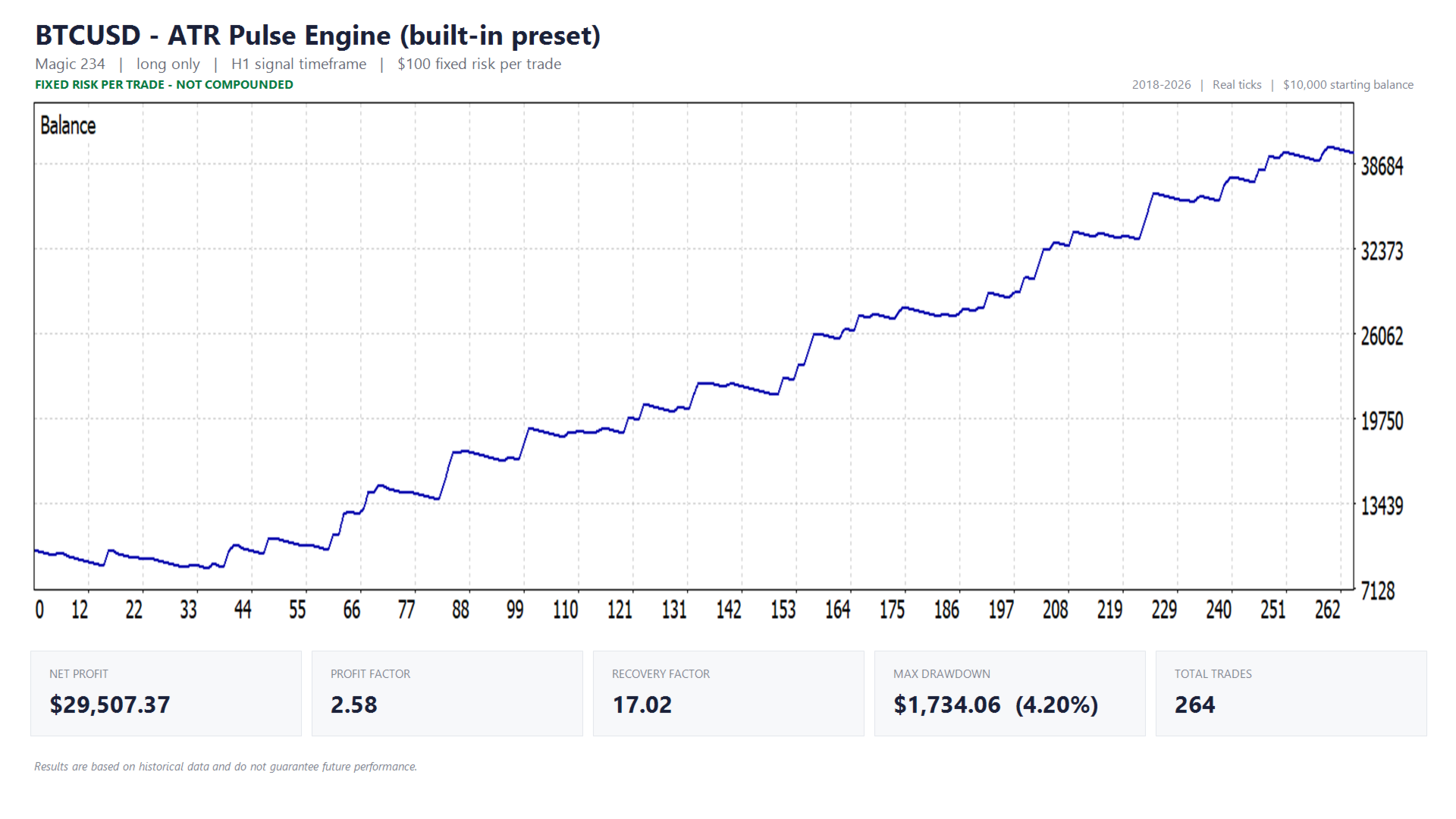
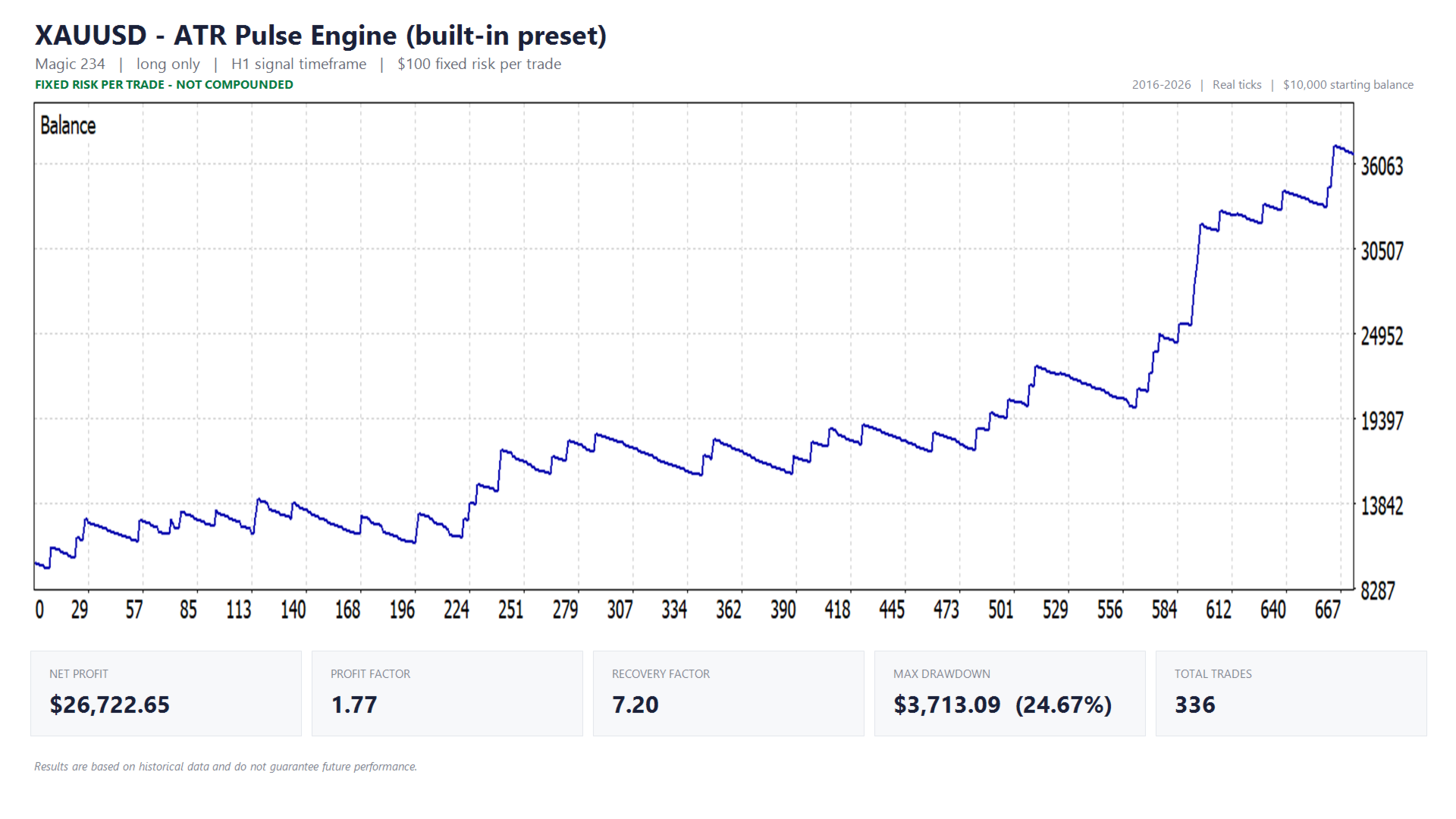
The equity curves and full reports are further down this page, including drawdown and profit factor. Test conditions:
- Symbols: XAUUSD and BTCUSD, each on its own built-in preset
- Risk per trade: $100 fixed, so every trade carries the same weight from the first to the last
- Historical tick data: Dukascopy
- Test period: 01-01-2016 to 01-01-2026 (BTCUSD: 2018–2026, limited by available data)
- Starting balance: $10,000
- Real tick modelling, so the spread comes from the tick data itself rather than a fixed setting
- Commissions: set to standard broker rates within the test environment
Results are based on historical data and do not guarantee future performance. A volatility strategy trades in bursts and will go through extended quiet stretches; the reports show what those stretches looked like.
Technical settings and notes
The daily risk budget is portfolio-wide
Under that sizing profile, "max daily positions" is the total number of trades you expect across your entire setup that day, not just on this chart. If you run the EA on several symbols or alongside other EAs, enter your full portfolio total; otherwise the daily budget is divided over too few trades and each one is sized too large.
Presets override the strategy only
Selecting a preset changes the strategy and filter settings. Risk profile, account protection, chart visuals, magic number and slippage are never touched.
Magic numbers
If you run the EA on several charts or symbols, give each instance its own magic number. The magic number determines which positions belong to which instance, so risk management and protection never act on another instance's trades.
Resetting the equity-trailing-high reference
If you use a trailing equity high as your protection reference, that value survives a restart and can therefore go stale after a withdrawal. To reset it: press F3, find the equity-high variable for this EA, and delete it. It reinitialises from your current equity.
Enabling the news filter (required setup)
The news filter retrieves the calendar over the internet, so WebRequest access has to be enabled or it stays inactive:
- Go to Tools → Options
- Open the Expert Advisors tab
- Enable "Allow WebRequest for listed URL"
- Add: https://nfs.faireconomy.media
WebRequest does not work inside the Strategy Tester, so the news filter is disabled automatically during backtests.
Verifying the news filter
Two ways to check that it is working. Enable "Show news filter status on chart" to see on the chart whether a news window is currently active. Or enable "Print news event in Experts journal for verification" to log every detected event with its currency, impact and timing, and compare that against the calendar itself.
Event times are converted to your broker's server time automatically. "Broker GMT offset" is 0 by default, which means auto-detect; if the logged times do not match the calendar, set the offset manually.
Settings that do not add up are refused, not ignored
If a combination of settings is inconsistent — a filter enabled without a valid value, for example — the EA does not start with it. It reports in the Experts tab exactly which setting needs changing.
Timeframe and execution
The EA does not depend on the timeframe of the chart it is attached to; the signal timeframe is set separately. Entries are market orders, so execution quality matters: a VPS and a broker with low costs and fast execution are recommended.