REACTIVE FX v1.85 - Your Ultimate Gold Trading Companion
WHEN YOU BUY I WILL ALSO INCLUDE 2 POWERFUL EA'S FOR PROFIRMS CHALLENGE OBJECTIVES HELPER JUST D'M ME AFTER YOU PURCHASED.
Welcome to REACTIVE FX – The Smart, Adaptive Gold Trader!
Are you ready to harness the power of gold's dynamic movements with an EA that's built for precision and protection? REACTIVE FX v1.85 is your all-in-one automated trading powerhouse, designed exclusively for XAUUSD on the 15-minute timeframe. Crafted with cutting-edge market responsiveness, it dynamically adjusts to live conditions while prioritizing risk control and profitability.
Whether you're a seasoned trader or dipping your toes into automation, REACTIVE FX delivers seamless performance with a sleek dashboard for real-time insights. Download it today and let it react to opportunities while you relax!
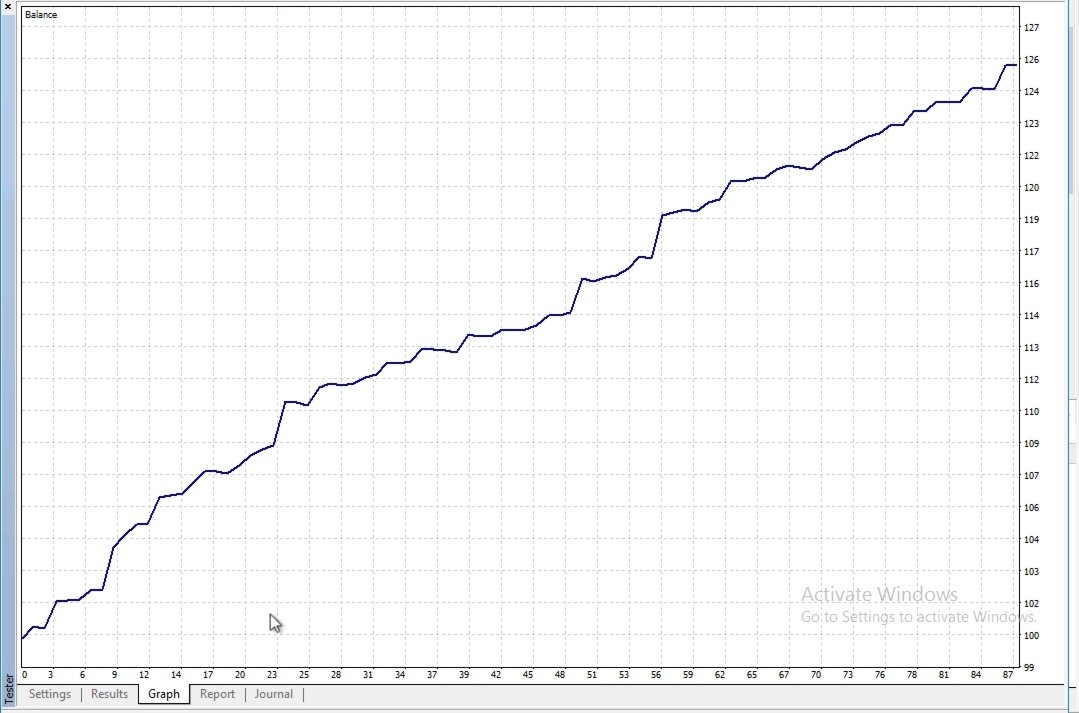
NOTE: For backtesting, use 99.90% quality tick data to obtain accurate backtest reports. If not, the results may show a downtrend curve. This EA is exclusively for XAUUSD on the M15 timeframe only!
Quick Guide: Download Tickstory for MT4 Tick Data Backtesting (XAUUSD Focus)
1. Visit www.tickstory.com.
2. Click "Download" > Select "Tickstory Lite" (free version).
3. Run the installer (.exe for Windows) and follow prompts.4
. Launch Tickstory—ready for XAUUSD data downloads (search symbol, pick Dukascopy provider for 99.90% quality).
Features Profile: Why Choose REACTIVE FX?
REACTIVE FX stands out with its intelligent, multi-layered approach to gold trading. Here's what makes it a game-changer:
- Dynamic Market Response Engine: Automatically detects and capitalizes on gold's natural swings using adaptive price level monitoring. It places strategic entry points based on recent bar extremes, ensuring timely reactions without overcomplicating setups.
- Smart Position Scaling: Enhances exposure during favorable recoveries by adding layers at predefined intervals, helping to smooth out drawdowns and amplify gains in aligned conditions.
- Advanced Volatility Shield: Monitors market turbulence in real-time and halts new actions or closes positions during extreme swings, keeping your account safe from wild rides. This includes proactive prevention of trading during high-impact news events by detecting sudden volatility spikes associated with economic releases.
- Trend-Aware Filtering: Integrates momentum indicators to avoid entries in overly chaotic or one-sided environments, focusing only on high-probability responsive opportunities.
- Adaptive Market Condition Handler: Seamlessly adjusts its behavior across varying market phases – from calm ranges to trending bursts – ensuring optimal performance in ranging, trending, or volatile sessions without manual tweaks.
- Profit-Locking Trailing Mechanism: Once in the green, it intelligently trails protective levels across all layers, securing profits while allowing room for continued upside.
- Dual Risk Management Modes: Choose between direct broker-integrated safeguards or hidden execution for ECN compatibility, with customizable distance buffers for ultimate flexibility.
- Real-Time Performance Dashboard: A stunning on-chart GUI tracks everything from floating P/L to peak equity, drawdowns, and live gold spot – all in a clean, black-gold theme for easy monitoring.
- Broker-Agnostic Safety Nets: Built-in checks for spreads, margins, and slippage ensure smooth operation across platforms, with visual clutter hidden for backtesting clarity.
- Proven Gold Focus: Optimized for XAUUSD's unique pip structure (treating pips as price points for accuracy), delivering consistent results on M15 charts.
- Lightweight & Efficient: Low resource usage, with debug modes for pros and one-click setup for beginners. No internet or external data needed – pure MT4 power!
🔒 Safety First – No Dangerous Strategies Here!: REACTIVE FX emphatically avoids risky systems like Martingale or grid trading, which can lead to catastrophic losses. Instead, it uses fixed lot sizing by default (0.01 lots for conservative starts) and ensures every single position is equipped with a built-in stop loss from the moment it opens, providing ironclad protection against adverse moves.
Bottom Line: REACTIVE FX isn't just an EA; it's your reactive partner that turns gold's volatility into verifiable growth. Backtested for robustness, forward-tested for real-world wins. Minimum required starting balance: $200 for optimal performance!
Installation Guide: Get Started in Minutes
Setting up REACTIVE FX is straightforward – no coding required! Follow these steps to launch it on MetaTrader 4 (MT4).
Step 1: Download & Prepare
- Download the REACTIVEFX.ex4 file
- Ensure you have MT4 installed (free from your broker like IC Markets, Pepperstone, or XM).
- Log in to your live or demo account (demo recommended for first runs).
Step 2: Install the EA
1. Open MT4 and go to File > Open Data Folder.
2. Navigate to MQL4 > Experts folder.
3. Copy-paste the REACTIVEFX.ex4 file into the Experts folder.
4. Restart MT4 (or right-click in Navigator > Refresh).
5. The EA will appear under Expert Advisors in the Navigator panel.
Step 3: Attach to Chart
1. Open a new chart for XAUUSD (Gold) on the M15 (15-minute) timeframe. (Pro Tip: Right-click chart > Properties > ensure "Show trade levels" is off if you prefer clean visuals.)
2. Drag REACTIVE FX from Navigator onto the chart.
3. In the popup, review Common tab: Enable "Allow live trading" and "Allow DLL imports" (if prompted).
4. Switch to Inputs tab: Customize parameters (see guide below). Click OK.
5. A smiley face 😊 appears in the top-right corner? You're live! ¬😔 If NOT, check Tools > Options > Expert Advisors for restrictions.
Step 4: Verify & Monitor
- The EA will auto-theme your chart (black background, gold accents) and display the dashboard at the top-left.
- Check the Experts tab in Terminal for logs (e.g., "EA initialized successfully").
- Run on demo first for 1-2 weeks to observe behavior.
- Important: Only one instance per account – attach to one XAUUSD M15 chart max.
Troubleshooting
- EA Won't Load? Ensure auto-trading is ON (green button in toolbar) and no antivirus blocks MT4 folders.
- No Trades? Confirm spread < MaxSpreadPips and sufficient margin.
- Visual Issues? Toggle HideTradeVisuals in inputs.
- Need help? Message @REACTIVE_FX on Telegram!
Ready to Trade? With installation done, tweak inputs and let REACTIVE FX do the heavy lifting!
---
Parameter Inputs Guide: Customize for Your Style
REACTIVE FX's inputs are grouped for ease. Defaults are battle-tested for conservative gold trading, but adjust based on your risk tolerance. All pips are calibrated for XAUUSD (1 pip = 0.10 price move, so SL_Pips=10000 means 100.00 distance).
Core Trading Settings
Parameter | Default | Description | Recommended Range | Tips
ManualLots | 0.0 | Fixed lot size per trade (ignores risk calc if >0). Set to 0 for auto-sizing. | 0.01–0.50 | Use 0 for beginners; 0.10 for $5K accounts.
RiskPercent | 2.0 | % of balance risked per initial layer (auto-lots only). | 1.0–5.0 | 2% balances aggression & safety; lower for small accounts.
SL_Pips | 10000 | Protective distance in points (e.g., 10000 = 100.00 price buffer). | 5000–15000 | Wider for volatile sessions; test via Strategy Tester.
TP_Pips | 5000 | Profit target distance in points (e.g., 5000 = 50.00). | 3000–8000 | 1:2 risk-reward default; scale up for trends.
Offset_Pips | 2 | Buffer beyond key levels for entry triggers. | 1–5 | 2 pips avoids false triggers; higher for choppy markets.
Execution & Safety Controls
Parameter | Default | Description | Recommended Range | Tips
Slippage | 3 | Max price deviation allowed on entries/exits (points). | 2–5 | 3 works for most; increase during news.
MagicNumber | 12345 | Unique ID to filter EA trades (avoids conflicts). | 10000–99999 | Change if running multiple EAs.
MaxSpreadPips | 50 | Max allowable spread before skipping actions. | 20–100 | 50 for gold; tighten to 30 for low-spread brokers.
UseHiddenSLTP | false | true=Hidden mode (ECN-friendly, no visible SL/TP); false=Direct set on open. | false/true | Use true for strict ECN; false for reliability.
Profit Protection & Filtering
Parameter | Default | Description | Recommended Range | Tips
TrailStart | 2000 | Points of total profit before trailing activates. | 1000–3000 | 2000 ensures breathing room; lower for quick locks.
TrailStep | 1000 | Trailing distance buffer (includes spread adjustment). | 500–1500 | 1000 for steady protection; pair with TrailStart.
Display & Debug Options
Parameter | Default | Description | Recommended Range | Tips
DebugTrailing | false | Logs trailing details in Experts tab. | false/true | Enable for analysis; disable live.
DebugSLTP | false | Logs safeguard calculations. | false/true | Useful for setup tweaks.
DebugPL | false | Logs P/L tracking (unused in v1.85). | false/true | Future-proof; leave off.
HideTradeVisuals | true | Hides arrows/lines in backtests for clean dashboard. | true/false | true for visuals; false to see entries.
Pro Tip: Start with defaults on demo. Use MT4 Strategy Tester (Ctrl+R) with "Every tick" mode for quick sims. Optimize SL/TP via genetic algo for your broker!
99.90% TICKS DATA is required upon backtesting this EA. if not you will get a downtrend curve.
---
💡 Usage Tips & Best Practices
- Account Setup: Minimum required starting balance: $200, with 1:500+ leverage recommended. ECN brokers shine with hidden mode.
- Trading Hours: All Day!
- Monitoring: Watch the dashboard for spread, P/L, and drawdown. Set MT4 alerts for >5% DD.
- Scaling Up: After 1 month demo success, go live with 1% risk. Track via Myfxbook.
- News Events: EA auto-skips high-vol, but pause manually for FOMC/NFP.