Osloma Spectra is a single-entry, Small SL, Quick TP Expert Advisor for MT5 that scans multiple timeframes for key market structure levels. It then performs a thorough analysis of market structure and price action as price approaches these levels, and only enters a trade when the probability of a successful momentum scalp is high.
This page serves as the Setup & Input Guide for Osloma Spectra v1.3 (last updated 09/09/2026)
Setup & Input Guide

LOT SIZE MODEL
- Lot Size Method (Fix/Auto): Select whether Spectra uses a fixed lot size or automatically calculates lot size based on account equity.
- FixLot Input: Lot size used when FixLot is selected. Example: 0.01 means every new trade uses 0.01 lot.
AUTOLOT SETTINGS
- AutoLot 0.01 BaseAmount: Defines how much usable account equity corresponds to each 0.01 lot in AutoLot mode. Lower values increase risk and position size.
- AutoLot CapitalBuffer in Percentage: Percentage of account equity excluded from AutoLot calculations. Use this to keep part of the account balance as an additional safety buffer.

EXECUTION SETTINGS
- Signal Profile: Selects the Spectra signal profile and determines how many internal signal scanners are active. Different profiles offer different trade frequency and diversification (refer details below).
- Execution Model (Sequential / Simultaneous): Sequential processes eligible signals one after another while Simultaneous processes multiple eligible signals at once.
- Use Breakeven Protection: If this is enabled, Stoploss is trailed at Breakeven as soon as the position goes into a preset minimum floating profit.
- Breakeven Delay: Minimum number of seconds after entry before breakeven and dynamic trade-management functions are allowed to activate.
SIGNAL PROFILES
- Max: Uses the full Spectra signal set and allows up to 10 (ten) multiple simultaneous positions at a time from different signal combinations.
- Box (Default): Uses a set of three optimized core Spectra signals. Opens up to 3 three simultaneous positions at a time based on generated signal combinations.
- MaxBox: Uses the full Spectra signal set while limiting simultaneous positions to three, i.e. up to 3 simultaneous positions at a time.
- MaxSingle: Uses the full Spectra signal set but allows only one Spectra position at a time, i.e. only 1 position at a time.
- BoxSingle: Uses a set of three optimized core Spectra signals but allows only one position at a time, i.e. only 1 position at a time.

MAGIC NUMBERS
- Magic Number Base: Base identifier used by Spectra to recognize and manage its own trades. Use a different value when running multiple independent Spectra setups on the same account.
SESSION SETTINGS
- Use TradingWindow: When enabled, new entries are allowed only during the configured trading hours. Existing positions continue to be managed normally.
- TradingWindow Start Hour: Broker/server-time hour from which Spectra is allowed to open new trades when TradingWindow is enabled.
- TradingWindow End Hour: Broker/server-time hour after which Spectra stops opening new trades when TradingWindow is enabled.
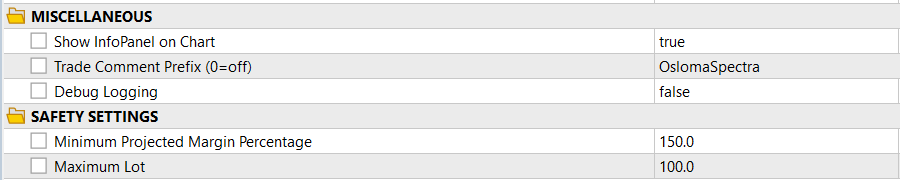
MISCELLANEOUS
- Show InfoPanel on Chart: Shows or hides the Spectra information panel on the chart. This does not affect trading logic.
- Trade Comment Prefix (0=off): Text added to Spectra trade comments for easier identification in MT5 history. Set to 0 to disable the custom prefix.
- Debug Logging: Enables additional operational logging for troubleshooting. Leave disabled during normal trading unless diagnostic information is required.
SAFETY SETTINGS
- Minimum Projected Margin Percentage: Prevents new trades when projected account margin level would fall below the specified percentage. Higher values provide a larger margin safety buffer.
- Maximum Lot: Sets the maximum lot size Spectra is allowed to place, regardless of Fixed Lot or AutoLot calculations.

HIGH IMPACT NEWS FILTER
- Use High Impact News Filter: When enabled, Spectra blocks new entries around selected high-impact economic news events. Existing trades continue to be managed normally.
- Block Entries Before News (Minutes): Number of minutes before a qualifying high-impact news event during which new entries are blocked.
- Block Entries After News (Minutes): Number of minutes after a qualifying high-impact news event during which new entries remain blocked.