

Creating a Cairo-Inspired Graphics Library for MetaTrader 5 (Part 9): Clipping, Bounds and Hit Testing
 275
 0

Contents
- Introduction
- A clip is coverage, asked of a second shape
- A rectangle, and somewhere to keep one
- Where a shape is
- Is the point inside?
- The clip object
- One multiplication in the rasterizer
- Clipping to a path
- Two things the clip exposed
- The demo
- Project structure
- Drawing learns where to stop
Introduction
A graphics engine needs more than the ability to draw shapes and fill them with colors. It must also control where those drawings are allowed to appear. Without this capability, graphical elements can extend beyond their intended boundaries, overlap neighboring components, and interfere with other parts of an interface. This becomes particularly important when developing complex applications such as trading dashboards, where panels, charts, buttons, and scrolling lists must remain visually separated.
Consider a list containing eight rows inside a panel that has enough space for only four. Without a way to restrict the drawing area, all eight rows will appear, with the remaining four spilling beyond the panel. A price line that extends past the right edge of its plot area will continue across the axis labels, while a long caption inside a narrow button may overlap the neighboring button. These problems cannot be solved by modifying the shape itself. The drawing operation must instead be restricted by a boundary belonging to another interface element.
This boundary is called a clip, and it is the main missing capability we address in this article. Along the way, we will also introduce two useful geometry operations: determining the bounding rectangle of a path and checking whether a given point is inside it.
The existing graphics library already provides the geometry and painting components required for these operations. As established in Part 8, the rendering model consists of two independent components: a mask describing how much of each pixel is covered by a shape, and a source determining the color to be applied there. The library can now fill outlines constructed from lines, polygons, Bézier curves, arcs, circles, and rounded rectangles, using either winding rule, with smooth edges and support for solid colors, linear gradients, and radial gradients.
The following overview shows how the library has evolved and identifies the components affected by this article:
Color.mqh      Part 1    the ARGB color type
               Part 4    + CairoBlendOver
Config.mqh     Part 4    CairoAaSamples
               Part 6    CairoFlattenTolerance
Surface.mqh    Part 1    a pixel buffer bound to one chart object
Paint.mqh      Part 8    the color source, and the two gradients
Path.mqh       Parts 2-7 the geometry layer
               Part 9    + SCairoRect, Bounds, Contains      <- changed
Clip.mqh       Part 9    where drawing is allowed to land    <- new today
Raster.mqh     Parts 3-5 the scanline fill, with coverage
               Part 8    the color became a paint
               Part 9    + the clip parameter                <- one line
Only Path.mqh, Clip.mqh, and Raster.mqh require changes. In Raster.mqh the runtime mechanism of clipping is one line in the inner loop of Fill, but the file also gains an include, a clip parameter on each overload, early exits and range narrowing at the top of Fill, and the new ClipToPath sweep. Color.mqh, Config.mqh, Surface.mqh, and Paint.mqh remain completely untouched.
A clip is coverage, asked of a second shape
The naive way to clip is to test every pixel against a rectangle before writing it. That works; it is what most hand-rolled drawing code does, and in its simplest form it produces a hard, jagged boundary, because a pixel is either written or it is not. That particular weakness is fixable on its own terms — a rectangular clip can be computed analytically, or supersampled, and comes out smooth. The broader limitation remains: each of those variants needs separate code for a boundary that is not a rectangle, and more code again to combine two boundaries.
The approach taken here is inexpensive for rectangles and supports non-rectangular clips without new code, because the engine already computes the necessary coverage.
Part 4 made the rasterizer produce coverage: for every pixel, a number from 0 to 1 saying how much of that pixel the shape reached. A pixel fully inside a triangle has coverage 1; one the edge passes through at an angle might have 0.37. That number is why the edges in this library are smooth.
Now ask the same question about a different shape. How much of this pixel is drawing allowed to reach? That is also a number from 0 to 1, and it means exactly the same kind of thing. The two are then combined the way every compositing engine combines a shape with a mask — by multiplying them:
final = shape_coverage * clip_coverage
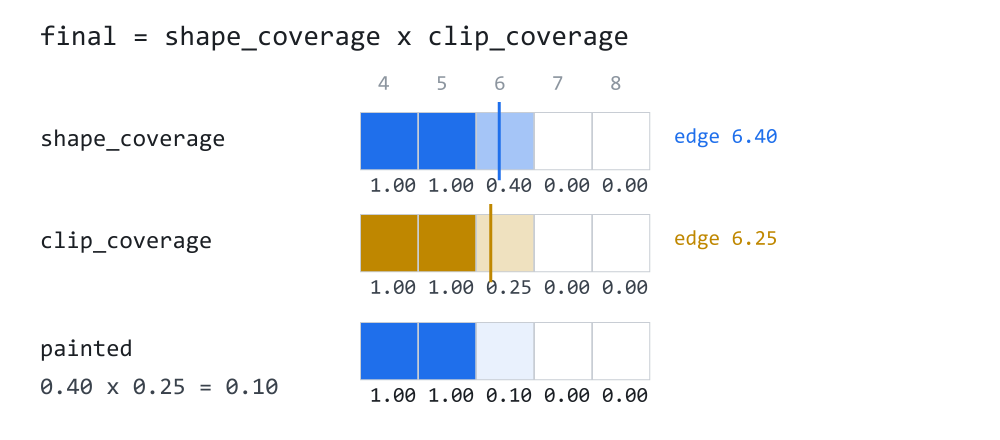
Follow column 6 across the figure. The shape ends at x = 6.40, so the shape covers 40% of that column. The clip allows up to x = 6.25, so a quarter of that same column is permitted. The model multiplies the two and paints 0.40 × 0.25 = 0.10 — a tenth of the pixel's worth of color, which is what the bottom row shows. Columns 4 and 5 are fully inside both and come out at 1.00. Columns 7 and 8 are outside the shape and get nothing, whatever the clip says.
That multiplication deserves to be named for what it is, because the article would otherwise be claiming something it cannot deliver. It is alpha compositing, not exact geometry. The true answer for column 6 is the area where the two regions actually overlap inside that pixel, and 0.40 × 0.25 only equals it when the covered part and the allowed part fall independently within the column. In the figure they do not: both are measured from the left edge, so the real intersection is the smaller of the two, 0.25, and the product understates it. The product gives the average over all possible positions of two regions of those sizes within a pixel. A mask-based compositor uses this approximation because carrying both boundaries as geometry and intersecting them per pixel would cost far more than the error it removes. From here on, "coverage" in this article means that stored mask value, not the area of a region.
It is worth knowing where to look for this error. The error is largest when the boundaries coincide. For example, if a shape edge and a clip edge run through the same pixels at the same angle, both report a coverage of 0.5 and their product is 0.25. The resulting seam is darker than either edge alone; this artifact is called conflation. It is zero wherever one side is fully in or fully out, which is every pixel that is not on a boundary, which in a panel is almost all of them.
That last sentence is a statement about panels, not a general reassurance, and three cases are worth naming because in them the error is systematic rather than rare. Self-clipping darkens the whole perimeter of a shape clipped to its own outline, because every edge pixel coincides with the clip boundary by construction. Thin geometry, such as a hairline or a one-pixel rule, consists almost entirely of boundary pixels, so the error has no interior to be diluted by. And repeated clipping, where a boundary that survives several nested clips is multiplied down once per level. In those three, treat the darkening as expected behavior of the model rather than as a bug to hunt.
With that stated, three things follow from the one line, and none of them needs any further code in the rasterizer:
- The clip is anti-aliased. A circular clip has the same smooth edge a circular fill has, because it is the same number out of the same rasterizer.
- A clip can be soft, in the model. Nothing in the arithmetic requires a clip's coverage to be 1 or 0 — if it were 0.5 across a whole region, everything drawn there would come out at half strength, and a fade would need no new code in the rasterizer. Be clear about what that is and is not: it is a property of the representation, not an API. Part 9 ships two ways to narrow a clip, a rectangle and a path, and both produce coverage that is 1 inside, 0 outside and fractional only on the boundary. A public call that takes an arbitrary halftone mask is not in this part.
- Clips nest by multiplying. Clip to a panel, then to a row inside it, and the second coverage multiplies the first. There is no special case for "already clipped" — exactly so in the arithmetic, and to within one rounding per step in the storage, for the reason the mask section gives.
A rectangle, and somewhere to keep one
Before the clip itself, the library needs a word for a rectangle. Part 9 needs one in four places — the clip bounds, the area a path covers, the region a widget owns, the pixel box the rasterizer must visit — and every one of those was previously four loose double values passed in a row.
SCairoRect goes at the top of Path.mqh, right after SCairoPoint:
//+-------------------------------------------------------------------+
//|  SCairoRect - an axis-aligned rectangle, in device pixels.        |
//+-------------------------------------------------------------------+
struct SCairoRect
  {
   double            x;
   double            y;
   double            w;
   double            h;

   //--- the four edges, named, because x + w reads worse than Right()
   double            Left() const   { return x;     }
   double            Top() const    { return y;     }
   double            Right() const  { return x + w; }
   double            Bottom() const { return y + h; }
Position and size, rather than two corners. Both forms are common and neither is better in general, but a size can be tested for emptiness in one comparison, and Part 9 tests for emptiness constantly: an empty clip is the cheapest draw there is.
It is a struct and not a class for a concrete reason. MQL5 will not return a class object from a function by value, and Bounds() further down this article returns a rectangle. As a class it would have to fill in a reference parameter instead, and every call site would need a local variable declared one line earlier.
   void              Set(const double rx, const double ry,
                         const double rw, const double rh)
     {
      x = rx;
      y = ry;
      w = rw;
      h = rh;
     }

   void              SetEmpty()
     {
      x = 0.0;
      y = 0.0;
      w = 0.0;
      h = 0.0;
     }
Now the emptiness test, which is written in a way that looks like a typo and is not:
   //--- Written as a pair of negations on purpose. A NaN extent fails
   //--- every comparison, so !(w > 0.0) reads a NaN rectangle as
   //--- EMPTY, while w <= 0.0 would read it as a rectangle of unknown
   //--- size - and an unknown clip is one that lets everything out.
   bool              IsEmpty() const { return (!(w > 0.0) || !(h > 0.0)); }
w <= 0.0 and !(w > 0.0) agree on every ordinary number and disagree on one value. A NaN is not greater than zero, not less than zero and not equal to zero, so every comparison against it is false. Write the test the obvious way and a rectangle whose width came out as NaN — from a division by a zero scale, say — reports itself as a perfectly good rectangle. It would then be used as a clip, and a clip that is not empty when it should be is a clip that lets drawing through. The negated form answers "empty" to anything that is not definitely a positive size, which is the safe direction for this particular question.
   //--- A rectangle given from one corner to another can arrive with a
   //--- negative extent. Every method below assumes it does not, so a
   //--- caller that computed a rectangle from two mouse positions
   //--- calls this once before using it.
   void              Normalize()
     {
      if(w < 0.0)
        {
         x += w;
         w  = -w;
        }

      if(h < 0.0)
        {
         y += h;
         h  = -h;
        }
     }
Contains is the point-in-rectangle test, and its half-open convention is the same one the rasterizer has used since Part 3:
   //--- Half-open on the far edges: a point at Right() is OUTSIDE.
   //--- That is the same convention the rasterizer uses for a scanline
   //--- crossing, and it is what makes two rectangles sharing an edge
   //--- claim a point once between them instead of twice.
   bool              Contains(const double px, const double py) const
     {
      return (px >= x && px < x + w && py >= y && py < y + h);
     }
Two cells of a table that share a border must not both claim the pixel on it. With <= on the far edge they would, and a mouse click on the boundary would hit whichever cell happened to be tested first.
Intersect is how one clip is narrowed by the next, and it is the method the whole part leans on:
   //--- the overlap of two rectangles, which is how one clip is
   //--- narrowed by the next
   void              Intersect(const SCairoRect &other)
     {
      const double l = MathMax(Left(),   other.Left());
      const double t = MathMax(Top(),    other.Top());
      const double r = MathMin(Right(),  other.Right());
      const double b = MathMin(Bottom(), other.Bottom());

      if(r <= l || b <= t)
        {
         SetEmpty();
         return;
        }

      Set(l, t, r - l, b - t);
     }
The overlap of two rectangles is the larger of the two left edges, the smaller of the two right edges, and the same for top and bottom. If the result is inside out, the rectangles did not overlap at all, and the answer is an empty rectangle rather than a negative one — because everything downstream tests IsEmpty() and nothing downstream is prepared for a negative width.
Union is the opposite, with one asymmetry that matters:
   //--- The smallest rectangle containing both. An empty operand is
   //--- IGNORED rather than dragging the result back towards the
   //--- origin, which is what lets a caller start from an empty
   //--- rectangle and union a list of shapes into it.
   void              Union(const SCairoRect &other)
     {
      if(other.IsEmpty())
         return;

      if(IsEmpty())
        {
         Set(other.x, other.y, other.w, other.h);
         return;
        }

      const double l = MathMin(Left(),   other.Left());
      const double t = MathMin(Top(),    other.Top());
      const double r = MathMax(Right(),  other.Right());
      const double b = MathMax(Bottom(), other.Bottom());

      Set(l, t, r - l, b - t);
     }
Without the two early returns, an empty rectangle would be treated as a zero-sized rectangle at the origin, and unioning a shape at (400, 300) with it would produce a box stretching all the way back to the top-left corner. Ignoring empties is what lets a caller write the natural loop: start with nothing, union each shape in turn, and end up with the box around all of them.
   //--- Grow on every side, or shrink for a negative amount. A border
   //--- drawn on a shape's bounds needs a rectangle half a line width
   //--- larger than the shape, and a shrink that would turn the
   //--- rectangle inside out gives an empty one instead.
   void              Inflate(const double amount)
     {
      x -= amount;
      y -= amount;
      w += amount * 2.0;
      h += amount * 2.0;

      if(w < 0.0 || h < 0.0)
         SetEmpty();
     }
  };
Two free functions follow, so that a rectangle can be built inside an expression instead of over three lines:
//+-------------------------------------------------------------------+
//|  Build a rectangle in one expression.                             |
//+-------------------------------------------------------------------+
SCairoRect CairoRect(const double x, const double y,
                     const double w, const double h)
  {
   SCairoRect r;

   r.Set(x, y, w, h);

   return r;
  }

//+-------------------------------------------------------------------+
//|  An empty rectangle, for seeding a union over several shapes.     |
//+-------------------------------------------------------------------+
SCairoRect CairoRectEmpty()
  {
   SCairoRect r;

   r.SetEmpty();

   return r;
  }
Where a shape is
A clip has to know which pixels a shape can possibly touch, so it can refuse to walk the rest. The path already holds every vertex it was built from, so the answer is a single pass:
//+-------------------------------------------------------------------+
//|  The smallest rectangle containing every vertex.                  |
//+-------------------------------------------------------------------+
SCairoRect CCairoPath::Bounds() const
  {
   if(m_point_count <= 0)
      return CairoRectEmpty();

   double min_x = m_points[0].x, max_x = m_points[0].x;
   double min_y = m_points[0].y, max_y = m_points[0].y;

   for(int i = 1; i < m_point_count; i++)
     {
      if(m_points[i].x < min_x)
         min_x = m_points[i].x;
      if(m_points[i].x > max_x)
         max_x = m_points[i].x;
      if(m_points[i].y < min_y)
         min_y = m_points[i].y;
      if(m_points[i].y > max_y)
         max_y = m_points[i].y;
     }

   return CairoRect(min_x, min_y, max_x - min_x, max_y - min_y);
  }
The interesting property of this method is that the answer is exact for the path as this library stores it, and that is a fact about this path class rather than about bounding boxes in general. The distinction matters: the box tightly encloses the vertices the rasterizer will actually fill, but not necessarily the original mathematical curve. Flattening may reduce a curve's bulge by a fraction of a pixel, within the tolerance set in Part 6. In a library that stores curves as curves, the bounding box of a cubic Bézier is normally computed from its four control points — which is quick, correct as a bound, and often several pixels too large, because the control points sit outside the curve they steer. Part 6 flattened every curve into vertices at the moment it was written. By the time a path is finished there is nothing left in it that can leave the hull of its own points, so the smallest box around the vertices is the smallest box around the shape.
An empty path gets an empty rectangle rather than a zero-sized one at the origin, for the reason Union cares about: a caller accumulating the bounds of a list of shapes must not have the result dragged back to (0, 0) by the entries that have nothing in them.
Is the point inside?
A dashboard needs to answer this on every mouse move, and it is the one place where a graphics library can disagree with the user's own eyes. If the hit test says "inside" and the pixels say "hole", the button is broken.
The way to make them agree is to decide both with the same arithmetic. That is achievable for the question most interfaces ask — is this point in the shape or not — and it is worth being precise about where the agreement ends. A hit test answers about a point; the rasterizer answers about the area of a pixel. The two coincide everywhere a pixel is wholly inside or wholly outside, and they are answering different questions in the thin band of partially covered pixels along an edge, where "the fill is 40% there" has no yes-or-no counterpart. For a button that band is one pixel wide, and the alternative — a hit test built from different arithmetic than the fill — disagrees in the middle of the shape, which is the failure that actually hurts.
Part 3 built the rasterizer by sweeping a horizontal line across a shape and counting which edges it crossed. Part 5 turned that count into the two fill rules. A hit test is that same sweep run once, on a single point: send a ray from the point out to the left, add +1 for every edge crossing it downwards and −1 for every edge crossing it upwards, and the total decides.
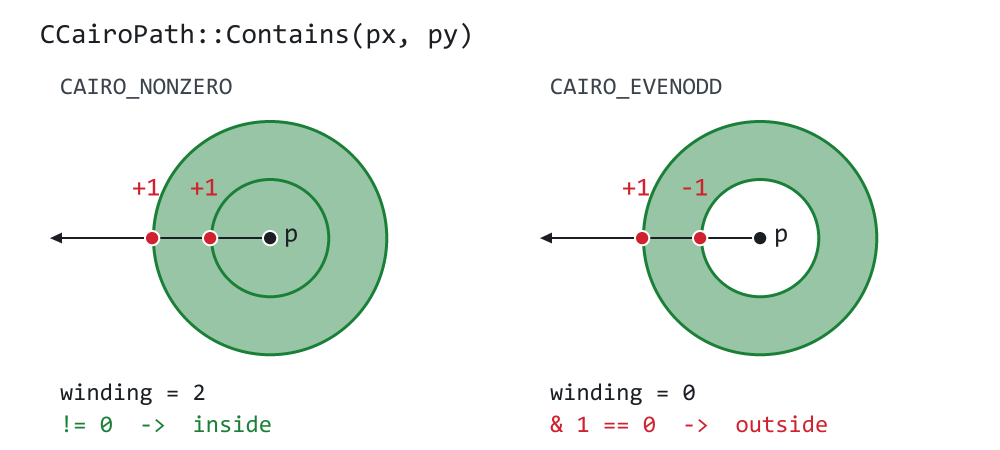
Both sides of the figure show the same two circles and the same test point in the middle. The ray crosses two edges on its way out. On the left, both contours wind in the same direction, so each crossing contributes +1. The sum is 2, and the non-zero rule reports the point as inside. The fill agrees: under this rule, the inner circle is not a hole. On the right the even-odd rule only cares about parity: two crossings is an even number, so the point is outside, and the fill has a hole in exactly the place the hit test refuses to claim. Neither answer is more correct than the other. They are answers to different questions, and the method takes a flag so the caller asks the one that matches how the shape was filled.
//+-------------------------------------------------------------------+
//|  Is the point (px, py) inside this path?                          |
//+-------------------------------------------------------------------+
bool CCairoPath::Contains(const double px, const double py,
                          const bool even_odd) const
  {
   int winding = 0;

   for(int c = 0; c < m_contour_count; c++)
     {
      const int start = m_starts[c];
      const int count = ContourLength(c);

      if(count < 2)
         continue;

      for(int i = 0; i < count; i++)
        {
         const int a = start + i;
         const int b = start + ((i + 1) % count);       // wrap = auto-close
The % count wrap closes every contour implicitly, exactly as BuildEdges does. A shape the eye reads as filled has to be clickable where it looks filled, whether or not the author remembered to call Close().
         const double y0 = m_points[a].y;
         const double y1 = m_points[b].y;

         //--- a horizontal edge is crossed by no horizontal ray
         if(y0 == y1)
            continue;

         double ytop, ybot, xtop, dxdy;
         int    dir;

         if(y0 < y1)
           {
            dir  =  1;
            ytop = y0;
            ybot = y1;
            xtop = m_points[a].x;
            dxdy = (m_points[b].x - m_points[a].x) / (y1 - y0);
           }
         else
           {
            dir  = -1;
            ytop = y1;
            ybot = y0;
            xtop = m_points[b].x;
            dxdy = (m_points[a].x - m_points[b].x) / (y0 - y1);
           }
This is the edge preparation from Part 3, inlined. The segment is stored top down whichever way it ran, and the direction it really ran is kept in dir — that single number is what the winding rule is made of.
         //--- the half-open test from Part 3: an edge owns its top
         //--- vertex and not its bottom one, so a ray passing exactly
         //--- through a shared vertex counts it once
         if(py < ytop || py >= ybot)
            continue;

         //--- only crossings to the LEFT of the point are counted -
         //--- the ray runs from the point out to minus infinity
         if(xtop + (py - ytop) * dxdy <= px)
            winding += dir;
        }
     }

   if(even_odd)
      return ((winding & 1) != 0);

   return (winding != 0);
  }
Two limits of this test should be stated before the mechanism, because neither is visible in the code. The result for a point lying exactly on an edge is undefined. Whether <= px claims it depends on the direction of that edge and on the last bit of a floating-point comparison, so callers must not rely on it. Inset or outset the hit shape by one pixel instead, which is what a real interface wants anyway. And the horizontal-edge test below is an exact ==, so an edge one ten-thousandth of a unit off horizontal takes the other branch entirely: the two are not a continuum, and a shape built from very nearly horizontal segments can report differently from the visually identical shape built from exactly horizontal ones.
The half-open interval [ytop, ybot) is doing real work here. Two edges of a polygon meet at a vertex; if the test ray passes exactly through that vertex and both edges claimed it, the crossing would be counted twice and the point would flip to the wrong side. Letting each edge own its top vertex and not its bottom one counts the shared vertex once. It is the same rule the scanline sweep uses, for the same reason, which is why the two never disagree.
The clip object
A clip is two things that look nothing alike, and keeping them apart is what makes the common case free.
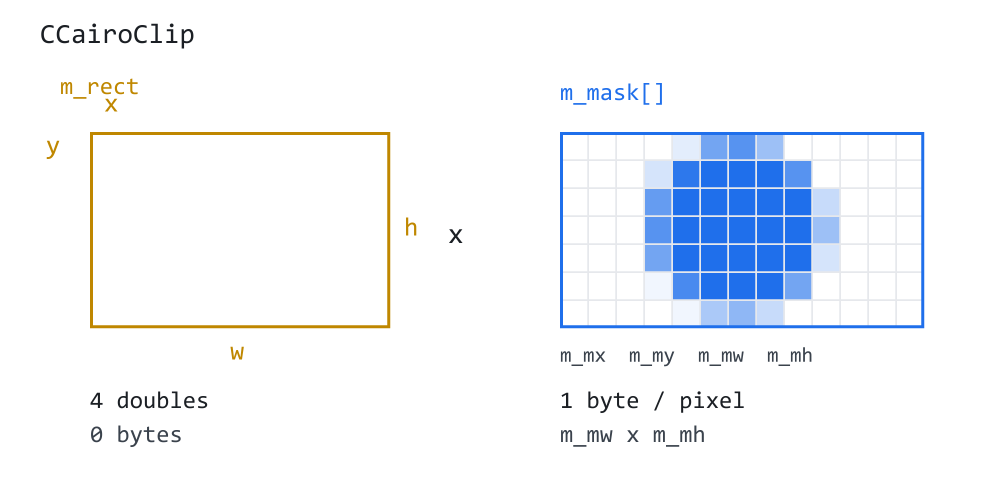
On the left, a rectangle: four double values and no allocation at all. Nearly every clip in an interface is a rectangle — a panel, a cell, a viewport, a scrolling list — so nearly every clip in practice costs nothing to store.
Cheap is not the same as free, and it is worth being exact about what a clipped fill still pays. The pointer is compared once per pixel. The bounding box is narrowed once per shape, which is work that saves far more than it costs. CoverageAt is then called for every pixel the shape touches. For a pixel lying wholly inside the rectangle, with no mask active, the call performs four comparisons and returns early. This is the common case, and the state after every reset. A pixel crossed by the rectangle's own edge instead takes the analytic path below: two MathMin calls, two MathMax calls, two NaN-safe tests and a multiplication. Those pixels are the perimeter of the clip rather than its area, so they are a vanishing fraction of a panel and the whole of a one-pixel-tall strip.
On the right, a path: one byte per pixel inside the shape's bounds, holding the coverage the rasterizer worked out when the clip was set. The blue cells in the figure are the mask of a circle, with the partial values around its edge visible as paler squares. That is the price of clipping to a round avatar or a rounded card, and it is paid once when the clip is set rather than once per shape drawn inside it.
The two multiply, as Figure 1 showed. Here is the state:
//+-------------------------------------------------------------------+
//|                                                         Clip.mqh  |
//+-------------------------------------------------------------------+
#ifndef CAIRO5_CLIP_MQH
#define CAIRO5_CLIP_MQH

#include "Path.mqh"

//+-------------------------------------------------------------------+
//| CCairoClip                                                        |
//+-------------------------------------------------------------------+
class CCairoClip
  {
private:
   SCairoRect        m_rect;           // the clip bounds, in device pixels
   bool              m_empty;          // nothing can be drawn at all

   //--- the optional soft mask, 0..255 per pixel, covering exactly the
   //--- integer pixel box [m_mx, m_mx + m_mw) x [m_my, m_my + m_mh)
   uchar             m_mask[];
   int               m_mx, m_my, m_mw, m_mh;
   bool              m_has_mask;

   //--- the PREVIOUS mask, kept alive only while a new one is being
   //--- built out of it. See BeginIntersect() for why it has to exist.
   uchar             m_prev[];
   int               m_px, m_py, m_pw, m_ph;
   bool              m_prev_mask;
   bool              m_building;       // is a Begin/End pair open?

   bool              m_alloc_failed;   // sticky until the next Reset()

public:
                     CCairoClip();

   //--- LIFECYCLE
   void              Reset(const int width, const int height);
   void              SetEmpty();
   void              Release();

   //--- NARROWING
   bool              IntersectRect(const SCairoRect &r);

   //--- Take on another clip's state, mask included. This is what a
   //--- save/restore of the clip is built from: a clip can only ever
   //--- be narrowed, so the only way back out is to have kept a copy.
   //--- The parameter is a POINTER because a stack of saved clips is
   //--- naturally an array of pointers, and MQL5 will not pass a
   //--- pointer to a reference parameter.
   bool              CopyFrom(CCairoClip *other);

   //--- QUERIES
   bool              IsEmpty() const { return m_empty;         }
   bool              HasMask() const { return m_has_mask;      }
   bool              IsValid() const { return !m_alloc_failed; }
   SCairoRect        Rect() const    { return m_rect;          }

   //--- The integer pixel range the clip can touch. The rasterizer
   //--- intersects its own bounding box with this before it walks a
   //--- single row, which is what makes a clipped draw cheap rather
   //--- than merely correct.
   int               PixelLeft() const;
   int               PixelTop() const;
   int               PixelRight() const;      // inclusive
   int               PixelBottom() const;     // exclusive, like the row loop

   //--- how much of this pixel may be drawn to, 0 .. 1
   double            CoverageAt(const int x, const int y) const;

   //--- MASK CONSTRUCTION
   //--- Called by CCairoRasterizer::ClipToPath() and by nobody else.
   //--- The four-step shape exists because intersecting a clip with a
   //--- path has to READ the old clip while WRITING the new one: the
   //--- result is old_coverage * path_coverage, and both operands live
   //--- in the same object.
   //---
   //---     BeginIntersect(bounds)   the old mask steps aside, a new
   //---                              one is allocated and zeroed
   //---     PrevCoverageAt(x, y)     read the old clip
   //---     SetMaskValue(x, y, v)    write the new one
   //---     EndIntersect()           the old mask is let go of

   bool              BeginIntersect(const SCairoRect &bounds);
   double            PrevCoverageAt(const int x, const int y) const;
   void              SetMaskValue(const int x, const int y, const double value);
   void              EndIntersect();
  };
The mask is a uchar per pixel, not a double. Coverage ranges from 0 to 1. Its 256 levels are sufficient for this mask's anti-aliased edges, which are one or two pixels wide. A clip over a 400 × 300 panel therefore costs 120 KB instead of 960 KB. Two consequences of that choice belong here rather than in a footnote. These levels are sufficient for edges, but spread across a large, low-contrast area they can band visibly. That is why this is a clip mask and not a gradient format, and why nothing in this library hands a user-authored ramp to it. And the quantization is not free when clips nest: each ClipToPath rounds its product back into a uchar, so three nested path clips carry three roundings rather than one. The error stays well under half a level per step and has never been visible in this series, but "clips nest by multiplying" is exact in the arithmetic and approximate in the storage.
The constructor is deliberately unhelpful:
//+-------------------------------------------------------------------+
//| Constructor - an empty clip, which allows nothing.                |
//+-------------------------------------------------------------------+
CCairoClip::CCairoClip()
  {
   m_rect.SetEmpty();

   m_empty        = true;
   m_has_mask     = false;
   m_prev_mask    = false;
   m_building     = false;
   m_alloc_failed = false;

   m_mx = 0;
   m_my = 0;
   m_mw = 0;
   m_mh = 0;
   m_px = 0;
   m_py = 0;
   m_pw = 0;
   m_ph = 0;
  }
A fresh clip allows nothing. Using one before Reset() has been called is a bug, and the restrictive default turns that bug into a drawing that disappears — which is noticed immediately — rather than one that quietly ignores its boundary, which is noticed three parts later.
//+-------------------------------------------------------------------+
//| Open the clip up to a whole buffer, and drop any mask.            |
//+-------------------------------------------------------------------+
void CCairoClip::Reset(const int width, const int height)
  {
   m_rect.Set(0.0, 0.0, (double)width, (double)height);

   m_empty     = m_rect.IsEmpty();
   m_has_mask  = false;
   m_prev_mask = false;
   m_building  = false;

//--- a refused allocation is not a permanent condition, and this is
//--- the method a frame begins with. Left latched, one failure in one
//--- frame would make IsValid() answer false for the rest of the
//--- session - which is how CCairoPath treats it in Clear(), and the
//--- two had no business disagreeing.
   m_alloc_failed = false;
  }
Reset is what a frame starts with. The mask array is kept rather than freed: the next clipped widget will want a buffer of about the same size, and this one is already paid for.
//+-------------------------------------------------------------------+
//| Clip everything away. Drawing through this does nothing at all.   |
//+-------------------------------------------------------------------+
void CCairoClip::SetEmpty()
  {
   m_rect.SetEmpty();

   m_empty    = true;
   m_has_mask = false;
  }

//+-------------------------------------------------------------------+
//| Hand the mask memory back.                                        |
//+-------------------------------------------------------------------+
void CCairoClip::Release()
  {
   SetEmpty();

   m_prev_mask = false;
   m_building  = false;

   ArrayFree(m_mask);
   ArrayFree(m_prev);
  }
Narrowing to a rectangle is three lines, and the line that is not there is the interesting one:
//+-------------------------------------------------------------------+
//| Narrow the clip to its overlap with a rectangle.                  |
//+-------------------------------------------------------------------+
bool CCairoClip::IntersectRect(const SCairoRect &r)
  {
   m_rect.Intersect(r);

   m_empty = m_rect.IsEmpty();

   return !m_empty;
  }
The mask is not touched. A mask is only ever read inside the clip rectangle, so shrinking the rectangle shrinks the region the mask applies to without rewriting a byte of it. "Clip to this rounded panel, then to this row inside it" therefore costs a path clip followed by two comparisons, not two path clips.
Saving a clip, so it can be put backA clip can only ever be narrowed. There is no "unclip", because the information that was thrown away is gone. The way back out is to have kept a copy:
//+-------------------------------------------------------------------+
//| Take on another clip's state, mask and all.                       |
//+-------------------------------------------------------------------+
bool CCairoClip::CopyFrom(CCairoClip *other)
  {
   if(other == NULL)
      return false;

//--- this object is being re-initialized out of another one, so
//--- whatever failed in its past is no longer about it
   m_alloc_failed = false;

   m_rect  = other.m_rect;
   m_empty = other.m_empty;

   m_mx = other.m_mx;
   m_my = other.m_my;
   m_mw = other.m_mw;
   m_mh = other.m_mh;

   m_has_mask  = other.m_has_mask;
   m_prev_mask = false;
   m_building  = false;

   if(!m_has_mask)
      return true;

   const int needed = m_mw * m_mh;

   if(needed <= 0)
     {
      m_has_mask = false;
      return true;
     }

   if(ArraySize(m_mask) < needed)
      if(ArrayResize(m_mask, needed) < needed)
        {
         m_alloc_failed = true;
         m_has_mask     = false;

         return false;
        }

   if(ArrayCopy(m_mask, other.m_mask, 0, 0, needed) != needed)
     {
      m_has_mask = false;
      return false;
     }

   return true;
  }
The mask array is copied, not shared. Two clips pointing at one array would be two objects with one owner, and the second one to narrow itself would corrupt the first — which, in a list of widgets, shows up as one row's clip mysteriously following its neighbor's. The copy is only as long as the mask actually in use, because the tail of the buffer behind it is left over from a bigger clip that has already been restored.
The parameter is a pointer rather than a reference because a stack of saved clips is naturally an array of pointers, and MQL5 will not pass a pointer to a reference parameter.
Which pixels are worth visiting
//+-------------------------------------------------------------------+
//| The integer pixel box the clip can touch.                         |
//+-------------------------------------------------------------------+
int CCairoClip::PixelLeft() const
  {
   if(m_empty)
      return 0;

   int left = (int)MathFloor(m_rect.Left());

   if(m_has_mask && m_mx > left)
      left = m_mx;

   return left;
  }

//+------------------------------------------------------------------+
//| PixelTop()                                                       |
//+------------------------------------------------------------------+
int CCairoClip::PixelTop() const
  {
   if(m_empty)
      return 0;

   int top = (int)MathFloor(m_rect.Top());

   if(m_has_mask && m_my > top)
      top = m_my;

   return top;
  }

//+------------------------------------------------------------------+
//| PixelRight()                                                     |
//+------------------------------------------------------------------+
int CCairoClip::PixelRight() const
  {
   if(m_empty)
      return -1;

   int right = (int)MathCeil(m_rect.Right()) - 1;

   if(m_has_mask && m_mx + m_mw - 1 < right)
      right = m_mx + m_mw - 1;

   return right;
  }

//+------------------------------------------------------------------+
//| PixelBottom()                                                    |
//+------------------------------------------------------------------+
int CCairoClip::PixelBottom() const
  {
   if(m_empty)
      return 0;

   int bottom = (int)MathCeil(m_rect.Bottom());

   if(m_has_mask && m_my + m_mh < bottom)
      bottom = m_my + m_mh;

   return bottom;
  }
PixelTop, PixelRight and PixelBottom are the same shape — floor on the near edges, ceil on the far ones, because a pixel partly inside a fractional boundary is not nothing. Both halves of the clip get a say, and after a path clip the mask's own box is much the tighter of the two: a circle in the middle of a chart allows nothing in the corners, and walking them is work with a guaranteed answer of zero.
The one question the rasterizer asks
//+-------------------------------------------------------------------+
//| How much of pixel (x, y) may be drawn to?                         |
//+-------------------------------------------------------------------+
double CCairoClip::CoverageAt(const int x, const int y) const
  {
   if(m_empty)
      return 0.0;

//--- FAST PATH: no mask, and the pixel sits wholly inside the
//--- rectangle, so both overlaps are a full 1.0. That is the state
//--- after every ResetClip(), which is most pixels this library ever
//--- draws, and four comparisons are cheaper than four MathMin /
//--- MathMax calls, two tests and a multiply.
   if(!m_has_mask &&
      (double)x >= m_rect.Left() && (double)x + 1.0 <= m_rect.Right() &&
      (double)y >= m_rect.Top()  && (double)y + 1.0 <= m_rect.Bottom())
      return 1.0;

//--- the pixel's overlap with the clip rectangle, one axis at a time
   double cx = MathMin((double)x + 1.0, m_rect.Right()) -
               MathMax((double)x,       m_rect.Left());

   if(!(cx > 0.0))
      return 0.0;

   if(cx > 1.0)
      cx = 1.0;

   double cy = MathMin((double)y + 1.0, m_rect.Bottom()) -
               MathMax((double)y,       m_rect.Top());

   if(!(cy > 0.0))
      return 0.0;

   if(cy > 1.0)
      cy = 1.0;

   double c = cx * cy;

   if(!m_has_mask)
      return c;
The rectangle's contribution is computed analytically, the same way Part 4 computes coverage along X: the overlap of the pixel's own square with the clip rectangle, one axis at a time, multiplied. A clip edge at x = 120.4 gives column 120 a coverage of 0.4 rather than a yes-or-no answer, which is why a panel boundary that does not land on a whole pixel stops being visible as a staircase.
//--- outside the mask's own box there is no coverage at all: the mask
//--- was built over the whole region the clip allowed at the time
   if(x < m_mx || x >= m_mx + m_mw || y < m_my || y >= m_my + m_mh)
      return 0.0;

   const int idx = (y - m_my) * m_mw + (x - m_mx);

//--- the two halves multiply, and they hold different things: the
//--- rectangle every rectangle the caller asked for, the mask every
//--- path. Neither may carry the other's boundary - the note at the
//--- end of BeginIntersect() says what happens when one does.
   return c * (m_mask[idx] / 255.0);
  }
That last comment is a warning worth stating plainly, because it is a mistake this code made once. The rectangle and the mask must hold different boundaries. Narrowing m_rect to the path's bounding box may seem like an obvious optimization, since the clip cannot reach outside it. However, it would anti-alias the edge of that box twice: once through the mask, which has just computed it properly, and once again through the rectangle. A clip at x = 10.5 would let through a quarter of the pixel where it should let through a half, and every path clip on a fractional boundary would come out visibly too dark at its edge.
Building a maskIntersecting a clip with a path has to read the old clip while writing the new one, because the result is old_coverage * path_coverage and both operands live in the same object. That is why the construction is four calls rather than one:
//+-------------------------------------------------------------------+
//| Step 1 of intersecting with a path: stand the old mask aside and  |
//| allocate a new one over `bounds`.                                 |
//+-------------------------------------------------------------------+
bool CCairoClip::BeginIntersect(const SCairoRect &bounds)
  {
   SCairoRect box = bounds;

   box.Intersect(m_rect);

//--- and with the existing mask's own box: outside it the previous
//--- coverage is already zero, so a new mask has nothing to add there
//--- and no reason to be allocated for it
   if(m_has_mask)
     {
      SCairoRect mbox = CairoRect((double)m_mx, (double)m_my,
                                  (double)m_mw, (double)m_mh);

      box.Intersect(mbox);
     }

   if(box.IsEmpty())
     {
      SetEmpty();
      return false;
     }

//--- the integer pixel box the new mask has to cover
   const int ix0 = (int)MathFloor(box.Left());
   const int iy0 = (int)MathFloor(box.Top());
   const int ix1 = (int)MathCeil(box.Right());
   const int iy1 = (int)MathCeil(box.Bottom());

   const int mw = ix1 - ix0;
   const int mh = iy1 - iy0;

   if(mw <= 0 || mh <= 0)
     {
      SetEmpty();
      return false;
     }
The new mask only has to cover the path's own bounds, narrowed by whatever the clip already allowed — so clipping to a small circle inside an already-clipped panel allocates a buffer the size of the circle, not the size of the panel.
//--- the old mask steps aside, taking its own geometry with it
   ArraySwap(m_mask, m_prev);

   m_px        = m_mx;
   m_py        = m_my;
   m_pw        = m_mw;
   m_ph        = m_mh;
   m_prev_mask = m_has_mask;

   const int needed = mw * mh;

   if(ArrayResize(m_mask, needed) < needed)
     {
      //--- give the old mask back and leave the clip exactly as it was
      ArraySwap(m_mask, m_prev);

      m_alloc_failed = true;
      m_prev_mask    = false;

      return false;
     }

//--- zero means "not reached by the path", which is the right answer
//--- for every pixel the sweep is about to skip
   ArrayInitialize(m_mask, 0);

   m_mx = ix0;
   m_my = iy0;
   m_mw = mw;
   m_mh = mh;
ArraySwap moves the old mask into m_prev without copying a byte, and EndIntersect() lets go of it afterwards. A nested clip therefore costs one extra buffer briefly, rather than one buffer per nesting level for as long as the clip lives. If the allocation fails, the swap is undone and the clip is left exactly as it was — a failed narrowing must not produce a clip that is neither the old one nor the new one.
The rest of the method is the comment quoted earlier plus three assignments:
//--- m_rect IS DELIBERATELY NOT NARROWED TO `box`.
   m_empty    = false;
   m_has_mask = true;
   m_building = true;

   return true;
  }
The other three steps are short. Reading the old clip:
//+-------------------------------------------------------------------+
//| Step 2: read the clip as it was BEFORE this intersection began.   |
//+-------------------------------------------------------------------+
double CCairoClip::PrevCoverageAt(const int x, const int y) const
  {
   if(!m_prev_mask)
      return 1.0;        // the old clip was a plain rectangle

   if(x < m_px || x >= m_px + m_pw || y < m_py || y >= m_py + m_ph)
      return 0.0;

   const int idx = (y - m_py) * m_pw + (x - m_px);

   return (m_prev[idx] / 255.0);
  }
Only the old mask is read here, never the old rectangle. The rectangle is applied once, at query time, by CoverageAt — folding it in here as well would be exactly the double counting that method's comment warns about.
Writing the new one:
//+-------------------------------------------------------------------+
//| Step 3: write one pixel of the new mask.                          |
//+-------------------------------------------------------------------+
void CCairoClip::SetMaskValue(const int x, const int y, const double value)
  {
   if(!m_building)
      return;

   if(x < m_mx || x >= m_mx + m_mw || y < m_my || y >= m_my + m_mh)
      return;

   double v = value;

   if(v <= 0.0)
      v = 0.0;

   if(v > 1.0)
      v = 1.0;

   const int idx = (y - m_my) * m_mw + (x - m_mx);

   m_mask[idx] = (uchar)(v * 255.0 + 0.5);
  }

//+-------------------------------------------------------------------+
//| Step 4: the old mask is finished with.                            |
//+-------------------------------------------------------------------+
void CCairoClip::EndIntersect()
  {
   m_prev_mask = false;
   m_building  = false;
  }

#endif // CAIRO5_CLIP_MQH
Out-of-range coordinates are dropped rather than clamped. The rasterizer already walks only the rows and columns the mask covers, so a value arriving from outside it is a bug — and clamping would hide that bug by painting it along the border, which is the hardest kind of artifact to trace.
One multiplication in the rasterizer
Raster.mqh gains an include, a clip parameter on each overload, early exits and a narrowed pixel range at the top of Fill, one line in its inner loop, and the ClipToPath sweep. The declarations come first.
   //--- Part 9 adds the clip, LAST and defaulted to NULL, so that
   //--- every call written against Parts 3 to 8 still compiles and
   //--- still means what it meant. NULL costs one comparison per
   //--- pixel and no second copy of the loop: the pointer cannot
   //--- change during a fill, so the branch is perfectly predicted.
   void              Fill(CCairoPath &path, CCairoPaint *paint, uint &buffer[],
                          const int width, const int height,
                          const ENUM_CAIRO_FILLRULE rule = CAIRO_NONZERO,
                          CCairoClip *clip = NULL);

   void              Fill(CCairoPath &path, const uint argb, uint &buffer[],
                          const int width, const int height,
                          const ENUM_CAIRO_FILLRULE rule = CAIRO_NONZERO,
                          CCairoClip *clip = NULL);
A pointer with a default, exactly as Part 8 added the paint. Every call written against the earlier parts still compiles and still draws the same pixels.
Note what that comment does and does not claim. The clip!= NULL comparison really is evaluated per pixel — it sits in the inner loop a few blocks further down. What is decided once per shape is the code path: there is no clipped Fill and unclipped Fill, no duplicated inner loop, and no branch on the kind of clip. The comparison is on a pointer that cannot change during the fill, so the branch is expected to be highly predictable; that is an expectation, not a measurement, and it depends on the processor and the code MQL5 generates. If profiling ever shows the comparison matters, it can be hoisted out of the loop into two copies of the loop, one clipped and one not.
The top of Fill gains two cheap exits and one piece of hardening:
//--- Part 9 HARDENING. The buffer is the one argument this function
//--- cannot check from inside the loop. A width and height that do
//--- not match it would be discovered as an array-out-of-range in the
//--- innermost line of the compositing loop, which points the finger
//--- at the rasterizer rather than at the caller who got the size
//--- wrong. Three comparisons, once per fill.
   if(width <= 0 || height <= 0 || ArraySize(buffer) < width * height)
      return;

//--- a clip that allows nothing is the cheapest possible draw: no
//--- edges built, no rows walked, no pixels read
   if(clip != NULL && clip.IsEmpty())
      return;
The empty-clip test is placed before BuildEdges. A widget scrolled completely out of its viewport clips to nothing, and every shape it draws then costs a single comparison — no edge list, no sorting, no row walk.
Then the bounding box, which the clip narrows before a single row is walked:
//--- PART 9: AND NOW THE CLIP NARROWS IT TOO.

   if(clip != NULL)
     {
      const int cl = clip.PixelLeft();
      const int ct = clip.PixelTop();
      const int cr = clip.PixelRight();
      const int cb = clip.PixelBottom();

      if(ix0 < cl)
         ix0 = cl;
      if(iy0 < ct)
         iy0 = ct;
      if(ix1 > cr)
         ix1 = cr;
      if(iy1 > cb)
         iy1 = cb;
     }
This is the half of clipping that costs nothing and saves a great deal. A row above the clip is going to come out of the multiplication as zero for every one of its pixels, so the cheapest way to clip it is not to visit it. A list of two hundred rows scrolled so that three are visible builds edges for all of them and walks pixels for three.
And then the feature itself, in the compositing loop:
         //--- PART 9, AND THE WHOLE FEATURE IN ONE LINE.

         if(clip != NULL)
           {
            a *= clip.CoverageAt(x, iy);

            if(a <= 0.0)
               continue;
           }
That is the whole of clipping as far as the fill is concerned. Everything in Figure 1 is this multiplication.
The flat-color overload passes the clip straight through, as it passes everything else:
//+------------------------------------------------------------------+
//| The flat-color form, kept so that every caller written against   |
//| Parts 3 to 7 still compiles.                                     |
//+------------------------------------------------------------------+
void CCairoRasterizer::Fill(CCairoPath &path, const uint argb,
                            uint &buffer[],
                            const int width, const int height,
                            const ENUM_CAIRO_FILLRULE rule,
                            CCairoClip *clip)
  {
   m_solid.SetColor(argb);

   Fill(path, GetPointer(m_solid), buffer, width, height, rule, clip);
  }
Clipping to a path
ClipToPath is Fill with the last loop changed, and that is worth noticing rather than skipping past. The bounding box, the sub-scanlines, the crossing search, the insertion sort and the winding sweep are the same machinery doing the same job. The only difference is where the coverage goes: a fill sends it to CairoBlendOver and gets a picture, a clip sends it to the mask and gets a permission map.
//+-------------------------------------------------------------------+
//|  ClipToPath - narrow a clip to the inside of a path.              |
//+-------------------------------------------------------------------+
bool CCairoRasterizer::ClipToPath(CCairoPath &path, CCairoClip &clip,
                                  const ENUM_CAIRO_FILLRULE rule)
  {
//--- the same refusals Fill() opens with, for the same reason:
//--- geometry we cannot trust produces a clip we cannot trust, and
//--- the safe answer for a clip is to allow nothing
   if(!path.IsValid())
     {
      clip.SetEmpty();
      return false;
     }

   path.BuildEdges(m_edges);

   const int edge_count = m_edges.m_count;

   if(edge_count == 0)
     {
      clip.SetEmpty();
      return false;
     }
Note which way the failures fall. A fill that cannot trust its geometry draws nothing; a clip that cannot trust its geometry allows nothing. Both are the conservative direction for what they do.
//--- The mask has to cover the path's own box, narrowed by whatever
//--- the clip already allowed. BeginIntersect() does that
//--- intersection, allocates the mask and reports back when the
//--- result is nothing at all.
   if(!clip.BeginIntersect(path.Bounds()))
      return false;

   const int ix0 = clip.PixelLeft();
   const int ix1 = clip.PixelRight();
   const int iy0 = clip.PixelTop();
   const int iy1 = clip.PixelBottom();

//--- The coverage accumulator is indexed by ABSOLUTE column, the same
//--- as in Fill(), so it has to reach the rightmost column the mask
//--- covers rather than merely be as wide as the mask.
   if(!EnsureCapacity(ix1 + 1, edge_count))
     {
      clip.EndIntersect();
      clip.SetEmpty();
      return false;
     }
Bounds() earns its place here: it is the argument to BeginIntersect, and it is what sizes the mask.
The sweep is identical to Fill's and is not reprinted in full — the same sub-scanlines, the same crossing search, the same SortCrossings, the same winding sweep calling AddSpan. What differs is the loop that consumes the finished row:
   int samples = CairoAaSamples;

   if(samples < 1)
      samples = 1;

   const double weight = 1.0 / samples;

   for(int iy = iy0; iy < iy1; iy++)
     {
      for(int x = ix0; x <= ix1; x++)
         m_coverage[x] = 0.0;

      for(int s = 0; s < samples; s++)
        {
         const double yc = iy + (s + 0.5) / samples;

         int n = 0;

         for(int i = 0; i < edge_count; i++)
            if(yc >= m_edges.m_edges[i].ytop &&
               yc <  m_edges.m_edges[i].ybot)
              {
               m_cross_x[n]   = m_edges.m_edges[i].XAt(yc);
               m_cross_dir[n] = m_edges.m_edges[i].dir;
               n++;
              }

         if(n < 2)
            continue;

         SortCrossings(n);

         int winding = 0;

         for(int k = 0; k < n - 1; k++)
           {
            winding += m_cross_dir[k];

            const bool inside = (rule == CAIRO_NONZERO)
                                ? (winding != 0)
                                : ((winding & 1) != 0);

            if(inside)
               AddSpan(m_cross_x[k], m_cross_x[k + 1],
                       weight, ix0, ix1);
           }
        }

      //-------------------------------------------------------------
      //  THE ONE LOOP THAT IS NOT Fill().
      //
      //  A pixel the path never reached keeps the zero the mask was
      //  allocated with, and that is the right answer: outside the
      //  new path, nothing may be drawn. So this loop only has to
      //  write the pixels the path DID reach.
      //-------------------------------------------------------------
      for(int x = ix0; x <= ix1; x++)
        {
         double a = m_coverage[x];

         if(a <= 0.0)
            continue;

         if(a > 1.0)
            a = 1.0;

         clip.SetMaskValue(x, iy, clip.PrevCoverageAt(x, iy) * a);
        }
     }

   clip.EndIntersect();

   return !clip.IsEmpty();
  }
old * new, written into the mask. A pixel the path never reached keeps the zero the mask was allocated with, which is the right answer — outside the new path, nothing may be drawn — so this loop only has to write the pixels the path did reach.
Clipping to a rounded panel and then to a circle inside it leaves exactly the lens where the two overlap, with both edges still smooth, because the two coverages were multiplied rather than one of them replacing the other.
The return value is false when nothing is left. That is a legitimate outcome rather than an error: a row scrolled fully out of its viewport clips to nothing, and every draw inside it then costs the one comparison at the top of Fill.
Which exposes the one thing this API is honestly bad at, and three smaller ones, all worth stating rather than leaving for a reader to discover.
A false return does not distinguish "empty" from "failed". A clip that scrolled out of view and a clip whose mask allocation was refused both return false, but they do not leave the object in the same state. An empty result leaves it allowing nothing. A refused allocation in BeginIntersect undoes the swap and leaves the old clip in force, exactly as it was before the call, so a caller that ignores false keeps drawing through the old clip rather than through nothing. (A later failure inside ClipToPath, when the coverage accumulator cannot grow, does empty the clip.) IsValid() is the function that tells the cases apart: it answers false after any refused allocation until the next Reset(). A caller that must not draw outside the intended region should test it, or call SetEmpty() itself on failure; a future part would be better off returning a small result enum.
CopyFrom from a half-built clip is not defined. Between BeginIntersect and EndIntersect the object holds two masks and a flag saying so. CopyFrom clears that flag and copies one mask, which is correct for every call the library makes — all of them from a settled clip — and is not a promise. Treat "do not copy a clip while a path intersection is open on it" as an invariant of the class.
Reset keeps the mask buffer. That is deliberate, and it is what makes a frame that re-clips the same panel allocation-free. The cost is that one unusually large path clip leaves its buffer attached to that object for as long as the object lives, and Release() is the only thing that hands it back.
The size arithmetic is unguarded.width * height, m_mw * m_mh and ix1 + 1 are computed as int before anything checks them, so they are correct up to about 2.1 billion pixels and undefined above it. A chart bitmap reaches that at roughly 46,000 × 46,000, which is three orders of magnitude past anything a terminal will allocate — but the code shown has no guard, and that is the reason it is being said here rather than implied.
Two things the clip exposed
Writing ClipToPath meant running EnsureCapacity from a second place, and that showed up an asymmetry that had been harmless only by luck:
//--- Part 9 fixes an asymmetry here. Both crossing arrays are grown
//--- together, but only m_cross_x was TESTED - so a run where the
//--- first resize succeeded and the second one did not would skip
//--- both of them on every later call, and the sweep would then index
//--- m_cross_dir past its end. Testing both costs one comparison per
//--- fill and removes the only way the two arrays could disagree.
   if(ArraySize(m_cross_x)   < edge_count ||
      ArraySize(m_cross_dir) < edge_count)
     {
      if(ArrayResize(m_cross_x,   edge_count) < edge_count)
         return false;
      if(ArrayResize(m_cross_dir, edge_count) < edge_count)
         return false;
     }
The second is in Path.mqh, and it is the kind of defect that only appears when a new caller supplies an input the old ones never did. StepForRadius divides the flattening tolerance by the radius:
//+------------------------------------------------------------------+
//| StepForRadius - the angular step, in radians, that keeps an arc  |
//| within CairoFlattenTolerance of the true circle.                 |
//+------------------------------------------------------------------+
double CCairoPath::StepForRadius(const double r) const
  {
//--- Part 9: a radius of zero or less divides by zero here, and the
//--- MathArccos below then receives an infinity and returns NaN. The
//--- step <= 1e-4 guard further down cannot catch it, because every
//--- comparison against a NaN is false - so the segment count comes
//--- out as a huge number or as zero depending on the rounding, and
//--- the loop that uses it either hangs or produces no geometry.
//--- A degenerate arc is a full turn in one step.
   if(!(r > 0.0))
      return 2.0 * M_PI;
A zero radius reaches this function the moment a widget is laid out with a corner radius of zero, or a clip is built from a rounded rectangle that has been shrunk to nothing. The existing guard tested step <= 1e-4, which cannot catch a NaN for the same reason IsEmpty is written with a negation: every comparison against a NaN is false. The new test is the negated form again, and it is the reason the series keeps writing them that way.
One thing that style does not buy, in case the pattern looks stronger than it is: a negated test makes the place it is written treat a NaN as the empty case. It does not make the rectangle algebra NaN-proof. A NaN coordinate entering Union or Intersect propagates through MathMin and MathMax and arrives at IsEmpty having already contaminated whatever it touched. The guards keep a NaN from turning into a hang or a wild allocation; keeping NaN out of the coordinates in the first place is still the caller's job.
The demo
Demo09_Clipping.mq5 draws seven panels into one chart object.
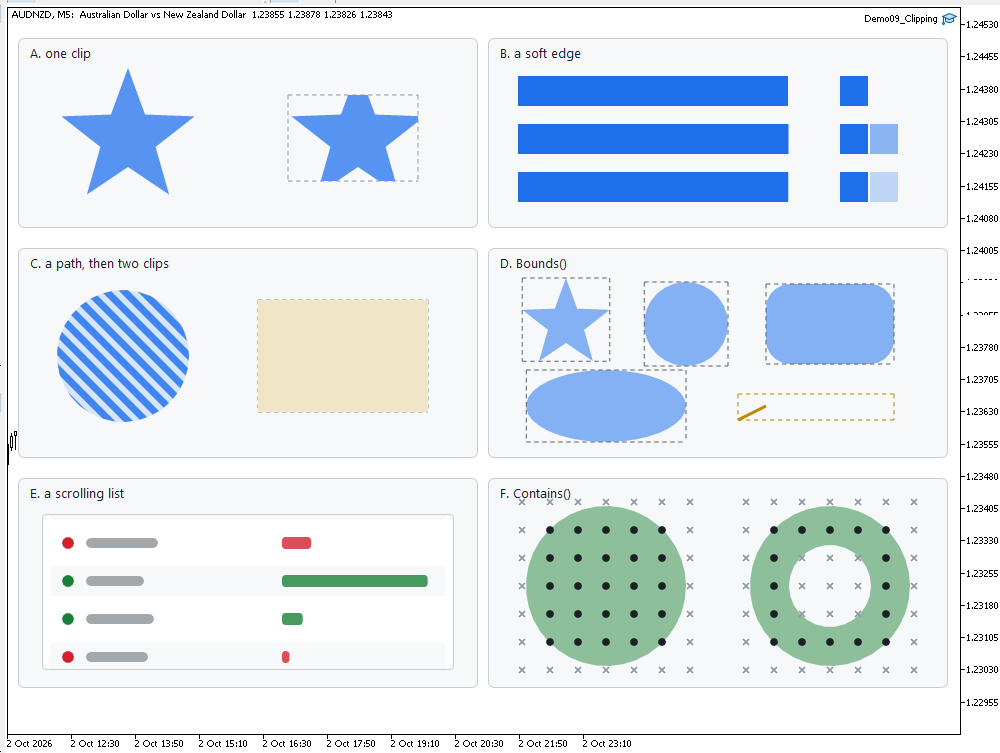
Panel A fills the same star twice. The two differ in one way: the clip was narrowed to the dashed rectangle before the second one. Panel B clips three bars at x.0, x.5 and x.25, and magnifies the three columns around each boundary by reading them back out of the surface — the middle column of the second bar is half strength, which is the analytic overlap and not a dither.
Panel C uses a circle and a rounded rectangle as windows onto a field of diagonal stripes. The stripes have no idea they are being cut. Panel D nests a circle inside a rectangle, then restores the saved copy and fills the rest of the rectangle in a paler tone, so both the lens and the region it was cut from are visible at once; the right-hand half applies the same two clips in the opposite order and arrives at the same region.
Panel E is the one the part exists for.
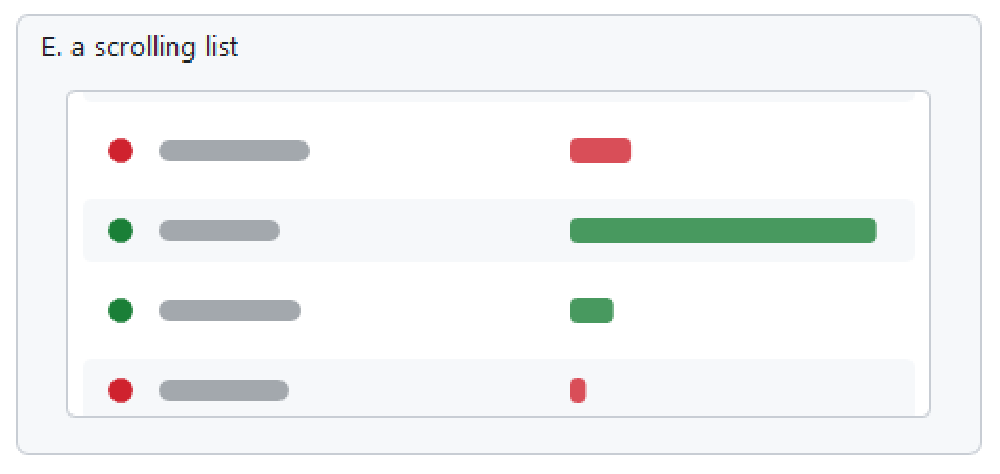
Every one of the eight rows is drawn, including the ones entirely above and below the viewport. Nothing in the loop tests whether a row is visible. The rows at the top and bottom edges end halfway through, with their rounded corners sliced cleanly, and the colored bars inside them stop at the same line. Change InpScroll and the whole list moves under the window.
Panel F draws each shape with the rectangle Bounds() returned around it. Panel G asks Contains() about a grid of points on a ring, under both fill rules, and marks each point with a dot or a cross. The markers in the hole change between the two halves, and they change in step with the fill — which is the only property a hit test really has to have.
The log line reports the frame time and the object count. The time comes from GetMicrosecondCount() around a single render on whatever machine runs the demo, with no repetition or averaging, so the line below is an example of the output rather than a benchmark:
Cairo5 Part 9: one frame in 41213 us, 980 x 880 pixels, 1 chart object
Project structure
Extract the archive so that MQL5/Include/CairoG2D/ and MQL5/Experts/CairoG2D/ land in your terminal's data folder, then compile Demo09_Clipping.mq5. No paths need editing.
MQL5/
├── Include/
│   └── CairoG2D/
│       ├── Color.mqh          // the ARGB color type and blending
│       ├── Config.mqh         // CairoAaSamples, CairoFlattenTolerance
│       ├── Clip.mqh           // the rectangle, the mask, the coverage
│       ├── Surface.mqh        // pixel buffer bound to one chart object
│       ├── Path.mqh           // the path and the edges, bounds, contains
│       ├── Paint.mqh          // the color source, solid and gradient
│       ├── Raster.mqh         // the coverage fill and the fill rule
│       └── DemoTheme.mqh      // the demos' shared palette - NOT library code
└── Experts/
    └── CairoG2D/
        └── Article 09/
            └── Demo09_Clipping.mq5    the runnable demo for this part
| # | File | Directory | Contents |
|---|---|---|---|
| 1 | Color.mqh | MQL5/Include/CairoG2D | the ARGB color type, constructors, interpolation |
| 2 | Config.mqh | MQL5/Include/CairoG2D | CairoAaSamples and CairoFlattenTolerance |
| 3 | Surface.mqh | MQL5/Include/CairoG2D | CCairoSurface - pixel buffer to chart bitmap |
| 4 | Path.mqh | MQL5/Include/CairoG2D | the path, the edges, the curves and the round shapes |
| 5 | Paint.mqh | MQL5/Include/CairoG2D | CCairoPaint, the two gradients, CCairoFillStyle |
| 6 | Clip.mqh | MQL5/Include/CairoG2D | CCairoClip - the rectangle, the mask, the coverage |
| 7 | Raster.mqh | MQL5/Include/CairoG2D | CCairoRasterizer - coverage, compositing, fill rule, paint |
| 8 | DemoTheme.mqh | MQL5/Include/CairoG2D | the shared light palette — not library code |
| 9 | Demo09_Clipping.mq5 | MQL5/Experts/CairoG2D/Article 09/ | seven panels: clips, nesting, a scrolling list, bounds, hit testing |
| 10 | Cairo-Style Library - Part 09.zip | archive containing all the attached files and their paths relative to the terminal's root folder. |
One file is new and two changed. Clip.mqh is written from scratch; Path.mqh gained a struct, two methods and a guard; Raster.mqh gained an include, a parameter on each overload, early exits and range narrowing in Fill, one line in its inner loop and the ClipToPath sweep.
Drawing learns where to stop
With clipping now implemented, the graphics engine can not only describe outlines and fill them with different paint sources, but also control where the resulting drawings are allowed to appear. This is an essential capability for building real graphical interfaces. Scrolling lists need to remain within their panels, individual components must own their drawing regions, and cards with rounded corners must prevent their contents from extending beyond those corners. Without clipping, these common interface behaviors would require additional workarounds outside the rendering engine.
The implementation is remarkably simple at its core: clipping is introduced as one additional multiplication in the compositing loop. The important decision, however, was how to represent the clipping boundary. A rectangular clip could be handled analytically, or by trimming scanline spans before they are accumulated. A stencil buffer would also be a reasonable solution. However, these approaches require additional mechanisms when dealing with non-rectangular boundaries, anti-aliased edges, or nested and soft clipping regions. By representing the clip as coverage, we reuse the same concept introduced in Part 4 for shape rendering. This allows rectangular, path-based, soft, and nested clipping to work through the same compositing mechanism, without introducing a separate rendering system for each case.
The two additional geometry operations introduced in this article are also important for the library. Bounds() calculates the bounding rectangle of a path, providing the information needed to determine the size of its mask and allocate the appropriate rendering area. Contains() reuses the rasterizer's winding calculations to determine whether a given point lies inside a path. This also provides a convenient foundation for mouse hit testing, with results consistent with the rasterizer wherever pixels are completely inside or outside the shape. Partially covered edge pixels represent a different question, since geometric containment and pixel coverage are not exactly the same operation.
In the next part, we will extend the library beyond device-pixel coordinates by introducing transformation matrices. So far, every coordinate has been expressed directly in pixels, meaning that drawing the same widget at different positions, scales, or rotations requires the caller to recalculate its geometry. A transformation matrix solves this problem by introducing an intermediate coordinate system between the values supplied by the caller and the pixels filled by the rasterizer. With this mechanism, shapes can be moved, scaled, and rotated without modifying their original geometry. It will also provide an important foundation for a unified drawing interface, where the current transformation and other drawing states can be managed in one place.
The project is supported on MQL5 Algo Forge. Each article in this series has its own release, containing exactly the source code presented and explained in that part. This allows readers to download the corresponding version of the library and follow the development step by step.
Part 9 is here: https://forge.mql5.io/SandroBegashvil/CairoG2D/releases/tag/part-09
Warning: All rights to these materials are reserved by MetaQuotes Ltd. Copying or reprinting of these materials in whole or in part is prohibited.
This article was written by a user of the site and reflects their personal views. MetaQuotes Ltd is not responsible for the accuracy of the information presented, nor for any consequences resulting from the use of the solutions, strategies or recommendations described.


